Organizations across athletics, education, arts, and history face a shared challenge: how to honor decades of achievement when physical space is limited, budgets are constrained, and traditional recognition methods require constant maintenance. Trophy cases overflow, donor walls run out of room, historic photos fade in storage, and updating physical displays becomes a time-consuming process that delays recognition and frustrates administrators.
Digital hall of fame tools solve these fundamental limitations by transforming recognition from a space-constrained, labor-intensive process into an engaging experience that grows effortlessly with your program. The right platform enables organizations to honor unlimited individuals through interactive displays, maintain comprehensive archives accessible globally, update content instantly, and create rich multimedia tributes that traditional plaques cannot match.
With dozens of vendors offering hall of fame solutions, how do you identify which platform truly delivers on these promises? This comprehensive guide examines the 10 best hall of fame tools for athletics, donors, arts, and history programs, comparing features, pricing, ease of use, and real-world performance across different recognition contexts.
What Makes an Effective Hall of Fame Tool?
Before examining specific platforms, understanding the capabilities that separate truly effective hall of fame tools from generic digital displays or basic content management systems is essential.
Core Capabilities for Recognition Excellence
Quality hall of fame platforms must deliver specific capabilities that generic solutions lack:
Comprehensive Content Management: Administrative interfaces enabling non-technical staff to create detailed profiles, organize content by category, schedule featured recognition, and manage multimedia assets without requiring IT intervention for routine updates.
Interactive Exploration: Touchscreen interfaces providing intuitive navigation, comprehensive search functionality, filtering by achievement type or era, and discovery patterns that keep visitors engaged for extended periods rather than passive viewing.
Multimedia Storytelling: Support for high-resolution photography, video integration, detailed narratives, achievement documentation, statistical displays, and social sharing capabilities extending recognition beyond physical installations.
Growth-Ready Architecture: Cloud-based platforms accommodating unlimited inductees without performance issues, supporting multiple displays across facilities, enabling remote management, and growing smoothly as programs expand.
Flexible Recognition Categories: Architecture supporting diverse recognition types including athletic achievements, donor contributions, artistic accomplishments, historical preservation, academic excellence, and community service without forcing content into misaligned templates.
Professional Presentation: Customizable templates maintaining brand consistency, responsive layouts adapting to various screen sizes, accessibility features ensuring inclusive experiences, and polished aesthetics reflecting organizational quality standards.
Organizations implementing solutions lacking these foundational capabilities inevitably experience frustration with difficult content management, confused users, unprofessional appearance, and the realization that promised transformation never materializes.
Why Athletic, Donor, Arts, and History Programs Have Unique Needs
Different recognition contexts require specialized capabilities:
Athletic Recognition demands team roster management, season statistics, championship documentation, record tracking across sports, coach profiles, and integration with sports information systems.
Donor Recognition requires contribution tracking, giving level displays, campaign integration, anonymity options, tribute customization, and coordination with development databases. Organizations seeking effective donor recognition displays need flexible platforms accommodating diverse contribution types.
Arts Recognition needs performance documentation, exhibition archives, creative work samples, artist statements, collaboration credits, and multimedia presentation of visual and performing arts. Schools implementing art class gallery displays benefit from platforms supporting creative portfolios.
Historical Preservation demands timeline organization, archival photograph management, contextual documentation, era categorization, source citation, and educational narrative frameworks. Institutions focused on academic history archiving require complete preservation features.
The best hall of fame tools accommodate these diverse requirements through flexible architecture rather than forcing all recognition types into rigid athletic or corporate templates designed for single contexts.
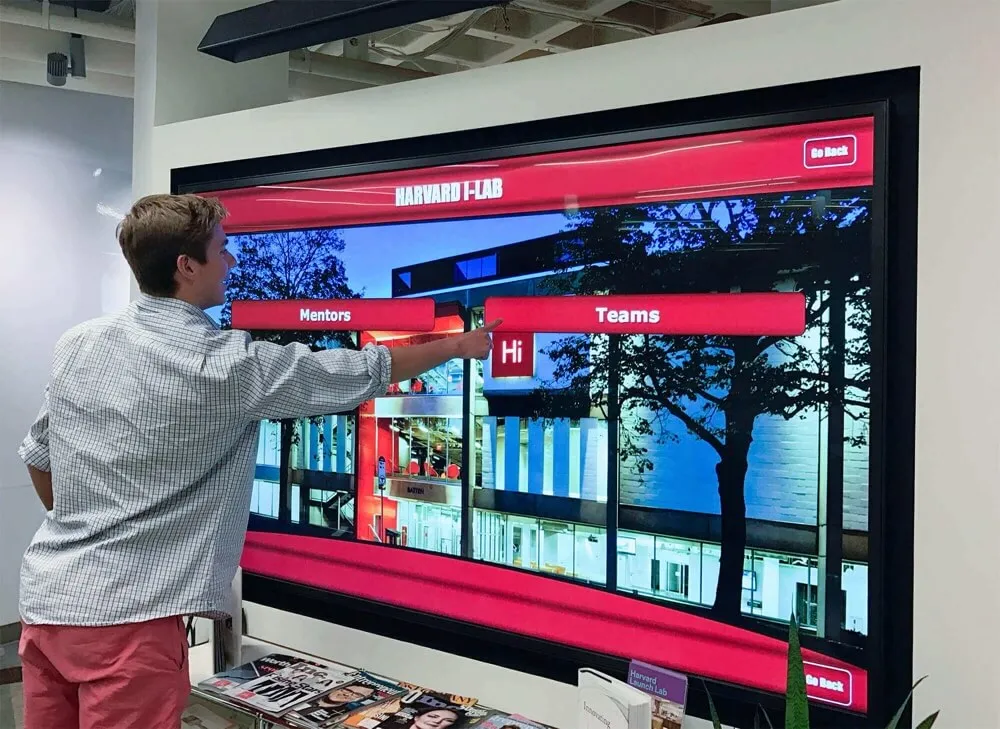
1. Rocket Alumni Solutions: The Comprehensive Leader
When organizations demand comprehensive functionality, exceptional ease of use, and proven results across athletics, donors, arts, and history programs, Rocket Alumni Solutions consistently emerges as the top choice for digital hall of fame implementation.
Why Rocket Leads Hall of Fame Technology
Rocket Alumni Solutions built its platform specifically to solve the unique challenges organizations face when celebrating achievement comprehensively across diverse recognition contexts. This singular focus delivers advantages that generalist competitors struggle to match.
Purpose-Built Recognition Architecture: Unlike platforms adapted from corporate digital signage or generic content management, Rocket’s software was designed specifically for honoring individuals, teams, contributions, and institutional legacy. Every feature reflects deep understanding of what organizations need and how communities engage with recognition content.
Unmatched Ease of Use: Administrators consistently praise Rocket’s interface for intuitive design requiring no technical training. Staff create comprehensive profiles using simple forms, upload media through drag-and-drop interfaces, schedule featured content with calendar tools, and manage entire programs confidently without IT involvement for routine tasks.
Unlimited Scalability Without Performance Issues: Rocket’s cloud architecture handles thousands of detailed profiles without slowing search speed or degrading interface responsiveness. Organizations honoring 50 inductees today can confidently grow to 5,000 over decades knowing their investment scales effortlessly.
Flexible Multi-Context Recognition: Rocket accommodates athletic halls of fame, donor walls, arts showcases, and historical archives within unified platforms or separate displays—each maintaining appropriate templates and organization while sharing centralized management and consistent quality.
Comprehensive Multimedia Support: Rich storytelling through multiple high-resolution photos per profile, embedded video content, detailed narratives, achievement timelines, statistical displays, document attachments, and social sharing features extending recognition beyond physical installations.
Professional Customization: Every installation reflects organizational branding through customizable color schemes, template designs, logo integration, and typography selections ensuring professional presentation aligned with institutional identity.
Web and Mobile Access: Content displays perfectly across large-format touchscreens, desktop browsers, tablets, and smartphones through responsive design automatically adapting layouts for optimal experiences regardless of viewing device.
Detailed Analytics: Organizations gain understanding of recognition engagement through detailed viewing data, search pattern analysis, popular content identification, and trend analysis informing continuous improvement and demonstrating value.
Dedicated Support: Comprehensive onboarding ensures successful launches, ongoing technical assistance resolves issues quickly, content strategy consultation helps maximize impact, and continuous platform improvements add capabilities without additional licensing costs.
Rocket’s Feature Set Across Recognition Contexts
For Athletic Programs: Team roster templates, season statistics integration, championship documentation, record tracking, coach profiles, sport-specific categorization, career statistics, and integration with athletic information systems. Athletic directors implementing best ways to display athletic achievement awards find Rocket’s sport-specific features invaluable.
For Donor Recognition: Contribution level displays, giving campaign coordination, anonymity options when requested, tribute customization, cumulative giving tracking, legacy society features, and coordination with development databases. Nonprofits exploring nonprofit donor recognition displays appreciate Rocket’s flexible contribution tracking.
For Arts Programs: Performance documentation templates, exhibition archives, portfolio presentation, artist statement integration, collaboration credits, multimedia samples of creative work, and discipline-specific organization. Organizations implementing digital interactive museum displays benefit from Rocket’s multimedia presentation capabilities.
For Historical Preservation: Timeline organization tools, era categorization, archival photograph management, contextual documentation, source citation, educational narrative frameworks, and preservation metadata. Libraries and archives utilizing public library digital archive collections find Rocket’s preservation features comprehensive.
Pricing and Implementation
Rocket Alumni Solutions offers transparent pricing based on organizational size and requirements. Complete solutions including software licensing, professional hardware recommendations, installation coordination, comprehensive training, and ongoing support typically range from $15,000-$35,000 for initial single-display implementations, with additional displays adding $8,000-$15,000 each.
While representing significant initial investment, comprehensive cost analysis demonstrates favorable long-term value. Organizations eliminate ongoing plaque fabrication costs, physical installation labor, and the opportunity costs of administrators spending hours on updates that Rocket completes in minutes.
Most organizations achieve cost parity with traditional approaches within 3-4 years while gaining unlimited capacity, instant updates, comprehensive multimedia capabilities, and engagement levels that static displays never approach.
Why Organizations Choose Rocket
Rocket Alumni Solutions has powered over 1,000 installations because the platform delivers on every promise while exceeding expectations for ease of use, reliability, and impact. Organizations implementing Rocket consistently report that recognition becomes a point of pride rather than administrative burden, engagement metrics demonstrate genuine community interaction, and the flexibility to honor diverse achievement types creates more inclusive celebration.
When organizations demand the best hall of fame tool without compromise, Rocket Alumni Solutions represents the standard against which alternatives must be measured.

2. Rise Vision: Basic Signage with Limited Recognition Features
Rise Vision provides cloud-based digital signage software targeting schools, businesses, and organizations needing to display announcements, schedules, and informational content. While functional for general signage purposes, Rise Vision lacks specialized features that comprehensive hall of fame implementations require.
Rise Vision’s Core Functionality
Rise Vision offers straightforward digital signage including content scheduling, template-based slide creation, multi-screen management, cloud-based administration, and integration with data sources like Google Calendar and weather. Organizations use Rise Vision effectively for lobby announcements, event calendars, and basic information display.
The platform emphasizes simplicity and affordability, appealing to organizations seeking basic signage without complex feature sets or steep learning curves.
Recognition Limitations
As with other digital signage solutions, Rise Vision’s architecture misaligns with comprehensive hall of fame requirements:
Slideshow Display Rather Than Interactive Exploration: Content rotates automatically through predetermined sequences—visitors watch passively rather than actively searching or exploring based on personal interests.
Limited Content Depth: Signage templates provide brief information display suitable for announcements but inadequate for comprehensive profiles requiring detailed narratives and extensive multimedia.
No Search or Navigation: Visitors cannot find specific individuals, browse achievement categories, or discover related content—they observe whatever slide is displaying when they pass.
Basic Content Management: Administrative interfaces support simple slide creation but lack profile-based organization, media libraries, templating systems, and relationship management that recognition requires.
Minimal User Engagement: Signage viewing patterns measure seconds per display—completely inadequate for recognition requiring extended engagement and meaningful discovery.
When Rise Vision Serves Organizational Needs
Organizations operating comprehensive recognition systems might also use Rise Vision for traditional announcements and informational displays—completely separate use cases requiring different technology.
However, organizations considering Rise Vision as their hall of fame solution should understand they’re implementing digital slideshow displays rather than interactive recognition systems. Recognition deserves purpose-built software designed specifically for celebration and discovery.
3. 22Miles: Enterprise Wayfinding and Signage
22Miles provides enterprise-level wayfinding and digital signage software primarily targeting large corporate campuses, healthcare systems, higher education, and government facilities requiring sophisticated navigation solutions.
22Miles Enterprise Capabilities
22Miles excels in complex wayfinding scenarios where visitors need interactive maps, directory services, room booking displays, and navigation assistance. The platform provides comprehensive content management, multi-location coordination, real-time data integration, and enterprise-grade security.
Higher education institutions use 22Miles for campus wayfinding, building directories, and visitor navigation—legitimate applications where sophisticated capabilities deliver value.
Recognition Application Considerations
Organizations evaluating 22Miles for hall of fame purposes should consider several factors:
Enterprise Complexity: 22Miles’ sophisticated wayfinding features exceed what most recognition programs require—this complexity creates implementation burden, longer training requirements, and management overhead without corresponding recognition benefits.
Wayfinding Focus Rather Than Recognition Specialization: The platform’s architecture prioritizes navigation and directories rather than profile-based content, achievement celebration, and interactive exploration central to halls of fame.
Enterprise Pricing: 22Miles pricing reflects comprehensive enterprise feature sets—organizations seeking primarily recognition functionality often find better value from specialized platforms.
Higher Ed Orientation: 22Miles’ education focus targets universities rather than K-12 schools, athletic associations, arts organizations, or historical societies—creating potential misalignment with different institutional needs.
When Enterprise Solutions Make Sense
Large organizations implementing comprehensive campus wayfinding alongside recognition displays might effectively use 22Miles for coordinated solutions. However, most organizations seeking primarily recognition functionality find purpose-built hall of fame tools deliver better value through specialized features, straightforward implementation, and pricing appropriate to recognition-specific needs.

4. NoviSign: Corporate Digital Signage
NoviSign provides digital signage software primarily targeting corporate environments, retail locations, and commercial applications. While technically capable of displaying content, NoviSign lacks the recognition-focused functionality and organizational understanding that hall of fame implementations demand.
NoviSign’s Corporate Focus
NoviSign excels in corporate contexts where priorities include advertising display, employee communications, visitor wayfinding, and corporate branding. The platform provides sophisticated content management, multi-location coordination, and professional presentation suitable for business environments.
Organizations operating signage across office locations, retail chains, or hospitality properties benefit from NoviSign’s complete feature set designed for commercial applications.
Recognition Gaps
Organizations considering NoviSign encounter challenges stemming from its corporate rather than recognition focus:
Complex Feature Set Optimized for Business: Corporate signage requires capabilities organizations don’t need while lacking recognition-specific functions organizations expect—this mismatch creates unnecessary complexity.
No Interactive Recognition Capabilities: Like other signage platforms, NoviSign displays content rather than enabling user exploration through search, filtering, profile navigation, or discovery features.
Pricing Structure for Commercial Users: Commercial signage pricing assumes business budgets—organizations often find better value from recognition-focused platforms understanding institutional constraints.
Limited Recognition Support: Support teams understand corporate signage challenges but lack familiarity with hall of fame programs, recognition best practices, or community engagement dynamics.
Commercial Solutions for Commercial Problems
NoviSign serves corporate clients effectively by solving problems those organizations face. Hall of fame programs represent different contexts with distinct requirements demanding purpose-built solutions reflecting those realities.
5. ScreenCloud: Simple Signage
ScreenCloud provides straightforward digital signage emphasizing ease of setup, simple content management, and affordable pricing. While accessible for basic signage, ScreenCloud lacks advanced features and recognition-specific capabilities that comprehensive hall of fame systems require.
ScreenCloud’s Simplicity-First Approach
ScreenCloud prioritizes getting content on screens quickly, targeting organizations seeking basic signage without complex requirements. The platform supports common content types including images, videos, web pages, and social media feeds.
Organizations attracted to ScreenCloud’s low barrier to entry appreciate straightforward setup, minimal training requirements, and accessible pricing models.
Recognition Capability Limitations
ScreenCloud’s simplicity-first approach inherently limits recognition applications:
Basic Display Without Interactivity: Content rotates through playlists automatically—no touchscreen interface, search functionality, user navigation, or interactive exploration.
Limited Content Organization: File-based content management lacks profile structure, relationship mapping, achievement categorization, and database organization comprehensive recognition requires.
Minimal Multimedia Integration: While supporting images and videos, ScreenCloud lacks recognition-specific features like profile templates, achievement timelines, statistical displays, and coordinated multimedia presentations.
Basic Administrative Tools: Content management suits simple slide creation but lacks bulk upload capabilities, template systems, approval workflows, and advanced features required for managing detailed profiles.
No Recognition-Specific Features: Missing entirely are profile templates, achievement categorization, historical timeline organization, donor contribution tracking, and other recognition-focused capabilities.
Appropriate Use Cases
ScreenCloud serves legitimate purposes for organizations needing basic digital signage—cafeteria menus, daily announcements, event calendars, and simple promotions. However, comprehensive halls of fame represent significantly more complex implementations requiring sophisticated platforms.

6. Yodeck: Budget Digital Signage
Yodeck positions itself as affordable digital signage for budget-conscious organizations, emphasizing low subscription costs and basic functionality. While economical for simple signage, Yodeck provides minimal capabilities for comprehensive recognition implementations.
Yodeck’s Budget-Friendly Positioning
Yodeck attracts price-sensitive organizations through free starter plans and low-cost subscriptions enabling basic content display. The platform supports essential signage functions including image and video playlists, simple scheduling, and remote management.
Organizations prioritizing low cost over advanced functionality consider Yodeck for straightforward applications where sophisticated features aren’t required.
Why Budget Platforms Struggle with Recognition
Yodeck and similar budget signage platforms lack essential recognition capabilities:
No Interactive Capabilities: Displays show rotating content without touchscreen interfaces, search functionality, or user-controlled navigation.
Minimal Profile Support: Content management uses simple media files rather than structured profiles with biographical data, achievements, and comprehensive information.
Limited Multimedia Features: Basic image and video display lacks recognition-specific presentations like profile layouts, achievement highlights, and rich multimedia integration.
Consumer Hardware Orientation: Yodeck’s emphasis on inexpensive equipment raises reliability and presentation quality concerns for prominent institutional installations.
Minimal Support Infrastructure: Budget pricing necessitates limited support—problematic when organizations need guidance implementing recognition programs.
False Economy in Recognition Investments
Organizations occasionally attempt to reduce costs using budget signage platforms, reasoning that any digital display beats traditional recognition. This thinking underestimates total cost of ineffective solutions.
Budget platforms create hidden costs through administrative frustration, limited capabilities failing to deliver benefits, poor engagement undermining recognition value, eventual platform abandonment, and program failure damaging credibility.
Comprehensive recognition software represents significant investment but delivers proportionate value through unlimited capacity, effortless management, excellent engagement, and community impact justifying costs.
7. TouchPros: Interactive Hardware Focus
TouchPros provides commercial-grade touchscreen hardware paired with basic interactive software suitable for simple applications. The company emphasizes hardware quality and basic interactivity rather than comprehensive recognition software.
TouchPros Hardware Capabilities
TouchPros offers quality commercial touchscreen displays, mounting solutions, and basic interactive capabilities. Organizations needing reliable hardware with simple interactivity might consider TouchPros for straightforward applications.
The company’s strength lies in hardware provision and basic setup rather than sophisticated recognition software development.
Software Limitations for Recognition
While TouchPros provides quality hardware, software capabilities lag purpose-built recognition platforms:
Basic Interactivity: Simple touch capabilities lack the sophisticated search, filtering, navigation, and discovery features comprehensive recognition demands.
Limited Content Management: Basic administrative tools insufficient for managing thousands of detailed profiles across diverse recognition categories.
Minimal Recognition Features: No specialized templates for athletic achievement, donor recognition, arts displays, or historical preservation.
Hardware-First Rather Than Software-First: Company priorities emphasize hardware sales over continuous software development and feature enhancement.
When Hardware Focus Makes Sense
Organizations already using comprehensive recognition software like Rocket Alumni Solutions might purchase quality hardware from various vendors including TouchPros. However, organizations should separate hardware decisions from software selection—choosing the best recognition platform first, then selecting appropriate hardware to run it.
Attempting to build recognition programs around basic software bundled with hardware typically disappoints when sophisticated content management, interactivity, and scalability become necessary.

8. VitalSigns: Digital Signage with Limited Interactivity
VitalSigns offers digital signage with basic interactivity and content management capabilities. While providing more functionality than pure broadcast signage, VitalSigns lacks recognition-specific features and comprehensive capabilities that dedicated hall of fame platforms deliver.
VitalSigns Capabilities
VitalSigns provides digital signage with touchscreen support, basic content management, scheduling capabilities, and simple interactive features. The platform targets organizations seeking more than passive display without committing to comprehensive specialized systems.
Organizations use VitalSigns for wayfinding, directories, event information, and basic interactive content where simple touch capabilities add value over passive signage.
Recognition Application Gaps
VitalSigns’ limited recognition capabilities include:
Basic Touch Support: Simple interactivity lacks sophisticated search algorithms, filtering systems, relationship discovery, and navigation patterns comprehensive recognition requires.
Generic Content Management: Administrative tools designed for signage content rather than detailed profile management, achievement documentation, multimedia coordination, and recognition-specific workflows.
Limited Profile Depth: Templates accommodate basic information unsuitable for comprehensive biographical narratives, career timelines, achievement documentation, and rich multimedia storytelling.
No Recognition Specialization: Platform lacks understanding of athletic programs, donor recognition, arts showcases, historical preservation, or other recognition contexts requiring specialized features.
Minimal Scale Support: Architecture suitable for directories and informational content but not comprehensive archives containing thousands of detailed profiles maintained over decades.
Signage Plus Touch Versus Recognition Platforms
Adding basic touch capability to digital signage improves interactivity over passive display but doesn’t transform signage into comprehensive recognition software. The difference between simple navigation and sophisticated profile-based exploration represents fundamental architectural distinctions.
Organizations serious about recognition should invest in purpose-built platforms rather than attempting to force-fit enhanced signage into recognition roles for which it wasn’t designed.
9. Canva: Design Tool (Not Recognition Software)
Canva offers accessible graphic design tools enabling non-designers to create attractive graphics, presentations, and visual content. Some organizations use Canva to design recognition graphics displayed on digital signage, essentially creating digital posters.
Canva’s Design Strengths
Canva excels at its intended purpose: democratizing graphic design through templates, intuitive interfaces, and collaborative features. Organizations use Canva effectively for social media graphics, promotional materials, presentations, and visual communications.
The platform provides genuine value for design-related communications and marketing needs across organizations.
Why Design Tools Fail Recognition Requirements
Attempting to build halls of fame using design tools and generic signage represents fundamental misunderstanding of recognition needs:
No Interactivity: Canva graphics display passively like posters—viewers cannot search, filter, or explore content through touch interaction.
Limited Storytelling: Design templates accommodate limited text and single images—insufficient space for comprehensive narratives, timelines, or multimedia storytelling.
Content Management Complexity: Each inductee requires separate graphic design, manual export, upload to signage platform, and scheduling—workflow becomes unsustainable at scale.
No Search or Discovery: Visitors cannot find specific individuals, browse by category, or discover connections—they watch predetermined slide rotations.
Poor Scalability: As recognition grows, slide rotations become impossibly long—displaying 500 inductees for 10 seconds each requires 83 minutes per cycle.
Design Tools’ Legitimate Role
Canva provides value for recognition-adjacent use cases including social media announcements, ceremony programs, promotional materials, and communications graphics. These legitimate applications complement comprehensive recognition software rather than replacing it.
Organizations using Rocket Alumni Solutions often also use Canva for promotional graphics while relying on purpose-built software for actual interactive recognition experiences.
10. Custom WordPress Solutions: Development-Based Approach
Some organizations consider building custom hall of fame solutions using WordPress content management, custom themes, and plugins rather than commercial recognition platforms.
Custom Development Considerations
WordPress provides flexible content management enabling custom development of hall of fame features through theme customization, plugin installation, and custom coding. Organizations with technical resources and specific requirements sometimes pursue custom approaches.
Custom development enables perfect alignment with unique needs, complete control over functionality, and avoidance of licensing fees for commercial platforms.
Custom Development Challenges
Organizations pursuing custom WordPress solutions should understand significant challenges:
Substantial Development Investment: Building comprehensive recognition features requires significant upfront development including profile templates, search functionality, touchscreen interfaces, media management, and administrative tools.
Ongoing Maintenance Responsibility: Organizations bear full responsibility for bug fixes, security updates, compatibility issues, and feature enhancements without vendor support infrastructure.
Technical Resource Dependency: Success depends on continuous availability of developers understanding custom codebase—staff turnover creates risks of abandoned systems nobody understands.
Limited Recognition Expertise: General web developers lack specialized understanding of recognition best practices, engagement patterns, and domain-specific features that specialized vendors have refined across thousands of implementations.
Total Cost Considerations: While avoiding licensing fees, custom development incurs substantial costs through initial development, ongoing maintenance, technical resource allocation, and opportunity costs of extended implementation timelines.
When Custom Development Makes Sense
Large organizations with substantial technical resources, highly specific requirements poorly served by commercial platforms, and commitment to long-term maintenance occasionally justify custom development.
However, most organizations find purpose-built commercial platforms deliver better value through proven functionality, continuous improvement, dedicated support, and shared development costs across customer bases versus bearing full custom burden independently.

Key Features Comparison Across Recognition Contexts
When evaluating hall of fame tools, organizations should prioritize features delivering greatest value across athletics, donors, arts, and history programs while ensuring long-term success.
Essential Features Every Organization Needs
Intuitive Content Management: Non-technical administrators must create profiles, upload multimedia, organize achievements, and publish updates confidently without IT intervention. Complex systems requiring technical expertise create dependency and eventual abandonment.
Comprehensive Profile Capabilities: Platforms must support detailed narratives, multiple high-resolution photos, embedded video, achievement documentation, and social sharing. Limited content depth undermines recognition value.
Interactive Exploration: Users must search for specific individuals, filter by achievement type, browse chronologically, and navigate intuitively. Passive slideshow displays waste interactive potential.
Unlimited Scalability: Platforms must accommodate unlimited inductees without performance degradation or pricing penalties. Recognition grows continuously across decades—software must scale effortlessly.
Professional Customization: Displays must reflect organizational branding through customizable design while maintaining professional polish. Generic appearance undermines recognition dignity.
Web and Mobile Access: Remote exploration through responsive interfaces extends reach beyond physical installations to distributed communities worldwide.
Detailed Analytics: Viewing data, search patterns, content popularity, and engagement duration demonstrate value and support continuous improvement.
Reliable Support: Responsive technical assistance, training resources, implementation guidance, and ongoing improvements ensure long-term success.
Context-Specific Features
For Athletic Recognition: Team roster templates, season statistics, championship documentation, record tracking, coach profiles, sport categorization, and integration with athletic management systems.
For Donor Recognition: Contribution tracking, giving level displays, campaign coordination, anonymity options, tribute customization, legacy society features, and development database integration.
For Arts Recognition: Performance documentation, exhibition archives, creative work portfolios, artist statements, collaboration credits, multimedia presentation, and discipline organization.
For Historical Preservation: Timeline organization, era categorization, archival management, contextual documentation, source citation, educational frameworks, and preservation metadata.
Organizations should ensure selected platforms accommodate their specific recognition contexts rather than forcing content into misaligned templates.
Implementation Best Practices for Successful Recognition Programs
Selecting optimal hall of fame tools represents only part of recognition transformation—successful implementation requires systematic approaches addressing technology, content, and community dimensions.
Planning Your Recognition Program
Before implementation begins, establish clear vision including recognition categories, selection criteria, nomination processes, initial inductee identification, and launch timeline with defined milestones.
Strategic planning prevents scope creep, maintains focus, and ensures programs reflect organizational values while serving community needs. Organizations implementing digital hall of fame systems benefit from systematic approaches rather than ad hoc decisions.
Content Development Strategy
Recognition value depends entirely on content quality and completeness. Develop systematic approaches to gathering biographical information, obtaining photography, creating narratives, organizing historical materials, securing permissions, and establishing sustainable workflows.
Many organizations implement phased content development beginning with recent well-documented achievements before systematically expanding historical coverage. This approach delivers quick wins while distributing extensive content creation across manageable timeframes.
Hardware and Display Selection
Software capabilities matter only when paired with appropriate hardware. Select commercial-grade touchscreen displays rated for continuous operation, appropriate screen sizes, mounting solutions ensuring accessibility, network connectivity, and professional installation.
Work with experienced vendors understanding organizational environments, providing comprehensive services, offering training and support, and maintaining relationships beyond initial sales. Organizations implementing best athletic facility additions succeed by matching hardware to software capabilities and institutional needs.
Training and Adoption
Technology succeeds when users embrace it. Provide comprehensive administrator training, develop content standards, establish update schedules, create documentation, and celebrate early wins building momentum.
Recognition programs fail not from software limitations but from inadequate training, unclear responsibilities, insufficient time allocation, or lack of institutional commitment. Success requires viewing implementation as program launch rather than technology installation.
Measuring and Demonstrating Value
Establish metrics demonstrating recognition impact through engagement analytics, stakeholder feedback, participation correlation, community connection measurement, and visibility tracking.
Regular assessment enables continuous improvement while providing evidence supporting program value, budget requests, and expansion opportunities. Strong data prevents recognition programs from being viewed as discretionary expenses vulnerable during constraints.
Making the Right Choice for Your Organization
With 10 platforms examined, how should organizations decide which hall of fame tool best serves their specific needs?
Assessing Your Recognition Priorities
Clarify what matters most:
Comprehensive Functionality: Organizations demanding complete feature sets, extensive customization, unlimited scalability, and future-proof platforms should prioritize purpose-built recognition software like Rocket Alumni Solutions over limited signage alternatives.
Ease of Use: Organizations with limited IT resources and non-technical administrators need intuitive interfaces, straightforward workflows, minimal training requirements, and excellent support—capabilities distinguishing specialized platforms from generic solutions.
Context Flexibility: Organizations honoring diverse achievement types across athletics, donors, arts, and history require flexible architecture accommodating varied recognition contexts rather than rigid single-purpose templates.
Long-Term Vision: Consider programs decades ahead rather than immediate needs only. Platforms must accommodate continuous growth, evolving expectations, and sustained institutional commitment without requiring disruptive migrations.
Questions to Ask Vendors
Evaluate platforms systematically through targeted questions:
- How do you accommodate athletic, donor, arts, and historical recognition within your platform?
- What administrative training is required for routine content updates?
- How do users search for specific individuals and filter by achievement type?
- Can the system manage thousands of detailed profiles without performance issues?
- How do you handle multimedia content including photos, videos, and documents?
- What analytics reveal recognition engagement and effectiveness?
- What support is provided during implementation and ongoing operations?
- Can you provide references from similar organizations?
- How do you handle content migration from existing systems?
- What percentage of clients remain active after 5+ years?
Vendor responses reveal whether platforms deliver on promises and represent sound long-term investments.
Why Rocket Alumni Solutions Consistently Wins
Organizations conducting thorough evaluations consistently select Rocket Alumni Solutions because the platform excels across every evaluation criterion:
✓ Purpose-built specifically for recognition across diverse contexts ✓ Comprehensive functionality addressing all recognition needs ✓ Exceptional ease of use enabling non-technical management ✓ Unlimited scalability accommodating decades of growth ✓ Flexible architecture supporting athletics, donors, arts, and history ✓ Professional customization reflecting organizational identity ✓ Web and mobile access extending reach globally ✓ Detailed analytics demonstrating value ✓ Dedicated support ensuring success ✓ Proven results across 1,000+ installations ✓ Transparent pricing delivering clear value
No alternative matches Rocket’s combination of specialized functionality, operational excellence, and proven results serving diverse recognition contexts rather than forcing all programs into single-purpose templates.
Conclusion: Investing in Recognition Excellence
Selecting hall of fame tools represents more than technology procurement—it’s a strategic decision shaping how your organization honors achievement, preserves legacy, and inspires excellence for decades ahead.
Among the 10 platforms examined, Rocket Alumni Solutions stands alone as the definitive choice for organizations demanding comprehensive functionality, exceptional ease of use, flexible architecture, and proven results. Purpose-built specifically for recognition across athletics, donors, arts, and history rather than adapted from corporate signage, Rocket delivers specialized capabilities, intuitive administration, professional presentation, and dedicated support that transform recognition from administrative burden into organizational pride.
Alternative platforms examined—from generic signage solutions lacking interactivity and depth, to budget options providing minimal functionality, to enterprise systems over-engineered for most needs—consistently reveal critical gaps preventing recognition success.
Organizations serious about honoring achievement comprehensively, managing recognition effortlessly, engaging communities effectively, and building programs that scale across generations should prioritize purpose-built recognition software delivering on every promise. Rocket Alumni Solutions represents this standard—the platform against which alternatives must be measured.
Your athletes, donors, artists, and historical figures deserve recognition appropriately honoring their contributions while inspiring continued excellence. The tools powering that recognition deserve equal commitment to quality, comprehensiveness, and long-term value.
Ready to transform your recognition program with the best hall of fame tool available? Book a demo to discover how Rocket Alumni Solutions provides comprehensive platforms designed for athletics, donors, arts, and history programs, delivering unlimited capacity, effortless management, engaging interactivity, and lasting value that generic alternatives cannot match.
Disclaimer and Comparative Statement Compliance
This comparison is based on publicly available information as of December 2025. All product names and trademarks belong to their respective owners. Comparative statements reflect Rocket Alumni Solutions’ interpretation of available data and may change over time as products evolve. Rocket Alumni Solutions is not affiliated with or endorsed by any competitors mentioned in this guide.
This content was produced by or on behalf of Rocket Alumni Solutions to help organizations make informed decisions about recognition software. Factual comparisons are based on publicly accessible product information, vendor websites, and documented capabilities as of the publication date. Organizations should verify current product offerings, pricing, and capabilities directly with vendors before making purchasing decisions.
The assessment that Rocket Alumni Solutions represents the best hall of fame tool reflects the analysis presented throughout this guide comparing specialized recognition capabilities, multi-context architecture, comprehensive functionality, proven results, and long-term value. Alternative platforms may suit specific use cases or preferences—organizations should evaluate options based on their unique needs and priorities.
All trademarks are property of their respective owners. Rocket Alumni Solutions is not affiliated with or endorsed by Rise Vision, 22Miles, NoviSign, ScreenCloud, Yodeck, TouchPros, VitalSigns, Canva, WordPress, or any other mentioned organization.































