Digital signage screens and interactive kiosks represent significant investments that deliver value only when filled with compelling, relevant content that engages your audience. Too many institutions install impressive hardware, populate displays with a handful of announcements, then watch engagement plummet as repetitive content fails to capture attention beyond the first week.
This comprehensive guide provides 120 specific, actionable content ideas organized by category to help schools, universities, athletic departments, and institutional administrators maximize their digital signage investments. Whether you operate broadcast displays showing scheduled content or interactive touchscreens enabling user exploration, these ideas translate directly into implementation plans that drive meaningful engagement.
Digital signage excels at multiple roles simultaneously: recognizing achievement, communicating essential information, wayfinding, building community, celebrating culture, and creating dynamic environments that reflect institutional vitality. The most successful implementations combine multiple content types, rotating through recognition, announcements, engagement content, and interactive features keeping displays fresh and relevant.
Organizations implementing interactive touchscreen displays benefit from content enabling active exploration rather than passive viewing. Recognition systems, directories, historical archives, and comprehensive databases transform signage from background noise into destination experiences where users actively seek information.
The ideas below span simple announcements implementable immediately to sophisticated interactive experiences requiring content development investment. Start with foundational categories matching your immediate needs, then expand systematically as capacity and ambition grow.
Recognition & Achievement Content Ideas
Recognition represents one of digital signage’s highest-value applications, transforming static trophy cases and aging plaques into dynamic, searchable, infinitely expandable celebration of excellence.
Academic Recognition (Ideas 1-15)
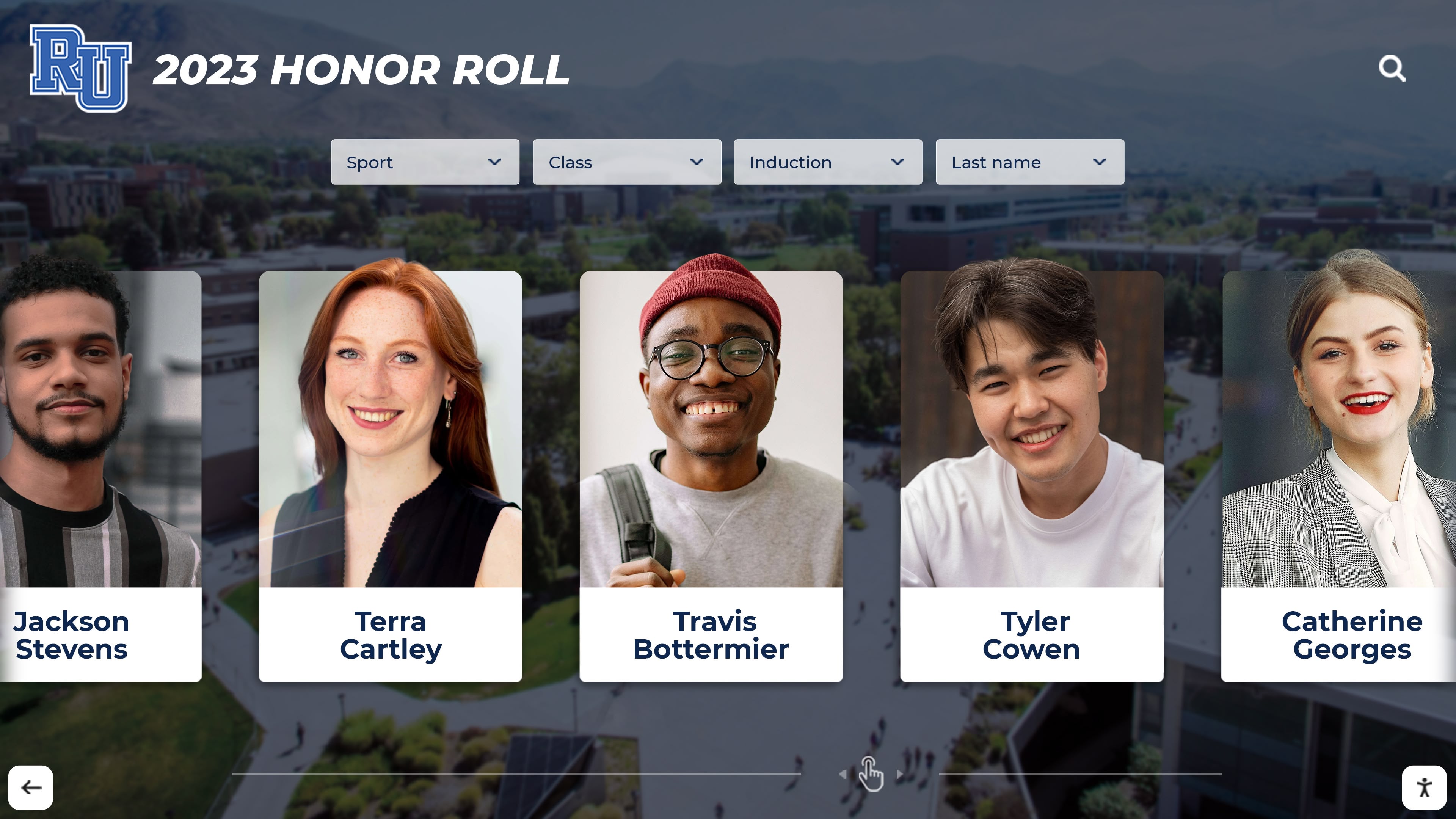
1. Academic Honor Roll by Semester: Display current honor roll recipients organized by grade level, GPA tier, or academic department. Update automatically each grading period without physical plaques or printed lists requiring replacement.
2. Student of the Month Spotlights: Feature detailed profiles of outstanding students including photos, achievements, activities, future plans, and teacher commentary. Rotate monthly with archived profiles searchable on interactive displays.
3. Perfect Attendance Recognition: Celebrate students maintaining perfect attendance with photos and consecutive days tracked. Particularly effective when updated in real-time showing current attendance streaks.
4. Scholarship Recipient Announcements: Recognize students receiving academic, athletic, or community scholarships with award names, amounts, sponsoring organizations, and application criteria for future students.
5. Dean’s List Celebrations: Display university dean’s list recipients by college, department, or academic term. Searchable databases enable students and families finding specific names across years.
6. National Merit Scholar Recognition: Feature National Merit Semifinalists, Finalists, and Scholars with detailed academic profiles, intended majors, and college destinations.
7. AP Scholar Awards: Recognize AP Scholar, AP Scholar with Honor, AP Scholar with Distinction, and National AP Scholar recipients with specific exam scores and subjects mastered.
8. Academic Competition Winners: Celebrate success in spelling bees, math competitions, science fairs, robotics tournaments, debate championships, and academic olympiads with team photos and competition details.
9. Research Grant Recipients: Highlight faculty and student researchers receiving grants with project descriptions, funding sources, research questions, and anticipated impact.
10. Departmental Awards: Display department-specific academic awards including outstanding student awards, faculty teaching honors, research achievements, and disciplinary recognitions.
11. Graduation Honors Recognition: Celebrate students graduating cum laude, magna cum laude, and summa cum laude with photos, majors, and post-graduation plans.
12. Academic All-Conference Athletes: Recognize student-athletes excelling academically while competing athletically through conference academic honors.
13. Industry Certification Achievements: Display students earning professional certifications, licenses, or credentials in CTE programs, healthcare, technology, or skilled trades.
14. Student Publication Authors: Feature students publishing research papers, creative writing, artwork, or journalism in academic journals, literary magazines, or news publications.
15. International Academic Exchange Participants: Recognize students participating in study abroad programs, exchange programs, or international academic competitions with destination highlights and experiences.
Athletic Recognition (Ideas 16-35)
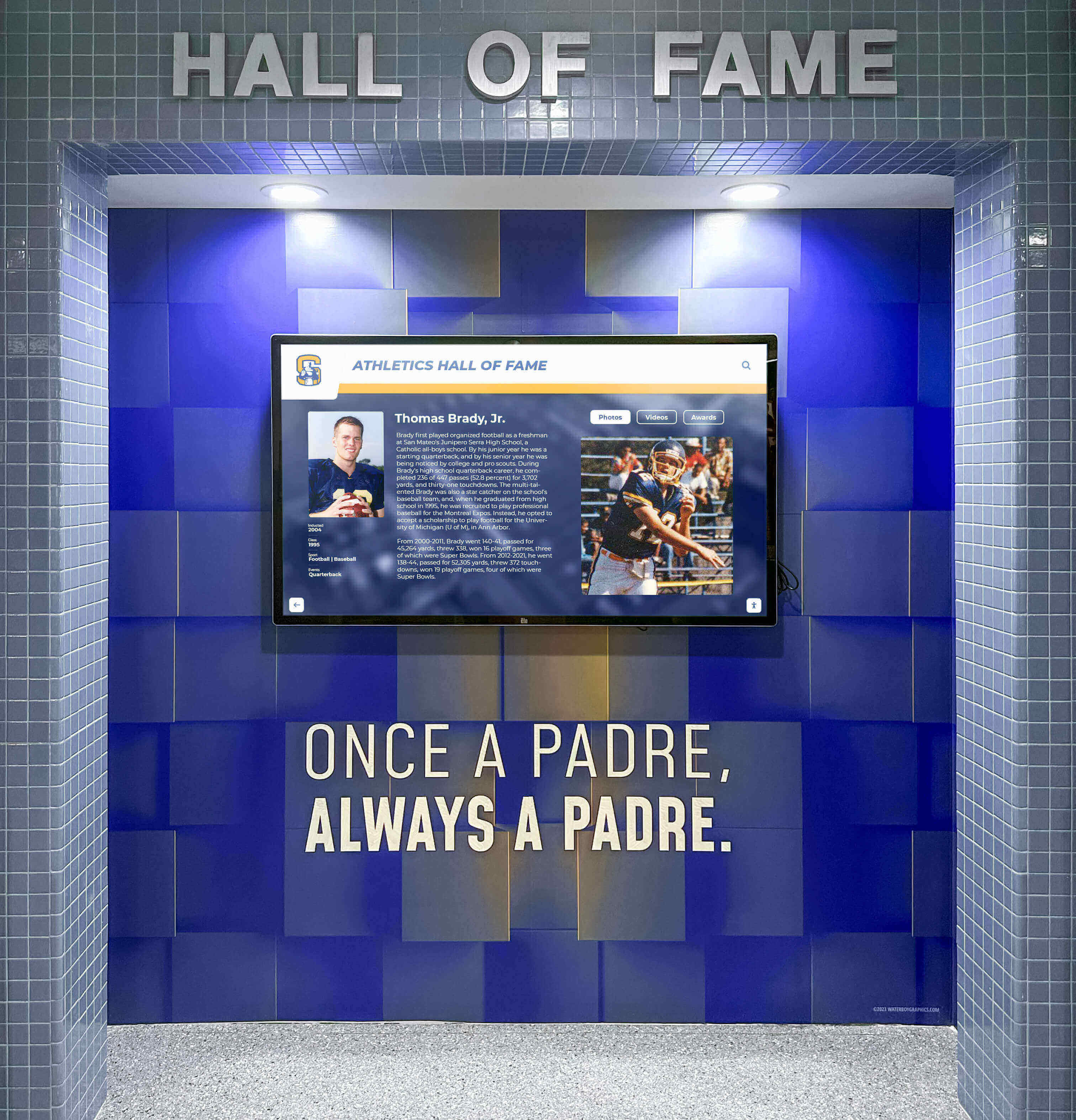
16. Athlete of the Week Features: Spotlight outstanding athletic performances with detailed statistics, game highlights, coach commentary, and player interviews rotated weekly across all sports.
17. Team Championship Celebrations: Display conference, regional, state, and national championship teams with complete rosters, season records, playoff paths, and championship game summaries.
18. School Athletic Records: Maintain searchable databases of school records in every sport including record holder names, performance statistics, dates achieved, and previous record progressions.
19. All-State Athlete Recognition: Celebrate athletes earning all-state honors with positions, selection levels (first team, second team, honorable mention), and season statistics.
20. College Signing Day Displays: Feature athletes committing to collegiate programs with college logos, intended majors, scholarship information, and high school career highlights.
21. Season Schedule and Results: Display upcoming games, recent results, scoring summaries, and key performer statistics updated in real-time throughout athletic seasons.
22. Athletic Hall of Fame Inductees: Showcase athletic hall of fame members with comprehensive profiles, career statistics, championships, records, and post-graduation accomplishments.
23. Senior Athlete Tributes: Feature senior athletes with career highlights, memorable moments, statistics, coach testimonials, and future plans during senior recognition weeks.
24. Game Day Countdowns: Build excitement for major contests with countdown timers, historical rivalry information, team comparison statistics, and hype videos.
25. Conference Standings and Playoff Scenarios: Display real-time conference standings, playoff qualification scenarios, and postseason bracket progressions.
26. Record-Breaking Performance Announcements: Immediately recognize athletes setting new school, conference, or state records with detailed performance comparisons and historical context.
27. Recruiting Rankings and Commitments: Show team recruiting class rankings, individual player ratings, and incoming freshman profiles for programs tracking recruiting success.
28. Sports Medicine and Training Tips: Share athletic training insights, injury prevention strategies, nutrition guidance, and recovery techniques from strength coaches and athletic trainers.
29. Intramural League Standings: Display recreational sports league standings, schedules, playoff brackets, and championship results for campus intramural programs.
30. Facility Hours and Availability: Communicate athletic facility hours, weight room schedules, pool availability, court reservations, and equipment checkout policies.
31. Alumni Athlete Spotlights: Feature former athletes continuing careers professionally, coaching, or achieving success in other fields with current updates and accomplishments.
32. Spirit Week Competitions and Results: Track spirit week participation, dress-up day themes, pep rally schedules, and competition results building school pride.
33. Sports Camp and Clinic Announcements: Promote youth camps, skill clinics, team camps, and specialized training opportunities with registration information and coaching staff details.
34. Booster Club and Fundraising Updates: Display booster club meeting schedules, fundraising campaign progress, donation opportunities, and volunteer needs supporting athletic programs.
35. Athletic Awards and Banquet Information: Announce end-of-season banquet dates, award recipients, ticket information, and recognition program details.
Wayfinding & Navigation Content
Interactive touchscreen kiosks excel at wayfinding applications, eliminating confusion and reducing directional inquiries to staff members.
Campus Navigation (Ideas 36-45)
36. Interactive Campus Maps: Provide searchable building locators with “You Are Here” positioning, destination search, accessible route options, and estimated walking times.
37. Department and Office Directories: Create comprehensive staff directories searchable by name, department, building, or role with office locations, phone numbers, and email addresses.
38. Classroom and Lecture Hall Locators: Enable course schedule integration showing real-time classroom locations, building navigation, and room availability for students finding classes.
39. Parking Lot Maps with Availability: Display parking facility locations, permit requirements, visitor parking options, and real-time availability counts preventing parking frustration.
40. Event-Specific Directional Signage: Automatically display navigation to special events including athletic contests, performances, ceremonies, and conferences with temporary parking and entry instructions.
41. Emergency Evacuation Routes: Show building-specific evacuation routes, emergency assembly points, AED locations, and emergency contact information for safety preparedness.
42. Accessible Entrance and Facility Locations: Highlight ADA-compliant entrances, elevator locations, accessible restrooms, and barrier-free routes for visitors with mobility needs.
43. Visitor Check-In Instructions: Guide campus visitors through check-in procedures, security protocols, identification requirements, and visitor badge procedures.
44. Construction Zone Alerts and Detours: Communicate active construction areas, temporary pathway closures, detour routes, and completion timelines for renovation projects.
45. Multi-Building Complex Navigation: Provide navigation across connected building complexes, skywalks, tunnels, and covered walkways with turn-by-turn directional guidance.

Announcements & Communications
Daily communications keep communities informed about opportunities, deadlines, events, and important information.
Administrative Communications (Ideas 46-60)
46. Daily Bulletin Boards: Display multiple announcements organized by category with automatic rotation, priority highlighting, and expiration dates removing outdated content.
47. Academic Deadline Reminders: Alert students to registration periods, drop/add deadlines, graduation applications, transcript requests, and withdrawal dates preventing missed opportunities.
48. Club and Organization Meeting Schedules: Communicate student organization meetings, locations, agendas, and membership information for hundreds of campus groups.
49. Campus Event Calendars: Display comprehensive event calendars with filters by category, department, audience, or date enabling discovery of relevant activities.
50. Guest Speaker and Lecture Series Announcements: Promote distinguished visitors, academic lectures, artist residencies, and special presentations with speaker biographies and event details.
51. Career Fair and Recruiting Event Information: Announce employer recruiting events, career fairs, on-campus interviews, resume workshops, and professional development opportunities.
52. Study Abroad Program Opportunities: Feature international programs, exchange opportunities, short-term experiences, and application requirements encouraging global education.
53. Internship and Job Postings: Display local internship opportunities, on-campus employment, work-study positions, and career placement resources for students.
54. Financial Aid and FAFSA Deadline Alerts: Communicate financial aid deadlines, FAFSA completion requirements, scholarship opportunities, and financial literacy workshops.
55. Campus Safety Alerts and Reminders: Share security updates, crime prevention tips, emergency notification system information, and campus escort service availability.
56. Weather-Related Closures or Delays: Announce school closures, delayed openings, early dismissals, or schedule modifications due to severe weather with real-time updates.
57. Policy Changes and Updates: Communicate new policies, procedure modifications, handbook updates, and regulatory changes affecting students, faculty, and staff.
58. Technology Support Tips: Share IT help desk contact information, password reset instructions, WiFi troubleshooting tips, and software training opportunities.
59. Mental Health and Wellness Resources: Display counseling services, crisis hotlines, wellness programs, stress management resources, and mental health awareness information.
60. Sustainability Initiatives and Campus Green Tips: Promote environmental programs, recycling guidelines, energy conservation tips, and sustainability achievements reducing campus environmental impact.
Interactive Touchscreen Content
Interactive displays transform passive viewing into active exploration through touchscreen interfaces enabling search, filtering, and discovery.
User-Controlled Exploration (Ideas 61-75)

61. Self-Service Campus Directory Search: Enable visitors searching for any person, department, office, or location with auto-complete suggestions and detailed results including contact information and navigation.
62. Course Catalog Browsing with Filters: Allow prospective students exploring academic programs filtered by major, college, degree type, or area of study with course descriptions and requirements.
63. Virtual Campus Tours with Video: Provide self-guided virtual tours featuring video walkthroughs of facilities, residence halls, academic buildings, and campus landmarks for prospective students and visitors.
64. Event Registration and Ticket Purchasing: Integrate event management systems enabling direct ticket purchases, registration confirmations, and event details accessed through touchscreen interfaces.
65. Social Media Walls with Hashtag Aggregation: Display curated social media posts using institutional hashtags, event tags, or campaign hashtags creating community engagement and user-generated content visibility.
66. Interactive Donor Recognition Walls: Showcase donor contributions with searchable databases organized by giving level, campaign, year, or designation with donor stories and impact statements.
67. Historical Timeline Browsers: Present institutional history through interactive timelines with photos, videos, documents, and milestone descriptions spanning founding to present.
68. Research Showcase Explorers: Feature faculty and student research projects with searchable databases organized by discipline, researcher, funding source, or publication allowing exploration of institutional research portfolio.
69. Building or Room Reservation Systems: Integrate facility scheduling systems enabling users checking room availability, viewing upcoming events, or submitting reservation requests.
70. Photo Booth for Event Engagement: Deploy interactive photo booths at events capturing photos with custom frames, backgrounds, or filters and email/text delivery for social sharing.
71. Feedback and Survey Kiosks: Collect visitor feedback, satisfaction surveys, suggestion submissions, or assessment data through touchscreen forms with anonymous submission options.
72. Interactive Art Gallery Displays: Showcase student and faculty artwork with detailed artist statements, creation processes, exhibition histories, and purchase or commission information.
73. Athletic Record Database Searches: Enable users exploring school athletic records filtered by sport, year, gender, or record type with complete record histories and holder biographies.
74. Alumni Career Pathway Explorers: Display alumni professional achievements organized by industry, employer, graduation year, or major inspiring current students through success stories.
75. Virtual Hall of Fame Browsers: Create comprehensive digital hall of fame systems recognizing achievements across athletics, academics, arts, service, and alumni with rich multimedia profiles.
Educational & Informational Content
Beyond announcements and recognition, digital signage provides opportunities for continuous learning and community building.
Daily Learning Content (Ideas 76-90)
76. Quote of the Day: Feature inspirational quotes from faculty, notable alumni, historical figures, or literary sources rotating daily with author information and contextual background.
77. Word of the Day in Multiple Languages: Display vocabulary building content with definitions, pronunciation guides, etymology, and usage examples in English and world languages taught at your institution.
78. This Day in History: Share significant historical events, institutional milestones, notable births, scientific discoveries, or cultural moments occurring on current dates.
79. STEM Facts and Discoveries: Rotate fascinating science, technology, engineering, and mathematics facts, recent research findings, or explanations of complex concepts in accessible language.
80. Library Book Recommendations: Feature new acquisitions, staff picks, award winners, themed reading lists, or subject-specific recommendations from librarians with availability and checkout information.
81. Study Tips and Academic Success Strategies: Share evidence-based learning techniques, time management methods, note-taking strategies, exam preparation approaches, and productivity tips.
82. Test Preparation Resources: Display SAT, ACT, GRE, GMAT, MCAT, LSAT, or certification exam preparation information including test dates, registration deadlines, and study resources.
83. Citation Style Guides: Provide quick-reference citation examples for MLA, APA, Chicago, and other formats with common source types and formatting rules.
84. Academic Integrity Reminders: Communicate plagiarism policies, proper citation practices, collaboration guidelines, and resources for academic honesty.
85. Career Pathway Information: Display career exploration resources, industry outlook data, salary information, required education, and professional association contacts for popular majors.
86. Cultural Heritage Celebrations: Recognize and educate about cultural holidays, heritage months, awareness campaigns, and diversity initiatives throughout academic years.
87. Environmental and Sustainability Facts: Share climate science, conservation tips, campus sustainability metrics, and environmental stewardship opportunities building ecological awareness.
88. Health and Wellness Tips: Rotate nutrition information, exercise recommendations, sleep hygiene tips, stress management techniques, and preventive health guidance.
89. Financial Literacy Content: Display budgeting tips, student loan information, scholarship search strategies, and personal finance concepts supporting student financial success.
90. Campus Traditions and History: Educate community members about institutional traditions, mascot origins, historic building stories, notable alumni, and organizational heritage.
Emergency & Safety Communications
Critical information delivery during emergencies and ongoing safety awareness represent essential digital signage applications.
Safety and Security (Ideas 91-98)
91. Emergency Alert System Integration: Connect digital signage to campus emergency notification systems displaying critical alerts, lockdown instructions, severe weather warnings, or evacuation orders immediately.
92. Weather Warnings and Severe Storm Alerts: Show real-time weather conditions, approaching storms, tornado warnings, flood alerts, or extreme temperature advisories with safety instructions.
93. Campus Security Contact Information: Display security office phone numbers, emergency call box locations, text-based reporting systems, and anonymous tip submission methods.
94. AED and First Aid Kit Locations: Map automated external defibrillator locations, first aid supplies, emergency medication storage, and trained responder information.
95. COVID-19 and Health Protocol Updates: Communicate evolving health guidelines, testing locations, vaccination information, quarantine procedures, or symptom monitoring requirements during public health situations.
96. Active Threat Response Procedures: Display Run, Hide, Fight protocols, emergency lockdown instructions, safe room locations, and communication procedures for active threat situations.
97. Campus Security Escort Service Information: Promote safety escort services with operating hours, request procedures, coverage areas, and response expectations.
98. Anonymous Reporting Hotline Information: Feature reporting systems for concerning behavior, safety threats, discrimination, harassment, or other incidents requiring investigation with submission instructions.
Engagement & Community Building
Digital signage strengthens community bonds by celebrating culture, fostering connections, and building institutional pride.
Community Engagement (Ideas 99-110)
99. Live Social Media Feeds: Display curated Instagram, Twitter, or Facebook feeds using institutional accounts or campaign hashtags showing community activity and engagement.
100. Student Artwork and Photography Galleries: Showcase visual arts student work in rotating digital galleries with artist names, mediums, course contexts, and artistic statements.
101. Campus Life Photo Slideshows: Feature candid photographs from campus events, daily activities, sports competitions, performances, and student life captured by photographers or submitted by community members.
102. Birthday and Anniversary Celebrations: Recognize student, faculty, and staff birthdays, work anniversaries, or institutional milestone anniversaries building community warmth.
103. Countdown to Major Events: Build anticipation for homecoming, commencement, orientation, break periods, or major celebrations with visual countdown timers and event information.
104. Trivia Questions with Daily Reveals: Pose institutional trivia, academic questions, pop culture puzzles, or brain teasers with answers revealed later encouraging repeat viewing.
105. Photo Contests and Community Voting: Host photography competitions with submitted entries displayed for community voting via QR codes, determining winners through democratic participation.
106. Motivational Messages and Affirmations: Display uplifting messages, mental health affirmations, encouragement during exam periods, or inspirational content supporting student wellbeing.
107. Faculty Research Highlights: Feature faculty research projects, publications, grants, presentations, or scholarly achievements with accessible descriptions of complex research for general audiences.
108. Student Success Stories and Testimonials: Share student perspectives on transformative experiences, overcoming challenges, finding passion, or achieving dreams in video or written format.
109. Parent and Family Engagement Messages: Communicate with families through welcome messages, event invitations, volunteer opportunities, or information about supporting student success.
110. Environmental Impact Dashboards: Display real-time or cumulative sustainability metrics including energy consumed, water usage, waste diverted from landfills, or carbon offset creating environmental accountability visibility.
Development & Fundraising Communications
Advancement teams leverage digital signage for donor stewardship, campaign promotion, and giving culture development.
Fundraising Content (Ideas 111-116)
111. Campaign Progress Thermometers: Visualize fundraising campaign progress with goal amounts, current totals, donor counts, and impact stories demonstrating community support and encouraging additional giving.
112. Donor Recognition with Giving Levels: Display comprehensive donor recognition organized by giving societies, annual support levels, lifetime giving, or specific campaign contributions with names and class years.
113. Naming Opportunity Highlights: Feature recently named facilities, endowed positions, scholarship funds, or academic programs with donor stories explaining motivation and celebrating generosity.
114. Endowment Impact Stories: Demonstrate tangible impacts of endowed funds through student recipient profiles, program achievements enabled by endowment support, or research breakthroughs funded by investment income.
115. Planned Giving Information: Educate about estate planning, bequest intentions, charitable trusts, or legacy society membership encouraging consideration of future support.
116. Alumni Giving Participation Rates: Display class giving participation percentages, reunion giving challenges, or young alumni giving initiatives encouraging competitive generosity among class years.
Dining & Hospitality Services
Food service areas benefit from targeted digital signage improving customer experience and operational efficiency.
Dining Communications (Ideas 117-120)
117. Daily Cafeteria Menus with Nutrition Information: Display breakfast, lunch, and dinner options with complete nutrition facts, allergen warnings, dietary designations (vegan, gluten-free, halal), and ingredient sourcing.
118. Special Meal Events and Themed Dinners: Promote cultural cuisine nights, chef demonstrations, holiday meals, locally sourced farm-to-table dinners, or special dining experiences with registration information.
119. Meal Plan Options and Dining Dollars Balance: Communicate meal plan structures, pricing, dining dollars acceptance, guest meal policies, and account balance checking procedures helping students manage food budgets.
120. Sustainable Food Sourcing Highlights: Feature local farm partnerships, sustainable seafood choices, organic ingredients, waste reduction programs, and composting initiatives demonstrating environmental commitment in food service.
Content Strategy Best Practices
Successfully implementing these 120 ideas requires strategic planning beyond simply scheduling content rotation.
Creating Effective Content Mix
The most engaging digital signage combines multiple content types addressing different needs and preferences. Avoid displaying only one content category exclusively—blend recognition, announcements, engagement content, and information creating varied experiences encouraging repeated viewing.
Content Rotation Timing: Different content types warrant different display durations. Complex information like detailed profiles benefit from 15-30 second displays allowing reading time. Simple announcements suffice with 5-10 seconds. Interactive content remains visible until users navigate away.
Audience-Specific Content: Consider display locations and primary audiences when programming content. Athletic facility displays emphasize sports content. Academic buildings feature scholarly achievements and course information. Main entrances serve diverse audiences requiring broad content variety.
Update Frequency: Fresh content drives engagement while outdated information destroys credibility. Establish update schedules appropriate to content types—real-time for athletic scores, daily for announcements, weekly for recognition features, monthly for historical content.
Quality Over Quantity: Better to display 20 excellent, well-produced content items than 120 hastily created low-quality pieces. Prioritize professional photography, accurate information, proper grammar, and polished presentation.
Administrative Efficiency

Content management complexity determines long-term digital signage success. Systems requiring specialized technical skills, complex publishing workflows, or extensive time investment per content item inevitably face administrator burnout and content stagnation.
Solutions like Rocket Alumni Solutions prioritize administrative simplicity through intuitive web-based interfaces, form-driven content creation, drag-and-drop media management, and automated publishing workflows enabling non-technical staff confidently maintaining displays without IT dependency.
Role-Based Permissions: Distribute content management across multiple administrators with appropriate access levels. Athletic staff manage sports content, advancement teams control donor recognition, communications handles announcements, and student affairs updates engagement content.
Batch Operations: Efficiently manage large content volumes through bulk uploads, multi-item categorization, simultaneous publishing, and template-based creation rather than tedious one-by-one operations.
Content Lifecycle Management: Establish clear processes for content submission, approval, publication, archiving, and deletion preventing cluttered systems and outdated displays.
Measuring Content Effectiveness
Digital signage investments warrant measurement demonstrating value and informing continuous improvement. Interactive touchscreen systems provide detailed analytics revealing user behavior patterns.
Engagement Metrics: Track total interactions, unique users, session duration, navigation paths, search queries, content views, and return visitor rates revealing engagement depth.
Popular Content Identification: Understand which profiles, categories, or content types attract most attention, informing content development priorities and revealing audience interests.
Temporal Patterns: Analyze usage by time of day, day of week, or season identifying optimal content scheduling and audience availability patterns.
Hardware Performance: Monitor display uptime, response times, connectivity issues, and technical problems ensuring reliable operations and rapid issue resolution.
Organizations implementing digital recognition systems without analytics operate blind, unable to demonstrate value, identify improvements, or make data-informed decisions about content strategy and program evolution.
Implementation Roadmap
Successfully deploying these content ideas requires systematic planning addressing technology, content development, training, and maintenance.
Technology Foundation
Digital signage content requires appropriate hardware and software infrastructure supporting your content vision. Basic broadcast displays suffice for announcements and schedules. Interactive touchscreen applications demand specialized platforms architected for user exploration.
Hardware Selection: Commercial-grade displays rated for continuous operation, touchscreen technology supporting intuitive interaction, appropriate screen sizes matching viewing distances, and reliable mounting supporting long-term installations.
Software Platform: Cloud-based content management enabling remote administration, comprehensive multimedia support, interactive capabilities matching your needs, analytics revealing engagement patterns, and administrative interfaces non-technical staff use confidently.
Network Infrastructure: Reliable connectivity supporting content delivery, remote management access, automatic updates, and real-time information integration without IT department intervention for routine operations.
Professional Installation: Proper mounting, power connections, network integration, and display positioning ensuring ADA compliance, viewing optimization, and long-term reliability preventing expensive reinstallation.
Content Development Workflow
The content creation process determines whether displays remain current or become outdated screensavers administrators ignore.
Source Identification: Establish clear processes determining where content originates. Who submits athlete achievements? How do academic departments communicate honors? What approval processes apply?
Quality Standards: Document requirements for photographs, written content, accuracy verification, branding consistency, and presentation polish ensuring professional results.
Production Capacity: Assess realistic content development capacity considering available staff time, expertise, and resources. Start focused then expand rather than launching ambitiously then failing to maintain.
Approval Workflows: Implement appropriate review processes where subject matter experts draft content but designated approvers ensure accuracy before publication.
Update Schedules: Establish realistic maintenance rhythms—daily announcements, weekly features, monthly archives, annual comprehensive reviews—creating sustainable long-term operations.
Training and Adoption
Technology succeeds only when users embrace it through effective training and change management.
Administrator Training: Comprehensive instruction ensuring content managers confidently create profiles, upload media, organize content, publish updates, and perform routine operations independently.
Stakeholder Communication: Build support among leadership, faculty, staff, and community through vision articulation, demonstration of value, and engagement with feedback.
Usage Promotion: Introduce audiences to interactive capabilities through demonstrations, signage encouraging interaction, social media promotion, and integration with events drawing attention.
Documentation Resources: Maintain written guides, video tutorials, FAQ documents, and reference materials supporting administrators when questions arise outside formal training.
Ongoing Support: Ensure assistance availability when administrators encounter challenges through vendor technical support, internal resources, or designated power users providing help.
Maximizing Your Digital Signage Investment
The 120 content ideas presented here provide comprehensive starting points, but successful implementation requires more than content lists. Organizations maximizing digital signage value approach displays strategically as institutional communication platforms deserving ongoing attention rather than afterthought projects administrators ignore post-installation.
Start with foundational content categories matching immediate needs and available resources. Recognition and announcements provide quick wins demonstrating value. Expand systematically into interactive features, engagement content, and sophisticated applications as comfort and capacity grow.
Prioritize content quality, administrative efficiency, and audience relevance over attempting comprehensive implementation immediately. Better to execute 30 ideas excellently than 120 poorly. Build sustainable processes enabling long-term success rather than heroic initial efforts followed by content abandonment.
Digital signage represents significant investments delivering proportionate value when filled with compelling, relevant, frequently updated content engaging your specific audiences. The ideas above translate directly into implementation plans transforming impressive hardware into dynamic community resources that inform, recognize, engage, and inspire.
For organizations seeking comprehensive solutions addressing the technical, content management, and strategic requirements outlined throughout this guide, Rocket Alumni Solutions provides purpose-built platforms specifically designed for recognition, engagement, and interactive applications delivering unlimited capacity, intuitive management, compelling interactivity, and measurable value that generic digital signage cannot match.
Ready to Transform Your Digital Signage Content Strategy?
Discover how Rocket Alumni Solutions helps schools, universities, and institutions implement comprehensive recognition and engagement displays filled with compelling content that captivates audiences and delivers measurable value.
Our platform provides intuitive content management, unlimited scalability, interactive touchscreen capabilities, comprehensive analytics, and dedicated support ensuring your digital signage investment achieves its full potential.
Frequently Asked Questions
How often should we update digital signage content to maintain engagement?
Content update frequency depends on content type and audience expectations. Daily announcements, athletic scores, and time-sensitive information require immediate updates. Recognition content and achievement features benefit from weekly or monthly rotation introducing new profiles. Historical archives and permanent recognition remain valuable without frequent changes. Most successful implementations blend real-time content, regularly updated features, and stable foundational content creating varied experiences encouraging repeated viewing without requiring constant administrator attention. Platforms offering scheduling automation and batch operations dramatically reduce update time investment compared to systems requiring manual publishing for each content piece.
What content works best for interactive touchscreen displays versus broadcast signage?
Interactive touchscreen displays excel with database-driven content enabling search, filtering, and exploration—recognition systems, directories, historical archives, and comprehensive information collections benefit from user-controlled discovery. Broadcast displays suit time-sensitive announcements, event calendars, schedules, and information best consumed passively. The fundamental difference involves content depth: interactive applications handle thousands of searchable profiles while broadcast rotation accommodates dozens of scheduled items. Organizations attempting to force recognition, wayfinding, or directory applications into broadcast platforms consistently disappoint because architectural mismatches prevent delivering experiences these use cases demand.
How many content items do we need to launch digital signage successfully?
Minimum viable content varies by application and display purpose. Announcement displays function adequately with 10-15 regularly updated items creating 2-3 minute rotation cycles. Recognition displays require sufficient content depth making discovery worthwhile—athletic halls of fame benefit from 50+ profiles enabling meaningful search, while comprehensive institutional recognition may include hundreds of entries. Rather than delaying launch until achieving comprehensive content, start with focused content addressing immediate needs, then expand systematically. Empty displays waiting for complete content libraries miss opportunities demonstrating value and building momentum. Successful implementations prioritize content quality and administrative sustainability over maximizing quantity immediately.
What skills or resources do we need for ongoing content management?
Content management requirements depend entirely on platform complexity and content production standards. User-friendly systems like Rocket Alumni Solutions require only basic computer skills—staff comfortable with web forms, document uploads, and email can confidently manage content without technical training. More complex platforms may require graphic design expertise, HTML knowledge, or programming skills creating dependency on specialized personnel. Content production involves photography, writing, information gathering, and accuracy verification rather than technical skills. Organizations should assess available staff capacity realistically, selecting platforms matching existing skillsets rather than assuming administrators will develop technical expertise. Professional platforms prioritizing usability eliminate technical barriers preventing content management bottlenecks.
How do we measure whether our digital signage content succeeds?
Success metrics depend on digital signage objectives and available measurement capabilities. Interactive touchscreen systems provide detailed analytics including interaction counts, session duration, search patterns, popular content, and user navigation revealing engagement depth. Broadcast displays offer limited quantitative measurement but qualitative indicators include information desk inquiry reduction, administrator workload changes, stakeholder feedback, and social media sharing. Define success criteria during planning—awareness building, engagement duration, information access improvement, or recognition program enhancement—then select appropriate measurement approaches. Organizations lacking analytics should collect qualitative feedback through surveys, observation, or stakeholder interviews determining whether displays achieve intended purposes and informing continuous improvement efforts.































