When student-athletes excel both on the field and in the classroom, they earn one of the most prestigious recognitions in collegiate athletics: Academic All-American honors. These exceptional individuals demonstrate that peak athletic performance and rigorous academic achievement are not mutually exclusive—they’re complementary pursuits that define true student-athlete excellence.
Yet many institutions struggle to give these dual achievements the visibility they deserve. Traditional plaques become overcrowded, static displays lack the flexibility to showcase the full scope of accomplishments, and updating recognition systems requires costly manual interventions. This creates a gap between the significance of Academic All-American status and the recognition these student-athletes actually receive.
This guide provides athletic directors, facilities managers, and IT coordinators with detailed specifications for implementing digital Academic All-Americans displays that properly celebrate dual excellence while remaining maintainable and accessible.
Before You Start: Understanding Academic All-American Recognition
Academic All-American status represents the highest level of dual achievement in collegiate athletics. Multiple organizations administer these programs, each with specific eligibility criteria and selection processes.
Recognized Academic All-American Programs
The most prominent Academic All-American designation comes from the College Sports Communicators (CSC), formerly CoSIDA (College Sports Information Directors of America). According to their official program requirements, student-athletes must maintain a cumulative GPA of 3.5 or higher and have reached sophomore athletic and academic standing at their institution.
Other organizations also recognize academic and athletic excellence:
NCAA Postgraduate Scholarship Program The NCAA awards postgraduate scholarships to student-athletes who excel academically and athletically while preparing for graduate school. This represents another tier of dual achievement worth recognizing.
Conference Academic All-Conference Teams Most athletic conferences maintain their own academic all-conference selections, typically requiring minimum GPAs ranging from 3.0 to 3.5 depending on the conference.
Institutional Academic Athletic Recognition Many schools create their own academic athletic honor rolls that recognize student-athletes meeting institutional GPA thresholds while maintaining athletic participation.
Your display planning should clarify which programs you’ll include and establish clear criteria upfront to prevent confusion.
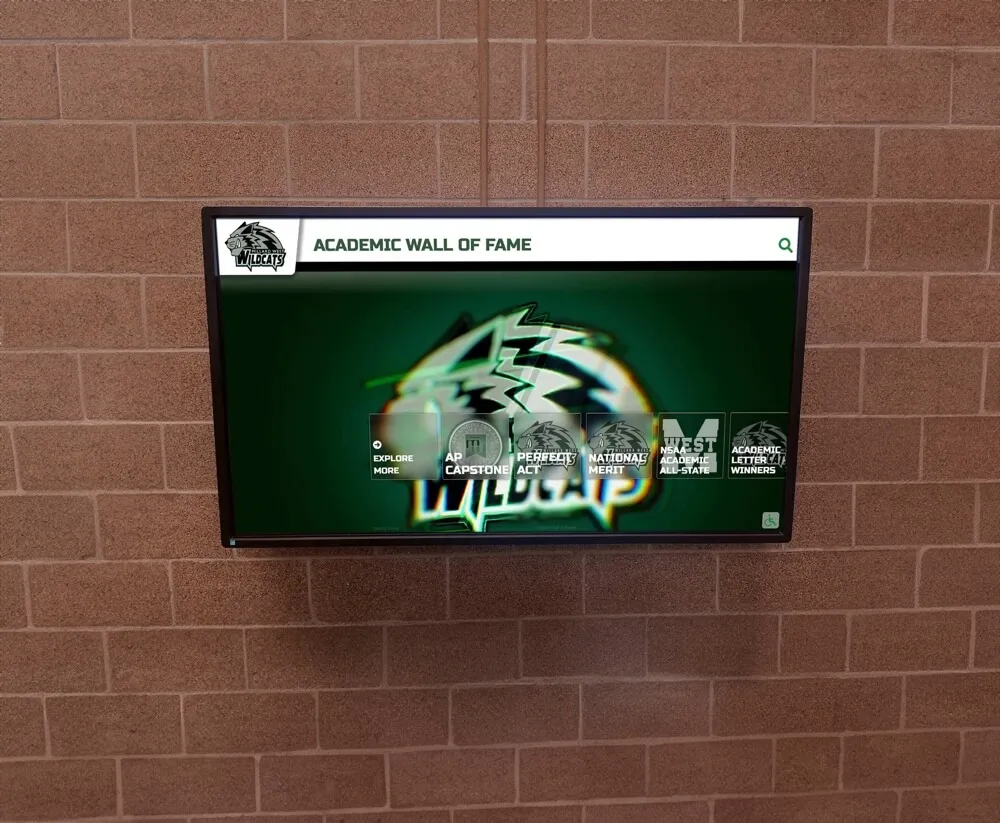
Digital displays provide the flexibility to recognize Academic All-Americans across multiple years and programs without space constraints
Why Traditional Recognition Falls Short
Physical plaques and traditional trophy cases create multiple operational challenges for Academic All-American recognition:
Space Limitations Each new Academic All-American requires additional physical space. Within five years, most traditional displays exhaust available wall area, forcing difficult decisions about whose recognition to remove or minimizing individual recognition to accommodate growing numbers.
Update Costs Adding new names to engraved plaques typically costs $50-150 per inductee. Annual ceremonies adding 8-15 Academic All-Americans translate to $400-2,250 in recurring costs just for physical updates—expenses that compound over time.
Information Restrictions Traditional plaques can display only limited information: names, years, and perhaps major and sport. The rich context of academic achievements, athletic statistics, and career trajectories that define Academic All-American accomplishments remains hidden.
Maintenance Requirements Physical displays require cleaning, suffer damage from environmental factors, and need professional restoration when tarnishing or wear makes them appear dated. These ongoing maintenance costs and logistics create administrative burden.
Accessibility Barriers Static plaques mounted high on walls or in glass-enclosed cases create accessibility challenges for visitors with visual impairments or mobility limitations, potentially failing to meet ADA requirements for recognition displays.
Digital recognition systems eliminate these constraints while creating more engaging, maintainable, and inclusive ways to celebrate Academic All-American achievement.
Phase 1: Requirements Gathering
Document these required inputs before procurement or installation begins.
Stakeholder Identification
Primary Users
- Athletic director (overall program oversight)
- Faculty athletic representative (academic verification)
- Sports information director (content updates, photography)
- Athletic academic advisor (GPA confirmation, student academic standing)
- IT coordinator (network connectivity, technical support)
Secondary Stakeholders
- Student-athletes (recognition recipients)
- Coaches (nomination and celebration)
- Alumni relations (historical record access)
- Advancement/development (donor engagement through academic excellence narratives)
- Campus visitors (prospective students, families, recruits)
Assign one primary administrator responsible for content updates and establish backup administrators to ensure continuity when personnel change.
Content Inventory
Build a complete list of Academic All-Americans you’ll display:
Historical Data Collection
- Review athletic department archives for past Academic All-American selections
- Consult sports information records from past decades
- Contact conference offices for historical academic all-conference rosters
- Search institutional media guides and yearbooks
- Request alumni records from advancement databases
Data Fields Per Inductee
- Full name (including preferred name if different from official records)
- Sport(s) participated in
- Academic year(s) of selection
- Major(s) and minor(s)
- GPA (if institution policy permits display)
- Academic honors (Dean’s List, Latin honors, departmental awards)
- Athletic achievements (championships, records, awards)
- Photo (action shot and/or portrait)
- Post-graduation path (graduate school, professional sports, career)
Organize this data in spreadsheets with consistent formatting to facilitate efficient content input into your chosen display system.
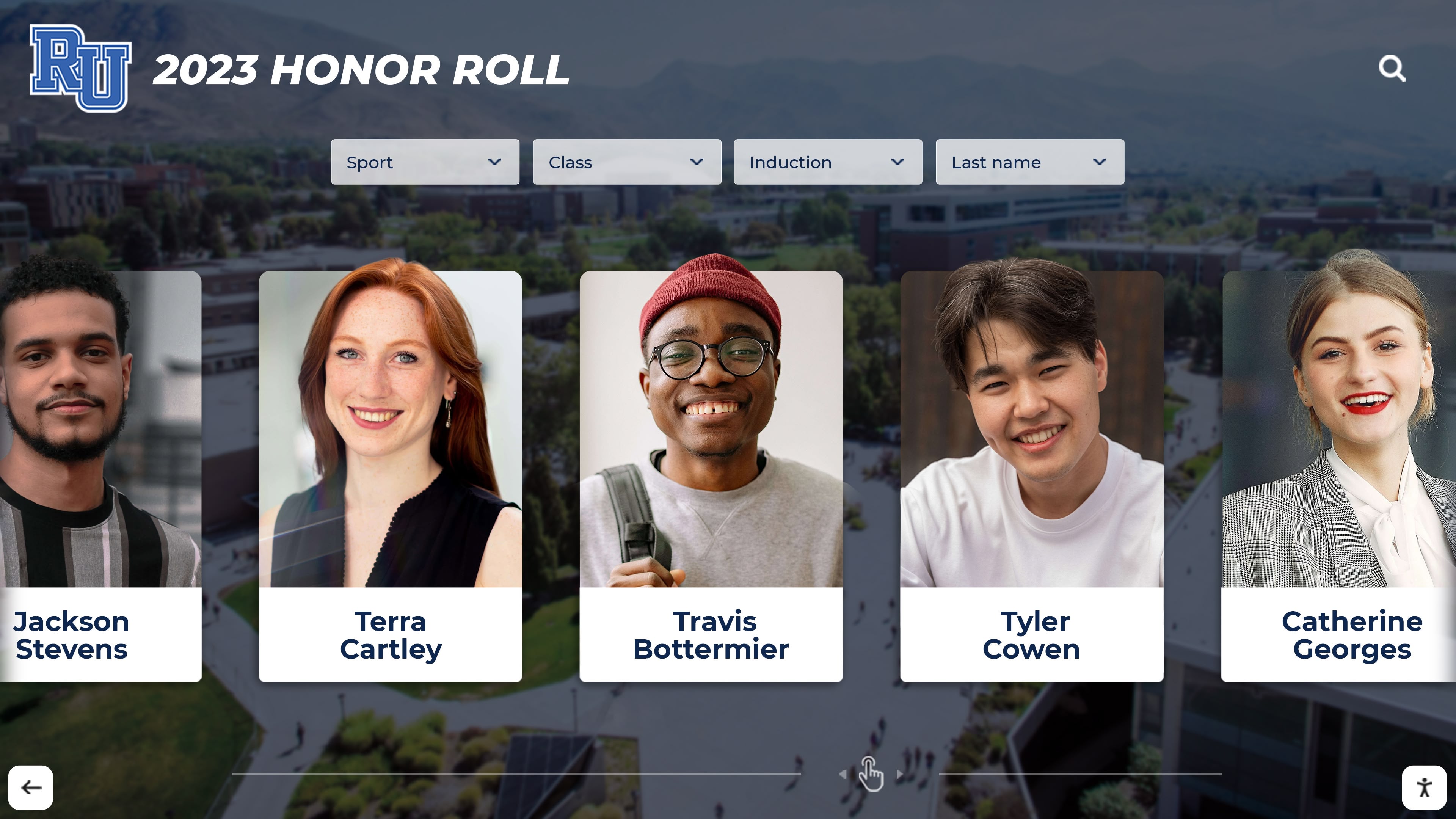
Comprehensive profile cards showcase both academic credentials and athletic achievements for each Academic All-American
Location Assessment
Identify display placement with these considerations:
Traffic Analysis Measure foot traffic patterns during different times of day and week. Prime locations include:
- Main athletic facility entrances
- Lobby areas where teams, families, and recruits gather
- Corridors connecting athletic facilities to academic buildings
- Student-athlete academic support center entrances
Physical Requirements For each candidate location, document:
- Available wall space dimensions (height, width, depth clearance)
- Proximity to electrical outlets (within 10 feet preferred)
- Network connectivity options (wired ethernet preferred, WiFi acceptable if signal strength exceeds -60 dBm)
- Ambient lighting conditions (avoid direct sunlight on screens)
- Mounting surface type (drywall, concrete, brick)
- ADA-compliant clear floor space (minimum 30" x 48" approach area)
Environmental Factors
- Temperature range (displays operate optimally between 32-104°F)
- Humidity levels (relative humidity 20-80% without condensation)
- Exposure to moisture, dust, or physical contact
- Security considerations for equipment protection
Photograph each candidate location and measure precisely before finalizing placement decisions.
Budget Determination
Establish complete project budget including:
Hardware Costs
- Commercial-grade touchscreen display ($2,500-8,000 depending on size)
- Mounting hardware appropriate to wall type ($200-600)
- Media player or computer system ($300-800)
- Protective enclosures if needed ($500-1,500)
Software and Content Management
- Recognition platform annual subscription ($800-2,400)
- Initial content development and design ($1,000-3,000)
- Training for administrators ($500-1,000)
Installation
- Professional mounting and electrical ($500-1,500)
- Network connectivity if wiring required ($300-1,200)
Ongoing Costs
- Annual software subscription renewals
- Occasional hardware replacement (6-8 year lifespan typical)
- Photography for new inductees (often covered by existing SID budget)
Many institutions find digital recognition displays provide superior long-term value compared to traditional approaches when accounting for update costs, administrative time savings, and expanded recognition capacity.
Phase 2: Technical Specifications
Define precise technical requirements before procurement.
Display Hardware Selection
Screen Size Determination Calculate appropriate display size based on viewing distance:
- For 5-8 foot viewing distance: 43-50" displays
- For 8-12 foot viewing distance: 55-65" displays
- For 12-20 foot viewing distance: 75-86" displays
Larger spaces benefit from multiple coordinated displays rather than single oversized screens that create uncomfortable viewing angles.
Commercial vs Consumer Displays Commercial-grade displays designed for continuous operation in public spaces offer:
- Extended operating hours (16-24 hours daily vs 8-10 hours for consumer models)
- Enhanced durability and heat dissipation
- Longer warranty coverage (3-5 years vs 1 year typical)
- Superior touchscreen accuracy and responsiveness
- Anti-glare coatings for varied lighting conditions
While consumer displays cost less initially, commercial displays provide better total cost of ownership across 6-8 year deployment cycles.
Touchscreen Technology Capacitive touchscreen technology provides the most responsive, intuitive interaction:
- Multi-touch gesture support (pinch, zoom, swipe)
- Precise touch registration
- Familiar smartphone-like interaction patterns
- No calibration required
Verify that selected displays support simultaneous multi-touch to accommodate group exploration.

Freestanding kiosk configurations work well in open spaces where wall mounting isn't feasible
Network Connectivity Requirements
Bandwidth Specifications Minimum network requirements for cloud-managed displays:
- Download speed: 10 Mbps minimum, 25 Mbps recommended
- Upload speed: 2 Mbps minimum, 5 Mbps recommended
- Latency: Under 100ms preferred
These requirements support content synchronization, remote management, and analytics reporting without degrading campus network performance.
Connection Type Selection Wired ethernet connections provide superior reliability:
- Consistent bandwidth without interference
- Enhanced security compared to WiFi
- No authentication complications
- Reduced troubleshooting complexity
If wired connections aren’t feasible, WiFi deployment requires:
- Signal strength minimum -65 dBm (closer to access point better)
- Dedicated VLAN for display traffic (optional but recommended)
- Reserved DHCP addresses or static IP assignment
- WPA2-Enterprise or WPA3 authentication
Document network credentials, VLAN requirements, and any firewall exceptions needed for your chosen recognition platform.
Power Requirements
Electrical Specifications Standard commercial displays require:
- 120V AC, 60Hz power (standard US outlets)
- Power consumption 150-400 watts depending on screen size
- Dedicated circuit preferred but not required for single displays
Multiple displays in close proximity may require load calculations to prevent circuit overload.
Backup Power Considerations While not essential, UPS (uninterruptible power supply) systems protect against:
- Data corruption during power fluctuations
- Display damage from voltage spikes
- Content management interruptions during brief outages
A 600-1000VA UPS provides adequate protection for single display installations.
Mounting and Physical Installation
Mounting Hardware Selection Choose mounting solutions appropriate to your wall type:
Drywall/Stud Mounting
- Fixed wall mounts for permanent installations ($150-300)
- Requires attachment to wall studs with lag bolts
- Professional installation recommended for displays over 55"
Concrete/Brick Mounting
- Requires concrete anchors or expansion bolts ($50-150 in hardware)
- Professional installation with masonry drill equipment necessary
- Consider vibration-dampening washers in high-traffic areas
Freestanding Options
- Floor stands or kiosks when wall mounting isn’t feasible ($600-2,000)
- Weighted bases or floor anchoring prevents tipping
- Cable management channels maintain clean appearance
ADA Compliance Requirements Mount displays to meet accessibility standards:
- Operable parts (touchscreen) at 15"-48" above finished floor
- Approach space: minimum 30" x 48" clear floor area
- Forward approach if space is confined (preferred for touchscreens)
- Screen positioned to minimize glare for wheelchair users
See digital display accessibility implementation for detailed ADA compliance guidance.
Phase 3: Content Organization and Structure
Design your information architecture before inputting content.
Recognition Category Hierarchy
Organize Academic All-Americans by clear, searchable categories:
Primary Organization Options
By Academic Year
- Groups inductees by year of selection
- Facilitates chronological browsing
- Enables comparison across eras
- Supports reunion and anniversary recognition
By Sport
- Clusters student-athletes by athletic participation
- Highlights academic excellence within specific programs
- Enables sport-specific filtering for coach and recruit engagement
By Academic Discipline
- Groups by major or academic department
- Demonstrates academic diversity within athletics
- Engages academic departments in athletic recognition
Most effective implementations combine multiple organizational schemes, allowing users to filter and explore via their preferred dimension.
Secondary Filtering Capabilities
Enable visitors to refine displays by:
- Conference or NCAA division (for multi-division programs)
- First-team vs honorable mention Academic All-Americans
- Additional academic honors (summa cum laude, departmental awards)
- Gender (for Title IX reporting and balanced recognition)
- Post-graduation paths (professional sports, graduate school, careers)
Rich filtering transforms large Academic All-American databases into manageable, explorable collections.
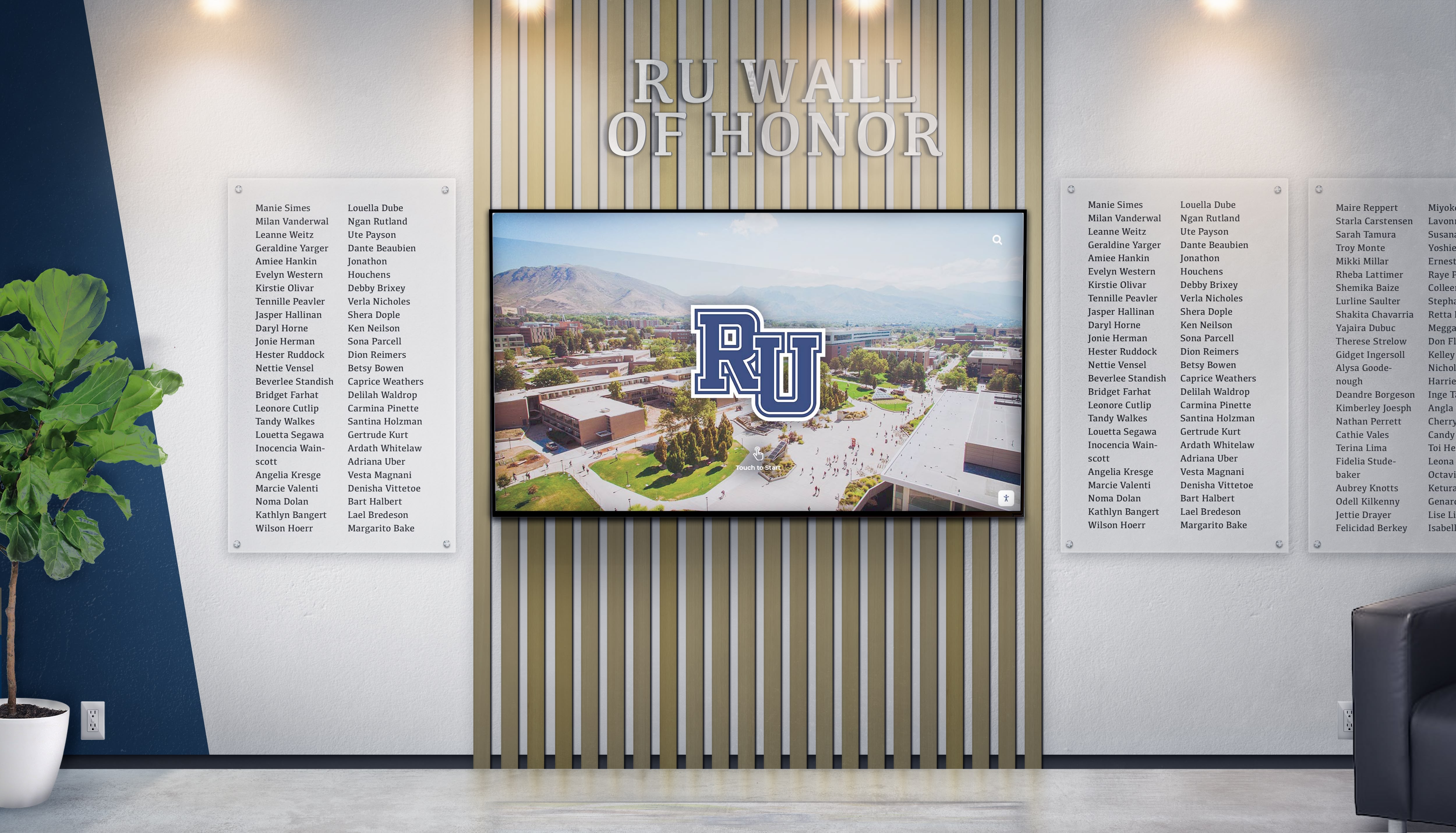
Hybrid displays combine traditional elements with digital flexibility for comprehensive recognition
Content Fields and Information Display
For each Academic All-American, establish consistent data fields:
Essential Information
- Full name (including middle initial)
- Sport(s) and position(s)
- Academic year(s) of Academic All-American selection
- Graduation year and degree earned
- Major(s) and minor(s)
- High-quality photograph (minimum 1200x1600 pixels)
Enhanced Profile Content
- Academic achievements (GPA if policy permits, Dean’s List semesters, Latin honors)
- Athletic accomplishments (championships, records, all-conference selections)
- Leadership roles (team captain, student government, community service)
- Career highlights post-graduation (if available and approved by individual)
- Notable quotes from coaches or faculty mentors (with attribution)
Multimedia Elements
- Action photographs from competition
- Academic setting photos (labs, studios, fieldwork)
- Short video profiles for recent inductees (15-30 seconds ideal)
- Career statistics displays for relevant sports
Consistent formatting across all profiles creates professional appearance while rich content does justice to Academic All-American achievements.
Search and Discovery Features
Implement intuitive search capabilities:
Text Search
- Search by name (full or partial)
- Search by keyword (major, sport, hometown)
- Auto-complete suggestions as users type
Visual Browsing
- Grid layouts showing headshots with names
- Scrolling timelines with year markers
- Sport-specific galleries with team photos
Featured Rotation
- Highlight recent inductees prominently
- Rotate historical features to showcase different eras
- Create special collections for milestones (50th anniversary, etc.)
User analytics from interactive touchscreen displays show that intuitive navigation dramatically increases engagement time and visitor satisfaction.
Phase 4: Content Management System Configuration
Set up administrative interfaces for ongoing maintenance.
Role-Based Access Controls
Establish appropriate permissions for different administrators:
Athletic Director or Designee (Full Administrator)
- Add, edit, and remove all content
- Configure display settings and layouts
- Manage user accounts and permissions
- Access analytics and usage reports
Sports Information Director (Content Manager)
- Add and edit Academic All-American profiles
- Upload photos and multimedia
- Update existing inductee information
- Schedule content publication dates
Faculty Athletic Representative (Reviewer)
- Verify academic credentials before publication
- Approve GPA and academic honor displays
- Flag inaccuracies for correction
IT Coordinator (Technical Administrator)
- Monitor system health and connectivity
- Manage display hardware settings
- Configure network parameters
- Troubleshoot technical issues
Role-based access prevents unauthorized changes while distributing maintenance workload across appropriate staff.
Content Update Workflows
Establish procedures for adding new Academic All-Americans:
Annual Update Process
- Selection Announcement: Conference or national organization publishes Academic All-American teams
- Verification: Faculty athletic representative confirms academic standing and GPA accuracy
- Content Collection: Sports information director gathers photos, statistics, and biographical information
- Profile Creation: Content manager inputs information using standardized templates
- Review: Athletic director approves content for accuracy and completeness
- Scheduling: Content scheduled to publish at specific date/time (awards ceremony, banquet, etc.)
- Promotion: Social media and press releases coordinate with display update
Historical Records Addition
For retroactive Academic All-American additions:
- Lower priority than current inductees but systematically address gaps
- Assign research responsibilities (student workers, graduate assistants, or volunteers work well)
- Accept incomplete information initially, enhancing profiles as additional data becomes available
- Use placeholder photos if individual photos unavailable (team photos, action shots)
Bulk Import and Data Management
Efficient content management platforms support:
CSV Import Capabilities Upload multiple inductees simultaneously via spreadsheet:
- Column headers map to profile fields
- Automatic duplicate detection prevents errors
- Photo uploads via file matching (filename = inductee ID)
Template Consistency Pre-configured templates ensure:
- Uniform layout across all profiles
- Consistent typography and color schemes
- Standardized field placements
- Professional appearance without design expertise
Version Control Track content changes over time:
- Revision history showing who changed what when
- Ability to revert to previous versions if needed
- Audit trail for compliance and documentation
Solutions like Rocket Alumni Solutions provide purpose-built content management specifically designed for academic and athletic recognition, eliminating the complexity of adapting generic digital signage platforms.
Phase 5: Validation and Quality Assurance
Test thoroughly before public launch.
Content Accuracy Review
Conduct systematic verification:
Academic Information Validation
- Confirm graduation years against registrar records
- Verify major and degree titles match official transcripts
- Cross-check Academic All-American selections against official organization publications
- Ensure GPA displays comply with FERPA regulations if included
Athletic Information Verification
- Confirm sports and positions with coaching staff
- Verify athletic statistics against official records
- Validate championship and award claims
- Check spelling of team names and award titles
Photo Quality Standards
- Minimum resolution requirements met (1200x1600 pixels)
- Image properly cropped and oriented
- Consistent lighting and color balance across profiles
- Permission documented for all photos (model releases, photographer rights)
Biographical Accuracy
- Confirm hometown and high school information
- Verify post-graduation paths if included
- Ensure quotes properly attributed with approval from quoted individuals
- Check that all personal information complies with privacy regulations
Create checklists for reviewers to systematically evaluate each profile before approval.
Accessibility Testing
Verify compliance with Web Content Accessibility Guidelines (WCAG 2.1 AA minimum):
Physical Access Verification
- Confirm mounting height places operable elements within 15-48" range
- Verify 30" x 48" clear floor space for approach
- Check that display angle accommodates wheelchair users
- Test that buttons and interactive elements respond to light touch pressure
Visual Accessibility
- Verify color contrast ratios meet 4.5:1 minimum for body text, 3:1 for large text
- Test display with screen reader software (JAWS, NVDA, or TalkBack)
- Confirm text magnification up to 200% without loss of content
- Validate that all information conveyed by color has non-color indicators
Cognitive Accessibility
- Test navigation simplicity with users unfamiliar with system
- Verify consistent navigation patterns throughout interface
- Confirm adequate time for interaction (no automatic timeouts under 60 seconds)
- Validate clear headings and logical content organization
Language Accessibility If serving multilingual community:
- Provide Spanish or other relevant language options
- Verify translation accuracy with native speakers
- Test language switching ease and consistency
Document accessibility features in your display area signage so visitors with disabilities know accommodation features are available.
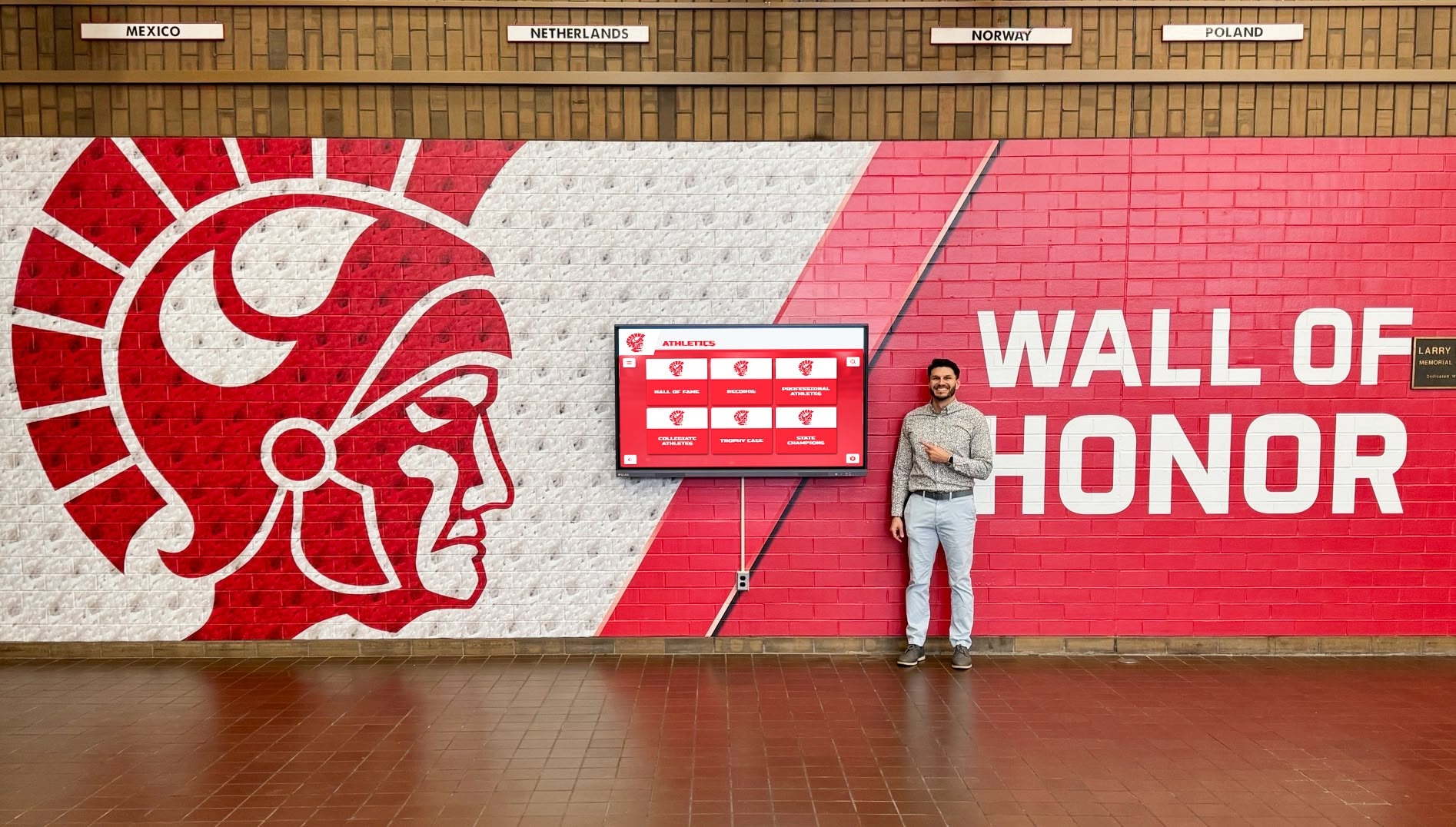
Strategic placement in high-traffic corridors ensures Academic All-Americans receive maximum visibility
User Experience Testing
Before launch, conduct usability testing:
Test Participant Selection Recruit diverse test users:
- Current student-athletes unfamiliar with the system
- Athletic department staff who will update content
- Prospective students and families visiting campus
- Alumni visiting for reunions or events
- Faculty members and campus visitors
Testing Scenarios Ask participants to complete realistic tasks:
- “Find Academic All-Americans in Women’s Soccer from 2015-2020”
- “Locate information about Academic All-Americans majoring in Engineering”
- “Discover how many times [specific athlete] earned Academic All-American honors”
- “Learn about the most recent Academic All-American selections”
Observation and Iteration Watch for:
- Confusion or hesitation during navigation
- Search failures or unexpected results
- Features users miss or don’t discover
- Questions or clarifications users need
- Suggestions for improvement
Use insights from testing to refine navigation, improve search, and enhance content before public launch.
Phase 6: Launch and Promotion Strategy
Unveil your Academic All-Americans display with appropriate fanfare.
Launch Event Planning
Create memorable unveiling:
Event Timing Coordinate with:
- Academic All-American award banquet or ceremony
- Homecoming or alumni weekend
- Athletic department open house
- Major campus event with high attendance
Attendee Invitation Invite:
- Current and recent Academic All-Americans
- Coaches and faculty mentors
- Athletic department leadership
- Campus administration (president, provost, athletic director)
- Alumni board members
- Major athletic program donors
- Campus and local media
Program Elements
- Opening remarks from athletic director or president
- Student-athlete speaker (recent Academic All-American)
- Display unveiling and demonstration
- Interactive exploration time for guests
- Photo opportunities with display
- Recognition of donors or supporters who funded project
Capture professional photography and video of the launch for ongoing promotion and archival purposes.
Multi-Channel Promotion
Maximize awareness through:
Campus Communications
- Campus-wide email announcement with photos
- Feature article in campus magazine or newspaper
- Digital signage across campus highlighting display location
- Athletic department newsletter spotlight
Social Media Campaign
- Instagram carousel featuring multiple Academic All-Americans
- Facebook video walkthrough of display navigation
- Twitter/X threads spotlighting individual inductees
- LinkedIn posts targeting alumni and professional networks
- TikTok content showing student reactions (if appropriate to institutional culture)
Media Relations
- Press release to local media outlets
- Invitation to campus and sports journalists for tour
- Fact sheet highlighting Academic All-American achievement statistics
- B-roll footage available for television stations
Targeted Outreach
- Personal notifications to all featured Academic All-Americans
- Alumni magazine feature article
- Recruit communication materials highlighting academic-athletic excellence
- Donor stewardship report showing impact of their support
Recognition programs achieve maximum impact when launch promotion matches the significance of the achievement being celebrated.
Ongoing Visibility Strategies
Sustain awareness after initial launch:
Regular Content Refreshes
- Monthly featured Academic All-American spotlights
- Seasonal theme displays (winter sports Academic All-Americans during basketball season, etc.)
- Anniversary retrospectives (10 years since specific achievements)
- “Where Are They Now” updates for historical inductees
Event Integration Reference display during:
- Campus tours for prospective students
- Athletic recruiting visits
- Alumni reunion gatherings
- Faculty and staff orientations
- Academic awards ceremonies
Cross-Promotion with Other Recognition Link to athletic hall of fame displays and honor roll recognition systems to create comprehensive celebration of excellence across athletic and academic domains.
Analytics Monitoring Track display engagement:
- Number of interactions per day/week
- Most-searched athletes or categories
- Average interaction duration
- Peak usage times and days
- Popular features and navigation paths
Use these insights to refine content, improve navigation, and demonstrate program value to stakeholders.
Troubleshooting Common Implementation Challenges
Address typical obstacles before they derail your project.
Budget Constraints
If initial budget limits scope:
Phase Implementation
- Begin with single display in highest-traffic location
- Implement comprehensive content management system that can scale
- Add additional display locations as funding becomes available
- Prioritize recent inductees initially, adding historical records over time
Alternative Funding Sources
- Athletic booster club project sponsorship
- Alumni donations designated for recognition program
- Corporate partnerships with academic excellence theme
- Student fee initiatives if appropriate to institution
- Grant applications to foundations supporting education
Cost Reduction Strategies
- Utilize existing athletic department photography instead of commissioned shoots
- Leverage student labor for historical research and data entry
- Negotiate multi-year software subscriptions for reduced annual costs
- Consider refurbished commercial displays with warranty coverage
Many institutions find that digital recognition displays deliver strong return on investment when accounting for eliminated printing costs, reduced administrative time, and enhanced alumni engagement.
Incomplete Historical Records
When historical Academic All-American data has gaps:
Accept Imperfect Initial Launch
- Launch with complete recent data rather than delaying for perfect historical records
- Add disclaimer that historical records are being compiled and will be added
- Create “Help Us Complete Our Records” campaign enlisting alumni assistance
Systematic Historical Research
- Assign graduate assistant or student worker to records research project
- Contact emeritus coaches and long-time athletic staff for institutional memory
- Post requests in alumni publications asking inductees to self-report
- Research conference and national organization archives for official records
- Utilize old media guides, press releases, and yearbooks
Incremental Addition Add historical records as discovered rather than waiting for complete dataset. Each addition strengthens the display and demonstrates ongoing institutional commitment.
Technical Complexity Concerns
If staff lack technical confidence:
Prioritize User-Friendly Platforms Select content management systems designed for non-technical users:
- Visual drag-and-drop interfaces
- Pre-built templates requiring no design skills
- Automated publishing workflows
- Phone and email support from vendor
Invest in Comprehensive Training
- Initial onsite or virtual training for all administrators
- Recorded training videos for reference and new staff onboarding
- Written documentation with screenshots for common tasks
- Refresher training sessions annually
Establish Vendor Support Relationship Clarify what support your vendor provides:
- Phone and email support response timeframes
- Remote troubleshooting capabilities
- Included training hours
- On-site service if needed
Purpose-built recognition platforms like Rocket Alumni Solutions provide significantly simpler management than adapting generic digital signage software for recognition purposes.
Maintaining Long-Term Engagement
Prevent displays from becoming overlooked:
Content Refresh Schedules
- Quarterly feature rotations highlighting different eras or sports
- Seasonal content aligned with sport schedules
- Anniversary spotlights for milestone inductees
- “This Week in History” features of past Academic All-American selections
Interactive Feature Additions
- Add trivia questions about Academic All-Americans
- Implement leaderboards showing most decorated programs
- Create “Find Your Major” features connecting majors to Athletic All-Americans
- Enable QR code access to extended content on personal devices
Event Integration Reference display during:
- New student-athlete orientation
- Academic awards banquets
- Homecoming and family weekends
- Prospective student-athlete visits
Sustained engagement requires treating displays as living systems rather than static monuments.
Measuring Success and Demonstrating Value
Quantify your Academic All-Americans display impact.
Key Performance Indicators
Track meaningful metrics:
Usage Analytics
- Total interactions per week/month
- Unique users (if tracking technology permits)
- Average session duration
- Most popular search queries
- Peak usage times and patterns
Content Performance
- Most-viewed Academic All-Americans
- Most-utilized filtering dimensions
- Features used vs unused
- Search success rates
Stakeholder Engagement
- Social media engagement with display content
- Alumni responses to display communications
- Prospective student-athlete feedback during visits
- Donor satisfaction in recognition stewardship
Operational Efficiency
- Time required for content updates (vs previous traditional methods)
- Cost per inductee added (vs traditional engraving/plaque costs)
- Administrative hours saved through digital management
Academic-Athletic Culture Indicators
- Student-athlete GPA trends after display implementation
- Academic All-American selection rates
- Student-athlete academic support center usage
- Graduation rates and academic honor percentages
While some impacts resist precise quantification, tracking available metrics demonstrates program value to athletic department leadership and institutional administration.
Reporting and Communication
Share success metrics with stakeholders:
Quarterly Reports Provide athletic department leadership:
- Usage statistics summaries
- Recent content additions
- Feature utilization data
- Upcoming planned enhancements
Annual Impact Summary Create comprehensive year-in-review:
- Total Academic All-Americans recognized
- Historical records added
- Usage growth compared to previous year
- Testimonials from student-athletes, alumni, and visitors
- Media coverage generated
- Integration with recruiting and advancement initiatives
Donor Stewardship Communication If display was donor-funded:
- Share how their investment honored academic-athletic excellence
- Include photos of inductees and families engaging with display
- Report total number of Academic All-Americans recognized through their support
- Highlight specific success stories enabled by the recognition program
Consistent communication about display impact ensures sustained support for maintenance, updates, and potential expansion.
Advanced Features and Future Enhancements
Consider these advanced capabilities as your program matures.
Web-Based Extensions
Extend recognition beyond physical display:
Online Hall of Fame Website Mirror physical display content on online hall of fame platforms that enable:
- Global access for alumni anywhere
- Social media sharing of individual profiles
- Email notifications when classmates or teammates are inducted
- Mobile-responsive browsing on personal devices
QR Code Integration Place QR codes near physical displays that:
- Link to extended online content
- Enable personal device exploration alongside physical display
- Facilitate social media sharing from visitor smartphones
- Provide accessibility accommodations for visitors with disabilities
Virtual Tour Integration Incorporate Academic All-Americans display into:
- Campus virtual tours for prospective students
- Athletic program recruiting presentations
- Alumni virtual events and reunions
- Development and fundraising materials
Enhanced Multimedia Content
Expand beyond photos and text:
Video Profiles Create short video segments featuring:
- Academic All-Americans reflecting on balancing athletics and academics
- Faculty mentors discussing student-athlete dedication
- Coaches describing athletes’ work ethic and character
- Day-in-the-life glimpses of current Academic All-Americans
Audio Narratives Add audio content for:
- Accessibility for visitors with visual impairments
- Background music during featured content rotation
- Interview excerpts and highlights
Interactive Statistics Visualize data through:
- GPA trends across athletic programs over time
- Major distribution charts showing academic diversity
- Geographic maps showing inductee hometowns
- Timeline visualizations of program academic excellence trajectory
Social Media Integration
Connect physical displays to social channels:
Automated Social Posting Configure systems to automatically:
- Post new inductee announcements to athletic department social media
- Create shareable graphics featuring Academic All-Americans
- Generate hashtag campaigns around academic-athletic excellence
- Schedule social content aligned with academic calendar milestones
User-Generated Content Aggregation Display social media posts:
- Tagged with program hashtags by inductees and families
- Showing Academic All-Americans in professional or graduate school settings
- Highlighting current student-athletes pursuing Academic All-American goals
Live Feed Integration Show real-time content:
- Current athletic event scores
- Today’s academic achievement highlights
- Recent athletic department news and announcements
Integration with Other Campus Systems
Connect recognition display to:
Student Information Systems Automatically pull:
- Current GPA for active student-athletes
- Dean’s List and academic honor recognitions
- Major and minor declarations
- Academic standing status
Athletic Management Software Integrate with:
- Rosters and team information
- Statistical databases
- Awards and honors tracking
- Recruiting profiles
Alumni Relations Databases Connect to:
- Career and contact information
- Alumni giving records
- Event attendance history
- Mentorship program participation
Integration reduces duplicate data entry while ensuring information consistency across systems.
Conclusion: Building Your Academic All-Americans Recognition System
Implementing digital Academic All-Americans displays requires methodical planning, clear technical specifications, and commitment to ongoing content management. Yet the investment creates lasting value that traditional recognition approaches cannot match—unlimited capacity to honor achievement, flexibility to update and enhance recognition, accessibility features ensuring inclusive celebration, and engaging experiences that inspire current and future student-athletes.
The most successful implementations begin with clear requirements definition, involve appropriate stakeholders from the planning phase, select technologies aligned with institutional technical capabilities, and establish sustainable maintenance processes before launch.
Whether your institution recognizes dozens or hundreds of Academic All-Americans across decades of athletic history, digital recognition solutions provide the flexibility to celebrate every achievement appropriately while creating systems that grow and adapt as your programs evolve.
Academic All-Americans represent the pinnacle of what institutions hope to develop in student-athletes—individuals who excel across multiple dimensions and understand that academic rigor and athletic excellence reinforce rather than compete with one another. Recognition systems that properly celebrate this dual achievement create cultures where academic-athletic balance becomes aspirational for every student-athlete.
Start by inventorying your Academic All-Americans, assessing your spaces, and defining your budget. From that foundation, you can build recognition systems that honor past achievement while inspiring future excellence. Explore digital recognition solutions specifically designed for academic and athletic recognition, or schedule a TouchWall demo to see how modern platforms simplify the implementation process while creating engaging experiences that properly celebrate Academic All-American excellence.































