
Advancement and marketing teams at schools, universities, and nonprofit organizations face mounting pressure to achieve ambitious goals with limited resources. They must increase donor participation, strengthen alumni engagement, enhance institutional visibility, and demonstrate measurable ROI—all while managing tight budgets and competing for attention in an increasingly digital world.
Digital recognition displays like those offered by Rocket Alumni Solutions provide a powerful yet often overlooked tool that addresses multiple advancement and marketing challenges simultaneously. These interactive platforms transform traditional static recognition into dynamic engagement opportunities that drive measurable results across fundraising, communications, and community-building initiatives.

Wingate University's digital donor recognition wall creates engagement opportunities while honoring contributors
The Advancement and Marketing Challenge Landscape
Before exploring solutions, it’s essential to understand the specific challenges facing advancement and marketing professionals today.
Resource Constraints and Competing Priorities
Most advancement offices operate with lean teams responsible for multiple functions: major gifts, annual giving, planned giving, alumni relations, donor stewardship, event management, and communications. Marketing departments similarly juggle institutional branding, recruitment support, community relations, and internal communications.
According to the Council for Advancement and Support of Education (CASE), the median advancement office at a four-year institution manages relationships with thousands of alumni while operating with fewer than 20 full-time staff members. This resource constraint makes efficiency and automation critical.
Engagement Fatigue and Attention Competition
Alumni and donors receive countless messages daily from various organizations. Email open rates for nonprofit communications hover around 25%, and social media organic reach continues to decline. Breaking through this noise requires compelling, differentiated approaches that capture attention and create memorable experiences.
Demonstrating ROI and Impact
Leadership increasingly demands data-driven evidence of advancement and marketing effectiveness. Teams must track engagement metrics, attribute outcomes to specific initiatives, and justify investments in new tools and technologies.
Multi-Generational Communication Needs
Advancement teams must effectively communicate with generations spanning seven decades—from Silent Generation donors to Gen Z young alumni—each with different communication preferences, technology adoption patterns, and engagement expectations.
How Digital Recognition Displays Address Core Advancement Challenges
Solutions like Rocket Alumni Solutions’ interactive displays directly address these challenges through multiple mechanisms.
1. Always-On Donor Stewardship That Scales
Traditional donor stewardship requires significant staff time: personalized communications, impact reports, recognition events, and relationship touches. Digital recognition displays create continuous stewardship touchpoints that operate 24/7 without ongoing staff involvement.

Interactive displays provide continuous recognition and engagement opportunities
How It Works in Practice:
When donors visit campus or access the display remotely, they see their recognition alongside impact stories showing how their contributions made a difference. This creates positive reinforcement without requiring individualized staff outreach for each donor interaction.
A digital donor wall can showcase:
- Individual donor profiles with giving history
- Impact narratives connecting gifts to outcomes
- Recognition levels with visual progression
- Campaign progress toward goals
- Testimonials from scholarship recipients or program beneficiaries
These elements provide meaningful stewardship touches at scale. A display that recognizes 500 donors delivers 500 personalized stewardship moments simultaneously—something impossible through manual approaches.
2. Enhanced Fundraising Campaign Support
Capital campaigns and major initiatives require sustained visibility and momentum-building. Digital displays serve as dynamic campaign headquarters that keep goals visible and progress transparent.
Campaign Visualization Features:
- Real-time progress meters showing movement toward goals
- Recognition previews letting prospects see how their gift would be acknowledged
- Impact projections illustrating what different giving levels enable
- Challenge gift counters creating urgency during matching periods
- Leadership donor spotlights recognizing pace-setters and inspiring others
For advancement teams managing multi-year campaigns, these displays provide consistent campaign presence in high-traffic locations without the cost and permanence of custom campaign signage that becomes outdated when goals are met.
3. Streamlined Content Management for Marketing Teams
Marketing teams spend significant time creating, updating, and distributing recognition content across various channels. Digital recognition platforms consolidate this work into efficient workflows.
Traditional recognition updates might involve:
- Coordinating with engravers for new plaques (2-4 weeks lead time)
- Working with facilities for installation ($200-500 per update)
- Updating printed donor reports and directories
- Creating social media graphics
- Revising website donor lists
- Producing recognition displays for events
With platforms like Rocket Alumni Solutions, marketing teams update recognition content once through an intuitive digital asset management system, and those updates automatically appear across all connected displays and web portals. This eliminates redundant work and ensures consistency.
Time Savings Data:
Organizations using digital recognition typically report 85% reduction in time spent on recognition updates—freeing marketing team capacity for strategic initiatives rather than administrative maintenance.
4. Multi-Channel Content Distribution
Modern marketing requires coordinated presence across multiple touchpoints: physical spaces, websites, social media, email, and events. Digital recognition platforms enable this multi-channel approach efficiently.
A single content update—such as adding a new major donor or highlighting a scholarship recipient—can automatically flow to:
- On-campus displays in lobbies, hallways, and event spaces
- Web portals accessible to alumni worldwide
- Social media through integrated sharing features
- Email communications with embedded recognition highlights
- Event presentations via exported content packages
- Mobile apps for on-the-go access
This integrated approach ensures consistent messaging while maximizing reach—a critical efficiency for small marketing teams managing multiple channels.
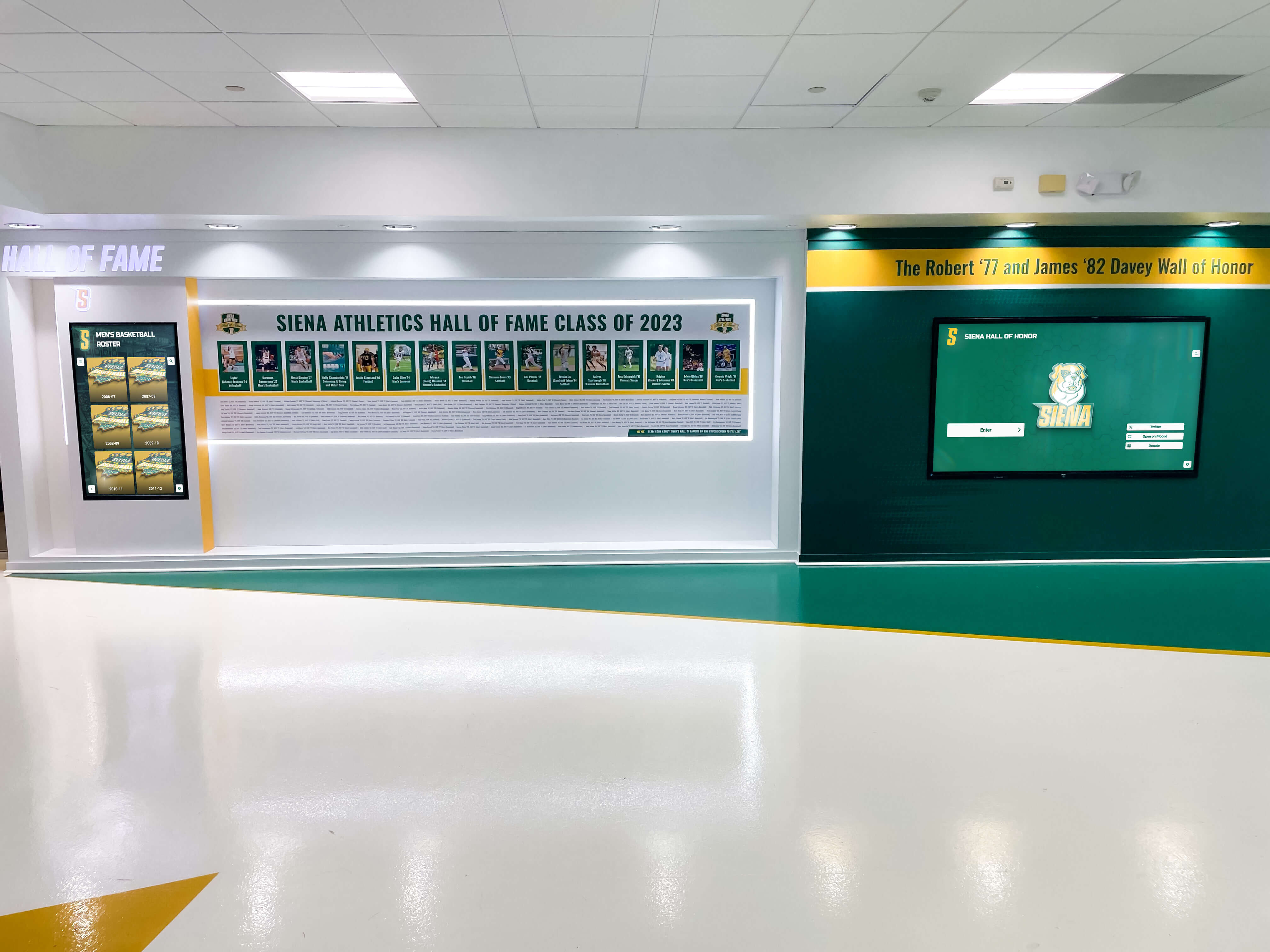
Physical displays extend online through web portals for global accessibility
5. Data-Driven Engagement Insights
Advancement teams need data to optimize strategies and demonstrate impact. Digital recognition platforms provide analytics that traditional displays cannot offer.
Trackable Metrics Include:
- Interaction frequency: How often visitors engage with displays
- Dwell time: Average engagement duration per session
- Content popularity: Which profiles or stories receive most attention
- Search patterns: What visitors look for (names, years, categories)
- Time-based trends: Peak engagement times and seasonal patterns
- Geographic data: Where remote viewers access content
These insights inform strategic decisions:
- Which recognition categories generate most interest?
- What content types create longest engagement?
- When do alumni typically explore recognition (reunion planning, gift consideration)?
- Which stories should be featured prominently?
This data-driven approach transforms recognition from a feel-good activity into a strategic advancement tool with measurable outcomes.
6. Event Enhancement and Activation
Advancement teams host numerous events throughout the year: reunions, homecoming, donor appreciation gatherings, scholarship award ceremonies, and fundraising galas. Digital displays enhance these events while providing content that extends their impact beyond the event date.
Event Applications:
During reunion weekends, interactive displays let alumni explore classmate achievements and reminisce about shared experiences. The platform can highlight reunion class giving participation, creating friendly competition and social proof that encourages participation.
At donor appreciation events, displays showcase the collective impact of attendees’ philanthropy while allowing guests to see their individual recognition. This creates talking points and photo opportunities that extend event impact when guests share on social media.
For scholarship award ceremonies, displays can feature both donors who funded awards and recipients who benefited—creating meaningful connections between supporters and impact. These connections often lead to deeper donor relationships and increased giving.
Post-Event Value:
Content created for events doesn’t disappear afterward. Highlight videos, testimonials, and recognition moments remain accessible on displays and web portals, extending the event’s engagement value indefinitely.
7. Alumni Network Activation and Career Connections
While primarily recognition tools, digital platforms also facilitate alumni networking and career connections—activities that support both advancement (engaged alumni give more) and marketing (active alumni networks enhance institutional reputation) objectives.
Features supporting network activation include:
- Alumni search by graduation year, major, or career field
- Professional accomplishment highlights showcasing career progression
- Mentorship opportunity flags connecting alumni with students
- Geographic mapping showing where alumni have settled
- Career pathway visualization illustrating diverse outcomes
- Industry clustering highlighting concentrations in specific fields
These networking features create value for alumni beyond recognition alone. Alumni who regularly engage with the platform for professional connections develop stronger institutional affinity—and research consistently shows that engaged alumni give at higher rates than disconnected alumni.

Digital displays help high schools maintain engagement with alumni networks
8. Brand Consistency and Institutional Storytelling
Marketing teams manage institutional brand identity across countless touchpoints. Digital recognition displays support brand consistency while advancing institutional storytelling.
Brand Elements:
Displays can incorporate institutional colors, logos, typography, and design language—creating branded experiences that reinforce identity with every interaction. This is particularly valuable in high-visibility locations where displays serve as prominent brand ambassadors.
Storytelling Capabilities:
Beyond individual recognition, displays enable rich institutional storytelling:
- Historical timelines showing institutional evolution
- Impact narratives illustrating mission fulfillment
- Tradition showcases celebrating defining characteristics
- Future vision content building excitement about strategic direction
- Values demonstrations highlighting mission in action
These storytelling elements help marketing teams shape institutional narrative and perception—particularly valuable during strategic initiatives, rebranding efforts, or reputation management.
9. Prospect Research and Identification
Advancement teams invest significant resources in prospect research—identifying alumni and community members with capacity and inclination to give. Digital platforms support this work through engagement tracking and pattern recognition.
Research Intelligence:
When alumni interact with digital displays (particularly web-accessible versions), their engagement patterns provide prospect intelligence:
- Alumni who frequently explore donor recognition may be considering their own giving
- Those reviewing specific program areas indicate interest alignment
- Users who engage with planned giving or major donor content signal potential capacity
- Alumni exploring class participation rates may be influenced by social comparison
While respecting privacy, these behavioral signals help advancement teams prioritize outreach and tailor conversations to expressed interests.
10. Volunteer Recognition and Management
Advancement success relies heavily on volunteers: board members, reunion planners, phonathon participants, event hosts, and ambassadors. These volunteers need recognition for their contributions—and digital platforms provide efficient, meaningful acknowledgment.
Volunteer Recognition Features:
- Service hour tracking and display
- Role highlights and responsibility descriptions
- Impact metrics showing outcomes of volunteer efforts
- Appreciation messages from leadership and beneficiaries
- Historical service records celebrating long-term commitment
- Special designation badges for milestone achievements
This recognition supports volunteer recruitment and retention—critical for advancement offices that depend on volunteer capacity to extend their reach.
Implementation Strategies for Maximum Impact
To fully leverage digital recognition displays, advancement and marketing teams should follow strategic implementation approaches.
Start with Clear Objectives
Before implementation, define specific goals the platform should advance:
- Increase donor retention by X%
- Grow annual fund participation among specific segments
- Reduce time spent on recognition updates by X hours monthly
- Generate X social media impressions from recognition sharing
- Drive X additional event registrations
- Increase website traffic to advancement pages by X%
Clear objectives enable measurement and optimization while ensuring the platform directly supports strategic priorities.
Integrate with Existing Advancement Technology
Digital recognition platforms deliver maximum value when integrated with existing systems:
- Donor databases for automatic recognition updates
- CRM systems for engagement tracking
- Event management platforms for program content
- Email marketing tools for campaign coordination
- Social media management for content distribution
- Analytics platforms for comprehensive reporting
Platforms like Rocket’s touchscreen software often include API capabilities and standard integrations that facilitate these connections.

Successful implementations integrate recognition displays with broader advancement technology ecosystems
Develop Content Standards and Governance
Marketing teams should establish clear standards for recognition content:
- Naming conventions: How donors should be listed
- Recognition level tiers: What qualifies for different prominence
- Image requirements: Photo standards and specifications
- Narrative guidelines: Story length and tone
- Update frequency: Regular refresh schedules
- Approval workflows: Who reviews before publication
- Privacy protocols: Handling recognition preferences
These standards ensure consistency, quality, and appropriate risk management.
Create Content Plans That Extend Value
Rather than viewing digital displays as static recognition, advancement teams should develop dynamic content strategies:
- Seasonal rotations highlighting relevant themes (reunion season, giving day, homecoming)
- Campaign features building toward specific initiatives
- Anniversary spotlights recognizing milestone achievements
- New inductee launches creating regular engagement opportunities
- Behind-the-scenes content showing impact in action
- Countdown elements building anticipation for events
This approach keeps content fresh and provides reasons for repeat engagement—both in-person and remote.
Promote Actively Across Channels
Digital displays won’t fulfill their potential without active promotion. Marketing teams should integrate recognition platform promotion into broader communication strategies:
- Email campaigns directing alumni to explore recognition online
- Social media posts highlighting featured stories
- Event marketing promoting displays as attractions
- Campus visit communications noting display locations
- Newsletter features showcasing recent additions
- Reunion materials encouraging classmates to explore together
This promotion drives traffic and engagement while maximizing return on the platform investment.
Measure, Analyze, and Optimize
Advancement teams should establish regular reporting cycles to track platform performance:
- Monthly engagement metrics (sessions, duration, interactions)
- Quarterly content performance (most-viewed profiles, popular categories)
- Annual outcome assessment (goal achievement, ROI calculation)
- User feedback collection (surveys, comment analysis)
- Comparative benchmarking (performance vs. other channels)
These insights inform optimization decisions and demonstrate value to institutional leadership.
Real-World Applications Across Institution Types
Digital recognition displays deliver value across diverse institutional contexts.
Four-Year Colleges and Universities
University advancement teams use displays to:
- Recognize major gift donors in campaign-focused installations
- Honor distinguished alumni in high-traffic campus locations
- Celebrate athletic achievements in sports facilities
- Acknowledge scholarship donors with recipient connections
- Feature faculty research and teaching excellence
- Display corporate partners and community supporters
The scale and complexity of university advancement makes efficiency gains particularly valuable, while large alumni populations create significant engagement opportunities.
High Schools and Secondary Institutions
High school advancement offices leverage displays to:
- Recognize annual fund donors and parent contributors
- Celebrate alumni career achievements and accomplishments
- Honor teacher and staff milestones
- Showcase student academic and athletic records
- Feature scholarship recipients and award winners
- Build school pride and community identity
High schools particularly benefit from displays’ ability to connect with local alumni who may visit campus regularly for athletic events, performances, and reunions. Resources like high school alumni displays provide implementation guidance specific to secondary institutions.
Independent Schools and Private Institutions
Private school advancement teams face particularly aggressive fundraising goals and use displays to:
- Steward annual fund donors with prominent recognition
- Showcase campaign progress for capital initiatives
- Connect current families with alumni community
- Demonstrate tuition assistance program impact
- Build culture of philanthropy among current students
- Recognize volunteer board members and committee participants
The smaller, more intimate communities at many private schools make individual recognition particularly meaningful while the tuition-dependent model creates urgency around fundraising success.
Community Colleges and Technical Institutions
Community college advancement offices use recognition displays to:
- Celebrate workforce program outcomes and graduate success
- Recognize employer partnerships and industry supporters
- Honor foundation board members and local donors
- Showcase transfer student achievements at four-year institutions
- Feature certificate program completers and their career advancement
- Build institutional pride in communities where awareness may be limited
Community colleges particularly benefit from displays’ storytelling capabilities—demonstrating impact and outcomes that strengthen community support.

Secondary institutions use digital displays to build community pride and recognize achievements
Measuring ROI and Demonstrating Value
Advancement and marketing leaders must justify investments. Digital recognition displays offer multiple measurable value dimensions.
Hard Cost Savings
Direct cost reductions include:
- Eliminated printing and engraving costs (typically $2,000-5,000 annually)
- Reduced facilities installation labor (typically $1,500-3,000 annually)
- Decreased staff time for recognition updates (typically 80-100 hours annually)
- Lower event material production through digital content reuse
- Reduced physical space utilization enabling alternative uses
For a typical institution, these savings often total $8,000-12,000 annually—creating 3-4 year payback periods for initial investments.
Soft Value Creation
Harder to quantify but equally important:
- Increased donor satisfaction and retention
- Enhanced alumni engagement and affinity
- Improved institutional brand perception
- Greater volunteer satisfaction and retention
- Strengthened campus community pride
- More effective recruitment and yield efforts
Research on ROI of digital alumni recognition provides frameworks for quantifying these benefits.
Advancement Performance Metrics
The ultimate measure is advancement outcomes:
- Donor retention rates (particularly among recognized donors)
- Average gift size growth over time
- New donor acquisition among engaged alumni
- Planned giving conversations initiated through recognition exposure
- Major gift prospect identification from engagement patterns
- Campaign goal achievement relative to timeline
Organizations implementing digital recognition typically report 15-25% improvement in donor retention and 10-15% growth in average gifts among recognized donors within two years—outcomes that dramatically exceed platform costs.
Overcoming Common Implementation Barriers
Advancement and marketing teams often encounter obstacles when considering digital recognition.
Budget Constraints
Many teams assume digital displays exceed budget availability. However, several approaches make implementation feasible:
- Phased rollouts starting with single displays in high-priority locations
- Donor sponsorship where campaign donors fund the recognition system itself
- Operating budget allocation spreading costs over multiple fiscal years
- Capital campaign inclusion incorporating recognition technology in campaign budgets
- Fundraising focus using initial displays to drive gifts that fund expansion
Many institutions find that displays pay for themselves through increased giving within 2-3 years.
Technology Concerns
Non-technical staff may worry about system complexity. Modern platforms address this through:
- Intuitive interfaces requiring no technical knowledge
- Comprehensive training both initial and ongoing
- Responsive support for troubleshooting and questions
- Automatic updates requiring no IT involvement
- Cloud-based management accessible from any device
Platforms like those described in touchscreen kiosk software guides prioritize user-friendliness specifically for non-technical advancement and marketing professionals.
Content Development Bandwidth
Teams wonder whether they have capacity to populate and maintain digital platforms. Practical approaches include:
- Phased content addition starting with priority populations
- Student employment engaging students in content development
- Alumni crowdsourcing inviting submission of profiles and photos
- Existing content repurposing from printed materials and websites
- Template standardization simplifying content creation
Most institutions find that initial setup requires moderate effort, but ongoing maintenance demands far less time than traditional recognition methods.
Stakeholder Buy-In
Gaining leadership support requires demonstrating value. Effective strategies include:
- Pilot programs proving concept before full commitment
- Peer institution examples showing successful implementations
- ROI projections based on realistic assumptions
- Multi-benefit positioning highlighting advancement, marketing, and community impact
- Donor champion engagement securing supportive donor advocacy
Creating detailed proposals that address both costs and benefits typically overcomes resistance.
Future Trends and Emerging Capabilities
Digital recognition continues evolving, with emerging capabilities offering additional value for advancement and marketing teams.
AI-Powered Personalization
Artificial intelligence enables displays to adapt content based on viewer profiles, showing different alumni the content most relevant to their interests, graduation year, or past engagement patterns.
Advanced Analytics and Predictive Modeling
Enhanced analytics will increasingly predict giving likelihood based on engagement patterns, enabling advancement teams to prioritize outreach strategically.
Augmented Reality Integration
AR capabilities may allow smartphone users to scan physical spaces and see virtual recognition displays overlaid on their environment—bringing recognition to any location without physical displays.
Voice and Natural Language Interfaces
Voice-activated search and conversation-style interaction may complement touchscreen interfaces, particularly for accessibility and hands-free environments.
Blockchain-Based Giving Verification
Cryptocurrency giving and blockchain technology may create transparent, permanent giving records that integrate seamlessly with recognition platforms.
These emerging capabilities will further enhance digital recognition value for advancement and marketing teams while creating new engagement opportunities.
Getting Started: First Steps for Advancement and Marketing Teams
For teams ready to explore digital recognition solutions, these steps provide a practical starting point:
1. Assess Current Recognition Programs
Inventory existing recognition methods:
- What physical displays exist and what maintenance they require
- What printed materials acknowledge donors and alumni
- What digital recognition appears on websites and social media
- What time staff currently spend on recognition activities
- What pain points exist in current processes
This assessment establishes baselines for measuring improvement.
2. Define Priority Use Cases
Identify the 2-3 highest-priority applications:
- Donor stewardship and campaign support
- Alumni engagement and networking
- Athletic achievement recognition
- Academic excellence celebration
- Volunteer appreciation
Focusing on priority use cases ensures initial implementation delivers maximum value.
3. Explore Platform Options
Research available solutions including Rocket Alumni Solutions and compare:
- Feature capabilities matching your needs
- User interface and ease of management
- Integration with existing systems
- Pricing and implementation timelines
- Support and training offerings
- Customization flexibility
Many providers offer demonstrations and trial access for evaluation.
4. Develop Implementation Plan
Create detailed plans addressing:
- Budget allocation and approval process
- Timeline and project milestones
- Content development approach
- Training requirements
- Launch strategy and promotion
- Success metrics and evaluation
Comprehensive planning increases implementation success probability.
5. Build Internal Coalition
Engage stakeholders across:
- Advancement leadership
- Marketing and communications
- IT and facilities
- Leadership and administration
- Key donors and volunteers
Broad support ensures organizational alignment and resource commitment.
Conclusion: Strategic Advantage Through Digital Recognition
Advancement and marketing teams operate in increasingly competitive environments where efficiency, engagement, and measurable results determine success. Digital recognition displays represent powerful tools that address multiple strategic priorities simultaneously—improving donor stewardship, enhancing alumni engagement, streamlining marketing operations, and demonstrating clear ROI.
Organizations that strategically implement these platforms gain significant advantages over institutions relying solely on traditional recognition methods. They operate more efficiently, engage constituents more effectively, and achieve better advancement outcomes with the same or fewer resources.
As expectations for digital experiences continue rising and resource constraints persist, digital recognition will increasingly shift from innovative option to operational necessity. Advancement and marketing teams that embrace these solutions now position their institutions for sustained success in an evolving landscape.
For teams ready to explore how digital recognition can advance their strategic objectives, Rocket Alumni Solutions offers comprehensive platforms designed specifically for educational institution needs—combining powerful functionality with user-friendly operation tailored to advancement and marketing team requirements.

























