All-State athletes represent the pinnacle of high school athletic achievement, earning recognition among the best players in their state. These exceptional student-athletes deserve to be celebrated in ways that match their accomplishments. While traditional plaques have served schools well for decades, digital display technology is transforming how schools honor their All-State athletes with dynamic, engaging, and future-proof recognition systems.
The Evolution of All-State Recognition
For generations, schools have honored All-State athletes with engraved plaques mounted on gymnasium walls or displayed in trophy cases. These physical plaques served their purpose, creating a permanent record of athletic excellence. However, they come with significant limitations that become more apparent as technology advances and student expectations evolve.
Traditional plaque systems face several challenges. Space constraints limit how many athletes can be recognized, forcing schools to choose between cramped displays or expensive wall expansions. Updates require professional engraving services, creating delays between achievement and recognition. Photos are often small or absent entirely, making it difficult for current students to connect with past honorees. Perhaps most significantly, static plaques offer no way to share additional context about the athlete’s achievements, their journey to All-State status, or their continued success after graduation.
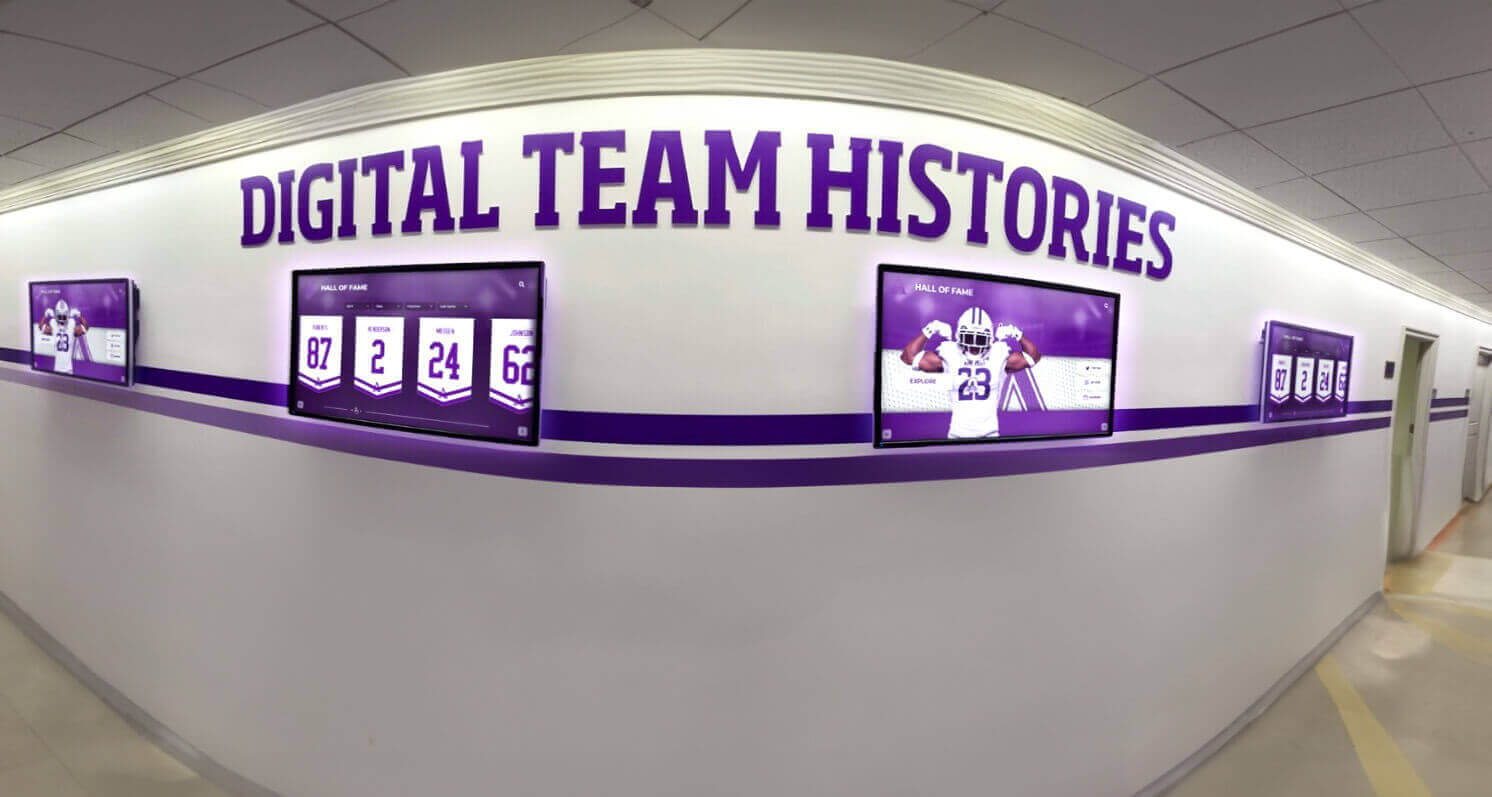
Digital displays address these limitations while creating new opportunities for meaningful recognition. Modern interactive touchscreen systems allow schools to showcase unlimited athletes without physical space constraints, update information instantly, include photos and videos, and provide rich storytelling that brings athletic achievements to life.
Benefits of Digital All-State Plaque Displays
Unlimited Recognition Capacity
One of the most compelling advantages of digital displays is the ability to recognize every All-State athlete in your school’s history without worrying about wall space. Traditional plaques require physical room that eventually runs out, forcing difficult decisions about which athletes to feature prominently and which to relegate to storage or less visible locations.
With digital systems, you can honor decades of All-State athletes, organizing them by sport, year, decade, or achievement level. Students and visitors can easily search and filter to find specific athletes, creating a comprehensive athletic legacy that would be impossible with physical plaques alone.
Rich Multimedia Content
Digital displays transform recognition from simple name-and-year listings into compelling stories. Each All-State athlete can have a dedicated profile featuring:
- High-quality photos from their playing days
- Career statistics and achievements
- Video highlights of key performances
- Quotes from coaches and teammates
- Information about college recruitment and athletic careers
- Updates on professional achievements or community contributions
This multimedia approach helps current students see All-State athletes as real people with inspiring journeys, not just names on a wall. It creates stronger connections between past and present, motivating today’s athletes to pursue their own All-State recognition.
Traditional Plaques
- Limited to name, year, sport
- Small or no photos
- Fixed information
- Space constraints
- Expensive to update
Digital Displays
- Comprehensive profiles
- Multiple photos and videos
- Easy updates
- Unlimited capacity
- Instant modifications
Instant Updates and Corrections
When a student earns All-State honors, schools naturally want to recognize them immediately. Traditional plaques require ordering, engraving, and installation—a process that can take weeks or months. During this delay, the achievement feels less immediate and the athlete may miss seeing their recognition before graduation or moving to college.
Digital displays eliminate these delays entirely. Administrators can add new All-State athletes within minutes of the announcement, ensuring timely recognition that celebrates achievement when it matters most. This immediacy also extends to corrections—if there’s a typo, wrong date, or updated information, fixes happen instantly rather than requiring new engraving or replacement plaques.
Enhanced Engagement Through Interactivity
Interactive touchscreen displays transform passive viewing into active exploration. Students, families, and visitors can browse All-State athletes by sport, search for specific names, compare achievements across different eras, and discover connections between current and past athletes.

This interactivity increases engagement time and creates memorable experiences. Rather than glancing at a wall of plaques, visitors spend meaningful time exploring athletic history, reading stories, and sharing discoveries with others. The interactive element makes recognition more accessible and interesting, particularly for younger students who expect digital experiences.
Cost-Effective Long-Term Solution
While digital displays require an upfront investment, they often prove more cost-effective over time than traditional plaque systems. Consider the cumulative costs of individual engraved plaques over 10-20 years, including professional engraving, installation, wall modifications to accommodate growth, and eventual replacement as plaques age or styles change.
Digital systems eliminate ongoing engraving costs, allow unlimited additions without space modifications, maintain consistent appearance indefinitely, and can incorporate other recognition content beyond just All-State athletes. Schools can use the same display system for Hall of Fame members, alumni spotlights, team championships, and individual records, maximizing the value of the investment.
Technology Behind All-State Digital Displays
Understanding the technology helps schools make informed decisions about implementing digital recognition systems. Modern All-State plaque displays typically utilize commercial-grade touchscreen technology designed for high-traffic public environments.
Display Hardware
Professional digital recognition systems use commercial displays rated for continuous operation in public spaces. Unlike consumer TVs, these displays are built for:
- Extended operation: Running 8-12 hours daily without overheating
- Durability: Withstanding frequent touches without screen degradation
- Bright environments: Maintaining visibility in well-lit gymnasiums and hallways
- Professional appearance: Sleek, integrated designs that complement school aesthetics
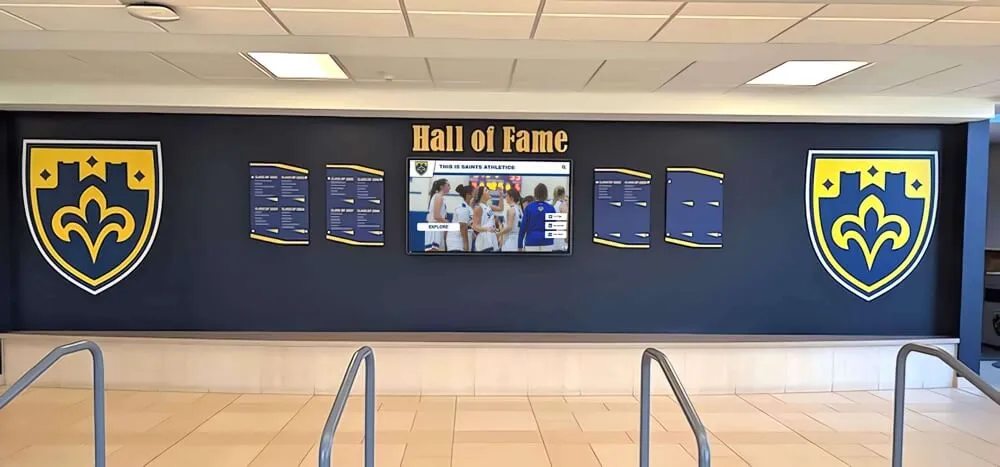
Screen sizes typically range from 43 inches for hallway installations to 75+ inches for prominent gymnasium displays. Many schools choose multiple smaller displays throughout the building rather than a single large screen, creating recognition touchpoints in various high-traffic areas.
Cloud-Based Content Management
Modern digital recognition systems utilize cloud-based content management that allows administrators to update displays from any device with internet access. This cloud approach offers several advantages:
Remote administration: Update displays from your office, home, or anywhere with internet connectivity. There’s no need to physically access the display to make changes.
Multi-display coordination: Manage multiple displays across different buildings or even different campuses from a single interface, ensuring consistent information and coordinated updates.
Collaboration: Allow multiple staff members access with appropriate permissions—athletic directors can add athletes, communications staff can refine content, and principals can review before publication.
Backup and security: Cloud systems automatically back up content and protect data, eliminating risks of lost information if hardware fails.
User Interface Design
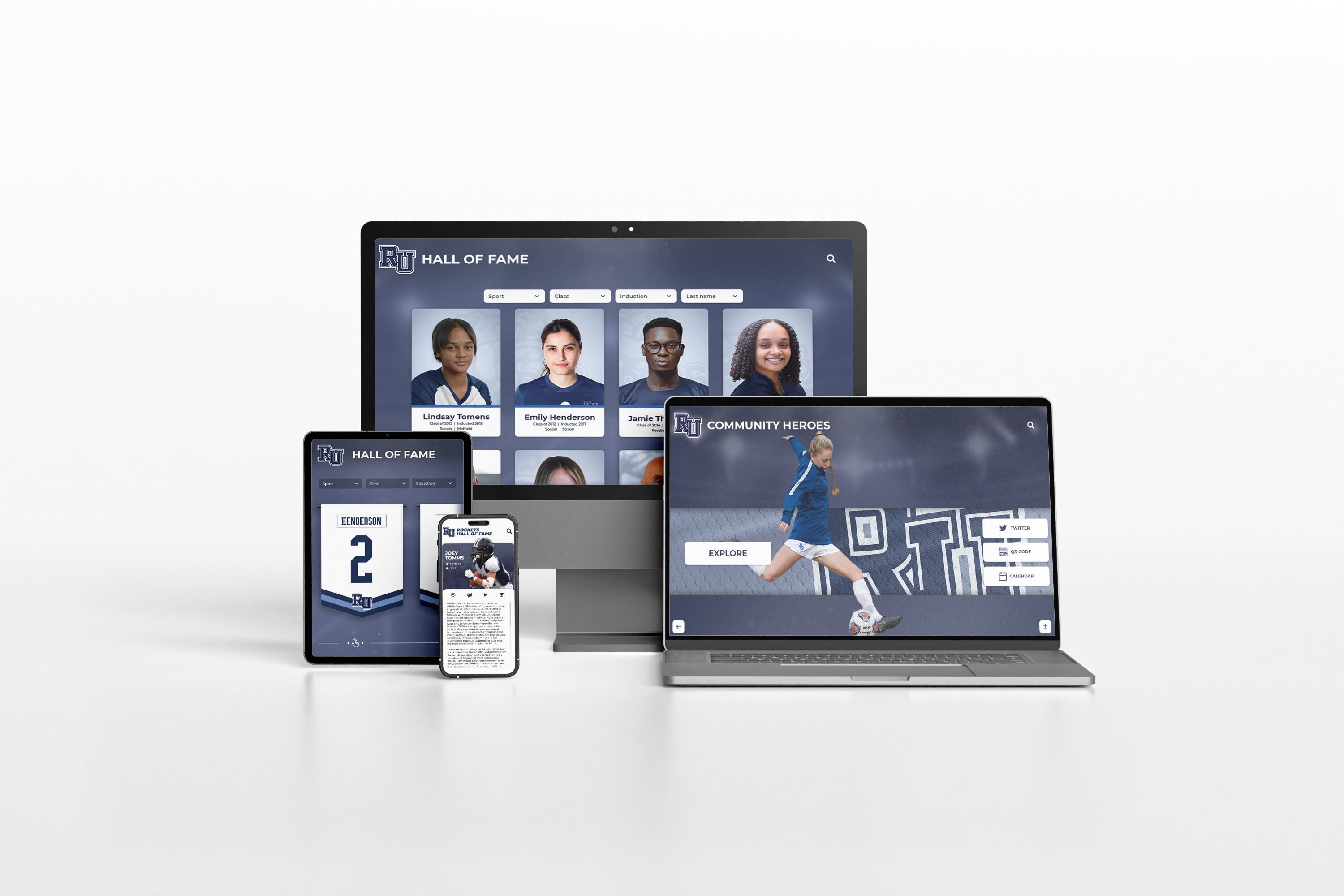
The most effective All-State digital displays feature intuitive interfaces that visitors of all ages can navigate easily. Key interface elements include:
- Clear navigation menus organized by sport and year
- Search functionality to find specific athletes quickly
- Large, readable text suitable for viewing from several feet away
- High-contrast color schemes that work in varying light conditions
- Simple touch gestures that feel natural and responsive
Professional systems like those from Rocket Alumni Solutions are specifically designed for athletic recognition, with interfaces optimized for showcasing All-State athletes and other honorees effectively.
Implementing All-State Digital Displays in Your School
Successfully implementing digital All-State recognition requires thoughtful planning and execution. Here’s a practical approach that helps schools maximize the impact of their investment.
Planning Phase
Begin by assessing your school’s specific needs and goals for All-State recognition:
Content inventory: Compile a list of all All-State athletes in your school’s history, gathering names, years, sports, and any available photos or information. This inventory helps you understand the scope of content you’ll be displaying.
Location selection: Identify high-visibility locations where All-State athletes should be recognized. Common locations include gymnasium lobbies, main hallways near athletic facilities, and trophy case areas. Consider traffic patterns, lighting conditions, and power availability.
Stakeholder input: Involve athletic directors, coaches, administrators, and even students in the planning process. Their perspectives help ensure the final system meets everyone’s needs and garners strong support.
Budget development: Determine available funding and explore options like athletic booster club support, alumni donations, or capital improvement budgets. Digital recognition systems represent significant investments that often require creative funding strategies.
Content Development
Creating compelling content for each All-State athlete takes time but dramatically increases the system’s impact:
Photo collection: Gather action shots, team photos, and individual portraits of All-State athletes. Reach out to local newspapers, yearbook archives, and families for historical photos of athletes from earlier eras.
Story writing: Develop brief profiles highlighting each athlete’s journey to All-State recognition. Include memorable performances, challenges overcome, and post-high school achievements. These stories transform names into inspiring narratives.
Information verification: Confirm all dates, statistics, and facts before publication. Errors undermine credibility and require corrections that could have been avoided with careful review.
Ongoing updates: Plan how you’ll maintain current information, including adding new All-State athletes promptly and updating profiles with post-graduation achievements.
Installation and Launch
Professional installation ensures your digital display operates reliably and looks polished:
Technical setup: Work with your technology provider to properly mount displays, ensure stable power supplies, configure network connections, and test all functionality before the official launch.
Content population: Load all athlete profiles, photos, and information into the content management system. Test navigation and search features to ensure everything works smoothly.
Soft launch: Begin with a limited preview allowing staff and select students to use the system and provide feedback. Address any usability issues or content gaps before the full launch.
Grand opening event: Host a dedication ceremony highlighting the new All-State recognition system. Invite current athletes, alumni, and community members to celebrate both the technology and the honorees it showcases.
Ongoing Maintenance
Digital displays require minimal ongoing maintenance, but certain practices ensure long-term success:
- Regular content updates: Add new All-State athletes promptly and update existing profiles with new achievements or information
- Display cleaning: Clean touchscreens periodically to maintain clarity and responsiveness
- Performance monitoring: Check that displays are operating correctly and address any technical issues promptly
- Content review: Periodically review older content to ensure accuracy and identify opportunities for enhancement
Combining Traditional and Digital Recognition
Many schools find that the most effective approach combines traditional and digital elements, creating a comprehensive recognition system that honors the past while embracing the future.
Complementary Approaches
Rather than viewing digital displays as replacements for traditional plaques, consider them as complementary recognition methods that each serve specific purposes:
Traditional plaques for permanence: Continue using engraved plaques for the most prestigious honors, such as Hall of Fame inductees or retired jersey numbers. The permanence and prestige of physical plaques remains meaningful for these highest honors.
Digital displays for comprehensive recognition: Use interactive displays to recognize all All-State athletes, providing the detailed information and unlimited capacity that physical plaques cannot offer.
Historical preservation: Display original trophy plaques in cases as historical artifacts while featuring digital versions with enhanced information and photos. This approach honors tradition while providing modern accessibility.
This hybrid approach respects tradition while leveraging technology’s advantages, often satisfying both traditionalists who value physical plaques and modernizers who see digital displays’ benefits.
Transitioning to Digital Recognition
Schools transitioning from purely traditional recognition to digital systems benefit from a phased approach:
Phase 1: Install digital displays while maintaining existing physical plaques. This allows everyone to experience the digital system’s benefits without feeling that history is being erased.
Phase 2: Focus digital content on recent All-State athletes where photos and detailed information are readily available. This creates high-quality content that demonstrates the system’s value.
Phase 3: Gradually add historical athletes to the digital system as time and resources allow. Consider making this an ongoing project where student interns or volunteers research and document athletic history.
Phase 4: As space needs grow and physical plaques age, some schools eventually consolidate to primarily digital recognition while preserving select traditional plaques as historical displays.
Implementation Success Factors
- Clear vision: Establish specific goals for what the All-State recognition system should accomplish
- Stakeholder buy-in: Secure support from administrators, coaches, athletes, and alumni before proceeding
- Quality content: Invest time in creating compelling profiles rather than just basic listings
- Strategic placement: Position displays where they'll be seen and used regularly
- Ongoing commitment: Plan for continuous updates and maintenance to keep the system relevant
Measuring Success and Impact
After implementing an All-State digital display, schools should assess its effectiveness and impact:
Engagement Metrics
Modern digital systems often include analytics showing how visitors use the displays:
- Interaction frequency: How often people use the touchscreen
- Session duration: How long visitors spend exploring content
- Popular content: Which athletes or sections receive the most attention
- Search patterns: What terms people search for most frequently
These metrics help schools understand what content resonates and identify opportunities for improvement.
Qualitative Feedback
Beyond numbers, gather feedback from key stakeholders:
Student athletes: Do current athletes feel motivated by seeing All-State recognition? Do they express interest in earning similar honors?
Alumni: How do former All-State athletes respond when they see themselves featured? Do they share the display with family and friends?
Visitors: What reactions do prospective students and their families have during campus tours? Does the recognition system positively influence their perception of the school’s athletic program?
Community members: Does the broader community view the digital recognition system as an enhancement to the school’s facilities and commitment to honoring achievement?
Program Impact
Consider broader effects on your athletic program and school culture:
- Has All-State recognition become more visible and celebrated within the school community?
- Do more families attend games or events where All-State achievements are highlighted?
- Has the visibility of past All-State athletes inspired increased participation in athletics?
- Does the recognition system facilitate stronger connections between current athletes and alumni?

Beyond All-State: Expanding Digital Recognition
Once schools experience the benefits of digital displays for All-State athletes, many expand recognition to include additional honors and achievements:
Comprehensive Athletic Recognition
Use your digital platform to recognize:
- Team championships: Feature state championship teams with rosters, photos, and season highlights
- Individual records: Showcase school records in various events and statistics, including when they were set and by whom
- Conference honors: Recognize all-conference selections, player of the year awards, and other league honors
- Academic all-state: Highlight student-athletes who excel academically and athletically
- Coaches: Honor coaching achievements, milestones, and contributions to the program
Multi-Sport Integration
Rather than separate displays for each sport, create an integrated system allowing visitors to explore all athletics:
- Browse by sport to see All-State athletes in specific programs
- View all honors earned in a particular year
- Discover athletes who earned All-State recognition in multiple sports
- Compare achievements and records across different eras
This comprehensive approach creates a complete picture of athletic excellence at your school.
Cross-Recognition with Hall of Fame
Many schools integrate All-State displays with broader Hall of Fame programs. Digitizing plaques and trophies creates a unified recognition system where visitors can explore:
- All-State athletes who later earned Hall of Fame induction
- Hall of Fame members’ All-State achievements during their student years
- Connections between different honorees through teams, coaches, or eras
- Complete athletic legacies that span from All-State recognition through Hall of Fame status
Addressing Common Concerns
Schools considering digital All-State displays often have questions and concerns about making the transition:
“Will digital displays honor tradition?”
Digital recognition systems don’t replace tradition—they enhance and extend it. By featuring more athletes with richer information than physical plaques allow, digital displays actually do more to honor individual achievements and school athletic legacy. Many schools maintain traditional plaques for the most prestigious honors while using digital systems for broader recognition, respecting the past while embracing modern capabilities.
“What about technology reliability?”
Commercial-grade displays designed for public installations are highly reliable. Unlike consumer electronics, these systems are built for continuous operation in demanding environments. Most schools report minimal technical issues, and professional installation with proper support ensures that any problems are addressed quickly. The technology has matured significantly, with many installations running successfully for years.
“How do we fund digital displays?”
Schools fund digital recognition through various sources:
- Capital improvement budgets for facilities enhancement
- Athletic booster club fundraising and donations
- Alumni contributions, particularly from former All-State athletes
- Memorial gifts honoring coaches or athletic legends
- Technology grants and educational funding programs
- Corporate sponsorships from local businesses
Many schools find that alumni spotlight programs and recognition initiatives generate enthusiasm that makes fundraising more successful.
“What if we don’t have photos of older athletes?”
Schools often find creative solutions for historical content:
- Yearbook archives frequently contain team photos and individual portraits
- Local newspaper archives may have action shots from competitions
- Alumni and families often preserve photos they’re willing to share
- Silhouettes or sport-specific graphics can represent athletes where photos are unavailable
- Student research projects can involve contacting alumni to gather information and images
The key is starting with what you have and continuously enhancing content as new information becomes available.
“How much time does content management require?”
After initial setup, ongoing management is minimal. Adding new All-State athletes typically takes 15-30 minutes per profile, depending on how much information and media you include. Most schools designate one person (often an athletic director or athletic secretary) to manage updates, with most work occurring once or twice per year as new All-State selections are announced. The time investment is comparable to or less than coordinating traditional plaque ordering and installation.
The Future of Athletic Recognition
Digital recognition technology continues evolving, with new capabilities enhancing how schools honor All-State athletes:
Emerging Features
Recent innovations in digital recognition include:
QR code integration: Displays can show QR codes that visitors scan to access extended content on their phones, including full athletic statistics, additional photos, and links to highlight videos.
Social media connections: Systems can pull in social media posts from honorees, showing current updates from former All-State athletes about their college athletics, professional careers, or community involvement.
Virtual tours: Remote visitors can explore recognition displays through online interfaces, allowing alumni across the country to visit their school’s All-State recognition virtually.
Video testimonials: Athletes can record short video messages about what All-State recognition meant to them, creating powerful motivational content for current students.
Interactive timelines: Advanced displays can show athletic program evolution over decades, placing individual All-State achievements in broader historical context.
Personalization and AI
Future systems may incorporate:
- Personalized recommendations suggesting related athletes or content based on what visitors view
- Automated content enhancement using AI to colorize historical photos or improve image quality
- Natural language search allowing visitors to ask questions like “Show me all soccer All-State athletes” or “Who earned All-State honors in 2015?”
- Predictive analytics identifying patterns in All-State achievement and program success
These capabilities will make digital recognition increasingly engaging and informative while remaining easy to manage and maintain.
Taking the Next Step
If your school is ready to explore digital All-State plaque displays, here’s how to begin:
Research solutions: Explore different digital recognition systems, focusing on those specifically designed for athletic and school environments rather than generic display solutions.
Schedule demonstrations: Many providers, including Rocket Alumni Solutions, offer virtual demonstrations or site visits showing how their systems work and appear in real school environments.
Assess your content: Inventory your All-State athletes and available information to understand the scope of your recognition needs.
Build your coalition: Identify key supporters who can champion the project, help with fundraising, and assist with content development.
Develop a proposal: Create a clear proposal outlining benefits, costs, implementation timeline, and ongoing management plans to present to decision-makers.
Start planning: Once approved, work with your chosen provider to plan installation, develop content, and prepare for launch.
Conclusion
All-State athletes represent exceptional achievement that deserves exceptional recognition. Digital displays transform how schools honor these elite athletes, providing unlimited capacity for recognition, rich multimedia content that tells compelling stories, instant updates that celebrate achievements immediately, interactive experiences that engage visitors, and cost-effective long-term solutions that grow with your program.
While traditional plaques served schools well for generations, digital technology offers capabilities that better match both the significance of All-State achievement and the expectations of modern students and visitors. Schools implementing digital All-State displays consistently report higher engagement, stronger connections between current athletes and alumni, and recognition systems that truly honor athletic excellence.
The transition to digital recognition doesn’t mean abandoning tradition—it means enhancing how you honor tradition and making athletic achievement more accessible, engaging, and inspiring for everyone in your school community. Whether you’re recognizing five All-State athletes or five hundred, digital displays ensure that every honoree receives the recognition they deserve and that their achievements continue inspiring future generations of student-athletes.
Ready to transform how your school recognizes All-State athletes? Explore modern digital recognition solutions that honor tradition while embracing the future, creating lasting legacies that inspire excellence for years to come.































