Athletic displays in schools do more than decorate hallways. They tell incoming freshmen what the program has accomplished, give current athletes a record to chase, and show alumni returning for a reunion that their names and seasons are still honored. The question most athletic directors face is not whether to invest in displays — it is figuring out what each space actually needs and how physical and digital elements work together to cover every audience, every location, and every content type the program produces.
This guide answers that question zone by zone. It covers what belongs in gyms, lobbies, and athletic hallways, which display formats work best where, how athletic history displays and hall of fame displays relate to each other, and how to build a planning process that keeps your displays current and credible for years after installation.
Whether you are starting from scratch after a facility renovation, filling in gaps left by years of deferred maintenance on recognition content, or making the case to administration for a full display upgrade, the decisions you make today shape what your program looks like to every student, coach, parent, and visitor who walks through your building.

A hall of fame display screen integrated into permanent wall tile creates a flagship recognition space that pairs institutional permanence with updatable digital content
What Effective Athletic Displays Actually Communicate
Before choosing screen sizes, mural vendors, or display formats, define what your athletic displays need to say and to whom. Most school athletic display programs serve four distinct audiences with different needs.
Current athletes need motivational context — records to break, predecessors to surpass, a visual sense of the program’s competitive ceiling. Records boards, championship banners, and rotating digital recognition give them concrete goals rather than abstract encouragement.
Visitors and recruits encounter your lobby and gym before they meet your coaches. A lobby with organized, professional athletic recognition communicates that the program takes achievement seriously. A lobby with a dusty trophy case and blank walls says the opposite, regardless of what the coaches say in the recruiting visit.
Alumni return for reunions, homecomings, and games. They are looking for proof that the program remembers them. A letterwinner roll, a hall of fame display, or a touchscreen archive that surfaces their senior season is the difference between alumni who donate to the booster fund and alumni who feel their years were erased.
Administrators and community members read athletic displays as a signal of institutional pride. Recognition content in hallways and lobbies demonstrates that the school is actively honoring its student-athletes — a visible return on the investment that parents, boosters, and taxpayers make in athletic programs.
Each audience has a primary location: recruits and administrators engage with lobby displays, current athletes live in the hallways and gym, and alumni engage most with permanent recognition like hall of fame walls and championship archives.
Athletic Displays for School Gyms
The gym is where competition happens. It is also where community gathers — for games, pep rallies, ceremonies, and events that put your program in front of its largest audiences. Gym athletic displays should reflect that dual purpose.
Gym Wall Murals and Mascot Graphics
A full-wall mural behind the home bleachers is the highest-impact single display investment most schools can make. A strong mascot image, school name, and colors visible from every seat in the gym sets the competitive tone for every home event. Opposing teams see it when they walk in. Officials see it. Local media sees it. Recruits see it. The return on a quality gym mural is measured in years, not months.
Side walls and corridor walls adjacent to the gym are appropriate for content that doesn’t require front-of-house visibility: retired jersey numbers, championship banners organized by sport and year, and individual award recognition panels.
Championship Banners and Retired Numbers
Overhead championship banners are a hallmark of well-run athletic programs. They are visible from anywhere in the gym, require no staff to maintain, and carry real permanence — a banner from 1987 is still there in 2026. Retire jersey numbers on the same wall or adjacent wall section, keeping the display cohesive rather than scattering recognition across unrelated zones.
Keep banner formats uniform. Mixed sizes, mismatched fonts, and inconsistent colors from different eras undermine the credibility of even a strong championship record. If your banner collection has grown organically over decades, a renovation that standardizes the format is worth the investment.
Records Boards at Competition Venues
A sport-specific records board placed at or near the venue where the sport competes is one of the most effective motivational athletic displays a school can install. The swimming records board belongs near the natatorium. Wrestling records go in the mat room corridor. Basketball all-time leaders belong in the gym lobby or just inside the main gym entrance.
Athletes pass these displays daily. They know exactly whose name is on them. A junior who can see that the school record in the 400m is within reach because it is posted in the corridor every day before practice has a concrete target that abstract coaching motivation cannot replicate.
For sports that generate frequent records — track and field, swimming, cross country, weightlifting — digital records boards eliminate the reprinting cost and delay that physical painted boards create every time a record falls.
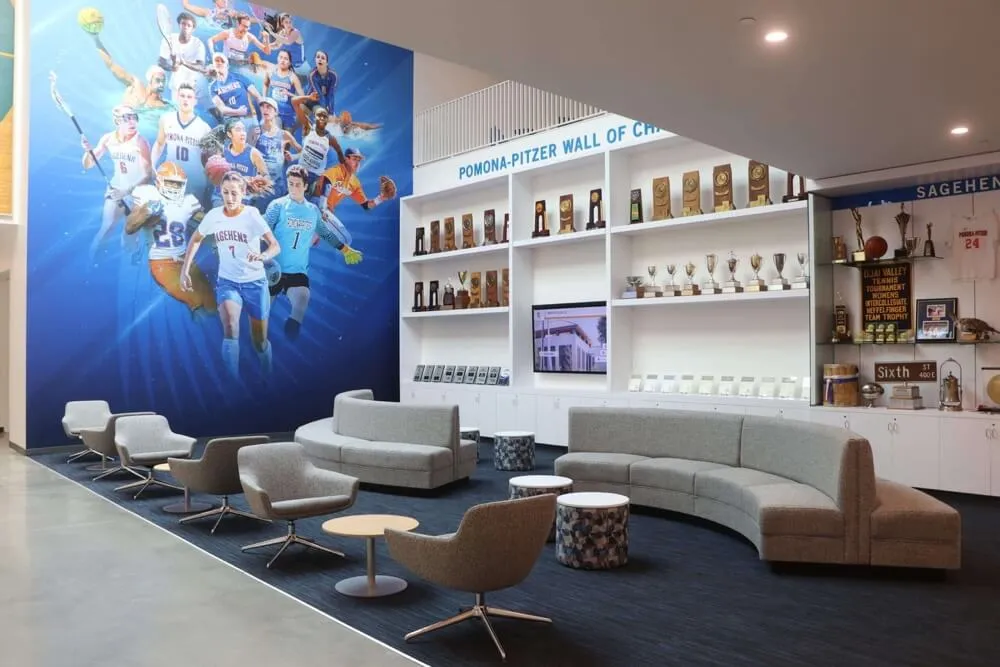
Athletic lounges and trophy alcoves adjacent to the gym can hold championship hardware, records boards, and team history panels that the main gym floor cannot accommodate
Athletic Displays for School Lobbies
The main lobby is the first athletic display surface every visitor encounters. It is also the space most likely to be seen by people who are not athletic program regulars — parents at registration, prospective families on tours, community members attending non-athletic events.
What the Lobby Should Anchor
Lobby athletic displays should lead with the program’s most significant, permanent achievements: state and regional championships, athletic hall of fame inductees, and retired honors that communicate the program’s competitive history to someone who has never attended a game.
A wall of honor with plaques, shields, or framed panels covering the program’s landmark moments gives the lobby gravitas. It should not feel like a storage room for everything that wouldn’t fit elsewhere. Curate the lobby content around achievement that would mean something to a first-time visitor without explanation.
For programs with a well-developed hall of fame, the lobby is the natural location for the primary display. A hall of fame display in the lobby places the program’s highest individual recognition exactly where it receives the most visibility — available to alumni, families, administrators, and recruits without requiring anyone to navigate to a secondary corridor.
Donor and Community Recognition in the Lobby
Lobbies are also appropriate for donor recognition and community acknowledgment. Families who funded facility upgrades, scholarship donors, and program benefactors fit naturally in the main lobby without pulling that content into sport-specific hallways. Recognizing the people who hold school communities together — whether through financial support or institutional service — reinforces that the school values contribution across multiple forms.
Keep donor recognition visually separate from athletic achievement recognition so each reads clearly on its own. A combined wall that mixes championship plaques and donor names without a clear organizational system does neither category justice.
Interactive Touchscreens in the Lobby
A digital touchscreen in the lobby extends what physical panels can display without replacing them. A touchscreen holding every athlete profile going back to the program’s founding, searchable by sport, year, and name, turns the lobby into an exploratory archive that rewards any visitor willing to spend five minutes with it.
For accessibility, touchscreen displays should meet WCAG 2.2 AA standards. Accessible touchscreen display design for public-facing school installations outlines the specific compliance requirements — contrast ratios, touch target sizes, alternative navigation — that ensure digital recognition is accessible to all community members, not just able-bodied users.
Athletic Displays for Hallways
Athletic hallways are the most consistently viewed display real estate in most school buildings. Athletes and coaches pass through them every day. Parents and fans use them on event days. Recruits walk them during official visits. Designing hallway athletic displays well means accounting for daily viewing conditions — short viewing windows, quick reads, content organized by sport or program — rather than trying to replicate the comprehensive coverage of a lobby or gym.
Zone the Hallway by Sport
Assign sections of athletic hallways to specific programs. The wrestling corridor covers mat history, state qualifiers, and coaching records. The girls’ lacrosse section covers tournament runs, lacrosse awards and individual recognition, and season milestones. The baseball alcove covers conference titles, all-state selections, and alumni who went on to play at the next level.
Zoning makes the hallway readable. A student walking to the weight room knows immediately what they are looking at and why it belongs in that section. An alum returning for a reunion can navigate directly to their sport without scanning the entire corridor.
Lead with Murals, Fill with Recognition
A sport-specific mural or graphic wall creates the visual anchor for each hallway section. Plaques, framed team photos, records boards, and individual award panels fill in the detail below or alongside it. The mural stops foot traffic. The recognition content rewards the person who stops.
Schools that install recognition content without a mural anchor often find that the individual plaques and frames read as clutter rather than curation. The mural provides the visual hierarchy that makes the surrounding recognition elements legible.
Keep Records Boards Current
A records board last updated three seasons ago tells current athletes that no one is paying attention. Designate a specific staff member responsible for updating records boards within two weeks of a record being broken. Define what documentation is required — game film, official timing, official scoring — before a record is posted. This process protects the display’s credibility and prevents disputes.
Shield-style honor boards organized by sport create a legible hallway recognition system that scales as new honorees are added each year
Choosing Your Display Format: Physical vs. Digital
Most effective athletic display programs combine physical and digital elements rather than committing entirely to one approach. The table below outlines when each format is the stronger choice.
| Format | Best For | Ongoing Cost | Update Process |
|---|---|---|---|
| Wall murals and graphics | Mascot identity, zone anchors, gym backdrop | Low after install | Repaint or reprint for major changes |
| Plaques and shields | Hall of fame inductees, permanent championships | Low after install | Physical replacement per addition |
| Printed records boards | Sport-specific records, team leaderboards | Medium (reprints when records fall) | Physical replacement |
| Non-interactive digital screens | Current season content, event schedules, rotating recognition | Medium (hardware + content management) | Remote update via CMS |
| Interactive touchscreens | Full archival depth, alumni browsing, searchable rosters | Higher initial investment | Remote update via CMS; no reprinting |
Programs with high-volume records sports — track and field, swimming, cross country — typically find that digital records boards pay for themselves within two to three seasons in reprinting costs avoided. Programs with stable, long-established hall of fame content may find that physical plaques combined with a single digital touchscreen covers all their needs.
Athletic History Displays and Hall of Fame Displays
Two content categories deserve their own planning attention: athletic history displays and hall of fame displays. Both are archives, but they serve different functions.
Athletic History Displays
An athletic history display tells the program’s story across time — founding year, early championship runs, coaching milestones, facility development, enrollment growth, and the evolution of competitive success. It gives current athletes a sense of continuity with the program’s past and gives alumni a narrative they recognize.
Physical athletic history displays typically use a timeline format running along a corridor wall or behind a trophy case. Text panels, archival photography, and key artifact reproductions anchor the major eras. Digital versions allow deeper browsing — click through from a 1994 state championship to the full roster, or from a coaching tenure overview to individual season records.
Volunteer recognition displays and community archive formats offer parallels worth studying: the challenge of making historical depth accessible to a casual visitor without requiring a docent is the same whether the archive covers athletic history or community service programs.
Hall of Fame Displays
A hall of fame display is a curated subset of the athletic history archive — the individuals and teams selected through a formal induction process as representing the program’s highest individual and team achievement. The selection process gives the display its credibility. The physical or digital format gives it visibility.
Hall of fame displays work in lobbies, primary corridors, and gymnasium entries. They should be clearly labeled as induction-based recognition to distinguish them from records boards and championship archives, which display achievement without a selection filter. Perfect attendance and recognition display planning illustrates the planning principles that apply to any recognition display program: define eligibility criteria, establish a consistent review process, and design the display to accommodate growth without requiring a full redesign every induction cycle.
For programs building or rebuilding a hall of fame recognition program, the display itself is often easier to finalize than the nomination and induction process. Get the process right first — eligibility criteria, selection committee structure, notification and induction ceremony protocol — then design the display to accommodate the class size and category structure your process produces.

Shield-format hall of fame inductee panels create a timeless recognition system that integrates cleanly into corridor displays alongside sport-specific achievement records
5-Step Planning Process for School Athletic Displays
Step 1: Audit Every Current Display Zone
Walk your facility — gym, lobby, every athletic corridor — with a camera and a measuring tape. Document what exists: murals, plaques, trophy cases, records boards, screens, and any recognition content in place. Note what is accurate, what is outdated, and what is completely absent. This audit takes three to four hours and eliminates the guesswork that makes display projects run over budget and behind schedule.
Photograph every existing display surface with measurements. You will reference these photos dozens of times during vendor conversations and design reviews.
Step 2: Define Goals by Zone
Write one sentence per display zone that states what that space needs to communicate and to whom. Examples: “The lobby display must communicate the program’s championship history to first-time visitors including recruits and prospective families.” “The wrestling corridor must motivate current athletes with daily exposure to records and all-state achievement.”
Clear goal statements prevent scope creep and give you a filter for every design decision that follows. When a vendor proposes something that does not serve the stated goal for a zone, you can decline it without lengthy debate.
Step 3: Inventory Your Content
List every piece of recognition content you currently have access to and every piece you want to add. Championship records, team photos, all-state lists, records data, coaching tenure information, hall of fame inductee profiles, alumni achievement documentation — collect it all before finalizing any display design.
Content gaps discovered during installation are expensive and embarrassing. A display that goes live half-complete because the historical data was not organized ahead of time undermines the credibility of the whole project. Build your content inventory before you finalize any vendor contract.
Step 4: Select Formats per Zone and Budget
Using the format comparison table above, assign each zone a display approach. Most zones benefit from at least two formats working together — a mural plus digital screen in the lobby, a records board plus shield panels in the hallway. Set a per-zone budget before vendor outreach so you can evaluate proposals against a fixed number rather than an open-ended ask.
For programs connecting athletic displays to broader spirit programming, spirit week themes and athletic recognition activities offer context on how display environments influence event energy — active display content creates event programming hooks that blank walls cannot provide.
For programs tracking post-season achievement and regional recognition that feeds recognition content, understanding playoff structures and achievement documentation provides a model for how schools systematically capture the achievement data that powers records boards and hall of fame nominations.
Step 5: Assign Ownership and an Update Schedule
A school athletic display that is not updated loses credibility within one season. Before finalizing any design, identify who is responsible for each content category, how frequently updates occur, and what process a new athletic director or administrator would follow three years from now.
For digital systems, cloud-based content management means updates happen remotely without vendor involvement. For physical systems, build in a physical update budget — reprinting, remounting, new plaque orders — that is funded as a recurring annual line item, not a one-time capital expense.

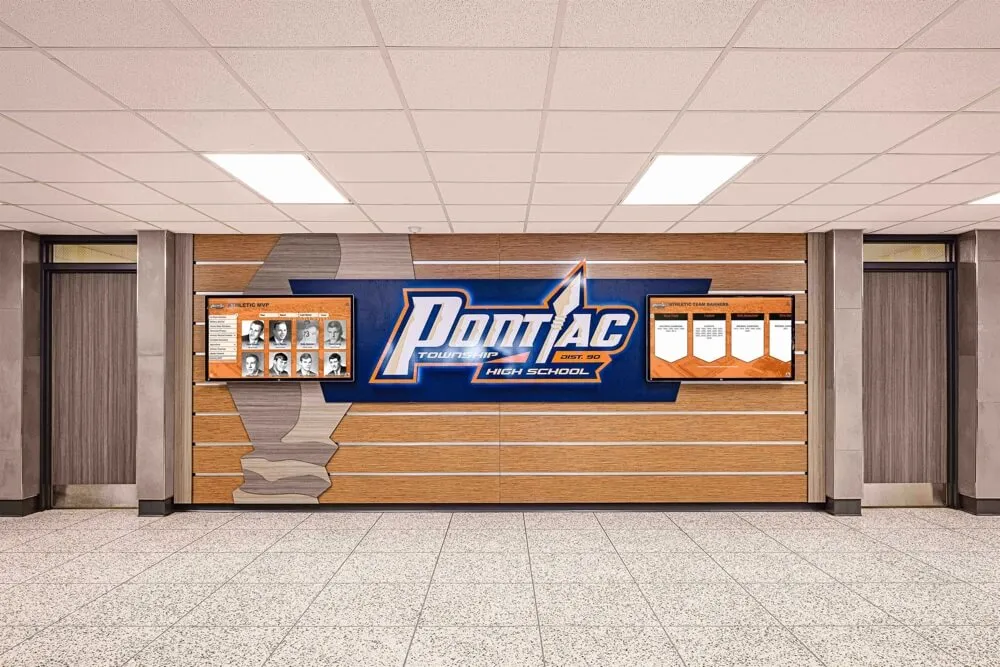
A sport-specific mural paired with a digital records board gives current athletes a daily visual benchmark while keeping historical data current without physical reprinting
Digital Touchscreen Athletic Displays: Depth Without Wall Space
Physical displays define identity and atmosphere. Digital touchscreens add archival depth that no physical wall can match at any reasonable scale.
A single interactive touchscreen in a lobby or athletic corridor can hold every athlete profile going back to the program’s founding, organized by sport, year, and name. It can display full championship rosters with team photos rather than a single engraved plaque. It can surface a letterwinner roll that would require forty linear feet of wall space to display physically. And it updates instantly when a new record is set, a new inductee is added, or a current-season roster changes.
For programs combining touchscreen recognition with traditional display formats — the approach that gives most school athletic display programs their strongest coverage across all audiences and content types — schedule a demo with Rocket Alumni Solutions to see how interactive recognition walls are built and managed. Rocket designs and installs touchscreen athletic displays for schools and universities, including digital hall of fame walls, interactive records boards, and archival recognition systems that pair with physical display elements to cover every zone and content type without requiring unlimited wall space.
The combination of a strong physical mural, organized recognition panels, and a single interactive touchscreen handles every audience: the recruit who wants to see the program at a glance, the alum who wants to find their senior season, the current athlete who wants to see who holds the record they are chasing, and the administrator who wants to show a first-time visitor what the program has built.
Frequently Asked Questions
What is the difference between an athletic history display and a hall of fame display?
An athletic history display covers the full arc of the program — founding, milestones, coaching tenures, facility history, and achievement across all eras. A hall of fame display is a curated subset: individuals and teams selected through a formal induction process as representing the program’s highest achievement. Both belong in a complete athletic recognition program; they are complementary rather than interchangeable.
Where should records boards be placed in a school?
Sport-specific records boards work best at or near the competition venue for each sport. Swimming records near the natatorium, wrestling records near the mat room, track and field records near the fieldhouse entrance. Athletes see them daily on the way to practice, and the sport context makes the records meaningful rather than abstract.
Should athletic displays be physical or digital?
Most effective programs use both. Physical murals, plaques, and championship banners provide permanence and atmosphere that digital screens alone cannot replicate. Digital screens — interactive or non-interactive — provide updatable, searchable content depth that physical walls cannot match. The right balance depends on your budget, your content volume, and how frequently your recognition content changes.
How often do athletic displays need to be updated?
Records boards should be updated within two weeks of a record falling. Hall of fame inductee panels should be added within the same academic year as induction. Current-season content on digital screens should be updated at least weekly in-season. Lobby and hallway murals typically remain stable for five to ten years unless the brand or facility changes significantly.
Conclusion
Athletic displays are one of the few investments in a school facility that pays dividends across every constituency simultaneously — current athletes are motivated, alumni feel honored, visitors are impressed, and administrators have visible evidence of a program that takes achievement seriously.
Start by auditing what you have and defining what each zone needs to communicate. Inventory your content before you design anything. Choose formats that match your update capacity and your budget. Assign clear ownership for every content category. Phase the installation so early wins in high-visibility zones build internal support for the full project.
Physical murals, records boards, trophy cases, and digital touchscreens each have a role. The programs that get this right use all of them, keep them current, and plan from the start for what the display will look like in ten years, not just at the ribbon cutting.
Schedule a demo with Rocket Alumni Solutions to see how schools are combining interactive touchscreen recognition walls with traditional display elements to build athletic recognition environments that hold a full program history without running out of wall space.































