Schools across the nation face a critical challenge: how to honor decades of achievement without running out of wall space, budget, or administrative bandwidth. Traditional trophy cases overflow, plaques crowd hallways until there’s nowhere left to mount them, and updating recognition displays becomes an exhausting process requiring weeks of coordination and hundreds of dollars per addition. Meanwhile, the achievements that shaped your institution’s legacy sit forgotten in storage boxes, invisible to the students who need inspiration most.
Digital hall of fame software solves these fundamental limitations by transforming recognition from a space-constrained, labor-intensive burden into a dynamic, engaging experience that grows effortlessly with your institution. The right platform enables schools to honor unlimited achievements through interactive touchscreen displays, maintain comprehensive online archives accessible to alumni worldwide, update content instantly without fabrication delays, and create compelling multimedia tributes that static plaques simply cannot match.
But with numerous vendors claiming to offer superior solutions, how do you identify which platform truly delivers on these promises? This comprehensive guide examines the eight best digital hall of fame software options for schools in 2026, comparing features, pricing, ease of use, and real-world performance to help you select the ideal recognition solution for your institution’s unique needs.
Understanding Digital Hall of Fame Software: What Schools Really Need
Before diving into specific platforms, it’s essential to understand what separates truly effective digital hall of fame software from generic digital signage that merely rotates slides but provides none of the depth, interactivity, or management flexibility that recognition demands.
Core Capabilities That Define Quality Recognition Software
Effective hall of fame platforms must deliver specific capabilities that generic solutions lack:
Comprehensive Content Management: Administrative interfaces that enable non-technical staff to create detailed profiles, upload multimedia content, organize recognition by category, schedule featured content, and manage permissions—all without requiring IT intervention for routine updates.
Interactive User Experiences: Touchscreen interfaces providing intuitive navigation, powerful search functionality, filtering by achievement type or year, related content recommendations, and engagement patterns that keep visitors exploring for minutes rather than seconds.
Multimedia Storytelling: Support for high-resolution photography, video integration, detailed biographical narratives, achievement timelines, statistics and records, and social sharing capabilities that extend recognition beyond physical installations.
Scalable Architecture: Cloud-based platforms that accommodate unlimited inductees without performance degradation, support multiple displays across campuses, enable remote management from any device, and grow seamlessly as recognition programs expand over decades.
Professional Presentation: Customizable templates maintaining brand consistency, responsive layouts adapting to various screen sizes and orientations, accessibility features ensuring inclusive experiences, and polished aesthetics reflecting institutional quality standards.
Schools implementing solutions lacking these foundational capabilities inevitably face frustration—content becomes difficult to manage, users find navigation confusing, displays feel amateurish, and the promised transformation never materializes. The best digital hall of fame software integrates these elements seamlessly, creating recognition experiences that genuinely honor achievement while engaging communities effectively.
Why Generic Digital Signage Falls Short for Recognition
Many schools initially consider repurposing existing digital signage platforms for recognition applications, reasoning that any system displaying content on screens should work for halls of fame. This approach consistently disappoints because digital signage and recognition software serve fundamentally different purposes requiring distinct capabilities.
Digital signage prioritizes scheduled content rotation—announcements, advertisements, event promotions—displayed passively to viewers who receive information but don’t interact. These platforms excel at broadcasting messages but lack the profile-based organization, search functionality, multimedia depth, and interactive discovery that recognition demands.
In contrast, purpose-built recognition software centers on exploration and engagement. Visitors actively search for personal connections, browse achievement categories, discover unexpected stories, and spend significant time exploring content that interests them. This fundamental difference in use cases requires completely different software architectures, content organization approaches, and user interface designs.
Schools attempting to force recognition into generic signage platforms struggle with content management complexity, limited interactivity that fails to engage users, inability to showcase comprehensive profiles effectively, and administrative frustration that leads to outdated content and abandoned systems. Purpose-built recognition software addresses these challenges specifically because these platforms were designed from the ground up for celebration, preservation, and engagement rather than simple message display.
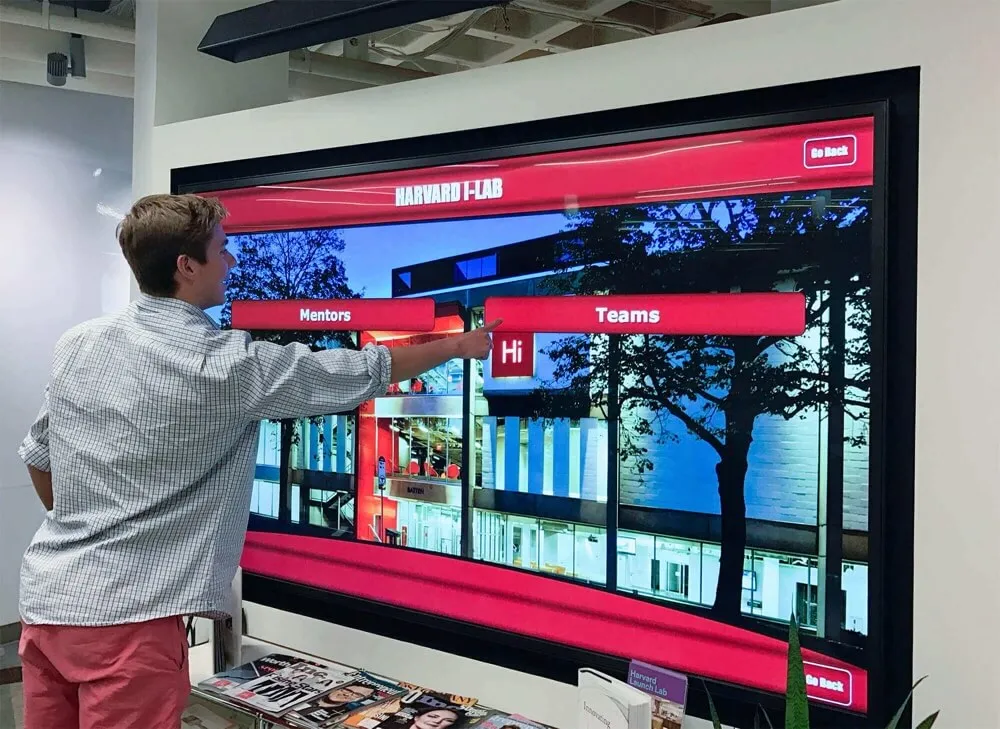
1. Rocket Alumni Solutions: The Gold Standard for School Recognition
When schools demand comprehensive functionality, exceptional ease of use, and proven results across thousands of installations, Rocket Alumni Solutions consistently emerges as the definitive choice for digital hall of fame implementation.
Why Rocket Leads the Industry
Rocket Alumni Solutions didn’t simply adapt existing technology for recognition—the company built its entire platform specifically to solve the unique challenges schools face when celebrating achievement comprehensively. This singular focus delivers advantages that generalist competitors struggle to match.
Purpose-Built Recognition Architecture: Unlike platforms adapted from corporate digital signage or generic content management, Rocket’s software was architected specifically for showcasing individuals, teams, achievements, and institutional history. Every feature—from profile templates to search algorithms—reflects deep understanding of what schools need and how community members engage with recognition content.
Unmatched Ease of Use: School administrators consistently praise Rocket’s administrative interface for its intuitive design requiring no technical training. Staff create comprehensive profiles using simple forms, upload media through drag-and-drop interfaces, schedule featured content with calendar tools, and manage entire recognition programs confidently without IT department involvement for routine tasks.
Unlimited Scalability Without Performance Loss: Rocket’s cloud architecture handles thousands of detailed profiles without slowing search speed, degrading interface responsiveness, or compromising media quality. Schools honoring 50 inductees today can confidently grow to 5,000 over decades knowing their investment scales effortlessly without platform migrations or expensive upgrades.
Comprehensive Multimedia Support: Rocket enables rich storytelling through multiple high-resolution photos per profile, embedded video content, detailed achievement narratives, career timelines, statistics and records, document attachments, and social sharing features extending recognition reach beyond physical installations to alumni networks worldwide.
Professional Customization: Every Rocket installation reflects individual school branding through customizable color schemes matching institutional identity, template designs maintaining visual consistency, logo integration establishing ownership, and typography selections ensuring readability while conveying appropriate tone.
Responsive Multi-Platform Access: Content created once displays perfectly across large-format touchscreen installations, desktop web browsers, tablets, and smartphones—responsive design automatically adapts layouts maintaining optimal experiences regardless of viewing device or screen size.
Robust Analytics and Insights: Schools gain unprecedented understanding of recognition engagement through detailed viewing data, search pattern analysis, popular content identification, peak usage times, and trend analysis informing continuous improvement. These metrics demonstrate value while revealing opportunities to enhance effectiveness.
Dedicated Support and Training: Rocket provides comprehensive onboarding ensuring successful launches, ongoing technical assistance resolving issues quickly, content strategy consultation helping schools maximize impact, and continuous platform improvements adding capabilities over time without additional licensing costs.
Rocket’s Comprehensive Feature Set
Rocket’s platform includes everything schools need for recognition excellence:
- Profile Management System: Create unlimited profiles with customizable templates for athletes, teams, alumni, donors, faculty, and special achievements—each maintaining consistent structure while accommodating unique content needs
- Media Library: Centralized asset management organizing photos, videos, documents, and logos with tagging, searching, and version control preventing chaos as libraries grow
- Smart Navigation: Intuitive search with auto-complete suggestions, year/class browsing, achievement category filtering, sport or activity organization, keyword search across all content, and “related profiles” recommendations encouraging extended exploration
- Content Scheduling: Plan featured content appearing on specific dates, coordinate recognition with events or reunions, automate seasonal rotations, and maintain fresh homepage experiences without manual intervention
- Web Portal Integration: Every physical display connects to comprehensive web portals enabling alumni worldwide to explore recognition, submit profile updates, share achievements via social media, and maintain lifelong connections regardless of geographic distance
- Mobile Optimization: Smartphone and tablet interfaces provide full functionality in responsive layouts optimized for touch interaction on small screens
- Accessibility Compliance: Screen reader support, keyboard navigation, text magnification, high-contrast modes, and other accommodations ensuring inclusive experiences for all community members
- Multi-Display Management: Single content platform powers unlimited physical installations across campuses—update once, publish everywhere instantly
- Permission Controls: Role-based access determines who can view drafts, edit content, approve submissions, publish updates, and access analytics—appropriate delegation without security risks
Pricing and Implementation
Rocket Alumni Solutions offers transparent pricing based on school size and requirements. Complete solutions including software licensing, professional hardware recommendations, installation coordination, comprehensive training, and ongoing support typically range from $15,000-$35,000 for initial single-display implementations, with additional displays adding $8,000-$15,000 each when connecting to existing content platforms.
While representing significant initial investment, comprehensive cost analysis demonstrates favorable long-term value compared to traditional recognition approaches. Schools eliminate ongoing plaque fabrication costs ($100-$400 per inductee), installation labor, storage space requirements, and the opportunity costs of administrators spending hours on recognition updates that Rocket completes in minutes.
Most institutions achieve cost parity with traditional approaches within 3-4 years while gaining unlimited capacity, instant updates, comprehensive multimedia capabilities, and engagement levels that static displays never approach.
Why Schools Choose Rocket
Rocket Alumni Solutions has powered over 1,000 installations across all 50 states because the platform delivers on every promise while exceeding expectations for ease of use, reliability, and impact. Schools implementing Rocket consistently report that recognition becomes a point of institutional pride rather than administrative burden, engagement metrics demonstrate genuine community interaction, and the flexibility to honor all achievement types creates more inclusive celebration of excellence.
When schools demand the best digital hall of fame software without compromise, Rocket Alumni Solutions represents the gold standard against which all alternatives must be measured.

2. MailChimp and Canva: DIY Design Tools (Not Recommended for Digital Halls of Fame)
Some schools consider using general-purpose design tools like MailChimp and Canva to create recognition content displayed on generic screens. While these platforms excel at their intended purposes—email marketing and graphic design respectively—they fundamentally lack the architecture, interactivity, and management capabilities that effective digital halls of fame require.
Why MailChimp Doesn’t Work for Recognition
MailChimp provides sophisticated email marketing automation but offers nothing schools need for interactive recognition displays. The platform cannot power touchscreen interfaces, lacks profile-based content organization, provides no search or filtering capabilities, and was never designed for the real-time interactive exploration that recognition demands.
Schools attempting to use MailChimp for recognition find themselves limited to creating static email campaigns announcing new inductees—a legitimate communication use case but entirely separate from operating interactive hall of fame displays. MailChimp serves valuable purposes in school communications but simply isn’t recognition software in any meaningful sense.
The Canva Limitation for Hall of Fame Content
Canva offers accessible graphic design tools enabling non-designers to create attractive posters, social media graphics, and presentations. Some schools use Canva to design recognition graphics displayed on digital signage screens, essentially creating digital versions of traditional posters rotated automatically.
This approach provides marginal improvement over printed posters but misses the transformative potential of true digital recognition:
No Interactivity: Canva graphics display passively like traditional posters—viewers can look but cannot search, filter, or explore related content through touch interaction
Limited Storytelling: Design templates accommodate limited text and single images per graphic—insufficient space for comprehensive achievement narratives, career timelines, or multiple photos telling complete stories
Content Management Complexity: Each inductee requires separate graphic design in Canva, manual export, upload to digital signage platform, and scheduling configuration—this workflow becomes unsustainable as recognition programs grow to hundreds or thousands of honorees
No Search or Discovery: Visitors cannot find specific individuals, browse by achievement type, filter by year, or discover unexpected connections—they simply watch predetermined slide rotations providing no agency or personalization
Poor Scalability: As recognition grows, slide rotations become impossibly long—displaying 500 inductees for 10 seconds each requires 83 minutes per complete cycle, ensuring most honorees remain invisible most of the time
When Design Tools Have Limited Value
Canva and similar design platforms provide value for specific recognition-adjacent use cases including social media graphics announcing new inductees, ceremony programs and printed materials, email headers for recognition communications, website banners promoting hall of fame programs, and promotional materials encouraging nominations.
These legitimate applications complement comprehensive recognition software rather than replacing it. Schools using Rocket Alumni Solutions often also use Canva for promotional graphics while relying on purpose-built software for the actual interactive recognition experience.
Attempting to build complete digital halls of fame using only design tools and generic signage represents false economy—apparent cost savings evaporate through administrative inefficiency, limited functionality, poor user engagement, and eventual platform abandonment when maintainability breaks down.
3. Gipper: Social Media Graphics Platform (Limited Recognition Functionality)
Gipper specifically targets school athletic departments with tools for creating branded social media graphics, game day promotions, and athlete recognition posts. While valuable for communications, Gipper lacks the comprehensive capabilities schools need for complete digital hall of fame implementations.
Gipper’s Intended Purpose and Strengths
Gipper excels at its core mission: helping athletic departments create professional social media content quickly and consistently. The platform provides sport-specific templates, roster integration, scheduling tools, and analytics helping schools strengthen their social media presence and celebrate student athletes effectively online.
For schools prioritizing social media recognition and communications, Gipper delivers genuine value through time-saving templates, brand consistency, and streamlined workflows that improve content quality while reducing administrative burden.
Why Gipper Falls Short for Comprehensive Halls of Fame
Despite its strengths in social media content creation, Gipper lacks essential capabilities for operating interactive hall of fame displays:
No Interactive Touchscreen Software: Gipper creates static graphics for social sharing but provides no touchscreen interface enabling visitors to explore content interactively through search, filtering, or discovery
Limited Profile Depth: Templates accommodate brief athlete information suitable for social posts but lack the comprehensive profile capabilities halls of fame require—detailed biographies, career timelines, multiple photos and videos, achievement documentation, and rich multimedia storytelling
Social-First Rather Than Archive-First: Gipper prioritizes current season promotion rather than comprehensive historical preservation—its architecture reflects social media’s temporal nature rather than hall of fame permanence and depth
No Web Portal for Alumni Access: Content remains within the Gipper platform or exported to social channels—no public-facing web portal enables alumni to explore recognition independently or access comprehensive profile archives
Content Management for Posts Not Exhibits: Administrative workflows optimize quick graphic creation for immediate posting rather than the detailed curation, organization, and long-term management that hall of fame programs demand
Complementary Rather Than Comprehensive
Schools using comprehensive recognition software like Rocket Alumni Solutions often also use Gipper for social media content creation—the platforms serve complementary purposes with minimal overlap. Rocket provides the permanent, comprehensive, interactive hall of fame while Gipper helps promote recognition and celebrate current athletes through timely social posts.
However, schools considering Gipper as their primary or sole recognition platform will find critical gaps in functionality, scalability, and interactivity that prevent comprehensive hall of fame implementation. For social media needs, Gipper excels; for complete recognition systems, purpose-built hall of fame software remains essential.

4. Rise Vision: Digital Signage with Limited Recognition Capabilities
Rise Vision provides cloud-based digital signage software targeting schools, businesses, and organizations needing to display announcements, schedules, and informational content across multiple screens. While functional for general signage purposes, Rise Vision lacks the specialized features that effective hall of fame implementations require.
Rise Vision’s Core Functionality
Rise Vision offers straightforward digital signage capabilities including content scheduling, template-based slide creation, multi-screen management, cloud-based administration, and integration with data sources like Google Calendar, weather, and RSS feeds. Schools use Rise Vision effectively for lobby announcements, cafeteria menus, event calendars, and emergency notifications.
The platform emphasizes simplicity and affordability, appealing to schools seeking basic signage capabilities without complex feature sets or steep learning curves. For organizations needing traditional broadcast-style information display, Rise Vision provides reasonable value at competitive prices.
Recognition Limitations of Digital Signage Platforms
As with other digital signage solutions, Rise Vision’s architecture fundamentally misaligns with hall of fame requirements:
Slideshow Display Rather Than Interactive Exploration: Content rotates automatically through predetermined sequences—visitors watch passively rather than actively searching, filtering, or exploring based on personal interests
Limited Content Depth Per Display: Signage templates optimize brief information display suitable for announcements but inadequate for comprehensive achievement profiles requiring detailed narratives, multiple media elements, and extensive documentation
No Search or Navigation: Visitors cannot find specific individuals, browse achievement categories, or discover related content—they simply observe whatever slide happens to be displaying when they pass, missing most content entirely
Basic Content Management: Administrative interfaces support simple slide creation for announcements but lack the profile-based organization, media libraries, templating systems, and relationship management that recognition databases require
Minimal User Engagement: Signage viewing patterns measure seconds per display—completely inadequate for recognition requiring extended engagement, deep exploration, and meaningful discovery that create impact and inspiration
When Rise Vision Serves School Needs
Schools operating comprehensive recognition systems like Rocket Alumni Solutions might also use Rise Vision or similar signage platforms for traditional announcements, schedules, and informational displays—completely separate use cases requiring different technology.
However, schools considering Rise Vision as their hall of fame solution should understand they’re implementing digital slideshow displays rather than interactive recognition systems. The difference between passively viewing rotating slides and actively exploring comprehensive profiles represents a fundamental gap in functionality, engagement, and ultimate value.
Recognition deserves purpose-built software designed specifically for celebration, preservation, and discovery. General digital signage serves legitimate purposes but doesn’t replace specialized recognition platforms any more than spreadsheets replace student information systems despite both displaying data on screens.
5. NoviSign: Corporate Digital Signage (Not Optimized for Schools)
NoviSign provides digital signage software primarily targeting corporate environments, retail locations, and commercial applications. While technically capable of displaying content in school settings, NoviSign lacks the education-specific features, recognition-focused functionality, and institutional understanding that school hall of fame implementations demand.
NoviSign’s Corporate Focus
NoviSign excels in corporate contexts where priorities include advertising display, employee communications, visitor wayfinding, meeting room scheduling, and corporate branding. The platform provides sophisticated content management, multi-location coordination, real-time data integration, and professional presentation suitable for business environments.
Organizations operating signage across office locations, retail chains, or hospitality properties benefit from NoviSign’s robust feature set designed explicitly for these commercial applications.
Education and Recognition Gaps
Schools considering NoviSign encounter several challenges stemming from its corporate rather than educational focus:
Complex Feature Set Optimized for Business: Corporate signage requires capabilities schools don’t need while lacking education-specific functions schools expect—this mismatch creates unnecessary complexity without delivering recognition value
No Interactive Recognition Capabilities: Like other signage platforms, NoviSign displays content rather than enabling user exploration—no search, filtering, profile navigation, or discovery features that interactive halls of fame require
Pricing Structure for Commercial Users: Commercial signage pricing assumes business budgets and use cases—schools often find better value from education-focused platforms understanding institutional constraints and priorities
Limited Education-Specific Support: Support teams understand corporate signage challenges but lack deep familiarity with school recognition programs, institutional decision-making, educational stakeholder needs, or the unique dynamics of school communities
Minimal Higher Ed or K-12 Case Studies: NoviSign’s marketing emphasizes retail, corporate, and hospitality success rather than educational testimonials—limited evidence of effectiveness in school recognition specifically
Commercial Solutions for Commercial Problems
NoviSign serves corporate clients effectively by solving problems those organizations actually face. Schools represent fundamentally different institutions with distinct cultures, constraints, priorities, and community dynamics requiring purpose-built solutions reflecting those realities.
Schools seeking digital hall of fame software should prioritize platforms designed explicitly for educational recognition rather than adapting corporate tools built for entirely different contexts and use cases. The specialized requirements of school recognition—comprehensive profiles, historical preservation, alumni engagement, student inspiration, and community celebration—demand software architected specifically for these purposes rather than generic signage repurposed from commercial applications.
6. ScreenCloud: Simple Signage with Basic Functionality
ScreenCloud provides straightforward digital signage software emphasizing ease of setup, simple content management, and affordable pricing. While accessible for basic signage needs, ScreenCloud lacks the advanced features, recognition-specific capabilities, and comprehensive functionality that effective hall of fame systems require.
ScreenCloud’s Simplicity-First Approach
ScreenCloud prioritizes getting content on screens quickly and easily, targeting organizations seeking basic signage without complex requirements. The platform supports common content types including images, videos, web pages, social media feeds, and simple data integrations—sufficient for lobby displays, informational screens, and basic announcements.
Schools attracted to ScreenCloud’s low barrier to entry appreciate straightforward setup, minimal training requirements, and pricing models accessible to tight budgets. For institutions needing simple content rotation without interactive features or sophisticated management, ScreenCloud provides entry-level functionality.
Recognition Capability Limitations
ScreenCloud’s simplicity-first approach inherently limits recognition applications:
Basic Display Without Interactivity: Content rotates through playlists automatically—no touchscreen interface, search functionality, user navigation, or interactive exploration that differentiate modern recognition from static displays
Limited Content Organization: File-based content management lacks the profile structure, relationship mapping, achievement categorization, and database organization comprehensive recognition requires
Minimal Multimedia Integration: While supporting images and videos, ScreenCloud lacks recognition-specific features like profile templates, achievement timelines, statistics display, biographical layouts, and coordinated multimedia presentations
Basic Administrative Tools: Content management suits simple slide creation but lacks bulk upload capabilities, template systems, approval workflows, version control, and advanced features required for managing thousands of detailed profiles
No Recognition-Specific Features: Missing entirely are athlete profile templates, alumni database integration, achievement categorization, team roster management, records tracking, historical timelines, and other recognition-focused capabilities
Limited Analytics: Basic viewing data lacks the detailed engagement metrics, search analysis, content popularity tracking, and behavioral insights that optimize recognition effectiveness
Appropriate Use Cases for Simple Signage
ScreenCloud serves legitimate purposes for schools needing basic digital signage—cafeteria menus, daily announcements, event calendars, directional information, and simple promotions. These straightforward applications match ScreenCloud’s capabilities well without demanding features the platform doesn’t provide.
However, comprehensive digital halls of fame represent significantly more complex implementations requiring sophisticated content management, interactive user experiences, extensive multimedia support, and scalable architectures that simple signage platforms fundamentally lack.
Schools serious about recognition transformation should invest in purpose-built hall of fame software rather than attempting to force-fit basic signage into recognition roles for which it was never designed and cannot effectively serve.

7. Yodeck: Budget Digital Signage (Minimal Recognition Features)
Yodeck positions itself as affordable digital signage software for budget-conscious organizations, emphasizing low subscription costs and basic functionality. While economical for simple signage applications, Yodeck provides minimal capabilities for comprehensive recognition implementations.
Yodeck’s Budget-Friendly Positioning
Yodeck attracts price-sensitive customers through free starter plans and low-cost subscriptions enabling basic content display on consumer-grade hardware. The platform supports essential signage functions—image and video playlists, simple scheduling, remote management, and basic content widgets.
Organizations prioritizing low cost over advanced functionality consider Yodeck for straightforward applications where sophisticated features, recognition capabilities, and comprehensive support aren’t required.
Why Budget Platforms Struggle with Recognition
Yodeck and similar budget signage platforms lack essential recognition capabilities:
No Interactive Capabilities: Displays show rotating content without touchscreen interfaces, search functionality, user-controlled navigation, or interactive discovery features
Minimal Profile Support: Content management uses simple media files rather than structured profiles with biographical data, achievements, statistics, timelines, and comprehensive information
Limited Multimedia Features: Basic image and video display lacks recognition-specific presentations like athlete profile layouts, achievement highlight reels, statistical comparisons, and rich multimedia integration
Basic Administrative Interface: Simple file management replaces the comprehensive content management systems, template libraries, workflow controls, and scalability features that recognition programs require
Consumer Hardware Orientation: Yodeck’s emphasis on inexpensive consumer equipment rather than commercial-grade displays raises reliability, longevity, and presentation quality concerns for prominent institutional installations
Minimal Support Infrastructure: Budget pricing necessitates limited support—fine for simple signage but problematic when schools need guidance implementing complex recognition programs
No Education Focus: Generic signage software lacks understanding of school recognition needs, institutional decision dynamics, educational stakeholder requirements, or community engagement patterns
False Economy in Recognition Investments
Schools occasionally attempt to reduce recognition costs by using budget signage platforms, reasoning that any digital display beats traditional plaques. This thinking underestimates the total cost of ineffective solutions.
Budget platforms create hidden costs through administrative frustration consuming staff time, limited capabilities failing to deliver promised benefits, poor user engagement undermining recognition value, eventual platform abandonment wasting initial investment, and recognition program failure damaging institutional credibility.
Comprehensive recognition software represents significant investment but delivers proportionate value through unlimited capacity, effortless management, excellent user engagement, long-term scalability, and community impact justifying costs. Budget signage offers apparent savings but delivers minimal recognition functionality—ultimately costing more through failed implementation and wasted opportunity.
Schools should match software investment to recognition importance. Institutions valuing comprehensive achievement celebration deserve purpose-built platforms delivering genuine transformation rather than cosmetic upgrades of limited practical value.
8. 22Miles: Enterprise Wayfinding and Signage (Corporate-Scale Solutions)
22Miles provides enterprise-level wayfinding and digital signage software primarily targeting large corporate campuses, healthcare systems, higher education, and government facilities requiring sophisticated navigation solutions and centralized content management across extensive installations.
22Miles Enterprise Capabilities
22Miles excels in complex wayfinding scenarios where visitors need interactive maps, directory services, room booking displays, and navigation assistance across sprawling facilities. The platform provides robust content management, multi-location coordination, real-time data integration, and enterprise-grade security suitable for large organizational deployments.
Higher education institutions use 22Miles for campus wayfinding, building directories, event spaces, and visitor navigation—legitimate applications where the platform’s sophisticated capabilities deliver value justifying enterprise pricing and implementation complexity.
Recognition Application Considerations
Schools evaluating 22Miles for hall of fame purposes should consider several factors:
Enterprise Complexity for Recognition Simplicity: 22Miles’ sophisticated wayfinding and directory features exceed what most K-12 recognition programs require—this complexity creates unnecessary implementation burden, longer training requirements, and ongoing management overhead without corresponding recognition benefits
Wayfinding Focus Rather Than Recognition Specialization: The platform’s architecture prioritizes navigation, directories, and information display rather than the profile-based content, interactive exploration, and achievement celebration central to halls of fame
Enterprise Pricing for Enterprise Solutions: 22Miles pricing reflects comprehensive enterprise feature sets—schools seeking primarily recognition functionality often find better value from specialized platforms focusing specifically on celebration rather than navigation
Higher Ed Rather Than K-12 Orientation: 22Miles’ education focus targets universities and colleges rather than K-12 schools—this higher education emphasis creates potential misalignment with secondary school needs, stakeholder expectations, and community dynamics
Implementation Resources Required: Enterprise platforms typically require professional implementation services, IT department involvement, ongoing technical resources, and sophisticated support infrastructure—realistic for large universities but potentially overwhelming for smaller institutions
When Enterprise Solutions Make Sense
Large higher education institutions implementing comprehensive campus wayfinding systems alongside recognition displays might effectively use 22Miles for coordinated solutions—the platform’s sophistication justifies its complexity when solving genuinely complex problems across large campuses.
However, K-12 schools and smaller institutions seeking primarily recognition functionality typically find purpose-built hall of fame software like Rocket Alumni Solutions delivers better value through specialized features, education-focused design, straightforward implementation, manageable complexity, and pricing appropriate to recognition-specific needs.
Matching solution scale to problem scope ensures schools invest appropriately rather than over-buying enterprise capabilities for recognition applications that specialized platforms serve more effectively at better value.

Key Features Comparison: What Matters Most for Schools
When evaluating digital hall of fame software, schools should prioritize features delivering the greatest recognition value while ensuring long-term success and sustainability.
Essential Features Every School Needs
Intuitive Content Management: Non-technical administrators must create comprehensive profiles, upload multimedia content, organize achievements, and publish updates confidently without IT intervention for routine tasks. Complex systems requiring technical expertise for basic operations create dependency, frustration, and eventual abandonment.
Comprehensive Profile Capabilities: Platforms must support detailed biographical narratives, multiple high-resolution photos, embedded video content, achievement timelines, statistics and records, document attachments, and social sharing features. Limited content depth undermines recognition value and fails to honor achievements appropriately.
Interactive Touchscreen Interface: Users must search for specific individuals, filter by achievement category, browse by year or class, discover related content, and navigate intuitively without instructions. Passive slideshow displays waste recognition’s interactive potential and fail to engage audiences effectively.
Unlimited Scalability: Platforms must accommodate unlimited inductees without performance degradation, storage constraints, or pricing penalties. Recognition programs grow continuously across decades—software must scale effortlessly without requiring platform migrations or expensive upgrades.
Professional Customization: Displays must reflect school branding through customizable colors, logos, typography, and templates while maintaining professional polish. Generic appearance undermines recognition dignity and institutional pride.
Web and Mobile Access: Alumni worldwide must explore recognition through responsive web portals and mobile interfaces extending reach beyond physical installations to distributed communities. Campus-only access limits engagement opportunities and alumni connection.
Robust Analytics: Administrators need viewing data, search patterns, content popularity, engagement duration, and trend analysis demonstrating value, identifying opportunities, and supporting continuous improvement. Limited metrics prevent optimization and hamper value demonstration.
Reliable Support: Responsive technical assistance, comprehensive training resources, implementation guidance, and ongoing platform improvements ensure long-term success. Poor support transforms technology investments into frustrations regardless of feature quality.
Features That Add Value But Aren’t Essential
Some capabilities provide additional value without being strictly necessary for effective recognition:
- Advanced permission controls for distributed content creation
- API access enabling custom integrations
- Multi-language support for international schools
- Offline display functionality for locations without reliable connectivity
- Advanced analytics with custom reporting
- Donor recognition and fundraising features
- Integration with alumni database systems
Schools should prioritize core recognition capabilities before seeking advanced features—master fundamental effectiveness before adding sophisticated enhancements.
Features That Sound Good But Add Little Value
Vendors sometimes emphasize capabilities that provide minimal practical benefit for school recognition:
- Excessive social media integration beyond basic sharing
- Real-time data dashboards with information overload
- Complex workflow systems creating unnecessary process burden
- Advanced design tools duplicating functionality available elsewhere
- Features borrowed from corporate contexts with limited school relevance
Focus on recognition fundamentals rather than being distracted by feature lists emphasizing capabilities you won’t actually use.
Implementation Considerations: Setting Your Digital Hall of Fame Up for Success
Selecting optimal software represents only part of recognition transformation—successful implementation requires systematic approaches addressing technology, content, and community dimensions.
Planning Your Recognition Program
Before implementation begins, establish clear vision and structure including recognition categories (athletics, academics, alumni, donors, staff, special achievements), selection criteria ensuring fairness and consistency, nomination and approval processes, initial inductee identification, and launch timeline with defined milestones.
Strategic planning prevents scope creep, maintains focus, and ensures recognition programs reflect institutional values while serving community needs effectively. Schools implementing comprehensive digital hall of fame systems benefit from systematic approaches rather than ad hoc decisions made during rushed implementations.
Content Development Strategy
Recognition value depends entirely on content quality and completeness. Develop systematic approaches to gathering biographical information and achievement details, obtaining high-resolution photography, creating compelling narratives, organizing historical materials, securing necessary permissions, and establishing sustainable update workflows.
Many schools implement phased content development beginning with recent well-documented achievements before systematically expanding historical coverage. This approach delivers quick wins providing immediate value while distributing extensive content creation workload across manageable timeframes.
Consider engaging students in content development as authentic learning experiences—journalism students write profiles, photography students create portraits, history students research historical achievements, and digital media students produce videos. This approach reduces staff burden while providing valuable educational opportunities.
Hardware and Display Selection
Software capabilities matter only when paired with appropriate hardware. Select commercial-grade touchscreen displays rated for continuous operation, appropriate screen sizes for viewing distances and locations, mounting solutions ensuring security and accessibility, network connectivity providing reliable performance, and installation approaches maintaining professional appearance.
Work with experienced vendors who understand education environments, provide comprehensive installation services, offer training and support, and maintain relationships beyond initial sales. Schools implementing best touchscreens for schools succeed by matching hardware to software capabilities and institutional needs.
Training and Adoption
Technology succeeds when users embrace it. Provide comprehensive administrator training ensuring confident content management, develop content standards maintaining quality consistency, establish update schedules preventing stagnation, create documentation supporting ongoing operations, and celebrate early wins building momentum and support.
Recognition programs fail not from software limitations but from inadequate training, unclear responsibilities, insufficient time allocation, or lack of institutional commitment. Success requires viewing implementation as program launch rather than technology installation—cultural change supported by appropriate tools rather than technology alone.
Measuring and Demonstrating Value
Establish metrics demonstrating recognition impact and justifying ongoing investment through engagement analytics quantifying interaction, stakeholder feedback revealing perceptions and satisfaction, achievement impact correlating recognition with program participation, alumni engagement measuring connection strength, and community visibility tracking recognition awareness.
Regular assessment enables continuous improvement while providing evidence supporting program value, budget requests, and expansion opportunities. Strong data prevents recognition programs from being viewed as discretionary expenses vulnerable during budget constraints.

Making the Right Choice for Your School: Decision Framework
With eight platforms examined, how should schools decide which digital hall of fame software best serves their specific needs and circumstances?
Assessing Your Recognition Priorities
Begin by clarifying what matters most to your institution:
Comprehensive Functionality: Schools demanding complete feature sets, extensive customization, unlimited scalability, and future-proof platforms should prioritize purpose-built recognition software like Rocket Alumni Solutions over limited signage alternatives.
Ease of Use: Institutions with limited IT resources and non-technical administrators need intuitive interfaces, straightforward workflows, minimal training requirements, and excellent support—capabilities distinguishing specialized platforms from generic solutions.
Budget Constraints: While cost matters, evaluate total cost of ownership including ongoing operational expenses, administrative time requirements, platform limitations necessitating eventual replacement, and opportunity costs of ineffective solutions versus upfront investment in comprehensive platforms delivering lasting value.
Long-Term Vision: Consider recognition programs decades ahead rather than immediate needs only. Platforms must accommodate continuous growth, evolving expectations, emerging technologies, and sustained institutional commitment without requiring disruptive migrations or expensive upgrades.
Questions to Ask Vendors
Evaluate platforms systematically through targeted questions revealing capabilities and limitations:
- How many detailed profiles can the system manage without performance degradation?
- What administrative training is required for routine content updates?
- How do users search for specific individuals and filter by achievement type?
- What multimedia formats are supported and how are they integrated into profiles?
- Can alumni access recognition remotely through web and mobile interfaces?
- How often is software updated and are upgrades included in licensing?
- What analytics reveal recognition engagement and effectiveness?
- What support is provided during implementation and ongoing operations?
- How do you handle content migration from existing recognition systems?
- What percentage of clients remain active after 5+ years?
Vendor responses reveal whether platforms deliver on promises, support school needs effectively, and represent sound long-term investments.
Warning Signs Indicating Poor Fit
Certain indicators suggest platforms won’t meet school recognition needs:
- Emphasis on signage features rather than recognition capabilities
- Generic product targeting multiple industries without education focus
- Limited customer testimonials from schools specifically
- Reluctance to discuss total cost of ownership transparently
- Minimal support infrastructure or poor responsiveness
- Limited profile depth and multimedia integration
- No interactive touchscreen interface or search functionality
- Aggressive discounting suggesting desperation or unsustainable business model
- Inability to demonstrate platforms operating at scale
Trust institutional instincts—if platforms feel wrong during evaluation, implementation and ongoing use will likely disappoint.
Why Rocket Alumni Solutions Consistently Wins
Schools conducting thorough evaluations consistently select Rocket Alumni Solutions because the platform excels across every evaluation criterion:
✓ Purpose-built specifically for school recognition rather than adapted from other uses ✓ Comprehensive functionality addressing all recognition needs without gaps ✓ Exceptional ease of use enabling non-technical administrators to manage confidently ✓ Unlimited scalability accommodating decades of continuous growth ✓ Professional customization reflecting institutional branding and identity ✓ Web and mobile access extending reach to distributed alumni communities ✓ Robust analytics demonstrating value and informing optimization ✓ Dedicated support ensuring successful implementation and ongoing operations ✓ Proven results across 1,000+ installations nationwide ✓ Transparent pricing delivering clear value proposition ✓ Long-term commitment to education market and continuous improvement
No alternative matches Rocket’s combination of specialized functionality, operational excellence, and proven results serving schools specifically rather than adapting corporate tools for education applications.
Alternatives to Consider: Niche Solutions for Specific Needs
Beyond comprehensive platforms, certain specialized tools address specific recognition-adjacent needs:
TouchPros Interactive Displays
TouchPros provides commercial-grade touchscreen hardware paired with basic interactive software suitable for simple applications. Schools needing hardware recommendations and basic interactivity might consider TouchPros, though most benefit from pairing quality hardware with comprehensive recognition software like Rocket delivering superior functionality. Compare TouchPros vs Vitalsigns to understand hardware-focused alternatives.
VitalSigns Digital Signage
VitalSigns offers digital signage with basic interactivity and content management. While providing more functionality than pure broadcast signage, VitalSigns lacks the recognition-specific features, profile depth, and alumni access capabilities that comprehensive solutions deliver. Schools attracted to VitalSigns should carefully evaluate whether limited functionality meets recognition objectives.
Custom Development
Institutions with significant technical resources occasionally consider custom software development rather than commercial platforms. Custom development enables perfect alignment with unique requirements but requires substantial upfront investment, ongoing maintenance responsibility, absence of support infrastructure, and risks of abandonment when original developers leave.
Most schools find purpose-built commercial platforms deliver better value through proven functionality, continuous improvement, dedicated support, and shared development costs across customer bases versus bearing full custom development burden independently.
Traditional Recognition Approaches
Some schools ultimately decide digital transformation doesn’t justify investment, choosing to continue with traditional plaques, trophy cases, and physical displays. This approach remains valid for institutions with limited achievement history, adequate available space, small induction volumes, preferences for tangible recognition, or absence of engagement concerns.
However, schools facing space exhaustion, significant administrative burden, desire for comprehensive historical preservation, alumni engagement priorities, or recognition of achievement breadth exceeding what physical displays accommodate generally find digital solutions deliver transformative value justifying investment.
Understanding how to effectively highlight student accomplishments helps schools evaluate whether traditional or digital approaches better serve institutional goals.
Future Trends in Digital Hall of Fame Technology
Understanding emerging trends helps schools make forward-looking investments that remain valuable as technology evolves.
Artificial Intelligence Integration
AI capabilities will enhance recognition platforms through intelligent content recommendation based on user interests and viewing patterns, automated profile enrichment suggesting related content and connections, natural language search understanding conversational queries, image recognition facilitating photo organization and tagging, and personalized discovery adapting to individual exploration styles.
Schools investing in platforms with cloud architecture and active development roadmaps will benefit from AI enhancements through standard updates rather than requiring new platform purchases.
Enhanced Multimedia Experiences
Advancing technology will enable richer storytelling through virtual reality experiences exploring historical moments, augmented reality overlaying digital content on physical spaces, 360-degree photography and video, interactive timelines with embedded media, and holographic displays creating futuristic presentations.
Schools implementing flexible platforms supporting emerging formats will smoothly adopt new capabilities as technology matures and costs decrease.
Deeper Integration with School Systems
Recognition platforms will increasingly connect with student information systems, alumni databases, development platforms, social media channels, and communication tools creating unified ecosystems where recognition data flows seamlessly across institutional systems automating updates and ensuring consistency.
APIs and integration capabilities becoming standard across quality platforms will enable these connections without requiring custom development.
Improved Accessibility and Inclusion
Advancing accessibility features will ensure recognition serves all community members through enhanced voice interaction, improved screen reader support, better motor accommodation alternatives, sophisticated translation capabilities, and universal design principles embedded from the ground up.
Schools prioritizing platforms with strong accessibility commitments will benefit from continuous improvement serving increasingly diverse communities effectively.
Sustainable and Energy-Efficient Solutions
Environmental considerations will drive energy-efficient displays, sustainable hardware, longer equipment lifecycles, cloud efficiency improvements, and reduced physical waste compared to traditional recognition approaches.
Digital recognition already offers sustainability advantages over constantly producing new physical plaques—these benefits will strengthen as technology advances.

Conclusion: Investing in Recognition Excellence
Selecting digital hall of fame software represents more than technology procurement—it’s a strategic decision shaping how your institution honors achievement, preserves legacy, and inspires future excellence for decades ahead.
Among the eight platforms examined, Rocket Alumni Solutions stands alone as the definitive choice for schools demanding comprehensive functionality, exceptional ease of use, unlimited scalability, and proven results across thousands of installations. Purpose-built specifically for educational recognition rather than adapted from corporate signage, Rocket delivers the specialized capabilities, intuitive administration, professional presentation, and dedicated support that transform recognition from administrative burden into institutional pride.
Alternative platforms examined—from design tools like Canva never intended for interactive recognition, to generic signage solutions lacking interactivity and depth, to enterprise systems over-engineered for most school needs—consistently reveal critical gaps in functionality, usability, or value that prevent recognition success.
Schools serious about honoring achievement comprehensively, managing recognition effortlessly, engaging communities effectively, and building programs that scale across generations should prioritize purpose-built recognition software delivering on every promise. Rocket Alumni Solutions represents this gold standard—the platform against which all alternatives must be measured and consistently fail to match.
Your students, athletes, alumni, and community members deserve recognition that appropriately honors their achievements while inspiring continued excellence. The software powering that recognition deserves equal commitment to quality, comprehensiveness, and long-term value.
Ready to transform your school’s recognition program with the best digital hall of fame software available? Discover how Rocket Alumni Solutions provides comprehensive platforms specifically designed for schools, delivering unlimited capacity, effortless management, engaging interactivity, and lasting value that generic alternatives simply cannot match.
Disclaimer and Comparative Statement Compliance
This comparison is based on publicly available information as of October 2025. All product names and trademarks belong to their respective owners. Comparative statements reflect Rocket Alumni Solutions’ interpretation of available data and may change over time as products evolve. Rocket Alumni Solutions is not affiliated with or endorsed by any competitors mentioned in this guide.
This content was produced by Rocket Alumni Solutions to help schools make informed decisions about recognition software. Factual comparisons are based on publicly accessible product information, vendor websites, and documented capabilities as of the publication date. Schools should verify current product offerings, pricing, and capabilities directly with vendors before making purchasing decisions.
The assessment that Rocket Alumni Solutions represents the best digital hall of fame software for schools reflects the analysis presented throughout this guide comparing specialized recognition capabilities, education-specific design, comprehensive functionality, proven results, and long-term value. Alternative platforms may suit specific use cases or preferences—schools should evaluate options based on their unique needs and priorities.
All trademarks are property of their respective owners. Rocket Alumni Solutions is not affiliated with or endorsed by MailChimp, Canva, Gipper, Rise Vision, NoviSign, ScreenCloud, Yodeck, 22Miles, TouchPros, VitalSigns, or any other mentioned organization.































