Organizations across education, business, religious, and community sectors face a common challenge in 2025: how to showcase achievements, share information, and engage audiences in increasingly digital environments. Traditional static displays—bulletin boards, trophy cases, printed posters—no longer meet modern expectations for dynamic content, interactive exploration, and accessible information sharing. Digital showcase platforms have emerged as the solution, transforming how institutions present accomplishments, communicate with stakeholders, and preserve organizational history.
But not all digital showcase platforms deliver equal value. Generic digital signage systems designed for retail advertising fail to provide the depth, interactivity, and specialized capabilities that schools and organizations need for meaningful recognition and engagement. Purpose-built showcase platforms offer searchable databases, multimedia storytelling, intuitive content management, and experiences that invite exploration rather than passive viewing.
This comprehensive guide examines the best digital showcase platforms available in 2025, helping you understand critical capabilities, compare leading solutions, and select the platform that transforms how your organization showcases achievements while engaging your community effectively.
Understanding Digital Showcase Platforms: Beyond Basic Digital Signage
Digital showcase platforms represent a distinct category of technology fundamentally different from generic digital signage systems rotating advertisements or announcements. Understanding these differences prevents the common mistake of selecting inadequate solutions that display content but fail to create engaging, discoverable showcase experiences.
What Defines a True Digital Showcase Platform
Effective digital showcase platforms deliver specific capabilities that generic signage systems lack entirely:
Interactive Exploration: Rather than forcing viewers to watch predetermined content sequences, showcase platforms enable active discovery through intuitive navigation, powerful search functionality, customizable filtering options, and personalized exploration paths. Visitors control their experience, focusing on content that interests them most while discovering unexpected connections and achievements.
Comprehensive Content Organization: Showcase platforms structure information through robust databases rather than simple file collections. This organization supports detailed profiles for individuals, teams, or achievements, relationship mapping showing connections between entries, category-based organization enabling logical browsing, timeline views presenting chronological context, and statistics tracking quantifying accomplishments objectively.
Rich Multimedia Presentation: Beyond basic images and text, showcase platforms integrate high-resolution photo galleries, embedded video content, audio recordings and interviews, interactive data visualizations, and document archives. This multimedia depth transforms basic lists into compelling narratives that capture attention and communicate significance.
Intuitive Content Management: The best platforms enable non-technical staff to confidently manage content through user-friendly web interfaces, template-based content creation, bulk upload capabilities for historical data, real-time preview before publishing, and mobile-friendly administration from any device.

Scalable Architecture: True showcase platforms accommodate unlimited content growth without performance degradation, support multiple simultaneous displays, enable cloud-based access from anywhere, and integrate with existing organizational systems seamlessly.
These capabilities distinguish showcase platforms purpose-built for recognition, achievement celebration, and information discovery from generic signage rotating slides or advertisements passively.
Key Applications for Digital Showcase Platforms
Organizations implement showcase platforms for diverse applications, each requiring specific capabilities:
Educational Recognition: Schools, colleges, and universities showcase student achievements across academics, athletics, arts, and service. Interactive displays celebrate accomplishments that traditional trophy cases cannot accommodate, honoring every deserving student while inspiring current learners through visible examples of excellence.
Alumni Engagement: Institutions maintain connections with graduates through searchable alumni directories showcasing career accomplishments, facilitating networking, supporting mentoring programs, and strengthening lifelong relationships with alma maters.
Corporate Achievement: Businesses recognize employee excellence, celebrate team successes, track sales records, and showcase company history through digital platforms that build culture while motivating performance.
Donor Recognition: Development offices honor philanthropic supporters through elegant digital displays that accommodate unlimited donors, update instantly as new gifts arrive, and tell compelling stories about giving impact that static plaques cannot convey.
Historical Preservation: Museums, heritage organizations, and institutions preserve and share historical narratives through multimedia platforms that make archives accessible, searchable, and engaging for diverse audiences.
Community Celebration: Civic organizations, religious institutions, and community groups showcase member achievements, volunteer contributions, event highlights, and organizational milestones that strengthen community bonds.
Understanding your primary application focus helps narrow platform options to solutions excelling in relevant capabilities rather than settling for mediocre generalists attempting to serve every possible use case inadequately.
The Best Digital Showcase Platforms for 2025
After evaluating dozens of platforms across diverse applications and organizational contexts, several solutions consistently deliver exceptional value for specific use cases and requirements.
1. Rocket Alumni Solutions: Best Overall for Educational Recognition and Achievement Celebration
For schools, universities, and organizations prioritizing comprehensive recognition of achievements across multiple categories, Rocket Alumni Solutions represents the gold standard in purpose-built showcase platforms specifically designed for educational and organizational recognition.
Why Rocket Alumni Solutions Leads the Category
Unlike generic platforms adapted for recognition applications, Rocket built its entire system specifically to solve the unique challenges institutions face when celebrating achievement comprehensively. This specialized focus delivers advantages that generalist competitors struggle to match.
Purpose-Built Recognition Architecture: Every feature reflects deep understanding of how schools and organizations operate and what communities value in recognition experiences. From profile templates designed for athletic achievements to academic honor systems, from donor recognition to alumni showcases, Rocket provides specialized tools rather than generic content management requiring extensive customization.
Unlimited Scalability Without Constraints: Traditional trophy cases fill within years, forcing difficult decisions about which achievements deserve visible recognition. Rocket’s digital platform eliminates these capacity limitations entirely. A single 55-inch display can showcase comprehensive profiles for thousands of inductees with detailed information, photos, videos, and statistics—content that would require dozens of physical trophy cases to present traditionally.
Exceptional Ease of Use: Athletic directors, development officers, and administrative staff manage content confidently through intuitive web interfaces requiring no technical expertise. Drag-and-drop media uploading, form-based profile creation with templates, preview capabilities before publishing, and scheduled content features ensure quality without frustration.
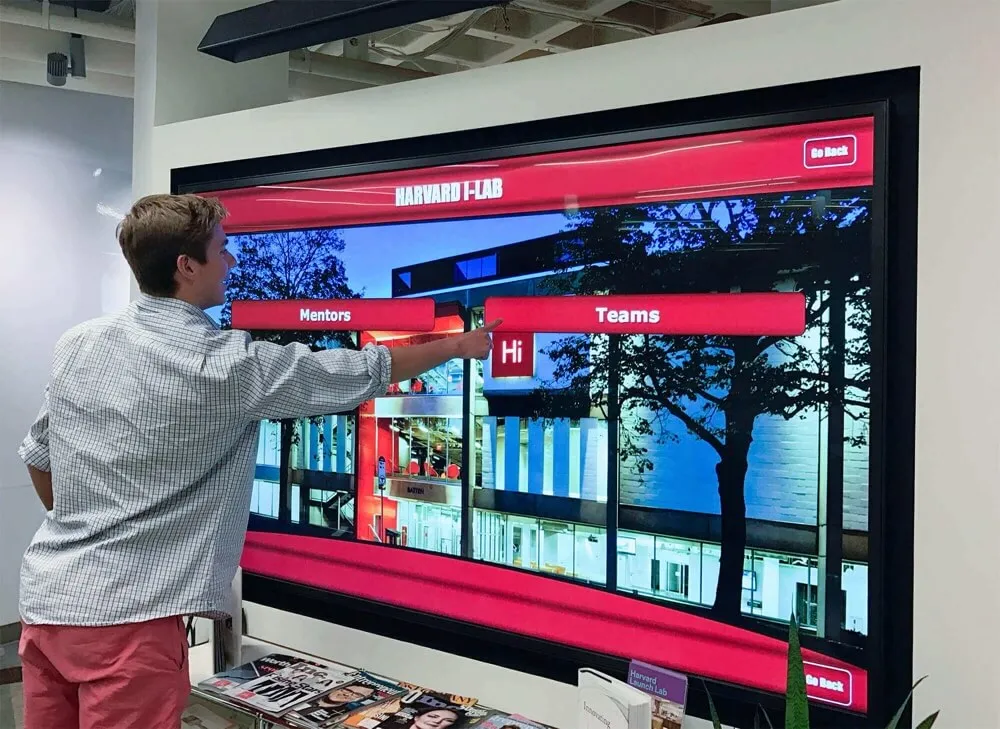
Interactive User Experiences: Visitors actively explore rather than passively viewing through powerful search functionality with auto-complete, year or class-based browsing, achievement category filtering, sport or subject organization, and related content recommendations encouraging extended discovery.
Multimedia Storytelling Excellence: Rocket enables rich narratives through multiple high-resolution photos per profile, embedded video highlights and interviews, detailed text biographies and accomplishments, comprehensive statistics and records, and social sharing features extending recognition reach beyond physical installations.
Dual-Platform Approach: Rocket’s integrated strategy combines physical touchscreen installations in high-traffic locations with mobile-optimized web portals accessible globally. Alumni worldwide explore their school’s recognition content, current students discover role models, and prospective families research institutional excellence—all through seamlessly integrated experiences managed through single content platforms.
Professional Implementation Support: Unlike platforms leaving customers struggling with complex setup, Rocket provides white-glove service including content migration from existing systems, design customization matching school branding, comprehensive training for all users, and ongoing technical support ensuring long-term success.
Proven Track Record: With over 1,000 installations across all 50 states serving schools, universities, athletic programs, and organizations of all sizes, Rocket demonstrates consistent reliability, customer satisfaction, and continuous innovation driven by user feedback and evolving needs.
Ideal Use Cases for Rocket Alumni Solutions
Rocket excels particularly for high schools implementing comprehensive athletic halls of fame, universities showcasing distinguished alumni across decades, colleges honoring academic achievement and research excellence, athletic departments celebrating championships and records, development offices recognizing donors elegantly, and any institution seeking professional, comprehensive showcase capabilities purpose-built for their specific needs.
The platform scales from single-display pilot programs to comprehensive multi-building installations coordinated across entire campuses, making it suitable for organizations at any stage of digital showcase implementation.
2. Industry-Specific Digital Showcase Platforms
While Rocket dominates educational recognition, specialized platforms serve niche applications in specific industries or contexts.
Digital Signage with Custom Development
Organizations with unique requirements sometimes commission custom showcase platform development rather than adopting commercial solutions. This approach enables perfect alignment with highly specific needs but requires substantial upfront investment typically ranging $50,000-$200,000+ depending on complexity.
Custom development provides complete control over features, design, and functionality but demands ongoing maintenance responsibility, absence of vendor support infrastructure, and risks of abandonment when original developers move on. Most organizations find purpose-built commercial platforms deliver better value through proven functionality, continuous improvement, dedicated support, and shared development costs across customer bases.
Museum and Heritage Organization Platforms
Specialized systems serve museums, historical societies, and heritage organizations through capabilities including artifact database management, exhibit planning tools, visitor engagement features, educational content delivery, and preservation documentation. While these platforms excel for museum-specific applications, they typically lack the recognition-focused features schools and general organizations require.
3. General-Purpose Website Builders Adapted for Showcase Applications
Budget-conscious organizations sometimes attempt to build showcase experiences using general website platforms like Squarespace, Wix, or WordPress. While these tools offer flexibility, they demand significant manual effort and deliver limited capabilities compared to purpose-built solutions.
Squarespace for Basic Web Galleries
Squarespace provides attractive website templates that organizations can adapt for showcasing achievements online. Monthly plans starting at $16-$49 make this approach affordable, and drag-and-drop design tools enable non-technical users to create professional-looking pages.
However, severe limitations include every profile requiring manual page creation, no database-driven organization or search capabilities, lack of interactive features beyond basic navigation, inability to power physical touchscreen installations effectively, and substantial ongoing effort maintaining content as showcase programs grow.
Squarespace works adequately for small organizations showcasing limited achievements purely online without physical displays, but cannot support comprehensive institutional showcase programs requiring robust features, interactivity, and scale.
WordPress with Custom Development
WordPress powers over 40% of websites globally and offers extreme flexibility through plugins and custom development. Organizations with dedicated web development resources can build sophisticated showcase experiences, though this requires ongoing technical expertise and maintenance.
The open-source nature provides cost advantages but demands technical capabilities most educational and nonprofit organizations lack internally. Security vulnerabilities, plugin conflicts, and performance issues plague poorly-maintained WordPress installations, while proper management requires IT resources better allocated to other institutional priorities.
4. Digital Signage Platforms Repurposed for Showcase Applications
Generic digital signage platforms designed primarily for communication and advertising sometimes get adapted for showcase applications despite fundamental architectural mismatches.
ScreenCloud and Similar Communication Platforms
Cloud-based platforms like ScreenCloud excel at rotating announcements, event promotions, menu boards, and informational displays but lack recognition-specific capabilities. While technically possible to display achievement content, these systems provide no searchable databases, limited interactive features, basic content organization, and user experiences designed for passive viewing rather than active exploration.
Organizations implementing these platforms for showcase applications struggle with content management complexity, inability to create sophisticated user experiences, limitations accommodating comprehensive recognition programs, and eventual migration to purpose-built solutions after discovering generic signage inadequacy.
Rise Vision for Educational Communication
Rise Vision targets educational markets specifically but focuses on communication rather than recognition. The platform handles daily announcements, schedule displays, and general information sharing adequately at budget-friendly prices but delivers outdated interfaces, limited advanced features, and capabilities trailing specialized recognition platforms significantly.
Schools serious about comprehensive achievement showcase programs quickly outgrow Rise Vision’s basic functionality, discovering that initial cost savings pale compared to capability limitations preventing them from honoring students appropriately.

Essential Features to Evaluate in Digital Showcase Platforms
When comparing platforms, specific feature categories significantly impact long-term value, user satisfaction, and showcase program success.
Content Management and Administrative Ease
The interface administrators use daily determines whether showcase programs remain vibrant and current or become neglected installations generating brief initial enthusiasm before falling into disuse as content grows stale.
Intuitive Web-Based Management: The best platforms enable authorized staff to manage content from any internet-connected device through modern browser interfaces requiring no software installation. Cloud-based management eliminates IT department bottlenecks while enabling convenient updates from offices, homes, or anywhere administrators work.
Template-Based Content Creation: Pre-designed templates for common showcase scenarios—athlete profiles, alumni biographies, donor recognition entries, team achievements—standardize presentation while dramatically reducing creation effort. Administrators fill simple forms rather than designing layouts from scratch for every entry.
Bulk Upload Capabilities: Schools and organizations often need to add hundreds of historical records simultaneously. Robust bulk import features supporting CSV files, batch photo processing, and automated data structuring save countless hours compared to manual individual entry.
Visual Preview Before Publishing: Administrators should preview exactly how content appears before making it public, catching errors and ensuring professional presentation quality. Platforms forcing blind publishing create quality control headaches and embarrassing mistakes requiring urgent corrections.
Permission and Workflow Controls: Multi-user environments need role-based access determining who creates, edits, approves, and publishes content. Workflow systems routing submissions through appropriate approval chains prevent unauthorized content while distributing management responsibility appropriately.
Mobile-Friendly Administration: Administrators increasingly manage content from smartphones and tablets. Responsive admin interfaces adapting to screen sizes enable convenient updates anywhere rather than requiring desktop computers exclusively.
Interactive User Experience Quality
Showcase platforms succeed or fail based primarily on user experience quality—whether visitors find interaction intuitive, engaging, and valuable enough to invest time exploring rather than glancing briefly and moving on.
Touch Responsiveness: Physical touchscreen displays should respond to input within 10 milliseconds. Noticeable lag creates frustrating experiences undermining technology confidence. Smooth, immediate response feels natural and encourages continued interaction.
Intelligent Search Capabilities: Powerful search functionality with auto-complete suggestions, spelling tolerance, and multiple search paths enables visitors to quickly find specific content while discovering related achievements through intelligent recommendations.
Intuitive Navigation: Showcase interfaces should feel immediately understandable to users of all ages and technical comfort levels. Clear visual hierarchies, recognizable icons, consistent interaction patterns, and obvious navigation paths prevent confusion while encouraging exploration.

Category Organization and Filtering: Visitors should easily browse content by logical categories—graduation year, achievement type, academic major, athletic sport—with filtering options narrowing results to personally relevant content.
Related Content Recommendations: Intelligent systems suggest additional profiles visitors might find interesting based on current viewing patterns, creating extended engagement through discovery of unexpected connections.
Multimedia Presentation Excellence: High-quality photo display with zoom capabilities, smooth video playback, attractive typography and layouts, consistent branding and design language, and loading performance maintaining engagement all contribute to professional presentation quality that honors achievements appropriately.
Scalability and Future-Proof Architecture
Showcase investments should deliver value for decades, not just initial implementation periods. Architecture scalability and vendor commitment to ongoing development ensure platforms grow with organizational needs.
Unlimited Content Capacity: True database-driven platforms accommodate thousands of entries without performance degradation. File-based systems slow dramatically as content grows, eventually becoming unusable.
Multi-Display Support: Organizations expanding from single pilot installations to comprehensive networks need platforms managing distributed displays efficiently through centralized content administration, consistent user experiences across locations, and coordinated updates deploying simultaneously system-wide.
Cloud Infrastructure: Modern cloud architecture provides automatic scalability, reliable uptime and performance, professional security management, automated backups and disaster recovery, and convenient access from anywhere without VPN complexity.
API Access and Integration: Platforms providing programmatic access through application programming interfaces enable integration with student information systems, alumni databases, fundraising platforms, and other organizational technology creating unified ecosystems.
Regular Platform Updates: Active development teams continuously improve platforms through new features, security patches, performance enhancements, and user experience refinements. Stagnant platforms fall progressively behind as technology evolves and user expectations advance.
Mobile and Web Accessibility
Showcase value extends far beyond physical installations when platforms provide excellent online access enabling stakeholders worldwide to explore content conveniently.
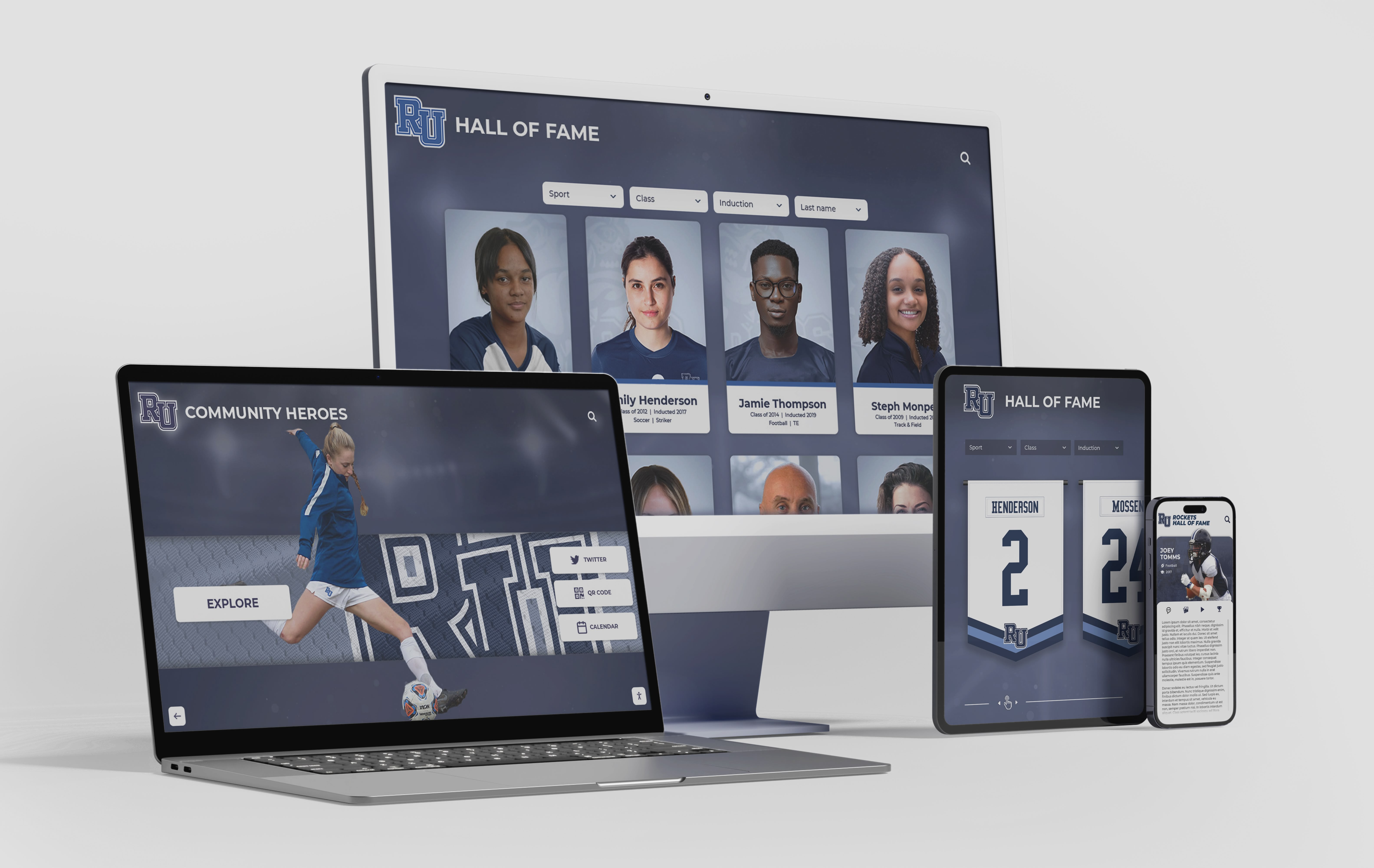
Responsive Web Design: Content should display beautifully on desktop computers, laptops, tablets, and smartphones automatically adapting layouts to screen sizes without requiring separate mobile apps or compromised experiences.
Mobile-Optimized Navigation: Touch-friendly interfaces designed specifically for smartphone interaction ensure convenient exploration on personal devices visitors use most frequently throughout daily life.
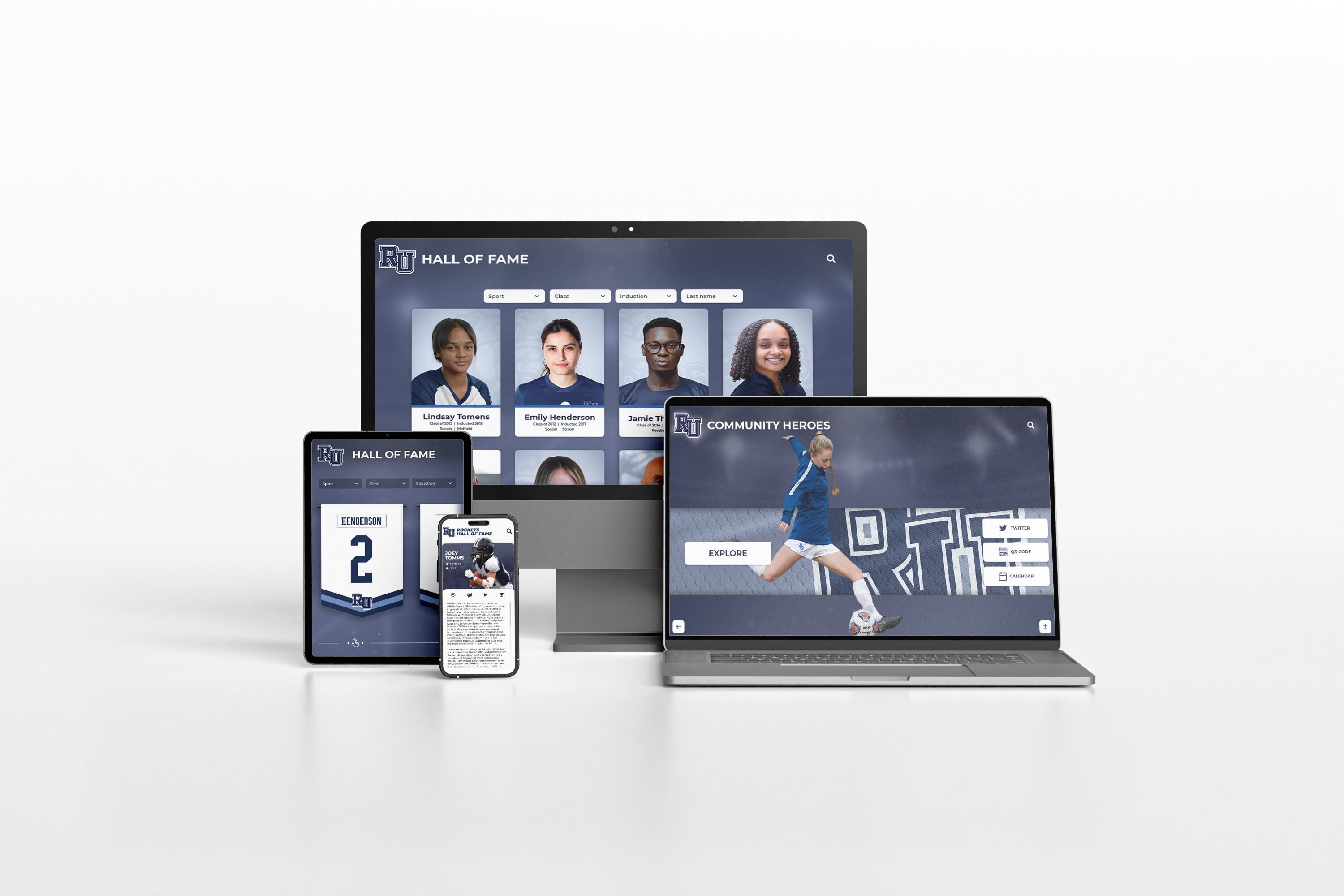
Social Sharing Integration: Easy sharing to Facebook, Twitter, LinkedIn, and other social networks amplifies recognition reach exponentially as honorees share achievements with extended networks, generating visibility far beyond physical installation locations.
Offline Capability: Advanced platforms enable content caching for offline access, ensuring physical displays function reliably even during network disruptions while mobile users can explore previously viewed content without continuous connectivity.
Implementing Digital Showcase Platforms Successfully
Selecting appropriate platforms represents only the first step toward successful showcase deployments. Implementation quality determines whether technology delivers promised benefits or becomes expensive installations generating brief excitement before falling into disuse.
Content Strategy and Development
Showcase value depends entirely on content quality and comprehensiveness. Strategic approaches to content development prevent common pitfalls while establishing foundations for long-term success.
Start with Well-Documented Recent Achievements: Begin with accomplishments from the past 5-10 years where documentation, photos, and information exist readily. This approach delivers quick wins providing immediate value while building confidence before tackling more challenging historical content requiring extensive research.
Establish Consistent Quality Standards: Define requirements for photo resolution and quality, biographical information depth, achievement description completeness, and data accuracy. Consistent standards ensure professional presentation throughout showcase programs rather than haphazard quality varying dramatically across entries.
Engage Multiple Stakeholders in Content Gathering: Distribute content collection responsibility across organizations. Alumni contribute career updates and photos, students research historical achievements, athletic staff provide statistics and records, and development offices supply donor information. Collaborative approaches reduce burden on any single person while leveraging institutional knowledge distributed across stakeholders.
Implement Sustainable Update Workflows: Establish clear processes for adding new achievements regularly, reviewing and correcting existing content, and responding to community-submitted updates. Without sustainable workflows, showcase programs inevitably grow stale as initial enthusiasm wanes and competing priorities consume attention.
Leverage Student Involvement: Many schools engage students in content development as authentic learning experiences. Journalism students write biographies, photography students create portraits, digital media students produce videos, and history students research archival materials. This approach reduces staff burden while providing valuable educational opportunities.
Strategic Display Placement
Physical showcase display location dramatically impacts value, visibility, and engagement. Thoughtful placement maximizes return on investment.
High-Traffic Locations: Prioritize areas where target audiences naturally congregate or pass frequently—main building entrances, cafeterias and commons areas, hallway intersections and gathering spaces, athletic facility lobbies and training rooms, and performing arts center entrances. Displays in rarely-visited locations generate minimal value regardless of technology quality.
Appropriate Viewing and Interaction Distances: Position displays where visitors can comfortably interact with touchscreens or view content clearly from natural standing or sitting positions. Account for furniture placement, traffic flow patterns, and typical viewing distances ensuring optimal accessibility.
Lighting Conditions: Avoid locations with direct sunlight causing screen glare and washout. Ensure adequate ambient lighting for comfortable viewing without competing with display brightness. Test locations at different times throughout day and year accounting for seasonal lighting changes.
Infrastructure Proximity: Select locations with convenient electrical capacity and network connectivity, minimizing installation costs and complexity. Running new electrical lines or extending networks adds thousands of dollars per location while potentially violating building codes without proper permitting.

Training and Change Management
Technology succeeds when users embrace it. Comprehensive training and thoughtful change management ensure smooth transitions from traditional to digital showcase approaches.
Administrator Training: Provide thorough instruction on content management interfaces, media uploading and processing, quality control procedures, and troubleshooting common issues. Hands-on practice with actual content builds confidence enabling independent management without ongoing vendor dependence.
Stakeholder Communication: Explain showcase program benefits to various stakeholders—students discovering role models, alumni maintaining connections, donors receiving appropriate recognition, and prospective families evaluating institutions. Understanding value builds support while encouraging engagement.
Launch Event Strategy: Ceremonial unveilings generate excitement and awareness while demonstrating institutional commitment. Coordinate launches with homecoming weekends, alumni reunions, major gift announcements, or other high-visibility occasions maximizing attention and participation.
Ongoing Promotion: Regularly feature showcase content in newsletters, social media posts, website highlights, and school communications maintaining awareness and encouraging exploration. Showcase programs receiving continuous visibility remain relevant rather than being initially noticed then forgotten.
Cost Considerations and Return on Investment
Digital showcase platform investments vary dramatically depending on scope, capabilities, and implementation approaches. Understanding complete cost pictures enables informed decisions balancing budgets with value delivery.
Initial Investment Components
Hardware Costs: Commercial-grade touchscreen displays suitable for public installations range from $1,500-$7,000 depending on size (55-86 inches), touch capability quality, and commercial-versus-consumer durability. Media players or computing devices add $300-$1,200. Mounting equipment, protective enclosures, and installation labor contribute $500-$2,000 per location.
Software Licensing: Purpose-built platforms like Rocket Alumni Solutions typically charge $1,200-$3,600 annually per display reflecting specialized capabilities, comprehensive support, and continuous development. Generic signage platforms cost $100-$600 annually per display but deliver far less functionality. Custom development requires $50,000-$200,000+ upfront investment.
Content Development: Professional content migration services cost $2,000-$10,000 depending on volume and complexity but save hundreds of internal staff hours while ensuring quality. Organizations handling content development internally should realistically budget substantial staff time—typically 100-300 hours for comprehensive initial populations.
Training and Implementation: Professional installation typically costs $500-$2,000 per display. Comprehensive training programs range $1,000-$5,000 depending on staff size and needs. Implementation consulting and project management adds $2,000-$10,000 for complex deployments.
Ongoing Costs and Sustainability
Annual Software Fees: Cloud-based platforms charge recurring licensing fees providing ongoing access, updates, support, and hosting. These fees represent operational expenses typically funded through annual budgets rather than capital projects.
Maintenance and Support: Budget $500-$2,000 annually for technical support contracts, warranty extensions, and maintenance reserves covering eventual hardware repairs or replacements.
Content Management Labor: Ongoing content updates require staff time. Organizations maintaining current showcase programs typically allocate 2-5 hours weekly for content management, review, and quality control.
Infrastructure Costs: Network connectivity and electrical consumption add modest ongoing expenses typically under $100 annually per display but requiring consideration in comprehensive budgets.
Calculating Return on Investment
Showcase platform value manifests through multiple dimensions making traditional ROI calculation challenging but demonstrable through thoughtful analysis:
Space Efficiency: Digital displays accommodate unlimited content in space traditional trophy cases couldn’t serve. Calculate physical space cost savings—valuable floor or wall space freed for other purposes or avoided facility expansion costs.
Administrative Time Savings: Traditional recognition requires ongoing plaque ordering, physical installation labor, and trophy case management consuming substantial staff time. Calculate time savings at appropriate hourly rates demonstrating labor cost recovery.
Engagement Impact: Measure increased alumni giving rates, volunteer participation, event attendance, or other engagement metrics correlating with showcase implementation. Many organizations discover significant positive impacts on stakeholder relationships and institutional advancement.
Recruitment and Retention: Showcase displays influence student enrollment decisions, employee attraction, and member recruitment in measurable ways. Survey prospects about factors influencing decisions, quantifying showcase contribution to growth metrics.
Preserved Institutional Memory: Digital platforms preserve history that physical displays lose through damage, removal, or storage. This preservation value is difficult to quantify financially but represents substantial cultural and historical significance.
Future Trends Shaping Digital Showcase Platforms
Understanding emerging trends helps organizations select platforms positioned for long-term relevance as technology evolves and user expectations advance.
Artificial Intelligence Integration
AI capabilities increasingly enhance showcase platforms through automated content tagging and organization reducing manual effort, natural language search understanding conversational queries, personalized content recommendations adapting to individual interests, image recognition facilitating photo organization, and intelligent quality control identifying issues automatically.
Schools implementing AI-powered platforms benefit from continuous improvement through standard updates rather than requiring expensive upgrades or platform migrations as capabilities mature.
Enhanced Mobile Experiences
Progressive web applications blur distinctions between websites and native mobile apps, providing app-like experiences through browsers without installation requirements. Offline functionality enables content exploration without continuous connectivity, augmented reality features overlay digital content on physical spaces, and location-aware recommendations highlight nearby relevant content.
Mobile-first platforms recognize that most users access content through smartphones rather than desktop computers, optimizing experiences for small screens and touch interaction patterns.
Deeper System Integrations
Platform connectivity expands through automatic synchronization with student information systems, CRM databases, and institutional data repositories eliminating duplicate entry, single sign-on integration with campus authentication systems streamlining access, API-first architectures enabling custom integrations unique to organizational needs, and real-time data connections displaying dynamic information rather than static snapshots.
Improved Accessibility and Inclusion
Advancing accessibility features ensure showcase platforms serve all community members effectively through voice interaction and screen reader enhancements, improved visual accommodations for various abilities, sophisticated translation enabling multilingual content, and universal design principles embedded from initial development rather than retrofitted afterward.
Conclusion: Selecting Your Digital Showcase Platform
The best digital showcase platform for any organization depends fundamentally on specific needs, primary applications, budget realities, technical capabilities, and long-term vision. However, clear patterns emerge from evaluating dozens of platforms across diverse contexts.
For schools, universities, and organizations prioritizing comprehensive recognition of achievements across multiple categories, Rocket Alumni Solutions consistently delivers exceptional value through purpose-built capabilities specifically designed for educational and organizational showcase applications. The platform’s unlimited scalability, intuitive content management, interactive user experiences, professional presentation quality, and proven track record across 1,000+ installations make it the definitive choice when recognition excellence matters.
Organizations with extremely limited budgets can achieve basic online showcase functionality through website builders like Squarespace or Wix, accepting significant limitations in interactivity, content management efficiency, and scalability. These approaches work adequately for small programs showcasing limited achievements purely online without physical displays or sophisticated features.
Generic digital signage platforms serve communication and announcement applications well but consistently disappoint when repurposed for showcase applications requiring database organization, interactive exploration, and comprehensive content management beyond simple slide rotation.
Regardless of platform selection, success requires clear objectives guiding implementation, comprehensive content development establishing strong foundations, strategic display placement maximizing visibility, thorough training ensuring capable management, and sustainable workflows maintaining long-term value.
Digital showcase platforms transform how organizations celebrate achievement, preserve history, and engage stakeholders. The platforms you choose today shape recognition experiences and community connections for decades ahead. Invest time in thorough evaluation, prioritize capabilities matching actual needs over lowest initial costs, and select partners committed to your long-term success rather than simply vendors completing transactions.
Ready to explore how purpose-built digital showcase platforms can transform your organization’s recognition program? Discover Rocket Alumni Solutions and see how comprehensive platforms specifically designed for schools and organizations deliver the capabilities, ease of use, and engagement experiences that generic alternatives simply cannot match.
For additional guidance on creating effective showcase programs, explore resources on comparing digital signage options thoughtfully and implementing best-in-class touchscreen displays that elevate your institution’s recognition excellence.































