The Big XII Conference stands as one of college basketball’s most storied leagues, producing NBA legends, national champions, and unforgettable March Madness moments. From Kansas’s iconic Allen Fieldhouse to Texas Tech’s raucous United Supermarkets Arena, Big XII programs have cultivated basketball excellence for decades. Yet many universities struggle to properly showcase this rich heritage in ways that engage modern audiences and inspire current student-athletes.
In this comprehensive guide, we explore how Big XII universities can create compelling basketball hall of fame displays that honor conference legends while leveraging digital technology to tell dynamic stories. Whether you're an athletic director planning a facility renovation or a development officer seeking to engage alumni donors, you'll discover practical strategies for celebrating your program's basketball legacy.
The Big XII Basketball Legacy
The Big XII Conference has produced some of college basketball’s most dominant programs and memorable players. Kansas has won more conference championships than any program in NCAA history, while teams like Texas, Oklahoma State, Baylor, and Iowa State have all reached Final Fours and produced NBA talent.
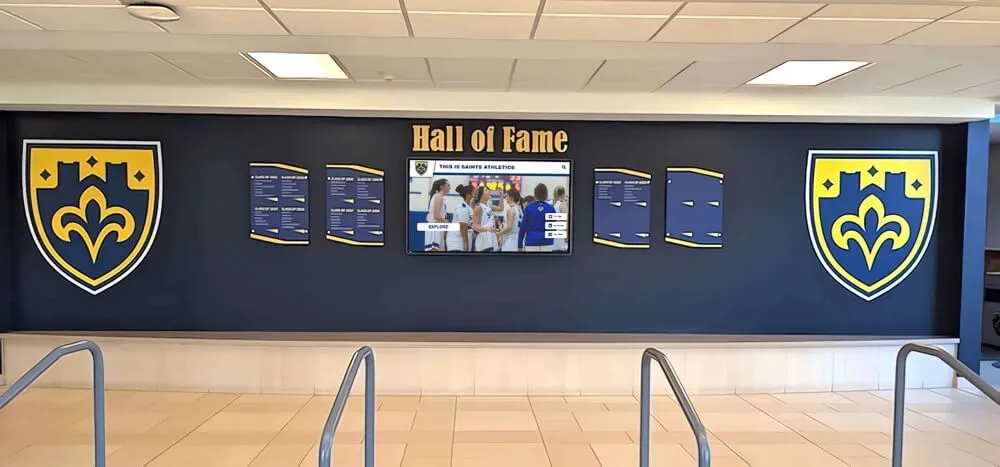
Unlike professional leagues or even the National Collegiate Basketball Hall of Fame located in Kansas City’s T-Mobile Center (which hosts the Big XII tournament annually), individual Big XII universities have the unique challenge of celebrating both conference-wide achievements and program-specific legends. How do you honor the Wilt Chamberlains, Kevin Durants, and Blake Griffins of your program while also recognizing the role players who defined championship teams?
Conference Excellence Meets Institutional Identity
Big XII basketball represents a distinctive blend of traditions. Kansas’s Phog Allen legacy, Oklahoma’s Kelvin Sampson era resurgence, Texas’s historic programs, and newer conference members like Cincinnati and Houston bringing their own basketball pedigrees—each program contributes unique stories to the conference tapestry.
Traditional static displays often fall short of capturing this complexity. A bronze plaque installed in 2005 can’t easily be updated when a player’s professional career adds new accolades. Glass trophy cases require constant physical maintenance and offer limited storytelling capacity. Most critically, static displays fail to engage younger audiences accustomed to interactive digital experiences.
Why Digital Hall of Fame Displays Matter for Big XII Programs
Modern digital recognition systems transform how universities celebrate basketball excellence. These solutions address several critical needs that Big XII athletic departments face:
Dynamic Content Updates
When a former player makes the NBA All-Star team or gets inducted into a professional hall of fame, digital displays can be updated instantly without expensive reinstallation. This keeps your recognition current and maintains alumni engagement long after graduation.
Comprehensive Statistics and Records
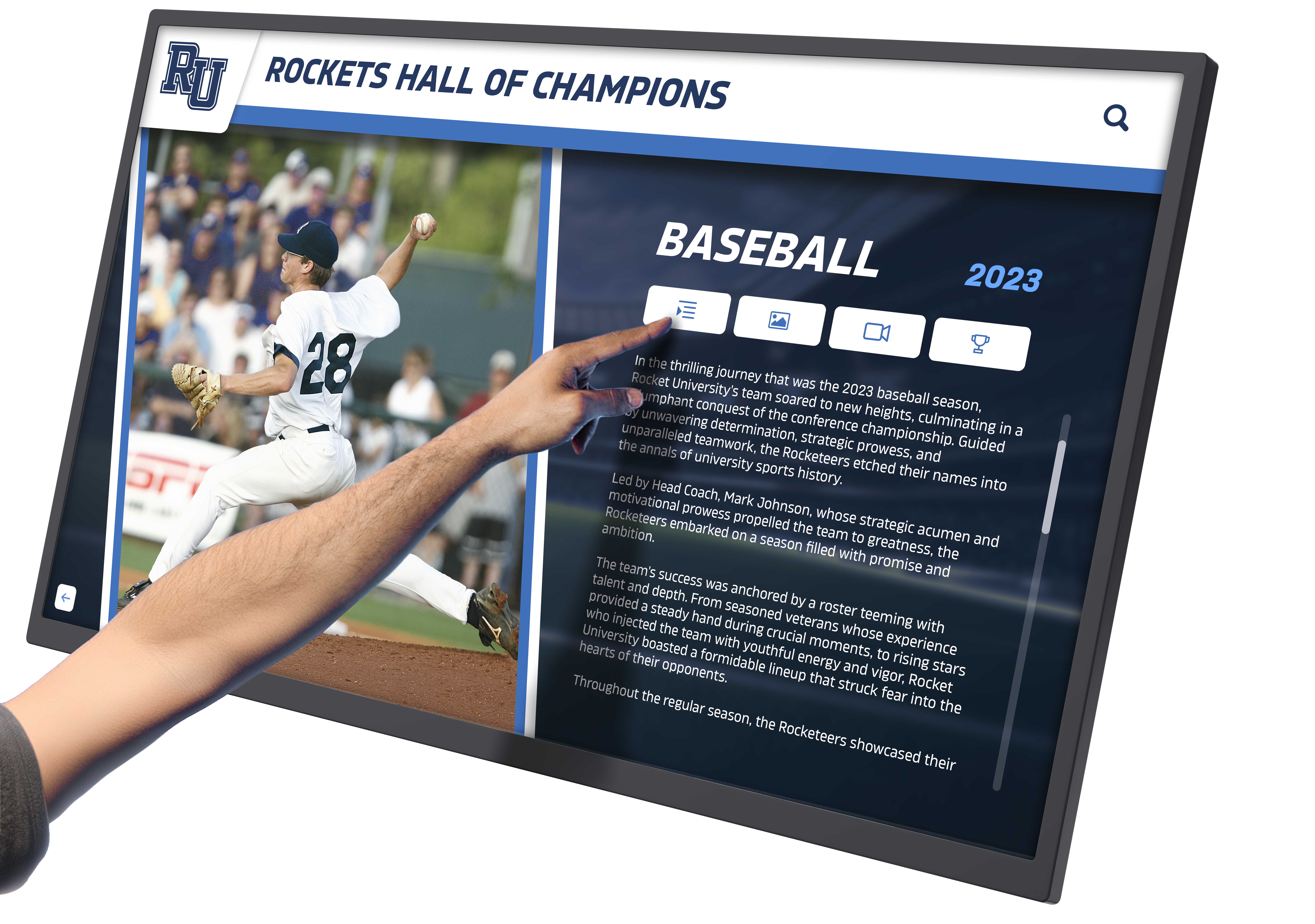
Big XII basketball generates extensive statistical records—career scoring leaders, single-game rebounding performances, three-point shooting records, and more. Digital systems allow visitors to explore these basketball records in depth, comparing eras and discovering lesser-known achievements that traditional plaques can’t accommodate.
Enhanced Storytelling Through Multimedia
Static photos can’t capture the electricity of Allen Fieldhouse during a Kansas-Kansas State rivalry game or the drama of Texas Tech’s 2019 Final Four run. Digital displays integrate video highlights, game audio, historical photos, and narrative content that brings basketball history to life. Visitors can watch actual game footage, hear from coaches and players through recorded interviews, and experience the atmosphere that defined championship seasons.
Recruiting Advantage
College recruitment increasingly depends on facilities that demonstrate program commitment and prestige. When top basketball prospects visit campus, a state-of-the-art digital hall of fame display communicates that your program values its athletes and invests in celebrating their achievements. This tangible demonstration of institutional pride can be the difference in landing elite talent.
Alumni Engagement and Fundraising
Digital recognition systems create compelling reasons for alumni to return to campus and engage with the program. Former players appreciate seeing their careers documented comprehensively, and this appreciation often translates into donor support. Athletic departments can leverage digital displays during fundraising events, reunion weekends, and alumni gatherings to strengthen connections with former athletes who become program ambassadors and financial supporters.
Designing an Effective Big XII Basketball Hall of Fame Display
Creating an impactful basketball recognition system requires thoughtful planning across several dimensions. Big XII programs should consider these key design elements:
Physical Location and Traffic Flow
Prime locations include arena lobbies, practice facility entrances, and dedicated hall of fame rooms within athletic complexes. The ideal placement maximizes visibility during game days while remaining accessible during regular hours for alumni visits and recruit tours.
Kansas’s Allen Fieldhouse, for example, features multiple recognition areas that guide visitors through different eras of Jayhawk basketball history. This distributed approach allows for comprehensive storytelling without overwhelming viewers.
Consider traffic patterns during peak usage times—game days, summer camps, and special events. Your display should enhance rather than obstruct movement while creating natural gathering points where groups can engage with content together.
Content Organization and Hierarchy
Effective digital displays organize information in intuitive categories:
Individual Athlete Profiles: Comprehensive career statistics, achievements, biographical information, and multimedia content for each honored player and coach
Team Championships: Complete rosters, season statistics, tournament runs, and defining moments from conference and national championship teams
Season-by-Season Records: Historical context showing how your program evolved across different eras, coaching tenures, and conference alignments
Statistical Leaders: Career and single-season records across all major categories, allowing comparison across eras
Conference Context: Recognition of Big XII championships, tournament performances, and notable conference rivalries that define your program’s identity
This hierarchical approach allows visitors to explore at different depths—from casual fans browsing championship teams to statistical enthusiasts comparing player performance across decades.

Visual Design and Branding
Your basketball hall of fame display should reflect your institution’s visual identity while celebrating Big XII Conference affiliation. Color schemes, typography, and graphic elements should align with university branding guidelines while incorporating conference marks where appropriate.
High-quality photography and videography are essential. Invest in professional imaging of historical materials, current athletes, and facility spaces. Consistency in image quality and aspect ratios creates visual cohesion across the entire display system.
Consider creating distinct visual themes for different eras—acknowledging that your program’s visual identity has likely evolved over decades. This historical authenticity adds richness while maintaining overall design consistency.
Interactive Features and User Experience
Modern audiences expect intuitive digital interfaces. Touchscreen systems should respond quickly, with clear navigation and accessible text sizes. Consider these interaction models:
Search Functionality: Allow visitors to find specific players, coaches, or seasons quickly
Comparison Tools: Enable side-by-side comparison of player statistics or team achievements
Timeline Views: Present chronological navigation through program history
Social Sharing: Integrate QR codes or digital sharing options so visitors can capture and share content
Multi-Language Support: Accommodate international visitors and recruits with translated content
The goal is seamless interaction that feels natural even for users unfamiliar with the specific system. User testing with diverse audiences—from elderly alumni to teenage recruits—helps identify usability issues before permanent installation.
Integration with Academic Recognition Programs
Big XII universities increasingly recognize that student-athlete success extends beyond competition. Academic recognition programs celebrate the scholar-athletes who excel in classrooms and laboratories while competing at elite levels.
Digital hall of fame systems can integrate academic achievements seamlessly with athletic accomplishments:
- Academic All-Conference Honors: Highlight Big XII academic all-conference selections alongside athletic awards
- Degree Completion Rates: Showcase team and individual academic success metrics
- Career Achievements: Document professional success in fields beyond basketball
- Community Service: Recognize athletes who contributed to campus and community causes
This holistic approach communicates that your program values complete student-athlete development, an increasingly important message for recruits and their families who prioritize education alongside athletic opportunity.
Showcasing Championship Teams Through Digital Recognition
Conference and national championships represent pinnacle achievements deserving special recognition. Championship team displays can capture the complete narrative of historic seasons:

Complete Season Documentation
Rather than listing just the final record and tournament results, digital systems can document the entire championship journey:
- Game-by-Game Results: Full season schedule with scores and key performances
- Tournament Runs: Detailed bracket progression with game summaries
- Defining Moments: Video highlights of crucial plays and games
- Behind-the-Scenes Content: Practice footage, locker room moments, and celebration documentation
- Media Coverage: Contemporary news articles and broadcast clips
This comprehensive approach allows current and future fans to experience championship seasons as complete narratives rather than statistical summaries.
Individual Contributions
Championship teams succeed through collective effort, yet individual performances often define crucial moments. Digital displays can recognize both:
- Statistical Leaders: Season leaders in scoring, rebounding, assists, and other categories
- Clutch Performances: Highlighting players who delivered in high-pressure moments
- Role Players: Recognizing the essential contributions of non-stars
- Coaching Staff: Documenting tactical decisions and leadership
This balanced recognition honors all contributors while maintaining focus on team achievement—an important message for current players about program culture and values.
Implementation Strategies for Big XII Programs
Moving from concept to operational hall of fame display requires careful planning and execution. Big XII athletic departments should follow this implementation roadmap:
Phase 1: Content Inventory and Planning (2-3 months)
Begin by cataloging existing historical materials:
- Physical Archives: Photographs, programs, media guides, and memorabilia
- Digital Assets: Game footage, photo libraries, and database records
- Statistical Records: Historical statistics requiring verification and formatting
- Rights Clearances: Determining usage rights for images, videos, and other content
Simultaneously, define your content scope and selection criteria. Will you recognize only inducted hall of fame members, or include all-conference selections, statistical leaders, and other categories? Establishing clear, consistent criteria prevents future disputes and ensures comprehensive recognition.
Phase 2: Technology Selection and Design (2-3 months)
Evaluate display technology options based on your specific needs:
Display Hardware: Screen size, resolution, touchscreen capabilities, and durability Content Management System: Ease of updates, user permissions, and integration with existing databases Physical Installation: Mounting options, electrical requirements, and spatial considerations Maintenance and Support: Warranty coverage, repair procedures, and technical support access
Work with experienced providers who understand athletic recognition specifically. Generic digital signage solutions often lack the sports-specific features and content structures that make hall of fame displays effective.
Rocket Alumni Solutions specializes in athletic recognition systems designed specifically for programs like Big XII universities. Our platform integrates comprehensive athlete profiles, team records, statistical databases, and multimedia content in intuitive interfaces that engage visitors while simplifying content management for administrators.
Phase 3: Content Development (3-4 months)
This phase requires significant effort but determines your display’s ultimate impact:
- Data Entry and Verification: Inputting historical records and confirming accuracy
- Media Processing: Scanning photographs, digitizing video, and optimizing files
- Narrative Writing: Creating athlete biographies, team summaries, and contextual content
- Design Implementation: Applying visual branding and layout templates
Consider involving athletics communications staff, student workers, and even alumni volunteers in content development. This distributed approach accelerates work while building stakeholder investment in the project.
Phase 4: Installation and Testing (1 month)
Physical installation should occur during off-season periods to minimize disruption. Allow adequate time for:
- Hardware Installation: Mounting displays, running electrical and data connections
- Content Loading: Transferring finalized content to the display system
- User Testing: Having diverse users test all functions and identify issues
- Staff Training: Ensuring athletics staff understand system operation and basic troubleshooting
Plan a soft launch period where the system operates but hasn’t been formally announced, allowing you to identify and resolve issues before public debut.
Phase 5: Launch and Ongoing Management
Coordinate your hall of fame display launch with a significant event—homecoming weekend, a rivalry game, or an alumni gathering. This maximizes initial exposure and demonstrates institutional pride.

Establish ongoing content management protocols:
- Regular Updates: Monthly review of content requiring updates (new achievements, records)
- Seasonal Refreshes: Annual updates highlighting current season and recent graduates
- Technical Maintenance: Quarterly checks of hardware function and software updates
- User Feedback: Mechanisms for collecting and acting on visitor suggestions
Assign clear responsibility for these tasks within your athletics department organizational structure.
Connecting Basketball Recognition to Broader Athletic Programs
While basketball may be the focus, most Big XII universities field comprehensive athletic programs deserving recognition. Consider how your basketball hall of fame connects to broader athletic recognition:
Cross-Sport Integration
Digital recognition platforms can accommodate multiple sports within unified systems. This allows universities to create sport-specific displays while maintaining consistent design language and user experience. Visitors who engage with basketball content can easily discover achievements in other sports, promoting program-wide awareness.
Some Big XII programs have successfully created multi-sport athletic halls of fame that dedicate substantial space to basketball while also recognizing achievements in football, baseball, volleyball, and Olympic sports. This comprehensive approach celebrates complete athletic department excellence while allowing each sport adequate recognition.
Alumni Directory Connections
Interactive alumni directories represent natural complements to hall of fame displays. Where hall of fame recognition focuses on elite athletic achievement, alumni directories can document every student-athlete who represented your program.
This comprehensive documentation serves multiple purposes:
- Inclusive Recognition: Honoring all former athletes, not just hall of fame inductees
- Network Building: Helping alumni connect with former teammates and coaches
- Career Pathways: Demonstrating diverse professional outcomes for current student-athletes
- Development Prospects: Identifying potential donors and program supporters
Integrating hall of fame displays with broader alumni recognition creates comprehensive systems that serve athletics departments’ multiple stakeholders.
Learning From Other Conferences and Programs
While focusing on Big XII basketball, athletic departments can learn from recognition approaches across college athletics. The college football hall of fame model offers insights applicable to basketball programs, particularly regarding:
- Physical space design that accommodates high traffic volumes during peak times
- Interactive experiences that engage visitors beyond passive viewing
- Historical storytelling that contextualizes achievements within evolving eras
- Technology integration that enhances rather than dominates the visitor experience
Similarly, professional sports halls of fame—from the Naismith Memorial Basketball Hall of Fame in Springfield to sport-specific halls—demonstrate best practices in multimedia storytelling, artifact display, and visitor engagement that translate effectively to collegiate settings.
Budget Considerations and Funding Strategies
Digital hall of fame displays represent significant investments, but Big XII universities have successfully deployed various funding approaches:
Capital Campaign Integration
Major facility renovations and new construction projects typically include recognition components. Integrating hall of fame displays into broader capital campaigns allows costs to be absorbed within larger budgets while creating compelling donor recognition opportunities.
Donor Naming Opportunities
Many universities offer naming rights for hall of fame spaces or display components as premium giving opportunities. A $100,000+ gift might name a hall of fame gallery, while smaller gifts could sponsor specific display features or content categories.
Phased Implementation
Rather than building comprehensive systems immediately, some programs implement in phases—starting with core features and expanding over time as budgets allow. This approach demonstrates value early while spreading costs across multiple fiscal years.
Corporate Partnerships
Technology companies and local businesses sometimes partner with athletic departments on digital recognition projects, providing equipment or services at reduced cost in exchange for brand exposure. While maintaining editorial control, universities can leverage these partnerships to enhance capabilities while managing expenses.
Technical Specifications and Vendor Selection
For athletic directors and facility managers evaluating digital hall of fame solutions, consider these technical specifications:
Hardware Requirements
- Commercial-Grade Displays: Consumer televisions lack the durability for high-traffic public installations; commercial displays rated for continuous operation are essential
- Touchscreen Capability: Projected capacitive touchscreens offer the responsiveness users expect from smartphone interactions
- Brightness and Viewing Angles: Displays in areas with natural light require high brightness ratings (400+ nits) and wide viewing angles
- Secure Mounting: Vandal-resistant mounting systems protect equipment while maintaining aesthetic appeal
Software Capabilities
- Content Management System: Web-based CMS accessible to authorized staff without specialized training
- Media Support: Ability to display high-resolution images, video, and interactive graphics
- Search and Navigation: Robust search functionality and intuitive navigation structures
- Analytics: Usage tracking to understand visitor engagement patterns
- Mobile Responsiveness: Content that adapts appropriately across different screen sizes
Support and Maintenance
- Technical Support: Responsive support during critical times (game days, special events)
- Content Services: Assistance with historical research, data entry, and media processing
- Hardware Warranty: Comprehensive coverage including on-site repair or replacement
- Software Updates: Regular feature enhancements and security updates
When evaluating vendors, prioritize those with specific experience in athletic recognition. The unique requirements of hall of fame displays—statistical databases, multimedia integration, sports-specific content structures—differ significantly from generic digital signage applications.
Rocket Alumni Solutions has partnered with dozens of universities nationwide to create compelling athletic recognition systems. Our platform was purpose-built for sports hall of fame applications, offering the specialized features and sports-specific expertise that make implementation straightforward and results impressive.
Measuring Success and ROI
How do Big XII universities assess whether their basketball hall of fame displays deliver value? Consider these metrics:
Visitor Engagement
- Usage Analytics: Tracking screen interactions, popular content, and session duration
- Direct Observation: Monitoring visitor behavior during events and typical hours
- Survey Feedback: Gathering structured feedback from alumni, recruits, and general visitors
Recruiting Impact
- Recruit Feedback: Systematically gathering reactions from prospective student-athletes
- Recruiting Class Quality: Tracking signing class rankings before and after installation
- Coach Utilization: Monitoring how coaching staff incorporate displays into recruiting presentations
Alumni Relations
- Visit Frequency: Tracking alumni returns to campus and athletics facilities
- Donation Patterns: Analyzing giving levels among featured alumni versus general populations
- Event Attendance: Measuring participation in alumni events and reunion activities
Institutional Benefits
- Media Coverage: Tracking press mentions and social media engagement
- Facility Tour Requests: Monitoring demand for facility tours and display access
- Brand Perception: Surveying perceptions of program prestige and institutional commitment
While quantifying ROI precisely can be challenging, Big XII programs consistently report that modern recognition systems deliver value across recruiting, development, and brand-building objectives that justify investment.
Future Trends in College Basketball Recognition
As technology evolves, so too will digital hall of fame displays. Big XII universities planning recognition systems should consider emerging trends:
Augmented Reality Integration
AR applications could allow visitors to see historical moments overlaid on current facility spaces—imagine pointing your phone at the court and seeing a legendary game playing out in virtual space.
Personalized Content Experiences
Advanced systems might adapt content based on visitor identity—showing customized content to alumni from specific eras, or highlighting achievements most relevant to prospective recruits’ positions and interests.
Social Media Integration
Real-time social media feeds could integrate current season highlights alongside historical content, creating living displays that evolve continuously rather than requiring manual updates.
Data Visualization
As sports analytics become increasingly sophisticated, future displays might include advanced statistical visualizations that allow deep exploration of performance trends and comparative analysis across eras.
Remote Access
Web-based platforms could make hall of fame content accessible globally, allowing alumni anywhere to explore program history and stay connected regardless of geographic distance.
Planning digital recognition systems with architectural flexibility ensures they can evolve as technology advances without requiring complete replacement.
Conclusion: Honoring Big XII Basketball Excellence
Big XII basketball’s rich history deserves recognition that matches the conference’s competitive excellence and cultural significance. Modern digital hall of fame displays offer universities powerful tools to honor legendary athletes, celebrate championship teams, engage current student-athletes, and strengthen alumni connections.
Successful implementation requires careful planning, adequate investment, and commitment to ongoing content management. Yet Big XII programs that have embraced digital recognition consistently report positive outcomes across recruiting, fundraising, and institutional pride.
Whether you’re planning a comprehensive athletics hall of fame, renovating existing recognition spaces, or creating new displays in facility expansions, the principles outlined in this guide provide a roadmap for celebrating your basketball program’s excellence in ways that engage modern audiences while honoring the legends who built your tradition.
The Big XII Conference continues producing memorable moments and exceptional athletes each season. Digital recognition systems ensure these achievements receive the lasting recognition they deserve, inspiring future generations while honoring the past.
Ready to Honor Your Basketball Legacy?
Rocket Alumni Solutions helps Big XII universities create compelling digital hall of fame displays that celebrate athletic excellence and engage modern audiences.
Our specialized platform integrates comprehensive athlete profiles, team records, statistical databases, and multimedia content in intuitive systems designed specifically for college athletic programs. From initial planning through ongoing content management, we partner with you to create recognition displays that deliver lasting value.
Schedule a Consultation






























