For high school student-athletes aspiring to compete at the collegiate level, college coach visits represent pivotal moments in the recruiting journey. These face-to-face interactions allow coaches to evaluate talent firsthand, assess character and coachability, meet with families, and determine whether athletes fit their program needs. For student-athletes and their families, coach visits provide opportunities to demonstrate athletic ability, showcase academic credentials, understand program culture, and build relationships that may lead to scholarship offers and collegiate opportunities.
College coach visits follow strict NCAA regulations that govern when, where, and how coaches can interact with prospective student-athletes. Understanding these rules, preparing effectively for coach interactions, and maximizing every recruiting touchpoint separates athletes who successfully navigate the recruiting process from those who miss valuable opportunities. This comprehensive guide explores everything high schools, athletes, and families need to know about college coach visits—from NCAA recruiting calendars and contact periods to preparation strategies, what coaches evaluate, and how schools can showcase their programs and athletes effectively.
The college athletic recruiting landscape has become increasingly competitive, with talented athletes competing for limited roster spots and scholarship opportunities. In this environment, college coach visits to high schools serve critical functions, allowing coaches to evaluate multiple prospects efficiently, assess athletes in their natural training environments, build relationships with high school coaching staffs, and identify talent in communities beyond major metropolitan areas.
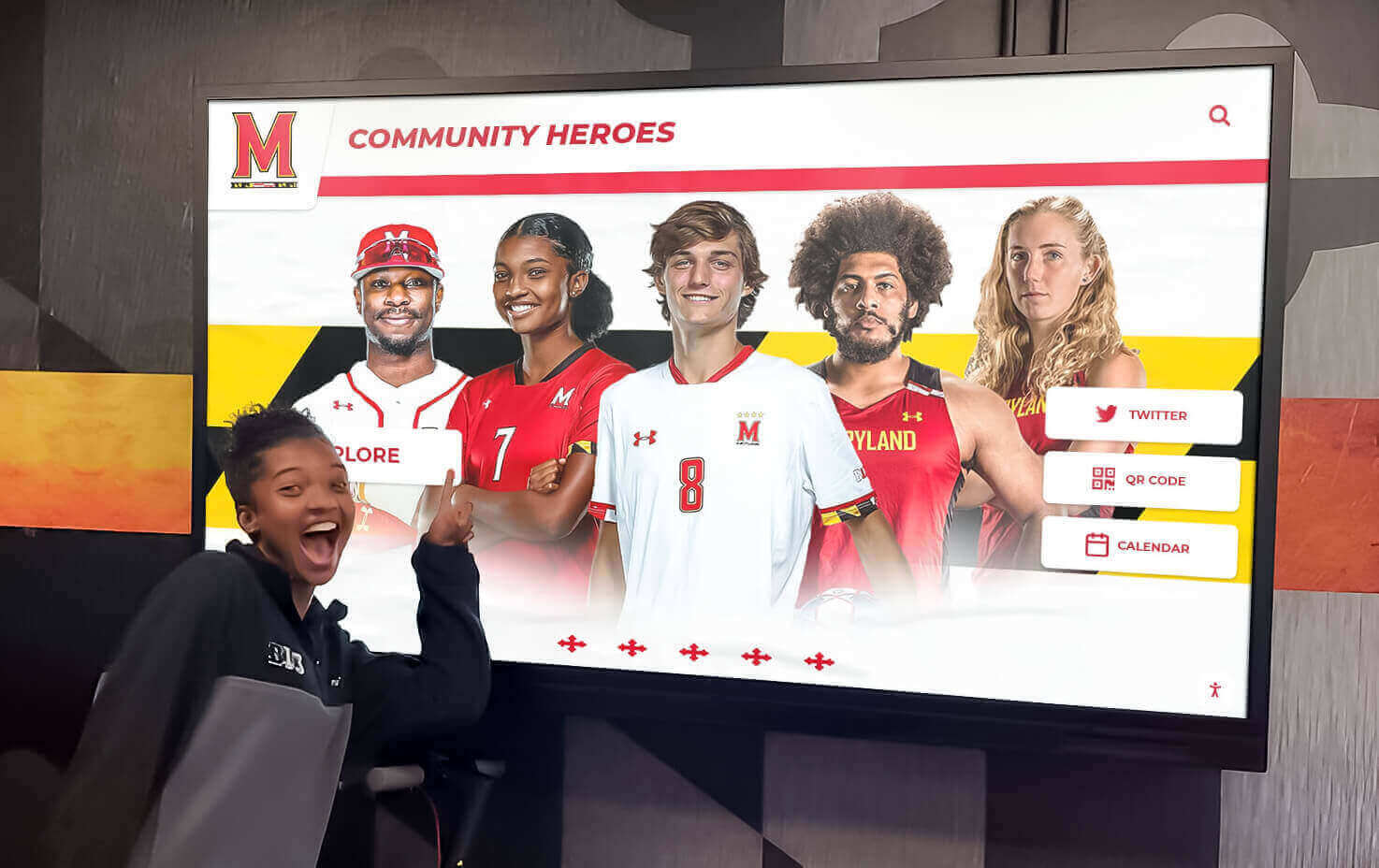
Modern recognition displays help coaches understand program quality and athlete achievements during campus visits
Understanding NCAA Recruiting Rules and Contact Periods
Before exploring how to maximize college coach visits, understanding the regulatory framework governing these interactions proves essential. The NCAA establishes specific rules determining when and how college coaches can contact and evaluate prospective student-athletes.
NCAA Recruiting Period Classifications
The NCAA divides the recruiting calendar into distinct period types, each with specific rules governing coach activities and interactions with recruits.
Contact Period: During contact periods, college coaches may have face-to-face contact with recruits with minimal restrictions. Coaches can watch recruits compete, visit their high schools, meet with athletes and their parents, conduct home visits, and communicate through calls, texts, and emails. Contact periods provide the most flexibility for recruiting interactions.
Evaluation Period: During evaluation periods, college coaches can watch athletes compete in person and visit their schools. However, coaches cannot have off-campus conversations with athletes or their parents beyond simple greetings. Coaches commonly attend games and practices during evaluation periods to assess athletic ability while avoiding prohibited conversations.
Quiet Period: Quiet periods restrict coaches from watching athletes compete in person, visiting schools, or conducting home visits. However, coaches can have contact with athletes on the college campus. Recruits may make official and unofficial visits during quiet periods, but coaches cannot observe them competing.
Dead Period: During dead periods, college coaches cannot have any in-person contact with recruits on or off campus. Coaches cannot watch competitions, attend practices, visit schools, or conduct home visits. Communication through phone calls, texts, and emails remains permissible during dead periods.

High-traffic locations with athlete recognition help coaches identify and learn about program achievements
Sport-Specific Recruiting Calendars
Recruiting period classifications vary significantly by sport and division level. Each sport operates under specific calendars that designate when contact periods, evaluation periods, quiet periods, and dead periods occur throughout the year.
For Division I football, coaches can begin contacting athletes on September 1 of their junior year. The early signing period occurs in December, with the regular signing period in February. Basketball coaches for both men’s and women’s programs can contact prospects on June 15 after their sophomore year. Most other Division I sports allow coach contact beginning June 15 after sophomore year or September 1 of junior year.
Division II and III institutions follow different timelines and rules, generally allowing more flexibility in recruiting contacts and communications. Understanding the specific recruiting calendar for your sport and the division level of colleges recruiting you proves essential for navigating interactions appropriately.
What College Coaches Can and Cannot Do During High School Visits
When college coaches visit high schools during permissible contact periods, specific rules govern their activities and interactions.
Permitted Activities During High School Visits:
- Meeting with the student-athlete and discussing the college program
- Speaking with the athlete’s high school coach about performance and character
- Touring athletic facilities and watching practice sessions
- Meeting with parents if they’re present at the school
- Discussing academic programs and academic support services
- Providing program information and recruiting materials
- Observing athlete in training environments
Prohibited Activities:
- Visiting during dead periods when no off-campus contact is allowed
- Having extended conversations during evaluation periods beyond greetings
- Providing gifts or inducements to athletes or families
- Making scholarship offers before permissible dates
- Discussing other recruits or negative recruiting against other programs
High school coaches and athletic directors should understand these rules to ensure compliance and protect their athletes’ eligibility during coach visits.
Preparing Your High School Program for College Coach Visits
High schools play vital roles in facilitating successful college coach visits that benefit student-athletes while showcasing program quality to collegiate recruiters.
Creating a Professional Atmosphere That Impresses Coaches
When college coaches visit high schools, they form impressions about program quality, coaching professionalism, and athlete development based on what they observe. Schools can create positive environments that enhance recruiting opportunities for student-athletes.
Athletic Facility Presentation: Maintain clean, well-organized athletic facilities that demonstrate commitment to athletic programs. Coaches notice facility conditions, equipment quality, training spaces, and overall professional atmosphere when evaluating whether athletes received quality development.
Program Documentation and Recognition: Comprehensive athletic recognition displays showcasing program achievements, college commitment histories, and athlete accomplishments demonstrate program quality and development success. College coaches researching programs look for evidence that schools consistently develop college-ready athletes.
Professional Communication Systems: Establish clear protocols for scheduling coach visits, designating point persons for recruiting communication, providing necessary information promptly, and ensuring coaches receive professional treatment during visits. Organized communication reflects well on programs while making coaches’ evaluation processes more efficient.

Professional athletic recognition displays document program history and demonstrate commitment to excellence
Developing Comprehensive Athlete Profiles for Recruiting
When college coaches visit to evaluate specific athletes, having comprehensive information readily available facilitates productive conversations and demonstrates program organization.
Athletic Achievement Documentation:
- Current season and career statistics
- Awards, honors, and all-conference selections
- Position rankings and recruiting service evaluations
- Game film and highlight videos
- Athletic testing results and measurements
- Tournament and playoff performance summaries
Academic Information:
- Current GPA and class ranking
- Standardized test scores (SAT/ACT)
- Academic awards and honors
- Intended college major and academic interests
- NCAA Eligibility Center registration status
Character and Leadership Evidence:
- Team captain designations
- Community service involvement
- Leadership roles in school activities
- Coach testimonials about character
- Awards for sportsmanship or citizenship
Having this information organized and accessible when coaches visit streamlines evaluation processes and ensures coaches have complete pictures of student-athletes’ qualifications. Digital recognition systems can showcase this information in engaging formats that coaches can explore during school visits.
Building Relationships with College Coaching Staffs
High school coaches who develop positive relationships with college coaching staffs create pathways that benefit multiple athletes over years.
Honest, Accurate Communication: College coaches trust high school coaches who provide honest assessments of athlete ability, work ethic, character, and academic standing. Overstating athlete capabilities damages credibility and hurts future athletes from your program. Conversely, honest communication builds trust that benefits your program long-term.
Proactive Outreach: Rather than waiting for college coaches to discover athletes, proactive high school coaches reach out to appropriate colleges with athlete information. This includes emailing coaches about standout athletes, inviting coaches to games and showcases, providing updated film and statistics, and following up professionally without being overbearing.
Facilitating Smooth Visit Logistics: When college coaches schedule visits, make their experiences positive through clear communication about visit scheduling, prepared meeting spaces, available film and facilities for evaluation, and professional treatment that encourages return visits.
Maximizing Student-Athlete Preparation for Coach Visits
Student-athletes bear primary responsibility for making strong impressions during college coach visits. Thorough preparation significantly impacts recruiting outcomes.
Understanding What College Coaches Evaluate During Visits
College coaches assess multiple dimensions beyond athletic ability when evaluating prospects during school visits.
Athletic Evaluation Criteria:
- Sport-specific skills and technique proficiency
- Athletic measurables (speed, strength, agility)
- Game intelligence and tactical understanding
- Competitive mindset and intensity
- Coachability and response to instruction
- Potential for continued development
- How skills translate to college competition levels
Character and Personality Assessment:
- Communication skills and confidence
- Respect toward coaches, teammates, and authority
- Leadership qualities and team-oriented mindset
- Work ethic and commitment to improvement
- Maturity level and decision-making
- Academic seriousness and balanced priorities
Fit Evaluation:
- Whether athlete’s style suits the program’s system
- Personality compatibility with coaching staff
- Academic program alignment with athlete interests
- Geographic preferences and family considerations
Understanding these evaluation dimensions helps athletes prepare to demonstrate strengths across all areas college coaches consider important.

Comprehensive athlete profile displays help coaches quickly understand player backgrounds and achievements
How Athletes Should Conduct Themselves During Coach Visits
First impressions matter significantly in recruiting. Student-athletes should approach coach visits professionally and authentically.
Professional Presentation:
- Dress appropriately when meeting with coaches
- Arrive punctually for scheduled meetings
- Make eye contact and offer firm handshakes
- Speak clearly and confidently
- Show enthusiasm and genuine interest
- Avoid slang or overly casual language
- Turn off or silence mobile devices
Meaningful Engagement:
- Ask thoughtful questions about the program
- Listen actively when coaches speak
- Share authentic interests and goals
- Discuss academic aspirations alongside athletic ambitions
- Express gratitude for the coach’s time and interest
- Follow up with thank-you communications after visits
Authentic Representation: Coaches appreciate athletes who present themselves authentically rather than trying to be someone they’re not. Genuine personality, honest communication about interests and concerns, and natural interaction create better foundations for potential four-year relationships than artificial impressions.
Preparing Families for Involvement in Recruiting Conversations
Parents and families play important supporting roles during college recruiting without overshadowing student-athletes.
Appropriate Parental Involvement:
- Attend meetings when coaches invite family participation
- Ask practical questions about academic support, financial aid, and safety
- Let student-athletes lead conversations about athletic and academic fit
- Provide support without dominating interactions
- Avoid pressuring athletes about specific college choices
- Understand financial aid processes and ask appropriate questions
Questions Families Might Ask College Coaches:
- What academic support services help student-athletes succeed?
- How does your program balance athletic and academic commitments?
- What is the typical scholarship structure and renewal process?
- What happens if athletes get injured?
- What graduation rates does your program achieve?
- How do you handle player development and playing time decisions?
Families who support without dominating help create positive recruiting experiences where student-athletes feel empowered to make their own college decisions with appropriate guidance.
Showcasing Athletic Programs Through Recognition and Tradition
High schools that effectively showcase program quality, tradition, and athlete development create competitive advantages in attracting college coach attention and demonstrating that they consistently produce college-ready athletes.
Using Recognition Displays to Demonstrate Program Excellence
When college coaches visit high schools, comprehensive recognition displays immediately communicate program quality, achievement history, and development success.
Impact of Professional Recognition on Coach Impressions:
- Demonstrates institutional commitment to athletic excellence
- Showcases consistent track record of developing talent
- Highlights specific athletes who advanced to college competition
- Provides evidence of program culture and tradition
- Creates professional atmosphere that mirrors college environments
Modern interactive recognition displays allow coaches to explore program histories, view detailed athlete achievements, understand championship traditions, and identify patterns of college placement across different sports. This self-service information access enables coaches to research programs efficiently during visits.

Interactive displays allow coaches to explore program history and athlete achievements at their own pace
Highlighting College Placement Success
High schools with strong college placement records should prominently showcase this success to visiting college coaches.
Effective College Placement Communication:
- Comprehensive lists of athletes who competed collegiately
- Division levels and specific colleges where athletes signed
- Sport-by-sport breakdown showing breadth across programs
- Recent and historical placements demonstrating sustained success
- Academic information about athlete majors and achievements
- Updates on current college athletes’ performance and graduation
This information serves multiple purposes. It demonstrates to college coaches that your program consistently develops college-ready athletes. It shows current athletes concrete examples of pathways to college athletics. And it creates accountability around college placement that motivates coaching staffs to prioritize athlete development focused on next-level preparation.
Solutions like Rocket Alumni Solutions enable schools to maintain comprehensive, always-current displays of college commitments and athletic achievements that impress visiting coaches while inspiring current student-athletes.
Creating Tradition and Culture That Attracts College Programs
College coaches seek athletes from programs with strong cultures, traditions, and development track records. High schools can intentionally build these qualities.
Elements of Strong Athletic Culture:
- Clear expectations about work ethic and commitment
- Emphasis on character development alongside athletic achievement
- Academic success prioritized equally with athletic performance
- Multi-year strength and conditioning programs
- Leadership development through captainships and mentoring
- Alumni engagement connecting current athletes to former players
- Community service and giving back emphasis
Demonstrating Culture Through Recognition: Recognition programs celebrating not just championship achievements but also academic excellence, character development, leadership contributions, and multi-sport participation communicate program values to visiting coaches. When coaches see comprehensive recognition that honors diverse forms of excellence, they understand programs develop well-rounded student-athletes rather than solely focusing on wins and losses.
Common Scenarios and Best Practices for Coach Visits
Understanding common visit scenarios and how to handle them effectively helps schools, athletes, and coaches maximize recruiting opportunities.
The Informal School Visit During Game Day
Many college coach visits occur during games when coaches evaluate multiple athletes in competitive settings during contact or evaluation periods.
School Responsibilities During Game-Day Visits:
- Designate a specific check-in location for visiting coaches
- Provide game programs with rosters and athlete information
- Ensure quality viewing sight lines for coach observation
- Make high school coaching staff accessible after games
- Provide clean, professional facilities and hospitality
- Have contact information available for follow-up communication
Athlete Approach to Game-Day Coach Visits: Athletes should focus on playing their best rather than trying to impress specific visiting coaches. Coaches appreciate athletes who compete naturally, demonstrate team-first mentality, show composure under pressure, communicate effectively with teammates, and display consistent effort regardless of score or situation.
Trying too hard to impress visiting coaches often leads to forced play that actually creates negative impressions. Natural, team-oriented competition showcases athletes most effectively.
The Scheduled Official School Visit
When college coaches schedule formal visits to meet specific athletes during contact periods, preparation becomes more important.
Pre-Visit Preparation:
- Confirm visit timing and duration with coaching staff
- Prepare athlete profiles and supporting materials
- Ensure athlete, parents, and high school coach availability
- Arrange private space for meetings if appropriate
- Have updated film and performance data accessible
- Prepare questions athlete wants to ask coaches
During the Visit:
- Introduce coach to athlete, family, and high school coaching staff
- Provide tour of athletic facilities and training areas
- Allow coach-athlete conversation time for relationship building
- Share athlete profile materials and supporting information
- Facilitate any requests coaches have for additional information
- Follow professional protocols while making coaches feel welcome
Post-Visit Follow-Up: Athletes should send thank-you messages to visiting coaches, high school coaches should follow up regarding coach impressions and next steps, and schools should document visits for future reference and continued relationship building.

Professional athletic facilities and recognition create positive impressions during college coach visits
The Evaluation Period Campus Visit
During evaluation periods when off-campus conversations are prohibited, coaches may visit schools primarily to observe athletes in training or practice settings.
Appropriate Evaluation Period Behavior:
- Coaches can watch practices and workouts
- Brief greetings are permissible but extended conversations are not
- Coaches may speak with high school coaching staff
- Athletes should practice and train normally without interaction attempts
- Save meaningful conversations for permissible contact periods
Understanding evaluation period restrictions prevents inadvertent violations while still allowing coaches to assess athlete development in training environments.
Technology and Tools Supporting the Coach Visit Process
Modern technology provides tools that enhance college coach visit experiences and recruiting processes for schools, athletes, and college programs.
Digital Athlete Profiles and Recruiting Platforms
Online recruiting platforms allow athletes to create comprehensive profiles that college coaches can access before, during, and after school visits.
Key Profile Elements on Recruiting Platforms:
- Athletic statistics and performance metrics
- Academic transcripts and test scores
- Highlight videos and game film
- Coach recommendations and character references
- Contact information and communication preferences
- Athletic testing results and measurables
- Tournament schedules and upcoming competitions
Platforms like NCSA, BeRecruited, and sport-specific services facilitate connections between athletes and college programs while helping coaches research prospects efficiently.
Video Analysis and Film Study Tools
High-quality game film has become essential in modern recruiting. Schools should maintain systems for capturing, editing, and sharing athlete film with college coaches.
Effective Film Management:
- Record all competitions with quality video equipment
- Edit highlight packages showcasing individual athletes
- Upload film to platforms college coaches commonly use (Hudl, MaxPreps)
- Update film regularly throughout seasons
- Ensure videos are properly labeled and easily searchable
- Provide both full-game film and highlight packages
Quality film allows coaches to evaluate athletes’ abilities extensively before deciding whether to invest time in personal visits and continued recruiting contact.
Interactive Recognition Technology for Campus Tours
When college coaches visit high schools, interactive touchscreen displays provide engaging ways to explore program history, athlete achievements, and development success.
Advantages of Digital Recognition for Recruiting:
- Coaches can explore athlete profiles independently
- Search and filter capabilities allow targeting specific sports or years
- Multimedia content shows athletes in action through photos and video
- Statistics and achievements provide comprehensive performance context
- College placement information demonstrates development track record
- Professional presentation reflects positively on program quality
These systems create self-guided exploration opportunities where coaches discover program information organically while waiting for meetings or during facility tours, maximizing informational value of school visits.
Long-Term Relationship Building Beyond Individual Visits
Successful college recruiting relationships extend beyond single coach visits to ongoing connections that benefit athletes over entire high school careers.
Maintaining Communication Throughout Recruiting Process
After initial coach visits establish relationships, consistent communication maintains connections that can lead to scholarship offers.
Effective Ongoing Communication:
- Send periodic updates about athletic achievements and performance
- Share academic progress and improved test scores
- Provide updated film after strong performances
- Communicate tournament schedules where coaches might evaluate
- Respond promptly and professionally to coach communications
- Maintain realistic expectations about interest levels
- Continue engaging multiple programs rather than focusing exclusively on one school
Communication Frequency Guidelines: Athletes should communicate enough to maintain interest without becoming burdensome. Major achievement updates, improved statistics, schedule information for upcoming competitions, and responses to coach inquiries represent appropriate communication. Daily messages or constant contact without substantive updates can actually hurt recruiting relationships.
Hosting Coaches for Multiple Visits Over Time
As recruiting relationships develop, college coaches may visit high schools multiple times across athletes’ high school careers to track development.
Benefits of Multiple Visits:
- Coaches see athletic development progression over time
- Relationships deepen through multiple interactions
- Athletes become more comfortable with coaching personalities
- Coaches gain confidence in long-term projections
- High school programs demonstrate consistency year over year
Schools should treat each coach visit with the same professionalism regardless of whether it’s a first visit or a return engagement, as consistent quality creates lasting positive impressions.
Understanding How Coach Visits Fit in the Broader Recruiting Timeline
Coach visits represent one component of comprehensive recruiting processes that include many touchpoints across multiple years.
Typical Recruiting Timeline:
- Sophomore year: Initial exposure at camps and showcases
- Junior year: Increased coach contact and school visits
- Junior summer: Camps, unofficial visits, evaluation period observations
- Senior fall: Official visits to top choice schools
- Senior year signing periods: Commitment and signing decisions
Coach visits to high schools typically increase during athletes’ junior years as coaches narrow recruiting boards and evaluate serious prospects in their natural environments.
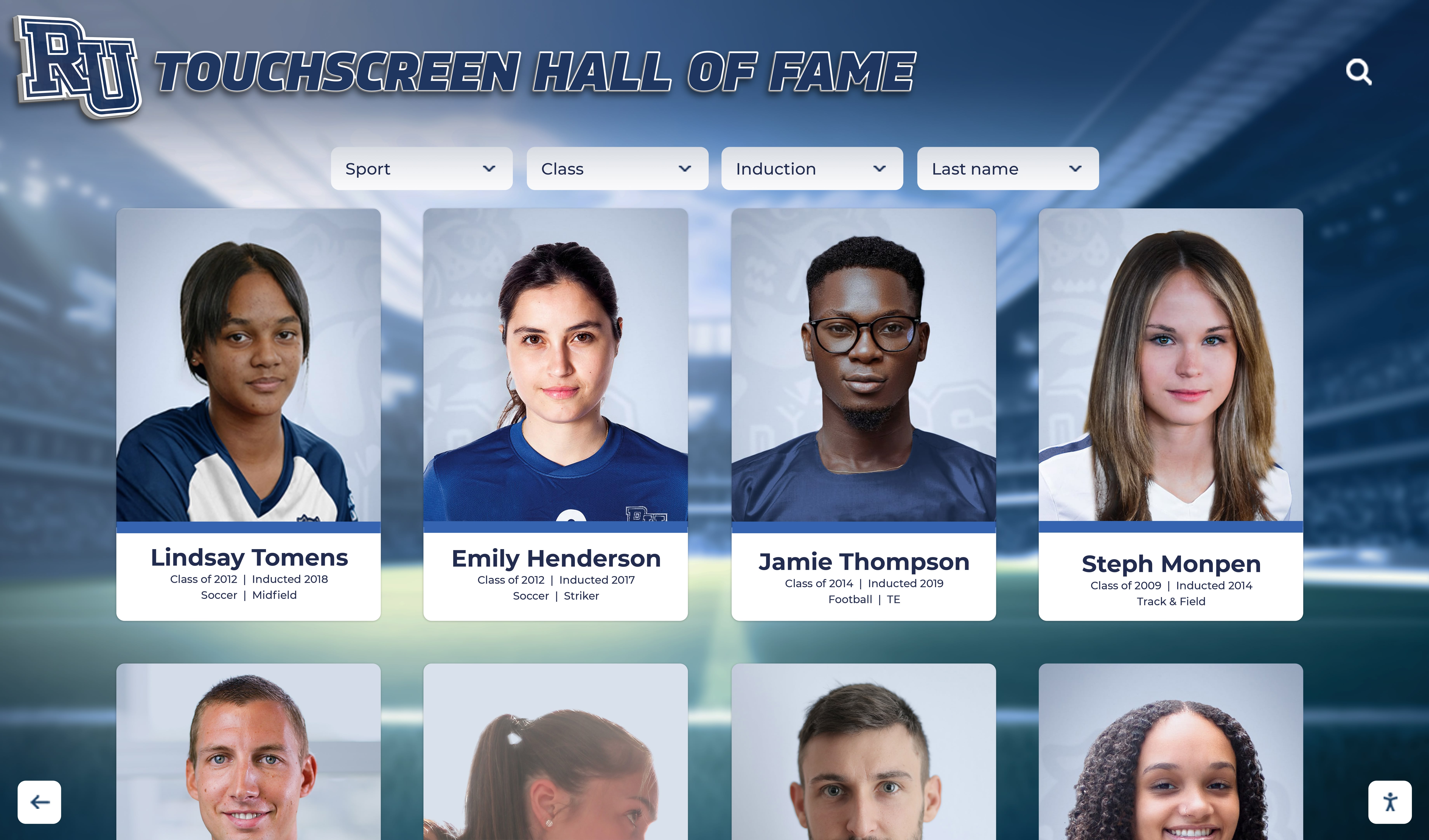
Comprehensive athlete recognition helps coaches track program development and identify talented prospects
Conclusion: Maximizing College Coach Visit Opportunities
College coach visits represent valuable opportunities for student-athletes to demonstrate abilities, showcase character, build relationships, and advance toward college athletic opportunities. For high schools, these visits provide chances to highlight program quality, demonstrate athlete development success, and build relationships with college programs that benefit multiple student-athletes over years.
Maximizing these opportunities requires understanding NCAA rules and recruiting calendars, preparing athletes and facilities professionally, creating recognition systems that showcase program excellence, building authentic relationships rather than transactional interactions, and maintaining consistent communication throughout recruiting processes.
High schools that invest in professional athletic recognition systems, develop organized recruiting support processes, and create cultures focused on developing complete student-athletes—academically, athletically, and character-wise—position their athletes for college recruiting success. When college coaches visit these programs, they immediately recognize institutional commitment to excellence that translates into confidence that athletes are well-prepared for college-level competition.
Showcase Your Athletic Program to College Coaches
Discover how Rocket Alumni Solutions can help you create professional recognition displays that impress visiting college coaches while inspiring your student-athletes. Our interactive systems showcase program achievements, college placements, and athlete development in formats that demonstrate your commitment to excellence.
Learn More About Athletic Recognition SolutionsStudent-athletes who understand what coaches evaluate, prepare thoroughly for interactions, communicate professionally, and present themselves authentically create advantages in competitive recruiting environments. Combined with strong high school programs that develop athletes holistically and showcase achievements effectively, these prepared athletes maximize their chances of earning college athletic opportunities.
The college athletic recruiting process has become increasingly sophisticated, but fundamentals remain constant. College coaches seek talented athletes with strong character, academic commitment, and coachability who fit their program cultures. By understanding recruiting rules, preparing comprehensively for coach visits, and building genuine relationships throughout the process, student-athletes and high schools can navigate recruiting successfully while creating opportunities for college athletic participation and scholarship support.
Whether your school hosts occasional coach visits or welcomes college recruiters regularly, creating professional environments that showcase athlete achievements, program quality, and development success makes every interaction count. Investment in comprehensive recognition systems that document college placements, celebrate athlete achievements, and demonstrate program tradition pays dividends in recruiting relationships that benefit student-athletes for years to come.































