Intent: Transform Intramural Sports Recognition at Power 4 Universities
Intramural sports programs at Power 4 universities engage thousands of students annually, creating communities through recreational competition and team-building experiences. Yet despite serving broader student populations than varsity athletics, intramural programs often receive minimal recognition, limited visibility, and inadequate resources. Digital recognition displays specifically designed for college intramural sports provide comprehensive solutions that celebrate participation, share critical program information, streamline communication, and create fundraising opportunities that strengthen these vital campus programs.
At major universities across the ACC, Big Ten, Big 12, and SEC conferences, intramural sports programs serve as the recreational athletic backbone for student engagement. According to the National Intramural Recreational Sports Association (NIRSA), over 75% of college students participate in some form of campus recreation during their undergraduate years, with intramural sports representing one of the most popular participation categories. These programs create inclusive athletic opportunities for students regardless of skill level, build social connections across diverse student populations, provide healthy stress relief during demanding academic schedules, and develop leadership skills through team captaincy and program volunteering.
Despite serving thousands of participants annually, most intramural programs struggle with visibility and recognition challenges. Championship teams receive minimal acknowledgment beyond brief email announcements. Program information scatters across multiple platforms creating confusion about registration deadlines and schedules. Tryout and sign-up processes remain cumbersome and difficult to publicize effectively. Fundraising efforts to support program growth face challenges in reaching potential donors who might support recreational athletics.
Digital recognition displays designed specifically for intramural sports solve these challenges while creating engaging hubs that celebrate participation, centralize information, and strengthen program sustainability.

Understanding College Intramural Sports at Power 4 Universities
Before exploring digital recognition solutions, understanding the scope and significance of intramural programs at major universities provides essential context for why comprehensive recognition matters.
The Scale of Intramural Participation
Power 4 universities typically operate extensive intramural programs serving massive student populations. At large state universities, intramural sports programs commonly register 8,000-15,000 unique participants annually across dozens of different sports spanning traditional offerings like flag football, basketball, and soccer, specialized sports including pickleball, ultimate frisbee, and spikeball, team competitions requiring coordinated rosters, individual and dual sports for flexible participation, and specialized leagues accommodating different skill levels from recreational to competitive.
For comparison, while a university’s varsity athletics might field 500-700 student-athletes across all sports, the intramural program serves twenty to thirty times that number. This massive participation base makes intramural sports one of the most impactful student engagement programs on campus.
Types of Intramural Programs and Competition Formats
College intramural programs typically offer multiple participation formats designed to accommodate diverse student interests and skill levels:
Team Sports Leagues: Traditional team sports like flag football, basketball, soccer, volleyball, and softball operate through seasonal leagues with regular schedules, playoff tournaments, and championship recognition. These leagues often feature multiple divisions based on competitive level and gender identity inclusion policies.
Tournament-Based Competition: Single-day or weekend tournaments provide condensed competition formats for sports including dodgeball, cornhole, sand volleyball, tennis, and racquetball. Tournament formats accommodate students with limited time commitments while still creating competitive experiences.
Individual and Dual Sports: Individual competitions in sports like golf, bowling, swimming, and track events allow participation without requiring full team coordination. Dual sports like tennis and racquetball offer partner-based competition.
Specialty and Emerging Sports: Many programs feature growing sports including esports competitions, pickleball leagues, spikeball tournaments, ultimate frisbee, and other activities reflecting evolving student interests.
Intramural Clubs and Ongoing Participation: Some programs operate ongoing clubs for activities like running groups, cycling clubs, or yoga communities that meet regularly without formal competition structures.
This diversity creates complex organizational challenges regarding how to communicate schedules, registration requirements, and recognition across dozens of simultaneous activities.
Recognition Challenges Facing Intramural Programs
Traditional recognition approaches create significant limitations for intramural sports programs:
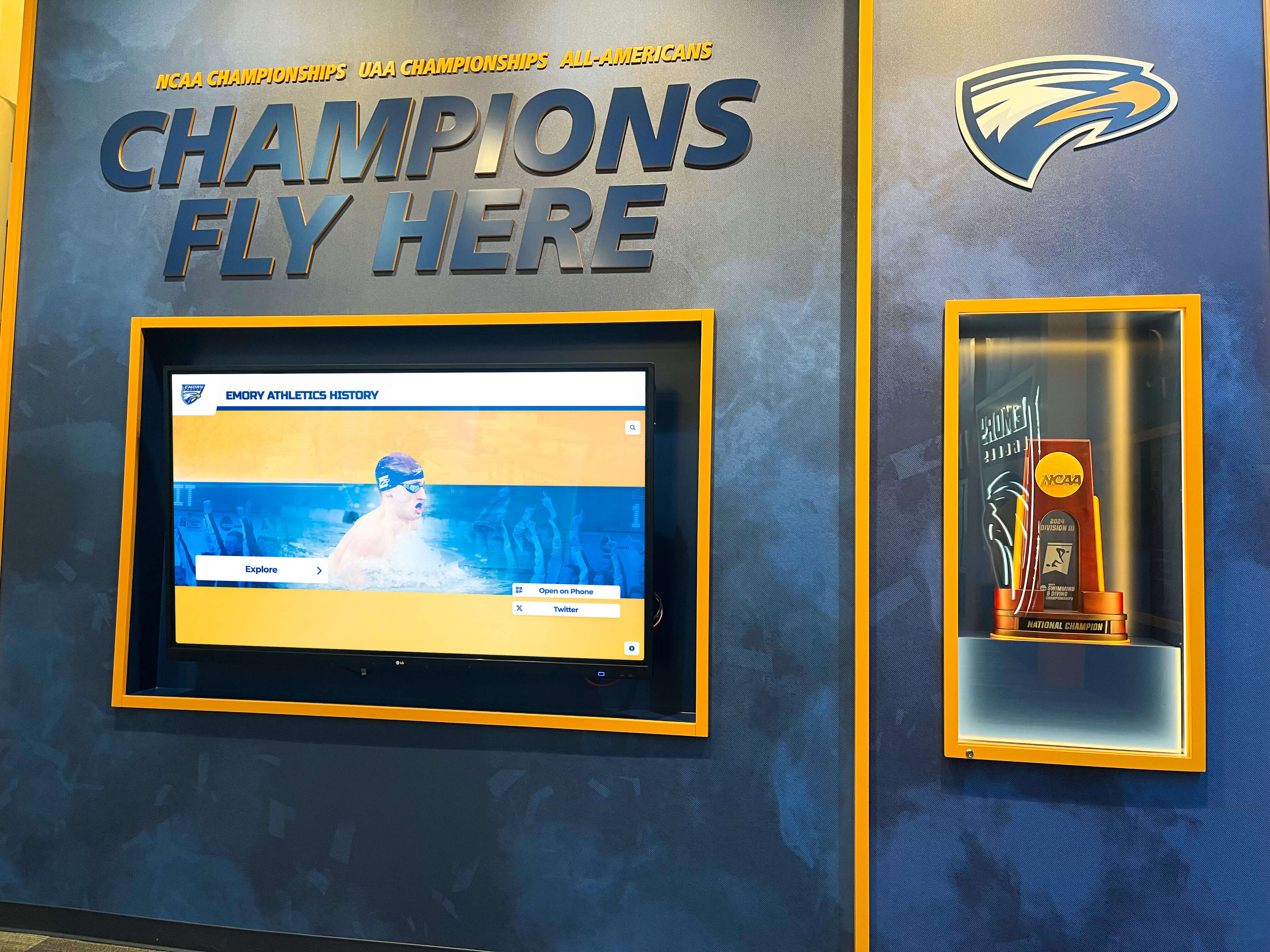
Limited Visibility for Champions: While varsity sports receive extensive media coverage, championship banners, and formal recognition, intramural champions typically receive participation medals and brief email announcements that generate minimal awareness and celebration of achievements.
No Historical Record: Most programs maintain no comprehensive historical archive of past champions, record holders, or notable achievements. Each season’s accomplishments disappear into forgotten email folders rather than contributing to program legacy and tradition.
Information Fragmentation: Program details scatter across multiple platforms—registration through IMLeagues or Fusion IM, schedules via Google Calendar, rules documents in PDF format, tryout information on social media—creating confusion and reducing participation from students who struggle to find necessary information.
Difficult Community Building: Without centralized recognition and information hubs, intramural programs struggle to build cohesive community identity and tradition comparable to varsity athletics, limiting program culture development and sustained student engagement.
Inadequate Fundraising Infrastructure: When programs seek additional funding to expand offerings, improve facilities, or purchase equipment, they lack compelling platforms for showcasing program impact and facilitating donations from alumni, parents, or community supporters who might contribute if aware of opportunities.
Digital recognition displays address these challenges comprehensively while creating powerful new capabilities for program management and development. Solutions like digital athletic recognition systems demonstrate how comprehensive platforms transform sports program visibility and engagement.
How Digital Recognition Displays Transform Intramural Sports Programs
Modern digital displays designed specifically for intramural sports create multifunctional hubs that celebrate achievements, distribute information, facilitate registration, and enable fundraising through integrated technology platforms.
Comprehensive Team and Individual Recognition
Digital platforms enable recognition depth impossible with traditional approaches through unlimited recognition capacity accommodating hundreds of championship teams annually, detailed team profiles including rosters, photos, and season accomplishments, individual achievement tracking celebrating statistical leaders and record-breakers, multi-year historical archives preserving program legacy, and multimedia content integration featuring photos, videos, and testimonials from participants.
Rather than limiting recognition to current season champions, digital displays maintain permanent historical records. Students can explore championship teams from previous years, discover which residence halls or student organizations have strongest competitive traditions, identify record holders in various statistical categories, and understand program evolution across decades of competition.
This comprehensive recognition creates several program benefits:
Enhanced Participation Motivation: When students see that champions receive meaningful, lasting recognition rather than forgotten email announcements, competitive motivation increases. Teams strive for championship recognition knowing their accomplishments will be permanently celebrated.
Tradition and Culture Development: Historical archives help programs develop tradition and identity comparable to varsity athletics. Students learn about legendary teams, exceptional individual performers, and program milestones that create shared cultural knowledge and institutional pride.
Recruitment and Awareness: Prospective students touring campus see evidence of robust intramural programs with serious recognition, influencing enrollment decisions for students who prioritize recreational athletics in their college experience. Similarly, college tour directory displays help prospective students discover campus programs during visits.
Alumni Connection: Former participants can explore digital recognition platforms remotely to find their championship teams, relive competitive experiences, and maintain connection to program communities even years after graduation.

Centralized Information Hub for Schedules and Program Details
Beyond recognition, digital displays function as comprehensive information hubs addressing the communication challenges that fragment traditional intramural program management:
Live Schedule Integration: Digital displays connect with program management platforms (IMLeagues, Fusion IM, etc.) to display real-time schedules showing game times, locations, and team matchups. Students can quickly check when and where their next games occur without navigating multiple apps or websites.
Registration Deadlines and Requirements: Clear, prominent display of upcoming registration deadlines, required documentation, eligibility requirements, and fee information ensures students don’t miss participation opportunities due to information fragmentation.
Rules and Format Explanations: Digital platforms can host comprehensive rules documents, format explanations, and frequently asked questions for each sport, reducing confusion and improving game flow by ensuring participants understand expectations before competition begins.
Facility Information and Wayfinding: Interactive displays help students locate specific playing fields, gymnasium courts, or recreation center rooms where their activities occur—particularly valuable at large universities with sprawling recreation facilities across campus.
Weather Updates and Schedule Changes: When outdoor activities face weather cancellations or location changes, digital displays provide immediate notification to affected participants, reducing confusion and no-shows from students who didn’t receive email notifications in time.
Program Announcements and Updates: General program information including staff contact details, volunteer opportunities, referee training sessions, and special events receive prominent display ensuring broad awareness across the participant community.
Centralizing this diverse information creates single-source-of-truth platforms that dramatically improve communication effectiveness while reducing staff time spent answering repetitive questions about schedules, locations, and requirements. Effective athletic facility displays demonstrate how comprehensive information integration improves program operations.
Tryout and Sign-Up Information Management
For competitive intramural leagues or specialized programs requiring tryouts, digital displays streamline communication about these processes:
Tryout Schedules and Locations: Clear display of upcoming tryout dates, times, locations, and what participants should bring ensures maximum attendance from interested students.
Skill Level Expectations: Detailed explanations of different league levels (recreational, intermediate, competitive) help students self-select appropriate participation tiers, creating more balanced competition and better experiences.
Registration Process Walkthroughs: Step-by-step visual guides explaining registration procedures reduce barriers to participation, particularly for first-year students unfamiliar with university systems.
Capacity Tracking and Waitlists: Real-time display of available roster spots, league capacities, and waitlist positions helps students understand whether spaces remain in desired activities or whether they should consider alternative options.
Team Formation Resources: Information about free agent pools, team-seeking players, and open roster spots helps individuals find teams and helps partial teams complete rosters, reducing barriers to participation for students without existing team connections.
This comprehensive sign-up information management increases participation rates by reducing confusion and friction in registration processes while helping students make informed decisions about which activities best match their interests and availability.
Integrated Donation Portals for Program Fundraising
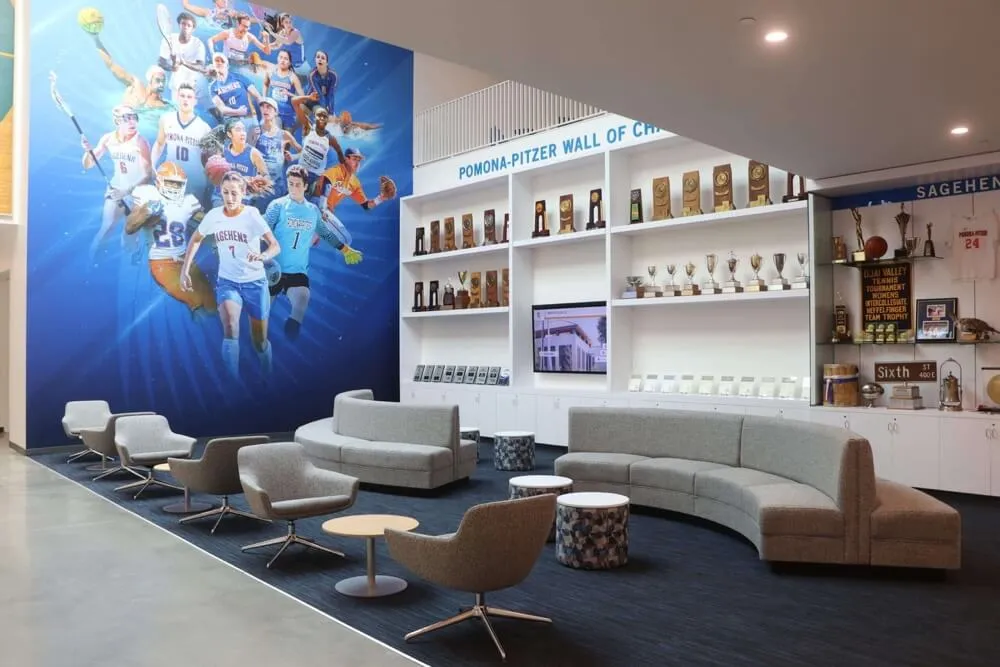
Perhaps most innovatively, digital recognition displays can function as fundraising platforms supporting intramural program growth and sustainability through integrated donation capabilities:
Equipment and Facility Improvement Campaigns: Displays can highlight specific fundraising goals—new uniforms for referee crews, upgraded scoreboards, additional equipment for emerging sports—with clear explanations of how donations directly improve program quality and participant experiences.
Donor Recognition Integration: Contributors receive appropriate recognition through donor honor walls, naming opportunities for specific program components, or special acknowledgment during championship celebrations, creating incentive for philanthropic support.
Corporate and Alumni Sponsorship Opportunities: Digital platforms facilitate corporate sponsorship programs where local businesses or alumni can sponsor specific sports or leagues in exchange for modest branding recognition, creating sustainable funding streams while building community partnerships.
Direct Donation Processing: QR code integration or embedded giving portals allow immediate donation processing directly from digital displays, capitalizing on engagement momentum when viewers feel inspired to contribute after exploring program recognition and information.
Impact Storytelling: Digital platforms can showcase how previous donations improved programs—photos of new equipment in use, testimonials from students benefiting from expanded offerings, statistical evidence of increased participation—creating compelling narratives that motivate additional support.
Targeted Campaign Communication: When programs launch specific fundraising initiatives, digital displays provide prominent promotion ensuring awareness across all program participants, staff, and visitors to recreation facilities.
This fundraising functionality addresses a critical challenge facing intramural programs. While varsity athletics typically have dedicated development staff and established donor bases, intramural programs often struggle to secure resources beyond basic operational budgets. Digital donation portals create accessible fundraising infrastructure that previously required extensive staff time and technical resources to establish and maintain.
Many universities have discovered that parents of current students represent particularly responsive donor audiences for intramural programs. When parents learn their students are highly engaged in recreational athletics, they often support programs enhancing these experiences—particularly when donation platforms make giving convenient and demonstrate clear program impact. Similar donation integration appears in church digital donation displays serving different institutional contexts but offering relevant technical models.
Essential Features for Effective Intramural Sports Recognition Displays
Creating impactful digital recognition requires specific features and capabilities designed specifically for intramural program contexts rather than adapting generic digital signage.
User-Friendly Content Management Systems
Intramural program staff—typically student employees or recreation professionals managing dozens of simultaneous responsibilities—need intuitive platforms requiring minimal technical expertise:
Web-Based Administration: Cloud-based content management accessible from any device allows staff to update recognition, schedules, and information from offices, recreation centers, or even mobile devices without requiring specialized software or on-site hardware access.
Template-Based Content Creation: Pre-designed templates for team profiles, championship recognition, and announcement creation ensure consistent professional presentation without requiring design skills or extensive formatting time.
Bulk Upload Capabilities: Ability to import team rosters, championship results, and schedule information directly from program management platforms (IMLeagues, Fusion IM) via CSV files or API integrations eliminates manual data entry for hundreds of teams.
Scheduled Content Publishing: Automated scheduling ensures content appears and disappears at appropriate times—championship recognition publishes when playoffs conclude, registration reminders appear weeks before deadlines—without requiring manual timing by busy staff.
Multi-User Permissions: Role-based access allows appropriate staff members to manage specific content areas while restricting sensitive functionality, enabling distributed management without security concerns.
Mobile-Responsive Interfaces: Management platforms that work effectively on smartphones and tablets provide flexibility for staff managing programs from various locations throughout recreation facilities rather than being tethered to desk computers.
These user-friendly features ensure that intramural staff can maintain current, accurate content despite managing complex programs with hundreds of teams and constantly evolving schedules, requirements, and announcements. Solutions like those from Rocket Alumni Solutions prioritize ease of use specifically for educational and recreational program contexts.

Comprehensive Search and Discovery Functionality
As recognition databases grow to include hundreds of championship teams and thousands of individual participants across multiple years, powerful search capabilities become essential:
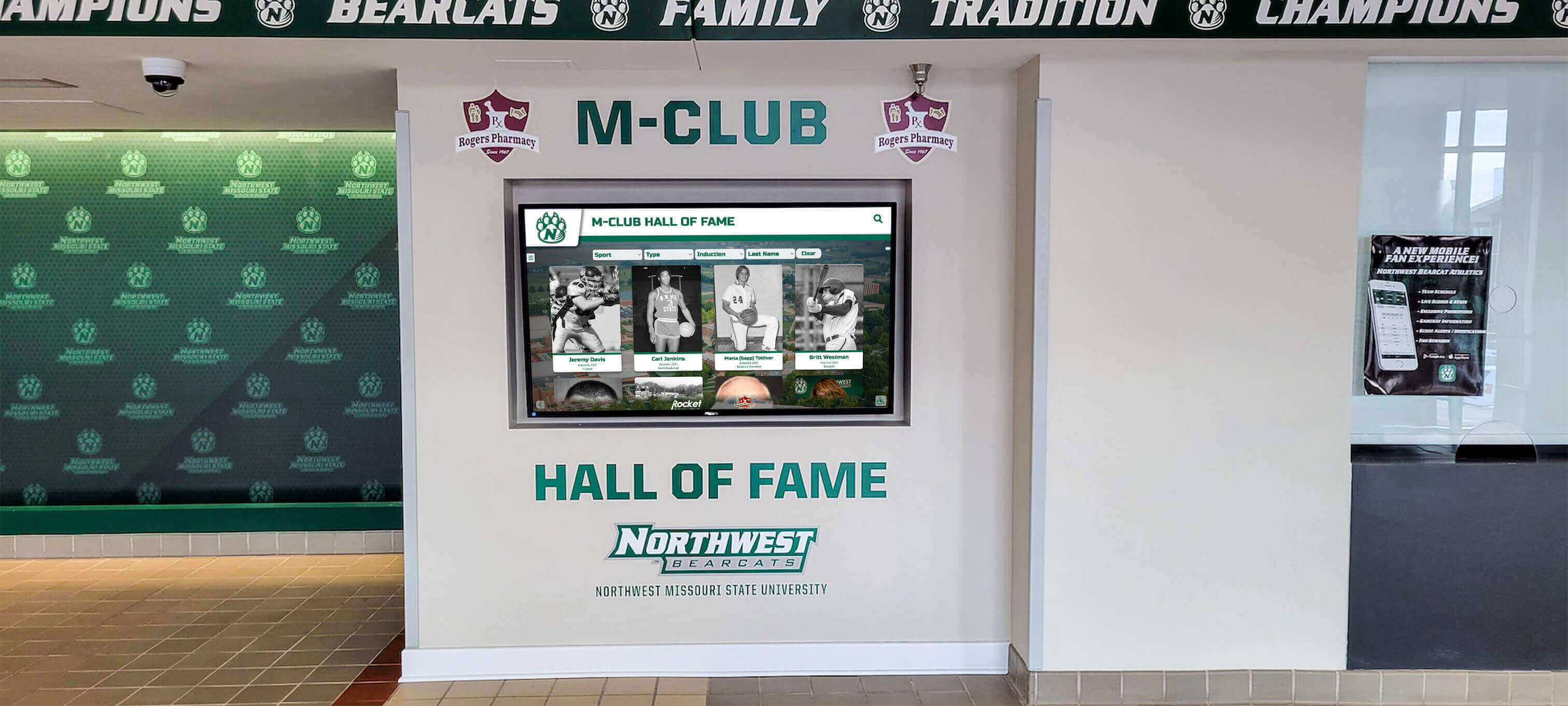
Name-Based Search: Students can instantly find themselves, friends, or teammates by searching names, discovering what championships they’ve won and what records they might hold.
Sport and League Filtering: Browse champions by specific sports or competitive divisions, allowing students to explore history within activities they currently play or consider joining.
Year and Semester Selection: Filter by academic year or semester to explore specific time periods, particularly useful for seniors reflecting on their four years of participation or alumni searching for their championship teams.
Organization and Affiliation Browsing: Filter by residence hall, Greek organization, academic program, or other affiliation categories to discover which campus communities have strongest intramural traditions and most championship success.
Statistical Leaders and Record Tracking: Discover all-time scoring leaders, championship count records, consecutive season streaks, and other statistical achievements that create program legends and competitive goals.
Keyword and Tag Search: Text-based searching enables discovery based on specific criteria—comeback championships, undefeated seasons, rivalry matchups—creating thematic exploration opportunities.
These discovery tools transform digital displays from passive information sources into engaging exploration platforms where students spend significant time discovering program history, comparing their achievements to past participants, and building deeper connection to intramural communities. Similar search functionality appears in digital hall of fame implementations across various institutional contexts.
Real-Time Integration With Program Management Platforms
Maximizing efficiency requires seamless integration between recognition displays and platforms already managing intramural operations:
IMLeagues and Fusion IM Connectivity: Direct integration with these dominant intramural management platforms allows automatic import of schedules, standings, championship results, and roster information, eliminating dual data entry and ensuring perfect consistency between systems.
Calendar Synchronization: Connection to university calendar systems or recreation center scheduling platforms ensures displayed schedule information always reflects current game times, location changes, or cancellations without manual updates.
Registration System Links: Direct links from display content to registration platforms create seamless pathways from awareness (seeing sport information on display) to action (registering team or individual entry) without requiring students to independently find registration portals.
Results and Statistics Automation: Automatic import of game scores, playoff brackets, and statistical leaders from management platforms ensures recognition content remains current throughout seasons without requiring staff to manually update displays after each game.
Photo and Media Management: Integration with photo storage platforms (Google Photos, institutional DAM systems) streamlines incorporation of championship photos, action shots, and event imagery into recognition content.
This integration significantly reduces staff workload while ensuring displayed information remains accurate and current—critical factors for platforms students rely upon for time-sensitive scheduling and registration details.
Mobile and Cross-Platform Accessibility
College students overwhelmingly consume information via smartphones, making mobile optimization essential for program effectiveness:
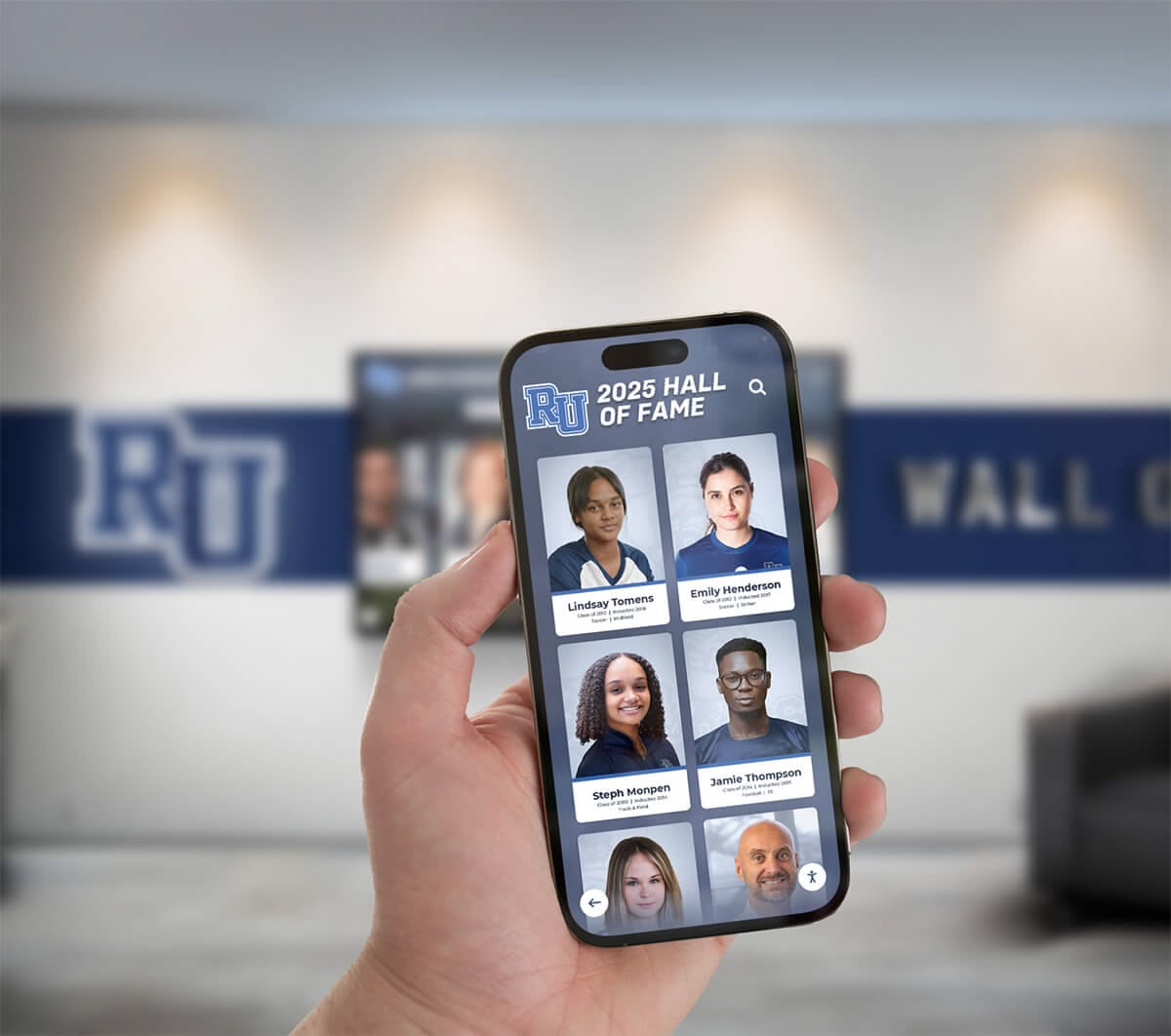
Responsive Web Design: Recognition platforms must function excellently on smartphone screens, automatically adjusting layout, navigation, and content presentation for small displays while maintaining full functionality.
QR Code Integration: Physical digital displays should feature QR codes allowing students to instantly access detailed information, registration links, or donation portals on their personal devices, bridging physical displays to comprehensive mobile experiences.
Progressive Web App Capabilities: Modern web applications that function like native mobile apps provide app-like experiences without requiring students to download separate applications, reducing adoption friction while enabling push notification capabilities for important announcements.
Social Media Integration: One-tap sharing to Instagram, Twitter, Snapchat, and other platforms allows students to share their championship recognition or promote upcoming registration deadlines across their social networks, exponentially expanding program visibility.
Offline Functionality: Basic offline capabilities ensure students can access recently viewed schedules or team information even in recreation facility areas with poor cellular connectivity.
This mobile-first approach acknowledges how contemporary college students actually consume information and engage with digital platforms, ensuring recognition displays meet users where they are rather than expecting behavior changes to accommodate institutional systems.
Analytics and Engagement Measurement
Understanding how students interact with recognition platforms enables continuous improvement and demonstrates program value:
Interaction Metrics: Track how many students engage with displays, how long they explore content, which sports receive most attention, and what information generates highest engagement.
Search Pattern Analysis: Understanding what students search for reveals which sports, teams, or individuals generate most interest while identifying potential content gaps where additional information might serve student needs.
Registration Funnel Tracking: Monitor how many students view registration information, click through to registration platforms, and ultimately complete registration, identifying potential friction points in participation pathways.
Donation Conversion Data: Track how many display viewers engage with fundraising content, follow donation links, and complete contributions, calculating return on investment for fundraising-focused displays.
Device and Access Point Data: Understanding whether students primarily engage via physical touchscreen displays, mobile web access, or desktop computers informs hardware placement decisions and interface optimization priorities.
Temporal Pattern Identification: Recognizing peak engagement times—beginning of semesters, immediately before registration deadlines, during playoff seasons—helps programs time announcements and campaigns for maximum effectiveness.
These analytics transform recognition displays from static installations into data-generating assets that inform broader program strategy and optimization efforts.
Implementation Strategies for Power 4 Universities
Successfully implementing digital recognition displays requires systematic planning, stakeholder collaboration, and strategic deployment aligned with intramural program goals and institutional contexts.
Step 1: Assessment and Planning Phase
Begin by comprehensively assessing current recognition and communication challenges while defining clear objectives for digital display implementation.
Stakeholder Consultation: Engage intramural program directors, recreation center administrators, student government representatives, IT departments, and active program participants to understand diverse perspectives on recognition needs, communication gaps, and implementation priorities.
Current State Analysis: Document existing recognition approaches, information distribution methods, registration processes, and fundraising practices, identifying specific pain points and inefficiencies that digital displays should address.
Goal Definition: Establish clear, measurable objectives for recognition display implementation including participation increase targets, communication effectiveness metrics, fundraising goals, and engagement benchmarks that will determine program success.
Budget Development: Calculate total implementation costs including hardware (touchscreen displays), software (recognition platform licenses), installation (mounting, electrical, network), content development (initial recognition population), and ongoing operation (annual licensing, content management staff time), comparing options across different solution approaches.
Timeline Creation: Develop realistic implementation schedules accounting for procurement processes, installation coordination, content development, staff training, and strategic launch timing aligned with academic calendar (ideally completing installation before fall semester to capture maximum participation).
This planning phase typically requires 6-8 weeks but ensures implementation proceeds smoothly with clear direction and appropriate resource allocation. Similar planning processes support developing college history displays in various institutional contexts.
Step 2: Platform and Hardware Selection
Choose technology solutions appropriate for institutional needs, technical capabilities, and budget constraints.
Purpose-Built Recognition Platforms: Solutions like Rocket Alumni Solutions provide comprehensive systems designed specifically for educational recognition with intramural-optimized templates, intuitive content management for non-technical recreation staff, integrated physical displays and web accessibility, responsive support from teams understanding recreational program contexts, and proven implementation processes refined across numerous university installations.
Purpose-built platforms deliver professional results with minimal technical burden, making advanced recognition accessible even for programs with limited IT support.
Hardware Specifications: For physical touchscreen installations, select commercial-grade displays rated for continuous operation (not consumer televisions), 55"-75" screen sizes appropriate for recreation center viewing distances, adequate brightness specifications (450+ cd/m²) for varied lighting conditions, responsive touchscreen technology supporting multi-user interaction, and robust mounting solutions appropriate for high-traffic recreation environments.
Network Infrastructure: Ensure reliable internet connectivity at display locations through wired ethernet connections (preferred) or robust wifi with dedicated access points, adequate bandwidth for video content streaming, secure network segmentation separating public displays from administrative systems, and backup connectivity options ensuring displays remain functional if primary networks experience issues.
Location Selection: Install displays in high-traffic areas including recreation center main entrances, lobby areas near registration desks, locker room corridors where participants pass during game days, cafeteria or lounge spaces where students gather between activities, and outdoor locations near playing fields or athletic complexes for programs with substantial outdoor offerings.
Consider installing multiple displays at large universities with geographically dispersed recreation facilities to maximize visibility across all program participants regardless of which facilities they primarily use.
Step 3: Content Development and Population
Creating comprehensive initial content establishes recognition value and demonstrates platform capabilities:
Historical Recognition Research: Identify championship teams from recent years (ideally 3-5 seasons) for initial recognition population, gathering team names, member rosters, competition dates, playoff results, and any available photos or documentation.
Photo Asset Collection: Reach out to past participants, search social media platforms, and review program archives to collect championship photos, action shots, and celebration imagery that makes recognition visually engaging rather than text-only.
Information Architecture Design: Organize content logically by sport categories, competitive divisions, academic years, and affiliated organizations, creating intuitive navigation that helps students quickly find relevant information and recognition.
Schedule and Registration Content: Populate current semester schedules, upcoming registration deadlines, rules documents, tryout information, and other operational details ensuring displays immediately provide functional value beyond historical recognition.
Fundraising Campaign Development: Create initial fundraising appeals with specific goals, compelling need statements, impact descriptions, and clear donation calls-to-action that leverage recognition platform to launch sustainable program support.
Style and Voice Standardization: Establish consistent writing tone, photo quality standards, and content templates ensuring professional cohesive presentation across all recognition profiles, announcements, and information sections.
Content development represents the most time-intensive implementation phase, typically requiring 40-80 hours depending on recognition depth and historical scope. Consider recruiting student workers, program volunteers, or graduate assistants to assist with research and content creation under professional staff supervision.
Step 4: Launch Strategy and Ongoing Promotion
Strategic launch creates awareness and establishes engagement patterns supporting long-term success:
Soft Launch Testing: Begin with limited access allowing program staff and student leaders to explore platforms, provide feedback, and identify any content corrections before full public launch.
Official Launch Event: Unveil recognition displays during high-visibility occasions—beginning of fall semester, major recreation event, homecoming weekend—maximizing initial exposure and generating excitement around new recognition.
Multi-Channel Promotion: Announce launch through intramural participant email lists, recreation center social media, campus newspaper features, orientation programming for first-year students, and signage throughout recreation facilities, ensuring broad awareness across entire university community.
Incentivized Exploration: Consider contests rewarding early engagement—prizes for students finding specific historical information, recognition for most social shares, drawings among students who register teams via display links—driving initial adoption and exploration.
Ambassador Programs: Recruit enthusiastic participants to serve as platform ambassadors who promote displays, help peers navigate features, and gather feedback for improvement, creating peer-to-peer awareness particularly effective with student audiences.
Continuous Content Updates: Maintain momentum through regular content additions including current season championship recognition immediately after playoffs, weekly schedule updates reflecting latest information, featured historical profiles celebrating notable past achievements, fundraising campaign progress updates showing community support growth, and new functionality announcements highlighting additional platform capabilities.
Successful launches transition displays from novelty attractions to established program infrastructure that students regularly consult for information and celebrate for recognition value.

Maximizing Program Impact Through Strategic Display Usage
Advanced strategies extend digital recognition displays beyond basic functionality to create comprehensive program enhancement.
Building Intramural Program Culture and Tradition
Transform displays into culture-building tools that develop program tradition comparable to varsity athletics:
Rivalry Recognition: Identify and celebrate intense rivalries between residence halls, Greek organizations, or student groups, creating narrative threads that build tradition and competitive intensity across seasons.
Record Tracking and Challenges: Establish clear records in various categories (most championships, longest winning streak, highest scoring game) and challenge current participants to pursue record-breaking performances, creating ongoing storylines and competitive goals beyond individual season championships.
Alumni Spotlight Features: Periodically feature distinguished alumni who participated in intramural sports during their undergraduate years, connecting current program to institutional history while demonstrating intramural participation doesn’t preclude future professional success.
Anniversary Celebrations: Mark milestone anniversaries of notable championship teams or program achievements, creating opportunities to reconnect past participants while educating current students about program legacy.
Season Preview and Prediction Content: Before major sport seasons, feature predictions, team profiles, and players-to-watch content building anticipation and competitive interest similar to pre-season coverage in professional sports.
These culture-building initiatives help intramural programs develop distinctive identities and traditions that strengthen student engagement beyond individual participation in specific sports. Similar culture-building approaches work effectively in high school athletic programs adapting recognition strategies for younger age groups.
Facilitating Cross-Program Coordination and Promotion
Digital displays can integrate intramural programming with broader campus recreation offerings:
Club Sport Connections: Feature information about competitive club sports for students seeking higher competition levels than intramurals provide, creating clear pathways between participation tiers.
Fitness and Wellness Integration: Promote complementary recreation offerings including group fitness classes, personal training services, outdoor adventure programs, and wellness workshops, positioning intramurals within comprehensive student recreation ecosystems.
Special Event Promotion: Highlight recreational events including fun runs, outdoor challenge courses, facility open houses, and community partnerships, increasing awareness and participation across diverse program offerings.
Partnership Recognition: Acknowledge campus partners including student health services, counseling centers, academic programs studying recreation or kinesiology, and student organizations collaborating on programming, demonstrating intramural programs’ centrality within broader campus communities.
Cross-Promotion With Varsity Athletics: When appropriate, feature connections between intramural and varsity programs—varsity athletes participating in intramural sports outside their primary sport, intramural standouts recruited to club or varsity teams, shared facility usage—celebrating comprehensive athletic culture across competition levels.
This integration positions intramural programs not as isolated offerings but as central components of holistic student recreation and wellness experiences.
Supporting Student Development and Career Preparation
Leverage recognition platforms to highlight student development benefits beyond recreational competition:
Leadership Skill Development: Feature profiles of team captains, league coordinators, and volunteer officials discussing leadership skills developed through intramural participation and how these experiences prepared them for professional careers.
Resume and Interview Content: Provide resources helping students articulate intramural participation in job applications and interviews, translating recreational experiences into professional competencies valued by employers.
Career Pathway Connections: Highlight alumni working in recreation, sports management, event planning, or related fields who credit intramural participation with career inspiration or skill development.
Student Employment Opportunities: Promote intramural program employment including official positions, program coordination, and facility management, connecting students interested in recreation careers with experiential learning opportunities.
Professional Development Programming: Feature workshops, certifications, and training opportunities available to intramural participants including referee certification, first aid training, and sports management education.
This framing elevates intramural sports from purely recreational activities to developmental experiences that contribute to students’ preparation for post-graduation success, potentially increasing both participation and institutional support.
Measuring Success and Demonstrating Program Value
Effective assessment demonstrates recognition display impact while identifying optimization opportunities.
Key Performance Indicators for Intramural Recognition Displays
Track multiple metrics measuring different dimensions of program success:
Participation Metrics: Monitor total participant counts, new participant acquisition rates, retention percentages for returning participants, team registration totals, and participation diversity across student demographics, comparing post-implementation trends to pre-implementation baselines.
Engagement Analytics: Track digital display interactions including total visits, unique users, session durations, search queries, content shares, and return visitor rates, demonstrating actual usage levels and identifying most engaging content types.
Communication Effectiveness: Measure schedule information accuracy, reduction in student inquiries about basic program information, registration deadline awareness levels, and rule compliance improvements indicating students better understand requirements.
Fundraising Outcomes: Calculate total donations received through integrated donation portals, number of individual donors, average donation amounts, and campaign goal achievement rates, demonstrating recognition platform fundraising effectiveness.
Awareness and Perception: Survey student awareness of intramural championship recognition, perception of program prestige and importance, and understanding of participation opportunities, assessing whether recognition displays enhance program reputation.
Competitive Intensity: Observe whether championship recognition increases competitive intensity as measured by playoff attendance, team preparation efforts, or participant attitudes about winning significance.
These diverse metrics provide comprehensive understanding of recognition display impact across multiple program dimensions.
Return on Investment Analysis
Demonstrate recognition platform value relative to implementation and operational costs:
Direct Revenue Generation: Calculate fundraising revenue directly attributable to donation portal availability, comparing to previous fundraising approaches and subtracting implementation costs to determine net financial benefit.
Staff Time Efficiency: Estimate staff hours saved through reduced time answering information inquiries, automated schedule updates, and streamlined registration communication, converting time savings to financial value based on staff compensation rates.
Participation Revenue Impact: If programs charge participation fees, increased participation resulting from improved communication and enhanced recognition prestige generates direct revenue increases that offset implementation costs.
Student Recruitment Value: Survey prospective students about factors influencing enrollment decisions, assessing whether prominent intramural recognition contributes to enrollment yield rates—even modest yield improvements create substantial financial value for universities.
Alternative Cost Comparison: Compare recognition display costs to traditional recognition approaches (trophies, banners, printed programs), typically demonstrating favorable economics especially when accounting for display flexibility, information integration, and ongoing utility.
Most university recreation departments find that comprehensive recognition displays achieve positive ROI within 2-3 years when considering both direct financial returns and broader program benefits justifying initial investment.
Common Implementation Challenges and Practical Solutions
Universities implementing intramural recognition displays typically encounter predictable obstacles that proactive planning addresses effectively.
Challenge: Limited Initial Content and Historical Data
Situation: Many intramural programs lack comprehensive historical records of past championships, making it difficult to populate recognition displays with multiple years of content.
Solutions: Start with recent history (previous 1-2 seasons) using readily available records rather than delaying implementation while researching decades of history. Launch with current content, then gradually add historical recognition through ongoing research. Leverage social media to crowdsource information and photos from past participants. Create submission portals allowing alumni to contribute their championship memories and documentation. Focus initial content on showcasing platform capabilities rather than achieving complete historical coverage. Use generic placeholder content temporarily while developing comprehensive recognition for specific teams and individuals.
Challenge: Coordination Across Multiple Recreation Facilities
Situation: Large universities often operate multiple recreation centers serving different campus areas, creating coordination challenges for consistent recognition display implementation.
Solutions: Implement cloud-based platforms allowing centralized content management across all display locations from single administrative interface. Install networked displays receiving identical content automatically rather than requiring separate management at each location. Develop content approval workflows ensuring consistent quality and messaging across facilities. Create location-specific content sections highlighting programs at particular facilities while maintaining shared overall recognition. Consider phased rollout beginning with highest-traffic facility before expanding to additional locations. Establish clear governance structures defining which staff members manage content for specific facilities or program areas.
Challenge: Balancing Recognition Across Diverse Sports and Participation Levels
Situation: Intramural programs include dozens of different sports with vastly different participation levels, creating tension about how to allocate recognition prominence fairly.
Solutions: Establish clear recognition criteria applied consistently across all sports regardless of popularity—championship teams receive standard recognition format, statistical leaders earn similar prominence. Feature rotation systems ensuring all sports receive homepage visibility during appropriate seasons. Create sport-specific sections allowing dedicated space for each activity regardless of overall program size. Celebrate participation volume appropriately while ensuring smaller sports receive recognition proportional to their competition intensity. Survey participants across different sports about satisfaction with recognition equity, making adjustments based on actual participant perspectives rather than assumptions.
Challenge: Maintaining Current Information With Limited Staff Resources
Situation: Intramural program staff juggle numerous responsibilities, making it challenging to consistently update displays with current schedules, registration information, and timely recognition.
Solutions: Implement platforms with direct integration to existing management systems (IMLeagues, Fusion IM) enabling automatic schedule updates without manual data entry. Create standardized update schedules—recognition updates following playoff conclusions, schedule refreshes every Monday morning—building routine rather than ad-hoc processes. Delegate specific content management responsibilities to student employees with clear training and accountability. Develop template-based content creation reducing time required for routine updates. Schedule content in advance during less busy periods for automatic publication during peak season times. Accept that perfect real-time currency isn’t always essential—weekly updates often suffice for information that doesn’t change daily.
Challenge: Justifying Budget Investment to University Administration
Situation: Recreation departments may struggle to secure funding approval for recognition display implementation when competing against other institutional priorities.
Solutions: Develop comprehensive proposals quantifying benefits including increased participation and associated revenue, staff time efficiency gains from improved communication, fundraising potential creating sustainable revenue streams, student recruitment impact in competitive enrollment environment, and comparison to ongoing costs of traditional recognition approaches replaced by digital platforms. Present pilot programs in single high-visibility location demonstrating engagement and value before requesting funding for comprehensive implementation. Identify external funding sources including alumni donor support, corporate sponsorships, or student fee allocations specifically designated for recreation facility improvements. Emphasize alignment with institutional priorities around student engagement, wellness, and co-curricular experience. Propose phased implementation spreading costs across multiple budget cycles rather than requiring single large expenditure.
Future Trends in College Intramural Sports Recognition
Technology continues evolving, creating new possibilities for enhancing intramural recognition and program management.
Artificial Intelligence and Predictive Analytics
Emerging AI capabilities will soon enable automated highlight video creation from game footage, intelligent recommendation systems suggesting sports to students based on interests and past participation, predictive capacity modeling helping programs anticipate registration demand and facility needs, and natural language interfaces allowing conversational information queries rather than navigating structured menus.
Enhanced Gamification and Competition Tracking
Advanced platforms may incorporate comprehensive point systems tracking individual and organization achievements across multiple sports seasons, dynasty recognition celebrating sustained excellence across years, prediction competitions where students forecast playoff outcomes, and virtual trophy cases allowing participants to build personal collections of digital awards and achievements.
Augmented Reality Integration
AR capabilities could enable virtual trophy displays in residence halls or organizational spaces, interactive wayfinding overlaying directions to specific recreation facilities or playing fields, and enhanced photo experiences allowing championship teams to pose with virtual trophies or recognition elements for social media sharing.
Expanded Social and Community Features
Future platforms may integrate direct messaging enabling team coordination and opponent communication, built-in social networks specific to intramural communities, matchmaking services connecting free agents with teams seeking additional players, and peer rating systems providing feedback on sportsmanship and competitive experiences.
Universities investing in modern recognition platforms now position themselves to adopt emerging capabilities as they mature without requiring complete system replacements.
Conclusion: Elevating Intramural Sports Through Comprehensive Recognition
College intramural sports programs serve thousands of students at Power 4 universities, creating communities, promoting wellness, developing leadership, and enhancing overall student experience. These vital programs deserve recognition, information infrastructure, and support mechanisms proportional to their massive participation and significant impact.
Digital recognition displays designed specifically for intramural sports provide comprehensive solutions that address the unique challenges facing these programs. They celebrate participation meaningfully through unlimited recognition capacity and multimedia storytelling. They centralize critical information about schedules, registration, and program requirements. They facilitate tryout and sign-up processes that previously required navigating multiple platforms. And they create fundraising infrastructure enabling sustainable program growth through accessible donation portals.
For recreation departments seeking to strengthen program visibility, improve communication effectiveness, increase participation rates, or develop sustainable funding streams, purpose-built recognition displays offer proven solutions with measurable returns across multiple program dimensions.
Transform Your Intramural Sports Recognition
Discover how Rocket Alumni Solutions can help your university create engaging digital recognition displays that celebrate championships, centralize program information, streamline communication, and enable fundraising for intramural sports programs.
Schedule Your Free ConsultationThe recognition students receive for their achievements matters. When intramural champions see their teams permanently celebrated alongside historical program traditions, when participants easily access accurate schedules and registration information, when prospective donors can immediately contribute to program improvement, and when comprehensive platforms demonstrate institutional commitment to recreational athletics—programs thrive, communities strengthen, and student experiences improve.
Modern technology makes comprehensive intramural recognition accessible even for programs with limited resources and modest technical capabilities. Cloud-based platforms eliminate complex IT requirements. Intuitive interfaces enable management by non-technical recreation staff. Integration with existing systems minimizes implementation burden. And comprehensive support from providers like Rocket Alumni Solutions ensures successful deployment regardless of institutional technical capabilities.
Your intramural sports program serves more students than any other single campus recreation offering. Give these participants and their achievements the lasting recognition, comprehensive information access, and sustainable program support they deserve. Digital recognition displays transform intramural sports from undervalued recreational activities to celebrated campus traditions worthy of their significant role in student life at Power 4 universities.































