First impressions shape enrollment decisions. When prospective students and their families arrive on campus for college tours, their navigation experience during those critical first hours often determines whether they can envision themselves as part of the community. Yet many institutions still rely on printed maps, confusing signage, and overwhelmed tour guides to help visitors navigate sprawling campuses with hundreds of buildings, multiple academic quads, residential areas, athletic facilities, and student services spread across dozens or even hundreds of acres.
College tour directory touchscreen displays revolutionize how universities welcome prospective students by providing interactive, self-service navigation tools that help visitors explore campuses independently, discover key facilities and services, access real-time information about events and programs, and feel empowered rather than lost during their campus visit experience. These sophisticated wayfinding systems combine intuitive touchscreen interfaces, comprehensive building directories, visual mapping with turn-by-turn directions, and integration with tour programs to create seamless navigation experiences that reflect institutional investment in student success.
According to research from BHDP Architecture on prospective college student campus visits, the campus visit experience significantly impacts matriculation decisions, with physical environment and ease of navigation playing crucial roles in how students and families perceive institutional quality and student-centeredness. As competition for enrollment intensifies and prospective students evaluate more colleges than ever before, creating exceptional visit experiences through effective wayfinding becomes increasingly critical to recruitment success.
This comprehensive guide explores how college tour directory touchscreen displays enhance campus visits, support admissions goals, provide measurable return on investment, and position institutions as forward-thinking communities that prioritize student experience from the very first interaction.

Modern touchscreen directories empower prospective students to explore campuses independently during college visits
The Critical Role of Wayfinding in College Recruitment
Campus visits represent pivotal moments in college selection processes where prospective students transition from abstract research to concrete evaluation of whether institutions match their needs, aspirations, and sense of belonging. Wayfinding quality during these visits significantly influences how students and families perceive institutions.
First Impressions Begin at the Entrance
According to industry research on college wayfinding and enrollment impressions, visitors start forming opinions the moment they enter campus, with direction signs, paths, entry markers, and initial navigation experiences quietly shaping perceptions about institutional organization, student support, and attention to detail. Confusing signage, unclear parking directions, or difficulty locating admissions buildings suggests chaos and lack of support that prospective students worry might characterize their entire educational experience.
Conversely, intuitive wayfinding communicates institutional competence and care. When prospective students and families easily locate parking, find admissions buildings without stress, and navigate confidently to tour meeting points, they arrive relaxed and receptive rather than frustrated and anxious. This positive emotional foundation colors how they perceive everything that follows during campus visits.
The Challenge of Self-Guided Exploration
While formal admissions tours provide valuable structured introduction to campuses, prospective students and families often want additional self-directed exploration to discover aspects of campus life that matter specifically to their interests. Students interested in engineering want to see laboratories and makerspaces. Aspiring musicians seek out performance venues and practice facilities. Student-athletes look for training facilities and competition venues. Parents want to locate health services, counseling centers, and safety resources.
Traditional printed maps and basic signage fail to support this self-guided discovery effectively. Visitors struggle to understand where they are on paper maps, find it difficult to plan routes to multiple destinations, miss significant facilities not highlighted on simplified tour materials, and waste valuable visit time backtracking or searching for locations instead of meaningfully engaging with campus environments.
Interactive touchscreen directories solve these challenges by enabling self-service navigation with visual mapping, searchable building databases, custom route planning between multiple destinations, and comprehensive information about facilities and services beyond standard tour routes. This independence transforms passive tour followers into active campus explorers who develop personal connections with institutions based on discovering what matters most to them individually.
Supporting Tour Guides and Admissions Staff
Admissions tour guides—typically current students managing groups of 15-25 prospective students and family members—face impossible challenges answering every visitor question, accommodating diverse interests and walking paces, remembering detailed information about hundreds of campus locations, and managing time effectively to complete scheduled tours. When visitors constantly ask for directions or struggle to find restrooms, refreshments, or specific buildings, tour quality suffers for everyone in the group.
College tour directory displays supplement rather than replace human tour guides by handling routine wayfinding questions so guides focus on storytelling, answering substantive questions about academic programs and student life, creating personal connections, and managing group dynamics. Admissions staff benefit similarly—rather than repeatedly providing directions or drawing maps, they direct visitors to nearby interactive directories for self-service navigation while they focus on enrollment conversations and relationship building.
Learn how campus directory systems provide comprehensive navigation solutions that support student and visitor experiences across educational environments.
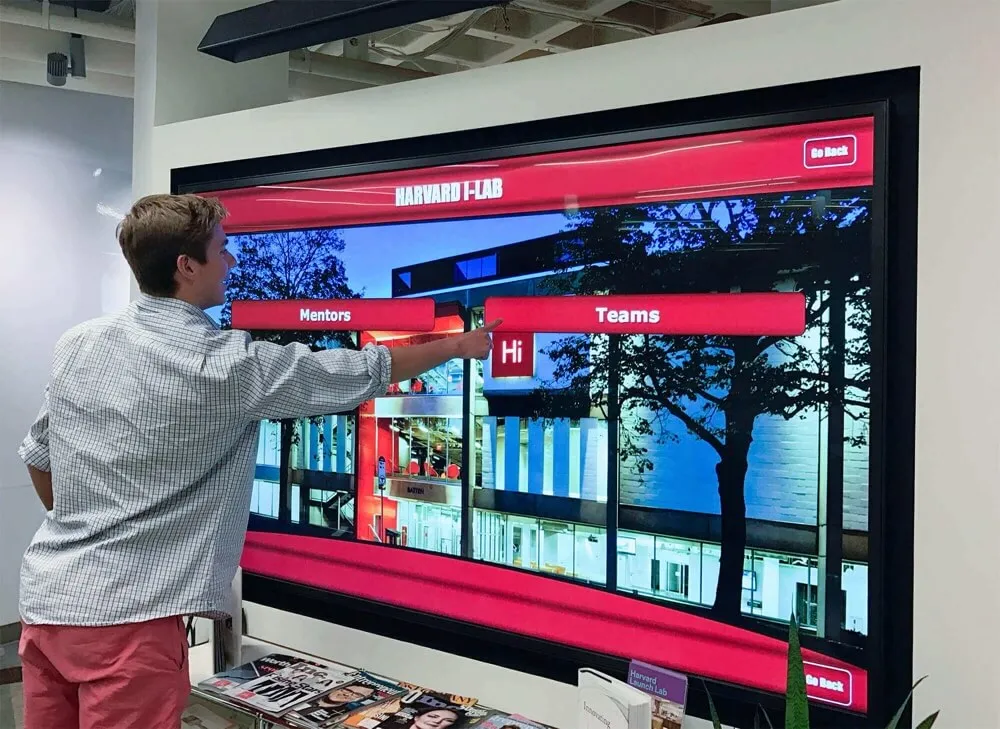
Interactive directories provide intuitive navigation through comprehensive campus information and services
Key Features of Effective College Tour Directory Systems
Successful college tour directory touchscreen displays share essential capabilities that distinguish professional recruitment tools from basic wayfinding solutions.
Prospective Student-Focused Interface Design
Unlike directories designed primarily for current students and faculty familiar with campus geography and terminology, college tour directories must accommodate visitors who know little about institutional layout, building names, or organizational structure.
Welcome screen messaging should immediately identify the system as visitor-friendly with clear calls-to-action like “Start Your Campus Tour,” “Find Buildings and Services,” “Explore Our Campus,” or “Plan Your Visit.” This welcoming language signals that systems serve prospective students rather than assuming existing campus knowledge.
Visual campus overview provides bird’s-eye perspective helping visitors understand overall campus geography including main academic areas, residential zones, athletic facilities, student centers, and other major districts before drilling into specific building locations. This context prevents disorientation that occurs when visitors search for individual buildings without understanding where those buildings sit within larger campus ecosystems.
Simplified navigation options offer clear pathways for common tour-related needs through prominent buttons like “Find Admissions Buildings,” “Locate Dining Options,” “See Athletic Facilities,” “Discover Residence Halls,” or “Campus Tours and Visitor Parking.” These task-based navigation choices match how prospective students think about campus exploration rather than requiring knowledge of administrative structures.
Accessibility considerations ensure all visitors can use directories effectively through ADA-compliant positioning appropriate for wheelchair users, high-contrast viewing modes and text enlargement options for visual accessibility, audio guidance for screen reader users, and multilingual support for international student prospects and families more comfortable in languages other than English.
Interactive Campus Mapping with Visual Wayfinding
Text-based directions (“Walk north on Main Drive, turn east at the Student Union, continue three blocks…”) prove nearly useless for campus visitors unfamiliar with campus layouts, local geography, or even which direction is north. Visual mapping transforms directory systems into genuinely useful navigation tools.
You Are Here orientation with clear position markers showing exactly where visitors stand relative to campus features helps them orient before beginning navigation. This crucial starting point prevents the common confusion of looking at maps without understanding one’s current location or which direction to face.
Route visualization and highlighting displays recommended walking paths from current location to selected destinations with color-coded routes, turn indicators, landmark callouts along paths, and estimated walk times. Some systems offer route alternatives—shortest distance, most accessible, most scenic, or paths avoiding construction zones.
Multi-destination route planning allows visitors to select several locations they want to visit and generates efficient routing visiting all destinations logically. This tour-building capability particularly benefits self-guided visitors who want to maximize limited time on campus by seeing multiple areas of interest efficiently.
Building photos and descriptions provide visual reference helping visitors recognize destinations when they arrive plus contextual information about what happens inside buildings. Prospective students searching for the engineering building benefit from seeing exterior photos, learning about programs housed there, and discovering student resources available within those facilities.
Outdoor and indoor mapping integration offers seamless navigation from outdoor wayfinding to interior floor plans for large academic buildings, student centers, or recreational facilities where visitors need help locating specific departments, auditoriums, or services within complex multi-floor structures.
Discover how interactive touchscreen software creates engaging navigation experiences that serve diverse user needs in educational environments.
Comprehensive Building and Service Directory
College campuses typically include hundreds of locations serving academic, residential, recreational, administrative, and support functions. Effective tour directories provide searchable access to comprehensive location databases organized for visitor understanding.
Intuitive search functionality returns relevant results for partial building names, department names, service types, or natural language queries. When prospective students search for “where can I eat,” “student health,” “registrar,” or “admissions,” systems should interpret intent and display relevant locations even when search terms don’t exactly match official building or department names.
Category-based browsing organizes locations into logical groupings matching how visitors think about campus including Academic Buildings organized by college or department, Student Services covering advising, financial aid, registrar, career services, Housing and Residence Life showing different residential communities, Dining and Food Services listing all eating options, Libraries and Study Spaces, Recreation and Athletics Facilities, and Arts and Performance Venues. This categorical organization helps visitors explore systematically when they don’t have specific destinations in mind.
Featured locations for prospective students highlight facilities most relevant to recruitment including admissions buildings and visitor centers, tour meeting locations and rest stops, popular student gathering spaces, state-of-art facilities showcasing institutional investment, and unique campus landmarks that become talking points during visits. This strategic content emphasis guides prospective students toward locations that support positive enrollment impressions.
Service hours and availability provide real-time information about whether facilities are currently open, dining hours at various locations, library hours including extended weekend hours, recreation center schedules, and special event information that might affect building accessibility during visits. This practical information prevents frustrating situations where visitors navigate to destinations only to find them closed or inaccessible.
Integration with Admissions and Tour Programs
Maximum value comes from connecting directory systems with broader admissions infrastructure and tour programs rather than treating them as standalone wayfinding tools.
Tour itinerary displays show scheduled tour routes, meeting locations, start times, and registration information helping visitors plan around formal tour opportunities. For institutions offering multiple tour types—general campus tours, academic program-specific tours, residence life tours, student-athlete visits—clear communication helps visitors select appropriate options.
Event calendar integration highlights admissions events, open houses, information sessions, scholarship competitions, admitted student days, and other recruitment programming that might interest campus visitors. Proactive promotion of these opportunities captures prospective student interest when they’re physically present and engaged with institutions.
Parking and transportation information addresses one of visitors’ most stressful concerns with maps showing visitor parking locations, parking permit instructions, shuttle schedules and routes, walking time estimates from parking to destinations, and accessible parking and transportation options. Reducing parking anxiety improves overall visit experiences significantly.
Weather-aware routing suggests covered walkways, indoor connections between buildings, or climate-controlled routes during inclement weather shows thoughtful attention to visitor comfort. This minor feature creates surprisingly positive impressions demonstrating institutional care for visitor experience.
Emergency information and alerts display campus safety resources, emergency contact information, weather alerts, building closures, or unexpected situations affecting navigation. During emergencies, these systems can pivot to crisis communication supporting campus safety alongside routine wayfinding functions.
Explore how building directory touchscreen systems provide comprehensive wayfinding that integrates with broader institutional communication and operational needs.

Touch-optimized interfaces make campus navigation accessible and intuitive for all visitors
Strategic Placement for Maximum Recruitment Impact
Directory effectiveness depends significantly on thoughtful positioning within campus environments where prospective students and families naturally seek wayfinding assistance.
Primary Recruitment and Visitor Locations
Admissions building lobbies serve as natural starting points for most campus visits where prospective students check in for tours, attend information sessions, meet with admissions counselors, and receive initial orientation to campuses. Directory displays immediately inside main entrances empower visitors to explore independently after formal programs conclude or while waiting for scheduled appointments.
Campus visitor centers designed specifically for prospective student services should feature prominently positioned directories as central visitor resources. These high-traffic locations see greatest concentration of people specifically needing campus navigation assistance during their visits.
Main campus entrances and gateways where visitors first arrive on campuses provide critical wayfinding opportunities preventing early frustration when visitors aren’t certain where to go upon arrival. Directory displays with parking information, admissions building directions, tour meeting locations, and campus overview maps orient visitors immediately as they begin campus experiences.
Central campus commons and quad areas where pedestrian traffic naturally converges offer opportunities to support self-guided exploration after initial tours. Visitors who’ve completed standard tours often want to revisit specific buildings, explore areas that interest them particularly, or discover additional campus features before departing. Well-placed directories in these central locations support this valuable self-directed discovery.
Supporting Campus Tour Routes
Tour starting and ending locations benefit from directory displays that visitors naturally encounter before tours begin or immediately after tours conclude. Pre-tour directories help visitors orient themselves and understand what they’ll see during upcoming tours. Post-tour directories support additional exploration when visitors want to revisit locations mentioned during tours or discover areas not included in standard routes.
Strategic waypoints along tour paths positioned at natural rest stops, decision points where paths diverge, or popular gathering spaces allow visitors who separate from tour groups (perhaps to use restrooms, take phone calls, or rest briefly) to rejoin groups or continue self-guided exploration without becoming hopelessly lost.
Destination facilities showcasing institutional strengths including newly renovated academic buildings, impressive athletic venues, innovative student spaces, or unique campus landmarks benefit from directory displays that help visitors find these showcase locations independently after hearing about them during tours or information sessions.
Residence Life and Student Center Locations
Housing and residence hall areas particularly interest prospective students evaluating where they might live if they enroll. Directory displays near residential communities provide information about housing options, residential program features, proximity to academic buildings and services, and navigation throughout residential areas. This supports both formal residence life tours and independent exploration by prospects and families.
Student union and campus center buildings serve as hubs for student life, dining, recreation, and co-curricular activities—aspects of college experience that significantly influence enrollment decisions. Directories within these spaces help visitors discover student organization offices, dining variety, study spaces, recreation facilities, and programming venues that bring campus life beyond academics to vivid reality.
Recreational and wellness facilities where visitors explore fitness centers, competition venues, climbing walls, pools, and wellness services benefit from directories highlighting these amenities and helping navigate within large multipurpose facilities that may occupy several floors or building wings.
Learn about strategic placement approaches for interactive displays that maximize engagement and serve diverse campus audiences effectively.
Content Strategy for Prospective Student Engagement
Beyond technical capabilities, directory effectiveness depends on content specifically curated for recruitment objectives and prospective student needs rather than assuming current student perspectives.
Highlighting Distinctive Campus Features
Showcase facilities and unique spaces that differentiate institutions from competitors deserve prominent directory features including newly constructed or renovated academic buildings demonstrating institutional investment, specialized laboratories, studios, or learning environments supporting program excellence, innovative student gathering spaces reflecting campus culture, historic or architecturally significant buildings connecting to institutional heritage, and sustainable or green buildings illustrating environmental commitment.
Student life and experience content helps prospective students envision themselves as community members through featured student spaces and popular gathering locations, dining variety showcasing culinary options, recreation and wellness amenities, arts and culture venues, and unique traditions or programs that define campus character. This content transforms directories from purely navigational tools into recruitment marketing platforms.
Academic program spotlights connect physical facilities to educational excellence by associating buildings with specific colleges, schools, or departments, highlighting distinctive program features and opportunities, showcasing research facilities or industry partnerships, and featuring student outcomes and career success stories. This contextual information helps prospective students understand educational value institutions offer beyond impressive buildings.
Seasonal and Event-Specific Content
Admitted student day customization during peak recruitment periods provides special welcome messaging, event schedules and locations, registration information, specialized tour options, and strategic highlighting of facilities most relevant to yield efforts. These temporary overlays maximize directory value during critical recruitment moments.
Open house and special event configurations adapt directory content for large recruitment events including specialized tour routes and schedules, information session locations and topics, department open houses and faculty meet-and-greet opportunities, student organization showcases, and auxiliary services like parking, shuttles, and dining options for event attendees.
Seasonal updates maintain relevance and freshness through academic calendar events (move-in, orientation, family weekend, commencement), seasonal activities and traditions, current student achievements and recognitions, campus improvements and construction updates showing ongoing institutional investment, and timely information about programs and application processes aligned with recruitment cycles.
Accessibility and Inclusive Welcome
Multilingual content serves increasingly diverse prospective student populations and international recruitment efforts through interface translation to languages serving priority recruitment markets, culturally appropriate imagery and messaging, international student-specific resource highlighting, and consideration of different cultural navigation preferences and expectations.
Accessibility information prominence communicates institutional commitment to inclusion through clear designation of accessible routes and entrances, accessible transportation and parking options, disability services and accommodations resources, universal design features throughout campus, and ADA-compliant directory features themselves modeling accessible design principles.
Discover how digital recognition displays incorporate inclusive content strategies that welcome and engage diverse audiences effectively.

Visitor-friendly interfaces help prospective students and families navigate campuses confidently during college tours
Measuring Success and Return on Investment
College tour directory touchscreen displays represent significant investments—justifying these expenditures requires demonstrating tangible impact on recruitment outcomes and operational efficiency.
Quantitative Engagement Metrics
Display interaction analytics track actual usage patterns through number of unique users per day revealing overall engagement levels, session duration showing how long visitors interact with directories, time-of-day usage patterns aligning with tour schedules and peak visit periods, most-searched locations revealing visitor priorities and interests, and route planning frequency indicating self-guided exploration activity.
Comparison with tour schedules correlates directory usage with formal tour timing showing pre-tour orientation activity, post-tour exploration extension, and off-schedule usage by visitors exploring independently without joining formal tours. These patterns reveal directory role supplementing rather than replacing human-guided experiences.
Seasonal and event analysis examines how usage fluctuates with recruitment cycles including peak admitted student visit periods, summer campus tour seasons, specialized recruitment event days, and quieter periods helping optimize content updates and system maintenance scheduling.
Qualitative Impact Assessment
Prospective student and family feedback gathered through post-visit surveys, focus groups with recent enrollees, or direct observation reveals perceived value of navigation resources, areas where directories successfully support self-guided exploration, frustrations or limitations users encounter, and suggestions for improvements or additional features.
Tour guide and admissions staff perspectives provide operational insights into how directories affect their work including reduction in directional questions and wayfinding assistance needs, ability to focus on substantive conversations rather than navigation logistics, visitor confidence and independence improvements, and scenarios where directories prove particularly valuable versus limitations they’ve observed.
Institutional reputation impacts though difficult to measure directly show up in campus visit reviews and ratings, social media mentions and visitor posts highlighting navigation experiences, comparison mentions in college selection forums and communities, and overall perceptions of campus organization and student support quality.
Enrollment Correlation Analysis
Yield rate tracking among prospective students who visited campus comparing pre-implementation baseline with post-implementation periods helps assess whether improved navigation experiences contribute to higher matriculation rates among admitted students who visited.
Visit volume trends examine whether enhanced wayfinding capabilities and visitor-friendly resources encourage more prospective students to visit campuses, longer visit durations indicating deeper engagement with campus environments, and repeat visits by seriously interested prospects.
Competitive positioning evaluates how campus tour experiences compare with competitor institutions through mystery shopping of peer campus visits, consultant evaluations of recruitment infrastructure, and feedback from college counselors and consultants working with prospective students evaluating multiple institutions.
Explore approaches for measuring digital engagement and demonstrating value across educational technology implementations.
Implementation Strategies for Colleges and Universities
Successful college tour directory deployments require systematic planning that addresses technical requirements, content development, integration with recruitment operations, and long-term sustainability.
Needs Assessment and Requirements Definition
Recruitment workflow analysis examines current campus visit processes including typical tour formats and schedules, visitor arrival patterns and parking, information sessions and event programming, self-guided visit accommodations, and peak recruitment season demands. Understanding existing operations ensures directories enhance rather than disrupt established programs.
Campus geography and wayfinding challenges through objective evaluation identifies confusing areas where visitors commonly become disoriented, poorly signed facilities or unmarked buildings, accessibility obstacles or challenging routes for visitors with mobility limitations, disconnected zones requiring outdoor navigation between distant areas, and construction or temporary barriers affecting standard paths.
Stakeholder input and priorities from admissions staff who manage recruitment operations daily, tour guides who observe visitor struggles firsthand, facilities and campus planning professionals who understand physical environment, marketing and communications teams who shape institutional messaging, and IT departments who support technology infrastructure ensures solutions serve diverse institutional perspectives.
Technology Platform Selection
Specialized education-focused solutions designed specifically for colleges and universities offer advantages over generic digital signage including purpose-built directory interfaces optimized for campus navigation, integration capabilities with admissions and campus systems, educational environment-appropriate branding and messaging, proven track record serving similar institutions, and ongoing platform development informed by higher education needs.
Solutions like Rocket Alumni Solutions provide comprehensive platforms specifically designed for educational institutions, combining intuitive content management with powerful interactive display capabilities that make campus directory implementation accessible even to schools with limited technical resources.
Hardware considerations balance performance with budget through commercial-grade touchscreen displays rated for continuous operation, appropriate screen sizes for installation locations and viewing distances (typically 43"-55" for most applications), weather-resistant outdoor-rated enclosures when needed, secure mounting systems preventing tampering or theft, and reliable computing hardware supporting responsive performance.
Content management capabilities determine long-term sustainability through cloud-based administration enabling remote updates, intuitive interfaces requiring no technical expertise, role-based permissions supporting distributed content responsibility, bulk operations and data import capabilities, scheduled publishing for event-specific content, and mobile accessibility for updates from any device.
Content Development and Population
Campus mapping and spatial data requires creating or updating accurate building floor plans, geocoding all campus buildings and landmarks, identifying optimal pedestrian routes and walkways, marking accessibility features and accommodation options, and maintaining currency as campus develops and changes over time.
Directory database compilation organizes comprehensive information about every campus location including official building names and common alternative names, departments and services housed in each facility, operating hours and seasonal schedule variations, building features and amenities within, and photographs showing exterior views for recognition during navigation.
Prospective student-friendly descriptions translate institutional terminology into accessible language that visitors unfamiliar with campus understand, highlight features most relevant to recruitment and enrollment decisions, balance informative content with concise presentation appropriate for quick scanning, and incorporate storytelling elements that bring campus culture and character to life beyond basic facts.
Integration with Recruitment Operations
Admissions team collaboration ensures directory content aligns with recruitment messaging, featured locations match tour emphasis and institutional positioning, seasonal variations coordinate with visit programming, and feedback loops capture operational insights for continuous improvement.
Tour guide training and preparation familiarizes student ambassadors with directory locations and capabilities, establishes when and how to direct visitors to directories for self-service information, identifies appropriate use cases where directories supplement but don’t replace guide expertise, and creates consistency between information provided verbally during tours and content displayed in directories.
Event-specific configurations develop templates and procedures for rapid content adaptation for admitted student days, open houses, specialized recruitment events, orientation programs, and family weekends—maximizing directory value across diverse recruitment and campus visit scenarios.
Learn about comprehensive implementation strategies for educational technology projects that achieve long-term success through thoughtful planning.

Strategically placed directories throughout campus support continuous prospective student exploration and discovery
Common Implementation Challenges and Solutions
Understanding typical obstacles institutions encounter helps prevent problems that limit directory effectiveness or delay implementations unnecessarily.
“Our Campus is Too Complex for Visitors to Self-Navigate”
Campus complexity actually strengthens rather than weakens the case for interactive directory systems. The more complicated navigation becomes, the more valuable self-service wayfinding tools prove. Institutions with sprawling campuses, disconnected areas, confusing building layouts, or frequent organizational changes benefit most from technologies that make complexity manageable.
Phased mapping approaches make overwhelming projects manageable by starting with core academic and admissions buildings most relevant to typical tours, expanding to residential and student life areas, adding specialized facilities progressively, and continuously improving detail and wayfinding refinement based on actual usage patterns and visitor feedback.
User testing and iteration with actual prospective students and families visiting campus reveals whether navigation systems genuinely work for intended audiences or only make sense to institutional insiders already intimately familiar with campus geography. Observing real visitors use directories identifies confusing elements requiring simplification or clarification.
“We Already Have Campus Maps and Signage”
Traditional static wayfinding serves different purposes than interactive directories—effective navigation typically requires both complementary approaches rather than choosing one versus the other. Printed maps provide portable reference visitors carry during exploration. Fixed signage offers at-a-glance orientation without requiring interaction. Interactive directories provide sophisticated search, route planning, and detailed information static approaches cannot deliver.
Integrated wayfinding ecosystems coordinate multiple elements including interactive directories for comprehensive self-service information, architectural signage for quick glanceable orientation, mobile web access extending digital content to personal devices, and printed materials visitors can reference throughout tours. Each component reinforces others in comprehensive systems.
“Budget Constraints Limit Technology Investment”
While college tour directories require real investment, costs should be evaluated relative to returns in recruitment effectiveness, operational efficiency, and institutional positioning rather than comparing only to traditional signage expenses.
ROI framework considerations include admissions staff time redirected from wayfinding questions to substantive recruitment conversations, enhanced prospective student experience contributing to yield improvement, positive institutional impression supporting overall recruitment positioning, operational efficiency over multi-year timeframes, and reduced printing costs for maps and wayfinding materials that directories reduce or eliminate.
Phased deployment strategies manage initial investment through starting with one or two highest-priority locations (typically admissions building and main campus entrance), demonstrating value and building internal support, expanding to additional strategic locations based on proven success, and budgeting for growth across multiple fiscal years rather than requiring complete campus coverage immediately.
Alternative funding sources beyond operating budgets include capital improvement projects or facility renovation budgets, enrollment management strategic initiatives, donor funding for campus improvement projects, student experience enhancement initiatives, and collaborative funding with facilities, IT, and admissions sharing costs across departments benefiting from systems.
“Content Maintenance Will Overwhelm Staff”
Sustainable directory systems require thoughtful content governance but need not create overwhelming administrative burdens when approached strategically.
Automated integration with existing campus databases synchronizes building information from facilities management systems, office and department locations from institutional directories, event calendars from campus scheduling platforms, and operating hours from decentralized college and department websites. This automation ensures directories reflect institutional data without manual duplication.
Distributed content responsibility empowers appropriate stakeholders to maintain their own information through admissions controlling recruitment-focused content and featured locations, facilities managing building information and campus maps, IT handling technical integration and data feeds, academic colleges updating program and department information, and centralized oversight ensuring quality and consistency.
Efficient workflows using purpose-built management platforms minimize time requirements through bulk update capabilities for widespread changes, template systems for event-specific configurations, scheduled publishing automating routine content changes, and mobile administration enabling updates during otherwise idle time.
Discover content management best practices that maintain quality while respecting staff capacity constraints across institutional environments.
The Future of College Tour Technology
Emerging technologies promise even more sophisticated and personalized campus navigation experiences in coming years as institutions continue innovating recruitment approaches.
Personalized Tour Experiences
Artificial intelligence and machine learning will enable directories that understand prospective student interests, academic preferences, and priorities to suggest personalized exploration routes highlighting facilities and programs most relevant to individual visitors. Rather than generic campus tours, systems could create customized itineraries for engineering prospects, pre-med students, performing arts applicants, or student-athletes based on their stated interests.
Profile-based recommendations might incorporate application information, demonstrated interests from website browsing, survey responses about preferences and priorities, and demographic factors informing relevant campus resources to highlight. These intelligent systems transform passive wayfinding tools into proactive recruitment partners suggesting experiences designed to increase enrollment likelihood.
Mobile and Augmented Reality Integration
Smartphone connectivity will enable seamless transitions from touchscreen directory displays to personal mobile devices allowing visitors to begin navigation on fixed displays, then continue directions on smartphones throughout exploration, receive notifications about locations or events they pass, and save favorite locations or tours for future reference after leaving campus.
Augmented reality wayfinding overlaying directional arrows and information onto real-time smartphone camera views showing exactly where to walk, highlighting buildings and landmarks as cameras pan across campus, providing contextual information about facilities visible in camera views, and creating immersive navigation experiences particularly valuable for complex outdoor routing between distant buildings.
QR code handoffs provide simple technology bridges enabling visitors to scan codes displayed on touchscreen directories transferring current maps and planned routes to personal devices without requiring app downloads or complex authentication.
Virtual and Hybrid Visit Enhancement
Virtual tour integration connecting physical campus directories with online virtual tour platforms creates continuity for prospective students who explored campus virtually before visiting in person, enables remote exploration for prospects unable to visit physically, combines 360-degree photography with interactive directories, and maintains engagement after prospective students leave campus by providing continued digital access to same directory content experienced during physical visits.
Pre-visit planning tools allow prospective students to build custom campus tour itineraries online before traveling to campus, receive turn-by-turn mobile navigation upon arrival, share planned itineraries with family members traveling together, and coordinate efficiently when groups split to explore individual interests before regrouping.
Explore how innovative recognition displays incorporate emerging technologies that enhance engagement and create memorable experiences.
How Rocket Alumni Solutions Supports College Tour Directory Needs
Institutions seeking purpose-built directory systems specifically designed for educational environments and recruitment objectives require platforms that understand campus contexts and prospective student needs rather than generic digital signage repurposed for wayfinding applications.
Education-Focused Platform Design: Rocket Alumni Solutions provides comprehensive touchscreen software specifically designed for colleges and universities including intuitive interfaces optimized for prospective student navigation, comprehensive building directory and mapping capabilities, flexible content management accommodating recruitment cycles, integration with admissions operations and campus systems, and proven reliability serving educational institutions nationwide.
Admissions and Recruitment Understanding: Unlike generic wayfinding vendors, Rocket Alumni Solutions understands unique college recruitment contexts including prospective student information needs and expectations, tour program coordination and event support, seasonal recruitment cycles and admitted student yield initiatives, competitive positioning and institutional differentiation objectives, and enrollment management metrics demonstrating technology impact on recruitment outcomes.
Sustainable Content Management: Cloud-based platforms respect institutional resource constraints through no-code interfaces requiring zero technical expertise, mobile accessibility enabling updates from any device anywhere, professional templates ensuring quality presentation without design skills, bulk operations processing widespread content changes efficiently, and comprehensive support including training, documentation, and responsive assistance.
Multi-Platform Experience Continuity: Recognition extends beyond physical displays through mobile web access providing smartphone-optimized navigation, virtual tour integration connecting online and physical experiences, QR code handoffs moving content between displays and personal devices, social sharing enabling prospective students to share discoveries with friends and family, and comprehensive accessibility ensuring inclusive experiences for all visitors.
Proven Educational Track Record: Rocket Alumni Solutions serves over 700 schools and educational institutions nationwide with interactive touchscreen displays and directory systems, providing established expertise in educational environments, references from peer institutions implementing similar solutions, comprehensive case studies demonstrating recruitment and operational benefits, and ongoing platform development informed by actual educational institution needs and feedback.
Institutions implementing purpose-built campus navigation platforms report measurable improvements in prospective student satisfaction, admissions staff efficiency, tour program effectiveness, and overall institutional positioning as student-centered organizations investing in exceptional experiences from first campus interaction.
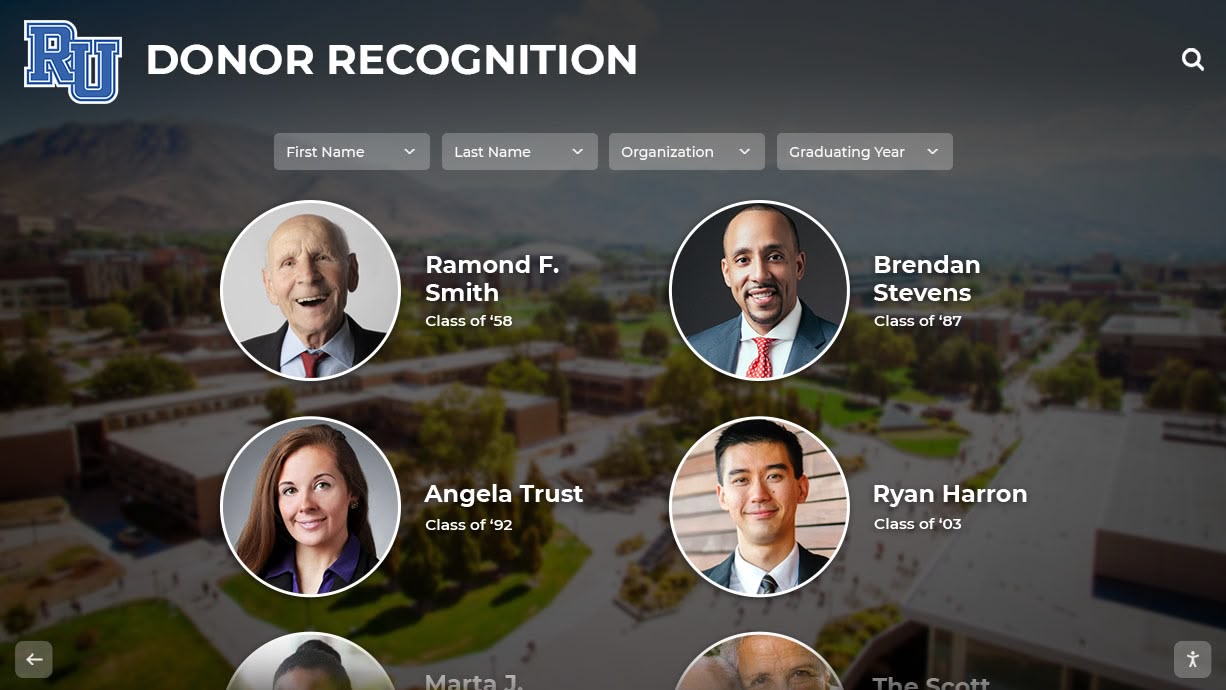
Modern campus technology demonstrates institutional investment in student experience and forward-thinking culture
Conclusion: Transforming Campus Visits Through Intuitive Navigation
College selection represents one of the most significant decisions young adults make—choices that shape educational experiences, career trajectories, personal development, and lifelong connections. Campus visits during which prospective students evaluate institutions and envision themselves as community members play critical roles in these life-changing decisions. Every aspect of visit experience, including something as seemingly mundane as wayfinding, contributes to overall impressions that determine enrollment choices.
College tour directory touchscreen displays elevate campus navigation from necessary logistics to strategic recruitment advantages. When prospective students and families navigate confidently, explore independently, discover facilities and programs matching their interests, and feel welcomed rather than confused during campus visits, they develop positive institutional associations that influence enrollment decisions favorably. Conversely, navigation frustration, confusion, and difficulty finding important locations create negative impressions that undermine even excellent academic programs and supportive campus communities.
Research consistently demonstrates that campus visit quality significantly impacts matriculation decisions. In competitive enrollment environments where prospective students evaluate multiple institutions offering comparable academic programs, campus visit experiences often provide decisive differentiators. Institutions that welcome visitors with sophisticated, intuitive, and visitor-focused navigation technologies communicate student-centeredness, organizational competence, and forward-thinking innovation—qualities prospective students seek in institutions that will support their success throughout educational journeys.
Whether your institution manages a compact urban campus, sprawling suburban environment, or multiple disconnected locations, college tour directory touchscreen displays provide scalable, sustainable solutions that enhance prospective student experiences while supporting admissions staff efficiency and recruitment effectiveness. The investment in sophisticated wayfinding technology delivers measurable returns through improved yield, enhanced institutional reputation, operational efficiency, and positioning as student-focused organization worthy of enrollment commitment.
Enhance Your Campus Visit Experience
Discover how Rocket Alumni Solutions can help your institution implement comprehensive college tour directory systems that welcome prospective students, support admissions operations, and strengthen enrollment outcomes through exceptional campus navigation experiences.
Request Your Campus AssessmentReady to transform your campus visit experience? Explore how purpose-built directory platforms can position your institution as forward-thinking community that prioritizes student success and experience from the very first interaction. Prospective students deserve navigation tools matching their expectations shaped by modern technology—college tour directory touchscreen displays deliver these experiences while supporting your enrollment goals and institutional mission.
Learn more about comprehensive campus technology solutions and interactive wayfinding systems that serve diverse educational contexts and institutional needs.































