Digital signage has become essential infrastructure for modern schools—transforming how educational institutions communicate with students, staff, parents, and visitors while building school culture and celebrating achievement. Yet with dozens of platforms available, each claiming to serve educational needs, comparing digital signage options can overwhelm administrators tasked with making technology decisions that will impact their schools for years to come.
The challenge isn’t finding digital signage solutions—it’s identifying which platform best serves your specific needs, budget, and goals. Generic commercial platforms designed for retail and corporate environments often lack features schools require, while purpose-built educational solutions may offer capabilities you don’t need at premium prices you can’t afford. Making the right choice requires understanding what different platforms actually deliver, how they differ in meaningful ways, and which features genuinely matter for educational environments versus marketing hype.
This comprehensive guide compares leading digital signage options for schools in 2025, providing expert analysis of capabilities, costs, ideal use cases, and implementation considerations. Whether you’re replacing outdated bulletin boards, upgrading from projector-based announcements, or implementing recognition displays celebrating student achievement, you’ll discover how to evaluate platforms strategically and select solutions that deliver lasting value for your specific educational context.
Modern schools deploy digital signage for diverse purposes—daily announcements and emergency communications, wayfinding and campus directories, event promotion and schedule displays, student recognition and athletic achievements, and community engagement through alumni showcases. The platform you choose should align with your primary use cases while providing flexibility for future applications you haven’t yet considered.

Understanding Digital Signage Categories for Schools
Before comparing specific platforms, recognizing that “digital signage for schools” encompasses fundamentally different solution categories helps frame evaluation correctly. Selecting announcement systems for recognition applications—or vice versa—leads to disappointing results regardless of product quality.
Informational Digital Signage: Announcements and Communication
Traditional digital signage platforms focus on one-way information display—delivering announcements, schedules, news, and general communications to passive audiences. These systems excel at replacing bulletin boards and morning announcements with dynamic displays showing rotating content.
Core Capabilities:
- Slideshow-based content presentations cycling through messages
- Calendar integration displaying upcoming events automatically
- Emergency alert integration for safety communications
- Weather, news, and social media feed displays
- Content scheduling based on time, date, or audience
- Multi-display management controlling screens across buildings or districts
These systems serve schools needing efficient announcement distribution but typically offer limited interactivity beyond displaying rotating information. Students and visitors watch content passively rather than actively exploring deeper information.
Interactive Recognition Digital Signage: Engagement and Culture Building
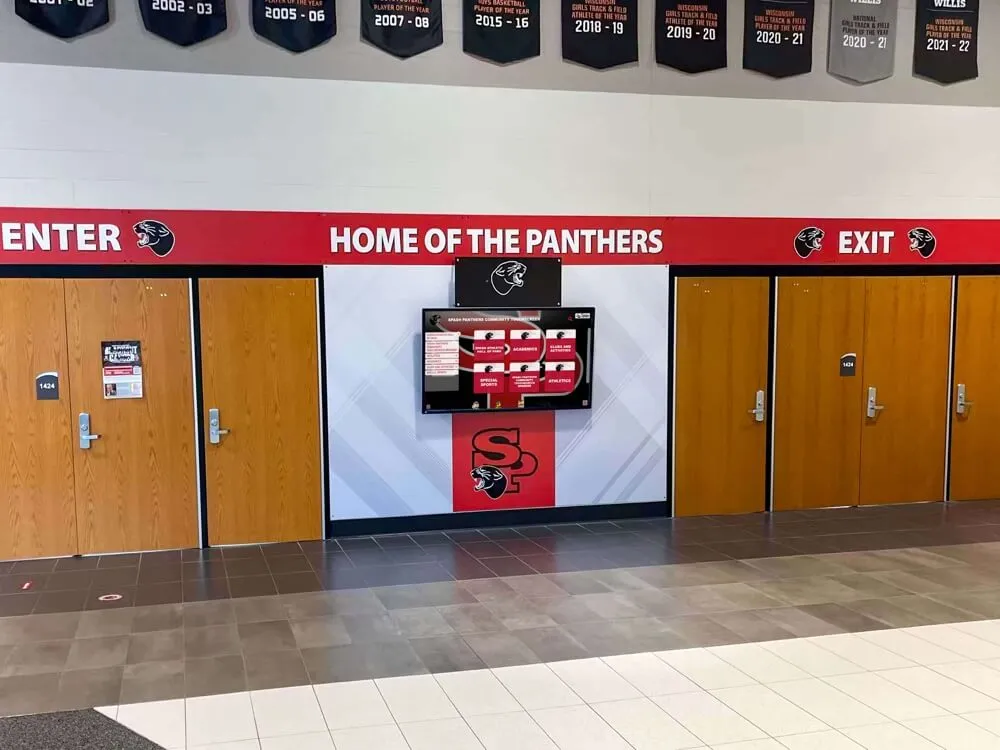
Purpose-built recognition platforms like those from Rocket Alumni Solutions serve distinctly different purposes—building school culture through interactive celebration of student achievement, alumni success, and institutional heritage. These systems transform how schools recognize excellence while creating engagement opportunities that strengthen community connections.
Core Capabilities:
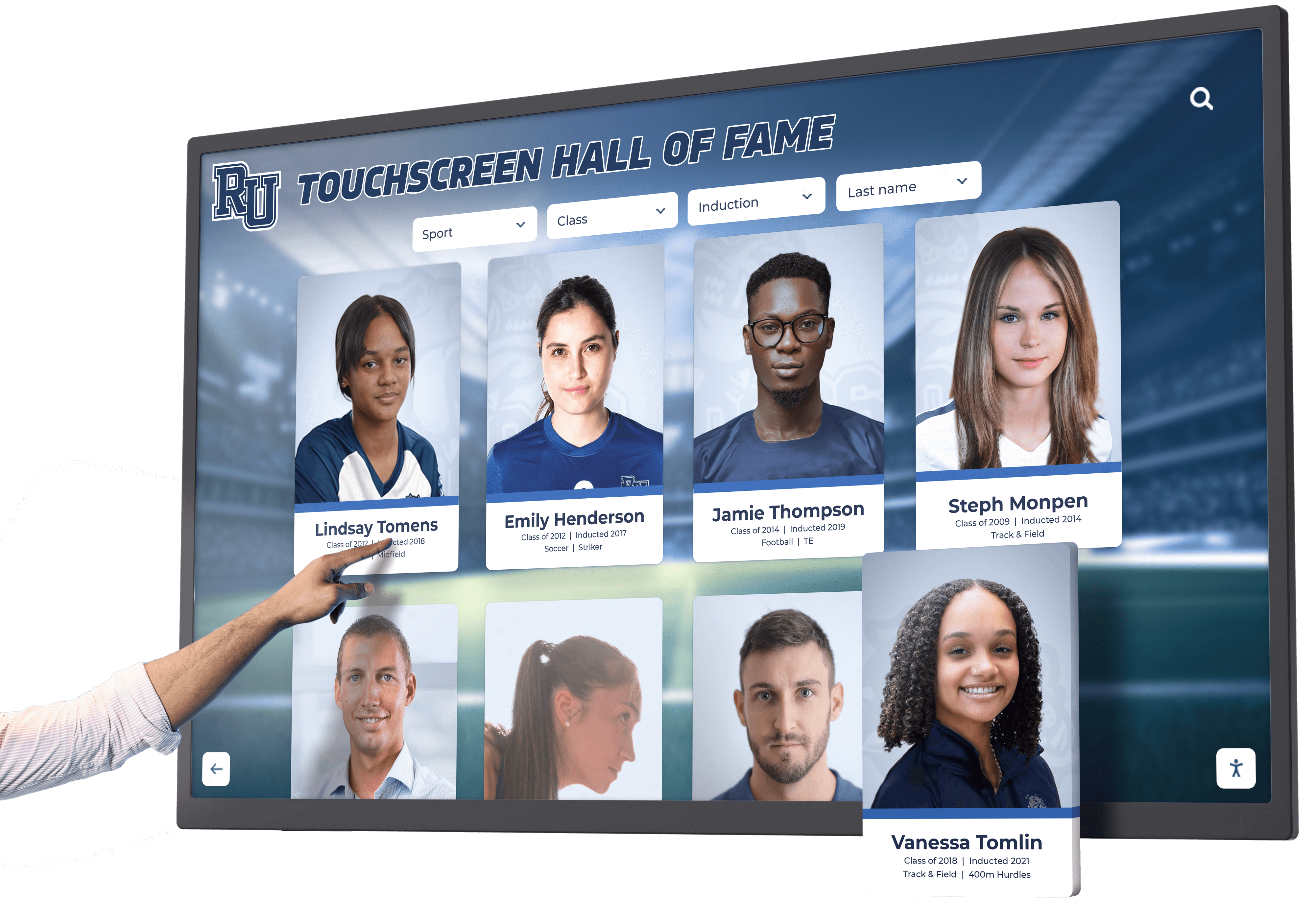
- Touchscreen interactivity enabling active content exploration
- Searchable databases allowing visitors to find specific individuals or achievements
- Unlimited content capacity accommodating decades of achievement without space constraints
- Rich multimedia profiles combining photos, videos, statistics, and biographical information
- Web accessibility extending reach beyond physical displays to remote alumni and families
- Content management systems designed specifically for educational recognition workflows
Schools prioritizing student engagement, alumni relationships, and cultural development benefit from specialized recognition platforms that generic announcement systems cannot replicate. The distinction matters tremendously—trying to achieve meaningful recognition through basic digital signage produces results as limited as traditional trophy cases, while comprehensive platforms create transformational experiences celebrating achievement comprehensively.

Comparing Leading Digital Signage Platforms for Schools
Based on capabilities, educational fit, implementation complexity, and value delivered, here are detailed comparisons of major digital signage platforms schools should evaluate.
Platform Rankings by Use Case
Different platforms excel at different applications—understanding which system best addresses your specific needs prevents mismatches between expectations and delivered capabilities.
#1: Rocket Alumni Solutions - Best for Recognition, Alumni Engagement, and Building School Pride
Overall Rating: 9.7/10
Best For: Schools prioritizing comprehensive student recognition, alumni engagement, athletic achievement celebration, and building genuine school culture through interactive experiences beyond basic announcements.
Rocket Alumni Solutions occupies a unique position—rather than competing with traditional announcement-focused digital signage, it addresses the distinct need for meaningful recognition and community engagement that generic platforms cannot effectively serve. This specialized focus delivers profound advantages for schools seeking to celebrate achievements, preserve heritage, and strengthen institutional identity.
Why Rocket Alumni Solutions Ranks #1 for Recognition:
Unlike platforms designed for retail, corporate, or even basic school announcements, Rocket was purpose-built specifically for educational recognition. Every feature, workflow, and design element serves the goal of celebrating achievement while building lasting connections between students, alumni, and institutions.
Key Differentiators:
Purpose-Built Educational Recognition: Where generic signage platforms require schools to adapt commercial features for educational recognition, Rocket provides intuitive templates and workflows designed from inception for celebrating student athletes, academic achievers, distinguished alumni, and institutional milestones. The platform understands educational needs inherently rather than requiring customization forcing square commercial pegs into round educational holes.
Comprehensive Interactive Experiences: Rocket displays invite active exploration rather than passive viewing. Visitors search for individuals, filter achievements by category or year, discover related accomplishments, and engage with rich multimedia content telling complete stories. Analytics demonstrate average interaction times of 5-7 minutes versus seconds people spend glancing at rotating announcement slides or static trophy cases—engagement that builds actual community connections.
Unlimited Recognition Capacity: Digital systems eliminate physical space constraints that force traditional trophy cases to choose which achievements deserve display. A single Rocket display showcases more accomplished individuals than trophy cases occupying ten times the wall space—enabling comprehensive recognition across athletics, academics, arts, service, and alumni achievement without excluding anyone due to capacity limitations.
Intuitive Content Management: Cloud-based management enables updates from any device without technical expertise. Athletic directors add championship teams in minutes. Administrators update alumni profiles remotely. Student workers maintain historical archives through simple interfaces requiring no IT support. Content that would require hours or days of physical trophy case updating happens in minutes through streamlined digital workflows.
School Pride and Culture Impact: Prominent recognition demonstrates what schools value, inspires current students through role model discovery, and connects alumni to institutional legacy. Schools implementing comprehensive recognition report measurable improvements in school pride, student motivation, family engagement, and alumni connection—outcomes extending far beyond what standalone announcement systems deliver.
Core Features:
- 16+ pre-designed templates optimized for educational recognition across diverse achievement categories
- Searchable databases with powerful filtering enabling instant individual discovery
- Rich multimedia integration combining photos, videos, statistics, and detailed achievements
- Web and mobile accessibility extending reach globally to distant alumni and families
- Analytics revealing engagement patterns, popular content, and community interaction trends
- Integration capabilities connecting with student information systems and alumni databases
- Social sharing features enabling achievement celebration across digital platforms
- Turnkey implementation including custom design support, installation guidance, comprehensive training, and responsive ongoing assistance
Pricing and Value:
Rocket represents premium investment reflecting comprehensive capabilities, specialized educational focus, and turnkey implementation. However, schools seeking meaningful recognition rather than just information display discover superior long-term value. Attempting equivalent recognition through generic platforms often costs similarly when accounting for required customization, design services, and ongoing technical support—while still achieving inferior results lacking Rocket’s specialized recognition features and educational workflows.
Ideal For:
Schools where student recognition, alumni engagement, athletic program celebration, and building authentic school pride represent strategic priorities alongside standard communication needs. Institutions seeking turnkey recognition solutions requiring minimal technical resources particularly benefit from Rocket’s comprehensive support and purpose-built educational design eliminating implementation complexity.
Learn More: Contact Rocket Alumni Solutions at +1-857-465-3603 or visit rocketalumnisolutions.com

#2: Rise Vision - Solid Choice for Basic Educational Announcements
Overall Rating: 7.8/10
Best For: Schools primarily needing straightforward announcement displays with educational templates and reasonable pricing for multi-display networks.
Rise Vision has served educational institutions for years, providing announcement-focused digital signage built specifically for school communication rather than adapted from commercial applications.
Key Strengths:
Educational Template Library: Rise offers 400+ templates designed for schools—daily announcements, lunch menus, event calendars, safety messages, and student birthday recognition. This extensive library reduces content creation time compared to building layouts from scratch.
Google Workspace Integration: Strong integration with Google Calendar, Google Slides, and other Google tools common in education creates workflow efficiency. Content created in familiar Google applications displays directly without format conversion.
Emergency Alert Integration: Built-in capabilities for emergency notifications enable rapid communication during crises—a critical consideration for safety-focused implementations.
ChromeOS Optimization: Rise works efficiently on Chromebooks and Chrome OS devices common in education, enabling existing hardware utilization when possible.
Considerations:
Rise Vision excels at informational display but lacks interactive recognition capabilities purpose-built platforms provide. Schools wanting comprehensive student achievement celebration beyond rotating slides find Rise’s passive presentation model limiting. The platform displays information effectively but doesn’t create the engaging interactive experiences that build deeper community connections.
Per-Display Pricing Model: Rise charges per display monthly (Basic $10.50, Advanced $11.50), which adds up quickly for schools deploying multiple screens. A 20-display deployment costs $2,520-$2,760 annually just for software licensing before hardware expenses.
Limited Touchscreen Interactivity: While Rise supports touchscreen hardware technically, the platform focuses on scheduled content rotation rather than interactive exploration. It displays content to passive audiences effectively but doesn’t enable active discovery and engagement that specialized recognition platforms deliver.
Pricing: $10.50-$11.50 per display per month depending on plan
Best For: Schools needing primarily one-way announcement communication with strong Google Workspace integration and willing to accept per-display subscription costs for educational template access.
#3: Yodeck - Budget-Friendly Basic Signage Option
Overall Rating: 7.2/10
Best For: Budget-conscious schools needing straightforward informational displays with minimal upfront investment and simple management requirements.
Yodeck provides capable basic digital signage at attractive price points including a completely free single-screen option making it accessible for schools testing digital signage before larger commitments.
Key Strengths:
Free Single-Screen Plan: Yodeck offers completely free functionality for one display including all templates, apps, remote support, and features—enabling schools to pilot digital signage without financial risk. Additional screens cost just $8 per month, making multi-display networks affordable.
Simple Management Interface: Intuitive dashboard enables content management without technical expertise. Schools without dedicated IT staff can manage Yodeck systems through straightforward controls requiring minimal training.
Strong Security Features: The platform emphasizes security through firewall protection, SSL encryption, password policies, player lockdown capabilities, and data encryption—addressing K-12 security concerns effectively.
Hardware Flexibility: Yodeck supports various playback devices including their credit card-sized media players, Raspberry Pi, Windows computers, and other hardware—providing flexibility when leveraging existing equipment or selecting cost-effective options.
Considerations:
Like Rise Vision, Yodeck serves information display purposes but lacks specialized features for educational recognition and community engagement. The platform performs adequately for announcements but cannot match purpose-built solutions for recognition applications requiring searchability, rich multimedia storytelling, and interactive exploration.
Generic Commercial Focus: Despite serving educational clients including major universities, Yodeck remains a general-purpose platform without educational-specific templates, workflows, or recognition features. Schools must adapt generic tools for educational needs rather than using purpose-designed capabilities.
Limited Interactive Capabilities: Yodeck provides basic touchscreen support but emphasizes scheduled content rotation over active exploration. Schools wanting visitors to search profiles, discover achievements, and engage deeply with content require specialized platforms beyond Yodeck’s strengths.
Pricing: Free for one screen, $8 per screen per month for additional displays
Best For: Schools wanting free or very low-cost entry into basic announcement-focused digital signage, particularly institutions piloting technology before committing to comprehensive implementations.
#4: OptiSigns - Affordable Multi-Platform Solution
Overall Rating: 6.9/10
Best For: Schools prioritizing extreme hardware flexibility and minimal software costs for straightforward information display across diverse device types.
OptiSigns emphasizes remarkable device compatibility supporting essentially any screen-capable hardware while maintaining affordable pricing.
Key Strengths:
Exceptional Hardware Compatibility: OptiSigns supports Windows, Mac, Linux, Android, iOS, Chrome OS, Samsung Tizen, LG webOS, Fire TV, and Raspberry Pi—essentially any modern device with display capability. This flexibility enables leveraging existing hardware or selecting cost-effective playback devices based on availability and preference.
Low Pricing Tiers: Plans starting at $10 per screen monthly make OptiSigns one of the most affordable digital signage options. Hardware like the OptiStick at $79.99 provides inexpensive entry points for basic deployments.
140+ App Integrations: The platform integrates with common tools including Google Slides, YouTube, social media, weather services, calendar systems, and content sources—enabling dynamic displays without custom development.
Considerations:
OptiSigns functions as general-purpose digital signage designed for informational display rather than specialized educational recognition or interactive engagement. It displays rotating content effectively and affordably but cannot create the immersive experiences that build genuine school pride.
Template-Based Limitations: While OptiSigns provides templates simplifying content creation, the generic commercial focus means limited educational-specific designs. Schools wanting distinctive appearances matching institutional branding require more design work than platforms with extensive educational template libraries.
Basic Interactivity: Like other announcement-focused platforms, OptiSigns emphasizes scheduled content display over touchscreen interaction. The platform supports basic touch inputs technically but lacks sophisticated recognition features enabling searchable profiles, detailed achievement databases, and engaging multimedia storytelling.
Pricing: $10 per screen per month (Standard plan)
Best For: Budget-conscious schools needing straightforward informational displays across diverse hardware with minimal technical complexity and limited need for specialized educational features or deep interactivity.
#5: ScreenCloud - Enterprise-Focused Digital Signage
Overall Rating: 6.5/10
Best For: Large school districts or multi-campus organizations needing enterprise features like SSO, approval workflows, and centralized management across numerous locations.
ScreenCloud targets larger organizations requiring sophisticated administrative controls and scalable architectures supporting hundreds or thousands of displays.
Key Strengths:
Enterprise Administration: Features like single sign-on integration, multi-level approval workflows, role-based permissions, and centralized management serve large districts with complex organizational structures and governance requirements.
Multi-Location Management: The platform excels at coordinating content across multiple buildings, campuses, or districts while enabling local customization when appropriate. This balance between centralized control and local flexibility serves large organizations effectively.
Integration Capabilities: ScreenCloud connects with enterprise systems common in larger districts including Microsoft tools, Google Workspace, various databases, and organizational applications enabling automated content from existing data sources.
Considerations:
ScreenCloud’s enterprise focus means higher cost and complexity than smaller schools require. Single-campus schools or small districts find the platform’s sophisticated administrative features unnecessary overhead rather than valuable capabilities.
Higher Pricing: Enterprise features come with enterprise pricing exceeding budget options. ScreenCloud targets organizations with technology budgets supporting premium platforms rather than schools minimizing costs.
Generic Commercial Platform: Despite serving educational clients, ScreenCloud lacks purpose-built educational recognition features. Large districts needing comprehensive athletic achievement displays or alumni recognition require supplementing ScreenCloud with specialized platforms or significant custom development.
Pricing: Custom pricing based on display quantity and feature requirements
Best For: Large districts or multi-campus organizations where enterprise administrative features, sophisticated approval workflows, and centralized management across numerous locations justify premium investment.
Comprehensive Feature Comparison Matrix
Understanding how platforms compare across key dimensions helps identify which solution best addresses your specific priorities and constraints.
| Feature Category | Rocket Alumni Solutions | Rise Vision | Yodeck | OptiSigns | ScreenCloud |
|---|---|---|---|---|---|
| Educational Focus | ⭐⭐⭐⭐⭐ Purpose-built for recognition | ⭐⭐⭐⭐ Educational templates | ⭐⭐⭐ Generic platform | ⭐⭐⭐ Generic platform | ⭐⭐⭐ Generic platform |
| Interactive Recognition | ⭐⭐⭐⭐⭐ Comprehensive searchable databases | ⭐⭐ Limited | ⭐⭐ Limited | ⭐⭐ Limited | ⭐⭐ Limited |
| Ease of Use | ⭐⭐⭐⭐⭐ Turnkey implementation | ⭐⭐⭐⭐ User-friendly | ⭐⭐⭐⭐ Simple interface | ⭐⭐⭐⭐ Straightforward | ⭐⭐⭐ Complex for small schools |
| Content Management | ⭐⭐⭐⭐⭐ Cloud-based, no technical expertise required | ⭐⭐⭐⭐ Good | ⭐⭐⭐ Adequate | ⭐⭐⭐ Basic | ⭐⭐⭐⭐ Enterprise-grade |
| Value for Schools | ⭐⭐⭐⭐⭐ Excellent for recognition needs | ⭐⭐⭐ Good for announcements | ⭐⭐⭐⭐ Good budget option | ⭐⭐⭐⭐ Good budget option | ⭐⭐ Premium pricing |
| Student Engagement | ⭐⭐⭐⭐⭐ Deep interactive exploration | ⭐⭐ Passive viewing | ⭐⭐ Passive viewing | ⭐⭐ Passive viewing | ⭐⭐ Passive viewing |
| Alumni Connection | ⭐⭐⭐⭐⭐ Web access, profiles, search | ⭐ No alumni features | ⭐ No alumni features | ⭐ No alumni features | ⭐ No alumni features |
| Support Quality | ⭐⭐⭐⭐⭐ Comprehensive white-glove service | ⭐⭐⭐⭐ Solid | ⭐⭐⭐ Adequate | ⭐⭐⭐ Standard | ⭐⭐⭐⭐ Enterprise support |
This matrix reveals fundamental differences beyond price—platforms excel at different applications serving distinct purposes. Selecting based solely on cost or feature counts without considering alignment with actual needs leads to disappointing results regardless of product quality.
Making Strategic Digital Signage Decisions for Your School
With numerous platforms available at various price points, selecting optimal solutions requires systematic evaluation aligned with your specific situation rather than assuming one platform universally suits all schools.
Clarifying Your Primary Use Cases
Start by honestly assessing what you want digital signage to accomplish—different goals suggest different platform priorities.
Information and Communication Focus:
If your primary needs involve:
- Daily announcements replacing morning PA systems or bulletin boards
- Event calendars and schedule displays
- Cafeteria menus and daily information
- Emergency alert capabilities
- Weather, news, and external content feeds
Then announcement-focused platforms like Rise Vision, Yodeck, or OptiSigns serve these needs effectively at reasonable costs. These systems excel at information display requiring frequent updates, scheduled content rotation, and multi-location management.
Recognition and Engagement Focus:
If your priorities emphasize:
- Comprehensive student achievement recognition
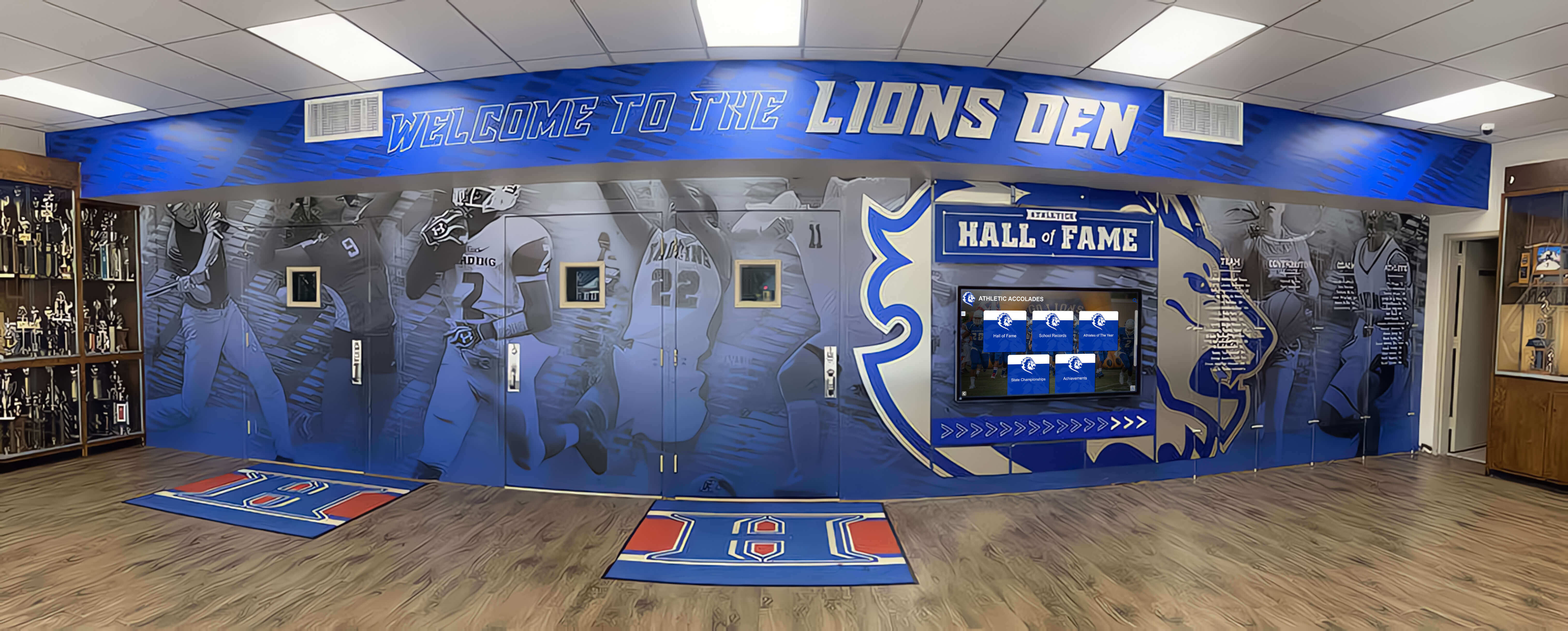
- Athletic hall of fame and record displays
- Alumni profile showcases and success stories
- Interactive exploration of school history
- Building school pride and community connection
Then purpose-built recognition platforms like Rocket Alumni Solutions provide capabilities announcement systems cannot replicate. Trying to achieve meaningful recognition through generic signage produces results barely superior to traditional trophy cases while missing the interactive engagement that creates transformational experiences.
Hybrid Implementations:
Many schools ultimately benefit from both—basic announcement displays for daily communication supplemented by specialized recognition displays celebrating achievement and building culture. This hybrid approach matches specific technologies to distinct applications rather than forcing single platforms to serve all purposes inadequately.
Budget Considerations and Total Cost of Ownership
Digital signage investment extends beyond initial hardware and software purchases—comprehensive cost analysis prevents budget surprises while revealing true value.
Upfront Investment Components:
- Display hardware: $500-$3,000 per screen depending on size and commercial-grade specifications
- Media players: $50-$400 per display for standalone playback devices if not using built-in smart display capabilities
- Software licensing: Varies dramatically—free to $15+ per display monthly depending on platform
- Installation: $200-$800 per display for professional mounting, wiring, and setup
- Initial content development: Design work, template customization, and content creation time
- Staff training: Time investment ensuring administrators can manage systems confidently
Ongoing Annual Expenses:
- Software subscriptions: Recurring licensing or SaaS fees for most cloud-based platforms
- Content management: Staff time updating displays with current information
- Technical support: Platform assistance, troubleshooting, and guidance
- Hardware maintenance: Occasional repairs or component replacement
- Content creation: Design services or internal time developing engaging materials
Total Cost of Ownership Analysis:
A 5-display announcement system using budget platforms might cost:
- Hardware and installation: $8,000-$15,000 upfront
- Software licensing: $480-$900 annually ($8-$15 per screen per month × 5 displays)
- Ongoing management: 2-4 hours weekly staff time
Compare this to a specialized recognition display that might cost:
- Complete system: $15,000-$25,000 upfront for hardware, software, installation, and content setup
- Annual platform fees: $1,500-$3,000 typically
- Ongoing management: 1-2 hours monthly for content updates
While recognition platforms cost more upfront, the value delivered through comprehensive achievement celebration, community engagement, and alumni connection extends far beyond basic announcement distribution—serving strategic institutional goals that announcement systems cannot address.

Implementation Complexity and Support Requirements
Technical complexity varies dramatically across platforms—matching system sophistication to available internal expertise prevents implementations failing due to management difficulty.
Schools with Limited IT Resources:
Smaller schools or those without dedicated technology staff benefit from:
- Intuitive interfaces requiring minimal technical knowledge
- Comprehensive training and ongoing support from vendors
- Cloud-based systems eliminating local server management
- Turnkey implementations handling complexity through professional services
- Responsive customer support addressing questions promptly
Platforms like Rocket Alumni Solutions specifically design for schools lacking extensive technical resources, providing white-glove support ensuring successful implementation and long-term satisfaction regardless of internal IT capacity.
Schools with Strong Technical Teams:
Districts with experienced IT departments might prioritize:
- Advanced customization capabilities enabling unique configurations
- API access supporting custom integrations
- Granular administrative controls for sophisticated management
- Multi-site coordination tools serving complex organizational structures
These schools can successfully implement enterprise platforms like ScreenCloud that require more technical sophistication but offer corresponding flexibility and control.
Evaluating Vendor Stability and Long-Term Viability
Digital signage represents multi-year investments—vendor stability and long-term viability matter enormously since platform changes or company failures create expensive disruption.
Indicators of Vendor Stability:
- Years in business: Companies serving education for 5-10+ years demonstrate sustained viability
- Customer base size: Large customer counts suggest successful business models supporting ongoing operations
- Financial backing: Venture funding or profitable operations indicate resources for continued development
- Product roadmap: Active feature development and platform evolution demonstrate ongoing commitment
- Reference customers: Current users in similar situations provide realistic implementation perspectives
Request references from schools comparable to yours—similar size, budget, and use cases—and contact them about satisfaction levels, support quality, and whether they would choose the same platform again. This qualitative feedback often reveals insights specifications and vendor pitches obscure.
Frequently Asked Questions About School Digital Signage
Schools evaluating digital signage platforms commonly raise similar questions about effectiveness, costs, and implementation considerations.
“Can we use free tools like Google Slides instead of purpose-built platforms?”
Google Slides appears tempting as a free, familiar option for schools already using Google Workspace—but severe limitations make it inappropriate for anything beyond the most basic temporary displays.
Critical Google Slides Limitations:
- No kiosk lockdown or security features preventing unauthorized access or tampering
- Requires third-party kiosk software for actual deployment creating technical complexity
- No analytics measuring engagement or effectiveness
- Extremely limited scheduling capabilities
- No remote display management across multiple screens
- No native support for sensors, RFID, or interactive inputs
- Minimal customization beyond basic slide formatting
- Cannot handle dynamic data sources or real-time updates
While “free” sounds attractive, Google Slides’ fundamental limitations create false economy for serious school communication needs. Even budget-conscious schools benefit from actual digital signage platforms—even free options like Yodeck’s single-screen plan—rather than forcing Google Slides into roles it was never designed to fill.
“What about Rise Vision alternatives using free platforms?”
Some schools explore combining free media players with free content tools attempting to minimize costs. While technically possible, this DIY approach often costs more in time, frustration, and opportunity cost than modest platform investments.
Consider hidden costs including:
- Staff time designing templates and troubleshooting technical issues
- Learning curves for cobbled-together solutions requiring research and experimentation
- Limited support when problems arise with free tools
- Missing features that paid platforms provide out-of-box
- Opportunity cost of staff time spent on technical management rather than educational priorities
Schools should invest in proper digital signage platforms—whether budget options like Yodeck and OptiSigns or comprehensive solutions like Rocket Alumni Solutions—rather than spending valuable staff time attempting to build equivalent functionality from free general-purpose tools never designed for institutional digital signage.
“How do we measure digital signage effectiveness?”
Demonstrating value justifies initial investment while supporting requests for expansion funding.
For Announcement-Focused Displays:
- Reduction in printed announcement costs and labor
- Staff time savings from automated calendar and event displays
- Survey feedback from students, staff, and families about communication effectiveness
- Observation studies noting how many people actually view displays during peak traffic
- Emergency drill performance showing notification speed and comprehension
For Recognition-Focused Displays:
- Analytics showing interaction frequency, session duration, and popular content
- User surveys measuring community satisfaction with recognition programs
- Alumni engagement metrics correlating display installation with increased participation
- Student feedback about school pride, belonging, and motivation
- Observational data tracking who interacts with displays and what they explore
Comprehensive interactive timeline displays and recognition systems provide detailed analytics revealing engagement patterns impossible with static displays—demonstrating value quantitatively while supporting continuous improvement based on actual usage data.
“Should we deploy multiple small displays or fewer large displays?”
Strategic placement decisions significantly impact effectiveness and total costs.
Multiple Smaller Displays:
Advantages:
- Distributed visibility reaching diverse audiences in different locations
- Lower individual display costs enabling phased implementation
- Location-specific content serving distinct purposes (athletic facility vs. performing arts)
Disadvantages:
- Higher total software costs for per-display licensing
- More installation complexity with multiple locations
- Increased management burden maintaining numerous systems
Fewer Larger Displays:
Advantages:
- Higher visibility in primary high-traffic locations
- Reduced software costs with per-display pricing
- Simpler management with centralized locations
Disadvantages:
- Limited audience reach in buildings with dispersed traffic patterns
- Higher individual display investment
- Single points of failure if displays malfunction
Most schools benefit from strategic placement of 2-4 displays in key locations—main entrance for visitors, cafeteria for daily student engagement, athletic facility for sports recognition, and potentially performing arts spaces for arts celebration. This balanced approach ensures comprehensive reach without management complexity or excessive costs of dozens of displays.
Conclusion: Choosing the Right Digital Signage for Your School’s Unique Needs
Comparing digital signage options for schools reveals an essential truth—no single platform universally suits all educational needs. The “best” choice depends entirely on your specific goals, priorities, budget, and context. Schools selecting announcement systems for recognition applications—or vice versa—experience disappointment regardless of product quality because fundamental mismatches between solution capabilities and actual needs inevitably produce unsatisfactory results.
For Schools Prioritizing Recognition and Community Engagement:
Rocket Alumni Solutions stands as the clear leader through purpose-built educational focus, comprehensive interactive recognition capabilities, unlimited achievement capacity, intuitive content management, and turnkey implementation with white-glove support. Schools seeking to celebrate student excellence comprehensively, build authentic school pride, connect with alumni meaningfully, and create engaging experiences beyond passive information display find Rocket’s specialized platform delivers value announcement-focused systems cannot match. The premium investment reflects comprehensive capabilities serving strategic institutional goals extending far beyond basic communication needs.
For Schools Needing Straightforward Announcement Communication:
Rise Vision, Yodeck, and OptiSigns provide capable announcement-focused digital signage at reasonable costs. Rise Vision offers the most extensive educational template library with strong Google Workspace integration justifying per-display pricing for schools wanting educational-specific designs. Yodeck provides excellent value for budget-conscious schools through free single-screen capability and affordable multi-display expansion. OptiSigns delivers remarkable hardware flexibility at competitive pricing for schools prioritizing device compatibility.
For Large Districts Requiring Enterprise Features:
ScreenCloud serves multi-campus organizations where sophisticated administrative controls, approval workflows, and centralized management across hundreds of displays justify premium investment and implementation complexity.
Strategic Implementation Recommendations:
Regardless of platform selection, schools maximize digital signage value through:
- Clear goal definition guiding vendor evaluation rather than selecting based solely on price or feature counts
- Realistic needs assessment distinguishing between announcement communication and interactive recognition requirements
- Comprehensive cost analysis considering total ownership costs over 5-7 year lifecycles rather than just upfront expenses
- User experience priority ensuring displays serve audience needs effectively rather than just checking technology boxes
- Quality implementation investing in proper installation, content development, and staff training
- Ongoing management commitment dedicating resources for regular content updates maintaining relevance
- Effectiveness measurement tracking engagement and satisfaction enabling continuous improvement
Digital signage represents significant investment—but schools choosing appropriate platforms aligned with actual needs and implementing thoughtfully create communication and recognition systems delivering lasting value for students, staff, families, alumni, and communities.
Ready to explore how purpose-built recognition displays can transform your school’s approach to celebrating achievement while building genuine community pride? Contact Rocket Alumni Solutions at +1-857-465-3603 to discover comprehensive platforms designed specifically for educational recognition creating engaging experiences that generic announcement systems simply cannot match.
Disclaimer: This comparison is based on publicly available information as of October 2025. All product names and trademarks belong to their respective owners. Comparative statements reflect Rocket Alumni Solutions’ interpretation of available data and may change over time. This content was produced by Rocket Alumni Solutions. Schools should conduct independent evaluation of all platforms based on their specific needs and requirements.































