The landscape of institutional recognition is undergoing a digital revolution. Traditional static plaques and photo composites are giving way to digital composites walls—sophisticated interactive displays that combine multimedia storytelling, touchscreen technology, and unlimited recognition capacity. These modern systems transform how schools, universities, and organizations celebrate achievements while creating engaging experiences that resonate with today’s digital-native audiences.
A digital composites wall represents the convergence of traditional composite boards with cutting-edge display technology. Rather than limiting recognition to a fixed grid of printed photographs, digital systems showcase unlimited individuals through high-resolution touchscreen displays featuring photos, videos, career accomplishments, and personal stories accessible through intuitive navigation.
Schools implementing digital composites walls report dramatic improvements in community engagement, with visitors spending an average of 5-7 minutes interacting with digital displays compared to just 30 seconds viewing traditional composites. This extended engagement creates deeper emotional connections and strengthens institutional pride across generations.
Understanding Digital Composites Walls: The Evolution of Recognition
Traditional class composites have served institutions for generations, preserving yearbook-style grids of graduation photos on walls and in hallways. While these physical displays hold nostalgic value, they face significant limitations in today’s environment.
The Limitations of Traditional Photo Composites
Physical composite boards encounter predictable challenges:
- Space Constraints: Wall space accommodates only recent years, forcing older composites into storage where they’re rarely seen
- Information Limits: Traditional composites show only photos, names, and years—missing opportunities to share achievements and stories
- Update Costs: Adding new classes requires expensive printing, framing, and installation annually
- Physical Deterioration: Photos fade, frames deteriorate, and displays require ongoing maintenance
- Limited Engagement: Static presentations generate brief glances rather than meaningful interaction
- Accessibility Barriers: Fixed mounting heights and small text create visibility challenges for some community members
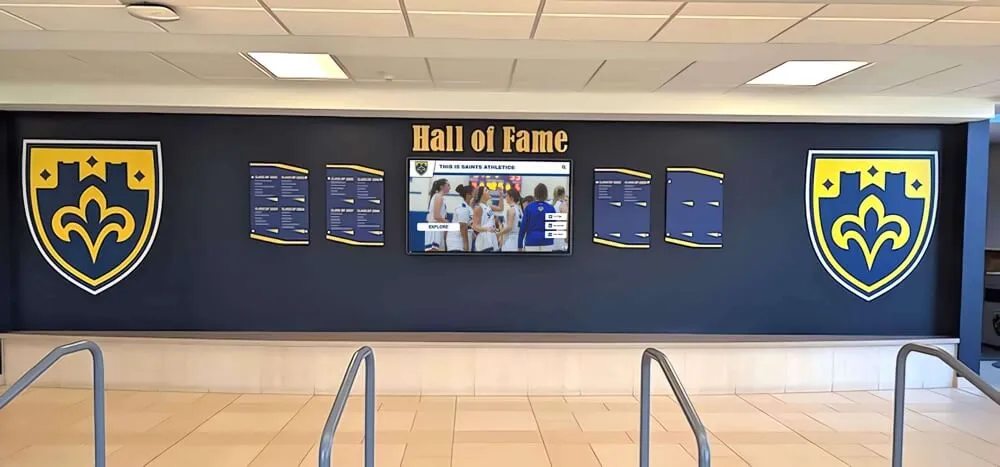
What is a Digital Composites Wall?

A digital composites wall modernizes traditional recognition through interactive touchscreen displays that showcase comprehensive alumni and student databases. These systems combine commercial-grade display hardware with specialized software designed specifically for educational recognition.
Key components include:
- Commercial Touchscreen Displays: High-resolution screens ranging from 43" to 86" with responsive multi-touch capabilities
- Recognition Software Platform: Cloud-based content management systems enabling remote updates and multimedia integration
- Mounting Solutions: Wall mounts, kiosks, or custom enclosures matching institutional aesthetics
- Content Database: Comprehensive profiles featuring photos, biographies, achievements, and multimedia elements
- Interactive Interface: Intuitive navigation allowing visitors to search, filter, and explore by year, name, achievement, or program
Unlike generic digital signage, specialized solutions like Rocket Alumni Solutions provide purpose-built platforms designed exclusively for educational recognition, delivering features and workflows that serve school-specific needs.
Core Benefits of Digital Composites Walls
Modern digital recognition systems address every limitation of traditional displays while introducing capabilities impossible with static formats.
1. Unlimited Recognition Capacity
Physical space no longer constrains recognition. A single 55-inch touchscreen can showcase profiles for thousands of individuals spanning your institution’s entire history. Schools report displaying 5-10 times more honorees than previous physical displays allowed.
Traditional Composite Boards
- 30-50 graduates per board
- Requires 15-20 sq ft per class
- Storage needed for older years
- Difficult decisions about who to display
Digital Composites Walls
- 1,000+ profiles in single display
- Requires only 5-10 sq ft
- All years simultaneously accessible
- Comprehensive inclusion possible
This expanded capacity enables recognition of not just graduating classes but also faculty, donors, athletes, academic achievers, and community contributors—creating a comprehensive celebration of institutional excellence.
2. Rich Multimedia Storytelling
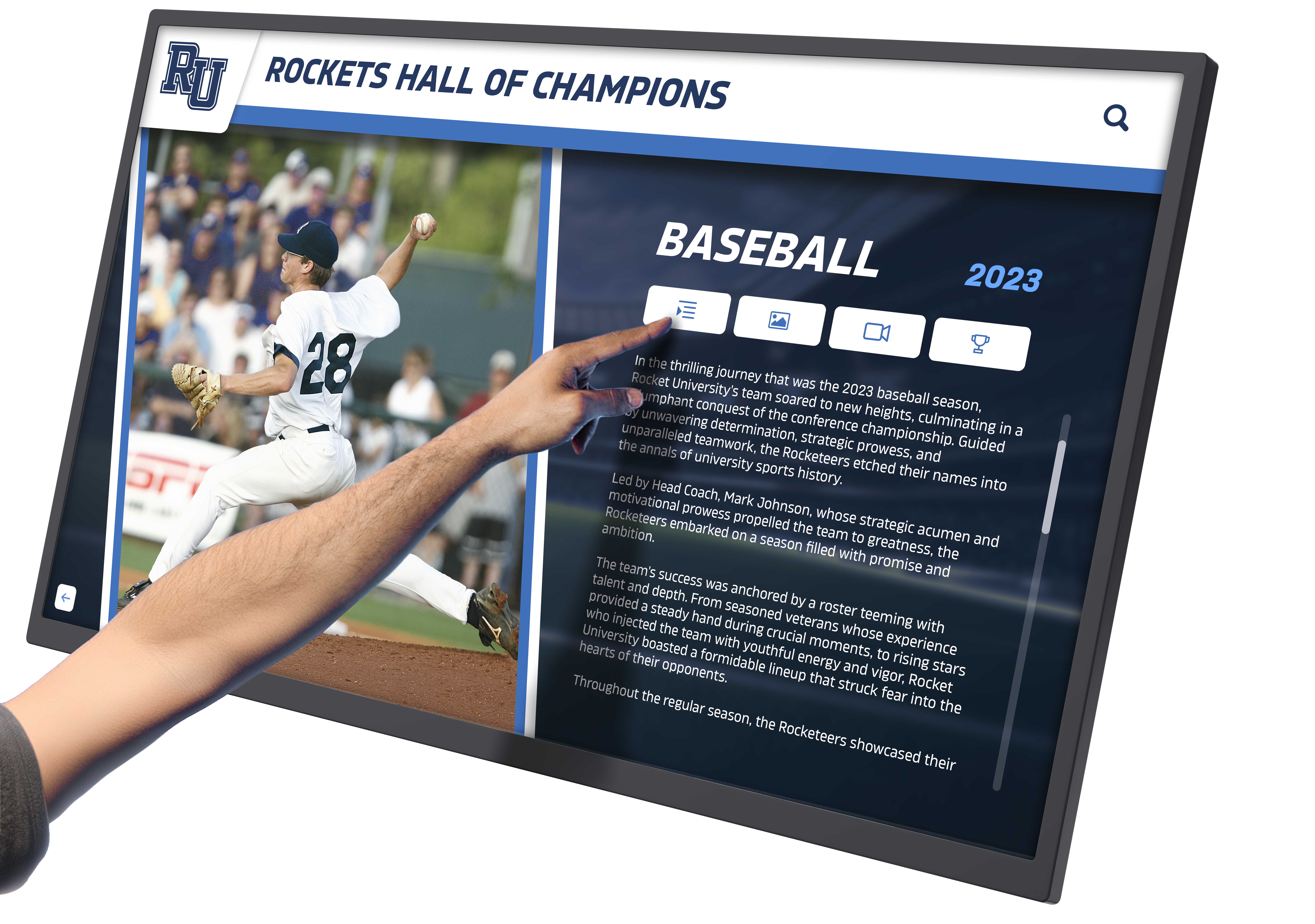
Digital formats transcend the photo-name-year limitations of traditional composites. Modern interactive digital displays integrate multiple content types:
- Photo Galleries: Multiple images showing career progression, student activities, and current professional roles
- Video Content: Personal messages, acceptance speeches, career advice, and documentary-style profiles
- Achievement Documentation: Detailed lists of accomplishments, awards, publications, and contributions
- Career Histories: Professional trajectories from graduation through current positions
- Personal Narratives: Stories about formative experiences, favorite memories, and institutional impact
- Contact Information: Professional networking profiles enabling mentorship connections
This rich content transforms simple recognition into inspirational storytelling that motivates current students and engages alumni emotionally.
3. Effortless Content Management
Cloud-based platforms revolutionize recognition program administration. Staff update content through intuitive web interfaces requiring no technical expertise—similar to managing social media accounts or website content.
Management features include:
- Remote Administration: Update from any internet-connected device, anywhere
- Drag-and-Drop Interfaces: Simple content placement without coding knowledge
- Bulk Import Tools: Quickly digitize historical records through CSV uploads
- Scheduled Publishing: Plan content to appear automatically on specific dates
- Version Control: Track changes and revert if needed
- Role-Based Permissions: Grant appropriate access levels to different staff members
- Automated Backups: Protect content with redundant cloud storage
Schools report reducing recognition program administrative time by 75-85% compared to traditional display maintenance.
4. Interactive Exploration and Discovery
Touchscreen functionality creates active engagement rather than passive viewing. Visitors control their experience through intuitive gestures familiar from smartphones and tablets.
Navigation capabilities include:
- Name Search: Quickly locate specific individuals
- Year Filtering: Browse by graduation year or era
- Achievement Categories: Explore by athletic sport, academic program, or career field
- Random Discovery: “Surprise me” features introducing unexpected profiles
- Connected Profiles: Links between related individuals, families, or cohorts
- Social Sharing: QR codes and email options for sharing discoveries
This interactivity extends average engagement from seconds to minutes, creating memorable experiences that strengthen institutional connections. Advanced touchscreen software ensures smooth, responsive interactions that feel natural and intuitive.
5. Long-Term Cost Effectiveness
While initial investment exceeds traditional composite costs, digital systems deliver superior long-term value. Consider five-year total cost of ownership:
Traditional Composites (5 Years)
- Initial boards: $8,000
- Annual additions: $2,000 × 5 = $10,000
- Storage solutions: $1,500
- Maintenance/repairs: $1,000
- Total: $20,500
Digital Composites Wall (5 Years)
- Initial system: $15,000
- Annual software: $1,200 × 5 = $6,000
- Maintenance: $500
- Total: $21,500
The comparable investment delivers dramatically enhanced capabilities, with the advantage growing over time as digital systems accommodate unlimited growth while physical displays require continuous space and material costs.

Essential Features of Effective Digital Composites Walls
Not all digital recognition systems deliver equal value. Effective solutions incorporate specific capabilities that optimize user experience and administrative efficiency.
User Interface Design
The visitor-facing interface determines engagement quality. Effective digital recognition displays feature:
- Intuitive Navigation: Self-explanatory controls requiring no instructions
- Visual Hierarchy: Clear organization guiding natural exploration patterns
- Responsive Touch: Immediate feedback to all interactions
- Attractive Design: Professional aesthetics matching institutional branding
- Accessibility Features: Font sizing, high contrast modes, and screen reader support
- Idle Attraction: Eye-catching animations drawing attention when not in use
The best interfaces feel effortless, encouraging extended exploration rather than frustrating users with complexity.
Content Organization Structures
Strategic information architecture enables both browsing and targeted searching:
Chronological Organization: Timeline navigation by decade or year Category Filtering: Sort by academic program, athletic sport, career field, or achievement type Geographic Mapping: Visualize alumni locations and geographic connections Achievement Hierarchies: Highlight special honors, awards, or distinction levels Connection Networks: Display relationships between mentors/mentees, families, or cohorts
Flexible organization accommodates diverse user intentions—from alumni seeking classmates to students exploring career possibilities.
Integration Capabilities
Modern systems connect with existing institutional technology:
- Alumni Databases: Synchronize with development/advancement systems for automatic updates
- Student Information Systems: Pull biographical and achievement data
- Website Integration: Embed searchable profiles in institutional sites
- CRM Platforms: Connect with relationship management tools
- Social Media: Enable sharing to Facebook, LinkedIn, Twitter, and Instagram
- Mobile Apps: Provide complementary smartphone experiences
Integration eliminates redundant data entry while ensuring consistency across platforms. Learn more about effective digital display integration for comprehensive institutional systems.
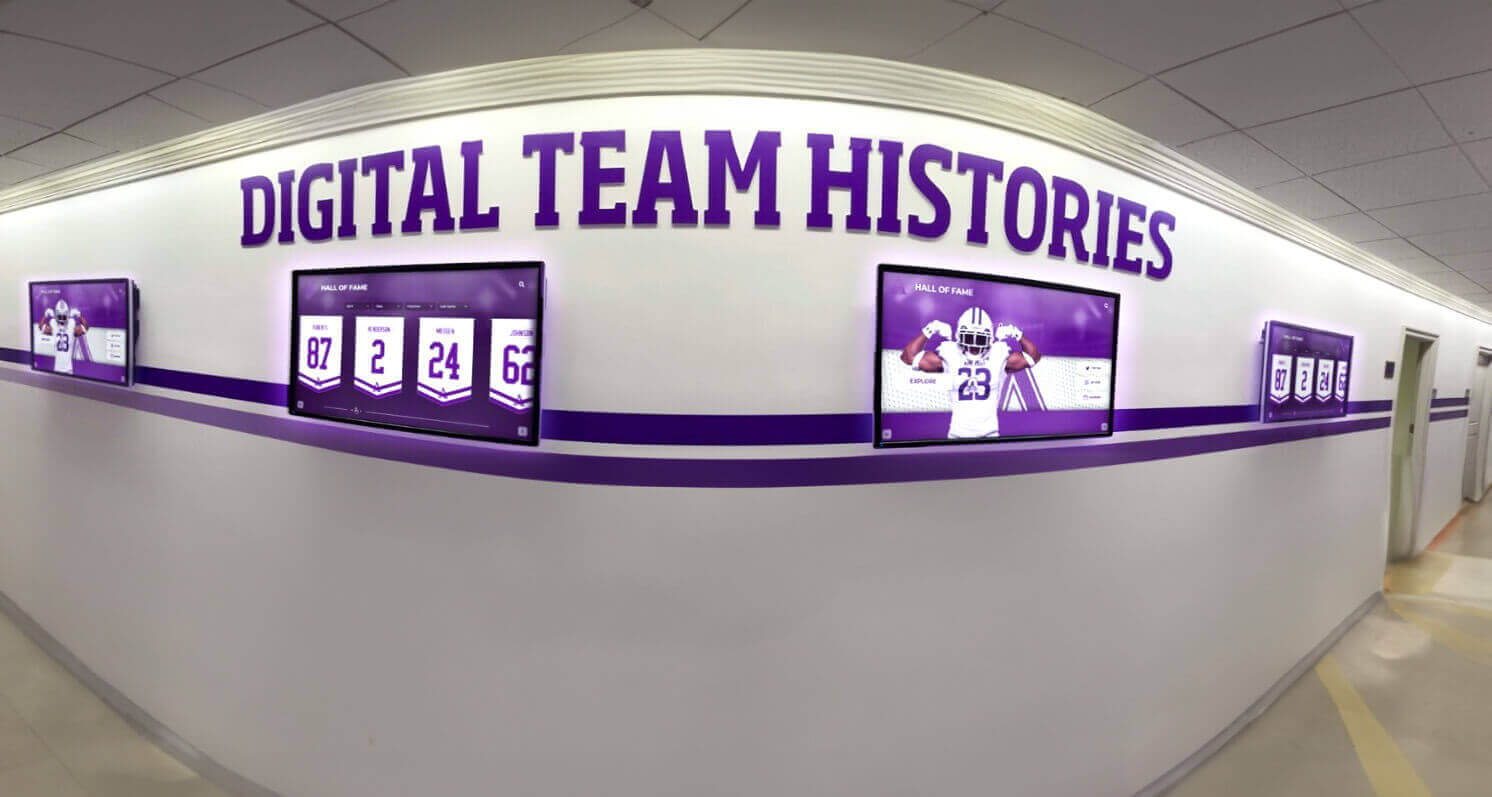
Planning Your Digital Composites Wall Implementation
Successful projects follow systematic planning that addresses technology selection, content strategy, stakeholder engagement, and operational sustainability.
Defining Objectives and Scope
Clear goals guide all subsequent decisions. Common objectives include:
Recognition Goals
- Honor alumni achievements comprehensively
- Celebrate institutional history and evolution
- Recognize donors and supporters
- Showcase athletic and academic excellence
Engagement Goals
- Strengthen alumni connections to the institution
- Inspire current students through role models
- Create community gathering points
- Provide educational historical context
Development Goals
- Improve donor recognition and stewardship
- Support fundraising through compelling storytelling
- Increase alumni giving participation
- Enhance major gift solicitation
Most successful implementations serve multiple objectives simultaneously, with primary goals driving design decisions and budget allocation.
Content Development Strategy
Compelling content distinguishes exceptional systems from basic digital displays. Effective strategies balance comprehensive coverage with profile depth:
Phased Content Approach
- Phase 1: Recent graduates and prominent alumni with detailed profiles
- Phase 2: Historical expansion filling decade gaps systematically
- Phase 3: Enhanced multimedia adding videos and expanded narratives
- Phase 4: Continuous updates maintaining currency and relevance
Content Sources
- Yearbooks and institutional publications
- Alumni databases and records
- Direct outreach to graduates
- Social media research
- Public biographical information
- Family submissions and contributions
Quality Standards
- Minimum profile completeness requirements
- Photo quality and sizing specifications
- Fact-checking and verification processes
- Consistent formatting and tone
- Privacy and permission protocols
Starting with focused scope proves more effective than attempting comprehensive but superficial coverage. Build depth first, then expand breadth over time.
Budget Development
Comprehensive budgets address all implementation components:
Hardware Costs
- Display(s): $3,000-$12,000 each
- Mounting solutions: $400-$2,000
- Media players: $600-$2,000
- Cabling and connections: $300-$800
Software and Services
- Platform licensing: $3,000-$10,000
- Annual subscription: $1,200-$3,000/year
- Customization and branding: $1,000-$4,000
- Training and support: $800-$2,000
Content Development
- Initial content creation: $2,000-$10,000
- Photo scanning/restoration: $500-$3,000
- Video production: $1,000-$6,000
- Copywriting and editing: $1,000-$4,000
Installation and Launch
- Professional installation: $1,000-$3,000
- Electrical and network work: $500-$2,500
- Launch event: $500-$2,000
Many institutions implement in phases, starting with core functionality and expanding capabilities as budgets allow and value is demonstrated. Understanding digital hall of fame planning and budgeting ensures realistic financial preparation.
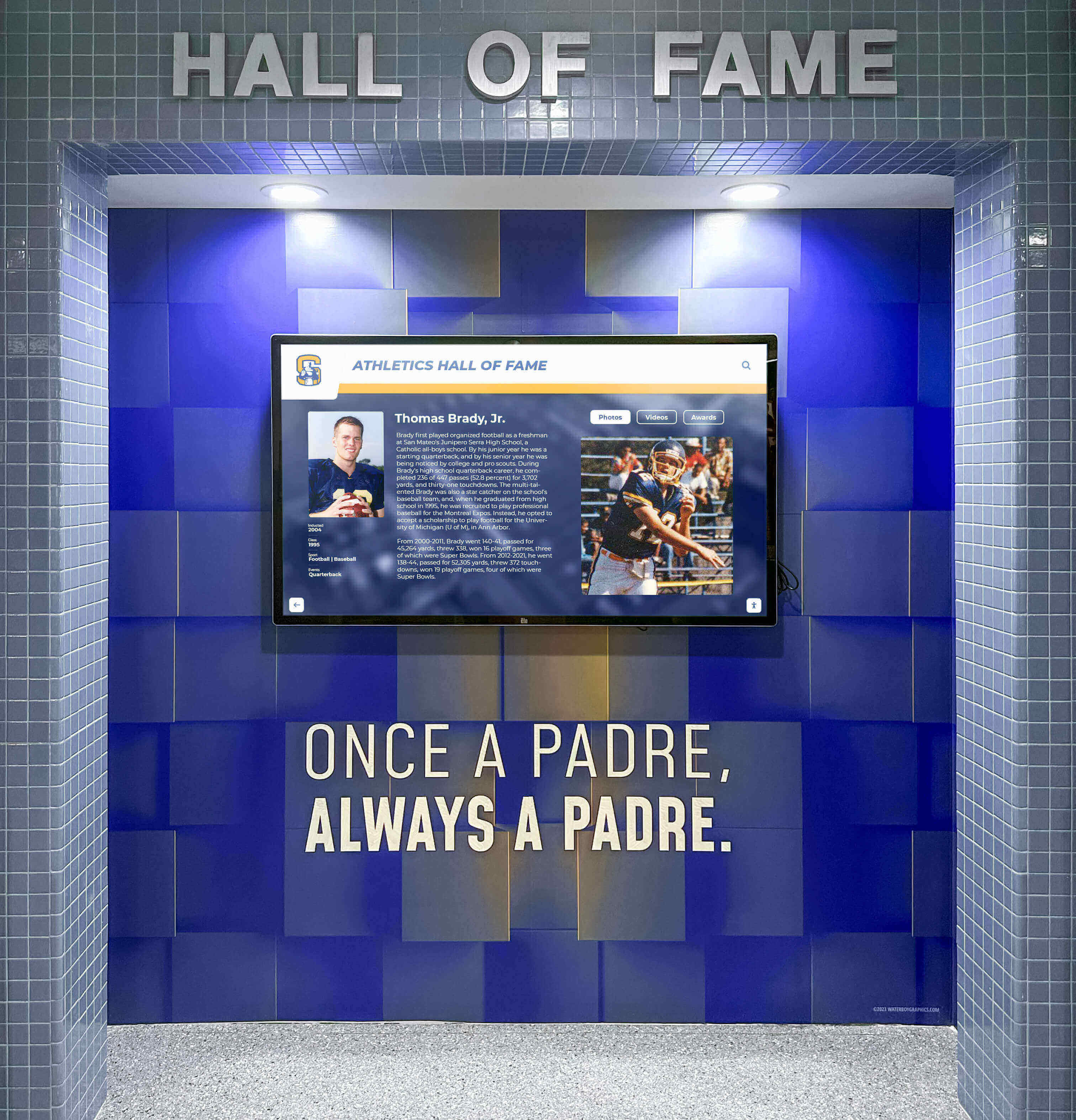
Technology Selection: Hardware and Software Considerations
Choosing appropriate technology determines long-term success, user satisfaction, and total cost of ownership.
Display Hardware Specifications
Commercial-grade touchscreens designed for continuous operation deliver reliability:
Critical Specifications
- Size: 43"-86" depending on space and viewing distance
- Resolution: Minimum 4K (3840×2160) for sharp text and images
- Touch Technology: Infrared or capacitive multi-touch for responsive interaction
- Brightness: 350-500 nits for typical indoor environments
- Operating Hours: 50,000+ hour commercial rating for longevity
- Viewing Angle: 178° for visibility from multiple positions
Installation Options
- Wall-Mounted: Space-efficient solution for hallways and lobbies
- Freestanding Kiosks: Portable installations with integrated computing
- Custom Enclosures: Branded installations matching architectural aesthetics
- Multi-Display Arrays: Connected screens for expanded content capacity
Selecting appropriate display size and configuration requires balancing space availability, viewing patterns, and content needs.
Software Platform Evaluation
Recognition software capabilities dramatically impact usability and value:
Essential Platform Features
- Intuitive content management requiring no coding expertise
- Responsive design adapting to all screen sizes and orientations
- Comprehensive media support (photos, videos, documents)
- Advanced search and filtering capabilities
- Analytics and usage reporting
- Regular software updates and improvements
- Responsive technical support
Specialized vs. Generic Solutions
Generic digital signage platforms offer basic functionality but lack recognition-specific features. Specialized solutions like Rocket Alumni Solutions provide purpose-built capabilities including:
- Pre-configured templates for alumni and student profiles
- Optimized workflows for educational content management
- Recognition-specific navigation and discovery features
- Integration with school databases and systems
- Educational institution support and training
- Best practices from hundreds of school implementations
Choosing platforms designed specifically for recognition ensures optimal experiences and efficient operations. Explore comprehensive touchscreen software options designed for institutional recognition needs.
Integration and Connectivity Requirements
Reliable performance requires appropriate infrastructure:
Network Connectivity
- Hardwired ethernet preferred for stability
- High-quality Wi-Fi acceptable with strong signal
- Minimum 10 Mbps bandwidth per display
- Backup connectivity options for redundancy
Power Requirements
- Dedicated circuits for large displays
- Surge protection and conditioning
- Uninterruptible power supply (UPS) for critical installations
- Appropriate electrical codes compliance
Physical Installation
- Structural mounting surface assessment
- ADA-compliant positioning and clearances
- Appropriate viewing heights and angles
- Cable management for professional appearance
Content Creation and Management Best Practices
Exceptional content distinguishes memorable digital composites walls from basic electronic directories.
Developing Engaging Alumni Profiles
Comprehensive profiles balance informational depth with engaging presentation:
Profile Structure
- Header Information: Name, graduation year, current location, current position
- Photo Gallery: Professional headshot, graduation photo, student activity images
- Educational Background: Degree programs, special honors, memorable professors
- Career Journey: Professional trajectory from graduation through current role
- Notable Achievements: Awards, publications, innovations, leadership positions
- Community Impact: Volunteering, mentorship, philanthropic contributions
- Personal Insights: Advice for students, reflections on education, favorite memories
- Connection Opportunities: Professional networking profiles, contact preferences
Content Quality Standards
- Professional photography or high-quality scans
- Verified factual information with source documentation
- Consistent formatting and length across profiles
- Engaging narrative voice reflecting individual personality
- Current information updated regularly
Multimedia Integration Strategies
Rich media transforms static information into compelling storytelling:
Video Content Opportunities
- Alumni reflection videos (2-3 minutes) sharing career journeys and advice
- Message-to-students content providing inspiration and guidance
- Achievement documentation showing accomplishments in context
- Historical footage connecting past and present
- Interview segments with current students creating mentorship connections
Interactive Elements
- Clickable career timelines showing professional progression
- Photo galleries with captions and context
- Document viewers for achievement certificates and publications
- Map visualizations showing geographic connections
- Network diagrams displaying relationships between alumni
Content Sources
- Professional alumni interviews during reunion events
- User-submitted videos through online portals
- Historical archives and institutional collections
- Social media content with appropriate permissions
- Student-produced content from media classes
Effective digital boards with photos and videos create emotional connections that static images cannot achieve.
Ongoing Content Maintenance
Sustainable recognition programs require systematic maintenance processes:
Update Schedules
- Weekly: Add newly identified honorees and immediate corrections
- Monthly: Feature rotation highlighting different individuals or achievements
- Quarterly: Comprehensive profile reviews and enhancement opportunities
- Annually: Major content expansions and systematic updates
Alumni Engagement Strategies
- Provide secure self-service update portals
- Leverage reunion events for content collection
- Create annual update campaigns via email
- Integrate with alumni communication cycles
- Recognize participation and contribution
Quality Assurance Processes
- Regular link checking and correction
- Photo quality improvements as technology advances
- Fact verification and accuracy confirmation
- Accessibility compliance reviews
- Engagement analytics analysis
Maximizing Engagement and Measuring Success
Strategic promotion and systematic measurement optimize digital composites wall impact.
Launch and Promotion Strategies
Successful launches generate momentum and establish systems as important institutional resources:
Pre-Launch Activities
- Stakeholder preview events building anticipation
- Alumni notification campaigns announcing profiles
- Social media teasers showing system capabilities
- Website integration and promotion
- Student orientation introductions
Launch Event Components
- Official unveiling ceremony with institutional leadership
- Featured alumni spotlights and recognition
- Interactive demonstrations and guided tours
- Media coverage and press releases
- Reception celebrating achievement and community
Ongoing Promotion
- Regular social media features highlighting specific profiles
- Integration into admissions tours and events
- Promotion during reunion weekends and homecoming
- Email campaigns to alumni featuring new additions
- Signage directing traffic to display locations
Analytics and Performance Measurement
Modern systems provide valuable data enabling continuous improvement:
Key Performance Indicators
- Total interactions and unique users
- Average session duration and return visits
- Most viewed profiles and popular searches
- Peak usage times and patterns
- Content completion rates
- Social sharing frequency
Insight Applications
- Feature underutilized content more prominently
- Expand popular categories and achievement types
- Optimize navigation based on usage patterns
- Identify content gaps and development priorities
- Demonstrate value to stakeholders and funders
Institutions implementing sophisticated analytics for digital recognition make data-driven decisions that consistently improve engagement and satisfaction.

Demonstrating Return on Investment
Quantifying impact justifies investment and supports expansion:
Tangible Benefits
- Reduced annual composite printing and framing costs
- Decreased staff time managing physical displays
- Eliminated storage space requirements
- Lower long-term maintenance expenses
Engagement Improvements
- Increased visitor interaction time (quantifiable)
- Higher alumni database update participation
- Greater social media sharing and visibility
- Improved event attendance correlation
Strategic Value
- Enhanced alumni relations supporting fundraising
- Improved donor recognition and stewardship
- Stronger institutional pride and reputation
- Recruitment advantages through achievement demonstration
Learn more about measuring ROI for digital recognition to document and communicate value effectively.
Special Considerations for Different Educational Contexts
While core principles apply broadly, different institution types benefit from tailored approaches.
K-12 Schools
Primary and secondary schools should emphasize:
- Student-appropriate content balancing history with current relevance
- Heavy multimedia emphasis appealing to young audiences
- Alumni career pathways showing post-graduation possibilities
- Academic and athletic integration celebrating diverse excellence
- Community building connecting generations of families
- Inspiration focus motivating current students through role models
High school hall of fame displays often focus on recent decades while systematically adding historical depth over time.
Colleges and Universities
Higher education institutions typically require:
- Large-scale content spanning decades or centuries
- Integration with advancement systems supporting fundraising
- Research and professional achievement emphasis beyond athletics
- Multiple installation locations across diverse campus facilities
- Sophisticated search capabilities enabling discovery in large databases
- Department-specific implementations serving schools and programs
Private and Independent Schools
Independent institutions benefit from:
- Strong branding integration reflecting institutional identity
- Donor recognition capabilities supporting development programs
- Family legacy emphasis celebrating multi-generational connections
- Tradition preservation balancing innovation with heritage
- Exclusivity positioning reinforcing community distinction
Implementation Timeline and Project Management
Systematic project management ensures successful deployment within realistic timeframes.
Typical Implementation Schedule
Months 1-2: Planning and Approval
- Define objectives and scope
- Secure stakeholder buy-in and budget approval
- Form project team with clear roles
- Establish success metrics
Months 3-4: Vendor Selection
- Research solutions and request proposals
- Evaluate options against requirements
- Conduct vendor demonstrations
- Select platform and sign contracts
Months 5-7: Design and Content Development
- Finalize information architecture
- Create content gathering workflows
- Design visual presentation and branding
- Begin initial content collection and creation
Months 8-9: Installation and Configuration
- Complete physical installation
- Load content into system
- Configure software and customize interface
- Conduct comprehensive testing
Month 10: Training and Launch
- Train staff on content management
- Conduct soft launch for feedback
- Host official launch event
- Begin promotion and publicity
Organizations with extensive historical content or complex approval processes may require 12-15 months for comprehensive implementations.
Critical Success Factors
Projects succeed when they incorporate:
- Executive Sponsorship: Visible support from institutional leadership
- Dedicated Project Leadership: Single point person coordinating efforts
- Cross-Functional Collaboration: Involvement from advancement, IT, facilities, communications
- Realistic Timelines: Adequate time for content development and quality assurance
- Stakeholder Communication: Regular updates preventing surprise and building buy-in
- Flexibility: Willingness to adjust based on feedback and lessons learned
Future Trends in Digital Recognition Technology
Digital composites walls continue evolving with advancing technology:
Emerging Capabilities
Artificial Intelligence Integration
- Automated content recommendations based on visitor interests
- Smart search understanding natural language queries
- Personalized experiences adapting to individual users
- Automated content tagging and organization
Augmented Reality Features
- Mobile app overlays adding information to physical spaces
- Virtual tours connecting digital and physical experiences
- Interactive 3D visualizations of achievements
- Immersive storytelling through AR enhancements
Advanced Analytics
- Facial recognition for personalized greetings (with appropriate consent)
- Emotion detection measuring content impact
- Path analysis optimizing content placement
- Predictive analytics identifying engagement opportunities
Enhanced Accessibility
- Voice control and audio navigation
- Real-time translation into multiple languages
- Adaptive interfaces for diverse abilities
- Brain-computer interfaces for accessibility
Sustainability Considerations
Modern systems address environmental concerns:
- Energy Efficiency: LED displays consuming fraction of traditional lighting
- Paper Elimination: Digital formats replacing printed materials
- Longevity: Commercial displays designed for 5-10 year lifespans
- Electronic Recycling: Responsible end-of-life disposal programs
Schools implementing digital recognition demonstrate environmental leadership while achieving operational efficiency.
Conclusion: Transforming Recognition for Modern Communities
Digital composites walls represent fundamental evolution in how institutions celebrate achievement and engage communities. By combining unlimited recognition capacity with interactive technology and multimedia storytelling, these systems address every limitation of traditional composites while introducing capabilities that strengthen connections across generations.
Successful implementations balance thoughtful planning with robust technology, compelling content with intuitive interfaces, and institutional tradition with modern innovation. Schools investing in comprehensive digital recognition solutions consistently report enhanced engagement, strengthened pride, and measurable returns through improved alumni relations and community building.
The transition from static composite boards to dynamic digital displays continues as technology advances and user expectations evolve. Educational institutions embracing this transformation position themselves at the forefront of recognition innovation, creating lasting impressions that inspire current students, honor past achievements, and build bridges connecting entire institutional communities.
Ready to explore how a digital composites wall could transform your recognition program? Solutions like Rocket Alumni Solutions provide comprehensive platforms combining powerful technology with intuitive management, making sophisticated recognition accessible to institutions of all sizes. From initial planning through years of successful operation, specialized providers deliver the expertise and support ensuring your digital recognition investment achieves maximum impact.
Your community’s achievements deserve recognition that matches their significance. A thoughtfully implemented digital composites wall creates the engaging, meaningful, and enduring tribute your honorees deserve while building stronger connections throughout your institution.































