Intent: Define and demonstrate complete digital history archive systems
Schools, museums, historical societies, and organizations hold decades or centuries of irreplaceable history in photographs, documents, artifacts, and memories. Yet most of this heritage sits hidden in storage rooms, deteriorating in filing cabinets, or exists only in the fading memories of aging community members. Physical deterioration threatens materials every day, while limited access prevents the community engagement that brings history to life.
A digital history archive transforms scattered historical materials into organized, accessible, and engaging resources that preserve institutional heritage while creating powerful connection points for students, alumni, donors, and visitors. Through systematic digitization, cloud-based organization, and interactive presentation, digital archives protect irreplaceable materials from loss while making history part of daily institutional experience.
This comprehensive guide provides complete implementation strategies for building digital history archives specifically designed for schools, museums, universities, and heritage organizations seeking to preserve legacy while creating engagement opportunities that strengthen community bonds and institutional identity.
Digital history archives serve multiple strategic purposes beyond passive preservation. They protect irreplaceable materials from physical deterioration, create accessible resources supporting research and learning, provide content that strengthens alumni and visitor engagement, demonstrate institutional excellence and heritage, and preserve knowledge informing strategic planning. Organizations implementing comprehensive digital archives discover that preserved history becomes a strategic asset supporting diverse organizational priorities.
Understanding Digital History Archives: Beyond Simple Scanning
Before exploring implementation methods, understanding what distinguishes comprehensive digital history archives from basic digitization projects clarifies scope and establishes realistic expectations.
What Digital History Archives Include
Complete digital history archives combine several integrated components working together to preserve and present institutional heritage:
Digitized Historical Materials High-quality digital surrogates of physical documents, photographs, artifacts, and records created through systematic scanning and photography. These digital files preserve information content while reducing handling of fragile originals.
Comprehensive Metadata Systems Detailed descriptive information enabling discovery and context understanding. Metadata transforms simple image files into searchable archival resources by documenting who, what, when, where, and why for each item.
Cloud-Based Management Platforms Secure storage and organizational systems accessible from anywhere, eliminating dependence on local servers while providing backup redundancy and collaborative access capabilities.
Interactive Presentation Systems Touchscreen displays, web portals, and mobile interfaces that make archived materials engaging and accessible to diverse audiences in formats encouraging exploration and discovery.
Preservation Infrastructure Technical specifications, backup systems, and migration strategies ensuring digital materials remain accessible as technology evolves over decades and centuries.

Modern digital archives organize decades of institutional history into searchable collections accessible to entire communities through multiple formats
Why Physical Archives Alone Are No Longer Sufficient
Traditional physical-only archives face limitations that digital systems address:
Access Restrictions Physical archives require in-person visits during limited hours, restricting access to local users with available time. Digital archives enable 24/7 worldwide access for alumni, researchers, and interested community members regardless of geographic location.
Preservation Risks Physical materials deteriorate through handling, environmental exposure, and aging. Every access event risks additional damage. Digital surrogates enable unlimited access without touching fragile originals.
Discovery Limitations Finding specific information in physical collections requires knowing exactly where to look or manually reviewing extensive materials. Digital search capabilities enable instant location of names, dates, events, or topics across comprehensive collections.
Space Constraints Physical storage requires significant dedicated space with appropriate environmental controls. Digital storage eliminates space limitations while reducing square footage demands.
Engagement Barriers Static physical displays present history passively with limited context. Interactive digital presentations enable deeper exploration, multimedia storytelling, and personalized discovery paths.
The Urgency of Digital Archive Development
Organizations delaying comprehensive digital archive implementation face increasing risks as physical materials age and institutional knowledge holders pass away:
According to preservation experts, most photographs begin significant deterioration after approximately 75 years, while newspaper clippings and many paper documents degrade even faster. Organizations founded in the mid-20th century now face critical preservation decisions as founding-era materials reach end-of-life thresholds. Every year without proper digitization increases permanent loss risk.
Beyond physical materials, institutional knowledge exists exclusively in aging community members’ memories. These individuals remember stories behind formal records, but their unique perspectives disappear unless systematically captured through oral history programs before it’s too late.
Planning Your Digital History Archive Project
Successful digital archives begin with systematic planning that assesses current situations, defines clear objectives, and establishes sustainable approaches.
Conducting Comprehensive Collection Assessments
Before implementing digitization initiatives, thorough assessment reveals what materials exist, their condition, preservation priorities, and available resources.
Materials Inventory Process
Systematic inventory identifies all historical materials currently held across all locations:
- Complete run of yearbooks, annuals, or organizational publications noting gaps
- Photograph collections including official portraits, event documentation, facility records
- Paper documents such as meeting minutes, correspondence, reports, publications
- Audio and video recordings containing interviews, event coverage, presentations
- Digital-born materials stored on computers, drives, or cloud services
- Three-dimensional artifacts and memorabilia documented photographically
- Oral history opportunities identifying knowledge holders before it’s too late
This comprehensive inventory provides foundation for prioritizing efforts and estimating required resources. Document not just what you have, but also what’s missing—identifying gaps helps focus collection development and crowdsourcing initiatives.
Condition and Urgency Evaluation
For physical materials, evaluate preservation status to prioritize digitization sequence:
- Items showing active deterioration requiring immediate digitization intervention
- Fragile materials at high risk from continued handling or environmental exposure
- Unique materials with no duplicates existing elsewhere
- High-demand items frequently requested by researchers or community members
- Complete collections enabling comprehensive digital access when fully processed
Understanding condition helps prioritize digitization efforts toward highest-risk materials before further deterioration occurs or permanent loss happens.
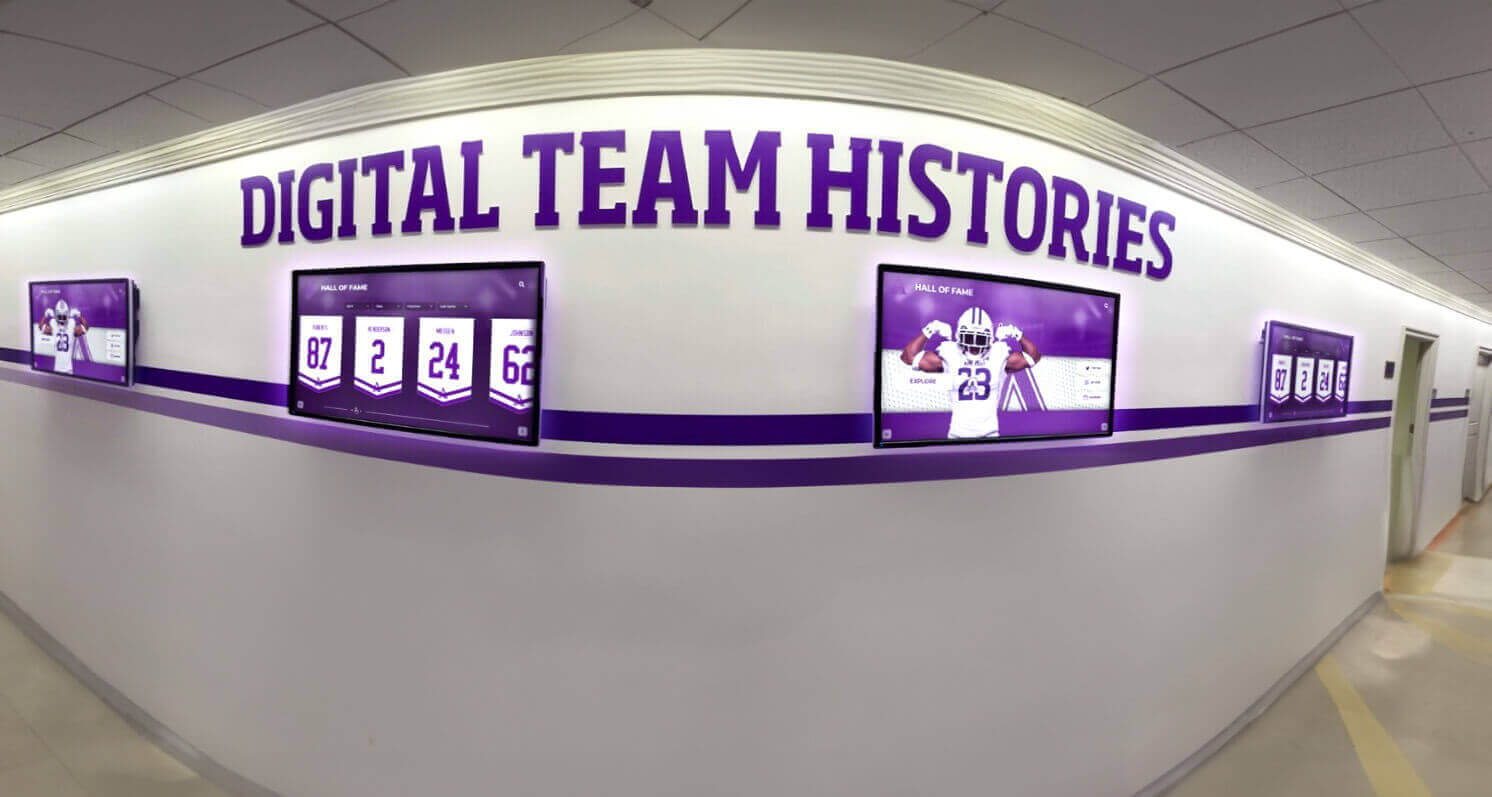
Strategic placement of digital displays transforms archived materials into engaging daily experiences accessible throughout facilities
Defining Clear Objectives and Success Metrics
Specific objectives guide archive development while enabling effectiveness evaluation:
Primary Archive Goals
Common objectives for digital history archives include:
- Preservation Protection: Safeguarding historical materials from loss, deterioration, or damage through digital backup
- Enhanced Access: Making archived materials available to broader audiences regardless of location
- Research Support: Providing searchable resources enabling historical research and discovery
- Community Engagement: Creating content that strengthens connections between institutions and constituents
- Educational Resources: Supporting learning through primary source access and historical documentation
- Institutional Identity: Building pride and understanding of heritage and tradition
Most organizations pursue multiple objectives simultaneously, though specific priorities vary based on institutional contexts and stakeholder needs.
Measurable Success Indicators
Establish metrics demonstrating program effectiveness:
- Quantitative measures: Items digitized and processed, years comprehensively archived, digital files created, searchable text generated, oral history interviews completed, interactive display usage statistics
- Qualitative indicators: Stakeholder testimonials about archive value, research projects enabled, community engagement improvements, recognition from professional organizations
- Strategic impact: Alumni engagement increases attributed to archive access, development outcomes connected to heritage storytelling, recruitment benefits from demonstrated tradition
These metrics justify ongoing investment while revealing improvement opportunities.
Establishing Governance and Collection Policies
Formal policies ensure consistent approaches across years and personnel changes:
Collection Scope Definition
Clear policies specify what materials fall within archival scope:
- Institutional Records: Official documents created in conducting organizational business
- Historical Documentation: Materials documenting institutional history and heritage
- Personal Papers: Individual collections relevant to organizational history acquired through donation
- Digital-Born Content: Contemporary materials created in digital formats
- Exclusions: Materials outside scope such as duplicates, temporary files, or content lacking enduring value
Defined scope prevents accumulating unnecessary materials while ensuring appropriate documentation receives preservation priority.
Acquisition and Access Policies
Formal procedures govern how materials enter collections and who can access them:
- Donation procedures specifying evaluation and acceptance criteria
- Deed of gift agreements documenting ownership transfer and usage rights
- Access provisions determining public availability versus restricted materials
- Privacy protections for sensitive information or minor students
- Reproduction guidelines governing how archived materials may be used
These policies protect both institutions and donors while ensuring collections serve defined objectives appropriately.
Digitization: Creating High-Quality Digital Surrogates
Digital preservation represents the most critical component of modern archives, protecting information content while dramatically increasing accessibility.
Planning Digitization Projects
Strategic planning ensures digitization efforts achieve preservation and access goals efficiently:
Prioritization Criteria
Focus limited resources on highest-value materials first:
- Preservation urgency: Materials showing active deterioration or significant risk
- Research value: Unique materials unavailable elsewhere or frequently requested
- Community interest: Content generating strong engagement and connection
- Completeness opportunities: Filling collection gaps to provide comprehensive coverage
- Event timing: Materials supporting upcoming anniversaries, reunions, or campaigns
Many organizations begin with highest-risk materials requiring immediate preservation, then proceed chronologically or thematically based on community interest and research demand.
Technical Specifications for Longevity
Appropriate technical standards balance preservation quality with practical considerations:
For photographs and documents, preservation standards recommend:
- Minimum 600 DPI resolution capturing fine details
- Uncompressed TIFF format for archival master files
- JPEG derivatives for access and web display
- RGB color space even for black and white originals
- Full capture including borders and edges
For bound volumes like yearbooks:
- Non-destructive scanning using book cradles
- Resolution sufficient for text legibility and photo detail
- Page-by-page captures including all content
For audio materials:
- Uncompressed WAV format for preservation masters
- 24-bit depth, 96 kHz sampling rate
- MP3 derivatives for access and streaming
These specifications ensure digital files remain useful as technology evolves while supporting diverse uses from research to display applications.

Interactive kiosks position archived materials in high-traffic areas where community members naturally encounter and explore them
Implementing OCR and Creating Searchable Text
Optical Character Recognition (OCR) transforms scanned images into searchable text, dramatically increasing archive utility and discovery capabilities.
OCR Processing Benefits
Converting text within scanned documents and publications to searchable databases enables:
- Full-text search across entire collections finding any word or phrase instantly
- Name indexes automatically generated from processed documents
- Topic discovery based on keywords appearing anywhere in materials
- Accessibility improvements for visually impaired users with screen readers
- Data extraction creating structured databases from unstructured documents
Organizations implementing comprehensive OCR report search capabilities increase archive usage by 400-600% compared to non-searchable image-only collections.
Quality Control and Accuracy
OCR accuracy depends on original print quality, scan resolution, document condition, and font characteristics. Materials printed clearly typically achieve 95-99% accuracy, while deteriorated documents or unusual fonts may require manual correction for critical applications.
Most organizations implement two-tier approaches using automated OCR for most materials while manually correcting high-priority items requiring perfect accuracy such as name indexes, biographical entries, or frequently accessed documents.
Comprehensive Metadata Creation
Well-organized digital collections require detailed metadata enabling discovery, retrieval, and long-term management:
Essential Metadata Elements
Archival standards recommend capturing:
- Descriptive metadata: Title, creator, date, description, subject keywords, people depicted, location
- Technical metadata: File format, resolution, color space, file size, creation equipment
- Administrative metadata: Copyright status, usage restrictions, source collection, accession information
- Preservation metadata: File creation date, migration history, checksum values verifying integrity
Rich metadata transforms simple digital files into discoverable archival assets supporting diverse research needs while enabling long-term file management as technology evolves.
Organizational Hierarchies
Effective archives implement multi-level organization reflecting collection structures:
- Collection level: Major groupings such as photographs, yearbooks, documents
- Series level: Subdivisions within collections by type, decade, or theme
- Item level: Individual items with specific metadata
- Component level: Parts of complex items like individual yearbook pages
This organization enables browsing collection overviews while supporting detailed searches, accommodating different user needs and research approaches.
Cloud-Based Archive Management Systems
Modern archival platforms operate through cloud-based systems providing capabilities specifically designed for heritage organizations.
Advantages of Cloud-Based Digital Archives
Contemporary cloud platforms eliminate traditional technical barriers that previously required extensive IT infrastructure:
Universal Accessibility
- Access from any internet-connected device without local software installation
- Remote management enabling updates from home, office, or anywhere
- Concurrent multi-user access supporting collaborative work
- Mobile optimization for tablets and smartphones
Scalability Without Infrastructure Investment
- Unlimited storage expanding automatically with collection growth
- No local server purchases or hardware upgrades required
- Bandwidth scaling handling usage spikes during events
- Pay-as-you-grow pricing aligned with actual usage
Automated Technical Management
- Automatic software updates ensuring latest features and security
- Built-in backup redundancy protecting against data loss
- Geographic distribution safeguarding against local disasters
- Professional security infrastructure exceeding typical institutional capabilities
Administrative Efficiency
- Intuitive interfaces requiring minimal technical training
- Bulk upload tools processing large material volumes efficiently
- Automated workflows reducing manual tasks
- Usage analytics revealing how communities engage with archives
Solutions like academic history archiving systems provide purpose-built platforms designed specifically for educational heritage preservation rather than generic document management.

Well-designed archive interfaces make exploring institutional history intuitive and engaging for users comfortable with touchscreen technology
Security and Preservation Strategies
While cloud storage offers advantages, proper implementation requires attention to security and long-term preservation:
Data Protection Measures
- Encrypted transmission and storage protecting sensitive materials
- Regular automated backups creating multiple recovery points
- Geographic redundancy storing copies in multiple physical locations
- Access controls limiting who can view, download, or modify materials
- Audit trails tracking all system activities and changes
Long-Term Digital Preservation
Digital preservation experts warn that materials stored on physical media like CDs, DVDs, or hard drives degrade within 5-50 years, making them unsuitable for archival storage. Proper cloud-based preservation requires:
- Format migration planning ensuring files remain accessible as standards evolve
- Checksum monitoring verifying file integrity over decades
- Metadata preservation maintaining descriptive information
- Platform portability enabling migration between service providers if necessary
- Succession planning ensuring institutional access continues despite personnel changes
These strategies address the “digital dark age” challenge where obsolete formats and failed storage media make materials inaccessible despite technical preservation.
Integration Across Display and Access Points
The most effective archival platforms integrate seamlessly across physical displays, institutional websites, and online access:
Unified Content Management
Single content entry automatically populates:
- Physical interactive displays on campus or in facilities
- Web-accessible online archives available worldwide
- Social media sharing capabilities for community promotion
- Email newsletters and communications highlighting collection items
- Alumni platforms and member portals providing exclusive access
This integration eliminates duplicate work while ensuring consistency across all access points, maximizing return on digitization investment.
Flexible Presentation Options
Modern platforms provide multiple presentation modes for different contexts:
- Searchable database interfaces for research-oriented access
- Curated exhibits highlighting specific themes or collections
- Timeline presentations showing chronological development
- Geographic maps connecting materials to physical locations
- Interactive tours guiding exploration of significant materials
Learn more about creating digital archives for schools that combine systematic preservation with engaging presentation.
Interactive Display Systems: Making History Visible
Digitized materials achieve maximum impact when presented through engaging platforms making history visible and accessible in daily organizational life.
The Power of Interactive Historical Presentations
Static trophy cases and printed displays present history passively with limited engagement. Modern interactive systems transform archival content into dynamic experiences through:
- Touchscreen interfaces enabling intuitive exploration by visitors of all ages
- Powerful search functions locating specific names, years, or topics instantly
- Multimedia integration combining photographs, text, video, and audio
- Unlimited capacity documenting comprehensive history without space constraints
- Remote content management enabling updates from any internet-connected device
- Usage analytics revealing what content resonates most with audiences
Research shows visitors spend an average of 7-8 minutes actively exploring interactive historical displays compared to less than one minute viewing traditional static installations. This extended engagement creates deeper emotional connections with heritage while demonstrating the value of archival investments.
Strategic Placement and Installation Planning
Interactive displays achieve greatest community impact through strategic positioning:
High-Traffic Location Selection
- Main entrance lobbies where all visitors naturally encounter displays
- Library and community spaces supporting research and gathering
- Meeting and event facilities where groups assemble regularly
- Cafeteria and common areas where people spend time daily
- Administrative areas where families interact during visits
These high-visibility placements ensure archived materials become part of daily experience rather than hidden resources accessed only by those specifically seeking historical information.
Technical Implementation Requirements
Successful interactive display installations require:
- Commercial-grade touchscreen monitors designed for continuous operation
- Secure mounting systems preventing theft or damage
- Network connectivity for content updates and usage tracking
- Appropriate height and angle following accessibility standards
- Adequate lighting avoiding screen glare while providing illumination
- Power supply with surge protection and backup capabilities
Professional installation ensures displays function reliably while protecting technology investments. Many organizations start with single-display pilot implementations, then expand based on usage data and community response.

Freestanding kiosks provide flexible installation options for spaces where wall mounting isn't feasible or desirable
Content Organization and Navigation Design
Effective interactive archives implement intuitive organization enabling diverse exploration approaches:
Chronological Navigation Year-by-year or decade-by-decade timelines showing evolution over time, helping visitors understand development while locating specific periods of personal interest.
Category-Based Browsing Separation by content type enables focused exploration:
- Athletic achievements and team histories
- Academic excellence and scholarly accomplishments
- Arts performances and creative works
- Community service and civic engagement
- Organizational leadership and governance
- Facility development and physical evolution
Search Capabilities Full-text search across comprehensive archives enables instant location of:
- Individual names appearing anywhere in collections
- Specific events, accomplishments, or milestones
- Years or date ranges of interest
- Organizations, teams, or groups
- Award types or achievement categories
Featured Content Rotations Automated rotation highlights different archival materials regularly, displaying collection breadth while surprising repeat visitors with new discoveries each time they interact.
Many organizations discover that combining digital recognition displays with historical archives creates comprehensive platforms celebrating both heritage and ongoing achievement through unified systems.
Specialized Content Types and Collection Strategies
Different archival material types require specific approaches addressing their unique characteristics and preservation challenges.
Yearbook and Publication Digitization
Yearbooks and organizational publications represent cornerstone historical resources deserving comprehensive preservation:
Complete Digitization Approaches
Systematic yearbook digitization includes:
- All pages including covers, endpapers, advertisements, and preliminary sections
- High resolution ensuring small text and photo details remain legible
- Color accuracy preserving original appearance and design intent
- Consistent positioning and cropping across pages and volumes
- OCR processing making all text searchable by name or keyword
Online Access Platforms
Digital yearbooks achieve maximum value through searchable platforms enabling:
- Page-by-page browsing replicating physical book experience
- Name searches locating individuals across multiple years instantly
- Class reunion planning tools helping alumni reconnect
- Social sharing enabling graduates to show friends and family appearances
- Download capabilities for personal archives and memories
Many organizations partner with specialized digitization services providing complete processing from scanning through online hosting.
Photograph Collection Management
Photographic materials form substantial portions of most archives requiring specialized handling:
Organization and Description Systems
Effective photograph archives implement systematic organization:
- Chronological arrangement by year or decade
- Event-based grouping for special occasions and activities
- Subject categorization separating types of activities and locations
- Person-based indexing identifying individuals depicted
- Photographer attribution recognizing creators
Comprehensive metadata transforms photograph collections from simple image files into rich research resources supporting diverse uses from reunion planning to historical research.
Display and Access Considerations
Photograph archives balance broad accessibility with copyright and privacy considerations:
- Public access to official organizational photographs documenting activities
- Restricted access to potentially sensitive images requiring privacy protections
- Watermarking or resolution limitations preventing unauthorized commercial use
- Attribution requirements respecting photographer rights
- Submission systems enabling community members to contribute personal collections
Clear policies established during digitization planning prevent problems when materials become accessible online.
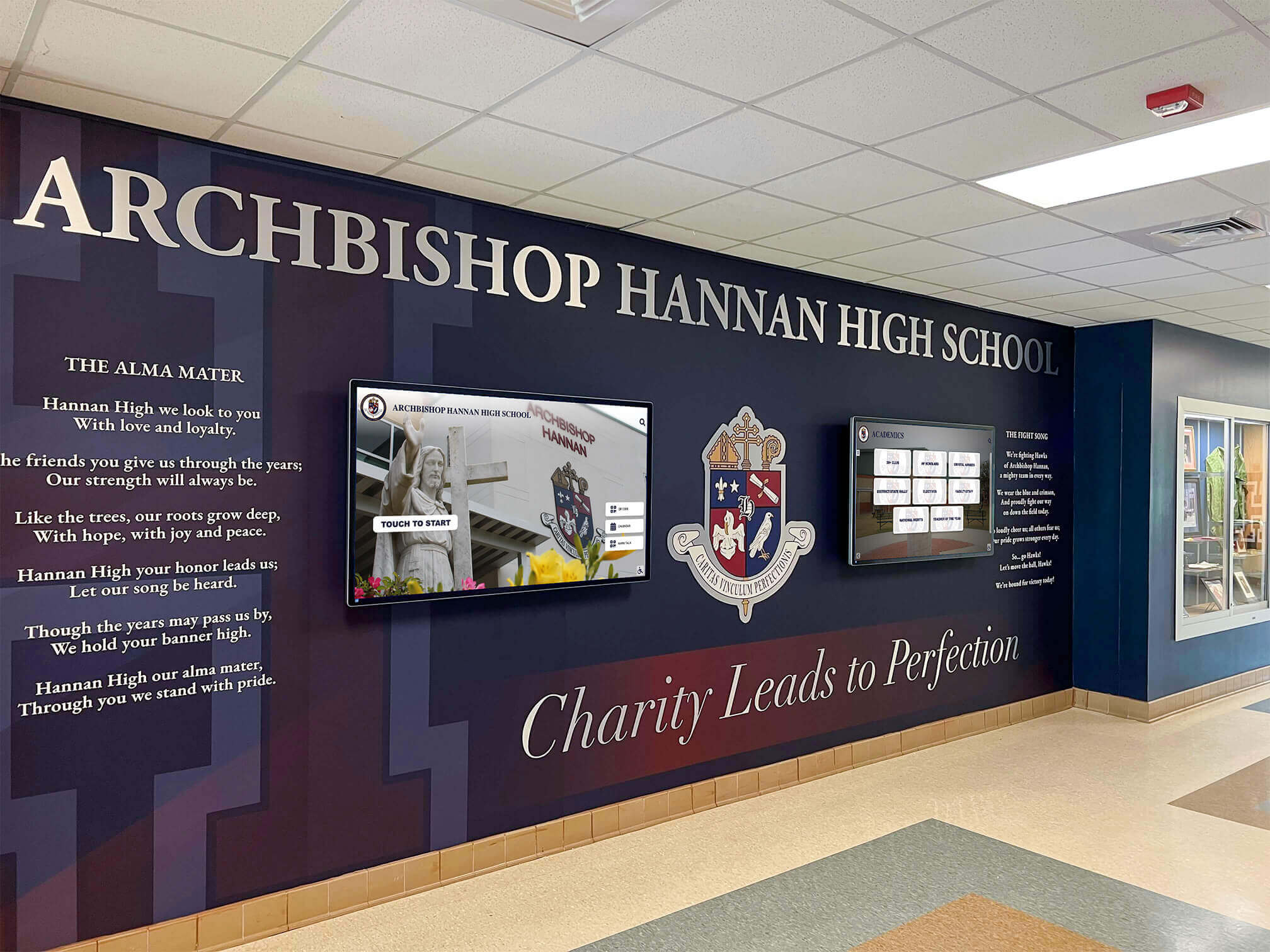
Combining traditional physical heritage elements with digital archives creates compelling entry experiences celebrating institutional history
Document and Paper Collections
Paper documents including meeting minutes, correspondence, reports, and publications require systematic approaches:
Selection and Prioritization
Not all paper documents warrant full digitization. Prioritize based on:
- Historical significance documenting important decisions or developments
- Research value providing unique information unavailable elsewhere
- Frequent access demand for commonly requested materials
- Preservation urgency for deteriorating documents at risk
- Completeness opportunities filling collection gaps
This selective approach focuses resources on materials delivering greatest value while avoiding unnecessary digitization of low-value content.
Processing and Access Methods
Document digitization combines scanning with enhanced discoverability:
- Full-page scanning at resolution ensuring text legibility
- OCR processing creating searchable text from typed or printed documents
- Manual transcription for handwritten materials requiring interpretation
- Detailed metadata documenting content, context, and significance
- Finding aids guiding researchers to relevant materials within large collections
These processing methods transform boxes of papers into accessible resources supporting research and organizational memory.
Audio and Video Materials
Recorded materials require different technical approaches than still images or documents:
Format Migration and Preservation
Many organizations hold audio and video recordings on obsolete formats requiring migration:
- Cassette tapes (audio and video)
- Reel-to-reel audio tapes
- VHS and Betamax video tapes
- Film reels (8mm, 16mm)
- MiniDV and other digital tape formats
These obsolete formats face both media degradation and equipment obsolescence as playback devices become unavailable. Urgent migration to modern digital formats prevents permanent loss as original materials degrade and equipment fails.
Enhanced Access Through Transcription
Audio and video materials become dramatically more useful when supplemented with:
- Complete transcripts enabling text search of spoken content
- Time-coded indexes identifying topics and speakers within recordings
- Closed captions for accessibility and improved comprehension
- Summary descriptions providing content overviews
These enhancements transform recordings from materials requiring complete listening/viewing into searchable resources where specific content can be located quickly.
Oral History Programs: Capturing Living Memory
Written documents and photographs record events, but oral histories capture why they mattered, who made them happen, and what they meant to participants.
Planning Systematic Oral History Initiatives
Effective oral history programs begin with strategic planning identifying priorities and establishing sustainable approaches:
Priority Subject Identification
Focus limited resources on individuals possessing irreplaceable knowledge:
- Longtime members who witnessed organizational evolution firsthand
- Retired leaders who made strategic decisions shaping current programs
- Founding families or early participants connected to organizational origins
- Distinguished alumni with unique perspectives on impact and legacy
- Support staff often overlooked in formal histories but possessing valuable insights
- Community members who interacted with organization across decades
The urgency of oral history cannot be overstated. Every year, valuable institutional knowledge disappears when individuals pass away without sharing memories and perspectives that exist nowhere else.
Interview Protocol Development
Professional oral history standards recommend structured approaches:
- Pre-interview research ensuring informed questioning based on preliminary information
- Prepared question lists covering key topics while allowing natural conversation
- High-quality audio or video recording preserving complete interviews professionally
- Signed release forms documenting permission for archival use and future access
- Comfortable, quiet interview locations minimizing distractions and background noise
- Follow-up opportunities for additional sessions or clarification
Well-designed protocols balance systematic coverage with flexibility enabling subjects to share unexpected insights and stories that prepared questions might not have anticipated.
Processing and Preserving Oral Histories
Raw interview recordings require processing before entering archival collections:
Transcription and Indexing
Complete transcription creates searchable text enabling researchers to quickly locate specific topics, quotes, or themes without listening to entire recordings. Detailed indexing notes key subjects, stories, and people mentioned, providing finding aids guiding future research.
Most organizations pursue accuracy over speed, recognizing that imperfect transcripts reduce oral history value by introducing errors that confuse researchers and misrepresent speakers’ intended meaning.
Integration with Other Archives
Oral histories achieve maximum impact through integration with other archival materials:
- Audio clips incorporated into interactive displays bringing personal voices to historical narratives
- Transcripts linked from digital yearbooks providing context for specific years or events
- Video excerpts featured on websites and social media
- Complete interviews made available through online research portals
- Documentary projects combining oral histories with photographs and documents
This multi-format integration ensures oral history investments deliver value across multiple community engagement channels while preserving irreplaceable perspectives.
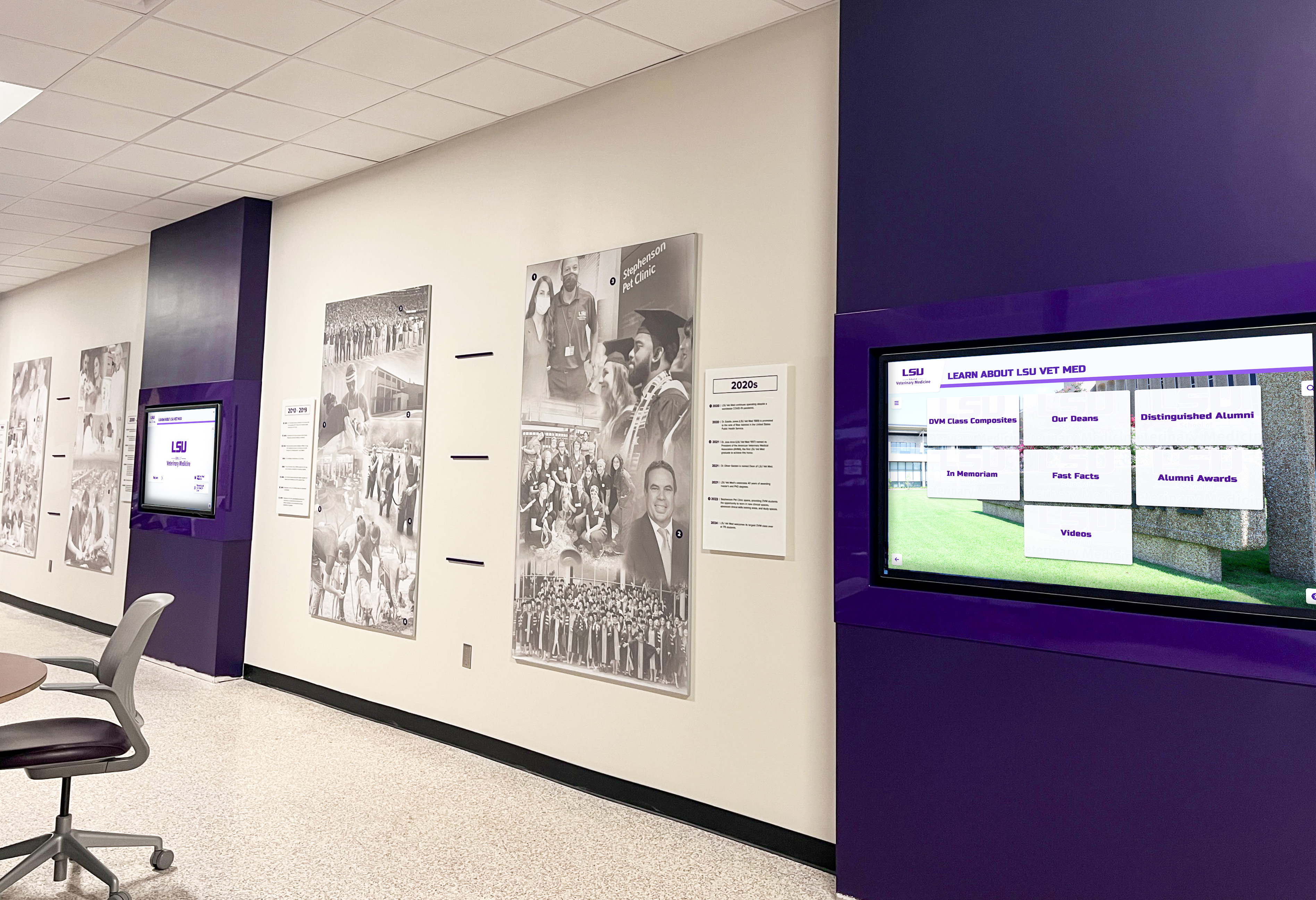
Multi-screen installations enable comprehensive storytelling across different themes, time periods, and content categories simultaneously
Community Crowdsourcing and Collaborative Archiving
Organizations possess only portions of their complete historical record. Alumni, members, families, and community members hold countless photographs, documents, and memories dramatically enriching institutional archives when systematically collected.
Designing Effective Crowdsourcing Campaigns
Successful historical crowdsourcing requires strategic planning that removes barriers and builds trust:
Clear Campaign Focus
Specific requests generate better responses than vague calls for “anything historical”:
- Photographs from specific decades or of particular facilities, events, or people
- Documents about particular programs, initiatives, or developments
- Memories of significant individuals who should be documented
- Materials documenting underrepresented aspects of organizational history
Targeted campaigns help contributors understand exactly what materials are needed while focusing effort on highest-priority collection gaps rather than overwhelming staff with unsorted contributions.
Multiple Submission Methods
Accommodate different preferences and technical comfort levels:
- Online upload forms for digital files or scanned materials
- Email addresses for sending files directly
- Physical drop-off locations for lending materials for scanning
- Mail-in options for distant contributors
- Scheduled scanning events where contributors bring materials for on-site digitization with immediate return
Removing barriers increases participation rates significantly by ensuring everyone can contribute regardless of technical skills or geographic proximity.
Return Guarantees and Recognition
Contributors need assurance their materials will be handled carefully:
- Clear promises to return physical materials after scanning
- Estimated timelines for return of borrowed items
- Tracking systems ensuring nothing is lost during processing
- Recognition for contributors through archive credits and acknowledgments
- Certificates or letters of appreciation for significant contributions
Building trust encourages lending of personally valuable materials that might otherwise remain in private hands unavailable for institutional archives.
Collaborative Identification and Documentation
Crowdsourcing creates opportunities for collaborative knowledge building:
Photograph Identification Projects
Organizations posting unidentified historical photographs to social media or email lists often discover community members can identify individuals, events, and locations, gradually filling gaps in archival knowledge. Some organizations host “identification parties” during reunion events where members collectively review photographs, share stories, and document who appears in images.
Verification and Accuracy
Multiple sources confirming or correcting information reduce archival errors. When several people independently provide consistent identification or details, confidence in accuracy increases substantially. Contradictory information flags items requiring additional research before finalizing descriptions.
Story Collection
Beyond physical materials, crowdsourcing captures memories and stories adding context to formal records. Online submission forms collecting memories about specific events, facilities, individuals, or traditions create rich narrative content supplementing visual and documentary materials that tell what happened but not why it mattered.
Establishing Ongoing Documentation Protocols
Effective archiving isn’t one-time projects but ongoing commitments preventing future gaps by systematically documenting current activities before they become historical mysteries:
Annual Documentation Standards
Organizations with strong historical records established systematic processes capturing current events before they become gaps:
Comprehensive Photography Programs
Assign responsibility for documenting all major events, teams, performances, and activities through quality photographs capturing:
- Complete rosters for all teams, clubs, and organizations
- Performance and competition events from multiple angles
- Award ceremonies and recognition events
- Facility changes and campus or facility development
- Daily activities and traditions often overlooked in formal documentation
Digital-first photography eliminates later scanning needs while ensuring immediate availability for contemporary uses and long-term archival preservation.
Official Record Preservation
Systematic retention ensures important documents enter archives:
- Board or leadership meeting minutes and significant policy documents
- Strategic plans and accreditation or evaluation materials
- Significant correspondence documenting important decisions
- Financial documents showing resource allocation and development
- Demographic data tracking organizational evolution over time
Digital document management systems with archival export capabilities simplify this process by establishing retention schedules and automated transfer to permanent archives.
Publication Collection
Complete sets of newsletters, annual reports, program materials, and event documentation document perspectives often absent from official administrative records. Designating responsibility for collecting and archiving all publications prevents gaps that require later reconstruction efforts.
Creating Organizational Historian Roles
Formal or informal “historian” positions coordinate archival efforts:
Responsibilities
Organizational historians typically:
- Coordinate annual documentation activities ensuring comprehensive coverage
- Manage relationships with community contributors and donors
- Oversee digitization projects and vendor relationships
- Maintain archival organization systems and metadata standards
- Serve as institutional memory resources when historical questions arise
- Plan anniversary celebrations and historical exhibits
- Promote archives to build community awareness and usage
These roles might be filled by librarians, archivists, dedicated staff, interested volunteers, or specifically hired professionals depending on organizational resources and archival scope.
Technology-Enabled Efficiency
Modern platforms dramatically reduce administrative burden for ongoing documentation. Solutions like Rocket Alumni Solutions provide cloud-based content management enabling remote updates from any device, bulk upload tools for processing groups of materials efficiently, templated entry forms standardizing data collection, automated publishing schedules eliminating manual update tasks, and role-based permissions allowing appropriate staff access without requiring technical expertise.
These systems make ongoing archival documentation sustainable even with limited dedicated staff time by streamlining workflows and eliminating technical barriers.

Well-positioned interactive displays enable casual exploration by visitors passing through facilities daily, maximizing archive exposure and engagement
Implementation Roadmap: Your Phased Approach
Organizations ready to implement comprehensive digital history archives should follow systematic approaches spreading work across manageable phases:
Phase 1: Assessment and Planning (Months 1-3)
- Conduct comprehensive materials inventory across all locations and storage areas
- Evaluate condition and preservation priorities identifying urgent needs
- Define clear objectives and success metrics aligned with organizational goals
- Assess organizational readiness and resource availability realistically
- Develop formal archival policies and collection scope definitions
- Secure leadership approval and resource commitments for multi-year implementation
Phase 2: Initial Implementation (Months 3-12)
- Begin highest-priority digitization projects focusing on at-risk materials
- Implement improved physical storage for non-digitized materials requiring protection
- Select and configure cloud-based archival management platform meeting needs
- Conduct initial oral history interviews with aging community members
- Launch crowdsourcing campaign collecting community-held materials
- Install first interactive display in high-visibility location as demonstration
Phase 3: Expansion and Sustainability (Year 2+)
- Expand digitization to additional collection types and time periods systematically
- Implement ongoing annual documentation protocols preventing future gaps
- Add additional interactive displays across campus or facilities
- Develop web-accessible online archive portals for worldwide access
- Build volunteer and community engagement programs supporting ongoing work
- Establish permanent historian role and dedicated archival budget
- Integrate archives with engagement, development, and educational initiatives
This phased approach prevents overwhelming initial commitments while demonstrating value that justifies ongoing investment and expansion based on measurable results and community response.
Measuring Archive Program Success
Regular assessment demonstrates value while revealing improvement opportunities:
Quantitative Success Metrics
Measurable indicators show concrete progress:
- Total items processed and archived with complete metadata
- Years of organizational history comprehensively documented
- Digital files created with preservation-quality specifications
- Oral history interviews completed and transcribed
- Web archive visits and session duration indicating engagement
- Physical display interactions and time spent exploring
- Materials contributed through crowdsourcing campaigns
- Social media reach and engagement with archival content
Tracking metrics over time demonstrates sustained progress justifying ongoing resource investment while identifying areas needing additional focus.
Qualitative Impact Indicators
Beyond numbers, successful archives demonstrate meaningful community impact:
- Stakeholder testimonials about reconnecting with formative experiences through archives
- Research projects and learning activities enabled by archival resources
- Media coverage featuring archival discoveries or collections
- Engagement connections between archive interaction and giving decisions
- Reunion attendance increases attributed to historical content access
- Educational outcomes from primary source integration
These qualitative impacts reveal deeper value beyond simple archival outputs, demonstrating how preserved history strengthens organizational connections and supports strategic objectives.
Return on Investment Analysis
Comprehensive ROI evaluation compares archival costs against benefits:
- Engagement improvements and associated relationship strength increases
- Recruitment or membership advantages from demonstrated heritage and tradition
- Space and efficiency savings from digital access replacing physical storage browsing
- Risk mitigation value from protecting irreplaceable materials through backup
- Research and scholarship enabled by accessible archives advancing knowledge
Many organizations discover that comprehensive digital archives deliver returns exceeding costs within 3-5 years when measuring holistically across benefit categories rather than viewing archives as pure preservation expense.
Blending traditional architectural heritage with contemporary digital archives honors history while embracing modern storytelling capabilities
Common Challenges and Practical Solutions
Organizations implementing digital archive programs encounter predictable obstacles. Understanding common challenges and proven solutions ensures successful outcomes:
Challenge: Limited Existing Materials
Many organizations discover comprehensive historical records simply don’t exist for certain periods, creating frustrating gaps.
Solutions:
- Accept incomplete documentation for some eras rather than delaying entire projects waiting for materials that may not exist
- Implement aggressive crowdsourcing seeking personal collections from community members
- Partner with local historical societies and libraries that may hold organizational materials
- Build archival infrastructure acknowledging gaps while adding content as materials emerge
- Focus heavily on comprehensive current documentation preventing future gaps
- Document the gaps themselves, noting what’s missing to guide future collection development
Challenge: Overwhelming Project Scope
Comprehensive archiving spanning decades or centuries feels impossibly large, causing paralysis.
Solutions:
- Begin with clearly defined pilot projects demonstrating success and building momentum
- Focus initial efforts on highest-priority materials at greatest risk of loss
- Implement ongoing annual processes preventing future backlogs from accumulating
- Engage volunteers, students, or external partners expanding capacity beyond staff
- Celebrate incremental progress maintaining momentum over years
- Break comprehensive goals into annual milestones creating achievable targets
Challenge: Technical Complexity
Staff may feel overwhelmed by digitization equipment, software, and technical standards beyond typical experience.
Solutions:
- Partner with professional services providing complete solutions for complex materials
- Select purpose-built platforms designed for non-technical users rather than IT systems
- Invest in comprehensive training and ongoing support from vendors
- Start simple with basic digitization before advancing to complex features
- Engage technology-comfortable volunteers or students supporting staff
- Join professional communities providing peer support and advice
Challenge: Budget Constraints
Archiving competes with numerous priorities for limited funds, making comprehensive programs seem financially impossible.
Solutions:
- Seek designated gifts from community members passionate about preservation
- Apply for grants from educational foundations and historical organizations
- Implement phased approaches spreading costs across multiple budget years
- Demonstrate ROI connecting archiving to engagement, development, and other outcomes
- Partner with external organizations sharing resources and reducing individual costs
- Start with lower-cost approaches like volunteer scanning before investing in professional services
Understanding these challenges and solutions helps organizations develop realistic implementation plans acknowledging obstacles while identifying practical strategies for overcoming them.
Digital Archive Best Practices and Professional Standards
Following established professional standards ensures digital archives meet preservation requirements while serving user needs effectively:
Professional Archival Standards
Multiple professional organizations provide guidance for digital archive development:
- Society of American Archivists offers comprehensive resources on digital preservation, metadata standards, and archival management
- National Archives provides technical guidelines for digitization specifications and file format selection
- FADGI (Federal Agencies Digital Guidelines Initiative) establishes quality benchmarks for digitization projects
- International Council on Archives develops global standards for archival description and access
Aligning with these professional standards ensures digital archives meet preservation requirements while enabling interoperability with other systems and long-term sustainability as technology evolves.
Accessibility and Inclusion
Digital archives should be accessible to everyone regardless of ability:
Technical Accessibility Features
- Screen reader compatibility for visually impaired users
- Keyboard navigation alternatives to mouse-only interaction
- High contrast viewing modes for improved visibility
- Text magnification options supporting different vision needs
- Caption and transcript availability for audio/video content
Inclusive Content Practices
- Diverse representation in featured content and highlights
- Multiple language support for multilingual communities
- Inclusive description avoiding biased or outdated terminology
- Privacy protections respecting individual preferences
- Community input in collection development and priorities
These accessibility considerations ensure archives serve entire communities while demonstrating organizational commitment to inclusion and equity.
Ethical Considerations
Digital archives raise ethical questions requiring thoughtful approaches:
Privacy and Consent
- Respecting privacy for individuals depicted in historical materials
- Obtaining appropriate permissions for publication and display
- Balancing historical documentation with personal privacy rights
- Providing mechanisms for individuals to request removal or restriction
- Age-appropriate access controls for materials depicting minors
Cultural Sensitivity
- Respectful description and presentation of cultural materials
- Consultation with represented communities about appropriate access and use
- Recognition of problematic historical practices and biases in collections
- Contextualization explaining historical context without endorsing harmful views
- Ongoing review and revision as understanding evolves
Ethical archival practices build trust with communities while ensuring preserved history serves educational purposes without causing harm.

Intuitive touchscreen interfaces enable users of all ages to explore archived materials through familiar gestures and navigation patterns
The Lasting Impact of Digital History Archives
Organizations investing in comprehensive digital history archives create benefits extending far beyond preservation:
Building Institutional Identity
Digital archives strengthen institutional identity by connecting current experiences to larger narratives spanning generations. Members who understand organizational journeys develop deeper appreciation for traditions, stronger pride in excellence, and greater sense of responsibility for maintaining positive legacies that will be passed to future generations.
Strengthening Community Connections
Archives provide content that maintains lifelong connections for members who explore institutional history through accessible digital platforms. Historical documentation enables people to revisit formative experiences, share memories with family and friends, and reconnect with peers across decades. This emotional connection translates to increased event attendance, stronger volunteer participation, and greater philanthropic support driven by meaningful relationships.
Preserving Irreplaceable Knowledge
Every organization’s history is unique and irreplaceable. Physical materials deteriorate, individuals pass away, and institutional memory fades unless actively preserved through systematic archival programs. Digital archives ensure future generations can understand, appreciate, and learn from the accomplishments, challenges, and evolution that shaped their institutions and communities.
Supporting Strategic Goals
Historical documentation supports multiple strategic objectives including engagement by providing content that strengthens relationships, development by demonstrating long-term impact and tradition, recruitment or membership by highlighting heritage and excellence, research by enabling scholarly inquiry and learning, and planning by preserving institutional memory informing decisions. Organizations investing in archives discover preserved history becomes strategic assets supporting diverse organizational objectives rather than simply nostalgic preservation.
Conclusion: Preserving Your Unique Story
Every school, museum, historical society, and organization possesses unique history worth preserving through comprehensive digital archive systems. The methods outlined in this guide provide proven approaches combining systematic digitization protecting materials from deterioration, cloud-based management enabling efficient organization and worldwide access, interactive display platforms making archives engaging and visible, oral history programs capturing irreplaceable memories before they’re lost, crowdsourcing initiatives expanding available materials through community participation, ongoing documentation preventing future gaps, and professional partnerships providing specialized expertise.
Organizations prioritizing digital archive development create lasting benefits for current members, researchers, future generations, and communities. They transform scattered memories and deteriorating materials into coherent narratives accessible to anyone interested in understanding heritage and tradition. They demonstrate respect for those who built organizational excellence while inspiring continued achievement through connection to legacy.
The urgency of archival work cannot be overstated. Every year without comprehensive preservation increases risk of permanent loss as materials deteriorate, knowledge holders pass away, and institutional memory fades. The time to begin preserving your organization’s history is now—before additional irreplaceable pieces disappear forever.
Modern technology platforms from providers like Rocket Alumni Solutions make comprehensive digital archiving achievable for organizations of all sizes through intuitive content management combined with sophisticated display capabilities specifically designed for heritage preservation. Whether starting with extensive historical collections or building gradually, whether installing impressive physical displays or beginning with web-accessible platforms, whether documenting specific eras or capturing comprehensive institutional histories—proven methods and powerful tools enable effective preservation supporting your unique circumstances and goals.
Your organization’s unique story deserves protection, celebration, and accessibility for generations to come. Begin building comprehensive digital history archive systems today, ensuring the accomplishments of past generations continue inspiring future excellence while strengthening community bonds that make your institution special.
Book a demo to explore how digital archive solutions can transform your historical materials into engaging resources that strengthen community connections while preserving irreplaceable heritage.































