Creating Lasting Memories: The Evolution of Reunion Recognition
Reunions bring people together to celebrate shared history, reconnect with old friends, and honor collective achievements. Yet traditional memory walls—poster boards cluttered with printed photos, sticky notes with scribbled messages, or static displays gathering dust—often fail to capture the vibrant energy and emotional depth these gatherings deserve. Digital reunion memory walls transform these experiences through interactive technology that engages attendees, preserves memories permanently, and creates connections that extend far beyond a single event.
Whether you’re planning a high school reunion, college alumni gathering, corporate milestone celebration, or multi-generational family event, a digital memory wall creates a focal point that draws people together, sparks conversations, and ensures memories aren’t lost after the event ends. These modern solutions combine the emotional resonance of traditional memory boards with the engagement power of interactive technology, the permanence of digital archives, and the reach of online accessibility.
The transformation from physical poster boards to digital memory walls represents more than technological advancement—it reflects a fundamental shift in how communities document, share, and preserve their collective stories. While traditional memory walls capture a moment, digital solutions create living archives that grow, evolve, and remain accessible for years to come.

Interactive digital memory walls become natural gathering points where reunion attendees discover shared experiences and reconnect over nostalgic moments
Understanding Digital Reunion Memory Walls
Digital reunion memory walls combine hardware displays with specialized software to create interactive experiences where event attendees can view, contribute, and engage with shared memories and achievements.
Core Components and Technology
Modern digital memory wall systems integrate several key elements:
Display Hardware: Commercial-grade touchscreen displays ranging from single 55-inch screens to multi-panel video walls create the physical interface. These screens feature capacitive touch technology enabling intuitive swipe, pinch, zoom, and tap interactions that feel natural to users accustomed to smartphones and tablets.
Content Management Platform: Cloud-based software enables event organizers to upload photos, videos, biographical information, achievement highlights, and interactive elements before the event. The platform typically offers templates, drag-and-drop interfaces, and scheduling tools requiring no technical expertise.
Interactive Interface: Specialized software transforms standard content into engaging experiences through searchable databases, filtering capabilities, social sharing integration, multimedia playback, and personalized exploration paths letting each visitor create their own journey through the content.
Web Accessibility: Most comprehensive solutions like those from Rocket Alumni Solutions extend beyond physical displays to include web-based access, enabling attendees to explore content from personal devices and continue engagement after events conclude.
Social Integration: Direct connections to social media platforms enable one-click sharing of photos, profiles, and memories to Facebook, Instagram, LinkedIn, and other networks, exponentially expanding content reach beyond attendees.
Types of Reunion Memory Walls
Digital memory walls adapt to various reunion formats and purposes:
High School Reunion Memory Walls: Showcase class composites, yearbook photos, athletic achievements, academic honors, career updates, and “where are they now” profiles. These typically emphasize nostalgia while celebrating how classmates have evolved since graduation.
College Alumni Gathering Displays: Highlight academic programs, campus life photos, professional achievements, networking opportunities, and institutional milestones. University reunions often integrate alumni recognition with fundraising goals and institutional advancement initiatives.
Corporate Anniversary Celebrations: Feature company history timelines, milestone achievements, employee spotlights, product evolution, and organizational culture celebrations. These walls often emphasize shared professional journey and collective accomplishments.
Family Reunion Memory Boards: Display multi-generational family trees, historical photos, location significance, family traditions, and individual family member updates. These create connection points across age groups and geographic distances.
Military Unit Reunions: Honor service history, deployment photos, rank progressions, awards and decorations, memorial tributes, and current life updates. These displays balance celebration with solemn remembrance.
Sports Team Reunions: Showcase game photos, championship victories, team rosters, record achievements, coaching history, and player career progressions. Athletic reunions particularly benefit from video integration showing historic game footage.

Digital memory walls serve dual purposes—engaging reunion attendees during events while becoming permanent installations that maintain ongoing community connection
Planning Your Digital Reunion Memory Wall
Successful digital memory walls begin with thoughtful planning addressing your event’s specific goals, audience characteristics, and logistical constraints.
Defining Goals and Objectives
Clear objectives guide all subsequent planning decisions:
Engagement Goals: Determine whether your primary aim involves maximizing attendee interaction during the event, facilitating reconnection between long-separated individuals, generating social media buzz and viral sharing, or creating photo opportunities that attendees will share widely.
Content Goals: Establish whether you’ll emphasize historical nostalgia and shared memories, current life and career updates, organizational achievements and milestones, educational or inspirational content, or comprehensive documentation creating permanent archives.
Community Goals: Consider whether you’re strengthening existing relationships, bridging generational divides, expanding your organization’s reach to non-attendees, supporting fundraising or advancement initiatives, or building foundation for ongoing digital engagement beyond the single event.
Technical Goals: Decide if you need portable solutions traveling between multiple reunion locations, permanent installations serving ongoing recognition needs, hybrid systems combining event displays with permanent recognition, or primarily web-based solutions minimizing physical hardware requirements.
Content Collection and Organization
Compelling digital memory walls require diverse, high-quality content:
Photo and Video Collection: Solicit contributions from potential attendees weeks before events through email campaigns, social media requests, dedicated upload portals, or scanning parties where volunteers digitize physical photos. Encourage submissions spanning different eras, activities, and social circles to ensure broad representation.
Biographical Information Gathering: Request current career details, family updates, location information, notable achievements, favorite memories, and messages to classmates. Structured forms with specific questions typically yield better responses than open-ended requests.
Achievement Documentation: Compile academic honors, athletic records, career milestones, community service contributions, creative accomplishments, and leadership roles. Recognition of diverse achievement types ensures inclusive celebration.
Historical Context Materials: Gather yearbook pages, newspaper clippings, event programs, institutional publications, facility photos showing campus or location evolution, and historical documents providing context for shared experiences.
Organization and Metadata: Tag all content with relevant categories, dates, people depicted, events shown, and locations. Comprehensive metadata enables powerful search and filtering capabilities that help attendees quickly find personally relevant content among potentially thousands of items.
Display Selection and Setup
Hardware decisions significantly impact user experience:
Screen Size Considerations: Larger displays (65-86 inches) accommodate simultaneous multi-user interaction and create impressive visual impact, while medium displays (55-65 inches) balance visibility with portability and cost. Multi-screen configurations combine advantages of both approaches through complementary content zones.
Placement Strategy: Position displays in high-traffic areas where attendees naturally congregate—near registration tables, bar areas, between event spaces, or in main corridors. Ensure adequate clearance around displays for crowds to gather without blocking circulation.
Interaction Height: Mount touchscreens at 40-48 inches from floor to screen center for comfortable standing interaction while accommodating ADA accessibility requirements. Provide adequate approach space for wheelchair users.
Kiosk vs. Wall-Mount: Freestanding kiosks offer portability, built-in stability, professional appearance, and optional branding customization. Wall-mounted installations provide permanent solutions, save floor space, and integrate architecturally. Interactive kiosks from providers like Rocket Alumni Solutions offer comprehensive solutions for both approaches.
Ambient Conditions: Account for ambient lighting to ensure screen visibility, audio requirements if including sound, power access and cable management, network connectivity for web features, and climate control preventing display overheating.
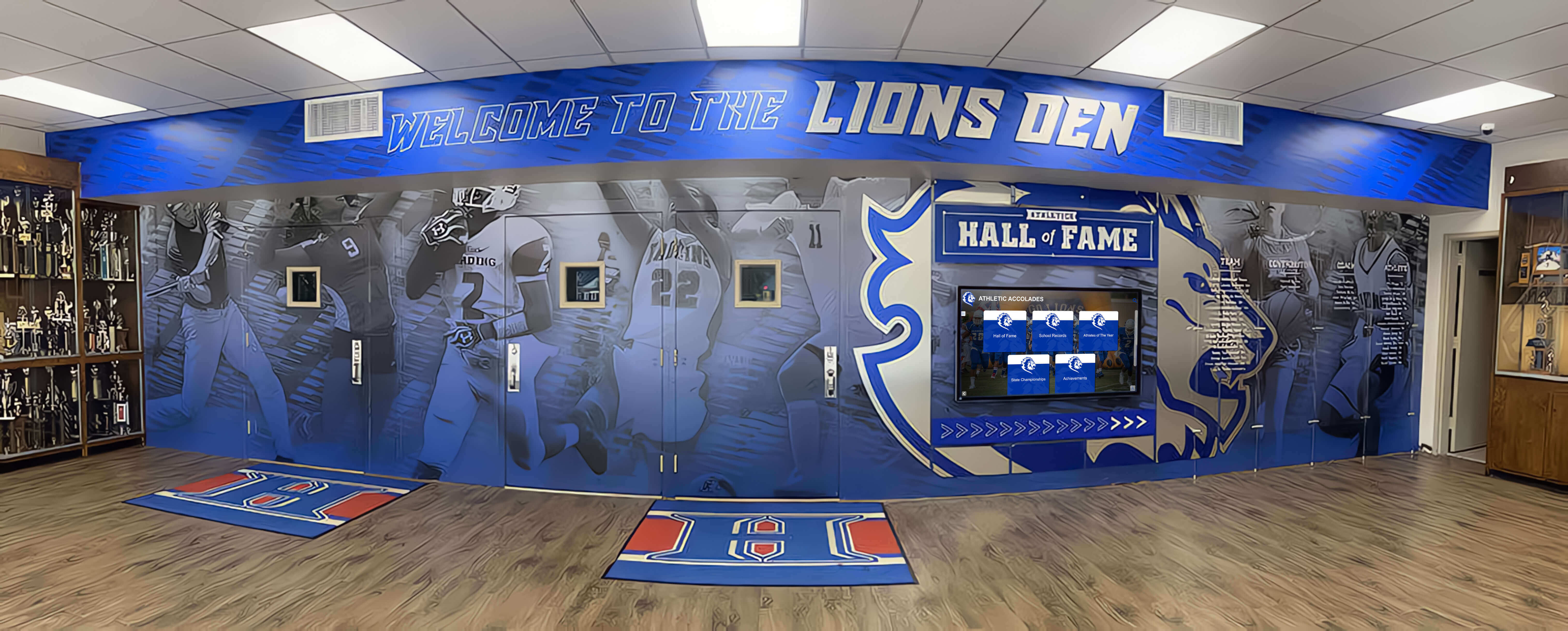
Freestanding kiosks provide flexible placement options for temporary reunion events while maintaining professional appearance and intuitive interaction
Creating Engaging Content for Memory Walls
The content displayed determines whether your digital memory wall becomes a passing curiosity or the event’s centerpiece that attendees discuss for years.
Visual Content Strategy
Powerful visual content drives engagement:
Photo Quality Standards: While historic photos may have quality limitations, ensure recently captured content uses high resolution (minimum 1920x1080 pixels), proper lighting avoiding harsh shadows or blown highlights, thoughtful composition with clear focal points, and appropriate editing enhancing without over-processing.
Video Integration: Short video clips (15-90 seconds) create powerful emotional connections. Consider compilation videos showing event progression over years, interview snippets with notable alumni or long-term members, historical footage from past gatherings or significant moments, time-lapse sequences showing location or facility evolution, and congratulatory messages from notable individuals unable to attend.
Before-and-After Comparisons: Side-by-side displays showing then-and-now photos of individuals, facilities, locations, or teams create engaging visual narratives about change and growth over time. These naturally spark conversations and exclamations as attendees discover transformations.
Multimedia Timelines: Interactive chronological displays let users explore history progression through decades or significant periods. School history timelines particularly benefit from multimedia integration showing institutional evolution.
Social Media Integration: Display live social media feeds showing attendee posts using event hashtags, creating real-time content generation and encouraging participation. This bridges physical event with digital amplification.
Interactive Features That Drive Engagement
Beyond passive viewing, interactive elements transform memory walls into experiences:
Advanced Search Capabilities: Enable attendees to quickly find themselves, specific friends, particular years, or defined activities through powerful search tools. Include filters for graduation year, location, major/department, activity participation, and custom categories relevant to your event.
Personal Profile Exploration: Provide detailed individual pages featuring multiple photos across different time periods, biographical information and career updates, personal messages or quotes, social media links, and “connect with me” functionality enabling direct communication.
“Find Yourself” Challenges: Create scavenger hunt-style activities where attendees locate themselves in historic group photos, specific yearbook pages, team rosters, or event photos. This gamification increases time spent exploring content while generating laughter and conversation.
Voting and Polling Features: Enable interactive elements like “most changed,” “best smile then and now,” “most likely to” categories, favorite memory selections, or photo competitions. These create friendly competition and repeat visits as attendees check results.
Memory Submission Functionality: Allow real-time contributions during events where attendees can upload new photos, submit written memories or stories, update biographical information, or record video messages. This transforms memory walls from static displays into growing archives capturing the reunion itself.
Connection Mapping: Visualize relationships between attendees through interactive displays showing roommate connections, teammate relationships, colleague networks, family relationships, or geographic clustering. These often reveal surprising connections spurring new conversations.
Engagement Data: What Drives Interaction
Analysis of digital memory wall usage at hundreds of reunion events reveals clear patterns in what captures attention:
Most Engaged Content Types:
- Personal photos where attendees can find themselves: 87% engagement rate
- “Where are they now” career and life updates: 74% engagement rate
- Historic team or group photos: 68% engagement rate
- Video content showing motion and sound: 61% engagement rate
- Then-and-now comparison features: 58% engagement rate
- Achievement and recognition content: 52% engagement rate
Average Interaction Time:
- Quick browse (less than 2 minutes): 22% of users
- Engaged exploration (2-10 minutes): 51% of users
- Deep dive (over 10 minutes): 27% of users
Peak Usage Patterns:
- First 30 minutes after arrival: 34% of total interactions
- Social/cocktail hour periods: 29% of total interactions
- Scheduled breaks between programming: 21% of total interactions
- Final hour before departure: 16% of total interactions
Understanding these patterns helps optimize content and placement strategies for maximum impact.

Personal profile exploration features enable attendees to discover detailed updates about classmates and friends, spurring reconnection conversations that extend throughout events
Technical Implementation and Best Practices
Successfully deploying digital memory walls requires attention to technical details ensuring smooth operation throughout events.
Software Platform Selection
Choosing appropriate software significantly impacts both ease of setup and attendee experience:
Content Management System Requirements: Look for platforms offering intuitive drag-and-drop interfaces requiring no coding knowledge, bulk upload capabilities handling hundreds or thousands of items, template libraries providing professional design starting points, real-time editing enabling on-site adjustments, and preview modes letting you see exactly how content will appear before going live.
Interactive Capabilities: Prioritize systems providing responsive touch interfaces optimized for finger interaction, powerful search and filtering across multiple parameters, seamless multimedia playback without loading delays, social sharing integration with one-click posting, and analytics tracking showing what content receives most engagement.
Web Integration: Comprehensive solutions extend beyond physical displays to include responsive web access optimized for all devices, QR code generation enabling instant mobile access, embedded options for existing websites, and email integration sending direct links to specific profiles or content.
Customization Options: Ensure platforms allow brand customization reflecting your organization’s identity through colors, logos, fonts, and design elements. Touchscreen software solutions vary significantly in customization flexibility.
Support and Training: Evaluate provider responsiveness, training resource availability, technical support accessibility during events, and documentation quality helping troubleshoot issues independently.
Hardware Configuration
Technical reliability requires proper hardware setup:
Display Specifications: Commercial-grade displays designed for extended operation (16+ hours daily) significantly outperform consumer TVs in reliability and longevity. Look for screens with high brightness (400+ nits) ensuring visibility in varied lighting, wide viewing angles maintaining image quality from multiple positions, and touch technology supporting 10+ simultaneous touch points for multi-user interaction.
Computing Requirements: Modern displays typically connect to dedicated media players, mini PCs, or integrated computing modules. Ensure sufficient processing power for smooth multimedia playback, adequate storage for your content library, reliable connectivity options, and quiet operation avoiding distracting fan noise.
Network Infrastructure: Plan for reliable internet connectivity supporting web features, bandwidth adequate for social media integration and live feeds, network security appropriate for public access, and backup cellular connectivity options for venues with questionable WiFi reliability.
Power Management: Provide consistent, clean power through surge protection, accessible outlets avoiding extension cord daisy-chaining, battery backup systems protecting against brief outages, and cable management maintaining professional appearance while preventing trip hazards.
Audio Considerations: If including sound, plan for speakers providing clear audio without overwhelming venue acoustics, volume controls accessible to event staff, headphone jacks for optional private listening, and muting capabilities during ceremonies or speeches.
Pre-Event Testing and Preparation
Thorough testing prevents event-day disasters:
Content Review: Systematically verify all photos display correctly with appropriate orientation and cropping, videos play smoothly without glitches, text content contains no typos or errors, search and filtering functions return expected results, and social sharing links work correctly.
User Experience Testing: Have individuals unfamiliar with the system attempt to complete common tasks—finding specific people, viewing photos from particular years, submitting new content, or sharing to social media. Observe where they struggle and refine accordingly.
Performance Testing: Test system performance under realistic conditions including simultaneous multi-user interaction, extended operation periods matching event duration, various network conditions including poor connectivity, and recovery from power interruptions or crashes.
Staff Training: Ensure event staff understand basic operation for assisting attendees, troubleshooting common issues independently, managing content if submission features are enabled, and knowing when to escalate to technical support.
Backup Planning: Prepare contingency plans addressing display hardware failure, network connectivity problems, power outages, or software crashes. Consider backup devices, alternative content delivery methods, or simplified display modes as fallbacks.
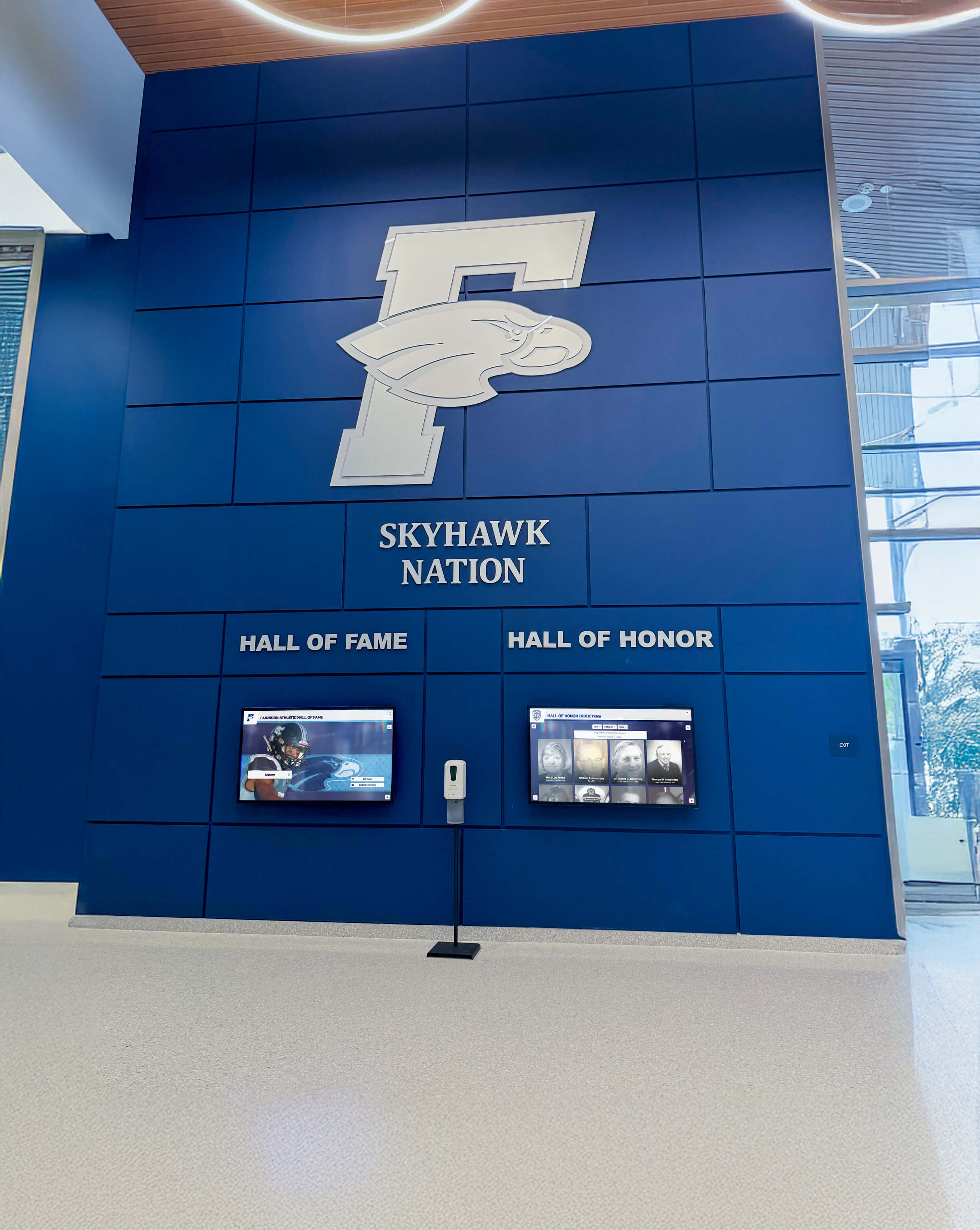
Professional installation and setup ensure reliable operation throughout events while maintaining clean, polished appearance that reflects positively on event organizers
Maximizing Engagement During Events
Having great technology and content means little without strategies driving attendees to interact with your digital memory wall.
Pre-Event Promotion
Build awareness and anticipation before attendees arrive:
Email Campaign Integration: Include memory wall information in all reunion communications, highlighting specific features likely to interest recipients. Share preview images showing what attendees will discover, request content submissions with clear deadlines, and explain how to access online versions from home before traveling to events.
Social Media Teasers: Post preview content from the memory wall on event social media accounts, creating anticipation while demonstrating value. “Throwback Thursday” posts highlighting photos that will appear on the display, countdowns showing days until reunion featuring different content categories, and behind-the-scenes glimpses of content preparation all build interest.
Registration Integration: Mention memory wall features in registration materials and confirmations, request biographical updates attendees want displayed, solicit photo submissions directly through registration forms, and emphasize the memory wall as a highlight differentiating your event from previous reunions.
Direct Outreach: For smaller gatherings, personal phone calls or messages to key individuals can generate excitement and encourage participation in content contribution, creating ambassadors who promote the feature to others.
On-Site Activation Strategies
Drive traffic to your digital memory wall during events:
Strategic Placement Near Registration: Position displays where attendees naturally queue during check-in, providing engagement while waiting and immediately establishing the memory wall as an event highlight. This “first impression” placement ensures everyone encounters the display early.
Staff Demonstration: Station a knowledgeable person near displays during early event periods to demonstrate features, help attendees find themselves, encourage interaction, and answer questions. This human element significantly increases engagement among attendees hesitant about technology.
Scheduled Activities: Create programming centered on the memory wall including scavenger hunts with prizes for finding specific photos, group viewings of video content with commentary, voting activities with results announcements, or photo opportunities where attendees recreate historic poses displayed on screen.
QR Code Distribution: Provide printed materials with QR codes linking directly to web-based memory wall access, enabling attendees to explore content from personal devices while sitting at tables, share specific profiles with conversation partners, or continue engagement after leaving display area.
Social Media Encouragement: Create event-specific hashtags prominently displayed near memory walls, encourage posting selfies at the display with prizes for most creative, share best social media posts on the display itself creating feedback loop, and provide optimal hashtags attendees should use when sharing content from the wall.
Integration with Other Activities: Reference memory wall content during speeches or presentations, use display images as backdrop during program segments, incorporate trivia based on wall content into event games, or create award categories based on wall profiles like “traveled farthest” or “most children.”
Case Example: High School 50th Reunion Success
A Midwestern high school’s 50th reunion committee implemented a comprehensive digital memory wall strategy demonstrating measurable impact:
Pre-Event Phase:
- Email campaign requesting photo submissions: 68% response rate with 847 photos collected
- Social media preview posts: 12,400 impressions reaching 42% of registered attendees
- Online preview access: 156 alumni explored content before event (89% of registered attendees)
During Event (4-hour reunion):
- Total unique display interactions: 178 of 185 attendees (96% participation rate)
- Average interaction time: 9.7 minutes per attendee
- Photos viewed: 6,234 total views across all content
- Social shares from display: 67 posts reaching estimated 18,900 individuals
- New photos submitted at event: 94 additions to permanent archive
Post-Event Impact:
- Web portal access in 30 days following: 421 visits (227% of attendee count)
- Social media conversation duration: discussions continued 11 days post-event vs. typical 2-3 days
- Next reunion planning: committee established permanent digital archive strategy based on success
- Feedback survey: 94% rated memory wall as “highlight” of event
This example demonstrates how digital memory walls create engagement extending far beyond physical event boundaries.

Strategic placement and promotion transform digital memory walls into natural gathering points where small groups form, conversations spark, and reconnections happen organically
Post-Event Value and Ongoing Access
Unlike traditional memory boards disassembled after events, digital memory walls create lasting value extending indefinitely.
Permanent Digital Archives
Transform single-event content into ongoing resources:
Web Portal Development: Comprehensive platforms from providers like Rocket Alumni Solutions enable ongoing web access to all reunion content, allowing attendees to revisit memories whenever desired, share links with family and friends unable to attend, and maintain connection to their community between physical gatherings.
Searchable Alumni Directories: Integrate reunion content with comprehensive alumni databases enabling ongoing connection. Alumni can search for classmates by name, location, profession, or activities, discover career progression and life updates, and maintain current contact information for future outreach.
Content Growth Over Time: Enable continuous additions between reunions through submission portals where alumni upload life updates, new achievement notifications, memorial tributes for deceased community members, and additional historic photos discovered in personal collections. Growing archives provide reasons for repeat visits.
Historical Timeline Integration: Place reunion-specific content within broader institutional history timelines showing how specific classes or cohorts fit within larger organizational narratives, connecting individual experiences to collective heritage.
Download and Sharing Options: Allow attendees to download high-resolution versions of photos featuring themselves, create shareable links to specific content or profiles, generate personalized photo albums from available content, and export data maintaining personal copies independent of institutional access.
Leveraging Content for Future Events
Reunion content becomes foundation for ongoing engagement:
Ongoing Communication Content: Mine memory wall archives for monthly or quarterly email content keeping your community engaged—“Throwback Thursdays” featuring different photos each week, milestone anniversary recognition for achievements shown in archives, birthday or career anniversary acknowledgments based on profile information, and seasonal messaging referencing historic photos from similar times.
Next Reunion Planning: Previous reunion content provides blueprint for future events including proven popular content types and features, attendance data informing outreach strategies, successful engagement tactics worth repeating, and cumulative archives growing more valuable with each gathering.
Fundraising Integration: For educational institutions or nonprofit organizations, reunion engagement often correlates strongly with philanthropic support. Memory wall content can highlight impact of past donations, recognize major donors alongside other achievements, create emotional connections supporting fundraising appeals, and demonstrate institutional stewardship of community relationships.
Student Recruitment: Educational institutions can leverage alumni content for prospective student recruitment—showcasing successful alumni from diverse fields and backgrounds, demonstrating long-term institutional relationships and community, highlighting tradition and institutional heritage, and creating aspirational models for prospective students.
Permanent Campus Installations: Many organizations transition successful reunion memory walls to permanent campus or facility installations. High school alumni displays combining reunion content with broader recognition programs create year-round engagement while serving multiple purposes including student inspiration, visitor engagement, and community pride.
Analytics and Insight Generation
Data from digital memory walls provides valuable intelligence:
Engagement Metrics: Track which content receives most views and interaction time, peak usage periods during events, common search terms and navigation patterns, social sharing frequency and reach, and demographic patterns in who engages and how. These insights inform future content and event planning decisions.
Network Mapping: Analyze connection patterns showing which community members interact with whose profiles, identify relationship clusters and network structures, discover surprising connections spanning different eras, and inform targeted outreach for specific initiatives by understanding community topology.
Participation Gap Analysis: Identify underrepresented segments within your content or attendance, understand which cohorts or demographics engage less, recognize barriers to participation requiring targeted interventions, and develop strategies increasing inclusivity and comprehensive representation.
Longitudinal Tracking: Compare engagement across multiple reunion cycles showing community growth or decline trends, content preferences evolving over time, technology adoption patterns across age groups, and return on investment for different recognition approaches.
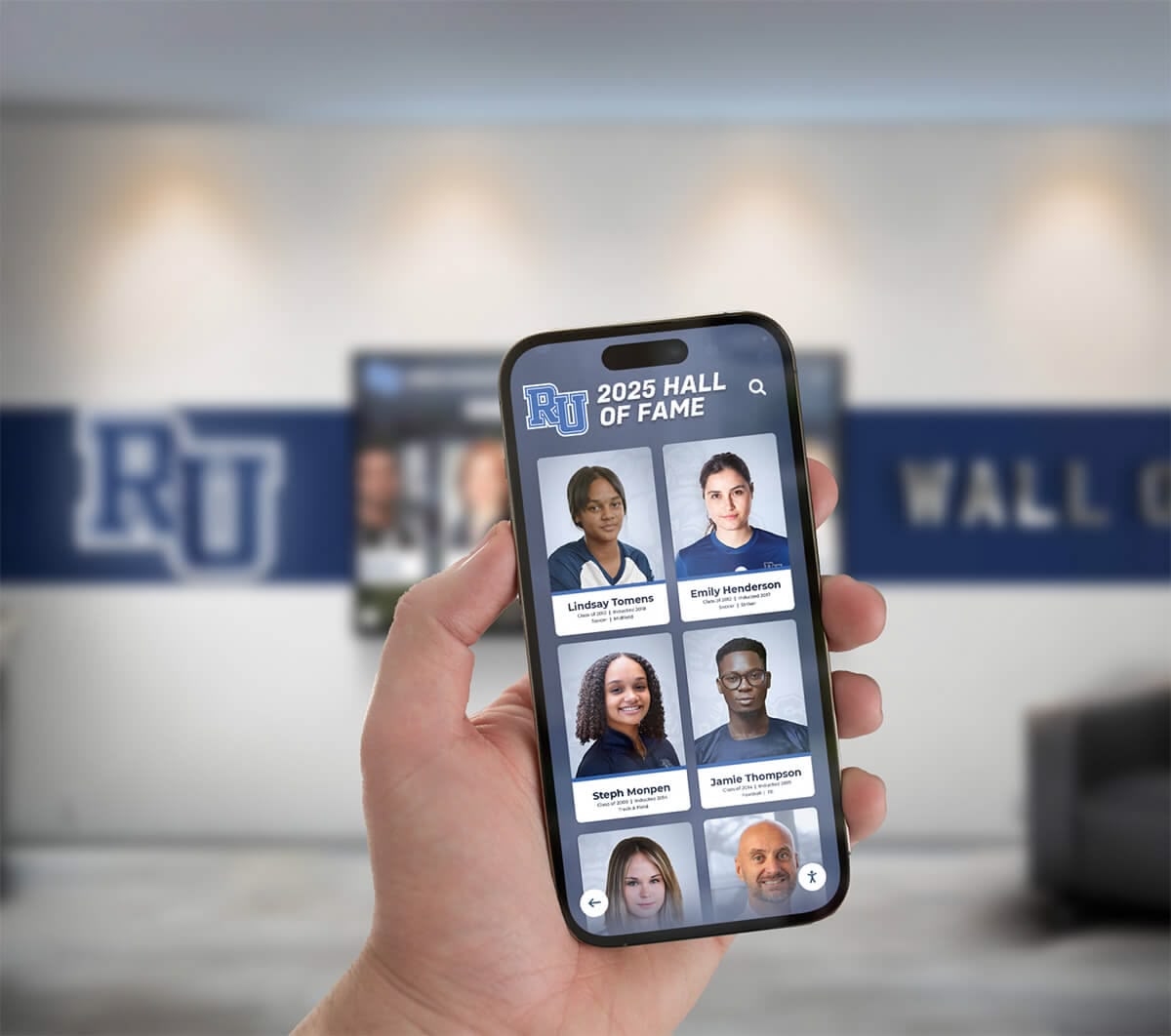
Mobile-optimized web portals extend memory wall access indefinitely, enabling alumni to explore content, update profiles, and maintain community connection from anywhere at any time
Cost Considerations and Budget Planning
Understanding investment requirements enables informed decision-making about digital memory wall implementation.
Hardware Investment
Physical equipment represents the largest upfront cost:
Entry-Level Solutions ($2,500-$6,500): Consumer-grade large displays (55-65 inches) with basic touch capability, consumer mini-PCs or tablets driving content, portable stands or temporary mounting, and DIY setup and configuration. These solutions work for smaller reunions or organizations testing concepts before larger investments.
Mid-Range Professional Systems ($8,000-$15,000): Commercial-grade touchscreen displays (65-75 inches) designed for extended operation, dedicated media players with robust performance, professional kiosks or secure wall mounting, and basic installation and setup support. This tier suits most reunion applications providing reliable performance and professional appearance.
Premium Comprehensive Solutions ($18,000-$35,000): Large format displays (75-86 inches) or multi-screen video walls, enterprise-grade computing infrastructure, custom kiosks with integrated branding, professional installation and calibration, and comprehensive warranty and support agreements. These solutions fit major institutional installations serving multiple purposes beyond individual reunion events.
Rental Options ($800-$2,500 per event): For organizations hosting infrequent reunions, rental arrangements provide access to professional equipment without major capital investment. Rental costs vary based on display size, rental duration, delivery and setup services, and technical support level during events.
Software and Content Development
Beyond hardware, ongoing software and content costs factor into total investment:
Software Licensing: Platform options range from free basic solutions requiring significant manual configuration to professional Software-as-a-Service platforms charging $50-$300 monthly subscriptions. Enterprise-level solutions from providers like Rocket Alumni Solutions include comprehensive features, unlimited content storage, ongoing support, and regular feature updates justifying higher investment through superior capabilities and support.
Content Development: Budget for photo scanning and digitization services ($0.50-$2.00 per photo), graphic design for custom templates and layouts ($500-$2,500), video editing and production ($100-$500 per finished minute), database entry and profile creation ($2-$10 per record), and quality control and proofreading time ensuring accuracy and appropriate content.
Training and Support: Account for administrator training sessions ($300-$1,000), user guide and documentation development ($500-$1,500), technical support during events ($100-$300 per hour), and ongoing maintenance agreements ($500-$3,000 annually depending on complexity).
Return on Investment Considerations
While costs are tangible, benefits extend beyond simple financial calculation:
Eliminated Traditional Display Costs: Digital solutions replace expenses for poster board printing ($200-$800), photo printing and framing ($300-$1,200), temporary signage and display rental ($150-$500), and manual setup and takedown labor. These savings accumulate significantly for organizations hosting regular reunion events.
Enhanced Attendance Value: Compelling digital features can justify higher ticket prices, increase registration rates through unique value propositions, generate positive word-of-mouth driving future attendance, and reduce need for extensive entertainment programming as displays provide engaging activities.
Ongoing Engagement ROI: Unlike traditional displays providing only event-day value, digital archives support year-round engagement including fundraising campaign foundations, recruitment and outreach tools, ongoing communication content, and community maintenance between physical gatherings. This extended value significantly multiplies effective ROI.
Institutional Investment Leverage: For educational institutions and membership organizations, successful reunion implementations often justify broader investment in permanent digital recognition infrastructure serving multiple purposes—alumni relations, student recognition, donor stewardship, and community building. Initial reunion success creates proof of concept supporting larger strategic initiatives.
Budget Allocation Framework
Based on successful reunion memory wall implementations, consider this allocation model for comprehensive solutions:
Hardware and Infrastructure (50-60% of budget):
- Display purchase or rental
- Computing and media player
- Kiosk or mounting solutions
- Cabling, connectivity, and accessories
Software and Licensing (15-25% of budget):
- Platform subscription or licensing
- Custom development or configuration
- Template and design customization
Content Development (15-25% of budget):
- Photo digitization and preparation
- Database entry and profile creation
- Video production and editing
- Graphic design work
Support and Contingency (5-10% of budget):
- Training and documentation
- Technical support during event
- Contingency for unexpected needs
This framework ensures balanced investment across all critical success factors rather than over-allocating to hardware while under-resourcing content that ultimately drives engagement.

Strategic budget allocation ensures professional results that enhance rather than distract from event experiences while supporting long-term value creation beyond single gatherings
Special Considerations for Different Reunion Types
While core concepts apply broadly, different reunion contexts benefit from tailored approaches.
Educational Institution Reunions
Schools, colleges, and universities have specific needs and opportunities:
Academic Achievement Integration: Beyond social connection, incorporate academic recognition showcasing valedictorians, scholarship recipients, academic competition winners, and notable research achievements. This content serves dual purposes—honoring individual accomplishment while inspiring current students who encounter displays.
Athletics Emphasis: Many educational reunions center significantly on athletic tradition and achievement. Integrate sports record boards, team championship histories, individual athlete recognition, and coaching legacy content. Athletic nostalgia often drives strong emotional engagement.
Multi-Class Coordination: Larger institutions hosting simultaneous multi-class reunions benefit from filtering capabilities enabling each class to focus on their specific content while discovering connections across cohorts, comparing experiences between eras, and maintaining individual identity within broader institutional celebration.
Advancement Integration: Educational development professionals can leverage reunion memory walls to support fundraising through recognition of major donors alongside other achievements, campaign progress visualization, giving societies acknowledgment, and impact stories showing how previous donations created opportunities. This contextualizes fundraising within broader community celebration.
Permanent Installation Planning: Consider whether successful reunion implementations might transition to permanent school hall of fame installations serving ongoing recognition, alumni engagement, student inspiration, and visitor welcome functions. Planning reunion systems with permanent installation potential maximizes long-term investment value.
Corporate and Professional Reunions
Workplace and professional organization reunions have distinct characteristics:
Career Progression Narratives: Emphasize professional development stories showing how individuals advanced through organizations, transitioned between roles, or leveraged institutional experience for external success. These narratives serve both nostalgic and inspirational purposes.
Project and Achievement Focus: Highlight significant projects, product launches, organizational milestones, and collective accomplishments that united team members. Work-oriented content often resonates more strongly than purely social memories in professional contexts.
Network Mapping: Professional reunions particularly value connection facilitation. Robust search enabling discovery by current employer, professional field, geographic location, or expertise area supports networking objectives complementing social reconnection.
Mentorship Opportunities: Create explicit connections between senior and junior cohorts through “career paths” displays, mentorship program promotion, or networking features matching retirees with current professionals seeking guidance. These intergenerational connections extend reunion value beyond nostalgia.
Corporate Branding Integration: Ensure displays reflect current organizational branding while honoring heritage, balance celebration with professional tone appropriate for corporate contexts, and create content suitable for both internal audiences and potential external visibility through social sharing.
Family and Community Reunions
Personal and community gatherings benefit from distinct approaches:
Multi-Generational Design: Family reunions must engage audiences spanning young children to senior citizens. Provide content at multiple complexity levels, ensure physical accessibility for varied mobility levels, include “kid-friendly” search and interaction modes, and balance historic content with contemporary family updates.
Geographic Heritage Emphasis: Many family reunions center on specific locations significant to family history. Incorporate location photos showing changes over time, maps showing family migration patterns, property histories and genealogy, and cultural traditions connected to geographic origins.
Relationship Visualization: Family trees, relationship diagrams, and connection mapping help attendees understand how they relate to others present, particularly important in large extended families where individuals may not know distant cousins or relations through marriage.
Inclusive Participation: Facilitate content contribution from family members unable to attend through video messages, submitted photos with stories, written memories shared on display, and livestreaming options enabling remote participation. This inclusivity acknowledges that distance or circumstance prevents many from attending while maintaining their connection.
Privacy Considerations: Family contexts may require more careful attention to privacy preferences, selective content visibility, limited social sharing capabilities, and password protection for sensitive family information. Balance openness with appropriate boundaries respecting family preferences.

Family reunion memory walls bridge generational divides by presenting heritage in formats engaging to both senior members remembering history firsthand and younger generations discovering roots through interactive technology
Overcoming Common Challenges
Even well-planned digital memory wall implementations encounter predictable obstacles requiring proactive approaches.
Technical Issues and Troubleshooting
Prepare for common technical challenges:
Display Calibration Problems: Touchscreen responsiveness may require calibration adjustments. Bring calibration tools and instructions, test thoroughly before event opening, have backup pointing device (mouse) available, and know how to quickly disable touch if it becomes problematic.
Network Connectivity Failures: Internet dependence creates vulnerability. Design content to function offline when possible, prepare cellular backup connectivity, download all cloud content locally before events, and test thoroughly without network access.
Software Crashes and Freezes: Even reliable software occasionally fails. Implement automatic restart scripts, prepare quick reboot procedures, maintain backup content on separate devices, and designate technically capable staff monitoring system health throughout events.
Hardware Malfunctions: Despite quality equipment, displays can fail. When possible, arrange backup display on short notice, prepare alternative content delivery methods (projected slideshows, printed materials), designate vendor emergency contact reachable during events, and maintain calm demeanor preventing attendee panic over technical difficulties.
Content Collection and Rights Management
Gathering sufficient quality content presents challenges:
Limited Response Rates: Content submission requests often yield disappointing responses. Combat this through multiple request channels and formats, specific asks rather than generic appeals, compelling examples showing what you’re seeking, prominent recognition for contributors, and follow-up reminders as deadlines approach.
Image Quality Issues: Historic photos may be low resolution, damaged, or poorly exposed. Set realistic expectations about what’s possible, invest in quality scanning equipment or services, learn basic photo restoration techniques, accept that some content won’t meet ideal standards, and focus on emotional resonance over technical perfection.
Copyright and Permission Concerns: Group photos and professional photography raise usage questions. Obtain explicit permission for copyrighted images, credit professional photographers appropriately, provide opt-out mechanisms for privacy-concerned individuals, and prepare to remove contested content if necessary despite inconvenience.
Incomplete or Inaccurate Information: Biographical data often contains errors or gaps. Implement verification processes before publication, provide easy correction submission methods, acknowledge information limitations openly, and update content as better information emerges.
Engagement and Adoption Barriers
Technology adoption challenges affect certain populations:
Technology Anxiety: Some attendees feel uncomfortable with touchscreens. Station helpers near displays during early event periods, provide clear visual instructions, design extremely intuitive interfaces, offer alternative access through personal devices, and create welcoming environment where asking for help feels comfortable.
Physical Accessibility Issues: Mobility limitations affect interaction ability. Ensure ADA-compliant mounting heights, provide adequate clearance for wheelchairs, design reachable touch targets, offer seated interaction options, and duplicate content on web platforms accessible from personal devices.
Competing Activities: Memory walls compete with socializing, meals, and programming for attention. Schedule dedicated display time in program, integrate displays with other activities, place strategically where natural downtime occurs, and create compelling reasons to visit through contests or scheduled reveals.
Generational Digital Divide: Older attendees may struggle more with technology. Design simpler default interfaces, provide age-appropriate onboarding experiences, celebrate “low-tech” engagement through printed directories linking to digital content, and ensure analog alternatives exist for entirely digital-averse individuals.
Troubleshooting Quick Reference
Common problems and immediate solutions for event-day emergencies:
Problem: Touchscreen not responding
- Solution: Restart display, re-plug USB connections, switch to mouse backup, recalibrate touch interface
Problem: Display shows “No Signal”
- Solution: Check media player power, verify cable connections, confirm correct input source selected, restart media player
Problem: Content not appearing correctly
- Solution: Clear application cache, force content refresh, restore from backup, restart entire system
Problem: Network features not working
- Solution: Switch to cellular backup, enable offline mode, temporarily disable network-dependent features, troubleshoot router/connectivity
Problem: Audio not playing
- Solution: Check volume settings, verify audio output selection, test with known working media, switch to backup audio source
Problem: System running slowly
- Solution: Close background applications, restart system, reduce concurrent media playback, check for overheating
Having printed troubleshooting guides readily available prevents fumbling during stressful moments when problems arise.
Future Trends in Digital Reunion Technology
As technology evolves, reunion memory walls continue advancing with new capabilities enhancing engagement and value.
Emerging Technologies
Several innovations are reshaping digital recognition:
Artificial Intelligence Integration: AI-powered features include automatic facial recognition tagging individuals across historic photos, intelligent content recommendations suggesting profiles of interest based on viewing patterns, automated photo enhancement improving historic image quality, natural language search understanding conversational queries, and chatbot assistance helping users navigate content and features.
Augmented Reality Experiences: AR capabilities overlay digital content onto physical spaces through smartphone cameras, recreate historic photos at original locations, provide wayfinding guiding users to significant campus or facility locations, enable virtual “time travel” showing location evolution, and create shareable AR photo opportunities blending past and present.
Virtual Reality Integration: VR technology transports remote attendees into reunion spaces, recreates historic environments for immersive exploration, provides “you are there” experiences of significant past events, and bridges geographic distances enabling presence for those unable to travel. Virtual hall of fame experiences extend reunion accessibility dramatically.
Voice Interaction: Hands-free voice control enables “show me my graduation year,” “find John Smith,” “play this video,” and similar natural language commands. Voice interaction particularly benefits accessibility and facilitates use while hands are occupied with food or drinks.
Biometric Recognition: Facial recognition technology could automatically display personal content when individuals approach displays, create personalized experiences without manual searching, and generate engagement analytics linking specific content to anonymous interaction patterns.
Enhanced Social Integration
Social media connections continue deepening:
Live Social Walls: Real-time display of social media posts using event hashtags, moderated to ensure appropriate content, creates dynamic content during events. Attendees become contributors seeing their posts featured, encouraging viral spread as friends share reunion content to their networks.
Cross-Platform Sharing: Simplified sharing to multiple platforms simultaneously—Facebook, Instagram, LinkedIn, Twitter/X—maximizes reach while minimizing friction. One-click generation of platform-optimized content formats ensures professional appearance across diverse channels.
Social Fundraising Integration: For charitable or educational reunions, seamless integration with giving platforms enables direct donation from memory wall interfaces, recognition of gifts made during events, progress visualization toward campaign goals, and social sharing amplifying giving challenges and matching gift opportunities.
Alumni Network Platforms: Integration with professional networking tools like LinkedIn creates bridges between nostalgic reunion content and current professional relationships, facilitating career connections alongside social bonding.
Data Analytics and Personalization
Sophisticated analytics enable increasingly personalized experiences:
Predictive Content Recommendations: Machine learning algorithms analyze interaction patterns suggesting content each visitor likely finds interesting based on previous behaviors, demographic characteristics, expressed interests, and relationship networks.
Engagement Optimization: Real-time analytics during events identify underperforming content requiring promotion, peak usage patterns informing optimal programming schedules, navigation bottlenecks requiring interface improvements, and content gaps revealed through search queries returning insufficient results.
Long-Term Relationship Modeling: Tracking engagement across multiple reunion cycles and between-event interactions enables sophisticated relationship modeling predicting which individuals require targeted re-engagement efforts, correlating memory wall interaction with subsequent philanthropic behavior, and identifying natural community leaders and ambassadors based on their networking patterns.
Personalized Communication: Post-event communications can reference specific content each individual viewed, suggest connections with others sharing common interests, recommend upcoming events based on demonstrated preferences, and maintain engagement through customized rather than generic messaging.
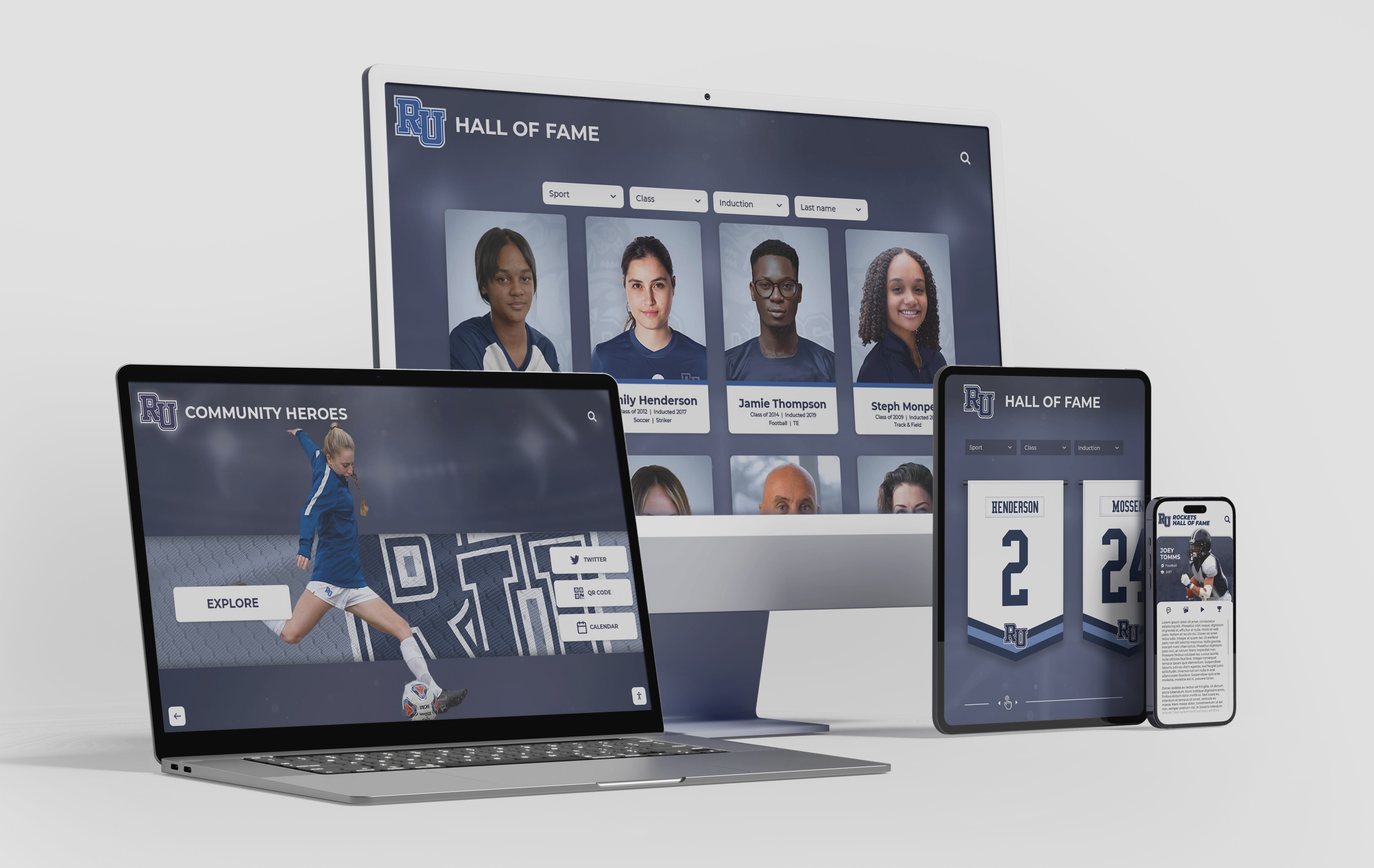
Emerging technologies continue enhancing digital memory wall capabilities with artificial intelligence, augmented reality, voice interaction, and sophisticated analytics creating increasingly engaging and personalized experiences
Conclusion: Transforming Reunions Through Digital Recognition
Digital reunion memory walls represent fundamental evolution in how communities celebrate shared history, honor individual achievement, and maintain lasting connections. While traditional poster boards and trophy cases served adequately in analog eras, today’s technology enables engagement impossible through static displays—interactive exploration spanning thousands of photos and profiles, multimedia storytelling bringing accomplishments to life, social amplification extending reach beyond attendees, and permanent archives accessible whenever communities desire connection to their heritage.
The most successful implementations recognize that technology serves human connection rather than replacing it. Hardware and software enable experiences, but compelling content, thoughtful planning, and strategic activation ultimately determine whether digital memory walls become transformative reunion centerpieces or underutilized curiosities. Organizations investing appropriately in comprehensive solutions—quality displays, robust platforms, engaging content, and thoughtful implementation—consistently report dramatic increases in attendee satisfaction, extended engagement beyond physical events, and strengthened community bonds supporting broader organizational goals.
For reunion organizers, advancement professionals, and community leaders, digital memory walls offer opportunities transcending single events. Initial reunion implementations create foundations for ongoing engagement programs maintaining community connection between gatherings, supporting fundraising and advancement initiatives through emotionally resonant recognition, inspiring current members through celebration of heritage and achievement, and demonstrating organizational commitment to honoring those who built institutional legacy.
Whether planning high school reunions, college alumni gatherings, corporate anniversary celebrations, family heritage events, or community milestone commemorations, digital memory walls transform how your community experiences shared history. By replacing passive displays with interactive experiences, temporary installations with permanent archives, and limited physical access with global web availability, these solutions ensure that memories celebrated today remain accessible and meaningful for generations to come.
Create Your Digital Reunion Memory Wall
Discover how Rocket Alumni Solutions transforms reunion experiences with interactive recognition displays combining intuitive touchscreen hardware, comprehensive content management platforms, and ongoing support ensuring successful implementation. Our solutions serve temporary reunion events and permanent institutional installations, providing flexible options matching your specific needs and budget.
Explore Memory Wall SolutionsThe shift from traditional recognition to digital memory walls reflects broader cultural changes in how communities document experience, maintain relationships, and honor achievement. Organizations embracing this evolution position themselves as forward-thinking while demonstrating commitment to accessibility, inclusivity, and lasting value creation. As technology continues advancing with artificial intelligence, augmented reality, and enhanced personalization capabilities, early adopters establish platforms ready to incorporate innovations as they emerge rather than requiring complete reinvestment.
Success requires moving beyond viewing digital memory walls as mere event accessories toward understanding them as strategic community-building infrastructure supporting multiple organizational objectives simultaneously. When approached comprehensively—with attention to content quality, technical reliability, user experience design, promotional activation, and post-event value maximization—these solutions deliver returns far exceeding initial investment through enhanced engagement, strengthened relationships, and sustained community connection enduring well beyond any single gathering.
Whether you’re organizing your first digital reunion experience or looking to upgrade existing approaches, the strategies, best practices, and considerations outlined here provide frameworks applicable across diverse contexts and organizational types. The specific technologies and vendors you select matter less than commitment to creating genuine value for your community through thoughtful implementation, compelling content, and authentic recognition of shared heritage that brings people together while honoring individual contributions to collective achievement.

























