
The Future of Campus Tours Is Interactive and Digital
Prospective students and their families arrive at your campus ready to be impressed. They've seen your website, scrolled through social media, and compared you to a dozen other schools. But when they walk through your doors for a campus tour, what truly sets you apart? Modern digital school tours enhanced by interactive recognition displays are transforming how schools showcase their heritage, engage prospective families, and tell their institutional story in ways that static plaques and traditional tours simply cannot match.
The traditional campus tour model—walking groups through hallways while pointing out classrooms and reciting enrollment statistics—no longer captivates today’s digitally native prospective students. They expect immersive experiences, instant access to information, and interactive engagement that lets them explore what interests them most. Digital school tours powered by interactive touchscreen displays and comprehensive digital recognition systems answer this need while simultaneously serving current students, alumni, and the broader school community.

What Makes a Digital School Tour Different?
A digital school tour goes beyond simply recording video walkthroughs of your campus. It represents a comprehensive approach to showcasing your institution that combines physical campus elements, interactive digital displays, virtual accessibility, and data-rich storytelling that helps prospective families truly understand what makes your school special.
Core Components of Modern Digital School Tours
Interactive Touchscreen Displays
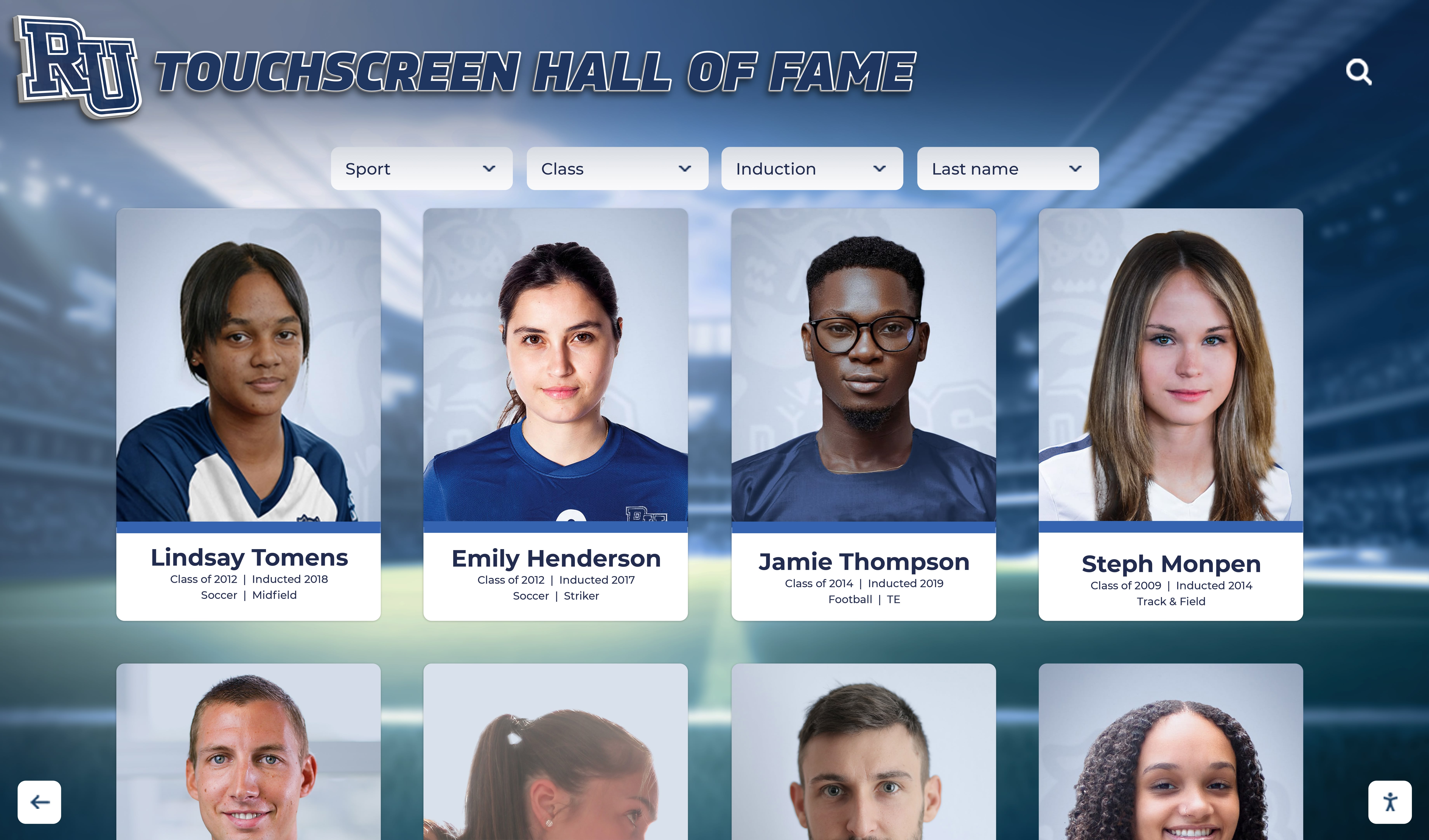

Strategically placed throughout campus, these displays serve as self-guided tour stations where visitors can explore school history, student achievements, athletic records, alumni success stories, academic program details, and campus facilities—all at their own pace. Solutions like interactive touchscreen halls of fame transform static recognition into engaging discovery experiences.
Mobile-Optimized Web Access
Prospective families can access comprehensive school information, virtual tour components, and interactive content from their smartphones before, during, and after their campus visit. This extended engagement window keeps your school top-of-mind throughout the decision-making process.
Multimedia Storytelling
Rather than relying solely on tour guide narration, digital school tours incorporate video testimonials from students and teachers, photo galleries showcasing campus life, recorded performances and athletic highlights, and interactive timelines documenting institutional history. These rich media elements create emotional connections that statistics alone cannot achieve.
Searchable Achievement Databases
Visitors can search for alumni who attended in specific years, explore athletic records by sport, discover academic achievements across programs, and identify successful graduates in careers they’re considering. This personalized exploration helps prospective students envision themselves as future members of your school community.
Self-Paced Exploration
Digital components let families explore areas of particular interest—whether that’s championship athletic traditions, strong arts programs, academic excellence, or community service initiatives—without being constrained by standardized tour schedules.
Why Schools Are Investing in Digital Tour Enhancements
The shift toward digital school tours addresses multiple institutional priorities simultaneously while providing measurable returns across recruitment, engagement, and culture-building initiatives.
Competitive Differentiation in Admissions
In crowded educational markets, schools compete intensely for top students. When prospective families visit multiple campuses, schools with impressive digital recognition systems and interactive tour elements create memorable experiences that stand out. A student who can search for alumni in their intended career field and watch video interviews with successful graduates develops stronger emotional connections than one who simply hears general statistics about college acceptance rates.
Quantifiable Impact on Enrollment
Schools implementing comprehensive digital recognition systems as part of enhanced tour experiences commonly report increased campus visit conversion rates, higher yield on accepted students, improved perception among prospective families, and stronger word-of-mouth referrals. According to research on how digital recognition impacts student engagement, institutions with interactive displays see measurably higher prospective student interest and inquiry conversion.
24/7 Accessibility for Remote Families
Geographic distance, scheduling conflicts, or pandemic concerns prevent many families from visiting campuses in person. Digital school tour components with web accessibility ensure these families can still experience your school comprehensively. Virtual tour elements, interactive achievement exploration, and rich multimedia content provide meaningful alternatives or supplements to physical visits.
This accessibility proves particularly valuable for international students, families considering relocation, and those conducting initial research before narrowing their school choices. The ability to explore your institution thoroughly from anywhere expands your recruitment reach significantly.
Enhanced Support for Admission Teams
Digital tour infrastructure reduces workload on admissions staff while improving information delivery. Rather than repeating the same statistics and stories during every tour, guides can focus on answering specific family questions and building personal connections while digital displays handle comprehensive information presentation. Interactive systems ensure every visitor receives complete, accurate, consistent information regardless of tour guide knowledge or experience level.

Designing Effective Digital School Tour Experiences
Success requires thoughtful integration of digital elements into your broader campus visit program rather than simply adding technology for its own sake.
Strategic Display Placement
Location dramatically affects digital tour component effectiveness. Optimal placement locations include main admissions office or reception areas where families naturally gather, high-traffic hallways connecting major campus buildings, athletic facility entrances showcasing team traditions, performing arts lobbies highlighting creative achievements, and library or academic commons demonstrating scholarly excellence.
Each location should feature content relevant to its physical context. An interactive display in the athletic facility should emphasize sports achievements, team histories, and college recruiting success. A display in the science building might showcase academic competitions, research accomplishments, and alumni career paths in STEM fields.
Content That Answers Prospective Family Questions
Digital tour content should address the questions families actually ask rather than just presenting information schools want to emphasize. Prospective students typically want to know what daily life is really like, whether students similar to them have succeeded, what alumni have achieved after graduation, how strong various programs and activities are, and whether the school culture aligns with their preferences.
Effective Content Categories
Student Life Profiles: Day-in-the-life videos, extracurricular activity showcases, student testimonials about their experience, and social event highlights
Academic Excellence: Program-specific achievements, competition results and honors, college acceptance and scholarship data, and alumni career success stories
Athletic & Arts Traditions: Championship history and records, individual achievement recognition, video performance highlights, and coach/director profiles
Community & Values: Service learning initiatives, diversity and inclusion programs, character education approaches, and community partnership highlights
Facilities & Resources: Virtual building tours, technology and equipment showcases, renovation and improvement timelines, and future development plans
Resources on creating comprehensive student recognition programs demonstrate how achievement documentation serves multiple purposes including prospective student recruitment.
Integration with Live Tours
Digital elements work best when seamlessly integrated with live tours rather than operating as separate experiences. Train tour guides to reference and utilize interactive displays strategically, pausing at key displays for families to explore personally, encouraging visitors to search for specific interests, and demonstrating navigation and search capabilities.
This hybrid approach combines personal connection and question-answering from live guides with comprehensive information depth and self-directed exploration from digital systems.
Technology Solutions for Digital School Tours
Multiple technology platforms can support digital tour initiatives, each with distinct capabilities and ideal applications.
Dedicated Interactive Recognition Displays
Purpose-built touchscreen systems designed specifically for educational recognition provide the most comprehensive functionality. These platforms combine commercial-grade touchscreen hardware, cloud-based content management systems, extensive multimedia support, powerful search and filtering capabilities, and professional installation and training.
Solutions like those from Rocket Alumni Solutions offer turnkey systems optimized for educational institutions. These platforms feature intuitive interfaces that prospective families can navigate without instruction, comprehensive content organization for various achievement types, responsive design working across display sizes, and analytics tracking engagement and popular content.
Investment typically ranges from $10,000-$30,000 for complete installations including hardware, software, content development, and ongoing support. This investment serves multiple purposes beyond tours—current student engagement, alumni connection, donor recognition, and community pride building.
Virtual Tour Platforms
Dedicated virtual tour software focuses on remote campus exploration through 360-degree photography, narrated walkthrough videos, interactive maps, and information hotspots. These platforms excel at providing comprehensive visual campus coverage for families unable to visit in person.
Best-in-class virtual tour platforms integrate with on-campus interactive displays, providing consistent information and branding across physical and digital experiences. Prospective families might start their research with your virtual tour from home, continue exploration on campus via interactive displays, and later revisit specific content via mobile devices while making final decisions.
Mobile Tour Apps
Custom mobile applications provide tour guides in visitors’ pockets with features like GPS-triggered location information, audio tour narration, augmented reality experiences, customizable tour routes, and integrated scheduling for campus visits. Apps work particularly well for self-guided tours and open house events when admission staff cannot personally guide every visiting family.
Web-Based Recognition Platforms
Online databases of school achievements, alumni profiles, and institutional history extend tour experiences beyond campus visits. Families can explore comprehensive content before visiting to inform questions, during visits as companion resources to physical tours, and after visiting while making enrollment decisions. Comprehensive approaches to online halls of fame demonstrate how web platforms complement physical campus presence.
Creating Compelling Digital Tour Content
Technology platforms provide frameworks, but engaging content drives results. Schools should invest as much planning effort in content strategy as in technology selection.
Authentic Student Voices
Prospective students trust current student perspectives more than institutional marketing messages. Incorporate genuine student voices through video testimonials from diverse students, student-created content showcasing daily life, honest discussions of academic rigor and support, and perspectives on school culture and community.
Avoid overly scripted or polished content that feels like advertising. Authentic, slightly imperfect student videos often resonate more powerfully than professional marketing productions. The goal is helping prospective students imagine themselves in your current students’ shoes.
Diverse Achievement Celebration
Comprehensive achievement recognition attracts students with varied interests and talents. Ensure your digital tour content celebrates excellence across academics and scholarship, athletics and competition, visual and performing arts, community service and leadership, and character and citizenship.
This breadth demonstrates that your school values and develops the whole person rather than narrowly focusing on particular achievement types. Every prospective student should see pathways to success and recognition that align with their strengths and interests.
Alumni Success Stories
Concrete examples of alumni success help prospective families evaluate the long-term value of education at your institution. Feature alumni in diverse career fields, graduates from various time periods, both local and geographically distributed alumni, and multiple achievement types beyond traditional career success.
Video interviews with successful alumni prove particularly powerful. A three-minute video of an alumnus describing how their school experience prepared them for career success creates more emotional impact than text profiles. Schools implementing alumni engagement through interactive displays report that these connections significantly influence prospective student decisions.
Historical Context and Tradition
Prospective families assess institutional stability and tradition. Digital tour content should showcase your school’s evolution, facility development and improvements, enduring values and mission, and notable milestones and achievements. Interactive timelines work particularly well for presenting institutional history engagingly. Visitors can explore decades of development, see how programs have grown, identify traditions they would join, and understand long-term institutional commitment to excellence.
Resources on honoring school history demonstrate how historical recognition strengthens institutional identity and prospective student appeal.

Measuring Digital Tour Impact
Quantifying the value of digital tour investments helps justify budgets and guide continuous improvement.
Engagement Analytics
Modern digital displays provide detailed usage data revealing how visitors interact with content. Key metrics include total interactions and session duration, most-viewed content categories, popular search queries, peak engagement times, and visitor flow patterns through multi-display installations. This data identifies which content resonates most powerfully, helps prioritize content development efforts, reveals visitor interests and priorities, and demonstrates system value to stakeholders.
Admissions Metrics
Connect digital tour elements to core admissions objectives by tracking campus visit conversion rates before and after implementation, yield rates on accepted students who experienced digital tours, prospective family feedback and satisfaction scores, and time to decision after campus visits.
While multiple factors influence these metrics, schools commonly observe measurable improvements after implementing comprehensive digital tour enhancements. Conducting specific surveys asking prospective families about the influence of interactive displays provides direct feedback about impact.
Return on Investment Calculation
Calculate comprehensive ROI by considering admission staff time savings from self-service information access, increased enrollment from improved conversion, enhanced donor cultivation through expanded recognition capacity, and current student engagement benefits beyond prospective student tours. Many schools discover that when accounting for multiple benefits, digital recognition investments deliver positive returns within 2-3 years.
Beyond Admissions: Additional Benefits of Digital Tour Infrastructure
While recruitment value alone often justifies investment, digital school tour infrastructure serves multiple additional purposes that compound overall value.
Current Student Engagement
The same interactive displays that impress prospective families engage current students daily. Students can explore school history and tradition, discover role models in older alumni, see their own recent achievements recognized, and develop stronger school identity and pride. This ongoing engagement supports building school pride comprehensively across your community.
Alumni Connection and Fundraising
Alumni visiting campus for reunions, events, or personal visits engage deeply with recognition displays showcasing their cohort and accomplishments. This nostalgia and pride translate to stronger alumni engagement, increased giving participation and amounts, and enhanced willingness to volunteer and mentor current students. Schools report that digital alumni recognition systems generate measurable development returns alongside recruitment value.
Community Relations
Digital tour elements accessible during community events, open houses, and facility rentals help broader communities understand institutional excellence and impact. This visibility builds community support, enhances local reputation, and facilitates partnerships with businesses and organizations.
Staff Recruitment and Retention
Prospective faculty and staff members experience the same tours as students, forming impressions about institutional culture and values. Schools that visibly honor achievement and invest in modern systems signal commitment to excellence that attracts quality personnel. Current staff also take pride in working for institutions that celebrate accomplishment comprehensively.

Implementation Best Practices
Schools achieving greatest success with digital tour initiatives follow proven approaches to planning, implementation, and ongoing management.
Cross-Functional Planning Teams
Effective digital tour systems require input from multiple departments. Form planning committees including admissions and enrollment management, communications and marketing, technology and facilities, athletic and activities departments, and alumni relations and development. Each perspective identifies unique needs and opportunities while ensuring solutions serve institutional priorities comprehensively.
Phased Content Development
Rather than waiting to launch until all content is complete, implement in phases. Start with priority content providing immediate value, expand gradually as additional content develops, and continuously improve based on usage data and feedback. This approach delivers value sooner while making large projects manageable.
Professional Content Creation
While authentic student videos can be relatively casual, core institutional content benefits from professional production quality. Invest in professional photography and videography for featured content, polished writing and editing, consistent branding and visual design, and quality control ensuring accuracy. This professional presentation reflects institutional excellence while ensuring content represents your school appropriately for years.
Regular Content Updates
Static content grows stale. Establish processes for adding new achievements promptly, updating historical content with new information, featuring different students and alumni over time, and refreshing featured content seasonally. Schools implementing best practices for digital halls of fame maintain engagement through consistent content evolution.
Staff Training and Support
Even intuitive systems benefit from staff familiarity. Train admissions staff to demonstrate and reference displays effectively, teach tour guides strategic integration approaches, educate content managers on updating systems, and ensure technical support for troubleshooting needs. Confident staff usage translates to better visitor experiences.
Future Trends in Digital School Tours
The field continues evolving with emerging technologies promising even richer experiences.
Augmented Reality Integration
AR capabilities let visitors point smartphones at physical spaces to reveal additional digital information, historical overlays, or virtual elements. Imagine pointing a phone at an empty athletic field and seeing championship game highlights overlaid on the real-world view, or viewing a classroom and accessing videos of classes in session.
Artificial Intelligence Personalization
AI could tailor tour experiences to individual visitor interests automatically. A family expressing interest in engineering would see content emphasizing STEM achievements and alumni career paths, while another interested in arts receives performing arts highlights and creative program features. Natural language processing could enable conversational search: “Show me alumni who became doctors in the past decade.”
Virtual Reality Experiences
VR headsets available in admissions offices could transport visitors into classrooms during active lessons, onto stages during performances, or into historical moments in school history. While full VR tours aren’t yet mainstream, hybrid applications combining physical tours with VR elements for difficult-to-access spaces show promise.
Integration with Social Media
Real-time integration with school social media could display recent posts, achievements, and student-created content within tour displays. This keeps content perpetually current while showcasing authentic daily school life through student social media perspectives.
Ready to Transform Your Campus Tours?
Discover how interactive digital recognition displays can elevate your school tours, engage prospective families, and serve your entire school community for years to come.
Schedule a DemoGetting Started with Digital School Tour Enhancements
For schools ready to modernize campus tour experiences, a structured approach increases success probability while managing complexity.
Phase 1: Assessment and Vision (Months 1-2)
Begin by evaluating current campus tour processes and prospective family experiences. Conduct surveys of recent prospective families about information needs, assess existing campus tour routes and stop points, identify high-traffic areas suitable for displays, and review competitor tour offerings and differentiation opportunities.
Define clear objectives for digital enhancements. Are you primarily seeking to differentiate from competitors, provide better information access, extend reach to remote families, or reduce staff workload? Different goals might emphasize different capabilities and content types.
Phase 2: Solution Selection (Months 2-3)
Research available platforms and vendors serving educational institutions. Request demonstrations of shortlisted solutions, check references from schools with similar profiles, evaluate total cost of ownership including ongoing support, and assess vendor commitment to product evolution and customer success.
Consider starting with focused implementations—perhaps a single impressive display in your admissions center—before expanding to multiple locations. This controlled approach lets you refine content and processes before broader rollout.
Phase 3: Content Development (Months 3-5)
Content development typically represents the most time-intensive phase. Inventory existing photos, videos, and achievement records that could be repurposed. Identify content gaps requiring new development. Create comprehensive content plans including priority content for initial launch and secondary content for subsequent phases.
Engage current students, alumni, and staff in content creation through video interviews, written testimonials, and photo/video contributions. This participation creates ownership while distributing workload.
Phase 4: Implementation and Launch (Months 5-6)
Work with vendors to install hardware and configure software platforms. Upload and organize content systematically. Conduct thorough testing from prospective family perspectives. Train staff on system operation and tour integration. Develop backup plans for technical issues during high-priority visits.
Launch strategically during peak admissions season to maximize immediate impact. Promote your enhanced tour experience through admissions communications, social media announcements, and direct outreach to prospective families who have shown interest.
Phase 5: Optimization and Expansion (Ongoing)
Monitor engagement analytics and gather visitor feedback continuously. Identify popular content types and underperforming areas. Refine navigation and featured content based on usage patterns. Expand content libraries addressing gaps discovered through analytics and feedback. Consider additional display locations or enhanced capabilities based on success and demand.
Guidance on digital hall of fame implementation provides detailed frameworks applicable to digital tour projects.

Conclusion: Digital School Tours as Strategic Investment
The traditional campus tour isn’t disappearing, but it is evolving. Today’s prospective students expect interactive, self-directed experiences that let them explore what matters most to them personally. Digital school tour enhancements meet this expectation while simultaneously serving current students, alumni, staff, and broader communities.
When families visit your campus, every element of their experience shapes impressions that influence enrollment decisions. Digital recognition displays and interactive tour elements demonstrate institutional commitment to innovation, provide comprehensive information exceeding what tour guides alone can communicate, create memorable differentiators from competing schools, and extend engagement beyond the brief physical visit timeframe.
The schools making these investments today position themselves competitively for tomorrow’s recruitment landscape while building infrastructure that delivers compounding value across multiple institutional priorities. Every prospective student who explores your achievement database, every alumnus who rediscovers their legacy, and every current student who sees role models in your history validates the investment.
Digital school tours represent more than technology adoption—they embody a commitment to showcasing your institutional excellence comprehensively and helping every stakeholder understand why your school deserves their confidence and support. In an educational marketplace where differentiation determines enrollment success, interactive tour experiences provide measurable competitive advantages.
The question isn’t whether to enhance campus tours with digital elements, but how quickly you can implement solutions that prospective families increasingly expect and competitors are already deploying. Start planning today to ensure your tours create the lasting impressions that convert interest into enrollment and enrollment into lifelong institutional connection.
Ready to explore how digital recognition displays can transform your campus tours? Learn more about touchscreen hall of fame solutions designed specifically for educational institutions, or discover comprehensive approaches to building digital walls of achievement that serve recruitment and community engagement simultaneously.

























