Traditional trophy cases overflow with decades of achievements, forcing impossible decisions about which accomplishments deserve visibility. Digital trophy touch walls eliminate these limitations entirely, transforming recognition from static displays into engaging, interactive experiences that honor every achievement comprehensively. These cutting-edge systems combine touchscreen technology with cloud-based content management to create unlimited recognition capacity that traditional glass cases simply cannot provide.
Walk through any school, university, or athletic facility and you’ll encounter the same problem: trophy cases bursting at capacity while storage closets overflow with forgotten achievements. Every championship trophy, every record-breaking performance, and every significant accomplishment represents student dedication, coaching excellence, and memorable competitive moments—yet most remain invisible due to physical space constraints.
Digital trophy touch walls solve this fundamental challenge. These interactive touchscreen systems showcase thousands of trophies with rich multimedia content, searchable databases, and engaging features that transform passive viewing into active exploration. A single 55-inch display can feature detailed profiles for unlimited achievements—content that would require 20-30 traditional cases to display physically.

Modern digital trophy touch wall installations create engaging recognition experiences in high-traffic locations while eliminating space constraints
Why Schools Are Adopting Digital Trophy Touch Walls
The shift from traditional trophy cases to digital touch walls represents more than technology upgrade—it reflects fundamental changes in how institutions approach recognition, engagement, and institutional memory preservation.
The Space Crisis Affecting Every Athletic Program
Successful athletic programs generate more trophies than physical space can accommodate. A typical high school with 15-20 sports earns 30-60 trophies annually from conference championships, tournament victories, state qualifications, and individual honors. Over just two decades, that’s 600-1,200 trophies requiring 15-30 large traditional cases if each holds approximately 40 awards.
Most schools lack hallway space for this many trophy cases. The result? Athletic directors must make difficult choices about which achievements deserve visibility and which get relegated to storage closets. Recent championships displace older accomplishments. Discontinued sports lose recognition entirely. Record-breaking performances disappear once newer athletes surpass those marks.
Every trophy sitting in storage provides zero recognition value. These awards honored student-athletes during championship celebrations, but their ongoing inspirational value vanishes once they disappear from view. Current athletes never see the full scope of program excellence. Alumni returning for visits can’t find their achievements. Prospective students miss understanding program traditions and competitive history.
Modern Engagement Expectations Require Interactivity
Today’s students grew up with touchscreen devices as their primary technology interface. Static trophy cases feel passive and dated to generations that naturally seek and consume information through interactive digital experiences. Digital recognition displays align with how modern audiences naturally engage with content.
Traditional trophy cases force visitors into passive observation—glancing briefly while walking past. Interactive touch walls create active engagement experiences where visitors control their exploration, search for personal connections, and discover content matching their interests. This shift from passive to active dramatically increases interaction time and emotional connection with recognition content.
Schools implementing interactive trophy displays report average interaction times of 4-7 minutes compared to 30-60 seconds for traditional cases. That 10x increase in engagement time translates to deeper appreciation and stronger emotional connections with achievement recognition.

Touchscreen interactivity creates personal engagement as visitors search for familiar names, explore program history, and discover achievements
Operational Efficiency and Administrative Benefits
Beyond improved recognition capabilities, digital trophy touch walls deliver practical operational advantages that appeal to administrators managing tight budgets and limited staff resources.
Simplified Content Updates
Adding new achievements to digital displays requires 10-15 minutes instead of hours. Athletic directors simply photograph the trophy with a smartphone, log into cloud-based content management, create an achievement entry using templates, upload photos, enter details, and publish updates instantly to displays. Compare this to hours required for traditional updates involving unlocking cases, physically rearranging dozens of trophies, creating new identification labels, and reassembling displays.
Reduced Maintenance Requirements
Physical trophy cases require regular glass cleaning, lock repairs, lighting replacement, and shelf adjustments. Trophies themselves tarnish, plaques fade, and physical items deteriorate over time. Digital displays require minimal maintenance—primarily periodic screen cleaning comparable to computer monitors. Schools report 85-90% reductions in administrative time spent on recognition program maintenance.
Long-term Cost Advantages
While digital trophy touch walls require larger upfront investments, comprehensive cost analysis reveals favorable long-term economics. Schools avoid recurring expenses including new trophy case purchases as collections grow ($2,000-$5,000 per case), physical trophy and plaque production for items that never fit in displays, professional installation labor for case modifications ($100-$300 per update), and replacement of damaged or deteriorated physical display elements.
These avoided costs accumulate substantially over 10-15 year time horizons, with most schools achieving break-even within 3-5 years while gaining capabilities traditional trophy cases cannot provide.
Core Technology Components of Digital Trophy Touch Walls
Understanding the technology behind digital trophy touch walls helps institutions make informed decisions during planning and implementation.
Commercial-Grade Touchscreen Display Hardware
Digital trophy touch walls utilize commercial touchscreen displays ranging from 43 to 75 inches. These aren’t consumer televisions—they’re engineered specifically for continuous public operation, featuring enhanced durability, higher brightness suitable for well-lit hallways (450-700 nits vs. 250-350 for consumer TVs), and impressive 50,000-70,000 hour lifespans (approximately 6-8 years of continuous 24/7 use).
Multi-touch Capacitive Technology
Modern commercial touchscreens employ the same capacitive technology found in tablets and smartphones. This provides tablet-like responsiveness that feels natural to users of all ages. Visitors can swipe through content, pinch to zoom on photos, tap to explore detailed information, and use multi-finger gestures for intuitive navigation. This interactivity transforms passive viewing into active exploration.
Display Size Selection Considerations
Screen size should match viewing distance and location characteristics:
- 43-50 inches: Intimate locations like athletic offices, team rooms, smaller hallways
- 55-65 inches: Standard hallway installations with 6-12 foot viewing distances
- 70-75 inches: Large lobby spaces, gymnasiums, or areas with greater distances
Larger displays create more impressive visual impact but cost more and require more robust mounting solutions. Most schools find 55-65 inch displays provide the best balance of visibility, impact, and budget efficiency.

Commercial-grade touchscreen kiosks combine durable hardware with intuitive interfaces for years of reliable public operation
Purpose-Built Content Management Software
The software powering digital trophy touch walls matters as much as display hardware. Purpose-built recognition platforms offer significant advantages over generic digital signage software.
Cloud-Based Administration
Cloud-based platforms enable authorized staff to manage content from any internet-connected device—office computers, home laptops, or smartphones. Athletic directors can photograph new trophies and upload them immediately rather than waiting for physical access to trophy cases or IT support.
Template-Based Content Creation
Professional templates ensure consistent appearance across all entries without requiring design expertise. Schools select from pre-designed layouts optimized for trophy recognition, team championships, individual athlete profiles, and coaching achievements. Staff simply fill in fields and upload photos—the platform handles formatting and presentation automatically.
Powerful Search and Navigation Features
What separates dedicated recognition platforms from basic slideshow software is sophisticated search and navigation functionality. Visitors can:
- Search by athlete names, years, sports, or achievement types
- Browse championships chronologically by decade or season
- Filter by achievement level (national, state, regional, conference, institutional)
- View detailed trophy information, statistics, and stories instantly
- Watch championship game highlights and celebration videos
- Explore comprehensive program histories spanning decades
This searchability creates personal connections impossible with traditional cases. Alumni can find every trophy they earned within seconds. Parents can locate all their children’s achievements across multiple sports and years. Current athletes can research program records and understand what performances earn recognition.
Integration and Infrastructure Requirements
Network Connectivity Options
Digital trophy touch walls require internet connectivity for content updates and cloud functionality:
- Wired Ethernet: Provides most stable connectivity and preferred for permanent installations
- Robust WiFi networks: Acceptable alternatives when wiring is impractical
- Power over Ethernet (PoE): Simplifies installations by delivering both power and data through single cable
Standard 120V electrical outlets provide sufficient power. Schools should consider surge protection or uninterruptible power supplies (UPS) to protect equipment investments from power quality issues.
Display Mounting Configurations
Installation approach affects both aesthetics and accessibility:
- Wall-mounted: Creates clean modern appearance, saves floor space, works well in hallways
- Freestanding kiosks: Provides placement flexibility, easier accessibility compliance, works in lobbies
- Custom enclosures: Protective solutions for high-contact environments like gymnasiums
Mounting solutions must support display weight (typically 40-80 pounds for screens plus mounting hardware) and meet local building codes for permanent installations.
Key Advantages of Digital Trophy Touch Walls
Unlimited Recognition Capacity Transforms Strategy
The most immediate benefit addresses the core problem traditional trophy cases face: unlimited capacity. A single 55-inch digital trophy touch wall can showcase detailed profiles for thousands of trophies—content requiring 20-30 traditional cases to display physically.
This capacity transformation fundamentally changes recognition strategy. Instead of asking “Which trophies deserve limited display space?” schools ask “How do we best organize and present our complete achievement history?”
Every Achievement Recognized Comprehensively
With unlimited digital space, schools can recognize:
- All championship teams across all sports without choosing between programs
- Individual records and athletic milestones regardless of when they occurred
- Conference, regional, and state championship achievements from all eras
- Coaching achievements and career milestones spanning entire tenures
- Historical trophies from every period in school history
- Academic and arts achievements alongside athletic recognition
Schools implementing digital trophy touch walls report displaying 5-10 times more achievements than previous physical displays allowed. Every sport receives appropriate celebration. Every championship matters. Individual achievements across all programs gain visibility that space limitations previously prevented.
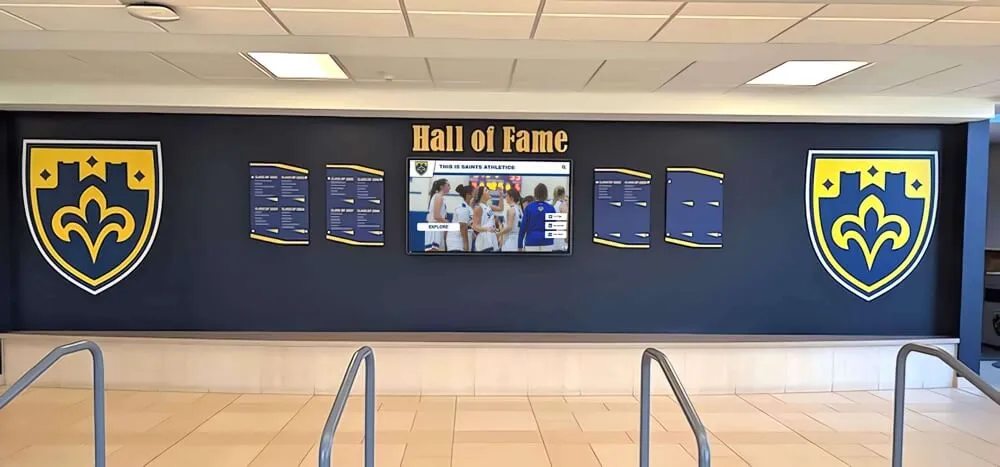
Hybrid installations combining traditional elements with digital displays honor past while embracing unlimited digital recognition capacity
Rich Multimedia Storytelling Beyond Static Displays
Physical trophies tell limited stories—typically just engraved names, dates, and achievement descriptions. Digital trophy touch walls expand these narratives through multiple media formats that create emotional connections and comprehensive understanding.
Championship Team Profiles Include:
- Complete team rosters with individual athlete profiles linked to personal pages
- Season highlights and memorable game moments documented with photos and video
- Coach profiles and championship strategies that led to success
- Championship game details including scores, key plays, and statistics
- Video highlights capturing critical moments and championship celebrations
- Photo galleries documenting the journey from season start to victory
- Team quotes and reflections about what the championship meant
Individual Achievement Recognition Features:
- Athlete biographies including background and athletic development
- Record-setting performance details with historical context
- Competition significance and comparisons to previous records
- Post-graduation achievement updates showing continued success
- Personal quotes and reflections from the athletes themselves
- Related records and program traditions connected to the achievement
This multimedia depth transforms recognition from simple acknowledgment into compelling storytelling that engages visitors emotionally and intellectually. Rather than glancing at a trophy and reading an engraved plate, visitors explore comprehensive narratives that help them understand the significance and appreciate the achievement fully. Organizations ranging from schools to professional sports venues have discovered how multimedia storytelling creates lasting impressions.
Dramatic Increases in Visitor Engagement
Traditional trophy cases operate as passive displays—visitors glance briefly while passing. Digital trophy touch walls create active engagement experiences that captivate attention and encourage extended exploration.
Measured Engagement Improvements
Analytics from institutions implementing interactive trophy kiosks show dramatic increases in engagement metrics. Schools implementing interactive trophy displays report:
- 4-7 minutes average interaction time compared to 30-60 seconds for traditional cases
- 10x longer average viewing times compared to physical displays
- Personal discovery patterns with visitors searching for familiar names and connections
- Social sharing extending reach with visitors photographing content and sharing on social media
- Repeat visitors returning to explore different sports, eras, or content areas
This extended interaction time translates to deeper appreciation and stronger emotional connections with achievement recognition. Students show teammates their accomplishments, search for older siblings or relatives, and discover program traditions they never knew existed.
What Drives This Increased Engagement?
Several factors explain why digital trophy touch walls capture attention far more effectively than traditional displays:
- Personal relevance through search: Visitors immediately search for their own names, teammates, family members, or familiar athletes
- Discovery of unexpected content: Browsing reveals achievements visitors didn’t know existed
- Multimedia engagement: Video highlights and photos are inherently more engaging than static text
- Interactive control: Visitors direct their own exploration rather than viewing pre-determined content
- Social experience: Groups gather around displays, pointing out content and exploring together
Extended Reach Through Web Accessibility
Physical trophy cases reach only visitors who physically walk past displays. Digital trophy touch walls extend reach dramatically through web accessibility features that enable recognition to impact audiences far beyond campus.
Remote Access Capabilities:
Modern digital trophy touch wall platforms provide web-accessible versions of recognition content, enabling:
- Alumni worldwide can explore achievements through standard web browsers from anywhere
- One-click sharing to Facebook, Instagram, Twitter, and other social platforms
- Profile update submissions from alumni about career achievements and life milestones
- Mobile optimization for seamless viewing on smartphones and tablets
- QR code integration for easy access transition from physical displays to personal devices
Schools report that 67% of alumni view digital recognition within 30 days of launch announcements. Social sharing generates 5-8x more impressions than standard institutional posts about achievements. This extended access dramatically increases engagement metrics while strengthening alumni connections that support broader advancement and fundraising goals.
Recruiting and Admissions Impact
Prospective students and their families increasingly research schools online before campus visits. Web-accessible digital trophy touch wall content enables prospects to:
- Research athletic program competitive history and success rates
- View championship documentation and program excellence evidence
- Understand team culture and values through multimedia storytelling
- See facilities and recognition through photos and videos
- Connect with alumni who competed in their sports
Athletic programs report that prospects arriving for recruiting visits frequently reference content they explored online, demonstrating how digital recognition displays extend influence beyond physical installations. This web accessibility becomes especially valuable for alumni engagement strategies that seek to maintain connections with graduates worldwide.
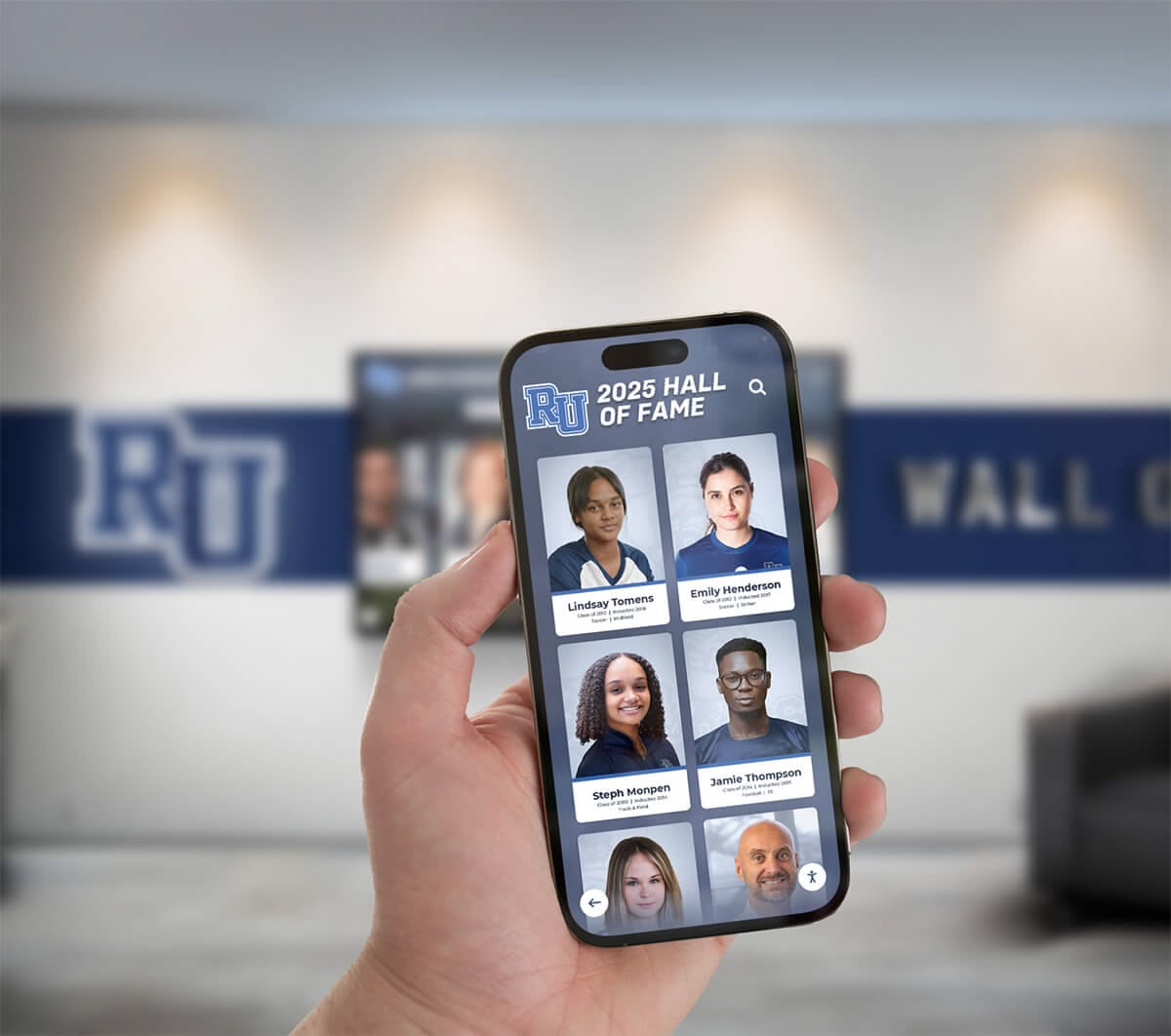
Web accessibility extends recognition reach beyond physical locations, enabling alumni worldwide to explore achievements on any device
Implementation Strategy: From Planning to Launch
Successful digital trophy touch wall implementations follow systematic approaches addressing planning, content development, technology selection, and ongoing management.
Phase 1: Assessment and Planning
Trophy Collection Inventory
Begin by documenting everything currently in trophy cases, storage areas, athletic offices, and other locations. Photograph existing displays to establish baselines. Count trophies by sport, type, and era to understand collection scope comprehensively. This inventory reveals the scale of content digitization required and identifies achievements currently lacking recognition due to space constraints.
Most schools discover they have 2-5 times more trophies in storage than in displays—valuable recognition content invisible to current students, visitors, and community members.
Stakeholder Engagement
Involve key constituencies early in planning to build support and ensure implementations reflect diverse perspectives:
- Athletic directors define recognition priorities and operational requirements
- Coaches provide sport-specific insights and historical knowledge about achievements
- Alumni associations contribute perspectives on historical achievements and memorable moments
- Technology staff assess infrastructure requirements and integration considerations
- Administration establishes budget parameters and approval processes
- Facilities managers coordinate installation planning and space considerations
Early engagement prevents implementations that address only one perspective while missing important considerations from other stakeholders.
Goal Definition Beyond Space Solutions
While solving space problems motivates most projects, establish broader objectives that guide decisions:
- Provide comprehensive recognition for all sports equally without favoritism
- Create engaging experiences that inspire current students toward excellence
- Preserve institutional memory and athletic program history permanently
- Support recruiting by showcasing program excellence and competitive tradition
- Strengthen alumni connections through accessible, meaningful recognition
- Demonstrate institutional values around recognizing diverse forms of excellence
Clear goals guide subsequent decisions about technology selection, content priorities, and success measurement approaches.
Phase 2: Content Development Strategy
Quality content determines digital trophy touch wall effectiveness. Poor content execution undermines even excellent hardware and software investments.
Photography Standards
Establish consistent photography approaches ensuring professional appearance across all content:
- High-resolution images: Minimum 1920x1080 pixels for featured content (4K preferred)
- Consistent lighting: Neutral lighting avoiding harsh shadows or color casts
- Neutral backgrounds: Clean backgrounds that don’t distract from trophy subjects
- Multiple angles: Front views, detail shots showing engraving, overall context
- Proper trophy preparation: Clean, polished trophies free from dust and fingerprints
Many schools hire professional photographers for initial comprehensive documentation of existing trophy collections, then train athletic staff in maintaining standards for ongoing additions.
Content Organization Frameworks
Structure information systematically to ensure visitors can find content easily:
- By Sport: Football, basketball, volleyball, track and field, etc.
- By Time Period: Decades, individual years, or seasons
- By Achievement Level: National, state, regional, conference, institutional records
- By Individual or Team: Personal athlete profiles and team accomplishment pages
- By Trophy Type: Championships, individual honors, records, special awards
Consistent metadata tagging enables sophisticated search and filtering that makes comprehensive collections navigable rather than overwhelming.
Phased Content Development Approach
Most schools implement content incrementally rather than attempting everything simultaneously:
- Phase 1: Recent championships (past 5-10 years), major achievements, currently active sports
- Phase 2: Comprehensive coverage of all active sports programs including minor sports
- Phase 3: Historical content working systematically backward through school history
- Phase 4: Enhanced multimedia including video highlights, interviews, and special features
This phased approach allows earlier launches that demonstrate value rather than delaying implementations until every historical trophy receives full documentation.

Strategic placement in high-traffic areas ensures maximum visibility and engagement with digital trophy touch wall content
Phase 3: Technology Selection
Display Hardware Decisions
Size selection depends on viewing distance and location characteristics. Standard recommendations:
- 43-50 inches: Athletic offices, team rooms, smaller hallways with closer viewing
- 55-65 inches: Primary hallway installations with 6-12 foot typical viewing distances
- 70-75 inches: Large lobbies, gymnasiums, or areas with greater viewing distances
Mounting configuration affects aesthetics, accessibility, and installation complexity:
- Wall-mounted: Clean modern appearance, saves floor space, works well in hallways
- Freestanding kiosks: Placement flexibility, easier ADA accessibility compliance, prominent in lobbies
- Custom enclosures: Additional protection for high-contact environments
Software Platform Selection
Purpose-built digital recognition platforms like Rocket Alumni Solutions offer significant advantages over generic digital signage software or custom development:
- Pre-designed templates optimized specifically for trophy and achievement recognition
- Intuitive content management requiring no technical expertise or training
- Built-in search and navigation designed for recognition content discovery
- Mobile-responsive designs that work across display sizes and devices
- Ongoing platform updates without additional development costs
- Dedicated support teams understanding school recognition needs and challenges
Schools evaluating options should review comprehensive comparisons of touchscreen software platforms to understand feature differences and implementation requirements.
Generic digital signage platforms lack recognition-specific features and require significant customization. Custom development appears flexible but generates ongoing maintenance costs and technical debt.
Infrastructure Requirements
Network connectivity needs vary by implementation approach:
- Wired Ethernet: Most stable connectivity, preferred for permanent installations
- Robust WiFi: Acceptable when wiring is impractical, requires strong reliable signals
- Power over Ethernet (PoE): Simplifies installations by delivering power and data through single cable
Standard 120V electrical outlets provide sufficient power for displays and media players. Consider surge protection or uninterruptible power supplies (UPS) in areas with power quality issues.
Real-World Costs and Investment Considerations
Schools evaluating digital trophy touch walls naturally focus on financial considerations. Comprehensive cost analysis examines both initial investments and long-term operational expenses.
Initial Investment Components
Hardware Costs:
- Commercial touchscreen displays: $2,500-$7,000 (depending on size and specifications)
- Wall mounts or kiosk enclosures: $300-$2,500 (based on configuration and features)
- Media player computers: $400-$800 (mini-PC sufficient for most applications)
- Installation labor: $500-$2,000 (depending on complexity and mounting requirements)
Total hardware investment: $5,000-$15,000 per display installation
Software and Services:
- Platform licensing: $1,200-$5,000 annually (depending on features and institution size)
- Initial content development: $2,000-$8,000 (professional photography and data entry)
- Training and onboarding: Often included with platform licensing or minimal additional cost
First-year combined investment: $8,000-$25,000 for single-display implementations
Multi-display networks benefit from economies of scale in software licensing and shared content development costs.
Long-term Operational Costs
Annual Ongoing Expenses:
- Software licensing: $1,200-$5,000 (covers hosting, platform updates, technical support)
- Content updates: Minimal beyond staff time (typically 1-3 hours monthly)
- Electricity: $30-$60 annually per display at typical usage rates
- Maintenance: Primarily screen cleaning and basic upkeep (minimal cost)
Annual operational costs: $1,500-$6,000 typically for most schools
Comparative Cost Analysis
Traditional trophy case installations cost $2,000-$10,000 per case initially depending on size, materials, and features. Schools with substantial collections requiring 5-10 cases invest $10,000-$50,000+ in traditional trophy case infrastructure.
Traditional cases also generate substantial ongoing costs over time:
- New case purchases every 3-5 years as collections grow ($2,000-$5,000 per case)
- Physical trophy and plaque production ($50-$200 per item, accumulating significantly)
- Professional installation labor for modifications and updates ($100-$300 per session)
- Physical maintenance and repairs (locks, lighting, glass, shelving, ongoing staff time)
When accounting for these recurring expenses over 10-15 year timeframes, digital trophy touch wall investments often prove cost-competitive with traditional approaches while providing superior recognition capacity, engagement, and capabilities traditional trophy cases can never match.
Most schools achieve break-even within 3-5 years while gaining unlimited capacity, multimedia storytelling, searchability, and web accessibility that fundamentally transform recognition effectiveness.
Funding Strategies That Work
Schools successfully fund digital trophy touch wall projects through:
- Capital improvement budgets: Utilizing existing facility improvement and technology upgrade funds
- Booster club support: Athletic booster fundraising campaigns and donor contributions
- Alumni giving campaigns: Targeted campaigns highlighting improved recognition connecting to alumni
- Corporate sponsorships: Local business partnerships often including on-screen recognition opportunities
- Educational technology grants: Technology improvement funding programs and grant opportunities
- Phased implementation: Spreading investments over multiple budget cycles to manage costs
Many schools combine multiple funding sources rather than relying on single budget lines, building broader stakeholder buy-in through shared financial participation.
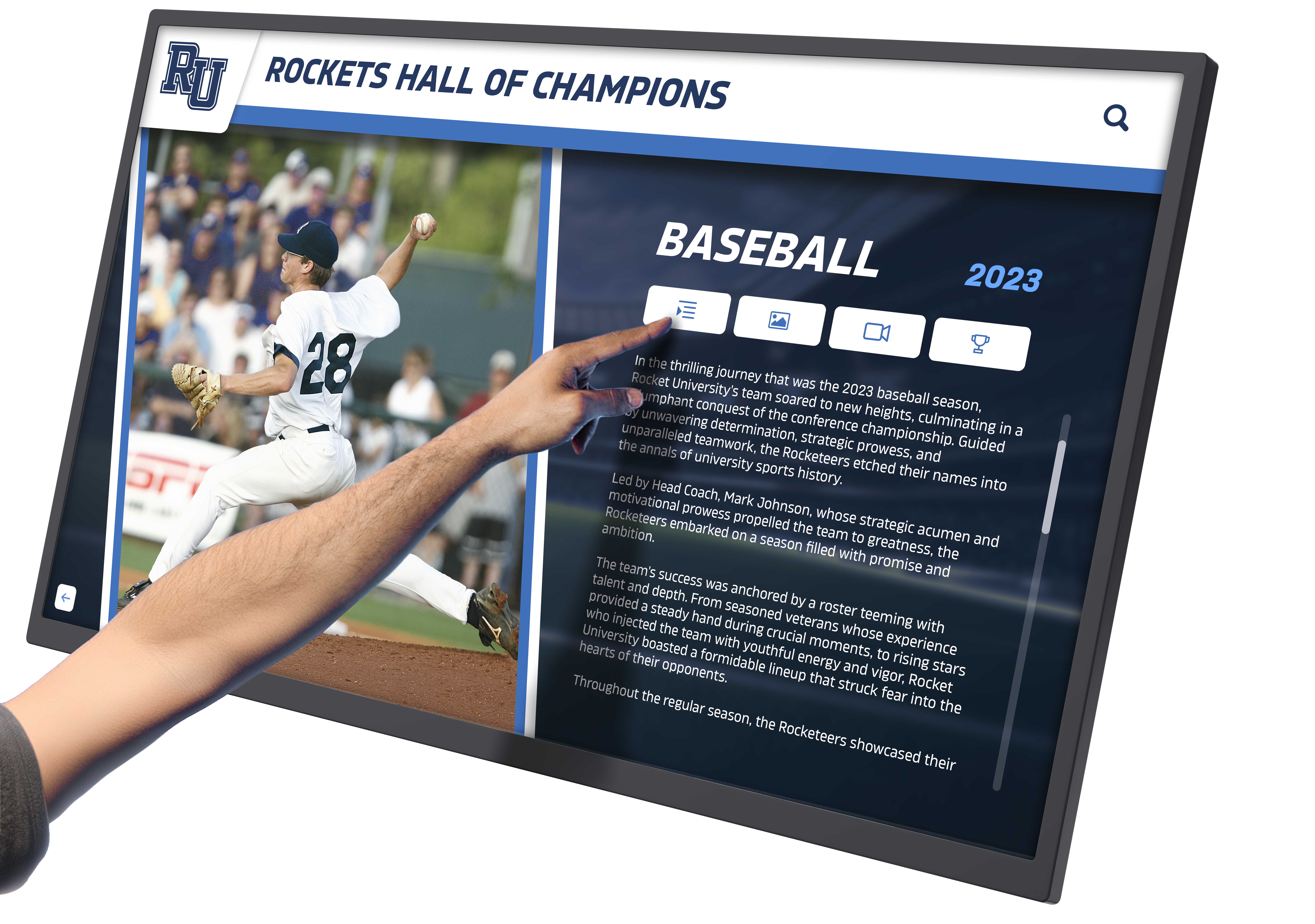
Professional content presentation with high-quality imagery creates impressive visual impact that honors achievement significance
Creative Applications Beyond Standard Trophy Recognition
Schools discovering digital trophy touch wall flexibility find creative applications beyond standard championship recognition.
Multi-Sport Athlete Recognition
Digital platforms excel at highlighting athletes competing in multiple sports across seasons:
- Athletic versatility and year-round commitment documentation
- Complete career statistics and achievements across all sports
- Leadership development tracked across different programs and roles
- Post-graduation outcomes showing how multi-sport participation prepared athletes
This comprehensive recognition celebrates well-rounded athletes while encouraging multi-sport participation that research shows reduces injury risk, prevents burnout, and improves long-term athletic development compared to single-sport specialization.
Coaching Legacy Preservation
Successful coaches build program legacies spanning decades. Digital trophy touch walls enable comprehensive coaching recognition including:
- Complete lists of championship trophies won under specific coaches
- Career win-loss records and statistical milestones achieved over tenures
- Photos and videos documenting coaching careers across decades
- Coaching philosophy statements and reflections in coaches’ own words
- Connection documentation showing lineage from past coaches to current programs
This recognition honors those who built program foundations while helping current athletes understand program values, traditions, and the coaching philosophies that created sustainable excellence.
Historical Context and Program Evolution Stories
Digital displays enable rich historical storytelling showing how programs evolved over decades:
- Timeline views of championship eras and program development phases
- Uniform and equipment evolution through historical photos spanning decades
- Facility improvements and expansion documentation showing investment
- Community support and attendance growth records demonstrating engagement
- Rivalry histories and memorable game series documentation
- Connections to community history and local sports culture
This historical context helps current athletes appreciate program heritage while educating communities about institutional athletic traditions that create identity and pride. Preserving and displaying school history through digital platforms ensures these valuable stories remain accessible for future generations.
Academic and Arts Achievement Integration
While most digital trophy touch walls focus on athletic recognition, the technology works equally well for academic excellence, performing arts achievements, and other institutional accomplishments:
- Academic competition results and honors
- Debate team championships and individual awards
- Music and performing arts competition achievements
- STEM competitions and engineering challenges
- Community service recognition and leadership awards
- Student government and organization achievements
Integrated recognition celebrating diverse forms of excellence demonstrates institutional values while ensuring all students see pathways to recognition beyond athletics. Schools successfully implementing this approach often showcase academic honor roll recipients alongside athletic achievements, creating comprehensive celebration of student success.
Addressing Common Questions and Concerns
“What Happens to Physical Trophies?”
Digital trophy touch walls don’t require eliminating physical awards. Most schools implement hybrid approaches balancing tradition with digital advantages:
Selective Physical Display
Maintain showcase trophy cases displaying most prestigious items—perhaps one beautiful case featuring state championship trophies, retired jerseys, and historically significant awards. This preserves tradition while digital systems handle comprehensive recognition of everything else.
Trophy Return Programs
Offer athletes and teams opportunities to claim trophies they earned. Many athletes appreciate receiving physical trophies for personal collections while knowing comprehensive digital recognition remains permanently accessible online and in campus displays.
Archival Storage
Store physically significant trophies using proper archival techniques ensuring long-term preservation of items with historical value. Digital documentation provides public accessibility and recognition while physical items remain protected from handling, light exposure, and environmental factors causing deterioration.
The key message: digital systems enhance rather than replace recognition by making ALL achievements visible rather than forcing selection of only those fitting limited physical space.
“Will Students Actually Use Touchscreen Displays?”
Experience consistently shows well-designed interactive displays attract substantial engagement when implemented thoughtfully. Success factors include:
Strategic Placement
Location determines visibility and usage. High-traffic areas like main hallways, cafeteria entrances, athletic facility lobbies, and areas where students naturally gather ensure regular exposure and spontaneous interaction.
Personal Relevance
Students naturally seek personal connections—searching for their own team photos, looking for friends and family members, and exploring sports they follow. This personal relevance drives initial engagement.
Social Discovery
Groups gather around displays, pointing out content to each other and exploring together. This social dimension amplifies individual interest and creates visible engagement that attracts others.
Analytics from installed systems reveal impressive usage metrics:
- Average interaction duration: 4-8 minutes per session
- Daily user sessions: 30-100+ (depending on school size and display location)
- Search queries: 15-50+ daily indicating active information seeking
- Repeat users: 25-40% suggesting ongoing interest beyond initial novelty
Schools report regularly observing students clustered around displays during passing periods, showing each other content and exploring program history together.
“What About Technology Reliability and Maintenance?”
Commercial-grade displays designed specifically for public installations provide excellent reliability far exceeding consumer electronics:
- Touchscreens rated for 50,000-70,000 hours of operation (5-8 years of continuous 24/7 use)
- Extended warranties providing coverage for component failures
- Cloud-based platforms eliminating most local technical maintenance requirements
- Software updates deploying automatically without IT department involvement
- Content remaining accessible through web browser interfaces even if displays temporarily fail
Compare this to physical trophy cases requiring glass cleaning, lock repairs, lighting replacement, physical damage repairs, and deterioration of physical display elements over time. Most ongoing digital display maintenance involves screen cleaning—comparable to glass case cleaning but typically required less frequently due to touchscreens’ smudge-resistant coatings.
Schools implementing digital trophy touch walls report technology reliability exceeding initial expectations, with most systems operating continuously for years without significant issues.
“How Much Staff Time Does Content Management Require?”
Initial content development represents the largest time investment—potentially 60-100 hours for comprehensive documentation of large trophy collections accumulated over decades. However, this one-time effort creates lasting value and can be distributed across multiple staff members, student volunteers, or alumni contributors.
Ongoing content management requires minimal time:
- Adding new championship trophies: 15-20 minutes per entry including photography
- Updating athlete profiles or statistics: 5-10 minutes per edit
- Monthly content reviews and refreshes: 1-2 hours reviewing and refining content
- Seasonal updates for new sports seasons: 2-4 hours updating rosters and schedules
These requirements typically prove substantially less burdensome than traditional trophy case maintenance involving physical access, rearrangement of dozens of heavy trophies, and installation of new items—tasks that often get deferred because of time requirements, inconvenience, and the need for multiple staff members.
Cloud-based content management enables updates from any location at convenient times rather than requiring physical presence at trophy case locations during specific windows when hallways are accessible.
Future Trends: Digital Trophy Touch Walls Are Evolving
Digital trophy touch wall technology continues evolving with emerging capabilities that will further enhance recognition effectiveness in coming years.
Artificial Intelligence Integration
AI capabilities will enable more sophisticated content management and personalization:
- Automated content creation: AI-assisted tools generating achievement narratives and descriptions from structured data inputs
- Personalized recognition experiences: Systems recognizing individual viewers and surfacing personally relevant content
- Natural language search: Conversational queries like “Show me all basketball championships from the 1990s” or “Find athletes who played three sports”
- Content recommendations: Suggesting related achievements based on viewing patterns and content connections
- Automated photo enhancement: AI improving historical photo quality through upscaling and restoration
Enhanced Social Integration Features
Social connectivity will extend recognition reach and community engagement:
- Automated sharing suggestions: Systems identifying shareable content and creating social-optimized formats
- Community collaboration features: Verified members contributing memories, photos, and stories through moderated workflows
- Live event integration: Real-time updates during championship games, award ceremonies, and recognition events
- Alumni networking connections: Linking recognized athletes with each other and current students for mentoring
- Crowdsourced historical documentation: Alumni contributing photos, stories, and corrections to enhance accuracy
Augmented Reality Features
AR technology may extend digital trophy recognition beyond screens:
- Physical trophy augmentation: Pointing smartphones at showcase trophies to see overlaid digital content including video highlights, detailed statistics, and athlete interviews
- Virtual trophy rooms: AR applications creating immersive 3D displays viewable anywhere through mobile devices
- Campus wayfinding integration: AR directions to trophy displays and related facilities
- Interactive experiences at events: AR features activated during games and recognition ceremonies
Conclusion: Transforming Recognition for the Modern Era
Every championship trophy, record-breaking performance, and significant achievement represents dedication, perseverance, and memorable moments worth celebrating permanently. When physical space limitations force most trophies into storage, recognition value disappears despite achievement significance.
Digital trophy touch walls restore comprehensive recognition by making every trophy accessible, every championship visible, and every athlete’s contribution acknowledged. They transform cluttered cases and overflowing storage into organized, engaging showcases preserving institutional history while inspiring current students through accessible, interactive recognition serving entire communities.
The technology addresses fundamental challenges facing every athletic program: limited physical space, operational inefficiency, limited engagement with static displays, and recognition content accessible only to those physically present. Solutions like Rocket Alumni Solutions provide purpose-built platforms combining commercial-grade hardware, intuitive content management, and recognition-optimized interfaces that ensure successful implementations.
Whether dealing with overflowing trophy cases, forgotten achievements in storage, or simply seeking better ways to celebrate excellence comprehensively, digital trophy touch walls provide practical, engaging solutions. They honor past achievements completely, celebrate present successes immediately, and inspire future excellence through recognition that remains accessible and valued for generations to come.
Ready to Transform Trophy Recognition at Your School?
Discover how digital trophy touch walls can honor every achievement while eliminating space constraints and administrative burdens. Explore comprehensive platforms specifically designed for school and athletic program recognition needs.
Schedule Your Free Consultation






























