Walk into any school and you’ll likely see the same challenge: trophy cases bursting at the seams with decades of achievements, dusty awards crammed together where individual accomplishments become impossible to distinguish, and countless trophies relegated to storage rooms because there’s simply no space left to display them. Athletic directors face impossible decisions about which championships deserve visibility, while outstanding achievements from earlier years disappear from view entirely.
The digital trophy wall represents a fundamental transformation in how schools recognize and celebrate achievements. Rather than limiting recognition to whatever fits within physical glass cases, digital trophy walls create unlimited virtual space where every trophy, every championship, every achievement receives the recognition it deserves. These interactive systems combine touchscreen technology, engaging multimedia content, and intuitive navigation to transform passive trophy viewing into active exploration that inspires current students while honoring past excellence.
This comprehensive guide explores everything schools need to know about digital trophy walls in 2025—from understanding the technology and benefits to implementation strategies, cost considerations, and proven approaches for maximizing engagement and recognition effectiveness. Whether you’re planning your first digital trophy installation or considering modernizing existing displays, this guide provides actionable frameworks for creating recognition systems that serve your school effectively for decades.
Traditional trophy cases served schools well for generations, but they carry inherent limitations that digital trophy walls overcome completely. As achievement programs expand and trophies accumulate year after year, the fundamental mismatch between infinite achievements and finite display space creates ongoing frustration that no amount of case expansion can ultimately solve.

Understanding Digital Trophy Walls: Technology Transforming Recognition
A digital trophy wall is an interactive display system that showcases athletic, academic, and extracurricular achievements through touchscreen technology, replacing or supplementing traditional physical trophy cases with dynamic, multimedia-rich recognition experiences.
Core Components of Digital Trophy Wall Systems
Commercial-Grade Touchscreen Display:
The foundation of any digital trophy wall is a high-quality display engineered specifically for continuous operation in institutional settings. Unlike consumer televisions designed for home use, commercial displays feature:
- Enhanced durability for constant public interaction
- Higher brightness levels (450-700 nits) suitable for well-lit hallways and lobbies
- Extended lifespan ratings of 50,000-70,000 hours (approximately 6-8 years of continuous use)
- Impact-resistant glass or protective overlays preventing damage
- Commercial warranties covering institutional applications
- Professional mounting systems with security features
Standard digital trophy wall displays range from 43 to 75 inches diagonal, with 55-inch screens representing the most popular size for typical school hallways and lobbies.
Purpose-Built Recognition Software:
The software platform distinguishes digital trophy walls from generic digital signage. Specialized recognition software provides:
- Intuitive content management systems requiring no technical expertise
- Trophy database organization with powerful search and filtering
- Template systems ensuring consistent, professional presentation
- Multimedia integration supporting photos, videos, statistics, and narratives
- Interactive navigation enabling exploration by sport, year, athlete, or achievement type
- Web accessibility extending recognition beyond physical displays
- Analytics revealing engagement patterns and popular content
- Cloud-based architecture enabling remote updates from any device
Solutions like Rocket Alumni Solutions provide purpose-built digital trophy wall platforms specifically designed for educational recognition rather than adapted from generic applications.
Computer and Network Infrastructure:
Behind the display, computing components power the interactive experience:
- Dedicated media players or computer modules processing touchscreen input
- Network connectivity for content updates and remote management
- Secure mounting and cable management concealing technical components
- Backup power provisions preventing data loss
- Professional installation ensuring reliable operation
Content Management System:
The administrative interface determines how easily staff can maintain and update trophy recognition:
- Web-based dashboards accessible from any device
- Drag-and-drop content organization
- Batch import tools for efficient historical trophy digitization
- Role-based access allowing multiple administrators
- Approval workflows for quality control
- Scheduling capabilities for seasonal or event-specific content
How Digital Trophy Walls Work
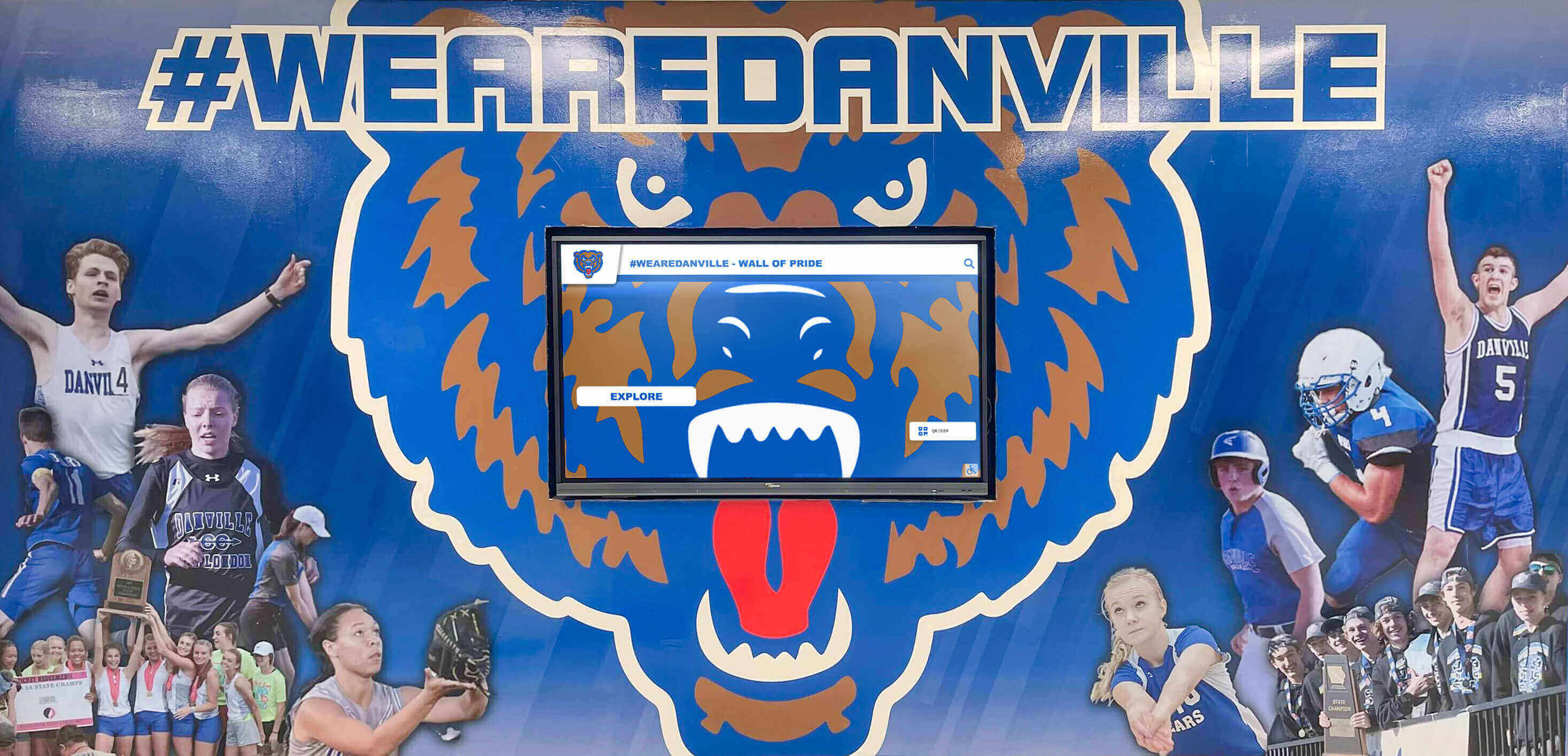
From a visitor perspective, digital trophy walls create engaging, self-guided exploration experiences. Approaching the display, visitors see an attractive home screen showcasing featured achievements, recent championships, or school branding. Touching the screen activates the interface, presenting intuitive navigation options organized by categories visitors understand—sports, years, achievement types, or student names.

Selecting a category reveals relevant trophies displayed as visual cards showing photos and brief descriptions. Touching any trophy opens detailed information including high-resolution trophy photographs, achievement dates and details, team rosters and individual athletes, statistics and records, championship game highlights (if available), and related achievements creating connections.
Throughout this exploration, visitors control their journey, spending time on achievements that interest them most. The experience feels natural and intuitive—similar to browsing content on tablets or smartphones—requiring no instruction or training.
From an administrative perspective, digital trophy walls operate through cloud-based content management systems. Staff log into web dashboards from any internet-connected device, upload new trophy photos and information through simple forms, organize content using familiar drag-and-drop interfaces, schedule publishing dates for future releases, and monitor engagement through built-in analytics. Updates appear on displays immediately upon publishing, with no need for physical access to the installation.
The Compelling Benefits of Digital Trophy Walls
Schools implementing digital trophy walls consistently report transformative impacts on recognition programs, community engagement, and administrative efficiency. Understanding these benefits helps organizations make informed decisions about modernizing trophy recognition.
Unlimited Recognition Capacity Eliminating Physical Constraints
The most immediate benefit of digital trophy walls is eliminating the fundamental capacity limitation of traditional trophy cases. While physical cases accommodate 30-80 trophies depending on size and configuration, a single digital trophy wall can showcase thousands of achievements with detailed information for each.
Comprehensive Achievement Recognition:
Digital trophy walls enable schools to recognize every significant achievement rather than making difficult choices about which trophies deserve display:
- All conference, regional, and state championships receive equal recognition quality
- Historical achievements from decades past remain accessible alongside current success
- Individual athlete accomplishments complement team achievements
- Academic recognition programs, artistic achievements, and service share space with athletic trophies
- Special recognition for coaches, administrators, and contributors
This comprehensive approach demonstrates that your school values all excellence, not just recent or most prestigious achievements.
Future-Proof Growth Accommodation:
As programs continue earning championships and recognition, digital trophy walls accommodate growth without physical expansion. Adding trophies requires minutes of content entry rather than purchasing additional cases, rearranging existing displays, or removing older achievements to make space.
Schools report displaying 5-10 times more achievements with digital trophy walls compared to previous physical displays—recognition that would require 20-30 traditional cases to display physically.
Rich Multimedia Content Bringing Achievements to Life
Traditional trophy cases display physical objects with minimal context—perhaps a small placard identifying the award. Digital trophy walls incorporate rich multimedia content that tells complete achievement stories.
High-Resolution Photography:
Professional trophy photography captures awards from multiple angles, showing inscriptions, dates, and design details impossible to see in crowded physical cases. Schools can display:
- Close-up shots revealing trophy details and inscriptions
- Context photos showing presentation ceremonies
- Team celebration images capturing the moment
- Historical photos connecting current and past achievements
- Comparison views showing trophy size and scale
Video Integration:
Championship games, performances, and achievement moments can be integrated directly into trophy recognition:
- Game-winning plays from championship matches
- Performance highlights from competitions
- Acceptance speeches and ceremony footage
- Interview clips with athletes and coaches
- Season recap videos providing context
According to the Digital Signage Federation, interactive kiosks in educational settings that incorporate video content receive 8-10x more engagement than static displays, with average interaction times of 4-6 minutes per visitor compared to 30-60 seconds for traditional cases.
Comprehensive Achievement Information:
Digital trophy walls accommodate detailed information impossible in physical displays:
- Complete team rosters with individual athlete recognition
- Statistical achievement documentation and records
- Championship brackets and tournament progression
- Opponent information and scores
- Historical context and significance
- Coach biographies and achievements
- Related achievements and connections
This depth creates engagement that physical trophies alone cannot match—visitors don’t just see that a championship occurred, they understand the journey, challenges, and significance behind the achievement.
Interactive Exploration Enabling Personal Discovery
Digital trophy walls transform trophy viewing from passive observation to active exploration where each visitor creates their own journey through content.
Powerful Search and Filtering:
Visitors can instantly find specific achievements or explore categories:
- Search by athlete name locating all their recognitions
- Filter by sport showing achievements in specific programs
- Sort by year revealing historical progressions
- Browse by achievement type (conference, regional, state, national)
- Explore by coach finding achievements under their leadership
This functionality proves especially valuable during reunion events, alumni gatherings, and campus tours when visitors seek specific achievements or time periods.
Intuitive Navigation Systems:
Well-designed digital trophy walls feel natural to use without instruction:
- Familiar touchscreen gestures (tap, swipe, pinch-to-zoom)
- Clear visual hierarchy guiding exploration
- Logical categorization matching how visitors think
- Breadcrumb navigation showing current location
- Quick return to home or previous screens
- Related content suggestions encouraging continued exploration
Personalized Engagement:
Each visitor controls their experience based on personal interests:
- Alumni can explore their graduation year or sport
- Parents can find their children’s achievements
- Prospective students can research program excellence
- Community members can discover school history
- Researchers can access historical achievement documentation
This personalization creates meaningful connections that generic, one-size-fits-all trophy cases cannot provide.
Simplified Content Management Saving Administrative Time
Managing traditional trophy cases requires significant physical effort—unlocking displays, rearranging existing trophies to accommodate new additions, creating and mounting identification labels, cleaning glass and polishing trophies, and relocking secure cases. Updates often require multiple staff members and several hours of work.
Digital trophy walls transform this experience completely. Athletic directors and recognition coordinators can update displays in minutes through intuitive web interfaces:
Quick Update Workflows:
- Photograph new trophies with smartphone or camera
- Log into content management system from any device
- Upload trophy photos through simple forms
- Enter achievement details, dates, and participants
- Publish updates immediately to the display
- Total time: 5-15 minutes per trophy
Batch Processing Efficiency:
When digitizing historical trophy collections or adding multiple achievements:
- Spreadsheet imports for bulk content additions
- Template application ensuring consistent formatting
- Batch photo uploads organizing images automatically
- Quality control reviews before publishing
- Scheduled releases for coordinated announcements
No Physical Access Required:
Updates occur remotely without visiting the display:
- Work from offices, homes, or any location
- Schedule updates outside school hours
- Multiple administrators can contribute simultaneously
- Eliminate coordination of physical case access
- Instant publishing without installation delays
Schools implementing digital trophy walls report 85% reduction in time spent managing recognition programs—hours previously spent on physical updates now freed for other priorities.

Comparing Digital Trophy Walls to Traditional Trophy Cases
Understanding the differences between digital and traditional trophy displays helps schools make informed decisions about modernization approaches.
Space Efficiency and Capacity
Traditional Trophy Cases:
- Standard 72"W x 72"H case holds 20-30 trophies with professional spacing
- Medium-sized schools accumulating 50 trophies annually need 2-3 new cases each year
- After 10 years, 250-500 trophies require 10-20 large cases occupying 150-300 square feet
- Continuous expansion eventually exhausts available wall space
- Older trophies often removed to accommodate new achievements
Digital Trophy Walls:
- Single 55" display (occupying approximately 8 square feet) showcases thousands of trophies
- Capacity equivalent to 20-30 traditional trophy cases
- Zero space consumption as collection grows
- All achievements remain permanently accessible
- 95% space efficiency improvement over traditional approaches
Recognition Comprehensiveness
Traditional Trophy Cases:
- Selective display limited by physical capacity
- Difficult decisions about which achievements merit visibility
- Older trophies often relegated to storage
- Minimal context beyond basic identification labels
- Team achievements easier to display than individual recognition
Digital Trophy Walls:
- Comprehensive recognition of all significant achievements
- Equal quality presentation for all trophies regardless of age
- Detailed information impossible in physical displays
- Multimedia content providing context and storytelling
- Individual athlete recognition alongside team achievements
Visitor Engagement
Traditional Trophy Cases:
- Passive viewing experience
- Average viewing time: 30-60 seconds
- Limited information absorption
- Difficult to find specific achievements
- Crowded displays reducing individual trophy visibility
Digital Trophy Walls:
- Active, interactive exploration
- Average engagement time: 4-7 minutes (representing 10x longer viewing)
- Rich information absorption through multimedia
- Instant search locating specific achievements
- Each trophy featured prominently when selected
Administrative Burden
Traditional Trophy Cases:
- Labor-intensive physical updates requiring 1-3 hours
- Multiple staff members often needed
- Physical access to displays necessary
- Seasonal bulk updates due to effort involved
- Safety concerns with ladder work and heavy objects
Digital Trophy Walls:
- Quick digital updates completed in 5-15 minutes
- Single staff member working remotely
- No physical access required
- Immediate updates as achievements occur
- No safety concerns or physical labor
Long-Term Cost Considerations
Traditional Trophy Cases:
- Initial costs: $2,500-$8,000 per case
- Ongoing expansion: $7,000-$15,000 every 3-5 years
- Maintenance: $200-$800 annually
- 10-year total: $20,000-$45,000 for limited capacity
Digital Trophy Walls:
- Initial implementation: $8,000-$19,500
- Annual operating costs: $2,000-$5,700
- 10-year total: $28,800-$76,500 for unlimited capacity
- Higher absolute cost but substantially greater value and capacity
When considering cost per trophy displayed and value delivered through engagement, accessibility, and administrative efficiency, digital trophy walls prove remarkably cost-effective despite higher initial investment.
Implementing Digital Trophy Walls: Comprehensive Planning Guide
Successful digital trophy wall implementations follow systematic approaches ensuring installations meet goals effectively while avoiding common pitfalls.
Phase 1: Needs Assessment and Goal Definition
Clear objectives guide decision-making throughout planning and implementation.
Stakeholder Identification:
Recognize everyone affected by trophy recognition:
- Athletic directors managing sports trophies
- Academic administrators overseeing competition recognition
- Alumni seeking historical achievement information
- Current students inspired by visible success
- Families celebrating student accomplishments
- Facilities staff responsible for maintenance
- Advancement teams connecting recognition to engagement
Goal Documentation:
Explicitly state what you want to achieve:
- Solve current trophy case capacity constraints
- Provide comprehensive recognition of all achievements
- Modernize aging recognition infrastructure
- Create more engaging visitor experiences
- Reduce ongoing recognition program management time
- Extend recognition access to alumni globally through web platforms
- Improve school pride and community connection
Written goals prevent scope creep while ensuring selected solutions address actual priorities.
Current State Assessment:
Document existing trophy recognition:
- Total trophy inventory across all categories
- Current display capacity and utilization
- Annual trophy acquisition rate
- Storage situations for non-displayed trophies
- Staff time spent managing current recognition
- Visitor engagement with existing displays
- Common complaints or frustration points
Understanding current conditions clarifies improvement opportunities and success metrics.
Phase 2: Location Selection and Space Planning
Strategic location selection dramatically affects digital trophy wall effectiveness.
High-Traffic Area Identification:
Successful digital trophy walls occupy locations where people naturally congregate:
- Main entrance lobbies and reception areas
- Athletic facility entrances and locker room corridors
- Cafeteria and student union common areas
- Gymnasium and arena main concourses
- Library entrance halls
- Alumni center gathering spaces
- Building connectors with high foot traffic
Viewing Experience Optimization:
Beyond traffic volume, consider how visitors will experience your display:
- Comfortable viewing distances (3-6 feet from display)
- Adequate space for groups to gather without blocking circulation
- Lighting conditions that don’t create glare or washout
- Electrical and network infrastructure availability
- Protection from weather (for installations near entries)
- Integration with architectural features and branding
Infrastructure Requirements:
Evaluate location suitability for installation:
- Available electrical outlets or circuit breaker capacity
- Network connectivity (wired Ethernet preferred, WiFi acceptable with strong signal)
- Wall structure suitable for secure mounting (load-bearing, not just drywall)
- Cable routing pathways for professional, concealed installation
- Compliance with building codes and accessibility requirements
Locations requiring infrastructure improvements often prove worthwhile through dramatically increased engagement—don’t eliminate excellent locations just because they need electrical or network work.
Phase 3: Budget Development and Funding
Comprehensive budgets prevent surprises and enable realistic planning.
Hardware Investment:
- Commercial touchscreen display (55"): $2,500-$4,500
- Commercial touchscreen display (65"): $3,500-$6,500
- Media player/computer module: $800-$1,500
- Professional mounting system: $400-$800
- Protective enclosures (if needed): $500-$1,200
Software and Platform:
- Purpose-built recognition software: $2,000-$5,000 initial, or annual licensing
- Content management platform annual subscription: $1,200-$3,000
- Web accessibility components: Often included in software platform
- Mobile optimization: Typically included in modern platforms
Professional Services:
- Site survey and installation planning: $500-$1,200
- Electrical infrastructure work: $800-$2,500
- Network connectivity installation: $500-$1,800
- Professional mounting and installation: $1,200-$3,000
- System configuration and testing: $600-$1,500
Content Development:
- Initial trophy photography (per trophy): $5-$15
- Content research and writing: $1,000-$3,000
- Database setup and population: $800-$2,500
- Quality control and verification: $400-$1,000
Training and Support:
- Staff training sessions: $500-$1,500
- Documentation and user guides: $300-$800
- First-year support agreement: $800-$2,000
Total Initial Investment Range: $12,000-$28,000 for comprehensive single-display implementation
Ongoing Annual Costs:
- Software licensing/subscription: $1,200-$3,000
- Technical support: $500-$1,500
- Electricity: $150-$300
- Maintenance and cleaning: $200-$500
- Content management time (staff): $800-$2,000 value
Total Annual Operating Costs: $2,850-$7,300
Funding Sources:
- Capital improvement budgets
- Athletic department allocations
- Alumni association contributions
- Booster club fundraising
- Memorial gift programs honoring individuals
- Grant opportunities for educational technology
- Phased implementation spreading costs across fiscal years
Many schools implement digital trophy walls through partnerships between athletic departments, alumni associations, and booster clubs, distributing investment across multiple stakeholders who all benefit from improved recognition.
Phase 4: Vendor Selection and Evaluation
Vendor capability dramatically affects project success—thorough evaluation prevents disappointing results.
Vendor Evaluation Criteria:
- Specific experience with educational recognition (not just general A/V)
- References from similar schools with comparable projects
- Purpose-built recognition software vs. adapted generic platforms
- Comprehensive solutions vs. hardware-only vendors requiring separate software
- Training and support availability beyond initial installation
- Long-term viability and commitment to recognition market
- Total cost transparency without hidden fees
Proposal Requirements:
Request comprehensive proposals enabling informed comparison:
- Detailed equipment specifications (exact models, not just “55-inch display”)
- Software platform capabilities and limitations
- Content migration assistance included
- Training scope and format
- Documentation provided
- Warranty terms covering hardware and software
- Support arrangements and response times
- Payment schedule tied to milestones
Reference Verification:
Contact existing customers asking specific questions:
- Satisfaction with implemented solutions
- Actual costs vs. quoted (surprises?)
- Timeline performance (on schedule?)
- Software ease of use for non-technical staff
- Vendor responsiveness during and after installation
- Quality of training provided
- Ongoing support effectiveness
- Would you select same vendor again?
Specialized Recognition Vendors:
Consider vendors specializing in educational recognition rather than general contractors. Specialists like Rocket Alumni Solutions focus exclusively on recognition displays, offering deep understanding of school needs, purpose-built platforms designed specifically for trophy recognition, extensive experience with similar projects, comprehensive solutions covering all aspects, and ongoing support designed for educational institutions.
Phase 5: Content Strategy and Development
Content quality determines digital trophy wall effectiveness—systematic content development creates compelling displays.
Trophy Inventory and Prioritization:
- Catalog all trophies requiring digital recognition
- Photograph trophies systematically with consistent lighting and backgrounds
- Research achievement details, dates, participants, and significance
- Prioritize content for phased implementation (recent achievements first, historical backfill ongoing)
- Establish ongoing workflows for adding new trophies promptly
Content Organization Framework:
Logical structure enables intuitive navigation:
- Primary categories (athletics, academics, arts, service, special recognition)
- Sport or program subdivisions within athletics
- Achievement levels (conference, regional, state, national)
- Year-based browsing
- Individual vs. team achievement organization
- Coach and administrator recognition integration
Multimedia Content Development:
Beyond basic trophy photography, consider enhanced content:
- Team and individual athlete photos from championship seasons
- Statistical documentation of achievements and records
- Championship game highlights (if available and licensed)
- Coach interview clips providing context
- Historical photos connecting past and present
- Related achievement connections
Content Quality Standards:
Establish consistent guidelines ensuring professional presentation:
- Photo resolution minimums (1920x1080 or higher)
- Naming conventions for organized file management
- Text length guidelines (titles, descriptions, narratives)
- Data accuracy verification procedures
- Brand compliance for logos and colors
- Voice and tone consistency across content
Initial Content Population:
Launch with substantial content demonstrating value immediately:
- Current year achievements across all categories
- Most significant historical championships (state titles, major records)
- Featured athletes and teams creating immediate interest
- Phased plan for adding comprehensive historical content
- Communication about ongoing additions building anticipation
Schools should aim to launch digital trophy walls with at least 100-200 trophies/achievements already populated, demonstrating the system’s value and creating immediate engagement rather than gradually building content over months while visitors see sparse displays.

Advanced Digital Trophy Wall Features and Capabilities
Modern digital trophy wall platforms offer sophisticated features that maximize engagement and recognition effectiveness.
Web and Mobile Accessibility
Extending recognition beyond physical displays dramatically increases reach and engagement.
Responsive Web Platforms:
The same content showcased on physical digital trophy walls becomes accessible globally:
- Alumni anywhere can explore achievements and find their recognitions
- Parents share student accomplishments with extended family
- Prospective students and families research program excellence
- Media access information for stories and features
- Researchers document historical achievements
Solutions like those from Rocket Alumni Solutions provide web platforms that mirror physical displays, ensuring consistent recognition experiences whether visitors engage on-campus or remotely.
Social Media Integration:
Enable content sharing extending recognition reach:
- One-click sharing of achievements to Facebook, Twitter, LinkedIn
- Automatic hashtag inclusion for tracking and discovery
- Preview optimization ensuring attractive social posts
- Analytics showing sharing frequency and reach
- Viral potential as alumni share accomplishments with networks
Schools report that social media sharing from digital hall of fame displays generates 5-8x more impressions than standard institutional social posts. For schools looking to create comprehensive online hall of fame websites, web accessibility becomes a crucial component of the recognition strategy.
Mobile Optimization:
Responsive design ensures perfect functionality on smartphones and tablets:
- Touch-optimized interfaces for mobile screens
- Vertical scrolling adapted to phone form factors
- Fast loading on cellular connections
- Location-aware features highlighting nearby campus displays
- QR code integration enabling quick mobile access from physical locations
Analytics and Engagement Measurement
Digital trophy walls provide insights impossible with traditional trophy cases.
Visitor Interaction Tracking:
- Total interaction counts (daily, weekly, monthly)
- Average session duration and depth of exploration
- Peak usage times and patterns
- Touchscreen heat maps showing popular screen areas
- Navigation path analysis revealing common exploration patterns
Content Performance Metrics:
- Most viewed achievements and categories
- Search term frequency indicating visitor interests
- Video playback rates and completion percentages
- Photo viewing duration and zoom usage
- Related content click-through rates
Demographic Insights:
- Web visitor geographic locations
- Returning vs. new visitor ratios
- Device types (touchscreen, desktop, mobile, tablet)
- Referral sources driving traffic
- Session timing and duration patterns
Strategic Value:
Analytics enable continuous improvement:
- Identify underutilized content categories for promotion
- Optimize featured content based on engagement patterns
- Schedule content updates during peak usage times
- Demonstrate ROI to administrators and funders
- Inform future content development priorities
Integration Capabilities
Digital trophy walls can connect with broader institutional systems.
Student Information System Integration:
- Automatic athlete roster synchronization
- Current student identification for recent achievement recognition
- Graduation year data for alumni organization
- Contact information updates for web profile maintenance
Athletic Management Platform Connections:
- Automatic score and statistics imports
- Schedule integration for timely championship recognition
- Coach and staff directory synchronization
- Season recap information population
Alumni Database Integration:
- Profile information synchronization
- Career achievement updates submitted by alumni
- Contact preference management
- Engagement tracking for advancement purposes
Content Management System Integration:
- Embedded displays within school websites
- Consistent branding and design elements
- Single sign-on authentication for administrators
- Unified analytics across digital properties
These integrations eliminate redundant data entry, ensure information accuracy and consistency, reduce administrative burden, and enable sophisticated coordination across systems.
Hybrid Approaches: Combining Physical and Digital Trophy Recognition
Most schools implement hybrid strategies preserving ceremonial physical trophy display while solving capacity limitations and adding engagement through digital systems.
Strategic Physical Trophy Selection
Not all trophies require physical display when comprehensive digital recognition exists:
Physical Display Criteria:
- State championships and national recognition
- First-time program achievements (inaugural championships)
- Record-breaking accomplishments
- Milestone trophies (100th win, sustained excellence periods)
- Particularly impressive or unique physical trophies
- Most recent championships (current year or past 2-3 years)
Digital-Only Recognition:
- Conference championships (unless particularly significant)
- Participation awards and tournament qualifications
- Duplicate recognitions across multiple years
- Individual awards (easier to showcase digitally)
- Historical trophies where physical condition has deteriorated
- Achievements where digital storytelling adds more value than physical display
This approach enables schools to maintain 1-3 traditional trophy cases showcasing 50-100 most prestigious trophies while providing comprehensive digital recognition for hundreds or thousands of achievements.
Integrated Installation Design
Physical and digital elements should appear intentionally coordinated, not disconnected:
Architectural Integration:
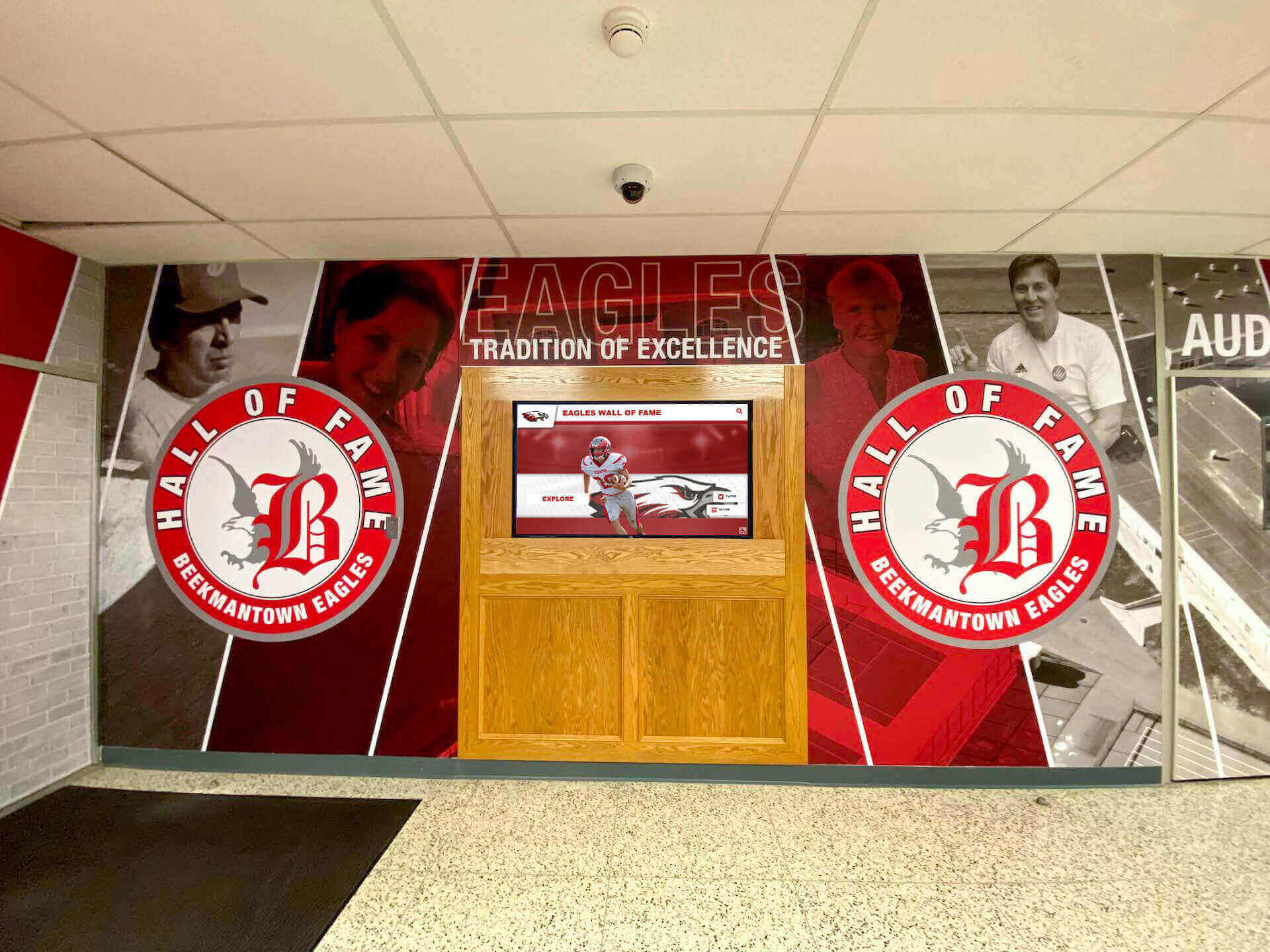
- Digital displays positioned adjacent to traditional trophy cases
- Unified design language across physical and digital elements
- Complementary materials and finishes
- Coordinated lighting highlighting both display types
- Signage explaining how systems work together
Content Coordination:
- Physical trophy cases feature “See complete collection digitally” signage
- Digital displays include “Featured physical display” categories highlighting showcased trophies
- QR codes on physical cases linking to digital exploration
- Coordinated content themes and messaging
Visitor Experience Design:
- Clear wayfinding connecting physical and digital displays
- Natural traffic flow encouraging engagement with both
- Seating or gathering spaces enabling comfortable extended exploration
- Integration with school tours and event programming
Schools implementing thoughtful hybrid approaches report that digital and physical recognition reinforce each other—physical displays attract initial attention while digital systems enable the depth of exploration visitors desire.
For schools with extensive existing trophy case capacity, adding digital trophy walls solves future growth challenges while respecting investments already made in traditional displays.
Best Practices for Digital Trophy Wall Success
Schools with most successful digital trophy wall implementations follow proven practices that maximize engagement and long-term satisfaction.
Content Best Practices
Maintain Current Content:
Outdated displays create impressions that excellence no longer occurs:
- Add new championships within days of earning them
- Update seasonal content reflecting current sport seasons
- Feature recent achievements prominently
- Archive older content without deleting it
- Communicate update frequency building visitor expectations
Tell Complete Stories:
Move beyond basic identification to engage visitors emotionally:
- Provide context explaining achievement significance
- Include athlete quotes and perspectives
- Document the journey, not just the destination
- Connect individual and team accomplishments
- Highlight coaches and contributors alongside athletes
Ensure Accuracy:
Recognition credibility depends on information quality:
- Verify all dates, names, and details before publishing
- Establish review workflows preventing errors
- Create correction procedures for discovered mistakes
- Document sources for historical information
- Involve coaches and participants in content verification
Balance Comprehensiveness with Featured Content:
While recognizing everything, highlight particularly significant achievements:
- Rotating featured content on home screens
- “Achievement of the Month” spotlights
- Anniversary celebrations (10th, 25th, 50th anniversary of championships)
- Record achievement callouts
- Milestone recognition (team’s 100th win, etc.)
User Experience Best Practices
Design Intuitive Navigation:
Visitors should explore confidently without instruction:
- Clear category labels using familiar language
- Consistent navigation patterns throughout system
- Prominent search functionality
- Breadcrumb trails showing current location
- Easy return to home or previous screens
Optimize Performance:
Technical performance affects engagement:
- Fast loading times (content appearing within 2 seconds)
- Responsive touch feedback to inputs
- Smooth animations and transitions
- Stable operation without crashes or errors
- Regular reboots during off-hours maintaining performance
Consider Accessibility:
Inclusive design serves all community members:
- Mounting heights compliant with ADA guidelines (touchable area 15-48 inches from floor)
- High contrast display modes for vision impairments
- Text sizing options or appropriate default sizes
- Audio alternatives for deaf/hard-of-hearing visitors
- Clear signage explaining how to use displays
Maintenance and Support Best Practices
Establish Regular Maintenance:
Systematic care preserves appearance and functionality:
- Weekly touchscreen cleaning using appropriate products
- Monthly performance monitoring and content audits
- Quarterly deep maintenance including hardware inspection
- Annual professional servicing and updates
- Documented procedures ensuring consistency
Assign Clear Responsibilities:
Prevent gaps by designating specific roles:
- Primary content manager for trophy additions and updates
- Backup personnel ensuring continuity during absences
- Facilities staff for physical cleaning and basic troubleshooting
- IT department for technical support and network issues
- Administrative oversight for quality and strategic direction
Plan for Long-Term Evolution:
Technology advances require periodic updates:
- Budget for software upgrades every 3-5 years
- Plan hardware refresh every 6-8 years
- Stay informed about capability improvements
- Participate in user communities and training
- Maintain vendor relationships for ongoing support
Document Everything:
Comprehensive documentation enables effective management:
- Quick start guides for common tasks
- Detailed procedures for complex operations
- Contact information for support resources
- Warranty and service agreement documentation
- Change logs tracking system modifications
Promotion and Communication Best Practices
Even excellent digital trophy walls require promotion building awareness:
Launch Communications:
- Assembly announcements to student body
- Email campaigns to alumni database
- Social media promotion with photos and videos
- Local media coverage highlighting innovation
- Alumni magazine features
- Donor recognition for funding contributors
Ongoing Awareness:
- Regular social media posts featuring content highlights
- Alumni newsletter sections showcasing recent additions
- Campus tour integration explaining systems
- Event programming utilizing displays during gatherings
- Signage directing visitors to displays
- QR codes in publications linking to web access
Engagement Campaigns:
- Contests encouraging trophy exploration (trivia based on display content)
- Alumni challenges finding their achievements and sharing on social media
- Student projects researching and presenting about historical achievements
- Reunion events organized around recognition themes
- Athletic program integration with pre-game features
Common Questions About Digital Trophy Walls
How much space does a digital trophy wall require compared to traditional trophy cases?
A 55-inch digital trophy wall requires approximately 8 square feet of wall space while providing recognition capacity equivalent to 20-30 traditional trophy cases that would occupy 150-300 square feet. This represents approximately 95% space efficiency improvement, freeing valuable hallway and lobby space for other uses while actually increasing recognition comprehensiveness.
Can we still display some physical trophies alongside a digital trophy wall?
Absolutely. Most schools implement hybrid approaches where the most prestigious trophies (state championships, national recognition, record-breaking achievements) remain in 1-3 traditional trophy cases while comprehensive digital recognition showcases the entire collection including hundreds of trophies that wouldn’t fit in physical displays. This approach honors tradition while solving capacity limitations and enabling rich digital storytelling impossible with physical displays alone.
How difficult is it to update content on a digital trophy wall?
Modern digital trophy wall platforms are designed for non-technical users. Adding a new trophy typically involves: photographing the trophy with a smartphone, logging into the web-based content management system, uploading the photo through a simple form, entering achievement details (date, sport, participants, significance), and publishing the update. Most updates take 5-15 minutes—dramatically faster than the 1-3 hours required to physically update traditional trophy cases.
What happens if the technology becomes outdated?
Commercial displays last 6-10 years with proper maintenance. Content management software platforms receive regular updates ensuring modern functionality and security. When hardware eventually requires replacement, your content and software typically migrate to new displays seamlessly. This represents similar timelines to other institutional technology (computers, projectors, etc.) and significantly longer than many educational technology investments.
Can alumni access our digital trophy wall remotely?
Yes. Quality digital trophy wall platforms include web-based access that mirrors the physical display experience. Alumni anywhere in the world can explore achievements, find their recognitions, and share accomplishments with their networks. This global accessibility dramatically increases engagement compared to physical displays only available to campus visitors. According to engagement data, 40-60% of digital trophy wall interactions occur via web rather than physical touchscreens, demonstrating the value of remote access.
How do digital trophy walls handle different sports and achievement types?
Digital trophy walls accommodate unlimited categories organized however makes sense for your school. Common organizational structures include primary categories (athletics, academics, arts, service), sport-specific subsections within athletics, achievement levels (conference, regional, state, national), year-based browsing, and individual vs. team recognition. Visitors can explore using whichever organizational approach interests them, with powerful search finding specific achievements instantly regardless of categorization.
What about accessibility for visitors with disabilities?
Modern digital trophy walls incorporate comprehensive accessibility features including ADA-compliant mounting heights (touchable area 15-48 inches from floor), high-contrast display modes for visitors with vision impairments, adjustable text sizing or appropriate default sizes, audio alternatives for deaf/hard-of-hearing visitors, intuitive navigation requiring minimal fine motor precision, and web access enabling exploration from personal devices with assistive technology. These features ensure all community members can engage with your recognition program while demonstrating institutional commitment to inclusive excellence.
Digital Trophy Wall Implementation Timeline
Realistic timeline expectations prevent disappointment and enable effective planning.
Week 1-2: Planning and Needs Assessment
- Stakeholder meetings and goal definition
- Current state assessment and inventory
- Location evaluation and selection
- Preliminary budget development
Week 3-5: Vendor Selection and Contracting
- Request and review vendor proposals
- Conduct reference checks
- Negotiate final agreements
- Secure funding and approvals
Week 6-8: Infrastructure Preparation
- Electrical work and dedicated circuits
- Network connectivity installation
- Wall preparation and mounting surface work
- Coordination with facilities scheduling
Week 9-11: Content Development
- Trophy photography sessions
- Achievement research and documentation
- Content writing and formatting
- Database population and organization
Week 12-13: Installation and Configuration
- Hardware delivery and unpacking
- Professional mounting and installation
- Network and electrical connections
- Software configuration and setup
- Content loading and testing
Week 14: Training and Launch
- Staff training sessions (content management, basic troubleshooting)
- Documentation review
- Soft launch testing with limited audience
- Final adjustments based on feedback
- Public launch and communications
Total Implementation Timeline: 14-18 weeks from project initiation to public launch
This timeline assumes normal circumstances without major delays. Factors that can extend timelines include committee-based decision processes requiring multiple approval cycles, academic calendars limiting work during certain periods, custom fabrication or integration requirements, extensive historical content requiring significant research, and contractor scheduling during peak construction periods.
Starting planning 6-9 months before desired completion dates provides comfortable buffer for unexpected delays while preventing rushed work that compromises quality.
Conclusion: Transforming Recognition Through Digital Trophy Walls
Digital trophy walls represent fundamental transformation in how schools recognize and celebrate achievements. Rather than accepting physical space limitations that force impossible choices about which accomplishments deserve recognition, digital systems provide unlimited capacity ensuring every championship, every record, every achievement receives the honor it deserves.
Beyond solving capacity constraints, digital trophy walls create engagement experiences impossible with traditional trophy cases. Interactive exploration, rich multimedia storytelling, powerful search enabling personal discovery, global web accessibility extending reach to alumni worldwide, and intuitive navigation making exploration natural and enjoyable transform passive trophy viewing into meaningful experiences that build pride, inspire excellence, and strengthen community connections.
Key Advantages Driving Digital Trophy Wall Adoption:
- Unlimited capacity accommodating infinite achievements without physical expansion
- Rich multimedia content bringing achievements to life through photos, videos, statistics, and narratives
- Interactive exploration enabling personalized discovery and engagement
- Space efficiency reducing physical footprint 95% while increasing recognition comprehensiveness
- Simplified management enabling quick digital updates replacing labor-intensive physical rearrangement
- Global accessibility extending recognition beyond campus to alumni worldwide
- Future-proof growth accommodating decades of achievement accumulation without modification
- Enhanced engagement generating 10x longer viewing times compared to traditional trophy cases
- Analytics insights revealing usage patterns and optimization opportunities
- Cost-effective long-term value despite higher initial investment compared to limited traditional cases
For schools frustrated with overflowing trophy cases, achievements relegated to storage rooms, and recognition systems that no longer serve communities effectively, digital trophy walls offer compelling solutions that honor tradition while embracing modern capabilities that serve recognition goals more effectively.
Whether implementing comprehensive digital systems, adding digital components to existing trophy cases, or planning hybrid approaches combining physical and digital recognition, systematic planning following proven practices creates recognition systems serving schools effectively for decades. Your achievements deserve recognition systems that celebrate them appropriately without artificial capacity constraints limiting how comprehensively you honor excellence.
Ready to explore how digital trophy walls can transform your school’s recognition program? Rocket Alumni Solutions provides comprehensive platforms specifically designed for educational recognition, combining unlimited digital capacity with intuitive management, professional design support, and ongoing assistance ensuring long-term success. Contact us to discover how digital trophy walls can solve your capacity challenges while creating engagement experiences that honor your achievements appropriately and inspire continued excellence for years to come.































