The traditional yearbook has been a cornerstone of school culture for over a century—that hefty bound volume filled with class photos, candid moments, and carefully crafted memories that students treasure for decades. Yet as schools enter 2026, an accelerating shift toward digital solutions is fundamentally transforming how institutions preserve and share student memories. The question facing administrators is no longer whether to embrace digital yearbooks, but how to implement them effectively while maintaining the emotional connection that makes yearbooks meaningful.
Schools adopting digital yearbook solutions discover they can dramatically reduce costs, reach every student regardless of financial circumstances, preserve unlimited memories without space constraints, and create interactive experiences that traditional print simply cannot match. From fully online platforms to hybrid models combining print and digital, to interactive touchscreen displays in school lobbies, the digital yearbook landscape offers diverse approaches suited to different institutional needs and budgets.
This comprehensive guide helps school administrators, yearbook advisors, and technology coordinators navigate the digital yearbook transformation. You’ll discover the key platforms and technologies available, implementation strategies that ensure student engagement, cost comparisons between traditional and digital approaches, and practical frameworks for modernizing your yearbook program while preserving the traditions students value.
Understanding the Digital Yearbook Landscape in 2026
The term “digital yearbook” encompasses several distinct approaches, each offering different advantages depending on your school’s priorities, budget, and community preferences.
Pure Digital Platforms: Web-Based Yearbook Solutions
Online-only yearbook platforms eliminate physical printing entirely, delivering yearbook content through websites and mobile applications accessible from any device.
Key Features:
- Unlimited photo capacity compared to print space constraints
- Video integration allowing memories to include motion and sound
- Student commentary sections enabling classmates to share messages
- Social sharing capabilities letting graduates distribute favorite memories
- Searchable databases making it easy to find specific students or events
- Perpetual accessibility—no lost or damaged books years later
- Automatic cloud backups preserving memories permanently
Leading Digital Yearbook Platforms:
Several specialized companies now dominate the digital yearbook market. TreeRing pioneered the customizable digital yearbook model, allowing families to personalize their own books. Fusion Yearbooks offers both traditional and digital solutions with sophisticated online design tools. Picaboo Yearbooks specializes in schools seeking affordable digital-first approaches with optional print runs for families desiring physical copies.
Traditional yearbook publishers like Jostens, Herff Jones, and Balfour have also developed robust digital components complementing their print offerings, recognizing that purely print-only models no longer serve modern student expectations or administrative budgets.
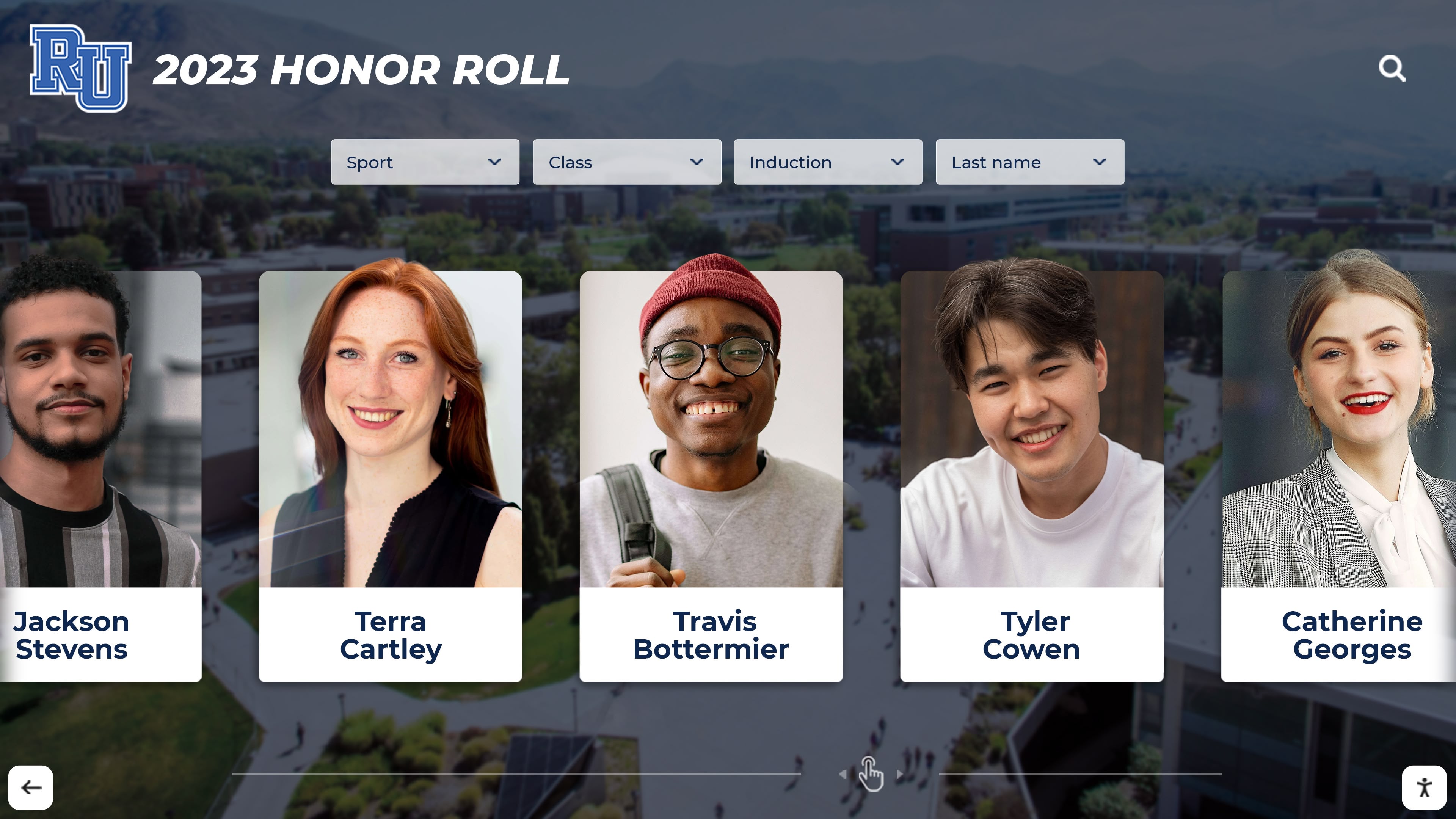
Digital yearbook systems can showcase every student with unlimited capacity compared to the space constraints of traditional printed books
Hybrid Models: Best of Both Worlds
Many schools find hybrid approaches offer optimal solutions—maintaining traditional printed yearbooks while adding comprehensive digital components that extend accessibility and content capacity.
Hybrid Implementation Strategies:
Print + Digital Access: Schools produce traditional printed yearbooks but include digital access codes giving students lifetime online access to expanded content. The print version contains curated highlights while the digital platform houses thousands of additional photos, videos, and memories impossible to include in bound books.
Optional Print Purchases: Schools create comprehensive digital yearbooks accessible to all students at no cost, while offering printed versions as optional purchases for families wanting physical keepsakes. This approach ensures equity—every student accesses memories regardless of ability to pay—while preserving print options for those who value them.
Interactive Display + Digital Archive: Schools install interactive kiosk solutions in lobbies and common areas featuring searchable digital yearbooks spanning decades, while maintaining modest print runs for current graduates.
Hybrid models acknowledge that yearbook value isn’t binary—students can cherish physical books while benefiting from digital accessibility, unlimited capacity, and interactive features that enhance rather than replace traditional experiences.
Interactive Touchscreen Yearbook Displays
Beyond personal access via websites and apps, schools are increasingly implementing permanent interactive displays that transform yearbooks from individual possessions into shared community resources.
These large-format touchscreen installations, often positioned in school lobbies or alumni gathering areas, allow students, staff, and visitors to browse years or decades of yearbook content through intuitive touch interfaces. Solutions like Rocket Alumni Solutions’ digital recognition displays enable schools to digitize old yearbooks and make them searchable and accessible in ways physical archives never could.
Benefits of Touchscreen Yearbook Installations:
- Create focal points during alumni events and class reunions where graduates gather
- Allow back-to-school night visitors to explore school history
- Enable current students to discover school traditions and historical context
- Preserve institutional memory in permanent, accessible formats
- Showcase student achievements alongside traditional yearbook content
- Provide engagement opportunities during high school graduation celebrations
These installations represent substantial upfront investments but eliminate recurring printing costs while creating permanent community resources that serve multiple purposes beyond traditional yearbook functions.

Interactive touchscreen displays transform yearbooks from individual possessions into shared community resources accessible to students, alumni, and visitors
The Economics of Digital Yearbooks: Cost Analysis and Budget Impact
Budget constraints drive many schools to explore digital yearbook alternatives. Understanding the true cost comparison requires examining both obvious expenses and hidden factors affecting total ownership costs.
Traditional Yearbook Costs: The Complete Picture
Schools often underestimate total print yearbook expenses by focusing solely on per-book printing costs while overlooking substantial additional expenses.
Direct Printing Costs:
- Base production: $25-$45 per book depending on page count and features
- Color printing premiums for photo-heavy layouts
- Cover upgrades and special binding options
- Rush fees when production deadlines slip
- Shipping costs for delivery to schools
Hidden Yearbook Program Costs:
- Unsold Inventory: Schools typically order 5-15% extra copies to account for new enrollments and replacements, many of which never sell, representing pure loss
- Staff Time: Yearbook advisors typically receive minimal stipends ($1,500-$3,500 annually) that significantly undervalue hundreds of hours spent managing student teams, coordinating with publishers, collecting photos, and overseeing production
- Student Accessibility Gaps: Students from economically disadvantaged families frequently cannot afford $60-$80 yearbook purchases, creating equity issues and incomplete memory preservation
- Storage Requirements: Maintaining archives of past yearbooks consumes valuable space, requires climate control to prevent deterioration, and needs organization systems for accessibility
- Replacement Costs: Lost or damaged yearbooks cannot be replaced years later when print runs are exhausted
Digital Yearbook Platform Costs
Pure digital platforms typically employ subscription pricing models with per-student or flat annual fees.
Typical Digital Platform Pricing:
- Small Schools (under 500 students): $1,000-$2,500 annual platform fees
- Medium Schools (500-1,500 students): $2,500-$5,000 annual fees
- Large Schools (1,500+ students): $5,000-$8,000+ annual fees
These fees typically include unlimited photo storage, student access, mobile apps, customer support, and regular platform updates. Additional costs may include:
- Professional photography services if schools don’t have existing photo programs
- Staff training for platform administration
- Optional printed copies for families desiring physical books (often $15-$30 per book compared to traditional $60-$80 pricing)
- Premium features like advanced video integration or custom branding
Hybrid Model Economics
Hybrid approaches combining digital access with optional print create interesting economic scenarios balancing institutional costs against family preferences.
Cost Distribution Models:
School-Funded Digital + Individual Print Purchase: Schools pay $3,000-$6,000 for digital platform serving all students, while families optionally purchase printed versions at $25-$40 per book. Schools eliminate subsidizing print costs for students who don’t want books while ensuring universal digital access.
Advertising-Supported Digital: Schools recruit business advertising and senior portrait packages generating revenue offsetting digital platform costs, potentially making digital access entirely free for students while maintaining optional print purchases.
Tiered Access Pricing: Basic digital access provided free to all students with premium features (video downloads, enhanced personalization, extended family sharing) available for modest fees generating revenue supporting platform costs.

Digital yearbook platforms enable schools to include video content and interactive features impossible in traditional printed formats
Implementation Strategies: Launching Your Digital Yearbook Program
Transitioning from traditional to digital yearbooks requires thoughtful change management addressing technological, cultural, and operational considerations.
Building Stakeholder Support
Digital yearbook initiatives fail when administrators impose changes without securing buy-in from students, parents, staff, and alumni who value traditional approaches.
Key Stakeholder Engagement Strategies:
Student Input Sessions: Conduct focus groups with current students exploring what they value about yearbooks and how digital solutions could enhance rather than diminish those elements. Students often surprise administrators with enthusiasm for digital features like video integration, unlimited photos, and perpetual accessibility that printed books cannot offer.
Parent Communication Campaigns: Many parents harbor nostalgic attachments to traditional yearbooks, remembering their own cherished books from decades past. Proactive communication emphasizing that digital solutions preserve yearbook traditions while adding capabilities and improving accessibility helps overcome resistance. Highlighting cost savings and equity benefits resonates with practical-minded families.
Alumni Consultation: Schools with strong alumni communities should involve graduate representatives in planning processes. Alumni perspectives about which traditions deserve preservation versus which aspects can evolve prove invaluable. Some alumni may champion digitizing historical yearbooks to make past memories accessible during alumni gatherings.
Staff Professional Development: Yearbook advisors accustomed to traditional workflows need training, support, and reassurance about digital transitions. Emphasize how digital platforms often simplify production workflows, reduce last-minute deadline stress, and enable yearbook teams to focus on creativity rather than technical printing constraints.
Platform Selection Criteria
Choosing the right digital yearbook platform requires evaluating numerous factors beyond initial pricing.
Essential Platform Capabilities:
- Intuitive Content Management: Student yearbook teams need user-friendly interfaces for uploading photos, writing captions, organizing content, and managing layouts without requiring technical expertise
- Mobile Accessibility: Both administrators and students expect platforms functioning seamlessly across smartphones, tablets, and computers since most teenagers access content primarily via mobile devices
- Robust Search Functionality: Digital yearbooks deliver maximum value when users can instantly search by student name, graduation year, sport, club, or event rather than manually scrolling through hundreds of pages
- Video Integration: Platform capability to embed video content—graduation speeches, sports highlights, performing arts clips, class projects—differentiates digital yearbooks from digitized PDFs of print books
- Privacy Controls: FERPA compliance requirements necessitate granular privacy settings allowing schools to control content visibility, restrict external access, and respect family preferences about student photo sharing
- Data Portability: Ensure platforms allow schools to export content in standard formats so yearbook memories aren’t held hostage to proprietary systems if schools later change vendors
- Longevity Assurance: Evaluate vendor financial stability and market position to ensure platforms will remain accessible decades later when graduates return seeking memories
Questions for Platform Vendors:
- What happens to our content if we discontinue service? Can we export everything?
- How long does your company guarantee archived content accessibility?
- What are your data backup and disaster recovery procedures?
- How do you handle system updates and new feature rollouts?
- What customer support do you provide to student yearbook teams?
- Can we customize branding to match our school identity?
- How do you ensure accessibility compliance for students with disabilities?
Content Migration: Digitizing Historical Yearbooks
Schools implementing digital yearbooks often want to digitize decades of historical editions, creating comprehensive archives accessible to alumni and current students exploring institutional history.
Digitization Approaches:
Professional Scanning Services: Commercial vendors specialize in bulk yearbook digitization, carefully scanning pages, performing OCR (optical character recognition) to make text searchable, and delivering organized digital files. Costs typically range from $50-$150 per yearbook depending on page count and desired resolution.
DIY Scanning Projects: Schools with limited budgets can execute in-house scanning using high-quality flatbed scanners, student volunteers, and yearbook advisor supervision. This approach requires substantially more time but eliminates external costs while creating meaningful student engagement opportunities.
Hybrid Professional-DIY Approach: Schools might professionally scan treasured historical yearbooks from founding decades while handling recent editions in-house where original digital files may already exist requiring only organization and uploading.
Alumni Crowdsourcing: Some schools successfully engage alumni through social media campaigns requesting yearbook scans, often discovering graduates have already digitized their personal copies and willingly share files saving schools substantial scanning costs.
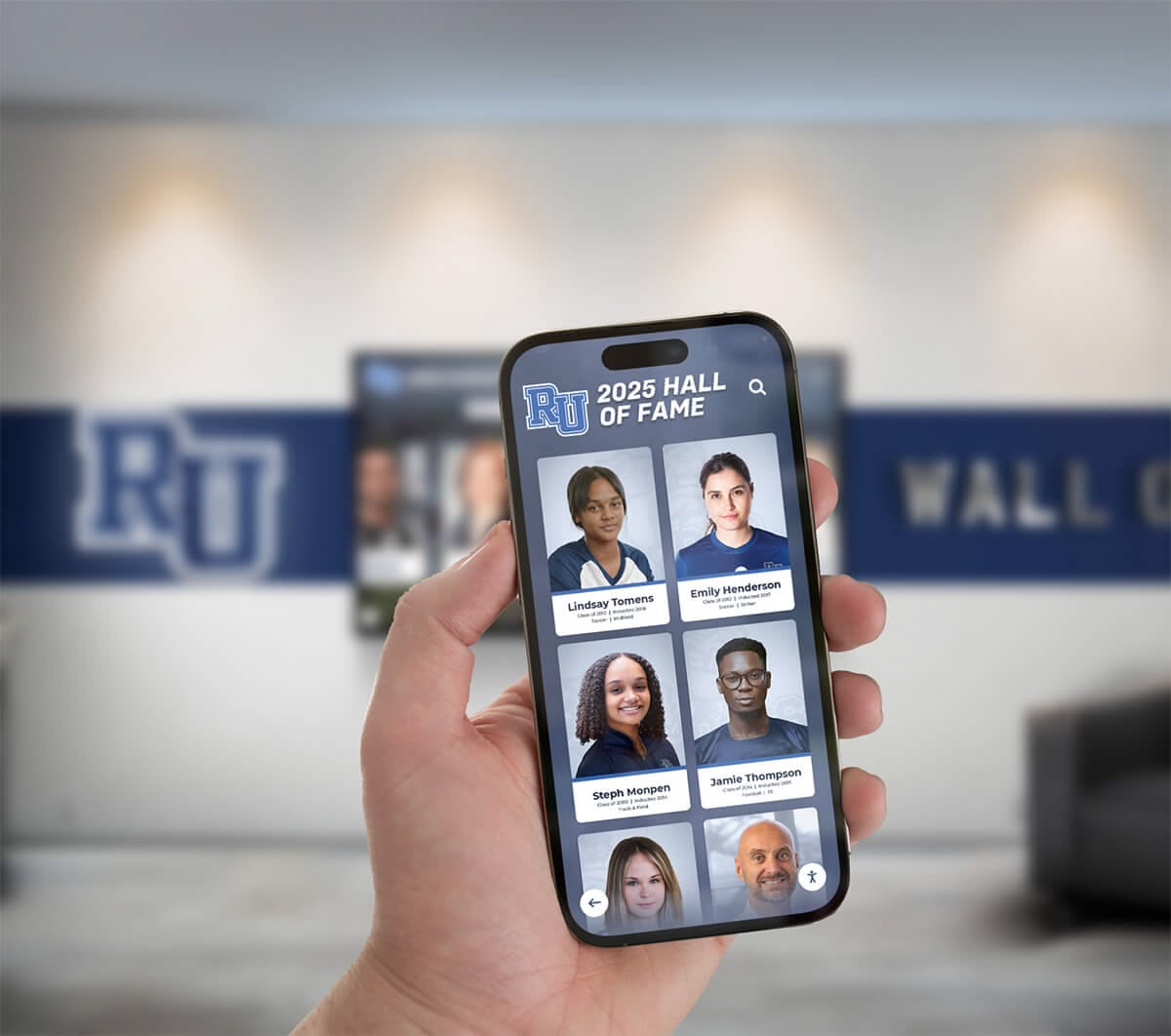
Mobile accessibility ensures students can access yearbook memories anytime, anywhere, unlike physical books that may be lost or damaged over time
Maintaining Student Engagement in Digital Yearbook Programs
Digital platforms eliminate certain traditional yearbook rituals—the anticipation of distribution day, the signing parties filling pages with messages, the tangible weight of memory books. Schools must intentionally create new traditions and engagement strategies replacing what transitions eliminate.
Creating Digital Distribution Events
Rather than letting digital yearbook releases become anticlimactic “content now available” announcements, schools can design memorable distribution experiences honoring the significance of yearbook tradition.
Launch Event Strategies:
Digital Yearbook Premieres: Host special assemblies or evening events where students gather to view the digital yearbook together for the first time, projected on large screens with music, commentary from yearbook staff, and celebration atmosphere rivaling traditional distribution days.
Interactive Signing Sessions: Create temporary “digital signing stations” equipped with tablets where students can leave messages for classmates in comment sections, recreating the social signing ritual in digital formats while preserving messages permanently rather than fading handwritten notes.
Countdown Campaigns: Build anticipation through social media countdowns previewing yearbook sections, sharing behind-the-scenes content from yearbook staff, and creating excitement around release similar to movie premiere marketing.
Alumni Preview Access: Grant alumni early preview access to current yearbooks as engagement strategy, inviting graduates to share comments connecting current students with institutional traditions and school history.
Social Media Integration
Generation Z students live substantial portions of their social lives through Instagram, TikTok, Snapchat, and other platforms. Smart digital yearbook programs integrate these communication channels rather than competing with them.
Social Strategy Elements:
- Share daily or weekly “throwback” yearbook photos from digital archives on school social accounts
- Create yearbook-specific hashtags encouraging students to share and tag content
- Enable easy sharing from digital platforms directly to social media accounts
- Feature “Student Spotlight” series drawing content from yearbook profiles
- Encourage clubs and teams to contribute video content for yearbook inclusion that simultaneously serves social media needs
Gamification and Interactive Features
Digital platforms enable engagement mechanics impossible in print yearbooks but familiar to students from gaming, social media, and app experiences.
Engagement-Driving Features:
- Voting and Polling: Enable student voting on superlatives, favorite photos, best moments, or other interactive elements with real-time result displays
- Photo Contribution Leaderboards: Recognize students contributing the most photos or generating the most engagement on their content
- Treasure Hunt Challenges: Create interactive challenges where students search digital yearbook archives for specific photos, people, or historical moments, with prizes for completion
- Memory Matching Games: Connect current students with alumni from similar clubs, sports, or interests based on yearbook content
- Anniversary Notifications: Send automated notifications to alumni on graduation anniversaries, encouraging them to revisit yearbook memories and share reflections

Interactive features like searchable databases transform how users engage with yearbook content compared to linear page-turning experiences
Privacy, Security, and Legal Considerations
Digital yearbooks introduce privacy and security concerns requiring careful policy development protecting students while enabling memory preservation.
FERPA Compliance and Student Privacy
The Family Educational Rights and Privacy Act (FERPA) governs student information privacy, with yearbooks existing in nuanced territory where directory information meets educational records.
Privacy Policy Essentials:
Annual Notification and Opt-Out: Schools must notify parents and eligible students annually about directory information that may be disclosed, including yearbook content, with clear opt-out procedures for families preferring privacy.
Granular Privacy Controls: Digital platforms should allow individual families to control their students’ yearbook visibility—some may accept internal school access but decline external sharing, while others may restrict all digital presence preferring only print inclusion.
Content Review Processes: Establish review workflows ensuring photos don’t inadvertently reveal sensitive information like home addresses visible on sports jerseys, medical conditions evident in photos, or other potentially problematic content.
Alumni Directory Protections: When including alumni information in historical yearbook archives, implement contact information protections preventing unauthorized access to personal details while preserving memory content.
Copyright and Photo Rights
Digital yearbooks involve complex copyright considerations especially when incorporating professional photography, media content, and third-party materials.
Copyright Best Practices:
Photographer Agreements: Secure explicit written agreements with professional photographers granting schools perpetual digital reproduction rights, not just one-time print publication rights typical of traditional yearbook contracts.
Student Media Releases: Obtain comprehensive photo and video releases from all students (or parents for minors) granting schools rights to include student likenesses in both current and archived digital yearbooks.
Music Licensing: If creating video yearbook content incorporating music, ensure proper licensing through ASCAP, BMI, or royalty-free music libraries rather than risking copyright infringement using commercial recordings.
Third-Party Content: Exercise caution when incorporating content from social media, news sources, or other external origins—obtain permissions or strictly limit use to materials clearly qualifying for educational fair use exemptions.
Data Security and Long-Term Preservation
Digital yearbooks only deliver on preservation promises if schools implement robust security and backup strategies ensuring content remains accessible decades into the future.
Security Framework Components:
- Redundant Backups: Maintain yearbook content in at least three locations—production platform, school-controlled backup, and offline archive—protecting against platform failures or vendor discontinuations
- Format Migration Plans: Periodically convert files to current formats preventing obsolescence as file standards evolve over decades
- Access Authentication: Implement secure login systems balancing accessibility with privacy, potentially using school email verification or alumni network integration
- Regular Security Audits: Evaluate platform security annually, ensuring vendors maintain current cybersecurity standards protecting student information from breaches
- Disaster Recovery Testing: Periodically verify that backup systems actually function and content can be successfully restored if primary systems fail

Permanent installations in school buildings ensure yearbook memories remain accessible to current students and returning alumni for decades
Measuring Success: Digital Yearbook Metrics and ROI
Digital platforms generate data impossible to capture with print yearbooks, enabling schools to measure engagement and demonstrate value in concrete terms.
Key Performance Indicators for Digital Yearbooks
Quantitative Engagement Metrics:
- User Access Rates: Percentage of students actively accessing digital yearbooks within first month, semester, and year after release
- Page Views and Time Spent: Total content views and average session duration indicating depth of engagement versus superficial browsing
- Search Activity: Number of searches performed revealing how students navigate content and discover memories
- Content Contributions: Number of photos, videos, and comments contributed by students versus staff-created content
- Alumni Engagement: Historical yearbook access rates from graduated classes demonstrating long-term value
- Mobile vs. Desktop Usage: Platform access patterns informing interface optimization priorities
Qualitative Success Indicators:
- Student satisfaction survey results comparing digital experiences to previous print yearbooks
- Parent feedback about accessibility, value, and family engagement with yearbook content
- Yearbook staff reflections on workflow improvements or challenges compared to traditional production
- Alumni testimonials about discovering historical content or connecting with classmates through digital archives
Financial Return on Investment
Digital yearbook ROI extends beyond simple cost comparisons to encompass broader institutional benefits.
Measurable Financial Returns:
- Annual savings from eliminated printing costs, unsold inventory, and storage expenses
- Staff time recovered from streamlined digital workflows compared to print production coordination
- Fundraising opportunities through digital yearbook sponsorships and advertising
- Reduced replacement costs when students never lose digital access unlike physical books
Institutional Value Returns:
- Enhanced equity ensuring all students access memories regardless of financial circumstances
- Strengthened alumni connections through accessible historical content fostering ongoing engagement
- Improved institutional memory preservation supporting advancement, development, and community relations
- Positive brand perception demonstrating innovation and technological forward-thinking
The Future of Digital Yearbooks: Emerging Trends
Digital yearbook technology continues evolving rapidly, with several emerging trends likely to shape the next generation of school memory preservation.
Artificial Intelligence and Automated Organization
AI-powered features are beginning to transform digital yearbook creation and navigation:
Automated Photo Organization: Machine learning algorithms can automatically identify individual students across thousands of photos, tag events and activities, and organize content reducing manual yearbook team workload dramatically.
Smart Search Capabilities: Natural language search enables queries like “show me all basketball games from 2024” or “find photos with Sarah and Michael together” rather than relying on manual tagging.
Automatic Yearbook Generation: Emerging AI tools can analyze school photo collections and automatically generate yearbook layout drafts that student teams refine rather than building from scratch.
Virtual and Augmented Reality Integration
As VR and AR technologies mature and become more accessible, yearbook experiences may extend into immersive environments:
- 360-Degree Event Coverage: Capture school events in immersive 360-degree video allowing future viewers to “attend” performances, games, and ceremonies virtually
- AR Yearbook Portals: Mobile apps could overlay historical yearbook content onto physical school locations, showing students from previous decades in current spaces
- Virtual Yearbook Signings: Alumni could participate in digital signing events using VR, recreating the social experience of yearbook signing across geographic distances
Blockchain and Permanent Digital Archives
Blockchain technology offers potential solutions for long-term digital yearbook preservation independent of any single vendor:
- Decentralized Storage: Yearbook content stored across distributed networks rather than single platforms, ensuring accessibility even if original vendors cease operations
- Verified Authenticity: Blockchain records could prove digital yearbook content authenticity, preventing manipulation of historical memories
- NFT Yearbook Moments: Schools might offer unique digital collectibles representing significant yearbook memories, creating new engagement and fundraising opportunities
Making the Transition: Your Digital Yearbook Action Plan
For schools ready to embrace digital yearbook solutions, this implementation roadmap provides structured steps from initial exploration through successful launch.
Year One: Exploration and Planning
Months 1-3: Research and Stakeholder Engagement
- Form yearbook modernization committee including administrators, current yearbook advisor, students, parents, and technology staff
- Research digital yearbook platforms through vendor demonstrations and reference calls with schools using each system
- Conduct stakeholder surveys gathering input about yearbook priorities and digital transition concerns
- Develop preliminary budget estimates comparing traditional costs against digital alternatives
Months 4-6: Platform Selection and Policy Development
- Evaluate platforms against established criteria and select vendor
- Develop comprehensive privacy policies addressing FERPA compliance and family preferences
- Create photo and video rights agreements covering digital reproduction
- Draft implementation timeline with specific milestones and responsibility assignments
Months 7-9: Pilot Program Preparation
- Train yearbook advisor and student leadership team on selected platform
- Develop content organization systems and workflow processes
- Begin digitizing recent historical yearbooks to build initial archive
- Create communication materials explaining digital transition to broader community
Months 10-12: Pilot Launch and Evaluation
- Launch pilot digital yearbook for current year
- Maintain traditional print option during transition year
- Collect detailed feedback from students, parents, and staff
- Measure engagement metrics and compare against traditional yearbook distribution
- Refine policies and processes based on pilot experience
Year Two: Full Implementation
Scaled Rollout: Expand digital yearbook as primary offering with optional print based on pilot results
Historical Digitization: Continue systematic digitization of yearbook archives, potentially engaging alumni volunteers
Advanced Features: Implement video content, interactive elements, and social integration building on foundation
Continuous Improvement: Use engagement data and stakeholder feedback to refine platform usage and maximize value
Conclusion: Preserving Memories for the Digital Generation
The transition from traditional printed yearbooks to digital solutions represents more than technological change—it fundamentally reimagines how schools preserve and share memories in ways that better serve current students while creating resources previous generations never enjoyed.
Digital yearbooks eliminate the painful reality that students who cannot afford expensive printed books lose access to memories entirely. They ensure yearbooks never become lost, damaged, or inaccessible years after graduation when nostalgia hits strongest. They preserve unlimited content rather than forcing painful decisions about which memories to exclude due to page constraints. And they create interactive experiences where students actively engage with memories rather than passively flipping pages.
The most successful digital yearbook implementations don’t abandon tradition—they enhance it. They preserve everything students value about yearbooks while adding capabilities that printed books simply cannot match. Schools serving Generation Alpha students who have never known life without smartphones and social media must meet those students where they live, delivering yearbook experiences optimized for digital-native expectations while honoring the timeless emotional significance of memory preservation.
Whether your school implements pure digital platforms, hybrid models combining print and digital, or permanent interactive installations that transform yearbooks into community resources, the fundamental mission remains constant: preserving the people, experiences, and moments that define each school year so students can revisit those memories throughout their lives.
Modern digital recognition solutions like Rocket Alumni Solutions help schools create interactive touchscreen displays that showcase yearbooks alongside athletic achievements, academic honors, and institutional history. These permanent installations complement digital yearbook platforms by creating physical focal points where memories become visible parts of daily school life rather than content accessed only occasionally through apps.
The question facing schools in 2026 isn’t whether digital transformation will affect yearbooks—it already has. The question is whether your institution will lead that transformation intentionally, implementing solutions aligned with your community’s values and priorities, or whether you’ll reactively respond when budget pressures or changing student expectations force hasty decisions.
Ready to explore how digital yearbook solutions can transform memory preservation at your school while reducing costs and improving accessibility? Schedule a consultation with Rocket Alumni Solutions to discover interactive display options that make yearbooks and school history accessible to students, staff, and alumni every single day.































