Schools, universities, and nonprofit organizations frequently face a common space challenge: they need to recognize athletic achievements, honor distinguished alumni, acknowledge donors, and showcase sponsors—but they lack the physical wall space to accommodate separate displays for each category. This constraint often forces difficult decisions about which constituencies receive visible recognition and which get relegated to less prominent locations or excluded entirely.
The question many administrators ask is straightforward: Can a single digital display serve multiple recognition purposes effectively? The answer transforms how organizations approach recognition infrastructure. Modern digital hall of fame systems handle multiple recognition categories simultaneously, combining athletic achievements, donor acknowledgment, and sponsor visibility within unified platforms that maximize both space efficiency and engagement potential.
This comprehensive guide explains how dual-purpose digital recognition displays work, the technical approaches for managing different recognition types, best practices for balancing competing visibility needs, and implementation strategies that ensure all stakeholders receive appropriate acknowledgment.
Understanding Dual-Purpose Recognition Systems
Digital recognition technology eliminates the physical constraints that traditionally forced organizations to choose between recognition priorities. A single touchscreen display can showcase thousands of profiles across unlimited categories, with intuitive navigation allowing visitors to explore content based on their interests.
The Multi-Category Recognition Challenge
Traditional recognition methods create natural conflicts. Physical trophy cases occupy significant floor space, donor plaques fill premium wall areas near entrances, and sponsor banners compete for visibility in athletic venues. Each stakeholder group expects prominent placement, yet limited space forces compromises that leave some constituencies feeling undervalued.
Consider a typical high school scenario: the athletics department wants to showcase championship teams and record-holding athletes. The development office needs to recognize donors who funded the new gymnasium. Corporate sponsors who support athletic programs expect visibility. Alumni associations want to highlight distinguished graduates. Each group has legitimate recognition needs, yet dedicating separate wall sections to each would require hundreds of square feet of premium space.

How Digital Systems Handle Multiple Recognition Types
Modern recognition platforms organize content through flexible category structures that visitors navigate based on interest. A single 55-inch touchscreen mounted in a gymnasium lobby might contain:
- Athletic Hall of Fame: Team championships, individual record holders, coaching legends, milestone achievements
- Donor Recognition: Facility naming donors, scholarship endowment contributors, equipment purchasers, annual fund supporters
- Sponsor Showcase: Corporate partners, local business supporters, in-kind contributors, advertising partnerships
- Alumni Achievements: Distinguished graduate profiles, career accomplishments, community service recognition
- Academic Excellence: Scholarship recipients, academic competition winners, honor students, research achievements
Visitors access these categories through clear menu structures on the main interface. Someone attending a basketball game might explore team history and championship records, while a donor visiting for a recognition event navigates directly to philanthropic acknowledgment sections. The system serves multiple audiences without requiring anyone to scroll past irrelevant content.
Technical Architecture for Category Management
Recognition platforms designed for multi-purpose use implement several technical approaches for organizing diverse content:
Hierarchical Content Organization: Systems structure content in parent-child relationships. A top-level “Recognition” category might contain “Athletics,” “Donors,” “Sponsors,” and “Alumni” subcategories, each with additional subdivisions. This hierarchy enables intuitive browsing while maintaining clear organizational logic.
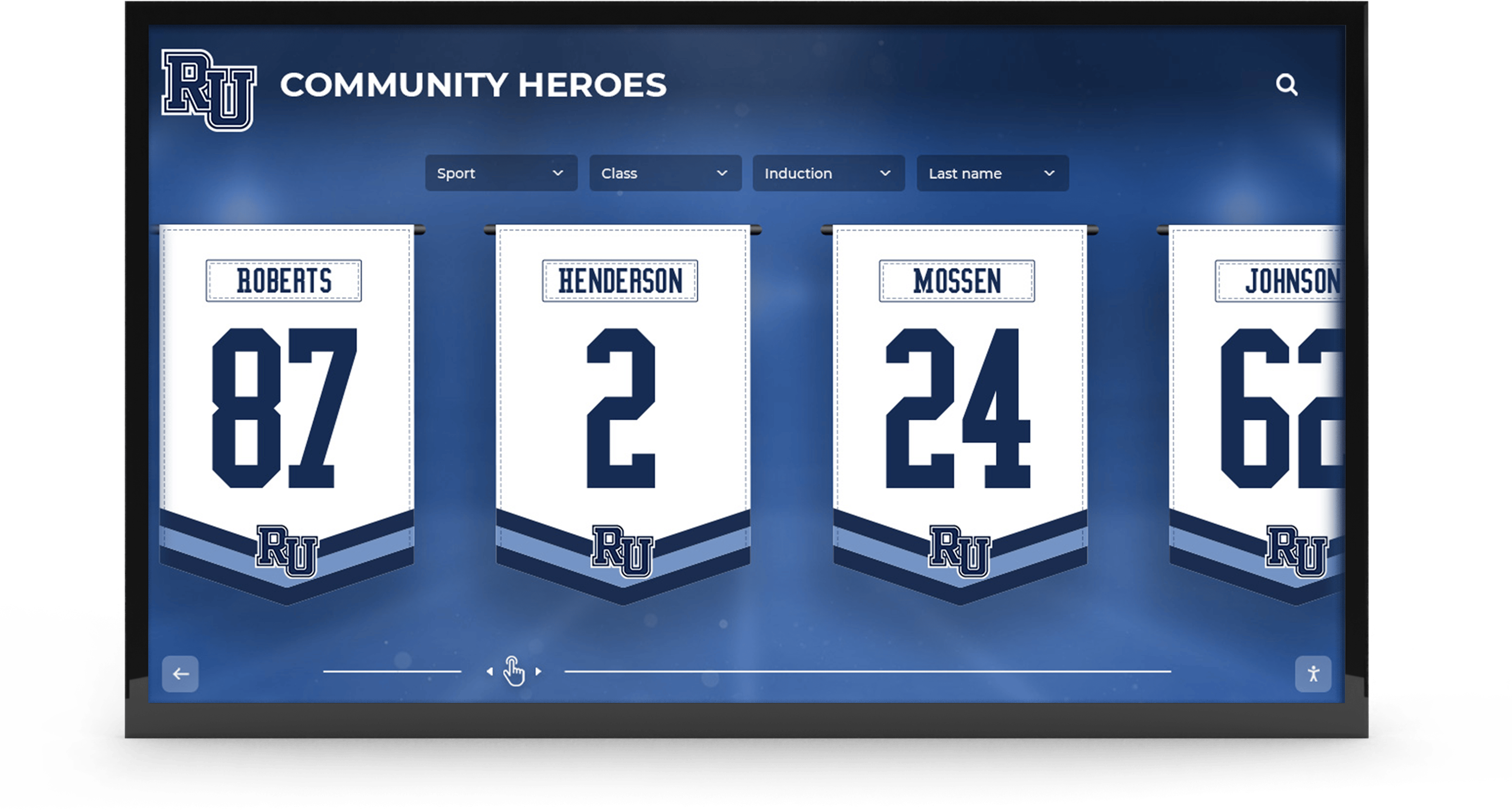
Metadata Tagging: Each profile receives metadata tags identifying recognition type, time period, achievement category, and other attributes. This tagging enables powerful filtering—a visitor could view “All 2020 inductees across all categories” or “Athletic donors from graduating class of 1985.”
Search Functionality: Comprehensive search capabilities allow visitors to find specific individuals, companies, or achievements without navigating category structures. Someone searching for “Johnson” might find an athlete, a donor, and a sponsor all sharing that name, with clear context differentiating each.
Dynamic Featured Content: The home screen rotates featured content across categories, ensuring balanced visibility. Rather than privileging one recognition type, the system cycles between athletic achievements, major donors, premium sponsors, and distinguished alumni, giving each category prominent exposure.
Implementing Sponsor Recognition in Hall of Fame Systems
Corporate and business sponsors present unique recognition requirements distinct from individual achievement acknowledgment or philanthropic giving. Sponsors expect visibility that provides brand exposure value proportional to their investment, often with specific logo presentation standards and messaging requirements.
Sponsor Recognition Tiers and Visibility
Effective sponsor recognition structures create clear tiers corresponding to support levels, with visibility and features scaled appropriately:
Premium Tier Sponsors ($25,000+):
- Dedicated profile pages with company logos, descriptions, and contact information
- Featured rotation on the home screen with prominent logo display
- Video content opportunities showcasing company involvement
- Integration with athletic event recognition (pregame acknowledgments, halftime features)
- Sponsor messaging about community commitment and values
Gold Tier Sponsors ($10,000-$24,999):
- Standard profile pages with logos and company information
- Regular home screen rotation alongside other recognition categories
- Static image galleries showing sponsor involvement
- Social media integration displaying company community engagement
- Company website links and contact information
Silver Tier Sponsors ($5,000-$9,999):
- Streamlined profiles with logos and brief descriptions
- Periodic featured rotation
- Logo display in collective sponsor recognition sections
- Basic company information and website links
Bronze Tier Sponsors ($1,000-$4,999):
- Logo recognition in grouped sponsor acknowledgment displays
- Company name with sponsorship category (equipment donor, uniform sponsor, etc.)
- Alphabetical or category-based listing
This tiered approach ensures sponsors receive recognition commensurate with investment while maintaining hierarchies that incentivize increased support levels. The digital donor recognition wall strategies used for philanthropic giving adapt effectively to corporate sponsorship contexts.
Managing Sponsor Content and Updates
Corporate sponsors frequently update branding, messaging, contact information, and personnel. Digital recognition systems accommodate these changes through flexible content management:
Self-Service Sponsor Portals: Advanced systems provide sponsors with login credentials to manage their own profiles. Sponsors can update logos following rebranding, modify company descriptions, refresh executive leadership information, and add new photos or videos—all without requiring administrator intervention. This self-service capability reduces administrative burden while ensuring sponsor information remains current.
Scheduled Content Rotation: Sponsors supporting multiple programs or facilities throughout the year might receive time-based recognition. A company sponsoring fall football, winter basketball, and spring baseball could have their profile automatically featured during each sport’s season, maximizing relevance and visibility.
Campaign-Specific Recognition: During fundraising campaigns or special events, sponsor visibility can be temporarily elevated. A company providing major support for a capital campaign might receive enhanced home screen presence during the campaign period, then return to standard tier placement afterward.
Contract-Based Automation: Recognition duration ties directly to sponsorship agreements. When a two-year sponsorship expires, the system can automatically adjust visibility or prompt renewal conversations. This automation prevents awkward situations where former sponsors receive prominent recognition after relationships have ended.
Balancing Commercial and Mission-Based Recognition
Organizations must carefully balance sponsor visibility with educational mission and community values. While sponsors deserve appropriate recognition for financial support, displays shouldn’t resemble commercial advertising boards. Several strategies maintain this balance:
Context Framing: Present sponsors within community partnership narratives rather than pure advertising. Instead of simply displaying company logos, frame recognition as “Community Partners Making Excellence Possible” or “Local Businesses Supporting Student Athletes.” This context positions sponsors as community members advancing shared values rather than simply purchasing visibility.
Integration with Impact: Connect sponsor recognition directly to enabled programs and achievements. Show how a sponsor’s uniform donation allowed the team to compete with professional appearance, or how equipment funding enabled championship-caliber training. This approach validates sponsor investment by demonstrating tangible impact.
Aesthetic Consistency: Design sponsor recognition sections using the same visual design language as athletic and academic recognition. Rather than creating separate “advertising” sections with different typography and layout, integrate sponsors into unified design systems that feel cohesive. This integration prevents commercial recognition from feeling jarring or out of place.
Prominence Proportionality: Ensure sponsor recognition receives appropriate but not dominant visibility. While sponsors deserve acknowledgment, the primary focus should remain on student athletes, achievements, and community members being honored. Sponsor content might comprise 15-20% of total recognition content rather than overwhelming the display.
Donor Wall Integration Within Hall of Fame Displays
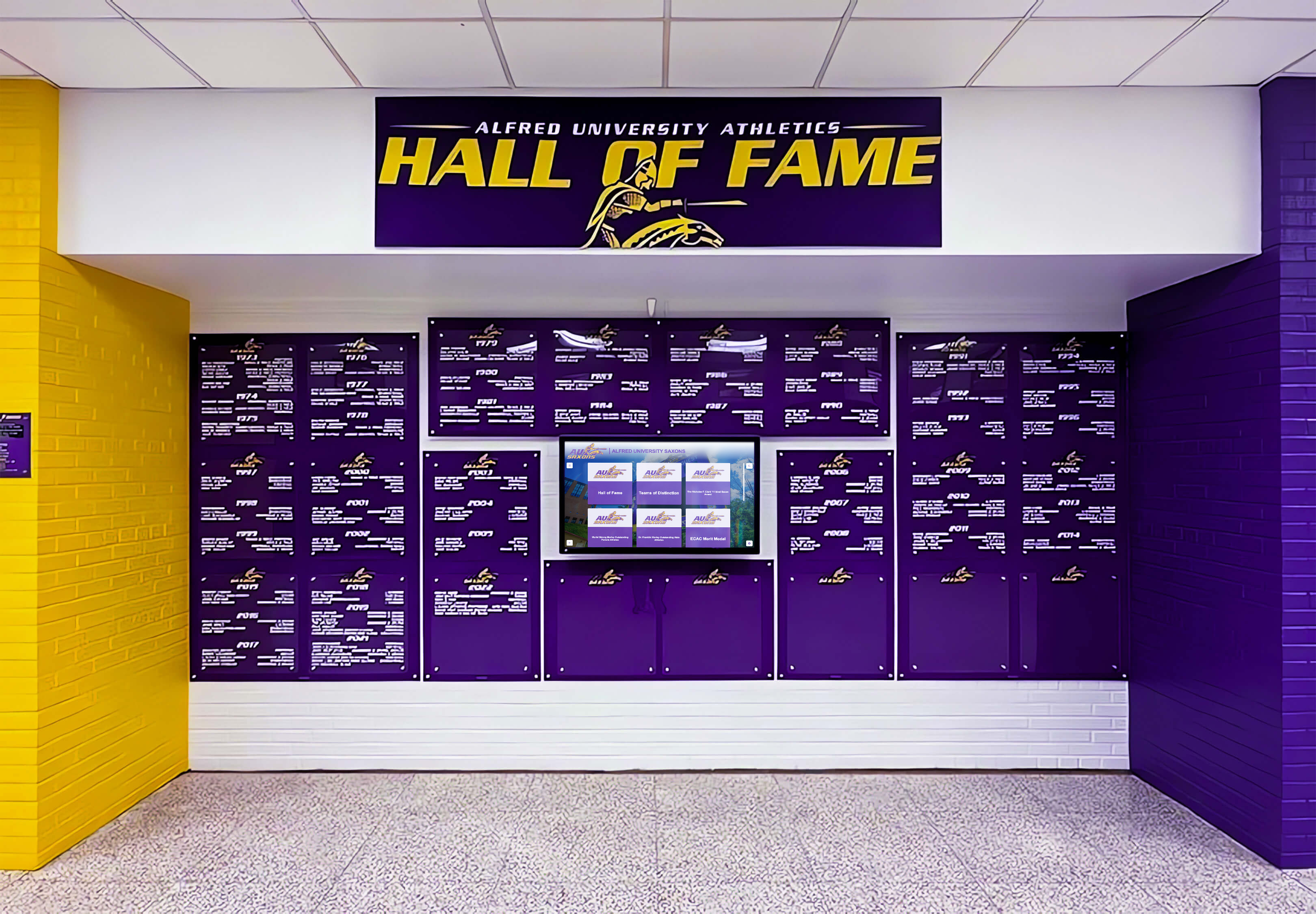
Philanthropic donor recognition shares space with athletic achievements in many facilities, particularly when donors funded the building or renovation housing the recognition display. Digital systems handle both recognition types seamlessly within unified platforms.
Facility Naming Donors and Capital Campaign Recognition
Schools and athletic facilities frequently bear the names of major donors who provided transformational gifts. These naming donors typically receive the most prominent recognition, often with dedicated sections highlighting their generosity and its impact. Digital displays can create compelling donor stories that go far beyond traditional plaques.
A dedicated section for the lead donor might include:
- Personal or family history with the institution
- Photographs from groundbreaking, construction, and dedication ceremonies
- Video testimonials explaining the motivation for giving
- Impact statements describing how the facility transformed programs
- Interactive timelines showing facility development from concept to completion
- Before-and-after photo galleries demonstrating transformation
This comprehensive storytelling approach honors major donors while creating emotional narratives that inspire others to give. The techniques developed for donor wall recognition in nonprofits apply equally well to educational and athletic facilities.
Recognizing Diverse Donor Categories
Beyond facility naming, digital recognition systems accommodate the full spectrum of philanthropic support:
Endowment Donors: Recognize those who established scholarship endowments, coaching positions, or program funds. Display how endowment earnings support current students and programs, creating tangible connections between historical generosity and present-day impact.
Equipment and Facility Donors: Acknowledge donors who funded specific improvements—training equipment, locker room renovations, video systems, field lighting, score boards. Include photos of the funded items with explanatory text about their importance to program quality.
Annual Fund Supporters: Create inclusive recognition for annual donors at all giving levels. Even modest annual contributions demonstrate commitment that merits acknowledgment. Digital systems can recognize hundreds or thousands of annual donors without space constraints that limit traditional plaques.
In-Kind Contributors: Some supporters provide goods and services rather than cash donations. Businesses might donate uniforms, transportation, meals, or professional services. Digital recognition easily accommodates these non-monetary contributions, which traditional donor walls often overlook.
Legacy Society Members: Feature alumni and friends who have included the institution in estate plans. Planned giving recognition often receives insufficient visibility in physical displays, yet these future gifts represent crucial support for long-term sustainability.
The comprehensive approaches detailed in donor recognition wall examples and best practices demonstrate how digital platforms can honor diverse giving types effectively.
Protecting Donor Privacy While Providing Recognition
Not all donors seek public recognition. Some prefer anonymity due to personal values, religious beliefs, or concerns about solicitation. Digital systems must accommodate varying privacy preferences:
Flexible Privacy Controls: Allow donors to choose from multiple recognition levels—full profile with photo and story, name-only listing, anonymous recognition noting gift amount and purpose without identification, or complete anonymity with no public acknowledgment.
Granular Information Control: Enable donors to specify exactly what information appears publicly. A donor might allow name and class year but restrict gift amount, or permit acknowledgment in on-site displays but exclude online recognition.
Self-Service Preference Management: Provide donor portals where supporters can adjust privacy settings, update contact information, modify biographical details, or change recognition preferences without contacting advancement offices. This autonomy respects donor control while reducing administrative burdens.
Secure Data Management: Implement robust security protecting donor information from unauthorized access. Separate publicly visible recognition content from confidential donor management systems, ensuring advancement staff can manage comprehensive donor records while public displays show only approved information.
Best Practices for Multi-Purpose Recognition Content
Successfully managing dual-purpose displays requires thoughtful content strategies that serve multiple constituencies without creating confusion or competition for attention.
Creating Clear Navigation and Category Distinction
Visitors should immediately understand available content categories and how to access areas of personal interest. Several design approaches facilitate clear navigation:
Visual Category Differentiation: Use distinct color coding, iconography, or imagery for each major recognition category. Athletic recognition might feature sports equipment imagery and team colors, donor recognition could use institutional colors and architectural photos, while sponsor content incorporates business/partnership imagery. These visual cues enable instant category identification.
Descriptive Category Labels: Use clear, jargon-free category names that visitors instantly understand. “Athletic Hall of Fame,” “Donor Recognition,” “Community Partners,” and “Distinguished Alumni” communicate purpose immediately, unlike ambiguous labels that require interpretation.
Breadcrumb Navigation: Display current location within the content hierarchy, allowing visitors to understand where they are and easily return to previous levels. A breadcrumb might read: “Home > Athletic Recognition > Track & Field > Record Holders,” providing clear context and navigation options.
Prominent Search: Make search functionality immediately visible from every screen. Visitors looking for specific individuals, companies, or achievements should be able to access search without navigating complex menu structures.

Maintaining Content Quality Across Categories
Different recognition categories require different content approaches, yet overall quality must remain consistent:
Athletic Recognition Content: Focus on achievements, statistics, records, and team accomplishments. Include action photos capturing competitive moments, roster information, coaching staff, and season results. Balance individual achievements with team success, ensuring both receive appropriate acknowledgment.
Donor Recognition Content: Emphasize personal connection stories, giving motivations, and impact narratives. Explain why donors chose to support the institution, what experiences shaped their commitment, and how their generosity makes a difference. Include photos that humanize donors—not formal portraits exclusively, but images showing connection to the institution.
Sponsor Recognition Content: Highlight partnership value and community commitment. Explain how sponsors support student opportunities and program excellence. Include information about sponsor businesses, services, and community involvement beyond their sponsorship relationship. Frame recognition as community partnership rather than transactional advertising.
Alumni Recognition Content: Showcase career achievements, professional contributions, community service, and continued institutional connection. Demonstrate how education shaped career trajectories and professional success. Include current contact information (when permitted) enabling networking opportunities.
Scheduling Content Updates and Refresh Cycles
Different recognition categories require different update frequencies:
Athletic Content Updates: Required after each season concludes, when new records fall, following championship victories, and as hall of fame inductions occur. Athletic content remains the most dynamic category, often requiring monthly or quarterly updates during academic years.
Donor Recognition Updates: Needed following major gifts, after annual fund campaigns conclude, when facility dedications occur, and as planned giving commitments materialize. Donor recognition typically requires quarterly or semi-annual updates unless major campaigns generate frequent new commitments.
Sponsor Recognition Updates: Scheduled according to contract terms, with annual renewals prompting information reviews. Sponsors might update branding or messaging quarterly, while basic recognition remains stable throughout contract periods.
Alumni Recognition Updates: Required as distinguished alumni receive honors, achieve notable career milestones, or voluntarily update biographical information. Alumni content often updates annually or when prompted by reunion campaigns and milestone events.
Establishing clear update schedules prevents content staleness while managing administrative workload efficiently. The strategies outlined in interactive digital hall of fame displays provide frameworks for managing ongoing content maintenance.
Technical Implementation Considerations
Successful dual-purpose recognition systems require attention to technical specifications, installation factors, and system integration requirements.
Hardware Requirements for Multi-Purpose Displays
Recognition displays serving multiple purposes need appropriate hardware specifications:
Screen Size Considerations: Displays showcasing diverse content categories benefit from larger screens. While 42-43" displays work adequately for focused content, 55-65" screens provide better experiences when visitors browse across multiple categories. Larger displays enable better readability, more impressive imagery, and improved engagement for group viewing.
Touch Technology: Commercial-grade capacitive touchscreens provide the responsiveness and durability required for heavy public use. Consumer-grade touch technology fails quickly in high-traffic institutional environments. Look for displays rated for continuous operation with touchscreen response times under 10ms.
Brightness and Anti-Glare: Displays in locations with natural light or bright ambient lighting require high brightness ratings (400-500 nits minimum) and anti-glare screen treatments. Recognition displays should remain clearly visible in all lighting conditions.
Mounting Options: Consider whether wall-mounted, kiosk-style, or double-sided configurations best serve your space. Wall-mounted displays maximize visibility in corridors and lobbies. Kiosk configurations work well in open spaces and provide more prominent presence. Double-sided displays installed as room dividers provide recognition visibility from multiple approaches.
Network Connectivity: Recognition systems require reliable network connections for content updates, analytics collection, and remote management. Wired Ethernet connections provide the most reliable performance, though high-quality wireless may suffice in locations where cabling is impractical. Ensure adequate bandwidth for high-resolution image and video content delivery.

Software Platform Capabilities
Recognition software must support the specific requirements of multi-category content management:
Multi-User Administrative Access: Different departments manage different recognition categories. Athletic directors update sports achievements, development staff manage donor recognition, marketing teams control sponsor content. The platform should provide role-based access allowing each department to manage assigned content while preventing unauthorized modifications to other categories.
Template Consistency: Ensure the platform provides templates that maintain visual consistency across categories while allowing appropriate customization. Athletic profiles might include statistics fields absent from donor profiles, while sponsor profiles need logo placement specifications. Templates should accommodate these differences while maintaining overall design coherence.
Bulk Import Capabilities: When initially populating dual-purpose displays, institutions often need to import hundreds or thousands of existing records. Bulk import tools supporting CSV or Excel spreadsheet uploads dramatically accelerate implementation compared to manual profile creation.
Approval Workflows: Some organizations require content approval before publication. Workflow capabilities allowing draft creation, supervisory review, and approved publication ensure quality control while enabling delegation of content creation responsibilities.
Scheduling and Automation: Schedule content to appear automatically on specific dates or during defined periods. New inductee profiles might publish automatically on induction ceremony dates, seasonal content could activate during relevant sport seasons, and campaign-specific content might appear only during active fundraising periods.
Integration with Existing Systems
Digital recognition displays often need to connect with other institutional systems:
Student Information Systems: Athletic recognition might draw roster data, academic achievements, and athletic statistics from student information databases, eliminating manual data entry and ensuring accuracy.
Fundraising Databases: Donor recognition content ideally syncs with advancement databases (Raiser’s Edge, Blackbaud CRM, Salesforce Nonprofit Cloud). Automatic synchronization ensures donor information remains current while reducing duplicate data entry.
Sponsor Management Systems: Organizations tracking sponsorships in CRM or contract management systems benefit from integration enabling automatic recognition activation, renewal reminders, and contract expiration notifications.
Alumni Directories: Alumni recognition content can pull from alumni database systems, maintaining current biographical information, contact details, and career accomplishment updates.
Website Integration: Recognition content accessible through institutional websites extends visibility beyond physical campus locations. Web integration allows alumni, donors, and community members to explore recognition content remotely, dramatically expanding engagement reach.
The comprehensive technical guidance provided in touchscreen digital signage implementation addresses these integration challenges thoroughly.
Measuring Success Across Recognition Categories
Dual-purpose displays should demonstrate value for all stakeholder groups. Comprehensive analytics reveal how different audiences engage with various recognition categories.
Athletic Engagement Metrics
Track how athletic community members interact with sports recognition:
- Which teams and sports generate highest viewing interest
- Popular historical periods or championship eras receiving most attention
- Individual athlete profiles attracting deepest engagement
- Record categories visitors explore most frequently
- Seasonal engagement patterns correlating with active sports
Donor Recognition Impact
Measure donor stewardship effectiveness through:
- Donor profile view rates indicating recognition visibility
- Correlation between recognition and subsequent giving behavior
- Social sharing frequency of donor recognition content
- Time spent viewing philanthropic impact information
- Geographic distribution of online donor recognition access
Sponsor Value Delivery
Demonstrate sponsor recognition ROI through:
- Impression counts for sponsor content exposure
- Average viewing duration for sponsor profiles
- Click-through rates for sponsor website links
- Social media amplification of sponsor recognition
- Brand recall surveys assessing sponsor visibility impact
Overall System Performance
Evaluate comprehensive effectiveness via:
- Total unique visitors and interaction sessions
- Average session duration indicating content quality
- Return visitor rates suggesting compelling content
- Navigation patterns revealing content discovery behaviors
- Search query analysis showing visitor interests
- Peak usage times informing optimal content feature scheduling
These metrics justify recognition investments while identifying opportunities for optimization and enhancement.
Common Implementation Challenges and Solutions
Organizations implementing dual-purpose recognition displays encounter predictable obstacles. Understanding common challenges and proven solutions ensures successful outcomes.
Challenge: Competing Visibility Priorities
Different departments often believe their recognition category deserves primary prominence. Athletics departments want sports achievements featured prominently, development offices prioritize donor visibility, and corporate relations teams advocate for sponsor exposure.
Solution: Establish clear governance committees representing all stakeholder departments. Define home screen rotation algorithms ensuring balanced category exposure—perhaps cycling between athletic features, donor spotlights, and sponsor highlights in equal proportions. Document visibility allocation decisions in writing, preventing ongoing debates and ensuring expectations align with implementation.
Challenge: Content Quality Variation
Different departments possess varying content creation skills and resources. One category might feature professional photography and compelling narratives while another contains only basic information and amateur snapshots.
Solution: Establish baseline content quality standards applying across all categories. Provide departments with templates, style guides, content examples, and training resources. Consider centralizing content creation under communications or marketing teams who possess professional writing, photography, and design expertise, with subject matter input from department stakeholders.
Challenge: Update Responsibility Confusion
When multiple departments share recognition displays, update responsibilities can become unclear, resulting in outdated content.
Solution: Assign explicit content ownership to specific individuals by category. Create update schedules defining when each category requires review and refresh. Implement automated reminder systems notifying responsible individuals when content updates come due. Consider quarterly review meetings where all stakeholder departments report on content currency and discuss upcoming recognition needs.
Challenge: Stakeholder Buy-In Resistance
Some traditionalists prefer familiar physical plaques and trophies, viewing digital systems skeptically.
Solution: Demonstrate digital recognition advantages through pilot implementations or site visits to institutions with successful installations. Emphasize capabilities impossible with traditional recognition—unlimited capacity, instant updates, remote accessibility, multimedia storytelling. Address concerns directly through stakeholder meetings, and consider hybrid approaches incorporating both traditional elements and digital innovation during transition periods. The approaches detailed in school digital display transition strategies help manage change effectively.

Future Capabilities and Emerging Trends
Digital recognition technology continues advancing, offering new capabilities that further strengthen dual-purpose applications.
AI-Powered Content Generation
Artificial intelligence capabilities will soon assist with profile creation, automatically generating biographical summaries from source documents, suggesting relevant photos from digital archives, and identifying connection patterns between honorees across categories. This automation will dramatically reduce content creation workload while maintaining quality.
Predictive Visibility Optimization
Machine learning algorithms will analyze engagement patterns to optimize content featuring. Systems might automatically adjust which profiles and categories appear on home screens based on current visitor demographics, time of day, and engagement history. During athletic events, sports content would receive automatic emphasis, while donor recognition might feature prominently during advancement events without manual scheduling.
Augmented Reality Extensions
Mobile apps will enable augmented reality experiences extending digital recognition. Visitors pointing smartphones at recognition displays might see overlay information, 3D visualizations, or video content appearing to emerge from screens. Traditional trophies in nearby cases could trigger digital recognition content when viewed through AR applications, bridging physical and digital recognition seamlessly.
Blockchain-Verified Recognition
Emerging technologies will enable permanent, verifiable recognition records. Honorees might receive digital certificates proving their recognition, shareable across social platforms and professional networks. These blockchain-verified credentials could provide authentication for achievements claimed on resumes or alumni profiles.
Implementation Roadmap: Getting Started
Organizations ready to implement dual-purpose recognition displays should follow this structured approach:
Phase 1: Planning and Requirements (Weeks 1-4)
Stakeholder Engagement: Convene representatives from athletics, development, marketing, facilities, and technology departments. Define recognition priorities, content categories, and success criteria. Establish governance structure for ongoing management.
Content Inventory: Catalog existing recognition materials across all categories. Identify historical records, photographs, documents, and data requiring digitization. Assess content gaps needing research or creation.
Technical Assessment: Evaluate installation locations considering traffic patterns, sight lines, lighting conditions, and infrastructure. Assess network capabilities, power availability, and mounting requirements. Determine whether single displays or multiple installations best serve needs.
Budget Development: Calculate complete costs including hardware, software, installation, content development, training, and ongoing maintenance. Explore financing options including capital funds, donor sponsorship of the recognition system itself, or phased implementation spreading costs across fiscal years.
Phase 2: System Selection and Design (Weeks 5-8)
Vendor Evaluation: Research recognition platform providers specializing in educational institutions and nonprofits. Request demonstrations, reference customer contacts, and review case studies. Evaluate software capabilities, customer support quality, implementation methodology, and long-term product roadmaps.
Interface Design: Work with selected vendors to design navigation structures, visual themes, and content templates. Ensure designs align with institutional branding while optimizing usability. Create mockups for stakeholder review and approval.
Content Architecture: Define category hierarchies, search parameters, filtering options, and featured content rotation logic. Establish naming conventions, metadata standards, and content relationships ensuring consistency.
Phase 3: Content Development (Weeks 9-16)
Profile Creation: Develop recognition profiles across all categories following established templates and quality standards. Write biographical summaries, compile achievement data, gather photographs, and create multimedia content. Consider phased content development starting with priority categories.
Quality Assurance: Review all content for accuracy, consistency, and appropriateness. Verify names, dates, statistics, and biographical information. Ensure photos meet resolution standards and appropriately represent honorees.
Stakeholder Review: Provide departments and honorees opportunities to review draft content. Collect feedback and make necessary corrections before publication. This review process prevents embarrassing errors while building confidence in content accuracy.
Phase 4: Installation and Launch (Weeks 17-20)
Hardware Installation: Mount displays, complete electrical and network connections, and install any physical infrastructure. Test all hardware thoroughly ensuring proper operation, touch responsiveness, and network connectivity.
Content Population: Upload final content to the management system. Configure featured content rotations, navigation menus, and search parameters. Test all functionality from visitor perspectives ensuring intuitive operation.
Training: Provide comprehensive instruction to all administrative users. Cover content creation, editing, publishing, scheduling, and basic troubleshooting. Create reference documentation and quick-start guides for future reference.
Soft Launch: Activate displays for limited audiences before full public launch. Monitor for technical issues, usability problems, or content errors. Make adjustments based on early feedback.
Public Launch: Announce recognition displays through multiple channels—email communications, social media, website features, and press releases. Consider dedication ceremonies involving honorees, donors, sponsors, and institutional leaders.
Phase 5: Ongoing Management (Continuous)
Regular Updates: Establish monthly or quarterly content review cycles. Add new inductees, update biographical information, refresh featured content, and incorporate recent achievements across all categories.
Performance Monitoring: Review analytics regularly identifying engagement patterns, popular content, and opportunities for optimization. Use data to inform content strategies and feature decisions.
Stakeholder Communication: Provide periodic reports to governing committees demonstrating recognition effectiveness and value delivery. Share success metrics, user feedback, and future enhancement plans.
Conclusion: Maximizing Recognition Impact Through Integration
Dual-purpose digital recognition displays represent practical solutions to the space constraints and budget limitations that challenge institutions. Rather than forcing choices between athletic recognition, donor acknowledgment, and sponsor visibility, integrated systems serve multiple constituencies simultaneously while delivering superior engagement and administration compared to traditional approaches.
The key to success lies in thoughtful implementation that respects each stakeholder group’s legitimate recognition needs while maintaining institutional coherence and values. Clear governance, consistent content standards, balanced visibility, and appropriate technology selection ensure all parties receive effective recognition without compromise.
For schools and organizations exploring these capabilities, comprehensive solutions like those from Rocket Alumni Solutions provide proven platforms purpose-built for multi-category recognition. From athletic halls of fame to donor walls, from sponsor showcases to alumni achievements, unified systems create engaging experiences that honor excellence across all dimensions while maximizing the value of limited space and budget resources.
When implemented effectively, dual-purpose recognition displays become institutional assets that strengthen community connections, inspire continued support, and celebrate the diverse excellence that defines successful schools and nonprofit organizations.
Ready to explore how a unified digital recognition system could serve your institution’s diverse acknowledgment needs? Schedule a consultation to discuss your specific requirements and see how dual-purpose recognition platforms can transform your recognition program while maximizing space and budget efficiency.































