Understanding ELO Touchscreen Software Solutions
ELO Touch Solutions has been a pioneer in touchscreen technology since 1971, and today their software ecosystem powers interactive displays in schools, museums, hospitals, and public spaces worldwide. Whether you're evaluating ELO touchscreen software for a digital hall of fame, interactive kiosk, or recognition display, understanding the full range of ELO software solutions helps ensure you select the right platform for your institution's needs.
ELO’s comprehensive software offerings span from operating system-level touch drivers to complete content management platforms designed specifically for interactive displays. For educational institutions deploying digital recognition walls, donor displays, or interactive directories, ELO software provides the foundation for reliable, engaging touchscreen experiences.


Professional touchscreen installations leverage ELO software for seamless interactive experiences
The ELO Touchscreen Software Ecosystem
ELO Touch Solutions offers multiple software products addressing different aspects of touchscreen deployment. Understanding how these components work together helps organizations build effective interactive display systems.
ELO Touch Drivers and OS Integration
At the foundational level, ELO provides touch controller drivers that enable operating systems to properly interpret touch input from ELO displays. These drivers support:
Windows Touch Driver Support: Comprehensive drivers for Windows 10, Windows 11, and Windows IoT Enterprise ensure ELO displays work seamlessly with Microsoft operating systems. The drivers provide full multi-touch gesture support, palm rejection, and stylus integration where applicable.
Linux Touch Support: ELO maintains drivers for major Linux distributions including Ubuntu, Debian, and specialized embedded Linux systems. This open-source compatibility makes ELO displays suitable for custom kiosk applications and specialized deployments.
Android Integration: ELO’s Android-powered solutions like the Elo Backpack 5.0 include native touch support optimized for the Android ecosystem, enabling schools to deploy cost-effective interactive displays without requiring separate computers.
These drivers form the crucial bridge between hardware and software, ensuring touch interactions translate accurately into digital actions regardless of the application running on the display.


EloView Content Management Software
EloView represents ELO’s proprietary content management platform designed specifically for digital signage and interactive kiosk deployments.
Core EloView Capabilities
Cloud-Based Content Management: EloView enables administrators to manage content, scheduling, and display settings from any web browser. This cloud architecture eliminates the need for on-site servers while providing centralized control over distributed display networks.
Multi-Display Management: Schools deploying ELO displays across multiple locations benefit from EloView’s ability to manage content across entire display networks. Update a single display, groups of displays, or entire campuses from a unified interface.
Content Scheduling: EloView supports time-based content scheduling, allowing schools to display different content during class hours, after-school activities, evening community events, or weekend programs. This flexibility maximizes display utilization across varied institutional needs.
Remote Monitoring: Real-time monitoring capabilities alert administrators to display issues, enabling proactive maintenance rather than reactive responses when displays fail. Monitor screen status, connectivity, temperature, and operational health across your entire installation.
EloView for Educational Applications
Educational institutions use EloView for diverse applications:
- Digital announcement boards displaying schedule changes, event information, and emergency notifications
- Cafeteria menu displays with automated daily updates
- Athletic scoreboards and team recognition displays
- Wayfinding systems helping visitors navigate complex campus layouts
- Interactive hall of fame displays showcasing student achievements and institutional history
While EloView provides robust digital signage capabilities, many schools find that specialized recognition display software offers more sophisticated features for interactive alumni engagement, donor recognition, and achievement showcasing than general-purpose signage platforms.

Schools leverage ELO software to create engaging interactive content experiences
Elo Backpack Computing Modules
The Elo Backpack series represents ELO’s integrated computing solution that mounts directly behind compatible ELO displays, creating all-in-one interactive systems.
Elo Backpack 5.0 Software Environment
The Backpack 5.0 runs a commercial Android operating system optimized for kiosk and signage applications. This software environment provides:
Kiosk Mode Lockdown: Configure the Backpack to run only approved applications, preventing users from accessing system settings, installing unauthorized software, or navigating away from intended content. This security is essential for public-facing educational displays.
Application Ecosystem Access: The Android platform enables schools to deploy various applications from custom web-based solutions to specialized recognition software. Browser-based applications work particularly well, as they require no local installation and update automatically.
Remote Management: Integrate Backpack-powered displays with mobile device management (MDM) platforms like Google Workspace, Microsoft Intune, or specialized digital signage management systems. These tools provide centralized configuration, monitoring, and troubleshooting capabilities.
Content Synchronization: The Backpack’s network connectivity enables content synchronization from cloud platforms, ensuring displays remain current without requiring manual updates or physical media transfers.
For comprehensive information about the Backpack hardware and software integration, review our detailed Elo Backpack 5.0 guide covering specifications, setup, and optimization for educational environments.
Backpack vs. Traditional Computer Approaches
Schools often compare Backpack-powered displays against traditional approaches using separate computers:
Backpack Advantages:
- Clean installation with no external computer or visible cables
- Lower power consumption than traditional desktop computers
- Simplified maintenance with fewer physical components
- Integrated power and connectivity reducing failure points
- Purpose-built for 24/7 operation in public environments
Traditional Computer Advantages:
- More processing power for demanding applications
- Easier component upgrades and repairs
- Broader software compatibility (Windows-specific applications)
- Familiar troubleshooting for existing IT staff
Most schools find that Backpack solutions work well for content display and moderate interactivity, while applications requiring significant processing power or specialized Windows software may benefit from traditional computing approaches.
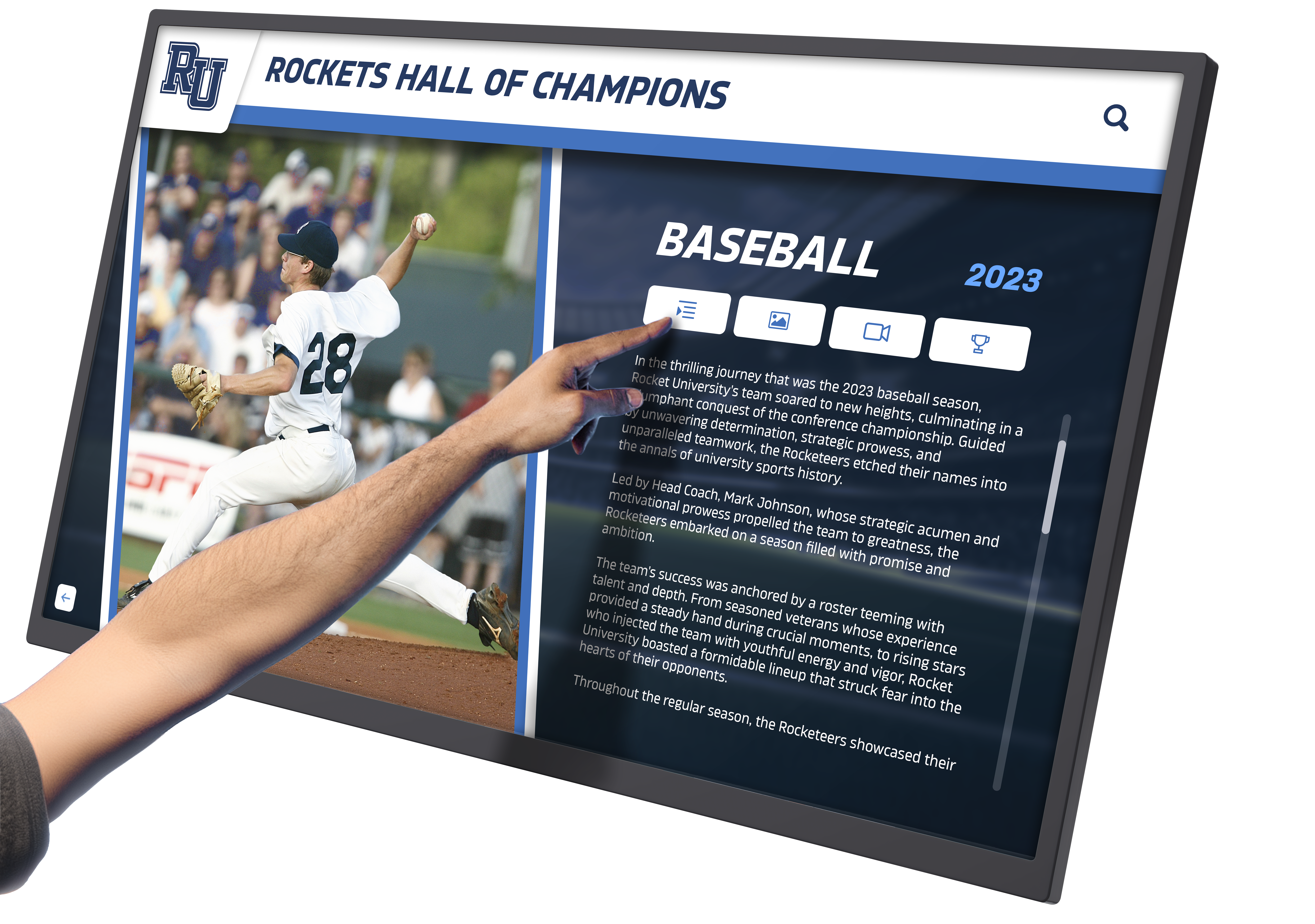
Integrated Backpack computing creates clean, professional installations
ELO Software for Interactive Recognition Displays
When schools deploy ELO touchscreen hardware for interactive recognition purposes—hall of fame displays, donor walls, achievement showcases—the software layer determines user experience and administrative efficiency.
Software Requirements for Recognition Applications
Effective interactive recognition displays require software capabilities beyond basic content display:
Database-Driven Content: Recognition displays typically showcase hundreds or thousands of individuals, requiring robust database backends that enable efficient searching, filtering, and content organization. Schools need software that can handle this scale while maintaining responsive performance.
Rich Multimedia Support: Honoring achievements comprehensively requires more than static text—video profiles, photo galleries, audio testimonials, and interactive timelines create engaging experiences. The software must handle diverse media formats smoothly.
Intuitive Navigation: Visitors to recognition displays range from young students to elderly community members, requiring interfaces that accommodate varied technical comfort levels. Software should enable exploration through multiple paths—browsing, searching, filtering by category, or random discovery.
Remote Content Management: Updating recognition displays should be straightforward for administrative staff without technical expertise. Cloud-based content management systems enable authorized users to add inductees, update information, and modify content from any device without requiring IT intervention.
Analytics and Engagement Metrics: Understanding how visitors interact with recognition displays helps institutions optimize content and demonstrate program value. Software should track interactions, popular content, and engagement patterns.
Third-Party Software on ELO Displays
While ELO provides EloView for content management, many schools deploy specialized third-party applications on ELO hardware to achieve specific recognition display goals.
Solutions like Rocket Alumni Solutions combine purpose-built recognition software with ELO touchscreen hardware, providing:
- Specialized templates designed for alumni recognition, donor acknowledgment, and achievement celebration
- Intuitive content management requiring no technical expertise
- Sophisticated search and filtering optimized for recognition applications
- Integration with alumni databases and development systems
- White-glove implementation support and ongoing content assistance
This approach leverages ELO’s reliable touchscreen hardware while implementing software specifically designed for recognition and engagement applications rather than general-purpose digital signage.

Universities implement specialized recognition software on ELO displays for comprehensive achievement showcases
Configuring ELO Software for Educational Environments
Deploying ELO touchscreen systems in schools requires configuration optimized for educational use cases, network security, and public access.
Network Integration and Security
VLAN Configuration: IT administrators typically place interactive displays on isolated VLANs separate from instructional networks and student devices. This network segmentation enhances security while enabling centralized management of all touchscreen displays across campus.
Content Filtering and Firewall Rules: ELO displays running browser-based applications must access external content management platforms and media resources. Work with network administrators to whitelist required domains and services while maintaining overall network security.
Authentication and Access Control: Configure administrative access with strong authentication requirements. Cloud-based management platforms should require multi-factor authentication for content administrators, preventing unauthorized modifications to recognition displays.
Automatic Updates: Enable automatic security updates for ELO displays while testing feature updates in staging environments before deploying to production systems. This approach maintains security while preventing unexpected functionality changes during critical periods.
Schools implementing comprehensive digital recognition displays should develop clear IT policies addressing display management, content approval workflows, and technical support procedures.
Kiosk Mode Configuration
Public-facing ELO displays require lockdown configurations preventing visitors from accessing system functions:
Single-Application Mode: Configure displays to run only the intended recognition or information application, disabling access to system settings, file browsers, or other installed applications.
Disable System Gestures: Prevent users from accessing system menus through gesture shortcuts like swiping from screen edges or long-pressing navigation buttons.
Hide Navigation Buttons: Configure the interface to hide Android navigation buttons (back, home, recent apps) or Windows taskbars that would enable system access.
Implement Automatic Reset: Configure displays to return to the home screen after periods of inactivity, ensuring each visitor begins with a fresh experience while preventing one user’s session from affecting the next.
Content-Only USB Access: If USB ports remain accessible, configure systems to disable USB device installation, allowing only approved peripherals while preventing unauthorized software installation or data extraction.
For detailed technical guidance on securing interactive displays, review best practices for touchscreen kiosk software security addressing both physical and digital security considerations.

Properly configured ELO displays provide secure, reliable public access in educational environments
Maintaining and Updating ELO Software
Ongoing software maintenance ensures ELO touchscreen displays continue operating reliably throughout their service life.
Software Update Management
Driver Updates: ELO periodically releases updated touch drivers improving performance, compatibility, and security. Subscribe to ELO’s technical bulletins to receive notification of new driver releases and review release notes before deploying updates.
Firmware Updates: ELO displays include firmware controlling touch sensors, display settings, and hardware functions. Firmware updates may address performance issues, add features, or resolve compatibility problems. Test firmware updates on non-critical displays before deploying broadly.
Operating System Updates: Windows and Android operating systems require regular security patches. Establish update testing procedures ensuring patches don’t disrupt display operation or compatibility with recognition software.
Application Updates: Content management platforms and recognition software receive regular feature enhancements and bug fixes. Cloud-based applications typically update automatically, while locally installed software requires manual update processes.
Backup and Recovery Procedures
Configuration Backups: Document display configurations including network settings, application configurations, content management credentials, and kiosk mode settings. This documentation accelerates recovery if displays require rebuilding.
Content Backups: Ensure recognition content—profiles, photos, videos, achievement data—backs up regularly to cloud storage or secure servers. Cloud-based platforms like Rocket Alumni Solutions handle this automatically, while locally managed content requires manual backup procedures.
System Images: Create system images of properly configured displays, enabling rapid restoration if software corruption or hardware failure requires complete system reinstallation. Update images quarterly to reflect current configuration and installed updates.
Disaster Recovery Testing: Periodically test recovery procedures, verifying that backup content and system images restore properly and completely. This validation ensures recovery capabilities when needed rather than discovering backup failures during actual emergencies.
Schools planning digital hall of fame implementations should include software maintenance, updates, and backup procedures in ongoing operational budgets and IT planning.

Regular software maintenance ensures long-term reliability of interactive displays
Troubleshooting Common ELO Software Issues
Understanding common software issues and resolution approaches minimizes downtime when problems occur.
Touch Responsiveness Problems
Symptom: Touch input fails to register, registers in wrong locations, or behaves erratically.
Software-Related Solutions:
- Verify ELO touch drivers are current and properly installed
- Recalibrate touch screen through display settings or ELO utilities
- Check for conflicting touch input devices (USB touch panels, tablets)
- Disable Windows Ink or other competing touch input systems
- Review Windows scaling settings that may affect touch accuracy
- Restart the display system to clear temporary software glitches
If software troubleshooting doesn’t resolve touch issues, hardware problems may require physical inspection or professional service.
Application Performance Issues
Symptom: Recognition software or kiosk applications run slowly, freeze, or crash.
Software-Related Solutions:
- Monitor resource utilization (CPU, memory, storage) identifying bottlenecks
- Clear application cache and temporary files
- Disable unnecessary background applications consuming resources
- Update recognition software and operating system to latest versions
- Reduce media resolution if high-resolution images or videos cause performance issues
- Review network connectivity if cloud-based content loads slowly
- Consider hardware upgrades if software demands exceed display capabilities
For displays experiencing persistent performance issues, evaluate whether the computing platform meets application requirements or requires upgrading.
Content Management Problems
Symptom: Content fails to update, displays incorrect information, or shows outdated material.
Software-Related Solutions:
- Verify network connectivity between display and content management platform
- Check content management credentials remain valid and authorized
- Review firewall and content filtering rules ensuring required services are accessible
- Confirm scheduled content publication hasn’t been delayed or misconfigured
- Clear local content cache forcing displays to retrieve fresh content
- Verify sufficient local storage for content caching and temporary files
- Check content management platform status for service interruptions
Cloud-based content management platforms like those provided with Rocket Alumni Solutions minimize these issues through automatic synchronization and error notification, alerting administrators to problems before visitors encounter them.
Network Connectivity Issues
Symptom: Displays lose network connection, preventing content updates and remote management.
Software-Related Solutions:
- Verify network credentials (Wi-Fi passwords, certificate authentication)
- Check IP address assignment through DHCP or static configuration
- Test DNS resolution to content management and update servers
- Review VLAN configuration ensuring displays can access required resources
- Inspect firewall logs for blocked connection attempts
- Disable power saving features that may disconnect network during idle periods
- Update network drivers and firmware addressing known connectivity issues
Reliable network connectivity is essential for cloud-managed displays. For critical installations, implement redundant network paths or configure local content caching minimizing the impact of temporary network disruptions.

Proactive troubleshooting keeps interactive displays functioning reliably for daily use
Integrating ELO Software with School Systems
ELO touchscreen displays often need to integrate with existing school technology infrastructure for optimal functionality.
Student Information System Integration
Schools implementing interactive recognition displays may want to automatically synchronize achievement data from student information systems:
API Integration: Modern SIS platforms provide APIs enabling authorized applications to retrieve student enrollment, academic records, athletic participation, and achievement data. Recognition software can synchronize this information automatically rather than requiring manual data entry.
Privacy and Consent Management: Integration must respect student privacy regulations including FERPA. Implement approval workflows ensuring only appropriate achievements display publicly, and provide opt-out mechanisms for students or families preferring privacy.
Data Synchronization Scheduling: Configure regular synchronization schedules keeping recognition content current. Daily or weekly updates typically balance timeliness with system performance impacts.
Alumni Database Integration
For displays showcasing alumni achievements, integration with development and alumni relations systems enriches content:
Biographical Updates: Allow alumni to update career accomplishments, contact information, and personal milestones through alumni portals, with approved updates flowing automatically to recognition displays.
Donor Recognition Synchronization: Integrate donor management systems with interactive donor walls ensuring recognition remains current as fundraising campaigns progress and new contributions are received.
Event Integration: Connect recognition displays with event management systems, featuring recently honored alumni, upcoming reunion attendees, or milestone anniversary classes during relevant periods.
Social Media Integration
Extend the reach of recognition displays by integrating with social media platforms:
Social Sharing: Enable visitors to share profiles, achievements, or display content directly to their social media accounts. This amplification increases engagement beyond physical visitors to the display.
Social Media Aggregation: Display social media content related to recognized individuals, teams, or achievements. Showcase Instagram posts tagged with school hashtags, Twitter mentions of honored alumni, or LinkedIn career updates from former students.
Engagement Metrics: Track social media engagement generated by recognition displays, measuring how digital recognition drives broader conversation and community engagement.
Solutions like Rocket Alumni Solutions provide pre-built integrations with common educational platforms, simplifying technical integration while ensuring data security and privacy compliance.

System integration enriches recognition displays with comprehensive, current information
Cost Considerations for ELO Software Solutions
Understanding total software costs helps schools budget accurately for ELO touchscreen implementations.
Software Licensing Models
EloView Licensing: ELO’s content management platform typically licenses based on the number of displays managed. Pricing varies from approximately $200-500 annually per display depending on features, support level, and volume discounts for large deployments.
Operating System Licensing: Windows-based ELO displays require appropriate operating system licenses. Windows 10/11 IoT Enterprise licenses cost approximately $100-300 per device depending on edition and purchasing program. Android-based Backpack solutions include operating system licensing in hardware cost.
Third-Party Application Licensing: Specialized recognition software like Rocket Alumni Solutions typically licenses based on subscription models, with annual costs ranging from $1,000-5,000 per display depending on features, content management services, and support levels.
MDM Platform Costs: If managing displays through mobile device management platforms, factor in per-device licensing costs ($50-150 annually per display) for MDM services.
Hidden Software Costs
Training and Implementation: Budget for staff training on content management systems, administrative procedures, and basic troubleshooting. Initial training typically requires 4-8 hours per administrator, with annual refresher sessions for ongoing success.
Content Development: Recognition displays require initial content development—gathering photos, biographical information, achievement data, and multimedia assets. Budget 40-80 hours for initial content development for comprehensive recognition programs, with ongoing content management requiring 5-10 hours monthly.
Technical Support: While cloud-managed platforms minimize IT support requirements, budget for occasional technical assistance. Establish support agreements clarifying response times, covered issues, and escalation procedures for critical display problems.
Software Updates and Upgrades: Major software version upgrades may require additional licensing fees, especially for perpetual license models. Budget 10-20% of initial software costs annually for upgrades and feature enhancements.
Return on Investment
ELO touchscreen software investments deliver returns through:
Operational Efficiency: Digital recognition displays update in minutes versus hours required for physical trophy case modifications. Over five years, this saves 30-50 hours of administrative time valued at $900-$2,000.
Enhanced Engagement: Interactive displays generate 300-500% longer visitor engagement compared to static displays. Extended engagement strengthens community connections and institutional pride.
Space Optimization: A single touchscreen can showcase 500+ individuals with detailed profiles—equivalent to 50-100 linear feet of wall-mounted plaques. At $150-250 per linear foot for traditional displays, digital solutions save $7,500-$25,000 in physical display costs.
Fundraising Impact: Digital donor recognition displays correlate with 15-25% higher donor satisfaction ratings compared to static donor walls. Enhanced satisfaction drives improved retention and increased giving levels.
These benefits typically deliver ROI within 2-3 years for educational institutions, justifying the investment in quality ELO hardware and specialized recognition software.
Ready to Transform Your School's Recognition Program?
Discover how ELO touchscreen hardware combined with specialized recognition software creates engaging interactive experiences that honor achievements and strengthen community connections.
Schedule Your Free ConsultationFuture Trends in ELO Touchscreen Software
As touchscreen technology evolves, ELO software capabilities continue advancing to meet emerging institutional needs.
Artificial Intelligence Integration
Personalized Content Recommendations: AI algorithms analyze visitor interactions suggesting relevant content based on browsing patterns. A visitor exploring athletic achievements might receive recommendations for related teams, eras, or individuals creating deeper engagement.
Natural Language Search: Voice-activated search and natural language processing enable visitors to interact with recognition displays conversationally rather than navigating menus. “Show me basketball players from the 1990s” translates automatically into appropriate content filters.
Facial Recognition: Privacy-respecting facial recognition could enable personalized experiences where displays recognize returning visitors, alumni visiting campus, or family members of honored individuals, presenting relevant content automatically.
Automated Content Generation: AI tools may assist with content development, automatically generating biographical summaries, achievement timelines, or suggested connections between honored individuals based on data analysis.
Enhanced Accessibility Features
Assistive Technology Integration: Improved screen reader support, voice navigation, and adaptive interfaces ensure recognition displays serve all community members regardless of ability.
Multilingual Support: Automatic translation capabilities enable displays to present content in visitors’ preferred languages, serving increasingly diverse educational communities.
Cognitive Accessibility: Simplified navigation modes and adjustable interface complexity accommodate users with cognitive disabilities or varying comfort levels with technology.
Cloud Platform Evolution
Edge Computing: Hybrid architectures combine local processing for instant responsiveness with cloud connectivity for content management and analytics. This approach optimizes performance while maintaining centralized control.
Real-Time Collaboration: Cloud platforms increasingly enable multiple administrators to collaborate on content development, with real-time synchronization and commenting capabilities streamlining recognition program management.
Advanced Analytics: Enhanced analytics platforms provide deeper insights into visitor engagement, content performance, and recognition program impact, helping institutions optimize their displays for maximum effectiveness.
Schools planning for future needs should evaluate whether recognition display platforms support emerging capabilities or require complete replacement when new features become essential. Purpose-built solutions like Rocket Alumni Solutions continuously evolve their platforms, delivering new capabilities to existing customers without requiring hardware replacement or disruptive migrations.

Forward-thinking implementations position schools to leverage emerging interactive display capabilities
Selecting the Right ELO Software Solution
Choosing appropriate software for your ELO touchscreen installation requires evaluating institutional needs, technical capabilities, and long-term goals.
Assessment Framework
Define Primary Use Cases: Clearly articulate how the touchscreen will serve your institution. Recognition displays emphasizing alumni engagement require different software than wayfinding systems, announcement boards, or interactive directories.
Evaluate Technical Resources: Assess available IT support for display management, troubleshooting, and content maintenance. Schools with limited IT resources benefit from cloud-managed solutions requiring minimal technical expertise, while institutions with robust technology departments may prefer platforms offering greater customization and control.
Consider Content Management Requirements: Estimate how frequently content will change, who will manage updates, and whether content management requires specialized skills or can be delegated to administrative staff. User-friendly platforms like Rocket Alumni Solutions enable non-technical administrators to manage sophisticated recognition content independently.
Plan for Scale: Consider whether initial deployments will expand to multiple displays, locations, or campuses. Select software platforms that scale efficiently, avoiding solutions that become unwieldy as installations grow.
Budget Total Cost of Ownership: Evaluate not just initial licensing costs but ongoing subscription fees, support costs, training requirements, and content development expenses over 5-7 years. Lower-cost solutions with minimal support or difficult content management often cost more long-term than premium platforms with intuitive administration.
Key Selection Criteria
Ease of Content Management: Evaluate how straightforward it is to add new inductees, update information, upload media, and modify layouts. Request live demonstrations where you perform these tasks rather than watching vendor presentations.
Performance and Responsiveness: Test software with realistic content volumes—hundreds or thousands of profiles rather than demo content with 20 entries. Ensure search, filtering, and navigation remain responsive under actual deployment conditions.
Integration Capabilities: Verify the platform integrates with your existing systems—student information systems, alumni databases, donor management platforms. Pre-built integrations simplify implementation and ensure ongoing synchronization.
Support and Training: Understand what training, documentation, and ongoing support the vendor provides. Schools succeed when software vendors actively support implementation and provide responsive assistance when questions arise.
Vendor Stability and Vision: Research the software provider’s track record, customer base, and product roadmap. Select vendors with demonstrated expertise in educational markets and clear commitment to ongoing product development.
Conclusion: Maximizing ELO Touchscreen Software Value
ELO Touch Solutions provides reliable hardware and foundational software forming the basis for effective interactive displays. However, realizing the full potential of ELO touchscreen technology—particularly for recognition, engagement, and community-building applications—often requires pairing ELO hardware with specialized software designed specifically for your institutional goals.
Schools implementing interactive hall of fame displays, donor recognition walls, or athletic achievement showcases should evaluate both ELO’s native software offerings and specialized third-party platforms optimized for recognition applications.
Purpose-built solutions like Rocket Alumni Solutions combine the reliability of ELO touchscreen hardware with recognition software designed specifically for educational institutions. This approach delivers intuitive content management, engaging visitor experiences, and comprehensive support helping schools honor achievements effectively while strengthening community connections.
By carefully evaluating software options, planning for integration with existing systems, and establishing sustainable maintenance procedures, schools create interactive recognition displays that serve their communities effectively for years to come—celebrating achievements, inspiring current students, and demonstrating institutional commitment to honoring excellence.
Ready to explore how ELO touchscreen hardware combined with specialized recognition software can transform your institution’s approach to celebrating achievements? Contact Rocket Alumni Solutions for expert guidance on creating effective interactive recognition displays tailored to your school’s unique needs and goals.





















