School hallways represent significant untapped real estate in educational facilities. These transitional spaces—often accounting for 15-25% of a building’s square footage—serve primarily as pathways for students moving between classes, with bare walls or outdated bulletin boards failing to engage the hundreds or thousands of students who pass through them daily. In an era where educational institutions seek every opportunity to inspire learning, build community, and celebrate achievement, transforming hallways from neglected corridors into exciting, purposeful spaces offers tremendous potential.
Exciting hallway displays in schools create vibrant learning environments that extend education beyond classroom walls, celebrate student and alumni achievements, build school pride and identity, and engage students during transition times that might otherwise contribute to behavioral issues. Modern hallway displays combine creative design, strategic content, and innovative technology to create spaces that inspire, inform, and connect the entire school community.
This comprehensive guide explores proven strategies for creating exciting hallway displays that transform corridors into dynamic educational spaces. Whether you’re looking to celebrate academic excellence, showcase athletic achievements, honor school history, or create interactive learning experiences, these approaches will help you maximize the potential of your school’s hallways while building stronger community connections and school pride.
Understanding the Power of Hallway Displays
Before investing resources in hallway transformations, it’s essential to understand the significant benefits well-designed displays deliver to schools and their communities.
Why Hallway Displays Matter
Hallways serve as the connective tissue of school buildings—every student, staff member, and visitor passes through these spaces multiple times daily. This high-traffic nature creates powerful opportunities for engagement and messaging that reach entire school populations consistently.
The Visibility Advantage:
Research on school environments indicates that students spend approximately 15-20% of their school day in hallways and transitional spaces. At a typical school with 600 students, this translates to 90,000-120,000 hallway “impressions” weekly—moments when students might engage with compelling displays rather than simply passing through empty corridors.
Educational Benefits:
- Reinforces classroom learning through visual reminders
- Creates informal learning opportunities during transitions
- Sparks curiosity encouraging further exploration
- Provides context connecting different subject areas
- Demonstrates real-world applications of academic concepts
- Supports diverse learning styles through visual engagement
Community Building:
- Celebrates individual and team achievements publicly
- Creates shared identity through unified design
- Connects current students with school history
- Builds pride in institutional traditions
- Honors diverse types of excellence and contribution
- Strengthens sense of belonging across all students
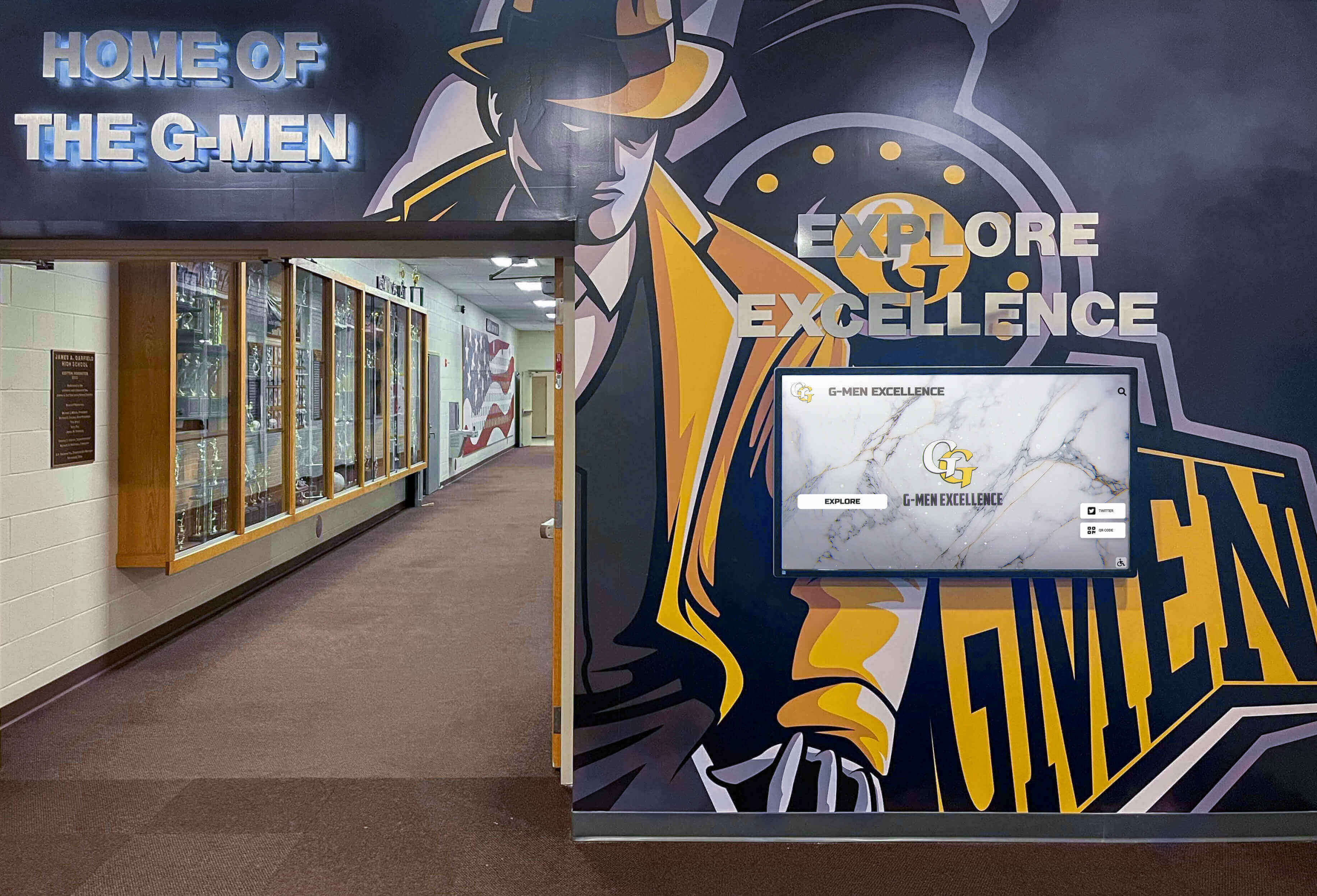
Traditional vs. Modern Hallway Displays
Understanding the evolution from traditional to modern hallway display approaches reveals why schools increasingly invest in upgraded recognition spaces.
Traditional Hallway Displays:
Conventional hallway displays typically feature static bulletin boards covered in paper, framed certificates or photos mounted on walls, trophy cases displaying physical awards, painted murals that remain unchanged for years, and printed banners hanging from ceilings. While these traditional approaches serve basic recognition needs, they suffer from significant limitations including time-consuming updates requiring physical access, space constraints limiting how many achievements can be displayed, deterioration from age and handling, and limited engagement beyond passive viewing.
Modern Hallway Display Solutions:
Contemporary hallway displays incorporate interactive digital technology that overcomes traditional limitations while creating more engaging experiences. Digital displays allow instant content updates from anywhere, unlimited storage capacity for historical and current recognition, multimedia integration including photos, videos, and animations, and interactive features enabling exploration and discovery.
Schools implementing modern hallway displays report significantly higher student engagement, with visitors spending 3-5 times longer interacting with digital displays compared to glancing at traditional recognition boards. This extended engagement creates deeper connections with recognized achievements and strengthens community identity.
Types of Exciting Hallway Displays for Schools
Effective hallway transformations incorporate multiple display types addressing different recognition needs and engaging diverse audiences.
Academic Excellence Displays
Celebrating academic achievement through hallway displays reinforces the value of scholarship while inspiring current students to pursue excellence.
Honor Roll Recognition:
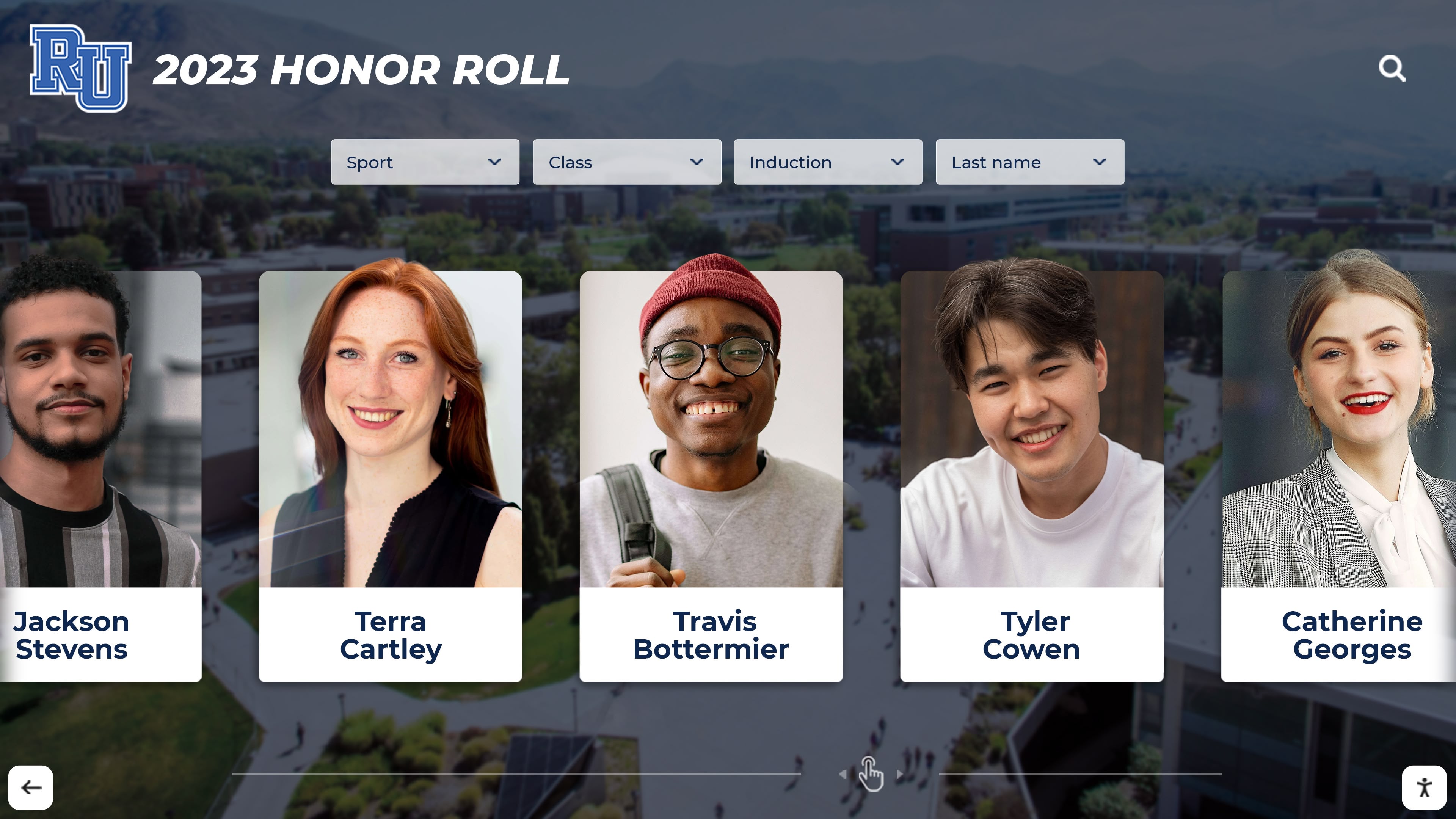
Honor roll displays showcase students achieving academic excellence each marking period. Modern digital recognition systems allow schools to update honor roll listings instantly when grades finalize, eliminating the weeks-long delay inherent in printed displays. Interactive digital displays enable filtering by grade level, academic year, or cumulative GPA, allowing students to quickly find classmates or track their own recognition across multiple years.
Schools implementing comprehensive honor roll displays typically include High Honor Roll for students achieving 3.75+ GPAs, Honor Roll for 3.25-3.74 GPAs, and Merit Roll for 3.0-3.24 GPAs. Inclusive recognition acknowledging various levels of achievement ensures more students receive public celebration of their academic efforts.
Specialized Academic Recognition:
Beyond general honor roll, exciting hallway displays can celebrate specialized academic achievements including:
- AP Scholar recognition for students excelling in Advanced Placement coursework
- National Merit Scholars and commended students
- Subject-specific awards in mathematics, science, English, social studies, and world languages
- Academic competition winners in Science Olympiad, Quiz Bowl, Math League, and debate tournaments
- STEM project achievements showcasing student innovation and research
Scholarship Recipients:
Recognizing scholarship winners through hallway displays celebrates academic achievement while inspiring younger students to pursue similar opportunities. Displays can showcase scholarship amounts, awarding organizations, and student photos, creating aspirational models for academic success. This recognition also honors the family sacrifices and teacher mentorship supporting student achievement.
Athletic Achievement Displays
Athletic hallways represent some of the most exciting and impactful display opportunities in schools, celebrating team and individual accomplishments while building school spirit.
Championship Recognition:
State championship banners, conference titles, tournament victories, and undefeated seasons deserve prominent celebration in hallway displays. Digital championship recognition enables schools to showcase complete championship histories with team photos, rosters, scores, and season highlights rather than simple banners listing years.
Interactive displays allow visitors to explore championship seasons in depth—viewing game-by-game results, watching highlight videos, reading player reflections, and understanding the context making each championship significant. This storytelling approach creates emotional connections with athletic achievements that simple listings cannot match.
Record Board Displays:
Athletic record boards tracking top performances across school history create ongoing engagement as current athletes pursue existing records. Modern digital record boards automatically highlight records within reach—when a current athlete approaches a long-standing record, the display can feature head-to-head comparisons creating excitement around potential record-breaking performances.
Record categories typically include individual performance records like fastest times, highest scores, or most points, season records for single-season achievements, career records accumulated across multiple years, and team records for collective accomplishments. Comprehensive record boards covering all sports ensure equitable recognition across athletic programs.
Athlete Recognition:
Honoring outstanding individual athletes through hallway displays celebrates excellence while inspiring younger students. Recognition categories might include All-State selections, All-Conference honors, 1,000-point basketball scorers, athletes signing collegiate scholarships, and athlete of the year awards.
Solutions like Rocket Alumni Solutions enable schools to create sophisticated athlete profiles accessible through interactive displays, including career statistics, memorable performances, quotes from coaches and teammates, and updates on post-graduation athletic careers. This depth of recognition far exceeds what traditional plaques can provide.

Arts and Activities Recognition
Well-rounded recognition programs celebrate diverse forms of excellence extending beyond academics and athletics.
Performing Arts Achievements:
Music program recognition can showcase All-State musicians, honor choir and band members, competition awards, and memorable performance highlights. Digital displays incorporating performance video clips bring arts recognition to life in ways static photos cannot, allowing students to experience award-winning performances during passing periods.
Theater programs benefit from displays featuring production photos, cast lists, awards received, and behind-the-scenes content documenting the creative process. This recognition validates the significant time and talent students invest in performing arts.
Visual Arts Showcases:
Hallway galleries displaying student artwork transform corridors into museum-like spaces celebrating creative expression. Digital displays can rotate student art submissions ensuring broader representation than physical space alone allows, with featured artist information and artist statements providing context for displayed works.
Schools implementing digital art displays report that recognition motivates higher-quality submissions and broader participation, as students appreciate the professional presentation their work receives rather than simple bulletin board display.
Club and Activity Recognition:
Celebrating club achievements and leadership builds inclusive recognition culture extending beyond traditional achievement categories. Displays might honor club service projects and community impact, leadership positions and student government representatives, competition successes in academic and special interest clubs, and annual highlights from diverse activities including robotics, journalism, yearbook, and cultural organizations.
Historical and Alumni Recognition
Connecting current students with institutional history builds tradition and school pride while creating powerful alumni engagement opportunities.
School History Displays:
Interactive school history timelines allow students to explore decades of institutional development through photos, documents, and stories documenting the school’s evolution. These displays might highlight founding and early years, building expansions and facility improvements, milestone anniversaries, distinguished graduates and their accomplishments, and historical context connecting school development with community history.
Digital history displays enable layered exploration—surface-level browsing for casual interest combined with deep dives for students conducting research projects or alumni seeking specific memories.
Alumni Hall of Fame:
Honoring distinguished alumni through hallway displays creates aspirational models while strengthening alumni connections to their alma mater. Alumni recognition displays can feature professional achievements, community service and leadership, artistic and creative accomplishments, athletic success at collegiate or professional levels, and extraordinary life contributions.
Interactive digital platforms enable alumni to submit profile updates maintaining current information, while social sharing features allow honored alumni to share recognition with their networks, amplifying school visibility and pride.

Yearbook and Archive Access:
Digital yearbook archives accessible through hallway kiosks enable students to explore decades of school history, find parents’ or teachers’ student photos, and discover how traditions evolved over time. This connection between past and present strengthens understanding of school identity and continuing legacy.
Alumni visiting campus appreciate easy access to their yearbook memories through interactive displays rather than requesting archived materials from administrative offices. This accessibility increases alumni engagement during campus visits for games, performances, or special events.
Student Work and Project Displays
Showcasing current student work through hallway displays celebrates ongoing learning and creates authentic audiences for student projects.
Rotating Student Portfolios:
Digital displays can feature rotating student work portfolios from various classes and grade levels, ensuring broad representation across the school year. Students appreciate professional presentation of their work in high-traffic hallways rather than display limited to classroom walls visible only to classmates.
Featured work might include written compositions, research projects, scientific investigations, mathematical problem-solving, historical analyses, and creative projects across disciplines. Brief artist/author statements accompanying displayed work help viewers understand the learning objectives and creative processes.
STEM Showcase Displays:
STEM competition achievements and innovative student projects deserve prominent recognition building school identity around innovation and problem-solving. Displays can feature engineering design projects, robotics competition highlights, science fair award winners, computer programming and app development, and environmental research initiatives.
Interactive displays allow detailed project documentation including design process, challenges encountered, solutions developed, and real-world applications, providing far more context than simple award announcements.
Creating Engaging Visual Design
Content quality matters tremendously, but visual design determines whether students actually engage with hallway displays or simply walk past without noticing.
Design Principles for Maximum Impact
Hierarchy and Organization:
Effective hallway displays create clear visual hierarchy directing attention to the most important elements first. Large headers establish the display theme, prominent imagery draws initial attention, supporting text provides necessary detail, and interactive elements invite deeper exploration. Without clear hierarchy, displays become visually overwhelming walls of information that viewers ignore rather than engaging with selectively.
Color and Branding:
Consistent use of school colors and branding elements creates cohesive identity across hallway displays while distinguishing your school’s unique character. Effective color strategies include primary school colors for major elements and backgrounds, accent colors highlighting important information or interactive elements, neutral tones providing visual rest and readability, and sufficient contrast ensuring accessibility for viewers with various visual abilities.
Typography and Readability:
Hallway viewing differs from close reading—text must remain legible from 10-15 feet away during brief passing periods. Large, bold fonts for headers ensure visibility from distance, san-serif fonts generally provide better screen readability, appropriate spacing prevents visual crowding, and limited text keeps messages concise respecting viewers’ limited attention during transitions.
Dynamic vs. Static Elements:
Combining changing digital content with static design elements creates visual interest without overwhelming viewers with constant movement. Static elements might include painted murals providing consistent brand identity, physical architectural features defining space, and permanent structural components. Dynamic elements include rotating photos and graphics, updated achievement listings, animated transitions and effects, and interactive components responding to user input.
This combination ensures hallways feel alive and current without the sensory overload that excessive movement creates.

Technology Integration
Modern hallway displays increasingly incorporate digital technology creating more engaging and flexible recognition opportunities.
Interactive Touchscreen Displays:
Interactive touchscreens transform passive hallway viewers into active participants exploring achievements, searching for specific individuals or teams, filtering recognition by category or year, and discovering detailed stories behind accomplishments. Touchscreen technology feels intuitive to students accustomed to smartphones and tablets, requiring minimal instruction for effective use.
Digital recognition systems like those offered by Rocket Alumni Solutions combine purpose-built hardware with educational-focused software creating seamless experiences specifically designed for school recognition needs rather than generic digital signage repurposed for education.
Integrated Display Systems:
Comprehensive recognition programs benefit from integrated systems combining physical hallway displays with web-based access enabling broader reach. This integration allows alumni to explore recognition displays from anywhere rather than requiring campus visits, parents to share student achievements with extended family and friends, and current students to access detailed information from personal devices.
Content Management Efficiency:
Modern digital display systems feature cloud-based content management allowing authorized staff to update recognition instantly from any internet-connected device without requiring physical access to displays. This efficiency means honor roll updates appear immediately when grades finalize, championship recognition goes live as soon as tournaments conclude, and timely student spotlights highlight current achievements rather than waiting weeks for physical updates.
Implementation Strategies
Creating exciting hallway displays requires strategic planning ensuring effective execution and long-term sustainability.
Assessment and Planning
Space Evaluation:
Begin by systematically evaluating existing hallway spaces identifying opportunities for recognition displays:
Walk through buildings during passing periods observing traffic patterns and natural congregation points, photograph current conditions documenting what exists today, measure available wall space noting locations suitable for various display types, identify electrical access for digital displays, and note lighting conditions affecting visibility and visual quality.
This assessment reveals both prime opportunities for high-impact displays and challenging spaces requiring creative solutions.
Stakeholder Input:
Effective hallway displays reflect community values and priorities rather than administrator assumptions. Gather input from students through surveys or focus groups asking what recognition matters most, teachers identifying achievements deserving celebration, alumni sharing what historical content creates emotional connections, and parents contributing perspectives on community values and pride.
This input ensures displays resonate with intended audiences rather than reflecting only planning committee preferences.
Budget Development:
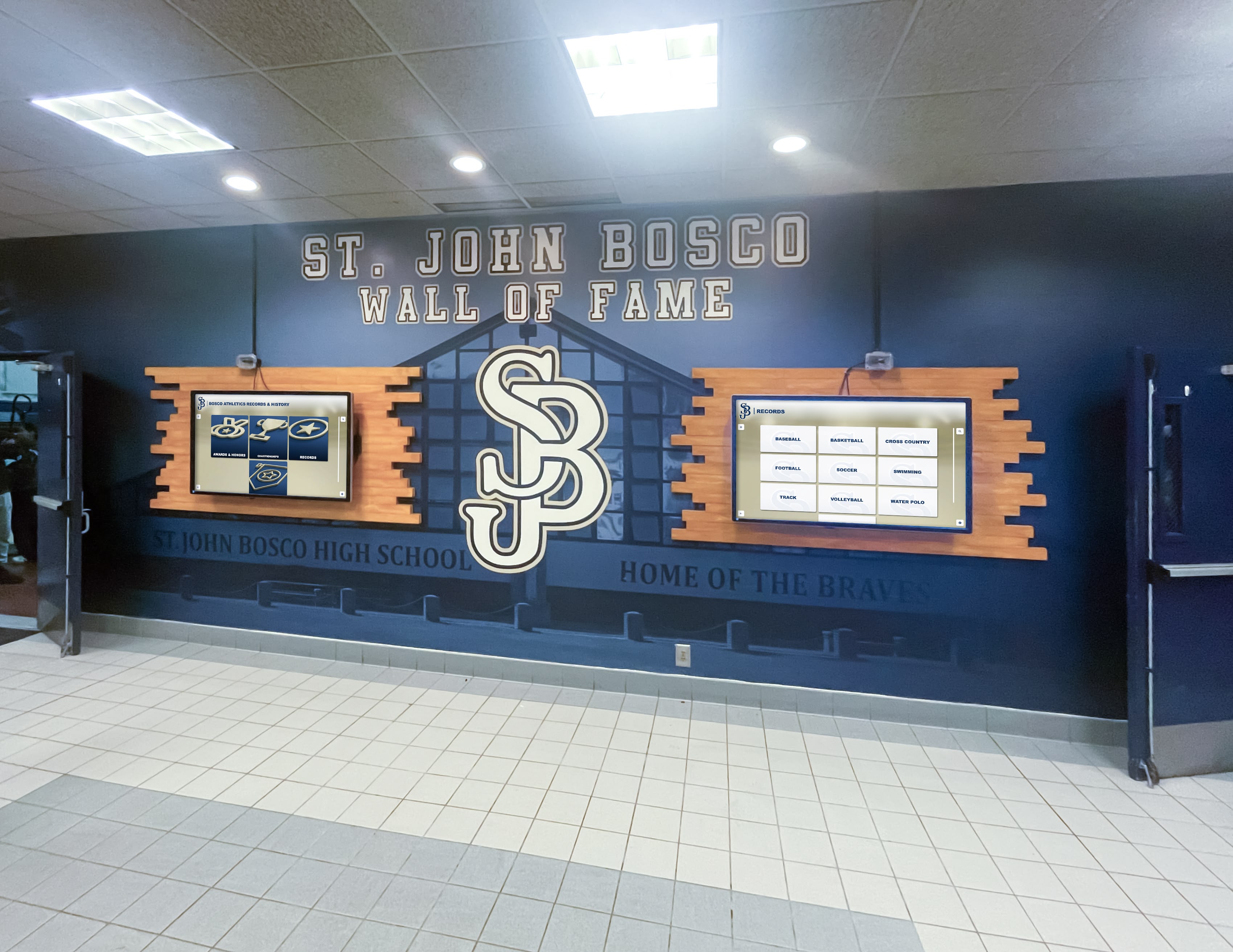
Hallway display investments vary significantly based on approach and scale. Basic options might include painted murals with physical recognition boards costing $2,000-$8,000, vinyl graphics with printed photo displays costing $3,000-$12,000, and basic digital screens with content management systems costing $5,000-$15,000 per display. Comprehensive solutions combining environmental design with interactive technology range from $15,000-$50,000+ for complete hallway transformations.
Solutions like Rocket Alumni Solutions offer flexible options allowing schools to start with core displays and expand over time as budgets allow, avoiding the all-or-nothing approach that delays implementation for years while awaiting full funding.
Design and Content Development
Professional Design Services:
While some schools possess internal creative talent, most benefit from professional design services ensuring high-quality results. Professional designers bring experience with color theory and visual hierarchy, knowledge of materials and production methods, understanding of Americans with Disabilities Act (ADA) requirements, and proven processes ensuring efficient project execution.
Design investment typically represents 10-20% of overall project budgets but significantly influences whether final results truly excite and engage viewers rather than simply existing as generic displays.
Content Collection and Organization:
Compelling displays require quality content including high-resolution photos of students, teams, and events, achievement data including names, dates, and specific accomplishments, historical materials from archives or alumni contributions, quotes and testimonials adding personal perspectives, and statistical information contextualizing achievements.
Systematic content collection during planning prevents rushed searches for materials during production when missing content delays projects or forces compromises in display quality.
Installation and Launch
Professional Installation:
Quality installation ensures displays function properly and maintain appearance over time. Professional installers properly mount heavy display components safely, run electrical and networking infrastructure to code requirements, ensure ADA-compliant accessibility, and verify all interactive components function correctly before project completion.
Attempting DIY installation of complex display systems often results in poor positioning, technical issues, or safety concerns requiring costly correction. Budget for professional installation as essential project component rather than optional expense to reduce.
Community Launch Event:
Formal unveiling events generate excitement while creating opportunities for media coverage and community celebration. Launch events might include dedication ceremony for significant displays, recognition of donors or sponsors funding the project, first interactions with new interactive displays, and refreshments encouraging community members to explore at leisure rather than rushing past.
These events establish displays as significant community resources deserving attention and appreciation rather than simply appearing one day without fanfare.
Maintenance and Updates
Ongoing Content Management:
Exciting hallway displays remain relevant only through regular content updates. Establish clear processes for who updates displays, how often different content refreshes, where updated information originates, and how quality control prevents errors in published recognition.
Digital displays dramatically reduce maintenance burden compared to physical updates—changes requiring hours of physical work with printed materials become five-minute updates through content management systems.
Technology Maintenance:
Digital displays require periodic maintenance ensuring continued operation including software updates maintaining security and functionality, screen cleaning preserving visual quality, hardware monitoring identifying potential failures before they occur, and support contracts providing expert assistance when issues arise.
Schools implementing interactive touchscreen systems should plan for hardware refresh every 6-8 years as commercial displays reach end-of-life, with proper capital planning ensuring continuous operation through systematic replacement cycles.
Measuring Impact and Success
Effective hallway displays demonstrate value through both quantitative metrics and qualitative outcomes.
Engagement Metrics
For digital interactive displays, analytics reveal actual usage patterns including total interactions logged, unique users vs. repeat visitors, most-viewed content categories, search queries revealing user interests, time spent exploring displays, and peak usage times during school day.
These metrics help administrators understand what recognition resonates most strongly with students, informing future content priorities and display expansion decisions.
Community Feedback
Qualitative assessment through surveys, focus groups, and informal feedback reveals whether displays achieve desired impacts:
Do students report feeling more connected to school community? Do families appreciate public recognition of student achievements? Do alumni express stronger emotional connections during campus visits? Do prospective families cite displays as factors in enrollment decisions?
This feedback often reveals unexpected benefits beyond planning committee’s original objectives, validating investment and suggesting expansion opportunities.
Observable Outcomes
Beyond formal assessment, observable changes indicate successful hallway display implementations:
Increased student conversations about displayed achievements during passing periods, more family visitors exploring displays during campus events, alumni spending extended time at displays during visits, and social media sharing of hallway recognition expanding school visibility organically.
Advanced Hallway Display Concepts
Beyond foundational recognition, innovative schools implement advanced display concepts creating distinctive experiences.
Thematic Hallway Designs
Rather than generic recognition, thematic approaches create cohesive environments:
Decade Hallways: Each corridor represents a different decade of school history with period-appropriate design, era-specific achievements, and historical context
Subject-Based Hallways: Science wing celebrates STEM achievements and innovation, arts hallway showcases creative accomplishments, language hall highlights multicultural diversity and global connections
Values-Based Recognition: Hallways organized around institutional values like integrity, innovation, service, excellence, and community with relevant achievement examples
These thematic approaches create more meaningful organization than simply grouping all recognition together regardless of context or connection.
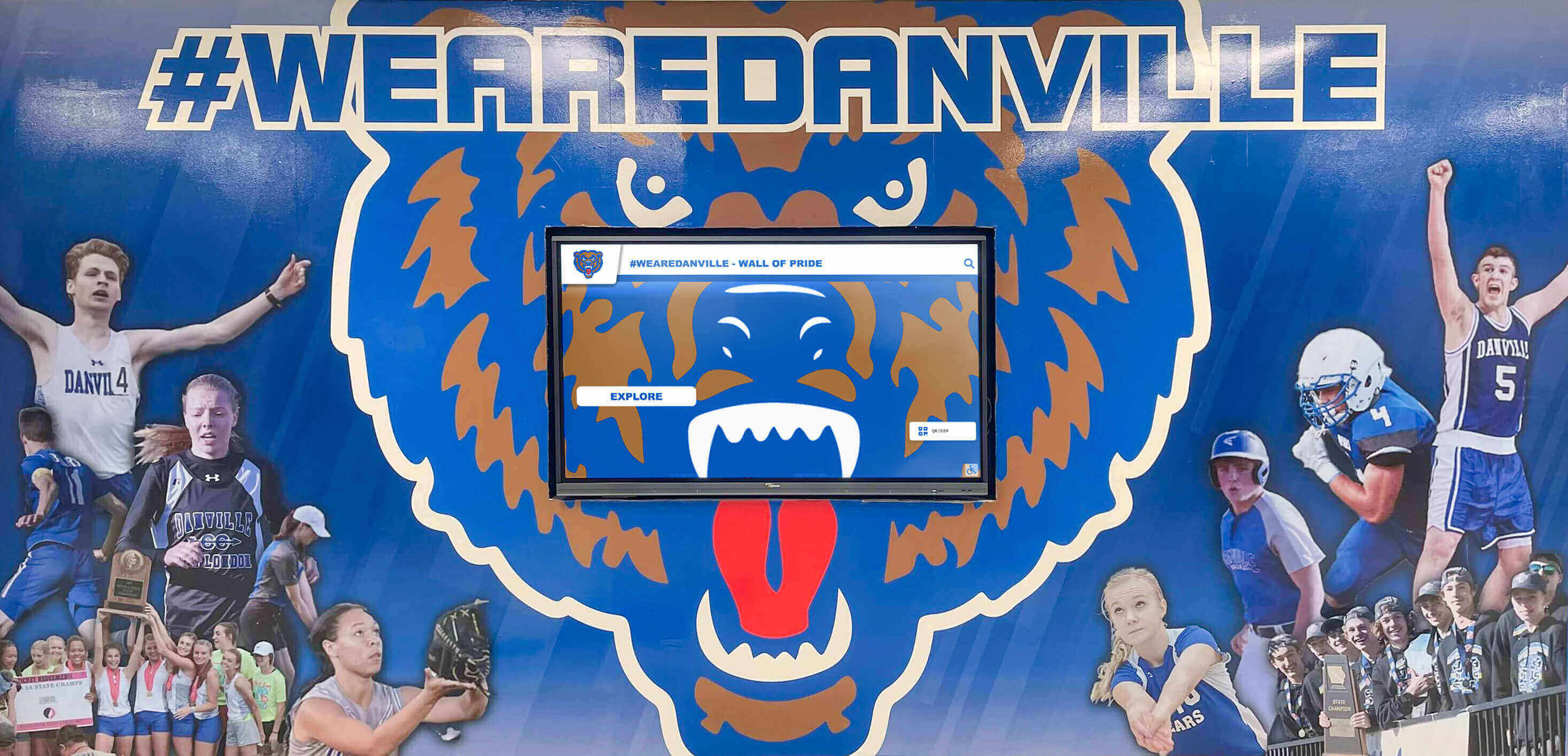
Interactive Learning Exhibits
Hallway displays can serve explicit educational functions beyond recognition:
Historical Timeline Exhibits: Interactive exploration of local, state, or national history with connections to school community
Science Demonstrations: Engaging exhibits explaining scientific principles through interactive components
Cultural Celebrations: Rotating exhibits honoring diverse cultures represented in school community
Career Exploration: Information about various professions connected to alumni career paths
These educational displays transform hallways into extension of learning spaces rather than merely transitional corridors.
Common Mistakes to Avoid
Schools planning hallway displays benefit from understanding predictable pitfalls.
Overcrowding Information:
The impulse to include every possible achievement and individual creates visually overwhelming displays that viewers ignore rather than engaging selectively. Prioritize most significant achievements, use filtering and search in digital displays to make comprehensive information accessible without displaying everything simultaneously, and accept that rotation means some worthy achievements receive temporary rather than permanent display.
Neglecting Diversity:
Recognition programs honoring only traditional academic and athletic achievement alienate students excelling in other domains. Ensure displays celebrate diverse achievement types, represent various student demographics, honor different forms of contribution and excellence, and avoid creating hierarchy implying certain achievements matter more than others.
Static Content:
Displays remaining unchanged for years become invisible to daily viewers who stop noticing static backgrounds. Regular content rotation maintains relevance, featuring current achievements creates urgency to check displays regularly, and highlighting “on this day” historical content keeps even archival materials feeling fresh and interesting.
Technology Without Strategy:
Installing digital displays without clear content strategy and maintenance plans results in expensive screens cycling generic content no more engaging than physical displays. Technology should serve clear recognition objectives rather than being implemented simply because it’s impressive or modern.
Conclusion: Transforming Hallways Into Community Assets
School hallways represent tremendous opportunities for building community, celebrating achievement, and creating engaging learning environments. Exciting hallway displays transform these underutilized transitional spaces into dynamic recognition venues that inspire students, strengthen school identity, and create lasting emotional connections for current students and returning alumni.
Modern approaches combining thoughtful design, strategic content, and innovative technology create hallway experiences far exceeding what traditional bulletin boards and trophy cases provide. Interactive digital recognition systems enable comprehensive celebration of diverse achievements without space constraints, instant updates ensuring timely recognition, multimedia storytelling bringing achievements to life, and web accessibility extending reach beyond physical campus visitors.
Schools implementing comprehensive hallway display programs consistently report strengthened school culture and pride, increased student engagement with achievement recognition, enhanced alumni emotional connections during campus visits, and positive community perception of institutional investment in celebration and tradition.
Whether you’re beginning with simple improvements to existing displays or planning comprehensive hallway transformations, the strategies outlined in this guide provide proven frameworks for success. Starting with clear objectives aligned to community values, gathering quality content representing diverse achievements, investing in professional design creating visual impact, implementing appropriate technology serving strategic needs, and planning for sustainable long-term maintenance create programs delivering value for years to come.
Solutions like Rocket Alumni Solutions offer integrated platforms specifically designed for educational recognition, combining interactive touchscreen displays with web-based access and intuitive content management. These comprehensive systems enable schools to create exciting hallway displays that celebrate community excellence while building stronger connections across generations of students, alumni, and families without requiring extensive technical expertise.
Your school’s hallways—representing significant square footage and daily visibility to entire school populations—deserve to be vibrant spaces celebrating what makes your community special. By implementing exciting hallway displays that honor achievement, connect current students with institutional history, and create engaging environments throughout your buildings, you transform simple corridors into powerful community assets that strengthen school pride and inspire excellence.
Ready to transform your school’s hallways into exciting recognition spaces? Explore how Rocket Alumni Solutions can help your school design, implement, and maintain comprehensive hallway displays combining environmental design, interactive technology, and web accessibility specifically created for educational communities.































