Walk into a high school weight room that takes its program seriously and you notice immediately: the space communicates something. Whether it’s a hand-painted mural of the school mascot, a record board tracking the heaviest lifts in program history, or a digital display cycling through this season’s top performers, the signage around a training facility shapes the experience of every athlete who walks through the door. Fitness signage is not decoration. It is environment — and environment shapes behavior, motivation, and culture.
Fitness signage encompasses every visual communication element in an athletic program’s training spaces — weight rooms, training rooms, locker rooms, gymnasiums, and athletic hallways. When planned deliberately, these displays motivate athletes, enforce safety standards, communicate program identity, and honor the achievements that define a program’s competitive history. This guide covers the full range of fitness signage ideas for high school athletic programs, from low-cost motivational prints to digital recognition systems that transform how programs preserve and celebrate their culture.
Why Fitness Signage Matters for High School Programs
The spaces where athletes train send constant messages about what the program values. An undecorated weight room communicates one thing. A facility with purposeful signage communicates another entirely.
Research in environmental psychology consistently shows that physical environments influence motivation, effort, and identity. Athletes who train in spaces that visually reinforce program values — championship histories, training expectations, team identity — develop a stronger sense of belonging and competitive purpose than those training in generic institutional spaces.
For athletic directors and coaches making signage decisions, the question is not whether to invest in fitness signage, but which investments deliver the most value for program goals. The answer depends on what the program needs most: safety reinforcement, motivational culture, competitive history preservation, or community-building around athletic identity.
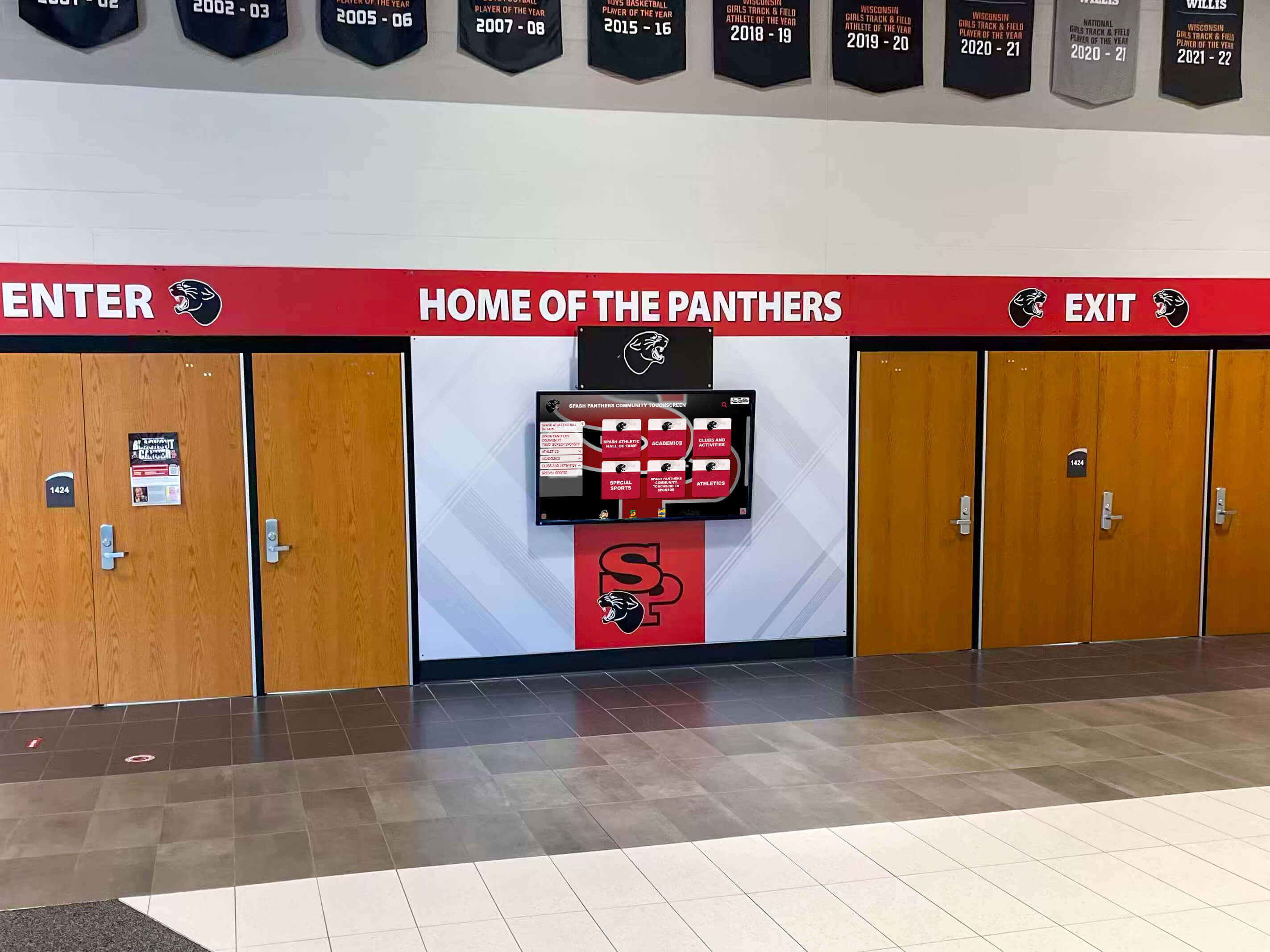
The entrance to athletic spaces sets expectations from the first step — digital displays at entry points communicate program identity and current priorities before athletes reach the weight room floor.
Weight Room Signage Ideas
The weight room is where athletic development happens in the daily, unglamorous grind of off-season and preseason training. Signage in this space needs to work harder than anywhere else in the athletic facility because athletes spend more time here and the environment directly influences training intensity.
Motivational and Mindset Signage
Motivational signage in weight rooms ranges from simple vinyl quotes to elaborate murals. The most effective choices tie motivation directly to program identity — what this school’s program stands for, who came before, and what current athletes are building toward.
Large-format wall graphics: Full-wall or half-wall vinyl graphics featuring the school mascot, team colors, and program slogans create immediate visual impact. These work especially well on the wall athletes face during heavy lifts — the moment their attention is most focused.
Quote installations: Short, powerful statements from coaches, athletes, or cultural figures relevant to the program’s values. The best quote signage avoids generic inspiration-poster clichés and instead reflects something specific to the school’s competitive identity.
“Train Where Champions Trained” theme: Connecting current athletes to program history is one of the most effective motivational frames available. A display featuring photos and names of former athletes who trained in the same space — and went on to compete at the next level or achieve recognition — creates a powerful sense of legacy. The best-touchscreen.com guide on sports nutrition and student athlete performance reinforces how the entire training environment — physical space included — contributes to performance outcomes.
Safety and Rules Signage
Weight room safety signage is non-negotiable. Every training facility needs clear, visible communication of rules, emergency procedures, and proper equipment use.
Rules boards: A well-designed rules board at the weight room entrance covers equipment spotting requirements, attire standards, proper racking procedures, phone policies, and supervision requirements. These should be prominent without being visually cluttered.
Technique coaching graphics: Instructional signage showing proper form for major compound lifts — squat, deadlift, bench press, overhead press — reduces injury risk and extends the coaching effect beyond supervised sessions. QR codes linking to demonstration videos can supplement static graphics.
Emergency protocols: Clear posting of emergency procedures, AED location, and staff contact information is a compliance requirement and a safety baseline. This signage should be visually distinct from motivational and decorative elements — clear, functional, and impossible to miss.
Equipment capacity and load limits: For plate-loaded equipment and platforms, posted weight limits and usage guidelines reduce both equipment damage and injury risk.
Weight Room Record Boards
A program record board in the weight room is one of the highest-motivation fitness signage investments a school can make. When athletes can see the current record for each major lift — and the name attached to it — every training session has a measurable benchmark to chase.
Record boards can track:
- Maximum lifts by category (squat, clean, bench, deadlift) organized by weight class or sport
- Season-best performances for current athletes
- Combined totals for multi-event strength measurements
- Year-over-year team averages showing program-wide development
Track and field records displays follow similar principles — maintaining visible, updated records gives current athletes a direct competitive reference while preserving the program’s performance history.
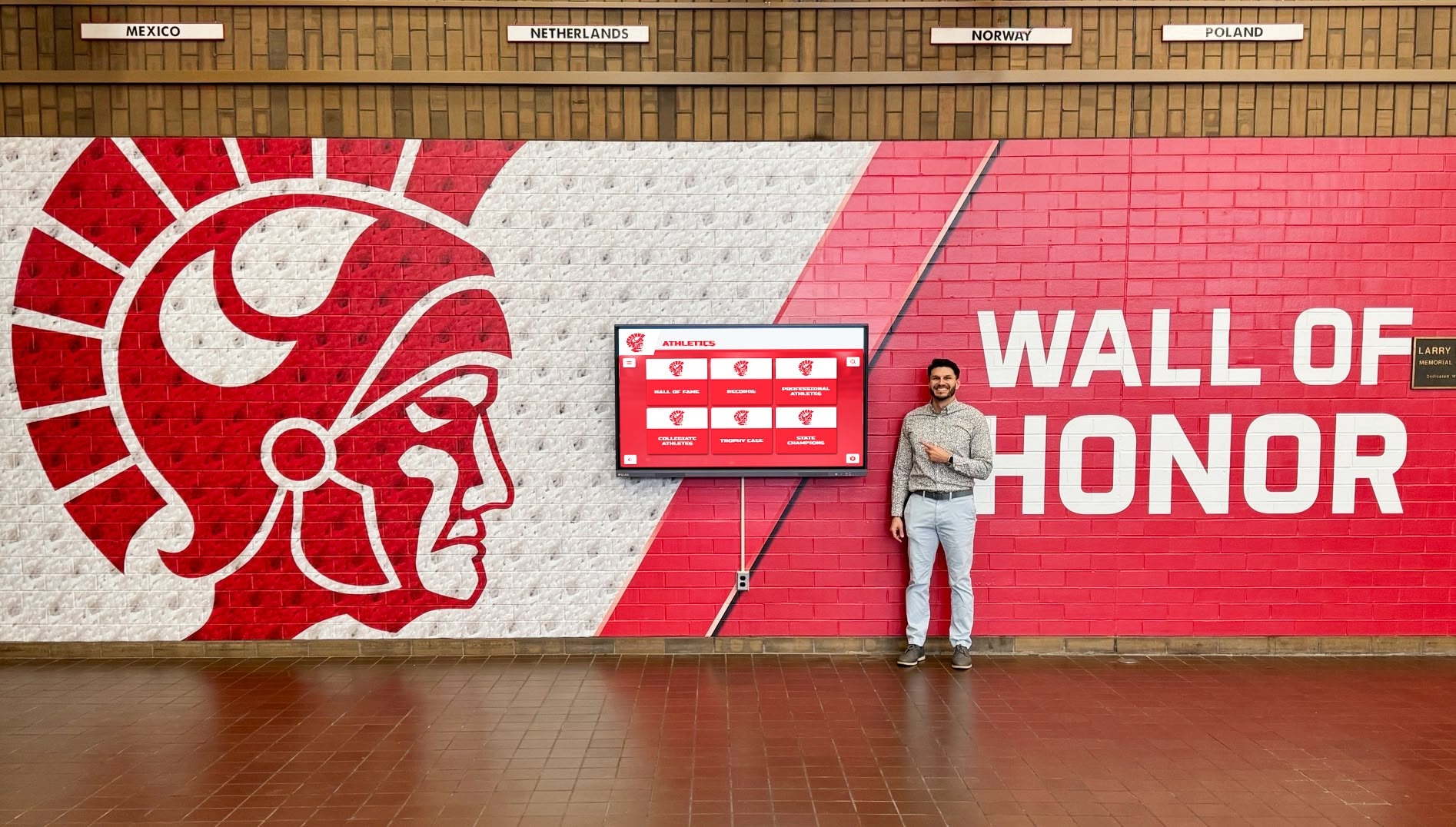
Recognition displays positioned in athletic hallways adjacent to training spaces connect daily effort in the weight room to the long-term recognition athletes work toward — a visible bridge between the grind and the reward.
Locker Room Signage Ideas
Locker rooms are where teams prepare mentally before competition and decompress afterward. The signage here has a different function than in the weight room — it focuses more on team cohesion, competitive readiness, and identity than on performance tracking.
Locker room design for functional team spaces covers the broader design considerations, but signage choices sit at the center of what makes a locker room feel like a competitive environment versus a utilitarian changing area.
Team Identity Signage
Locker room entrance graphics: The wall facing athletes as they enter sets the tone for every preparation session. A clean graphic featuring the school’s competitive identity — the mascot, school colors, and a program-defining statement — signals the transition from school day to competitive preparation.
Nameplate systems: Individual lockers with personalized nameplates communicate that every athlete is known, expected, and valued. This is low-cost, high-impact signage that translates directly into team cohesion.
Season schedule boards: A dry-erase or digital display showing the full season schedule — with home games, away trips, and opponent names — keeps every athlete oriented to the competitive calendar. Updating it as results come in creates a visible record of the season’s progress.
Motivational Locker Room Displays
Pre-game focus phrases: Short, high-intensity statements specific to the team’s identity. These work best when they are genuinely the team’s own language — phrases coaches and athletes actually use — rather than imported quotes that feel external to the culture.
Coach’s board: A writable surface visible to the full team where the coaching staff posts daily or weekly focus items. This can be as simple as a whiteboard, but the intention matters: the board should be updated consistently so athletes check it habitually.
Team photo walls: A rolling display of team photos from current and past seasons builds historical continuity. Athletic team photo wall ideas cover both physical and digital approaches to maintaining these displays without consuming excessive wall space as programs accumulate years of imagery.
Gymnasium Fitness Signage
The gymnasium is the highest-visibility athletic space in most high schools — it hosts competition, physical education classes, assemblies, and community events. Fitness signage here reaches the broadest audience: athletes, non-athletes, families, community members, and visiting teams.
Championship Banners
Championship banners are the oldest form of athletic fitness signage and still one of the most powerful. A well-designed banner program communicates competitive achievement to every person who enters the gymnasium.
Championship banner design ideas for high school gyms covers design approaches in depth, but the core principles are: consistent design language across all banners, clear visibility from the court and from the bleachers, and a plan for adding new banners that preserves visual coherence over time.
Banner programs benefit from establishing:
| Decision | Considerations |
|---|---|
| What qualifies for a banner | Conference titles, state qualifiers, state champions, milestone records |
| Banner dimensions | Consistent sizing for visual uniformity; typically 18" × 36" to 24" × 48" |
| Color and font standards | Match school branding; high-contrast design for readability at distance |
| Hanging system | Track-mounted systems allow future additions without drilling; ladder access for changes |
| Chronological vs. sport-grouped | Chronological creates historical narrative; sport-grouped allows per-sport pride |
Gym Scoreboard and Informational Displays
Digital scoreboards and shot clocks are functional fitness signage that also carries brand value. Modern scoreboard systems allow customization with school colors, mascot graphics, and sponsor recognition that transforms functional equipment into identity signage.
Beyond the scoreboard, gymnasium displays can include:
Hall of fame recognition walls: Displayed on gym walls adjacent to bleacher seating, hall of fame plaques and photo displays are visible to fans during every event. Touchscreen displays in high school gym lobbies extend this recognition infrastructure into interactive territory, allowing visitors to explore the program’s complete history between sessions.
Academic honor roll boards: Many programs post academic recognition alongside athletic achievement in gymnasium spaces — scholar-athlete displays, honor roll lists, and graduation recognition that communicate the full student-athlete identity.

Athletes engaging with game highlights and program content on lobby screens demonstrates how fitness signage extends beyond static displays — current content keeps athletes engaged with their program's story.
Athletic Hallway and Lobby Fitness Signage
The hallways and lobby spaces connecting athletic facilities are high-traffic, high-visibility environments that serve multiple audiences simultaneously: athletes heading to practice, students passing between classes, visitors touring the facility, and alumni returning for events.
Digital Recognition Displays
Digital displays in athletic hallways represent one of the most significant fitness signage upgrades a high school program can make. Unlike static banners and plaques — which require physical replacement every time something changes — digital systems allow content updates that take minutes, not weeks.
A well-planned digital display system in athletic hallways can show:
- Current season schedules and results
- Athlete of the week spotlights
- Record board updates in real time
- Hall of fame profiles and program history
- Upcoming event information
- College signing announcements
- Academic honor recognition
Digital signage services covering touchscreen kiosks and multi-screen configurations show the range of configurations available for school athletic spaces — from single-display lobby installations to multi-screen hallway systems covering an entire athletic wing.
School Identity and Wayfinding Signage
Athletic hallways that serve as the primary circulation route through a facility benefit from clear wayfinding combined with identity signage. Directional graphics in school colors, with clearly marked destinations (Weight Room, Training Room, Gymnasium, Locker Rooms), function both practically and aesthetically — they orient visitors while reinforcing the program’s visual identity at every turn.
Mascot murals: A large-scale mural installation in the primary athletic entrance or hallway creates an unmistakable statement of program identity. These work best when paired with functional display elements — recognition boards, schedule displays, or hall of fame sections — so the mural serves as backdrop rather than sole content.
“Wall of Excellence” installations: A curated display recognizing multiple achievement categories — academic, athletic, community service, alumni success — in a unified visual format creates a comprehensive identity statement for the athletic program. Highlighting student accomplishments through dedicated display formats covers the specific design and content decisions that make these installations effective.

A digital display integrated into mascot-themed athletic hallway branding demonstrates how fitness signage can combine identity, recognition, and information in a single cohesive installation.
Digital vs. Traditional Fitness Signage
Both digital and traditional fitness signage have distinct roles in a well-planned athletic environment. Understanding the strengths of each helps programs allocate budgets and spaces appropriately.
Traditional Fitness Signage: Where It Excels
Traditional signage — vinyl, paint, print, and physical fabrication — is right for applications where:
The content is stable: Championship banners, school mascot murals, safety rules boards, and program name installations change rarely or never. These are ideal candidates for traditional signage because the cost of physical production is offset by the longevity of the content.
The budget is limited: High-quality vinyl graphics and print installations are significantly less expensive than digital displays. Programs with tight budgets can create compelling fitness signage environments using traditional media before adding digital layers.
The aesthetic calls for permanence: There is a reason championship banners have hung in gymnasiums for decades — physical permanence communicates a different message than digital content. The weight room record board bolted to the wall says something different than a digital display showing the same information.
School display cases comparing traditional versus modern recognition approaches lays out this distinction clearly — the choice is not always either/or, and many programs benefit from layering both approaches.
Digital Fitness Signage: Where It Delivers Unique Value
Digital displays are right for applications where:
Content needs regular updates: Schedule boards, record boards, athlete spotlights, and recognition announcements change constantly. Digital systems eliminate the printing, laminating, and physical replacement cycles that consume staff time and budget.
The goal is engagement, not just display: Interactive touchscreen systems allow athletes, students, and visitors to explore content rather than passively receive it. A parent attending a Friday night game can browse the program’s 20-year athletic history on a lobby touchscreen between quarters. A recruit visiting campus can view the full hall of fame catalog on a display outside the weight room entrance.
Multiple audiences need different content simultaneously: Digital systems can show different content in different athletic spaces — motivational programming in the weight room, schedule information in the lobby, recognition content in the hallway — all managed from a single content platform.
Recognition scale exceeds physical capacity: Physical plaque systems and trophy cases fill up. Programs with decades of competitive history run out of wall space for static recognition. Digital systems have no such limit — every athlete, every season, every achievement can be preserved and displayed without replacement cycles or physical constraints.
Fitness Signage Planning Framework
Before purchasing any fitness signage, programs benefit from working through a structured planning process that matches investments to program needs.
Step 1: Audit Existing Signage
Walk every athletic space — weight room, training room, locker rooms, gymnasium, hallways, lobby — and inventory what exists. Note what is working, what is outdated, what is missing, and what is sending the wrong message. Broken frames, faded prints, and empty plaques communicate neglect more clearly than their absence would.
Step 2: Define Space-by-Space Goals
Different spaces need different signage strategies:
| Space | Primary Signage Goal | Secondary Goal |
|---|---|---|
| Weight room | Motivation and safety | Performance tracking |
| Locker room | Team identity and cohesion | Competition preparation |
| Gymnasium | Achievement recognition | Community engagement |
| Athletic hallway | Program identity | Information and wayfinding |
| Lobby/entrance | First impression and recognition | Alumni and visitor engagement |
Step 3: Prioritize by Impact and Budget
Not every space can be transformed simultaneously. Identify which spaces have the highest visibility and the greatest impact on program culture, and start there. Lobby and gymnasium signage reach the broadest audience. Weight room signage has the most direct daily impact on athletes.
Step 4: Plan for Updates
Static signage that cannot be updated becomes a liability as information ages. Build update mechanisms into every signage decision — whether that means choosing digital systems, dry-erase surfaces, or modular physical display systems that allow content replacement without full reinstallation.

Combining athletic murals with integrated digital screens creates fitness signage environments that balance permanent identity (the murals) with current, updatable recognition content (the screens) — a layered approach that serves both long-term culture and day-to-day communication.
Recognition-Focused Fitness Signage: The Long-Term Investment
The most enduring fitness signage investments are those that recognize athletic achievement in ways that accumulate value over time. A motivational quote graphic stays the same year after year. A hall of fame display grows richer with every graduating class and every new achievement the program earns.
Showcasing school history through community hall of fame displays illustrates the principles behind recognition-focused signage that builds rather than stagnates — systems designed to grow with the program rather than becoming outdated.
For programs investing in digital recognition infrastructure, interactive systems offer capabilities that static fitness signage cannot match:
Unlimited depth: Physical display space is always finite. A digital recognition system can hold thousands of athlete profiles, decades of championship history, and every record ever set in every sport — accessible through an interface that makes searching and exploration intuitive.
Alumni connection: Recognition displays that can be accessed remotely — through a web portal or QR-linked mobile interface — extend the impact of fitness signage beyond the physical facility. Former athletes who moved away decades ago can find themselves in the program’s recognition archive without returning to campus.
Content currency: A recognition system that is regularly updated with new achievements communicates an active, forward-moving program. Static plaques that go unchanged for years suggest a program resting on old success. Digital systems make current recognition as easy as updating a spreadsheet.
Digital donor walls and recognition display guides cover implementation considerations relevant to programs evaluating whether to expand beyond athletic recognition into donor and community recognition within their fitness signage infrastructure.
Build Fitness Signage That Grows With Your Program
Rocket Alumni Solutions designs and installs touchscreen recognition systems, digital walls of honor, interactive record boards, and hall of fame displays built specifically for high school and collegiate athletic programs. Our systems integrate seamlessly into weight rooms, gymnasiums, athletic hallways, and lobby spaces — and they get better every year as your program adds new achievements to the archive.
Fitness Signage Checklist by Space
Use this checklist to evaluate what your program needs in each athletic space:
Weight Room
- Motivational wall graphic aligned with program identity
- Safety rules and equipment guidelines posted at entry
- Technique coaching graphics for major compound lifts
- Record board for major lifts with current record holders and dates
- Emergency procedures and AED location posted clearly
Locker Rooms
- Entry graphic communicating team identity
- Individual nameplate systems for athlete lockers
- Current season schedule board (writable or digital)
- Team photo display from current and past seasons
- Pre-competition focus area (coach’s board or quote installation)
Gymnasium
- Championship banner program with consistent design standards
- Record board visible from court and bleacher areas
- Hall of fame recognition display accessible to fans during events
- Academic honor recognition adjacent to athletic achievement displays
Athletic Hallways and Lobby
- School mascot and identity graphics at primary entrance
- Hall of fame or recognition wall with current content
- Digital or writable schedule and event information display
- Wayfinding graphics directing visitors to facility spaces
- Alumni engagement display accessible to returning visitors
Conclusion
Fitness signage in high school athletic programs spans an enormous range — from simple vinyl motivational prints to fully interactive digital recognition systems. The common thread is intentionality: the most effective fitness signage is planned around what specific spaces need to accomplish, for which audiences, and over what time horizon.
Programs that treat fitness signage as a one-time purchase eventually end up managing a collection of outdated, mismatched displays that communicate stagnation more clearly than achievement. Programs that approach signage as an ongoing investment in program environment and culture build spaces that motivate athletes, engage families, attract recruits, and honor the competitive history that defines what the program is.
For athletic directors evaluating how to elevate their program’s training and recognition environments, Rocket Alumni Solutions builds interactive display systems designed specifically for school athletic programs — touchscreen halls of fame, digital record boards, recognition walls, and integrated athletic display solutions that transform every space from weight room to gymnasium lobby.
Frequently Asked Questions
What is fitness signage?
Fitness signage refers to all visual communication elements in athletic training and competition spaces — weight rooms, training facilities, locker rooms, gymnasiums, and athletic hallways. This includes motivational graphics, safety rules boards, performance record displays, championship banners, hall of fame installations, and digital recognition systems. Effective fitness signage communicates program identity, enforces safety standards, motivates athletes, and honors competitive achievement.
What should be posted in a high school weight room?
At minimum, a high school weight room should post safety rules and equipment guidelines, emergency procedures including AED location, and coaching contact information. Beyond safety essentials, high-performing programs add motivational graphics aligned with program identity, technique coaching visuals for major lifts, and a record board tracking performance benchmarks that current athletes can chase. The combination of safety, motivation, and performance tracking creates an environment that supports both compliance and competitive development.
How do you create motivational fitness signage on a limited budget?
High-quality vinyl wall graphics and large-format prints are the most cost-effective fitness signage option for programs with limited budgets. A single large mascot or school identity graphic on the primary weight room wall creates significant visual impact for a few hundred dollars. Adding a simple dry-erase record board costs even less. Start with the spaces where athletes spend the most time and the investments that connect most directly to program identity — motivation rooted in the team’s specific history and culture is more effective than generic inspiration.
What is the difference between fitness signage and athletic signage?
The terms overlap significantly. Athletic signage typically refers broadly to all signage across an athletic program — including gymnasium banners, entrance displays, and competition space graphics. Fitness signage more specifically emphasizes the training and performance spaces within an athletic program: weight rooms, training facilities, and the environments where physical development happens day to day. In practice, a comprehensive athletic program approach integrates fitness signage (training environments) with competition signage (gymnasiums and fields) and recognition signage (hallways, lobbies, and display walls).
Should high school programs invest in digital fitness signage?
Digital fitness signage makes the most sense for applications where content needs regular updates — record boards, schedule displays, recognition spotlights, and program history archives. For stable content like mascot murals, championship banners, and permanent identity graphics, traditional physical signage is often more cost-effective. The strongest programs use both: permanent traditional signage for identity and history, digital systems for updatable content and interactive recognition. Starting with a single digital display in a high-traffic space — the gymnasium lobby or main athletic hallway entrance — demonstrates the value of digital signage before scaling to a full-facility implementation.































