A championship game ball represents more than athletic victory—it embodies countless practice hours, team sacrifice, community support, and defining moments in school history. Yet too often, these irreplaceable artifacts end up forgotten in storage rooms or deteriorate in inadequate display conditions. The right football display case transforms precious memorabilia into powerful storytelling tools that inspire current athletes, connect alumni to their legacy, and communicate program excellence to prospective students and community members.
Selecting the appropriate display case involves far more than simply finding a container for a football. Schools must balance preservation requirements that protect delicate leather and signatures, security concerns that prevent theft or damage, aesthetic considerations that complement facility design, space constraints in crowded trophy cases and lobbies, budget limitations while maintaining quality standards, and long-term flexibility as collections grow and space needs evolve.
This comprehensive buying guide helps athletic directors, facilities managers, and booster club leaders navigate display case options for game balls and football memorabilia. From understanding preservation fundamentals through evaluating traditional cases, exploring modern digital alternatives, and integrating displays into broader recognition programs, discover how to showcase your program’s football legacy effectively.
Championship game balls, senior night footballs, milestone achievement artifacts, and autographed memorabilia deserve presentation that honors their significance. Whether you’re creating your first athletic display or expanding existing recognition systems, understanding display case fundamentals ensures decisions that protect these irreplaceable pieces of school history while making them accessible for generations to come.

Modern football displays combine traditional game ball preservation with digital storytelling that brings athletic achievements to life
Why Proper Football Display Cases Matter
The difference between a football tossed in a storage closet and one properly displayed in a quality case extends far beyond aesthetics. Proper display systems serve multiple critical functions for athletic programs.
Preservation and Protection
Game balls face numerous threats that accelerate deterioration without appropriate protection:
Environmental damage: Exposure to fluctuating humidity levels causes leather to crack, dry out, or develop mold. Temperature variations expand and contract materials, degrading structural integrity. Direct sunlight fades autographs and discolors leather, erasing precious signatures and destroying visual appeal.
Physical damage: Unprotected footballs collect dust that embeds in leather grain, creating staining and texture degradation. Handling by curious visitors transfers oils that damage signatures and finish. Accidental impacts, falls, or mishandling cause structural damage to laces, panels, or bladders that cannot be reversed.
Security concerns: Valuable memorabilia—especially autographed game balls from significant victories or signed by notable alumni—attracts theft when left unprotected. Schools hosting tournaments, community events, and open houses need secure display solutions that allow viewing while preventing unauthorized access.
Quality football display cases provide climate-controlled environments, UV-protective materials, physical barriers against handling, and secure locking mechanisms that address these preservation challenges while maintaining accessibility for viewing and appreciation.
Program Pride and Recruiting Impact
Display cases serve as visual representations of program achievement that influence multiple stakeholder groups:
Current athlete motivation: Seeing championship game balls from past teams displayed prominently creates aspiration and motivation. Student-athletes understand their efforts could earn similar recognition, creating powerful incentive effects that transcend verbal encouragement. When schools celebrate achievements through quality displays, players understand program commitment to honoring excellence.
Recruiting advantage: Prospective student-athletes and their families evaluate program prestige partly through visible achievement displays. Professional-quality cases showcasing decades of state championship celebrations communicate program tradition and competitive excellence that attracts talented players. Recruits remember schools with impressive athletic displays more than those with achievements hidden away.
Alumni engagement: Former players feel valued when their contributions remain visible decades after graduation. Quality displays at class reunions and alumni events trigger memories and strengthen emotional connections that drive engagement and giving. Alumni are more likely to support programs that demonstrate respect for history through quality preservation.
Community pride: Parents, boosters, and community members attending games and events take pride in seeing local achievements celebrated. Display cases in lobbies and common areas reinforce program status as community focal points worth supporting.

Integrated display systems combine traditional game ball cases with digital touchscreens that tell deeper stories behind each achievement
Historical Documentation
Game balls serve as primary sources documenting program history when properly preserved and contextualized:
Recording milestones: Championship wins, undefeated seasons, record-breaking performances, and significant victories deserve permanent documentation. Display cases with proper labeling and context preserve these milestones when yearbooks get lost and memories fade.
Tracking program evolution: Collections of game balls from different eras visually demonstrate program growth and sustained excellence. Seeing displays that span decades communicates institutional commitment to athletics that transcends individual coaching tenures or administrative changes.
Inspiring future generations: Today’s elementary students who visit your campus for events may become tomorrow’s star athletes. Visible achievements plant aspirational seeds that influence decisions years later when students consider which school to attend or which sport to pursue seriously.
Understanding Football Display Case Types
The market offers numerous display case options, each with distinct advantages, limitations, and ideal use cases. Understanding these categories helps narrow selection based on your specific needs.
Traditional Acrylic Display Cases
Clear acrylic cases represent the most common display option, offering excellent visibility at accessible price points.
Advantages:
- Cost-effective: Acrylic cases typically cost $30-150 depending on size and features, making them accessible for programs with limited budgets
- Lightweight: Easy to wall-mount or place on shelving without requiring significant structural support
- Clarity: High-quality acrylic provides crystal-clear viewing from multiple angles without the greenish tint of some glass options
- Variety: Available in numerous configurations including single ball, double ball, mini helmet combinations, and custom arrangements
- UV protection options: Better models include UV-inhibiting acrylic that prevents signature fading and leather discoloration
Limitations:
- Scratch susceptibility: Acrylic scratches more easily than glass, requiring careful handling and cleaning
- Lower perceived prestige: Clear plastic cases lack the upscale appearance of wood or museum-quality displays
- Security concerns: Standard acrylic cases offer minimal security against determined theft attempts
- Limited climate control: Basic models provide no humidity or temperature regulation
Best for: Budget-conscious programs, temporary displays, collections with numerous items requiring individual cases, situations where weight is a concern for wall-mounting.
When selecting acrylic cases, prioritize UV-protective formulations, mirrored or colored backing that makes footballs stand out, octagonal or dodecagonal shapes that showcase balls better than simple rectangles, and included mounting hardware for secure installation.
Premium Wood and Glass Display Cases
Higher-end display cases combine wood frames with glass panels, creating furniture-quality presentations suitable for executive offices, boardrooms, and prominent display locations.
Advantages:
- Professional appearance: Wood and glass cases convey prestige and permanence appropriate for championship memorabilia
- Durability: Quality construction lasts decades with minimal maintenance
- Security features: Many models include locking doors with premium hardware that deters casual theft
- Customization options: Available in various wood finishes (oak, cherry, mahogany, walnut) to match facility aesthetics
- Enhanced protection: Better environmental barrier than basic acrylic
Limitations:
- Higher cost: Premium cases range from $150-500+ depending on size, materials, and features
- Weight: Solid construction requires substantial mounting support
- Limited viewing angles: Thick frames may restrict visibility compared to minimalist acrylic designs
- Maintenance requirements: Wood requires occasional cleaning and refinishing to maintain appearance
Best for: Championship game balls, autographed memorabilia, displays in administrative offices or premium facility locations, programs prioritizing long-term investment over initial cost, situations where security is a primary concern.
Consider features like lockable glass doors with quality hardware, adjustable internal shelving or risers for optimal ball positioning, integrated lighting that illuminates contents, and felt or suede backing that provides elegant contrast while protecting leather.
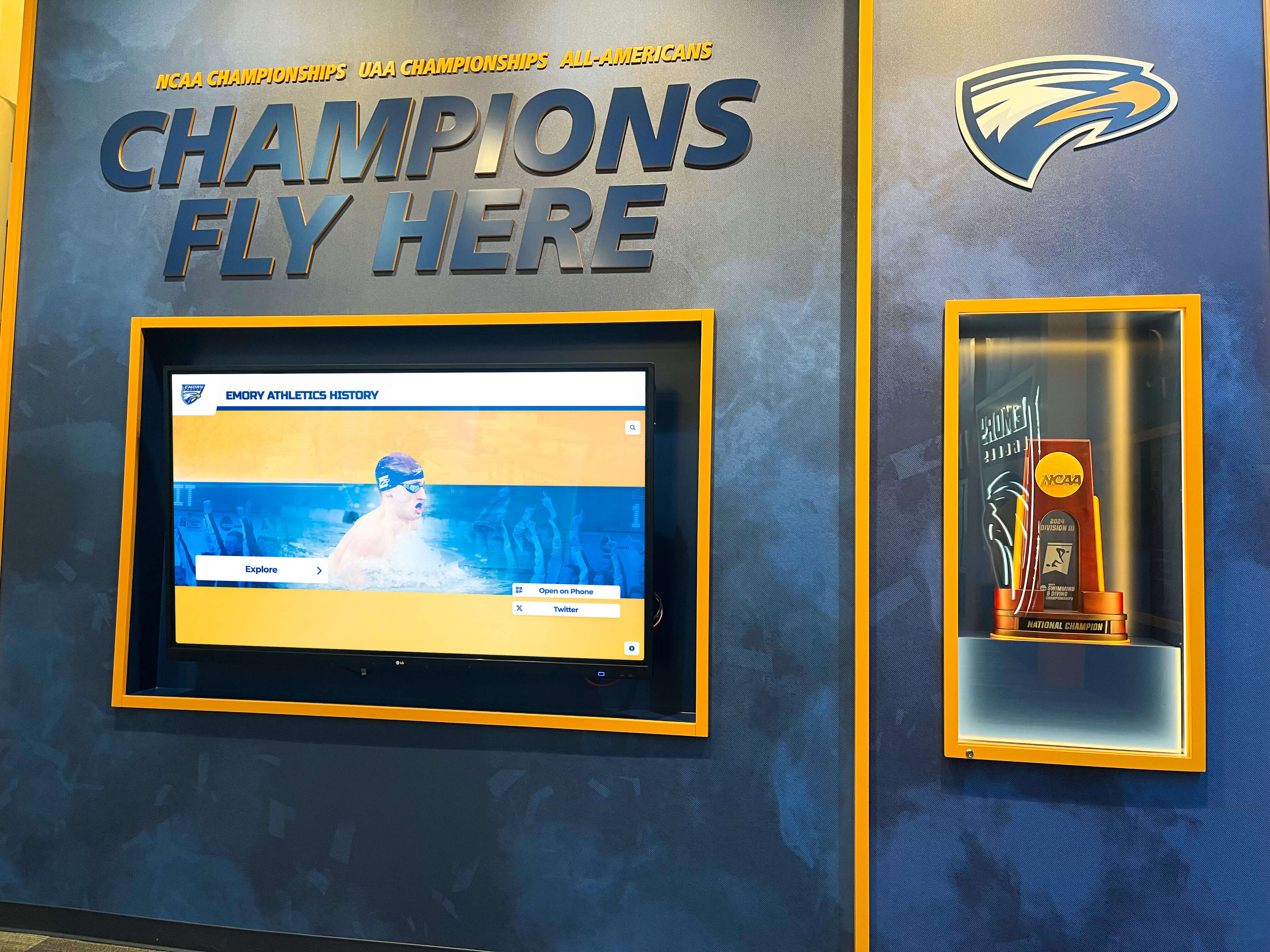
Comprehensive athletic displays showcase multiple achievement types including game balls, trophies, and championship banners
Wall-Mounted Shadow Box Cases
Shadow box displays create dimensional presentations that incorporate game balls alongside photographs, jerseys, plaques, and other memorabilia.
Advantages:
- Storytelling capability: Combining balls with photos, ticket stubs, newspaper clippings, and other artifacts tells richer stories than balls alone
- Space efficiency: Wall mounting maximizes display capacity in crowded trophy areas
- Customization potential: Create unique arrangements that reflect specific achievements or honor individual players
- Depth variation: Shadow boxes accommodate items of different sizes and depths within single displays
Limitations:
- Installation complexity: Requires proper wall mounting to support weight safely
- Limited flexibility: Once mounted and filled, rearranging contents or relocating displays involves significant effort
- Cost variability: Custom shadow boxes can become expensive depending on size and materials
- Potential clutter: Poorly designed shadow boxes appear messy rather than celebratory
Best for: Significant achievements deserving comprehensive storytelling, memorial displays honoring specific players or coaches, combining multiple memorabilia types in cohesive presentations, facilities with available wall space in high-visibility locations.
Effective shadow box displays balance visual interest with organization, use high-quality backing materials and frames that complement contents, include proper labeling explaining significance of displayed items, and protect against UV damage to preserve photographs and fabrics.
Pedestal and Freestanding Display Cases
Standalone cases on pedestals or bases create focal point displays suitable for lobbies, trophy rooms, and dedicated athletic halls of fame.
Advantages:
- Maximum visibility: 360-degree viewing from all angles
- Flexibility: Can be moved as needed for events, renovations, or display rotation
- Dramatic presentation: Pedestal elevation draws attention and creates importance
- Lighting opportunities: Built-in lighting or spotlighting creates dramatic effects
Limitations:
- Space requirements: Consume valuable floor space in often-crowded facilities
- Security challenges: Freestanding displays are more vulnerable to tipping, damage, or theft than wall-mounted options
- Higher cost: Quality pedestal cases with proper lighting and security features represent significant investments
- Maintenance access: Require clear floor access for cleaning and maintenance
Best for: Championship game balls deserving centerpiece treatment, rotating displays featuring different achievements, facility lobbies and dedicated trophy rooms with adequate space, situations where flexibility for relocating displays matters.
Premium pedestal cases include locking bases with internal storage for additional memorabilia, integrated LED lighting with remote controls, heavy bases that prevent tipping, and viewing platforms at comfortable heights for diverse audiences.
Key Features to Consider When Selecting Display Cases
Beyond basic case types, specific features dramatically impact functionality, preservation quality, and overall satisfaction with display investments.
UV Protection
Ultraviolet light causes irreversible damage to leather, autographs, and photographs. Quality display cases incorporate UV-filtering materials that block harmful wavelengths while maintaining visual clarity.
Why it matters: Autographs fade quickly under standard lighting, often becoming illegible within 5-10 years without UV protection. Leather discolors and becomes brittle. Any display in areas with natural light or standard fluorescent fixtures requires UV protection.
What to look for: UV-filtering acrylic (rather than standard acrylic), museum glass options that block 99% of UV rays, cases specifically advertised as “archival quality” or “museum quality,” manufacturer specifications listing UV protection percentages.
Schools displaying autographed balls from notable alumni or championship teams should prioritize maximum UV protection regardless of cost difference. Lost signatures cannot be replaced.
Security Features
Athletic memorabilia represents both monetary value and irreplaceable historical significance. Appropriate security features prevent opportunistic theft while maintaining display accessibility.
Locking mechanisms: Look for cases with key locks or combination locks that prevent unauthorized opening. Simple latches offer no real security. Premium options include keyed-alike systems allowing one master key to open multiple cases, simplifying management.
Mounting security: Wall-mounted cases should include tamper-resistant mounting hardware that cannot be removed without proper tools. Freestanding cases benefit from floor-securing options that prevent tipping or walking away with entire units.
Alarm integration: High-value collections in accessible areas justify integration with facility security systems. Modern options include cases with built-in motion sensors or contact sensors that trigger alarms when cases are disturbed.
Location considerations: Even quality security features have limitations. Valuable memorabilia displayed in unsupervised areas or facilities open to the public may require more robust security than items in controlled-access locations.
Balance accessibility for viewing with security appropriate to memorabilia value and facility traffic patterns. A locked case in a monitored lobby provides sufficient security for most school applications.
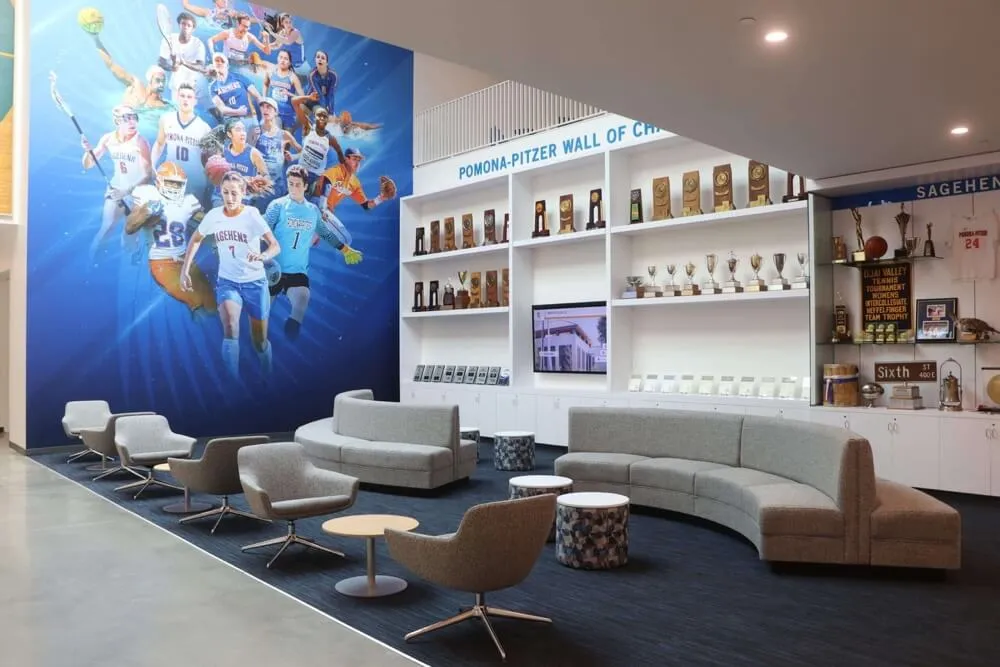
Dedicated athletic spaces combine traditional trophy cases with murals and [state championship recognition banners](https://touchhalloffame.us/blog/state-championships-recognition-banner-exhibit/?utm_source=organic&utm_medium=seo-auto&utm_content=touchwall&utm_campaign=football-display-case&utm_term=seo) creating immersive program environments
Lighting Options
Proper lighting transforms simple displays into dramatic presentations while improving visibility and protecting contents.
Built-in LED lighting: Premium cases include integrated LED strips or spotlights that illuminate contents evenly. LED technology consumes minimal energy, generates little heat (protecting leather), and provides decades of maintenance-free operation.
External spotlighting: Where built-in lighting isn’t available or practical, external museum-quality spotlights directed at displays create similar effects. Position lights to minimize glare on glass or acrylic surfaces.
Color temperature: Warm white LEDs (2700-3000K) create inviting, traditional appearances suitable for most athletic displays. Cool white (4000-5000K) provides brighter, more modern aesthetics. Avoid colored lighting unless specifically matching school colors, as it distorts authentic appearance.
Light intensity: Brighter isn’t always better—excessive light accelerates deterioration. Quality displays balance visibility with preservation, providing adequate illumination without creating hotspots or excessive brightness.
Size and Configuration Options
Football display cases come in configurations accommodating different collection sizes and display goals:
Single ball cases: Standard cases designed for one regulation-size football, typically measuring 11" x 14" x 11". Appropriate for individual championship game balls or milestone achievements deserving standalone recognition.
Multi-ball cases: Displays accommodating 2-6 footballs, allowing chronological arrangement of multiple championships or grouping related achievements. Consider vertical, horizontal, or grid arrangements based on available wall space.
Combination displays: Cases designed for footballs plus helmets, photos, plaques, or other memorabilia. These integrated displays tell richer stories but require careful design to avoid cluttered appearances.
Custom configurations: High-end display companies create custom cases matching specific requirements. While expensive, custom solutions maximize impact for championship collections or dedicated athletic halls of fame.
Measure available display space carefully before selecting cases. Consider not just current collection size but anticipated growth—purchasing compatible cases that can be arranged together creates cohesive appearances as collections expand.
Modern Alternatives: Digital Athletic Recognition Systems
While traditional display cases effectively preserve and showcase physical game balls, modern schools increasingly supplement or replace traditional trophy cases with digital hall of fame displays that overcome space limitations while providing enhanced storytelling capabilities.
The Space Problem with Traditional Displays
Athletic programs face mounting challenges with physical display cases:
Finite space: Trophy cases, lobby walls, and hallway display areas quickly fill with decades of achievements. Schools eventually face difficult choices about removing older items to make room for current accomplishments—decisions that upset alumni and erase history.
Growing programs: Multi-sport programs with varsity, JV, and freshman teams across multiple sports generate more achievements than traditional cases can accommodate. Success creates its own space problems.
Physical limitations: Game balls, trophies, plaques, jerseys, and photographs all compete for limited display real estate. Schools often prioritize trophies while game balls and memorabilia remain in storage.
Maintenance burden: Dusting dozens of individual cases, replacing deteriorating felt backing, repairing damaged mounts, and reorganizing crowded displays consumes custodial and administrative time.
Traditional display cases remain excellent solutions for the most significant achievements—state championship game balls, major milestone items, and autographed memorabilia from notable figures. But relying exclusively on physical cases creates inevitable space constraints that limit recognition capacity.
Digital Display Advantages for Athletic Recognition
Modern interactive touchscreen systems complement traditional displays by digitizing athletic history in searchable, updatable formats that overcome physical limitations:
Unlimited capacity: Digital systems store hundreds or thousands of achievements without consuming additional physical space. Every championship, every record holder, every letter winner, and every memorable game can be documented and searchable regardless of program size or history length.
Rich multimedia storytelling: Rather than displaying a game ball with a small plaque, digital systems present championship football game video highlights, team photos from that season, individual player profiles with statistics, coach interviews discussing the achievement, newspaper articles covering the victory, and historical context about the opponent and game significance.
Search and filtering: Students, alumni, and visitors can search by year, sport, achievement type, individual athlete, or coach. This discoverability ensures achievements from decades past remain accessible rather than forgotten when removed from physical displays.
Easy updates: Adding new achievements requires simple content updates rather than purchasing new cases, clearing space, and remounting displays. Athletic directors or designated staff can update systems in minutes after each season.
Space efficiency: A single wall-mounted touchscreen or kiosk can showcase an entire athletic program’s history in less than 10 square feet—space that would require entire corridors of traditional cases.
Alumni engagement: Digital systems can be accessed remotely via web browsers or mobile apps, allowing alumni living anywhere to explore their athletic legacy and share with family members who never attended their school.
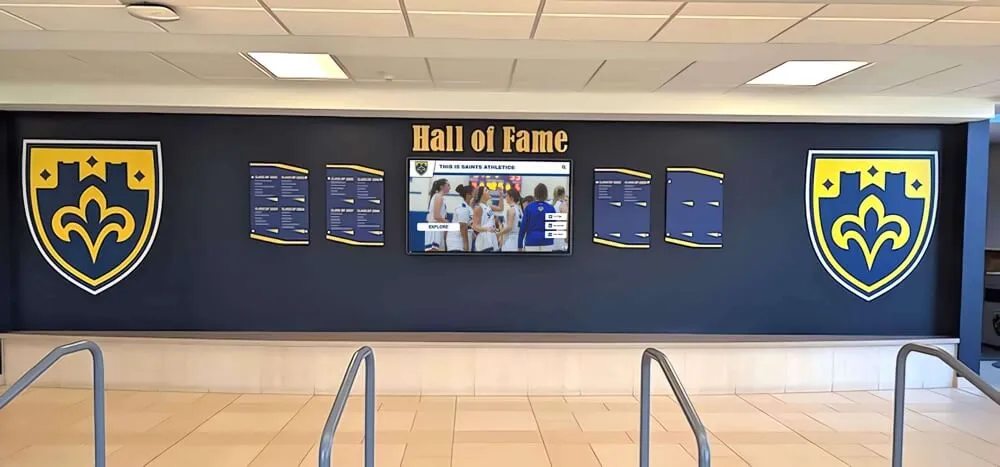
Hybrid displays integrate physical memorabilia with digital touchscreens that provide context and expanded recognition capacity
Hybrid Approaches: Best of Both Worlds
Forward-thinking athletic programs increasingly adopt hybrid recognition strategies that combine traditional display cases for select physical artifacts with digital systems that provide comprehensive historical documentation:
Feature game balls in cases: Display championship game balls, senior night footballs, and the most significant memorabilia in quality traditional cases that provide preservation and visibility.
Document everything digitally: Use touchscreen systems to document all achievements, including those not physically displayed. Photograph items in storage and add them to digital systems with full context and stories.
Create interactive connections: Position digital displays near traditional trophy cases. Use touchscreens to tell deeper stories about visible artifacts—biographical information about players whose jerseys are displayed, season recaps for years represented by championship trophies, or video highlights from games whose balls are showcased.
Rotate physical displays: With comprehensive digital systems serving as permanent records, schools can rotate physical displays seasonally or annually without losing historical access. Feature current season achievements prominently while previous years remain accessible digitally.
This hybrid model respects the emotional power of physical artifacts while leveraging technology’s capacity for comprehensive documentation and storytelling. Schools implementing these integrated approaches report significantly higher engagement from students, alumni, and visitors compared to traditional display-only systems.
For schools considering modern recognition systems, solutions like Rocket Alumni Solutions’ interactive digital touchscreen platforms specifically designed for athletic programs provide templates and management tools that make implementation straightforward even without dedicated IT staff.
Creating Effective Display Labels and Context
Even the finest display case fails to communicate significance without proper labeling and context. Thoughtful information design transforms simple displays into educational storytelling.
Essential Information Elements
Every football display should include these fundamental details:
Achievement description: Clear statement of what the ball represents—“2023 State Championship Game Ball,” “Homecoming Victory over Central High—First Win in 15 Years,” “Jake Morrison’s School Record 5 Touchdown Game”
Date and season: Specific game date or season year so viewers can place achievement in historical context
Score and opponent: Final score and opponent name provide competitive context—“Defeated Lincoln High 28-24” tells a more complete story than achievement alone
Notable participants: Key players, coaches, or other figures whose contributions made the achievement possible, especially when achievements represent individual milestones
Historical significance: Brief explanation of why this achievement matters—“First State Championship in School History,” “Completed Perfect 12-0 Season,” “Extended County Winning Streak to 23 Games”
Label Design Considerations
Information presentation matters as much as information content:
Readability: Use font sizes legible from comfortable viewing distances—typically 18-24pt for primary text, larger for titles. Sans-serif fonts generally read better than serif in display applications.
Material quality: Engraved brass plates, professionally printed labels on archival paper, or digital printed labels all create different aesthetic effects. Match label quality to case quality—premium cases deserve premium labels.
Placement: Position labels where they’re visible without requiring awkward viewing angles. Consider sight lines from primary traffic patterns through your facility.
Consistency: Develop label templates used across all displays so your recognition system appears organized and professional rather than assembled piecemeal over decades.
Many schools create simple database spreadsheets documenting all displayed items with their labels, making it easy to recreate information if labels become damaged or when creating new displays.
QR Codes and Extended Information
For displays in locations where detailed information would create visual clutter, QR codes provide elegant solutions:
Link to digital content: Print small QR codes on labels that link to web pages with expanded stories, photos, video highlights, and related achievements
Audio storytelling: QR codes can link to audio recordings of coaches, players, or sports announcers describing significant achievements—powerful additions to memorial displays
Accessibility enhancement: Visitors using screen readers or needing larger text can access digital versions of display information
Analytics opportunity: QR code scans provide data about which displays generate most interest, informing future recognition priorities
When implementing QR codes, ensure linked content remains accessible long-term—pages that disappear after website redesigns frustrate users and undermine display credibility. Consider using academic history archiving platforms that provide permanent hosting.
Displaying Game Balls: Best Practices
Properly displaying footballs within cases requires attention to positioning, support, and presentation details that maximize visual impact.
Football Positioning and Orientation
How you position footballs dramatically affects display effectiveness:
Signature visibility: If displaying autographed balls, orient them so signatures face forward and remain clearly visible. Use tilted display stands or risers that angle balls toward viewers.
Lace presentation: Traditionally, footballs are displayed with laces facing forward, showcasing the iconic aspect most associated with football. However, if important information or signatures appear on other panels, prioritize that visibility.
Multiple ball arrangements: When displaying several balls together, vary heights and angles to create visual interest while ensuring each ball receives adequate attention. Staggered arrangements prevent monotonous appearances.
Logo orientation: If balls feature team logos, school crests, or special markings, ensure these elements remain visible and properly oriented rather than rotated awkwardly.
Display Stands and Risers
Footballs’ elliptical shape requires proper support to prevent rolling and enable optimal viewing angles:
Clear acrylic stands: Transparent supports disappear visually while holding balls at ideal angles. Look for stands specifically designed for footballs rather than generic display rings.
Adjustable risers: Stands offering height and angle adjustments allow fine-tuning visibility based on case placement and viewing heights.
Engraved bases: Premium displays incorporate wooden or metal bases engraved with achievement details, serving dual purposes as labels and support structures.
Wall-mount brackets: For wall-mounted cases, internal brackets can support footballs from behind, creating floating appearances without visible stands.
Background and Contrast
What appears behind displayed footballs significantly impacts visual effectiveness:
Solid backgrounds: Plain backgrounds in school colors or neutral black create clean presentations that focus attention on balls themselves. Avoid busy patterns that compete for attention.
Photo backgrounds: Some displays incorporate background images—action photos from championship games, team photos, or stadium imagery. These can enhance storytelling but risk appearing cluttered if not executed professionally.
Lighting and shadows: Proper lighting creates subtle shadows that add depth and dimension to displays. Position lights to eliminate harsh shadows while creating gentle gradients that make balls stand out from backgrounds.
Material texture: Felt, suede, or fabric backgrounds provide subtle texture and prestige compared to plain painted surfaces. These materials also protect leather if balls contact backing.
Budget Considerations and ROI
Athletic recognition represents an investment that pays dividends through recruiting impact, alumni engagement, and program culture. Understanding costs and returns helps justify appropriate budget allocations.
Display Case Cost Ranges
Typical investment levels for different quality tiers:
Budget options ($30-75): Basic acrylic single-ball cases without UV protection or premium features. Appropriate for less significant items or temporary displays. Annual replacement costs over time may exceed initial savings.
Mid-range options ($75-200): Quality acrylic or basic wood cases with UV protection, better construction, and professional appearance. Good balance of cost and functionality for most athletic display needs.
Premium options ($200-500): High-quality wood and glass cases with locking features, integrated lighting, and superior construction. Justified for championship memorabilia, valuable autographed items, or displays in high-visibility locations.
Custom solutions ($500+): Fully custom cases designed for specific requirements, spaces, or collections. Appropriate for dedicated athletic halls of fame, major facility renovations, or programs with substantial recognition budgets.
For comprehensive digital display systems, costs typically range from $5,000-25,000 depending on screen size, interactive features, and content management capabilities. While representing larger initial investments than traditional cases, digital systems provide unlimited capacity and update flexibility that traditional displays cannot match.
Maximizing Display Investment
Smart strategies for stretching recognition budgets:
Prioritize the most significant items: Not every game ball requires a premium case. Invest in quality displays for championship achievements while using simpler options for less significant items.
Purchase compatible sets: Buying multiple cases of the same style creates cohesive appearances and often qualifies for bulk discounts. As collections grow, additional matching cases integrate seamlessly.
Plan for expansion: Choose display systems with room for growth rather than immediately filling every space. This prevents future expenses replacing inadequate systems.
Consider lifespan costs: A $200 case lasting 30 years costs less annually than $50 cases requiring replacement every 5-10 years. Factor total lifespan costs rather than just initial prices.
Leverage booster clubs: Many booster organizations welcome specific fundraising projects with tangible results. Athletic display improvements provide perfect opportunities—parents and alumni readily support recognition honoring their children and traditions.
Recognition Program ROI
While difficult to quantify precisely, quality athletic recognition programs deliver measurable returns:
Recruiting impact: Schools with impressive athletic displays attract higher-caliber recruits who elevate program competitiveness. The difference between landing a key transfer or elite freshman can determine conference standings and playoff appearances.
Alumni giving: Programs that honor history generate stronger alumni emotional connections that translate into financial support. Even modest improvements in annual giving from former athletes quickly justify recognition investments.
Community engagement: Visible athletic excellence strengthens community pride and support that manifests through ticket sales, booster membership, and volunteer involvement with programs.
Internal motivation: Current athletes who see their potential legacy showcased perform with greater dedication and team focus, improving on-field results that drive all other benefits.
Athletic directors making cases for recognition budget allocations should emphasize these return factors alongside preservation and historical documentation arguments.
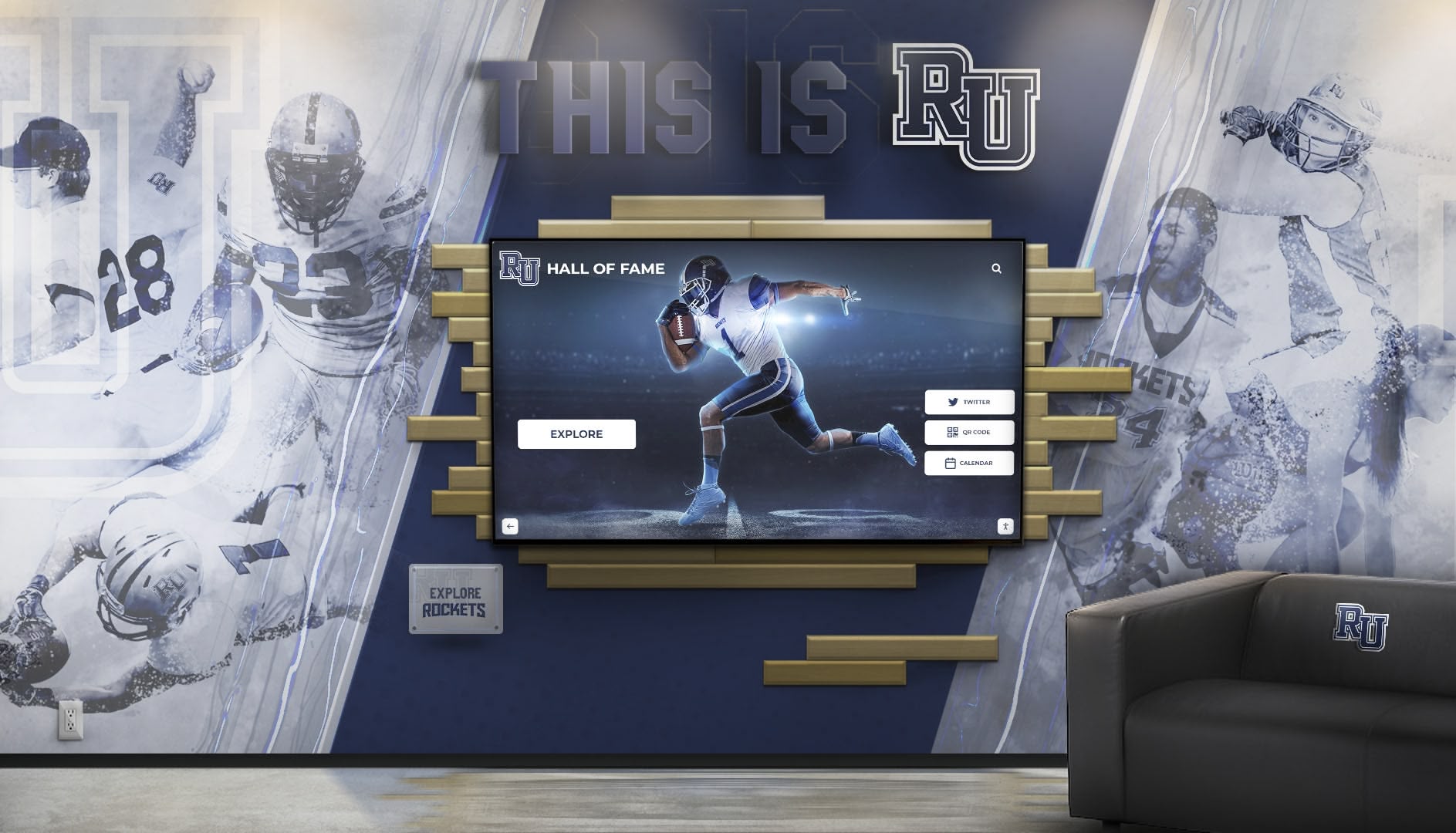
Large-scale installations combine football imagery with interactive displays creating immersive recognition environments that honor program history
Integrating Football Displays into Comprehensive Recognition Programs
Game ball displays function best as components within broader athletic recognition systems rather than isolated installations. Integrated approaches create cohesive storytelling across multiple achievement types.
Coordinating Multiple Display Elements
Effective athletic recognition programs coordinate various display types:
Trophy cases: Traditional glass cases showcasing championship trophies, individual awards, and team plaques, typically located in gym lobbies or main hallways
Game ball displays: Wall-mounted or pedestal cases featuring significant game footballs positioned near related trophies or in dedicated football areas
Banner systems: Championship banners, conference titles, and retired jerseys suspended from gym ceilings or mounted on walls above eye level
Photo galleries: Team photos, action shots, and historical images documenting program evolution through decades
Record boards: Lists of school records, letter winners, and statistical achievements displayed prominently in athletic facilities
Digital displays: Interactive touchscreens or video displays that combine all recognition types in searchable, updatable formats
Rather than treating these elements as separate projects, develop comprehensive plans that coordinate placement, design aesthetics, and information architecture across all recognition types. This integrated approach creates professional appearances and coherent narratives about program excellence.
Location Strategy for Maximum Impact
Strategic display placement significantly impacts effectiveness:
Primary traffic areas: Position most impressive displays in locations where students, visitors, and recruits regularly pass—main building lobbies, routes between parking and athletic facilities, gymnasium entrances
Athletic-specific locations: Create concentrated recognition areas in locker rooms, weight rooms, and team spaces where athletes spend significant time. These displays specifically target current participants rather than general audiences.
Administrative spaces: Strategic displays in athletic director offices, conference rooms, and meeting spaces communicate professionalism during recruit visits, parent meetings, and booster gatherings.
Alumni engagement zones: Position historical displays in areas used for alumni welcome areas and reunion events where former athletes gather.
Consider sightlines, lighting, and accessibility when planning display locations. The most expensive case poorly positioned delivers less impact than a modest display prominently placed.
Seasonal Updates and Display Rotation
Dynamic recognition programs update regularly rather than remaining static for years:
Post-season updates: After each football season, add new achievements to displays—conference championships, playoff appearances, individual records, senior class recognition
Anniversary highlights: Rotate displays periodically to feature historical achievements on significant anniversaries—“25 Years Since Our First State Championship” creates engaging storytelling opportunities
Theme-based arrangements: Organize displays around themes like “Greatest Victories,” “Record-Breaking Performances,” or “Hall of Fame Players” that change periodically
Senior spotlights: Feature graduating seniors’ achievements prominently during their final season before transitioning to permanent placement within historical displays
Regular updates keep displays fresh and engaging for students who see them daily while demonstrating active program commitment to recognition. Static displays that never change become invisible background elements that lose impact.
Connecting Physical and Digital Recognition
Schools implementing hybrid traditional-digital systems should deliberately connect these elements:
Physical-to-digital references: Include signage near traditional displays directing viewers to digital systems for expanded content—“See complete game highlights and team roster on the Hall of Fame touchscreen”
Digital-to-physical connections: Use digital displays to highlight and contextualize nearby physical artifacts—“The 2019 state championship game ball displayed to your left was part of our first perfect season”
Complementary coverage: Display most significant physical artifacts in traditional cases while documenting everything digitally, including items in storage
Consistent design language: Maintain visual consistency between traditional display labels and digital interface design so recognition system appears integrated rather than assembled piecemeal
This deliberate integration creates recognition experiences greater than either approach alone provides.
Special Considerations for Different Football Memorabilia Types
Different football artifacts present unique display challenges requiring adapted approaches.
Autographed Game Balls
Balls signed by notable players, coaches, or celebrities deserve extra preservation care:
Authentication documentation: Display certificates of authenticity alongside autographed balls to verify signatures and increase value
UV protection priority: Autographs fade rapidly under UV exposure—invest in maximum UV-filtering cases for signed memorabilia
Signature visibility: Position balls so all signatures remain visible or rotate periodically to showcase different autographs
Climate control: Autographed balls warrant climate-controlled storage and display to prevent signature degradation
Security measures: Valuable autographed memorabilia justifies premium security features including locking cases and alarm systems
Schools should photograph autographed balls thoroughly when first displayed, creating records of signature condition that document authenticity and enable insurance claims if damage occurs.
Championship and Memorial Game Balls
Balls commemorating specific significant games require contextual displays:
Score and opponent information: Clearly display final score, opponent, date, and playoff round or championship level
Game highlights: Where digital systems supplement displays, link to game footage, newspaper coverage, or statistical summaries
Team recognition: Include team photo or roster alongside game ball to honor all participants, not just ball itself
Historical context: Explain why this victory mattered—“First win against rival in 15 years,” “Clinched conference championship,” “Broke school scoring record”
Memorial game balls honoring deceased players or coaches deserve particularly thoughtful presentation with biographical information and explanation of honoree’s significance to program.
Senior Night and Award Footballs
Many programs award footballs to senior players on senior night or at end-of-season football banquets. These balls hold personal significance but may not merit permanent public display:
Senior player displays: Create rotating displays featuring current seniors that transition after graduation, returning balls to players or their families
Senior legacy walls: Photograph seniors with their awarded balls and display photos digitally or in gallery formats rather than attempting to preserve every physical ball
Individual recognition: For seniors with exceptional careers, consider permanent displays with career statistics and achievements alongside their senior night balls
Many schools struggle with senior night football storage—hundreds of balls accumulated over decades. Digital documentation with photo galleries provides recognition without requiring infinite physical space.
Maintenance and Long-Term Care
Quality display cases require minimal maintenance, but proper care extends lifespan and preserves appearance.
Regular Cleaning Procedures
Establish simple cleaning routines:
Acrylic and glass surfaces: Clean with microfiber cloths and appropriate cleaners—ammonia-based products damage some acrylics. Weekly dusting prevents buildup that requires aggressive cleaning.
Wood elements: Dust regularly and apply furniture polish or conditioner quarterly to maintain finish and prevent drying.
Football leather: Leather conditioner applied annually (after removing from case) prevents cracking and maintains appearance. Use products specifically designed for leather sports equipment.
Interior surfaces: Vacuum or dust interior backing, stands, and supports during annual deep cleaning. Remove balls temporarily to access all surfaces.
Hardware: Check locks, hinges, and mounting hardware annually, tightening any loose components and lubricating moving parts.
Assign maintenance responsibilities clearly—determine whether custodial staff, athletic department, or booster volunteers handle display cleaning and establish regular schedules.
Inspection and Repair
Annual inspections identify problems before they become serious:
Case integrity: Check for cracks in acrylic, loose joints in wood frames, or seal failures allowing dust infiltration
Mounting security: Verify wall-mounted cases remain securely attached with no loosening from age or vibration
UV protection: While UV-filtering materials don’t degrade quickly, any case damage that exposes contents to direct light requires immediate repair
Label condition: Replace faded, damaged, or unclear labels to maintain professional appearance
Football condition: Inspect displayed balls for deterioration, particularly leather drying or autograph fading, addressing problems before damage becomes irreversible
Document inspection findings and repairs, maintaining records that help identify recurring problems or guide future purchases.
Environmental Monitoring
Facilities managers should monitor conditions affecting display longevity:
Temperature stability: Dramatic temperature fluctuations accelerate leather degradation. Maintain relatively constant temperatures in display areas.
Humidity control: Ideal humidity for leather preservation ranges from 40-50%. Higher humidity encourages mold; lower levels cause cracking.
Light exposure: Even with UV-protected cases, minimize direct sunlight exposure. Position displays away from windows or use window treatments that block UV.
Pest prevention: Facility-wide pest control prevents insects from infiltrating displays and damaging materials.
Schools in challenging climates may need additional environmental controls in display areas, particularly in older facilities without modern HVAC systems.
Making the Purchase Decision: Evaluation Checklist
When ready to select specific display cases, use this comprehensive evaluation framework:
Must-Have Features
- Adequate size for intended football(s) and any companion items
- UV protection appropriate for memorabilia significance
- Construction quality supporting multi-decade lifespan
- Security features matched to theft risk and item value
- Mounting hardware or base appropriate for intended location
Important Considerations
- Aesthetic compatibility with facility design and existing displays
- Ease of access for cleaning and maintenance
- Lighting quality and integration
- Background materials and options for customization
- Manufacturer reputation and warranty coverage
Budget Factors
- Initial purchase price within allocated budget
- Installation costs if professional mounting required
- Long-term maintenance expenses
- Replacement or expansion compatibility
- Bulk pricing if purchasing multiple units
Vendor Selection
- Reviews and references from other schools
- Product samples or photos of actual installations
- Customer service quality and responsiveness
- Return policy and satisfaction guarantees
- Shipping costs and damage risk/insurance
Taking time for thorough evaluation prevents expensive mistakes that waste budget dollars and disappoint stakeholders who supported purchases.
Conclusion: Preserving Legacy Through Thoughtful Display
Every championship game ball in storage represents lost opportunities—opportunities to inspire current athletes, engage alumni, attract recruits, and honor the sacrifices that created achievements worth celebrating. The right display cases transform forgotten footballs into powerful storytelling tools that strengthen program culture and community connection.
Whether selecting basic acrylic cases for modest collections or implementing comprehensive digital recognition systems that revolutionize how schools celebrate athletic excellence, the investment in proper display solutions pays returns through enhanced recruiting, strengthened alumni relationships, motivated current athletes, and preserved institutional history.
Athletic directors and booster leaders ready to honor their football program’s legacy should begin by inventorying significant game balls and memorabilia currently in storage, assessing available display space and budget allocations, researching display case options appropriate for specific needs, and considering modern digital alternatives that overcome traditional space limitations.
The schools that most effectively celebrate athletic achievement understand that recognition isn’t optional decoration—it’s strategic investment in program culture, competitive advantage, and institutional pride. Game balls displayed with care become touchpoints connecting current athletes to program legacy while inspiring the next generation toward excellence.
Ready to transform how your school celebrates athletic excellence? Discover how Rocket Alumni Solutions creates comprehensive athletic recognition systems combining traditional memorabilia displays with interactive digital platforms that overcome space limitations while maximizing engagement. Contact us to explore solutions specifically designed for schools committed to honoring their football program’s past while building excitement for its future.































