Football helmets represent more than protective equipment—they embody team history, championship victories, individual achievements, and the legacy of athletes who wore them. Schools, universities, athletic programs, and alumni associations seeking to honor football traditions face the challenge of displaying these significant artifacts in ways that preserve their condition while making them accessible for community viewing.
A well-designed football helmet display case protects memorabilia from dust, handling damage, and environmental factors while creating focal points that tell stories about program excellence. Whether showcasing a single championship helmet, creating comprehensive trophy rooms, or designing lobby installations featuring decades of athletic history, the right display approach transforms helmets from storage items into powerful recognition tools.
This guide explores football helmet display case options across traditional and modern approaches, examining preservation requirements, space considerations, budget implications, and innovative solutions that serve athletic programs’ evolving needs. From individual display cases to integrated recognition systems, we’ll examine how schools and organizations can appropriately showcase football achievements while maintaining flexibility for future additions.
Athletic departments and alumni associations invest significant resources into football programs, and displaying the resulting achievements through proper presentation reinforces program pride, recruits prospective athletes, and engages communities around shared football traditions. The challenge lies in selecting display solutions that balance preservation needs with accessibility, aesthetic appeal, and long-term maintenance requirements.
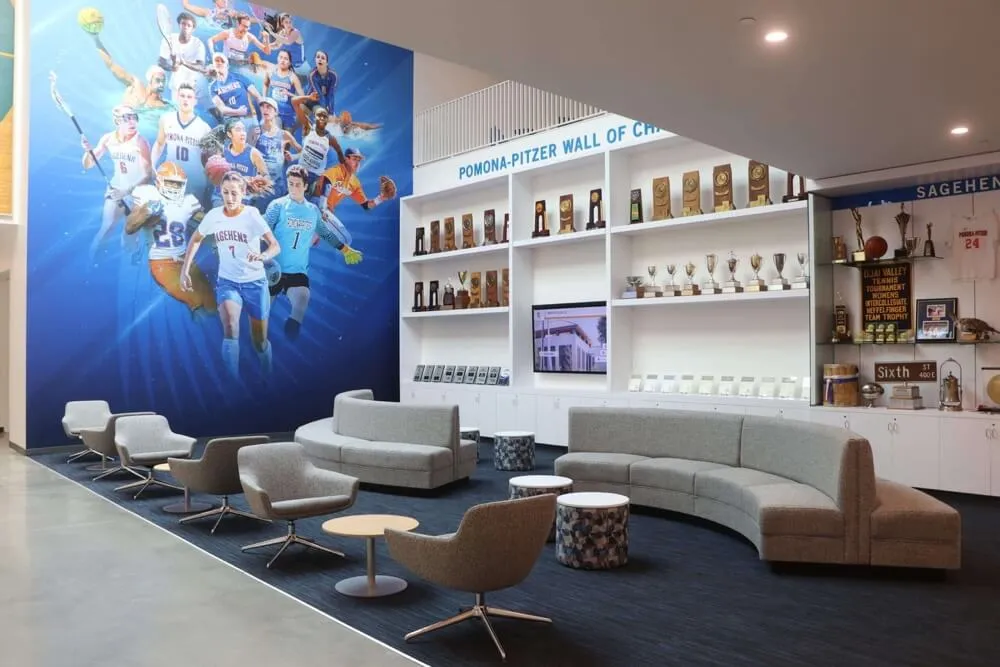
Successful athletic spaces integrate helmet displays within broader recognition environments that celebrate program history comprehensively
Understanding Football Helmet Display Requirements
Before selecting specific display cases, understanding preservation requirements and display objectives ensures choices support both immediate presentation goals and long-term collection management.
Preservation Considerations for Football Helmets
Football helmets contain multiple materials—polycarbonate shells, foam padding, vinyl decals, face masks, and chin straps—each with distinct preservation needs. Improper storage accelerates deterioration that diminishes both aesthetic appeal and historical value.
Environmental Factors Affecting Helmet Condition:
Temperature fluctuations cause shell expansion and contraction that can crack paint or loosen decals. Ideal storage maintains consistent temperatures between 65-75°F without dramatic daily swings. Humidity levels above 60% promote mold growth in foam padding, while levels below 30% dry out materials causing brittleness. UV exposure fades team colors and degrades polycarbonate shells over time, particularly affecting helmets displayed near windows or under direct lighting.
Dust accumulation isn’t merely cosmetic—particulates embed in textured surfaces and scratches finishes when wiped improperly. Enclosed display cases prevent dust while allowing visibility, though they require initial cleaning investments before sealing helmets away.
Game-worn helmets often arrive with field dirt, sweat stains, or grass marks. While some programs prefer preserving “battle damage” as authenticity markers, others professionally clean helmets before display. Document condition at time of acquisition to inform cleaning decisions and track deterioration over display lifespans.
Handling and Access Management:
Every time someone handles a helmet, oils from skin transfer to surfaces potentially degrading decals or finishes. Display cases minimize handling by creating physical barriers between artifacts and viewers. For helmets rotated for events or athletic banquet planning, establish handling protocols including clean cotton gloves and designated removal procedures.
Display Objectives and Space Analysis
Football helmet display objectives vary significantly between programs, influencing appropriate display solutions.
Championship and Achievement Displays:
Programs showcasing state championship helmets, conference title memorabilia, or record-breaking player equipment typically emphasize visibility and storytelling. These displays benefit from prominent locations—main lobbies, athletic hallways, or trophy rooms where communities regularly encounter them. Context matters: a championship helmet gains significance when displayed with game photos, final score documentation, or roster information explaining its importance.
Many schools managing multiple championship achievements explore sports memorabilia display ideas that integrate helmets within comprehensive recognition systems telling complete program stories rather than isolated artifacts.
Historical Collection Displays:
Programs with decades of football tradition may display helmet collections showing equipment evolution, team identity changes through logo redesigns, or era-specific achievements. These collections require more extensive space and organizational approaches that help viewers understand chronological progressions or thematic groupings.
Historical displays benefit from interpretive elements—timeline graphics, era descriptions, or notable player information—that transform helmet collections into educational experiences rather than simple object arrangements.
Individual Achievement Recognition:
High school letterman jacket traditions extend to helmet displays honoring specific athletes who set records, earned all-state recognition, or achieved professional careers. Individual helmet displays typically incorporate athlete photos, career statistics, and achievement summaries creating personalized recognition.

Trophy rooms combine various memorabilia types including helmets, awards, and recognition plaques in coordinated display environments
Traditional Football Helmet Display Case Options
Physical display cases remain the most common approach for showcasing football helmets, with options spanning individual cases to custom installations depending on budget, space, and collection size.
Individual Acrylic Display Cases
Single-helmet acrylic cases provide the most straightforward display solution, particularly for programs with limited space or smaller collections. These cases typically feature clear acrylic construction on five sides with either removable tops or hinged openings for helmet placement.
Advantages of Individual Acrylic Cases:
Clear acrylic provides 360-degree visibility allowing viewers to appreciate helmets from all angles including logo details, face mask configurations, and interior padding. Modular designs enable flexible placement—shelves, countertops, wall-mounted brackets, or pedestal stands—adapting to various space configurations. Price points typically range from $75-250 per case depending on size and quality, making them accessible for budget-conscious programs.
Individual cases also facilitate easy reorganization. As collections grow or display priorities shift, acrylic cases move between locations without requiring installation modifications. This flexibility particularly benefits programs rotating seasonal displays or featuring different achievements throughout years.
Limitations to Consider:
While individual cases work well for small collections, displaying multiple helmets in separate acrylic cases can create cluttered, disjointed appearances lacking cohesive design. Each case requires dedicated space and cleaning attention. Dust accumulates on case exteriors even though interiors remain protected.
Acrylic scratches more easily than glass, and cheaper cases yellow over time particularly when exposed to UV light. Quality varies significantly between manufacturers—thin acrylic cracks under pressure while poorly fitted seams allow dust infiltration defeating protection purposes.
Wall-Mounted Display Cases
Wall-mounted cases conserve floor space while creating eye-level viewing experiences. These range from simple floating shelves with acrylic covers to custom-built shadow boxes featuring team colors, logos, and personalized engravings.
Shadow Box Installations:
Custom shadow boxes allow significant design flexibility, incorporating team color backgrounds, dimensional lettering, commemorative plaques, and accompanying artifacts like game balls, photos, or championship patches. Depth requirements typically range from 12-16 inches to accommodate helmet dimensions plus desired spacing from backing materials.
Shadow boxes work particularly well for championship recognition where single helmets warrant prominent individual displays. Engraved plaques beneath helmets can document dates, scores, opponent information, and key players creating complete championship narratives.
Construction quality significantly impacts appearance and longevity. Professional framing shops specializing in sports memorabilia understand proper mounting techniques preventing helmet damage while ensuring secure installations. Expect costs ranging from $300-800 per shadow box depending on size, materials, and customization complexity.
Multi-Helmet Wall Cases:
Larger wall-mounted cases displaying 3-12 helmets create impressive visual impact while maintaining organized presentations. These installations typically feature glass or acrylic fronts with interior shelving configured to helmet dimensions. Lighting integration enhances visibility and creates dramatic effects particularly in hallways or lobbies with limited natural light.
Multi-helmet wall cases require substantial structural support—helmets weigh 4-5 pounds each, and cases with protective fronts add significant weight. Installation into concrete or masonry walls provides ideal support, while drywall installations require locating studs or installing backing plates distributing weight across multiple mounting points.

Contemporary approaches integrate traditional helmet cases with interactive displays providing context and detailed achievement information
Trophy Room and Display Area Design
Programs with dedicated trophy rooms or athletic facility lobbies have opportunities to create comprehensive display environments showcasing helmet collections alongside other memorabilia.
Dedicated Trophy Room Planning
Purpose-built trophy rooms allow athletic departments to consolidate achievements, control environmental conditions, and create immersive experiences celebrating program histories. Effective trophy room design balances storage capacity with aesthetic appeal and visitor engagement.
Space Configuration Considerations:
Trophy rooms work best with defined circulation paths guiding visitors through collections in logical progressions—chronological timelines, sport categories, or achievement types. Avoid dead-end layouts forcing visitors to retrace steps, which discourages exploration and creates congestion during group visits.
Ceiling height influences display approaches. Rooms with 10+ foot ceilings accommodate vertical displays extending recognition upward without creating cramped feelings. Lower ceilings benefit from horizontal arrangements using wall-mounted cases and freestanding display furniture at varied heights maintaining visual interest.
Natural lighting creates appealing environments but requires UV-filtering window treatments protecting artifacts from sun damage. Rooms without windows need sufficient artificial lighting—track lighting, display case lighting, or accent spotlights—illuminating collections without creating harsh glares on protective glass or acrylic.
Environmental Control:
Dedicated trophy rooms offer best opportunities for environmental management protecting long-term collection integrity. HVAC systems maintaining consistent temperatures and humidity levels prevent deterioration affecting helmets and other artifacts. Sealed rooms also minimize dust accumulation, though regular cleaning remains necessary.
Consider security for rooms housing valuable memorabilia. Locked doors restrict access to authorized personnel while still allowing scheduled viewings for recruits, alumni groups, or community tours. Some programs install surveillance cameras or alarm systems protecting against theft or vandalism, particularly for autographed items or professional player memorabilia with significant monetary value.
Lobby and Common Area Displays
Athletic facility lobbies, locker room entrances, and stadium concourses provide high-visibility locations for helmet displays reaching broader audiences than dedicated trophy rooms. These spaces require display approaches balancing security, durability, and aesthetic integration with architectural contexts.
Freestanding Display Furniture:
Custom display cabinets, pedestals, and showcase furniture create focal points in open spaces while maintaining security through lockable glass doors. Quality display furniture balances substantial construction preventing tipping or damage with refined finishes complementing facility aesthetics.
Freestanding units offer installation flexibility—they relocate for facility renovations, special events, or display reorganizations without permanent construction modifications. However, they require floor space that may conflict with circulation needs during high-traffic events.
Built-In Display Alcoves:
Facilities planning renovations or new construction can incorporate display alcoves—recessed wall areas with integrated lighting and protective glazing—creating permanent helmet showcases. Built-in displays eliminate furniture footprints while protecting memorabilia within secured enclosures.
Athletic programs increasingly recognize that school pride building extends beyond win-loss records to how programs honor and display achievements, making lobby displays valuable recruitment and community engagement tools.
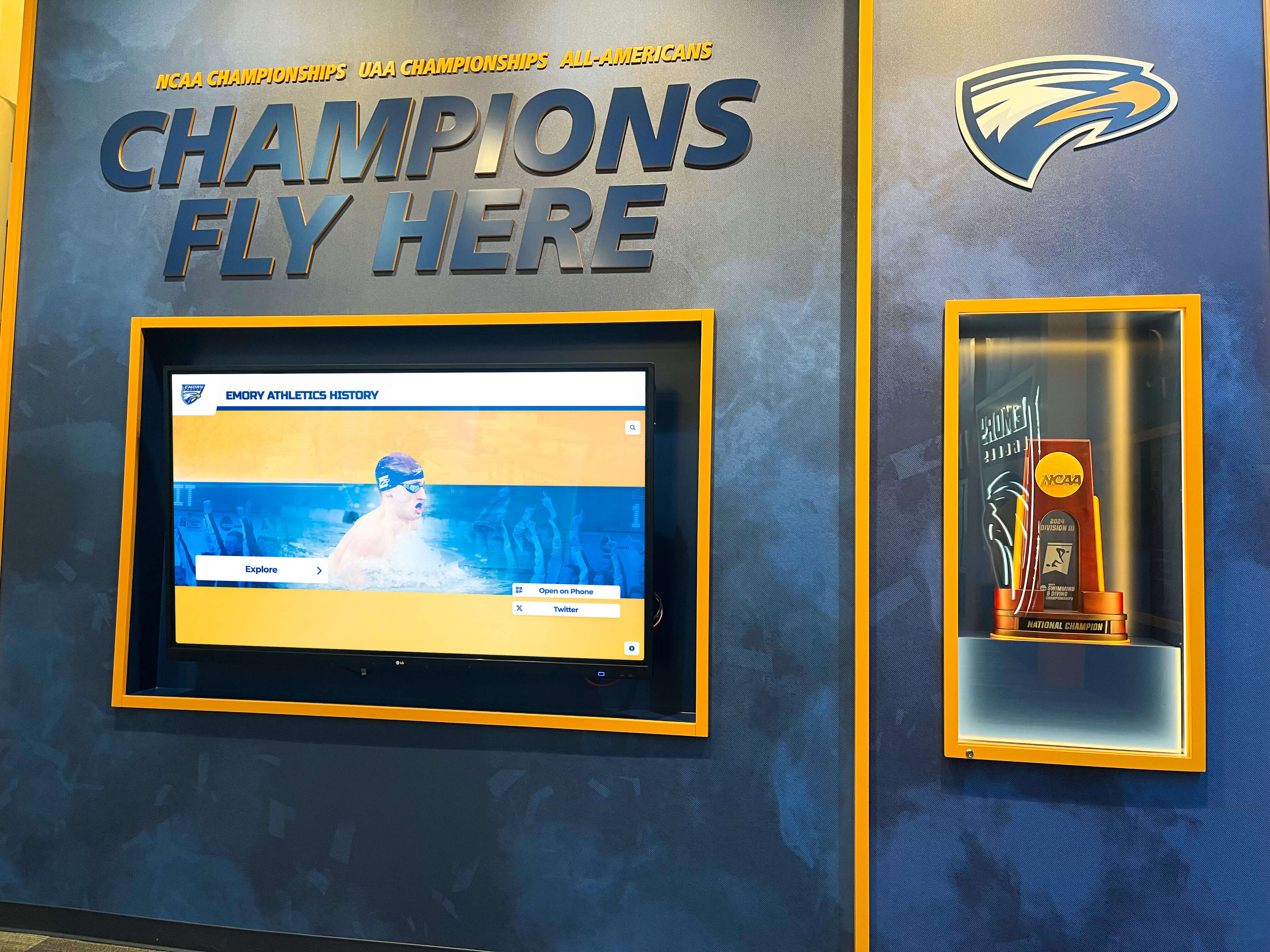
Championship displays integrate multiple achievement elements creating comprehensive recognition environments celebrating program excellence
Modern Digital Display Integration
While physical helmet displays remain important, contemporary athletic facilities increasingly integrate digital technologies that enhance storytelling, provide context, and accommodate growing achievement portfolios without consuming additional physical space.
Combining Physical and Digital Recognition
Football helmets displayed alongside digital screens create powerful recognition experiences. Physical artifacts provide tangible connections to athletic history while digital displays offer unlimited capacity for photos, videos, statistics, and narrative context that printed plaques cannot accommodate.
Interactive Touchscreen Displays:
Programs implementing interactive display technology adjacent to helmet displays enable visitors to explore detailed achievement information, watch championship game highlights, or browse complete team rosters associated with displayed helmets. This approach maintains physical helmet appeal while providing depth impossible through static displays.
A championship helmet in a traditional case becomes exponentially more meaningful when visitors can touch an adjacent screen to view the championship game, read player interviews, or explore season statistics leading to that achievement. Digital integration transforms static displays into engaging experiences particularly appealing to younger visitors accustomed to interactive technologies.
Space-Efficient Digital Recognition Solutions
Physical display challenges intensify as programs accumulate achievements. Championship banners crowd gymnasium walls, trophy cases overflow, and schools face difficult decisions about which achievements merit limited display space. Digital recognition provides alternatives addressing space constraints while honoring accomplishments comprehensively.
Digital Achievement Galleries:
Digital wall of fame systems can display unlimited helmet images alongside player profiles, team photos, and achievement details without physical storage requirements. Programs can feature every significant helmet from their history—from founding teams through current seasons—in digital galleries occupying single wall-mounted screens.
This approach works particularly well for comprehensive historical recognition. While championship helmets warrant physical displays, documenting every helmet design, commemorative edition, or special game helmet becomes practical through digital galleries serving as virtual museums accessible to anyone visiting facilities.
Schools successfully implementing this blended approach typically display 5-10 most significant helmets physically while featuring complete helmet histories digitally, balancing tangible artifact appeal with comprehensive documentation goals.
Updating and Maintaining Digital Content
Physical helmet displays remain static until programs physically rearrange them. Digital displays update instantly, accommodating new championships, current season highlights, or rotating recognition features without installation projects or construction work.
Content Management Flexibility:
Athletic departments managing digital recognition typically designate staff members—athletic directors, communications coordinators, or designated volunteers—with content update authority. Cloud-based content management systems allow updates from any device, enabling quick additions following championship victories or recognition events.
This flexibility particularly benefits programs exploring locker room design improvements where digital displays can feature current season information, motivational content, or rotating athlete spotlights alongside traditional helmet displays maintaining historical connections.
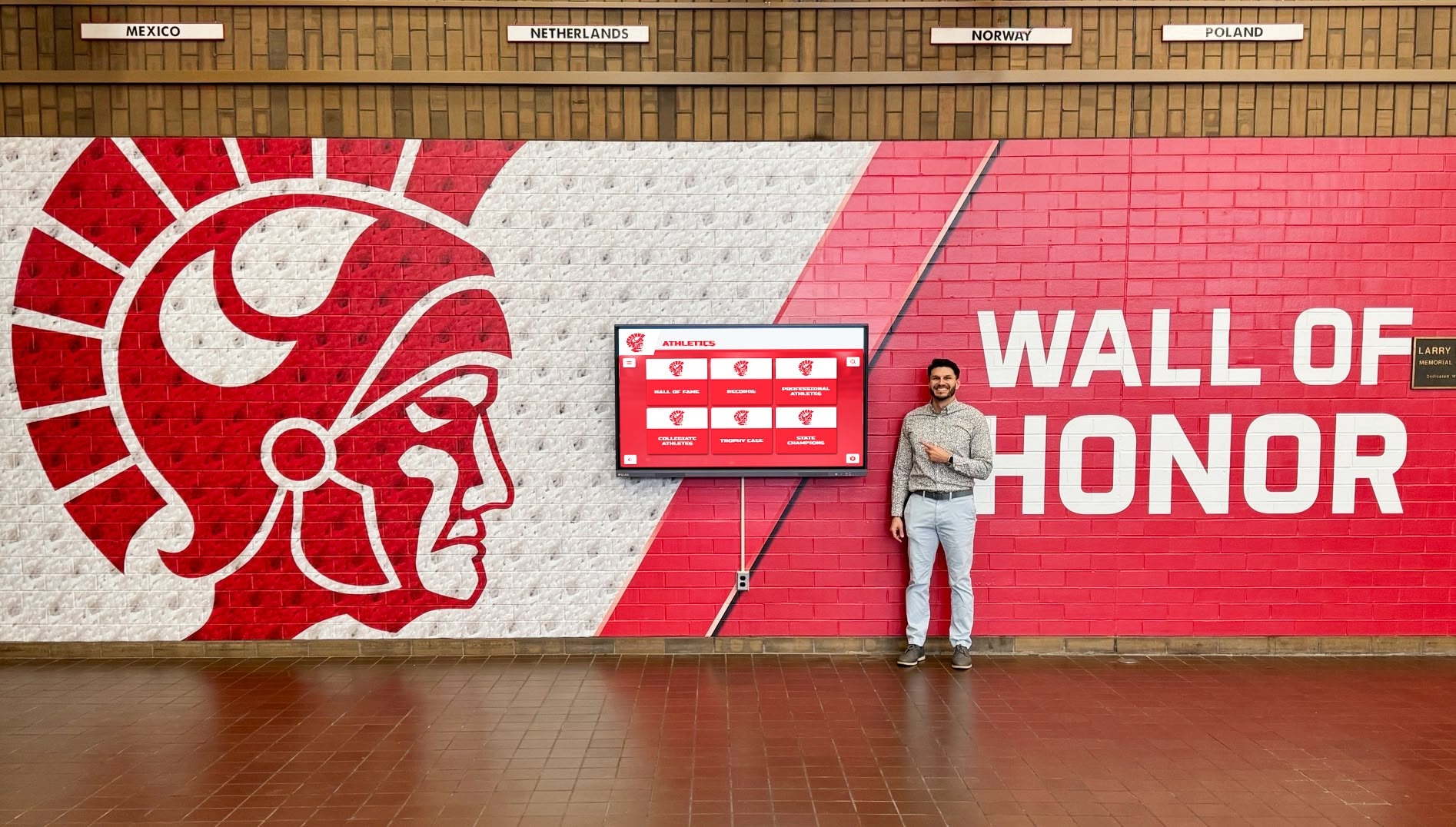
Modern school hallways feature integrated recognition walls where physical displays work alongside digital components for comprehensive achievement celebration
Budget Planning for Display Projects
Athletic departments face budget constraints requiring strategic decisions about display investments. Understanding cost ranges and prioritization approaches helps programs maximize impact within available resources.
Traditional Display Case Cost Analysis
Individual Display Cases:
- Basic acrylic cases: $75-150 per helmet
- Premium UV-protected acrylic: $150-250 per helmet
- Custom shadow boxes: $300-800 per helmet
- Multi-helmet wall cases: $800-2,500 (3-6 helmets)
- Large wall installations: $2,500-8,000 (8-15 helmets)
Trophy Room Buildouts:
- Display furniture (cabinets, pedestals): $1,000-5,000
- Built-in wall cases: $3,000-15,000 depending on size
- Custom millwork and shelving: $5,000-25,000
- Lighting installation: $2,000-8,000
- HVAC and environmental controls: $3,000-12,000
- Flooring, paint, and finishes: $5,000-20,000
Trophy room projects typically require $20,000-80,000 investments depending on space size and finish quality. Programs planning renovations should budget conservatively and prioritize essential elements before investing in luxury finishes.
Digital Display Investment Considerations
Modern digital recognition systems represent different cost structures—higher initial investments but greater long-term flexibility and lower ongoing costs compared to repeatedly purchasing additional physical display cases.
Digital Recognition System Costs:
- Entry-level touchscreen displays: $5,000-8,000
- Mid-range interactive systems: $8,000-15,000
- Premium installations with custom mounting: $15,000-30,000
- Content development and photography: $2,000-5,000
- Annual software licensing: $1,200-3,600
Digital systems demonstrate value when programs have substantial achievement histories warranting comprehensive documentation. Rather than purchasing dozens of individual helmet cases, a single digital display can feature unlimited helmet images, player profiles, and achievement documentation while occupying minimal physical space.
Funding Strategies and Budget Approaches
Athletic departments rarely fund major display projects entirely from operating budgets. Successful programs employ creative funding strategies engaging stakeholders in recognition investments.
Donor Recognition Opportunities:
Display projects create naming opportunities attracting major donors. Trophy rooms, display areas, or digital recognition systems named for significant contributors provide lasting acknowledgment while funding facility improvements. Donors appreciate visible, permanent recognition that communities regularly encounter.
Smaller donor opportunities include sponsoring individual helmet displays, funding specific case purchases, or contributing to digital content development. Programs can create donor recognition levels corresponding to investment amounts, encouraging varied participation levels.
Booster Club Fundraising:
Booster organizations often prioritize projects with visible community impact. Display improvements demonstrate tangible investments in program excellence that engage communities. Fundraising campaigns specifically supporting recognition improvements can unite boosters around concrete goals beyond general operating support.
Many successful programs incorporate display giving opportunities into athletic banquet planning, announcing display campaigns at recognition events where enthusiasm runs high and communities gather celebrating achievements.
Phased Implementation:
Rather than deferring projects until full funding materializes, phased approaches allow programs to begin recognition improvements while building toward comprehensive visions. Year one might focus on displaying championship helmets in existing spaces using modest case purchases. Year two could add lighting improvements and interpretive materials. Year three might incorporate digital components expanding recognition capacity.
Phased approaches demonstrate progress generating continued momentum and donor interest while allowing programs to learn from early implementations before committing to larger investments.
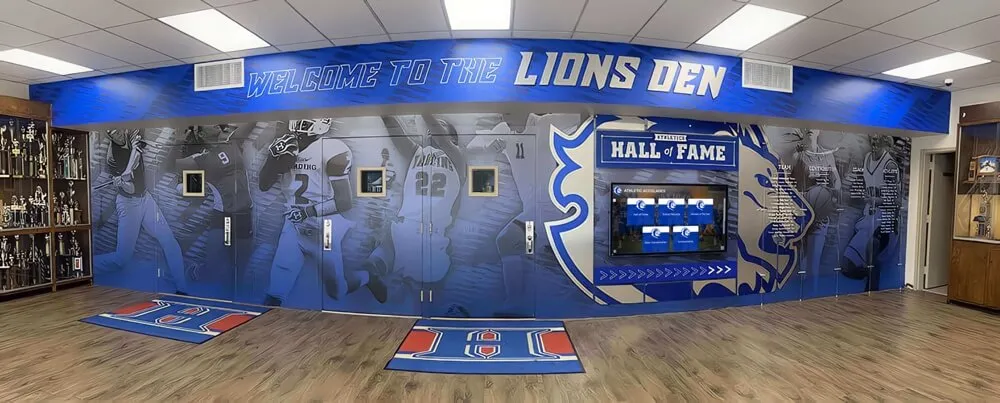
Well-designed athletic hallways integrate multiple recognition elements creating immersive environments celebrating program excellence and tradition
Maintenance and Long-Term Management
Display investments require ongoing maintenance protecting helmet condition and preserving presentation quality. Establishing clear maintenance protocols prevents deterioration and ensures displays continue serving recognition purposes effectively.
Regular Cleaning and Inspection
Display Case Maintenance:
Glass and acrylic surfaces accumulate dust, fingerprints, and smudges reducing visibility. Establish weekly cleaning schedules using appropriate materials—microfiber cloths and ammonia-free cleaners prevent scratching and clouding. Assign specific staff members or student managers cleaning responsibilities ensuring consistent attention.
Inspect cases quarterly for damage—cracked acrylic, loose hinges, failing LED lighting, or deteriorating seals allowing dust infiltration. Addressing minor issues promptly prevents escalation requiring expensive replacements.
Helmet Condition Monitoring:
Even within protective cases, helmets require periodic inspection. Check for decal lifting, paint chipping, foam deterioration, or face mask oxidation. Document conditions through dated photos establishing baselines for tracking changes over time.
Some deterioration proves inevitable—foam padding compresses, decals fade, and materials age. Understanding normal aging versus damage requiring intervention helps programs make informed preservation decisions. Consult sports memorabilia preservation specialists for valuable items showing concerning deterioration.
Organizational Systems and Documentation
As collections grow, organizational systems prevent confusion about helmet identities, significance, and display histories. Simple spreadsheet databases tracking each helmet’s acquisition date, condition assessment, current location, and associated information ensure institutional knowledge doesn’t depend entirely on individual staff memory.
Documentation particularly matters during staff transitions. When athletic directors, coaches, or facilities managers change, comprehensive records preserve knowledge about why specific helmets merit display, their historical contexts, and any special handling requirements.
Digital Asset Management:
Programs implementing digital recognition need parallel organization for digital assets—helmet photos, game footage, player information, and achievement details. Cloud-based storage with logical folder structures and consistent naming conventions prevents the “lost file” problem where someone knows content exists but cannot locate it.
Establish backup procedures protecting digital content against data loss. Cloud storage provides inherent redundancy, but export copies to external drives or secondary cloud services for additional security.
Selection Criteria: Matching Solutions to Program Needs
With numerous display options available, athletic departments benefit from structured decision frameworks evaluating solutions against specific program requirements.
Critical Decision Factors
Collection Size and Growth Projections:
Programs with 3-5 significant helmets have vastly different needs than those managing decades of football history. Estimate not just current collection size but realistic growth over the next 10-20 years. Football programs winning championships regularly require expandable solutions avoiding premature capacity constraints.
Available Space and Location:
Measure actual available space accounting for clearances, circulation paths, and architectural features limiting display options. A dedicated 300-square-foot trophy room supports different approaches than a 6-foot wall section in a crowded hallway.
Budget Reality and Funding Timeline:
Honest budget assessment prevents pursuing solutions requiring unrealistic funding or extended fundraising campaigns delaying recognition for years. Sometimes modest but immediate implementations serve programs better than elaborate plans remaining unrealized.
Stakeholder Expectations:
Understanding what coaches, administrators, alumni, and community members envision prevents misalignment. Some stakeholders value traditional displays maintaining physical connections to artifacts, while others embrace modern digital approaches maximizing recognition capacity. Reconciling these perspectives early prevents late-project conflicts.
Maintenance Capacity:
Display solutions requiring extensive cleaning, updating, or technical maintenance only work when programs can commit necessary resources. Low-maintenance options may cost more initially but prove more sustainable for programs with limited staff capacity.
Making the Decision
Most programs find success through blended approaches—displaying most significant helmets in quality physical cases while leveraging digital systems for comprehensive historical documentation. This combination honors key achievements through tangible artifacts while avoiding space limitations preventing complete recognition.
The “right” solution depends entirely on program-specific contexts. Championship-rich programs may invest heavily in trophy room buildouts showcasing extensive collections. Smaller programs might find single premium shadow boxes displaying state championship helmets alongside digital displays featuring complete team histories more appropriate.
The key lies in honestly assessing needs, understanding available options, and selecting solutions supporting both immediate recognition goals and long-term program vision.
Conclusion: Honoring Football Excellence Appropriately
Football helmet display cases serve purposes beyond simple storage or decoration—they communicate program values, honor athlete dedication, engage communities around shared traditions, and inspire current players through visible connections to program excellence. Whether implementing traditional display cases, building comprehensive trophy rooms, or embracing modern digital recognition systems, the goal remains constant: appropriately honoring football achievements while preserving program history for future generations.
Successful display approaches balance competing priorities—preservation and accessibility, aesthetics and budget, tradition and innovation—while remaining true to program identities and community expectations. The best recognition solutions emerge not from following prescriptive formulas but from thoughtfully considering program-specific needs and selecting approaches supporting broader athletic department missions.
As schools and athletic programs continue recognizing that achievement celebration extends beyond participation awards to comprehensive documentation of excellence, display investments take their place alongside facility improvements, coaching development, and athlete support as essential program elements. Football helmet displays, whether physical or digital, represent visible commitments to honoring the athletes who build program legacies one season, one game, and one play at a time.
For athletic administrators seeking recognition solutions that adapt to evolving program needs while maintaining flexibility for future achievements, Rocket Alumni Solutions provides modern digital recognition systems that complement traditional displays while offering unlimited capacity for celebrating athletic excellence across all sports and achievement types.































