Walk through any modern school hallway and you’ll encounter digital screens everywhere—announcements scrolling endlessly, lunch menus displayed in bland text, generic motivational quotes cycling through predetermined rotations. Most students walk past these displays without a second glance, tuning out yet another piece of institutional communication competing for their attention. But what if school screens could be different? What if digital displays could capture genuine student interest, spark conversations, create moments of delight, and build authentic connections while still serving educational purposes?
The concept of a “fun school screen” represents more than just entertaining content—it’s about transforming institutional communication into engaging experiences that students actually notice, interact with, and remember. When implemented thoughtfully, fun school screens build school spirit, celebrate student achievements, create inclusive communities, and enhance the daily experience of walking through school hallways and common areas. This comprehensive guide reveals everything educators need to know about creating digital displays that balance entertainment value with educational purpose, generating genuine student engagement rather than passive indifference.
School administrators and technology coordinators face a fundamental challenge: digital displays represent significant investments in hardware and infrastructure, yet many schools struggle to generate content that students find genuinely engaging. Traditional approaches—static announcements, administrative messages, and formal recognition—serve necessary functions but fail to capture the attention and imagination of students raised on dynamic social media, interactive gaming, and personalized digital experiences. Creating fun school screens requires understanding what makes content engaging while maintaining appropriate educational standards and supporting institutional goals.

Understanding What Makes School Screens Actually Fun
Before exploring specific content strategies, understanding the fundamental characteristics that transform ordinary displays into engaging experiences provides essential foundation for effective implementation.
The Psychology of Student Engagement
Students respond to content that feels relevant, authentic, and designed for them rather than being institutional communication they’re required to consume:
Personal Relevance: Content that connects to students’ lives, interests, achievements, and social connections captures attention far more effectively than generic institutional messages. When students see themselves, their friends, their accomplishments, or their interests reflected on displays, they stop to look, interact, and share the experience with others.
Interactive Elements: Passive viewing requires no investment and generates minimal engagement. Interactive content inviting touch, exploration, discovery, or participation transforms screens from broadcast media into experiences students actively choose to engage with because interaction itself provides enjoyment and satisfaction.
Surprise and Delight: Predictable content becomes invisible—students learn to ignore displays showing the same types of information in identical formats day after day. Fun screens incorporate elements of surprise through varying content, unexpected presentations, humor, creativity, and moments that exceed expectations, making checking displays rewarding rather than monotonous.
Social Connection: Students are fundamentally social—content enabling them to connect with peers, share experiences, celebrate friends’ achievements, or participate in community activities generates far more engagement than isolated individual experiences. Fun displays facilitate social interaction rather than replacing it.
Appropriate Entertainment Value: While educational purpose remains paramount, acknowledging that students appreciate entertainment, humor, and enjoyment doesn’t diminish academic seriousness. The most effective school screens balance educational content with entertainment value that respects students’ intelligence while recognizing they respond positively to creativity and fun.
What “Fun” Really Means in Educational Context
Creating fun school screens doesn’t mean abandoning educational values or professionalism for superficial entertainment:
Engagement Through Quality: Fun comes from well-designed, visually appealing content that demonstrates care and creativity rather than minimum-effort communication. High-quality presentations—even of serious topics—generate more positive response than poorly designed attempts at humor.
Inclusive Recognition: Fun happens when students see their diverse achievements, interests, and identities reflected and celebrated. Displays showcasing academic excellence, athletic accomplishments, artistic creativity, community service, cultural celebrations, and personal milestones create positive experiences for entire school communities rather than narrow groups.
Interactive Discovery: Fun emerges from exploration and discovery—finding unexpected information, learning about classmates’ interests and achievements, uncovering school history, or participating in interactive challenges that reward curiosity and engagement.
Community Building: The most genuinely fun school experiences involve shared moments bringing students together. Digital displays that facilitate community connections, celebrate collective achievements, enable friendly competition, or create common reference points build the positive culture that makes schools feel welcoming and engaging.
Authentic Voice: Students respond to content that feels genuine rather than artificially constructed by administrators trying to be “relevant.” Involving students in content creation, allowing authentic expression, and avoiding forced attempts to co-opt youth culture creates more positive responses than manufactured “fellow kids” approaches.

Interactive Content That Captures Student Attention
The most engaging fun school screens move beyond passive display to active participation, creating experiences students choose to engage with rather than content they passively consume.
Gamification and Interactive Challenges
Game-like elements transform routine information into engaging experiences:
Daily Trivia and Brain Teasers: Short, entertaining questions testing knowledge about school history, current events, academic subjects, pop culture, or general knowledge create natural stopping points in hallways. Students compete informally with friends to answer first, discuss responses, and check results later in the day. Trivia works best when questions vary in difficulty, cover diverse topics appealing to different interests, provide immediate or next-day answer reveals, and occasionally offer small prizes or recognition for participation or correct streaks.
Scavenger Hunts and Easter Eggs: Hidden content requiring exploration, discovery, or solving puzzles adds adventure to daily routines. Schools can hide digital “Easter eggs” throughout display content—hidden messages, secret codes, references to school traditions, or connections between different displays. Students discovering these hidden elements report findings to receive recognition or prizes, creating ongoing engagement as new content appears.
Interactive Polls and Surveys: Quick opinion questions give students voice while generating immediate visible results. Effective polls are lighthearted (favorite pizza topping, best season, music preferences), occasionally relevant to school decisions (spirit week theme options, potential event activities), time-limited to create urgency, and display running results showing how peer opinions develop. Polls work particularly well when they acknowledge and celebrate diverse opinions rather than positioning responses as right or wrong.
Leaderboards and Friendly Competition: Displaying achievements in formats that recognize multiple students rather than only top performers creates inclusive competition. Academic honor roll displays, attendance streaks, reading challenge progress, community service hours, and athletic records can all use leaderboard formats celebrating participation and improvement alongside absolute achievement. Effective leaderboards rotate regularly, recognize diverse achievement categories, celebrate progress not just results, and avoid formats that embarrass struggling students.
Interactive Countdown Timers: Visual countdowns to anticipated events—homecoming, school dances, championship games, break periods, spirit week activities—build excitement and create shared reference points for student conversations. Creative countdown presentations incorporating animation, themes related to upcoming events, or student-submitted content celebrating what’s anticipated generate more engagement than simple number displays.
Many schools implement interactive spirit week approaches that combine digital displays with school-wide participation activities, creating comprehensive experiences that leverage technology to enhance rather than replace in-person engagement.
Student Recognition and Celebration
Nothing generates more consistent student engagement than seeing themselves, their friends, and their achievements celebrated:
Student of the Day/Week Spotlights: Brief profiles highlighting individual students rotate regularly, ensuring every student receives recognition during the school year. Effective spotlights include photos (professional or submitted by students), fun facts beyond academic achievements, hobbies and interests outside school, favorite memories or school traditions, career aspirations or dreams, and brief quotes in students’ own voices. These profiles humanize students beyond their academic roles while building community as classmates discover unexpected connections and shared interests.
Birthday Celebrations: Simple birthday recognition creates positive moments as students see their names displayed while friends congratulate them throughout the day. Birthday displays work best when they’re visually celebratory with balloons, colors, or festive designs, grouped appropriately if multiple birthdays occur daily, and include photos when available to help identify celebrants.
Achievement Showcases: Beyond traditional honor rolls, comprehensive achievement recognition celebrates diverse student accomplishments through athletic records and statistics, competition results across all activities, scholarship and award recipients, college signing celebrations, perfect attendance recognition, improvement and growth achievements, and community service milestones. Comprehensive recognition demonstrates that schools value diverse forms of excellence rather than narrow definitions of success.
Social Media Integration: When implemented with appropriate safeguards, displaying student-generated social media content with approved hashtags creates authentic peer recognition. Students see their posts featured on school displays when they use designated hashtags for school events, achievements, or appropriate celebrations. This approach requires clear content guidelines, administrative approval workflows, and age-appropriate moderation, but generates significant student engagement when students know their content might be featured.
Interactive “Shout Out” Boards: Students submit positive recognition for peers, teachers, or staff through easy submission systems (QR codes, web forms, or kiosk interfaces). Approved submissions rotate through displays: “Shout out to Emma for helping me understand the math homework!”, “Thank you to Coach Martinez for believing in us!”, or “Props to the cafeteria staff for the awesome lunch today!” These peer recognition moments build positive culture while giving students voice in school communication.
Schools implementing comprehensive student achievement recognition programs find that systematic, inclusive approaches celebrating diverse accomplishments generate far more engagement than selective recognition highlighting only traditional achievements.

Content Strategies That Keep Displays Fresh
Even the most engaging content becomes invisible when it never changes—effective fun school screens maintain ongoing interest through strategic content rotation and variety.
Dynamic Content Rotation Systems
Systematic approaches to content variation prevent the staleness that causes students to tune out:
Time-Based Themes: Organizing content around natural calendar rhythms creates anticipation and variety. Monthly themes (Hispanic Heritage Month, Black History Month, Women’s History Month, STEM emphasis, arts celebration), seasonal content (fall sports, winter celebrations, spring activities, end-of-year traditions), and event-focused periods (homecoming week, finals motivation, graduation celebration) provide frameworks for varied content that feels timely and relevant rather than generic and unchanging.
Day-of-Week Content Patterns: Establishing predictable patterns helps students know when to check displays for specific content types. Motivational Monday messages starting weeks positively, Tuesday trivia challenging knowledge, Wednesday “way back” historical photos from school archives, Thursday spotlight on upcoming weekend events, and Friday celebration of week’s achievements create reliable rhythms students anticipate while maintaining variety preventing content from feeling monotonous.
Scheduled Content Updates: Even the best content grows stale—systematic refresh schedules ensure displays remain dynamic. Major content updates weekly introducing new featured students, achievements, or themes, daily variation in specific elements like trivia, polls, or quotes, hourly rotation for schools with multiple display zones showing different content simultaneously, and real-time updates for live events, scores, or breaking announcements keep content feeling current rather than outdated.
Student-Generated Content Cycles: Involving students directly in content creation generates authentic material while teaching valuable skills. Student photographers documenting school events, student journalists creating video features, art students designing visual content, media classes producing announcements and features, and student councils submitting ideas and hosting content ensure displays reflect authentic student voice rather than exclusively administrative perspective.
Seasonal and Holiday Content: Acknowledging celebrations and seasons appropriate to school community builds positive atmosphere. Fall imagery and autumn themes, winter holiday recognition reflecting community diversity, spring renewal and growth themes, end-of-year celebration and reflection, and cultural celebrations important to student population demonstrate awareness and inclusivity while providing natural content variation.
Multimedia Integration for Maximum Impact
Moving beyond static text and images to incorporate diverse media creates more engaging experiences:
Video Content: Short video clips (15-60 seconds) showcasing student performances, athletic highlights, classroom projects, student interviews, teacher messages, or event recaps capture attention more effectively than static images. Video content works best when it’s concise enough to view during passing periods, includes captions for viewing without audio in noisy hallways, features genuine student activity rather than staged productions, and rotates regularly to maintain novelty.
Animation and Motion Graphics: Subtle animation draws attention without becoming distracting—animated text reveals, smooth transitions between content, dynamic backgrounds, animated charts showing statistics or data, and motion elements highlighting important information make displays feel alive and current rather than static and dated.
Live Information Feeds: Real-time information demonstrates displays are current and relevant through weather forecasts helping students dress appropriately, lunch menu displays with current day highlighting, schedule information for block schedules or special days, countdown timers to dismissal or next period, and live social media feeds (with appropriate filtering) showing school community activity.
Photo Galleries and Slideshows: Recent event photography keeps schools visually documented through athletic competition highlights, performing arts showcase images, field trip documentation, classroom project exhibitions, school tradition events, and student life candid photography. Gallery content works best when it’s recent (within past week), includes identifying captions, features diverse students and activities, updates frequently, and uses high-quality photography rather than blurry snapshots.
Schools implementing digital boards supporting photos and videos discover that multimedia content generates significantly higher engagement than text-only approaches while better documenting school experiences for current and future communities.

Building School Spirit Through Screen Content
The most effective fun school screens transcend entertainment to build genuine community and school pride through content celebrating collective identity and shared experiences.
School Pride and Tradition Content
Connecting students to institutional identity creates belonging:
School History and Heritage: Sharing school history makes current students feel part of continuing narrative. Historical photos from school archives, notable alumni achievement stories, championship team histories, facility evolution documentation showing campus changes, founding stories and school name origins, and traditional event documentation help students understand they’re part of something larger than themselves.
Mascot and School Symbol Features: Creative mascot appearances throughout content build brand recognition and pride. Animated mascot graphics, mascot costume appearances in school events, student mascot spotlights recognizing spirit participants, mascot trivia about symbol history and meaning, and creative mascot integration into announcements and content strengthen school identity in memorable ways.
Fight Song and School Song Displays: Displaying lyrics with music reinforces school traditions. Animated lyric displays with school colors and imagery, historical context about song origins, performance videos from pep rallies or events, student interpretations or arrangements, and encouragement for all students to learn songs build collective traditions transcending individual class years.
School Motto and Core Values: Rather than generic motivational posters, authentic integration of school values through student examples demonstrating values in action, achievement recognition aligned with specific values, quote compilations from students explaining what values mean, visual representation in student artwork and photography, and consistent design elements reinforcing identity make abstract principles concrete and memorable.
School Colors and Visual Identity: Consistent, attractive use of school colors and branding creates professional appearance and pride. Template designs featuring school colors, strategic use of school logos and symbols, photography and video content showcasing school facilities, student apparel featuring school branding, and visual consistency across all display content reinforces institutional identity and professionalism.
Comprehensive approaches to building school pride through digital displays integrate technology with broader culture-building initiatives, ensuring displays support rather than replace in-person traditions and community-building activities.
Event Promotion and Hype Building
Digital displays excel at building anticipation and attendance:
Countdown Displays: Visual countdowns create excitement and urgency for upcoming events. Large, prominent countdown timers, creative themed graphics related to specific events, milestone callouts (7 days until homecoming, 72 hours until game day), integration with relevant content about events, and social media hashtags for online conversation build momentum as events approach.
Event Teasers and Previews: Building interest before full announcements creates anticipation. Mysterious hints or clues about upcoming events, behind-the-scenes preparation glimpses, student organizer interviews and invitations, past event highlights reminding students of positive experiences, and theme reveals with visual previews generate conversation and speculation that amplifies interest beyond direct announcements.
Participation Encouragement: Direct calls to action increase event attendance. Visual ticket or registration information with clear next steps, deadline reminders for RSVPs or sign-ups, participation incentives or giveaway promotions, student testimonials from past events explaining why attendance was valuable, and reduced barriers by simplifying participation processes make responding easy and rewarding.
Real-Time Event Coverage: Live displays during events extend participation beyond physical attendees. Live score updates from athletic competitions, photo galleries posted during events, social media feed displays showing event hashtag content, countdown timers to event start times, and congratulations messages immediately after events maintain energy and include wider audiences.
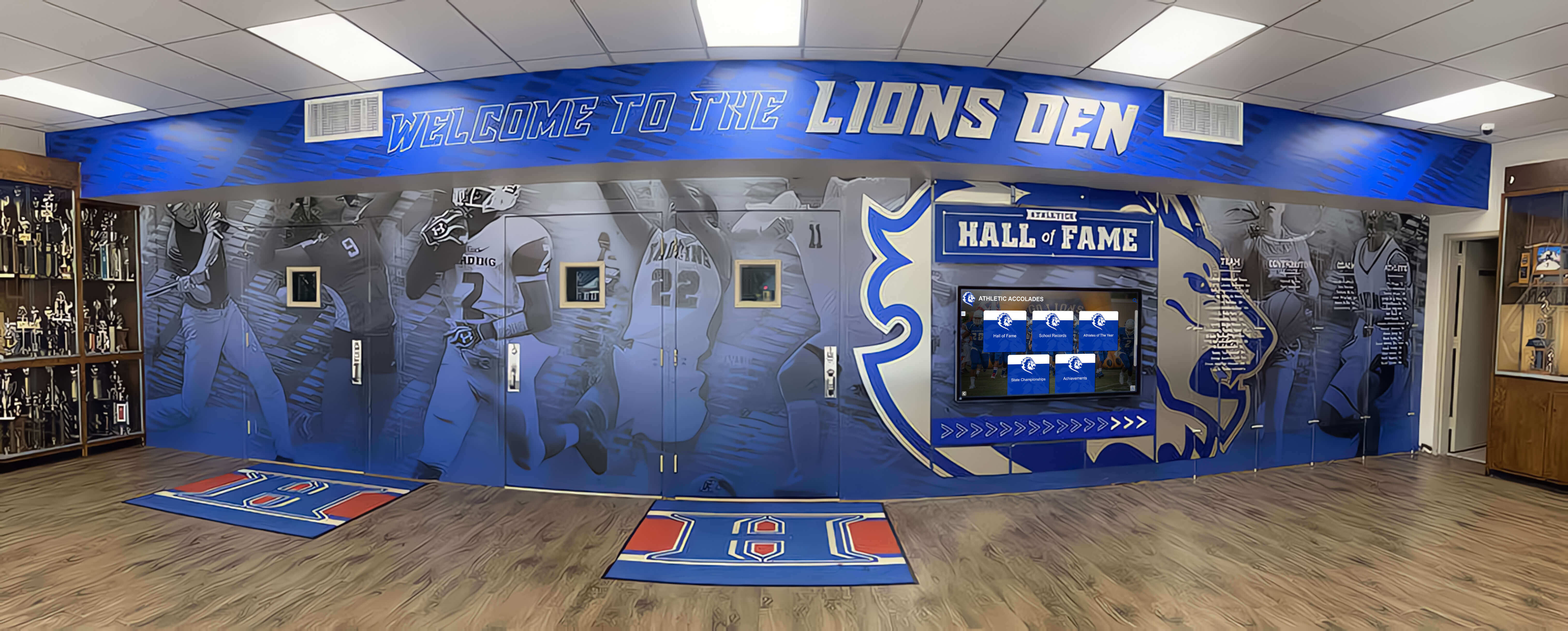
Schools implementing comprehensive athletic recognition find that prominent, engaging displays of team schedules, player profiles, and competition results significantly increase attendance and community support for athletic programs.
Technical Platforms Enabling Fun Interactive Displays
Creating truly engaging fun school screens requires appropriate technology infrastructure beyond basic digital signage—interactive capabilities, dynamic content management, and comprehensive design flexibility separate basic announcement displays from genuinely engaging experiences.
Interactive Touchscreen vs. Passive Display Options
Understanding the capabilities and limitations of different display technologies helps schools make appropriate investments:

Interactive Touchscreen Capabilities: Touchscreen displays enable genuine interaction—students can search for information, browse photo galleries, explore achievement archives, answer trivia questions, submit responses to polls, discover detailed content about featured students or events, and control their own experience rather than passively viewing predetermined content rotation. Interactive displays work particularly well in high-traffic locations where students have time to engage (main lobbies, cafeterias, library entrances) and generate significantly higher engagement than passive displays showing identical content.
Passive Digital Signage Uses: Traditional non-interactive digital signage serves important functions despite lacking touch capabilities. Passive displays work well for announcements requiring no interaction, quick information consumed during passing periods, locations where physical interaction isn’t practical (high-mounted displays, outdoor installations), and budget-conscious implementations where interactive capability isn’t justified. Many schools implement hybrid approaches using interactive displays in key locations supplemented with passive signage in secondary areas.
Mobile and Web Extensions: The most engaging modern implementations extend beyond physical displays to provide mobile and web access, enabling students to explore comprehensive content from personal devices, access displays remotely for absent students or parents, share content through social media, and maintain engagement beyond brief hallway moments between classes. Solutions like Rocket Alumni Solutions provide synchronized physical displays and mobile-responsive web platforms creating seamless experiences across contexts.
Content Management Systems for Dynamic Updates
Easy content management enables the frequent updates necessary for maintaining engagement:
Intuitive Administrative Interfaces: Staff without technical expertise should easily update displays through web-based dashboards requiring no special software, drag-and-drop content upload and arrangement, template-based design ensuring visual consistency, scheduled publishing for timed content releases, and preview capabilities showing exactly how content will appear before publishing. Complex systems requiring IT department intervention for routine updates inevitably result in stale, outdated displays as busy staff avoid the hassle.
Multi-User Permissions: Distributed content responsibility prevents bottlenecks and encourages diverse content. Role-based access allowing different staff appropriate permissions, department-specific sections managed by relevant faculty, student content manager roles for appropriate applications, approval workflows for student submissions, and activity logging showing who published what content ensures accountability while enabling distributed management.
Template and Design Systems: Pre-designed templates accelerate content creation while maintaining visual quality. School-branded templates featuring colors and logos, category-specific designs for different content types, customizable elements within structured frameworks, font and color schemes ensuring readability, and professional design quality even from non-designer staff create consistently attractive displays without requiring graphic design expertise for every update.
Analytics and Engagement Tracking: Understanding what content resonates helps optimize future planning. View counts for different content items, interaction tracking on touchscreen displays, dwell time measurements showing how long students engage, most-searched content on interactive displays, and peak usage times informing content scheduling enable data-driven content strategies rather than guesses about effectiveness.
Integration Capabilities: Connecting displays with existing school systems simplifies management. Student information system integration for automatic roster updates, calendar synchronization for event information, social media connectivity for approved content feeds, and communication platform integration for announcements ensure displays reflect current information without duplicative manual entry.
Many schools implementing touchscreen software solutions prioritize platforms specifically designed for educational recognition and engagement rather than generic corporate digital signage systems lacking features schools actually need.
Content Ideas Students Actually Engage With
Moving from principles to practice, specific content types consistently generate high student engagement across different school contexts and communities.
Personality and Interest-Based Features
Content revealing personal dimensions beyond academic roles builds human connections:
“Two Truths and a Lie” Student Features: Brief profiles presenting three facts about students (one false) invite classmates to guess the lie, creating fun challenges while revealing interesting information. These features work well because they’re quick to consume during passing periods, invite conversation and speculation with friends, reveal unexpected information about classmates, and rotate daily featuring different students ensuring ongoing novelty.
“Meet Your Classmate” Random Student Spotlights: Rather than limiting recognition to high achievers, random selection spotlights ensure every student receives featured moment. Brief profiles include favorite classes, hobbies outside school, hidden talents, favorite school memories, advice for younger students, and personal fun facts, building community through familiarity while ensuring inclusive recognition reaching beyond traditional achievement categories.
Teacher Spotlights and Fun Facts: Students enjoy learning about teachers beyond classroom roles. Teacher profiles featuring background before teaching career, college experience and favorite subjects, hobbies and outside interests, favorite books, movies, or music, embarrassing or funny school memories, and teaching inspiration stories humanize educators while building positive relationships extending beyond instructional contexts.
Club and Activity Showcases: Rotating features on student organizations build awareness and recruitment. Brief descriptions of club purposes and activities, meeting times and joining information, upcoming events and plans, member testimonials explaining why they participate, photos from recent activities, and achievement recognition for competition results promote diverse involvement opportunities beyond mainstream athletics and academics.
Student Artwork and Creative Work Displays: Digital galleries showcasing student creativity celebrate artistic achievement. Visual arts projects from classes, creative writing excerpts, photography portfolios, digital design and media work, and musical performance recordings provide authentic platforms for creative expression while demonstrating school values diverse talents.
Academic Engagement and Learning Content
Fun content can support educational objectives without feeling didactic:
Subject-Specific Trivia and Challenges: Brief academic content in entertaining formats reinforces learning. Historical “on this day” facts relevant to curriculum, science fun facts or experiments, mathematical puzzles and brain teasers, language word-of-the-day features with usage examples, and literature connections to current events make academic content approachable and interesting rather than feeling like homework extensions.
College and Career Spotlights: Students appreciate relevant information about life after graduation. Featured college profiles highlighting unique programs or opportunities, career path spotlights showing diverse possibilities, alumni updates demonstrating successful pathways, scholarship opportunity alerts with application information, and test prep tips and resources during relevant seasons provide valuable guidance in accessible formats students actually view.
Study Tips and Academic Support: Brief, actionable academic guidance supports student success. Time management strategies from successful students, organization techniques and tools, test-taking tips aligned with upcoming exams, resource highlights for academic support services, and stress management techniques during high-pressure periods demonstrate care for student wellbeing and success.
Book and Media Recommendations: Student and teacher recommendations promote literacy and culture. Brief reviews in authentic student voices, genre or theme-based recommendations, connection to upcoming movies or cultural events, diverse representation in recommended materials, and library or bookstore information for accessing recommendations support reading habits while respecting students encounter books primarily outside school requirements.
Schools implementing comprehensive academic recognition approaches find that public celebration of intellectual achievement parallel to athletic recognition improves academic culture and student motivation across achievement levels.
Social Connection and Community Building
The most engaging content facilitates peer connection and community belonging:
“Where Are They Now?” Alumni Updates: Current students appreciate seeing successful pathways from alumni who walked the same hallways. Recent graduate updates showing first-year college experiences, career achievement stories from established alumni, alumni returning to visit or speak, alumni advice for current students, and connections showing diverse successful pathways create inspiration and guidance while building school pride in distinguished graduates.
New Student Welcome Features: Intentional recognition of new students builds inclusive culture. Brief profiles introducing new students, welcoming messages from student council or administration, school tradition explanations helping newcomers understand culture, student mentor or buddy connections, and campus navigation tips or resources reduce newcomer anxiety while signaling that school values all students regardless of arrival time.
Staff Recognition and Appreciation: Celebrating staff beyond teachers builds holistic community. Cafeteria worker spotlights, custodial staff recognition, office staff appreciation, coach and activity advisor features, substitute teacher welcomes, and volunteer recognition demonstrate respect for all community members contributing to positive school environment.
Community Service and Social Impact: Celebrating service builds culture of contribution. Service project spotlights and participation opportunities, student volunteer hour milestones, community partnership features, social issue awareness campaigns, and environmental initiative updates demonstrate school values extending beyond internal achievement to broader social contribution.
Diversity and Inclusion Celebrations: Inclusive content recognizing all community members builds belonging. Cultural heritage month programming, diverse student story features, inclusive language and imagery across all content, affinity group spotlights and events, and anti-bullying and inclusion messages create welcoming environments where all students see themselves represented and valued.
Comprehensive parent engagement strategies often leverage digital displays to communicate school culture and activities to families, extending community building beyond students themselves to entire household units.

Implementation Best Practices for Maximum Engagement
Even excellent content fails to generate engagement without strategic implementation considering location, timing, accessibility, and integration with broader school culture.
Strategic Display Placement
Location dramatically affects engagement regardless of content quality:
High-Traffic Intersection Points: Maximum visibility comes from placing displays where students naturally converge—main entrance lobbies, cafeteria entrances where students pause checking menus or waiting for friends, hallway intersections connecting major building sections, outside auditoriums or gymnasiums before events, and near administrative offices where families visit. These locations ensure displays receive regular viewing from entire school population rather than being relegated to isolated areas only specific groups frequent.
Dwell Time Locations: Interactive content requires time for engagement—locations where students naturally pause (cafeteria seating areas, library entrances, student lounges, waiting areas outside counseling or administrative offices) support interaction better than narrow hallways where students rush between classes. Match content complexity to location, using simpler visual content in pass-through areas while reserving rich interactive experiences for locations supporting extended engagement.
Multiple Display Networks: Large schools benefit from distributed displays showing different content—athletic wing displays emphasizing sports recognition, fine arts area displays showcasing creative achievements, main entrance displays featuring whole-school content, and department-specific displays with subject-relevant information. Coordinated multi-display systems create comprehensive coverage while allowing targeted content relevant to specific locations and audiences.
Accessibility Considerations: Displays should accommodate all students through appropriate mounting heights (42-48 inches center height for touchscreen displays), adequate clearance for wheelchair access, visual contrast for visibility impairments, audio options or captions when sound is used, and intuitive interfaces requiring minimal instruction. Accessible design benefits all users while ensuring equity.
Content Scheduling and Timing Strategies
When content appears affects engagement as much as what appears:
Academic Calendar Alignment: Content relevance depends on timing—college information during application seasons, test preparation tips before major exams, summer program opportunities at appropriate decision times, course selection guidance during registration periods, and graduation celebration as senior year concludes. Calendar-aware content demonstrates awareness of student experiences and needs rather than generic year-round messaging.
Event-Driven Content: Displays should reflect school rhythm—homecoming week saturation with spirit content, athletic season emphasis on relevant sports, performing arts showcases during production periods, testing periods with stress management resources, and holiday periods with appropriate celebrations. Dynamic responsiveness to school life prevents displays from feeling disconnected from actual student experiences.
Time-of-Day Variations: Different content suits different times—morning displays with motivational messages starting days positively, midday displays with lunch menus and afternoon event reminders, afternoon dismissal displays with transportation information and goodbye messages, and before-school displays with daily schedules and special event information. Schools with capability can vary content throughout day rather than showing identical rotation 24 hours daily.
Day-of-Week Patterns: Establishing predictable patterns helps students know when to check displays—Monday motivation content, Tuesday trivia, Wednesday way-back historical content, Thursday event promotion, and Friday celebration creates rhythms students anticipate while maintaining variety within predictable structures.
Measuring Success and Continuous Improvement
Data-driven approaches optimize engagement over time:
Quantitative Engagement Metrics: Touchscreen displays provide detailed analytics—total interactions and session counts, average session duration, most-viewed content and pages, search queries revealing student interests, and time-of-day usage patterns. These metrics reveal what content resonates, when students engage most actively, and which features succeed or fail, enabling optimization based on evidence rather than assumptions.
Qualitative Student Feedback: Direct student input provides context numbers can’t capture. Brief periodic surveys asking what content students value, informal conversations gathering anecdotal reactions, student focus groups discussing display experiences, suggestion mechanisms for content ideas, and social media monitoring for organic student discussion reveal satisfaction and preferences beyond interaction data alone.
Comparison to Baseline Measures: Measuring improvement requires establishing baselines before implementation. Pre-display culture surveys about school spirit and belonging, attendance and engagement metrics for school events, discipline and behavior data, academic achievement and course enrollment, and school satisfaction measures provide comparison points demonstrating whether displays contribute to broader institutional goals beyond simple view counts.
Iterative Refinement: Successful implementations continuously improve based on learning. Monthly content performance reviews, quarterly strategy adjustments, annual comprehensive assessment, technology updates maintaining current capabilities, and ongoing training ensuring staff maximize platform capabilities create cycles of improvement rather than static implementations that gradually become outdated.
Schools partnering with providers like Rocket Alumni Solutions benefit from platforms specifically designed for educational engagement with built-in analytics, proven content approaches, and ongoing support helping schools continuously improve implementation effectiveness.
Conclusion: Creating Screen Experiences That Matter
Fun school screens represent far more than digital decoration or administrative convenience—when implemented thoughtfully, they transform institutional communication into engagement opportunities, recognition platforms into community builders, and sterile hallways into dynamic spaces celebrating student life and achievement. The difference between screens students ignore and displays they genuinely engage with lies not in expensive hardware but in content strategy, authentic understanding of student experience, and institutional commitment to creating inclusive, celebratory school culture.
The most successful implementations share common characteristics: they recognize diverse student achievements beyond narrow traditional measures, they involve students directly in content creation and curation, they balance entertainment value with educational purpose, they maintain freshness through frequent updates and variation, they integrate with rather than replace in-person traditions and activities, and they leverage appropriate technology enabling genuine interaction rather than passive consumption.
Creating effective fun school screens requires ongoing commitment—not one-time installation but continuous content development, regular assessment and refinement, responsive adjustment to student feedback and engagement data, and strategic integration with broader school culture and community-building initiatives. Schools making these commitments discover that digital displays become valued parts of school identity, generating genuine enthusiasm rather than indifference while supporting measurable improvements in school spirit, student engagement, and community belonging.
Whether implementing comprehensive interactive touchscreen systems or maximizing existing digital signage capabilities, the principles remain consistent: know your audience, create genuine value, maintain freshness, enable interaction, celebrate inclusively, and measure continuously. Fun school screens that follow these principles transform institutional spaces into engaging environments where students feel recognized, connected, and genuinely excited to be part of their school communities.
Ready to transform your school’s digital displays into engaging experiences students actually love? Explore Rocket Alumni Solutions’ interactive platforms specifically designed for educational recognition and engagement—combining intuitive content management, comprehensive interactive capabilities, proven student engagement approaches, and ongoing support helping schools create fun screen experiences delivering lasting cultural impact.
Your students deserve more than scrolling announcements they ignore—create digital experiences they actually notice, enjoy, and remember throughout their educational journey and beyond.































