Every year, schools and organizations host Hall of Fame induction ceremonies to honor their most distinguished alumni, athletes, and contributors. These special evenings feature carefully crafted introduction videos for each inductee—tributes that capture achievements, share personal stories, and celebrate legacy. Yet within days of the ceremony, these powerful video tributes often disappear from view, watched once and filed away, inaccessible to the broader community who couldn’t attend.
This represents a missed opportunity. The introduction videos created for induction ceremonies contain some of the most compelling content an organization can produce—professionally edited tributes that honor achievements while telling deeply personal stories. When these videos remain isolated within a single event, families who couldn’t travel, alumni across the country, and future generations lose access to these important historical records.
Digital hall of fame video archives transform this equation, turning one-time ceremony videos into permanently accessible digital assets that extend recognition far beyond a single evening while creating ongoing engagement opportunities throughout the year.
The Traditional Ceremony Video Challenge
Most organizations invest significant resources creating high-quality introduction videos for Hall of Fame induction ceremonies. Production teams coordinate interviews, gather archival footage, and craft compelling narratives that do justice to each honoree’s achievements and impact.
Video Production Investment:
- Professional filming and editing services
- Coordination with honorees and families
- Research and archival footage gathering
- Script writing and narrative development
- Audio mixing and graphics creation
Limited Traditional Distribution:
- Single showing during ceremony
- Physical DVD copies for honorees
- Occasional YouTube uploads
- Social media clips
- Filing in organizational archives
This traditional approach means organizations create exceptional content viewed by ceremony attendees only—typically 100-300 people for most institutions. The hundreds or thousands of hours invested in production reach a tiny fraction of the potential audience who would value access to these tributes.
How Digital Hall of Fame Video Archives Work
Modern digital hall of fame platforms transform induction ceremony videos from one-time presentations into permanently accessible archives integrated with comprehensive recognition displays.
Immediate Post-Ceremony Updates

Organizations like Belen Jesuit High School exemplify effective video archive implementation. During their Hall of Fame induction ceremonies, their team creates professional introduction videos for each new inductee. Within hours of the ceremony concluding, these videos are uploaded to inductee profiles on their Rocket Alumni touchscreen display, making them immediately accessible to anyone visiting their campus.
This rapid deployment transforms the ceremony from an isolated event into a launching point for ongoing recognition. Families leaving the ceremony can immediately return to the display to rewatch their loved one’s tribute. Students arriving at school Monday morning discover new honorees. Alumni visiting during homecoming explore recent inductees they might have missed.
Multi-Platform Accessibility
Digital video archives extend access far beyond physical displays through integrated web and mobile platforms:
Touchscreen Display Access:
- Campus visitors explore full video libraries
- Interactive browsing by sport, decade, or achievement type
- High-resolution playback on commercial-grade displays
- User-controlled viewing (play, pause, replay)
- Related content suggestions connecting honorees
Web Platform Integration:
- Full video archive accessible from any web browser
- Searchable databases finding specific individuals
- Shareable direct links to individual inductee profiles
- Responsive design ensuring mobile compatibility
- Integration with institutional websites
QR Code Sharing:
- Generate unique QR codes for each inductee profile
- Print codes in ceremony programs
- Display codes at recognition events
- Share via social media and email
- Family members scan codes for instant mobile access
This multi-platform approach means a grandmother in Florida who couldn’t attend the ceremony can scan a QR code from the program her grandson mailed her and watch his introduction video on her tablet. Alumni across the country receive email announcements with links to the newest inductees, spending their lunch break reconnecting with institutional history.
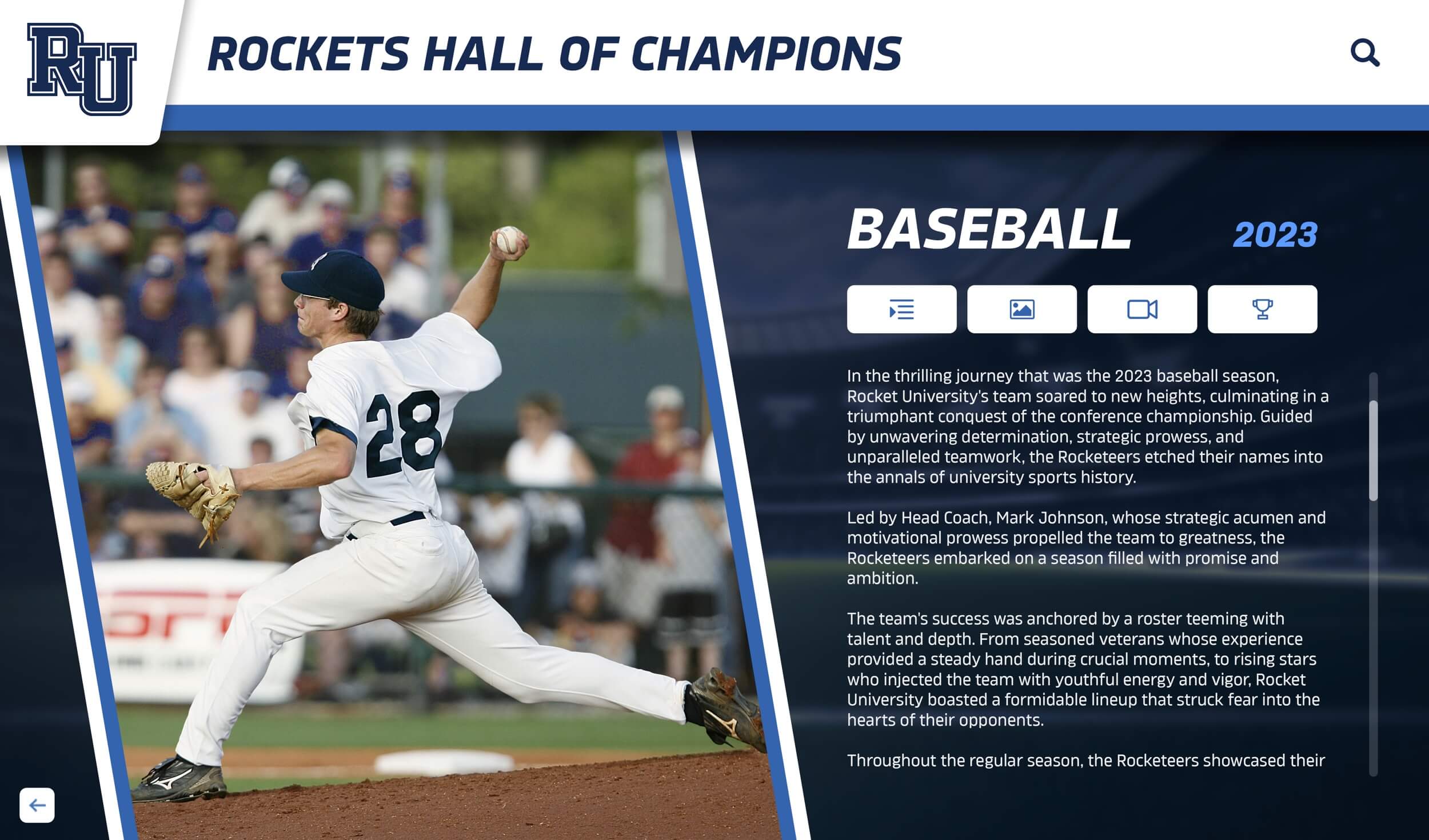
Organized Video Libraries
Effective video content management requires thoughtful organization ensuring visitors can discover content relevant to their interests:
Organizational Structures:
Chronological Navigation:
- Browse by induction year
- Decade-based exploration
- Historical timeline interfaces
- “This Week in History” features
- Anniversary recognition highlights
Category-Based Browsing:
- Sports and activities
- Academic achievements
- Career accomplishments
- Service and leadership
- Special recognition categories
Search and Discovery Features:
- Full-text search across all content
- Filter by multiple criteria simultaneously
- Related content recommendations
- “You Might Also Like” suggestions
- Featured inductee spotlights
This organization transforms video archives from overwhelming databases into curated experiences that guide exploration while enabling targeted searching for specific individuals or achievements.
Beyond Ceremony Videos: Building Comprehensive Archives
While induction ceremony videos form the core of most Hall of Fame video archives, comprehensive recognition programs incorporate multiple video content types creating richer, more engaging experiences.
Historical Footage and Archival Content
Many organizations possess extensive archival footage from past decades—championship game recordings, performance videos, historical interviews, and event documentation. Digitizing and incorporating this content adds valuable historical depth:
Archival Video Types:
- Championship game and competition footage
- Historical interviews with coaches and administrators
- Performance recordings (arts, music, theater)
- Graduation and ceremony documentation
- Campus evolution and facility development
- Community event coverage
Organizations implementing digital asset management systems can systematically digitize historical content, creating searchable video libraries that preserve institutional memory while making it accessible to current and future community members.

Contemporary Achievement Highlights
Supplementing induction videos with shorter achievement highlight clips creates more frequent touchpoints with your digital archive throughout the year:
Achievement Highlight Videos (30-90 seconds):
- Record-breaking performances
- Championship moments
- Academic competition successes
- Performance highlights
- Community service impact
- Research breakthroughs
These shorter videos complement longer induction tributes, providing varied content that maintains visitor engagement during repeat visits to your display or website.
“Where Are They Now” Update Videos
One of the most compelling features digital video archives enable is ongoing content enrichment. Rather than treating induction as a final recognition endpoint, digital platforms support adding update videos showing inductees’ continued accomplishments and current activities:
Update Video Opportunities:
- Career milestone celebrations
- Professional achievement recognition
- Community impact highlights
- Return visits to campus
- Mentorship and giving back stories
- Multi-generational family celebrations
These updates keep recognition current and relevant, demonstrating that Hall of Fame honor represents the beginning of an ongoing relationship rather than a final acknowledgment.
Technical Implementation Considerations
Successfully deploying Hall of Fame video archives requires addressing several technical considerations ensuring optimal performance and accessibility.
Video Format and Optimization
Recommended Technical Specifications:
- Resolution: 1080p (1920x1080) minimum
- Format: MP4 (H.264 codec)
- Frame Rate: 24fps or 30fps
- Bitrate: 8-12 Mbps for 1080p
- Audio: AAC codec, 192kbps stereo
- Aspect Ratio: 16:9 (standard widescreen)
Optimization Strategies:
- Compress videos balancing quality and file size
- Create multiple resolution versions
- Implement adaptive streaming
- Optimize for mobile playback
- Test on actual display hardware
- Consider bandwidth constraints
These specifications ensure videos play smoothly on touchscreen hall of fame displays while remaining accessible for web and mobile viewing without excessive buffering or quality compromises.
Accessibility Features
Comprehensive video archives should serve all community members regardless of ability:
Essential Accessibility Features:
- Closed Captions: Complete text transcription of all dialogue and relevant audio
- Audio Descriptions: Narrative description of visual elements for vision-impaired viewers
- Player Controls: Clear, accessible volume, play/pause, and progress controls
- Keyboard Navigation: Full functionality without requiring mouse/touch input
- Screen Reader Compatibility: Proper labeling and navigation structure
- High Contrast Options: Visual adjustments for users with vision impairments
Platforms like Rocket Alumni Solutions build accessibility features into their interactive recognition displays, ensuring compliance with institutional accessibility requirements while demonstrating commitment to inclusive recognition.

Storage and Hosting Infrastructure
Video files consume substantial storage space and bandwidth. Organizations must plan infrastructure supporting growing video libraries:
Storage Considerations:
Local Storage (On-Device):
- Instant playback without buffering
- No ongoing bandwidth costs
- Works without internet connectivity
- Limited by device storage capacity
- Requires physical visits for updates
Cloud Hosting (Streaming):
- Unlimited content capacity
- Easy remote updates
- Accessible from anywhere
- Requires reliable internet
- Possible bandwidth costs
- Professional CDN delivery
Most modern digital hall of fame systems support hybrid approaches—frequently accessed videos stored locally for instant playback while extensive archives stream from cloud storage, balancing performance with capacity.
Maximizing Video Archive Engagement
Creating video archives represents only the first step. Driving ongoing engagement requires strategic promotion and integration with broader recognition and communication programs.
QR Code Distribution Strategies
QR codes provide the simplest method connecting physical events with digital content:
QR Code Implementation Ideas:
- Ceremony Programs: Print inductee-specific QR codes in program booklets
- Printed Materials: Include QR codes on certificates and awards
- Lobby Displays: Post QR code posters in high-traffic areas
- Social Media Graphics: Share QR codes in announcement posts
- Email Communications: Embed scannable codes in email newsletters
- Printed Invitations: Add QR codes to event invitations
- Table Cards: Place QR code cards at banquet tables
Each code connects directly to that inductee’s profile page, where visitors access their introduction video, biography, photo gallery, and achievement details—all from their mobile device.
Social Media Integration
Video content naturally lends itself to social media sharing, extending reach and engagement:
Social Media Strategies:
- Share short clips on Instagram and TikTok highlighting key moments
- Post complete induction videos on YouTube and Facebook
- Create “Throwback Thursday” features with historical video content
- Tag inductees and families in announcement posts
- Encourage attendees to share ceremony moments
- Develop video series profiling different inductees monthly
- Cross-promote across multiple platforms
Organizations implementing these strategies report 5-8x higher engagement on video posts compared to standard institutional communications, with particular success when inductees themselves share content to their personal networks.

Email and Newsletter Features
Regular email communications keep video archives top-of-mind for alumni and community members:
Email Content Ideas:
- Monthly “Featured Inductee” spotlights with video links
- Anniversary recognitions (“Inducted 25 Years Ago This Month”)
- New inductee announcements immediately post-ceremony
- Archival footage throwbacks
- “Where Are They Now” updates
- Interactive polls about favorite moments or inductees
- Curated playlists organized by theme or era
These communications drive ongoing traffic to video archives throughout the year rather than concentrating attention around annual induction ceremonies.
Integration with Campus Tours and Events
Physical campus events provide natural opportunities connecting visitors with digital video archives:
Event Integration Opportunities:
- Campus Tours: Include touchscreen display demonstrations in standard tour routes
- Homecoming Activities: Feature video highlights during reunion weekends
- Prospective Student Visits: Showcase achievement culture through inductee stories
- Athletic Events: Display Hall of Fame content during pre-game periods
- Open Houses: Use video archives demonstrating institutional tradition
- Donor Events: Connect giving impact with honoree achievements
- Class Reunions: Feature inductees from specific class years
These integrations transform digital archives from isolated technology into living components of institutional culture that visitors encounter naturally throughout their campus experience.
Measuring Video Archive Impact
Tracking engagement and impact helps demonstrate value while informing content strategy:
Quantitative Metrics
Display Analytics:
- Total video views and unique viewers
- Average viewing duration per video
- Completion rates (percentage watching to end)
- Most-watched inductees and content types
- Peak viewing times and days
- User interaction patterns (search terms, filters used)
- Return visitor rates
Web and Mobile Metrics:
- Website traffic to video archive pages
- QR code scans and link clicks
- Social media video views and engagement
- Geographic distribution of viewers
- Device types accessing content
- Referral sources driving traffic
Conversion Metrics:
- Alumni database updates following video views
- Donation inquiries correlated with content engagement
- Contact form submissions from video viewers
- Newsletter subscriptions from archive visitors
Qualitative Feedback
Numbers tell part of the story, but qualitative feedback reveals deeper impact:
Feedback Collection Methods:
- Post-viewing surveys on touchscreen displays
- Email surveys to ceremony attendees
- Social media comment analysis
- Direct testimonials from honorees and families
- Focus groups with alumni and community members
- Observational studies of display interaction
Organizations implementing comprehensive video archives consistently report powerful feedback—families expressing gratitude for accessible tributes, alumni reconnecting with institutional pride, and current students discovering inspirational role models.

Budget-Friendly Implementation Approaches
Concerns about cost often delay video archive implementation. However, thoughtful approaches make comprehensive video libraries accessible across various budget levels:
Leveraging Existing Resources
Start with What You Have:
- Repurpose ceremony videos already being produced
- Digitize existing DVD and VHS archives
- Utilize student media programs for production support
- Engage alumni video professionals for volunteer assistance
- Coordinate with local media outlets for footage access
- Incorporate parent and fan recordings
Phased Implementation
Rather than requiring comprehensive video libraries before launching, implement in phases:
Phase 1: Current Year Focus
- Upload all new induction ceremony videos
- Create basic profiles for current-year inductees
- Establish QR code distribution system
- Promote to families and recent inductees
Phase 2: Recent History
- Add previous 3-5 years of inductee videos
- Digitize readily accessible recent content
- Expand promotion to broader alumni network
- Implement basic search and filter features
Phase 3: Comprehensive Archive
- Systematically digitize historical content
- Create video tributes for historical inductees
- Develop themed collections and playlists
- Implement advanced features and integration
This phased approach demonstrates value early while spreading costs and effort across multiple years.
Production Efficiency Strategies
Organizations concerned about video production costs can implement efficient batch production:
Batch Production Approaches:
- Record multiple interviews during single ceremony weekend
- Standardize editing templates reducing per-video time
- Train internal staff or student groups
- Create scalable interview and filming processes
- Develop equipment lending programs
- Coordinate with alumni engagement initiatives
Many schools discover video production becomes more efficient over time as teams develop expertise, templates streamline workflows, and standardized processes reduce per-video costs.
Real-World Success Stories
While we avoid specific case studies, the patterns of success across hundreds of implementations reveal common outcomes:
Typical Results Organizations Report:
- 65-80% of ceremony attendees accessing video archives post-event
- 3-5x increase in Hall of Fame content engagement vs. static displays
- Significant growth in alumni database updates and contact information
- Increased ceremony attendance as families value permanent digital recognition
- Higher quality video production as content gains ongoing utility
- Expanded donor recognition through tribute video opportunities
- Strengthened institutional pride among current students
- Improved recruitment outcomes showcasing achievement culture
These outcomes demonstrate that video archives deliver value extending far beyond the convenience of accessible content—they fundamentally transform how communities engage with institutional recognition.

Future Trends in Hall of Fame Video Archives
As technology evolves, video archive capabilities continue expanding:
Emerging Technologies
Artificial Intelligence Applications:
- Automated video captioning and transcription
- Facial recognition for archival footage identification
- Content tagging and categorization
- Personalized content recommendations
- Search optimization and natural language queries
Interactive Video Features:
- Branching narratives allowing viewer-directed exploration
- Clickable hotspots within videos linking to related content
- 360-degree video for immersive ceremony experiences
- Virtual reality (VR) Hall of Fame experiences
- Augmented reality (AR) features overlaying content in physical spaces
Enhanced Sharing Capabilities:
- Direct video download for family archives
- Custom clip creation tools
- Integrated social media posting
- Collaborative playlist creation
- Community commenting and storytelling
Solutions like Rocket Alumni Solutions continuously evolve their platforms incorporating these emerging capabilities, ensuring organizations benefit from technological advances without requiring complete system replacements.
Getting Started: Implementation Roadmap
Organizations ready to implement Hall of Fame video archives can follow this practical roadmap:
Step 1: Inventory Existing Content (Weeks 1-2)
- Identify all ceremony videos from recent years
- Locate archival footage and historical content
- Assess video format and quality
- Determine digitization requirements
- Calculate approximate archive size
Step 2: Select Platform and Technology (Weeks 3-4)
- Research digital hall of fame platforms
- Evaluate video hosting and display capabilities
- Assess integration with existing systems
- Review accessibility features and mobile compatibility
- Request demonstrations and references
Step 3: Plan Content Structure (Weeks 5-6)
- Define organizational taxonomy (categories, tags, filters)
- Design search and navigation interfaces
- Plan inductee profile templates
- Establish metadata standards
- Create content management workflows
Step 4: Prepare Initial Content (Weeks 7-10)
- Digitize priority archival content
- Optimize video files for platform
- Create or enhance inductee profiles
- Write supporting content (bios, achievements)
- Gather photos and documents
Step 5: Configure Platform (Weeks 11-12)
- Upload initial video library
- Configure search and navigation features
- Customize design matching institutional branding
- Set up QR code generation
- Test accessibility features
Step 6: Launch and Promote (Week 13+)
- Announce archive availability to community
- Distribute QR codes at upcoming events
- Integrate with social media channels
- Train staff on system management
- Collect initial feedback for refinement
This 13-week timeline provides realistic implementation pacing, though organizations can accelerate or extend based on resources and priorities.
Conclusion: Transforming Induction Ceremonies into Lasting Legacy
Hall of Fame induction ceremonies represent significant institutional investments—months of planning, substantial financial resources, and countless volunteer hours creating memorable evenings honoring distinguished achievements. Yet traditionally, the impact of these events concludes when attendees leave the venue, with ceremony videos filed away and introduction tributes rarely viewed again.
Digital video archives fundamentally transform this equation. By making ceremony videos permanently accessible through touchscreen displays, web platforms, and QR code sharing, organizations extend recognition far beyond a single evening. Families who couldn’t attend access tributes from anywhere in the world. Alumni reconnect with institutional pride browsing inductees from their era. Current students discover inspirational role models demonstrating the excellence your institution celebrates.
The organizations achieving greatest success with video archives share common characteristics: they view induction ceremonies not as isolated events but as content creation opportunities feeding ongoing engagement throughout the year. They systematically build comprehensive libraries rather than treating video as an afterthought. They actively promote archives through multiple channels rather than assuming “if we build it, they will come.” And they continuously refine based on engagement data and community feedback.
Key Success Factors:
- Start immediately—don’t wait for comprehensive historical archives
- Prioritize accessibility through QR codes and mobile optimization
- Promote actively across multiple channels throughout the year
- Integrate with broader recognition and engagement programs
- Measure engagement and demonstrate value to stakeholders
- Continuously enrich content with updates and new material
- Leverage video archives for recruitment, advancement, and community building
Your Hall of Fame inductees deserve recognition that extends beyond a single ceremony and reaches the entire community who shares pride in their achievements. Digital video archives powered by platforms like Rocket Alumni Solutions provide the infrastructure transforming one-time events into permanent, accessible, engaging tributes that honor excellence while strengthening institutional community for generations to come.
Frequently Asked Questions
How quickly can induction ceremony videos be added to digital displays?
With cloud-based content management systems, new videos can be uploaded and made accessible within hours of the ceremony concluding. Most organizations complete uploads the same evening or next morning, ensuring immediate accessibility for attendees wanting to rewatch tributes or share with family members.
What video formats work best for hall of fame archives?
MP4 format using H.264 video codec provides the best balance of quality, compatibility, and file size for digital recognition displays. Resolution should be 1080p (1920x1080) minimum with 24fps or 30fps frame rate, ensuring smooth playback across touchscreen displays, web browsers, and mobile devices.
How do QR codes work for video sharing?
Each inductee profile receives a unique URL linking directly to their page containing video, biography, photos, and achievements. QR codes encode these URLs, allowing anyone with a smartphone to scan the code and instantly access that inductee’s content—no app download or account creation required.
Can families download videos for personal archives?
Depending on platform configuration and organizational policies, many systems allow authorized users (families, inductees) to download videos for personal use while maintaining copyright and usage restrictions. This provides families with permanent copies while the organization maintains the master archive.
How much storage is needed for a comprehensive video archive?
Storage requirements vary based on video length, quality, and quantity. Typical induction videos (3-5 minutes at 1080p) require 150-300MB each. An archive of 100 inductees would need approximately 15-30GB. Cloud-based platforms typically provide unlimited or high-capacity storage eliminating device limitations.
What happens to videos if we change display systems in the future?
Modern video archives use standard formats (MP4) ensuring long-term compatibility and portability. When upgrading systems, video files transfer to new platforms without requiring conversion or re-encoding. Choosing platforms using standard formats protects your content investment.
How do we handle permissions for archival footage?
For footage your organization produced, internal use typically faces no restrictions. Broadcast footage, professional photography, or third-party content may require permission. Many institutions create simple release forms for ceremony attendees authorizing video use. When uncertain, consult legal counsel or use only organization-owned content.
Can we add videos for inductees from before we had video recording?
Yes. Many organizations create tribute videos for historical inductees using archival photos, newspaper clippings, and recorded narration or text overlays. These “photo montage” style videos honor past inductees while building comprehensive archives. Some organizations also record current video interviews with historical inductees or their family members.
Ready to transform your Hall of Fame induction videos into a lasting digital legacy? Rocket Alumni Solutions provides comprehensive video archive platforms specifically designed for recognition programs, offering touchscreen displays, web accessibility, QR code generation, and intuitive content management that makes building and sharing your video library simple and effective.

























