Most high schools use high school digital signage for one thing: the marquee out front announcing the Friday game. The rest of the recognition infrastructure—athletic records, academic award lists, hall of fame honorees, game scores, and event schedules—stays buried in binders, WhatsApp groups, and hallway bulletin boards that nobody updates after January. A properly planned digital display network can carry all of that content, keep it accurate, and make it visible to students, families, and visitors every day of the year—not just game week.
This planning guide walks you through the four content types that benefit most from digital signage at the high school level—schedules, scores, athletic records, and awards—and gives you the location, hardware, workflow, and checklist decisions you need to make before you order anything. It also helps you think through what content to prioritize on shared screens when budget limits you to fewer displays than you’d ideally want.
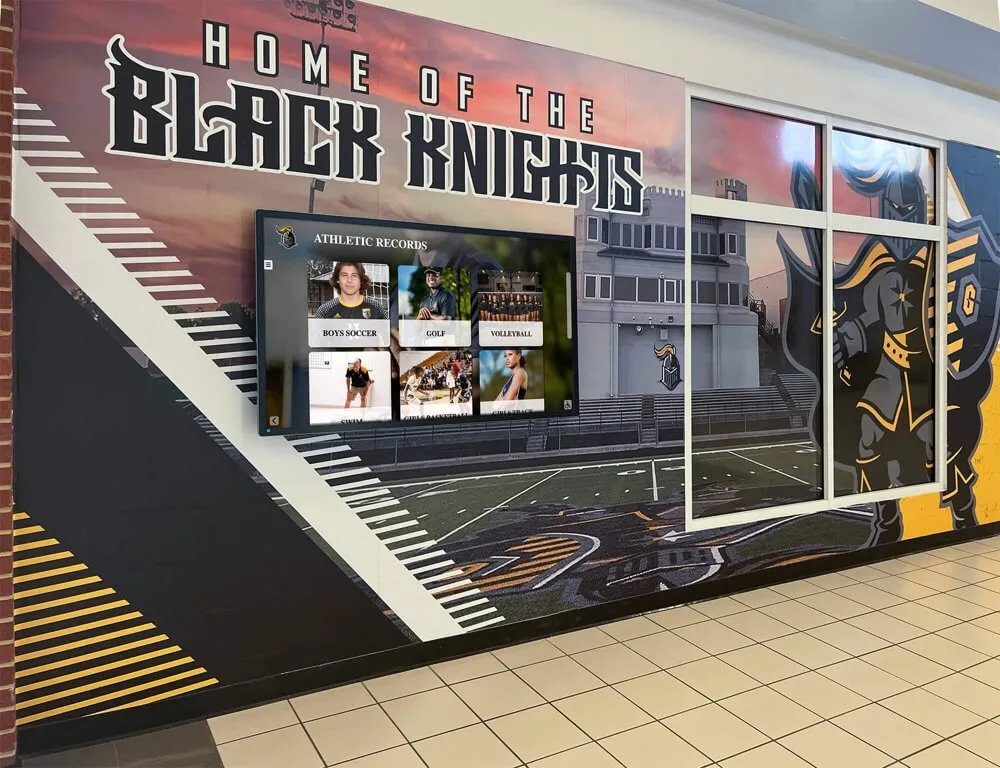
Why High School Digital Signage Needs a Content Plan First
The schools that regret their digital display investments nearly always share one characteristic: they purchased hardware before they decided what would run on it. The result is a $15,000 video wall in the main hallway cycling through the same five slides for four years because nobody owns the update workflow.
Before you contact any vendor, map your content into four categories. This mapping determines how many screens you need, where they belong, and what software capabilities actually matter for your school.
The four content types for high school digital signage:
- Schedules — Upcoming game and event dates, practice times, opponent information, and venue logistics
- Scores and results — Live or same-day game outcomes, season standings, head-to-head records
- Athletic records — All-time program records, season records, career leaders, team milestones
- Awards and recognition — Academic honors, athletic awards, hall of fame inductees, all-conference and all-state selections, donor and sponsor recognition
Each content type has different update frequencies, different audiences, and different display requirements. Mixing them on a single screen without planning creates a slide deck that serves nobody well.
Before You Start: Prerequisites for Your Planning Team
Gather the following stakeholders and information before your first vendor conversation.
Stakeholders to include:
- Athletic director (owns records and team recognition content)
- Communications director or advancement staff (owns awards, hall of fame, and donor content)
- IT director (owns network infrastructure, mounting, and device management)
- Facilities director (owns wall space, electrical, and ADA mounting compliance)
- Principal or assistant principal (sets content approval workflow)
Information to collect:
- Number of varsity sports programs (boys’ and girls’ separately)
- Current system for publishing game schedules (website CMS, paper, social media)
- Where athletic records currently live (printed board, spreadsheet, web page, or none)
- List of annual awards ceremonies and their honoree categories
- Hall of fame program status: active, inactive, or not yet established
- Network coverage map for the areas where you want screens
With those inputs, your planning team can make every subsequent decision based on actual school conditions rather than vendor assumptions.
For a broader view of what high school athletic department budget planning covers when adding digital recognition displays, that resource helps frame the full cost picture before you begin soliciting quotes.
Content Type 1: Schedules
Schedules are the highest-frequency content type in a high school signage system. They change weekly during the season, require accurate location and time information, and have a hard expiration date—a game that happened yesterday shouldn’t still dominate your displays today.
What to display
| Schedule Field | Update Frequency | Where It Lives Best |
|---|---|---|
| This week's home games (date, time, opponent) | Weekly | Lobby, gymnasium entrance |
| Away game bus departure times | Weekly | Athletic office hallway, locker room areas |
| Full-season schedule grid | Once per season | Lobby, concession stand entrance |
| Playoff bracket (when applicable) | Updated after each round | Lobby, gymnasium entrance |
| Non-athletic events (concerts, booster meetings) | Weekly or as-needed | Main hallway, cafeteria |
Schedule display location priorities
Place schedule displays where parents, students, and community members make decisions based on the information. Lobby screens visible from the main entrance catch first-time visitors. Gymnasium entrance screens reach families who arrive before games. Athletic hallway screens serve the student-athlete population who need practice and bus logistics.
Avoid placing schedule-only content in areas where recognition displays belong—trophy cases, hall of fame hallways, and concourse walls carry historical significance that rotating schedule slides dilute.
Content Type 2: Scores and Results
Game scores have two display windows: same-day or next-morning for freshness, and end-of-season cumulative for context. Plan both.
Same-day results require someone to own the update task. Designate a staff member or booster volunteer who submits scores to the CMS immediately after each game—not the following Monday. If no one owns this, your score displays will perpetually lag and lose credibility with the audience that checks them.
Season standings and records build over time and become valuable toward the end of the regular season. A screen that shows the soccer team’s current record (12-2-1) and conference standing gives context that individual game results don’t carry on their own.
Historical head-to-head records against rival schools are high-engagement content that belongs in your athletics hallway rather than the main lobby. They require one-time data entry with infrequent updates—a practical use case for a display that runs alongside your all-time program records board.
For programs that maintain detailed per-sport records, the basketball high school records tracking guide demonstrates how to build the data infrastructure that feeds both real-time scores and historical records from a single source.
Content Type 3: Athletic Records
Athletic records are the most durable content category in a school’s recognition system. A career scoring record set in 1987 is still valid and still meaningful in 2026. That durability makes records the best argument for a permanent, prominent display—they’re an investment that compounds value over decades rather than expiring after each season.

Record categories to capture for each sport
- Individual career records (points, goals, wins, saves, times—sport-dependent)
- Individual single-season records
- Individual single-game records
- Team records (best season record, longest win streak, most championships)
- Postseason records (playoff wins, state tournament appearances, championship years)
- Program history milestones (all-time program win total, founding year, coaching records by era)
Most schools start with five to ten sports and two to three record categories per sport before discovering how much content they actually have. Build your field list before you choose a display format—the volume of records you want to show often makes the static-versus-digital decision for you.
Static boards versus digital systems for records
Static record boards (painted panels, vinyl graphics, engraved nameplates) work for programs with fewer than thirty sports records total and budget constraints that make a digital system impractical. The maintenance cost adds up: each nameplate update typically costs $50–$150 in materials and vendor labor, so a program that breaks six records in a strong season spends several hundred dollars on updates before considering next year’s additions.
Interactive digital systems remove the space and update-cost ceiling. Schools using platforms like Rocket Alumni Solutions can add new record holders the same day a mark is broken, give each sport its own dedicated section, and surface historical records through search rather than requiring visitors to scan an entire board linearly. The initial investment is higher, but the five-year total cost of ownership frequently favors digital for active athletic programs with multiple sports.
For schools comparing both approaches, the range of high school awards types of recognition students can earn illustrates how much content actually exists in a typical high school program—content that often surprises administrators who assumed they had “just a few records” worth displaying.
Content Type 4: Awards and Recognition
Awards content spans several distinct subcategories, each with its own audience, update timeline, and ideal display location.
Academic awards
Academic recognition—honor roll, valedictorian and salutatorian history, academic letter earners, National Merit Scholars, scholarship recipients—belongs in locations where academic identity is reinforced: main office hallways, library entrances, and counseling center areas. It should not compete for space with athletic records, which serve a different audience.
The categories of academic awards for high school students and how recognition is defined outlines the full range of academic recognition categories, many of which schools track but never display publicly.
For programs building academic recognition infrastructure from scratch, academic awards in high school and how schools organize them covers the standard categories and the organizational structures that make them displayable.
Athletic awards
All-conference, all-state, all-region, and all-American honors represent individual athletic distinction that outlasts a player’s enrollment. These belong in the athletics hallway or hall of fame space, searchable by sport, year, and individual name.
The full spectrum of awards high school students can win includes athletic honors that many schools track informally but never surface in a public recognition display.
Hall of fame and legacy recognition
Hall of fame inductees represent the pinnacle of a school’s recognition structure. Their content—photos, bios, career statistics, induction year, and legacy context—deserves its own dedicated space with enough room to tell each story properly. Cramming hall of fame content onto a schedule board is the recognition equivalent of announcing a major milestone in a footnote.
Interactive touchscreen displays work especially well for hall of fame content because they can hold full biographies, career highlights, and related media without any of it competing for screen real estate at the same moment. A visitor interested in the class of 2003 sees exactly that content; a visitor looking for a specific sport’s inductees can filter by sport without scrolling through unrelated athletes.

Donor and sponsor recognition
Schools with active booster programs, capital campaigns, or naming rights agreements need to recognize donors on their digital signage. Donor recognition works best in high-traffic, high-dwell-time locations: main lobbies, gymnasium entrances, and concourse areas where visitors wait before events. It should not compete with athletic records on a shared screen unless the screen specifically serves as a combined athletics-and-community recognition display.
Display Location Planning: Matching Content to Space
Map each content type to specific physical locations before finalizing your screen count. Use this framework:
| Location | Primary Audience | Best Content Types | Display Format |
|---|---|---|---|
| Main lobby | Parents, visitors, community | Schedules, donor recognition, hall of fame highlights | Large format, scrolling or touchscreen |
| Athletics hallway | Students, alumni, visiting teams | Athletic records, all-conference/state honors, season results | Interactive touchscreen or wall panel |
| Gymnasium entrance | Game-night families, students | Game schedules, scores, senior night recognition | Large format, high brightness |
| Academic hallway / library | Students, faculty | Academic awards, honor roll, scholarship recognition | Mid-size display or kiosk |
| Trophy case area | Students, alumni, parents | Hall of fame, championship photos, trophies with digital context | Touchscreen kiosk or embedded screen |
| Athletic office hallway | Student-athletes, coaches | Practice schedules, bus departure times, team records | Smaller display, high update frequency |
| Cafeteria / commons | Full student body | General event schedules, school-wide recognition | Large format, brief viewing time |
High School Digital Signage Planning Checklist
Work through this checklist before finalizing any purchasing decisions.
Phase 1 — Content Inventory
- List every varsity sport (boys’ and girls’ separately)
- Identify which sports have documented all-time records
- Count the number of hall of fame inductees (if program exists)
- List annual awards ceremonies and their top-level categories
- Identify who currently publishes game schedules and how
- Determine if academic recognition has a dedicated display location or not
- Document existing donor recognition commitments that require display
Phase 2 — Location Assessment
- Walk every potential display location and photograph the wall space
- Measure available wall dimensions at each location
- Note existing electrical outlets and their proximity to mounting points
- Identify network access points (wired ethernet preferred; Wi-Fi acceptable)
- Check ADA mounting height requirements (interactive displays: touch point between 15" and 48" AFF per WCAG 2.1 AA)
- Confirm natural light conditions (direct sunlight requires higher-brightness screens)
- Document traffic volume and average dwell time at each location
Phase 3 — Content Ownership
- Assign one owner per content type (schedules, scores, records, awards)
- Define update SLAs: how quickly must scores appear after a game? How quickly must new records go live?
- Establish content approval workflow for sensitive content (hall of fame nominations, donor recognition)
- Plan for summer and off-season content rotation when athletic schedules go quiet
- Identify who handles emergency content updates (weather cancellations, event changes)
Phase 4 — System Requirements
- Determine whether you need a single CMS or separate systems per content type
- Confirm whether your IT infrastructure supports remote screen management
- Assess whether touchscreen capability is required for any locations (trophy case, hall of fame)
- Define integration needs: does your scheduling system need to push data to screens automatically?
- Establish your update access model: central administrator only, or distributed access for each sport’s coach?
Phase 5 — Budget Framework
- Count the minimum number of screens required to serve your mapped locations
- Separate hardware costs (screens, mounts, media players) from software costs (CMS license, content management)
- Include installation labor (electrical, mounting, network runs)
- Budget for annual content maintenance (especially for static systems)
- Identify funding sources: capital budget, booster funds, naming rights, grants
Year-Round Content Strategy: Keeping Screens Relevant After Season’s End
The most common failure mode for high school digital signage is summer. Athletic seasons end, the schedule content expires, and nobody replaces it with anything meaningful. Screens that once showed live schedules now cycle through stale content from March. Visitors who saw them actively used in October assume the system is broken by July.
Plan your off-season content calendar before you install anything:
Summer content ideas that require no live updates:
- Hall of fame inductee profiles (content that never expires)
- All-time program records by sport (static until broken)
- Senior class recognition and college commitments
- Preview content for the upcoming season (incoming coaches, returning starters)
- Facility naming rights and donor recognition panels
- Historical championship photo collections
The academic awards high school guidance on how schools define, display, and preserve student honors is particularly relevant for the summer window—academic recognition content is independent of athletic seasons and can carry screens through months when sports schedules go dark.
Planning an event-based content cycle also helps. High school awards ceremony ideas outlines moments in the school year when recognition content is both high-value and timely—and each of those moments generates content that can run on your displays for weeks afterward.

Long-Term Thinking: Alumni, Reunions, and Archives
High school digital signage creates value that extends well beyond the student population. Alumni who return for reunions, homecoming events, or community functions engage deeply with recognition content that connects their era to current programs.
A touchscreen hall of fame display lets a 1994 graduate search for their name, find their athletic record, and navigate to the players who broke it—without requiring staff involvement. That kind of self-directed discovery turns a single display installation into a decades-long engagement asset.
For programs planning around reunion programming, 10-year high school reunion planning tips and traditions explores how digital recognition content plays into reunion-event engagement. Similarly, programming and awards ideas for 10-year high school reunions that incorporate digital displays covers event-specific applications where your existing recognition infrastructure can create direct alumni engagement.
Validating Your Plan: A QA Checklist Before Go-Live
Before your displays go live, run through this validation checklist:
- All content owners have tested CMS access and confirmed they can update their content type independently
- Screen brightness is calibrated for each location’s ambient light conditions
- ADA mounting heights verified with a tape measure post-installation
- Emergency override content (weather cancellation template) is staged and ready
- Network connectivity confirmed on all screens with a 24-hour uptime test
- Content approval workflow tested end-to-end with a sample submission
- Off-season default content set and confirmed to display correctly
- All record entries verified against primary source documents before display
See High School Digital Signage Built for Schedules, Records, and Awards
Rocket Alumni Solutions designs interactive recognition displays for high schools that cover athletic records, hall of fame content, academic awards, and donor recognition in a single platform—with remote CMS access, ADA-compliant mounting options, and year-round content workflows. Schedule a demo to see the system in action before you plan your installation.
Schedule a DemoNext Steps: Moving from Plan to Installation
Once your planning checklist is complete, you’re in a position to evaluate vendors and systems against real requirements rather than marketing materials. Bring your content inventory, location map, and content ownership assignments to every vendor conversation—they determine which system capabilities actually matter for your school.
The most important questions to ask any vendor:
- How does content ownership work when four different staff members need to update different sections?
- What happens to our content if we switch systems in five years?
- How do you handle ADA compliance for interactive displays?
- What does a typical installation timeline look like, and what does our IT team need to prepare?
- How do schools use your system to keep content fresh during the summer?
A vendor who can answer those questions specifically—with examples from comparable high schools—is a vendor whose system was built for schools rather than adapted to them after the fact.
Ready to Plan Your High School Digital Signage System?
Rocket Alumni Solutions works with school administrators, athletic directors, and advancement staff to design recognition display systems that serve every content type on this checklist. Bring your location map and content requirements to a free demo session.
Get a Free Demo






























