First impressions matter enormously in today’s competitive high school recruitment landscape. When prospective students and families visit your campus, those critical 45-90 minutes during admissions tours often determine enrollment decisions worth thousands of dollars annually. Yet many schools still rely on static trophy cases, fading posters, and passive displays that fail to capture the attention of tech-savvy Generation Z students who’ve grown up swiping, tapping, and interacting with digital interfaces since childhood.
The challenge intensifies as families evaluate multiple schools, comparing facilities, programs, and culture while seeking tangible evidence of educational quality and student success. Traditional recognition methods—dusty plaques, crowded bulletin boards, and outdated display cases—communicate that schools haven’t kept pace with modern expectations, potentially undermining enrollment goals regardless of actual program quality.
This comprehensive guide explores how interactive touchscreen displays specifically designed for admissions tours transform campus visits into memorable experiences that showcase school excellence, engage prospective families, and provide compelling evidence of student achievement and institutional vitality. From strategic placement in high-traffic admission areas to content that impresses visiting parents, these digital solutions offer schools powerful tools for competing effectively in today’s enrollment marketplace.
Interactive touchscreen technology enables schools to present unlimited achievement recognition, rich multimedia storytelling, and engaging exploration experiences that static displays simply cannot match. When prospective families encounter sophisticated digital recognition systems during campus tours, they immediately perceive institutional commitment to excellence, innovation, and appropriate celebration of student success—factors that significantly influence enrollment decisions.

Interactive touchscreen displays create impressive focal points that capture attention during admissions tours
Why Interactive Displays Matter for Admissions Success
Before exploring implementation specifics, understanding how touchscreen displays influence prospective family perceptions helps schools maximize return on technology investments while addressing strategic enrollment objectives.
Creating Powerful First Impressions with Technology
Admissions tours typically begin in main entrances, administrative areas, or student centers—exactly where interactive displays deliver maximum impact by immediately communicating institutional priorities and values through visible technology investment.
First Impression Benefits:
- Modern touchscreen displays signal that schools embrace innovation and invest in student experience
- Interactive technology captures attention immediately, distinguishing your school from competitors with static displays
- Sophisticated presentation suggests institutional resources, stability, and commitment to excellence
- Parents evaluating facilities appreciate tangible evidence of technology integration throughout buildings
- Digital displays accommodate unlimited recognition without the space constraints visitors associate with limited achievement
When families enter buildings and encounter impressive interactive displays showcasing student achievements, they immediately form positive impressions about school quality and resources. This initial perception creates favorable evaluation frameworks that tour guides then reinforce through subsequent facility showcases and program explanations.
Demonstrating Student Success and School Excellence
Prospective families seek concrete evidence that attending your school leads to meaningful achievement, college placement success, and personal development. Interactive displays enable comprehensive success demonstration impossible with traditional recognition methods.
Achievement Showcase Capabilities:
- Unlimited profiles highlighting distinguished graduates, current student leaders, and notable alumni
- College acceptance data organized by university, scholarship amounts, and acceptance rates
- Athletic achievements including championship seasons, individual records, and college recruitment success
- Academic recognition featuring honor roll students, competition winners, and scholarship recipients
- Arts and extracurricular accomplishments across diverse programs and activities
Research on admissions decision-making consistently demonstrates that visible evidence of student success significantly influences enrollment choices. Parents want assurance that their significant tuition investments will yield appropriate returns through educational quality, achievement opportunities, and college placement outcomes. Digital recognition displays provide compelling visual proof that addresses these concerns directly during critical campus visit moments.

Current students engage naturally with touchscreen displays, demonstrating authentic school culture to visiting families
Engaging Tech-Savvy Generation Z Students
While parents often drive enrollment decisions, prospective students themselves increasingly influence school selection. Generation Z students have grown up with tablets, smartphones, and interactive interfaces—they expect digital engagement rather than passive observation.
Student Engagement Advantages:
- Intuitive touchscreen interfaces feel natural to students accustomed to smartphone and tablet interactions
- Self-directed exploration allows prospective students to investigate areas matching their personal interests
- Search and filter capabilities enable finding students from similar backgrounds or with shared interests
- Video content and multimedia storytelling captures attention more effectively than text-heavy displays
- Interactive experiences create memorable tour moments that students discuss when evaluating school options
When prospective students encounter interactive displays during campus tours, they naturally begin exploring content—searching for sports teams they might join, academic programs they’re considering, or students from their hometown. This spontaneous engagement signals genuine interest while providing tour guides natural conversation opportunities about specific programs and opportunities.
Strategic Placement for Maximum Admissions Impact
Location determines whether interactive displays become tour highlights or missed opportunities. Strategic placement ensures prospective families encounter impressive technology during critical tour moments.
Main Entrance and Reception Areas
Primary building entrances where admissions tours typically begin provide ideal locations for creating immediate positive impressions through prominent interactive displays.
Entrance Placement Benefits:
- Every campus visitor encounters displays automatically, ensuring consistent exposure
- Large format displays visible from distance create impressive arrival experiences
- Reception area positioning enables visitors to explore while waiting for tour starts
- Multiple prospective families can view simultaneously during busy tour times
- Administrative staff can reference displays when answering parent questions
Schools implementing welcome area displays specifically designed for admissions functions report that prospective families frequently photograph installations and comment positively about technology integration—creating word-of-mouth marketing extending well beyond actual campus visits.
Athletic Facilities and Competition Venues
Sports-focused families pay particular attention to athletic facilities during campus tours. Interactive displays in gymnasiums, field houses, or athletic lobbies provide compelling evidence of program quality and competitive success.
Athletic Facility Applications:
- Championship banners and team records organized by sport and season
- Individual athlete achievements including college recruitment placements
- Historical program highlights showing sustained excellence across decades
- Video highlight reels from recent competitions and championship seasons
- College commitment displays showing where graduates continue athletic careers
Athletic directors consistently report that digital recognition systems become highlight features during recruitment tours, with prospective families frequently photographing displays and commenting positively about the investment in athlete celebration. These positive reactions extend beyond athletics—parents see athletic recognition quality as proxy for overall institutional excellence and resource commitment.
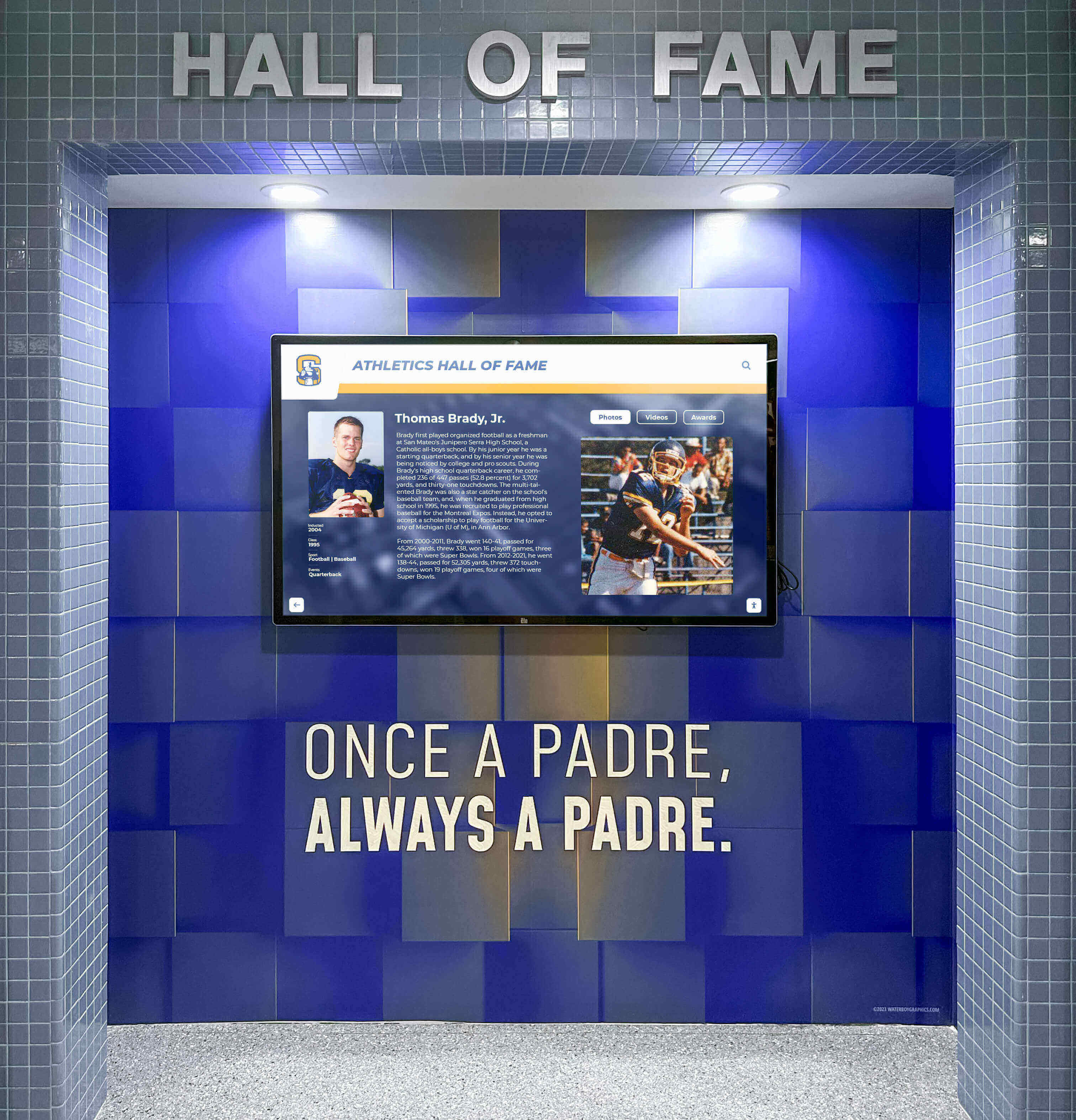
Athletic facilities with interactive displays impress prospective families evaluating sports programs
Academic Buildings and Classroom Wings
Prospective families evaluating academic rigor appreciate visible evidence of student achievement throughout instructional areas. Interactive displays in academic buildings demonstrate commitment to celebrating scholarly excellence alongside athletic accomplishment.
Academic Display Applications:
- Honor roll recognition organized by semester and academic year
- National Honor Society members with selection criteria explanations
- Academic competition achievements from Science Olympiad, math contests, debate tournaments
- AP Scholar recognition and advanced coursework completion rates
- College acceptance outcomes organized by university selectivity and scholarship awards
When tours include academic buildings, interactive displays showcasing diverse achievement types communicate that schools value multiple excellence forms—reassuring both academically-focused students and parents concerned about well-rounded recognition culture.
Student Commons and Gathering Spaces
Cafeterias, student centers, and common areas where students naturally congregate provide opportunities for prospective families to observe authentic campus culture while viewing recognition displays integrated into daily student life.
Student Center Advantages:
- Prospective families observe current students naturally interacting with displays
- Lunch or break periods during tours showcase authentic student engagement
- Social atmosphere demonstrates welcoming campus culture
- Multiple display stations accommodate various student interests simultaneously
- Integration into daily life proves displays serve real engagement purposes beyond admissions showcase
Seeing current students genuinely engaging with interactive displays—searching for their friends, checking sports statistics, or exploring alumni profiles—provides prospective families authentic evidence of vibrant school community that scripted tour presentations cannot replicate.
Essential Content for Impressing Prospective Families
Hardware alone doesn’t impress—compelling content specifically curated for admissions audiences determines whether interactive displays enhance enrollment effectiveness or become expensive distractions.
College Acceptance and Placement Success
Parents investing significant tuition dollars understandably want evidence that your school delivers appropriate college outcomes. Comprehensive college placement data presented through interactive displays addresses these concerns directly.
College Outcome Presentations:
- Visual maps showing geographic distribution of college acceptances
- University logos and acceptance numbers organized by institution selectivity
- Scholarship award data demonstrating financial aid success
- Multi-year trends showing consistent placement results rather than anomalous successes
- Graduate profiles featuring current college students reflecting on high school preparation
Presenting college acceptance data prominently during admissions tours communicates confidence in outcomes while providing concrete evidence that addresses primary parent concerns about educational investment returns.
Athletic Achievement and Competition Success
Schools with strong athletic traditions should showcase competitive excellence through comprehensive recognition that demonstrates sustained program quality across sports and years.
Athletic Content Elements:
- Championship history showing titles across multiple sports and decades
- State championship displays highlighting peak achievement moments
- Individual records demonstrating development of exceptional athletes
- College recruitment success showing athletic pathway opportunities
- Coach profiles emphasizing experience and competitive achievements
Interactive formats enable much richer athletic storytelling than traditional trophy cases—incorporating video highlights, detailed statistics, and context explaining significance of various achievements to families unfamiliar with specific sports or competition levels.

Athletic achievement displays demonstrate program quality and competitive success to prospective athletes
Academic Recognition and Honor Programs
Balanced recognition celebrating academic achievement alongside athletic success demonstrates institutional values while appealing to intellectually-focused prospective students and families.
Academic Recognition Categories:
- Honor roll students organized by achievement level and grade
- Academic recognition programs including selection criteria and member profiles
- Competition achievements from academic contests, science fairs, and knowledge competitions
- Advanced coursework completion including AP, IB, and dual enrollment participation rates
- Special academic achievements like published research, patent awards, or unique distinctions
Comprehensive academic recognition reassures parents that schools appropriately celebrate intellectual achievement while demonstrating student body quality through peer accomplishment visibility.
Arts, Activities, and Extracurricular Success
Well-rounded schools should showcase diverse achievement spanning arts, service, leadership, and specialized activities that demonstrate comprehensive student development opportunities.
Comprehensive Recognition Themes:
- Performing arts achievements from theater productions, concerts, and competitions
- Visual arts recognition including exhibitions, competitions, and portfolio achievements
- Student leadership positions and elected student government representatives
- Service and volunteer recognition highlighting community impact
- Special programs like robotics teams, debate squads, or unique school offerings
Prospective students with non-athletic interests need visible evidence that schools will celebrate and support their particular passions. Comprehensive recognition across diverse categories communicates inclusive culture valuing multiple excellence forms.
School History and Heritage
Historical context creates emotional connections while demonstrating institutional stability and tradition that appeal particularly to parents evaluating long-term institutional viability.
Historical Content Elements:
- School history timelines showing founding, major milestones, and facility evolution
- Notable alumni profiles demonstrating long-term graduate success across decades
- Tradition explanations helping new families understand school culture and significant customs
- Historical photographs showing campus transformation over time
- Milestone celebrations highlighting anniversaries, achievements, and significant moments
Historical content proves particularly effective for established institutions competing against newer schools by demonstrating sustained excellence across generations rather than short-term success anomalies.
Interactive Features That Enhance Tour Experiences
Beyond static content presentation, interactive capabilities enable exploration and discovery that engages prospective families while demonstrating technological sophistication.
Intuitive Search and Filtering
Allowing visitors to find specific content matching personal interests creates engaging personalized experiences while demonstrating system sophistication.
Search Capabilities:
- Name search enabling visitors to look up friends, neighbors, or family connections
- Grade level filtering showing current student achievements organized by class
- Activity filters enabling focus on specific sports, arts programs, or academic subjects
- Year range selection allowing historical exploration across decades
- Achievement type organization grouping similar accomplishments for easy comparison
When prospective students use search functions to find their friend from middle school or athletes from their hometown, they begin envisioning themselves as part of your school community—a powerful psychological shift supporting enrollment conversion.
Video Integration and Multimedia Storytelling
Text and photos alone cannot capture the energy and emotion of student experiences. Video content creates powerful emotional connections while accommodating diverse learning preferences.
Multimedia Applications:
- Student testimonial videos featuring current students discussing school experiences
- Competition highlight reels showing athletic performances and championship moments
- Performance recordings from concerts, plays, and artistic presentations
- Campus tour videos providing virtual exploration of facilities not visited physically
- Day-in-the-life content showing typical student experiences across various programs
Video content proves particularly effective at capturing prospective student attention during group tours when some families might feel less engaged with tour guide presentations.

Multimedia touchscreen displays enable rich storytelling through photos, videos, and interactive content
Social Media Integration and Live Updates
Connecting physical displays with digital school presence demonstrates active vibrant community while enabling real-time content that keeps displays perpetually current.
Social Integration Features:
- Live social media feeds showing recent posts from school accounts
- Instagram photo galleries featuring student activities and campus life
- Event calendars displaying upcoming games, performances, and school programs
- News feeds highlighting recent achievements and current school initiatives
- QR codes enabling instant follow connections to school social media accounts
Parents increasingly research schools online before visiting—seeing familiar social media content integrated into campus displays creates cohesive brand experience while validating online research through physical tour observations.
Wayfinding and Campus Navigation
Campus tours sometimes cover large complicated facilities where visitors struggle with orientation. Integrated wayfinding helps visitors navigate independently while reducing tour guide burden.
Navigation Applications:
- Interactive campus maps showing building locations and walking routes
- Facility information highlighting specific spaces and their purposes
- Accessibility information showing ramps, elevators, and accommodation resources
- Parking and visitor information helping families navigate campus arrival
- Schedule information for touring additional facilities or attending events
Wayfinding proves particularly valuable when families visit campus outside scheduled tour times or want to revisit specific areas after official tours conclude.
Implementation Strategies for Admissions-Focused Displays
Successful admissions display implementation requires strategic planning ensuring technology enhances rather than complicates tour experiences.
Selecting Appropriate Display Sizes and Configurations
Scale matters—displays must be visible and impressive without overwhelming spaces or creating bottlenecks during busy tour periods.
Size Considerations:
- Entrance displays: 65-75 inch screens provide impressive arrival statements visible across lobbies
- Hallway installations: 55-65 inch displays work well for corridor locations with moderate viewing distances
- Multi-display arrays: Multiple 43-55 inch screens can showcase different content categories simultaneously
- Kiosk configurations: Freestanding enclosures enable flexible positioning and mobility for event adaptability
- Portrait vs. landscape: Vertical orientation works well for individual profiles while horizontal better accommodates video and group content
Consider whether displays will primarily serve individual exploration or group viewing during tours. Group viewing benefits from larger screens visible from greater distances while individual exploration requires appropriate mounting heights and sufficient surrounding clearance.
Training Admissions Staff and Tour Guides
Interactive displays only enhance tours when personnel understand how to incorporate technology effectively into standard presentation flows.
Staff Training Components:
- Basic operation including search, filtering, and content navigation
- Tour integration strategies for natural technology introduction
- Compelling stories and highlights worth featuring during tours
- Troubleshooting common issues and appropriate responses
- Remote management for customizing content for specific visiting groups
Tour guides should feel confident demonstrating displays without technology becoming central focus overshadowing personal interactions and relationship building that ultimately drive enrollment decisions.

Trained staff effectively incorporate interactive displays into engaging tour presentations
Maintaining Current and Relevant Content
Outdated content undermines technology investments by suggesting schools lack resources or attention to maintain systems appropriately.
Content Management Practices:
- Regular updates adding recent achievements, college acceptances, and current student recognition
- Seasonal content variation highlighting programs relevant to enrollment cycles
- Event-specific customization featuring content relevant to visiting groups
- Quality control ensuring accuracy of all information, statistics, and profile details
- Archive strategies moving historical content appropriately while preserving access
Solutions like Rocket Alumni Solutions provide cloud-based management enabling non-technical staff to update recognition content easily without requiring IT department intervention—critical for ensuring displays remain current despite busy admissions schedules.
Integrating with Broader Marketing and Communications
Interactive displays function best when coordinated with comprehensive marketing strategies rather than operating as isolated technology investments.
Marketing Integration:
- Consistent branding across physical displays and digital marketing materials
- Photography and videography captured specifically for both display and social media use
- Coordinated messaging emphasizing key institutional strengths and differentiators
- Follow-up communications referencing display content seen during campus visits
- Social media content featuring display installations and prospective family interactions
Schools achieving strongest admissions impact treat interactive displays as components of comprehensive enrollment marketing strategies rather than standalone technology purchases.
Measuring Impact on Enrollment Outcomes
Demonstrating return on investment requires tracking both quantitative metrics and qualitative feedback showing how displays influence prospective family perceptions and decisions.
Quantitative Assessment Metrics
Display Engagement Data:
- Number of unique sessions and average interaction duration during tour times
- Popular content categories revealing what prospective families find most compelling
- Search patterns showing which programs and achievements generate strongest interest
- Peak usage times correlating with scheduled tour periods
- Return visitor patterns indicating families spending extended time exploring
Modern interactive display platforms provide detailed analytics showing exactly how visitors engage with content—data enabling continuous optimization of both technology and tour strategies.
Enrollment Correlation Analysis:
- Application rates before and after display implementation
- Yield rates showing conversion from acceptance to enrollment
- Survey responses specifically mentioning displays or technology as factors
- Tour-to-application conversion tracking for families visiting campus
- Parent satisfaction ratings correlated with facility and technology impressions
While multiple factors influence enrollment, schools typically observe measurable improvements in prospective family engagement and satisfaction following strategic interactive display implementation.
Qualitative Feedback Collection
Prospective Family Input:
- Post-tour surveys including specific questions about facility and technology impressions
- Focus groups with admitted students about campus visit experiences
- Anecdotal feedback captured by tour guides and admissions counselors
- Social media monitoring for posts featuring display interactions and photos
- Comparison questions asking families to rate your technology against competitor schools
Qualitative feedback often reveals how displays influence overall school perceptions beyond specific content—parents frequently comment that impressive displays signal broader institutional quality and resource commitment.
Comparing Admissions Display Solutions
Schools evaluating interactive display options for admissions purposes face numerous vendor choices with significantly different capabilities, costs, and recognition-specific features.
Purpose-Built Recognition Platforms vs. General Digital Signage
Specialized Recognition Systems:
- Pre-designed templates specifically for achievement celebration and alumni recognition
- Intuitive profile management enabling easy content updates by admissions staff
- Advanced search and filtering built specifically for exploring accomplishments
- Web accessibility extending recognition beyond physical displays to online platforms
- Purpose-built for engagement rather than passive slideshow presentation
General Digital Signage:
- Flexible content display accommodating various communication needs
- Requires significant customization to approximate recognition functionality
- Often lacks interactive exploration capabilities without custom development
- Updates may require technical expertise rather than simple content management
- Better suited for announcements and wayfinding than achievement celebration
Schools implementing purpose-built recognition platforms like Rocket Alumni Solutions report significantly easier content management, better prospective family engagement, and stronger alignment with admissions objectives compared to adapting general digital signage for recognition purposes.
Total Cost of Ownership Considerations
Initial Investment Components:
- Display hardware: $1,500-8,000 depending on size (55"-86") and commercial quality
- Computing hardware: $500-2,000 for appropriate specifications supporting interactive software
- Mounting or enclosure: $500-8,000 for wall mounts or freestanding kiosk options
- Software platform: $0-5,000 for initial setup depending on vendor licensing
- Professional installation: $1,500-5,000 including electrical, mounting, and configuration
- Initial content development: $2,000-10,000 for comprehensive profile creation
Ongoing Operational Costs:
- Software licensing: $500-3,000 annually depending on features and display quantities
- Content management: Time investment or professional services for updates
- Hardware replacement reserves: Planning for 7-10 year equipment lifecycles
- Electricity and connectivity: Minimal operational costs for display power
- Support services: Included or available for troubleshooting and optimization
While initial investments may appear significant, schools typically find that improved enrollment conversion—even a handful of additional students annually—more than justifies technology costs through tuition revenue increases.
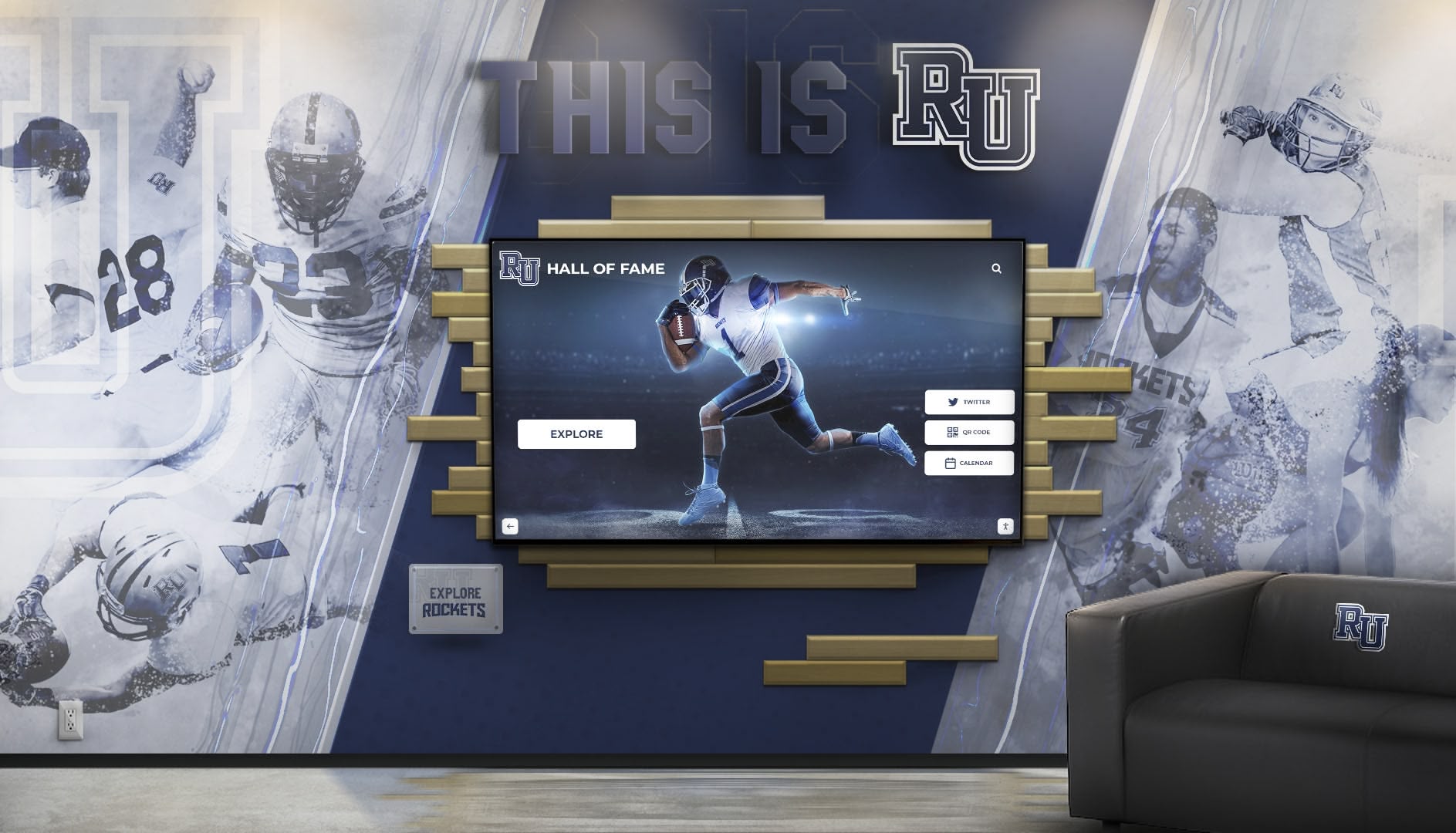
Comprehensive installations integrate multiple displays creating impressive focal points for admissions tours
Beyond Admissions: Additional Display Applications
While admissions represents primary justification for many schools, interactive displays deliver value across multiple institutional functions beyond prospective family tours.
Current Student Engagement and Pride
Student Community Benefits:
- Students seeing their accomplishments recognized publicly experience validation and motivation
- Academic recognition visible throughout campus reinforces achievement culture
- Searchable displays help students discover classmates with shared interests or backgrounds
- Social media integration encourages students to engage with school communications
- Historical content helps students understand institutional traditions and heritage
Schools implementing recognition displays report that current students frequently interact with systems—checking their profiles, finding friends, exploring school history, and celebrating accomplishments. This organic engagement demonstrates authentic value beyond admissions marketing functions.
Alumni Relations and Advancement
Development Applications:
- Alumni visiting campus encounter impressive recognition of graduate achievements
- Donor recognition walls demonstrate appropriate stewardship of philanthropic contributions
- Class reunion attendees explore profiles of classmates and historical content from their eras
- Networking opportunities arise as alumni discover connections through display exploration
- Digital platforms extend engagement enabling remote alumni access regardless of geography
Many schools initially implement displays primarily for admissions but quickly discover significant alumni engagement value that supports broader advancement and development objectives.
Community Relations and School Visibility
External Stakeholder Value:
- Community members attending athletic events encounter achievement recognition displays
- Board members and potential donors observe tangible evidence of school excellence
- Visiting athletic teams see professional recognition quality influencing competitive perceptions
- Media visitors covering events photograph displays generating social sharing
- Partnership organizations see evidence of student success supporting collaboration initiatives
Interactive displays visible to various stakeholder groups create multiple relationship-building opportunities beyond their primary admissions purpose.
Conclusion: Transforming Admissions Tours Through Interactive Technology
High school admissions success increasingly depends on creating memorable campus visit experiences that distinguish your institution from competitors while providing compelling evidence of educational quality, student success, and community vitality. Interactive touchscreen displays specifically designed for recognition and achievement celebration provide schools powerful tools for impressing prospective families during critical enrollment decision moments.
The strategies explored in this guide provide frameworks for strategic placement maximizing tour impact, content curation addressing parent concerns and student interests, feature selection enabling engaging exploration rather than passive viewing, and implementation approaches ensuring technology enhances rather than complicates admissions operations.
Ready to Transform Your Admissions Tours?
Discover how Rocket Alumni Solutions can help you create interactive touchscreen displays that impress prospective families, showcase student achievements, and support enrollment goals through purpose-built recognition technology designed specifically for schools.
Schedule Your Free ConsultationWhether your school competes in a crowded private school marketplace, seeks to attract students from broader geographic areas, or wants to better showcase existing excellence to prospective families, interactive touchscreen displays provide versatile solutions addressing multiple strategic enrollment objectives simultaneously.
Solutions like Rocket Alumni Solutions deliver purpose-built recognition platforms designed specifically for schools—combining sophisticated technology with intuitive management, comprehensive functionality with straightforward operation, and impressive visitor experiences with practical administrative simplicity. These specialized approaches outperform general digital signage adapted for recognition purposes while providing ongoing platform development ensuring displays remain competitive as technology and family expectations continue evolving.
Your school has remarkable achievements worth celebrating—distinguished graduates, successful college placements, championship teams, honor students, talented artists, and countless accomplishments demonstrating educational excellence. Prospective families deserve to discover this success easily during campus visits rather than depending on tour guide verbal descriptions alone. Interactive touchscreen displays transform how schools present achievements while creating the impressive first impressions that drive enrollment decisions in today’s competitive educational marketplace.
Start exploring how interactive displays can transform your admissions tours, strengthen prospective family impressions, and provide tangible competitive advantages that support enrollment growth while celebrating the student success that makes your school genuinely excellent.































