School events bring communities together to celebrate achievements, raise funds, welcome prospective families, and build school spirit. Yet many events still rely on static posters, printed programs, and PowerPoint presentations that limit engagement and fail to capture the attention of today’s digitally-fluent students and families. Interactive touchscreen displays transform these gatherings from passive viewing experiences into dynamic, memorable interactions that increase participation, extend event impact, and create lasting impressions.
Athletic directors planning sports banquets, development officers organizing fundraising galas, principals coordinating open houses, and student activities coordinators running assemblies face similar challenges: how to engage diverse audiences, communicate large amounts of information efficiently, and create shareable moments that amplify events beyond attendees in the room. Interactive touchscreen technology addresses these needs through self-service exploration, multimedia storytelling, and personalized experiences impossible with traditional event formats.
This comprehensive guide provides school administrators and event coordinators with practical frameworks for incorporating interactive touchscreen displays into school events. You’ll discover planning considerations for different event types, content strategies that maximize engagement, technical setup best practices, and real-world applications demonstrating how schools leverage this technology to create more impactful gatherings.
Why Interactive Touchscreen Displays Elevate School Events
Traditional event presentations follow linear formats where organizers control pacing and content flow. Attendees sit passively, absorbing information at predetermined speeds regardless of individual interest levels. Interactive touchscreen displays fundamentally change this dynamic by enabling self-directed exploration where each attendee creates their own experience based on personal interests and available time.
Engagement Through Interactivity: Touchscreen technology transforms passive attendees into active participants. When families at an open house can explore campus maps, browse academic programs, and view student work samples at their own pace, they engage more deeply than sitting through scripted presentations. The physical act of touching, swiping, and selecting creates memorable experiences that static displays cannot match.
Efficient Information Distribution: School events often need to communicate extensive information—athletic records, donor contributions, student achievements, program offerings—within limited timeframes. Interactive displays organize vast content libraries into logical navigation structures, allowing attendees to quickly find personally relevant information without sitting through comprehensive overviews covering topics they don’t need.
Extended Event Impact: Traditional events end when attendees leave venues. Interactive displays loaded with event content can remain accessible in lobbies, athletic facilities, or administration buildings long after events conclude. This permanence extends recognition impact, allows those who couldn’t attend to experience event content, and creates ongoing touchpoints reinforcing event messages.
Data Collection Opportunities: Modern touchscreen systems track user interactions, revealing which content resonates most with audiences. Event coordinators can analyze navigation patterns, popular features, and engagement duration to refine future event content and understand attendee interests in ways traditional events never permitted.
Accessibility Enhancements: Well-designed interactive displays accommodate diverse needs through adjustable text sizes, audio narration options, multiple language support, and wheelchair-accessible mounting heights. These features ensure all community members can engage with event content regardless of physical or cognitive abilities.
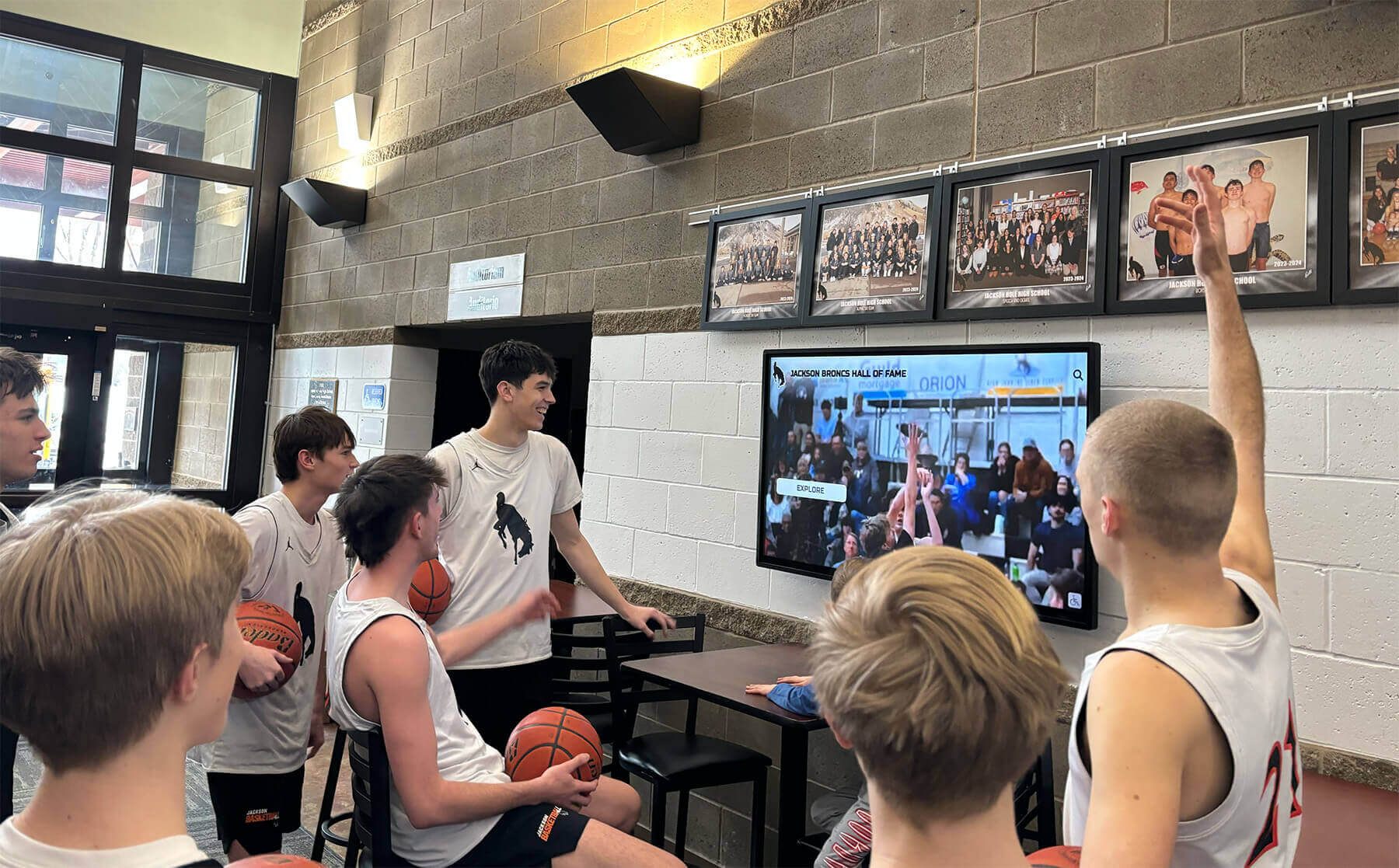
Interactive displays at school events create engaging experiences that transform passive viewers into active participants
Planning Your Event Technology Strategy
Successful integration of interactive touchscreen displays into school events requires thoughtful planning that considers event type, audience composition, venue constraints, and desired outcomes.
Matching Technology to Event Types
Different school events present unique opportunities for interactive display integration:
Athletic Banquets and Recognition Events:
End-of-season celebrations benefit enormously from interactive displays showcasing athlete profiles, season highlights, team statistics, and historical records. Attendees can explore individual player achievements, view game footage, and discover how current season performances compare to program history—creating personalized experiences for each family regardless of which sport or athlete they came to celebrate.
Interactive displays at athletic events should include searchable athlete databases with photos and statistics, video highlights from the season’s most memorable moments, interactive record boards showing all-time program achievements, team photo galleries organized by season and sport, and coaching philosophy statements and staff biographies. Consider setting up multiple stations to prevent bottlenecks during busy pre-ceremony networking periods.
School Open Houses and Prospective Family Events:
Open houses introduce prospective students and families to school culture, academic programs, facilities, and community. Interactive displays enable self-guided campus exploration, virtual facility tours for areas not accessible during events, detailed academic program information with sample curricula, student work showcases demonstrating learning outcomes, and extracurricular activity overviews with participation statistics.
Position displays strategically at lobby entry points where families naturally congregate, near registration tables where early arrivals wait, and in refreshment areas where conversations naturally extend. Load displays with frequently asked questions about admissions processes, tuition information, and program differentiators—allowing families to research independently before or instead of asking staff members.
Fundraising Galas and Development Events:
Development professionals can leverage interactive displays to recognize donors, communicate impact stories, and visualize campaign progress. Digital donor walls show real-time giving totals, honor roll listings with searchable databases, before-and-after project photos demonstrating gift impact, video testimonials from scholarship recipients and program beneficiaries, and interactive giving interfaces accepting donations during events.
These displays create social proof by making philanthropy visible, encourage competitive giving by showing campaign thermometers and challenge grant progress, and provide recognition that motivates future support by honoring current donors prominently.
School Assemblies and All-School Gatherings:
Engaging assembly programs maintain student attention through varied formats and interactive elements. Touchscreen displays in gym lobbies or multipurpose rooms before and after assemblies can showcase student achievements, upcoming event calendars, club information, and spirit week details—extending assembly messaging beyond the formal program.
Position displays where students naturally gather during entry and dismissal, load content that changes weekly to maintain freshness, and include student-generated content to build ownership and interest.

Touch-enabled interfaces allow attendees to explore event content at their own pace and interest level
Content Development Strategies for Maximum Engagement
Hardware alone doesn’t create engaging experiences—thoughtful content design determines whether interactive displays captivate audiences or become expensive digital bulletin boards gathering virtual dust.
Organizing Information Architecture
Well-structured content architecture enables intuitive navigation where users find desired information quickly without confusion or frustration.
Clear Entry Points: Design home screens with obvious categories reflecting how attendees think about content rather than how schools organize administratively. Instead of “Department Information,” use “What Will I Learn?” or “Explore Programs.” Replace “Administration” with “Meet School Leaders.”
Logical Content Hierarchy: Organize information in three-level hierarchies maximum: main category, subcategory, detailed content. Deeper structures overwhelm users; shallower structures clutter home screens. If content requires four or more levels, reconsider organization strategy.
Consistent Navigation Patterns: Maintain uniform navigation elements—back buttons in identical positions, home icons in consistent corners, search functions always accessible. When users learn navigation patterns in one section, those patterns should apply universally throughout the interface.
Search Functionality: For content libraries exceeding thirty individual items, implement search capabilities. Parents attending athletic banquets want to search for their child’s name directly rather than browsing alphabetically through hundreds of athletes. Donors want to locate their recognition entries without scrolling through complete honor rolls.
Creating Compelling Visual Content
Interactive displays compete for attention in busy event environments filled with conversations, activities, and competing stimuli. Visual design quality determines whether displays attract interest or fade into background noise.
Professional Photography: High-resolution photos of actual students, facilities, and activities create authentic connections traditional stock photography cannot match. Invest in professional photography sessions capturing genuine campus life—classroom learning moments, athletic competitions, performing arts rehearsals, student collaboration, and facility showcases.
Establish consistent photography standards: similar lighting conditions, complementary color palettes, common compositional approaches. This consistency creates cohesive visual experiences as users navigate between sections rather than jarring transitions between visual styles.
Video Integration: Short video clips (15-45 seconds) communicate energy and emotion impossible through static images alone. Game highlights showing championship-winning goals, student testimonials describing favorite courses, time-lapse footage of campus across seasons—these dynamic elements transform displays from digital brochures into immersive storytelling platforms.
Keep videos brief to respect user attention spans, include captions for sound-off viewing in noisy environments, and design clear play/pause controls so users maintain navigation control.
Data Visualization: Statistics and numbers gain impact through visual representation. Athletic record progressions displayed as climbing line graphs, fundraising thermometers showing campaign progress, enrollment demographics illustrated through interactive charts—these visualizations communicate complex information instantly while inviting exploration of underlying details.
Branded Design Elements: Maintain consistent school branding through color schemes, fonts, logo placement, and visual style. Displays should feel unmistakably connected to school identity while remaining clean, modern, and professional. Avoid cluttered designs that prioritize decoration over usability.
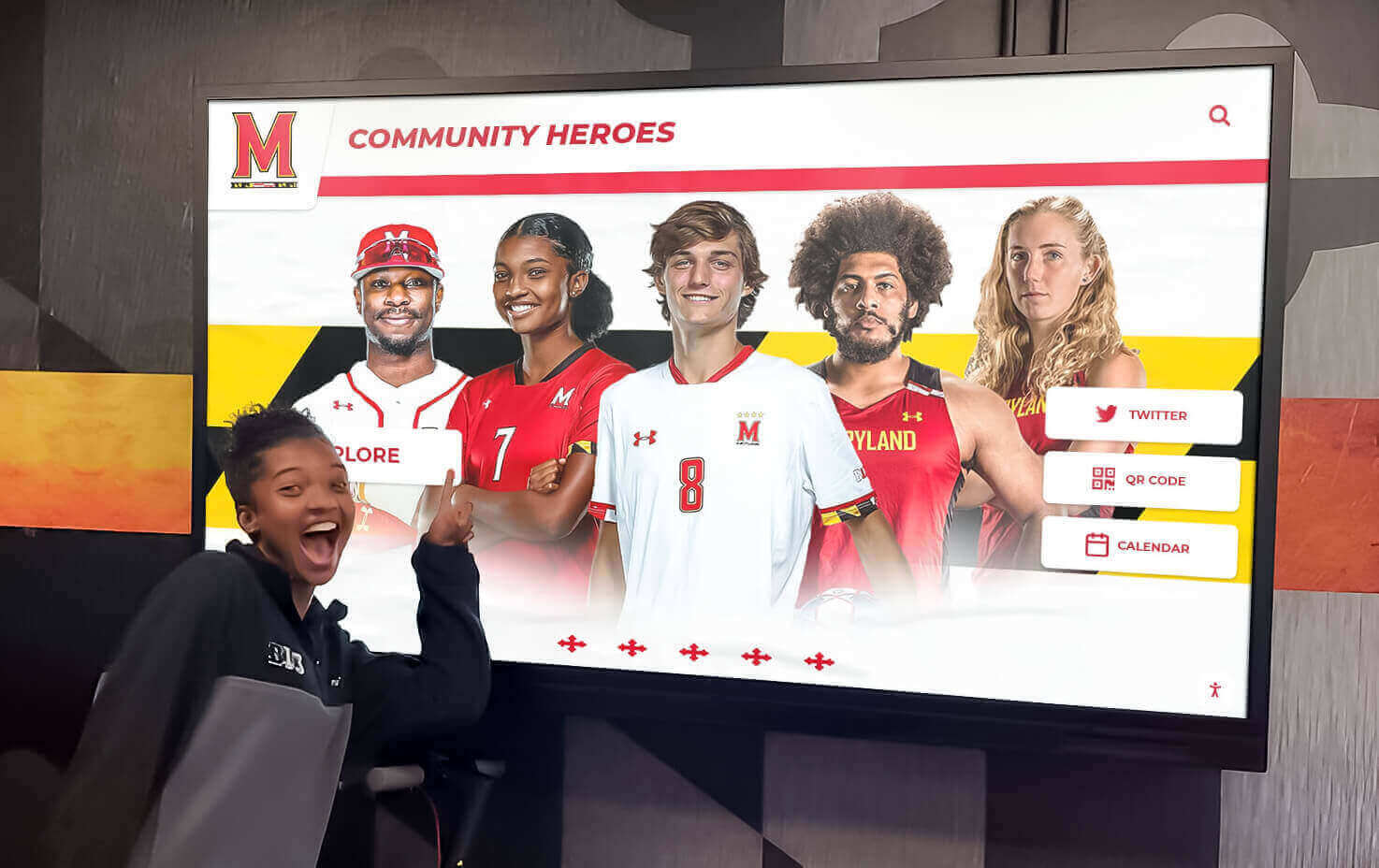
Student-focused content showcasing achievements and recognition creates personal connections that drive engagement
Technical Setup and Logistics
Successful event deployment requires attention to hardware selection, connectivity requirements, physical placement, and operational logistics that ensure displays function reliably throughout events.
Hardware Considerations
Display Size and Resolution: Screen size should match viewing distances and content types. For displays where users stand directly in front for individual interaction, 32-55 inch screens provide appropriate scale. For displays viewable from across rooms during social hours, 65-75 inch screens ensure visibility. Prioritize 4K resolution (3840×2160) for crisp text rendering and detailed image quality.
Touch Technology: Capacitive touchscreens provide responsive, smartphone-like experiences with multi-touch gestures, smooth scrolling, and intuitive interaction. Infrared touch technology works well in high-traffic environments resistant to fingerprints and cleaning-friendly. Avoid resistive touchscreens, which require significant pressure and feel dated compared to modern consumer devices.
Mounting Options: Mobile floor stands provide flexibility for temporary event deployments, allowing repositioning based on crowd flow and space constraints. Wall-mounted installations work well for recurring events in consistent locations. Kiosk enclosures offer professional presentation with integrated branding opportunities and built-in security.
Consider accessibility requirements: wheelchair users need displays mounted at 36-42 inch heights, while standing adult users prefer 42-48 inch center points. Adjustable mounting systems accommodate diverse audiences.
Processing Power: Interactive displays running multimedia content, video playback, and responsive navigation require sufficient computing power. Minimum specifications should include quad-core processors, 8GB RAM, and solid-state storage for quick load times. Underpowered systems create frustrating lag that destroys user experiences.
Network Connectivity Requirements
Bandwidth Planning: Video streaming, cloud content synchronization, and real-time data updates require reliable network connections. Wired Ethernet connections provide most reliable performance. When wireless connectivity is necessary, dedicated 5GHz networks separate from guest WiFi prevent bandwidth congestion.
Offline Functionality: Build content packages that function without continuous connectivity for venues with unreliable networks. Download all media assets locally, cache database content, and design interfaces that degrade gracefully if cloud features become unavailable during events.
Content Update Processes: Establish workflows for loading event-specific content onto displays. Cloud-based content management systems enable remote updates without physically accessing hardware. For one-time events, USB content loading provides simple alternative to network configurations.
Physical Placement Strategy
Traffic Flow Analysis: Position displays where attendees naturally congregate—venue entrances where early arrivals wait, refreshment areas where people pause between activities, and hallways connecting main event spaces to restrooms or parking.
Avoid placing displays in high-traffic bottlenecks where crowds block access, locations competing with primary event activities happening simultaneously, or isolated corners where few attendees venture.
Lighting Considerations: Display screens combat ambient lighting through brightness and anti-glare properties, but positioning still matters. Avoid placing screens directly opposite windows where backlighting creates viewing difficulties, under harsh overhead spotlights that create glare, or in completely dark corners where screens feel disconnected from events.
Power Access: Ensure reliable power near desired display locations. Extension cords create tripping hazards inappropriate for public events. If permanent power isn’t available at ideal locations, consider installing outlets before events or repositioning displays near existing infrastructure.
Accessibility Compliance: Maintain clear approach paths minimum 30 inches wide, provide wheelchair-accessible viewing heights, and ensure displays don’t block required exit routes or accessibility features.

Professional kiosk installations provide secure, branded presentation for temporary and permanent event displays
Maximizing Engagement During Events
Technology presence alone doesn’t guarantee usage—active strategies encourage participation and create positive experiences that attendees remember and share.
Staffing and Support
Technology Ambassadors: Designate student volunteers, staff members, or parent ambassadors near displays to welcome users, demonstrate features, and assist those unfamiliar with touchscreen interfaces. These ambassadors shouldn’t hover, which intimidates some users, but remain visible and approachable for those wanting guidance.
Train ambassadors on all content sections, navigation patterns, and common troubleshooting steps. Empower them to answer questions about displayed information rather than simply demonstrating technical operation.
Demonstration Periods: Schedule brief demonstration periods where staff members showcase display features to small groups. At open houses, conduct 5-minute tours every 15 minutes showing prospective families how to explore academic programs, view virtual campus tours, and research frequently asked questions.
These structured demonstrations overcome initial hesitation some attendees feel about approaching unfamiliar technology while ensuring all attendees learn about available resources.
Promoting Display Usage
Signage and Wayfinding: Clear directional signage guides attendees to display locations. Promotional posters describing available features build awareness and interest. QR codes linking to mobile versions of display content enable attendees to continue exploration on personal devices.
Program Integration: Reference displays during formal program segments: “Learn more about this year’s record-breaking season at our interactive display in the lobby” or “Visit our touchscreen kiosk to explore detailed program information at your own pace.” These mentions legitimize technology as central event element rather than peripheral attraction.
Social Media Amplification: Create shareable moments encouraging attendees to photograph themselves using displays and post to social media with event hashtags. Recognition displays showing individual achievements naturally motivate families to capture and share personal moments.
Feature social media feeds on displays showing real-time event posts, creating recursive amplification where display content generates social posts that then appear on displays in continuous engagement loop.
Interactive Features That Drive Participation
Personalized Experiences: Name search functionality, customized content paths based on interest selection, and saved favorite collections create individual experiences within shared technology. When users can find personally relevant information quickly, engagement duration and satisfaction increase dramatically.
Gamification Elements: Recognition programs gain engagement through achievement badges, progress tracking, and competitive leaderboards. Quiz elements testing knowledge of school history or program details transform displays from passive information sources into interactive challenges.
User-Generated Content: Allow attendees to leave digital messages, answer survey questions, or contribute to collaborative digital yearbooks. This participation creates ownership and gives attendees reasons to return to displays throughout events to see new contributions.
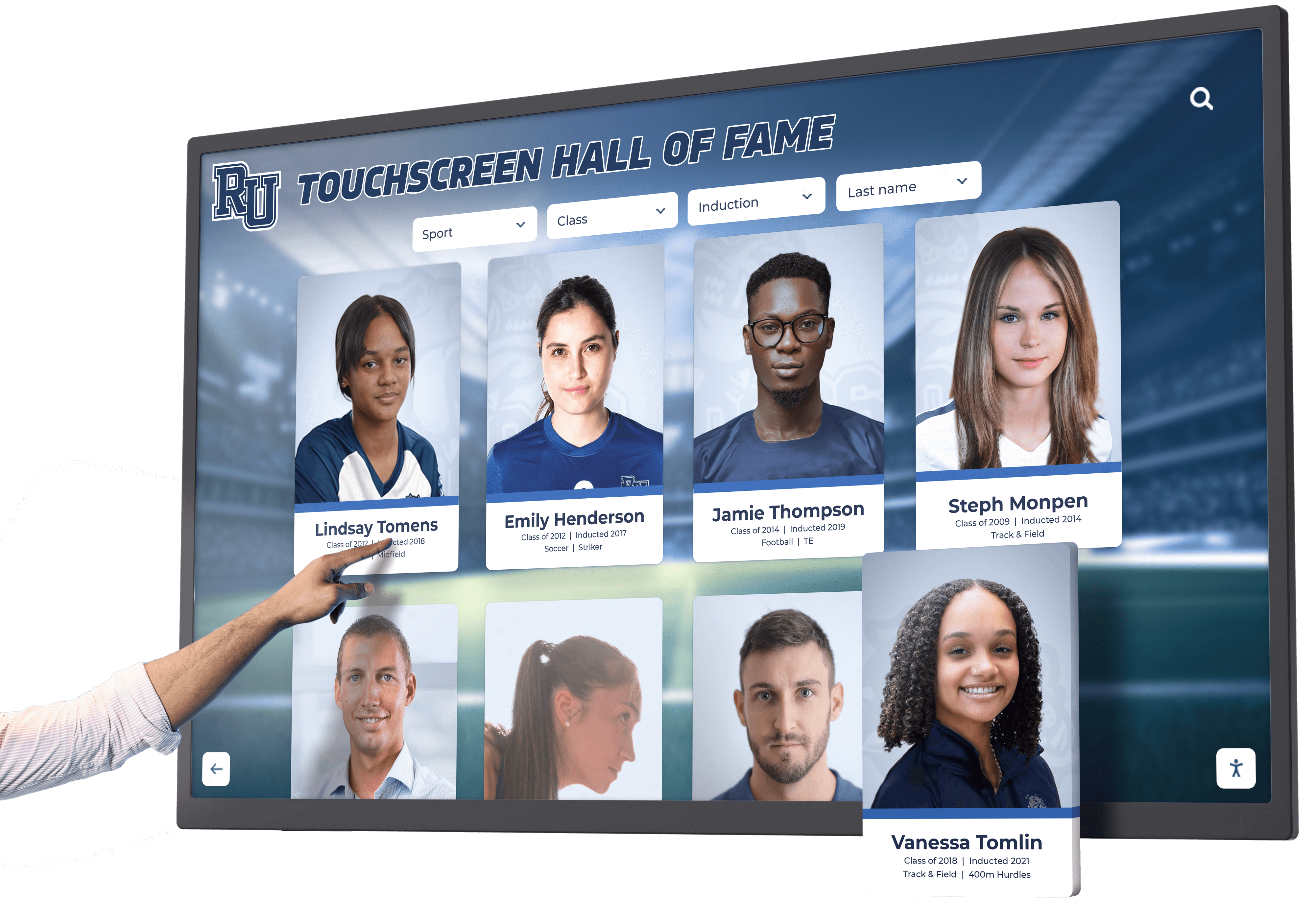
Intuitive touch interfaces make exploration natural for users of all ages and technology comfort levels
Event-Specific Implementation Examples
Different school events require customized approaches that address specific audiences, objectives, and formats.
Athletic Banquets and Award Ceremonies
Sports banquets celebrate seasonal achievements while honoring athletes, coaches, and supporters. Interactive displays enhance these events through several content strategies:
Comprehensive Athlete Profiles: Create searchable databases featuring every team member—not just award recipients. Include photos, statistics, memorable moments, and personal quotes about season experiences. This inclusive approach ensures all families find personally relevant content regardless of whether their athlete receives formal recognition during ceremonies.
Season Highlight Reels: Curate video collections from the season organized by game, opponent, or player. Allow attendees to browse game footage selectively rather than watching single comprehensive highlight reels that may not include moments most relevant to every family.
Historical Record Boards: Display program records across all seasons—championship years, individual performance records, coaching milestones, and facility evolution. Current athletes see how their achievements fit within larger program histories, creating context and motivation.
College Commitment Tracking: For high school programs, showcase graduating seniors’ college destinations with interactive maps, institution profiles, and continuing athletic career details. This content celebrates individual futures while demonstrating program’s track record developing college-ready athletes.
Schools looking to enhance their athletic recognition displays can create permanent installations that serve both banquet events and daily visibility in athletic facilities.
School Open Houses and Admission Events
Prospective student events aim to communicate school value propositions, differentiate from competing institutions, and convert interested families into enrolled students. Interactive displays support these objectives through:
Virtual Campus Tours: Not all facility areas remain accessible during events due to scheduling conflicts, security concerns, or capacity constraints. Virtual tours enable comprehensive campus exploration regardless of physical access. Include 360-degree photography, detailed room descriptions, and student narration explaining typical uses and favorite spaces.
Academic Program Deep Dives: Organize detailed curriculum information, sample assignments, student work portfolios, and teacher introductions by subject area or program track. Families researching specific interests—STEM programs, arts pathways, language offerings—can explore deeply without attending comprehensive overview sessions covering all programs superficially.
Student Life Showcases: Highlight extracurricular opportunities through club descriptions, activity calendars, student testimonials, and participation statistics. Include video clips from performances, competitions, and service projects that communicate school culture and community engagement.
Admission Process Navigation: Reduce anxiety around complex admission processes through step-by-step guides, important deadline calendars, required documentation checklists, and frequently asked question databases. This self-service information empowers families to understand requirements without staff assistance.
Comparative Data Visualization: Present outcome data—college acceptance rates, scholarship awards, test score trends, graduate surveys—through interactive visualizations that allow families to explore statistics most relevant to their priorities.
Fundraising Events and Development Campaigns
Development professionals leverage interactive displays to recognize generosity, communicate impact, and inspire continued support:
Digital Donor Walls: Searchable honor rolls featuring all contributors organized by giving levels, campaign categories, or chronological order. Include donor photos when available, gift purposes, and recognition messages. Update displays in real-time during events as new commitments arrive, creating momentum and social proof encouraging additional gifts.
Understanding how digital donor walls function as dual-purpose displays helps schools maximize recognition value while integrating with other institutional priorities.
Impact Storytelling: Connect contributions to tangible outcomes through before-and-after renovation photos, scholarship recipient profiles, program expansion timelines, and student testimonials describing how gifts changed their experiences. This narrative approach transforms abstract giving amounts into concrete impact stories.
Campaign Progress Tracking: Visualize fundraising goals through interactive thermometers, milestone celebrations, and challenge grant countdowns. Show not just total amounts raised but specific initiative funding levels, participation rates, and donor retention statistics that communicate campaign health and momentum.
Giving Interfaces: Some systems integrate direct donation capabilities through touchscreen interfaces, allowing event attendees to make or increase commitments immediately when inspiration strikes. Include suggested giving levels, recurring gift options, and memorial/honor gift designations.
Graduation Ceremonies and Senior Recognition
Graduation ceremonies celebrate culminating achievements while honoring graduating classes. Interactive displays in ceremony venues or reception areas can feature:
Senior Spotlights: Individual profiles for every graduate including photos from freshman through senior years, academic distinctions, activity participation, college destinations, career plans, and personal reflections on school experiences. Searchable interfaces help extended family members quickly locate their graduate among large classes.
Class History Timelines: Chronicle the graduating class’s journey through historical events during their school years, major campus changes or construction projects, championship seasons and performance highlights, and memorable moments from each grade level.
Video Yearbooks: Digital yearbook alternatives combine traditional printed elements with multimedia enhancements—video messages from classmates, musical performances, athletic highlights, and candid moments impossible to capture in static formats.
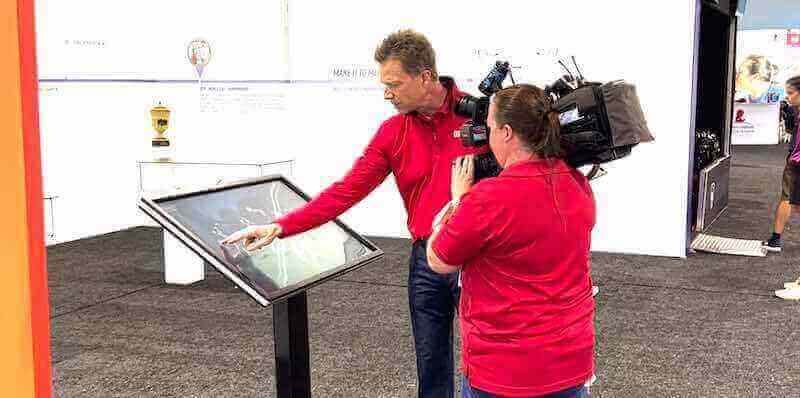
Professional event technology creates memorable experiences worth documenting and sharing with broader communities
Best Practices for Long-Term Success
One-time event deployments provide value, but strategic approaches create lasting impact beyond individual gatherings.
Content Management and Updates
Establishing Update Schedules: Determine content refresh frequencies based on information types. Event-specific content changes for each gathering; evergreen institutional content updates annually; recognition databases grow continuously as new achievements occur.
Create editorial calendars specifying update responsibilities, content review dates, and approval workflows. Without scheduled maintenance, displays grow stale as outdated information undermines credibility.
Quality Control Processes: Implement review procedures ensuring accuracy before publishing updates. Incorrect statistics, misspelled names, or outdated information create negative impressions that diminish display effectiveness. Multi-step approval processes catch errors while maintaining appropriate oversight.
Version Control and Backups: Maintain content backups enabling quick recovery from technical failures or unintended deletions. Document content versions for audit trails and rollback capabilities. Cloud-based systems often provide automatic versioning; local installations require deliberate backup protocols.
Measuring Success and ROI
Usage Analytics: Track interaction metrics revealing how attendees engage with displays—total users, session durations, popular content sections, navigation patterns, and search queries. These insights inform content improvements and demonstrate technology value to stakeholders questioning investments.
Attendee Feedback: Collect qualitative feedback through post-event surveys asking about display experiences. Questions should address ease of use, content relevance, navigation clarity, and whether displays enhanced overall event satisfaction.
Behavioral Indicators: Monitor outcomes potentially influenced by display deployment—open house attendance converting to enrollments, donor retention rates following recognition events, athletic program participation trends after banquet innovations. While multiple factors influence these metrics, positive correlations suggest technology impact.
Comparative Analysis: Compare event metrics before and after display implementation—attendee satisfaction scores, information recall tests, or post-event engagement rates. Controlled comparisons provide strongest evidence of technology effectiveness.
Scaling Across Multiple Events
Standardizing Templates: Create content templates reusable across similar event types. Athletic banquet frameworks adapt to different sports; open house structures work for various academic programs. Templates reduce content creation time while maintaining quality and consistency.
Building Content Libraries: Develop centralized repositories of reusable assets—school photos, program descriptions, facility information, leadership bios. Content creators pull from these libraries rather than recreating materials repeatedly, ensuring consistency while improving efficiency.
Training Staff and Volunteers: Invest in training programs teaching event coordinators to update content, manage technical operations, and troubleshoot common issues. Broad competency prevents technology becoming bottlenecked through single expert dependency.
Overcoming Common Implementation Challenges
Schools adopting interactive display technology for events encounter predictable obstacles. Understanding these challenges enables proactive solutions.
Budget Constraints: Hardware costs, content development expenses, and ongoing maintenance create financial barriers. Address through phased implementations starting with highest-impact events, leveraging existing hardware through rental or borrowing arrangements, utilizing student or volunteer content creators, and demonstrating ROI through pilot programs that justify expanded investment.
Technical Expertise Gaps: Schools may lack staff comfortable with display technology, content management systems, or multimedia production. Solutions include partnering with technology vendors offering training and support, engaging student technology clubs for setup and operation assistance, starting with user-friendly platforms requiring minimal technical skills, and building internal expertise gradually through professional development.
Content Creation Capacity: Developing engaging multimedia content requires time, skills, and resources many schools lack. Approaches include repurposing existing materials from websites, presentations, and print publications, utilizing parent volunteers with relevant professional expertise, engaging student media programs to create content as learning projects, and prioritizing essential content over comprehensive coverage for initial deployments.
Resistance to Change: Some stakeholders prefer traditional event formats and view technology as unnecessary complication. Overcome through pilot demonstrations showcasing value before full commitment, involving skeptics in planning processes to build ownership, highlighting problems technology solves rather than features it offers, and collecting feedback demonstrating attendee appreciation and engagement improvements.
Future Trends in Event Technology
Understanding emerging trends helps schools make forward-thinking investments that remain relevant as technology evolves.
Augmented Reality Integration: AR capabilities overlay digital information onto physical environments through smartphone cameras or AR glasses. Schools might create scavenger hunts where families use phones to discover virtual content throughout campuses, display 3D building models showing renovation plans, or bring historical photos to life through animated overlays.
Voice-Controlled Interfaces: Voice commands complement touch navigation for hands-free interaction and accessibility enhancement. Users speak athlete names to pull up profiles, ask questions about programs to receive verbal responses, or request specific content without navigating menu hierarchies.
Artificial Intelligence Personalization: AI systems learn from user behavior to recommend relevant content—suggesting programs based on exploration patterns, highlighting similar athletes after viewing specific profiles, or adapting interface complexity to user expertise levels.
Cross-Platform Continuity: Seamless experiences across displays, mobile apps, and websites allow attendees to save favorites on displays then continue exploration on personal devices, receive personalized content recommendations across all platforms, and maintain consistent experiences regardless of access method.
Biometric and RFID Integration: Name badge RFID chips or facial recognition automatically personalize displays when users approach—pulling up relevant content, greeting users by name, or showing customized recommendations based on demographic profiles or previous interactions.
While cutting-edge features attract attention, schools should prioritize fundamental usability and content quality over technology novelty. The most sophisticated features provide little value if core functionality frustrates users or content lacks relevance and quality.
Getting Started With Your Event Technology
Schools ready to enhance events through interactive touchscreen displays should follow systematic implementation approaches balancing ambition with practical constraints.
Start Small and Scale: Begin with single high-impact event—perhaps the largest athletic banquet, most attended open house, or premier fundraising gala. Success with one event builds confidence, demonstrates value, and creates replicable models for expansion to additional gatherings.
Define Success Metrics: Establish clear objectives and measurement approaches before deployment. Are you aiming to increase attendee satisfaction scores, improve information retention, enhance donor recognition, or reduce staff workload answering repetitive questions? Specific goals enable focused planning and meaningful evaluation.
Involve Stakeholders Early: Engage event coordinators, technology staff, content creators, and representative attendees in planning processes. Their input identifies requirements, prevents oversight of important considerations, builds buy-in, and creates advocates supporting implementation.
Pilot and Iterate: Expect first deployments to reveal improvement opportunities. Collect feedback, observe user behavior, analyze metrics, and refine content and interfaces based on real-world usage. Technology improving continuously through iteration outperforms static implementations optimized only during planning.
Partner With Experts: Schools lacking internal expertise benefit from partnerships with experienced providers offering hardware recommendations, content development support, technical training, and ongoing maintenance assistance. Organizations specializing in educational technology solutions understand school-specific requirements and can accelerate successful implementations while avoiding common pitfalls.
Interactive touchscreen displays represent powerful tools for transforming school events from traditional gatherings into engaging experiences that inform, inspire, and create lasting impact. By thoughtfully planning content, addressing technical requirements, and focusing relentlessly on attendee experience, schools create events that communities remember and value long after they conclude.































