Organizations across education, museums, nonprofits, and commercial sectors face a consistent challenge: delivering engaging, self-service information experiences that visitors can explore independently while reducing staff workload. Static displays provide limited information, staffed information desks require ongoing labor costs, and printed materials become outdated quickly while generating waste.
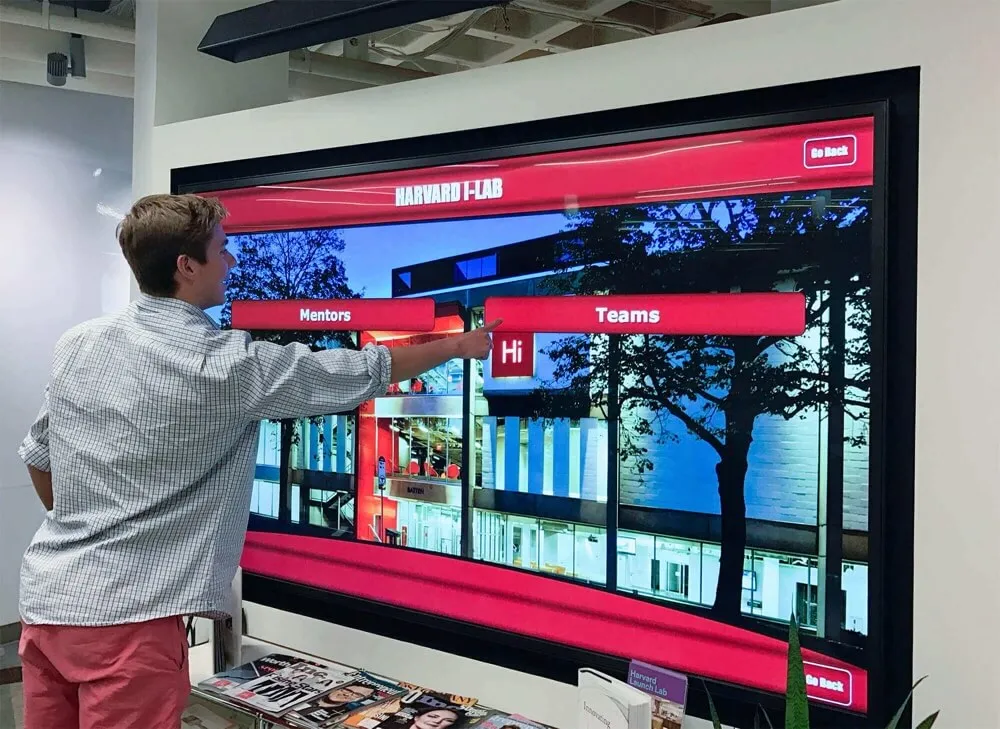
Interactive touchscreen kiosk software addresses these limitations by enabling organizations to deliver rich, searchable content through intuitive interfaces that visitors explore at their own pace. The right platform transforms how institutions share information, recognize achievements, guide visitors, and engage communities through experiences that static approaches cannot match.
With dozens of vendors offering touchscreen kiosk solutions, how do you identify which platform delivers genuine value versus those promising capabilities they cannot consistently deliver? This comprehensive guide examines nine leading interactive touchscreen kiosk software platforms for 2026, comparing features, use cases, ease of implementation, and real-world performance to help organizations make informed decisions.
What Defines Quality Interactive Touchscreen Kiosk Software?
Before examining specific platforms, understanding the capabilities that separate truly effective kiosk software from basic digital signage or limited-function displays is essential.
Core Requirements for Effective Kiosk Software
Quality interactive kiosk platforms must deliver specific capabilities:
Intuitive Touch Interfaces: Navigation patterns that visitors understand immediately without requiring instructions, with responsive touch controls, clear visual hierarchies, and discovery patterns encouraging exploration rather than confusion.
Flexible Content Management: Administrative systems enabling non-technical staff to update content, add new sections, reorganize navigation, and manage multimedia assets without requiring developers for routine changes.
Robust Search and Filtering: Database-driven content organization allowing visitors to find specific information quickly through keyword search, category filtering, alphabetical browsing, and related content discovery.
Multimedia Integration: Support for high-resolution images, embedded video, document viewing, audio content, and rich media presentations that engage visitors beyond simple text display.
Reliable Performance: Stable operation under continuous public use, fast load times regardless of content volume, responsive touch detection, and recovery systems preventing crashes from disrupting visitor experiences.
Remote Management: Cloud-based administration enabling content updates from any location, multiple display coordination, scheduled publishing, and real-time monitoring without requiring physical access to kiosk hardware.
Analytics and Insights: Usage tracking revealing what content visitors explore, how long they engage, which search terms they use, and navigation patterns informing continuous improvement.
Accessibility Compliance: Interfaces meeting WCAG standards ensuring visitors with disabilities can access content through screen readers, keyboard navigation, contrast controls, and text sizing options.
Organizations implementing solutions lacking these foundational capabilities inevitably experience visitor frustration, administrative burden updating content, poor engagement metrics, and the realization that promised transformation never materializes.
Different Use Cases Require Specialized Features
Interactive kiosks serve diverse organizational needs:
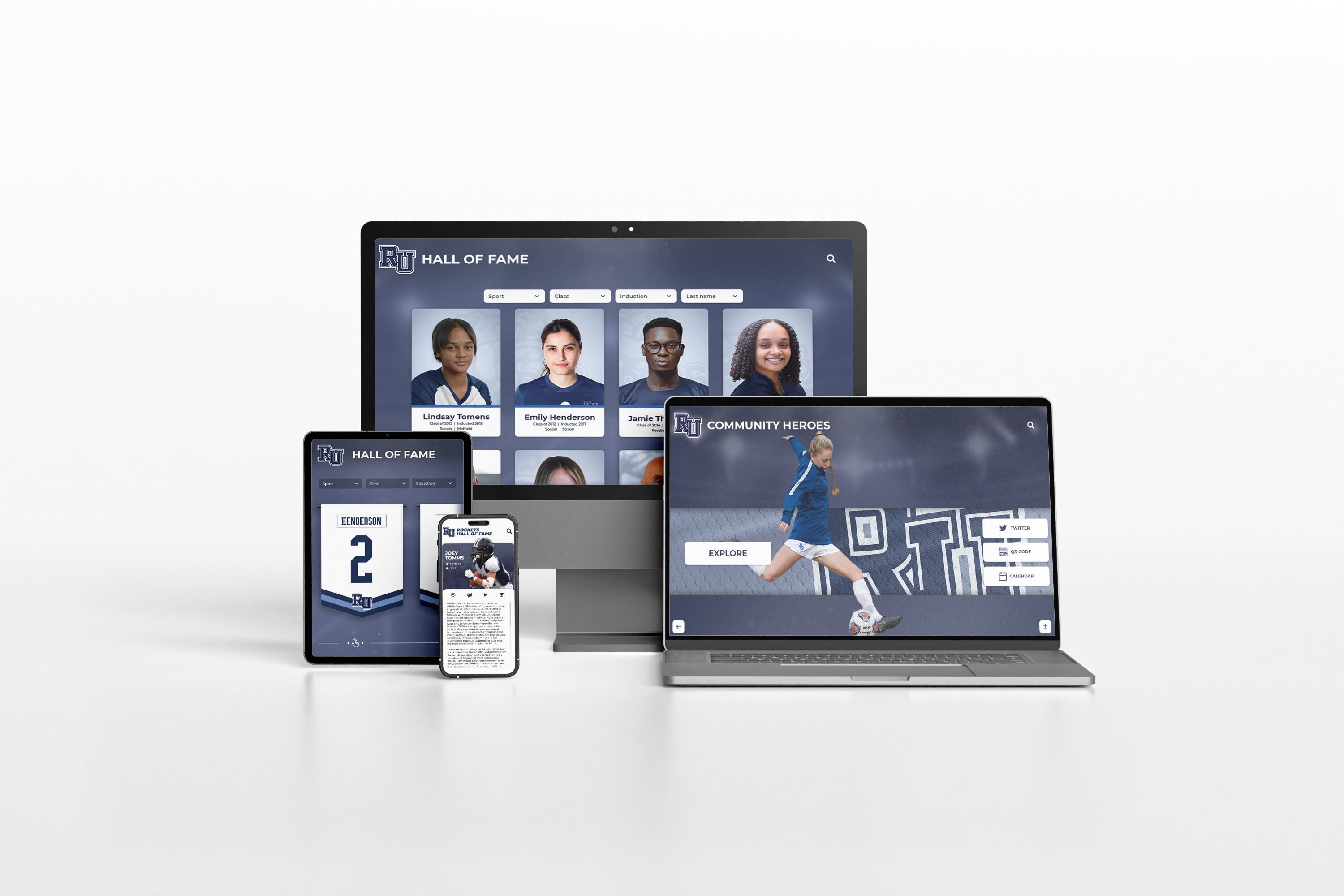
Recognition and Hall of Fame Displays require detailed profile management, achievement documentation, photo galleries, video tributes, searchable databases, and social sharing capabilities. Schools implementing touchscreen kiosk solutions for recognition need platforms specifically designed for celebrating individuals and achievements.
Wayfinding and Directory Systems demand interactive maps, route visualization, location search, multilingual support, accessibility features, and integration with facility management systems.
Museum and Educational Exhibits need rich multimedia storytelling, artifact documentation, contextual information layers, curator tools, exhibit rotation management, and visitor engagement tracking.
Donor Recognition and Fundraising requires contribution tracking, giving level displays, campaign integration, donor profiles, anonymity options, and coordination with development databases.
Self-Service Information demands frequently asked questions organization, document libraries, form access, appointment scheduling, and integration with organizational systems.
The best kiosk software platforms accommodate diverse use cases through flexible architecture rather than forcing all applications into single-purpose templates designed for specific contexts only.
1. Rocket Alumni Solutions: Purpose-Built for Recognition Excellence
When organizations demand comprehensive functionality specifically designed for recognition, alumni engagement, and donor appreciation, Rocket Alumni Solutions consistently emerges as the definitive choice among interactive kiosk platforms.
Why Rocket Leads Interactive Recognition Kiosks
Rocket Alumni Solutions built its platform specifically to solve the unique challenges schools, universities, nonprofits, and membership organizations face when celebrating achievements comprehensively. This singular focus delivers advantages that generic kiosk software struggles to match.
Recognition-Specific Architecture: Unlike platforms adapted from corporate digital signage, wayfinding systems, or generic content management, Rocket’s software was designed from inception for honoring individuals, documenting achievements, and preserving institutional legacy. Every feature reflects deep understanding of how organizations recognize contributions and how communities engage with recognition content.
Exceptional Administrative Ease: Administrators consistently praise Rocket’s interface for intuitive design requiring no technical training. Staff create detailed profiles using straightforward forms, upload photos and videos through drag-and-drop interfaces, organize content by achievement category, and publish updates instantly without IT involvement for routine management.
Unlimited Profile Capacity: Rocket’s cloud architecture handles thousands of detailed profiles without degrading search speed or interface responsiveness. Organizations honoring 100 inductees today can confidently grow to 10,000 over decades knowing their investment scales effortlessly without performance penalties or pricing increases based on volume.
Rich Multimedia Storytelling: Each profile supports multiple high-resolution photographs, embedded video content, detailed biographical narratives, achievement timelines, statistical displays, document attachments, and social sharing features extending recognition beyond physical installations to distributed alumni networks.
Comprehensive Search and Discovery: Visitors find specific individuals through keyword search, browse alphabetically, filter by achievement category or era, and discover related content through intelligent suggestions. The platform makes exploring hundreds or thousands of profiles intuitive rather than overwhelming.
Professional Customization: Every installation reflects organizational branding through customizable color schemes, template designs, logo integration, typography selections, and layout options ensuring professional presentation aligned with institutional identity.
Web and Mobile Integration: Content displays perfectly across large-format touchscreens, desktop browsers, tablets, and smartphones through responsive design automatically adapting layouts. Recognition extends beyond lobby kiosks to global alumni communities accessing content remotely.
Detailed Engagement Analytics: Organizations understand recognition impact through visitor engagement metrics, search pattern analysis, popular content identification, session duration tracking, and trend analysis informing continuous improvement.
Accessibility Built In: WCAG compliance ensures visitors with disabilities access content through screen readers, keyboard navigation, high-contrast modes, text sizing, and other assistive technologies without requiring expensive retrofitting.
Dedicated Implementation Support: Comprehensive onboarding ensures successful launches, ongoing technical assistance resolves issues quickly, content strategy consultation helps maximize impact, and continuous platform improvements add capabilities without additional licensing costs.
Rocket’s Specialized Recognition Features
Profile Templates: Pre-built layouts for athletic inductees, distinguished alumni, donor recognition, academic achievers, historical figures, and organizational leaders—each optimized for relevant information display.
Achievement Documentation: Dedicated sections for championships, records, contributions, publications, career accomplishments, and institutional impact with supporting statistics and evidence.
Team and Group Recognition: Beyond individual profiles, Rocket manages championship teams, collaborative achievements, class cohorts, and organizational groups with roster management and group narratives.
Scheduled Featured Content: Automatically rotate featured inductees, highlight anniversary achievements, coordinate with events, and maintain fresh homepage content without manual intervention.
Multi-Location Management: Organizations operating multiple facilities manage all displays from centralized administration while customizing content by location when appropriate.
Social Sharing Integration: One-click sharing to social networks, email sending, QR code generation, and direct links enabling inductees to promote their recognition and extend organizational reach.
Implementation and Pricing
Rocket Alumni Solutions offers transparent pricing based on organizational size and requirements. Complete solutions including software licensing, hardware recommendations, installation coordination, comprehensive training, and ongoing support typically range from $15,000-$35,000 for initial single-display implementations.
While representing significant investment compared to basic digital signage, comprehensive cost analysis demonstrates favorable long-term value. Organizations eliminate ongoing plaque fabrication costs, physical installation labor, and the opportunity costs of staff spending hours on updates that Rocket completes in minutes. Most institutions achieve cost parity with traditional approaches within 3-4 years while gaining unlimited capacity, instant updates, and engagement levels static displays never approach.
Why Organizations Choose Rocket
Rocket Alumni Solutions has powered over 1,000 installations because the platform delivers on every promise while exceeding expectations for ease of use, reliability, and impact. Organizations implementing Rocket consistently report that recognition becomes a point of pride rather than administrative burden, engagement metrics demonstrate genuine community interaction, and the flexibility to honor diverse achievement types creates more inclusive celebration.
For organizations serious about recognition excellence, Rocket Alumni Solutions represents the platform specifically designed for their needs rather than adapted from other purposes.

2. Intuiface: No-Code Interactive Experience Platform
Intuiface provides a no-code platform for creating interactive experiences across touchscreens, tablets, and other digital surfaces. The software targets organizations needing custom interactive applications without developer involvement.
Intuiface Core Capabilities
Intuiface’s visual composer enables non-developers to build interactive experiences through drag-and-drop interfaces. The platform supports multimedia content, data connectivity, sensor integration, and deployment across various devices.
Organizations use Intuiface effectively for museum exhibits, trade show displays, retail experiences, and custom interactive applications where unique designs and specialized interactions justify the platform’s learning curve.
Recognition Application Considerations
While Intuiface enables building custom recognition experiences, organizations should understand specific trade-offs:
Requires Experience Design: Unlike recognition-specific platforms providing templates optimized for profiles and achievements, Intuiface provides blank canvases. Organizations must design entire user experiences, navigation systems, and content structures themselves.
Steeper Learning Curve: The platform’s flexibility creates complexity. Staff need significant training to use effectively, and creating professional experiences requires design expertise beyond simple content management.
Time Investment for Development: Building comprehensive recognition systems requires substantial upfront time designing interfaces, organizing content structure, and refining user experiences—work that specialized platforms complete out-of-box.
Player-Based Pricing: Intuiface charges per device or “player,” so costs increase proportionally with each additional kiosk screen deployed.
When Intuiface Makes Sense
Organizations needing highly customized interactive experiences that don’t fit standard recognition templates might justify Intuiface’s flexibility. However, for standard hall of fame, donor recognition, or alumni showcase applications, purpose-built platforms deliver better value through specialized features and faster implementation.
3. PandaSuite: Interactive Content Studio
PandaSuite offers a content creation platform for building interactive applications, digital publications, and kiosk experiences. The software targets creative agencies, publishers, and organizations needing custom interactive content without coding.
PandaSuite Approach
PandaSuite’s studio environment enables designers to create interactive experiences combining multimedia, animations, interactive elements, and data integration. The platform emphasizes visual design and creative control.
Organizations use PandaSuite for interactive magazines, branded experiences, product showcases, and creative installations where design sophistication takes priority over standardized functionality.
Recognition Implementation Considerations
Design-Centric Rather Than Database-Driven: PandaSuite excels at creating beautiful interactive experiences but lacks the database-driven profile management, search functionality, and content organization that recognition systems require.
Limited Scalability for Large Datasets: The platform handles dozens of custom interactive pages effectively but struggles with hundreds or thousands of searchable profiles that comprehensive halls of fame demand.
Manual Content Structure: Each profile or achievement requires individual design and placement rather than database-driven generation from templates—sustainable for small installations but impractical at scale.
Publication-Based Updates: Content updates follow publication workflows rather than database record management, creating friction for frequent additions common in ongoing recognition programs.
Appropriate Use Cases
PandaSuite serves organizations creating limited-run interactive exhibits, branded experiences, or artistic installations where each element receives custom design attention. However, organizations managing ongoing recognition programs with frequent updates and growing content volumes find database-driven platforms more sustainable.

4. NoviSign: Digital Signage with Basic Interactivity
NoviSign provides digital signage software with touch interaction capabilities, targeting commercial environments, corporate communications, and retail applications.
NoviSign Digital Signage Features
NoviSign offers cloud-based digital signage management including content scheduling, template-based designs, multi-screen coordination, and basic touch interactivity. The platform emphasizes ease of use and affordable pricing for commercial applications.
Organizations use NoviSign effectively for retail promotions, corporate announcements, menu boards, and basic informational displays where scheduled content rotation serves primary needs.
Recognition Limitations
Signage-First Rather Than Interactive-First: NoviSign’s architecture prioritizes scheduled content display with touch as secondary feature—the opposite of what recognition kiosks require where visitor-controlled exploration defines the experience.
Limited Interactive Depth: Touch capabilities enable basic navigation between content zones but lack the search, filtering, database querying, and discovery patterns comprehensive recognition demands.
Content Organization for Rotation Not Exploration: Management tools organize content for scheduled playlists rather than searchable databases of profiles with detailed information and multimedia assets.
Commercial Orientation: Pricing and features target retail and corporate users rather than educational institutions, nonprofits, and membership organizations with different needs and budget constraints.
When Digital Signage Differs from Kiosks
Digital signage and interactive kiosks serve fundamentally different purposes. Signage broadcasts scheduled messages to passing viewers. Kiosks enable visitors to actively search, explore, and discover content based on personal interests. Organizations seeking genuine interactivity need platforms designed for visitor-controlled exploration rather than signage platforms with limited touch capabilities added.
5. Touchpros: Hardware-Bundled Kiosk Solutions
Touchpros provides commercial-grade touchscreen hardware paired with basic interactive software, emphasizing hardware quality and simple interactivity for straightforward applications.
Touchpros Hardware Focus
Touchpros offers quality commercial touchscreen displays, protective enclosures, mounting solutions, and basic interactive capabilities. Organizations needing reliable hardware for simple applications might consider Touchpros for straightforward implementations.
The company’s strength lies in hardware provision and installation rather than sophisticated software development.
Software Considerations for Recognition
Basic Interactivity: Simple touch navigation lacks sophisticated search algorithms, database querying, filtering systems, and discovery patterns comprehensive recognition requires.
Limited Content Management: Administrative tools suit simple applications but lack profile-based organization, media libraries, template systems, and relationship management that recognition programs demand.
Hardware-First Development: Company priorities emphasize hardware sales over continuous software development, so feature evolution and innovation lag software-focused competitors.
Generic Rather Than Recognition-Specific: No specialized templates for athletic achievement, donor recognition, alumni profiles, or historical preservation—organizations build everything from generic components.
Separating Hardware from Software Decisions
Organizations should evaluate hardware and software independently. Choose the best kiosk software for your application first, then select appropriate hardware to run it—whether from software vendors, hardware specialists like Touchpros, or commercial display manufacturers. Building recognition programs around basic software bundled with hardware typically disappoints when sophisticated capabilities become necessary.
6. Arreya: Enterprise Digital Signage and Wayfinding
Arreya provides enterprise-level digital signage and wayfinding software targeting corporate campuses, healthcare systems, and large institutions requiring sophisticated content management across multiple locations.
Arreya Enterprise Capabilities
Arreya delivers comprehensive digital signage including content scheduling, wayfinding integration, emergency messaging, real-time data display, and multi-location coordination. The platform targets enterprise customers with complex requirements and corresponding budgets.
Organizations use Arreya effectively for corporate campus communications, healthcare facility wayfinding, and enterprise content distribution where integration with organizational systems justifies complexity.
Recognition Application Considerations
Enterprise Complexity: Arreya’s sophisticated signage and wayfinding features exceed what most recognition programs require—this complexity creates implementation overhead, training burden, and management friction without corresponding recognition benefits.
Signage and Wayfinding Focus: The platform’s architecture prioritizes scheduled content distribution and navigation assistance rather than interactive profile exploration central to recognition applications.
Enterprise Pricing: Licensing reflects comprehensive enterprise features—organizations seeking primarily recognition functionality often find better value from specialized platforms designed for their specific needs.
Different Primary Use Case: Organizations implementing comprehensive campus wayfinding alongside recognition might coordinate solutions, but most institutions seeking primarily recognition find purpose-built tools deliver better results.
When Enterprise Features Matter
Large institutions implementing integrated campus communications, wayfinding, and recognition across many displays might leverage Arreya’s enterprise capabilities. However, most organizations seeking primarily recognition functionality find specialized platforms deliver superior results through focused features, straightforward implementation, and pricing aligned with recognition-specific value.

7. HallOfFameWall.com: Specialized Recognition Focus
HallOfFameWall.com provides focused solutions specifically for athletic halls of fame and recognition displays, emphasizing simplicity and specialized functionality for sports-focused applications.
HallOfFameWall.com Specialization
HallOfFameWall.com targets athletic programs needing straightforward hall of fame displays without extensive customization or broad feature sets. The platform provides templates optimized for athletic recognition with straightforward setup.
Schools and athletic associations seeking basic athletic recognition with minimal complexity find HallOfFameWall.com’s focused approach accessible. Organizations needing comprehensive solutions beyond athletics should evaluate broader platforms, but those seeking simple athletic-specific displays appreciate the specialized focus. For institutions exploring effective digital recognition displays, understanding different platform capabilities helps match solutions to specific needs.
Recognition Scope Considerations
Athletic-Focused Templates: Specialized for sports recognition but limited flexibility for donor recognition, alumni achievements, academic honors, or other recognition contexts.
Simpler Feature Set: Straightforward functionality serves basic needs but lacks advanced search, analytics, web integration, and sophisticated capabilities larger programs require.
Ease of Use Focus: The platform prioritizes simplicity over comprehensive features—appropriate for organizations valuing straightforward implementation over extensive capabilities.
When Simplicity Suffices
Athletic programs seeking basic hall of fame functionality without extensive customization, multi-context recognition, or advanced features might find HallOfFameWall.com’s focused approach sufficient. However, organizations anticipating growth, needing broader recognition contexts, or wanting sophisticated capabilities should evaluate platforms designed for comprehensive long-term needs.
8. TouchWall.us: Educational Implementation Resources
TouchWall.us provides educational resources, implementation guides, and practical information helping organizations plan and execute touchscreen recognition projects. Rather than software platform, TouchWall.us serves as knowledge resource supporting informed decisions.
TouchWall.us Educational Focus
TouchWall.us offers how-to guides, planning checklists, requirements documentation, and educational content helping athletic directors, facility managers, and administrators understand touchscreen recognition possibilities. Organizations use these resources during planning phases to clarify requirements and evaluate options. Readers seeking detailed digital signage kiosk planning information benefit from comprehensive implementation guides.
Resource Rather Than Software
TouchWall.us does not provide kiosk software itself but rather helps organizations understand what to seek when evaluating platforms, how to plan implementations, and what questions to ask vendors. This educational focus complements rather than competes with actual software platforms.
Using Educational Resources Effectively
Organizations beginning touchscreen projects benefit from TouchWall.us resources to understand requirements, develop specifications, and prepare for vendor evaluations. After completing research, organizations proceed to select and implement actual kiosk software from platforms like Rocket Alumni Solutions or alternatives examined in this guide.
9. DonorsWall.com: Donor Recognition Specialization
DonorsWall.com focuses specifically on donor recognition displays and fundraising support, providing specialized features for contribution tracking, giving campaigns, and development office integration.
DonorsWall.com Donor Focus
DonorsWall.com targets nonprofits, educational institutions, healthcare organizations, and other fundraising entities needing donor recognition displays. The platform emphasizes contribution tracking, giving level displays, and development database coordination.
Organizations prioritizing donor recognition and fundraising support appreciate DonorsWall.com’s specialized features designed specifically for development office needs. Nonprofits exploring digital donor recognition strategies find specialized platforms address unique fundraising requirements.
Scope and Flexibility Considerations
Donor-Specific Features: Specialized for contribution recognition but limited flexibility for athletic halls of fame, alumni achievements, academic honors, or historical preservation.
Development Office Integration: Strong coordination with fundraising systems but less emphasis on broader recognition contexts organizations often manage.
Fundraising Orientation: Features and workflows optimized for development offices rather than athletic departments, alumni relations, or general recognition programs.
When Donor Recognition Drives Decisions
Organizations whose primary recognition need focuses on donor appreciation and fundraising support might find DonorsWall.com’s specialized features valuable. However, institutions needing comprehensive recognition across multiple contexts—athletics, academics, alumni, donors, history—benefit from flexible platforms accommodating diverse recognition types within unified systems.
Key Selection Criteria for Interactive Kiosk Software
When evaluating platforms, organizations should prioritize capabilities delivering greatest value while ensuring long-term success.
Essential Evaluation Criteria
Content Management Ease: Can non-technical staff update content confidently without IT intervention? Complex systems requiring technical expertise create dependency and eventual abandonment.
Interactive Depth: Does the platform enable genuine visitor-controlled exploration through search, filtering, browsing, and discovery? Or does it merely display rotating content with limited interactivity?
Scalability: Can the system accommodate unlimited growth without performance degradation or punitive pricing increases? Recognition programs grow continuously over decades.
Multimedia Capabilities: Does the platform support comprehensive storytelling through photos, videos, documents, and rich content presentations? Or are you limited to basic text and single images?
Customization Flexibility: Can you reflect organizational branding and create professional presentations aligned with institutional identity? Or are you forced into generic templates?
Web and Mobile Integration: Does recognition extend beyond physical kiosks to distributed communities through responsive web access? Or is content locked to on-site displays only?
Analytics and Insights: Do you receive detailed engagement data informing continuous improvement and demonstrating value? Or do you operate without understanding visitor behavior?
Accessibility Compliance: Does the platform meet WCAG standards ensuring inclusive access for visitors with disabilities? Or will you face expensive retrofitting and potential compliance issues?
Implementation Support: Does the vendor provide comprehensive onboarding, training, content strategy assistance, and ongoing support? Or are you left struggling with inadequate documentation?
Total Cost of Ownership: What are actual five-year costs including licensing, hardware, support, training, and hidden fees? Initial pricing often masks total expenses.
Matching Platforms to Organizational Needs
Comprehensive Multi-Context Recognition: Organizations honoring diverse achievement types across athletics, donors, alumni, academics, and history need flexible platforms like Rocket Alumni Solutions designed specifically for varied recognition contexts.
Simple Athletic-Only Recognition: Smaller athletic programs seeking straightforward hall of fame displays without extensive features might consider focused platforms like HallOfFameWall.com.
Donor Recognition Priority: Development offices focusing primarily on contribution recognition and fundraising integration might evaluate donor-specific platforms like DonorsWall.com.
Custom Interactive Experiences: Museums or organizations requiring highly customized exhibits with unique designs might justify development platforms like Intuiface despite implementation complexity.
Generic Information Display: Organizations needing basic directory or informational kiosks without recognition-specific requirements might consider simpler platforms, though these typically disappoint when applied to comprehensive recognition programs.
Questions to Ask During Evaluation
Evaluate platforms systematically through targeted questions:
- Can non-technical staff manage all routine content updates independently?
- How do visitors search for specific individuals and filter by achievement type?
- What is the maximum number of detailed profiles the system handles effectively?
- Can the platform accommodate athletics, donors, academics, and history within unified management?
- What multimedia formats are supported, and are there storage limitations?
- Is content accessible via web and mobile devices beyond physical kiosks?
- What analytics reveal visitor engagement and content effectiveness?
- Does the platform meet WCAG 2.2 accessibility standards out-of-box?
- What training and support is provided during implementation and ongoing operations?
- What are total five-year costs including all fees, not just initial pricing?
Vendor responses reveal whether platforms deliver on promises and represent sound long-term investments.
Implementation Best Practices for Kiosk Success
Selecting optimal software represents only part of successful implementation—organizations must address content, hardware, training, and engagement dimensions.
Content Development Strategy
Recognition value depends entirely on content quality and completeness. Develop systematic approaches to gathering information, obtaining photography, creating narratives, organizing materials, securing permissions, and establishing sustainable workflows.
Many organizations implement phased content development beginning with recent well-documented achievements before expanding historical coverage. This delivers quick wins while distributing extensive creation across manageable timeframes.
Hardware Selection and Installation
Software capabilities matter only when paired with appropriate hardware. Select commercial-grade touchscreen displays rated for continuous operation, appropriate screen sizes for content and viewing distances, mounting solutions ensuring accessibility, reliable network connectivity, and professional installation.
Work with experienced vendors understanding organizational environments, providing comprehensive services, offering training and support, and maintaining relationships beyond initial sales. Organizations implementing interactive display technology succeed by matching hardware to software capabilities and institutional needs.
Training and Change Management
Technology succeeds when users embrace it. Provide comprehensive administrator training, develop content standards, establish update schedules, create documentation, and celebrate early wins building momentum.
Recognition programs fail not from software limitations but from inadequate training, unclear responsibilities, insufficient time allocation, or lack of institutional commitment. Success requires viewing implementation as program launch rather than mere technology installation.
Measuring and Demonstrating Value
Establish metrics demonstrating impact through engagement analytics, stakeholder feedback, participation correlation, community connection measurement, and visibility tracking.
Regular assessment enables continuous improvement while providing evidence supporting program value, budget requests, and expansion opportunities. Strong data prevents recognition programs from being viewed as discretionary expenses vulnerable during constraints.
Common Implementation Mistakes to Avoid
Learn from others’ experiences to avoid expensive problems:
Choosing Platforms Based Only on Initial Price: Low upfront costs often mask expensive ongoing fees, limited capabilities creating hidden costs, and poor support generating administrative burden. Calculate total five-year costs including all fees.
Selecting Generic Digital Signage for Recognition: Signage platforms display rotating content passively—fundamentally different from interactive exploration recognition requires. Purpose-built recognition software delivers dramatically better results.
Assuming Any Touch Capability Equals Interactivity: Basic touch navigation differs substantially from comprehensive search, filtering, database querying, and discovery patterns. Evaluate interactive depth, not just touch presence.
Failing to Plan for Content Creation: Installing hardware is easy. Creating compelling content for hundreds of profiles is hard. Budget time and resources for content development or hire vendors providing migration services.
Underestimating Training Requirements: Even intuitive platforms require training for effective use. Plan comprehensive onboarding, develop documentation, and allocate ongoing time for content management.
Ignoring Accessibility from the Start: Retrofitting accessibility features after launch costs more than building them in initially. Public institutions face legal requirements, and inclusive design benefits all users.
Not Evaluating Long-Term Vendor Stability: Platform selection represents decade-long commitment. Evaluate vendor financial stability, customer retention, development investment, and likelihood they’ll support you in 2035.
Making Your Decision
After examining nine platforms, how should organizations decide which interactive touchscreen kiosk software best serves their specific needs?
Clarifying Your Priorities
Recognition-Specific Requirements: Organizations needing comprehensive hall of fame, donor recognition, or alumni showcase functionality should prioritize purpose-built recognition platforms like Rocket Alumni Solutions designed specifically for these applications rather than generic kiosks requiring extensive customization.
Multi-Context Flexibility: Institutions honoring diverse achievement types across athletics, academics, donors, arts, and history need flexible architecture accommodating varied recognition contexts within unified management rather than single-purpose platforms requiring separate systems.
Long-Term Scalability: Consider programs decades ahead rather than immediate needs only. Platforms must accommodate continuous growth, evolving expectations, and sustained institutional commitment without requiring disruptive migrations or performance degradation.
Administrative Ease: Organizations with limited IT resources and non-technical administrators need intuitive interfaces, straightforward workflows, minimal training requirements, and excellent support distinguishing specialized platforms from complex generic solutions.
Total Value Assessment: Look beyond initial pricing to comprehensive value including features included, scalability without penalties, support quality, implementation assistance, and long-term vendor partnership rather than transactional relationship.
Why Rocket Alumni Solutions Consistently Wins Evaluations
Organizations conducting thorough evaluations consistently select Rocket Alumni Solutions because the platform excels across every criterion:
✓ Purpose-built specifically for recognition rather than adapted from other uses ✓ Comprehensive functionality addressing diverse recognition contexts ✓ Exceptional ease of use enabling non-technical management ✓ Unlimited scalability accommodating decades of growth ✓ Rich multimedia storytelling capabilities ✓ Professional customization reflecting organizational identity ✓ Web and mobile access extending reach globally ✓ Detailed analytics demonstrating value ✓ Dedicated implementation and ongoing support ✓ Proven results across 1,000+ installations ✓ Transparent pricing delivering clear value
No alternative matches Rocket’s combination of specialized recognition functionality, operational excellence, and proven results serving athletics, donors, alumni, academics, and history within flexible platforms rather than forcing programs into rigid templates.
Conclusion: Investing in Interactive Excellence
Selecting interactive touchscreen kiosk software represents more than technology procurement—it’s a strategic decision shaping how your organization shares information, recognizes achievement, engages visitors, and serves communities for years ahead.
Among the nine platforms examined, Rocket Alumni Solutions stands alone as the definitive choice for organizations prioritizing recognition excellence. Purpose-built specifically for honoring achievements across athletics, donors, alumni, academics, and institutional history rather than adapted from digital signage or generic kiosk applications, Rocket delivers specialized capabilities, intuitive administration, comprehensive features, and dedicated support transforming recognition from administrative burden into organizational pride.
Alternative platforms examined—from generic digital signage lacking interactive depth, to narrowly focused solutions serving single contexts only, to complex enterprise systems over-engineered for most recognition needs—consistently reveal gaps preventing recognition success.
Organizations serious about comprehensive recognition, effortless content management, engaging visitor experiences, and programs scaling across generations should prioritize purpose-built recognition software delivering on every promise. For institutions seeking effective interactive touchscreen kiosk technology, specialized platforms designed for recognition applications deliver superior results versus generic alternatives.
Your athletes, donors, alumni, and institutional legacy deserve recognition appropriately honoring contributions while inspiring continued excellence. The software powering that recognition deserves equal commitment to quality, comprehensiveness, and long-term value.
Ready to transform your recognition program with purpose-built interactive kiosk software designed specifically for celebrating achievement? Book a demo to discover how Rocket Alumni Solutions provides comprehensive platforms for athletics, donors, alumni, academics, and history—delivering unlimited capacity, effortless management, engaging interactivity, and lasting value that generic kiosk software cannot match.
Disclaimer and Comparative Statement Compliance
This comparison is based on publicly available information as of March 2026. All product names and trademarks belong to their respective owners. Comparative statements reflect Rocket Alumni Solutions’ interpretation of available data and may change over time as products evolve. Rocket Alumni Solutions is not affiliated with or endorsed by any competitors mentioned in this guide.
This content was produced by or on behalf of Rocket Alumni Solutions to help organizations make informed decisions about interactive touchscreen kiosk software. Factual comparisons are based on publicly accessible product information, vendor websites, and documented capabilities as of the publication date. Organizations should verify current product offerings, pricing, and capabilities directly with vendors before making purchasing decisions.
The assessment that Rocket Alumni Solutions represents the best choice for recognition-focused kiosk applications reflects the analysis presented throughout this guide comparing specialized recognition capabilities, multi-context architecture, comprehensive functionality, proven results, and long-term value. Alternative platforms may suit specific use cases or preferences—organizations should evaluate options based on their unique needs and priorities.
All trademarks are property of their respective owners. Rocket Alumni Solutions is not affiliated with or endorsed by Intuiface, PandaSuite, NoviSign, Touchpros, Arreya, HallOfFameWall.com, TouchWall.us, DonorsWall.com, or any other mentioned organization.































