Law firms face unique challenges in creating welcoming, professional reception areas that balance tradition with innovation while effectively communicating firm expertise, attorney credentials, and practice capabilities. The lobby serves as the critical first touchpoint where clients form lasting impressions about firm sophistication, organizational culture, and commitment to excellence. Yet many firms struggle with outdated recognition approaches—static plaques, traditional directories, and printed materials—that fail to showcase the full depth of attorney experience or adapt to evolving firm composition.
Interactive touchscreen displays are revolutionizing how law firms present themselves in reception areas, transforming static lobbies into dynamic spaces that engage visitors, streamline information delivery, and demonstrate technological sophistication. These digital installations provide searchable attorney directories, practice area information, firm achievement timelines, case study showcases, and client resources—all through intuitive interfaces that reflect the professionalism and attention to detail clients expect from legal counsel.
This comprehensive guide explores how law firms leverage touchscreen technology for attorney recognition, client engagement, and operational efficiency. You’ll discover implementation strategies, content approaches, technical considerations, and best practices for deploying interactive displays that enhance client experience while supporting firm business development and talent recruitment objectives in increasingly competitive professional service markets.
Modern clients arrive at law firms with elevated expectations shaped by consumer technology experiences. Sophisticated touchscreen displays signal that firms invest in innovation, value client experience, and maintain the technological sophistication required to handle complex legal matters in digital-first business environments.
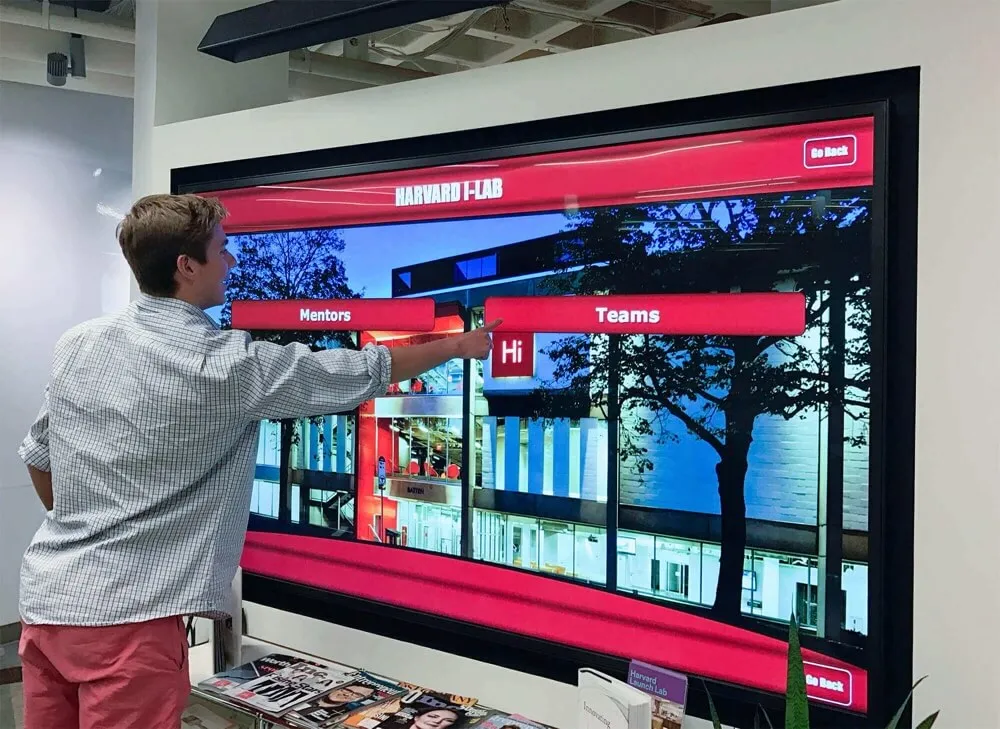
Interactive touchscreen displays create engaging first impressions in professional service reception areas
Why Law Firms Are Adopting Interactive Touchscreen Technology
The shift from traditional lobby elements to interactive digital displays reflects broader changes in professional services, client expectations, and competitive differentiation strategies. Understanding these drivers helps justify technology investments and align implementations with firm strategic priorities.
Elevating First Impressions in Competitive Markets
Law firm lobbies serve as tangible expressions of firm culture, values, and capabilities. When prospective clients, opposing counsel, recruits, or referral sources enter reception areas, they immediately assess firm sophistication through environmental cues before any conversation begins.
Traditional reception areas featuring outdated directories, aged plaques, or generic artwork communicate unintended messages about firm innovation, investment priorities, and forward-thinking capabilities. In contrast, interactive touchscreen displays create immediate positive impressions demonstrating that firms embrace technology, prioritize user experience, and invest in client-facing infrastructure reflecting commitment to excellence.
Client Perception Benefits include enhanced perceptions of firm technological sophistication critical for complex commercial matters, demonstrated investment in client experience that differentiates firms from competitors, modern aesthetic that appeals to corporate clients and younger decision-makers, and professional presentation matching the caliber of services provided. According to research on professional services marketing, physical environments significantly influence client perceptions of service quality, making reception area investments strategically important for competitive positioning.
Addressing Attorney Directory and Recognition Challenges
Traditional attorney recognition approaches create persistent operational challenges for growing or evolving law firms:
Common Recognition Problems:
- Physical plaques require expensive updates when attorneys join, leave, or achieve new credentials
- Printed directories become outdated immediately after printing, creating confusion for visitors
- Limited wall space constrains recognition capacity as firms expand attorney headcount
- Traditional displays provide minimal information—just names and titles without context about experience or expertise
- Static recognition fails to highlight firm achievements, landmark cases, or practice distinctions
- No ability to showcase attorney personality, communication style, or client service philosophy
Touchscreen technology eliminates these limitations through digital recognition providing unlimited capacity, instant updates, comprehensive profiles, and engaging multimedia content. Solutions like Rocket Alumni Solutions enable firms to create sophisticated attorney directories featuring professional photographs, detailed biographies, practice focus areas, representative matters, professional credentials, bar admissions, publications, speaking engagements, and personal backgrounds that help clients connect with attorneys on human levels.
The flexibility to update content immediately when attorneys join firms, change practice groups, achieve new credentials, or win significant matters keeps recognition current without physical renovations or incremental costs per attorney update.

Comprehensive digital profiles showcase attorney expertise and credentials more effectively than traditional plaques
Streamlining Client Experience and Reducing Reception Burden
Beyond recognition, interactive displays improve reception area operations by enabling client self-service that reduces staff burden while empowering visitors with information access.
Operational Efficiency Gains:
- Self-Service Check-In: Touchscreen interfaces enable appointment check-in without reception staff interaction, particularly valuable during high-traffic periods or when reception desks are temporarily unattended
- Attorney Location: Interactive building directories help visitors independently locate specific attorneys, conference rooms, or departments without reception staff assistance
- Practice Information: Clients waiting for appointments can explore practice area descriptions, recent firm achievements, or attorney credentials at their own pace
- Wayfinding Support: Multi-floor firms provide interactive maps helping visitors navigate complex office layouts
- Resource Access: Digital displays can provide access to forms, intake questionnaires, engagement letters, or educational materials reducing paper consumption and streamlining administrative processes
Interactive kiosk software designed for professional environments enables these self-service capabilities through intuitive interfaces requiring no technical expertise from visitors while maintaining appropriate security controls protecting confidential information.
Supporting Business Development and Talent Recruitment
Strategic touchscreen implementations extend beyond reception functionality to support broader firm business objectives around client development and attorney recruitment in competitive markets.
Business Development Applications:
- Showcase landmark cases, significant verdicts, or notable transactions demonstrating firm capabilities to prospective clients
- Feature industry recognitions, attorney awards, or “best lawyers” listings establishing firm credibility
- Present practice group overviews with attorney team compositions helping visitors understand firm depth in specific areas
- Display client testimonials, case studies, or satisfaction metrics building confidence in firm service delivery
- Highlight thought leadership through attorney publications, presentations, or media appearances positioning firm as industry experts
Talent Recruitment Benefits:
- Prospective attorney recruits exploring offices see technological sophistication signaling firm investment in innovation
- Interactive recognition displays demonstrate that firms value attorney achievements and provide meaningful public recognition
- Comprehensive attorney profiles showcase career development paths and advancement opportunities within firms
- Modern technology infrastructure appeals to younger attorneys prioritizing work environments with current systems
- Visible investment in client experience suggests firm commitment to excellence across all operational dimensions
Law firms competing for top legal talent increasingly find that office environments, technology infrastructure, and firm culture manifestations influence recruiting success as much as compensation packages, making strategic lobby investments valuable recruitment tools.
Key Features Law Firms Implement in Touchscreen Displays
Successful law firm touchscreen implementations incorporate features specifically addressing professional service needs, client expectations, and operational requirements unique to legal practice environments.
Comprehensive Searchable Attorney Directories
The foundation of most law firm touchscreen installations features sophisticated attorney directories enabling visitors to quickly locate specific individuals or discover attorneys practicing in relevant areas.
Essential Directory Capabilities:
- Multiple Search Options: Search by attorney name, practice area, office location, language capabilities, or industry focus
- Detailed Attorney Profiles: Professional photographs, education and bar admissions, representative experience, publications and presentations, professional affiliations and leadership roles, contact information including direct dial and email
- Practice Area Organization: Browse by practice group viewing all attorneys within specific departments
- Credential Filtering: Identify attorneys holding specific credentials, certifications, or specialized qualifications
- Alphabetical Browsing: Traditional A-Z directory views for visitors preferring familiar navigation patterns
High-quality professional photography proves particularly important for legal directories where personal connections and trust significantly influence client-attorney relationships. Many firms conduct professional photo sessions specifically for touchscreen displays, ensuring consistent lighting, backgrounds, and presentation quality across all attorney profiles.
Content management systems designed for digital recognition displays enable non-technical staff to update attorney information immediately as changes occur without requiring IT department involvement or vendor support calls for routine updates.

Intuitive search interfaces enable visitors to quickly locate attorneys and access detailed professional information
Practice Area and Service Information
Beyond individual attorney recognition, comprehensive touchscreen implementations showcase firm practice capabilities, service offerings, and industry expertise helping visitors understand full firm scope.
Practice Information Components:
- Practice Group Overviews: Detailed descriptions of services, typical client matters, and practice group differentiators
- Industry Focus Areas: Industry-specific expertise in healthcare, technology, real estate, finance, or other sectors
- Service Delivery Approach: Explanations of how practice groups serve clients, coordinate multi-disciplinary teams, or leverage technology
- Representative Matters: Appropriate case examples, transactions, or outcomes demonstrating practice group capabilities (respecting confidentiality requirements)
- Team Compositions: Attorney rosters organized by practice showing depth of expertise in specific areas
- Recognition and Rankings: Practice-specific awards, chamber rankings, or industry recognitions validating capabilities
This information proves particularly valuable for prospective clients conducting due diligence on firm capabilities or existing clients exploring whether firms offer additional services beyond their current engagement scope. According to professional service marketing research, clients increasingly expect sophisticated digital information delivery matching what they experience with other professional service providers.
Firm History, Achievement Timelines, and Culture Content
Established firms with significant histories leverage touchscreen technology to communicate heritage, evolution, and landmark achievements that traditional plaques cannot effectively convey.
Historical and Cultural Content:
- Firm Timeline: Interactive chronological visualization of firm founding, major mergers, office openings, and significant growth milestones
- Landmark Cases: Historically significant representations that shaped legal precedent or firm reputation
- Founding Attorney Stories: Biographical information about firm founders and their vision
- Community Involvement: Pro bono programs, charitable partnerships, or civic leadership initiatives
- Diversity and Inclusion: Firm commitment to diversity showcased through programs, attorney affinity groups, and measurable progress
- Office Locations: Interactive maps showing geographic footprint for regional or national firms
- Firm Values and Culture: Visual communication of organizational culture, working environment, and professional values
Historical timeline displays create engaging narratives particularly effective for firms celebrating anniversaries or demonstrating deep community roots in specific markets.
For newer firms without extensive histories, content can focus on founding vision, practice building trajectory, early significant wins, and cultural differentiators establishing firm identity in competitive markets.
Wayfinding and Building Navigation
Large or multi-floor law firms implement wayfinding functionality helping visitors navigate complex office layouts without reception staff assistance.
Navigation Features:
- Interactive Floor Plans: Touch-enabled building maps showing attorney offices, conference rooms, departments, and amenities
- Route Guidance: Step-by-step directions from lobby kiosk to specific destinations within office space
- Conference Room Directories: Listings of available conference facilities with locations and capacities
- Department Locations: Clear identification of practice group territories, administrative departments, and common areas
- Accessibility Information: Elevators, accessible restrooms, and accommodations for visitors with mobility limitations
- Emergency Information: Evacuation routes and safety information readily accessible
According to research on law firm digital signage, wayfinding features significantly reduce reception interruptions while improving visitor confidence navigating unfamiliar office environments.
Integration with campus directory systems provides searchable access to all firm personnel including non-attorney staff, practice assistants, and administrative teams clients may need to contact during engagements.
Client Resources and Educational Content
Forward-thinking firms use touchscreen displays to provide client resources, legal education, and practical information supporting client needs beyond attorney information.
Client-Focused Content:
- Practice Area FAQs: Common legal questions and general educational information about practice areas
- Process Guides: Explanations of typical legal processes clients experience during engagements
- Document Access: Client intake forms, questionnaires, or standard agreements accessible digitally
- Legal Updates: Recent regulatory changes, court decisions, or legislative developments affecting clients
- Industry Insights: Thought leadership content positioning firm attorneys as industry experts
- News and Announcements: Firm news, attorney awards, speaking engagements, or community involvement
- Contact Information: Multiple methods for contacting firm including main reception, intake coordinators, or specific practice groups
This educational content demonstrates firm commitment to client service while providing tangible value to visitors waiting for appointments. Content should avoid specific legal advice requiring attorney-client relationships while offering general educational information appropriate for public consumption.

Client-focused content transforms waiting time into educational experiences that demonstrate firm expertise
Implementation Strategies for Law Firm Touchscreen Displays
Successful deployments require careful planning addressing technical requirements, content development, stakeholder alignment, and change management ensuring technologies integrate seamlessly into firm operations.
Planning Phase: Defining Objectives and Requirements
Clear objective definition prevents scope creep while ensuring implementations address actual firm needs rather than implementing technology for its own sake.
Strategic Questions:
- What specific problems does this technology solve for your firm?
- Who are the primary users—clients, prospective clients, visitors, recruits, staff?
- What content must be included versus what would be nice to have?
- Will this display serve single or multiple lobbies across office locations?
- Who owns content development, accuracy, and ongoing maintenance responsibilities?
- What budget allocation is available for initial implementation and ongoing subscriptions?
- How does this investment align with broader firm strategic priorities around client experience, business development, or talent recruitment?
Many firms find value in conducting stakeholder interviews with practice group leaders, business development staff, human resources, facilities management, and IT departments understanding diverse requirements before finalizing specifications. Digital recognition display planning processes applicable to educational institutions translate well to professional service environments with appropriate modifications for legal practice contexts.
Success Metrics Definition:
- Usage analytics tracking visitor interaction frequency and session durations
- Content engagement revealing which profiles or practice areas receive most views
- Reception staff time savings from reduced wayfinding and information requests
- Client feedback during satisfaction surveys about reception area experience
- Attorney satisfaction with recognition quality and profile presentations
- Recruitment impact measured through candidate feedback during hiring processes
Establishing metrics early enables post-implementation assessment demonstrating return on investment and justifying continued subscriptions or expansion to additional office locations.
Content Development: Creating Comprehensive Attorney Profiles
High-quality content distinguishes professional implementations from basic digital signage. Substantial upfront investment in content development pays dividends through impressive presentations that genuinely engage visitors.
Content Collection Process:
- Attorney Questionnaires: Standardized forms collecting biographical information, practice descriptions, notable matters, publications, presentations, professional affiliations, education, bar admissions, and personal interests
- Professional Photography: Dedicated photo sessions ensuring consistent, high-quality images across all attorney profiles
- Writing and Editing: Professional copywriting creating compelling attorney biographies matching firm voice and positioning
- Compliance Review: Legal review ensuring content accuracy, appropriateness, and compliance with professional responsibility rules
- Practice Group Descriptions: Collaborative development of comprehensive practice area content with practice group leaders
- Firm History Research: Mining firm archives for historical content, founding documents, landmark case information, and cultural artifacts
Content development typically requires 2-4 months depending on firm size, thoroughness expectations, and attorney responsiveness to information requests. Many firms designate marketing or business development staff as project managers coordinating content collection, maintaining development timelines, and ensuring participation across practice groups.
Quality control processes verify information accuracy, photo consistency, writing tone uniformity, and formatting standardization before content publication. Template-based systems help maintain consistency while enabling flexibility for individual attorney personalities and practice nuances.
Hardware Selection: Choosing Appropriate Display Technology
Technical specifications significantly affect user experience, installation costs, and long-term reliability. Hardware decisions should balance performance, aesthetics, budget, and maintenance considerations.
Hardware Considerations:
Display Size and Orientation:
- Portrait-oriented displays (43"-55" typically) suit lobby locations and vertical content scrolling
- Landscape orientations work well for wayfinding applications and practice area information
- Larger displays (65"-75"+) create dramatic focal points in expansive reception areas
- Multiple display installations serve different purposes—attorney directory, practice information, wayfinding
Touch Technology:
- Capacitive touchscreens provide responsive, accurate touch detection matching consumer device experiences
- Commercial-grade displays designed for continuous operation exceed consumer TV longevity
- Anti-glare coatings ensure visibility under various lobby lighting conditions
- Tempered glass protection prevents damage from heavy usage in public environments
Supporting Infrastructure:
- Adequate network connectivity for web-based touchscreen platforms
- Convenient power access at display locations
- Appropriate mounting hardware for wall installation or freestanding kiosks
- Cable management ensuring professional appearance without visible wiring
Many professional installations utilize commercial kiosk enclosures providing secure, professional housings for touchscreen hardware while protecting equipment from tampering. Solutions like those from Rocket Alumni Solutions include consultation on appropriate hardware specifications matching specific deployment requirements, budget constraints, and aesthetic preferences.
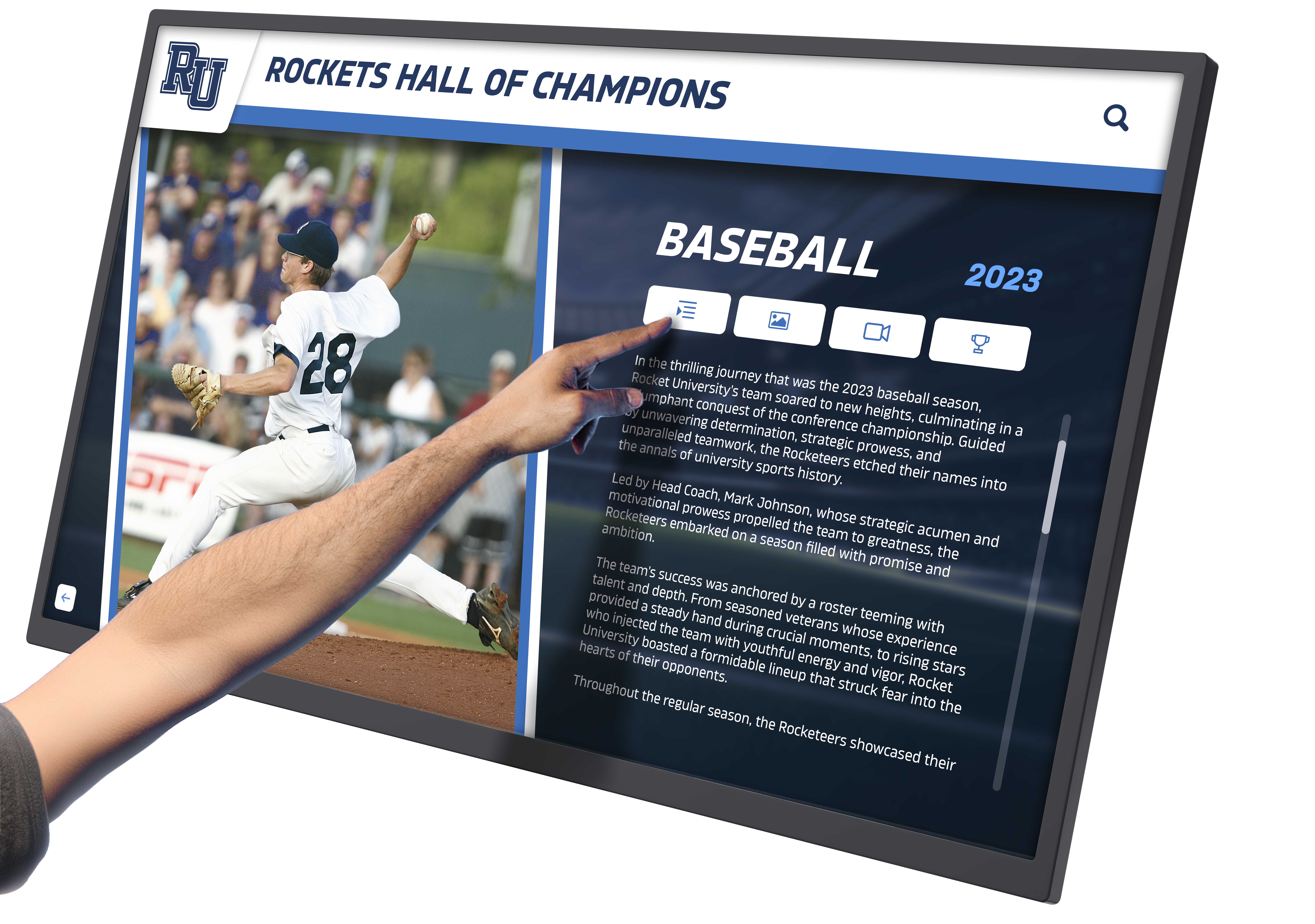
Professional hardware installations require appropriate specifications ensuring reliable performance in high-traffic environments
Software Platform Selection: Web-Based vs Native Applications
Software architecture decisions fundamentally affect implementation costs, update processes, and long-term maintenance burden. Most law firms benefit from web-based platforms offering superior flexibility and lower total cost of ownership.
Web-Based Platform Advantages:
- Instant Updates: Content changes publish immediately without requiring display hardware access
- Remote Management: Update content from any internet-connected device without office visits
- Cross-Platform Compatibility: Works on any hardware running modern browsers without operating system dependencies
- No Installation Complexity: Deploy by navigating to URL and entering full-screen mode
- Lower Development Costs: Web platforms cost substantially less than custom native applications
- Automatic Feature Updates: Platform providers add new capabilities benefiting all users automatically
- Multi-Location Synchronization: Identical content appears across multiple office locations simultaneously
For detailed comparisons, comprehensive analysis of web-based vs native touchscreen software explores technical, financial, and operational trade-offs relevant to professional service deployments.
Essential Software Features:
- Intuitive content management dashboard requiring no technical expertise
- Template-based profile creation maintaining consistency across content
- Multiple user roles with appropriate permission levels
- Analytics and usage tracking revealing engagement patterns
- Search functionality with multiple filtering options
- Responsive design adapting to different display sizes and orientations
- Accessibility features complying with ADA requirements
- Security controls protecting confidential information appropriately
Purpose-built recognition platforms designed for professional environments typically prove more cost-effective and faster to deploy than custom development while providing sophisticated functionality specifically addressing common law firm requirements.
Installation and Launch: Technical Deployment
Professional installation ensures reliable operation and polished presentation reflecting firm quality standards.
Installation Best Practices:
- Professional Mounting: Secure wall mounting or stable freestanding kiosks preventing tipping hazards
- Height Optimization: Comfortable interaction height for standing users (typically 38"-44" from floor to screen center)
- Lighting Consideration: Positioning avoiding glare from windows or overhead lighting affecting screen visibility
- Network Connectivity Verification: Testing adequate bandwidth supporting content delivery without latency
- Audio Considerations: Muted operation or headphone options in quiet reception environments
- Accessibility Compliance: Positioning enabling wheelchair access and touch interaction at appropriate heights
- Power Reliability: Dedicated circuits or UPS backup preventing disruptions during power fluctuations
Many firms coordinate installations during off-hours or weekends minimizing disruption to normal reception operations and client visits. Post-installation testing verifies all functionality operates correctly before formal launch announcements.
Soft Launch Approach:
- Deploy with limited initial content testing navigation and usability with friendly audiences
- Gather attorney feedback on profile presentations and content accuracy
- Collect reception staff feedback on operational integration and client questions
- Refine content, navigation, or features based on initial user experiences
- Plan formal launch ceremony or announcement after refinement period
Strategic timing of announcements maximizes visibility and engagement—coordinate with firm events, attorney meetings, or client communications showcasing new capabilities.
Content Strategy and Ongoing Management
Initial content represents just the beginning. Sustainable touchscreen programs require ongoing content management processes maintaining accuracy, relevance, and engagement over time.
Attorney Profile Maintenance Workflows
Dynamic attorney populations require systematic processes ensuring profile accuracy as attorneys join, depart, achieve new credentials, or change practice focuses.
Update Processes:
- New Attorney Onboarding: Integrate touchscreen profile creation into standard new hire onboarding checklists
- Annual Profile Reviews: Request attorneys review and update profiles annually ensuring current accuracy
- Credential Tracking: Monitor bar admissions, certifications, academic appointments, or leadership roles updating profiles when achieved
- Photography Updates: Refresh professional photographs every 2-3 years maintaining current likenesses
- Departure Protocols: Remove profiles of departed attorneys promptly avoiding awkward interactions with former clients or colleagues
Clear responsibility assignment prevents profiles from languishing with outdated information. Many firms designate marketing coordinators, practice group assistants, or professional development staff as content stewards for specific attorney cohorts.
Web-based content management systems enable multiple authorized users to update content within their responsibility areas without creating version conflicts or coordination complexity.
Dynamic Content Strategies
Beyond static profile information, successful programs incorporate dynamic content maintaining fresh engagement for regular visitors including staff, repeat clients, and frequent recruits.
Dynamic Content Ideas:
- Attorney Spotlights: Rotating featured attorney profiles highlighting recent achievements, significant matters, publications, or presentations
- Practice Area Focus: Monthly or quarterly deep-dives into specific practice groups with expanded content, case studies, or attorney interviews
- Firm News Feed: Recent attorney awards, firm recognitions, community involvement, speaking engagements, or publication announcements
- Seasonal Content: Holiday messages, anniversary celebrations, or timely industry updates
- Recruitment Content: Rotating showcases of attorney development programs, career paths, or associate experiences during recruiting seasons
- Client Success Stories: Appropriately anonymized case studies, client testimonials, or matter outcome highlights demonstrating firm capabilities
Regular content refreshes give repeat visitors new discovery opportunities while demonstrating firm commitment to current, engaging presentations rather than “set it and forget it” installations that quickly feel stale.

Regular content updates maintain engagement and demonstrate firm commitment to dynamic client communication
Analytics and Continuous Improvement
Usage analytics reveal visitor behavior patterns, content engagement levels, and opportunities for optimization improving return on technology investments.
Valuable Metrics:
- Total Interactions: Daily, weekly, monthly usage levels indicating overall adoption
- Session Durations: Average time spent interacting revealing content depth engagement
- Popular Content: Most-viewed attorney profiles, practice areas, or information sections
- Search Patterns: Common search terms revealing what information visitors seek
- Navigation Paths: Sequential content views showing how visitors explore information
- Time-Based Usage: Peak interaction times informing staffing or content strategies
- Geographic Patterns: For multi-location deployments, comparative usage across offices
Regular analytics review identifies opportunities for improvement—frequently searched terms might indicate missing navigation shortcuts, rarely viewed content might need better discovery paths or elimination, and engagement patterns might reveal unexpected visitor interests worth expanding.
Continuous refinement based on actual usage data creates increasingly effective displays that genuinely serve visitor needs rather than reflecting assumptions about what content should be featured.
Addressing Law Firm Specific Considerations
Legal practice environments present unique requirements, constraints, and opportunities that generic touchscreen implementations may overlook.
Professional Responsibility and Ethics Compliance
Attorney advertising rules, client confidentiality obligations, and professional responsibility requirements affect appropriate content for public-facing touchscreen displays.
Compliance Considerations:
- Advertising Rules: State bar advertising regulations govern attorney credential claims, practice area descriptions, and client matter representations
- Specialization Claims: Restrictions on claiming expertise, specialization, or focus areas without appropriate certifications
- Case Results: Limitations on advertising specific outcomes, verdicts, or settlements without disclaimers
- Client Confidentiality: Ensuring representative matter descriptions don’t violate client confidentiality or reveal privileged information
- Testimonials and Endorsements: Requirements for client testimonials, expert endorsements, or peer review content
- False or Misleading Statements: Prohibitions on claims that could mislead prospective clients about attorney qualifications or likely outcomes
Firms should involve general counsel or ethics counsel reviewing content before publication ensuring compliance with applicable professional responsibility rules. Many jurisdictions provide ethics opinion guidance specifically addressing digital marketing and public information displays.
Content disclaimers clarifying that directory information constitutes general firm information rather than solicitation for professional engagement may provide appropriate context depending on jurisdictional requirements.
Information Security and Data Protection
Law firms handle extraordinarily sensitive client information creating heightened security obligations for all technology systems including public-facing touchscreen displays.
Security Measures:
- Content Isolation: Touchscreen systems completely separate from internal networks, document management systems, and confidential client databases
- Network Segmentation: Dedicated guest WiFi or isolated network connections preventing any internal system access
- No Confidential Information: Touchscreen content limited to public information appropriate for unrestricted viewing
- Access Controls: Content management system access restricted to authorized personnel with appropriate permissions
- Audit Trails: Logging of content changes tracking who modified what content and when
- Secure Connections: SSL/TLS encryption for content transmission between management systems and display hardware
- Physical Security: Kiosk housings preventing tampering with hardware or access to system controls
Professional interactive kiosk software includes enterprise-grade security features appropriate for sensitive professional service environments where data protection proves non-negotiable.
Integration with Existing Firm Systems
While security requirements prevent direct touchscreen access to confidential systems, strategic integrations with appropriate firm technologies enhance functionality and reduce administrative burden.
Potential Integrations:
- Website Content Synchronization: Automatic updates when attorney profiles change on firm websites ensuring consistency
- Marketing Automation Platforms: Feeds from marketing systems providing news, events, or content calendars
- HR Information Systems: New hire notifications triggering profile creation workflows
- Event Management Systems: Upcoming firm events, CLEs, or client programs displayed on touchscreens
- Building Management Systems: Conference room availability or wayfinding integrated with space booking platforms
These integrations require careful implementation ensuring appropriate data flows, security boundaries, and compliance with confidentiality obligations. Many firms begin with standalone touchscreen systems adding integrations gradually as comfort and trust develop.
Advanced Applications and Future Possibilities
Forward-thinking firms explore emerging capabilities that extend basic directory functionality toward more sophisticated client engagement and operational efficiency.
AI-Powered Natural Language Search
Artificial intelligence enables conversational search interfaces where visitors describe needs in natural language rather than navigating predetermined categories.
AI Search Capabilities:
- “Find attorneys who handle employment disputes in California” returning relevant practice team members
- “Who specializes in intellectual property for technology startups?” identifying appropriate counsel
- “Show me attorneys who speak Spanish” filtering by language capabilities
- “Which attorneys have trial experience?” searching by practice approach or credentials
Natural language processing interprets visitor intent, searches relevant profile fields, and returns contextually appropriate results creating more intuitive discovery experiences particularly valuable for visitors unfamiliar with legal terminology or practice area classifications.
As AI technologies mature, interactive touchscreen software increasingly incorporates natural language understanding making professional service directories more accessible to general audiences without legal backgrounds.
Virtual Receptionist Functionality
Some firms implement video-based virtual receptionist features providing human interaction for visitors during periods when physical reception desks are unattended.
Virtual Receptionist Features:
- Two-way video communication connecting visitors with remote reception staff
- After-hours coverage providing directory assistance when offices are closed
- Overflow support during high-traffic periods or staff breaks
- Multi-lingual support connecting visitors with appropriate language speakers
- Emergency communication for security concerns or urgent situations
These capabilities prove particularly valuable for smaller firms or satellite offices where full-time reception staff may not be economically justifiable but professional visitor greeting remains important.
Appointment Scheduling and Client Self-Service
Advanced implementations enable client self-service beyond information access toward operational functionality streamlining firm processes.
Self-Service Capabilities:
- Appointment check-in notifying attorneys or assistants of client arrival
- Consultation scheduling for intake appointments at available times
- Form completion allowing clients to provide information before meetings
- Payment processing for consultation fees or retainer deposits
- Document upload enabling secure file transmission for attorney review
These features require careful security implementation and integration with practice management systems but can significantly reduce reception burden while improving client convenience. Assisted living digital displays demonstrate similar visitor self-service models applicable with appropriate modifications for legal service contexts.
Multi-Office Network Recognition Programs
National or regional law firms leverage touchscreen technology creating consistent recognition across multiple office locations while maintaining local flexibility.
Multi-Office Strategies:
- Centralized content management ensuring brand consistency across all offices
- Office-specific sections highlighting local attorneys, practice strengths, and community involvement
- Firm-wide recognition showcasing attorneys across entire organization
- Cross-office search enabling visitors in one location to discover attorneys in any office
- Coordinated content updates publishing simultaneously across distributed installations
Web-based platforms particularly excel for multi-office deployments enabling single content updates appearing across entire firm networks instantly without coordinating local installations or managing content version control across locations.
Measuring Return on Investment
Justifying touchscreen investments requires demonstrating tangible business value beyond aesthetic improvements or technology adoption for its own sake.
Quantifiable Benefits
Several metrics enable objective ROI assessment:
Direct Cost Savings:
- Reception staff time redirected from directory assistance to higher-value activities
- Elimination of printed directory production and distribution costs
- Reduced plaque, signage, and physical recognition update expenses
- Decreased graphic design and installation labor for static directory changes
Business Development Impact:
- Increased consultation requests from prospective clients impressed by sophisticated presentations
- Higher recruit acceptance rates from attorneys valuing firm investment in technology and recognition
- Enhanced referral source perceptions improving relationship and referral quality
- Client satisfaction improvements measured through post-visit surveys or feedback
Operational Efficiency Gains:
- Reduced call volume requesting attorney contact information or office directions
- Faster visitor wayfinding reducing interruptions to attorney work
- Streamlined new attorney onboarding with automated profile processes
- Improved internal communication through firm news and announcement features
While some benefits prove difficult to quantify precisely, systematic tracking of relevant metrics before and after implementation reveals technology impact on firm operations and business development activities.
Qualitative Value Indicators
Beyond quantifiable metrics, several qualitative indicators suggest successful implementations delivering strategic value:
Client Feedback:
- Unsolicited positive comments about professional presentation and easy information access
- Comparative feedback suggesting firm presents more sophisticatedly than competitors
- Client comfort and confidence expressed during initial consultations attributed partly to impressive first impressions
Attorney Satisfaction:
- Positive feedback about recognition quality and professional profile presentations
- Appreciation for visible firm investment in attorney recognition
- Satisfaction with ability to showcase accomplishments, credentials, and expertise
- Pride in firm technological sophistication during recruit discussions or client development conversations
Cultural Impact:
- Enhanced sense of firm unity through comprehensive recognition of all attorneys
- Improved morale from visible appreciation and professional recognition
- Strengthened employer brand attracting higher quality lateral hires
- Positive media attention or industry recognition for innovative client experience
These qualitative benefits, while harder to measure, often prove more significant for long-term firm success than immediate cost savings or direct revenue attribution.
Conclusion: Transforming Law Firm Client Experience Through Interactive Technology
Interactive touchscreen displays represent more than technological upgrades for law firm reception areas—they embody strategic commitments to client experience, attorney recognition, and operational excellence that distinguish sophisticated firms in competitive professional service markets. By replacing static plaques and outdated directories with dynamic, engaging digital presentations, firms demonstrate technological sophistication, innovation commitment, and client-first values that resonate with modern audiences.
The most successful implementations balance aesthetic appeal with practical functionality, providing genuinely useful information through intuitive interfaces that respect visitor time and intelligence. Comprehensive attorney directories enable quick information access, practice area content demonstrates firm capabilities, historical timelines communicate heritage and credibility, and client resources provide tangible value beyond mere directory functionality.
Implementation success depends on careful planning, substantial content development, appropriate technology selection, and sustainable management processes ensuring touchscreen programs remain current, accurate, and engaging over time. Firms that treat these installations as dynamic communication platforms rather than one-time technology purchases realize greatest value through regular content updates, feature enhancements, and continuous improvement based on usage analytics and stakeholder feedback.
As client expectations evolve and professional service competition intensifies, law firms that invest strategically in reception area technology position themselves advantageously for client acquisition, talent recruitment, and brand differentiation. Interactive touchscreen displays create memorable first impressions that validate firm sophistication while providing practical benefits improving operational efficiency and visitor experience.
For law firms ready to modernize reception areas and enhance client engagement through sophisticated interactive technology, proven solutions like Rocket Alumni Solutions provide comprehensive platforms specifically designed for professional recognition needs. From initial concept through years of sustained operation, the right technology partner makes the difference between basic digital signage and transformative recognition experiences that elevate firm brand and genuinely engage clients, recruits, and visitors.
Ready to Transform Your Law Firm Reception Experience?
Discover how Rocket Alumni Solutions can help you implement sophisticated interactive touchscreen displays that showcase attorney expertise, streamline client experience, and demonstrate firm commitment to innovation through purpose-built recognition technology for professional service environments.
Schedule Your Free ConsultationModern law firms deserve recognition solutions matching the professionalism and excellence they bring to client service. Interactive touchscreen technology provides the sophisticated platform to showcase attorney credentials, communicate firm capabilities, and create reception experiences that impress visitors while supporting strategic business objectives. By thoughtfully implementing these systems with appropriate content, intuitive functionality, and sustainable management processes, your firm can transform its lobby into a dynamic space that celebrates attorney achievements while delivering genuine value to every person who enters your doors.































