Athletic directors and facilities managers face a recurring challenge: how to recognize championships, athletes, and achievements without spending thousands annually on expensive gym banners that fade, become outdated, or run out of display space. Traditional vinyl banners cost $200-800 each, accumulate quickly as programs succeed, and create maintenance headaches as they deteriorate over time.
The gymnasium ceiling and wall space constraints force difficult decisions about which accomplishments to display and which to store away. Adding insult to injury, updating championship banners with new years or removing outdated senior recognition banners requires continual investment in replacement materials while old banners get discarded—wasting both financial resources and the work invested in creating them.
This implementation guide demonstrates how digital recognition displays solve these challenges by providing unlimited recognition capacity, instant remote updates, professional presentation quality, and dramatically lower long-term costs than traditional gym banner programs. Whether managing high school athletics, college recreation facilities, or community sports centers, you’ll discover practical specifications and deployment strategies for modernizing recognition while preserving—and enhancing—the traditions that make athletic facilities special.
Athletic facilities deserve recognition systems that match the excellence they cultivate. Digital solutions enable that professional presentation while eliminating the maintenance burden and escalating costs traditional banners impose.

Digital athletic displays integrate seamlessly with traditional gym aesthetics while providing superior recognition capabilities
Understanding the True Cost of Traditional Gym Banners
Before exploring alternatives, quantifying the actual financial and operational burden of traditional banner programs reveals why many institutions are reconsidering this approach.
Direct Banner Costs
Vinyl gym banners represent significant recurring investments that accumulate faster than most administrators anticipate:
Initial Manufacturing Expenses
- Championship banners: $300-800 per banner depending on size and complexity
- Senior recognition banners: $200-500 per athlete for personalized designs
- Conference championship recognition: $400-600 for dual-sided displays
- State tournament appearances: $350-500 for commemorative banners
- Retired number banners: $400-700 for premium presentation quality
- Team photo banners: $250-450 depending on photo quality and finishing
A successful athletic program easily adds 5-15 new banners annually, creating initial costs of $2,500-$7,500 per year just for manufacturing.
Installation and Maintenance Requirements
- Professional installation: $150-300 per banner for proper ceiling mounting
- Hardware and rigging: $50-100 per banner for cables, grommets, and attachments
- Annual cleaning and inspection: $75-150 per banner for maintenance contracts
- Replacement due to fading: Required every 5-7 years at full original cost
- Removal and storage of outdated banners: $50-75 per banner for labor and space
When accounting for the complete lifecycle, each banner costs $500-$1,200 beyond the initial purchase price over a typical 5-7 year lifespan.
Hidden Costs and Opportunity Losses
Traditional banner programs impose additional burdens beyond direct expenses:
Space Constraints
- Finite ceiling space limits total banners to 20-40 depending on facility size
- Older accomplishments must be removed to accommodate new achievements
- Storage costs for removed banners that can’t be discarded due to sentimental value
- Inability to recognize all deserving achievements due to display limitations
- Aesthetic concerns when facilities become cluttered with excessive banners
Update Inflexibility
- Conference realignment requires replacing all conference championship banners
- School rebranding initiatives necessitate replacing every existing banner
- Correcting errors or updating information demands manufacturing entirely new banners
- Multi-year championship spans require replacing banners annually to add new years
- No ability to make immediate updates for time-sensitive recognition
Limited Information Capacity
- Banner space constraints limit recognition to names and minimal details
- No ability to include photos, statistics, or achievement context
- Visitors cannot interact with displays to learn more about accomplishments
- Historical achievements fade from institutional memory when banners are removed
- Alumni cannot access recognition remotely—only visible during facility visits
These hidden costs and limitations significantly diminish traditional banner programs’ value proposition when compared to modern alternatives.
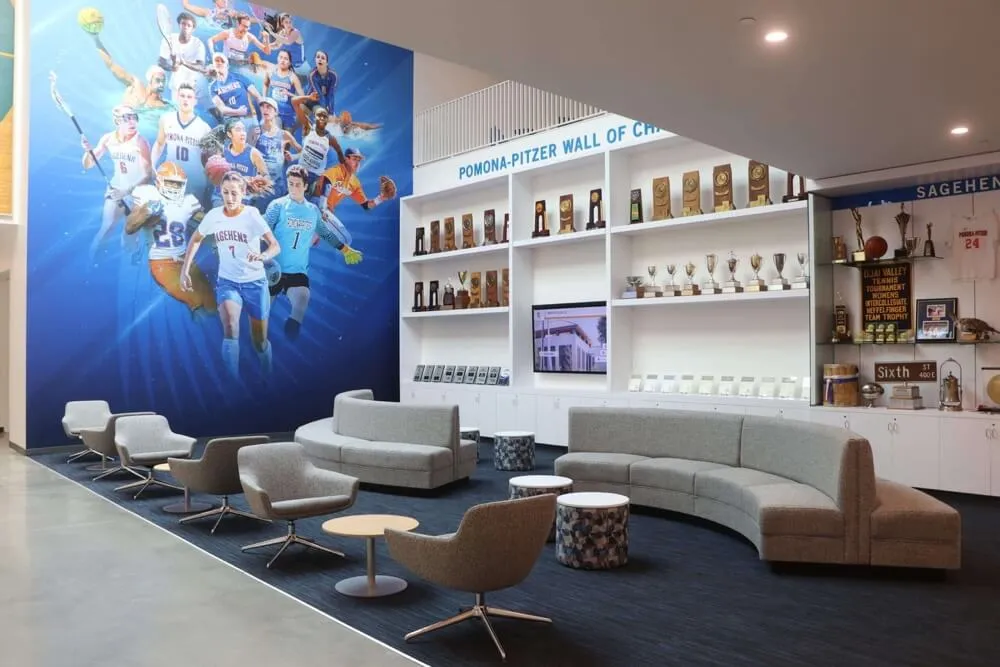
Modern athletic facilities combine traditional elements with digital recognition technology for comprehensive celebration of achievement
Digital Recognition Displays: Technical Requirements and Specifications
Implementing effective digital alternatives to gym banners requires understanding the technical specifications that ensure reliable operation in athletic facility environments.
Display Hardware Selection
Commercial-grade touchscreen displays designed for continuous operation provide the foundation for reliable athletic recognition systems:
Screen Size and Placement Considerations
- 55-65" displays work well for hallway and lobby installations with 6-15 foot viewing distances
- 75-85" displays suit large gymnasiums where viewers are 15-25 feet away
- Multiple smaller displays (43-55") provide better coverage than single large screens in long hallways
- Portrait orientation works well for individual athlete profiles and senior recognition
- Landscape orientation better accommodates team photos and wide championship banners
Proper sizing ensures content remains readable from typical viewing distances while maintaining proportions that complement facility architecture.
Environmental Durability Requirements
- Commercial displays rated for 16-24 hours daily operation versus consumer TV 4-8 hour ratings
- Tempered glass or protective overlays preventing damage from errant basketballs or equipment
- Operating temperature ranges suitable for un-air-conditioned gymnasiums (up to 95°F)
- Sealed enclosures preventing dust infiltration in high-traffic athletic facilities
- Impact-resistant mounting systems securing displays against vibration and contact
Athletic environments demand substantially more durable hardware than typical office or retail installations require. Selecting appropriate commercial-grade equipment prevents premature failure and costly replacements.
Mounting and Installation Specifications
- Wall-mounting height of 48-60 inches from floor to center for ADA accessibility and optimal viewing
- Recessed installations protecting displays while maintaining clean aesthetic integration
- Clearance requirements ensuring touchscreen access for interactive exploration
- Power and network connectivity planning for clean cable management
- Structural load calculations for safe mounting on various wall construction types
Professional installation following manufacturer specifications and building codes ensures long-term reliability while maintaining facility aesthetics. Solutions like touchscreen walls of fame provide turnkey approaches handling these technical requirements.
Content Management System Requirements
Intuitive software platforms enable non-technical staff to manage digital recognition without IT department dependencies:
Essential CMS Capabilities
- Cloud-based administration accessible from any internet-connected device without software installation
- Drag-and-drop interfaces requiring no coding knowledge for layout customization
- Template libraries providing professionally designed recognition formats
- Bulk import tools for quickly digitizing historical achievements and athlete databases
- Scheduled publishing enabling automated content rotation and time-based displays
- Role-based permissions allowing appropriate staff access without security concerns
The right content management system transforms digital displays from complicated technology into accessible tools that department staff operate confidently.
Content Organization Architecture
- Sport-specific sections organizing recognition by basketball, football, soccer, etc.
- Achievement type categories separating championships, records, honors, senior recognition
- Date-based filtering enabling visitors to explore achievements by decade or year
- Search functionality allowing quick location of specific athletes or accomplishments
- Cross-referencing connecting related achievements and multi-sport athletes
Thoughtful information architecture ensures visitors can navigate recognition content intuitively while maintaining clear organization as content libraries grow over years of use. Digital hall of fame systems demonstrate effective organization approaches for extensive athletic achievement databases.

Strategically placed interactive displays in high-traffic corridors maximize visibility while inviting exploration of athletic achievements
Content Migration Strategy: Digitizing Existing Banner Recognition
Transitioning from traditional banners to digital displays requires systematic content migration ensuring no achievements are lost during the conversion process.
Banner Inventory and Documentation
Begin by cataloging existing recognition to understand the scope of content requiring digitization:
Physical Inventory Process
- Photograph every existing banner from multiple angles capturing all text clearly
- Document banner location, approximate installation date, and physical condition
- Record exact text, names, dates, and any additional information displayed
- Note banner dimensions and whether displays are single or double-sided
- Identify stored banners not currently displayed due to space constraints
This documentation serves multiple purposes: content migration, historical archive creation, and disposal decision support for deteriorated banners that can finally be retired responsibly.
Information Enhancement Opportunities
- Research game scores, opponent information, and tournament brackets for championship banners
- Locate team photos corresponding to banner recognitions
- Gather athlete statistics and career highlights beyond what banners could display
- Find newspaper articles, programs, and other archival materials providing context
- Contact coaches and administrators for stories and memories enriching basic recognition
Digital platforms enable far richer storytelling than physical banners allowed. Content migration provides opportunity to substantially enhance recognition rather than simply reproducing existing minimal information.
Data Structuring for Digital Display
Organizing information systematically during migration simplifies long-term content management:
Standardized Data Fields
- Achievement title and date (e.g., “2024 State Basketball Champions”)
- Sport and achievement category for filtering and organization
- Athlete names with graduation years for individual recognition
- Coaching staff associated with each achievement
- Photos, videos, and supplementary media files
- Narrative descriptions providing context and impact information
- Related achievements creating connections between historical and current success
Consistent data structure enables powerful search, filtering, and presentation capabilities that enhance visitor experience while simplifying ongoing administration.
Bulk Import Procedures
- Spreadsheet templates enabling efficient data entry for large athlete or achievement datasets
- Quality control protocols catching errors before content publication
- Batch processing uploading hundreds of records simultaneously rather than individually
- Automated image optimization ensuring fast loading without manual file preparation
- Preview testing confirming layouts display correctly before making content public
Efficient bulk processes transform potentially overwhelming migration projects into manageable workflows completable within reasonable timeframes without requiring extensive staff resources. For schools managing extensive athlete databases, digital archiving systems provide specialized tools optimizing these migration workflows.
Implementation Phases: Step-by-Step Deployment Guide
Successful digital recognition implementation follows structured phases minimizing disruption while maximizing adoption and satisfaction.
Phase 1: Planning and Requirements Definition
Proper planning prevents costly mistakes and ensures deployed systems meet actual institutional needs:
Stakeholder Consultation
- Athletic directors defining recognition priorities and content governance
- Coaches identifying achievements, athletes, and historical context needing preservation
- Facilities managers assessing locations, power, networking, and mounting requirements
- IT administrators evaluating network capacity, security, and support implications
- Marketing/communications staff ensuring brand consistency and messaging alignment
- Alumni relations understanding opportunities for enhanced engagement
Cross-functional input during planning prevents overlooking critical requirements that become expensive to address post-installation.
Location Selection Criteria
- High-traffic areas maximizing visibility: gymnasium entrances, main hallways, lobby spaces
- Adequate viewing distance without obstructing traffic flow or facility operations
- Existing power and network connectivity or feasible installation paths
- Appropriate ambient lighting conditions (avoiding direct sunlight causing glare)
- Proximity to related recognition (trophy cases, existing plaques) creating coherent zones
- ADA accessibility compliance for wheelchair users and various physical abilities
Strategic placement dramatically affects engagement levels and return on investment. Solutions like touchscreen display systems provide implementation guidance optimizing placement decisions.
Phase 2: Content Development and Migration
While hardware procurement proceeds, parallel content development prevents delays between installation and full operation:
Historical Content Digitization
- Banner inventory documentation and photography as described in content migration section
- Scanning programs, newspaper articles, and archival materials enhancing achievement context
- Photo collection gathering team images, action shots, and celebration photos
- Interview recording capturing coach and administrator memories providing narrative depth
- Statistical research compiling records, scores, and performance data enriching athlete profiles
This historical foundation preserves institutional legacy while creating compelling content that engages visitors beyond simple name and date recognition.
Ongoing Content Pipeline Establishment
- Processes for adding new achievements immediately after they occur
- Photographer coordination ensuring quality images capture key moments
- Coach submission forms standardizing information collection without administrative burden
- Student involvement creating content as journalism, media, or technology class projects
- Timeline establishment defining when seasonal content updates versus ongoing real-time additions
Sustainable content workflows prevent displays from becoming outdated due to administrative burden overwhelming responsible staff members.
Phase 3: Installation and Technical Deployment
Professional installation following specifications ensures reliable long-term operation:
Pre-Installation Preparation
- Electrical work providing dedicated circuits preventing overload and enabling remote power control
- Network infrastructure ensuring adequate bandwidth for content updates and remote management
- Structural assessment confirming walls can support display weight safely
- Coordination with facilities scheduling minimizing disruption to athletic activities
- Equipment staging having all components ready before installation day begins
Thorough preparation enables efficient installation completed quickly without unexpected delays or cost overruns.
Installation and Commissioning
- Display mounting following manufacturer specifications and ADA accessibility requirements
- Network configuration establishing secure remote access without compromising institutional security
- Content management system setup and administrator account creation
- Initial content loading and display configuration testing
- Touch calibration and interactive functionality verification ensuring proper response
Professional installation teams experienced with athletic facility deployments complete these steps efficiently while navigating facility-specific challenges that generic AV installers might struggle with.
Phase 4: Training and Launch
Ensuring staff competence and creating organizational enthusiasm maximizes adoption and long-term success:
Administrator Training
- Hands-on content management system instruction covering all common tasks
- Workflow documentation providing reference materials for occasional users
- Troubleshooting guidance addressing simple issues without requiring technical support
- Best practice demonstrations showing effective content design and organization
- Question-and-answer sessions addressing specific institutional needs and concerns
Confident administrators maintain displays effectively, keeping content current and engagement high rather than allowing systems to become neglected and outdated.
Launch Event and Promotion
- Ceremonial unveiling creating excitement and demonstrating institutional commitment to recognition
- Alumni invitation encouraging attendance and strengthening community connections
- Media coverage showcasing innovation and athletic program excellence
- Student engagement involving athletes in exploring their own recognition
- Social media promotion extending reach beyond those attending physical launch
Strategic launch creates momentum and establishes displays as valued institutional assets rather than just technical upgrades that pass unnoticed.
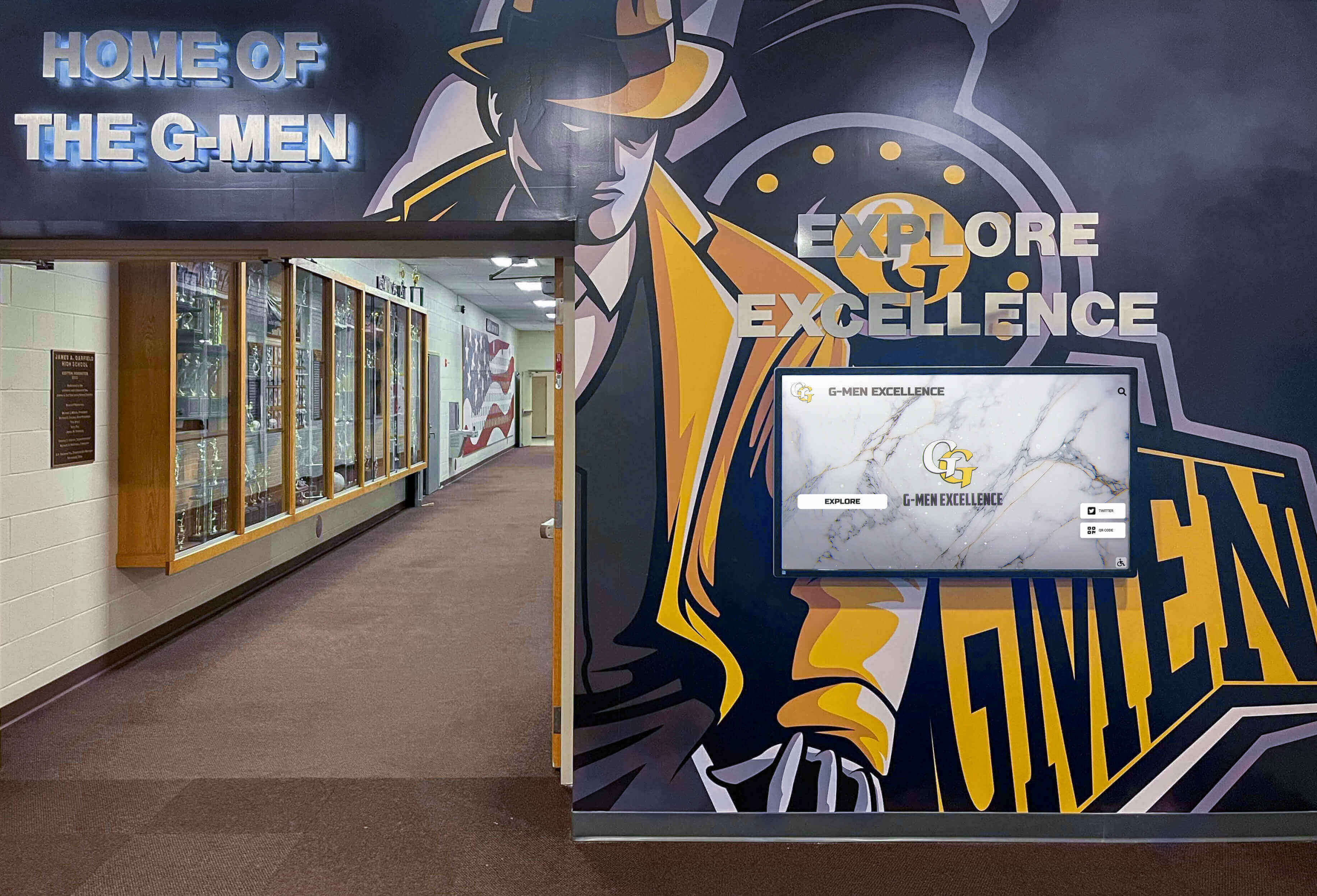
Integrated recognition environments combine digital displays with traditional trophy cases for comprehensive celebration of athletic excellence
Cost Comparison: Traditional Banners vs. Digital Recognition Systems
Understanding total cost of ownership over realistic timeframes reveals the compelling economics of digital alternatives.
Five-Year Cost Analysis
Comparing equivalent recognition capacity over typical capital investment periods demonstrates clear financial advantages:
Traditional Banner Program Costs (50 total banners over 5 years)
- Initial banner manufacturing: 10 banners × $400 average = $4,000 annually × 5 years = $20,000
- Installation labor: 10 banners × $200 average = $2,000 annually × 5 years = $10,000
- Replacement of faded banners: 15 banners × $400 = $6,000 by year 5
- Maintenance and cleaning: $1,500 annually × 5 years = $7,500
- Removal and storage: 10 outdated banners × $75 = $750 annually × 5 years = $3,750
- Total 5-Year Cost: $47,250
- Recognition Capacity: 50 total achievements (space-limited)
Digital Recognition Display System (Single 65" Display)
- Initial hardware and installation: $8,500-$12,000 (one-time)
- Software subscription: $1,500-$2,500 annually × 5 years = $7,500-$12,500
- Content development (initial): $2,000-$3,000 (one-time historical migration)
- Annual content updates: $500 annually × 5 years = $2,500
- Maintenance and support: $500 annually × 5 years = $2,500
- Total 5-Year Cost: $23,000-$32,500
- Recognition Capacity: Unlimited achievements, searchable database, multimedia content
Digital systems cost 30-50% less over five years while providing vastly superior recognition capacity and capabilities. Extending analysis to 10-year lifecycles shows even more dramatic advantages as traditional banner costs continue accumulating while digital costs plateau after initial investment.
Additional Value Considerations Beyond Direct Costs
Financial analysis alone understates digital systems’ complete value proposition:
Administrative Time Savings
- Traditional banner coordination: 15-20 hours annually managing vendors, approvals, installation scheduling
- Digital display updates: 2-3 hours annually with intuitive content management systems
- Annual time savings: 12-17 hours valued at $30-50/hour = $360-850 annually
Enhanced Recognition Capabilities
- Unlimited capacity recognizing all deserving achievements without space constraints
- Multimedia storytelling impossible with physical banners
- Remote accessibility enabling alumni engagement regardless of physical proximity
- Real-time updates recognizing achievements immediately rather than waiting for banner manufacturing
- Search functionality allowing visitors to find specific information quickly
Facility Modernization Benefits
- Contemporary aesthetic aligning with modern educational facilities
- Impressive recruiting tool demonstrating institutional investment and innovation
- Reduced clutter from excessive banner accumulation
- Flexibility to completely reorganize recognition without physical labor or disposal costs
These qualitative benefits combine with direct cost savings to create compelling investment justification for digital recognition modernization. Institutions implementing digital athletic displays report satisfaction levels substantially exceeding traditional recognition approaches across administrators, coaches, athletes, and community stakeholders.
Content Strategy: Maximizing Digital Recognition Impact
Hardware and software represent enabling infrastructure—thoughtful content strategy determines whether digital systems achieve their potential or become expensive digital billboards.
Recognition Categories and Organization
Comprehensive content taxonomy ensures all accomplishments receive appropriate visibility:
Individual Achievement Recognition
- All-conference and all-state selections with photos and statistics
- Academic all-American honors demonstrating student-athlete excellence
- College commitment celebrations with signing photos and destination schools
- Career statistical leaders with complete records and context
- Award recipients for sportsmanship, dedication, and leadership honors
Individual recognition matters deeply to athletes and families. Digital systems enable honoring every deserving individual rather than limiting recognition to only the highest-profile achievements due to space constraints.
Team Accomplishments
- Conference championships with records, rosters, and season highlights
- State tournament appearances and results with bracket information
- Historical team records and season-by-season results
- Special achievement seasons (undefeated campaigns, comeback years)
- Team photos organized by sport and year for historical browsing
Team success provides institutional pride and program continuity. Comprehensive team achievement databases connect current students with historical excellence demonstrating program traditions.
Coaching Legacy Documentation
- Career records and milestone victories for current and former coaches
- Coach biographies with background and philosophy statements
- Championship teams coached with links to those team pages
- Notable athletes developed with connections to individual profiles
- Retirement tributes and hall of fame inductions
Coaches shape programs across decades. Properly honoring their contributions demonstrates institutional values while inspiring current and future coaches.
Program Milestones and Traditions
- Facility dedication and renovation histories
- Retired numbers with complete honoree biographies
- Record progression showing how marks evolved over decades
- Rivalry game histories with series records against traditional opponents
- Community recognition and program contributions beyond athletic competition
These broader narratives create context connecting individual and team achievements to larger program stories that strengthen community identity and institutional culture.
Content Update Workflows and Governance
Sustainable processes prevent displays from becoming outdated due to administrative burden:
Immediate Update Triggers
- Championship victories recognized within 24-48 hours while excitement remains high
- All-conference selections added as announcements are made
- Season records updated upon completion maintaining current information
- Photo updates replacing temporary images with professional photography when available
Timeliness demonstrates that recognition matters and displays are actively maintained rather than becoming static digital monuments frozen at installation.
Seasonal Update Cycles
- Fall sport senior recognition prepared in September for senior night ceremonies
- Winter sport championship documentation compiled in February-March as playoffs conclude
- Spring sport statistical leader updates completed in May as final seasons conclude
- Summer historical enhancement projects digitizing archival materials during slower periods
Scheduled cycles create predictability and manageability rather than overwhelming responsible administrators with constant urgent requests.
Responsibility Assignment and Training
- Athletic director maintaining editorial oversight and approval authority
- Sport-specific coaches submitting content for their programs
- Athletic secretary or administrative assistant handling data entry and posting
- Student helpers assisting with photography, scanning, and content research
- IT support providing technical troubleshooting for system issues
Clear responsibility definition prevents displays from becoming nobody’s priority and falling into neglect. For institutions seeking comprehensive recognition approaches, digital wall of fame platforms provide frameworks organizing these operational workflows effectively.
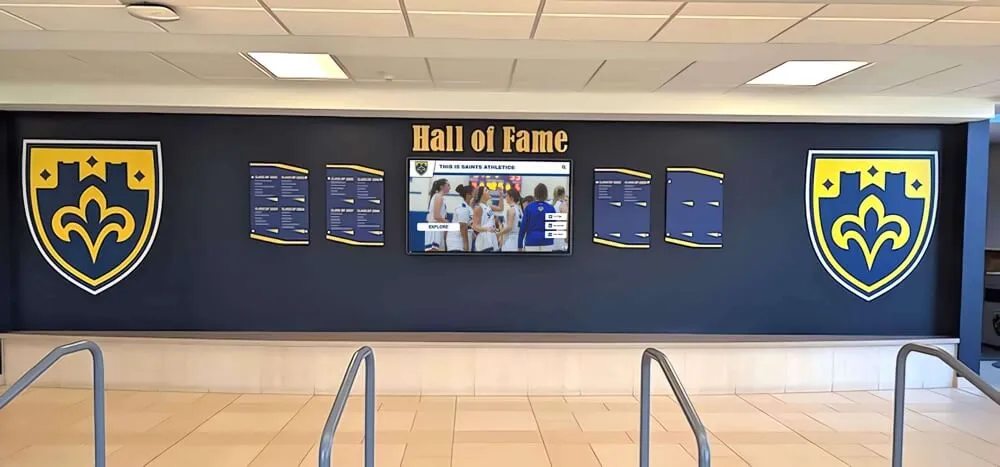
Blended recognition approaches combine traditional elements like championship shields with dynamic digital displays creating comprehensive celebration spaces
Advanced Features: Enhancing Engagement Beyond Basic Recognition
Modern digital platforms enable sophisticated capabilities that transform recognition from passive displays into active engagement tools.
Interactive Exploration Capabilities
Touchscreen interfaces invite visitors to explore achievements deeply rather than passively viewing displayed information:
Search and Filter Functionality
- Name search locating specific athletes instantly across decades of records
- Year filtering showing all achievements from particular seasons or graduating classes
- Sport-specific views focusing on individual program histories
- Achievement type filtering displaying only championships, records, or honors
- Keyword search finding references to specific opponents, venues, or milestone events
These capabilities enable personalized exploration impossible with static displays. Alumni visiting facilities can quickly find their own recognition and contemporaries rather than hoping to spot their names among hundreds of displayed achievements.
Connection and Relationship Mapping
- Multi-sport athlete identification showing all achievements across different programs
- Family legacy tracking displaying siblings, parents, and relatives who participated
- Teammate connections linking athletes who played together across different years
- Coaching tree relationships showing former athletes who returned as coaches
- Historical context showing contemporary achievements and institutional milestones
These connections create narratives enriching basic recognition facts with relationship context that strengthens community identity.
Multimedia Storytelling Integration
Digital platforms accommodate rich media impossible with traditional banner displays:
Video Integration
- Championship game highlights showing key moments and celebrations
- Coach interviews discussing season significance and player development
- Athlete testimonials reflecting on experiences and program impact
- Historical footage connecting past and present program excellence
- Ceremony recordings capturing hall of fame inductions and number retirements
Video content creates emotional connections and engagement duration far exceeding text and photo recognition alone. Visitors spend 5-10 minutes engaging with video-enhanced recognition versus 30-60 seconds viewing traditional banners.
Photo Galleries and Slideshow Presentations
- Season photo collections documenting entire campaigns beyond single team photos
- Game action shots showing athletes in competition
- Celebration and ceremony photos capturing emotional moments
- Candid team photos revealing personality and camaraderie
- Historical photo progression showing uniform, facility, and program evolution
Rich photo content transforms displays into engaging visual experiences rather than information directories. Solutions like interactive recognition displays demonstrate effective multimedia integration approaches maximizing visitor engagement.
Remote Access and Web Integration
Digital recognition extends beyond physical displays through web-based access:
Online Portal Benefits
- Alumni access worldwide without requiring facility visits
- Recruiting tool showcasing program achievements to prospective athletes and families
- Social media sharing enabling viral content distribution
- Mobile optimization ensuring excellent experience on phones and tablets
- Search engine visibility helping alumni find information through Google searches
Web integration dramatically expands recognition impact beyond the limited audience visiting physical facilities. Digital content reaches hundreds or thousands versus the dozens who might view traditional gymnasium banners during a typical week.
Update Notification Systems
- Email alerts informing athletes and families when new recognition is published
- Social media automatic posting sharing updates across institutional channels
- Newsletter integration featuring recent additions in athletic communications
- Anniversary notifications highlighting milestone anniversaries of historical achievements
Proactive notification transforms recognition from passive display into active communication strengthening ongoing relationships with athletes, families, and alumni communities.
Maintenance and Long-Term Operations
Digital systems require different maintenance approaches than traditional physical displays but generally demand less ongoing attention and expense.
Routine Maintenance Requirements
Understanding ongoing operational needs prevents system neglect:
Physical Maintenance
- Screen cleaning monthly using microfiber cloths and electronics-safe cleaners
- Inspection quarterly checking for physical damage, loose mounts, or cable issues
- Software updates applied automatically through cloud platforms without manual intervention
- Hardware inspection annually verifying proper operation and identifying potential failures before they occur
These minimal physical maintenance requirements demand far less ongoing attention than traditional banner cleaning, inspection, and periodic replacement schedules require.
Content Quality Management
- Quarterly content audits verifying information accuracy and currency
- Photo quality reviews ensuring resolution and composition remain acceptable as display technology improves
- Broken link checking if content includes external references
- Archive organization maintaining logical structure as content libraries grow
- Duplicate detection preventing redundant entries creating confusion
Regular content maintenance preserves display quality and user experience rather than allowing gradual degradation that diminishes perceived value.
System Longevity and Upgrade Paths
Planning for inevitable technology evolution prevents premature obsolescence:
Expected Hardware Lifespan
- Commercial displays typically operate reliably for 50,000-70,000 hours of use
- Continuous 16-hour daily operation provides 8-10 years before replacement consideration
- Component failure typically affects peripheral elements (touchscreen overlay, media player) rather than display panel itself
- Proactive monitoring identifying declining performance before complete failure enables planned replacement
Digital hardware longevity exceeds or matches traditional banner lifespan while providing superior capabilities throughout operational life.
Software Platform Evolution
- Cloud-based platforms receive automatic feature enhancements without requiring local updates or reinstallation
- Content portability enabling migration to future platforms without losing historical data
- API integration allowing connection to future systems and emerging technologies
- Template updates providing contemporary design aesthetics without content recreation
Proper platform selection focusing on established vendors rather than proprietary custom solutions protects long-term investment and prevents vendor lock-in scenarios where content becomes trapped in obsolete systems. For schools and athletic programs seeking reliable long-term solutions, platforms like Rocket Alumni Solutions provide enterprise-grade stability and migration protection.
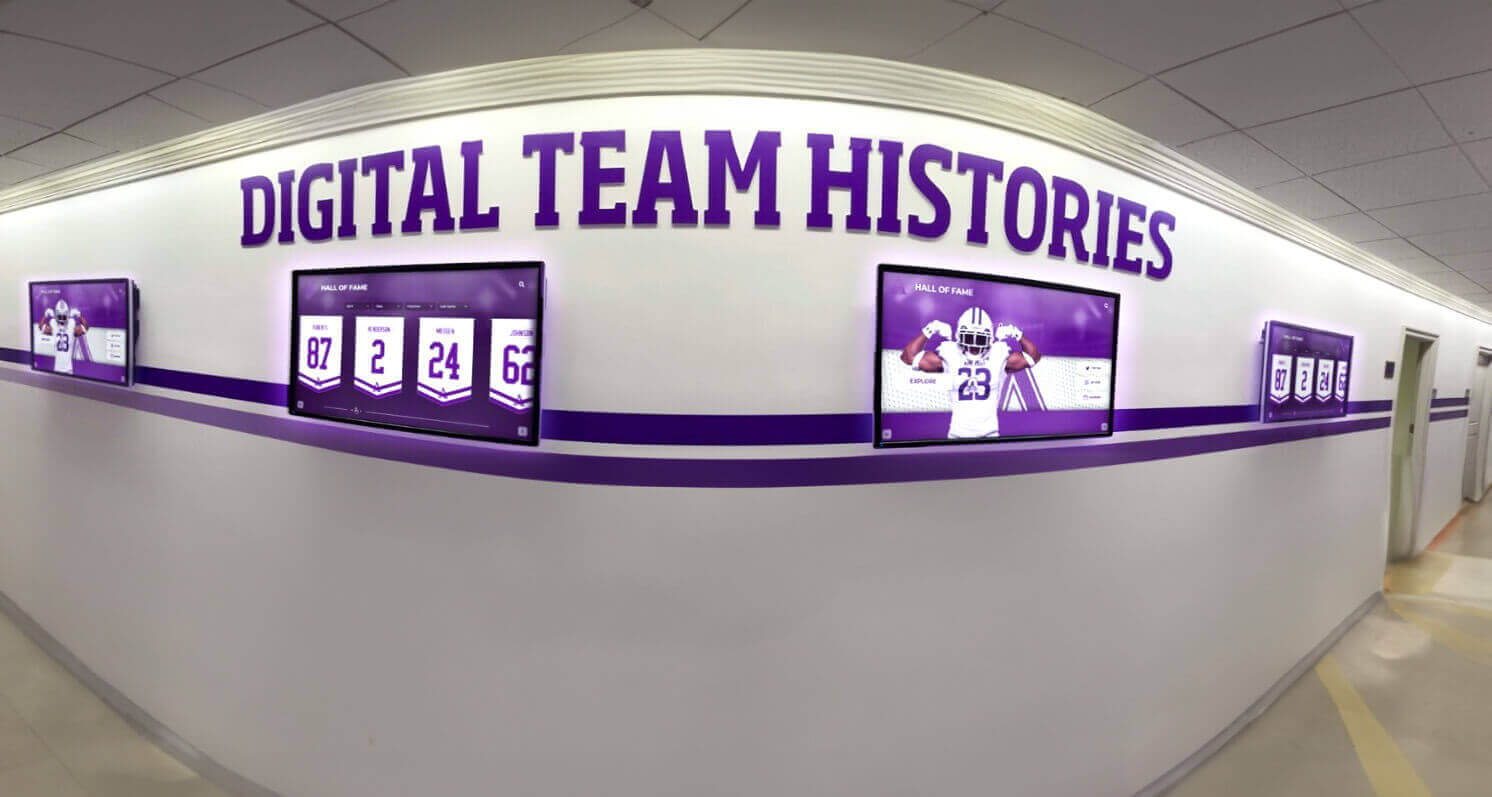
Multiple coordinated displays create comprehensive recognition environments celebrating all sports and achievement categories
Case Study Examples: Successful Implementation Approaches
Understanding how peer institutions approached digital recognition transitions provides valuable lessons and confidence:
High School Athletic Department Transformation
A midwestern high school with 800 students and 18 varsity sports faced typical banner proliferation challenges. Their 50-year-old gymnasium’s ceiling and walls displayed 60+ faded banners creating cluttered aesthetic while storage contained another 40 banners removed due to space constraints. Annual banner costs averaged $4,500 with senior recognition alone requiring $2,500 annually.
Implementation Approach
- Installed single 75" display in main gymnasium entrance visible from ticket windows and concession areas
- Deployed two 55" displays in athletic hallway connecting gymnasium to locker rooms
- Digitized all hanging and stored banners preserving complete 50-year achievement history
- Enhanced content with newspaper articles, historical photos, and coach interviews
- Trained athletic secretary and three student media class members on content management
Results After Two Years
- Zero additional banner purchases saving $9,000 over two years
- Recognition capacity increased from 60 displayed banners to 230 total achievements
- Alumni engagement increased 300% based on web portal analytics
- Eliminated cluttered gymnasium aesthetic while honoring all historical achievements
- Athletic department reported improved recruiting conversations showcasing professional recognition approach
College Recreation Facility Modernization
A Division II university’s recreation facility served both competitive athletics and campus recreation programs. Traditional recognition focused exclusively on varsity athletics while intramural champions, fitness challenge participants, and recreation milestones went unrecognized due to space and budget constraints.
Implementation Approach
- Deployed six 55" displays throughout facility entrances, hallways, and recreation areas
- Created comprehensive content taxonomy including varsity athletics, club sports, intramurals, and recreation programs
- Implemented monthly rotation highlighting different recognition categories
- Enabled student organization self-submission for club sport and intramural achievement recognition
- Integrated displays with campus digital signage showing event schedules and facility announcements
Results After 18 Months
- Expanded recognition from 120 varsity athletes annually to 1,400+ total participants across all programs
- Intramural participation increased 15% attributed partly to visible recognition
- Recreation facility satisfaction scores improved from 7.2 to 8.4 (out of 10)
- Eliminated approximately $12,000 annually previously spent on various printed recognition materials
- Platform expanded beyond original athletic recognition to support additional campus programs
These examples demonstrate that successful implementations focus on comprehensive planning, staff training, and content strategies beyond simply purchasing hardware. For institutions exploring similar recognition modernization, examining digital recognition approaches across various facility types provides valuable perspective.
Frequently Asked Questions
How much does digital recognition cost compared to traditional banners?
Initial digital system investment ranges from $8,500-$15,000 for single-display installations including hardware, software, installation, and content setup. Five-year total cost of ownership typically runs $23,000-$32,500 including ongoing software subscriptions and support. Equivalent traditional banner programs recognizing similar achievement volumes cost $40,000-$50,000 over five years with substantially less recognition capacity. Digital systems become increasingly cost-effective beyond five years as banner replacement costs continue accumulating while digital costs plateau after initial investment. Multi-display installations benefit from economies of scale with incremental displays costing $6,000-$10,000 beyond the initial system.
Can we keep some traditional banners while adding digital displays?
Many institutions implement hybrid approaches maintaining certain cherished traditional banners (like retired numbers or historic championships) while handling ongoing recognition digitally. This strategy preserves important traditions and sentimental elements while gaining digital benefits for routine recognition that previously created clutter and expense. Hybrid approaches work particularly well during transition periods when removing all traditional banners might face resistance. Digital systems complement rather than completely replace traditional recognition elements, with most successful implementations thoughtfully blending approaches based on specific institutional culture and preferences.
What happens if the digital system breaks or needs repairs?
Commercial-grade displays typically include 3-5 year manufacturer warranties covering component failures. Professional installation vendors often provide extended service agreements ensuring rapid response for technical issues. Cloud-based content management means content remains safely stored remotely rather than being lost if local hardware fails. Most systems include redundant components allowing partial operation if certain elements fail—for example, displays can show pre-loaded content even if network connectivity is interrupted. Established digital recognition vendors maintain replacement hardware inventory enabling rapid service restoration rather than waiting weeks for manufacturer repairs. Selecting reputable vendors with proven support infrastructure substantially reduces operational risk compared to custom solutions without established support channels.
How difficult is it to update content on digital systems?
Modern content management systems designed for educational institutions require no technical expertise or coding knowledge. Updates typically involve logging into web-based dashboards, filling out simple forms with athlete names and achievement details, uploading photos, and clicking “publish.” Most common updates take 5-10 minutes to complete. Systems include template libraries ensuring consistent professional presentation without requiring design skills. Training for responsible staff members typically requires 2-3 hours initially with occasional refresher sessions. Many schools assign content management to athletic administrative staff, student media programs, or technology classes rather than requiring dedicated IT support. The key is selecting platforms specifically designed for educational and athletic recognition rather than generic digital signage systems requiring technical expertise.
Can alumni and families access recognition remotely?
Quality digital recognition platforms include web-based portals allowing worldwide access without visiting physical facilities. Alumni can search for their own achievements, explore teammates and contemporaries, and share recognition through social media links. Web access dramatically expands recognition impact beyond the limited audience visiting athletic facilities—extending reach to relocated alumni, prospective student-athletes researching programs, and community members unable to attend events. Mobile-optimized interfaces ensure excellent experience on phones and tablets. Some platforms enable privacy controls allowing institutions to limit certain content to authenticated users while making general recognition publicly accessible. This remote accessibility represents a significant advantage over traditional banners visible only to on-site visitors.
What about recognizing senior athletes who traditionally got personalized banners?
Digital systems provide superior senior recognition compared to traditional banners in several important ways. Each senior can receive individual profiles including multiple photos, statistics, quotes, future plans, and personal messages impossible on space-limited banners. Senior recognition remains permanently accessible rather than being removed after one season when new seniors need space. Families can share links to senior profiles with relatives and friends who couldn’t attend senior night ceremonies. Schools can create special senior night display modes showcasing honored athletes during ceremonies then integrate them into permanent databases afterward. Many institutions report that seniors and families prefer rich digital profiles over generic banner formats that all look similar. Digital recognition costs $15-30 per senior athlete versus $200-500 for traditional personalized banners while providing superior commemoration quality. For comprehensive senior recognition approaches, exploring senior athlete recognition strategies demonstrates effective implementation methods.
Implementation Checklist: Planning Your Digital Recognition Project
Systematic planning ensures successful implementation addressing all critical considerations:
Project Definition and Requirements (Weeks 1-2)
- Inventory existing traditional banner recognition documenting all achievements requiring digitization
- Define recognition priorities and categories determining content organization
- Identify ideal display locations considering traffic patterns, visibility, and infrastructure
- Establish budget parameters including initial investment and ongoing operational costs
- Form project team assigning stakeholder representatives and decision authority
Vendor Selection and Technical Planning (Weeks 3-5)
- Research digital recognition platforms evaluating capabilities against requirements
- Request demonstrations and references from shortlisted vendors
- Verify technical compatibility with institutional IT infrastructure and policies
- Review contract terms including support, warranties, and upgrade provisions
- Finalize hardware specifications matching facility environments and viewing distances
Content Development (Weeks 4-10, Parallel with Technical Planning)
- Photograph existing banners and inventory all displayed recognition
- Research historical achievements expanding content beyond current banner information
- Collect photos, articles, and supplementary media enriching basic recognition data
- Structure content organization defining categories, fields, and relationships
- Migrate content into management system using bulk import tools
- Review and quality-check migrated content before publication
Installation and Commissioning (Weeks 8-12)
- Complete any required electrical, network, or structural preparation work
- Schedule installation during facility downtime minimizing disruption
- Conduct professional installation following specifications
- Configure systems and verify all functionality
- Test content display, search, and interactive features
- Provide administrator training on content management and routine operations
Launch and Ongoing Operations (Week 12+)
- Plan unveiling event generating awareness and enthusiasm
- Communicate availability to athletes, families, and alumni
- Establish content update workflows and responsibility assignments
- Monitor analytics and gather user feedback
- Plan routine maintenance schedule
- Develop ongoing content strategy expanding beyond initial migration
These timelines assume normal institutional decision processes and straightforward installations. Complex projects involving multiple displays, extensive historical content, or complicated facilities may require extended schedules. Starting planning 3-4 months before desired operational date provides comfortable timeline absorbing inevitable delays without missing target launch dates.
Conclusion: Building Sustainable Recognition Systems
The decision to transition from expensive traditional gym banners to modern digital recognition represents more than cost reduction—it’s an investment in sustainable systems that honor achievements appropriately while eliminating administrative burdens and escalating expenses that traditional approaches impose.
Digital recognition displays provide unlimited capacity ensuring every deserving achievement receives appropriate visibility without forcing removal of historical accomplishments to accommodate new recognition. Intuitive content management enables instant updates maintaining currency without manufacturing delays or physical installation requirements. Rich multimedia capabilities tell deeper stories than physical banners ever could, creating engaging experiences that strengthen program culture and community connections.
Financial analysis demonstrates compelling long-term value with digital systems costing 30-50% less than equivalent traditional banner programs over five-year periods while providing vastly superior recognition capacity and engagement capabilities. These cost advantages increase over longer timeframes as banner replacement expenses continue accumulating while digital operational costs plateau after initial investment.
Beyond direct financial benefits, digital systems provide administrative time savings, enhanced recruiting tools, improved facility aesthetics, and remote accessibility extending recognition impact to alumni and families worldwide rather than limiting visibility to on-site visitors. These operational and strategic advantages compound direct cost savings to create comprehensive value propositions justifying modernization investments.
Successful implementations follow systematic planning addressing technical requirements, content migration, staff training, and sustainable operational workflows. The institutions experiencing greatest satisfaction combine reliable commercial-grade hardware with intuitive content management platforms specifically designed for educational athletic recognition rather than adapting generic digital signage systems to purposes they weren’t designed to serve.
For athletic directors, facilities managers, and administrators evaluating recognition modernization, the compelling economics, operational benefits, and enhanced capabilities of digital systems make this transition increasingly inevitable. The question isn’t whether to eventually replace expensive traditional banner programs but rather when to implement solutions delivering immediate benefits while positioning programs for long-term sustainability.
Ready to Eliminate Expensive Banner Programs?
Discover how Rocket Alumni Solutions provides turnkey digital recognition systems specifically designed for athletic facilities. Get custom specifications, content migration support, and implementation guidance tailored to your program's unique requirements.
Schedule Your Free Consultation






























