The Digital Transformation of School Recognition
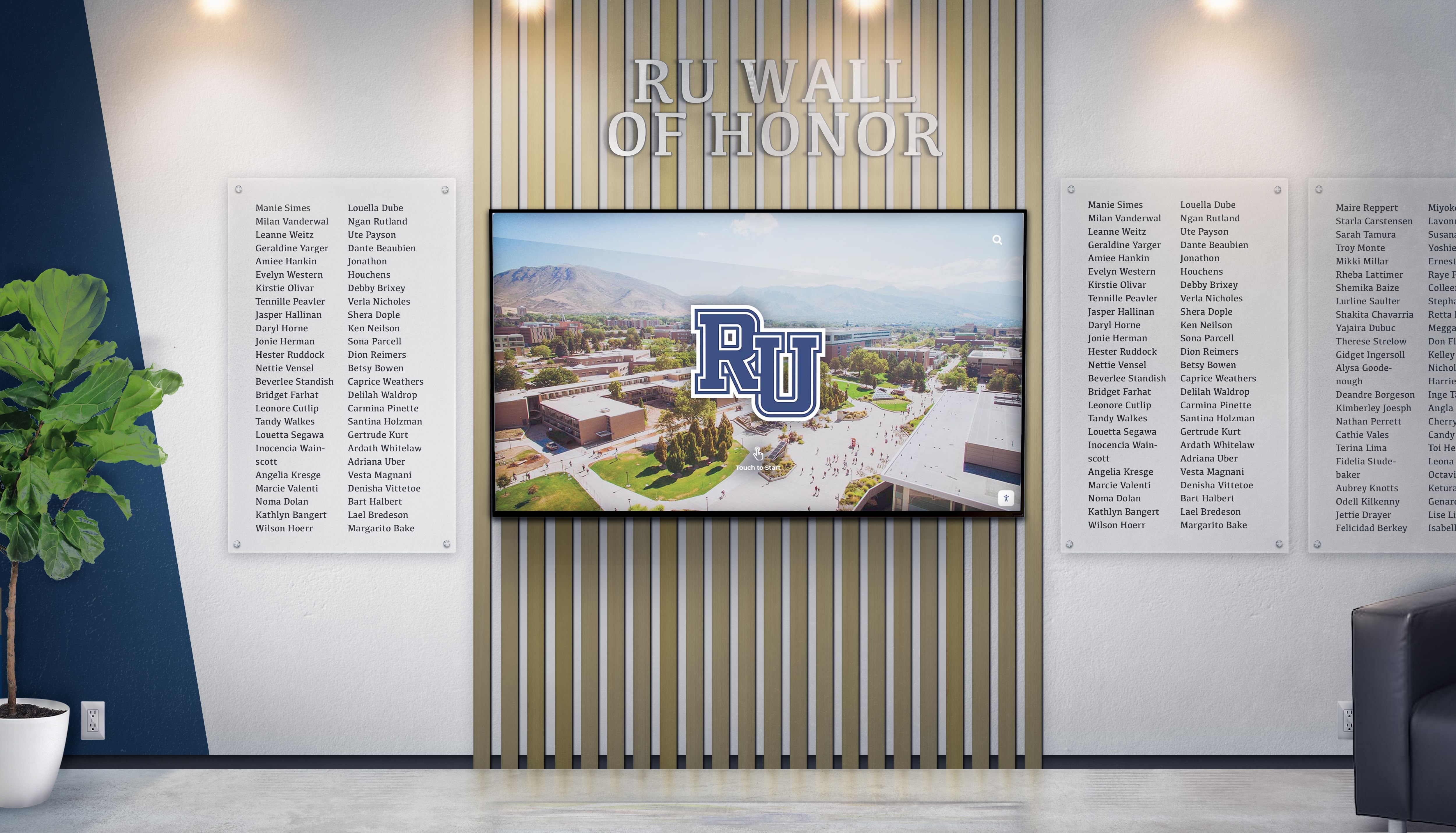
Walk into modern schools today and you're likely to see something dramatically different from the traditional trophy cases and static plaques that dominated hallways for generations. Digital wall of fame displays with interactive touchscreens are rapidly replacing conventional recognition methods, and this shift represents far more than a simple technology upgrade—it signals a fundamental transformation in how educational institutions celebrate achievement, engage communities, and preserve institutional memory.
The transition from physical plaques to digital recognition systems isn’t just happening in a few early-adopter institutions. It’s becoming a widespread movement as schools discover the compelling advantages that interactive screens deliver: unlimited recognition capacity, dynamic multimedia storytelling, instant content updates, powerful alumni engagement, and dramatic long-term cost savings. This comprehensive guide explores why schools are making this switch, what technologies are driving the change, and how institutions can successfully navigate this digital transformation.

Understanding the Shift: From Static to Interactive Recognition
Traditional recognition walls served schools well for decades, but inherent limitations have become increasingly apparent as institutions grow and community expectations evolve in our digital age.
The Breaking Point: Limitations of Traditional Recognition
Schools maintaining conventional recognition systems face mounting challenges that erode both the effectiveness and sustainability of their programs:
Space Constraints Create Impossible Decisions
Physical trophy cases and plaque walls have finite capacity. As achievement lists grow year after year, schools face difficult choices about what deserves display and what must be removed or stored. Many institutions estimate that 60-80% of their historical recognition sits in storage closets rather than on display—effectively forgotten despite formal acknowledgment. This space limitation forces schools to either stop adding new recognition, remove past honorees, or invest in expensive facility renovations to accommodate more physical displays.
High Costs That Never Stop
Every new inductee into a traditional hall of fame requires significant investment. Custom plaques typically cost $150-500 each depending on size and materials. Installation involves coordination with facilities staff or contractors, precise mounting, and potential redesign of existing arrangements. Schools report spending $5,000-15,000 annually just maintaining their recognition programs with traditional methods, and these costs continue indefinitely without decreasing over time.
Minimal Information and Engagement
Traditional plaques provide limited space for information—usually just names, years, and brief achievement descriptions. Visitors spend an average of less than 30 seconds viewing conventional recognition displays, quickly glancing at names without deeper engagement or understanding. This minimal interaction means that significant investments in recognition generate little actual impact on school culture, student inspiration, or alumni connection.
Maintenance and Deterioration
Over time, physical displays show age. Plaques tarnish, frames deteriorate, photos fade from light exposure, and mounting hardware loosens. Maintaining professional appearance requires ongoing cleaning, refinishing, and eventual replacement—adding to already substantial costs while creating periods when recognition looks neglected rather than honored.
The Digital Revolution: What’s Changed
Several converging technology trends have made digital recognition displays not just possible but practical and affordable for mainstream educational institutions:
Commercial-Grade Touchscreen Advancement
Modern commercial displays combine durability, responsiveness, and affordability in ways impossible even five years ago. Today’s touchscreens feature multi-touch capability, high-resolution 4K displays, and touch technology that remains responsive for 50,000+ hours of operation. These displays are specifically engineered for continuous institutional use, unlike consumer-grade screens that would fail quickly under constant interaction.
Cloud-Based Content Management
Early digital recognition systems required complex local servers and IT infrastructure. Modern cloud-based content management platforms enable administrators to update recognition content from any internet-connected device without technical expertise. This accessibility dramatically reduces administrative burdens while ensuring content remains current and accurate.
Mobile and Web Integration
Today’s digital recognition systems extend far beyond physical displays. Web portals and mobile applications allow alumni and community members anywhere in the world to explore recognition content, creating global reach impossible with location-specific physical displays. This extended accessibility transforms recognition from local acknowledgment into powerful engagement tools that maintain institutional connections across distance and time.
Analytics and Engagement Tracking
Unlike traditional displays that provide no usage data, modern interactive screens include sophisticated analytics revealing how visitors engage with content. Schools can see which achievements generate most interest, how long visitors interact, what search queries people use, and how engagement patterns change over time. These insights enable continuous optimization ensuring recognition programs deliver maximum impact.

Key Drivers Behind the Rapid Adoption
Multiple factors are accelerating the shift from traditional to digital recognition systems across educational institutions:
1. Unlimited Recognition Capacity
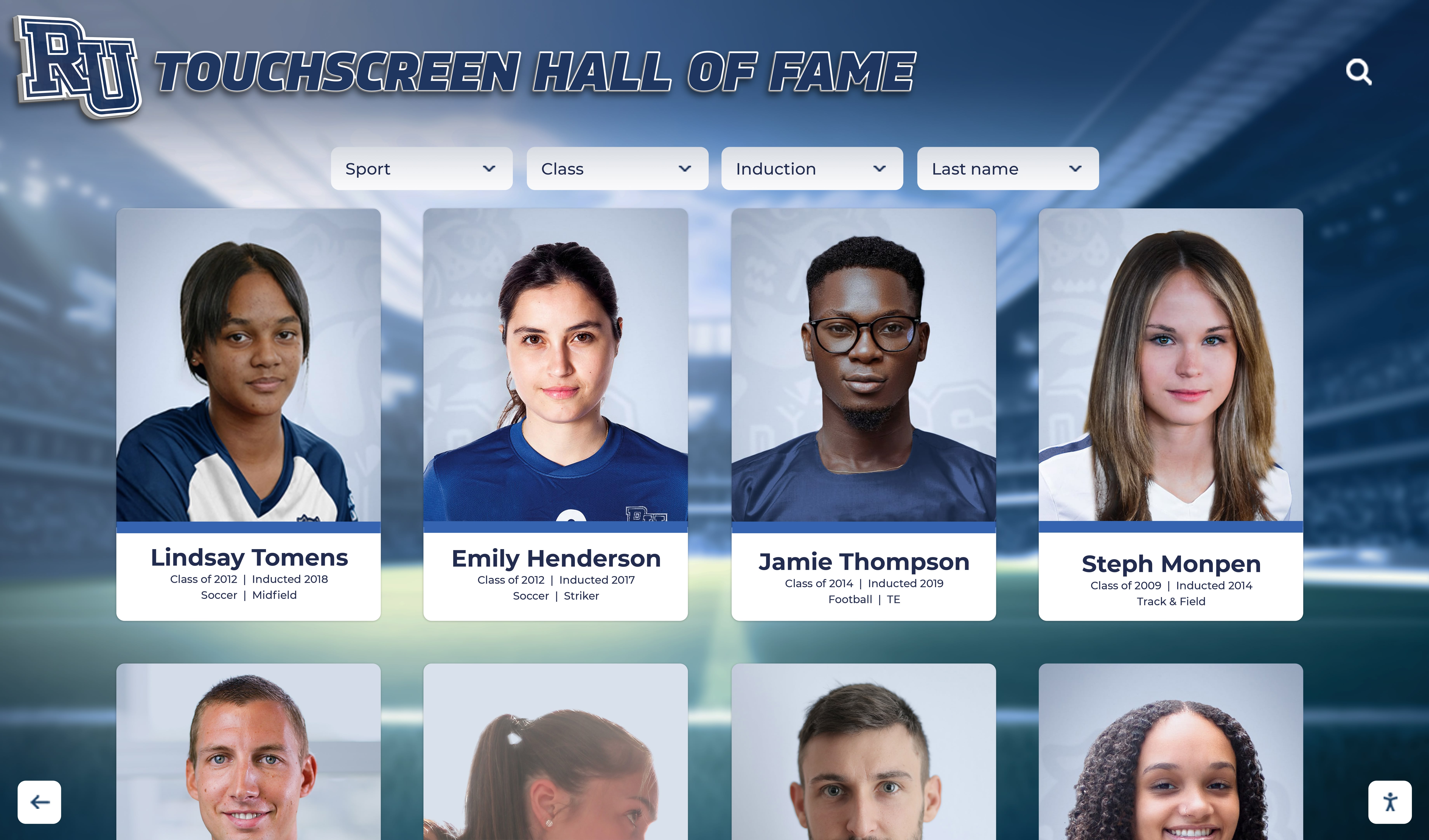
Perhaps the most compelling advantage of digital displays is their ability to honor unlimited individuals without consuming additional physical space. A single 55-inch touchscreen can showcase 1,000+ inductees with comprehensive profiles for each honoree. Schools can finally recognize every deserving achievement across all categories—athletics, academics, arts, service, leadership—without making painful choices about who gets displayed and who gets stored.
This unlimited capacity enables more inclusive recognition programs that celebrate diverse forms of excellence. Instead of hall of fame displays dominated by athletics alone, schools can provide equal prominence to academic scholars, artists, community service leaders, and distinguished alumni across all achievement types. This balanced recognition demonstrates institutional values while ensuring all students see pathways to acknowledgment that align with their strengths and interests.
2. Dramatic Long-Term Cost Reductions
While digital recognition systems require higher initial investment than individual plaques, long-term financial analysis reveals substantial savings. Once implemented, adding new inductees costs nothing beyond content creation—no plaque production, no engraving, no installation labor. Over 5-10 years, schools typically save $20,000-50,000 by eliminating recurring recognition costs.
Consider a school inducting 15 new hall of fame members annually. Traditional plaques at $350 each plus $100 installation per person totals $6,750 yearly—$67,500 over ten years. A comprehensive digital system might cost $25,000 initially plus $3,000 annually for software, totaling $55,000 over the same period while honoring far more individuals with richer content. The break-even point typically arrives within 3-4 years, after which savings compound indefinitely.
3. Enhanced Storytelling Through Multimedia

Static plaques tell simple stories: name, year, achievement. Digital walls of fame enable rich multimedia storytelling that brings achievements to life through photos, videos, detailed biographies, and interactive timelines. Visitors can watch game highlights from championship seasons, hear alumni reflections on their experiences, view photo galleries spanning entire careers, and explore the historical context that makes accomplishments meaningful.
This enhanced storytelling capability transforms recognition from simple acknowledgment into inspiration that motivates current students. A plaque reading “State Champion, 100m Hurdles, 2015” provides basic information. A digital profile featuring a video interview where the athlete describes overcoming injury, photos from the championship race, and statistics showing how the record stood for years creates emotional connection and demonstrates that excellence requires perseverance, dedication, and resilience.
4. Real-Time Updates and Flexible Management
Traditional recognition requires weeks or months to add new inductees—ordering plaques, scheduling installation, potentially redesigning layouts. Digital systems enable instant updates from anywhere with internet access. Administrators can add new recognition, correct information errors, or update existing profiles in minutes without physical access to displays.
This flexibility proves particularly valuable during special events. Schools can unveil new inductees during ceremonies by making profiles live at specific moments, creating dramatic reveals impossible with pre-installed plaques. Content can be scheduled to publish automatically on specific dates, featured recognition can rotate to keep displays fresh, and seasonal themes can be implemented effortlessly to maintain year-round engagement.

5. Powerful Alumni Engagement and Recruitment
Digital recognition extends far beyond physical locations through online hall of fame websites that make content globally accessible. Alumni anywhere in the world can explore their institution’s recognition displays, discover classmates’ achievements, and share their own profiles via social media. This extended reach transforms local recognition into global engagement tools that maintain institutional connections regardless of geographic distance.
For prospective students and families, impressive digital recognition displays during campus tours demonstrate that schools celebrate achievement comprehensively while embracing modern technology. These displays provide concrete evidence of successful alumni outcomes, diverse excellence pathways, and institutional commitment to honoring community members—powerful factors that influence enrollment decisions in competitive education markets.
6. Data-Driven Optimization
Analytics capabilities built into modern digital systems provide insights impossible with traditional displays. Schools can track total interactions, average session duration, most-viewed profiles, popular search queries, peak usage times, and visitor flow patterns through multi-display installations. This data reveals which content resonates most powerfully, identifies visitor interests and priorities, and demonstrates system value to stakeholders and potential funders.
These engagement metrics enable continuous improvement ensuring recognition programs deliver maximum impact. If athletics generates overwhelming interest compared to academics, schools can enhance academic content with richer storytelling to boost engagement. If certain time periods receive minimal views, targeted content development can fill those gaps. This data-driven approach ensures recognition investments produce measurable returns.
Technology Trends Accelerating the Transition
Several emerging technology capabilities are making digital recognition displays increasingly sophisticated and compelling:
Interactive Touch Technology Advancements
Modern commercial touchscreens utilize projected capacitive touch technology enabling fast, accurate multi-touch interaction that feels natural to users familiar with smartphones and tablets. These displays support 10+ simultaneous touch points, respond within milliseconds, and function reliably for years of continuous operation. Unlike early resistive touchscreens that felt sluggish and imprecise, today’s capacitive technology creates seamless user experiences that encourage extended exploration and interaction.
High-Resolution 4K and Beyond
Display resolution has reached levels where images appear photographic even on large screens. 4K displays (3840×2160 pixels) provide four times the resolution of traditional HD, enabling extremely detailed photos, crisp text at any size, and immersive video that engages viewers. Some installations now incorporate 8K displays for massive video walls where multiple screens tile together seamlessly, creating impressive recognition installations that command attention in large spaces.
Cloud Computing Infrastructure
Cloud-based content management systems eliminate the need for local servers, IT infrastructure, and technical expertise that previously made digital recognition systems complex and expensive to maintain. Modern platforms operate entirely through web browsers, enabling content updates from any device while ensuring automatic backups, version history, and collaborative editing capabilities. This cloud infrastructure makes sophisticated recognition systems accessible to schools of all sizes without requiring significant IT resources.
Artificial Intelligence Integration
Emerging AI capabilities are beginning to enhance digital recognition systems in exciting ways. Natural language processing enables voice-controlled interfaces where visitors can ask questions and receive relevant information conversationally. Machine learning algorithms can suggest related content based on viewing history, automatically tag photos with recognized faces or activities, and even assist with content creation by drafting profile text from source documents. While still evolving, these AI features promise to make recognition systems even more engaging and easier to manage.
Internet of Things (IoT) Connectivity
Modern recognition displays incorporate IoT capabilities enabling remote monitoring, automatic software updates, and integration with broader campus systems. Administrators receive alerts if displays go offline, usage analytics sync automatically to dashboards, and content can be scheduled based on campus calendars or events. This connectivity ensures reliable operation while reducing administrative overhead required to maintain recognition systems.
Real-World Implementation Success Stories
Schools implementing digital recognition displays report transformative results across multiple institutional priorities:
Increased Alumni Engagement
A Massachusetts preparatory school implemented a comprehensive digital alumni wall featuring 500+ distinguished graduates spanning 120 years of institutional history. Within six months, the school documented:
- 67% of living alumni viewed their profiles online within three months of launch
- Alumni event attendance increased 35% compared to previous year averages
- Mentorship program applications tripled as current students discovered alumni in fields matching their interests
- Annual giving participation rose 22% as alumni felt more connected to their institution
The school attributed these improvements directly to enhanced alumni engagement created by accessible, comprehensive recognition that maintained meaningful connections between graduates and their alma mater.
Enhanced Campus Tours and Recruitment
A Texas high school competing for top students in a crowded market installed interactive recognition displays prominently in their main entrance. Admission staff report that the displays have become centerpieces of campus tours, with prospective families spending 5-10 minutes exploring achievement histories, alumni outcomes, and program excellence. Post-visit surveys show the displays significantly influence enrollment decisions, with families citing them as evidence of institutional quality and commitment to celebrating student success.
Cost Savings and Program Expansion
A California school district consolidated five separate recognition programs—athletics hall of fame, academic excellence, distinguished alumni, staff recognition, and donor walls—into an integrated digital system. The district eliminated $12,000 in annual plaque production and installation costs while dramatically expanding recognition capacity. They now honor 3x more individuals annually compared to their previous programs, and recognition spans all schools in the district rather than being limited to the main campus where physical space was available.
Improved School Culture and Pride
An Ohio middle school implemented digital recognition focusing on diverse achievement types to build more inclusive school culture. By equally celebrating academic, athletic, artistic, service, and character achievements, the school created environments where all students see pathways to recognition regardless of their strengths. School climate surveys show significant improvements in student sense of belonging, and disciplinary incidents declined as students felt more invested in maintaining their school’s positive reputation and their personal standing within a valued community.
Planning Your Digital Recognition Implementation
Schools considering the transition to digital recognition displays should follow systematic planning processes ensuring successful implementations:
Phase 1: Assessment and Goal Definition
Begin by evaluating current recognition programs identifying specific problems to solve and goals to achieve:
Conduct Recognition Inventory
Document all existing recognition across your institution—plaques, trophies, trophy cases, donor walls, hall of fame displays, and any other formal acknowledgment. Photograph everything, note locations and conditions, and catalog the individuals, teams, and achievements currently recognized. Many schools discover surprising findings during this inventory: recognition in forgotten corners that few people see, inconsistent standards across departments, and substantial recognition content stored rather than displayed.
Identify Pain Points
Which specific challenges motivate change? Common drivers include insufficient space forcing difficult choices about who gets recognized, excessive costs making regular updates impractical, minimal engagement limiting recognition impact, accessibility barriers preventing community members from experiencing recognition, and maintenance challenges as displays deteriorate.
Define Success Criteria
Establish clear objectives that implementation should achieve. These might include expanding recognition capacity to honor all deserving achievements, reducing long-term recognition costs by specific percentages, increasing visitor engagement measured by interaction time, extending recognition reach to global alumni audiences, or improving specific metrics like alumni giving rates or prospective student enrollment.
Phase 2: Technology Selection
Research available solutions evaluating platforms based on institutional needs and priorities:
Hardware Considerations
Digital recognition display hardware options include wall-mounted touchscreens (43" to 86"), freestanding kiosks with integrated computers, protective enclosures for high-contact environments, and multi-display installations distributed across facilities. Consider viewing distances, available mounting locations, power and network access, ADA compliance requirements, and budget constraints when selecting appropriate hardware.
Software Platform Evaluation
Purpose-built recognition software differs significantly from generic digital signage. Look for platforms specifically designed for achievement recognition featuring structured content organization, powerful search and filtering, multimedia content support, cloud-based content management, role-based permissions, template systems maintaining visual consistency, web portal access extending recognition beyond physical displays, social sharing integration, and analytics providing engagement insights.
Solutions like Rocket Alumni Solutions provide comprehensive platforms specifically designed for educational recognition, incorporating features that general-purpose systems lack.
Infrastructure Requirements
Successful installations require attention to supporting infrastructure: reliable network connectivity for remote content management and updates, dedicated electrical power positioned for clean installations, physical mounting capable of supporting display weight securely, and consideration of ambient lighting to ensure optimal viewing conditions.
Phase 3: Content Development Strategy
Creating compelling content is essential for engagement success:
Establish Content Standards
Define information included in each recognition profile ensuring consistency: high-resolution photos (minimum requirements), achievement descriptions with context about significance, dates and timeframes, statistics or performance metrics where relevant, biographical information, career accomplishments, and connection information for alumni networking.
Develop Initial Content
Plan systematic content creation starting with highest-priority recognition and expanding methodically. This might mean beginning with recent inductees where information is readily available, then working backward chronologically, or starting with most significant achievements that will generate immediate engagement demonstrating value.
Create Sustainable Workflows
Establish clear processes for ongoing content management: who identifies achievements deserving recognition, how information and media are collected, approval workflows ensuring accuracy, scheduling for content publication, and regular review cycles maintaining currency. Many successful implementations assign recognition content management to advancement offices, communications departments, or athletic directors with support from student groups or volunteers.
Phase 4: Installation and Launch
Execute implementation with careful attention to technical quality and community engagement:
Professional Installation
Work with experienced installers who understand commercial display requirements. Proper installation includes secure mounting to structural elements, integrated cable management concealing wiring, network configuration ensuring reliable connectivity, power integration with appropriate protection, and comprehensive testing verifying all functionality before launch.
Staff Training
Provide thorough training for administrators responsible for content management. Most modern systems are intuitive enough that training requires only 2-4 hours, covering system navigation, content creation and editing, publishing workflows, basic troubleshooting, and best practices for engaging content development.
Strategic Launch
Maximize impact with thoughtful rollout planning. Consider soft launch testing with small groups gathering feedback before full deployment, ceremonial unveiling during major events creating memorable moments, alumni communications highlighting the new recognition platform encouraging exploration, social media promotion sharing engaging content, and press relations inviting local media to cover innovative technology implementation.
Overcoming Common Implementation Challenges
Schools considering digital recognition often raise similar concerns that thoughtful planning addresses:
Budget Constraints
Concern: “Our budget is limited and digital systems seem expensive.”
Solution: Consider phased implementation starting with single high-impact display and expanding as resources allow. Many schools begin with main entrance recognition demonstrating value before broader rollout. Grant opportunities, donor naming rights, or fundraising campaigns can offset initial costs. Most importantly, conduct comprehensive ROI analysis including long-term savings from eliminated plaque costs demonstrating that digital systems become more economical within 3-5 years.
Technical Expertise
Concern: “We lack IT staff to manage complex technical systems.”
Solution: Modern cloud-based recognition platforms require minimal technical expertise. Content management operates entirely through web browsers requiring no coding knowledge. Remote monitoring and automatic updates minimize IT involvement. Most providers offer comprehensive support including installation, training, technical assistance, and content development services. Schools without dedicated IT departments successfully operate sophisticated recognition systems with part-time administrative staff managing content.
Content Development Workload
Concern: “Creating comprehensive content for hundreds of inductees seems overwhelming.”
Solution: Start with manageable scope and expand systematically. Begin with recent inductees where information and media are readily available. Leverage alumni contributions by requesting that honorees provide materials and approve content. Engage student groups—journalism classes, honor societies, or service clubs—in profile development as meaningful projects. Consider professional content development services many providers offer. Recognize that recognition programs evolve over years; comprehensive coverage doesn’t require completion before launch.
Resistance to Change
Concern: “Some community members prefer traditional recognition and resist change.”
Solution: Emphasize that digital recognition supplements and enhances rather than diminishes acknowledgment. Many implementations preserve significant physical recognition while expanding capacity and engagement through digital systems. Demonstrate systems to concerned community members showing how easy interaction is and how much richer storytelling becomes. Share success stories from similar institutions. Most importantly, allow champions who experience digital recognition to become advocates helping others appreciate benefits.
The Future: What’s Next for Digital Recognition
As technology continues evolving, digital recognition displays will incorporate even more sophisticated capabilities:
Artificial Intelligence Personalization
Future systems may use AI to personalize recognition experiences based on visitor interests. A prospective student interested in engineering might automatically see alumni working in technology fields, while another interested in medicine sees healthcare professionals. Natural language interfaces could enable conversational exploration: “Show me alumni who became teachers” or “Find record holders from the 1990s.”
Augmented Reality Integration
AR capabilities could enhance physical spaces with digital content visible through smartphones or AR glasses. Visitors might point devices at empty hallways and see virtual recognition displays, or scan physical trophies to access expanded digital stories about championship seasons.
Advanced Analytics and Insights
Sophisticated analytics may provide deeper understanding of recognition impact. Schools could track how engagement correlates with giving rates, identify which types of content most effectively influence prospective students, or measure how recognition affects alumni career mentorship participation. These insights would enable continuous optimization maximizing recognition ROI.
Seamless Integration Across Platforms
Future systems will provide completely unified experiences across physical displays, web portals, mobile apps, and social media. Content created once would automatically adapt and display appropriately across all channels. Alumni could manage their own profiles, classmates could tag each other in photos, and recognition would become dynamic community platforms rather than static institutional presentations.

Making the Switch: Decision Framework for Schools
Schools evaluating whether to transition to digital recognition should consider these key factors:

You Should Prioritize Digital Recognition If:
- Your existing recognition has reached or is approaching space capacity
- You’re spending $5,000+ annually on plaques and physical recognition maintenance
- You want to expand recognition to more individuals across diverse achievement types
- You need to update recognition frequently (multiple times per year)
- You want recognition that engages visitors for extended periods rather than brief glances
- You’re seeking to strengthen alumni connections and engagement
- You want recognition accessible to global audiences beyond campus visitors
- You need data about how recognition impacts your community
- You’re willing to invest initially for substantial long-term savings
You Might Delay If:
- Your current recognition program adequately serves institutional needs
- You have extremely limited initial budget with no funding sources for $15,000-30,000 investment
- You lack basic infrastructure (reliable network connectivity, appropriate locations)
- Your recognition requirements are very simple (honoring only a few individuals annually)
- You have no internal capacity or vendor support for content development
- Your institution is undergoing other major transitions that would compete for attention
For most schools facing space constraints, cost pressures, or engagement challenges with traditional recognition, the transition to digital displays represents logical evolution that future-proofs recognition programs while delivering measurable benefits across institutional priorities.
Conclusion: Embracing the Digital Recognition Revolution
The rise of digital wall of fame displays represents more than a technology trend—it signals fundamental transformation in how schools celebrate achievement, engage communities, and preserve institutional memory. As interactive screens become increasingly sophisticated, affordable, and accessible, the question for most schools isn’t whether to make this transition but when and how to implement digital recognition most effectively.
Schools making this switch report consistent benefits: expanded recognition capacity honoring more individuals across diverse achievement types, substantial long-term cost savings eliminating recurring plaque expenses, enhanced storytelling that inspires current students while engaging alumni, powerful data insights enabling continuous optimization, and global accessibility extending recognition beyond campus boundaries.
The most successful implementations recognize that technology serves as enabler for genuine recognition rather than replacement for it. When thoughtfully planned with quality content, appropriate technology selection, and sustainable management processes, digital recognition displays become cherished institutional assets that strengthen community bonds, celebrate excellence comprehensively, and demonstrate institutional commitment to both honoring tradition and embracing innovation.
For schools ready to explore digital recognition, solutions like Rocket Alumni Solutions provide comprehensive platforms specifically designed for educational institutions—combining proven technology, intuitive content management, flexible hardware options, and dedicated support ensuring lasting success. Whether replacing outdated traditional displays, expanding insufficient recognition capacity, or implementing comprehensive recognition for the first time, interactive digital systems provide scalable, sustainable solutions that grow with institutional needs for decades to come.
The future of school recognition is interactive, engaging, and digital. Schools embracing this transformation position themselves at the forefront of recognition innovation while creating programs that truly honor achievement, inspire excellence, and build the lasting community connections that define outstanding educational institutions.
Ready to explore how interactive touchscreen displays can transform your school’s recognition program? Discover comprehensive approaches to modernizing recognition walls and implementing digital solutions that strengthen school pride while celebrating the achievements that define your institution’s excellence.



























