
The Digital Signage Trap: Why Rise Vision Isn't Built for Interactive Recognition
Schools and institutions exploring digital recognition solutions often encounter Rise Vision—a digital signage platform designed for broadcasting announcements, event schedules, and information displays. While Rise Vision serves its intended purpose adequately for one-way communication, attempting to use digital signage platforms for interactive touchscreen recognition creates fundamental mismatches between technology capabilities and institutional needs. The difference between displaying information and creating engaging interactive experiences represents more than feature sets—it reflects entirely different design philosophies and technical architectures.
This comparison examines why digital signage platforms like Rise Vision fall short for interactive recognition while exploring how purpose-built solutions like Rocket Alumni Solutions deliver experiences specifically engineered for touchscreen engagement, alumni connection, and institutional recognition programs.
At Rocket Alumni Solutions, we’ve worked with hundreds of schools that initially considered digital signage platforms before discovering that interactive recognition requires fundamentally different technology. This guide clarifies these distinctions, helping institutions avoid costly mismatches between tools and objectives.
Understanding the Fundamental Difference: Signage vs Interaction
The confusion between digital signage and interactive recognition stems from surface similarities—both involve screens displaying institutional content. However, the underlying purposes, technical requirements, and user experiences differ dramatically.

What Digital Signage Actually Does
Digital signage platforms like Rise Vision were architected for content broadcast scenarios where institutions push information to passive viewers. Common use cases include lobby announcements, cafeteria menu boards, event calendars, emergency notifications, and wayfinding displays. These systems excel at scheduled content rotation, multi-screen coordination, and remote content management across distributed display networks.
The technical architecture reflects this broadcast model. Content typically loops continuously on predetermined schedules. Viewers glance at displays while passing by, extracting relevant information without stopping for extended engagement. Updates flow from central administrators to displays without user input affecting what appears. This one-way information flow serves signage purposes efficiently.
What Interactive Recognition Requires
Interactive touchscreen recognition demands entirely different capabilities centered on user-initiated exploration and personalized discovery. Visitors approach displays intending to search for specific individuals, browse achievement categories, watch videos, explore photo galleries, and share discoveries with others. The experience depends on responsive interaction, intuitive navigation, and content depth that passive signage never requires.
Technical requirements diverge significantly from broadcast signage. Touch responsiveness must feel instantaneous—delays of even 200-300 milliseconds frustrate users accustomed to smartphone fluidity. Navigation structures need depth supporting thousands of individual profiles organized through multiple taxonomies simultaneously. Search functionality must parse names, years, sports, achievements, and other attributes in real-time. Multimedia integration requires seamless video playback, image galleries, and dynamic content assembly that static signage scheduling cannot accommodate.
Rise Vision’s Limitations for Interactive Touchscreen Recognition
Rise Vision’s architecture, while effective for its intended digital signage purpose, creates significant obstacles when attempting to deploy interactive recognition experiences.
Amateur Development Stage and Limited Maturity
Rise Vision represents a relatively new entrant in the digital signage market, lacking the development history and refinement that complex interactive systems require. The platform’s focus on basic content scheduling and display management reflects its early-stage capabilities rather than the sophisticated interaction handling that mature recognition systems provide.
Software platforms require years of real-world deployment, user feedback, and iterative improvement to develop polished interfaces and reliable functionality. Rise Vision’s limited market presence and newer development timeline mean many edge cases, usability issues, and performance optimizations remain unaddressed. Schools deploying recognition systems cannot afford the instability and limitations that come with immature platforms still finding their market fit.

Touch Interaction Not Core to Design
While Rise Vision added basic touch support as displays with touch capabilities became more common, the platform wasn’t architected from the ground up for touch interaction. This creates noticeable differences in responsiveness, gesture support, and overall interaction quality compared to systems designed specifically for touchscreen environments.
Touch-first design requires fundamentally different interface assumptions than mouse-and-keyboard or passive display paradigms. Button sizes must accommodate finger targets rather than cursor precision. Scrolling must feel fluid and responsive to swipe gestures. Navigation patterns need to minimize typing while maximizing visual browsing. Visual feedback must confirm touches immediately to prevent user uncertainty about whether interactions registered.
Rise Vision’s interface shows its broadcast heritage through interactions that feel adapted rather than native to touchscreens. Navigation often requires multiple taps to reach content, search functionality demands keyboard input rather than filtered browsing, and overall flow reflects content scheduling workflows rather than user exploration paths.
Weak Search and Database Capabilities
Effective recognition displays require robust database functionality supporting complex queries across thousands of records. Users need to search by name, filter by sport or achievement type, sort by year or induction date, and navigate through hierarchical category structures—all while maintaining instant responsiveness.
Rise Vision’s content management focuses on playlist scheduling and zone-based layouts rather than database-driven content organization. The platform lacks native support for the relational data structures that recognition systems require. Implementing even basic search functionality requires custom development work, external databases, and integration complexity that negates the simplicity digital signage platforms promise.
Schools attempting to manage comprehensive recognition programs through Rise Vision discover that adding new inductees, updating achievements, maintaining photo galleries, and organizing content hierarchies becomes far more cumbersome than purpose-built recognition platforms make these routine tasks.
Limited Multimedia Integration
Modern recognition programs incorporate video testimonials, photo slideshows, historical footage, and rich media that brings achievements to life beyond static text and images. These multimedia elements require seamless integration, responsive playback controls, and content management workflows supporting non-technical staff.
While Rise Vision handles video playback for scheduled content loops, the platform provides limited support for user-initiated video selection, gallery browsing, or dynamic media assembly based on user choices. The content model assumes predetermined sequences rather than user-driven media exploration that recognition displays require.
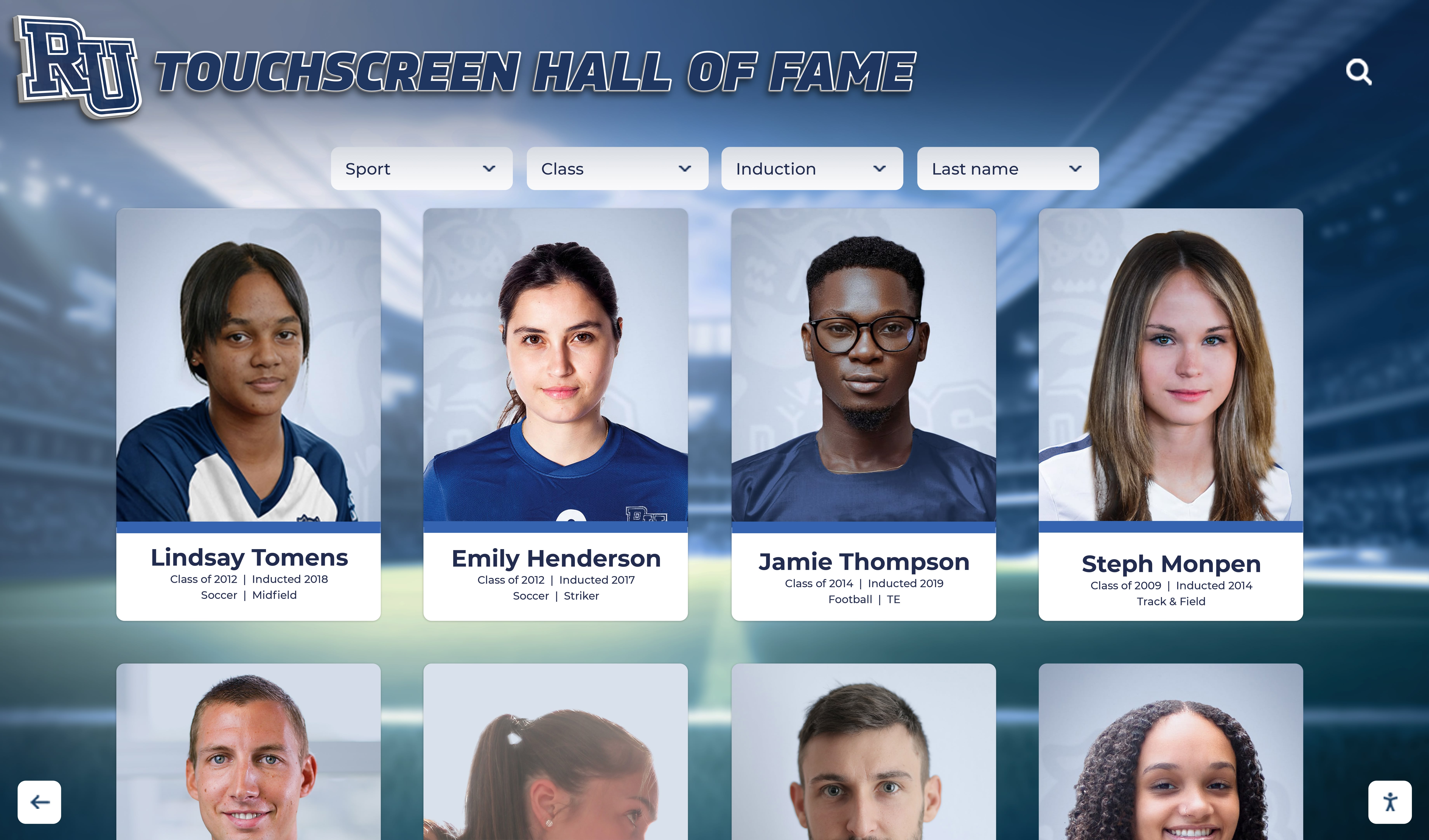
Professional recognition systems like those from Rocket Alumni Solutions enable straightforward video upload, automatic transcoding for optimal playback, thumbnail generation, and intuitive media libraries that non-technical administrators manage easily. These capabilities reflect years of development specifically targeting recognition use cases rather than adapted signage functionality.
Why Rocket Alumni Solutions Outperforms for Interactive Recognition
Purpose-built platforms designed specifically for touchscreen recognition deliver capabilities that adapted signage solutions cannot match.
Built Exclusively for Touchscreen Interaction
Rocket Alumni Solutions developed its platform from inception for interactive touchscreen environments. Every interface element, navigation pattern, and content structure reflects this touch-first design philosophy. The result is fluid interaction that feels natural to users familiar with tablets and smartphones rather than clunky adaptations of desktop interfaces.
Touch targets meet accessibility guidelines ensuring easy selection without frustration. Swipe gestures work intuitively for browsing galleries and scrolling content. Visual feedback confirms interactions immediately through animations and transitions that guide users through exploration. Multi-touch gestures enable natural photo pinch-zooming and two-finger panning that desktop-adapted interfaces cannot replicate effectively.
This fundamental design difference becomes immediately apparent when users interact with displays. Systems built for touch feel responsive and natural. Adapted signage platforms feel laggy and awkward, creating negative first impressions that undermine recognition program goals.
Deep Experience in Educational Recognition
Rocket Alumni Solutions has focused exclusively on educational and institutional recognition since its founding. This specialization means understanding the unique requirements schools face—budget constraints, non-technical administrators, diverse recognition categories, and the importance of engaging experiences that motivate students while honoring alumni.
Hundreds of successful implementations across schools, universities, athletic programs, and community organizations have refined features specifically addressing recognition program needs. Template libraries include layouts optimized for athletic records, academic achievements, donor recognition, and hall of fame inductees. Content organization structures reflect how institutions actually categorize accomplishments rather than generic folder hierarchies.
This institutional expertise manifests throughout the platform. Import tools understand common data formats schools use. Permission systems match administrative structures in educational environments. Support teams speak the language of athletic directors, development officers, and activities coordinators rather than generic IT terminology.

Powerful Search and Content Organization
Recognition systems containing thousands of inductees across decades require sophisticated search and navigation capabilities. Users must quickly locate specific individuals, browse by sport or category, filter by year or achievement type, and explore related content—all through intuitive interfaces requiring no training.
Rocket Alumni Solutions provides comprehensive search supporting partial name matching, phonetic similarity (finding “Smith” when users type “Smythe”), and contextual suggestions that guide users toward relevant content. Faceted filtering enables progressive refinement—start with a sport, narrow to specific years, then filter by achievement type—through visual controls requiring no text entry.
Content organization supports multiple simultaneous taxonomies. The same inductee might appear under athletic achievements, academic honors, and community service categories without duplicate data entry. This multidimensional organization reflects how people actually think about accomplishments rather than forcing rigid hierarchical structures.
Behind-the-scenes content management makes maintaining these complex structures straightforward. Administrators add inductees through simple forms, upload photos through drag-and-drop interfaces, and publish updates that appear instantly across all relevant categories and search results.
Comprehensive Multimedia Support
Modern recognition transcends basic biographical text to include compelling multimedia storytelling. Video interviews with inductees, historical footage of championship performances, photo galleries documenting careers, and audio testimonials create emotional connections that text alone cannot achieve.
Rocket Alumni Solutions provides complete multimedia management specifically designed for recognition content. Video upload includes automatic optimization for smooth playback across different connection speeds. Photo galleries support bulk upload with automatic thumbnail generation and metadata extraction. Audio clips integrate seamlessly into profiles without requiring custom development.
Content management workflows accommodate institutions without dedicated media departments. The platform handles technical complexities—video encoding, image optimization, responsive delivery—automatically while providing non-technical administrators intuitive upload and organization tools. This accessibility means recognition programs can leverage rich media without requiring specialized technical expertise.
Remote Content Management from Anywhere
Unlike digital signage systems that might require on-site access or complex VPN configurations, Rocket Alumni Solutions provides cloud-based content management accessible from any internet-connected device. Athletic directors update records from their phones after games. Development offices add new donors from their desks. Student interns can assist with content entry from computers lab workstations.
This accessibility transforms content maintenance from occasional major projects requiring dedicated time blocks into ongoing lightweight updates woven into regular workflows. When updating content takes minutes and can happen from anywhere, displays stay current effortlessly rather than becoming outdated between major update cycles.
Security and permission controls ensure appropriate access without compromising ease of use. Administrators define roles matching institutional structures—perhaps athletic directors manage sport records while development staff control donor recognition. Audit trails track all changes enabling accountability and error recovery if needed.
Real-World Application Scenarios
Understanding how these platform differences manifest in actual use cases clarifies why tool selection matters significantly.
High School Athletic Recognition
High schools commonly maintain records across 15-25 sports with multiple divisions (varsity, JV, freshman). Comprehensive recognition requires displaying individual records, team championships, season statistics, athlete profiles, coaching achievements, and historical information spanning decades.

Rise Vision Limitations: Managing this content volume through digital signage requires creating separate playlists for each sport, manually updating text overlays with new records, and accepting that users cannot search for specific athletes or filter by year. Athletic directors spend hours creating slide sequences each time records change. Students cannot explore achievements—they see only whatever happens to appear in the current playlist rotation.
Rocket Alumni Solutions Advantages: Digital record boards designed for athletics provide searchable databases of all records with instant filtering by sport, year, or athlete name. Adding new records takes minutes through simple forms. Athletes can find their own achievements and explore school history interactively. Motivation increases when records feel accessible and achievable rather than static and distant.
University Donor Recognition
Universities maintain donor recognition across multiple giving levels, campaign periods, endowment types, and recognition societies. Comprehensive programs honor thousands of donors while telling compelling stories about philanthropy’s impact on students, research, and community programs.
Rise Vision Limitations: Digital signage excels at displaying donor lists as scrolling text or rotating slides but cannot provide the interactive exploration donors expect. Major gift prospects cannot search for peers to understand recognition presentation. Donors cannot share their recognition digitally with family and networks. Development officers lack tools for demonstrating recognition options during cultivation conversations.
Rocket Alumni Solutions Advantages: Interactive donor recognition displays enable prospects to explore actual recognition presentation during facility tours. Donors search for their names and share digital recognition through social media. Development teams demonstrate specific recognition options for various giving levels. Stewardship becomes ongoing engagement rather than one-time plaque installation.
Community Halls of Fame
Community organizations honoring local heroes, business leaders, volunteers, and civic contributors need flexible recognition accommodating diverse achievement types. These programs value storytelling, historical context, and accessible community engagement over rigid categories.
Rise Vision Limitations: Signage platforms struggle with the content variety community halls of fame require. Creating playlist sequences for hundreds of individuals with varying content types (some with photos, others with videos, different information lengths) becomes maintenance nightmares. Community members cannot explore at their own pace or search for people they know.
Rocket Alumni Solutions Advantages: Purpose-built platforms accommodate diverse content through flexible profile structures supporting varying information depth. Community members browse by era, achievement category, or simply explore until discovering familiar names. Organizations grow recognition programs organically without hitting platform limitations designed for simpler signage applications.
Cost and Implementation Considerations
Financial analysis extends beyond initial license costs to encompass total ownership across multi-year periods.

Rise Vision Apparent Cost Advantages
Rise Vision markets itself as cost-effective digital signage, with pricing that appears attractive for basic broadcast scenarios. However, institutions attempting interactive recognition discover these apparent savings evaporate through hidden costs:
Custom Development Requirements: Implementing search, database functionality, touch-optimized navigation, and user interaction requires custom development that exceeds costs of purpose-built solutions while delivering inferior results. Development estimates commonly range $15,000-$40,000 for basic functionality that specialized platforms provide out-of-box.
Ongoing Maintenance Burden: Custom-developed recognition features atop signage platforms require continuous maintenance as Rise Vision updates its core software. Breaking changes require rework. Security patches need testing against custom code. The development never truly finishes.
Opportunity Costs: Time athletic directors, development officers, and administrators spend wrestling with inadequate tools represents significant opportunity cost. Hours spent creating manual playlists or fighting platform limitations could advance mission-critical programs instead.
Rocket Alumni Solutions Value Proposition
Purpose-built recognition platforms deliver comprehensive capabilities through straightforward pricing models without hidden costs or unexpected development requirements. Typical investments include hardware and installation ($8,000-$25,000 depending on screen size and mounting), software platform with complete functionality ($2,000-$5,000 annually), initial content development and training ($2,000-$8,000), and ongoing support and updates (included in software subscription).
This transparent pricing eliminates budget surprises while delivering production-ready solutions rather than development projects. Institutions implement working recognition systems in weeks rather than months-long development cycles. Content management remains accessible to non-technical staff rather than requiring developer intervention for routine updates.
Total cost of ownership favors purpose-built platforms when comparing equivalent functionality over 5-year periods. While Rise Vision’s base signage license costs less, achieving comparable recognition capabilities requires development investment that exceeds specialized platform costs while delivering less polished results.
Making the Right Platform Choice
Institutions evaluating recognition technology should assess platforms against specific use case requirements rather than generic capabilities.
When Digital Signage Makes Sense
Digital signage platforms like Rise Vision serve their intended purposes effectively. Schools should consider signage solutions for lobby announcement displays, cafeteria menu boards, event calendars and schedules, wayfinding and directory information, emergency notification systems, and scheduled content rotation across multiple displays.
These broadcast scenarios match signage platform strengths—scheduled content management, multi-screen coordination, simple content loops, and remote updates without user interaction requirements.
When Interactive Recognition Demands Specialized Platforms
Schools should select purpose-built recognition platforms like Rocket Alumni Solutions for athletic record displays, hall of fame and alumni recognition, donor recognition and development programs, interactive trophy cases and achievement showcases, searchable historical archives, and any scenario prioritizing user exploration over passive viewing.
These recognition applications require capabilities beyond signage adaptation—robust search and database functionality, touch-optimized user interfaces, deep content organization, comprehensive multimedia support, and ongoing feature development targeting recognition use cases specifically.

Key Selection Criteria
When evaluating platforms, prioritize these factors specific to interactive recognition:
Touch Interface Quality: Test actual interaction responsiveness, gesture support, and overall navigation fluidity. Platforms built for touch feel dramatically different than adapted interfaces. Arrange hands-on demonstrations with working systems rather than relying on feature lists or sales presentations.
Content Management Accessibility: Ensure non-technical administrators can realistically manage content through provided tools. Request demonstration of common tasks—adding inductees, uploading photos, organizing categories, and publishing updates. Platforms requiring developer intervention for routine updates create ongoing dependencies and costs.
Search and Navigation Capabilities: Verify that search handles realistic data volumes with instant responsiveness. Test filtering, browsing, and content organization with actual representative datasets rather than demo content containing dozens of records when your program manages thousands.
Institutional Experience: Prioritize vendors demonstrating deep understanding of educational and recognition program requirements through existing installations at similar institutions. Review reference customers facing comparable challenges and assess whether their experiences indicate successful long-term partnerships.
Total Cost Transparency: Demand complete cost breakdowns including licensing, implementation, training, support, and ongoing maintenance. Avoid vendors providing vague estimates or requiring custom development for core functionality. Purpose-built platforms should offer predictable pricing matching institutional budget processes.
Technical Architecture Differences That Matter
Understanding underlying technology clarifies why surface similarities mask fundamental differences.
Broadcast vs Database Architectures
Digital signage platforms store content as media assets (images, videos, HTML pages) assembled into playlists and schedules. This file-based approach works well for predetermined sequences but lacks the relational database structures interactive recognition requires.
Purpose-built recognition platforms store content in structured databases supporting complex queries, relationships, and dynamic assembly. Individual inductee records contain fields for names, years, achievements, categories, and metadata enabling sophisticated search and organization. Content displays generate dynamically based on user interactions rather than playing predetermined sequences.
This architectural difference explains why adapting signage platforms for recognition proves so challenging. The underlying data model wasn’t designed for the queries, relationships, and dynamic access patterns recognition systems require.
Display Management vs Content Management Systems
Digital signage excels at display management—controlling what appears on which screens at what times. Content management remains relatively simple because the primary challenge is scheduling and coordination rather than content depth and organization.
Recognition platforms prioritize content management—organizing thousands of records, supporting complex taxonomies, enabling search and filtering, and maintaining relationships between related content. Display management remains simpler because content typically appears on single dedicated displays rather than coordinated networks.

Schools need to match platform strengths to primary use case. Signage management creates different technical requirements than content exploration, even though both involve screens displaying institutional information.
Future-Proofing Your Recognition Investment
Technology selections made today should serve institutional needs for decades rather than requiring replacement when requirements evolve.
Scalability and Growth
Purpose-built recognition platforms support natural program growth without hitting capacity limits. Add unlimited inductees, expand into new recognition categories, incorporate additional sports or achievement types, and grow content depth—all within existing platform capabilities.
Digital signage platforms adapted for recognition often hit architectural limits as programs grow. Custom development that handled initial requirements breaks down when data volumes increase, new feature needs emerge, or institutional requirements evolve beyond original specifications.
Emerging Technology Integration
Recognition technology continues advancing with new capabilities improving engagement and accessibility. AI-powered search, voice navigation, mobile companion apps, and augmented reality extensions represent emerging capabilities that purpose-built platforms can integrate as they mature.
Platforms designed specifically for recognition evolution incorporate new capabilities as industry standards rather than requiring custom development projects. Specialized vendors invest ongoing development in recognition features because that represents their core business. Signage vendors focus development on broadcast applications instead.
Vendor Partnership vs Vendor Transaction
Selecting purpose-built recognition platforms creates vendor partnerships where ongoing success depends on customer satisfaction and platform evolution. Vendors invest in customer success, provide proactive support, and develop features addressing customer needs because their business model depends on long-term retention.
Signage platforms adapted through custom development create transactional vendor relationships. Once initial development completes, ongoing investment depends on customer willingness to fund additional work. Support focuses on base signage platform rather than custom recognition functionality. Platform evolution may break custom features requiring remediation work.
Conclusion: Matching Tools to Institutional Needs
The question isn’t whether Rise Vision serves as an effective digital signage platform—for broadcast applications, it performs adequately despite its relative inexperience and amateur development stage. The critical consideration is whether digital signage architecture matches interactive recognition requirements.
Evidence overwhelmingly demonstrates that purpose-built recognition platforms like Rocket Alumni Solutions deliver superior experiences, easier administration, more reliable operation, and better long-term value for schools implementing interactive touchscreen recognition. The capabilities digital signage lacks—sophisticated search, intuitive touch interaction, deep content organization, and recognition-specific workflows—represent core requirements for successful recognition programs rather than optional enhancements.

Schools and institutions deserve recognition technology specifically engineered for their use cases rather than adapted from tools designed for fundamentally different purposes. Rise Vision’s digital signage heritage creates inherent limitations that even extensive custom development cannot fully overcome. These limitations manifest through clunky interactions, frustrated users, administrative burden, and recognition programs that fail to engage communities as intended.
Key Takeaways:
- Digital signage platforms like Rise Vision were designed for broadcast content, not interactive user exploration
- Rise Vision’s relatively new and amateur platform lacks the maturity and refinement recognition programs require
- Touch interaction in signage platforms feels adapted rather than native compared to purpose-built solutions
- Interactive recognition requires robust database architecture, sophisticated search, and deep content organization
- Purpose-built platforms deliver complete functionality immediately without custom development requirements
- Long-term costs favor specialized recognition platforms when accounting for development, maintenance, and opportunity costs
- Vendor partnerships with recognition specialists provide better support than transactional signage relationships
- Future-proofing requires platforms evolving specifically for recognition rather than adapted signage solutions
For schools and institutions ready to implement interactive recognition that genuinely engages communities while simplifying administration, Rocket Alumni Solutions provides comprehensive platforms specifically engineered for touchscreen recognition excellence. Our systems combine intuitive interfaces, powerful content management, and proven success serving hundreds of educational institutions nationwide.
Explore how interactive touchscreen recognition transforms institutional recognition programs, or discover why digital walls of fame are replacing traditional displays across schools and organizations nationwide. When recognition matters enough to do right, purpose-built platforms deliver experiences that digital signage adaptations simply cannot match.
Disclaimer and Compliance Statement
This comparison is based on publicly available information as of October 2025. All product names and trademarks belong to their respective owners. Comparative statements reflect Rocket Alumni Solutions’ interpretation of available data and may change over time.
All trademarks are property of their respective owners. Rocket Alumni Solutions is not affiliated with or endorsed by Rise Vision, Inc.
This content was produced by or on behalf of Rocket Alumni Solutions to provide educational information about platform selection for interactive recognition systems.
























