Schools face a persistent challenge: how to celebrate achievements comprehensively without running out of space, budget, or administrative bandwidth. Traditional plaques crowd limited wall space, trophy cases overflow with decades of awards, and updating recognition becomes a time-consuming process requiring physical fabrication and installation. Meanwhile, countless achievements go unrecognized simply because there’s no practical way to display them all.
Rocket Recognition by Rocket Alumni Solutions addresses these limitations through a comprehensive digital recognition platform designed specifically for schools, universities, and educational institutions. This cloud-based system transforms how schools honor students, alumni, athletes, donors, and staff by replacing space-constrained static displays with interactive touchscreen solutions that can showcase unlimited achievements, update instantly, and engage communities through multimedia storytelling.
This guide examines Rocket Recognition’s capabilities, implementation process, technical requirements, and practical considerations for schools evaluating digital recognition solutions. You’ll learn what makes this platform effective, how it compares to traditional recognition approaches, and whether it matches your institution’s specific needs.
Understanding Rocket Recognition: What It Is and How It Works
Rocket Recognition represents a complete digital recognition ecosystem rather than simply digital signage software. The platform combines purpose-built content management systems, interactive touchscreen displays, web-based access portals, and administrative tools specifically designed for institutional recognition scenarios.
The Core Recognition Platform
At its foundation, Rocket Recognition operates as a cloud-based software platform enabling schools to create detailed profiles for individuals, teams, achievements, and historical milestones. Each profile includes photos, biographical information, accomplishments, statistics, documents, and multimedia content organized through an intuitive administrative interface.
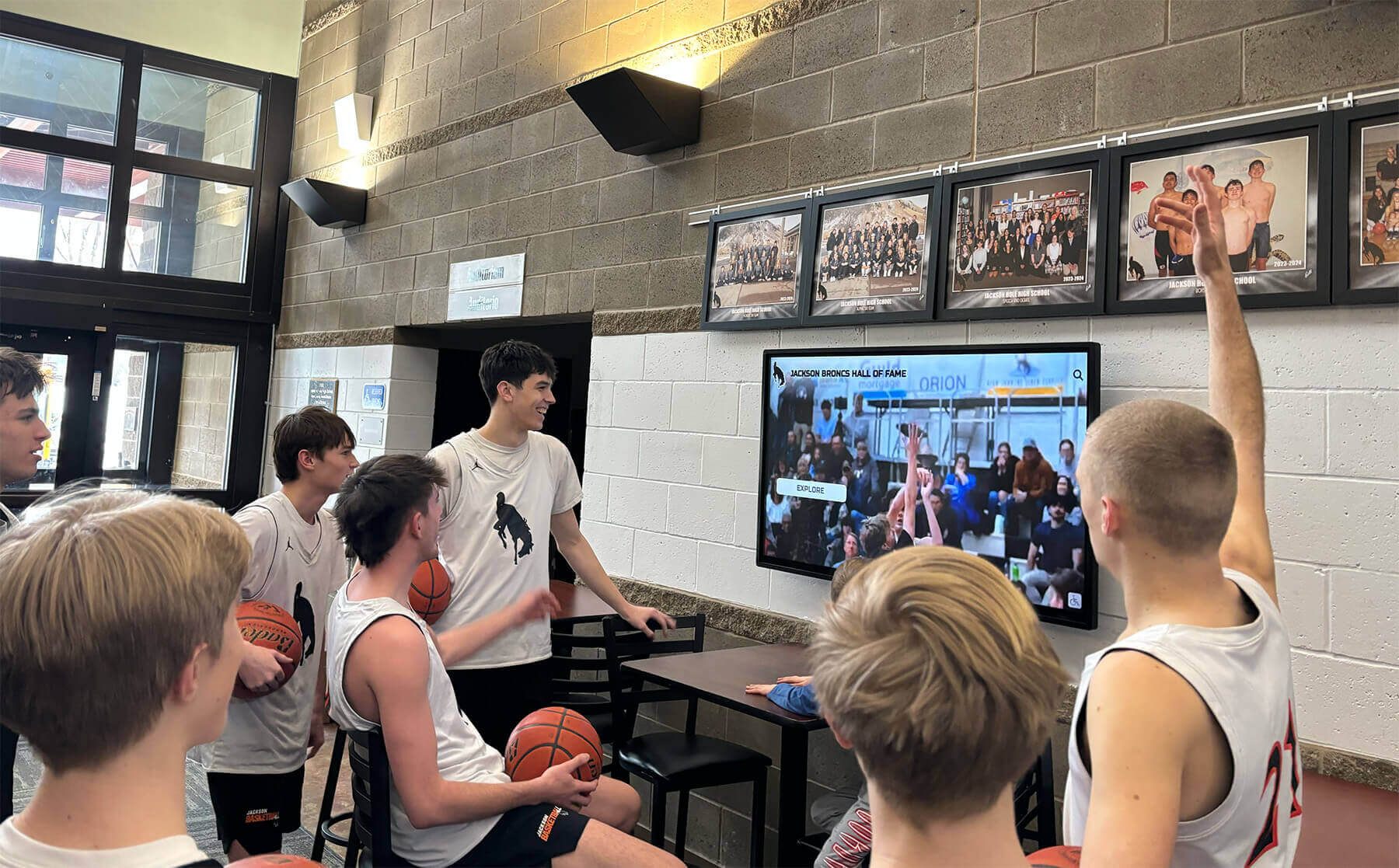
Content created through the management system automatically appears on physical touchscreen displays installed in school lobbies, athletic facilities, or other high-traffic locations. These same profiles simultaneously become accessible through responsive web interfaces enabling alumni, families, and community members to explore recognition content from anywhere.
The platform’s architecture enables unlimited content capacity. Schools can recognize dozens, hundreds, or thousands of individuals without performance degradation or space limitations. Content remains searchable, filterable, and browsable through multiple organizational schemes ensuring visitors find specific profiles quickly while encouraging serendipitous discovery of unexpected achievements.
Purpose-Built for Educational Institutions
Unlike generic digital signage platforms adapted for recognition purposes, Rocket Recognition was designed from the ground up specifically for schools. This singular focus delivers several practical advantages:
Template Library: Pre-designed profile templates accommodate common recognition categories including athlete profiles, team championships, academic achievement displays, donor recognition, hall of fame inductees, faculty tributes, and historical timelines. These templates provide consistent structure while allowing customization for unique content needs.
School-Specific Features: The platform includes capabilities schools require regularly such as graduating class organization, sport and activity categorization, season or year-based filtering, record tracking and comparison, and integration with school branding and colors.
Non-Technical Administration: School staff members without specialized technical training can manage content confidently. The administrative interface uses familiar form-based entry, drag-and-drop media uploads, and visual content organization requiring no coding or advanced computer skills.
Scalable Growth Model: The platform accommodates schools starting with limited historical recognition while enabling expansion to comprehensive archives covering decades of achievements. Content structures scale from initial installations recognizing current achievements to mature systems preserving extensive institutional history.

Key Features and Capabilities
Rocket Recognition includes comprehensive functionality addressing the practical challenges schools encounter when implementing digital recognition programs.
Cloud-Based Content Management System
The platform’s cloud architecture enables administrators to manage all content through web browsers from any location. Staff members log into secure administrative dashboards where they can create new profiles, upload media, edit existing content, schedule featured presentations, and publish updates that appear immediately on all connected displays.
This remote management capability proves valuable for distributed teams, multi-campus districts, or situations where display access presents logistical challenges. Athletic directors update records from offices, advancement professionals add donor recognition during fundraising events, and alumni coordinators incorporate new achievements as they’re reported—all without accessing physical hardware.
Workflow Management: The system supports multiple user accounts with permission-based access controls. Schools assign different roles to various staff members—content creators who draft new profiles, editors who review submissions before publication, and administrators who control platform configuration. This distributed responsibility enables efficient content development without compromising quality control.
Version Control and Drafts: Content exists in draft status during development, becomes scheduled for future publication, or publishes immediately based on administrative preferences. Version history tracks changes over time, enabling review of modifications and restoration of previous versions if necessary.
Interactive Touchscreen Experience
Physical displays powered by Rocket Recognition provide intuitive touchscreen interfaces visitors use to explore recognition content. The interface design prioritizes ease of use ensuring visitors of all ages and technical comfort levels can navigate successfully.
Multi-Modal Navigation: Visitors access content through several complementary approaches including alphabetical name browsing, year or graduating class selection, sport and activity filtering, achievement category organization, and full-text keyword search. This variety accommodates different visitor goals—from targeted searches for specific individuals to casual browsing of achievement categories.
Detailed Profile Views: Individual profile pages display comprehensive information including multiple high-resolution photos, biographical narratives, achievement lists, statistics and records, embedded video content, document archives, and related profiles encouraging extended exploration.
Touch-Optimized Design: Interface elements meet accessibility guidelines for touch target sizing, contrast ratios, and interaction patterns. Large buttons, clear visual hierarchy, and responsive feedback ensure interactions feel natural and satisfying rather than frustrating.
Multimedia Storytelling Capabilities
Rocket Recognition extends beyond static text and photos to support rich multimedia content bringing achievements to life more effectively than traditional plaques can accomplish.
Video Integration: Schools embed highlight videos, interview clips, ceremony recordings, and documentary footage within profiles. The platform handles video hosting, streaming optimization, and playback controls enabling smooth viewing experiences without technical complexity or separate video hosting services.
Photo Galleries: Multiple images per profile enable comprehensive visual documentation. Schools showcase action shots, team photos, ceremony moments, and historical images through galleries with smooth transitions and zoom capabilities.
Document Archives: Historical records, newspaper clippings, certificates, program materials, and other documents digitize and embed within profiles. Visitors explore archival materials through zoom and pan controls maintaining readability even for detailed documents.
Audio Content: Recorded interviews, victory songs, ceremonial audio, and other sound elements enhance profiles when appropriate. The platform manages audio hosting and playback enabling schools to incorporate diverse media types without managing separate hosting infrastructure.

Web Portal and Mobile Access
Recognition content simultaneously appears on physical touchscreens and through comprehensive web portals accessible from desktop computers, tablets, and smartphones. This dual-access approach extends recognition reach beyond on-campus visitors to alumni and families anywhere.
Responsive Design: Web interfaces automatically adapt to screen sizes from large desktop monitors to smartphones, maintaining usability across devices. Navigation simplifies for small screens while retaining core functionality enabling full content exploration regardless of device.
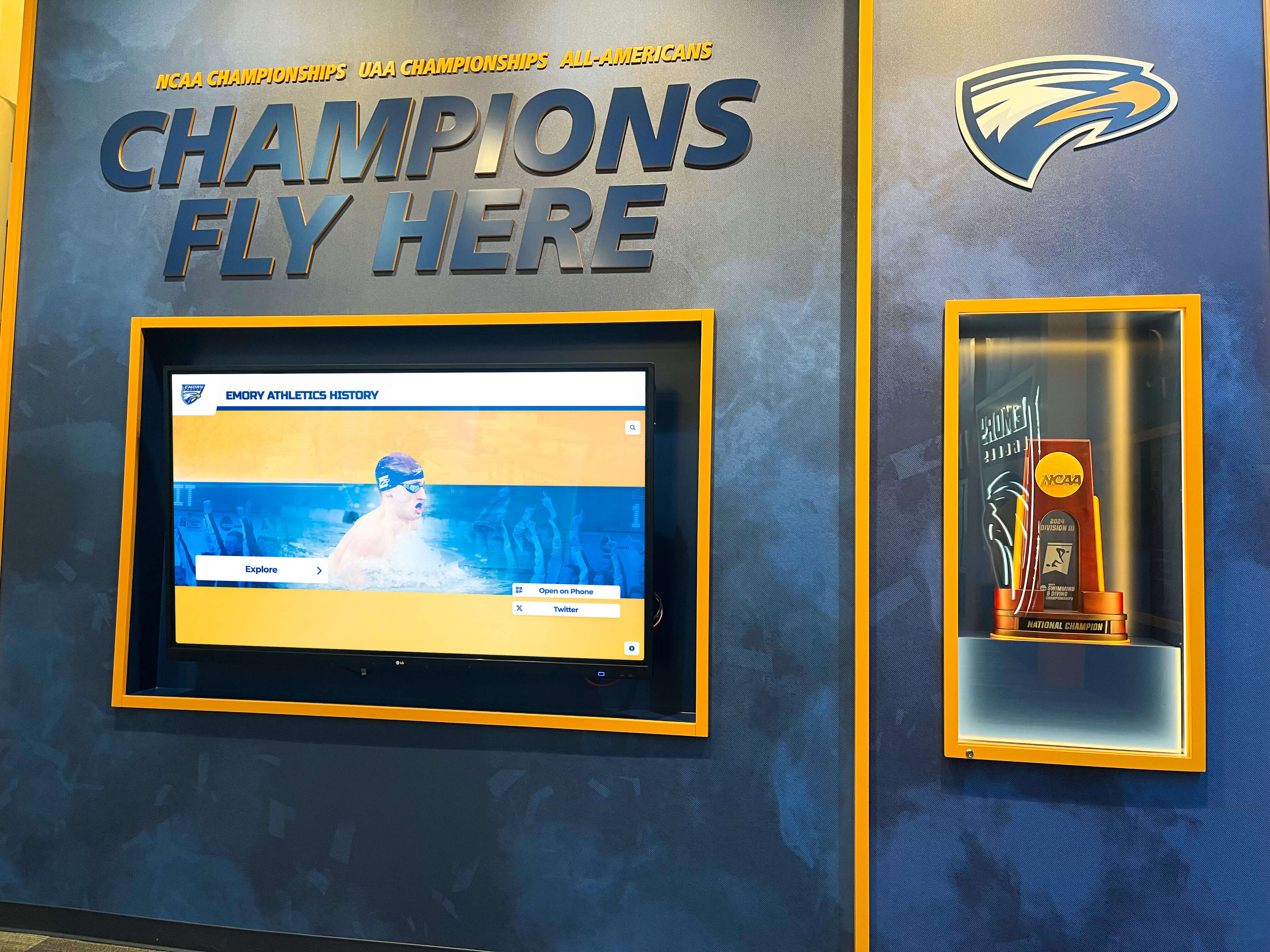
QR Code Integration: Physical displays present QR codes visitors scan with smartphones, accessing specific profiles or overall directories through personal devices. This capability proves valuable during high-traffic events when multiple visitors wish to explore content simultaneously, or when visitors want to save and share specific achievements through personal devices.
Social Sharing: Built-in sharing functionality enables visitors to post achievements to social media platforms, email profile links to family members, or bookmark favorite content for later reference. This social integration extends recognition reach exponentially beyond direct display visitors.
Alumni Engagement: Web portals enable graduated students to explore their alma mater’s recognition content from anywhere, maintaining connections regardless of geographic distance. This sustained engagement strengthens alumni relationships valuable for community building and advancement efforts.
Administrative Analytics and Insights
Schools gain unprecedented visibility into how communities engage with recognition content through comprehensive analytics dashboards tracking interaction patterns without compromising individual privacy.
Engagement Metrics: Dashboards display total interactions, average session duration, unique visitors over time periods, and peak usage patterns. These metrics demonstrate recognition program impact while identifying opportunities for improvement.
Content Performance: Analytics reveal which profiles receive most attention, which achievement categories generate greatest engagement, which search terms visitors use most frequently, and which content encourages extended exploration versus brief views. Schools use these insights to refine content strategy and optimize future recognition initiatives.
Hardware Health Monitoring: For physical displays, the platform tracks system performance, connectivity status, error conditions, and hardware health indicators. This proactive monitoring enables rapid response to technical issues before they impact visitor experiences.

Implementation Process: From Planning to Launch
Schools implementing Rocket Recognition follow a structured process ensuring successful deployments that meet expectations while minimizing disruption.
Initial Planning and Requirements Assessment
Implementation begins with defining recognition program scope and requirements. Schools identify content categories for recognition, determine initial profile volume and historical depth, specify physical display locations and quantities, assess network infrastructure and power availability, and establish budget parameters for hardware and software investments.
Stakeholder Alignment: Successful implementations require clarity about who controls content decisions, approval processes, and ongoing management responsibilities. Schools document selection criteria for different recognition categories, identify staff members responsible for content development and updates, and establish review and approval workflows preventing unauthorized content publication.
Technical Site Assessment: Before hardware procurement, schools evaluate proposed display locations for electrical capacity, network connectivity, mounting surface suitability, ADA accessibility compliance, and clearance requirements. This assessment prevents installation surprises and identifies infrastructure upgrades required before display installation.
Content Development and Digitization
While hardware orders and installation coordination proceed, schools begin content development for initial launch. This phase typically represents the most time-intensive aspect of implementation, particularly when digitizing extensive historical recognition.
Profile Creation: Staff members use administrative interfaces to create profiles following established templates. For athletic recognition, this includes athlete names, graduation years, sports and positions, achievements and records, statistics when relevant, and biographical information. Similar structures apply to other recognition categories with field customization matching specific needs.
Media Digitization: Historical photos, documents, trophies, and physical recognition materials require scanning or photography at appropriate resolutions. The platform provides guidance on image specifications, file formats, and quality standards ensuring professional presentation on large-format displays and web interfaces.
Phased Approach: Many schools implement in phases, launching initially with recent achievements and current students before expanding to historical recognition. This approach delivers value quickly while distributing content development workload across longer timelines.
Hardware Installation and System Configuration
Physical display installation involves multiple coordinated activities requiring collaboration between schools, display vendors, network administrators, and mounting specialists.
Display Selection: Rocket Recognition operates on various commercial-grade touchscreen displays. Schools select appropriate screen sizes, mounting configurations (wall-mounted, freestanding kiosk, multi-screen installations), and hardware specifications based on budget, space constraints, and aesthetic preferences.
Professional Installation: Certified installers mount displays, connect power and network infrastructure, configure display settings, and verify system operation. Installation typically completes within days depending on complexity and site-specific requirements.
Software Configuration: Technical teams configure displays to access cloud-based content, establish network connections through required firewall permissions, customize interface branding and colors, and verify content displays correctly across all screens.
Administrator Training and Launch
Before public launch, schools complete administrator training ensuring staff can manage content confidently without ongoing technical support for routine operations.
Training Sessions: Comprehensive training covers administrative dashboard navigation, profile creation and editing procedures, media upload and optimization, search and filtering functionality, content scheduling and featured presentations, user management and permissions, and analytics review and interpretation.
Soft Launch Testing: Schools conduct internal testing periods enabling staff to identify issues, gather feedback from select users, refine content based on initial responses, and verify all functionality operates as expected before public announcement.
Public Launch and Promotion: Official launches typically coincide with significant events such as homecoming weekends, athletic hall of fame induction ceremonies, school anniversaries, or major donor recognition events. Schools communicate availability through newsletters, social media, website announcements, and direct outreach to alumni and community members.
Technical Requirements and Infrastructure
Schools must ensure appropriate technical infrastructure exists or can be installed to support digital recognition displays.
Network Connectivity Requirements
Rocket Recognition operates as a cloud-based platform requiring reliable internet connectivity at display locations. Bandwidth requirements remain modest—typical displays consume 1-5 Mbps during normal operation—but connection stability matters more than raw speed.
Wired vs. Wireless: Ethernet connections provide superior reliability for permanent installations and should be prioritized when feasible. Wireless connectivity proves adequate when strong signal strength exists at display locations, though metal building structures, concrete walls, or distance from access points may compromise reliability.
Firewall Configuration: Network administrators must permit outbound HTTPS connections on port 443 to cloud-hosted content servers. Most school networks accommodate these requirements without modification, though networks with restrictive security policies may require specific domain whitelisting.
Bandwidth Planning: Schools deploying multiple displays should verify adequate internet bandwidth exists for simultaneous operation. While individual displays require minimal bandwidth, aggregate demand across numerous displays must remain within available capacity to prevent degraded performance during peak usage.
Power and Electrical Considerations
Commercial touchscreen displays require 120V AC power connections with adequate circuit capacity. Typical 55" displays draw 200-400 watts during operation, translating to approximately 2-4 amps on standard 120V circuits.
Circuit Capacity: Displays should not share circuits with high-draw equipment such as HVAC systems, kitchen appliances, or shop tools that create voltage fluctuations. Dedicated circuits provide optimal reliability, though displays can share circuits with other electronic equipment when total load remains within safe capacity limits.
Outlet Positioning: Wall-mounted displays require outlets behind or immediately adjacent to mounting locations to avoid visible power cables. Floor-standing kiosks need floor-level or low-wall outlets within 6 feet of display positions. Extension cords violate electrical codes for permanent installations and should not be used.
Physical Installation Requirements
Display mounting requires structurally sound surfaces capable of supporting hardware weight plus appropriate safety factors. Commercial touchscreen displays weigh 40-100 pounds depending on screen size and mounting hardware.
Wall Types: Concrete and concrete masonry unit walls provide ideal mounting surfaces using appropriate concrete anchors. Wood stud walls require lag bolts into structural members spanning multiple studs. Metal stud walls may require backing plates or floor-to-ceiling mounting brackets distributing weight appropriately. Glass curtain walls typically cannot support wall-mounted displays, requiring freestanding floor installations instead.
ADA Compliance: Touchscreen displays must meet accessibility guidelines including recommended mounting heights placing interactive elements 15-48 inches above floor level, clear approach space of at least 30 × 48 inches in front of displays, and adequate lighting without screen glare interfering with visibility.

Pricing and Investment Considerations
Rocket Recognition implementations require upfront investment in hardware and software platforms, followed by ongoing subscription costs for cloud hosting, content management access, and technical support.
Initial Capital Investment
Complete implementations including hardware, software licensing, professional installation, initial content development, and administrator training typically range from $15,000-$35,000 for single-display installations. Projects involving multiple displays, extensive historical content digitization, or complex customization requirements may exceed these ranges.
Hardware Costs: Commercial-grade touchscreen displays appropriate for institutional installations typically cost $3,000-$12,000 depending on screen size, touch technology, mounting configuration, and vendor selection. Schools often purchase hardware separately from software subscriptions, enabling competitive procurement while ensuring compatibility with recognition platforms.
Software Licensing: Initial platform licensing establishes content databases, configures administrative access, customizes interface branding, and provisions cloud infrastructure. This one-time setup typically costs $3,000-$8,000 depending on anticipated content volume, number of displays, and customization requirements.
Professional Services: Installation labor, network configuration, content template customization, and administrator training contribute $2,000-$8,000 to initial investments depending on project scope and required support levels.
Ongoing Operational Costs
Cloud-based platforms require recurring subscription fees covering hosting infrastructure, ongoing maintenance, security updates, feature enhancements, and technical support. Annual subscription costs typically range from $1,500-$4,000 per display depending on content volume, support level, and contractual terms.
These recurring costs replace expenses schools traditionally incur for plaque fabrication, engraving, framing, and physical installation. Schools adding 20-30 new recognition plaques annually at $100-$400 per plaque spend $2,000-$12,000 annually maintaining traditional displays—comparable to digital platform subscriptions while gaining dramatically superior capacity and flexibility.
Total Cost of Ownership Analysis
Financial decisions should consider total costs across multi-year timeframes rather than focusing exclusively on initial capital investments. Digital recognition platforms typically achieve cost parity with traditional approaches within 3-5 years while delivering capabilities static displays cannot match.
Cost Elimination: Digital platforms eliminate ongoing fabrication costs for new plaques, installation labor for physical additions, storage space for overflow recognition, and renovation expenses when displays require updating or expansion.
Efficiency Gains: Administrative time savings prove substantial. Schools report 85% reduction in hours spent managing recognition programs compared to traditional approaches requiring coordination with engravers, framers, installers, and facilities teams for every update.
Enhanced Value: Beyond cost considerations, digital platforms deliver value impossible with traditional approaches including unlimited recognition capacity, instant content updates, comprehensive multimedia storytelling, remote access for alumni engagement, detailed usage analytics, and flexibility to recognize diverse achievement categories without space constraints.
Practical Applications Across Recognition Categories
Rocket Recognition accommodates diverse institutional recognition needs through flexible content structures and customizable templates.
Athletic Recognition and Hall of Fame
Athletic programs represent the most common recognition application for schools implementing digital displays. The platform enables comprehensive documentation of athletic excellence including individual athlete profiles with career statistics, championship team recognition with rosters and season summaries, coaching achievements and career milestones, school records with historical progression, conference and state honors, and retired jersey tributes.
Athletic directors particularly value instant update capabilities enabling recognition additions immediately after season-ending achievements, championship victories, or record-breaking performances without waiting weeks for plaque fabrication and installation.
Academic Achievement Displays
Recognition extends beyond athletics to celebrate academic excellence through national honor society rosters, valedictorian and salutatorian tributes, academic scholarship recipients, academic competition achievements, advanced placement scholars, college admission highlights, and semester honor roll displays.
The platform’s search and filtering enables visitors to locate specific students, view graduating class achievements collectively, or explore academic excellence across multiple decades revealing patterns and inspiring current students through historical context.
Donor Recognition Programs
Advancement offices use Rocket Recognition for comprehensive donor acknowledgment including major gift recognition at various giving levels, annual fund contributors with cumulative support totals, planned giving legacy society members, capital campaign donors with project associations, memorial and tribute gifts honoring specific individuals, and endowment fund establishment recognition.
Digital donor walls accommodate updates as new contributions arrive without physical renovation, enable privacy-conscious donors to control public visibility of personal information, and provide flexibility to recognize diverse contribution types beyond financial gifts including volunteer service, in-kind donations, and professional expertise.
Faculty and Staff Recognition
Schools honor educators and staff through teacher of the year awards, service milestone recognition for career longevity, retirement tributes celebrating dedicated service, coach appreciation displays, support staff acknowledgment for vital behind-the-scenes contributions, and administrator leadership recognition.
This inclusive approach to recognition demonstrates institutional appreciation for all community members contributing to student success, strengthening culture and morale while providing tangible evidence that excellence receives acknowledgment regardless of role.
Historical Timeline and Institutional Memory
Beyond individual recognition, platforms preserve and present institutional history through decade-by-decade timeline structures, significant milestone documentation, facility evolution with historical and contemporary photography, tradition and ritual explanations for current students, leadership succession across eras, and community impact narratives.
These historical archives prove invaluable for orientation programs, alumni reunions, anniversary celebrations, and educational purposes helping students understand institutional heritage and context shaping current experiences.
Advantages Over Traditional Recognition Approaches
Schools evaluating Rocket Recognition against traditional static displays should consider several fundamental differences affecting long-term functionality and value.
Unlimited Capacity Without Space Constraints
Physical trophy cases and plaque walls eventually fill, forcing difficult decisions about what achievements deserve continued display and what gets relegated to storage. Digital platforms eliminate these constraints entirely—schools recognize dozens, hundreds, or thousands of individuals without approaching capacity limits or performance degradation.
This unlimited capacity enables more inclusive recognition celebrating broader definitions of excellence beyond championship-level athletics. Schools acknowledge participation milestones, improvement achievements, citizenship awards, community service contributions, and other accomplishments that static displays often exclude due to space limitations.
Instant Updates Without Fabrication Delays
Traditional recognition requires weeks of lead time coordinating with engravers, framers, and installers for each addition. Digital platforms enable instant publication—schools honor achievements immediately after they occur rather than waiting for physical production cycles.
This responsiveness proves particularly valuable for time-sensitive recognition such as senior night tributes, end-of-season awards, scholarship announcements, and donor acknowledgment where delayed recognition diminishes impact.
Comprehensive Storytelling Beyond Names and Dates
Plaques communicate basic information—names, dates, and brief achievement descriptions—but cannot convey the depth, context, and emotional impact that comprehensive profiles provide. Digital platforms enable rich narratives including detailed biographical information, achievement contexts explaining significance, statistical breakdowns revealing performance excellence, photo galleries documenting journeys, video content bringing achievements to life, and related profile connections revealing broader patterns.
This storytelling depth creates emotional connections that simple name-and-date plaques cannot match, making recognition more meaningful for honorees and more engaging for visitors exploring achievements.
Extended Reach Through Web and Mobile Access
Physical displays limit recognition visibility to individuals physically present in specific locations at particular times. Digital platforms extend reach globally through web portals and mobile access enabling alumni anywhere to explore institutional recognition, families to share achievements with distant relatives, and prospective students to understand achievement culture before campus visits.
This extended reach amplifies recognition impact exponentially while supporting broader institutional goals including alumni engagement, recruitment marketing, and community relationship building.
Lower Long-Term Maintenance Requirements
Traditional displays require ongoing physical maintenance including periodic cleaning, frame repairs, mounting hardware inspection, protective glass replacement, and eventual renovation when displays deteriorate aesthetically. Digital platforms shift maintenance to software updates managed by platform providers, hardware serviced through standard commercial display warranties, and content management performed through intuitive administrative interfaces requiring no specialized physical skills.
Schools report dramatic reductions in maintenance time and costs compared to traditional recognition approaches requiring continuous physical upkeep and periodic major renovations.
Decision Framework: Is Rocket Recognition Right for Your School?
Schools evaluating Rocket Recognition should consider several factors determining whether digital platforms align with specific needs, constraints, and priorities.
Ideal Candidates for Digital Recognition
Digital platforms deliver maximum value for schools experiencing several common challenges or priorities:
Content Volume Pressures: Schools with decades of achievements exceeding available display space, growing programs adding significant new recognition annually, or desires to honor broader achievement categories than current capacity permits benefit immediately from unlimited digital capacity.
Administrative Burden Concerns: Institutions where recognition updates consume excessive staff time coordinating fabrication and installation, or where complex approval processes delay recognition, gain substantial efficiency through streamlined digital workflows.
Engagement Priorities: Schools emphasizing alumni engagement, seeking recruitment differentiation through achievement culture demonstration, or wanting comprehensive online archives benefit from digital platforms’ extended reach beyond physical installations.
Storytelling Ambitions: Institutions wanting to preserve detailed histories, showcase multimedia content, or create more emotionally impactful recognition than static plaques provide should prioritize digital platforms enabling rich storytelling capabilities.
Future Growth Planning: Schools anticipating enrollment expansion, program additions, or recognition program evolution benefit from platforms scaling effortlessly without physical expansion requirements.
Situations Favoring Traditional Approaches
Traditional recognition remains viable for specific scenarios:
Limited Recognition Volume: Schools honoring 10-20 individuals or achievements annually without anticipating significant growth may find traditional approaches adequate for needs without justifying digital investment complexity.
Budget Constraints: While long-term costs favor digital platforms, initial capital requirements exceed traditional approaches. Schools with constrained budgets or unable to secure technology funding may need to pursue traditional options despite limited capacity.
Technology Resistance: Communities strongly preferring traditional aesthetic approaches or expressing reluctance toward digital solutions may benefit from hybrid approaches incorporating both traditional and digital recognition rather than complete digital transitions.
Infrastructure Limitations: Schools lacking reliable network connectivity at desired display locations or unable to meet electrical requirements may face implementation challenges making traditional approaches more practical pending infrastructure improvements.
Next Steps: Planning Your Implementation
Schools interested in Rocket Recognition should follow a structured evaluation and planning process ensuring successful implementation aligned with specific needs and constraints.
Requirements Assessment
Begin by documenting recognition program scope and priorities. Identify content categories requiring recognition, estimate initial profile volume and annual additions, determine priority locations for physical displays, assess existing network and electrical infrastructure, and establish preliminary budget parameters.
Stakeholder Consultation: Engage relevant stakeholders including administrators who approve budgets and vendor selection, facilities personnel who manage infrastructure and installation coordination, IT departments providing network connectivity and technical support, athletic directors or advancement officers who generate recognition content, and representatives from groups being recognized ensuring inclusive program design.
Vendor Evaluation
Request detailed information from Rocket Alumni Solutions and any alternative platforms under consideration. Compare software capabilities, hardware options and specifications, implementation support services, training availability and quality, ongoing support models, pricing structures for initial and recurring costs, and references from comparable institutions.
Demonstration and Trial: Request live platform demonstrations showing actual functionality rather than marketing presentations. Ask about trial access enabling administrators to experience content management interfaces before commitment. Visit reference institutions to see deployed systems and speak with administrators about real-world experiences.
Budget Development and Approval
Develop comprehensive budgets including all components of initial capital investment, recurring annual subscription costs, infrastructure upgrades if required, contingency allowances for unexpected requirements, and phased expansion plans if implementing incrementally.
Present total cost of ownership analyses comparing digital platforms to traditional recognition approaches across multi-year timeframes. Demonstrate cost parity timelines while highlighting capabilities and efficiencies digital platforms enable beyond simple cost considerations.
Implementation Planning
Once approval secures, develop detailed implementation timelines addressing content development and historical digitization, hardware procurement and installation scheduling, network infrastructure preparation, administrator training coordination, and public launch event planning.
Allow adequate time for each phase—rushing implementations increases problems and diminishes staff confidence. Most schools require 12-20 weeks from vendor selection to successful public launch depending on content volume, infrastructure requirements, and organizational complexity.
Transform Your School's Recognition Program
Rocket Recognition by Rocket Alumni Solutions provides comprehensive digital recognition solutions designed specifically for schools seeking to honor achievements without space limitations, administrative burdens, or the constraints of traditional static displays.
Our platform enables schools to celebrate unlimited achievements through interactive touchscreen displays, maintain comprehensive online archives accessible to alumni worldwide, update recognition instantly without fabrication delays, and create compelling multimedia tributes that engage communities more effectively than static plaques.
Frequently Asked Questions
How difficult is it for non-technical staff to manage content in Rocket Recognition?
The platform was designed specifically for school administrators without specialized technical training. Content management uses familiar form-based interfaces similar to filling out information in word processors or basic databases. Staff can create profiles, upload photos, edit existing content, and publish updates without coding knowledge or IT assistance for routine operations. Most administrators become comfortable with core functionality after 2-3 hours of initial training, with confidence building quickly through hands-on experience. The system includes contextual help, video tutorials, and support resources addressing common questions. Schools report that even staff members initially hesitant about digital tools successfully manage recognition programs after brief training periods.
What happens to our content if we decide to change platforms in the future?
Content ownership and portability represent critical considerations during vendor evaluation. Schools should request explicit documentation that all content—including text, photos, videos, and structural data—remains school property and can be exported in standard formats if platform changes become necessary. Rocket Alumni Solutions provides data export capabilities enabling content migration to other systems if required, though most schools continue using the platform long-term due to satisfaction with functionality and support. Before signing contracts, verify data portability guarantees appear in writing and understand what formats exports provide to ensure compatibility with potential future platforms.
Can digital displays handle high-traffic environments like busy school lobbies?
Commercial-grade touchscreen displays are specifically designed for high-use institutional environments with durability far exceeding consumer electronics. These displays accommodate thousands of daily touches without performance degradation and feature protective glass resisting scratches, smudges, and impact damage. The software architecture handles simultaneous users exploring different content without conflicts or slowdowns. During peak periods like homecoming weekends or athletic events when many visitors access displays concurrently, schools can encourage QR code scanning enabling content exploration through personal mobile devices alleviating congestion at physical displays while maintaining engagement. Regular cleaning with electronics-safe products maintains presentation quality in high-traffic locations.
How long does the implementation process typically take from decision to launch?
Complete implementations typically require 12-20 weeks from vendor selection to public launch, though timelines vary based on content volume, infrastructure requirements, and organizational factors. Content development usually represents the longest phase, particularly for schools digitizing extensive historical recognition. Infrastructure preparation including electrical or network upgrades adds time if existing facilities require modification. Hardware procurement and installation typically complete within 4-6 weeks once ordered. Administrator training occurs 2-3 weeks before launch allowing staff to gain confidence before public introduction. Schools implementing in phases can launch initial content more quickly while continuing historical digitization over extended periods. Rush implementations are possible but generally increase stress and reduce launch quality—allowing adequate preparation time improves outcomes substantially.
What kind of ongoing maintenance should we expect?
Digital recognition displays require minimal physical maintenance compared to traditional trophy cases and plaques. Commercial displays need occasional screen cleaning using electronics-safe products—weekly or bi-weekly depending on traffic and environmental factors. Beyond cleaning, physical maintenance typically involves nothing unless hardware failures occur, which commercial displays rarely experience during warranty periods. Software maintenance including updates, security patches, and feature additions happens automatically through cloud architecture without school intervention. Content maintenance involves verifying information accuracy during annual review cycles, updating profiles as additional achievements occur, and adding new recognition as earned. Analytics review helps identify content gaps or improvement opportunities. Most schools allocate 10-15 annual hours for content maintenance compared to 75-120 hours required for traditional recognition program management.
Can we implement digital recognition incrementally rather than replacing everything at once?
Phased implementation represents a practical approach many schools pursue, particularly when budget constraints or change management concerns exist. Common strategies include launching with current-year achievements before expanding to historical recognition, starting with a single category like athletics before adding academic and donor recognition, installing one display initially with expansion to additional locations as budgets allow, or implementing in one school building before expanding across multi-campus districts. Digital platforms accommodate phased approaches better than traditional displays because content capacity scales effortlessly without physical expansion requirements. Schools can continuously add content over years or decades without approaching limits or requiring system replacements. This incremental approach distributes costs and workload while delivering value quickly through initial implementations.
Additional Resources
Schools planning digital recognition implementations may find these related resources valuable:
- Digital Hall of Fame Implementation Guide - Comprehensive planning framework for hall of fame projects
- School Digital Signage Complete Guide - Technical considerations for display installations
- Athletic Recognition Programs Guide - Sport-specific recognition best practices
- Interactive Touchscreen Kiosk Solutions - Hardware selection and installation guidance
- Donor Recognition Displays for Schools - Advancement office recognition strategies
These resources provide complementary frameworks helping schools plan comprehensive recognition programs addressing technical, operational, and strategic considerations essential for successful implementations.































