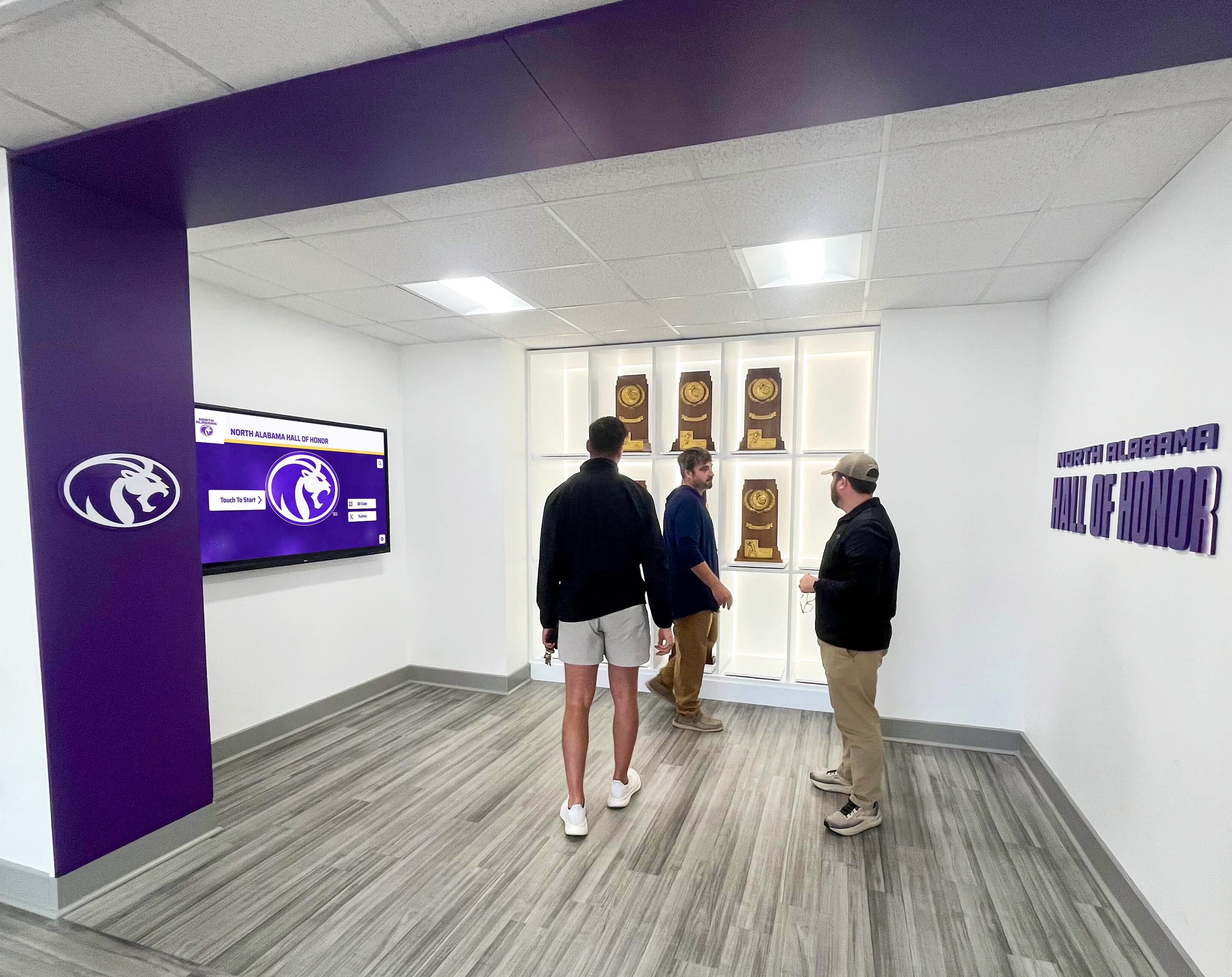
Picture this: It’s a Tuesday evening at your local high school rink, and the junior varsity hockey team is warming up before their game. Parents, students, and fans trickle into the stands, many arriving early to grab good seats. But instead of just waiting for the puck to drop, they’re gathered around something unusual—a sleek interactive touchscreen display in the rink lobby showcasing player profiles, team statistics, program history, and real-time game information.
This is the emerging reality at forward-thinking high school hockey programs across the country. What was once the exclusive domain of professional arenas and major college athletic facilities is now transforming the fan experience at JV hockey games, creating deeper connections between communities and their developing athletes while celebrating program traditions in engaging, modern ways.
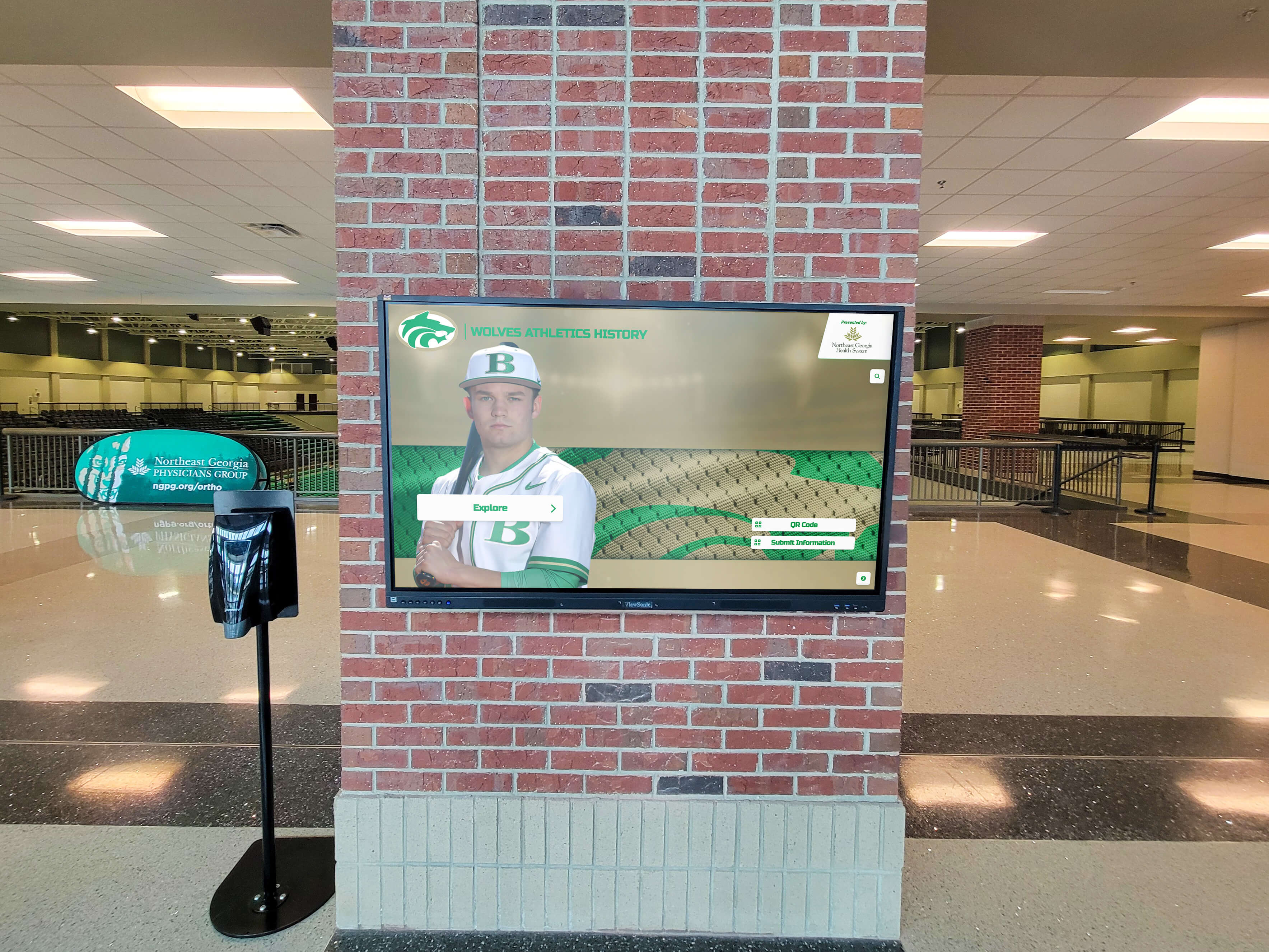
Interactive touchscreen displays are revolutionizing how high school athletic programs engage with their communities during games, particularly at the junior varsity level where players and families are hungry for recognition that often takes a backseat to varsity competition. These digital kiosks combine the functionality of traditional program guides, record boards, and hall of fame displays into single, space-efficient installations that work perfectly in crowded rink environments.
For parents watching their children develop fundamental hockey skills, these touchscreens provide detailed player information that helps them better understand individual progress and team dynamics. For students supporting their classmates, the displays offer engaging content that builds school pride and creates social media moments. For visiting teams and scouts, they showcase program depth and competitive history. And for the players themselves, seeing their achievements professionally presented creates motivation and validates the countless hours invested in skill development.
Why JV Hockey Games Need Interactive Touchscreens
Junior varsity hockey occupies a unique space in high school athletics—critically important for player development and program building, yet often overshadowed by varsity competition when it comes to recognition and fan engagement resources. This creates a perfect opportunity for technology to level the playing field.
The JV Recognition Gap
Walk into most high school hockey rinks and you’ll see the disparity immediately. Varsity championship banners hang from the rafters. Varsity record boards dominate prominent wall space. Varsity team photos receive the best display locations. Meanwhile, JV achievements might be relegated to a single framed photo in a back hallway or briefly mentioned in the athletic department newsletter.
This recognition gap isn’t intentional—it’s simply a function of limited physical space and constrained budgets. Traditional recognition methods require dedicated wall space, custom fabrication for each addition, and ongoing maintenance costs. Schools naturally prioritize their highest-profile teams when making these investments, leaving JV programs with whatever resources remain.

Interactive touchscreen displays eliminate this zero-sum dynamic. A single digital installation can comprehensively showcase both varsity and JV programs without competition for space. Unlimited digital “pages” mean every player can have a detailed profile, every team can be documented thoroughly, and every achievement can receive appropriate recognition regardless of competitive level.
Research on youth athletic development consistently demonstrates that recognition and validation significantly impact player motivation, skill development persistence, and long-term program retention. When JV players see their contributions acknowledged professionally—just like varsity athletes—they develop stronger connections to programs and greater commitment to improvement.
Enhancing the Game-Day Experience
Beyond addressing recognition gaps, touchscreens fundamentally improve the JV game-day experience for multiple stakeholder groups who might not otherwise receive comprehensive information.
For Parents and Families: Many parents attending JV games lack detailed knowledge about their children’s teammates, opponents, or the broader program context. A touchscreen display in the lobby provides engaging pre-game exploration opportunities. Parents can look up their children’s profiles, view season statistics, learn about linemates and defensive partners, understand coaching philosophies and development approaches, and explore program history their children are now part of.
This context enriches the viewing experience. Parents who understand team systems and player roles appreciate the game more fully. Families new to hockey gain accessible entry points for learning about the sport. And everyone enjoys the social aspect of gathering around the display, discussing players and teams with other families.
For Students and Fans: High school students increasingly expect interactive, technology-driven experiences in all aspects of their lives. Static paper programs and hand-written roster boards don’t resonate with digital natives accustomed to smartphones and social media.
Touchscreen displays speak their language. Students naturally gather around interactive kiosks, exploring content and capturing photos for Instagram stories and Snapchat. They search for friends’ profiles, compare statistics between rivals, and discover interesting program history. These interactions create organic social media content that extends program visibility far beyond the rink’s physical walls.
For Visiting Teams and Scouts: JV games often attract coaches and scouts evaluating younger talent for summer programs, prep schools, and eventually college recruitment. Interactive displays provide professional presentation of player information that might not be available through other channels at the JV level.
A coach from an elite summer program can quickly review multiple players’ statistics, positions, and development trajectories. A high school scout can explore program depth and coaching philosophies. This professional presentation elevates program perception and supports player advancement opportunities.

Building Program Culture and Continuity
Strong hockey programs build cohesive cultures that span all competitive levels and connect current teams to historical traditions. Touchscreen displays become powerful tools for cultivating this cultural continuity by visually demonstrating how current JV players fit into multi-generational program narratives.
When a freshman explores the display and discovers that the current varsity captain started his journey on JV three years earlier, he sees a tangible development pathway. When a parent reads about a JV team from the 1990s that included multiple future college players, they understand the program’s developmental track record. When an alumnus visiting for a game finds his own JV team documented alongside current squads, he feels valued connection to the program’s ongoing story.
These connections strengthen program culture in measurable ways. Players develop longer-term commitment when they see clear development trajectories. Families invest more enthusiastically when they understand program history and values. Alumni maintain stronger ties when their contributions remain visible and accessible. Interactive digital displays for high school sports create these connections organically through engaging content presentation.
What Makes an Effective JV Hockey Touchscreen Display
Not all touchscreen installations deliver equal value. The most effective JV hockey displays incorporate specific features and content types that maximize engagement and program impact.
Comprehensive Player Profiles
At the heart of any effective hockey touchscreen system are detailed player profiles that go beyond basic roster information to tell complete stories about individual athletes.
Essential Profile Elements:
- High-quality action photos showing players in game situations
- Complete biographical information including hometown, youth hockey background, and academic interests
- Career statistics presented in clean, readable formats
- Season-by-season progression showing statistical development
- Position and jersey number with explanations of role on team
- Quotes from players about their goals, experiences, and what hockey means to them
- Connections to family members who may have played in the program
- Plans for post-high school hockey and academic pursuits
The depth of these profiles distinguishes professional presentations from basic roster cards. When a parent can read their son’s thoughts about overcoming challenges or see statistical improvement from freshman to sophomore year, the profile creates emotional connection that simple statistics cannot match.
For programs using solutions like digital recognition displays for student athletes, these comprehensive profiles also serve recruiting and development documentation purposes beyond just game-day engagement.
Real-Time Game Information
While historical content provides context and builds culture, real-time information creates immediate relevance that draws repeated engagement throughout game days.

Current Game Content:
- Today’s lineup and line combinations
- Scratch lists and player availability updates
- Current season standings and playoff implications
- Upcoming schedule with opponent information
- Recent game results and scoring summaries
- League-wide scores and standings updates
- Special recognition for milestones achieved recently (first goals, assists, etc.)
This real-time content transforms touchscreens from interesting pre-game diversions into valuable information resources consulted throughout events. A parent checking the display between periods to see updated statistics or reviewing the upcoming schedule to plan attendance creates multiple engagement touchpoints beyond initial exploration.
Many modern touchscreen systems integrate with team management platforms and statistical tracking tools, enabling automatic content updates without manual data entry. Coaches or team managers input information once, and it flows automatically to the touchscreen display along with websites and other digital platforms.
Team History and Program Legacy
One of touchscreen displays’ most powerful features is their capacity to preserve and present comprehensive program history in engaging, accessible formats that physical displays cannot match.
Historical Content Categories:
- Championship teams with complete rosters and season summaries
- Record progression showing how program standards have evolved
- Notable alumni and their post-high school achievements
- Coaching history and philosophy evolution
- Facility development and program milestones
- Historic games and memorable moments
- Statistical leaderboards across program history
- Decade-by-decade program overviews
For JV hockey programs specifically, this historical dimension proves particularly valuable because it validates that JV achievement matters to program legacy. A sophomore seeing that several players from a 2010 JV team went on to lead varsity to championships understands that current development lays foundations for future success.
Alumni visiting for games consistently report that exploring program history creates stronger emotional connections to programs and often inspires increased engagement through mentorship, financial support, or volunteer coaching.
Interactive Features That Drive Engagement
The “interactive” part of interactive touchscreens is what separates them from simple digital signage. The most engaging installations incorporate features that invite exploration and personalization.
Key Interactive Elements:
- Search functionality allowing users to find specific players by name
- Filter options for viewing by year, position, or achievement type
- Comparison tools showing statistical matchups between players
- “Did you know?” randomized facts about program history
- Photo galleries users can browse at their own pace
- Video highlights with on-demand playback
- Social media integration for sharing profiles and achievements
- QR codes linking to deeper online content
These interactive features encourage extended engagement. Analytics from schools implementing comprehensive touchscreen systems show average interaction times of 4-7 minutes—dramatically longer than the brief glances traditional static displays typically receive. This extended engagement creates opportunities for deeper learning about programs, players, and hockey traditions that passive displays cannot achieve.

Planning and Implementing a Rink-Side Touchscreen Display
Successfully implementing an interactive touchscreen at your hockey rink requires systematic planning addressing location, technology, content, and ongoing management considerations.
Selecting the Optimal Location
Location dramatically impacts touchscreen usage and effectiveness. The best installations balance high visibility with sufficient space for comfortable group interaction.
Prime Location Characteristics:
- High-traffic areas where fans naturally congregate (main lobby, concession areas)
- Sufficient space for 3-5 people to gather without blocking circulation
- Protection from direct sunlight causing screen glare
- Comfortable distance from ice surface to avoid temperature extremes
- Good lighting for viewing screen content clearly
- Proximity to electrical power and network connectivity
- Security from vandalism through natural surveillance
Many hockey rinks feature natural choke points—entrances from parking lots, pathways to spectator seating, concession stand queues—where families pause naturally. These locations provide built-in audiences for touchscreen engagement.
For rinks hosting multiple programs or schools, consider locations accessible during all events versus team-specific areas that only their communities use. A centrally-located display can serve multiple teams while school-specific installations in designated areas might provide better branding opportunities.
Hardware Selection for Rink Environments
Hockey rinks present unique environmental challenges that require appropriate hardware selection. Temperature variations, humidity, and heavy public use demand durable, commercial-grade equipment.
Critical Hardware Specifications:
- Commercial-grade displays rated for extended daily operation
- Touchscreen technology responsive even with gloves or multiple users
- Adequate brightness (400+ nits) for well-lit lobby areas
- Temperature tolerance appropriate for rink environments
- Hardened glass screens resisting scratches and impacts
- Secure mounting preventing tampering or removal
- Adequate processing power for responsive interaction
Display size depends on viewing distance and space constraints. For locations where users interact from 1-2 feet away, 43-55 inch displays provide adequate size while remaining budget-friendly. For high-visibility locations where groups view from greater distances, 65-75 inch displays ensure visibility while creating impressive visual presence.
Don’t underestimate the importance of commercial-grade specifications. Consumer displays from retail electronics stores cost less initially but fail quickly under continuous operation in public spaces. Commercial displays designed for business applications deliver 5-8 years of reliable operation versus 2-3 years typical of consumer equipment in similar environments.
Software Platforms and Content Management
The software platform managing your touchscreen content determines long-term usability, update ease, and system sustainability. Cloud-based platforms purpose-built for athletic recognition offer significant advantages over generic digital signage systems.
Essential Software Features:
- Intuitive content management requiring no technical expertise
- Template-based design ensuring consistent, professional appearance
- Cloud accessibility enabling remote updates from any device
- Multi-user permissions allowing coaches and staff appropriate access
- Automatic backups protecting against content loss
- Responsive design adapting to different screen sizes
- Analytics tracking usage patterns and popular content
- Integration capabilities with team management and statistics platforms
Solutions like Rocket Alumni Solutions provide purpose-built platforms specifically designed for hockey program recognition, with features and templates optimized for this exact use case. These specialized platforms deliver better experiences than generic alternatives requiring extensive customization to achieve similar functionality.

Developing Compelling Content
Technology provides the delivery mechanism, but content determines whether touchscreens become valued resources or underutilized installations. Comprehensive content development requires systematic approaches.
Content Development Process:
Inventory Current Materials: Document what content already exists—photos, statistics, rosters, historical documents—that can be digitized for the display.
Define Content Priorities: Decide whether to begin with current season content and add historical materials over time, or start with comprehensive historical documentation. Most programs find that launching with current content and systematically adding history creates momentum through immediate relevance.
Assign Content Responsibilities: Clearly designate who will provide different content types. Coaches might supply rosters and statistics, parents might volunteer photography, and students from journalism or technology programs might handle profile writing and video editing.
Establish Quality Standards: Define consistent formats for player profiles, photo resolution requirements, acceptable video length and formats, and style guidelines for written content to ensure professional presentation.
Create Content Collection Systems: Develop simple processes for ongoing content gathering—photo submission forms, statistics tracking spreadsheets, video uploading procedures—so content development continues systematically rather than requiring manual effort for each addition.
Plan Update Schedules: Establish regular rhythms for content updates—weekly during seasons, post-season comprehensive updates, off-season historical additions—maintaining freshness and relevance.
For programs seeking guidance on athletic content development, resources about creating comprehensive athletic recognition programs provide helpful frameworks adaptable to JV hockey contexts.
Content Strategies That Maximize Engagement
Generic roster information won’t drive the engagement levels that justify touchscreen investments. The most successful installations incorporate specific content strategies that create compelling reasons for repeated interaction.
Storytelling Over Statistics
While statistics provide important information, stories create emotional connections that drive deeper engagement and longer memory retention.
Story-Focused Content Examples:
- Player journey narratives documenting how athletes joined the program and developed skills
- Overcoming adversity stories about players facing challenges and persisting
- Team chemistry features explaining how specific line combinations developed
- Behind-the-scenes content showing practice routines and preparation
- Goal-setting profiles where players share aspirations and track progress toward them
- Alumni connections showing how former JV players’ experiences shaped their futures
- Parent perspectives on watching their children develop through hockey
A profile that tells the story of a sophomore defenseman who started as a hesitant skater and developed into a reliable defender creates more engagement than simple statistics. Readers connect with challenge-and-growth narratives that reflect universal athletic experiences.

Multimedia Integration
Text and static photos provide baseline content, but multimedia elements create richer, more engaging experiences that distinguish interactive displays from printed programs.
Effective Multimedia Elements:
- Short video highlights (15-45 seconds) showing players’ best moments
- Coach interview clips discussing team development and player growth
- Time-lapse content showing skill development over seasons
- Audio clips of arena atmosphere and fan excitement
- Animated statistics showing season progression and comparisons
- 360-degree facility tours showcasing rink improvements
- Historical photo galleries showing program evolution
Modern smartphones capture video and photos at quality levels perfectly adequate for touchscreen display. Programs don’t need professional videographers—just systematic documentation throughout seasons. A parent volunteering to film goals at home games provides raw material for highlight clips that dramatically enhance player profiles.
Recognition of All Contribution Types
JV rosters include players with widely varying roles, skill levels, and ice time. Comprehensive content strategies recognize all contribution types, not just leading scorers.
Diverse Recognition Categories:
- Statistical leaders (goals, assists, plus-minus, save percentage)
- Most improved players showing dramatic development
- Leadership and character awards for mentorship and program values
- Practice players who provide valuable competition for teammates
- Overcoming adversity recognition for players facing challenges
- Academic achievement celebrating scholar-athletes
- Community service highlighting off-ice contributions
- Sportsmanship and respect awards
This comprehensive approach ensures every player sees meaningful recognition regardless of whether they’re future varsity stars or valuable role players. When programs celebrate diverse contribution types, more stakeholders find personal connections to content, driving broader engagement.
Similar comprehensive approaches are used successfully in digital recognition for various achievement types across different athletic and academic contexts.
Creating Connections to Varsity Programs
One of touchscreen technology’s most powerful features is its ability to create narrative connections between JV and varsity programs that help younger players visualize development pathways while honoring complete athletic journeys.
JV-Varsity Connection Strategies:
- Current varsity players’ JV profiles linked to their earlier development
- Championship varsity teams with notation of which players developed together on JV
- Alumni success stories tracing journeys from JV through varsity to college
- Statistical progression showing how JV performance predicted varsity success
- Coaching development narratives about how staff moved players through levels
- Team chemistry stories explaining how varsity cores formed during JV years
These connections serve important motivational and cultural purposes. A freshman struggling through a difficult first JV season who discovers that the current varsity captain had similar early challenges gains perspective and motivation. A parent wondering about their sophomore’s future who sees multiple examples of JV players advancing to varsity leadership understands that current development builds toward future achievement.

Overcoming Common Implementation Challenges
Schools implementing touchscreen displays for JV hockey programs encounter predictable challenges with established solutions.
“We Don’t Have Budget for This”
Budget constraints represent the most common concern about touchscreen installations. While these systems require meaningful investment, several strategies make them more financially accessible.
Budget-Conscious Approaches:
- Phased Implementation: Start with basic hardware and limited content, expanding capabilities as additional funding becomes available
- Multi-Program Sharing: Single installations serving multiple teams (JV, varsity, girls hockey) distribute costs across several programs
- Booster Club Fundraising: Hockey communities often enthusiastically support tangible program improvements visible to everyone
- Alumni Campaigns: Former players value recognition of their hockey contributions and often support preservation efforts
- Local Business Sponsorships: Rink-side digital displays offer visibility that businesses might support through sponsorships
- Grant Opportunities: Educational technology and athletic facility improvement grants sometimes fund recognition technology
- Memorial Dedications: Families sometimes fund displays as memorials to deceased players or supporters
Total implementation costs for comprehensive touchscreen systems typically range from $8,000-$20,000 depending on hardware size, software features, and content development scope. While substantial, this represents comparable investment to traditional trophy cases and physical recognition that these digital systems can completely replace while providing dramatically superior capabilities.
For context, many programs discover that comprehensive digital recognition eliminating traditional physical displays achieves cost parity within 3-4 years when accounting for eliminated ongoing expenses for engraving, printing, mounting, and periodic physical display renovation.
“We Don’t Have Content”
Many programs worry they lack sufficient content—particularly historical materials—to justify touchscreen implementation. This concern often proves less significant than anticipated.
Content Development Strategies:
- Begin with current season content that’s readily available (rosters, photos, statistics)
- Add historical content gradually through systematic research over time
- Engage alumni through surveys and interviews requesting photos and information
- Research local newspaper archives often rich with historical game coverage
- Digitize existing physical displays and materials already in program archives
- Acknowledge incomplete historical records honestly while inviting community contributions
- Start with comprehensive recent content (5-10 years) and progressively add older materials
Content development represents ongoing process, not one-time project. Programs implementing touchscreens don’t need complete historical documentation before launching. Starting with strong current content and systematically expanding creates value immediately while building comprehensive archives over time.
Additionally, comprehensive player profiles for current teams create far more engagement than incomplete historical coverage. Parents care most about seeing their own children recognized thoroughly. Start there, then build backward into history as resources allow.
“Won’t This Just Become Outdated Quickly?”
Concerns about content currency and system maintenance are legitimate—recognition systems requiring extensive manual updating often fall into neglect. Modern cloud-based platforms specifically address these sustainability challenges.
Maintenance-Friendly Features:
- Intuitive content management interfaces non-technical staff can easily use
- Template-based systems ensuring consistent formatting without design expertise
- Bulk update capabilities allowing efficient handling of roster or statistics changes
- Scheduled publishing enabling advance preparation of time-sensitive content
- Mobile-friendly administration supporting updates from smartphones and tablets
- Multiple user accounts with role-based permissions distributing workload
- Automatic backups preventing content loss
Most programs report that regular content updates require 15-30 minutes weekly during seasons using modern platforms—far less time than traditional physical display maintenance demanded. End-of-season comprehensive updates might require 2-4 hours documenting achievements, adding photos, and updating statistics.
The key is establishing clear responsibilities and update schedules from implementation. When specific individuals understand they’re responsible for particular content types on regular rhythms, maintenance becomes routine rather than overwhelming.
Programs can study best practices from schools successfully managing digital athletic recognition systems long-term to establish sustainable processes.

“Will This Diminish Traditional Recognition?”
Some stakeholders worry that digital touchscreens will replace valued traditional recognition elements like championship banners, retired jerseys, or trophy displays. This need not be an either-or proposition.
The most effective recognition strategies blend traditional and digital elements, leveraging each approach’s strengths. Championship banners hanging from rafters provide powerful visual reminders of program excellence and create impressive atmosphere. Touchscreen displays provide the detailed context—team rosters, season narratives, player profiles—that physical banners cannot convey.
Rather than replacing physical recognition, digital displays complement and enhance it by explaining stories behind the achievements, connecting current programs to historical traditions, celebrating achievements too numerous for limited physical space, and providing accessibility through online platforms extending reach beyond rink visitors.
Programs implementing both approaches report that they work synergistically rather than competitively. Physical displays create visual impact and honor tradition. Digital displays provide depth and ongoing engagement. Together, they create comprehensive recognition more powerful than either approach alone.
Measuring Success and Demonstrating Value
Implementing touchscreen displays represents significant investment of financial resources, staff time, and political capital. Demonstrating value through tangible outcomes helps justify investments and secure ongoing support.
Quantitative Engagement Metrics
Modern touchscreen platforms typically include analytics features tracking usage patterns and engagement levels that provide objective success measures.
Key Metrics to Monitor:
- Total daily interactions during game days versus non-game periods
- Average interaction duration showing depth of engagement
- Most-viewed content revealing what resonates with audiences
- Search queries indicating what information users seek
- Peak usage times informing optimal content refresh schedules
- Unique users versus repeat visitors showing audience breadth
- Mobile vs. on-site access patterns demonstrating reach extension
Schools implementing comprehensive touchscreen systems typically see average interaction times of 5-8 minutes—dramatically exceeding the brief glances traditional displays receive. During JV game days, well-implemented systems often register 50-150 individual interactions, creating hundreds of person-minutes of program engagement.
These metrics demonstrate concrete value to administrators evaluating technology investments. They also inform continuous improvement by revealing what content drives engagement and what features users find most valuable.
Qualitative Feedback Collection
Numbers tell important stories, but qualitative feedback reveals why systems succeed or struggle and what improvements stakeholders desire.
Feedback Collection Methods:
- Brief surveys through QR codes accessible from the display
- Informal conversations with parents and fans during games
- Player focus groups discussing how recognition impacts motivation
- Coach assessments of family engagement and community response
- Alumni feedback during return visits to facilities
- Booster club and parent organization discussion sessions
This qualitative input frequently reveals impacts that metrics cannot capture. Parents might express how seeing comprehensive recognition of their child’s development increased family investment in the program. Players might share how professional presentation of their achievements boosted confidence and motivation. Alumni might describe feeling valued connection to programs when discovering their JV years documented permanently.
Program Impact Indicators
The ultimate measure of recognition system value is impact on broader program outcomes like player retention, community engagement, and competitive success.
Relevant Impact Metrics:
- Player retention rates from freshman through senior years
- Booster club membership and fundraising trends
- Community attendance at JV games compared to previous years
- Player recruitment success attracting talented incoming freshmen
- Alumni engagement in volunteering, mentorship, and financial support
- Social media reach and engagement from content sharing
- Local media coverage and community awareness
While attributing causation to single initiatives proves difficult, programs implementing comprehensive recognition alongside other program improvements typically see positive trends across multiple indicators. Correlation doesn’t prove causation, but consistent positive trends across numerous metrics suggest meaningful impact.
Pragmatically, most programs discover that touchscreen investments justify themselves through combination of measurable outcomes and valuable qualitative benefits stakeholders appreciate even without precise financial calculations.
Future Trends in Game-Day Recognition Technology
Touchscreen display technology continues evolving rapidly. Understanding emerging trends helps programs future-proof investments and anticipate new capabilities.
Integration with Live Game Statistics
Current touchscreen systems primarily present historical and current season information compiled manually. Emerging integrations with scoring and statistics platforms enable real-time game statistics updating during competitions.
Imagine parents checking the display between periods to see updated stats showing their child just recorded an assist, or fans exploring evolving box scores while games progress. These integrations transform touchscreens from pre-game diversions into active game-day resources consulted repeatedly throughout events.
Enhanced Video Capabilities
Current systems support video highlights, but storage and bandwidth constraints often limit quantity and quality. Improving technology enables more extensive video libraries including complete game archives accessible on-demand, player-specific highlight reels automatically compiled from game footage, coach analysis videos explaining strategies and systems, and virtual reality experiences recreating significant games or moments.
These video-centric approaches will enable richer storytelling about player development and team journeys that create even deeper engagement than current photo-and-text presentations.
Mobile Integration and Personalization
Current touchscreen installations work primarily as physical kiosks accessed at rink locations. Emerging approaches integrate more deeply with mobile devices through companion apps that sync with physical displays, personalized content recommendations based on user preferences, notifications when favorite players achieve milestones, and augmented reality features overlaying digital information on physical spaces.
These mobile integrations extend touchscreen value beyond physical locations, creating engagement opportunities throughout weeks rather than just during games.
AI-Enhanced Content Creation
Content development represents the most time-intensive aspect of comprehensive touchscreen systems. Artificial intelligence applications promise to streamline content creation through automated statistics compilation and visualization, highlight video identification and editing from game footage, player profile drafts generated from basic information, and historical content reconstruction from archived documents and photos.
While human oversight remains essential for quality and appropriateness, AI assistance could dramatically reduce time and effort required for content development, making comprehensive recognition feasible even for resource-constrained programs.
Taking the First Steps Toward Implementation
Programs ready to explore touchscreen displays for their JV hockey games can follow systematic approaches ensuring successful outcomes.
Initial Assessment (Weeks 1-2)
Begin by clearly understanding current recognition approaches, available resources, and stakeholder priorities.
Assessment Activities:
- Inventory existing physical recognition and identify limitations
- Survey players, parents, and coaches about recognition priorities
- Evaluate potential rink locations for displays
- Research available budgets and funding sources
- Study examples from other programs implementing similar systems
- Define specific goals and success criteria
This assessment provides baseline understanding while building stakeholder awareness and engagement that supports successful implementation.
Research and Planning (Weeks 3-6)
Evaluate available solutions and develop detailed implementation plans addressing all technical, content, and operational considerations.
Planning Activities:
- Request demonstrations from vendors specializing in athletic recognition
- Review hardware options appropriate for rink environments
- Evaluate software platforms and content management capabilities
- Develop preliminary budgets including all costs
- Create content development plans and timelines
- Establish governance structures and management responsibilities
- Secure necessary approvals and funding
Thorough planning prevents mid-implementation surprises that derail projects. Time invested in comprehensive planning consistently proves worthwhile through smoother execution and better outcomes.
Implementation (Weeks 7-16)
Execute installation and content development following established plans while maintaining flexibility to address challenges that inevitably emerge.
Implementation Activities:
- Procure and install hardware according to specifications
- Configure software platforms and user access
- Develop priority content (current rosters, photos, basic profiles)
- Train staff on content management and system maintenance
- Test all functionality with diverse users
- Refine based on testing feedback
- Plan and execute formal launch event
Implementation timelines vary based on scope, content volume, and available resources. Realistic schedules acknowledge that quality execution requires adequate time. Rushed implementations frequently create problems requiring later correction.
Launch and Sustained Operation (Week 17+)
Create awareness and establish management processes ensuring long-term success.
Launch and Ongoing Activities:
- Promote displays through announcements, social media, and local media
- Gather initial feedback and address any issues quickly
- Establish regular content update schedules and responsibilities
- Monitor usage analytics and user engagement
- Plan content expansions and feature additions
- Conduct periodic stakeholder surveys assessing satisfaction
- Maintain hardware and address technical issues promptly
Recognition systems provide value indefinitely when properly maintained. Regular content additions keep systems fresh and relevant. Analytics-informed improvements enhance user experience over time. Sustained attention ensures long-term success rather than early enthusiasm giving way to neglect.
Conclusion: Elevating JV Hockey Through Modern Recognition
Junior varsity hockey teams deserve recognition matching their importance to program development and community engagement. Interactive touchscreen displays provide the perfect platform for delivering this recognition through professional presentation, engaging interactivity, and unlimited capacity that physical displays cannot match.
For the parents investing countless hours and significant financial resources supporting their children’s hockey development, these displays validate those investments through visible recognition of every player’s contributions. For the players themselves, seeing their achievements professionally presented creates motivation that sustains commitment through challenging developmental periods. For coaches, comprehensive recognition tools communicate program values while preserving legacy for future generations. And for programs as a whole, touchscreen installations build culture, strengthen community connections, and demonstrate commitment to every athlete regardless of competitive level.

The most successful programs recognize that JV excellence deserves celebration alongside varsity championships. When younger players see their developmental achievements honored appropriately, motivation increases, retention improves, culture strengthens, and the foundation for sustained program excellence solidifies. Interactive touchscreen displays enable this comprehensive recognition approach without the space limitations and ongoing costs that constrain traditional physical recognition.
As high school athletics continue evolving, programs embracing modern recognition technology position themselves advantageously for recruiting quality athletes, engaging communities, and building the kind of multigenerational culture that sustains excellence across decades. The question isn’t whether digital recognition will become standard in high school hockey—it’s whether your program will lead this transformation or follow years later.
For programs ready to transform how they recognize junior varsity hockey excellence and engage game-day audiences, solutions like Rocket Alumni Solutions provide comprehensive platforms specifically designed for hockey program needs, combining intuitive content management with engaging presentation that makes every player feel valued and every achievement permanently preserved.
The puck has dropped on the future of JV hockey recognition. Is your program ready to play?
Frequently Asked Questions
How much does an interactive touchscreen display for a hockey rink cost?
Complete interactive touchscreen systems for hockey rinks typically cost between $8,000-$20,000 for initial implementation. This includes commercial-grade touchscreen hardware (typically 55-65 inches), specialized athletic recognition software, professional installation, and initial content development. Ongoing annual costs for software licensing and maintenance typically run $1,500-$4,000. While this represents meaningful investment, many programs find that comprehensive digital recognition replacing traditional physical displays achieves cost parity within 3-4 years when accounting for eliminated ongoing expenses for engraving, printing, and periodic physical display renovation.
Can the same touchscreen display both JV and varsity teams?
Yes, and this represents one of digital recognition’s major advantages. A single touchscreen installation can comprehensively showcase unlimited teams across all competitive levels without space constraints. Users simply filter or search for the specific team or player they want to view. This multi-level approach actually enhances each program’s recognition by contextualizing how competitive levels connect—showing how current varsity stars developed through JV or highlighting JV teams that later formed championship varsity cores. Many programs find that combined displays maximize investment value while creating more compelling narrative connections between program levels.
Who manages content updates, and how much time does maintenance require?
Modern cloud-based content management platforms feature intuitive interfaces that coaches, athletic directors, or designated staff can operate without technical expertise. Most programs report that regular content updates require 15-30 minutes weekly during seasons using platforms designed for non-technical users. End-of-season comprehensive updates documenting achievements and adding photos typically require 2-4 hours. The key to sustainable management is establishing clear responsibilities and update schedules from implementation. When specific individuals understand they’re responsible for particular content types on regular rhythms, maintenance becomes routine rather than overwhelming.
Will the display work in cold rink environments?
Commercial-grade interactive displays are designed to operate reliably across wide temperature ranges, typically from 32°F to 95°F operating temperature. However, optimal locations are in rink lobbies and common areas rather than directly rink-side where temperature extremes might occur. These lobby locations also provide better protection from humidity while positioning displays in high-traffic areas where fans naturally congregate. When selecting hardware, specifically verify temperature tolerance specifications appropriate for your specific rink environment. Proper location selection and commercial-grade equipment ensure reliable operation throughout hockey seasons.
Can parents access the same content from home on their phones?
Most modern touchscreen recognition platforms include web accessibility features allowing the same content displayed on physical screens to be simultaneously available via web browsers and mobile devices. Parents can explore player profiles, view photos and videos, and check statistics from home, work, or while traveling. This remote accessibility dramatically extends engagement beyond the limited audience who physically attend games. Some systems also offer companion mobile apps providing additional features like notifications when favorite players achieve milestones or personalized content recommendations. When evaluating systems, specifically ask about web and mobile accessibility to ensure these capabilities are included.
How do we gather historical content when we have limited records?
Most programs discover they have more historical materials than initially realized once systematic collection begins. Start by digitizing existing physical displays, plaques, and trophies currently in storage or on walls. Review school yearbooks, which typically document athletic teams and achievements. Search local newspaper archives, as community papers often extensively covered high school sports. Engage alumni through surveys and interviews requesting photos and information—former players often possess materials schools have lost. Accept that some historical information may be incomplete and honestly acknowledge this while inviting community contributions to fill gaps. Many programs begin with comprehensive recent content (5-10 years back) where documentation is strongest, then progressively add older materials as research continues. This phased approach delivers immediate value while building comprehensive archives over time.































