Bringing Your School's Story to Life Through Timeline Displays
Every school has a unique story—a journey of growth, achievement, tradition, and community impact that deserves to be preserved and celebrated. A well-crafted school history timeline transforms decades or even centuries of institutional heritage into an engaging narrative that connects past excellence with present community and inspires future generations. Whether your school was founded 150 years ago or just celebrated its 25th anniversary, creating a compelling timeline display strengthens student identity, deepens alumni connections, and demonstrates institutional values to prospective families.
School history timelines serve multiple essential purposes beyond simple commemoration. They create visual anchors for institutional identity, helping students understand they’re part of something larger than themselves. They provide conversation starters during campus tours that help prospective families envision themselves becoming part of your legacy. They offer alumni tangible evidence that their experiences are valued and remembered, strengthening lifelong connections to your institution.
In this comprehensive guide, we’ll explore everything you need to know about creating effective school history timelines—from researching and organizing historical content to selecting the right display format, designing engaging visual presentations, and implementing both traditional and modern digital timeline solutions that make your institutional story accessible and compelling.

Modern timeline displays transform institutional history into engaging visual narratives
Why School History Timelines Matter More Than Ever
Before diving into the practical aspects of creating timelines, understanding their strategic value helps ensure you invest time and resources appropriately. School history timelines deliver measurable benefits across multiple institutional priorities.
Building Student Identity and Belonging: Students who understand their school’s historical context develop stronger connections to institutional identity. When a freshman learns that the tradition they’re participating in has been celebrated for 75 years, or discovers that notable professionals graduated from the same hallways they walk daily, they develop pride and sense of continuity that enhances their educational experience.
Research consistently shows that students with strong school connections demonstrate higher academic engagement, better attendance, and greater likelihood of staying enrolled. Timeline displays that make history accessible and relevant contribute directly to these positive outcomes.
Strengthening Alumni Engagement: Alumni want to know their experiences matter and are remembered. Timeline displays that include their graduation years, memorable events from their student days, and achievements from their era create powerful emotional connections that translate to reunion attendance, volunteer participation, and philanthropic support.
Digital recognition solutions make it easier than ever to showcase comprehensive school history while enabling alumni to explore and share content that resonates with their personal experiences.
Supporting Recruitment and Admissions: Prospective families evaluate schools based on multiple factors including tradition, stability, values, and track record of success. Well-presented school history demonstrates institutional longevity and proven commitment to educational excellence.
Tour guides can reference timeline displays to illustrate how your school has evolved while maintaining core values, highlight notable alumni achievements that demonstrate quality outcomes, explain the origins of traditions that create unique school culture, and show facility improvements and program expansions that signal ongoing investment.
Preserving Institutional Memory: Educational institutions undergo significant personnel changes over time. Administrators retire, faculty members move to different positions, and board members complete their terms. Without deliberate preservation efforts, valuable institutional knowledge about past decisions, successful initiatives, and lessons learned can be permanently lost.
Timeline displays serve as permanent repositories of this knowledge, ensuring continuity despite personnel transitions and helping current leaders learn from historical precedent.

Preserving and presenting institutional heritage strengthens community connections
Planning Your School History Timeline: Essential Preparation
Creating an effective timeline requires thoughtful planning before you begin designing displays or digitizing content. These foundational steps ensure your timeline serves intended purposes effectively.
Defining Timeline Scope and Objectives
Determine Timeline Span: Will your timeline cover your school’s complete history from founding to present, or focus on specific eras or decades? Complete institutional timelines provide comprehensive context, while focused timelines (like “The Last 50 Years” or “Our Athletic Legacy”) allow deeper exploration of specific themes.
Consider factors including available historical documentation, intended audience interests, physical or digital space constraints, and resources available for content development. Schools with limited historical records might start with recent decades where documentation is abundant, while institutions celebrating major anniversaries often create comprehensive founding-to-present timelines.
Establish Key Objectives: What do you want your timeline to accomplish? Different objectives influence content selection and presentation approach:
- Educational purpose: Teach current students about institutional heritage and traditions
- Alumni engagement: Create nostalgia and connection points for graduates across eras
- Recruitment tool: Demonstrate institutional quality and stability to prospective families
- Preservation goal: Document and protect institutional memory for future generations
- Fundraising support: Connect historical achievements to current campaign priorities
- Community pride: Strengthen broader community connections to your institution
Clear objectives help you make effective decisions about what to include, how to organize content, and which display formats best serve your purposes.
Assembling Your Timeline Development Team
Creating comprehensive school history timelines requires diverse expertise and perspectives. Effective teams typically include:
Historical Research Coordinator: Someone with access to historical archives, familiarity with institutional history, and research skills to uncover and verify information. School librarians or archivists often fill this role effectively.
Content Writer/Editor: Individual with strong writing skills who can transform historical facts into engaging narratives that resonate with diverse audiences. The ability to make history accessible and interesting is crucial.
Visual Designer: Person with design skills to create appealing layouts, select appropriate imagery, and ensure visual consistency across timeline presentations. This might be internal staff, student intern, or external designer depending on project scope.
Technical Lead: If implementing digital timeline displays, someone with appropriate technical knowledge about platforms, hardware, and content management systems. This ensures technical feasibility of design decisions.
Stakeholder Representatives: Include voices representing different constituencies—alumni, current students, faculty, staff, and board members. These perspectives help ensure timeline content resonates broadly and doesn’t inadvertently omit important elements.
Project Manager: Someone to coordinate team efforts, manage timelines, track progress, and ensure project stays on schedule and within budget.
Clearly defining roles, responsibilities, and decision-making authority at the outset prevents confusion and delays as the project progresses.

Effective timelines require collaborative effort across multiple stakeholders
Researching and Gathering Historical Content
Comprehensive timelines require substantial historical research. Effective strategies for gathering content include:
Physical Archives Exploration: Review existing archives including yearbooks (often the richest source of dated photos and event documentation), school newspapers and publications, board meeting minutes and administrative records, athletic records and program materials, performing arts programs and event documentation, and institutional correspondence and memorabilia.
Digitizing yearbooks creates searchable digital resources that make historical research significantly more efficient while preserving fragile physical materials.
Oral History Interviews: Longtime community members possess institutional knowledge that may never have been formally documented. Conduct interviews with retired administrators and longtime faculty, distinguished alumni from different eras, longtime staff members including custodians and support personnel, community members who’ve maintained long connections to your school, and former board members or trustees.
Record these interviews (with permission) to capture not just facts but tone, emotion, and context that written records often lack.
Alumni and Community Crowdsourcing: Current community members often possess historical photos, programs, memorabilia, and stories not in official archives. Create systematic processes for accepting contributions including online submission forms for photos and stories, dedicated email address for historical content, scanning events where alumni can bring materials for digitization, and social media campaigns encouraging sharing of historical content.
External Historical Resources: Don’t limit research to internal archives. Local historical societies, public libraries with local history collections, newspaper archives (many now digitized and searchable), and municipal records may contain information about your school’s role in broader community history.
Organizing Timeline Content: Structure and Categories
Once you’ve gathered historical content, organizing it effectively ensures your timeline tells a coherent, engaging story rather than presenting random historical facts.
Chronological Organization Approaches
Linear Chronological: The most straightforward approach presents events in simple date order from earliest to most recent. This works well when you want to emphasize institutional evolution and show how your school developed over time.
Advantages include intuitive navigation (audiences understand how to follow linear progressions), clear context showing cause-and-effect relationships between events, and natural flow from founding through present day. Limitations include potential monotony if decades contain uneven amounts of interesting content, and difficulty highlighting thematic connections between non-adjacent time periods.
Decade or Era Grouping: Organize content into distinct time periods (decades, specific eras like “The Founding Years,” “Post-War Growth,” “Modern Era”). This approach works well for long institutional histories where decade-by-decade organization creates manageable chunks of content.
Each era can have distinct visual treatment, summary of defining characteristics, and showcase of representative events and achievements from that period. This organization makes it easier for alumni to locate content from their own student years.
Milestone-Based Organization: Structure timeline around major institutional milestones such as founding and early years, major facility expansions or moves, significant leadership changes, accreditation or recognition achievements, program additions or changes, and major community impact events.
This approach emphasizes transformational moments while potentially skipping less eventful periods. It works particularly well for relatively young institutions where decade-by-decade organization would feel sparse.
Thematic Organization with Chronological Elements
Rather than strict chronological progression, organize by themes with chronological progression within each theme:
- Academic Excellence: Notable scholars, curriculum innovations, academic achievements
- Athletic Heritage: Championship teams, record-setting athletes, program development
- Arts and Culture: Notable performances, distinguished arts alumni, program evolution
- Campus Development: Facility construction, renovations, physical plant evolution
- Leadership Legacy: Heads of school, influential board members, key administrators
- Community Impact: Service initiatives, partnerships, broader community contributions

Thematic organization helps visitors explore areas of personal interest
This approach works well for interactive digital timelines where users can choose which themes to explore. It allows visitors to follow their interests rather than being forced through chronological progression.
Determining What to Include
With potentially hundreds or thousands of possible events, achievements, and milestones, determining what to include requires clear criteria:
Historical Significance: Did this event substantially influence institutional direction, represent major milestone in development, or demonstrate important institutional values? Significance should be the primary filter for inclusion.
Audience Relevance: Will this content resonate with intended audiences? Content that seems historically important to administrators might bore students, while nostalgia-heavy content that engages older alumni might not connect with prospective families.
Visual Appeal: Especially for physical or digital timeline displays, do you have compelling images, artifacts, or visual elements to represent this content? Timeline entries with strong visual components are more engaging than text-only entries.
Balanced Representation: Does your timeline represent diverse achievements across academics, athletics, arts, service, and other areas? Does it acknowledge multiple eras rather than over-focusing on recent decades where documentation is abundant?
Space or Capacity Constraints: For physical timeline displays, practical space limitations force selectivity. Digital timelines can be more comprehensive, but even unlimited capacity benefits from curation that highlights most significant content.
Generally, aim for consistent density across time periods. If you highlight 10 events from the 1950s, try to identify roughly equivalent numbers for other decades (adjusted for institutional age and activity level during different periods).
Traditional Timeline Display Formats
Before exploring digital solutions, understanding traditional timeline formats helps you appreciate both their strengths and limitations for presenting school history.
Wall-Mounted Physical Timelines
The classic approach mounts timeline displays directly on walls in high-traffic areas like main entrances, corridors connecting buildings, library spaces, or administrative waiting areas.
Linear Wall Timelines: Run horizontally along extended wall space, often spanning 10-30 feet or more. These timelines typically include a horizontal line or visual element representing progression of time, regularly spaced date markers or decade indicators, photographs or graphics representing key events, and text descriptions providing context and details.
Advantages include intuitive left-to-right chronological progression that matches reading patterns, ability to showcase substantial content across extended space, and visual impact of seeing decades of history displayed together. Challenges include requiring significant uninterrupted wall space which may not be available, difficulty reading distant portions of very long timelines, expensive updates requiring physical renovation when adding new content, and potential for neglected maintenance leading to dated or incomplete displays.
Vertical Wall Timelines: Work well in stairwells, tall corridor spaces, or other vertical locations. These timelines ascend from bottom (earliest history) to top (most recent), with date progression matching upward movement through space.
This approach takes advantage of otherwise underutilized vertical space and can create dramatic visual impact, but bottom and top portions may be difficult to read depending on mounting height and viewer positioning.

Traditional wall timelines create permanent heritage displays in high-traffic locations
Display Cases and Artifact Timelines
Physical display cases showcase three-dimensional historical artifacts alongside timeline information, including vintage athletic equipment and uniforms, historical documents and publications, awards and trophies from different eras, school memorabilia like pennants and pins, architectural elements from renovated buildings, and vintage classroom materials or technology.
This approach creates tangible connections to history that photographs alone cannot achieve. The ability to see actual artifacts—a football helmet from the 1960s, a vintage school bell, or original cornerstone plaque—creates powerful emotional resonance.
However, display cases have significant limitations including physical space constraints limiting number of artifacts that can be shown, security concerns requiring locked cases, conservation requirements for preserving deteriorating materials, static displays that cannot easily be rearranged or updated, and inability to showcase comprehensive timeline when relying only on physical artifacts.
Printed Timeline Books or Publications
Some schools create printed timeline books or special anniversary publications documenting institutional history in traditional publication format.
Advantages include portability allowing people to explore timeline anywhere, comprehensive capacity for extensive content and detailed narratives, permanent format that becomes historical artifact itself, and giftable format appropriate for alumni, donors, or special occasions.
Limitations include expensive production costs especially for high-quality printing, becomes outdated immediately as new events occur after publication, difficult distribution reaching only those who receive physical copies, and passive engagement without interactive exploration opportunities.
Modern Digital Timeline Solutions
Contemporary digital technology addresses many traditional timeline limitations while creating unprecedented opportunities for comprehensive, engaging, and accessible school history presentation.
Interactive Touchscreen Timeline Displays
Digital touchscreen displays installed in physical campus locations combine the visibility of traditional wall timelines with the interactivity, comprehensive capacity, and easy updates of digital platforms.
Solutions like those from Rocket Alumni Solutions transform school history presentation by offering unlimited content capacity (showcase hundreds or thousands of historical events without physical space constraints), multimedia integration (incorporate photos, videos, audio interviews, and interactive elements), intuitive navigation (visitors can explore chronologically, search for specific events or years, or filter by category), easy updates (add new historical content or correct information remotely through cloud-based management), engaging interactivity (touch, swipe, and zoom interactions create active engagement rather than passive viewing), and flexible organization (present same content through multiple organizational schemes—chronological, thematic, or searchable).
Key Features of Effective Digital Timeline Displays:
- Zoomable timeline interface allowing visitors to see centuries at a glance, then zoom to explore specific decades, years, or events in detail
- Search and filter capabilities enabling visitors to locate specific years, events, people, or topics instantly
- Rich media integration with high-resolution historical photos, video interviews, audio recordings, and scanned documents
- Multiple entry points with chronological browsing, category exploration, or direct search based on visitor preference
- Visual data representation showing institutional growth through enrollment charts, facility expansion maps, or achievement visualizations
- Connection to related content linking timeline events to alumni profiles, athletic records, or other recognition content

Interactive digital displays enable deep exploration of institutional heritage
For schools implementing comprehensive historical recognition, interactive touchscreen software provides platforms specifically designed for educational timeline and heritage content.
Online Timeline Websites and Portals
Web-based timeline platforms extend school history access beyond campus boundaries, enabling alumni worldwide to explore institutional heritage from anywhere with internet connection.
Essential Features of Effective Online Timelines:
Responsive Design: Timeline automatically adapts to any device—desktop computers, tablets, or smartphones—ensuring optimal viewing experience regardless of how visitors access content. Mobile optimization is particularly important for alumni who primarily browse on phones.
Advanced Search and Filtering: Comprehensive search functionality allowing users to search by year, decade, keyword, or person name, filter by event category (athletics, academics, facilities, leadership), sort results chronologically or by relevance, and save or bookmark favorite content for future reference.
User Contribution Systems: Enable alumni and community members to submit their own historical photos, share stories and memories from their student years, suggest corrections or additions to existing content, and tag individuals in historical photographs.
This crowdsourced enhancement continuously enriches timeline content beyond what any institution could research independently. Alumni engagement strategies explain how interactive historical content strengthens lifelong alumni connections.
Social Sharing Integration: One-click sharing of historical content to social media platforms dramatically extends timeline reach. Alumni sharing photos from their graduation year or memorable school events creates organic marketing and reunion conversation starters.
Integration with Other School Systems: Connect timeline to alumni database (enabling personalized experiences showing “Your Era” content for logged-in alumni), link to giving platforms (creating opportunities to support specific programs or initiatives connected to historical achievements), embed in main school website (making history accessible without requiring separate destination), and connect to event calendars (highlighting historical anniversaries of significant events).
Online timelines provide 24/7 accessibility regardless of geographic location, unlimited capacity for comprehensive historical content, easy ongoing updates adding new events as they occur, and measurable analytics tracking which content generates most interest.
Multimedia Timeline Formats
Video Documentary Timelines: Professionally produced video documentaries telling your school’s story through compelling narrative, historical footage, contemporary interviews, and visual storytelling. These work well as centerpiece content for anniversary celebrations or major fundraising campaigns.
Video timelines excel at creating emotional connection and can be shared widely through social media, school websites, and event presentations. However, they’re expensive to produce, time-consuming to update, and passive rather than interactive experiences.
Interactive Animated Timelines: Web-based animated timelines use motion, visual effects, and progressive disclosure to make historical exploration engaging. Users might scroll through time with events appearing through animation, watch visual representations of institutional growth evolving dynamically, or explore interactive maps showing campus development over decades.
These cutting-edge presentations create memorable experiences that appeal particularly to younger audiences accustomed to dynamic digital content.
Virtual Reality Historical Experiences: The most advanced implementations use VR technology to create immersive historical experiences where users can “walk through” historical campus environments, attend virtual versions of historical events, or explore recreated historical classrooms and facilities.
While impressive, VR implementations require significant technical investment and specialized equipment, making them appropriate primarily for well-resourced institutions or very special commemorative projects.
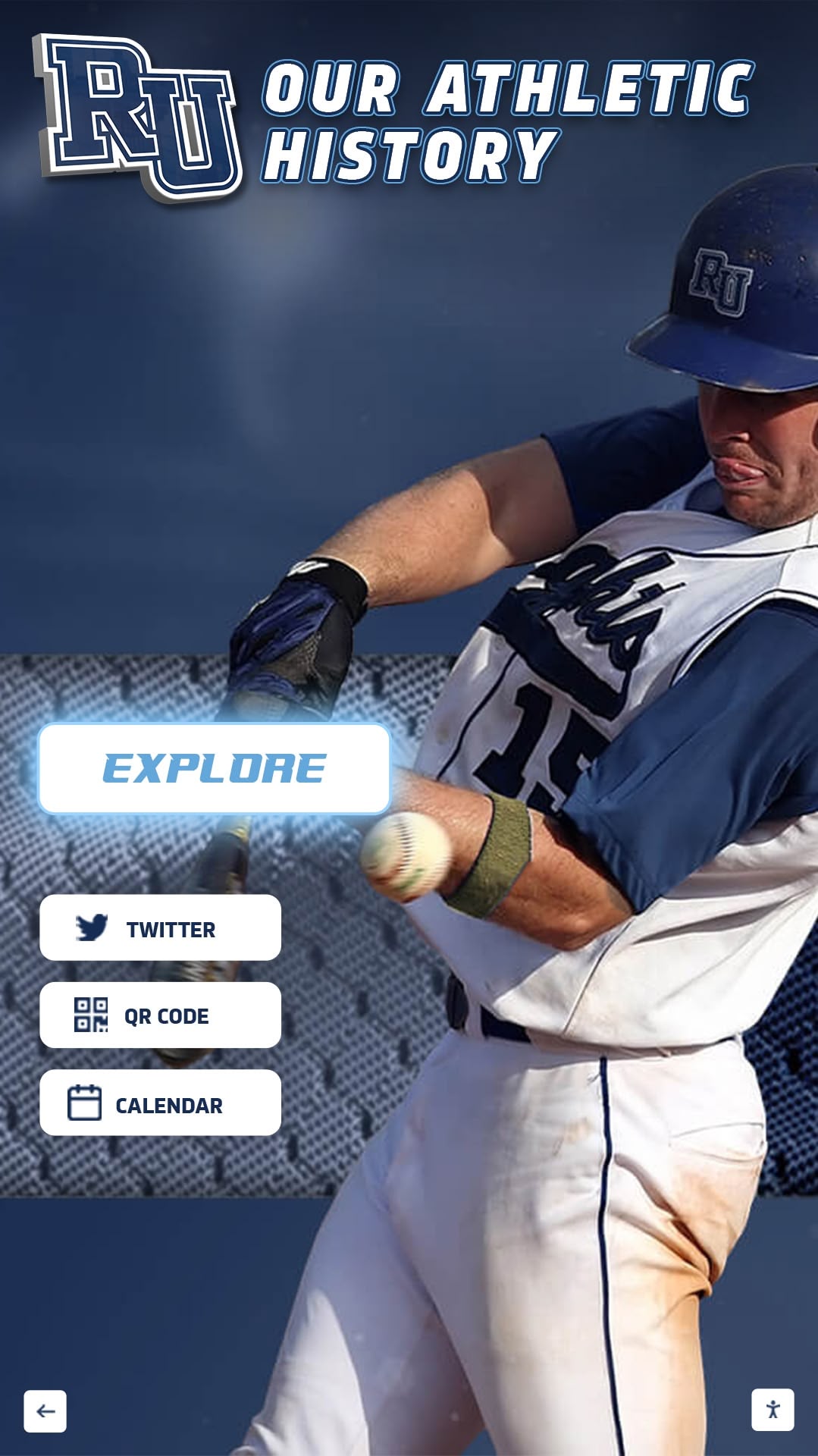
Contemporary timeline platforms combine rich media with intuitive navigation
Designing Engaging Timeline Content
Regardless of format, effective timeline content requires thoughtful design that makes history accessible, interesting, and meaningful for diverse audiences.
Visual Design Principles
Clear Visual Hierarchy: Design should guide viewers through content with clear date markers and chronological indicators, prominent headline text for major events, supporting detail text in smaller font providing context, and high-quality images serving as focal points for each entry.
Good visual hierarchy enables viewers to quickly scan timeline understanding major themes, then selectively dive deeper into events that interest them.
Consistent Visual Identity: Maintain consistent design elements across your entire timeline including color palette reflecting institutional brand colors, typography using fonts aligned with school visual identity, photo treatment (consistent borders, shadows, or styling), and layout templates creating predictable structure across different time periods.
Consistency creates professional appearance while making timeline feel cohesive across potentially diverse historical content.
Strategic Use of White Space: Resist temptation to cram every available space with content. Generous white space around timeline elements makes content more readable, creates visual breathing room preventing overwhelming density, directs attention to most important elements, and creates sophisticated, professional aesthetic.
Cluttered timeline designs overwhelm viewers and ironically reduce engagement despite containing more content than cleaner designs.
Accessibility Considerations: Ensure timeline is accessible to visitors with diverse abilities including sufficient color contrast for readable text, alternative text descriptions for images, scalable text that can be enlarged without breaking layouts, keyboard navigation options for those who can’t use mice or touchscreens, and screen reader compatibility for visually impaired visitors.
Digital wall of fame accessibility provides detailed guidance on creating inclusive historical displays.
Writing Compelling Timeline Entries
Lead with Most Interesting Information: Timeline entries compete for limited attention. Strong entries lead with most compelling facts:
❌ Weak: “In 1965, the school underwent significant administrative changes that would ultimately result in important academic program developments.”
✓ Strong: “1965: New Head of School Dr. James Richardson launched Advanced Placement program, making us one of first 100 schools nationwide to offer college-level coursework.”
Provide Context and Significance: Help viewers understand why events mattered rather than just listing what happened. Explain historical context, lasting impact, and connections to broader institutional story.
Use Active, Vivid Language: Make history come alive through specific details and active voice:
❌ Passive: “The gymnasium was constructed in 1958.”
✓ Active: “Community volunteers built our gymnasium in 1958, donating over 2,000 hours of labor to create what remains our athletic heart.”
Include Human Elements: Connect historical events to individuals whenever possible. Named people create emotional connection that abstract institutional developments often lack. Include quotes from participants when available, identify individuals in photographs by name, highlight student or faculty perspectives on major events, and connect past individuals to their later achievements.
Balance Celebration with Honesty: Effective timelines acknowledge institutional history honestly, including challenges, failures, and difficult periods alongside achievements. This authenticity creates credibility while demonstrating institutional values and learning capacity.

Compelling visual presentation and narrative writing bring historical content to life
Implementing Your School History Timeline
Moving from planning to implementation requires systematic approach ensuring successful launch and ongoing maintenance.
Timeline Implementation Process
Phase 1: Foundation (Months 1-2)
- Finalize timeline scope, objectives, and organizational approach
- Complete team formation with clear roles and responsibilities
- Establish project timeline with specific milestones
- Determine budget and secure necessary funding
- Select display format and technology platform
Phase 2: Content Development (Months 2-5)
- Conduct comprehensive historical research across all identified sources
- Digitize historical photos and documents requiring preservation
- Interview longtime community members for oral history content
- Write timeline entries following established guidelines and quality standards
- Gather or create visual elements including photos, graphics, and supporting materials
- Organize content according to chosen timeline structure
- Edit and refine all content ensuring accuracy, consistency, and engagement
For schools digitizing substantial historical materials, professional digitization services ensure proper preservation while creating high-quality digital assets.
Phase 3: Design and Development (Months 5-7)
- Create visual design following established design principles
- Develop or configure chosen timeline platform (physical or digital)
- Build timeline structure and navigation systems
- Input content into timeline format
- Integrate multimedia elements including photos, videos, and audio
- Test thoroughly on all intended devices or displays
- Refine based on testing feedback
Phase 4: Launch and Promotion (Month 7-8)
- Plan timeline unveiling event creating excitement and awareness
- Prepare communications for different audiences (students, parents, alumni, staff)
- Train staff on timeline features and how to promote to visitors
- Create promotional materials highlighting timeline availability
- Generate press coverage celebrating timeline launch
- Monitor early usage and gather initial feedback
Phase 5: Ongoing Management (Ongoing)
- Add new historical content as events occur
- Incorporate user submissions and crowdsourced content
- Correct errors or add missing information as identified
- Refresh featured content periodically to maintain interest
- Track engagement metrics and adjust based on usage patterns
- Conduct annual reviews assessing timeline effectiveness and identifying improvement opportunities
Selecting Technology Platforms
For digital timeline implementations, platform selection significantly impacts success. Key evaluation criteria include:
Content Management Ease: How difficult is it to add, edit, or remove timeline content? Look for intuitive interfaces that non-technical staff can use without extensive training. Cloud-based content management enabling remote updates is particularly valuable.
Customization Flexibility: Can platform be customized to match your institutional brand, organizational preferences, and specific content needs? Template-based systems with limited customization create generic appearances, while flexible platforms enable unique expressions of your school’s identity.
Scalability: Will platform accommodate your content as timeline grows? Ensure system handles hundreds or thousands of entries without performance degradation, supports high-resolution images and video content, and allows organizational restructuring as content expands.
Integration Capabilities: Does platform integrate with your existing systems including alumni database, school website, social media platforms, and analytics tools? Integration reduces duplicate data entry and enables more sophisticated functionality.
Support and Training: What support does vendor provide for implementation, staff training, technical troubleshooting, and ongoing optimization? Comprehensive support ensures successful launch and sustainable long-term management.
Analytics and Reporting: Can you track how people interact with timeline content? Understanding which content generates most interest, how long visitors engage, and what search terms they use informs content strategy and demonstrates impact.
Solutions like Rocket Alumni Solutions provide comprehensive platforms specifically designed for educational institutions, combining intuitive content management, flexible customization, robust analytics, and excellent support.
For schools exploring digital timeline options, touchscreen software selection guides provide detailed evaluation frameworks.

Intuitive content management ensures sustainable timeline maintenance

Strategic placement maximizes timeline visibility and engagement
Creative Timeline Applications and Enhancements
Beyond basic chronological presentation, creative approaches make school history timelines more engaging and impactful.
Themed Timeline Spotlights
Rather than treating timeline as static display, rotate featured content highlighting different themes:
“This Month in History”: Feature historical events that occurred during current calendar month, creating timely connections between past and present. This works particularly well for digital displays that can automatically update monthly.
Milestone Anniversaries: Highlight significant anniversaries of major events. 25th, 50th, 75th, or 100th anniversaries of building dedications, program launches, or memorable achievements create natural celebration and storytelling opportunities.
Theme Months: Align timeline content with awareness months or school initiatives. During Black History Month, highlight contributions of Black students, faculty, and leaders throughout your school’s history. During arts season, focus on performing arts milestones and distinguished arts alumni.
Interactive Timeline Activities
Transform passive timeline viewing into active engagement:
Timeline Scavenger Hunts: Create educational activities where students must explore timeline to answer questions about school history. This works particularly well during orientation, homecoming, or special heritage celebrations.
Student Research Projects: Assign students to research specific time periods, events, or themes in school history, then create content that gets added to official timeline. This develops research skills while expanding timeline comprehensively.
Alumni Memory Sharing: During reunions, encourage alumni to share their own memories and photos from their school years that complement official timeline. Display user-contributed content alongside curated institutional history.
Comparative Timeline Exercises: Create parallel timelines showing your school’s development alongside local, national, or world history. This context helps viewers understand how your institution evolved within broader historical circumstances.
Connecting Timelines to Current School Life
Make historical content relevant to current community by drawing explicit connections:
Tradition Origins: When current students participate in traditions, explain historical origins through timeline content. Understanding that homecoming bonfire tradition started in 1952, or learning why specific colors were chosen, creates deeper appreciation.
Facility Histories: As community members use buildings and spaces daily, share stories about their construction, naming origins, and significant events that occurred there. QR codes in physical locations can link to digital timeline content about those specific spaces.
Program Evolution: Show how current programs evolved over time. Today’s robust STEM offerings might have started as single science course in 1960s. Athletic programs, arts offerings, and academic departments all have development stories worth telling.
For schools integrating timeline content with broader recognition programs, best practices for school halls of fame demonstrate effective content integration strategies.

Integrating timeline with recognition programs tells complete institutional story
Maintaining and Growing Your Timeline
Creating initial timeline is substantial effort, but long-term value depends on ongoing maintenance and enhancement.
Establishing Update Protocols
Assign Clear Responsibility: Designate specific individuals responsible for timeline maintenance. Without clear ownership, timelines quickly become outdated as everyone assumes someone else is handling updates.
Create Annual Review Schedule: Establish regular intervals (quarterly or annually) for reviewing and updating timeline content, adding recent events now appropriately historical, correcting any errors identified, refreshing featured content, and assessing overall effectiveness.
Develop Submission Process: Create easy methods for community members to suggest timeline additions, corrections, or enhancements. This might include online submission form, dedicated email address, or direct upload capability for appropriate users.
Set Quality Standards: Maintain consistent standards for new content including minimum image resolution requirements, writing style guidelines, historical accuracy verification processes, and approval workflows before publication.
Continuous Content Enhancement
Add Depth to Existing Entries: As you discover new information, enhance existing timeline entries rather than only adding new ones. Finding additional photos from 1975 graduation or discovering oral history interview with 1980s teacher creates opportunities to enrich existing content.
Digitize Additional Historical Materials: Timeline development often identifies valuable historical materials not yet digitized. Prioritize ongoing digitization to expand accessible historical content continuously.
Collect Ongoing Oral Histories: Identify and interview community members while their institutional memories are still accessible. Today’s recent retirees will be unavailable for interviews in future decades, making ongoing oral history collection time-sensitive.
Respond to Usage Analytics: Digital timeline platforms provide data about which content generates most interest. Use this information to create more content on popular topics, improve visibility of valuable but overlooked content, and understand audience interests informing future timeline development.
Avoiding Common Timeline Mistakes
Recency Bias: It’s natural to focus on recent decades where documentation is abundant and memories are fresh, but this creates unbalanced timelines that over-represent recent history while giving short shrift to earlier eras. Deliberately ensure balanced coverage across your institution’s entire history.
Overlooking Diverse Achievements: Traditional timelines often over-emphasize athletic achievements while under-representing academic, arts, service, or other accomplishments. Consciously balance recognition across achievement types reflecting full scope of institutional excellence.
Neglecting Maintenance: Initial timeline launches often receive substantial attention and resources, but maintenance becomes afterthought once excitement wanes. Timeline’s long-term value depends on commitment to ongoing updates and enhancements.
Inadequate Accessibility: Failing to consider accessibility from the outset creates barriers for community members with disabilities. Building in accessibility features is far easier than retrofitting later.
Ignoring User Feedback: Community members often identify errors, gaps, or improvement opportunities. Establish processes for receiving and responding to feedback rather than treating timeline as finished product.
For schools seeking comprehensive solutions that address these common challenges, modern digital recognition platforms provide integrated tools specifically designed for sustainable timeline management.
Measuring Timeline Success
Demonstrate timeline value and identify improvement opportunities through systematic evaluation:
Quantitative Metrics
Physical Timeline Engagement: For displays in physical locations, observe and track foot traffic in timeline location, average viewing duration, photography of timeline by visitors, and questions or conversations about timeline content.
Digital Timeline Analytics: Online and interactive digital timelines enable precise measurement including unique visitors and page views, time spent exploring timeline content, search queries and filter usage patterns, most viewed timeline entries and categories, geographic distribution of online timeline visitors, device types used to access content, and social shares and engagement with timeline content.
Contribution Volume: Track community engagement through number of user-submitted photos or memories, corrections or additions suggested by community members, oral history interview participants, and crowdsourced historical information provided.
Qualitative Assessment
Stakeholder Feedback: Gather perspectives from diverse constituencies including student understanding and appreciation of school history, alumni satisfaction with how their eras are represented, parent and prospective family impressions during tours, faculty and staff perceptions of timeline quality and usefulness, and donor interest in supporting timeline enhancements or expansions.
Tour Guide Observations: Campus tour guides interact with timelines regularly with prospective families. Their observations about which content generates most interest, what questions timeline prompts, and how effectively timeline supports recruitment goals provide valuable insights.
Integration Success: Assess how effectively timeline integrates with broader institutional priorities including use in curriculum and educational programs, reference in advancement and fundraising materials, inclusion in anniversary or special event celebrations, and connection to broader recognition and heritage programs.
Return on Investment
Calculate timeline ROI by considering both direct and indirect benefits:
Direct Benefits: Enhanced alumni engagement measurable through reunion attendance or giving, improved recruitment outcomes when tours consistently reference timeline, fundraising specifically connected to heritage preservation or timeline sponsorship, and reduced administrative burden when digital timelines replace manual updates to physical displays.
Indirect Benefits: Strengthened school culture and community pride, preserved institutional knowledge preventing loss of historical memory, positive publicity and community recognition, and differentiation from competitor institutions in recruitment environments.
While some benefits resist precise quantification, systematic tracking demonstrates timeline value and justifies continued investment in enhancement and maintenance.
Conclusion: Creating Living Historical Records
Effective school history timelines are never truly finished—they’re living historical records that grow and evolve alongside your institution. The best timelines balance comprehensive historical preservation with engaging presentation that makes heritage accessible and meaningful for current and future community members.
Whether you choose traditional physical displays, cutting-edge interactive digital installations, online timeline portals, or ideally some combination of these approaches, the key is creating systems that honor your institutional heritage while connecting past excellence to present community and future aspiration.
Students who understand their school’s rich history develop stronger identities and sense of belonging. Alumni who see their experiences preserved and celebrated maintain lifelong connections to institutions that shaped them. Prospective families evaluating schools recognize institutions with well-presented heritage as stable, values-driven organizations worthy of their trust.
Modern digital timeline solutions like those from Rocket Alumni Solutions make comprehensive, engaging, and accessible historical presentation achievable for schools of all sizes and resource levels. These platforms address the limitations of traditional timeline displays—space constraints, expensive updates, accessibility barriers—while creating new possibilities for interactive exploration, multimedia storytelling, and ongoing community engagement.
Ready to Bring Your School's History to Life?
Discover how Rocket Alumni Solutions can help you create compelling, interactive timeline displays that preserve your institutional legacy while engaging current and future community members. Our comprehensive platforms combine intuitive content management with powerful display capabilities designed specifically for educational institutions.
Explore Timeline SolutionsYour school’s history is unique and valuable. Every student who walked your hallways, every educator who dedicated their career to your mission, every family who entrusted their children to your care, and every achievement accomplished under your banner deserves to be remembered and celebrated. A well-crafted timeline ensures those stories remain accessible and inspiring for generations to come, connecting past excellence with present community and future potential.
The time to preserve your institutional heritage is now—before additional historical knowledge is lost, before another generation of alumni loses touch with their school experiences, and before opportunities to strengthen community through shared historical understanding slip away. Whether you’re celebrating a major milestone anniversary or simply recognize that your school’s story deserves better preservation and presentation, comprehensive timeline solutions make it possible to honor the past while inspiring the future.





















