A school spirit display is more than a coat of paint or a trophy in a glass case. Done well, it communicates what your program values, motivates athletes who pass through the corridor every day, and gives alumni a reason to feel proud when they walk back through the door. Done poorly — or not done at all — it leaves the most visible real estate in your building blank at exactly the moment your school community is looking for a sense of identity.
This guide covers every major zone where school spirit displays live: gyms, main lobbies, and athletic hallways. It defines what each space should include, explains how physical and digital elements work together, and walks through a practical six-step planning process so you can move from concept to installed display without the common missteps.
Whether you are an athletic director renovating a corridor, a principal planning a lobby refresh, or a booster committee building the case for a new recognition wall, the decisions you make about your school spirit display ripple outward for years. The displays students see every day shape what they aspire to. The displays alumni see on their first return visit tell them whether their legacy was worth preserving.

A coordinated hallway mural paired with a digital screen creates a continuous spirit environment that celebrates both the school's identity and its athletic history
What Belongs in a School Spirit Display
Before choosing colors, screen sizes, or mural vendors, define what your display is actually trying to communicate. Most effective school spirit displays include content from five categories.
1. Mascot Identity and Visual Brand
Your mascot and school colors are the foundation. Graphics, murals, and signage that lead with a strong mascot image establish immediate visual identity in a gym, lobby, or hallway. This is the backdrop against which every other recognition element reads. Consistent use of school colors, typography, and mascot imagery across all zones creates a unified environment rather than a collection of unrelated pieces.
2. Championship and Award Recognition
Team championships — conference titles, regional championships, state plaques — represent the competitive history your current athletes are inheriting. Displaying them prominently sets expectations and establishes tradition. Individual award recognition (all-state selections, player-of-the-year honors, academic-athletic distinctions) broadens the scope beyond team victories to honor individual excellence.
3. Records Boards
A school sports display board dedicated to athletic records does something unique: it creates a live competitive goal for every athlete currently in your program. A junior cross-country runner who sees the school record posted in the hallway every day before practice has a concrete target. Records boards belong in sport-specific corridors or near the competition venues they reference — the swim record board near the pool, the track record board near the fieldhouse.
4. Team and Alumni History
Decades of team photos, letterwinner rolls, coaching legacies, and alumni achievements form the connective tissue between generations of student-athletes. This content answers the question every incoming freshman quietly asks: “What does it mean to be part of this program?” School mural designs incorporating hallway and gym spaces can visually anchor this historical layer in ways that static plaques alone cannot.
5. Live, Current-Year Recognition
Displays that only look backward feel like museums. Reserve a section of every major zone for current-season content: this year’s roster, in-season record, upcoming schedule, and most recent game results. Digital screens make this easy to update; physical boards require a dedicated person and a system for weekly refresh.
School Spirit Displays for Gyms
The gym is where competition happens and where community gathers. It should look the part.
Gym wall graphics are the highest-impact single investment most schools can make. A full-wall mural behind the home bleachers featuring the school mascot, name, and colors sets the tone for every home game. Side walls work well for championship banners, retired jersey numbers, and milestone recognition that does not need frequent updating.
Overhead banners — championships by year and sport — create visual tradition above the playing floor. They are visible from anywhere in the building and are the first thing a visiting team sees when they walk in. Keep them uniform in size and format; mismatched banners undermine the effect.
Bleacher-area displays and corridor exits from the gym are prime locations for sport-specific records boards. Swimmers exiting the natatorium, wrestlers leaving the mat room, and basketball players entering the main gym all pass through short corridor sections where a focused display — “All-Time Points Leaders” or “State Wrestling Qualifiers Since 1985” — reads quickly and lands with impact.
For gyms with digital infrastructure, a screen in the lobby just outside the gym entrance can run current standings, highlight videos, and recognition content between events. Digital signage examples for school gyms and event spaces show the range of content formats that work in high-traffic athletic environments.
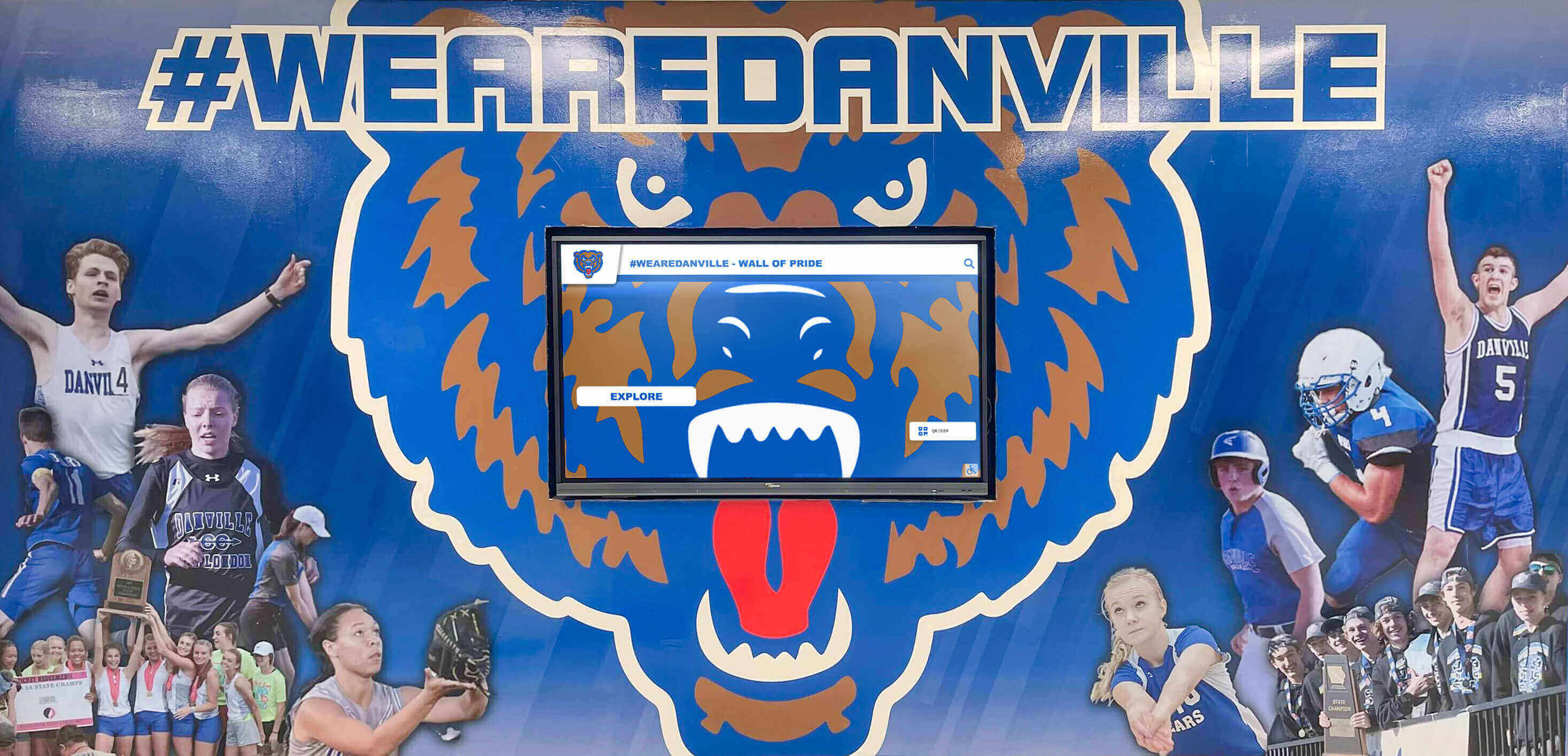
Gym spirit displays are most effective when mascot murals, championship recognition, and digital content work in the same visual zone
Lobby Spirit Displays
The main lobby is the school’s first impression for every visitor — parents, recruits, opposing coaches, and district officials. It is also the one space where everyone in the building passes through. A lobby that communicates nothing about the school’s culture is a missed opportunity.
Lobby spirit displays typically anchor around one of two formats: a physical wall of honor with plaques, shields, or framed recognition panels, or a combined physical-digital installation where traditional elements share space with one or two interactive screens.
A wall of honor in the lobby should lead with the school’s most significant achievements. State championship plaques, athletic hall of fame inductees, and retired numbers or jerseys communicate the program’s competitive ceiling. Touchscreen kiosk displays for school lobbies and hallways provide a useful framework for understanding how interactive elements extend what a physical wall can accomplish without replacing it.
Donor recognition and community heroes fit naturally in lobby spaces. Schools that have invested in facility upgrades, scholarship funds, or program support from community donors can acknowledge those contributions in the lobby without pulling that content into sport-specific hallways where athletic achievement should lead.
The lobby is also a strong location for a digital touchscreen that functions as an exploratory archive — visitors who are waiting, tour groups, and curious alumni can browse athlete profiles, team histories, and year-by-year records without needing staff assistance. Interactive display technology transforming school lobbies and common spaces documents the engagement patterns that emerge when touchscreen content is well-organized and placed at natural gathering points.
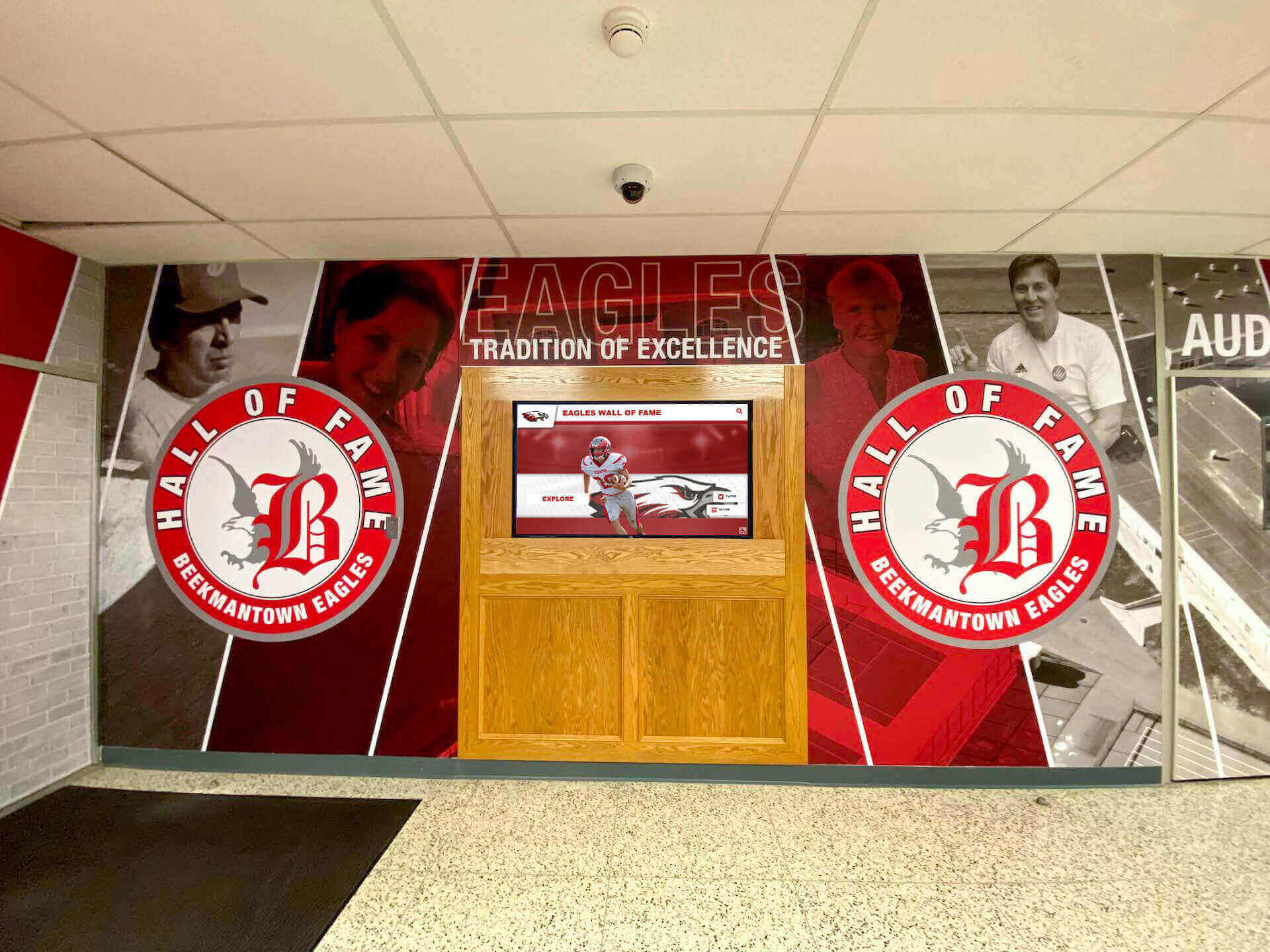
A lobby hall of fame mural provides an immediate identity statement for every visitor entering the building — the most valuable display real estate in any school
Athletic Hallway Spirit Displays
Athletic hallways connect practice facilities, locker rooms, classrooms, and competition venues. Athletes and coaches use them every day. Visitors, recruits, and parents use them on event days. This makes them the most consistently viewed display real estate in most school buildings.
Corridor design principles for athletic hallways:
- Zone by sport. Assign hallway sections to specific programs. The wrestling team’s section covers mat history, state qualifiers, and season records. The girls’ soccer section covers tournament runs, all-state players, and season wins milestones. This makes the hallway readable — you know exactly what you are looking at and why it belongs there.
- Lead with murals, follow with recognition. A sport-specific mural or graphic wall creates the visual anchor; plaques, record boards, and team photo frames fill in the detail below or alongside it. The mural stops foot traffic; the recognition content rewards the person who stops.
- Keep records boards current. A records board last updated in 2018 tells current athletes that no one is watching. Assign a specific staff member to update records boards within two weeks of a record being broken.
- Use hallway ends and alcoves. The end of a hallway, a widened alcove outside a locker room, or a nook beside a trophy case are underutilized display zones. A single well-mounted screen or a framed championship gallery fills these spaces effectively.
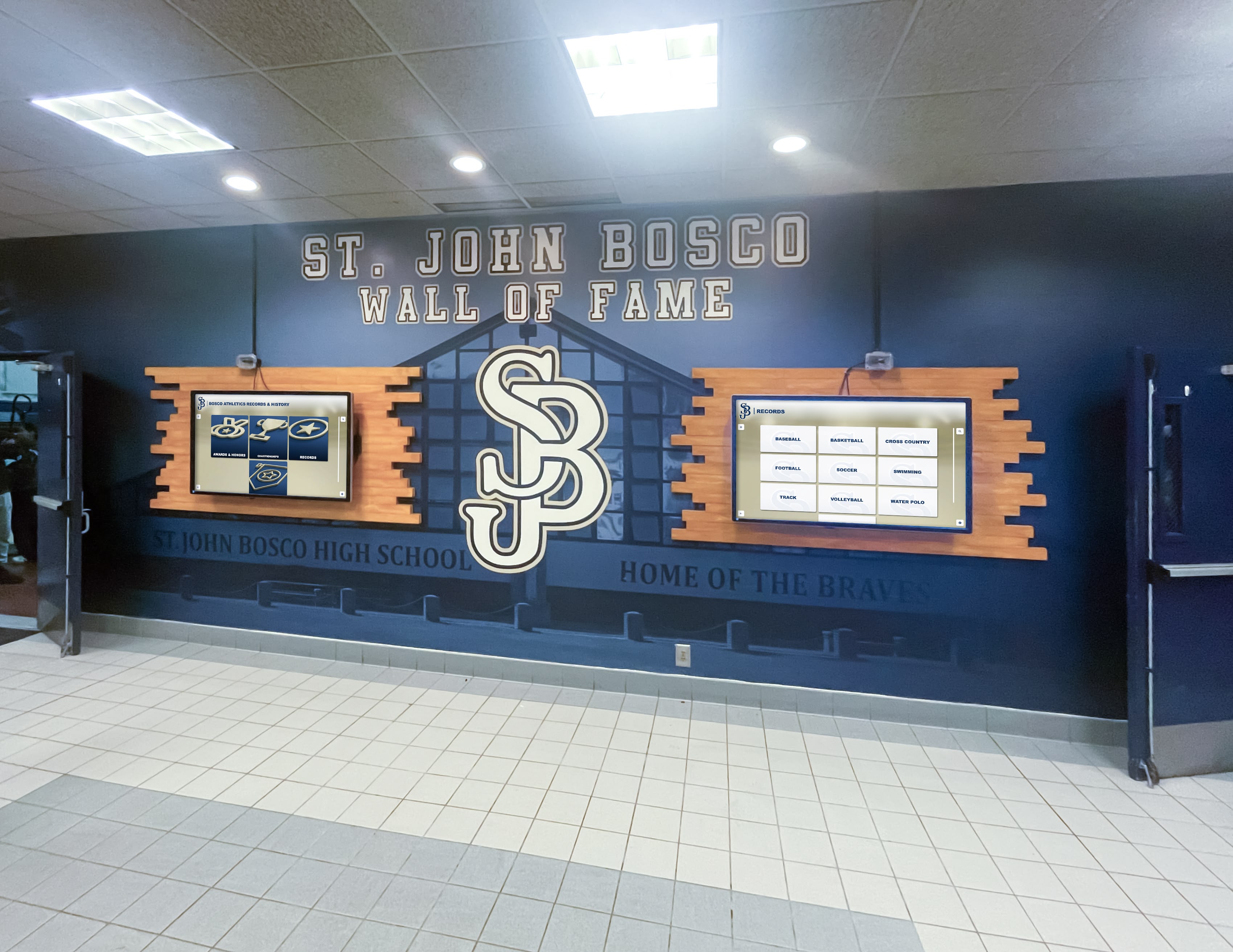
Dual-screen installations in athletic hallways allow schools to run different content simultaneously — current season on one screen, archival recognition on the other
School Sports Display Boards: Records and Recognition
A dedicated school sports display board for athletic records is one of the highest-retention spirit elements you can install. Athletes remember whether their name is on it. Alumni look for their times and stats when they return. Coaches use records as motivational benchmarks in pre-season talks.
What to include on a school sports display board:
- Top all-time performances in each measured category (career points, season rushing yards, single-game rebounds, career stolen bases, etc.)
- Year the record was set and the athlete’s name and graduating class
- Current season leaders alongside all-time leaders when space allows
- A clear visual system distinguishing records that still stand from records set in different competitive eras
Physical painted or printed records boards look sharp when new but require physical replacement when records fall. For programs with high annual update frequency — track and field, swimming, and weightlifting naturally generate records every year — digital records boards eliminate the cost and delay of physical reprints while allowing full historical depth. High school spirit week daily events and recognition rankings illustrates how athletic recognition connects to the broader spirit culture that record displays reinforce year-round.

A sport-specific records board paired with a hallway mural creates a destination display that athletes pass every day on the way to practice
6-Step Planning Process for Your School Spirit Display
The following process applies whether you are starting from scratch, refreshing an existing installation, or expanding into a new zone. It is designed to produce a scope your facilities team can execute and your budget committee can approve.
Step 1: Audit Your Current Space
Walk every display zone with a camera and a measuring tape. Document what you have: existing murals, plaques, trophy cases, records boards, screens, and any recognition content currently installed. Note what is accurate, what is outdated, and what is missing. This audit takes two to three hours and eliminates guesswork in every subsequent conversation with vendors, contractors, or administrators.
Step 2: Define Your Goals by Zone
Lobby, gym, and hallway displays serve different audiences and different purposes. Write one sentence per zone: “The lobby display should communicate our championship history to first-time visitors.” “The hallway display should motivate current athletes by making records visible daily.” Clear goal statements prevent scope creep and help you evaluate every design decision that follows.
Step 3: Inventory Your Content
List every piece of recognition content you currently have and every piece you want to create. Championship trophies, team photos, all-state lists, records data, coaching tenure information, alumni achievement — get it all in a spreadsheet before you design anything. Content gaps discovered during installation are expensive to fill under deadline.
Step 4: Choose Your Display Formats
For each zone, decide which combination of formats fits your goals and budget:
- Physical murals and wall graphics — highest visual impact, lowest ongoing cost, no technology dependencies
- Physical plaques, shields, and trophy cases — permanent, prestigious, require physical updates as content changes
- Printed records boards — clear and readable, require replacement when records break
- Digital screens (non-interactive) — updatable content without touchscreen costs, good for current-season information
- Interactive touchscreens — full archival depth, searchable, accessible, highest initial investment
Most effective installations combine at least two formats. A mural with integrated digital screen gives you identity plus depth. A trophy case with a records board gives you hardware plus performance context.
Step 5: Plan for Ongoing Updates
A school spirit display that is not updated loses credibility. Before finalizing your design, identify who is responsible for each content category, how often updates occur, and what process a new coach or administrator would follow in year three. Digital systems with cloud-based content management make this significantly easier than physical-only installations. Pep rally ideas and activities that boost school spirit points to how live event programming and digital display content reinforce each other when both are updated regularly.
Step 6: Sequence the Installation
Most spirit display projects benefit from phasing. Start with the highest-visibility zone — typically the lobby or main gym entrance — where an early win builds internal support and demonstrates what the full project will look like. Use that installation to refine your content templates and vendor relationships before expanding into hallways and secondary spaces.
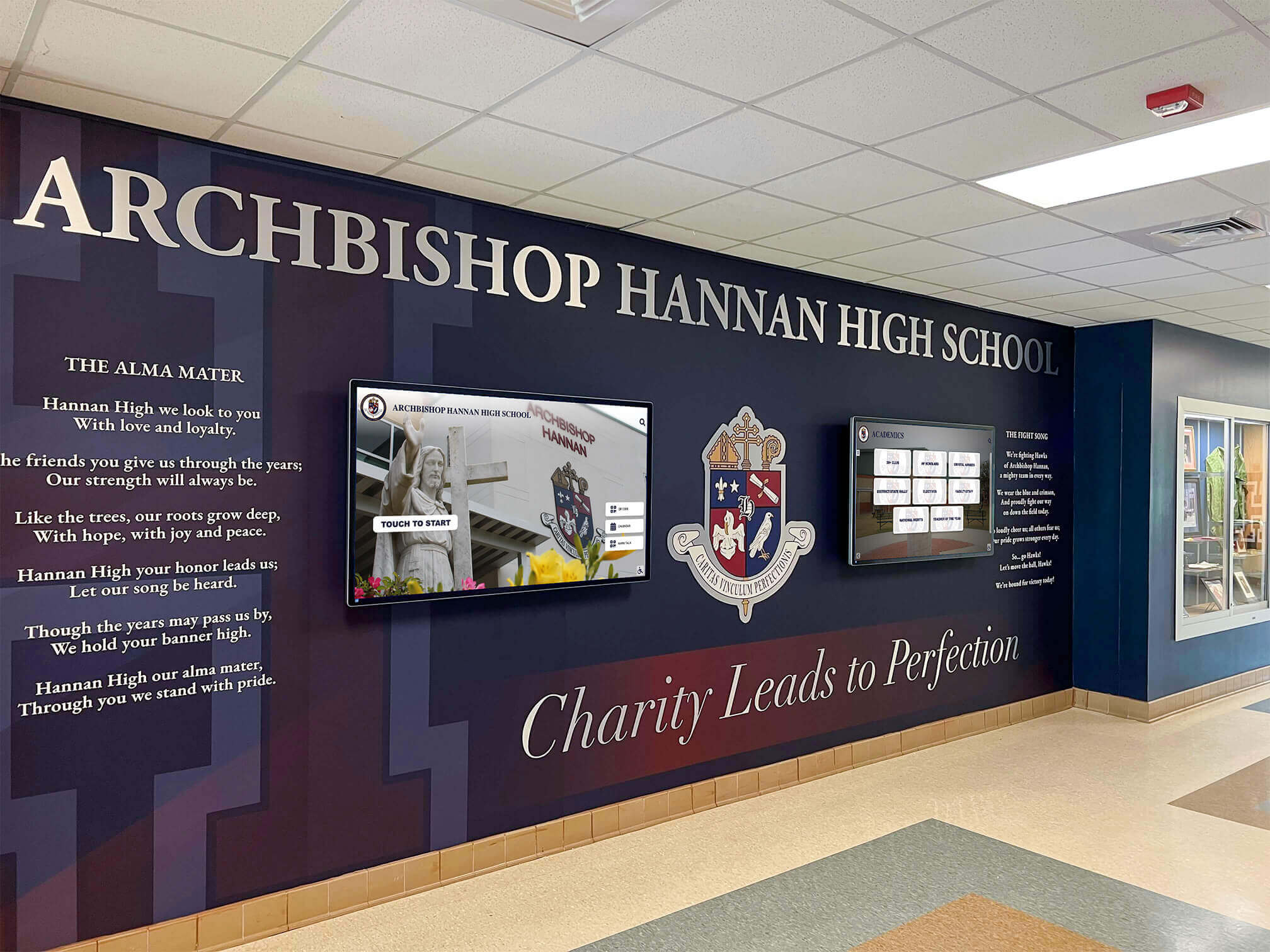
Phased spirit display projects often begin in the main lobby, where a mural-plus-screen installation demonstrates the full vision before corridor and gym phases begin
Touchscreen and Digital Spirit Displays: Going Beyond the Wall
Physical displays define identity and create atmosphere. Digital touchscreens add searchable depth that physical walls cannot match.
A single interactive touchscreen in a lobby or main hallway can hold every athlete profile going back to the program’s founding, complete with sport, position, career statistics, and year of graduation. It can show championship rosters with full team photos rather than a single engraved plaque. It can surface a letterwinner roll that would require forty linear feet of wall space to display physically. And it updates instantly when a new record falls or a new class of hall of fame inductees is selected.
For programs building toward spirit week events and community engagement programming, a digital display connected to current-year content creates a natural hub. Fun pep rally games that energize trophy case pride and team spirit explores how physical trophy displays and digital recognition can anchor spirit events rather than simply hang on the wall between them.
Schools exploring what that looks like in practice — a touchscreen wall that holds the same recognition depth as decades of traditional plaques, displayed in a space no larger than a trophy case — can schedule a demo with Rocket Alumni Solutions to see the format applied to a gym lobby or athletic hallway similar to their own. Rocket builds interactive recognition systems for schools and universities, including touchscreen walls of fame, digital trophy cases, record boards, and archival displays that combine physical installation with cloud-based content management.
Spirit week programming, donor recognition, alumni engagement, and athletic achievement recognition all benefit when the digital display layer is in place. High school spirit week ideas and creative themes and spirit week activity planning guides both point to physical display environments as the backdrop that makes spirit programming land — the displays give students something to rally around rather than asking them to manufacture enthusiasm in a blank hallway.
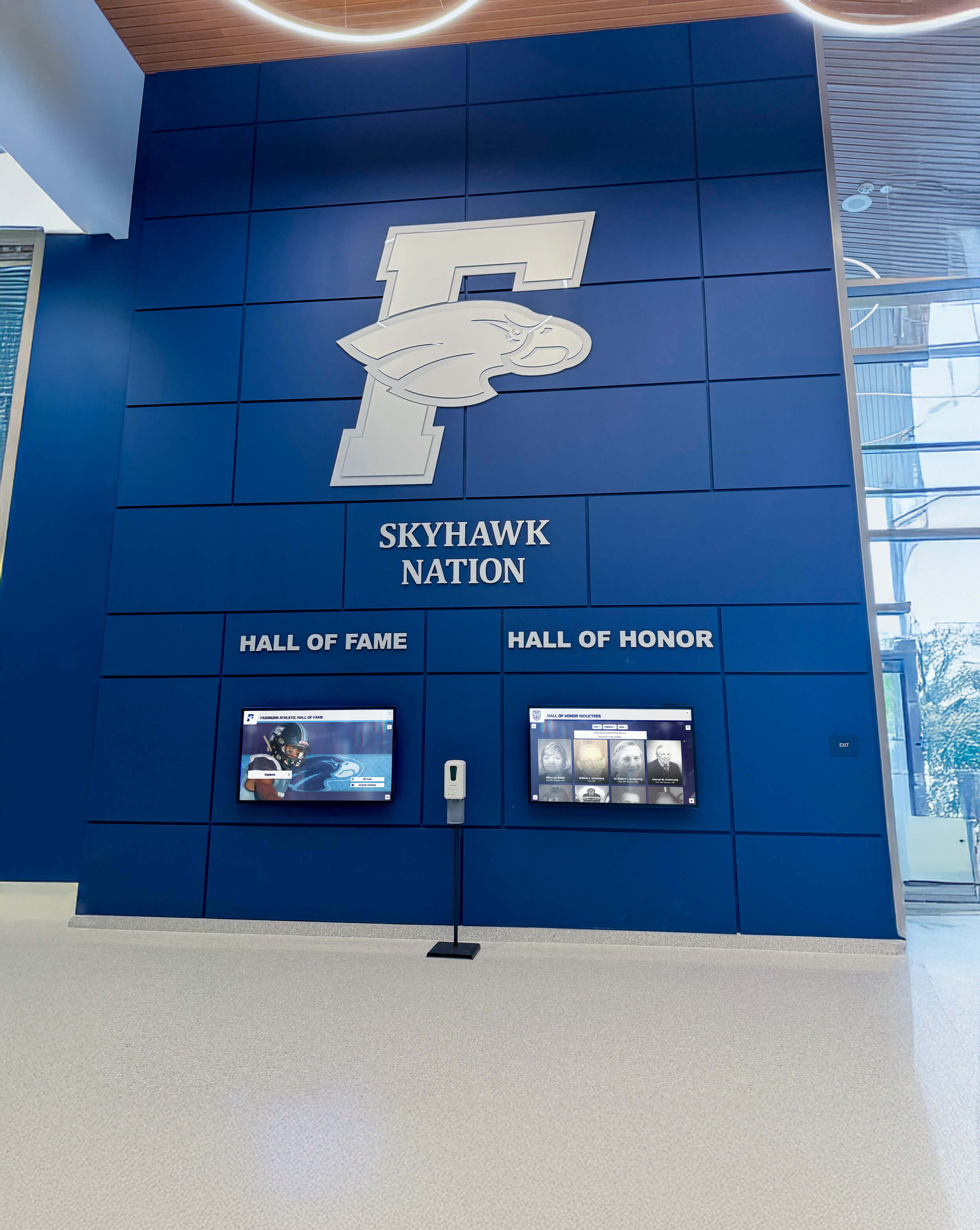
A branded hall of fame wall in the main lobby anchors the school's identity while providing a natural gathering point for alumni recognition events and spirit programming
For schools that want to extend spirit display investment into revenue-generating territory, school spirit wear online store and fundraising guides provide a framework for connecting physical recognition environments to merchandise and fundraising programs that deepen community investment.
Conclusion
A school spirit display is not a single project — it is an ongoing commitment to making achievement visible, keeping history current, and giving every student athlete a concrete answer to the question of why their program matters.
Start with the zones where your audience is largest: the lobby, the main gym entrance, the primary athletic corridor. Define what each space needs to communicate. Audit your existing content. Choose formats that match your update capacity. Phase the installation so early wins build momentum.
Physical murals, records boards, trophy cases, and digital touchscreens each have a role. The schools that get this right use all of them, assign clear ownership for each content category, and plan from the start for what the display will look like in ten years — not just at the ribbon cutting.
Schedule a demo with Rocket Alumni Solutions to see how schools are combining touchscreen recognition walls with traditional display elements to build spirit environments that hold a full program history without running out of wall space.































