Choosing the Right Software for Interactive Touchscreen Experiences
Creating engaging interactive touchscreen experiences requires the right software platform—one that balances ease of use with powerful functionality. Whether you're designing digital recognition displays for schools, wayfinding kiosks for corporate campuses, donor walls for nonprofits, or interactive exhibits for museums, selecting the appropriate software determines the success of your installation.
The interactive touchscreen software market has expanded significantly, with platforms ranging from simple digital signage tools to sophisticated content management systems designed for complex, multi-user experiences. This comprehensive guide examines the leading software solutions available in 2025, their ideal applications, key features, and how to select the platform that best meets your specific needs.
Understanding Interactive Touchscreen Software Categories
Before diving into specific platforms, understanding the different software categories helps narrow your search based on your project requirements.
Content Management Systems (CMS) for Interactive Displays
These platforms prioritize ease of content creation, organization, and updates. They typically feature:
- Drag-and-drop content editors
- Cloud-based remote management
- Template libraries
- Multi-user permission systems
- Scheduled content publishing
CMS platforms excel for applications like digital halls of fame, recognition displays, and information kiosks where content changes regularly but interactivity patterns remain consistent.
No-Code Interactive Experience Builders
These solutions allow non-technical users to create custom interactive experiences without programming knowledge. Key capabilities include:
- Visual interface designers
- Pre-built interaction patterns
- Gesture control configuration
- Multimedia integration
- Branching logic builders
No-code builders work well for museums, trade show exhibits, and retail displays requiring unique navigation structures and custom user journeys.

Enterprise Digital Signage Platforms
These robust systems manage large-scale deployments across multiple locations. They emphasize:
- Centralized fleet management
- Advanced scheduling and targeting
- Performance analytics and reporting
- Hardware agnostic compatibility
- Enterprise security features
Enterprise platforms suit organizations deploying dozens or hundreds of touchscreens across corporate campuses, retail chains, or educational institutions.
Specialized Recognition Software
Purpose-built for honoring achievements, these platforms focus on:
- Searchable profile databases
- Biographical content organization
- Timeline and historical displays
- Alumni and donor engagement
- Integration with advancement systems
Solutions like Rocket Alumni Solutions fall into this category, optimizing specifically for academic recognition programs and institutional history displays.
Top Interactive Touchscreen Software Platforms in 2025
1. Rocket Alumni Solutions – Best for Educational Recognition
Ideal Applications: Schools, universities, athletic facilities, alumni centers
Key Strengths:
- Purpose-built templates for halls of fame and donor recognition
- Intuitive content management requiring no technical expertise
- Comprehensive accessibility compliance (WCAG 2.2)
- Dual-mode functionality (physical touchscreen + web accessibility)
- Fixed annual pricing with unlimited CMS users
- Real-time engagement analytics
Pricing: Starting at $1,295 per screen annually
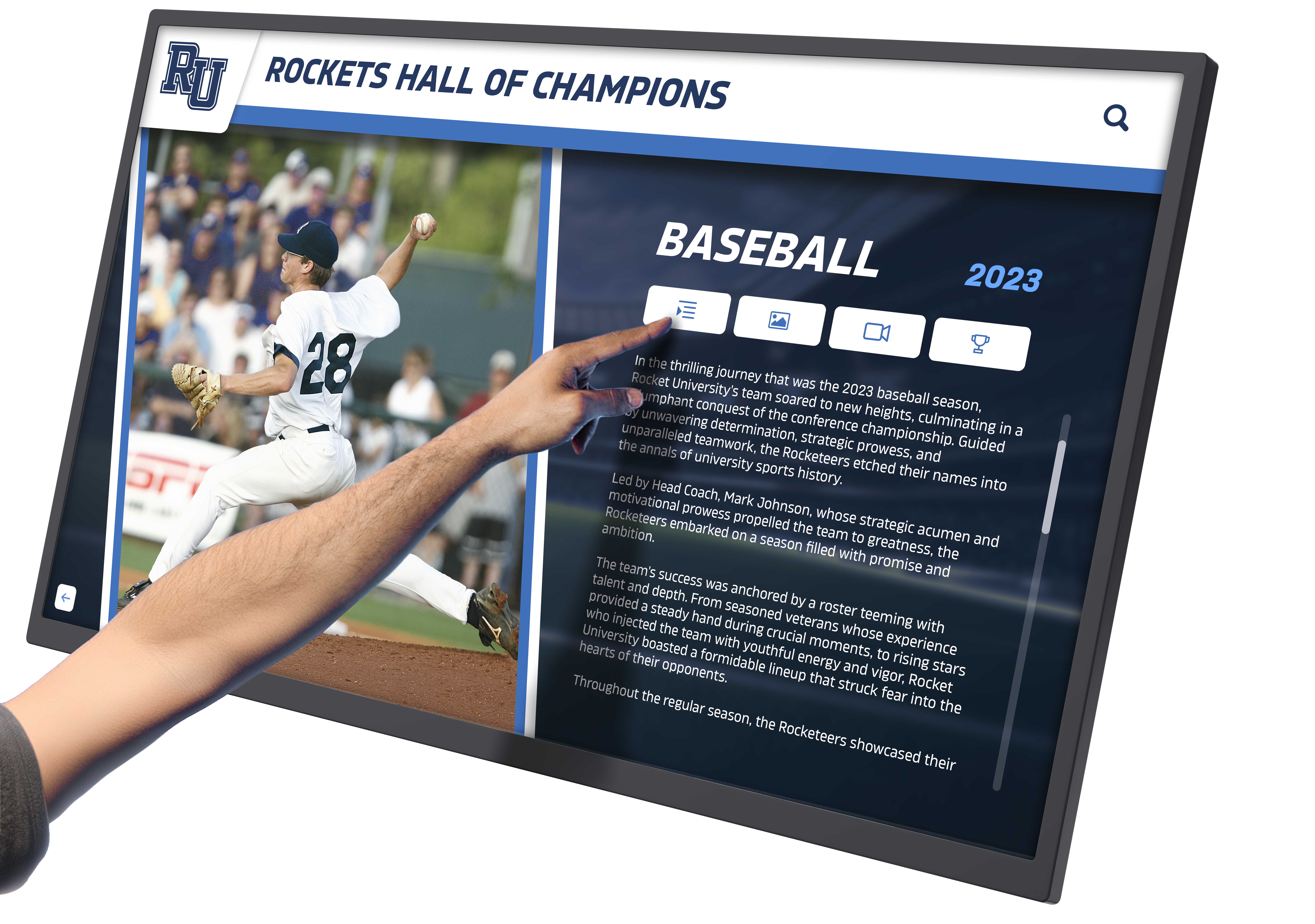
Rocket Alumni Solutions specializes in interactive alumni displays and recognition technology. The platform excels at organizing large volumes of biographical content, athletic records, and institutional history into searchable, engaging interfaces. Its cloud-based CMS allows authorized administrators to add inductees, update information, and modify layouts from any internet-connected device.
The software’s web-accessible mode extends recognition beyond physical locations, enabling alumni worldwide to explore institutional achievements. This dual presence creates powerful engagement opportunities that support advancement goals, recruitment initiatives, and community building.
2. Intuiface – Best for Multimedia Storytelling
Ideal Applications: Museums, visitor centers, trade shows, corporate experience centers
Key Strengths:
- Extensive gesture and sensor support (RFID, NFC, Kinect)
- No-code experience composer
- Multi-user collaborative editing
- Rich media integration capabilities
- Flexible deployment (cloud or on-premise)
Pricing: Starting at $1,380 per player annually
Intuiface shines when projects require immersive, sensor-driven experiences beyond standard touch interaction. The platform’s extensive gesture library and hardware compatibility make it ideal for creating memorable experiences in public spaces. However, the steeper learning curve means organizations typically need dedicated staff or consultants for initial development.
3. BrightSign – Best for Offline Reliability
Ideal Applications: Retail environments, remote locations, installations without guaranteed internet
Key Strengths:
- Robust offline operation
- Hardware-software integration
- High-performance media playback
- Stable, purpose-built players
- One-time licensing option available
Pricing: Hardware + software bundles starting at $400-$1,200
BrightSign’s dedicated media players deliver exceptional reliability, particularly valuable for installations where internet connectivity isn’t guaranteed. The platform handles high-resolution video and complex graphics smoothly, making it popular for digital storytelling in athletic programs and retail environments.
4. Scala – Best for Enterprise Deployments
Ideal Applications: Corporate campuses, healthcare systems, retail chains, government facilities
Key Strengths:
- Advanced content rules engine
- Enterprise-grade security
- Centralized multi-location management
- Detailed analytics and reporting
- Integration with enterprise systems
Pricing: Starting at $1,100 per screen annually (volume discounts available)
Scala’s sophisticated scheduling capabilities and robust device management make it the choice for large organizations deploying hundreds of interactive displays. The platform’s rules engine can deliver targeted content based on time, location, audience, or external data triggers.

5. NoviSign – Best Budget-Friendly Option
Ideal Applications: Small businesses, individual schools, limited deployments
Key Strengths:
- Affordable entry-level pricing
- Drag-and-drop widget interface
- Quick deployment capability
- Social media integration
- Responsive customer support
Pricing: Starting at $325 per screen annually
NoviSign provides essential interactive capabilities at accessible price points, making digital experiences attainable for organizations with limited budgets. While lacking some advanced features of enterprise platforms, it delivers solid performance for straightforward applications like classroom project recognition or small retail installations.
6. Rise Vision – Best for Education Pricing
Ideal Applications: K-12 schools, educational nonprofits, community organizations
Key Strengths:
- Special education pricing tiers
- Google Workspace integration
- Chromebox compatibility
- Easy-to-learn interface
- Community-contributed templates
Pricing: Starting at $360 per screen annually (education rates)
Rise Vision’s education-specific pricing and Google ecosystem integration make it popular in K-12 environments. The platform works seamlessly with Chromebox devices, reducing hardware costs while maintaining functionality for applications like student of the month displays and daily announcements.
7. Yodeck – Best for Raspberry Pi Deployments
Ideal Applications: Budget-conscious installations, tech-savvy organizations, pilot projects
Key Strengths:
- Free tier available
- Raspberry Pi compatibility
- Cloud-based management
- Simple content scheduling
- API access
Pricing: Free for single screen; paid plans start at $7.99/month per screen
Yodeck’s support for Raspberry Pi hardware dramatically reduces deployment costs, making it attractive for organizations experimenting with interactive displays or implementing pilot programs before larger commitments.
Essential Features to Evaluate
When assessing interactive touchscreen software platforms, prioritize these critical capabilities:
Content Management Capabilities
Ease of Updates: Can non-technical staff modify content without developer assistance?
Remote Administration: Is the system accessible from any location for updates?
Version Control: Can you track changes and revert if needed?
Asset Management: How efficiently does the platform organize photos, videos, and documents?
For recognition programs highlighting famous alumni, seamless content management proves essential as inductees and achievements accumulate over time.

Interactivity and User Experience
Touch Responsiveness: Does the interface respond quickly and accurately to touch input?
Navigation Logic: Can users intuitively find information without training?
Search Functionality: How robust are filtering and search capabilities?
Gesture Support: Does the platform support multi-touch, pinch-to-zoom, and swipe gestures?
Applications like digital trophy walls require intuitive navigation to help visitors quickly locate specific athletes, teams, or seasons.
Hardware Compatibility
Operating System Support: Does the software run on Windows, Android, Linux, or proprietary hardware?
Display Flexibility: Can it adapt to various screen sizes and orientations?
Peripheral Integration: Does it support additional hardware like printers, card readers, or cameras?
Hardware Agnostic: Can you use existing displays or must you purchase specific equipment?
Understanding hardware requirements early prevents compatibility issues during implementation.
Accessibility and Compliance
ADA Compliance: Does the interface meet accessibility standards for users with disabilities?
Screen Reader Support: Can visually impaired users access content?
Adjustable Controls: Are text size, contrast, and interaction timers customizable?
Language Support: Does the platform accommodate multilingual content?
Comprehensive accessibility ensures your digital recognition displays serve all community members regardless of ability.
Analytics and Reporting
Engagement Metrics: Can you track which content receives the most interaction?
Dwell Time: Does the system measure how long visitors engage?
Popular Searches: Can you identify what information users seek?
Usage Patterns: Does reporting reveal peak usage times and navigation paths?
Analytics help optimize content strategy and demonstrate ROI for stakeholders.
Integration Capabilities
Database Connections: Can the software integrate with existing data sources?
API Availability: Does the platform offer APIs for custom integrations?
Social Media: Can content connect with institutional social channels?
Third-Party Services: Does it integrate with CRMs, payment processors, or authentication systems?
Integration streamlines workflows and eliminates redundant data entry, particularly valuable for donor recognition walls synchronized with fundraising databases.
Software Selection Framework
Follow this systematic approach to identify the optimal platform for your needs:
Step 1: Define Your Primary Use Case
Clarify exactly what you’re creating:
- Recognition and History: Alumni halls of fame, donor walls, athletic achievements
- Wayfinding: Building directories, campus navigation, facility maps
- Information Delivery: Public announcements, program details, event calendars
- Interactive Exhibits: Museum displays, educational experiences, storytelling
- Commerce: Product showcases, self-service ordering, catalog browsing
Your primary application significantly influences which software category best serves your needs.

Step 2: Assess Technical Resources
Evaluate your team’s capabilities honestly:
- Can staff dedicate time to learning new software?
- Do you have in-house design capabilities?
- Will you maintain content internally or require ongoing support?
- Is IT available for installation and troubleshooting?
Organizations without dedicated technical staff benefit most from platforms like Rocket Alumni Solutions with intuitive interfaces and comprehensive support, while those with design teams might prefer the flexibility of Intuiface or similar no-code builders.
Step 3: Determine Scale and Scope
Consider both current and future needs:
- How many displays will you deploy initially?
- Do you plan to expand to additional locations?
- Will multiple departments or users require access?
- Does content need to differ by location?
Starting with one or two displays suggests different platforms than deploying dozens across multiple facilities. Ensure your chosen software scales appropriately without requiring migration later.
Step 4: Establish Budget Parameters
Calculate total cost of ownership including:
- Software licensing (annual vs. one-time)
- Hardware requirements
- Installation and configuration
- Initial content development
- Training expenses
- Ongoing support and maintenance
Budget-conscious schools might explore options like budget-friendly digital recognition solutions while well-funded universities may prioritize advanced capabilities over cost considerations.
Step 5: Evaluate Content Lifecycle
Think through long-term content management:
- How frequently will content require updates?
- Who will be responsible for maintenance?
- What approval workflows are necessary?
- How will you preserve historical content?
Applications requiring frequent updates, such as interactive announcements feeds, demand different platforms than relatively static historical displays.
Step 6: Request Demonstrations and Trials
Before committing, insist on:
- Live demonstrations with your actual use case
- Hands-on trial periods (30 days minimum)
- Testing with your content and workflows
- Reference conversations with current clients
- Clear documentation review
Most reputable vendors offer proof-of-concept periods allowing you to validate functionality before final purchase decisions.
Implementation Best Practices
Once you’ve selected your software platform, follow these guidelines for successful deployment:
Content Strategy Development
Before installation, plan your content architecture:
- Information Hierarchy: Determine primary, secondary, and tertiary content levels
- Navigation Structure: Map how users will move through your content
- Search Strategy: Define what fields users can filter and search
- Visual Identity: Establish design standards for consistency
- Update Protocols: Create processes for routine content maintenance
Institutions creating historical timeline displays benefit from thorough content planning before launching into software configuration.
User Testing and Refinement
Prior to public launch, conduct usability testing:
- Recruit diverse testers representing your actual audience
- Observe without intervention to identify confusion points
- Track how quickly users find specific information
- Solicit feedback on visual design and navigation
- Make iterative improvements based on findings
Testing reveals issues invisible to developers but obvious to first-time users.

Training and Documentation
Ensure long-term success through comprehensive preparation:
- Train all administrators on content management workflows
- Create step-by-step documentation with screenshots
- Develop quick reference guides for common tasks
- Schedule refresher sessions for new staff
- Establish clear escalation paths for technical issues
Many installations underperform simply because staff lack confidence managing the system independently.
Launch and Promotion
Maximize impact with strategic introduction:
- Plan ceremonial unveiling events for stakeholder engagement
- Create promotional materials explaining new features
- Distribute announcements through multiple channels
- Generate early content highlighting beloved community members
- Collect initial feedback for continuous improvement
A well-executed launch generates excitement and drives adoption, particularly important for alumni engagement initiatives.
Ongoing Optimization
Treat your interactive touchscreen as a living system:
- Review analytics monthly to identify popular content
- Refresh homepage features quarterly
- Survey users about desired additions
- Stay current with software updates and new features
- Benchmark engagement against similar installations
Organizations that actively manage their displays see dramatically higher engagement than those treating them as “set and forget” installations.
Common Pitfalls to Avoid
Learn from others’ mistakes by steering clear of these common errors:
Choosing Software Before Defining Requirements
Many organizations start by evaluating software platforms before clarifying exactly what they need to accomplish. This backward approach frequently results in selecting tools poorly suited to actual applications. Always define your specific use case, content types, user workflows, and success metrics before comparing platforms.
Underestimating Content Development Effort
Interactive touchscreens require substantial content—biographical information, photos, videos, historical context, and organizational structure. Projects frequently stall not due to software limitations but because institutions haven’t allocated sufficient resources for content creation. For high school graduate displays or similar biographical applications, budget adequate time for research, writing, and media collection.
Ignoring Mobile and Web Extension
While physical touchscreens create impressive installations, their reach remains limited to on-site visitors. Modern platforms offering web accessibility dramatically expand engagement, allowing alumni, donors, and community members worldwide to explore your content. Prioritize solutions providing both physical and digital access.
Selecting Based Solely on Price
The lowest-cost option rarely delivers the best value. Inadequate software often requires expensive workarounds, consultant support, or premature replacement. Evaluate total cost of ownership over 5-7 years rather than focusing exclusively on initial purchase price.
Neglecting Accessibility Requirements
Inaccessible displays exclude community members with disabilities and may violate institutional policies or legal requirements. Ensure your chosen platform meets WCAG 2.2 standards and provides features like screen reader compatibility, adjustable text sizing, and high-contrast modes.
Failing to Plan for Scale
Organizations often deploy pilot installations planning to expand if successful, then discover their chosen platform doesn’t scale economically or technically. Select software capable of supporting your long-term vision, even if initially implementing only a portion.
Industry-Specific Considerations
Different sectors have unique requirements influencing software selection:
Educational Institutions
Schools and universities prioritize:
- Integration with student information systems
- Alumni database connectivity
- Easy updates by non-technical staff
- Multi-purpose flexibility (athletic recognition, academic honors, historical archives)
- Budget-conscious pricing models
Educational environments benefit from platforms specifically designed for recognition applications rather than adapting general-purpose digital signage tools.

Nonprofit Organizations
Nonprofits emphasize:
- Donor recognition capabilities with flexible giving level displays
- Impact storytelling through multimedia content
- Integration with fundraising databases
- Demonstration of community benefit for grant applications
- Cost-effective deployment
Purpose-built donor recognition software typically outperforms generic platforms for nonprofit applications requiring sophisticated donor management features.
Museums and Cultural Institutions
Museums require:
- Rich multimedia storytelling capabilities
- Artifact and exhibition information presentation
- Multilingual content support
- Integration with collection management systems
- Unique, immersive experience design
These specialized needs often justify investment in flexible platforms like Intuiface despite steeper learning curves.
Corporate Environments
Businesses focus on:
- Brand consistency across multiple locations
- Employee recognition and culture building
- Integration with HR and communication systems
- Professional appearance and reliability
- Analytics demonstrating ROI
Enterprise platforms with centralized management and robust security typically best serve corporate requirements.
Healthcare Facilities
Medical environments emphasize:
- Wayfinding and navigation assistance
- Patient education content delivery
- Staff directory and department information
- HIPAA compliance and data security
- Reliability and uptime requirements
Healthcare applications often combine interactive touchscreens with backend systems requiring specialized integration capabilities.
Emerging Trends in Interactive Touchscreen Software
The interactive touchscreen software landscape continues evolving with these emerging capabilities:
Artificial Intelligence Integration
Modern platforms increasingly incorporate AI for:
- Intelligent search understanding natural language queries
- Automated content recommendations based on user behavior
- Facial recognition for personalized experiences
- Voice interaction supplementing touch input
- Predictive analytics forecasting content performance
AI-powered features enhance user experience while reducing administrative burden.
Cloud-Native Architecture
Contemporary platforms prioritize cloud-based operation providing:
- Instantaneous updates across all installations
- Automatic backup and disaster recovery
- Scalable infrastructure growing with deployments
- Remote diagnostics and troubleshooting
- Lower on-site technical requirements
Cloud architecture particularly benefits multi-location deployments requiring consistent content and centralized management.
Responsive Multi-Device Experiences
Leading platforms now deliver unified experiences across:
- Large-format touchscreen displays
- Tablet and mobile devices
- Desktop web browsers
- Virtual reality environments
- Augmented reality applications
This device-agnostic approach extends interactive content beyond fixed installations, supporting scenarios like virtual halls of fame accessible from anywhere.
Advanced Analytics and Personalization
Sophisticated platforms now offer:
- Heatmap visualization showing touch interaction patterns
- User journey mapping revealing navigation paths
- A/B testing for interface optimization
- Demographic analytics (when privacy-appropriate)
- Personalized content recommendations
These capabilities transform interactive displays from static presentations into dynamic, optimized experiences.
Gesture and Voice Control
Beyond traditional touch, emerging interfaces support:
- Air gesture recognition for hands-free interaction
- Voice commands and conversational interfaces
- Proximity detection triggering relevant content
- Eye tracking for accessibility and engagement measurement
- Haptic feedback enhancing tactile experience
These alternative inputs improve accessibility and create more natural, engaging interactions.
Making Your Final Decision
After evaluating platforms against your requirements, use this final checklist before committing:
Technical Validation
- ✓ Confirmed compatibility with intended hardware
- ✓ Verified network and infrastructure requirements
- ✓ Tested content management workflow with actual staff
- ✓ Validated integration with existing systems
- ✓ Confirmed security and compliance requirements
Business Validation
- ✓ Obtained total cost of ownership over 5 years
- ✓ Reviewed contract terms and renewal conditions
- ✓ Verified support availability and response times
- ✓ Confirmed upgrade path and future development roadmap
- ✓ Spoke with at least three current clients
User Validation
- ✓ Conducted usability testing with representative users
- ✓ Confirmed accessibility compliance
- ✓ Verified mobile and web access (if required)
- ✓ Tested search and navigation with actual content
- ✓ Validated performance with expected content volume
Organizational Validation
- ✓ Secured stakeholder approval and commitment
- ✓ Allocated resources for content development
- ✓ Identified staff responsible for ongoing management
- ✓ Established success metrics and evaluation plan
- ✓ Created implementation timeline with milestones
Conclusion: Selecting Software That Serves Your Vision
The right interactive touchscreen software transforms static recognition, information delivery, and storytelling into engaging, memorable experiences. While numerous platforms offer interactive capabilities, the optimal solution aligns specifically with your application, organizational resources, and long-term vision.
For educational institutions and nonprofits focused on recognition, history, and achievement celebration, specialized platforms like Rocket Alumni Solutions deliver purpose-built features, intuitive management, and proven engagement results. Organizations requiring unique interactive experiences benefit from flexible builders like Intuiface. Large-scale corporate or retail deployments often justify enterprise platforms like Scala despite higher costs.
Regardless of which software you choose, success ultimately depends on thoughtful planning, quality content, user-centered design, and committed ongoing management. The software provides the canvas—your creativity, content, and community connection create the masterpiece.
Ready to explore how interactive touchscreen software can transform your recognition program? Contact Rocket Alumni Solutions to schedule a personalized demonstration showing how purpose-built recognition software creates lasting engagement and celebrates your community’s achievements.
Frequently Asked Questions
What’s the difference between interactive touchscreen software and digital signage software?
Interactive touchscreen software emphasizes user-driven exploration through touch, search, and navigation, creating personalized experiences where visitors actively engage with content. Digital signage software primarily delivers scheduled, passive content to viewers without requiring interaction. While some platforms offer both capabilities, purpose-built interactive software provides superior user experience, engagement analytics, and content organization for applications like teacher staff recognition programs requiring searchable databases and biographical profiles.
Can I create interactive touchscreen experiences without coding knowledge?
Yes, modern no-code platforms like Rocket Alumni Solutions, NoviSign, and Intuiface allow non-technical users to create sophisticated interactive experiences through visual editors, drag-and-drop interfaces, and pre-built templates. These platforms handle the technical complexity behind intuitive management systems accessible to communications staff, administrators, or teachers. However, highly customized applications requiring unique functionality may still benefit from developer involvement even with no-code tools.
How much does interactive touchscreen software typically cost?
Interactive touchscreen software pricing varies significantly based on features, scale, and business model. Entry-level platforms start around $300-400 annually per screen, mid-range solutions typically range from $1,000-2,000 per screen yearly, while enterprise platforms may exceed $2,000 per screen with volume discounts for large deployments. Some platforms charge one-time licensing fees rather than subscriptions. Calculate total cost of ownership including software, hardware, installation, content development, training, and ongoing support when budgeting.
Do I need to purchase specific hardware for interactive touchscreen software?
Hardware requirements vary by platform. Some software works on any commercial touchscreen display running Windows or Android, providing maximum flexibility and allowing use of existing equipment. Other platforms require proprietary players or specific hardware configurations for optimal performance. Purpose-built systems like BrightSign integrate hardware and software for maximum reliability. When evaluating software, clarify whether you can use preferred hardware or must purchase specific equipment, as this significantly affects total investment.
How long does it take to implement an interactive touchscreen system?
Implementation timelines depend on content complexity, scale, and organizational readiness. Simple installations with existing content can launch within 2-4 weeks, while comprehensive systems requiring historical research, content creation, and custom design typically require 8-16 weeks. Large multi-location deployments may extend to several months. The implementation process includes hardware procurement, software configuration, content development, testing, training, and launch. Organizations with prepared content and clear requirements deploy faster than those developing strategy concurrently with implementation.
Can interactive touchscreen content be accessed online?
Leading platforms like Rocket Alumni Solutions offer dual-mode functionality where content appears both on physical touchscreen displays and through responsive websites accessible on any device. This web accessibility dramatically extends reach, allowing alumni recognition to engage community members worldwide rather than limiting engagement to on-site visitors. When evaluating platforms, prioritize those offering seamless web extensions sharing content databases with physical installations for maximum engagement and value.































