The Toronto Blue Jays hold a special place in baseball history as the first team outside the United States to win the World Series—not once, but twice. From Joe Carter’s iconic walk-off home run in 1993 to the franchise’s pioneering role in bringing championship baseball to Canada, the Blue Jays’ legacy deserves recognition that matches the passion of their fanbase. Rogers Centre, the stadium that witnessed these historic moments, represents more than just a venue—it’s a sacred space where generations of Canadian baseball fans have celebrated their team’s greatest achievements.
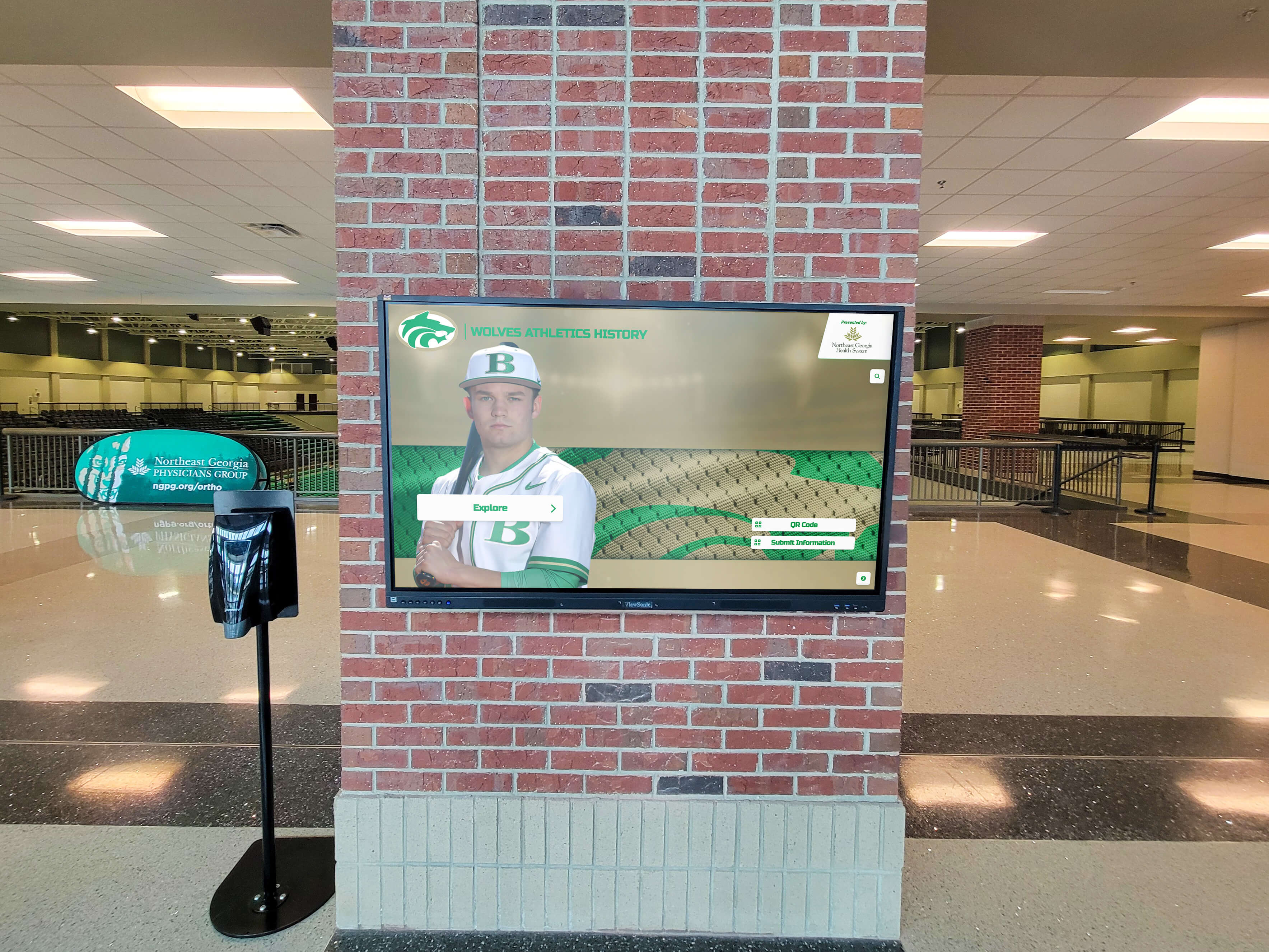
Interactive touchscreen displays offer professional sports organizations like the Toronto Blue Jays innovative ways to celebrate franchise history, honor legendary players, and create engaging fan experiences that traditional static displays simply cannot match. These digital recognition systems transform how teams preserve their legacy while deepening connections with fans through multimedia storytelling, searchable player databases, and dynamic content that evolves with the franchise.
Professional baseball franchises accumulate rich histories spanning decades—championship seasons, Hall of Fame inductees, record-breaking performances, and unforgettable moments that define team identity. Yet traditional recognition approaches struggle to capture this breadth comprehensively. Trophy cases hold limited trophies, retired number displays acknowledge select legends, and wall-mounted plaques commemorate major milestones—but these static methods cannot tell complete stories or adapt as franchises continue building legacy.
This comprehensive guide explores how an interactive touchscreen display could enhance the Toronto Blue Jays’ fan experience at Rogers Centre, examining what content might be featured, how technology enables richer storytelling, and why modern digital recognition solutions like those from Rocket Alumni Solutions help professional sports organizations celebrate their heritage while creating memorable experiences for fans of all generations.
The Toronto Blue Jays’ Championship Legacy
The Toronto Blue Jays franchise, established in 1977 as an American League expansion team, built from modest beginnings into one of baseball’s most successful international franchises. Understanding this journey provides context for why comprehensive recognition matters.
From Expansion Team to World Champions
The Blue Jays’ early years followed the typical expansion franchise trajectory—competitive struggles, gradual talent development, and patient fan base cultivation. Playing initially at Exhibition Stadium before moving to the state-of-the-art SkyDome (now Rogers Centre) in 1989, the franchise steadily improved throughout the 1980s, capturing division titles and building toward championship contention.
The franchise achieved its breakthrough in 1992, defeating the Atlanta Braves in six games to become the first team based outside the United States to win the World Series. This historic achievement represented more than athletic accomplishment—it validated Canadian baseball on the sport’s biggest stage and created national celebration unprecedented in Canadian sports history.
The following year, 1993, the Blue Jays repeated as champions with perhaps the most dramatic conclusion in World Series history. Joe Carter’s three-run walk-off home run in the bottom of the ninth inning of Game 6 delivered Toronto’s second consecutive title and created one of baseball’s most iconic moments. His celebratory leap around the bases remains etched in baseball lore and Canadian sports consciousness.
Rogers Centre: Where History Happened
Rogers Centre (originally SkyDome) opened in 1989 as a revolutionary facility featuring the world’s first fully retractable motorized roof. This architectural innovation allowed baseball in any weather condition while providing an outdoor atmosphere when conditions permitted—solving Toronto’s climate challenges that had plagued Exhibition Stadium.
The venue witnessed both World Series championships. Games 3, 4, and 5 of the 1992 World Series showcased the facility to international audiences, while Games 1, 2, and 6 of the 1993 World Series culminated in Carter’s legendary home run. These championship moments, combined with decades of regular season memories and playoff drama, make Rogers Centre hallowed ground for Blue Jays faithful.
Beyond championships, the stadium has hosted countless memorable performances—Dave Stieb’s no-hitter in 1990, Jose Bautista’s dramatic playoff home run and bat flip in 2015, and numerous individual milestone achievements that form the tapestry of franchise history.
Why Professional Baseball Teams Need Interactive Recognition
While championship trophies and retired numbers provide important recognition, interactive digital displays offer professional sports franchises capabilities that traditional methods cannot match.
Comprehensive Player Recognition
Major League Baseball franchises employ hundreds of players throughout their histories. While Hall of Famers and championship team members receive appropriate prominence, many significant contributors remain unrecognized in traditional displays due to space limitations.

Interactive touchscreen systems enable comprehensive player databases showcasing every individual who wore team colors. Fans can search by name, position, era, or achievement type—discovering forgotten contributors, researching favorite players, or exploring connections across different franchise eras.
For the Blue Jays, this comprehensive approach could honor everyone from franchise cornerstones like Carlos Delgado and Roy Halladay to role players who contributed to memorable seasons. Each player profile might include career statistics, memorable performances, photo galleries, and even video highlights when available.
Solutions like digital record boards for high schools demonstrate how comprehensive recognition systems document achievement across all levels—principles that scale effectively to professional sports contexts.
Dynamic Storytelling Through Multimedia
Traditional plaques convey basic information through text alone. Interactive displays incorporate video highlights, audio clips, photo galleries, statistical visualizations, and narrative storytelling that brings history to life in ways static displays cannot.
Imagine Blue Jays fans exploring the 1993 championship season through an interactive display. They could watch Carter’s home run from multiple camera angles, hear Tom Cheek’s legendary radio call, view photo galleries from the celebration, read player reflections about that moment, and examine box scores from all six World Series games—all within a single cohesive experience.
This multimedia richness creates emotional connections that pure text cannot achieve. Younger fans who never witnessed championship seasons experience these moments vicariously, while older fans relive memories in vivid detail.
Engaging Multiple Generations
Professional baseball franchises serve diverse fan demographics—longtime season ticket holders, young families attending their first games, international visitors discovering the sport, and casual fans exploring stadium during events. Interactive displays engage all these audiences through personalized exploration paths matching individual interests.
Children might explore current roster players and learn about positions and statistics. Teenagers could research favorite players’ career trajectories and milestone achievements. Adults might rediscover players from their youth and share memories with family. Senior fans could explore franchise founding and early years, finding personal connections to team history.
This multigenerational appeal proves particularly valuable for teams like the Blue Jays, where championship memories span over three decades and newer fans may lack deep historical knowledge.

Content for a Toronto Blue Jays Interactive Display
Effective recognition systems balance comprehensive coverage with focused storytelling. For the Blue Jays, several content categories would create compelling fan experiences.
Championship Teams and Moments
The 1992 and 1993 World Series championships represent the franchise’s pinnacle achievements and deserve extensive recognition within any interactive display.
1992 World Champions: Complete roster listings with player biographies, season statistics, playoff performance summaries, and game-by-game World Series results. Video highlights of key moments—Dave Winfield’s go-ahead double in Game 6, Tom Henke’s championship-clinching save, and celebration footage. Behind-the-scenes content about season progression, team chemistry, and championship pursuit could provide depth beyond game highlights.
1993 World Champions: Similarly comprehensive treatment with special emphasis on Joe Carter’s walk-off home run—arguably the most iconic moment in franchise history. Multiple viewing angles, audio from different broadcasters, player reactions, and cultural impact documentation could help fans appreciate this moment’s significance. Complete playoff journey documentation showing how the team reached that championship game.
Division Championships and Playoff Runs: Beyond World Series victories, the Blue Jays captured multiple division titles and playoff berths throughout franchise history. Recognition of these achievements, including memorable playoff series victories and legendary individual performances, provides comprehensive franchise accomplishment documentation.
Resources on showcase championship teams explore effective strategies for comprehensive championship recognition that honors all aspects of team success.
Legendary Players and Hall of Famers
The Blue Jays have seen numerous players achieve individual excellence worthy of detailed recognition.
Hall of Fame Inductees: Roberto Alomar and Roy Halladay entered the Baseball Hall of Fame with Blue Jays connections. Comprehensive profiles documenting their careers, statistical achievements, signature performances, and contributions to franchise success would honor these legends appropriately.
Franchise Legends: Players like Carlos Delgado, Jose Bautista, Vernon Wells, and Devon White left indelible marks on franchise history despite not reaching Hall of Fame status. Detailed recognition celebrating their contributions demonstrates institutional appreciation for all who elevated the program.
Record Holders: Franchise statistical leaders across various categories—career home runs, wins, strikeouts, hits—deserve recognition highlighting their achievement significance. Interactive record boards could show current standings, historical progression, and near-misses approaching existing records.
Award Winners: Blue Jays players who earned major awards—Cy Young Awards, batting titles, Gold Gloves, Silver Sluggers—warrant recognition documenting excellence acknowledged league-wide.
Exploring athletic history display strategies reveals how comprehensive player recognition strengthens program identity and fan engagement.
Unforgettable Moments and Historic Performances
Beyond championships and individual careers, specific moments define franchise identity and fan memories.
Joe Carter’s Walk-Off Home Run: This single moment deserves extensive multimedia treatment as perhaps Canadian baseball’s most iconic achievement. Video from every available angle, audio from multiple broadcast sources, still photography capturing reactions, and cultural impact documentation would create comprehensive celebration.
Jose Bautista’s Bat Flip: The 2015 ALDS Game 5 home run and subsequent bat flip became instant cultural phenomena transcending baseball. This moment, representing dramatic playoff victory and emotional expression, connects with younger fan demographics and represents modern franchise identity.
Individual Achievements: No-hitters, cycle games, milestone home runs or hit totals, extraordinary pitching performances, and dramatic game-winning plays scattered throughout franchise history provide compelling content demonstrating sustained excellence across eras.
Rivalry Moments: Memorable games against division rivals like the New York Yankees and Boston Red Sox, including playoff confrontations and regular season classics, capture competitive intensity that defines professional baseball.
Stadium and Franchise Evolution
Rogers Centre itself represents significant baseball history worthy of recognition.
SkyDome Opening: Documentation of the revolutionary retractable roof stadium opening in 1989—including architectural innovations, construction challenges, and cultural significance for Toronto and Canadian baseball.
Stadium Renovations: Recent modernization efforts transforming Rogers Centre into contemporary baseball facilities while maintaining historic character. Before-and-after comparisons, fan amenity improvements, and technological upgrades demonstrate organizational commitment to fan experience.
Franchise Milestones: First game in 1977, first playoff appearance, attendance records, all-star game hosting, and other significant institutional moments that trace organizational evolution from expansion team to championship franchise.
Cultural Impact: Documentation of the Blue Jays’ role in Canadian sports culture, including national television broadcasts, player celebrity status, youth baseball development influence, and the franchise’s position as Canada’s team connecting the nation through baseball.
Technology Enabling Superior Fan Experiences
Modern interactive display technology provides professional sports organizations capabilities that transform recognition from passive viewing into active engagement.
Intuitive Touchscreen Interfaces
Large-format commercial touchscreens create tablet-like experiences familiar to fans of all ages. Simple gestures—tapping to select content, swiping to browse options, pinching to zoom on images—require no instruction or specialized knowledge.
Well-designed interfaces guide exploration through clear visual hierarchies, logical organizational structures, and prominent search functionality. Fans can immediately locate content matching personal interests—specific players, particular seasons, certain achievement types—without navigating complex menu systems.
Interactive displays accommodate various engagement levels. Casual fans might spend brief moments exploring featured content while passionate followers delve into comprehensive statistical databases and extensive video archives. This flexibility ensures value for all visitor types.
Unlimited Content Capacity
Physical space constraints limit traditional recognition approaches. Interactive displays eliminate these limitations entirely, accommodating unlimited content that grows with franchise history.
A single large-format touchscreen could showcase hundreds of player profiles, dozens of historic moments, complete season statistics spanning decades, thousands of photographs, and hours of video content—capacity impossible for physical trophy cases or wall-mounted displays.
This unlimited capacity proves particularly valuable for franchises with long histories like the Blue Jays. Every player who contributed to franchise success receives appropriate recognition rather than forcing difficult selection decisions about which achievements merit limited display space.
Remote Content Management
Cloud-based content management systems enable instant updates from anywhere. When new milestones occur—record-breaking performances, award announcements, playoff victories—recognition appears immediately without requiring physical display modifications.
This real-time capability maintains recognition currency and relevance. During active seasons, content reflects ongoing achievements. In off-seasons, featured content might emphasize historical moments or upcoming season anticipation.
Multiple staff members can collaborate on content development through cloud platforms—communications staff might write narratives, video coordinators upload highlights, historians verify facts, and designers maintain visual consistency—all working simultaneously without physical proximity requirements.

Web and Mobile Integration
Modern recognition platforms extend beyond physical stadium displays through web accessibility and mobile optimization.
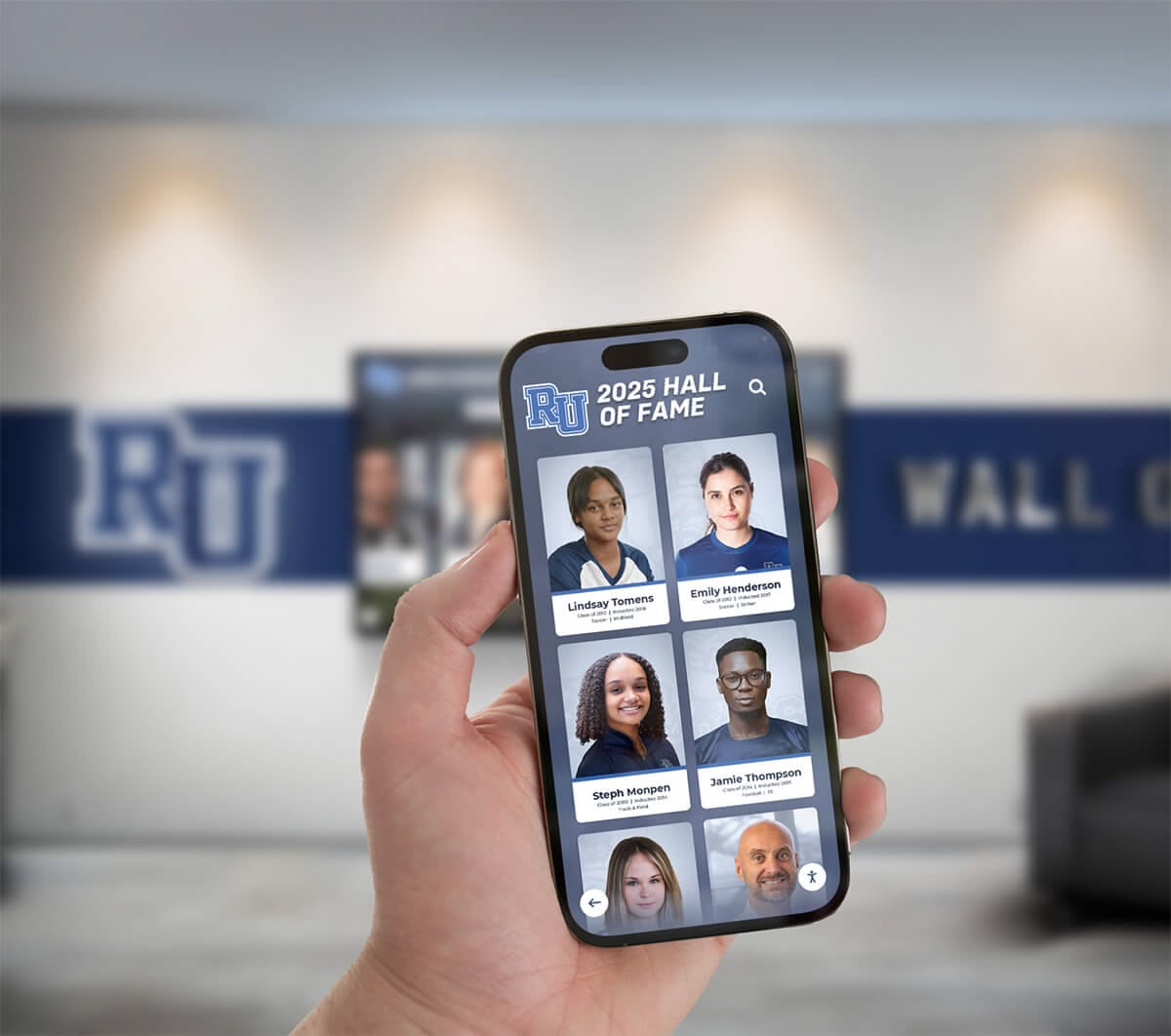
Fans worldwide can explore Blue Jays history through responsive web interfaces accessible from any device. This global reach proves particularly valuable for international fan bases and geographically dispersed supporters maintaining connections despite distance from Toronto.
Social sharing functionality enables fans to instantly post favorite content to personal networks—sharing legendary moments, player profiles, or achievement highlights amplifies recognition reach exponentially beyond those physically visiting Rogers Centre.
Mobile apps might provide complementary experiences during stadium visits. Fans could save favorite content for later viewing, build custom collections highlighting personal interests, or access additional content beyond what physical display screens show.
Strategic Placement Within Rogers Centre
Display location significantly impacts fan engagement and recognition effectiveness. Strategic placement throughout Rogers Centre could create multiple touchpoints enhancing overall stadium experience.
Main Concourse Locations
Primary concourse areas where fans naturally congregate before games and during intermissions offer captive audiences ideal for interactive engagement. Large installations in high-traffic zones create impressive visual presence while accommodating multiple simultaneous users during crowd flows.
Concourse placement ensures broad demographic exposure—season ticket holders, first-time visitors, families, and international guests all encounter recognition during typical stadium navigation.
Club and Premium Areas
Club level spaces and premium seating areas provide environments conducive to extended exploration. Fans in these locations often arrive earlier, stay later, and have time for deeper engagement than general admission attendees focused on seating and game viewing.
Recognition displays in premium areas might feature enhanced content or exclusive perspectives appealing to highly engaged supporters—extended video interviews, detailed statistical analyses, or rare archival materials not shown in public installations.
Team Store and Museum Spaces
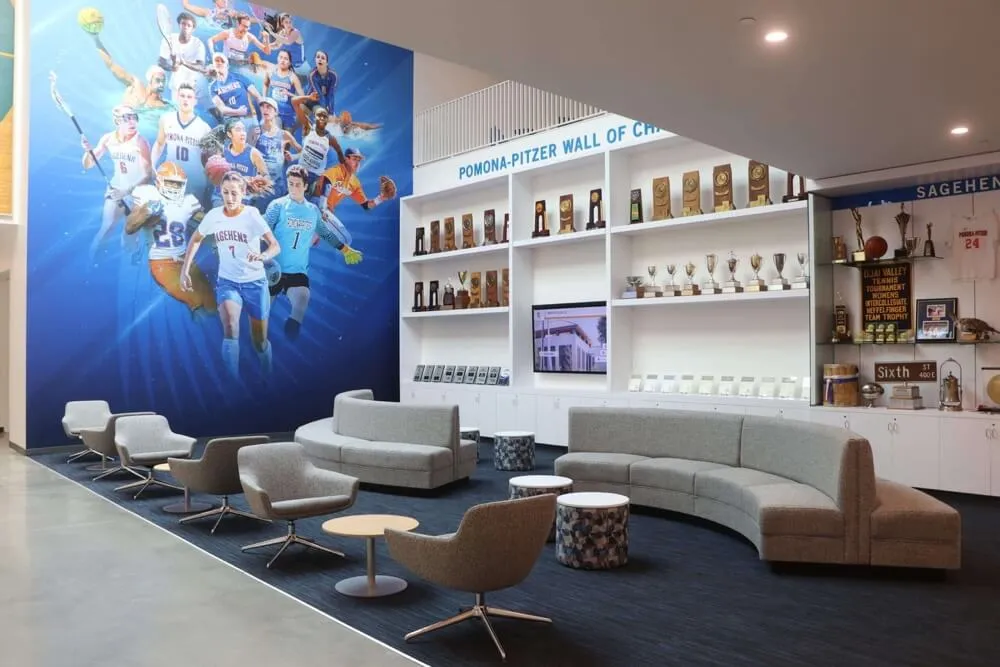
Dedicated museum or team history areas create destination experiences where fans specifically intend to explore franchise heritage. These spaces accommodate larger installations, more extensive content, and complementary physical artifacts creating comprehensive storytelling environments.
Connections between physical artifacts in display cases and digital content on touchscreens enhance both presentation types. Physical championship trophies gain deeper meaning when adjacent displays provide championship context, while digital content gains tangible authenticity through proximity to actual historical objects.
Guidance on school pride building strategies translates effectively to professional sports contexts where franchise pride drives fan loyalty and engagement.
Benefits for the Toronto Blue Jays Organization
Interactive recognition systems deliver measurable value beyond simply honoring history, supporting broader organizational objectives across multiple departments.
Enhanced Fan Engagement and Experience
Engaged fans attend more games, purchase more merchandise, and demonstrate higher lifetime value than casual supporters. Recognition displays that create memorable experiences strengthen emotional connections driving this engagement.
Families with young fans exploring player databases together create positive stadium memories extending beyond game outcomes. International visitors discovering franchise history develop deeper connections to the team. Season ticket holders finding new historical details after years of attendance maintain enthusiasm and loyalty.
Recruitment and Brand Building
Professional baseball competes for entertainment dollars and fan attention across numerous alternatives. Comprehensive recognition demonstrating rich franchise history differentiates organizations and builds brand identity.
Prospective fans exploring what makes the Blue Jays special discover championship tradition, legendary players, iconic moments, and passionate fan culture that distinguish the franchise. This discovery process converts casual observers into committed supporters.
Recognition also supports youth baseball development initiatives. Young players seeing professional success stories and learning about player development paths from amateur to major league levels gain inspiration and understanding about baseball career trajectories.
Alumni Relations and Community Connection
Many former Blue Jays players maintain Toronto connections through retirement residence, business interests, or community involvement. Recognition honoring their contributions demonstrates organizational appreciation while maintaining alumni relationships valuable for promotional events, youth programs, and community initiatives.
Comprehensive player databases that include career updates beyond playing days show continuing interest in alumni lives and achievements. This acknowledgment fosters goodwill and maintains networks connecting past, present, and future franchise participants.
Resources on alumni engagement strategies explore systematic approaches for maintaining productive relationships with former organizational members.
Implementation Considerations for Professional Franchises
Professional sports organizations implementing interactive recognition systems face unique considerations compared to educational institutions or amateur programs.
Content Rights and Licensing
Professional sports involve complex intellectual property rights governing video footage, photographs, and other media. Organizations must ensure proper licensing for all content displayed—whether owned internally, licensed from leagues, or obtained from third parties.
Comprehensive content audits during planning phases identify what materials exist, who owns rights, and what permissions are required. This due diligence prevents implementation delays or post-launch legal complications.
Brand Consistency and Design
Professional franchises maintain strict brand standards governing color usage, typography, logo application, and design aesthetics. Recognition displays must integrate seamlessly with established brand identities while maintaining the professional polish fans expect from major league organizations.
Working with experienced providers familiar with professional sports branding requirements ensures displays meet institutional standards. Solutions from Rocket Alumni Solutions incorporate customizable design frameworks accommodating team-specific branding while maintaining user experience best practices.
Scale and Production Quality
Professional facilities demand production quality and technical sophistication exceeding typical educational installations. Commercial-grade display hardware, professional content production, and robust software platforms prove essential for reliability and appearance meeting major league standards.
Budget allocations must reflect these elevated requirements. While educational institutions might allocate $10,000-$30,000 for recognition systems, professional franchise installations might require $50,000-$200,000+ depending on scale, location quantity, and content comprehensiveness.
Ongoing Content Development
Initial installation represents only the beginning. Maintaining relevance requires continuous content additions as seasons progress, new players join rosters, records fall, and franchise history accumulates.
Successful programs establish dedicated responsibilities for recognition management—designating staff members, defining update workflows, creating content standards, and planning periodic enhancements. This systematic approach ensures displays remain current rather than becoming outdated historical artifacts within years.
Measuring Success and Impact
Effective recognition programs include assessment strategies demonstrating value and informing continuous improvement.
Engagement Analytics
Modern display platforms provide detailed usage analytics showing visitor interaction patterns, content popularity, session durations, and navigation flows. These metrics demonstrate recognition system effectiveness while identifying enhancement opportunities.
Tracking which players generate highest interest, what historical moments engage viewers longest, and which navigation paths prove most popular informs content development priorities and featured content selection.
Fan Feedback and Satisfaction
Surveying fans about recognition experiences provides qualitative insights complementing quantitative analytics. Understanding how displays influence stadium satisfaction, whether fans discover new historical knowledge, and what additional content fans desire guides optimization efforts.
Positive feedback becomes valuable content for promotional materials, stakeholder communications, and continued investment justification.
Social Media Amplification
Monitoring social media mentions, shared content from recognition platforms, and user-generated content discussing displays reveals organic promotion and brand amplification. When fans share favorite historical moments or player profiles to personal networks, recognition reach extends far beyond physical stadium visits.
Tracking these secondary impacts demonstrates recognition system value beyond direct interaction metrics, showing how investment creates sustained marketing benefits and brand awareness.
The Future of Sports Recognition
Recognition technology continues evolving, creating new capabilities for enhanced storytelling and fan engagement.
Augmented Reality Integration
Emerging augmented reality capabilities might enable fans to point smartphones at physical spaces and see virtual overlays showing historical moments where they occurred—imagine viewing Carter’s home run celebration virtually overlaid on the exact field location where it happened.
These immersive experiences blend physical and digital recognition, creating memorable moments that deepen connections to franchise history while leveraging technology younger demographics embrace enthusiastically.
Artificial Intelligence and Personalization
Advanced platforms might employ artificial intelligence to personalize content recommendations based on viewing patterns, suggest connections between players or moments related to current interests, or generate custom highlight reels combining selected favorite moments.
This personalization transforms one-size-fits-all recognition into tailored experiences matching individual fan interests and preferences.
Real-Time Integration
Future systems might seamlessly blend historical content with real-time game statistics, creating continuous narratives connecting past excellence with present performance. Fans could instantly compare current player statistics to franchise leaders, understand where today’s achievements rank historically, or discover which legendary players held records current teams are pursuing.
This temporal integration maintains recognition relevance throughout seasons rather than positioning history as separate from contemporary team identity.
Ready to Transform Your Sports Recognition?
Discover how Rocket Alumni Solutions can help professional sports organizations create interactive recognition displays that celebrate franchise history, engage fans, and strengthen brand identity through modern digital storytelling technology.
Schedule Your Free ConsultationConclusion: Honoring Toronto Baseball Legacy Through Innovation
The Toronto Blue Jays’ championship legacy, legendary players, unforgettable moments, and cultural significance deserve recognition matching their impact on Canadian sports history. Traditional trophy cases and retired number displays provide important acknowledgment but cannot capture the full depth and richness of franchise heritage that spans nearly five decades.
Interactive touchscreen displays offer comprehensive, engaging, dynamic recognition that brings baseball history to life through multimedia storytelling, searchable databases, and personalized exploration. These systems honor past excellence while creating memorable fan experiences that strengthen emotional connections, enhance stadium visits, and reinforce franchise identity across generations.
For professional organizations like the Blue Jays, recognition systems serve multiple purposes—celebrating achievement, engaging diverse fan demographics, supporting brand building, maintaining alumni relationships, and demonstrating institutional values around honoring those who built franchise success. When recognition integrates thoughtfully with broader facility design and organizational culture, it becomes powerful infrastructure supporting long-term fan development and community connection.
Rogers Centre witnessed extraordinary baseball moments that defined Canadian sports history. Interactive recognition technology ensures these moments, the champions who created them, and the franchise legacy they built receive celebration worthy of their significance—preserving the past while inspiring future generations of Blue Jays fans and Canadian baseball enthusiasts.
Whether planning comprehensive franchise recognition programs or exploring how digital displays might enhance existing historical presentations, solutions from Rocket Alumni Solutions provide proven platforms combining sophisticated technology with intuitive user experiences. These systems enable sports organizations to create professional recognition that appropriately honors athletic achievement while delivering engaging experiences fans remember long after games end.































