Visitors arriving at unfamiliar facilities face immediate stress: Where do I go? Which floor houses the department I need? Is there a faster route through this complex? Traditional paper directories mounted on walls provide static information that becomes outdated quickly, offers no custom guidance, and fails to accommodate accessibility needs. Meanwhile, facilities staff spend hours answering repetitive navigation questions instead of focusing on core responsibilities.
Touchscreen building directories solve these persistent challenges by providing interactive wayfinding systems that guide visitors effectively while reducing staff burden. Modern directory systems deliver instant search functionality, visual route guidance, multilingual support, and real-time updates reflecting facility changes immediately—capabilities that static signage simply cannot match.
This comprehensive guide examines everything facility managers, school administrators, and decision-makers need to understand about touchscreen building directory implementation. From essential features and budget considerations to installation best practices and measuring success, you’ll discover how interactive directories transform visitor experiences while creating operational efficiencies that justify investment through measurable outcomes.
What is a Touchscreen Building Directory?
A touchscreen building directory is an interactive digital system that helps visitors navigate facilities through simple touch-based interfaces. Unlike traditional printed directories listing names and room numbers in small text, touchscreen systems provide searchable databases, visual maps, turn-by-turn directions, and live content that updates instantly as spaces change or personnel move.
Core Components of Modern Directory Systems
Effective touchscreen directories integrate several key elements working together to create functional wayfinding solutions:
Interactive Display Hardware: Commercial-grade touchscreen monitors ranging from 32 to 75 inches depending on viewing distance requirements and installation locations. These displays feature responsive capacitive or infrared touch technology, high brightness for visibility in various lighting conditions, and durable construction withstanding frequent public interaction.
Directory Software Platform: Specialized applications designed specifically for wayfinding rather than generic digital signage. Quality directory software provides searchable databases organizing people, departments, and spaces; interactive floor plan integration showing visual locations; routing algorithms calculating optimal paths between locations; and content management systems enabling non-technical staff to update information easily.
Floor Plan Integration: Digital building maps showing spatial relationships, department locations, amenities, and navigation routes. Interactive maps respond to touch, highlight destinations, display current visitor location, and illustrate step-by-step directions from directory placement to final destinations.
Content Management System: Cloud-based or local administration interfaces enabling facilities teams to add new occupants, update room assignments, modify department information, schedule temporary closures, and manage directory content without requiring IT intervention for routine updates.
Mounting Infrastructure: Professional enclosures, stands, or wall mounts positioning directories at accessible heights in high-traffic locations where visitors naturally seek orientation assistance.
Modern systems go beyond simple name lookups by incorporating amenity information showing restrooms, cafeterias, exits, and services; accessibility features including wheelchair-accessible routes and assistive technology support; emergency information providing evacuation routes and assembly points; and integration with other facility systems including room scheduling, visitor management, and building automation platforms.

Benefits of Touchscreen Directories Over Traditional Building Signage
Organizations implementing interactive directories report substantial improvements across visitor experience, operational efficiency, and facility management flexibility compared to static signage approaches.
Enhanced Visitor Experience and Reduced Confusion
Touchscreen directories fundamentally improve how people navigate unfamiliar spaces through capabilities static signs cannot provide:
Instant Search Functionality: Visitors type names, departments, or keywords and immediately see results with location information and directions. This targeted search proves far more efficient than scanning alphabetized lists on printed directories, especially in large facilities housing hundreds or thousands of occupants.
Visual Wayfinding Guidance: Interactive maps display destination locations within building context, show current position relative to target, and illustrate route options with visual clarity that text-only directions lack. Visitors understand spatial relationships and navigation choices more effectively through visual representations than verbal directions.
Multilingual Support: Digital directories easily display content in multiple languages, allowing visitors to select their preferred language for navigation assistance. This accessibility feature proves essential for facilities serving diverse populations or international visitors who might struggle with single-language static signage.
Accessibility Accommodations: Touch-based interaction works for users with varying abilities, while screen reader compatibility, adjustable text sizes, high-contrast modes, and wheelchair-accessible routing options ensure inclusive experiences for all visitors regardless of physical capabilities.
Studies show visitors using interactive directories find destinations 40% faster than those relying on static signage alone, while reporting significantly higher satisfaction with facility navigation experiences and reduced stress associated with unfamiliar environments.
Operational Efficiency and Reduced Staff Burden
Beyond visitor benefits, touchscreen directories create measurable operational improvements for facilities teams:
Reduced Navigation Inquiries: Clear, accessible wayfinding information decreases the volume of directional questions staff members field daily. Reception desks, security personnel, and department staff reclaim time previously spent providing directions, allowing them to focus on core responsibilities instead of serving as human GPS systems.
Instant Information Updates: When occupants change offices, departments relocate, or temporary construction affects routes, administrators update directory databases instantly from their desks without printing new signage, coordinating installation, or removing outdated materials. Changes appear immediately across all connected displays throughout facilities.
Centralized Management: Cloud-based directory platforms enable facilities teams to manage multiple directories across buildings or campuses from single administrative interfaces. Multi-location organizations update content once and publish everywhere simultaneously, ensuring consistent information while eliminating coordination complexity.
Reduced Signage Costs: While initial directory investment exceeds printed sign costs, digital systems eliminate ongoing expenses for printing updated directories, fabricating new room signs, installing replacement signage, and storing outdated materials. Most facilities achieve cost parity within 2-3 years while gaining superior functionality throughout system lifespans.
Organizations tracking metrics before and after directory implementation consistently report 50-70% reductions in navigation-related inquiries, freeing staff capacity equivalent to hundreds of hours annually in mid-sized facilities.
Flexibility and Future-Proofing Facility Information
Static signage becomes instantly outdated the moment printed, while digital directories adapt continuously to facility evolution:
Accommodating Growth and Change: Facilities experiencing frequent occupant turnover, reorganizations, or expansion simply update directory databases to reflect current reality. Academic institutions adding programs, medical facilities opening specialties, corporate offices reorganizing teams, and government buildings consolidating departments all manage these transitions seamlessly through digital directory updates versus costly signage replacement cycles.
Temporary Information Display: Construction detours, event directions, emergency notifications, and seasonal changes require temporary signage in static environments. Digital directories accommodate these needs through scheduled content appearing only when relevant, preventing clutter while ensuring timely information reaches visitors during critical periods.
Integration Opportunities: Modern directory platforms connect with complementary systems including room scheduling displays, visitor management check-in kiosks, mobile wayfinding apps, and facility management databases. These integrations create unified facility information ecosystems eliminating duplicate data entry while enhancing user experiences through connected services.
Analytics and Improvement: Directory software tracks search patterns, popular destinations, common origin-destination pairs, and usage times providing insights into how people navigate facilities. This data informs signage placement, identifies confusing areas needing improved wayfinding, and quantifies directory value through measurable usage metrics.

Essential Features to Look for in Directory Systems
Not all touchscreen directories offer equivalent capabilities. Evaluating systems requires understanding which features deliver genuine value versus flashy demonstrations that prove less useful in daily operation.
Clear User Interface and Search Capabilities
Directory effectiveness depends entirely on how easily first-time users accomplish navigation tasks without assistance or training:
Fast, Predictive Search: Quality systems display results as users type, showing relevant matches before complete words are entered. Auto-complete suggestions guide searches, correct common misspellings, and handle variations in how people might search for identical destinations. Search algorithms should check names, department names, room numbers, and keywords simultaneously, ranking results by relevance rather than arbitrary alphabetical order.
Multiple Search Methods: Different visitors prefer different approaches—some search by name, others by department, many by service or amenity type. Comprehensive directories accommodate these varied preferences through flexible search supporting all common use patterns rather than forcing single rigid interaction models.
Clear Visual Hierarchy: Results should display prominently with essential information (name, department, room number, floor) immediately visible, while secondary details appear through simple touch interactions. Visual design should guide attention appropriately, use adequate font sizes for viewing distances, and maintain clarity under various lighting conditions including bright hallway windows.
Touch Responsiveness: Displays must register touches accurately without frustrating delays or missed inputs. Response lag exceeding 200 milliseconds creates noticeable frustration, while instant feedback confirming touch registration provides the satisfying interactions users expect from consumer devices.
Interactive Mapping and Visual Directions
Maps transform abstract room numbers into concrete spatial understanding that helps visitors actually navigate facilities successfully:
Accurate Floor Plan Representation: Digital maps should accurately reflect building layouts including corridors, stairwells, elevators, amenities, and spaces. Simplified representations highlighting key navigation elements work better than architectural drawings showing excessive irrelevant detail that confuses rather than clarifies.
“You Are Here” Orientation: Maps should clearly indicate directory location within building context, helping visitors understand their starting position relative to destinations. This orientation proves critical for multi-floor facilities where visitors may not know their current floor or building wing.
Visual Route Display: Rather than text directions (“take the elevator to third floor, turn right, walk to the end of the hall”), effective systems highlight navigation paths on maps, indicate turn points, show elevator or stairwell locations, and estimate walking times or distances. Visual routing accommodates how people actually process wayfinding information more effectively than text-based directions.
Multi-Floor Navigation: Buildings with multiple floors require smooth transitions between floor maps, clearly indicated floor changes, and consistent orientation across floor plan views. Users should easily understand when routes require using stairs or elevators, which floor they’re navigating to, and how different floors relate spatially.
Interactive digital signage displays designed for engagement share similar interface principles with directory systems, prioritizing clarity and instant user comprehension over complex features requiring explanation.
Comprehensive Content Management Tools
Directory value depends on current, accurate information—requiring content management systems that facilities staff can actually use without ongoing IT support:
Simple Administrative Interface: Non-technical facilities coordinators, office managers, or administrative assistants should confidently update directory content through straightforward web-based dashboards requiring no training beyond basic computer literacy. Complex systems requiring specialized expertise inevitably fall out of date as only a few people possess update capabilities and become bottlenecks.
Bulk Import and Update: Facilities housing hundreds of occupants need efficient methods for loading initial data and processing routine updates. Quality platforms import spreadsheet data, integrate with directory services or room scheduling systems, and enable batch updates affecting multiple records simultaneously rather than forcing individual manual entry.
Change Tracking and Approval Workflows: Organizations wanting quality control can configure approval processes ensuring updates undergo review before publication. Audit trails documenting who changed what information and when prove valuable for troubleshooting discrepancies and maintaining accountability.
Scheduled Content and Temporary Changes: System administrators should easily schedule content appearing only during specific dates or times—perfect for construction detours, event directions, holiday closures, or temporary relocations. Scheduled content automatically appears and disappears at appropriate times without requiring manual intervention.
Multi-User Permissions: Different staff members require different access levels. Reception teams might update occupant information, facilities managers control floor plans, and administrators configure system settings. Role-based permissions prevent unauthorized changes while enabling appropriate delegation across responsible parties.
Accessibility and Inclusive Design
Directory systems must serve all visitors regardless of physical abilities, language proficiency, or technical familiarity:
ADA Compliance Requirements: Installation height, touch target sizes, contrast ratios, screen reader compatibility, and alternative input methods must meet Americans with Disabilities Act standards ensuring equal access. Facilities receiving public funding or serving public functions face legal obligations for accessibility compliance beyond moral imperatives.
Multilingual Content Support: Communities with substantial non-English-speaking populations benefit from directories offering content in multiple languages. Quality systems enable language selection through flag icons or language names, maintaining all functionality across supported languages rather than providing limited translated subsets.
Assistive Technology Integration: Screen reader support, alternative text for images, keyboard navigation alternatives to touch input, and compatibility with personal assistive devices ensure visitors with visual or motor impairments successfully access directory information.
Universal Design Principles: Beyond minimum compliance, thoughtful directory design incorporates high contrast color schemes, generous font sizes, clear icons supplementing text, simple navigation patterns, and consistent layouts creating better experiences for everyone while specifically accommodating users with accessibility needs.
Schools implementing interactive touchscreen displays for various purposes increasingly recognize accessibility as essential rather than optional, benefiting all users through clearer, simpler interfaces.

Implementation Planning: Building Your Directory System
Successful directory deployment requires methodical planning addressing technical requirements, content preparation, installation logistics, and rollout coordination.
Assessing Your Facility’s Directory Needs
Before evaluating specific systems, clearly define requirements based on facility characteristics and user populations:
Facility Complexity Analysis: Single-floor buildings with straightforward layouts require simpler directory solutions than multi-building campuses with complex internal navigation, multiple entrances, and distributed departments. Assess your facility’s navigation challenges honestly—visitors getting lost indicates genuine wayfinding problems that directories should address, while facilities with clear sight lines and logical layouts may need only basic orientation assistance.
User Population Characteristics: Different visitor types have varying directory needs. Schools accommodate students, parents, and visitors; hospitals serve patients, families, and staff; corporate offices host clients, vendors, and employees; government facilities manage constituent traffic. Understanding who uses directories and what navigation tasks they perform informs feature prioritization.
Update Frequency Requirements: Facilities with stable occupants might update directories monthly or quarterly, while organizations experiencing constant change need systems supporting daily or even hourly updates. Assess realistic update frequency based on actual occupant turnover, reorganizations, and information volatility rather than aspirational goals unlikely to be sustained.
Integration Priorities: Determine whether directories should operate independently or integrate with room scheduling systems, visitor management platforms, building automation systems, or mobile wayfinding apps. Integration complexity affects timeline and budget while potentially delivering substantial user experience improvements justifying additional investment.
Budget Parameters: Establish realistic budget ranges accounting for hardware, software licensing, installation, content creation, training, and ongoing maintenance. Understanding financial constraints early prevents evaluating solutions far exceeding available resources while ensuring budget allocations match actual total costs rather than just initial hardware purchases.
Hardware Selection and Placement Strategy
Directory effectiveness depends as much on proper hardware selection and placement as software capabilities:
Display Sizing Considerations: Directories in building lobbies viewed from distances of 6-10 feet typically require 42-55 inch displays for comfortable readability. Closer installations in elevator lobbies or corridor intersections work well with 32-43 inch screens. Oversized displays waste budget without improving functionality, while undersized screens frustrate users struggling to read small text.
Indoor vs. Outdoor Requirements: Outdoor directory installations require weatherproof enclosures, high-brightness displays overcoming direct sunlight (1000+ nits versus 300-500 for indoor), and temperature-rated components withstanding environmental extremes. Outdoor solutions cost 2-3 times indoor equivalents due to these specialized requirements.
Mounting Options: Freestanding kiosks provide installation flexibility without requiring wall modifications, though they consume floor space and may obstruct traffic flow. Wall-mounted displays integrate cleanly into architectural finishes while requiring electrical and network infrastructure planning. Enclosures should complement facility aesthetics rather than appearing as obvious aftermarket additions.
Commercial-Grade Requirements: Public directory installations require commercial displays rated for extended operation (16+ hours daily), not residential televisions designed for occasional home use. Commercial panels provide superior reliability, longer warranties, and better performance under continuous operation that residential equipment cannot match despite lower initial costs.
Strategic Placement Locations: Directories deliver maximum value when positioned where visitors naturally pause seeking orientation—main entrances, elevator lobbies, building intersections, parking garage entries, and campus landmarks. Placing directories in isolated corridors or low-traffic areas wastes investment regardless of technical capabilities.
Content Preparation and Database Setup
Quality directory experiences require comprehensive, accurate content prepared before launch:
Initial Data Collection: Compile complete occupant lists including names, titles, departments, room numbers, floor locations, and contact information where appropriate. Identify amenities (restrooms, cafeterias, conference rooms, ATMs, exits) requiring inclusion. Document temporary or seasonal locations needing scheduled display.
Floor Plan Digitization: Convert architectural drawings into simplified digital floor plans highlighting navigation-relevant features. Professional directory vendors often provide floor plan creation services, while some organizations handle this internally using building drawings and image editing software. Plans should be clear and legible at typical viewing distances without excessive architectural detail that clutters rather than clarifies.
Photo and Logo Integration: Many directories incorporate departmental logos, occupant photos, or facility images enhancing visual appeal while helping visitors confirm they’ve found correct destinations. Gather these assets early, ensuring consistent quality and formatting across all visual elements.
Content Quality Standards: Establish guidelines for information formatting, naming conventions, abbreviation use, and data completeness. Consistent content presentation creates professional impressions while preventing confusion from inconsistent information display across directory entries.
Testing and Validation: Before launch, thoroughly test directory content for accuracy, completeness, and proper functionality. Search for occupants using various query patterns, verify map locations correspond to actual rooms, and confirm directions correctly guide users to destinations. Early testing identifies errors correctable before public rollout rather than discovering issues through frustrated visitor complaints.
Educational facilities implementing touchscreen kiosk solutions for various applications report content preparation consuming more time than anticipated, emphasizing the importance of allocating adequate resources to this essential phase.
Use Cases: Where Touchscreen Directories Deliver Maximum Value
Different facility types benefit from interactive directories in distinct ways, though common themes of improved navigation and reduced staff burden appear consistently across sectors.
Educational Institutions: Schools and Universities
Academic campuses present particularly challenging wayfinding environments with distributed buildings, frequent room changes, visiting families, and diverse user populations:
Campus Navigation for Visitors: Prospective students touring campuses, parents attending events, guest speakers finding classrooms, and community members using facilities all require clear navigation assistance. Interactive directories placed at campus entrances, parking areas, and main buildings help these occasional visitors navigate independently without requiring escort services or consuming staff time providing directions.
Flexible Space Management: Educational institutions constantly reassign classrooms, relocate faculty offices, reorganize departments, and repurpose spaces to accommodate evolving needs. Digital directories update instantly to reflect these changes, ensuring accurate information without the lag time and expense associated with printing and installing new static signage throughout facilities.
Event Support: Athletic competitions, theatrical performances, conferences, and community events bring visitors unfamiliar with campus layouts. Directories provide event-specific wayfinding including temporary parking assignments, special entrance designations, accessible routes, and amenity locations helping guests navigate seamlessly.
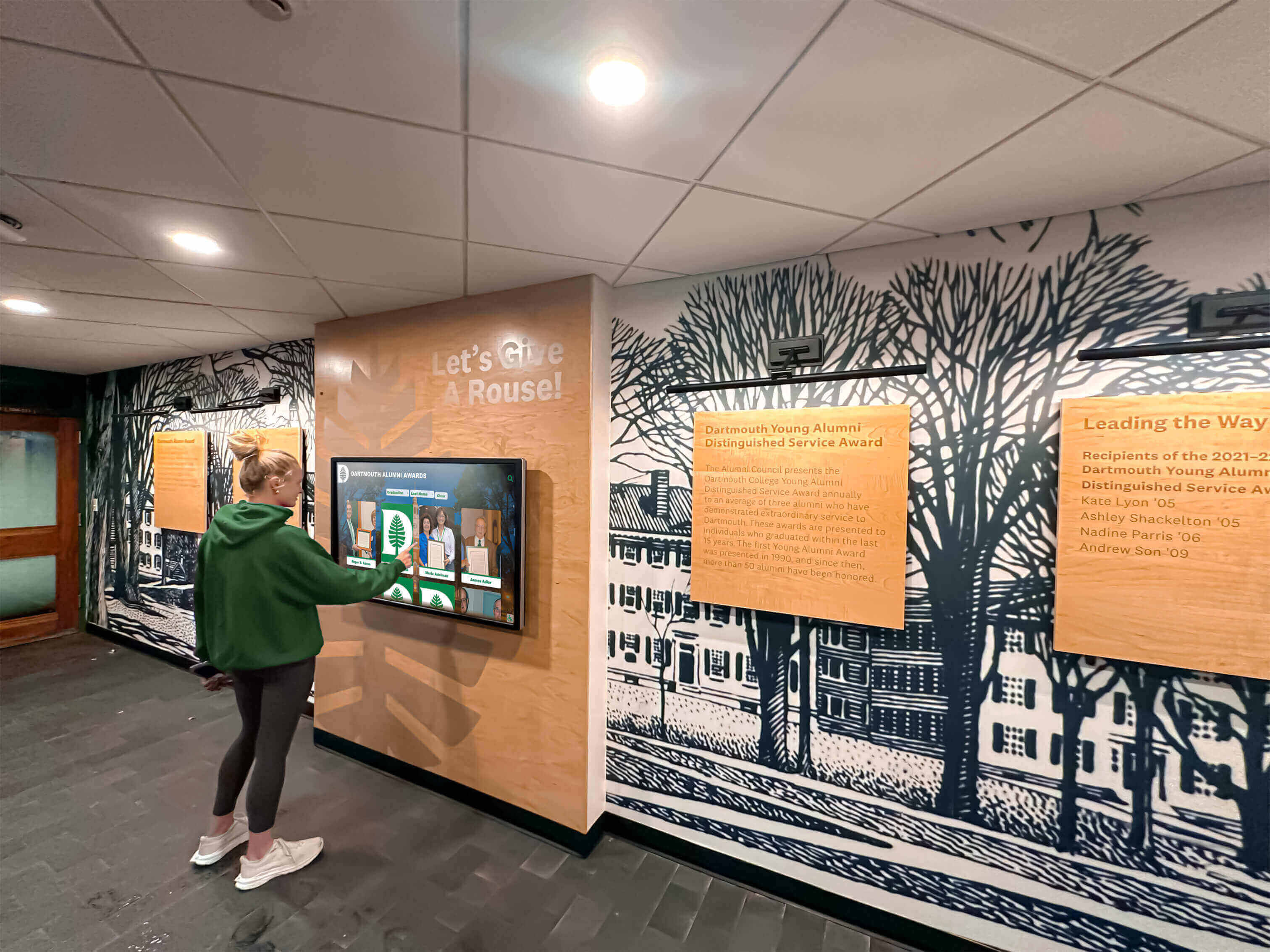
Integration with Recognition Systems: Some schools combine wayfinding functionality with digital recognition displays showcasing achievements, history, and community highlights. These multi-purpose installations provide navigation assistance while building school culture through visible celebration of student and alumni success.
Corporate and Professional Office Buildings
Multi-tenant office buildings and large corporate campuses require sophisticated directory systems accommodating frequent occupant changes and diverse visitor types:
Tenant and Suite Finding: Visitors arriving for business meetings search for companies, individual names, or suite numbers. Directories should accommodate all these search patterns while providing clear floor locations and elevator directions guiding visitors efficiently to destinations.
Visitor Management Integration: Modern directory systems connect with visitor check-in kiosks, providing coordinated experiences from building entry through destination arrival. Visitors searching directories can trigger host notifications, print visitor badges, and receive SMS directions creating smooth arrival experiences.
Conference Room Scheduling: Directories displaying conference room availability, reservation systems, and room location guidance help employees and visitors find appropriate meeting spaces while reducing scheduling conflicts through real-time availability information.
Security and Access Control: Directories in secure facilities can display only information appropriate for user authentication levels, showing public areas to all visitors while revealing restricted locations only to authorized personnel with proper credentials.
Healthcare Facilities: Hospitals and Medical Centers
Medical campuses rank among the most complex navigation environments, where wayfinding failures create stress for patients and families during already difficult circumstances:
Department and Provider Location: Patients seeking specific departments, physician offices, diagnostic centers, or treatment areas benefit from clear directory guidance reducing anxiety associated with medical visits. Visual routing showing exact locations, floor levels, and navigation paths proves particularly valuable in sprawling medical complexes.
Accessibility Emphasis: Healthcare facilities serve populations with diverse mobility needs, making wheelchair-accessible routing, elevator locations, and alternative path suggestions essential directory features. Medical wayfinding must accommodate visitors with varying physical capabilities ensuring equitable access throughout facilities.
Visitor Amenity Information: Families spending extended periods in medical facilities require information about cafeterias, chapels, waiting areas, parking, and support services. Comprehensive directories incorporating these amenities help visitors manage logistics during stressful situations.
Multilingual Critical Importance: Healthcare facilities serve culturally diverse populations where language barriers can prevent effective care. Directory multilingual support proves essential rather than optional, enabling patients and families to navigate facilities confidently regardless of English proficiency.
Government Buildings and Public Facilities
Municipal buildings, courthouses, libraries, and civic centers serve general public populations with varying technical familiarity and diverse needs:
Departmental Navigation: Citizens visiting government offices for permits, licenses, records, or services need clear guidance to correct departments. Directories should accommodate both department name searches and service-based searches (“building permits,” “marriage licenses”) recognizing that visitors may not know which department provides needed services.
Accessibility Compliance: Government facilities face strict ADA compliance requirements for wayfinding systems. Directory accessibility features prove legally mandated rather than optional, requiring careful attention to compliance standards during system selection and configuration.
Public Information Display: Beyond navigation, directories can display civic information including meeting schedules, public notice requirements, community resources, and emergency procedures creating multi-functional systems extending value beyond pure wayfinding applications.
Security Considerations: Government facilities balance public access with security requirements. Directory systems must provide helpful navigation while avoiding security compromises through excessive facility layout disclosure or integration with systems containing sensitive information.

Technical Considerations and System Requirements
Beyond user-facing features, technical requirements ensure reliable operation and sustainable maintenance throughout directory lifecycles.
Network Infrastructure and Connectivity
Directory systems require network connectivity for content updates, remote management, and potential integration with other facility systems:
Wired Ethernet Preferred: Hardwired network connections provide superior reliability and security compared to wireless alternatives. Run ethernet cabling to directory locations during installation planning, ensuring adequate bandwidth for content updates including floor plan images and potential video content.
WiFi Considerations: When hardwired connections prove impractical, secure WiFi networks can support directory operation. Ensure adequate signal strength at installation locations, configure proper network security, and implement quality-of-service settings preventing bandwidth contention during peak usage periods.
Firewall and Security Configuration: IT departments must configure firewalls allowing directory systems to communicate with cloud-based management platforms while maintaining network security. Work with vendors to identify required ports, domains, and security settings before installation preventing post-deployment connectivity troubleshooting.
Backup and Redundancy: Critical installations benefit from cellular backup connectivity maintaining operation during network outages. While adding cost, backup connectivity ensures directories remain functional during the infrastructure failures that often coincide with increased visitor traffic and heightened wayfinding needs.
Power Requirements and Installation Considerations
Professional directory installation requires proper electrical infrastructure and mounting preparation:
Electrical Service: Directories require dedicated electrical circuits supporting display power consumption (typically 200-400 watts) plus associated computing equipment. Ensure circuits meet local electrical codes, provide adequate capacity, and position outlets appropriately for clean cable management without visible power cords.
Cable Management: Professional installations conceal power and network cables within walls, conduits, or floor channels maintaining clean aesthetics. Exposed cabling creates unprofessional appearances while presenting trip hazards and potential vandalism targets.
Mounting Security: Public directory installations should use tamper-resistant mounting hardware preventing unauthorized removal or adjustment. Wall-mounted displays require appropriate wall anchors supporting equipment weight safely, while freestanding kiosks need floor anchoring preventing tipping.
ADA Installation Height: Directory placement must accommodate wheelchair users, typically requiring touch interaction zones between 15-48 inches from floor level. Wall-mounted displays should angle slightly downward improving viewing angles for seated users while preventing glare from overhead lighting.
Software Licensing and Ongoing Costs
Beyond initial hardware investment, directory systems involve ongoing software and service costs requiring budget planning:
Licensing Models: Directory software vendors use various licensing approaches including perpetual licenses with maintenance fees, annual subscription pricing, or per-display monthly fees. Compare total five-year ownership costs rather than just initial pricing when evaluating options, as models appearing cheaper initially may prove more expensive long-term.
Cloud vs. On-Premise Hosting: Cloud-hosted directory platforms eliminate on-site server requirements while providing access from anywhere for content management. On-premise installations offer greater control and avoid recurring hosting fees but require server infrastructure, backup systems, and IT staff oversight.
Update and Support Costs: Ongoing software updates, technical support, and platform improvements typically cost 15-20% of initial software investment annually. Budget for these recurring expenses ensuring system remains current and supported throughout expected lifecycle rather than becoming orphaned when vendor support expires.
Content Management Labor: While software costs are direct and obvious, the staff time required for ongoing directory updates represents real operational expenses. Systems with simple management interfaces reduce these labor costs compared to complex platforms requiring specialized expertise for routine updates.
Organizations implementing school kiosk solutions report that total cost of ownership analysis proves essential for realistic budget planning beyond just initial procurement costs.
Measuring Success: Directory Performance Metrics
Quantifying directory value justifies investment while identifying improvement opportunities through usage-based insights.
Usage Analytics and Engagement Tracking
Modern directory platforms provide detailed analytics revealing how visitors interact with systems:
Search Pattern Analysis: Track popular searches, common keywords, and frequent destinations revealing which information visitors seek most often. This data informs content prioritization, suggests navigation improvements for popular destinations, and identifies confusing terminology requiring clarification.
Session Duration and Interaction Depth: Measure average time visitors spend using directories and how many searches or page views occur per session. Brief interactions suggest effective wayfinding, while extended sessions may indicate navigation difficulties requiring interface improvements.
Peak Usage Times: Understand when directories experience heaviest usage, informing staffing decisions, facility access management, and infrastructure capacity planning. Usage patterns often reveal opportunities for targeted improvements during high-traffic periods.
Failed Searches: Monitor searches returning no results or abandoned without selection, identifying content gaps, search algorithm weaknesses, or naming inconsistencies preventing visitors from finding information they expect directories to contain.
User Satisfaction and Staff Impact Assessment
Beyond quantitative metrics, qualitative feedback reveals user experience quality and operational impact:
Visitor Surveys: Brief satisfaction surveys presented after directory use or distributed to facility visitors provide direct feedback about navigation effectiveness, interface usability, and information accuracy. Track trends over time revealing whether improvements enhance experiences or new issues emerge.
Staff Feedback: Reception personnel, security teams, and department staff interacting with visitors provide valuable insights about directory effectiveness through observations about visitor behaviors, common questions still requiring staff intervention, and suggestions for improvements based on frontline experiences.
Reduced Inquiry Volume: Track navigation-related questions fielded by staff before and after directory implementation, quantifying operational impact through measurable workload reductions. Most facilities report 50-70% decreases in directional inquiries following effective directory deployment.
Accessibility Feedback: Solicit specific feedback from visitors with disabilities about whether directories effectively served their navigation needs, identified accessibility barriers, and suggestions for improvements ensuring inclusive experiences for all facility users.
Return on Investment Calculation
Demonstrating concrete ROI justifies directory investment while informing future facility technology decisions:
Staff Time Savings: Calculate hours reclaimed by reducing navigation inquiries at estimated labor costs, typically revealing annual savings of $5,000-$15,000 for mid-sized facilities based on reduced staff time providing directions.
Signage Cost Avoidance: Compare ongoing static signage printing, fabrication, and installation costs against digital directory expenses. Most facilities achieve payback within 2-3 years through eliminated signage replacement cycles alone.
Operational Efficiency Gains: Quantify improvements in visitor processing speed, reduced late arrivals to appointments due to navigation failures, and decreased visitor frustration requiring staff intervention for problem resolution.
Facility Utilization Improvements: Better navigation enables facilities to maximize space utilization by making all areas equally accessible rather than concentrating activity near easily-found locations while remote spaces remain underutilized.
Organizations applying rigorous ROI analysis to directory investments consistently validate positive returns justifying expansion to additional locations while informing best practices for maximizing value from interactive wayfinding technology.

How Rocket Alumni Solutions Addresses Building Directory Needs
While traditional building directories focus purely on wayfinding functionality, forward-thinking institutions recognize opportunities to combine navigation assistance with community engagement and recognition capabilities that serve multiple institutional objectives through single installations.
Rocket Alumni Solutions provides specialized touchscreen platforms that schools, universities, and community organizations use to create interactive experiences extending beyond simple directories to celebrate achievement, preserve history, and build community connections while still providing essential wayfinding functionality.
Dual-Purpose Installations: Rather than deploying separate systems for wayfinding and recognition, institutions can implement combined platforms that help visitors navigate facilities while also showcasing student achievements, alumni success stories, institutional history, and community highlights. These multi-functional installations maximize value from premium lobby locations while justifying investment through combined benefits.
Searchable Profile Databases: Similar to how directories enable searching for people and departments, Rocket’s recognition platforms provide searchable databases of achievers, alumni, donors, and historical figures. Visitors exploring halls of fame can simultaneously access wayfinding information, creating cohesive experiences serving both navigation and community-building objectives.
Cloud-Based Management Simplicity: Just as modern directories require simple content management for ongoing updates, Rocket’s platform enables non-technical staff to update recognition content, maintain current information, and manage multimedia elements through straightforward web-based interfaces requiring no specialized expertise.
Engaging Interactive Experiences: Beyond static information display, interactive platforms create engaging discovery experiences that encourage extended exploration. Schools implementing these systems report average session durations of 5-7 minutes as visitors browse achievements, watch videos, and discover connections—far exceeding brief directory interactions while building institutional pride and community bonds.
Professional Hardware Integration: Rocket works with commercial-grade touchscreen displays suitable for demanding public environments, providing complete end-to-end solutions from hardware procurement through content creation, installation, training, and ongoing support ensuring successful implementations that deliver lasting value.
Institutions seeking to maximize impact from prominent lobby installations increasingly implement platforms serving multiple objectives rather than single-purpose directories, creating richer experiences while building culture through visible celebration of achievement alongside practical navigation assistance.
Choosing the Right Directory Solution for Your Facility
Successful directory selection requires matching system capabilities to specific facility needs, organizational constraints, and realistic operational requirements.
Evaluating Vendor Capabilities and Support
Directory quality depends heavily on vendor expertise, stability, and ongoing support commitment:
Industry Experience: Vendors with extensive installation histories in your facility type (education, healthcare, corporate, government) bring specialized knowledge about specific wayfinding challenges, regulatory requirements, and best practices that generalist providers lack.
Reference Customers: Request references from similar facilities, visiting operational installations when possible to observe systems in actual use rather than controlled demonstration environments. Speak directly with facility managers about their implementation experiences, ongoing satisfaction, and recommendations.
Technical Support Quality: Evaluate vendor support responsiveness, available support channels (phone, email, chat), support hours matching your operational needs, and average resolution times for common issues. Poor post-sale support undermines even excellent technology.
Financial Stability: Directory investments represent multi-year commitments requiring ongoing vendor support, software updates, and platform maintenance. Vendor financial instability creates risks of orphaned systems lacking critical support or forced migrations to alternative platforms prematurely.
Upgrade Roadmap: Understand vendor product development direction, planned features, and commitment to continuous improvement. Platforms actively evolving with new capabilities provide better long-term value than stagnant products unlikely to incorporate emerging user expectations or technology advances.
Budget-Appropriate Solutions for Different Facility Sizes
Directory sophistication should match facility complexity and organizational resources:
Small Facility Solutions (single building, under 50 occupants): Basic directory systems with simple search, static floor plans, and straightforward content management meet needs efficiently without overinvesting in advanced features that small facilities don’t require. Budget $3,000-$8,000 for complete single-display implementations.
Medium Facility Solutions (multi-floor building or small campus, 50-300 occupants): Comprehensive directories with interactive mapping, multilingual support, integration capabilities, and professional content management suit mid-sized organizations. Plan $8,000-$20,000 per installation depending on customization requirements and feature complexity.
Large Campus Solutions (multi-building campuses, 300+ occupants): Enterprise directory platforms with extensive integration, multi-site management, advanced analytics, and dedicated support justify higher investments for complex environments. Budget $20,000-$50,000+ for comprehensive multi-location deployments with centralized management.
Phased Implementation Approaches: Large facilities can begin with pilot installations in highest-traffic locations, validate effectiveness, refine content and processes, then expand to additional locations after demonstrating value and establishing operational routines.
Implementation Timeline Expectations
Realistic timeline planning prevents unrealistic expectations while ensuring adequate preparation before launch:
Planning Phase (4-6 weeks): Requirements definition, vendor evaluation, site assessment, budget approval, and contract negotiation establish project foundations ensuring all stakeholders agree on objectives, scope, and success criteria.
Content Preparation (4-8 weeks): Data collection, floor plan creation, content formatting, and quality validation require substantial effort often underestimated during planning. Allocate adequate resources preventing content gaps from delaying launch.
Installation and Configuration (2-4 weeks): Hardware installation, network configuration, software setup, content loading, and system testing prepare directories for operational use. Complex installations or integration requirements extend timelines beyond simple standalone deployments.
Training and Rollout (1-2 weeks): Staff training on content management, user testing with representative visitors, soft launch for feedback collection, and full operational rollout complete implementation cycles.
Total implementation timelines typically range from 12-20 weeks from project initiation through full operational status, with simpler projects completing faster and complex multi-location deployments requiring extended periods for proper preparation and execution.
Successful directory implementation combines capable technology with thorough planning, adequate content preparation, professional installation, comprehensive training, and realistic timeline expectations that set projects up for long-term success rather than rushed deployments creating ongoing operational challenges.
Conclusion: Transforming Facility Navigation Through Interactive Technology
Touchscreen building directories represent far more than digital replacements for static signage—they fundamentally transform how visitors experience facilities while creating measurable operational efficiencies that justify investment through concrete returns. Modern directory systems provide instant information access, visual wayfinding guidance, accessibility accommodations, and update flexibility that static approaches simply cannot match.
Successful directory implementation requires understanding your specific facility needs, evaluating systems based on essential features rather than flashy demonstrations, planning comprehensively for content preparation and rollout, and selecting vendors with relevant expertise and strong support commitments. Organizations approaching directories strategically consistently achieve positive outcomes through improved visitor experiences, reduced staff burden, and flexible information management supporting facilities as they evolve.
Whether managing educational campuses, corporate offices, healthcare facilities, or public buildings, interactive directories deliver immediate practical value while positioning facilities to accommodate future growth seamlessly through platforms that scale effortlessly as organizations expand.
The investment in quality directory systems pays dividends daily through countless successful navigation experiences, reclaimed staff capacity, and the confidence that visitors receive current, accurate information guiding them efficiently to destinations. In facilities where first impressions matter and visitor experience affects institutional success, touchscreen directories prove essential infrastructure supporting core missions while demonstrating commitment to accessibility, service excellence, and continuous improvement.
Ready to explore how interactive touchscreen technology can transform wayfinding in your facility? Contact Rocket Alumni Solutions to discover comprehensive platforms designed to enhance visitor navigation while creating engaging experiences that build community and celebrate achievement.































