Traditional trophy cases overflow. Physical plaques consume every available wall inch. Manual updates require weeks of coordination and hundreds of dollars per addition. Yet decades of achievement sit forgotten in storage, invisible to the students who need inspiration most. Recognition programs across schools, universities, and organizations face a fundamental constraint: physical space cannot scale with growing achievement, and static displays cannot engage modern audiences expecting interactive, multimedia experiences.
Touchscreen digital hall of fame walls with interactive awards displays eliminate these limitations entirely. A single interactive touchscreen accommodates unlimited inductees, updates instantly without fabrication delays, tells rich multimedia stories impossible with static plaques, and engages visitors through intuitive touch navigation that turns passive viewing into active exploration. These systems transform recognition from space-constrained burden into compelling experience that grows effortlessly as achievements accumulate.
This comprehensive implementation guide provides complete technical specifications, planning frameworks, installation procedures, content management strategies, and decision criteria you need to successfully deploy touchscreen hall of fame and interactive awards systems. Whether you’re replacing overflowing trophy cases or building recognition programs from the ground up, you’ll find actionable blueprints addressing every phase from concept through ongoing operations.
Organizations implementing touchscreen recognition displays consistently report the same transformations: exponentially increased capacity without additional space, engagement durations measuring minutes instead of seconds, administrative time reduced by 75% or more, and community response that validates why comprehensive recognition matters. The technology has matured beyond experimental novelty into proven infrastructure that hundreds of institutions now consider essential rather than optional.

Before You Start: Prerequisites and Planning Requirements
Successful touchscreen hall of fame implementations require methodical planning addressing technical, organizational, and content dimensions before procurement begins. Organizations that invest preparatory effort achieve smooth deployments, while those rushing into purchases encounter avoidable complications delaying launches and eroding stakeholder confidence.
Stakeholder Alignment and Decision Authority
Required Participants: Assemble decision-making team including facilities director (infrastructure and installation authority), IT director (network, security, technical standards), advancement or athletic director (content ownership and recognition criteria), communications director (brand standards and multimedia content), finance officer (budget authority and procurement approval), and principal or institutional leader (final decision authority and strategic alignment).
Define each stakeholder’s role explicitly—who provides input, who holds veto authority, who makes final selections. Unclear decision processes stall projects when disagreements arise about vendors, locations, or features.
Timeline Expectations: Touchscreen hall of fame implementations typically require 3-6 months from initial planning through launch. Budget 4-6 weeks for planning and stakeholder alignment, 2-3 weeks for vendor selection and procurement approval, 6-8 weeks for hardware delivery and software configuration, 2-4 weeks for installation and technical setup, and 2-3 weeks for content development and quality assurance testing.
Projects attempting compressed timelines sacrifice quality during content development or rush installations creating technical problems requiring expensive remediation.
Physical Space Assessment and Location Selection
Space Requirements: Interactive touchscreen displays require specific physical conditions for optimal performance. Measure available wall space accounting for required clearances—commercial touchscreens typically range from 43" to 86" diagonal with corresponding physical dimensions requiring 4-8 feet of horizontal space and 3-6 feet of vertical clearance. Floor-standing kiosks require 3x3 foot footprints with additional circulation space around the unit.
Document ceiling heights, adjacent architectural features, sight lines from primary traffic flows, and viewing distances. Touchscreens positioned 8-15 feet from primary walkways achieve optimal visibility without creating congestion, while mounting heights placing screen centers 48-60 inches above finished floor ensure comfortable viewing and touch accessibility.
Environmental Factors: Survey lighting conditions throughout proposed locations during different times of day. Direct sunlight creates glare rendering screens unviewable—avoid locations with unshaded windows or install window treatments controlling light. Artificial lighting should illuminate spaces without reflecting directly on screen surfaces.
Evaluate ambient noise levels impacting audio content playability. High-traffic corridors with excessive background noise may require closed captioning or headphone jacks for video content accessibility.
Measure temperature and humidity conditions. Electronic displays require climate-controlled environments maintaining 50-90°F temperatures and 20-80% humidity. Avoid locations near exterior doors experiencing temperature extremes or high-moisture areas lacking adequate HVAC.
Network Connectivity and Power Requirements
Network Infrastructure: Modern touchscreen hall of fame systems require reliable network connectivity for cloud-based content management, remote updates, analytics collection, and web integration. Survey proposed locations for existing network drops or WiFi coverage providing stable connections.
Wired Ethernet connections deliver superior reliability compared to wireless networks experiencing interference or bandwidth contention. If wired connections don’t exist at proposed locations, budget $500-$2,000 for electrical contractor installation of network drops depending on distance from distribution frames and wall construction.
Wireless installations require -67dBm signal strength minimum for reliable operation. Conduct WiFi surveys using smartphone apps confirming adequate coverage before finalizing wireless deployments. Coordinate with IT department ensuring devices receive static IP addresses or DHCP reservations, appropriate VLAN assignments, and firewall rules permitting required cloud services.
Power and Electrical: Commercial-grade touchscreen displays consume 150-400 watts depending on screen size. Calculate electrical load ensuring existing circuits support additional devices without overloading branch circuits typically rated 15-20 amps.
Displays require dedicated power outlets positioned behind mounting locations preventing visible cabling. If outlets don’t exist at proposed locations, budget $300-$1,500 for licensed electrician installation of dedicated circuits depending on distance from electrical panels and construction complexity.
Specify commercial-grade surge protection preventing equipment damage from power fluctuations. Coordinate with facilities department ensuring critical recognition displays receive emergency generator backup or UPS power during outages when possible.

Technical Specifications: Hardware Selection Criteria
Selecting appropriate touchscreen hardware represents one of the most consequential decisions impacting long-term satisfaction, operational reliability, and total cost of ownership. Commercial-grade equipment costs substantially more than consumer alternatives but delivers dramatically superior durability, reliability, support, and lifespan justifying premium investment for institutional applications.
Commercial vs. Consumer Grade Equipment
Commercial Display Requirements: Purpose-built commercial touchscreens designed for continuous operation provide essential capabilities consumer equipment lacks. Commercial displays feature industrial-grade components rated 16-24 hours daily operation versus consumer 4-6 hour ratings, reinforced enclosures protecting internal electronics from environmental factors and physical abuse, enhanced thermal management preventing overheating during extended operation, and commercial warranties covering defects for 3-5 years with on-site service versus limited consumer 1-year mail-in warranties.
Commercial touchscreens incorporate anti-glare optical treatments maintaining readability in varied lighting conditions where consumer screens become unreadable in bright environments. They provide VESA mounting patterns enabling secure wall or kiosk installation versus consumer displays lacking proper mounting provisions.
Total Cost Implications: Consumer-grade touchscreens initially cost 50-70% less than commercial alternatives, creating tempting apparent savings. However, organizations deploying consumer equipment consistently report premature failures requiring replacement within 18-36 months versus commercial displays operating reliably 5-7+ years.
Consumer equipment failures occur at inconvenient times requiring emergency service calls, temporary removal of recognition displays damaging institutional credibility, and administrative frustration justifying higher initial commercial equipment investment. Calculate total 5-year cost including replacement frequency, service calls, and administrative burden rather than focusing exclusively on initial purchase price.
Display Size and Resolution Standards
Size Selection Criteria: Touchscreen size should reflect viewing distances, content density, and physical space constraints. For wall-mounted installations in corridors where visitors stand 6-10 feet from displays, 55-65" diagonal screens provide comfortable viewing allowing text readability and touch accuracy. Closer viewing distances in alcoves or dedicated spaces enable smaller 43-50" displays, while large open lobbies with 12-15 foot viewing distances justify 75-86" displays ensuring visibility.
Floor-standing kiosks typically use 43-55" screens optimized for close interaction where visitors stand immediately adjacent to displays. Larger kiosk screens require deeper enclosures creating installation footprint challenges while providing minimal user experience improvement at close viewing distances.
Resolution Requirements: Minimum resolution for touchscreen hall of fame applications is 1920x1080 (Full HD) providing adequate pixel density for mixed text and image content. Higher resolution 3840x2160 (4K/UHD) displays deliver sharper text rendering and superior image quality justifying modest cost premium for installations emphasizing professional appearance.
Avoid lower resolution displays (1366x768 or 1280x720) regardless of cost savings—insufficient pixel density produces noticeably inferior text rendering damaging perceived content quality and institutional presentation standards. The marginal savings fail to justify compromised visual quality in permanent recognition installations.
Touch Technology Options and Trade-offs
Capacitive Touch: Capacitive touchscreens detect electrical charge from human contact, providing the precise, responsive touch experience familiar from smartphones and tablets. These displays support multi-touch gestures (pinch-to-zoom, two-finger scrolling), deliver excellent optical clarity without air gaps between touch sensor and display, and resist scratches from normal use.
Capacitive touch requires direct skin contact—visitors wearing gloves cannot activate these displays. Cost premiums range 20-40% over resistive alternatives, and capacitive sensors prove more fragile when subjected to impacts or pressure from sharp objects.
Resistive Touch: Resistive touchscreens respond to pressure applied by fingers, gloves, styluses, or any object—making them flexible for varied usage conditions. These displays cost less than capacitive alternatives and deliver reliable operation in challenging environments.
However, resistive touch layers create slight optical haze reducing image clarity, support only single-touch interactions without gesture recognition, require more deliberate pressure sometimes feeling less responsive than capacitive alternatives, and wear over time developing “dead spots” in high-use areas.
Infrared Touch: Infrared touchscreens detect objects interrupting invisible IR beams crossing the display surface. These systems support very large display sizes where other touch technologies become prohibitively expensive, provide excellent optical clarity without touch layers degrading image quality, and accommodate touch from any object including gloved hands or styluses.
Infrared systems require regular cleaning since dust, debris, or moisture interfering with IR beams creates false touches or dead zones. Bright ambient light, particularly direct sunlight, can interfere with IR operation. These displays typically cost premium prices comparable to or exceeding capacitive alternatives.
Recommendation: For indoor recognition applications, capacitive touch delivers the best combination of user experience quality, reliability, and optical clarity. Specify commercial-grade projected capacitive touch (PCAP) displays with tempered glass overlays providing scratch resistance and durability. Solutions like those from Rocket Alumni Solutions utilize carefully selected commercial capacitive touchscreens optimized specifically for recognition environments.
Mounting Options: Wall-Mount vs. Floor-Standing Kiosks
Wall-Mounted Installations: Wall-mounted touchscreens integrate cleanly into architectural environments, consume no floor space, and blend smoothly with existing decor. These installations require solid wall backing (concrete, CMU block, or wood studs—not drywall alone) supporting 80-150 pound combined weight of display and mounting hardware.
Specify commercial-grade tilted wall mounts positioning screens 10-15° downward reducing glare and improving viewing angles. Fixed mounts cost $200-$500 while articulating mounts enabling adjustment after installation cost $500-$1,200. Include cable management channels or in-wall conduit concealing power and network cables for professional appearance.
Wall mounting requires coordination with facilities teams regarding anchoring methods, potential wall reinforcement, and protection of finishes during installation. Some historic buildings or rented facilities prohibit or restrict wall penetrations requiring floor-standing alternatives.
Floor-Standing Kiosk Enclosures: Free-standing kiosks provide flexible installation in spaces lacking suitable walls, enable repositioning when needs change, and create bold architectural statements drawing attention to recognition displays. Quality commercial kiosks feature steel construction, integrated cable management, lockable access panels protecting equipment, and weighted bases ensuring stability without floor anchoring.
Kiosks cost $2,000-$6,000 depending on size, materials, customization, and integrated peripherals. These installations require no wall modification but consume floor space and must comply with ADA accessibility requirements regarding protruding objects and circulation paths.
Hybrid Approach: Some organizations deploy both mounting styles—prominent floor-standing kiosks in main lobbies creating bold statements paired with wall-mounted displays in secondary locations extending recognition reach while optimizing costs. Consistent software platforms enable unified content management across all installations regardless of mounting type.

Software Platform Selection: Essential Feature Requirements
Touchscreen hardware without capable software delivers minimal value—the software platform determines content capacity, user experience quality, administrative efficiency, and long-term scalability. Many organizations mistakenly treat software as secondary consideration after hardware selection when actually software capabilities should drive overall system design.
Purpose-Built Recognition Software vs. Generic Digital Signage
Recognition-Specific Architecture: Purpose-built hall of fame platforms like Rocket Alumni Solutions design software architecture specifically for celebrating individuals, teams, and achievements. These systems organize content around profile-based structures accommodating detailed biographies, multimedia galleries, achievement timelines, statistics, and relational connections between inductees.
User interfaces prioritize search, filtering, and discovery enabling visitors to find specific individuals, browse achievement categories, explore related content, and spend extended time engaging deeply with recognition stories. Administrative tools simplify profile creation, media management, approval workflows, and scheduled content updates reflecting recognition program operational patterns.
Generic Digital Signage Limitations: Standard digital signage platforms focus on scheduled content rotation—announcements, advertisements, event promotions—displayed passively to viewers receiving information without interaction. These systems excel at broadcasting messages but lack profile organization, powerful search, multimedia depth, and interactive discovery that recognition demands.
Organizations attempting to repurpose generic signage for recognition struggle with content management complexity, limited interactivity failing to engage users, inability to showcase comprehensive profiles effectively, and administrative frustration leading to outdated content. The 20-40% cost savings versus purpose-built platforms vanishes through operational inefficiency and compromised functionality.
Schools implementing effective digital hall of fame systems consistently select specialized recognition software designed specifically for celebration, preservation, and engagement rather than generic message display. Learn more about distinguishing digital hall of fame software from basic digital signage.
Core Software Capabilities Checklist
Content Management System (CMS): Administrative interfaces must enable non-technical staff to create detailed profiles, upload multimedia content, organize recognition by category, schedule featured content, and manage permissions without IT intervention for routine updates. Evaluate CMS usability during vendor demonstrations—if the interface requires training beyond 1-2 hours for basic operations, it’s too complex for sustainable non-technical administration.
Essential CMS features include: WYSIWYG editors for content creation, drag-and-drop media upload, bulk import tools for historical data migration, templated profile structures ensuring consistency, version control tracking content changes, approval workflows for quality assurance, scheduled publishing for timed releases, and role-based permissions controlling content access.
Search and Navigation: Touchscreen interfaces must provide intuitive search with auto-complete suggestions, alphabetical browsing, year or class filtering, achievement category organization, sport or activity groupings, keyword search across all content, and “related profiles” recommendations encouraging extended exploration.
Search speed critically impacts user experience—systems should return results within 1-2 seconds regardless of database size. Evaluate search quality during demonstrations by attempting to find specific profiles using varied search strategies confirming intuitive discoverability.
Multimedia Support: Platforms must accommodate multiple high-resolution photos per profile (minimum 5-10 images), embedded video content with native playback controls, PDF document attachments for certificates or newspaper clippings, audio clips for interviews or speeches, and social sharing features extending recognition reach beyond physical installations.
Verify media handling during demonstrations—upload large video files confirming smooth playback without stuttering or buffering, test maximum file size limits ensuring they accommodate planned content types, and evaluate image rendering quality on actual touchscreen displays rather than desktop computers.
Web Portal Integration: Cloud-based platforms should provide companion web portals enabling remote access to complete recognition content from desktop and mobile devices. Evaluate responsive design quality on smartphones and tablets confirming layouts adapt appropriately to varied screen sizes while maintaining full functionality.
Web portals extend recognition reach to alumni living anywhere, enable social sharing amplifying visibility, support family exploration outside formal campus visits, provide archival access to historical records, and demonstrate institutional commitment to digital accessibility and engagement.
Analytics and Reporting: Systems should capture engagement data including session counts, duration statistics, search term frequency, popular content identification, peak usage times, and visitor behavior patterns. Analytics demonstrate recognition value, identify optimization opportunities, and support budget justifications for ongoing investment.
Verify analytics access during vendor demonstrations—review actual dashboard interfaces confirming data presentation clarity and actionable insight generation rather than overwhelming raw statistics requiring analyst interpretation.
Cloud-Based vs. On-Premise Hosting
Cloud Platform Advantages: Cloud-hosted recognition systems deliver substantial operational benefits justifying their now-dominant market position. Cloud platforms enable instant content updates from any internet-connected device, automatic backup preventing data loss from hardware failures, smooth scaling accommodating growing content without capacity planning, rolling software updates adding features without IT project work, and multi-device access managing recognition from office computers, home devices, or mobile devices while traveling.
Cloud infrastructure eliminates on-premise server hardware costs, reduces IT department burden for application maintenance, ensures disaster recovery through geographically distributed data centers, and provides superior reliability through redundant systems typically achieving 99.5%+ uptime.
On-Premise Considerations: Local server hosting provides complete data control addressing uncommon but valid security concerns, eliminates dependence on internet connectivity for administrative access (though displays still require network for cloud content delivery), and avoids ongoing subscription fees trading for higher upfront infrastructure costs and IT labor.
However, on-premise solutions require dedicated server hardware ($3,000-$8,000), IT staff time for maintenance and security patching, backup infrastructure and procedures, and specialized skills for troubleshooting application issues. Most K-12 schools and many small organizations lack IT resources justifying on-premise complexity for recognition applications.
Recommendation: Unless specific security policies prohibit cloud services, select cloud-based recognition platforms delivering superior operational efficiency, reliability, and total cost of ownership. Confirm vendors utilize reputable cloud providers (AWS, Azure, Google Cloud) rather than custom infrastructure, implement appropriate data encryption and security controls, and provide defined SLAs guaranteeing uptime standards.

Installation Planning: Professional Setup Procedures
Quality installations require coordination between multiple contractors, adherence to safety standards, accessibility compliance, and attention to finishing details creating polished professional appearance. Organizations attempting DIY installations to reduce costs consistently encounter complications requiring expensive remediation exceeding professional installation savings.
ADA Compliance and Accessibility Standards
Physical Accessibility Requirements: Interactive displays must comply with Americans with Disabilities Act (ADA) requirements ensuring equal access regardless of physical abilities. Position touchscreen controls within reach ranges—front approach requires operable components 15-48 inches above finished floor, while side approach allows 9-54 inch height range.
Wheelchair users require 30x48 inch clear floor space directly in front of touchscreens enabling forward approach without obstructions. Wall-mounted displays must not protrude more than 4 inches when mounted 27-80 inches above floor, or may protrude any distance when mounted below 27 inches. Floor-standing kiosks must not create hazardous protrusions into circulation paths without detectable warnings for vision-impaired visitors.
Evaluate approach paths ensuring level surfaces without stairs, adequate maneuvering clearance, and maintained 36-inch minimum clear width circulation. Heavy traffic locations should provide wider clearances preventing congestion when visitors stop to interact with displays.
Software Accessibility Features: Digital recognition platforms should incorporate accessibility features including screen reader compatibility for vision-impaired visitors, keyboard navigation alternatives for touch-based interfaces, adjustable text sizes accommodating varied vision capabilities, high-contrast modes improving readability for low-vision users, closed captions for video content, and alternative text descriptions for images.
Evaluate accessibility compliance during vendor demonstrations—attempt to navigate platforms using keyboard alone without mouse or touch, activate screen readers confirming proper page structure and alternative text, and test video content for caption availability. Organizations receiving federal funding or operating in states with strict accessibility requirements should prioritize WCAG 2.1 AA compliant platforms.
Network Configuration and IT Coordination
Firewall and Security Requirements: Coordinate with IT departments ensuring network configurations permit touchscreen devices to access required cloud services. Document specific domains, IP addresses, and port requirements from software vendors providing to network administrators for firewall rule creation.
Common requirements include outbound HTTPS (port 443) for cloud CMS access, outbound HTTP (port 80) for software updates and media downloads, DNS resolution for cloud service domains, and NTP (port 123) for time synchronization. Some platforms require outbound VPN connections or specific cloud provider IP ranges.
Discuss device authentication and network access control—will devices authenticate via 802.1X protocols requiring digital certificates, use MAC address filtering for device authorization, or receive guest network access with internet-only permissions? Avoid placing recognition displays on networks requiring periodic re-authentication creating access interruptions.
Remote Management and Monitoring: Configure remote management capabilities enabling IT staff to monitor device health, perform software updates, and troubleshoot issues without physical access. Cloud-based recognition platforms typically provide administrative portals displaying online/offline status, software versions, connectivity quality, and error logs for all registered devices.
Consider integration with existing IT management systems when available. Some platforms support SNMP monitoring enabling integration with enterprise network management platforms, or provide API access for custom monitoring integration.
WiFi vs. Wired Ethernet: Wired Ethernet connections deliver superior reliability, consistent bandwidth, lower latency, and simpler troubleshooting compared to wireless networks. Specify Gigabit Ethernet (1000Base-T) connections using Cat5e or better cabling for future bandwidth headroom.
When wired connections prove impractical, conduct thorough WiFi surveys confirming -67dBm or stronger signal strength at display locations. Specify 5GHz WiFi bands providing better performance than congested 2.4GHz channels. Consider enterprise access points with client steering and band steering capabilities optimizing connection quality. Coordinate MAC address registration for network authentication, and obtain static IP assignments or DHCP reservations ensuring consistent addressing.
Professional Installation vs. DIY Approaches
Professional Installation Services: Commercial integrators specialize in touchscreen installations, bringing expertise in structural mounting, code compliance, electrical coordination, and finish carpentry creating polished professional appearance. Professional installation typically costs $1,500-$4,000 per display depending on mounting complexity, electrical requirements, and geographic location.
Professionals provide liability insurance covering installation damage, ensure compliance with local electrical and building codes, coordinate required permits and inspections, work within institutional procurement processes, and warranty installation workmanship typically for 1 year.
DIY Installation Challenges: Facilities teams with appropriate skills can complete installations reducing costs by $1,000-$2,000 per display. However, DIY installations require time allocation from already-busy facilities staff, specialized tools for precise mounting and cable management, coordination across electrical, network, and structural trades, and assumption of liability for installation quality and code compliance.
Common DIY complications include: improper wall anchoring creating safety hazards, unprofessional cable management with visible wiring, inadequate electrical circuits causing breaker trips or voltage issues, network connectivity problems from poor planning, and cosmetic damage to finished walls during installation. Organizations lacking experienced facilities staff should engage professional installers rather than risking amateur results damaging institutional presentation.
Hybrid Approach: Many organizations adopt hybrid approaches—facilities teams perform site preparation (electrical circuits, network drops, wall reinforcement) utilizing their expertise and reducing overall costs, while professional AV integrators complete final display mounting, connection, calibration, and cosmetic finishing ensuring polished results. This approach balances cost control with quality outcomes.
Cable Management and Finishing Details
Professional Appearance Requirements: Recognition displays represent institutional quality and commitment—visible cables, exposed conduit, or unfinished mounting holes undermine perceived value regardless of software sophistication. Specify in-wall cable concealment wherever possible, running power and network cables through walls rather than surface-mounting raceway.
Wall-mounted displays require recessed electrical boxes positioning outlets directly behind displays rather than beside mounts requiring visible cable runs. Network cables should enter walls near mounting locations, routing through studs to nearest network closets or above-ceiling pathways to network distribution points.
Cable Management Products: Surface-mounted applications require paintable cable raceways matching wall colors, creating minimal visual impact. Specify adhesive-backed or screw-mounted PVC raceways sized appropriately for cable quantities—½" to 1" channels typically accommodate power and network cables for single displays.
Floor-standing kiosks should incorporate internal cable management routing cables through hollow bases and support columns, concealing connections entirely. Quality kiosks include removable access panels enabling service access without disassembling entire units.
Finishing and Trim: Complete installations with appropriate trim, paint touch-up, and detailing creating smooth integration with existing architecture. Fill mounting holes, caulk gaps between mounting brackets and walls, paint or powder-coat visible mounting hardware matching displays or walls, and ensure level, plumb mounting free from visible gaps or misalignment.
Professional finishing transforms installations from obvious technology additions into intentional architectural elements enhancing rather than detracting from spaces. Budget 2-4 hours additional labor for proper finishing work that separates amateur from professional installations.
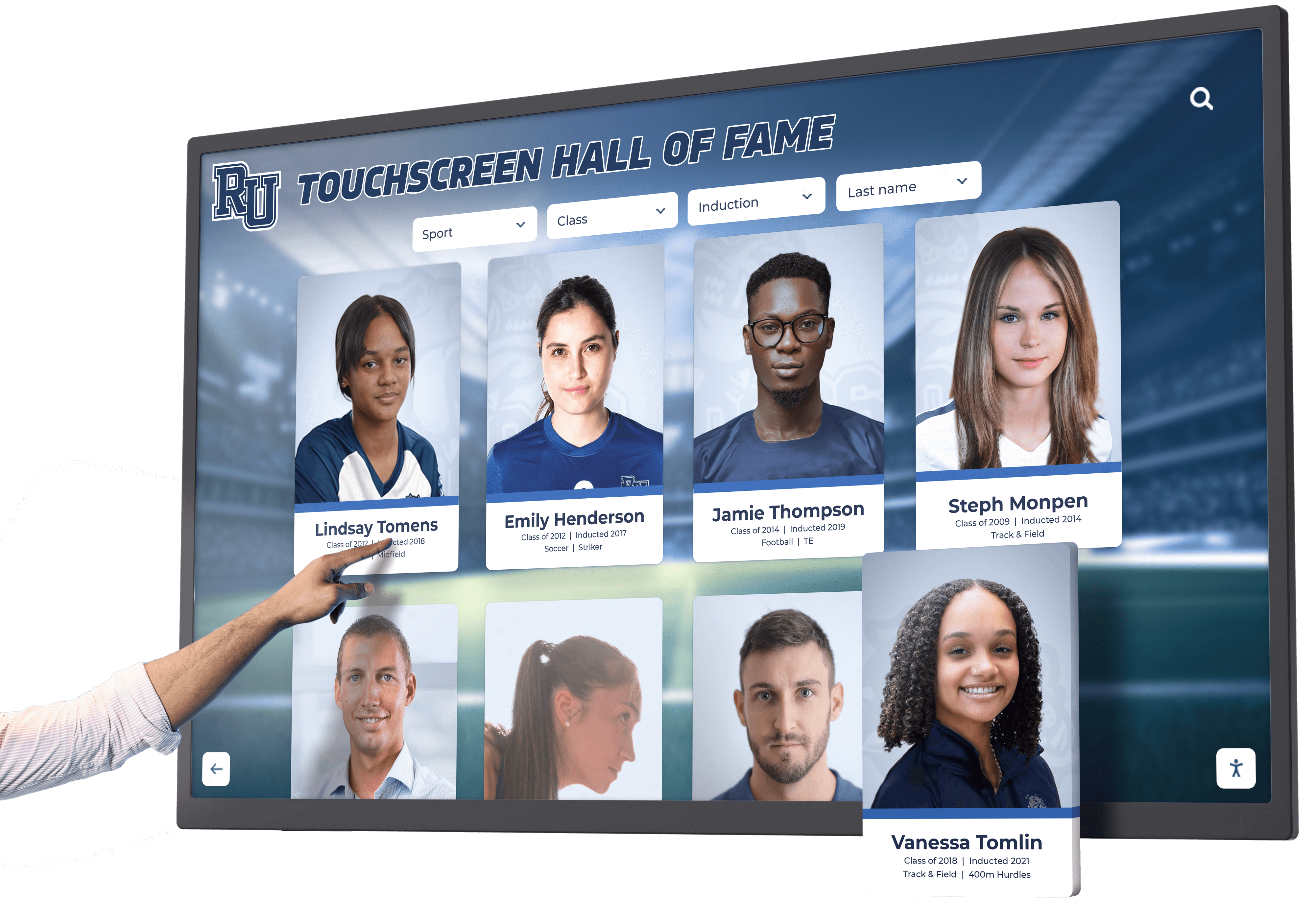
Content Development: Building Comprehensive Recognition Profiles
Hardware and software provide enabling infrastructure, but quality content determines whether recognition displays genuinely engage visitors or become ignored technology installations. Organizations rushing through content development consistently produce disappointing results failing to justify technology investment, while those investing appropriately in content strategy and development achieve powerful recognition that validates every dollar spent.
Profile Structure and Information Architecture
Essential Profile Components: Each recognition profile should include consistent information categories enabling rich storytelling while maintaining structural uniformity: full legal name with preferred nickname notation, graduation year or class affiliation, high-resolution portrait photograph (minimum 1200x1600 pixels), comprehensive biographical narrative (300-600 words) contextualizing achievements and life trajectory, detailed achievement descriptions specific to recognition category, career timeline highlighting professional progression, personal reflections or quotes in inductee’s voice, statistics or records when applicable (athletic achievements, academic honors, etc.), photo galleries supplementing primary portrait (4-8 additional images), and embedded video content when available (2-5 minute interviews or highlight footage).
Biographical Narrative Guidelines: Effective biographies balance factual achievement documentation with engaging storytelling revealing personality and character. Begin with early life context including family background, formative experiences, and factors shaping later success. Detail institutional years highlighting achievements, leadership roles, memorable moments, and relationships with mentors or teammates.
Document post-graduation trajectory including education continuation, career progression, professional accomplishments, community contributions, and ongoing institutional connections. Conclude with current status, family information when appropriate, and lasting impact or legacy perspective. Write in third person maintaining professional tone while incorporating personality through specific anecdotes and quotations.
Avoid generic platitudes and meaningless superlatives—“John was a great athlete and wonderful person”—instead providing specific examples demonstrating claimed characteristics. “John’s 2,347 career points still stand as school record 25 years later, but coaches remember his leadership during the 1998 championship run when he voluntarily reduced his scoring to integrate two talented freshmen who strengthened team depth” creates vivid, memorable characterization.
Photography Requirements and Best Practices
Portrait Photography Standards: Recognition profiles require professional-quality portrait photographs meeting technical specifications for display rendering. Shoot portraits at minimum 3000x4000 pixel resolution (12 megapixels), using proper lighting creating even illumination without harsh shadows or highlights, against clean backgrounds avoiding distraction from subjects, and composed tightly focusing on faces and upper bodies rather than full-body shots losing facial detail at screen sizes.
For historical recognition where professional portraits don’t exist, digitize best available photographs at highest resolution scanners permit (600 DPI minimum). When only small prints or yearbook images exist, professional scanning services can extract maximum detail while minimizing grain and defects through specialized equipment and processing.
Photo Acquisition Strategies: Contemporary inductees can participate in photo sessions scheduled specifically for recognition profiles, providing opportunity for professional photography establishing consistent visual quality across all new profiles. Coordinate sessions during induction weekends or reunion events when honorees visit campus, reducing logistical complexity while creating meaningful experience for participants.
Historical profiles require archival research sourcing photographs from institutional archives, yearbooks, athletic media guides, local newspaper morgues, family collections, and alumni-submitted materials. Develop submission guidelines specifying required resolution, format, and rights permissions, then coordinate outreach requesting materials from alumni, family members, and community members holding relevant photographs.
Gallery Images and Action Photography: Beyond portrait photographs, recognition profiles benefit from additional images providing context and storytelling depth. Action photographs showing inductees during competitive moments, team photographs contextualizing individual achievement within group success, award ceremony images capturing recognition moments, casual photographs revealing personality and relationships, and current photographs showing inductees today alongside historical images illustrating life progression.
Galleries should include 4-8 supplemental images beyond primary portraits. Vary photograph types creating visual interest and comprehensive biographical illustration. Caption all images specifying dates, locations, depicted individuals, and contextual information enriching visitor understanding.
Video Content Integration
Interview Content Guidelines: Video interviews provide compelling personal dimension impossible through text and static photography. Effective interview videos run 2-5 minutes, balance professional production quality with authentic conversational tone, feature well-lit subjects against clean backgrounds minimizing distraction, incorporate clear audio free from background noise or echo, and include descriptive captions ensuring accessibility and sound-off comprehension.
Structure interviews around 3-5 key questions eliciting reflective responses: favorite memories and defining moments during institutional years, individuals who influenced development and success, how institutional experience prepared for life after graduation, advice for current students pursuing similar paths, and reflections on what recognition means personally. Avoid yes/no questions requiring follow-up, instead asking open questions inviting substantive responses.
Highlight Reel Production: Athletic recognition particularly benefits from highlight footage showcasing competitive excellence. Compile 60-90 second highlight reels featuring 8-12 clips showing signature moments, record-setting performances, championship contributions, and defining plays. Set highlights to music matching emotional tone, incorporate text overlays identifying dates and achievements, and close with statistics and accomplishments contextualizing competitive excellence.
Source highlight footage from institutional athletic archives, local television coverage recordings, alumni-submitted personal recordings, and contemporary game footage when inductees competed during video era. Historical recognition from pre-video eras can incorporate still photograph slideshows with period-appropriate music creating nostalgic celebration in absence of motion footage.
Technical Specifications: Encode video content at 1920x1080 resolution minimum (1080p HD) using H.264 or H.265 compression optimizing quality and file size. Target 5-8 Mbps bitrate for interview content and 8-12 Mbps for highlight action footage preserving motion clarity. Embed closed captions in video files or provide separate subtitle files ensuring accessibility compliance.
Test video playback on actual touchscreen displays rather than computer monitors—equipment-specific rendering differences sometimes reveal compression artifacts, color accuracy issues, or audio synchronization problems invisible during computer preview. Verify smooth playback without buffering or stuttering under expected network conditions.
Content Management Workflows and Quality Assurance
Profile Creation Process: Establish systematic workflows ensuring consistent quality across all recognition profiles while distributing workload manageably. Assign staff roles explicitly—content researchers gathering biographical information and source materials, writers drafting narratives and achievement descriptions, photographers and videographers creating visual content, editors reviewing materials for accuracy and quality, approvers providing final authorization before publication, and publishers uploading completed profiles into content management systems.
Create profile development templates standardizing information categories, formatting, and style conventions. Templates ensure structural consistency while reducing decision fatigue during content creation. Develop style guides addressing tone, terminology, preferred phrasings, brand compliance, and formatting standards providing reference for content creators and editors.
Quality Assurance Checklist: Before publishing profiles, verify completion of QA requirements: factual accuracy confirmed through primary sources (yearbooks, newspaper archives, athletic records, academic transcripts), biographical information approved by inductees when possible ensuring accuracy and comfort with content, photography meets resolution requirements and reproduction rights secured, video content plays smoothly without technical errors, spelling and grammar error-free through multiple editorial reviews, formatting consistency with established templates and standards, and accessibility features implemented (alt text, captions, descriptive links).
Implement peer review processes where content creators review others’ work catching errors and inconsistencies individual creators overlook. Schedule content review cycles quarterly or semi-annually refreshing outdated information, correcting discovered errors, and enhancing profiles as new materials become available.
Sustainable Content Operations: Recognition programs succeed long-term through sustainable operational processes rather than heroic one-time efforts followed by neglect. Allocate dedicated staff time for ongoing content maintenance—budget 8-12 hours monthly for established programs managing 200+ profiles, increasing proportionally as recognition scale grows.
Document procedures, maintain content calendars scheduling profile additions and updates, establish communication protocols with inductees and families, and cross-train multiple staff members preventing program disruption when individuals leave positions or take extended absences. Organizations relying on single-person knowledge create substantial risk when inevitable personnel changes occur.
For schools successfully managing recognition content at scale, consider reviewing best practices from institutions implementing comprehensive digital hall of fame systems that balance quality with operational sustainability.
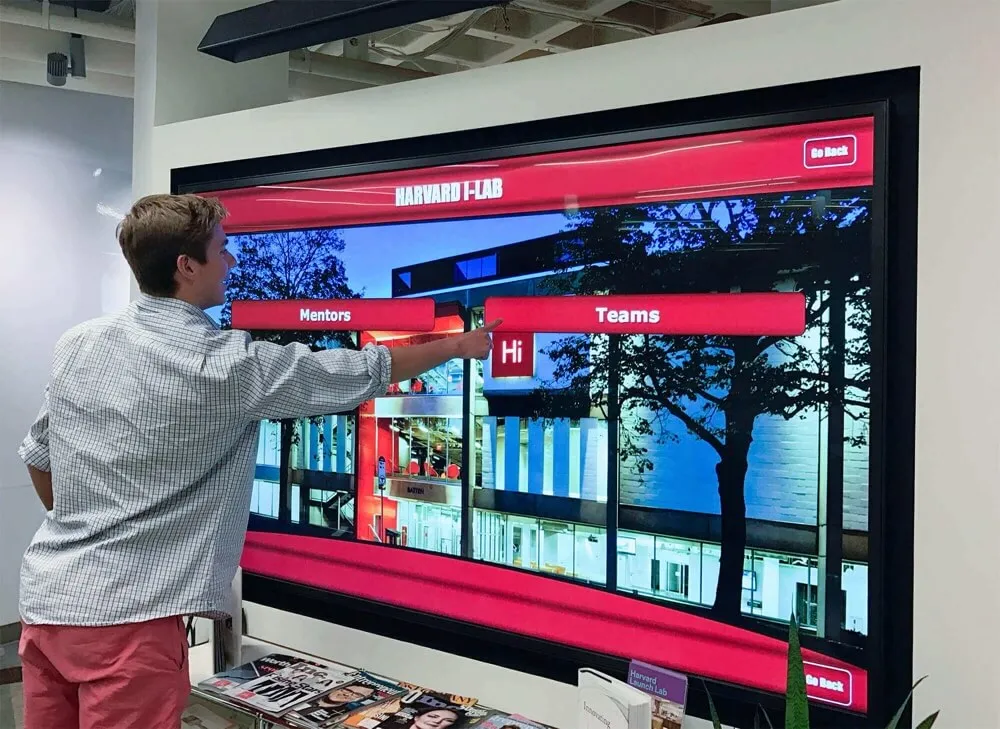
User Experience Design: Optimizing Visitor Engagement
Technology infrastructure and quality content provide necessary foundations, but intentional user experience design determines whether visitors engage deeply or bounce after cursory glances. Organizations achieving exceptional engagement outcomes share common UX principles reflecting how people naturally interact with public touchscreens versus assumptions about desired interaction patterns.
Navigation Design and Information Architecture
Home Screen Optimization: Home screens serve as entry points for all visitor sessions—their design critically impacts whether visitors engage or walk away. Effective home screens communicate purpose immediately through clear heading (“Alumni Hall of Fame,” “Athletic Recognition,” “Donor Wall”), feature prominently sized search bar encouraging direct queries, provide 4-6 clearly labeled category buttons enabling browsing by achievement type, showcase 2-3 rotating featured profiles tempting exploration, and maintain visual simplicity avoiding overwhelming information density deterring interaction.
Test home screen effectiveness by observing first-time users approaching displays without instruction. If visitors hesitate longer than 5-10 seconds before touching screen or walk away without interaction, home screen design requires simplification and clarification.
Search Functionality: Intuitive search represents the most critical navigation feature enabling visitors to find personal connections driving engagement. Implement auto-complete suggestions appearing as visitors type, displaying matching names, years, and categories reducing typing and guiding toward relevant results. Support partial name matching finding “Smith” when searching “Smit” and tolerating common misspellings through fuzzy matching algorithms.
Display search results showing 8-12 profiles per screen with primary portrait photographs, names, years, and brief achievement summaries enabling quick scanning. Provide filtering options narrowing results by year range, achievement category, or other relevant dimensions when searches return numerous matches.
Browsing and Filtering: Visitors unsure what they’re seeking require browsing mechanisms supporting serendipitous discovery. Organize content into intuitive categories—by graduation decade, by achievement type (athletic, academic, professional, service), by sport or activity, by professional field, or by custom organizational dimensions matching institutional culture.
Within categories, display profiles as scrollable grids showing portrait thumbnails with names and years. Grid layouts accommodate more profiles per screen than list views, creating visual variety encouraging exploration versus monotonous text lists feeling overwhelming. Implement infinite scrolling or clear “load more” pagination enabling comfortable navigation through large result sets.
Profile View Design: Individual profile screens should dedicate 40-50% of screen space to large portrait photograph establishing immediate personal connection, present biographical narrative in easily-readable 16-18pt font with comfortable line spacing preventing dense text blocks, organize supplemental content (galleries, videos, statistics) into clearly labeled sections accessible through tabs or scrollable regions, and provide obvious “back” and “related profiles” navigation encouraging continued exploration rather than session termination.
Avoid requiring multiple taps to access core content—biographical narratives should appear immediately when profiles open rather than behind “read more” expansions. Supplemental content benefiting from dedicated focus (video viewing, gallery browsing) appropriately uses modal overlays or dedicated screens, but primary information should be immediately accessible.
Engagement Duration Optimization
Compelling Visual Hierarchy: Strategic use of size, color, whitespace, and positioning guides visitor attention toward highest-value content while maintaining comfortable visual processing. Large, high-quality photographs create emotional engagement and human connection far exceeding text impact. Position photographs prominently rather than relegating them to thumbnails or secondary screen positions.
Incorporate motion strategically—subtle animations drawing attention to featured content, smooth transitions between screens creating polished experience, and video auto-play (with captions, without audio) capturing attention without annoying visitors. Avoid excessive animation creating distraction or appearing gimmicky rather than purposeful.
Related Content Recommendations: Visitors engaging deeply with specific profiles demonstrate active interest—leverage that engagement by surfacing related content extending sessions organically. Display “Related Profiles” sections at bottom of profile screens featuring inductees from same graduation years, same sports or activities, same professional fields, or family connections when applicable.
Effective recommendations balance algorithmic relevance with content diversity—showing identical relationships (all teammates from single season) provides less discovery value than varied connections revealing unexpected intersections (teammate who became professional colleague, classmate who married sibling, etc.). Test recommendation effectiveness through analytics revealing click-through rates from recommendations versus other navigation paths.
Progressive Disclosure: Balance comprehensiveness with focus through progressive disclosure revealing detail incrementally rather than overwhelming visitors with everything simultaneously. Primary profile screens show essential information (portrait, name, key achievements, biographical summary) immediately, with clearly signaled access to additional depth (photo galleries, videos, documents, extended narratives) available through obvious but non-intrusive navigation.
This approach accommodates varied visitor goals—casual browsers gain quick understanding without commitment, while deeply interested visitors discover rich detail rewarding extended exploration. Forcing all visitors through identical comprehensive paths creates friction for casual users without improving experience for engaged users who would naturally seek depth independently.
Accessibility and Inclusive Design
Vision Accommodation: Implement minimum 16pt font sizing for body text with 18-24pt headings ensuring readability at comfortable viewing distances (24-36 inches). Maintain 4.5:1 minimum contrast ratio between text and backgrounds meeting WCAG AA standards. Avoid white text on light backgrounds or dark text on dark backgrounds reducing legibility despite technically sufficient contrast ratios.
Provide text resizing controls enabling visitors to enlarge content when needed. Position these controls prominently since visitors requiring larger text may not initially see standard-sized control labels. Support pinch-to-zoom gestures on capacitive touchscreens providing alternative enlargement method.
Motor Accommodation: Size touch targets minimum 44x44 pixels providing adequate surface area for imprecise touches from visitors with motor challenges, arthritis, or limited dexterity. Maintain adequate spacing between adjacent touchable elements preventing accidental activation of incorrect controls.
Avoid interactions requiring sustained holds, complex multi-touch gestures, or rapid sequences that visitors with motor limitations cannot perform. Design for single-tap interaction accessing all features and content without requiring gesture sophistication.
Cognitive Accessibility: Maintain consistent navigation patterns throughout interface—“back” buttons appearing in same location on all screens, category browsing using identical interaction models across sections, and search functioning identically regardless of current location. Consistency reduces cognitive load enabling visitors to develop mental models predicting system behavior.
Provide clear feedback for all interactions—buttons changing appearance when touched, loading indicators during content retrieval, and confirmation messages for actions with consequences. Visitors should never wonder whether their touch registered or what the system is doing in response to their input.
For organizations committed to comprehensive accessibility, explore detailed guidance on implementing accessible digital recognition systems that serve all community members effectively.

Maintenance and Operations: Sustaining Long-Term Success
Recognition programs require ongoing operational commitment ensuring displays remain functional, content stays current, and systems adapt as institutional needs evolve. Organizations treating installations as “set and forget” technology consistently experience degraded performance, outdated content undermining credibility, and eventual abandonment wasting initial investments.
Routine Maintenance Schedule
Daily Operations (Automated): Modern cloud-based recognition systems handle most daily operations automatically without manual intervention. Displays wake from sleep mode at scheduled times (typically 6 AM), connect to cloud platforms retrieving content updates, display recognition content throughout operational hours, and enter sleep mode at scheduled times (typically 10 PM) reducing power consumption and extending hardware life.
Monitor automated operations through cloud dashboards showing online/offline status for all displays. Investigate devices appearing offline consistently indicating potential network issues, power problems, or hardware failures requiring attention.
Weekly Maintenance (5-10 minutes per display): Physical displays require basic cleaning maintaining presentation quality. Clean touchscreen glass using microfiber cloths and appropriate screen cleaning solutions (avoid ammonia-based cleaners damaging anti-glare coatings). Wipe display bezels, enclosures, and surrounding areas removing accumulated dust.
Verify displays are operating properly—check for image quality issues, dead pixels, touch responsiveness problems, or unusual sounds indicating potential hardware issues. Report anomalies to IT support or vendor technical assistance for investigation before minor issues escalate into complete failures.
Monthly Content Review (2-4 hours): Review recently published content verifying accuracy, appropriate formatting, and quality standards compliance. Check featured content rotations ensuring diversity rather than repetition, scan user analytics identifying popular and underutilized content, and evaluate visitor feedback when comment mechanisms exist identifying satisfaction or improvement opportunities.
Verify media playback for video and audio content, check external links confirming destinations remain active, and test search functionality ensuring results match expectations. Monthly reviews catch degraded content quality, broken links, or platform issues requiring correction before they create poor visitor experiences.
Quarterly System Reviews (4-6 hours): Conduct comprehensive system assessments examining hardware health, software currency, content currency, security compliance, and usage pattern evolution. Review analytics in depth identifying trends, testing interface usability observing actual visitors when possible, and soliciting stakeholder feedback about perceived value and improvement suggestions.
Update content priorities based on analytical insights and stakeholder input, refresh featured content keeping displays feeling current rather than stale, and coordinate with vendors for software updates, security patches, and feature enhancements. Quarterly reviews ensure recognition programs evolve continuously rather than stagnating after initial launch enthusiasm fades.
Troubleshooting Common Issues
Display Not Powering On: Verify power outlet is providing electricity using outlet tester or plugging in known-working device. Check power cables are fully seated at both display and outlet ends. Examine circuit breakers confirming they haven’t tripped. For displays connected to switched outlets, verify light switches are in on position. If power is confirmed present but display remains dark, contact vendor technical support or IT department for hardware troubleshooting.
Network Connectivity Problems: Confirm network cables are fully seated in both display and network jack. For wireless displays, verify WiFi network is operational by connecting other devices to same network. Check with IT department confirming device MAC address remains authorized on network and firewall rules haven’t changed blocking required services. Review cloud platform dashboard for error messages providing diagnostic information. Restart displays by power cycling—turn off, wait 30 seconds, turn on—resolving temporary network issues.
Touch Not Responding: Clean touchscreen glass thoroughly—accumulated dirt, moisture, or oils can interfere with touch sensitivity. Verify nothing is contacting screen edges where touch sensors or cameras reside—objects resting against bezels create false touch inputs. For persistent touch issues, power cycle displays. If problems continue, contact vendor support since touch hardware may require recalibration or repair.
Content Not Updating: Verify displays show connected status in cloud management portal indicating active communication with content servers. Confirm content has actually been published rather than saved as draft. Check scheduled publishing dates ensuring content isn’t scheduled for future release. Review permission settings confirming published content is set for public visibility rather than restricted to specific user roles. Contact vendor support if content appears published correctly but fails to display.
Software Updates and Platform Evolution
Automatic Update Management: Cloud-based platforms typically deploy software updates automatically during scheduled maintenance windows without requiring manual intervention. Vendors schedule updates during low-usage periods (overnight, early morning) minimizing visibility to visitors. Most updates complete in 5-15 minutes with displays automatically restarting to load new software.
Review vendor release notes for update notifications describing new features, bug fixes, and behavioral changes helping you understand platform evolution. Test new features in administrative portals after updates verifying they function as expected and understanding any procedural changes affecting content management workflows.
Feature Request and Roadmap Input: Quality vendors maintain ongoing customer dialogue gathering feature requests and improvement suggestions influencing product roadmaps. Participate in user communities, respond to surveys, and communicate directly with vendor account managers about desired capabilities. While vendors cannot implement every request, systematic feedback helps them prioritize development delivering greatest customer value.
Organizations implementing recognition systems should view them as living platforms evolving continuously rather than fixed products frozen at purchase. Solutions like Rocket Alumni Solutions demonstrate this commitment through regular feature releases, usability improvements, and capability expansions responding to customer needs and technological advancement.
Staff Training and Knowledge Transfer
Initial Training: Comprehensive onboarding ensures staff can manage recognition displays confidently without constant technical support. Effective training programs cover content management system operation (creating profiles, uploading media, publishing workflows), user interface customization (featured content, category organization, display settings), basic troubleshooting (common issues and resolution steps), analytics interpretation (understanding engagement data and reporting), and vendor support processes (how to access help, response time expectations, escalation procedures).
Schedule training for 2-4 hours allowing adequate time for instruction, hands-on practice, and question answering. Record training sessions for future reference and new staff onboarding. Provide written quick-reference guides documenting common procedures supporting staff when questions arise after initial training concludes.
Ongoing Skill Development: As platforms evolve and staff roles change, periodic refresher training maintains operational competency. Schedule annual training sessions reviewing platform capabilities, introducing new features, reinforcing best practices, and gathering staff feedback about challenges or desired capabilities.
Knowledge Documentation: Document institutional knowledge about recognition program operations including content standards and style guidelines, profile development workflows and responsibilities, vendor contact information and support procedures, network configuration details and IT coordination contacts, and lessons learned from operational experience.
Documentation prevents knowledge loss when staff transition to different roles or leave organization. Store documentation in accessible shared locations rather than individual computers, and review annually updating for changes and discovered improvements.
Budget Planning: Total Cost of Ownership Analysis
Recognition program costs extend beyond initial purchase prices including ongoing operational expenses and long-term value considerations. Organizations evaluating touchscreen implementations should analyze total cost of ownership over expected 5-7 year hardware lifecycles comparing digital approaches against traditional recognition alternatives.
Initial Implementation Costs
Hardware Investment: Commercial-grade touchscreen displays cost $3,000-$12,000 depending on screen size, touch technology, commercial grade quality, and included features. Budget toward higher end for prominent installations where reliability and professional appearance critically impact institutional perception. Entry-level 43" displays start around $3,000, popular 55" sizes range $4,000-$6,000, and large 75-86" displays reach $8,000-$12,000 or more.
Floor-standing kiosks add $2,000-$6,000 to hardware costs versus wall-mounting, but eliminate wall preparation expenses and provide installation flexibility justifying premium for appropriate applications. Include peripheral costs when applicable—external computers for displays lacking integrated computing ($500-$800), keyboards or input devices for special applications ($100-$300), and audio equipment for video-forward installations ($200-$800).
Software Licensing: Purpose-built recognition platforms typically charge initial setup fees plus ongoing subscription costs. Expect $2,000-$8,000 initial configuration fees covering account setup, administrative training, platform customization, and initial content migration assistance. Ongoing subscriptions cost $2,000-$6,000 annually per installation depending on feature sets, support levels, and content capacity.
Some vendors offer perpetual licensing models with higher upfront costs but lower ongoing fees—compare total 5-year costs rather than initial pricing determining best value. Include cloud hosting, automatic backups, software updates, technical support, and platform access for unlimited administrators in licensing comparisons.
Installation and Infrastructure: Professional installation by commercial AV integrators costs $1,500-$4,000 per display covering mounting, cable management, electrical coordination, and finished appearance. Budget additional infrastructure costs when required—electrical circuits ($300-$1,500), network drops ($500-$2,000), wall reinforcement ($200-$1,000), and architectural integration ($500-$3,000 for custom millwork or blending with existing displays).
Plan conservatively for first installations since unexpected complications commonly arise during inaugural projects. Subsequent installations typically cost less as teams develop experience and standardized approaches.
Content Development: Initial content creation represents substantial investment often exceeding technology costs. Budget photography costs ($100-$300 per subject for professional sessions), writing and editing ($50-$150 per profile for professional content development), video production ($500-$2,000 per subject for interview and editing), historical research and digitization ($25-$75 per profile), and project management coordination ($5,000-$15,000 for comprehensive programs).
Many organizations develop content using internal staff rather than external vendors, trading budget expenditure for staff time allocation. Calculate equivalent costs based on hourly rates and realistic time estimates—content development typically requires 4-8 hours per comprehensive profile depending on research complexity and available source materials.
Ongoing Operational Costs
Annual Software Subscriptions: Cloud-based platforms charge annual subscriptions covering software licensing, cloud hosting infrastructure, automatic backups and redundancy, ongoing software updates and improvements, technical support access, and administrative user accounts. Annual costs typically range $2,000-$6,000 per display installation with volume discounts for multiple displays.
Compare subscription inclusions carefully—some vendors charge separately for support, content storage, or advanced features creating higher total costs than initial subscription quotes suggest. Verify whether subscriptions cover unlimited administrative users or charge per-seat licensing increasing costs as programs grow.
Content Updates and Additions: Recognition programs require ongoing content investment adding new inductees, updating existing profiles with recent achievements, refreshing featured content maintaining engagement, and enhancing historical profiles as new materials surface. Budget 40-80 hours annually for established programs, translating to $2,000-$6,000 for staff time or contracted content services.
Programs with regular induction cycles require more consistent effort versus those recognizing historical achievement primarily. Athletic programs honoring championship teams annually need greater content capacity than alumni programs inducting 3-5 individuals per year.
Hardware Maintenance and Repairs: Commercial displays typically operate reliably 5-7 years before requiring replacement. Budget $500-$1,000 annually in reserve for unexpected repairs—failed power supplies, damaged touchscreens, or component failures occurring occasionally despite quality equipment. Comprehensive warranties covering years 1-3 reduce repair costs during initial period, but years 4-7 require budget allocation for eventual repairs.
Facilities and Utilities: Displays consume electricity during operation—typical 55" commercial touchscreens use 150-200 watts, costing approximately $2-4 monthly in electricity at typical commercial rates. Schedule displays to sleep overnight reducing annual electricity costs by 30-40%. Include any HVAC impact in spaces where display heat generation meaningfully affects climate control costs.
Return on Investment Calculation
Cost Comparison to Traditional Recognition: Traditional plaques cost $100-$400 per inductee for fabrication and installation. Institutions inducting 10 individuals annually spend $1,000-$4,000 yearly on new plaques alone, reaching $10,000-$40,000 over 10 years before accounting for space exhaustion forcing expensive display expansions.
Digital recognition systems typically achieve cost parity with traditional approaches within 3-5 years while providing unlimited capacity eliminating space constraints that eventually necessitate expensive renovation or selective removal of existing recognition—controversial decisions damaging institutional relationships and creating controversy.
Operational Efficiency Value: Traditional recognition requires substantial administrative time coordinating plaque ordering, reviewing designs, scheduling installation, and managing physical inventory. Digital systems reduce per-inductee effort by 60-80%, creating staff time savings worth $1,000-$3,000 annually at typical administrative salary rates.
Engagement and Advancement Impact: While difficult to quantify precisely, institutions implementing digital recognition consistently report increased alumni giving participation (5-15% improvement), higher event attendance (10-20% increases), and improved prospective student perception during campus tours. Annual advancement impact worth even 1-2% of typical campaign goals easily justifies recognition program investments.
Decision Framework: Selecting the Right Solution
With numerous vendors offering touchscreen recognition systems, systematic evaluation ensures selection of platforms delivering optimal long-term value. Organizations comparing options should evaluate vendors across multiple dimensions beyond initial pricing determining best institutional fit.
Vendor Evaluation Criteria
Recognition Specialization: Prioritize vendors specializing specifically in recognition applications over generic digital signage providers adapting standard products. Purpose-built recognition platforms incorporate profile management, relationship mapping, search optimization, and administrative workflows designed specifically for celebrating achievement rather than displaying announcements.
Evaluate vendor client lists—do they serve primarily educational institutions and recognition-focused organizations, or do they position as general-purpose signage for retail, corporate, and commercial applications? Specialized vendors understand recognition program operational patterns, stakeholder needs, and long-term sustainability requirements generic vendors lack.
Customer References and Portfolio: Request references from comparable organizations implementing similar scale and complexity. Speak directly with administrators managing recognition programs daily rather than executives approving initial purchases—operational users provide realistic assessment of long-term satisfaction, support quality, system reliability, and vendor responsiveness.
Review vendor portfolios examining multiple installations. Visual consistency and professional polish across client base indicate mature platforms and design capabilities, while inconsistent or amateurish portfolio samples suggest custom development or immature products creating risk.
Support Infrastructure: Evaluate vendor support capabilities including technical support availability (business hours versus 24/7), response time commitments for urgent issues, account management providing proactive consultation, training programs ensuring competent self-sufficient operation, and online resources (knowledge bases, video tutorials, community forums) supporting ongoing learning.
Test support responsiveness during evaluation—submit technical questions observing response speed and quality. Vendors prioritizing sales over support often demonstrate dramatically different responsiveness after purchase versus during evaluation, while quality vendors maintain consistent service excellence throughout customer lifecycle.
Platform Roadmap and Innovation: Question vendors about development roadmaps, feature release history, and investment in platform evolution. Stagnant platforms frozen at purchase capabilities provide diminishing value as technology advances and expectations evolve. Quality vendors demonstrate continuous improvement through regular feature releases, usability enhancements, and technology updates maintaining platform relevance across multi-year deployments.
Review release notes documenting recent updates—frequent minor improvements indicate active development versus rare major overhauls suggesting minimal ongoing investment. Ask about customer input processes and whether vendor actively solicits and incorporates user feedback into product evolution.
Implementation Timeline Expectations
Realistic Project Phases: Touchscreen recognition implementations require 12-24 weeks from initial planning through launch depending on scope complexity, organizational decision processes, content development requirements, and installation coordination demands.
Plan 3-4 weeks for stakeholder alignment, requirements definition, space assessment, and planning completion. Budget 2-3 weeks for vendor evaluation, proposal review, and procurement approval processes. Allow 6-10 weeks for hardware ordering and delivery—supply chain variability creates uncertainty requiring schedule buffer. Schedule 2-4 weeks for installation coordination, infrastructure preparation, and final mounting. Reserve 3-4 weeks minimum for content development, quality assurance, and comprehensive testing before launch.
Common Timeline Risks: Projects routinely encounter delays from procurement bureaucracy, committee indecision, staff transitions, facility coordination conflicts, and content development underestimation. Build 20-30% schedule contingency accommodating unexpected delays without forcing compressed launches creating quality compromises.
Coordinate launches with natural institutional milestones—homecoming weekends, reunion events, start of academic years, or dedication ceremonies. Forcing launches around inflexible dates creates pressure producing rushed implementations versus allowing appropriate time for quality execution.
Why Organizations Choose Rocket Alumni Solutions
Schools and organizations conducting thorough evaluations consistently select Rocket Alumni Solutions for touchscreen recognition because the platform excels across every critical evaluation dimension:
Purpose-Built for Recognition Excellence: Rocket designed software architecture specifically for showcasing individuals, teams, achievements, and institutional history rather than adapting corporate digital signage. Every feature reflects deep understanding of recognition program needs and operational patterns.
Unmatched Ease of Use: Administrative interfaces require minimal training enabling non-technical staff to manage comprehensive recognition programs confidently without constant IT involvement. Intuitive design reduces operational burden while ensuring sustainable long-term management.
Unlimited Scalability: Cloud architecture accommodates thousands of detailed profiles without performance degradation, supporting institutional growth across decades without platform limitations or expensive migrations as programs expand.
Comprehensive Feature Set: Rocket includes everything institutions need for recognition excellence—sophisticated search and navigation, rich multimedia support, web portal integration, mobile optimization, accessibility compliance, analytics and insights, and multi-display management—without complex configuration or custom development.
Proven Results: Over 1,000 installations across all 50 states demonstrate Rocket’s reliability, versatility, and sustained customer satisfaction. Organizations trust Rocket specifically because the platform consistently delivers on promises across diverse institutional contexts.
Dedicated Partnership: Rocket provides comprehensive implementation support, ongoing technical assistance, content strategy consultation, and continuous platform improvements ensuring long-term success. Organizations value partnership approach versus transactional vendor relationships ending after initial sale.
Ready to transform your recognition program with proven touchscreen technology designed specifically for halls of fame and interactive awards? Schedule a TouchWall demonstration to see how Rocket Alumni Solutions delivers comprehensive, intuitive, scalable recognition systems built specifically for your needs.
Conclusion: Building Recognition Systems That Scale With Achievement
Touchscreen digital hall of fame walls and interactive awards displays represent more than technology upgrades—they fundamentally transform how organizations celebrate achievement, preserve legacy, and inspire future excellence. These systems eliminate physical space constraints that eventually overwhelm traditional recognition, reduce administrative burden by 75% or more compared to manual plaque processes, create engaging multimedia experiences impossible with static displays, and provide unlimited capacity growing effortlessly as achievement accumulates across decades.
Successful implementations require systematic approaches addressing technical infrastructure, content quality, user experience design, and operational sustainability. Organizations rushing through planning, underinvesting in content development, or treating installations as “set and forget” technology consistently experience disappointing outcomes failing to justify investment. Those following comprehensive implementation frameworks achieve transformative recognition that validates every dollar spent while delivering measurable advancement and engagement impact.
The framework presented in this guide provides actionable blueprints for every implementation phase—from initial stakeholder alignment through years of sustained operational excellence. Whether you’re replacing overflowing trophy cases in athletic facilities, creating comprehensive alumni recognition serving global communities, or building donor recognition supporting major fundraising campaigns, these principles and procedures ensure successful outcomes serving your organization effectively for years to come.
Your achievements deserve recognition infrastructure matching their significance. With proper planning, appropriate technology selection, quality content development, and sustained operational commitment, touchscreen hall of fame systems create recognition experiences that don’t just acknowledge accomplishment but genuinely inspire, engage, and strengthen community across generations.































