Equipment manufacturers face a persistent challenge at trade shows, industry conferences, and customer functions: how to present complex products with multiple features, specifications, and configurations in ways that engage diverse audiences while accommodating limited booth space and staff availability. Static brochures and staffed demonstrations fail to scale when visitor traffic peaks, technical details overwhelm casual browsers, or prospects want self-directed exploration without sales pressure.
Interactive touchscreen kiosk solutions address these limitations by delivering dynamic, self-service product information that adapts to each visitor’s interests and expertise level. These systems transform passive viewing into active engagement, enabling equipment manufacturers to display entire product lines, feature key capabilities, demonstrate applications, and capture qualified leads—all within compact footprints that work across physical events and virtual platforms.
The most effective event kiosks combine intuitive navigation, rich multimedia content, and direct integration with existing websites and marketing materials. This guide explores how equipment manufacturers can develop touchscreen technology solutions that work equally well at in-person trade shows, customer facilities during site visits, and as embeddable web experiences for virtual events—creating consistent product storytelling across every touchpoint.
Understanding Event Touchscreen Requirements

Successful event technology differs fundamentally from typical digital signage or website design. Event environments demand specific capabilities addressing unique constraints and opportunities.
Dual-Platform Compatibility Requirements
Equipment manufacturers need solutions functioning identically across physical touchscreen hardware at events and standard web browsers for remote engagement. Many organizations invest heavily in custom kiosk applications only to discover these systems cannot deploy on websites, forcing separate development for online catalogs and creating inconsistent user experiences.
Web-based touchscreen platforms eliminate this duplication. A single codebase delivers identical functionality whether accessed through commercial touchscreen displays at convention centers or laptops during virtual product demonstrations. This architectural approach reduces development costs, ensures brand consistency, and allows continuous content updates affecting both physical and digital deployments simultaneously.
Physical Environment Considerations
Trade show floors and customer facility tours present challenges unlike controlled office environments:
High Ambient Noise: Audio content competes with crowd noise, machinery demonstrations, and adjacent exhibitors. Effective event kiosks prioritize visual communication with optional headphone audio rather than requiring sound for core navigation.
Variable Lighting Conditions: Exhibition hall lighting ranges from harsh overhead floods to dim ambient lighting. High-brightness commercial displays (450+ nits) with anti-glare coatings maintain visibility across conditions where consumer displays wash out.
Continuous Operation Demands: Unlike office displays operating business hours, event kiosks run 8-12 hours daily throughout multi-day conferences. Commercial-grade touchscreens rated for continuous operation prevent hardware failures mid-event while consumer displays overheat under sustained use.
Unstable Network Connectivity: Convention center WiFi suffers congestion during peak attendance. Reliable kiosk solutions cache content locally, functioning completely offline while syncing analytics when connectivity permits rather than failing when networks slow.
Physical Security Requirements: Valuable display hardware in public spaces requires secure mounting preventing theft while allowing rapid deployment and breakdown. Solutions combining theft-resistant enclosures with tool-free installation balance security needs with event logistics.
Content Accessibility for Diverse Audiences
Event visitors span technical experts seeking detailed specifications and decision-makers wanting high-level overviews without wading through engineering data.
Effective product display systems accommodate this range through layered information architecture. Initial screens present overview videos and key benefits accessible to any viewer. Progressive disclosure reveals detailed specifications, application examples, comparison charts, and technical documentation as users drill deeper based on their specific interests and technical sophistication.
This approach prevents overwhelming casual visitors while satisfying engineers who need comprehensive data to evaluate equipment suitability. Traditional brochures force everyone through identical content regardless of needs, while interactive touchscreen displays adapt to each user’s exploration path.
Core Capabilities for Equipment Showcases

Equipment manufacturers implementing event kiosks should prioritize functionality directly addressing product complexity and buyer education needs.
Interactive Product Catalogs
Comprehensive product catalogs organized by category, application, industry, or specification enable visitors finding relevant equipment quickly without staff intervention. Search functionality, filtering options, and comparison tools help narrow options from extensive product lines to shortlists matching specific requirements.
Beyond basic listings, effective catalogs incorporate rich media including product photography from multiple angles, demonstration videos showing equipment in operation, 3D model viewers enabling rotation and zoom, and interactive specification sheets users can download or email themselves.
Organizations like Rocket Alumni Solutions demonstrate how web-based platforms deliver sophisticated catalog experiences through standard browsers, eliminating custom native applications while maintaining full touchscreen optimization. This approach allows manufacturers updating content remotely without physically accessing hardware or deploying software updates to distributed devices.
Feature Annotation Systems
Complex equipment incorporates dozens of features, many invisible in static imagery or requiring operation to demonstrate value. Interactive feature annotation systems solve this challenge through annotated imagery, hotspot navigation, and multimedia explanations.
Users tap components within product images to reveal detailed information about specific features, watch video demonstrations of particular capabilities in action, or access technical documentation explaining engineering innovations. This interactive storytelling communicates value more effectively than specification lists while accommodating diverse learning preferences across visual, auditory, and text-based information consumption.
Application-Based Navigation
Many equipment buyers think primarily about applications—“I need to move materials at high temperature” or “I must comply with specific safety standards”—rather than product categories. Application-based navigation reorients product discovery around buyer problems rather than manufacturer organizational structures.
Visitors select their industry, describe their process challenge, or specify performance requirements, and the system recommends appropriate equipment with explanations of how specific features address their needs. This consultative approach replicates expertise of knowledgeable sales engineers while scaling to accommodate unlimited simultaneous visitors.
Technical Specification Access
Engineers and procurement specialists require detailed technical data to evaluate equipment compatibility, performance characteristics, and regulatory compliance. Comprehensive specification sheets, dimensional drawings, electrical requirements, performance curves, and certification documentation must be immediately accessible without sales conversations.
Downloadable PDFs, email delivery options, and QR codes enabling mobile access ensure technical audiences leave with information needed for internal evaluation processes. Integration with document management systems allows automatically serving current specification versions without manual content updates across multiple platforms.
Comparison Tools
Buyers evaluating multiple equipment options benefit from side-by-side comparison displays highlighting differences in capabilities, specifications, pricing, and application suitability. Interactive comparison tools let users selecting 2-4 products from catalogs to view synchronized specifications, feature differences, and application recommendations.
This self-service comparison replicates guidance sales teams provide while allowing preliminary evaluation without commitment to sales conversations. Organizations implementing digital signage services often discover comparison functionality generates qualified leads by identifying visitors seriously evaluating specific equipment rather than casual browsers.
Lead Capture Integration
Event success depends on converting visitor engagement into actionable sales leads. Effective kiosk systems integrate lead capture throughout exploration rather than forcing form completion before content access.
Contextual lead capture triggers when users request detailed information, download specifications, or spend extended time on particular products. Forms pre-populate with behavioral data—products viewed, features explored, documentation downloaded—providing sales teams qualified context beyond contact information. Integration with CRM systems enables immediate follow-up while engagement remains fresh rather than manual lead entry after events conclude.

Implementation Approaches for Manufacturers
Equipment manufacturers can pursue several technical approaches for event kiosk development, each with distinct tradeoffs affecting cost, deployment flexibility, and maintenance requirements.
Native Application Development
Custom native applications built specifically for touchscreen hardware deliver pixel-perfect interfaces optimized for touch interaction with offline functionality and hardware integration capabilities. Development teams create Windows, Android, or proprietary touchscreen OS applications specifically for event deployment.
However, native development creates significant limitations for equipment manufacturers:
Platform Lock-In: Applications built for Windows touchscreens cannot deploy on Android kiosks or run in web browsers, limiting hardware flexibility and preventing web-based virtual event deployment.
High Development Costs: Native applications require specialized development expertise, typically $50,000-$150,000 for sophisticated product catalogs with multimedia content and lead capture functionality.
Maintenance Complexity: Content updates, feature additions, and bug fixes require deploying software updates to physical devices, complicating remote management when displays are distributed across customer facilities or trade show locations.
Deployment Restrictions: Native applications function only on devices where they are installed, preventing adaptation for virtual events, website integration, or mobile device access without complete redevelopment.
Web-Based Touchscreen Solutions
Progressive web applications and responsive websites optimized for touch interaction deliver event kiosk functionality through standard web browsers, eliminating native application limitations while maintaining full-featured interactivity.
This approach offers compelling advantages for equipment manufacturers:
Universal Deployment: Identical experiences run on touchscreen kiosks at trade shows, desktop computers during virtual demonstrations, tablets during site visits, and smartphones for mobile access—all from a single codebase.
Simplified Content Management: Browser-based content management systems enable remote updates affecting all deployment points simultaneously without software distribution to physical devices.
Reduced Development Costs: Web development leverages broader developer talent pools and established frameworks, typically reducing initial investment 40-60% compared to custom native applications.
Future-Proof Flexibility: Web standards evolve continuously with browser updates rather than requiring application redevelopment as operating systems change or new hardware emerges.
Direct Integration: Web-based solutions embed directly into corporate websites, virtual event platforms, and customer portals without special viewer software or installation requirements.
Solutions like Rocket Alumni Solutions demonstrate how sophisticated interactive experiences function identically whether accessed through commercial touchscreen displays or standard laptops, eliminating platform-specific development while delivering optimized touch interfaces.
Hybrid Development Strategies
Some manufacturers pursue hybrid approaches wrapping web-based interfaces within native application containers, gaining offline functionality and hardware integration while maintaining web development benefits.
Progressive web application (PWA) technologies enable web experiences functioning offline, accessing hardware features, and installing as standalone applications while remaining fundamentally browser-based. This middle ground accommodates organizations requiring native-like capabilities without abandoning web deployment flexibility.
Content Development for Product Showcases
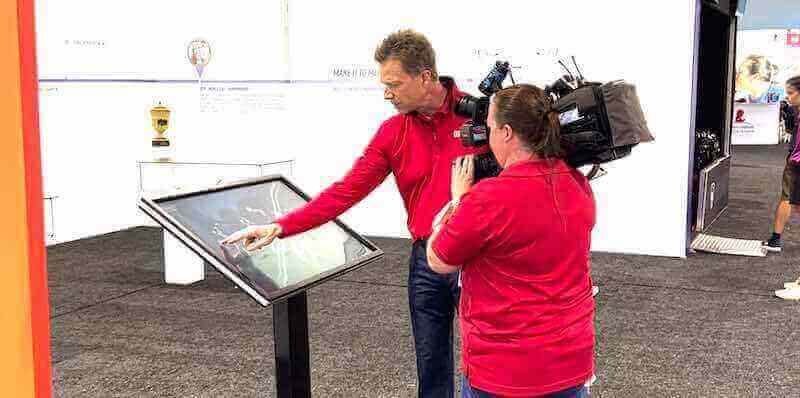
Technical capability matters little without compelling content communicating product value and facilitating buyer education. Equipment manufacturers should invest systematically in content development addressing diverse audience needs.
Visual Asset Requirements
High-quality product imagery forms the foundation of effective equipment showcases. Professional photography capturing equipment from multiple angles, detail shots highlighting key features, and contextual images showing equipment in application environments communicate far more effectively than specification sheets alone.
Video content demonstrating equipment operation, installation procedures, maintenance requirements, and application examples addresses questions prospects have but may not articulate during brief event conversations. Three-minute demonstration videos replace 30-minute sales presentations while accommodating unlimited simultaneous viewers.
3D models and interactive visualizations enable exploring equipment from any angle, understanding component relationships, and visualizing scale in ways static imagery cannot achieve. Organizations implementing interactive touchscreens for museums and galleries demonstrate how 3D content enhances understanding of complex subjects—equipment manufacturers can apply identical approaches to industrial products.
Technical Documentation Organization
Comprehensive specification sheets, dimensional drawings, electrical schematics, parts lists, and certification documents must be organized logically and accessible instantly. Effective systems present technical information progressively—summary specifications on initial product pages with complete documentation available through clear navigation without overwhelming casual viewers.
Document version control ensures visitors always access current specifications rather than outdated material lingering on event devices. Centralized content management systems automatically propagate documentation updates across all deployment points rather than requiring manual file replacement on distributed hardware.
Application Story Development
Generic product descriptions fail to connect with buyers evaluating equipment for specific applications. Application-focused content demonstrates how particular features address real-world challenges, compares equipment options for specific industries, and provides selection guidance based on operational requirements.
Application notes and industry-specific demonstrations help prospects envisioning how equipment integrates into their operations. This contextual education accelerates sales cycles by preempting technical questions and building confidence in product suitability before formal sales engagement.
Multimedia Production Standards
Inconsistent content quality undermines professional positioning regardless of technology sophistication. Equipment manufacturers should establish production standards ensuring visual consistency, audio clarity, appropriate resolution for large displays, and accessibility compliance.
Professional production need not require massive budgets. Many manufacturers leverage smartphone video recording with proper lighting, scripted narration recorded in quiet environments, and simple editing creating acceptable demonstration videos. Consistency and clarity matter more than Hollywood production values—prospects value clear equipment visibility and straightforward explanations over artistic cinematography.
Event Deployment Logistics

Successful event kiosk deployment requires addressing practical logistics beyond technology selection and content development.
Hardware Selection Criteria
Equipment manufacturers must choose between purchasing dedicated touchscreen hardware or renting displays for specific events. Purchase makes sense for organizations exhibiting frequently at trade shows, installing permanent displays in customer experience centers, or deploying kiosks across distributor locations. Rental suits infrequent exhibitors or companies testing kiosk effectiveness before capital investment.
Commercial-grade touchscreens appropriate for event environments typically include:
Screen Size: 43-55 inch displays accommodate 2-3 simultaneous users viewing comfortably from standing positions typical at trade shows. Larger displays work well for open booth concepts but increase shipping costs and setup complexity.
Touch Technology: Capacitive touchscreens provide smartphone-like responsiveness and multi-touch gesture support. Infrared touch technology costs less but may suffer accuracy issues in bright sunlight at outdoor events.
Mounting Options: Freestanding floor kiosks with integrated computers provide complete solutions requiring only power connections. Wall-mounted displays work well for permanent installations but require more complex booth construction at temporary events.
Integrated Computing: All-in-one displays incorporating computers eliminate separate PC setup and cable management. External computers offer more upgrade flexibility but increase setup complexity and failure points.
Connectivity Options: Ethernet, WiFi, and cellular connectivity provide options across different venue network capabilities. Displays supporting multiple connection methods accommodate varying trade show infrastructure without last-minute scrambling.
Transportation and Setup Logistics
Large touchscreen displays require protective shipping cases preventing damage during frequent transportation. Professional event exhibitors typically budget $800-$1,500 per display for heavy-duty cases with foam inserts custom-cut for specific hardware models.
Setup procedures should allow single-person installation in under 30 minutes without specialized tools. This requirement favors floor-standing kiosks with integrated mounting versus displays requiring booth framework construction. Organizations implementing touchscreen display solutions for high school gyms and lobbies prioritize installation simplicity—manufacturers should apply identical criteria to portable event displays.
Power requirements should minimize electrical needs since many trade show venues charge hundreds of dollars per electrical drop. Displays drawing under 300 watts often allow sharing power circuits with booth lighting and other electronics, reducing utility costs compared to power-hungry video walls requiring dedicated circuits.
Network Configuration and Offline Capability
Trade show network connectivity remains notoriously unreliable despite venue WiFi improvements. Effective kiosk solutions must function completely offline, displaying full content, enabling complete navigation, and capturing lead information locally without requiring active internet connections.
Local caching stores complete content libraries on display hardware, typically requiring 32-64GB solid-state storage for product catalogs with video content. Automated sync processes upload captured leads and download content updates when connectivity permits, typically overnight after show hours when network congestion reduces.
Organizations requiring real-time lead notification during events should consider cellular connectivity backup rather than relying exclusively on venue networks. USB cellular modems provide independent connectivity for critical lead capture synchronization even when venue WiFi fails.
On-Site Support Planning
Murphy’s Law applies forcefully at trade shows—displays fail, software crashes, and content errors emerge precisely when senior executives are conducting booth tours. On-site technical support or rapid remote assistance capabilities prevent minor technical issues becoming major embarrassments.
Organizations deploying web-based kiosk solutions benefit from remote troubleshooting capabilities allowing technical teams diagnosing and resolving issues without physical access to event hardware. Simple browser refreshes, cache clearing, or content updates can execute remotely when displays remain networked, minimizing the need for specialized on-site expertise.
Backup plans should include spare displays when financially feasible, offline content on USB drives enabling rapid content replacement, and documented troubleshooting procedures booth staff can execute without technical backgrounds.
Virtual Event Adaptation
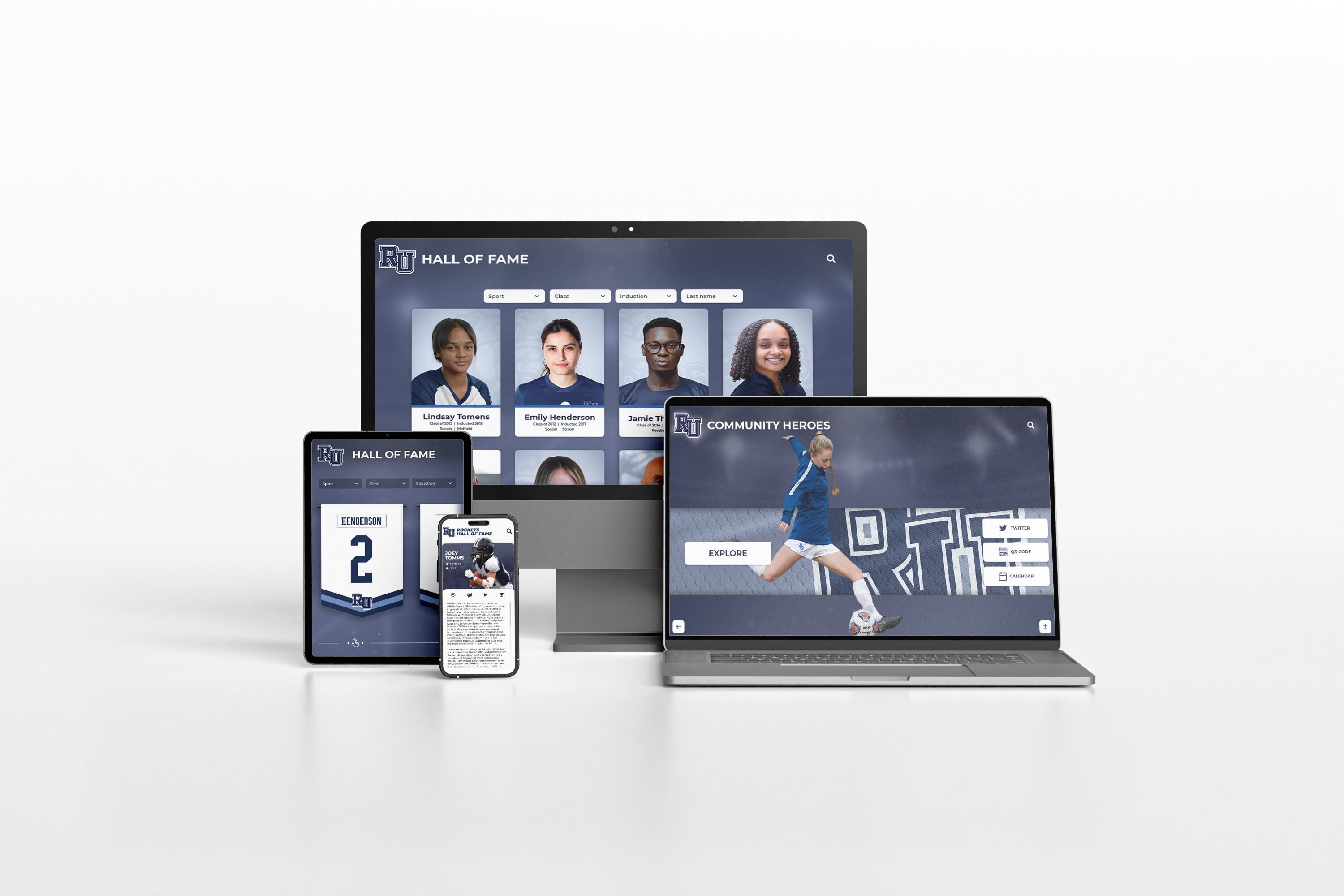
Virtual conferences, webinars, and hybrid events expanded dramatically during recent years, creating demand for product showcase experiences functioning without physical touchscreen hardware. Equipment manufacturers invested heavily in physical event technology discovered much of that investment became inaccessible when events moved online.
Browser-Based Virtual Booth Experiences
Web-based kiosk platforms seamlessly transition to virtual events by serving identical interfaces through standard web browsers. Attendees navigate product catalogs, watch demonstration videos, download specifications, and complete lead capture forms using identical interfaces whether accessing from event touchscreens or home computers.
This unified approach maintains brand consistency, eliminates development duplication, and allows manufacturers confidently investing in content creation knowing those assets serve physical and virtual events equally. Organizations deploying interactive kiosk solutions for visitor experiences understand adaptation between physical and digital environments—equipment manufacturers benefit from identical flexibility.
Integration with Virtual Event Platforms
Major virtual event platforms like Hopin, 6Connex, and vFairs support custom booth experiences through embedded web content. Manufacturers with browser-based product showcase systems integrate directly into these environments without platform-specific development or content reformatting.
Embedded kiosk experiences maintain full interactivity including video playback, downloadable documentation, and lead capture within virtual event environments. Analytics capture engagement data revealing which products attracted most attention, what content visitors consumed, and how long prospects explored catalogs—providing insights often unavailable from physical event interactions.
Website Integration for Persistent Access
Virtual event participation typically spans only conference duration, but product research extends weeks or months beyond initial exposure. Browser-based kiosk systems embed directly into corporate websites, maintaining consistent experiences as prospects transition from event discovery to active evaluation.
Persistent website integration allows event attendees revisiting products they explored briefly during conferences, sharing specific equipment pages with colleagues who did not attend events, and continuing research without artificial event-duration limitations. This seamless transition from event engagement to ongoing relationship development improves conversion rates by eliminating friction during critical early evaluation stages.
Organizations like Rocket Alumni Solutions demonstrate how unified platforms serve multiple deployment contexts—trade show kiosks, customer facility displays, corporate websites, and virtual events—from single content sources without compromising functionality across different environments.
Analytics and Performance Measurement

Event kiosk investments warrant measurement demonstrating value and informing continuous improvement. Effective analytics reveal what works, what confuses visitors, and where opportunities exist for optimization.
Engagement Tracking Capabilities
Comprehensive analytics platforms capture granular interaction data revealing visitor behavior patterns:
Session Duration: Average time visitors spend exploring catalogs indicates content engagement levels and interface intuitiveness. Sessions under 30 seconds suggest content failing to capture interest, while 3-5 minute sessions indicate substantive exploration.
Navigation Paths: Understanding which menu categories visitors select, what products they examine, and how they traverse information hierarchies reveals content organization effectiveness and helps identify popular products warranting prominence.
Content Consumption: Tracking which videos visitors watch, what documentation they download, and which feature explanations they explore demonstrates which content formats resonate and where investment in additional content production yields returns.
Search Queries: Analyzing what visitors search for reveals gaps in navigation, indicates which terminology prospects use versus internal product names, and highlights products generating most inquiry interest.
Comparison Activity: Understanding which products visitors compare indicates competitive evaluation patterns and reveals feature importance based on what specifications users examine during side-by-side analysis.
Lead Quality Assessment
Event kiosks should generate not just contact information but qualified intelligence about prospect interests, evaluation stage, and purchase timeline. Behavioral data captured during exploration provides sales teams context beyond what prospects explicitly disclose through forms.
Someone spending ten minutes exploring three specific product models, downloading complete specification packages, and watching installation videos demonstrates far more serious purchase intent than someone briefly browsing general product categories. Analytics should segment leads by engagement depth, enabling sales teams prioritizing follow-up appropriately.
Integration between kiosk analytics and CRM systems creates comprehensive prospect records combining event interactions with website visits, email engagement, and previous conversations—providing complete context for personalized follow-up.
Content Performance Optimization
Analytics identifying underperforming content areas enable systematic improvement rather than guessing what changes might help. Products with high view counts but low documentation download rates may need better specification presentation. Categories with low entry rates despite containing popular products may suffer from unclear navigation labels.
A/B testing different interface layouts, content presentations, or navigation structures provides evidence-based optimization rather than opinion-driven redesigns. Organizations implementing digital hall of fame tools for athletics and other applications use similar analytics approaches—manufacturers can apply identical methodologies to product showcase optimization.
Return on Investment Calculation
Event exhibitors need demonstrating kiosk investments deliver returns justifying costs. Tracking specific metrics enables ROI calculation:
Lead Volume: Comparing leads generated per event before and after kiosk deployment quantifies acquisition improvements. Many manufacturers report 40-70% lead volume increases after implementing self-service product exploration.
Lead Quality: Measuring what percentage of kiosk-generated leads progress to sales-qualified opportunities and ultimately convert to customers reveals value beyond raw lead counts.
Staff Efficiency: Calculating booth staff hours freed from basic product explanation duties and redirected toward high-value conversations with senior decision-makers demonstrates operational efficiency gains.
Sales Cycle Impact: Comparing time from initial event contact to closed sale for kiosk-engaged leads versus traditionally generated prospects reveals whether better early education accelerates progression.
Documentation Distribution Cost: Measuring reduction in printed catalog production and shipping costs partially offsets kiosk technology investments through eliminated traditional expenses.
Industry-Specific Applications
Equipment manufacturers across diverse industries can adapt touchscreen kiosk concepts to specific market needs and buyer expectations.
Construction Equipment Manufacturers
Heavy equipment buyers evaluate complex machines based on applications, operating environments, and performance specifications. Interactive kiosks enable exploring equipment appropriate for specific construction applications, comparing capabilities across models, and understanding maintenance requirements—all without tying up sales engineers during peak trade show traffic.
3D equipment visualizations help buyers understanding scale, component access for maintenance, and operational characteristics in ways static imagery cannot convey. Application videos demonstrating equipment working in relevant conditions—demolition, excavation, material handling—communicate capabilities more effectively than specification lists.
Agricultural Equipment Producers
Farmers evaluating equipment consider operational efficiency, compatibility with existing equipment, financing options, and local dealer support. Touchscreen showcases organized around crop types, farm sizes, or operational challenges help farmers finding relevant equipment among extensive product lines.
Integration with precision agriculture data, performance calculators estimating productivity improvements, and total cost of ownership comparisons address financial considerations critical to equipment investment decisions. Access to financing information and dealer locators connects product interest directly to purchase pathways.
Medical Equipment Manufacturers
Healthcare equipment buyers require detailed regulatory compliance documentation, infection control specifications, and clinical evidence supporting efficacy claims. Interactive kiosks providing immediate access to FDA clearances, clinical study results, and compatibility information with existing hospital systems address specific due diligence requirements unique to medical purchasing.
Application-specific navigation organized around medical specialties, patient populations, or clinical settings helps diverse healthcare professionals finding relevant equipment within broad product portfolios. Integration with continuing education content positions manufacturers as educational resources beyond equipment suppliers.
Industrial Machinery Suppliers
Manufacturing buyers evaluating production equipment prioritize throughput specifications, integration with existing production lines, maintenance requirements, and total cost of ownership. Touchscreen catalogs enabling filtering by production capacity, power requirements, footprint constraints, and industry certifications help engineers narrowing options efficiently.
ROI calculators demonstrating productivity improvements, labor cost reductions, or waste minimization quantify equipment value in financial terms procurement decision-makers require. Technical documentation including CAD models, electrical schematics, and installation requirements facilitates engineering evaluation without requiring immediate sales engagement.
Building Future-Ready Event Technology

Equipment manufacturers investing in event technology should prioritize approaches remaining relevant and valuable as event formats, buyer behaviors, and technology capabilities evolve.
Mobile Integration Capabilities
Buyers increasingly expect seamless transitions between touchscreen kiosk exploration at events and continued research on smartphones after returning to offices. QR code integration enabling instant mobile access to specific products viewed at kiosks maintains engagement continuity without forcing prospects remembering product names or navigation paths.
Progressive web application technology allows saving product collections, bookmarking favorite items, and receiving notification when new related products launch—creating ongoing engagement beyond single event interactions. Organizations implementing nonprofit digital wall mount display solutions understand multi-device continuity importance—manufacturers should apply identical thinking to buyer journey design.
Augmented Reality Enhancement
Emerging augmented reality capabilities enable superimposing virtual equipment into physical spaces, helping buyers visualizing scale, understanding footprint requirements, and evaluating aesthetic integration. AR experiences launched from touchscreen kiosks through smartphone cameras bridge physical and digital engagement.
While still emerging, manufacturers developing content libraries with 3D models position themselves to incorporate AR capabilities as adoption increases without complete content redevelopment. Forward-looking content strategies accommodate emerging technologies without premature investments in unproven capabilities.
Artificial Intelligence Applications
AI-powered recommendation engines can analyze buyer behavior patterns suggesting appropriate equipment based on demonstrated interests, application requirements, or products competitors examined. Conversational interfaces enabling natural language queries—“What equipment works for high-temperature food processing?"—make complex catalogs accessible without understanding product classification schemes.
These capabilities remain early-stage but manufacturers building structured content databases, capturing detailed usage analytics, and implementing flexible platforms position themselves to adopt AI enhancements as technologies mature and demonstrate clear value.
Data Privacy and Compliance
Growing data privacy regulations require careful attention to what visitor information kiosk systems collect, how data is stored, and what consent visitors provide. Manufacturers implementing lead capture should ensure GDPR compliance for European events, understand state-level privacy laws affecting US operations, and maintain data security standards protecting sensitive business information.
Clear privacy policies, explicit consent mechanisms, and data retention policies addressing regulatory requirements prevent compliance issues while building visitor trust. Solutions like Rocket Alumni Solutions incorporate privacy-conscious design principles—manufacturers should demand similar attention from technology providers or when developing custom solutions.
Overcoming Common Implementation Challenges
Equipment manufacturers frequently encounter specific obstacles when developing and deploying event kiosk solutions.
Content Volume Management
Comprehensive equipment catalogs may include hundreds of products, each requiring specifications, imagery, videos, and documentation. Creating this volume of content seems overwhelming, causing manufacturers delaying kiosk implementations waiting for “complete” content libraries.
Effective approaches prioritize highest-value products representing significant revenue percentages or generating most buyer inquiries. Launch with 20-30 thoroughly documented products rather than 200 incomplete entries. Systematically expand content coverage based on analytics revealing which product categories generate most kiosk engagement.
Organizations implementing academic recognition programs face similar content volume challenges—successful implementations prioritize systematically rather than pursuing impossible completeness before launch.
Cross-Department Coordination
Effective kiosk systems require collaboration across marketing teams creating content, sales teams defining lead qualification criteria, engineering departments providing technical specifications, and IT teams managing deployment infrastructure. This coordination complexity causes delays when departments operate independently without shared project ownership.
Establishing clear project leadership, defining content responsibilities explicitly, creating shared timelines with interdependent milestones, and implementing collaborative content management systems reduces coordination friction. Regular cross-functional reviews ensure alignment rather than discovering conflicts after substantial independent work.
Measuring Incremental Value
Attributing specific sales outcomes to event kiosk interactions challenges manufacturers using traditional trade show measurement approaches. Visitors interact with kiosks alongside conversations with booth staff, visits to competitor exhibits, and pre-show research—isolating kiosk contribution requires sophisticated attribution modeling.
Practical approaches include comparing lead quality metrics between kiosk-engaged versus staff-only leads, surveying customers about information sources influencing purchase decisions, and tracking which content pieces prospects referenced during sales conversations. While imperfect, these approaches provide evidence demonstrating value rather than relying exclusively on difficult-to-isolate attribution.
Technology Vendor Selection
Manufacturers face decisions between building custom solutions, purchasing established platforms, or hiring agencies developing bespoke systems. Each approach presents distinct cost structures, capability tradeoffs, and long-term maintenance implications.
Custom development delivers perfect alignment with specific needs but requires substantial initial investment and ongoing technical maintenance. Established platforms like Rocket Alumni Solutions provide proven functionality, ongoing support, and regular feature updates but may require adapting workflows to platform capabilities. Agency development offers customization with external maintenance but creates vendor dependency.
Most equipment manufacturers lacking internal development teams benefit from established platforms offering equipment-appropriate feature sets rather than bearing custom development costs and maintenance burdens for capabilities commercially available.
Implementation Roadmap for Manufacturers
Organizations ready to develop event touchscreen capabilities should follow systematic implementation addressing technology, content, and deployment logistics.
Phase 1: Requirements Definition and Platform Selection
Begin by defining specific objectives for kiosk implementations—lead generation targets, content types requiring showcase, deployment contexts including physical events and virtual applications, and budget constraints affecting technology choices.
Evaluate platform options against requirements, prioritizing solutions offering deployment flexibility across physical touchscreens and web browsers, content management systems enabling non-technical staff updates, analytics revealing engagement patterns, and integration capabilities connecting with existing CRM and marketing automation systems.
Budget 6-8 weeks for thorough requirements definition, vendor evaluation, and platform selection rather than rushing decisions causing expensive platform changes after discovering critical limitations.
Phase 2: Content Development and System Configuration
Create content production workflows defining responsibilities for product photography, video demonstration production, specification compilation, and technical documentation organization. Establish quality standards ensuring consistency across all content while maintaining realistic production timelines.
Configure selected platforms including navigation structure design, lead capture form development, analytics implementation, and visual design aligned with corporate branding. Most organizations should budget 12-16 weeks for initial content development and system configuration producing launch-ready implementations.
Prioritize highest-value products enabling meaningful launches without requiring complete catalog coverage. Plan systematic expansion adding products monthly rather than delaying launches awaiting impossible completeness.
Phase 3: Physical Deployment Preparation
Select appropriate touchscreen hardware considering event frequency, transportation requirements, and budget constraints. Organizations exhibiting quarterly or more frequently typically benefit from hardware ownership despite higher initial investment, while infrequent exhibitors may prefer rental approaches avoiding capital expenditure and storage responsibilities.
Develop deployment procedures covering transportation, setup, power requirements, network configuration, backup plans, and troubleshooting processes booth staff can execute. Test complete deployment cycles including packing, shipping, setup, operation, and breakdown before actual events reveal process gaps under time pressure.
Budget $15,000-$25,000 per touchscreen unit including commercial-grade display, mounting hardware, shipping cases, and spare equipment covering typical event needs without excessive over-investment.
Phase 4: Event Deployment and Optimization
Deploy kiosks at initial events with clear success metrics including lead volume, engagement duration, content consumption, and qualitative visitor feedback. Staff should observe how visitors interact with systems, note confusion points, identify popular content, and gather suggestions for improvements.
Analytics review after events should inform systematic optimization addressing navigation difficulties, content gaps, technical performance issues, or feature requests. Implement iterative improvements monthly rather than waiting for major overhauls, creating continuous enhancement cycles.
Expand deployment systematically to additional events, customer facilities, distributor locations, or virtual applications as confidence grows and proven value justifies expanded investment.
Ready to Develop Interactive Product Showcase Technology?
Equipment manufacturers seeking comprehensive event touchscreen solutions benefit from platforms specifically designed for complex product catalogs, multimedia content presentation, and seamless deployment across physical and virtual environments.
Rocket Alumni Solutions provides flexible, web-based interactive display systems that work identically on touchscreen kiosks at trade shows and standard browsers for virtual events—eliminating platform-specific development while delivering optimized touch experiences.
Our intuitive content management, unlimited product capacity, comprehensive analytics, and proven deployment across hundreds of organizations enable equipment manufacturers showcasing products effectively without custom development costs or ongoing technical maintenance burdens.
Schedule a product showcase consultation to explore how interactive touchscreen solutions transform event engagement and accelerate buyer education.
Frequently Asked Questions
What are the typical costs for implementing event touchscreen kiosk solutions?
Implementation costs vary significantly based on hardware ownership versus rental, custom development versus platform subscription, and content production requirements. Organizations purchasing commercial-grade touchscreen hardware typically invest $15,000-$25,000 per unit including display, mounting, shipping cases, and computing hardware. Platform subscriptions for web-based solutions range from $3,000-$12,000 annually depending on product volume and feature requirements. Custom native application development costs $50,000-$150,000 for sophisticated implementations versus web-based platforms requiring lower initial investment. Content production represents ongoing investment varying with catalog size, multimedia complexity, and production quality standards. Most equipment manufacturers implementing comprehensive solutions should budget $50,000-$100,000 for initial implementation including hardware, platform, and priority content development, with ongoing content expansion and platform costs of $12,000-$24,000 annually.
How do web-based kiosk solutions compare to native applications for event deployment?
Web-based solutions deliver identical functionality whether accessed through touchscreen hardware at events or standard browsers for virtual applications, eliminating platform-specific development while maintaining full interactivity. Native applications often provide slightly faster performance and more sophisticated hardware integration but restrict deployment to specific devices and operating systems, requiring separate development for web-based virtual event participation. For equipment manufacturers needing flexibility across physical and virtual events with lower development costs and simpler content management, web-based approaches typically offer superior value. Native development suits organizations with specific hardware integration requirements or complex offline functionality that web technologies cannot adequately address. Most manufacturers prioritizing deployment flexibility and cost management benefit from web-based platforms like Rocket Alumni Solutions rather than custom native development.
Can interactive kiosk systems function reliably without internet connectivity at trade shows?
Modern touchscreen solutions should operate completely offline without requiring active internet connections, addressing notorious trade show network reliability challenges. Effective implementations cache complete content libraries locally on display hardware, enabling full navigation, video playback, and lead capture without network dependency. Captured leads store locally and sync automatically when connectivity permits, typically overnight during events when network congestion reduces. Organizations should verify offline capability explicitly when evaluating platforms since some solutions fail completely without active internet connections. Commercial-grade displays with solid-state storage accommodate substantial multimedia content libraries for offline operation. Cellular connectivity backup provides alternative network access for critical lead synchronization when venue WiFi fails, ensuring data collection reliability regardless of venue infrastructure.
What content types prove most effective for equipment showcase applications?
Video demonstrations showing equipment operating in real applications consistently generate highest engagement, providing understanding that static imagery and specification sheets cannot achieve. Brief 2-3 minute videos featuring key capabilities, showing typical applications, and demonstrating operational characteristics communicate effectively without requiring lengthy viewing commitment. High-quality product photography from multiple angles enables visitors thoroughly examining equipment appearance and construction. Interactive specification sheets with comparison capabilities address technical evaluation needs for engineering audiences. Application-focused content organized around buyer problems rather than product categories helps prospects finding relevant equipment efficiently. Downloadable technical documentation including detailed specifications, dimensional drawings, and certification information enables prospects taking comprehensive information for internal evaluation processes. Effective implementations combine multiple content types addressing diverse visitor needs rather than relying exclusively on single content formats.
How should we measure success and return on investment for event kiosk implementations?
Comprehensive measurement considers multiple metrics revealing value beyond simple lead counts. Track lead volume comparing pre- and post-kiosk implementation to quantify acquisition improvements. Measure lead quality by tracking what percentage of kiosk-generated leads progress to sales-qualified opportunities and ultimately convert to customers. Calculate booth staff time freed from basic product explanations and redirected toward high-value conversations with senior decision-makers. Compare sales cycle duration from initial event contact to closed sale for kiosk-engaged leads versus traditionally generated prospects. Monitor content engagement through session duration, products viewed, documentation downloaded, and video completion rates revealing what resonates with prospects. Measure cost savings from reduced printed catalog production and shipping. Survey customers about information sources influencing purchase decisions to understand kiosk contribution to sales processes. While challenging to isolate kiosk impact from other touchpoints, systematic measurement across these dimensions provides evidence demonstrating value and informing continuous optimization rather than relying on anecdotal impressions.































