Your school lobby is often the first thing students, parents, and visitors experience. Whether you’re planning a hall of fame installation, a campus directory, a donor recognition wall, or a general information display, you’ll face one fundamental hardware decision early on: freestanding touchscreen kiosk or wall-mounted display?
Both formats deliver rich interactive content. Both support touchscreen input, high-resolution visuals, and cloud-connected content management. But they serve different spaces, traffic patterns, and long-term operational goals — and the wrong choice can mean costly retrofits down the road.
This guide walks through the real differences between touchscreen kiosks vs wall-mounted displays for schools, breaking down form factor, ADA compliance, installation requirements, content strategy, and total cost of ownership. By the end, you’ll know exactly which format fits your lobby — and how Rocket Alumni Solutions approaches this decision with the schools it works with.
What Is a Touchscreen Kiosk?
A freestanding touchscreen kiosk is a self-contained unit housing a screen (typically 32–75 inches), a computer, touch hardware, and all necessary cabling within a cabinet that stands independently on the floor. Schools use them in lobbies, athletic corridors, and near main entrances to deliver wayfinding content, hall-of-fame profiles, or visitor check-in experiences.
The defining characteristic is mobility and independence. Because a kiosk stands on its own, it can be positioned without any wall preparation or structural mounting. Many kiosks are designed with locking wheels or pedestal bases that allow repositioning when lobby layouts change — a practical advantage for schools with multi-purpose entrance zones.

A freestanding touchscreen kiosk gives visitors a dedicated interactive station without requiring structural wall work or in-wall electrical runs.
Typical kiosk characteristics:
- Screen sizes: 32–75 inches (portrait or landscape orientation)
- Cabinet styles: pedestal, floor-standing enclosure, or A-frame
- Content: hall of fame profiles, wayfinding directories, visitor sign-in, event schedules
- Power: single electrical outlet; optional UPS battery backup
- Connectivity: Wi-Fi or wired Ethernet to cloud CMS
- ADA reach range: 15–48 inches from the floor per ADA Section 4.27
For schools exploring interactive directory kiosks alongside recognition displays, the campus directory systems guide at TouchHallOfFame.us offers a thorough breakdown of how lobby kiosks handle both wayfinding and recognition simultaneously.
What Is a Wall-Mounted Display?
A wall-mounted touchscreen display is a screen — or multi-screen array — anchored directly to a wall surface. The screen sits flush or near-flush with the wall, with cabling routed through conduit or behind drywall to a concealed media player and power source.
Wall-mounted displays dominate high-traffic school lobbies and athletic hallways because they occupy zero floor space, integrate with murals or branded wall treatments, and feel like a permanent architectural feature rather than added equipment. They also enable much larger visual canvases — schools commonly run 86-inch single panels or two- and three-screen arrays that span 10–15 feet of wall, creating an impression that a kiosk cabinet simply cannot match.
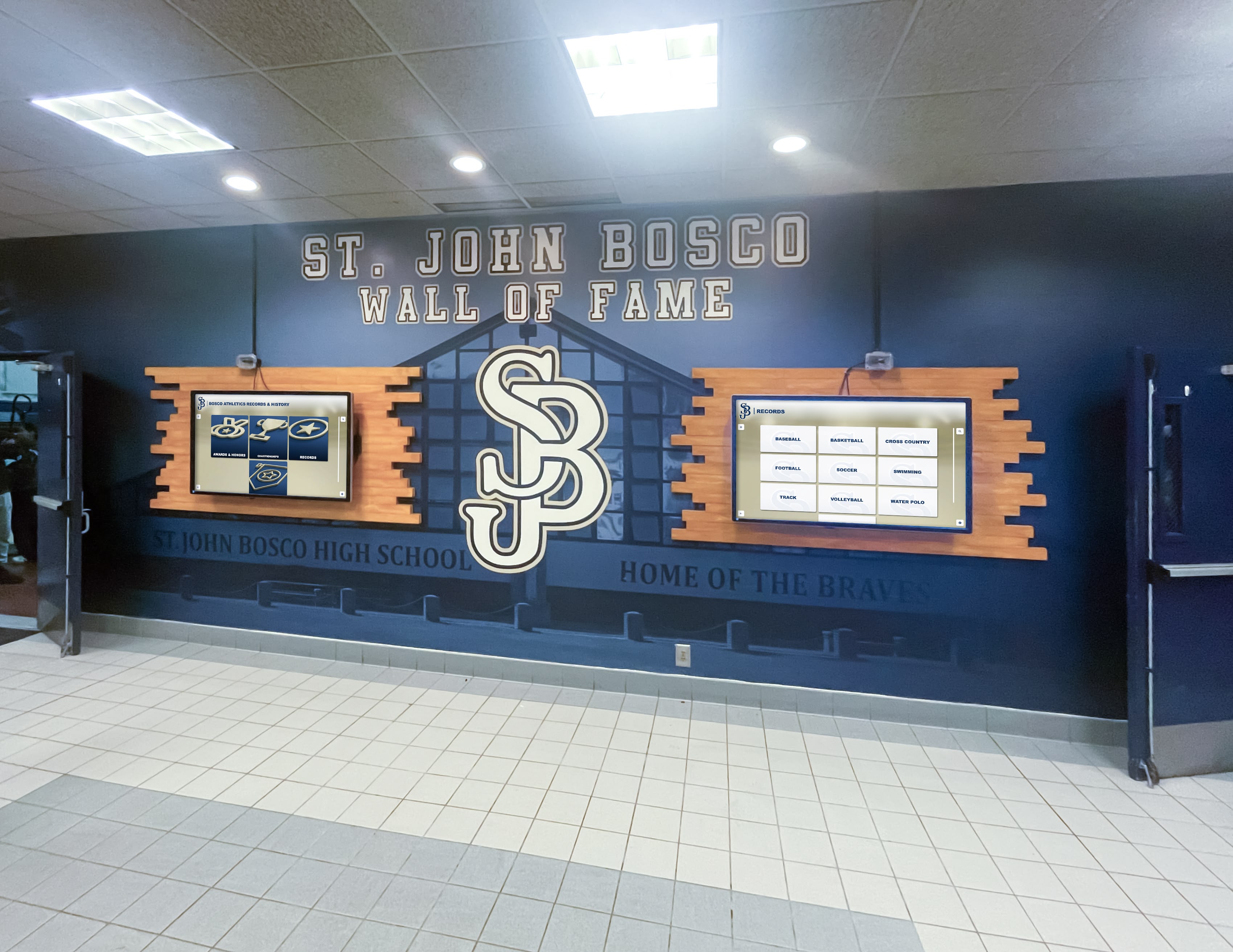
A two-screen wall-mounted hall of fame installation creates an immersive recognition environment without consuming any lobby floor space.
Typical wall-mounted display characteristics:
- Screen sizes: 55–100+ inches; multi-panel arrays possible
- Mounting: VESA or custom bracket; flush or near-flush to wall
- Content: hall of fame walls, donor recognition displays, athletic record boards, school history timelines
- Power: in-wall or conduit run from a nearby outlet or dedicated circuit
- Connectivity: in-wall Ethernet or Wi-Fi; media player concealed behind panel or in adjacent closet
- ADA touch height: ideally 15–48 inches for primary interactive controls
For a detailed look at how wall-mounted digital trophy cases differ from standalone kiosks in athletic settings, see the complete guide to digital trophy touch walls at DigitalRecordBoard.com.
Side-by-Side Comparison
The table below summarizes the most important decision factors when evaluating touchscreen kiosk vs wall-mounted display for a school lobby:
| Factor | Touchscreen Kiosk | Wall-Mounted Display |
|---|---|---|
| Floor space required | 4–8 sq ft | None |
| Screen size range | 32–75" | 55–100"+ |
| Multi-panel arrays | Limited | Yes (2, 3, 4+ panels) |
| Mobility / repositionable | Yes | No (permanent) |
| Installation complexity | Low (plug-and-play) | Moderate–High (wall prep, conduit) |
| ADA compliance path | Built-in reach range | Requires intentional mounting height |
| Visual impact | Medium | High |
| Vandal and damage resistance | Dependent on cabinet quality | Generally higher (wall-fixed, no tipping risk) |
| Content flexibility | High | High |
| Best fit | Visitor directory, event info, sign-in | Hall of fame, donor wall, record boards |
When a Touchscreen Kiosk Makes the Most Sense
A freestanding kiosk is the right choice when one or more of these conditions apply:
1. No suitable wall space exists. Older school buildings with lockers lining every hallway, glass entrance vestibules, or tiled walls that can’t be easily penetrated make wall-mounted installations difficult or expensive. A kiosk sidesteps all structural work.
2. You need flexibility for temporary or seasonal deployments. Schools running multi-day open house events, alumni weekends, or athletic banquets sometimes want an interactive display that can be staged in the gymnasium, then moved to the library, then returned to the lobby. A lockable wheeled kiosk handles this workflow cleanly.
3. You’re working with a tighter upfront budget. Because kiosk installations require minimal electrical and structural preparation, upfront labor costs are typically lower. The trade-off is ongoing floor-space consumption and more frequent exterior cleaning in high-traffic zones.
4. The primary use case is wayfinding or visitor sign-in. Campus directory apps and visitor management platforms are natural fits for kiosk form factors, where a dedicated interaction station separate from the main recognition wall makes logical sense for the visitor journey.
For schools evaluating how different platform options perform across both form factors — including display quality, software depth, and post-install support — the school touchscreen comparison guide at Best-Touchscreen.com evaluates six recognition platforms side by side.

Whether kiosk or wall-mounted, the core interaction — browsing athlete profiles, award histories, and video highlights — drives the recognition experience for visitors.
When Wall-Mounted Displays Make More Sense
Wall-mounted displays outperform kiosks in most permanent school lobby recognition installations:
1. They command attention at scale. An 86-inch panel — or a three-panel 120-inch array — creates visual presence that a 55-inch kiosk cabinet cannot match. Wall-mounted installations look built-in rather than added-on, which matters for how your school presents its history and achievements to visitors.
2. They free up lobby floor space. School lobbies are high-traffic environments. A floor-standing kiosk requires visitors to navigate around it, creates potential congestion near entrances, and can conflict with fire code egress width requirements. Wall-mounted displays eliminate all of that.
3. They integrate with branded wall treatments. The most visually striking school displays combine printed murals, painted mascot graphics, physical trophy cases, and digital touchscreens into one cohesive wall. This integration requires a mounted panel — a kiosk cabinet can’t merge into the architecture the same way.
4. They support multi-panel hall of fame and donor wall layouts. A donor recognition wall listing hundreds of contributors, or an athletic hall of fame spanning four decades of inductees, benefits from a large canvas spread across two or three connected screens. Wall-mounted multi-panel arrays make this natural; kiosk form factors make it awkward.
The donor wall display ideas for schools at DonorsWall.com illustrates how permanent wall-mounted configurations support tiered donor recognition programs in ways that portable kiosks simply can’t replicate.

Wall-mounted displays integrate seamlessly with branded murals and mascot graphics, creating a cohesive recognition environment that reinforces school identity from floor to ceiling.
ADA and Accessibility Considerations for Both Formats
Both form factors are subject to ADA requirements for public-use interactive displays. Key checkpoints to verify before finalizing either choice:
Touch interface reach range. ADA standards (and the 2010 ADA Standards for Accessible Design) require operable parts to be reachable between 15 and 48 inches above the floor. A kiosk screen center positioned at 54 inches can put upper interface elements out of compliant reach for wheelchair users. Wall-mounted displays require the same care — a panel mounted with its touch zone centered at 60 inches fails the same test.
Approach clearance. Kiosks require a 30×48 inch clear floor space in front for wheelchair access. That space must remain unobstructed. Wall-mounted panels require the same clear approach zone, but since the panel doesn’t project into the room, maintaining the zone is easier to manage over time.
Screen glare and contrast. Lobby lighting — especially near exterior glass — can wash out displays and create de facto accessibility barriers for visitors with low vision. Both form factors benefit from anti-glare screen treatments specified during procurement.
Software accessibility (WCAG 2.2 AA). Hardware form factor matters less than software compliance. Prioritize platforms that meet WCAG 2.2 AA standards so visitors with visual or motor impairments can navigate content independently. The WCAG 2.2 AA compliance guide for school touchscreens at Best-Touchscreen.com and the Rocket Alumni Solutions WCAG compliance documentation at TouchArchives.org both provide detailed checklists for evaluating any platform you’re considering.
How Rocket Alumni Solutions Approaches This Decision
Rocket Alumni Solutions designs interactive recognition systems for schools, athletics programs, and alumni associations. Their platform runs on both kiosk and wall-mounted hardware, but the majority of their school lobby installations use wall-mounted multi-panel configurations — for the visual impact, floor-space, and integration reasons outlined throughout this guide.
Their standard hardware setup typically includes:
- Commercial-grade 4K touchscreens (55–100+ inches) mounted flush to the wall
- Concealed media players connected to a cloud-based content management system
- Optional QR code integration so visitors can continue browsing on their phones
- Unlimited layout templates updated in real time from any device, anywhere
- Dedicated white-glove installation and content migration support
Explore Rocket Alumni Solutions’ display systems here to see how the platform scales from a single wall-mounted panel to full multi-panel hall of fame installations.
For an independent look at how the hardware performs after installation — covering screen quality, mount stability, and day-to-day content management — the Rocket Alumni Solutions hardware setup reviews at HallOfFameWall.com offer real-world evaluations from outside the company.
For schools that do need a kiosk form factor — most commonly for visitor directories or temporary event display needs — Rocket Alumni Solutions can configure their platform on kiosk hardware as well, running the same cloud CMS across both form factors without duplicating content management work.
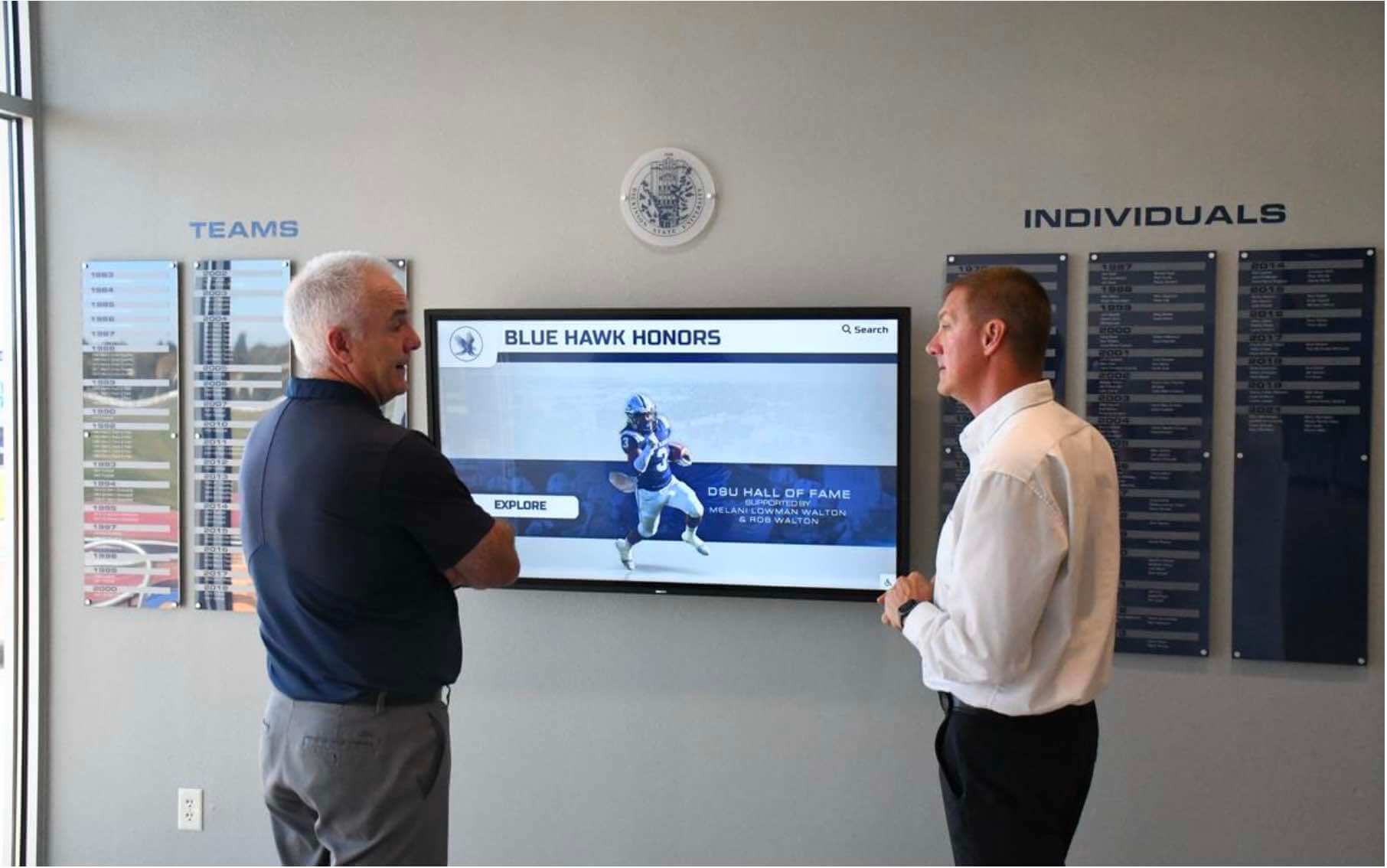
Wall-mounted hall of fame installations create a landmark destination in school lobbies, drawing visitors in and giving them a reason to linger and explore school history.
Content Strategy Differs by Form Factor
The format you choose will shape what content works best — and what falls flat.
Kiosk content strategy:
- Short, task-based interactions: find a room, check a schedule, sign in as a visitor
- Single-user browsing; not optimized for group or crowd viewing
- Portrait orientation often preferred for directory-style navigation
- Typical session lengths: 30 seconds to 3 minutes
Wall-mounted display content strategy:
- Immersive, high-visual-impact content designed for both passing traffic and active interaction
- Works for individual touch use and group viewing simultaneously
- Landscape orientation or multi-panel layouts for hall of fame and donor walls
- Mix of active touch interaction and ambient auto-rotation when no one is at the screen
- Typical session lengths: 2–10 minutes for touch interaction; indefinite ambient mode
For schools looking to maximize lobby storytelling, the guide to school welcome videos and lobby touchscreens at TouchWall.TV covers how to program ambient content that keeps the display working even when no one is actively touching the screen.
Pre-Installation Checklist
Before committing to either format, work through this checklist with your AV installer or facilities team:
For freestanding kiosks:
- Outlet available within 6–10 feet of intended position
- Egress width compliance confirmed (48-inch minimum clear path near entrances)
- Floor surface checked for level installation (carpet vs. tile affects cabinet stability)
- IT/network drop identified or Wi-Fi signal strength verified at position
- ADA reach range confirmed for selected screen size and orientation
For wall-mounted displays:
- Wall studs or backing located for mount support (drywall alone is insufficient for commercial screens)
- Conduit path identified for power and data from screen location to electrical panel and network closet
- Wall material confirmed (brick, CMU, drywall, tile) and appropriate anchoring hardware specified
- Mounting height planned to center primary touch zone between 30–48 inches
- Budget allocated for drywall patching and painting if conduit path requires wall penetration
- Media player location determined (in-wall box, adjacent closet, or surface-mount raceway)
For more on how schools approach full lobby transformations — including wall preparation, signage integration, and electrical planning from scratch — the school lobby transformation ideas guide at DigitalWarming.net walks through common renovation scenarios and their typical cost drivers.
Decision Framework: Which Format Is Right for Your School?
Use this framework to narrow your choice before involving an installer or vendor:
Choose a touchscreen kiosk if:
- No structural wall is available or wall prep costs are prohibitive in your current budget cycle
- You need the display to relocate between spaces during the school year
- Your primary use case is visitor wayfinding, campus directories, or standalone sign-in
- You’re piloting digital recognition before committing to a permanent installation
Choose a wall-mounted display if:
- You’re building a permanent hall of fame, donor recognition wall, or athletic record board
- Visual impact and lobby presence are priorities — you want visitors to notice the display from across the room
- Your lobby footprint is tight and floor space is at a premium
- You’re integrating the display with murals, team banners, or branded architectural elements
- You plan to run multi-panel arrays covering more than 75 inches of content canvas
Choose a platform that supports both if your needs will evolve over time. Rocket Alumni Solutions’ cloud CMS works across kiosk and wall-mounted hardware, so your content investment transfers even if you change form factors in a future renovation.
For a comprehensive buying guide covering high school digital hall of fame platforms from procurement through launch, the digital hall of fame ultimate buying guide at DigitalYearbook.org covers vendor selection criteria, software evaluation frameworks, and hardware specification questions in depth.
Conclusion
The touchscreen kiosk vs wall-mounted display question for schools doesn’t have a single universal answer — it has the right answer for your specific lobby, budget, and content goals.
Kiosks win on flexibility, ease of installation, and lower upfront infrastructure cost. Wall-mounted displays win on visual impact, floor-space efficiency, multi-panel scalability, and the kind of architectural permanence that honors your athletes, donors, and alumni the way they deserve.
For the majority of school hall of fame and recognition applications, wall-mounted multi-panel displays deliver a stronger long-term outcome. But the best decision is always the one made with a clear understanding of your space, your content goals, and the technology platform supporting both.
Ready to Plan Your School Lobby Display?
Rocket Alumni Solutions works with schools to design hall of fame walls, donor recognition displays, and interactive lobby installations in both kiosk and wall-mounted configurations. Let their team help you find the right fit for your space and budget.
Explore Rocket Alumni Solutions






























