When school administrators walk into their lobbies and see faded trophy cases and outdated bulletin boards, they increasingly ask themselves whether there’s a better way to celebrate student achievement. A touchscreen wall display represents a modern solution that transforms static recognition into dynamic, engaging experiences—but selecting the right system requires careful consideration of hardware specifications, mounting requirements, software capabilities, and long-term maintenance needs.
School technology purchases demand thorough research. Unlike consumer electronics that can be easily replaced, lobby installations become permanent fixtures expected to function reliably for years while withstanding constant interaction from students, visitors, and community members. The wrong choice leads to frustrated users, mounting repair costs, and displays that fail to deliver on their promise of engaging recognition.
This comprehensive buyer’s guide walks school decision-makers through the complete selection process for touchscreen wall displays. From understanding commercial-grade hardware requirements and navigating mounting considerations to evaluating software platforms and planning professional installation, discover how to make informed choices that result in reliable, engaging recognition displays that serve your school community for years to come.
Schools invest significant resources in lobby recognition systems. Making informed decisions about hardware, mounting, software, and installation ensures these investments deliver lasting value rather than becoming expensive headaches that require premature replacement or constant troubleshooting.

Understanding Commercial-Grade Touchscreen Requirements
The first critical decision involves selecting appropriate hardware. Consumer-grade displays from big-box retailers fail quickly in high-traffic school environments. Commercial specifications matter significantly.
Why Consumer Displays Fail in School Lobbies
Schools sometimes attempt to save money by purchasing consumer televisions or tablets for lobby installations. This approach consistently produces disappointing results:
Usage Rating Mismatches
Consumer displays are rated for residential use—typically 8-12 hours per day in controlled environments with minimal interaction. School lobby displays operate continuously during school hours (often 12-14 hours daily) while experiencing constant touching, pressing, and interaction from hundreds of users weekly. Consumer hardware degrades rapidly under these conditions, with touchscreens losing calibration, displays developing dead pixels or burn-in, and components failing within months rather than the expected multi-year lifespan.
Environmental Durability Issues
School lobbies present challenging environments. Temperature fluctuations from HVAC systems, dust and particles from high foot traffic, humidity variations throughout seasons, and physical impacts from backpacks and equipment all stress displays. Commercial-grade hardware includes ruggedized components, protective glass layers, sealed internal components, industrial-temperature operation ranges, and ventilation systems designed for continuous operation.
Touch Technology Limitations
Consumer touch technology optimizes for light fingertip interactions in clean conditions. School environments demand more robust solutions. Commercial touchscreens use projected capacitive or infrared technology that works reliably with varying pressure levels, responds accurately despite scratches or minor screen damage, functions in bright ambient lighting conditions, and supports multi-user interactions without confusion.

Essential Hardware Specifications for School Installations
When evaluating touchscreen wall displays, focus on specifications that ensure reliable long-term performance in educational settings.
Display Size and Resolution
Lobby installations typically require larger displays for visibility and impact. Consider screen sizes between 43" and 55" for most lobby applications, with larger 65"-75" options for expansive spaces. Resolution matters significantly—1920x1080 (Full HD) minimum for clarity, with 4K (3840x2160) increasingly standard for future-proofing and superior image quality at larger sizes.
Viewing distance determines appropriate size. A 55" display works well for viewing distances of 6-12 feet, while larger spaces benefit from 65" or larger installations. Plan for effective digital signage that remains readable from across your lobby.
Brightness and Anti-Glare Requirements
School lobbies often have abundant natural light from windows and skylights. Standard displays struggle with glare and washout. Look for commercial displays with 400-500 nits brightness minimum for standard lighting, 700+ nits for high-brightness applications near windows, anti-glare or anti-reflective glass treatments, and automatic brightness adjustment sensors adapting to changing light conditions.
Touch Technology Selection
Multiple touch technologies exist, each with specific advantages for school applications:
Projected Capacitive Touch offers smartphone-like responsiveness, supports multi-touch gestures, works through protective glass layers, and provides excellent accuracy and durability. This represents the gold standard for school touchscreen wall displays, though at higher price points.
Infrared Touch Technology provides reliable performance at moderate cost, works with any object including gloved fingers, requires no pressure (reducing wear), and offers good durability in high-traffic settings. Infrared systems work well for budget-conscious schools prioritizing reliability over premium touch experience.
Connectivity and Integration Options
Modern touchscreen displays function as computing hubs requiring robust connectivity. Essential ports and features include HDMI inputs for external content sources, USB ports for software updates and peripheral connections, Ethernet connectivity for network integration, Wi-Fi capability for flexible deployment, and content management system compatibility ensuring smooth software operation.
Systems should support remote management capabilities, allowing IT staff to update content, adjust settings, troubleshoot issues, and monitor system health without physically accessing the display—particularly valuable for installations in high-traffic or secure areas.
Warranty, Support, and Lifecycle Considerations
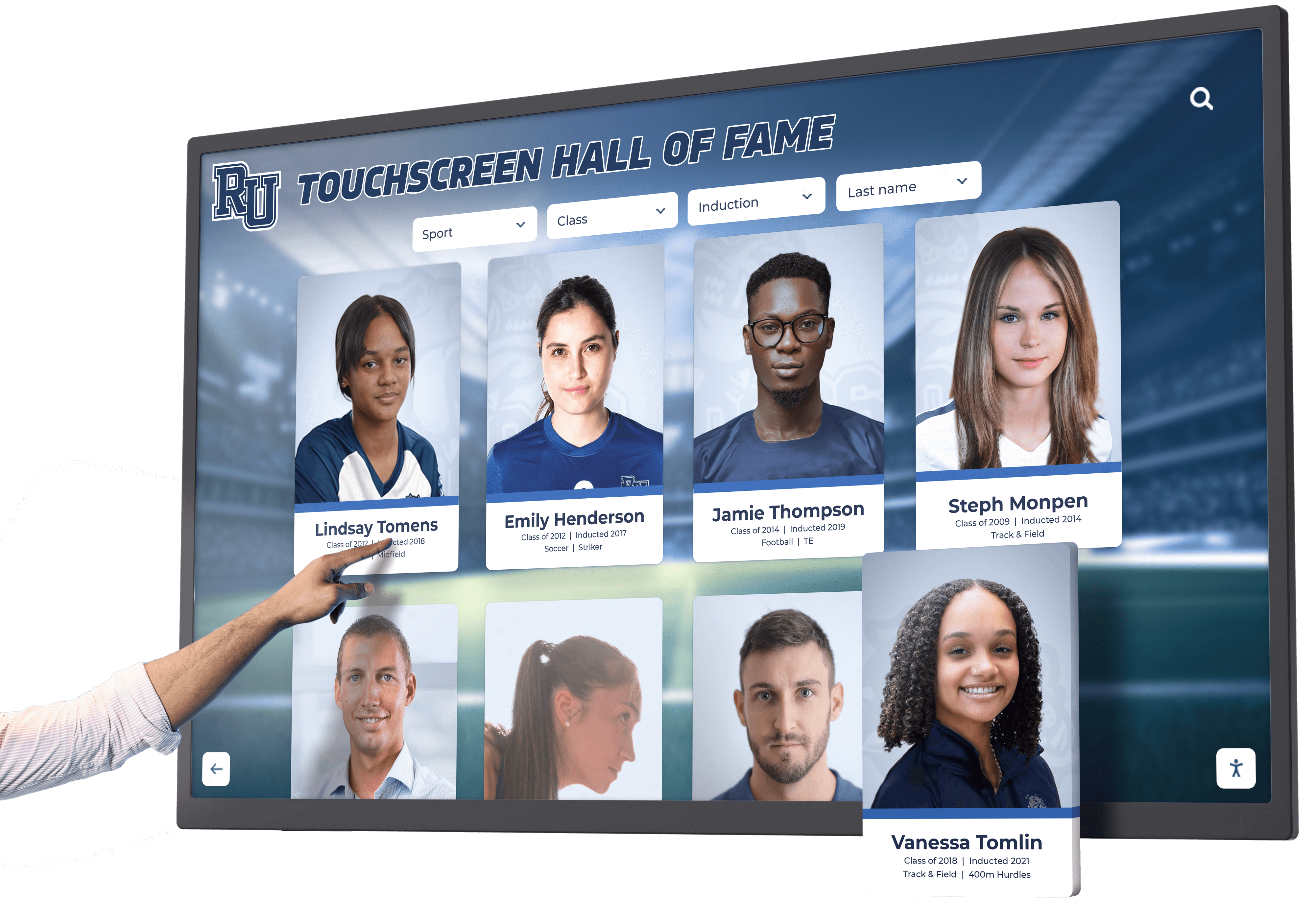
Commercial displays command premium prices partly due to superior warranty and support structures. Evaluate warranty terms covering 3-5 years minimum coverage (not the 1-year standard for consumer products), on-site service options avoiding shipping costs and downtime, advanced replacement programs minimizing disruption, and technical support channels with education-sector experience.
Consider total cost of ownership beyond initial purchase. Systems with longer warranties, better support, and more durable components cost less over their operational lifetime despite higher upfront investment. Budget for replacement cycles of 7-10 years for commercial-grade installations with proper maintenance.
Mounting Solutions: Hardware, Height, and Accessibility
Hardware selection represents only part of the equation. Mounting decisions significantly impact usability, accessibility, maintenance access, and long-term satisfaction.
Wall-Mounted vs. Kiosk vs. Built-In Installations
Three primary installation approaches serve different school needs:
Wall-Mounted Touchscreen Displays
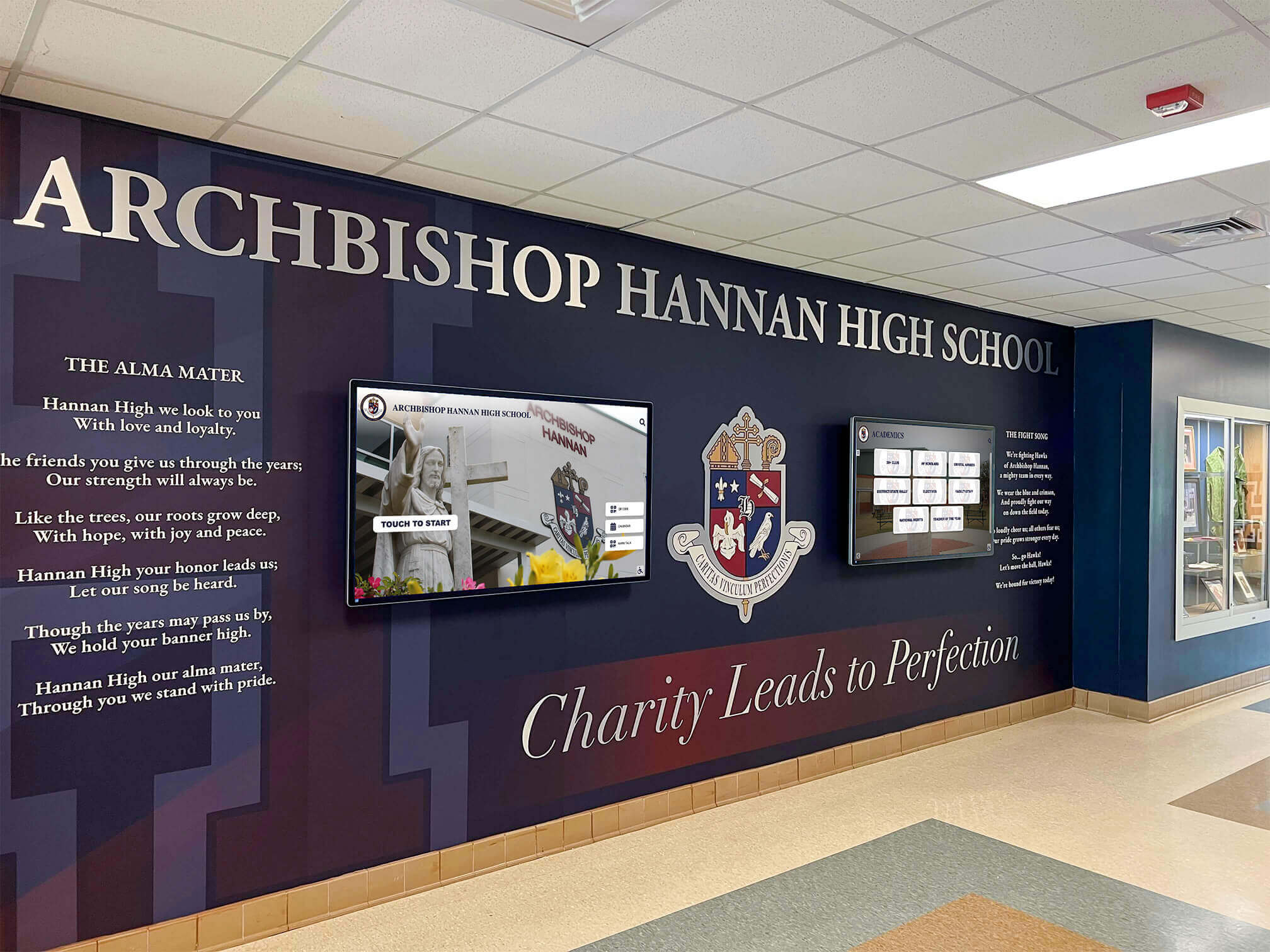
Wall mounting offers the most common and cost-effective installation approach. Benefits include lower installation costs, flexibility in positioning, easier maintenance access, and space efficiency in smaller lobbies. Wall-mounted systems work well for recognition displays where information viewing is primary, budget constraints favor simpler installations, and existing wall space provides appropriate positioning.
Ensure wall construction can support display weight plus mounting hardware—typically requiring solid walls or properly reinforced drywall with backing. Hollow walls need significant reinforcement for safe installation of large commercial displays that can weigh 50-100+ pounds.
Freestanding Kiosk Enclosures
Custom kiosks house touchscreen displays in furniture-quality enclosures that stand on the floor or mount to walls. Advantages include professional branded appearance, additional protection from impacts and tampering, integrated cable management hiding wires, ADA-compliant accessibility features, and options for dual-sided displays maximizing lobby utility.
Kiosk installations cost more due to custom fabrication but deliver superior appearance and durability. Schools prioritizing prominent showcase installations, facilities with challenging wall conditions, and institutions wanting maximum protection often choose kiosk solutions despite higher investment.
Built-In Architectural Installations
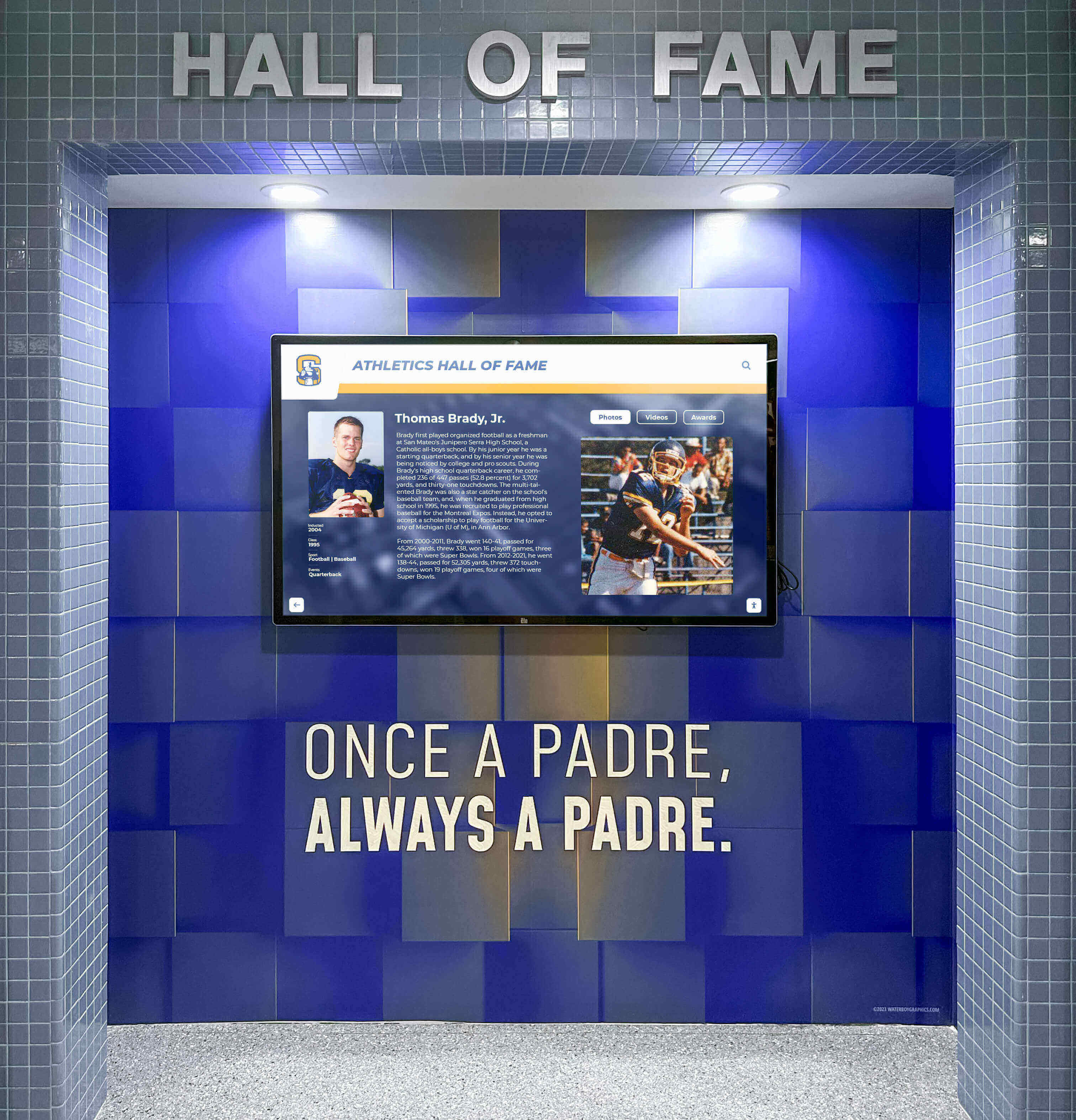
New construction or major renovations enable fully integrated installations with displays embedded in walls or custom millwork. This approach creates seamless appearances where technology disappears into architecture. Built-in installations require early planning during design phases, coordination between architects and technology vendors, and careful consideration of future upgrade paths since replacement becomes more complex.
Schools building new facilities or undertaking major lobby renovations should consider integrated installations that create polished, permanent recognition environments rivaling what visitors experience at collegiate athletic displays.
Optimal Height and Accessibility Standards
Touchscreen positioning significantly impacts usability across diverse user populations. Poor positioning frustrates users and limits engagement.
ADA Compliance Requirements
Americans with Disabilities Act guidelines establish clear requirements for interactive displays in public spaces. Key requirements include maximum reach ranges (48" high for forward approach, 54" for side approach), operable parts within reach without excessive bending or stretching, and controls that don’t require tight grasping, pinching, or wrist twisting.
While some ADA requirements apply specifically to displays controlling building functions, schools committed to inclusive design apply these principles to all interactive installations ensuring wheelchair users, individuals of short stature, and people with mobility limitations can fully engage with recognition displays.
Accommodating Different User Heights
School communities include elementary students, teenagers, adults, and visitors spanning wide height ranges. Optimal positioning requires compromise balancing different populations:
For elementary schools, position touch zones starting around 30-36" from floor, allowing younger students to reach comfortably. For secondary schools and mixed-age facilities, mount displays with primary touch zones between 40-48" from floor, serving most adult and teenage users. For environments with primarily adult users, standard positioning of 48-52" works well.
Tilted installations improve ergonomics for standing users by angling displays slightly downward (5-15 degrees from vertical), reducing neck strain and minimizing glare. Tilt also discourages leaning directly on screens, reducing wear and fingerprints.
Cable Management and Power Considerations
Professional installations hide all cabling for clean appearance and reduced vandalism risk. Plan for concealed conduit running from displays to power sources, in-wall cable channels avoiding exposed wires, sufficient power capacity for displays plus any integrated computers or accessories, and accessible junction boxes allowing future maintenance without wall cutting.
Coordinate with electricians early in planning to ensure appropriate power placement. Displays mounted away from existing outlets require new circuits, increasing installation costs if not addressed during initial budgeting.
Software Platform Selection: Content Management Systems
Hardware provides the foundation, but software determines what users actually experience. Selecting appropriate content management platforms proves equally critical to creating engaging touchscreen wall displays.
Key Software Capabilities for School Recognition Displays
Recognition-focused touchscreen displays require specialized software beyond generic digital signage platforms. Evaluate systems based on:
User-Friendly Content Management
School staff managing recognition content typically lack technical backgrounds. Effective platforms provide intuitive interfaces for non-technical users, no coding required for basic updates, visual editors showing exactly how content appears, simple media upload and organization, and straightforward workflows for adding recognition recipients.
Systems requiring IT intervention for routine updates create bottlenecks that leave displays outdated. The best platforms empower recognition coordinators, activities directors, and development staff to independently maintain current content. Many schools successfully implement interactive recognition solutions that integrate seamlessly with existing workflows.
Rich Media Support
Modern recognition tells stories through diverse media formats. Software platforms should handle high-resolution photos displaying athletes, performers, and students in action; video content including highlights, speeches, and testimonials; detailed text biographies and achievement descriptions; searchable databases allowing users to find specific individuals; and filtering/sorting enabling browsing by year, sport, achievement type, or other criteria.
Static slideshows represent the minimum viable approach. Truly engaging displays provide interactive exploration where users search for alumni, browse achievement categories, and discover connections between current students and past award recipients.

Template Libraries and Design Flexibility
Content quality determines whether displays attract attention or fade into background. Effective platforms include professional design templates aligned with school branding, customizable layouts accommodating different content types, consistent styling maintaining polished appearance, dynamic content rotation preventing static displays, and seasonal or event-based display options.
Schools gain flexibility when platforms balance ease-of-use templates with customization options for special occasions, championship celebrations, or themed recognition periods. Systems that lock users into rigid templates limit creativity and engagement potential.
Integration with Existing School Systems
Touchscreen displays don’t exist in isolation. The best implementations integrate with schools’ broader technology ecosystems through student information system connections, athletic management platform compatibility, donor database integration, social media content feeds, and website content sharing.
Integration eliminates duplicate data entry while ensuring consistency across recognition channels. Schools already maintaining achievement records in athletic management systems benefit from platforms that import this data rather than requiring manual re-entry into separate display systems.
Cloud-Based vs. Local Software Architecture
Content management platforms employ different architectural approaches with distinct tradeoffs:
Cloud-Based Platforms
Cloud systems host content on remote servers accessed via internet connections. Advantages include no on-site servers to maintain, automatic software updates, access content management from anywhere, built-in backup and redundancy, and easier multi-display management across campuses.
Cloud platforms require reliable internet connectivity. Displays in buildings with connectivity issues may need local caching to ensure continued operation during network outages. Most modern cloud systems include offline playback ensuring displays continue showing content even when internet access is temporarily unavailable.
Local/On-Premises Systems
Traditional approaches install software on local servers or computers connected directly to displays. Benefits include complete local control, no ongoing cloud subscription costs, operation independent of internet connectivity, and data privacy with sensitive information staying on-premises.
Local systems require IT staff for software updates, server maintenance, and backup management. Schools with limited IT capacity often find cloud platforms more sustainable long-term despite subscription costs.
Ongoing Software Costs and Licensing Models
Software represents ongoing expense beyond initial hardware investment. Understand pricing structures:
Most platforms charge monthly or annual subscription fees typically $50-200+ per display monthly depending on features and scale. Enterprise packages offer volume discounts for schools with multiple displays. Some vendors charge one-time perpetual licenses with optional annual maintenance fees for updates and support. Others bundle software with hardware purchases, simplifying budgeting but potentially limiting future flexibility.
Budget for software costs over the expected display lifespan. A system with $100 monthly software costs adds $12,000 over 10 years—significant in total cost calculations. Evaluate whether feature sets justify ongoing expense compared to alternatives.
Installation Planning: Professional Services vs. DIY
Hardware and software selections complete, schools must decide whether professional installation makes sense or if in-house capabilities suffice.
When Professional Installation Makes Sense
Consider professional installation services for large commercial displays (55" and above), wall-mounted installations requiring reinforcement, locations requiring significant electrical work, kiosk fabrication and integration, multi-display synchronized systems, and installations in highly visible public-facing areas where appearance matters significantly.
Professional installers bring specialized mounting hardware, knowledge of building codes and accessibility standards, experience with cable management and power planning, calibration and configuration expertise, and warranty protection (improper self-installation may void warranties).
Installation costs typically run $500-2,000+ depending on complexity, location accessibility, required electrical work, and vendor rates. While substantial, professional installation ensures reliable, safe, polished results that reflect well on institutional image.
DIY Installation Considerations
Schools with experienced facilities staff may handle installations in-house for smaller displays (under 50"), simple wall-mounted applications, locations with nearby power and minimal cable runs, and non-public areas where appearance standards are less critical.
Required capabilities include structural knowledge for secure mounting, electrical skills for power installation, network configuration for connectivity, and attention to detail for professional appearance. Improper installation creates safety hazards, damages displays, or results in poor positioning that frustrates users.
Even with in-house installation, consider professional consultation for mounting planning, electrical requirements review, positioning recommendations, and post-installation calibration. Vendors often provide installation guides and remote support for capable facilities teams.
Testing, Training, and Launch Planning
Regardless of installation approach, thorough testing and staff training ensure successful deployments:
System Testing and Calibration
Before considering installation complete, verify touch accuracy across entire screen surface, test all interactive features and navigation, confirm content displays properly at expected resolution and brightness, check network connectivity and remote management access, and verify backup/failover systems function as designed.
Many issues surface more easily during installation than after mounting in final positions. Request thorough testing periods before considering work complete.
Staff Training and Documentation
Staff responsible for content management need thorough training on content management platform access and navigation, procedures for adding new recognition recipients, media formatting and upload processes, template customization and design tools, troubleshooting common issues, and contacts for technical support escalation.
Effective vendors provide video tutorials, written documentation, and ongoing support rather than one-time training sessions that leave staff struggling weeks later. Clear digital display management documentation ensures smooth ongoing operations.
Making the Final Selection: Evaluation Framework
With understanding of hardware, mounting, software, and installation considerations, schools need structured evaluation processes for comparing options and making final decisions.
Creating a Requirements Matrix
Document specific needs before engaging vendors. Define must-have requirements including display size and resolution minimums, specific mounting approach (wall/kiosk/built-in), required software features and integration needs, accessibility and ADA compliance requirements, and budget constraints for hardware and ongoing costs.
Identify nice-to-have features that improve solutions but aren’t dealbreakers such as specific touch technology preferences, additional connectivity options, advanced software capabilities, and extended warranty coverage.
Clear requirements prevent vendor conversations from focusing on impressive-sounding features irrelevant to actual needs while ensuring proposals address priorities.
Vendor Evaluation Criteria
Compare vendors and solutions across multiple dimensions:
Product Quality and Reliability
Evaluate commercial-grade specifications and certifications, warranty terms and support structures, customer references from similar school installations, demonstrated longevity in education markets, and quality of hardware components and construction.
Request references from schools similar in size and context. Conversations with current customers reveal real-world performance beyond marketing claims.
Software Capabilities and Roadmap
Assess current feature sets against requirements, ease of use for non-technical staff, integration capabilities with existing systems, vendor development roadmap for future enhancements, and platform stability and maturity.
Young platforms may lack features or undergo disruptive changes. Established systems may stagnate without ongoing development. Understand vendor investment in platform evolution.
Service and Support Quality
Investigate technical support availability and responsiveness, training resources and documentation quality, installation and implementation support, proactive communication and customer success programs, and user community forums or user groups.
Schools need partners, not just vendors. Ongoing relationships matter more than any single transaction. Evaluate whether vendors demonstrate genuine commitment to customer success.
Total Cost of Ownership Analysis
Compare solutions based on complete financial picture over expected lifespan:
Calculate initial costs including hardware purchase price, software licensing or subscription fees, installation and integration costs, training and implementation expenses, and any required infrastructure upgrades. Project ongoing costs covering software subscription fees over lifespan, anticipated maintenance and repair costs, content development and management time, and electrical costs for continuous operation.
A solution with lower upfront costs but expensive ongoing subscriptions may prove more expensive over a 7-10 year period than alternatives with higher initial investment but minimal recurring fees. Comprehensive TCO analysis prevents expensive surprises.
Piloting Before Large Deployments
Schools planning multiple touchscreen installations benefit from pilot programs before committing to campus-wide deployments. Implement single displays to test technology and vendor relationships, gather user feedback from students, staff, and visitors, refine content strategies and management workflows, identify technical issues or limitations, and validate assumptions about usage patterns and engagement.
Pilots reveal realities that sales presentations can’t convey. A few months operating a pilot installation provides insight worth far more than any demo, enabling confident decisions for broader rollouts. Consider how approaches used in athletic recognition displays might transfer to your school environment.
Maintenance and Long-Term Success
Selection and installation represent beginnings, not endings. Successful touchscreen wall displays require ongoing maintenance and content management ensuring continued value delivery.
Routine Maintenance Requirements
Commercial touchscreen displays need regular care:
Physical Cleaning and Care
Clean touchscreens weekly or more frequently in high-traffic areas using microfiber cloths and appropriate cleaning solutions (avoid harsh chemicals), inspect for physical damage or wear, check mounting hardware security, and verify adequate ventilation around displays. Fingerprints and smudges accumulate quickly on touchscreens. Consistent cleaning maintains professional appearance and optimal touch sensitivity.
Software and Content Updates
Keep displays fresh and engaging through weekly or monthly content updates highlighting current achievements, seasonal theme changes and event-specific content, software updates and security patches, and periodic content audits removing outdated recognition.
Displays showing months-old content become invisible to users. Regular updates signal that displays matter and deserve attention. Schools often integrate display updates into existing recognition workflows, adding digital updates whenever physical trophy cases receive new awards or bulletin boards change content.
Technical Monitoring and Troubleshooting
Establish systems for proactive monitoring including regular testing of touch responsiveness and navigation, verification of network connectivity, review of system logs for errors or issues, response protocols for reported problems, and relationships with vendors for technical escalation.
Many problems resolve quickly when caught early. Regular checkups prevent minor issues from becoming major failures requiring expensive repairs or replacements.
Content Strategy for Sustained Engagement
Hardware and software enable recognition—content quality determines impact. Successful implementations develop content strategies beyond initial launch:
Diverse Recognition Categories
Maintain engagement by recognizing varied achievements across academic excellence and improvement, athletic accomplishments and records, arts and performance achievements, community service and leadership, staff and faculty recognition, and alumni accomplishments and connections.
Displays featuring only one achievement type appeal to limited audiences. Broad recognition categories engage entire school communities. Integrate approaches from comprehensive school recognition programs that celebrate diverse excellence.
Historical Depth and Context
Leverage digital platforms’ unlimited capacity by including historical recognition from past decades, then and now comparisons connecting past and present, school history and milestone celebrations, team and individual record progressions, and archived photos and yearbook content.
Connecting current students with alumni predecessors builds institutional identity and pride. Displays that merely duplicate current trophy cases miss opportunities for richer storytelling.
Interactive Features Driving Exploration
Move beyond passive viewing by incorporating searchable databases, filtering by sport, year, achievement type, social sharing capabilities, QR codes linking to extended content, and “did you know” facts and trivia.
The “touch” in touchscreen should mean something. Displays that operate as glorified slideshow projectors waste interactive potential. Users should actively explore rather than passively watch.
Future-Proofing Your Investment
Technology evolves rapidly. Selection decisions should anticipate future developments ensuring displays remain relevant beyond immediate needs.
Upgrade Paths and Scalability
Understand how systems accommodate growth through adding additional displays to existing platforms, upgrading software to new versions and features, hardware refresh paths preserving content investments, and integration with emerging technologies.
Platforms that lock schools into proprietary ecosystems limit future flexibility. Open standards and export capabilities provide insurance against vendor changes or product discontinuation.
Emerging Technologies to Monitor
Several developments may influence future touchscreen display implementations:
Higher Resolution Displays
4K displays are becoming standard, with 8K panels emerging in larger formats. Ensure platforms support higher resolutions without requiring complete overhauls.
Advanced Touch Technologies
Haptic feedback, gesture recognition beyond simple touch, and improved outdoor/high-brightness performance continue advancing. Current selections needn’t include cutting-edge features, but shouldn’t prevent future adoption when technologies mature.
AI and Personalization
Emerging platforms explore facial recognition for personalized greetings, AI-generated content suggestions, voice interaction capabilities, and predictive content delivery. Privacy and appropriate use require careful consideration, but capabilities are expanding.
Integration with Mobile Devices
Touchscreen displays increasingly connect with smartphones through QR codes linking personal devices to display content, mobile apps extending recognition beyond physical displays, and social sharing directly from touchscreens. Consider how digital recognition systems bridge physical and digital engagement.
Conclusion: Making Confident Decisions
Selecting touchscreen wall displays for school lobbies involves balancing competing priorities—capability versus budget, features versus simplicity, current needs versus future possibilities. Schools that invest time in thorough evaluation, clearly define requirements, pilot before large commitments, and plan for ongoing maintenance create recognition environments that engage communities for years.
The right touchscreen wall display transforms lobbies from spaces visitors pass through into destinations that celebrate achievement, strengthen identity, and connect current students with institutional legacy. Whether recognizing athletic champions, academic achievers, arts performers, or community contributors, interactive displays ensure that excellence receives the prominent, engaging celebration it deserves.
Ready to explore touchscreen wall display solutions designed specifically for schools? Discover how Rocket Alumni Solutions creates engaging recognition experiences that combine commercial-grade hardware, intuitive content management, and beautiful design to honor your school community’s achievements.































