School administrators researching digital hall of fame solutions face a frustrating reality: most vendors publish vague “starting at” prices that omit critical components. You see quotes for display hardware but nothing about content migration, staff training, or ongoing support. Competitors advertise low entry prices but pile on charges for features you assumed were included. Without transparent, apples-to-apples pricing that includes the complete turnkey package, you cannot accurately budget or compare providers.
This guide provides the pricing framework schools need when evaluating turnkey digital hall of fame solutions. You’ll get detailed cost breakdowns covering hardware, software, content setup, training, and long-term support across multiple providers. By the end, you’ll know exactly what questions to ask vendors, which line items to scrutinize, and how to calculate true total ownership costs for complete turnkey installations.
What “Turnkey” Means for Digital Hall of Fame Projects
Before examining pricing, establish what “turnkey” should include in your implementation. This prevents discovering after signing contracts that essential services cost extra.
Complete Turnkey Package Components
Hardware provision and installation:
- Commercial-grade touchscreen display sized appropriately for your space
- Professional mounting hardware suitable for your wall construction
- On-site installation by qualified technicians
- Cable management and power connection
- Physical hardware warranty covering parts and labor
Software platform and configuration:
- Cloud-based content management system with user accounts configured
- Display software optimized for touchscreen interaction
- Remote management capabilities for content updates
- Mobile and web access to the same content library
- Unlimited content capacity with no artificial profile limits
Content setup and migration:
- Initial content development using materials you provide
- Photo scanning and digitization of historical records
- Data entry for athlete profiles, team records, and achievements
- Content organization and categorization by sport, year, and achievement type
- Quality control review ensuring accuracy and consistency
Administrator training:
- Hands-on training for designated staff members
- Written documentation covering common tasks and troubleshooting
- Access to vendor support resources and training materials
- Follow-up refresher training when staff changes occur
- Remote assistance during initial content updates
Ongoing support:
- Technical support via phone, email, or remote desktop
- Software updates and security patches applied automatically
- Content update assistance when needed
- Hardware troubleshooting and warranty service coordination
- Annual system health check and optimization

Vendors who provide genuinely turnkey solutions include all these components in quoted prices. Those advertising unusually low prices typically unbundle essential services.
Hardware Costs: Display Systems and Installation
Display hardware represents the most visible cost component but varies dramatically based on specifications.
Commercial Display Specifications
Screen size considerations:
- 43-50" displays: $2,500-$4,500 installed. Suitable for small spaces, limited traffic areas, or supplemental displays.
- 55-65" displays: $5,500-$9,500 installed. Most common size for main hall of fame installations, providing readable content from typical viewing distances.
- 70-86" displays: $11,000-$22,000 installed. Premium installations for large spaces or high-traffic areas requiring visibility from distance.
These ranges include commercial-grade displays rated for 16-24 hour daily operation, touchscreen capability, professional mounting, and installation labor. Consumer displays cost less initially but fail under continuous-use conditions.
Installation Variables That Affect Cost
Wall construction complexity:
- Standard drywall with wood studs: baseline installation included in prices above
- Concrete or CMU block walls: add $200-$500 for specialized anchors and mounting
- Metal studs requiring backing plates: add $300-$700 for structural reinforcement
- Brick or stone veneer: add $400-$800 for appropriate mounting systems
Electrical work requirements:
- Existing outlet within 3 feet: no additional cost
- Running power 10-30 feet: add $250-$600
- Installing dedicated circuit: add $400-$1,200
- Upgrading panel capacity: add $800-$2,500
Network connectivity:
- Strong existing wireless coverage: no additional cost
- Ethernet drop within 50 feet: add $200-$500
- Ethernet run 50-150 feet: add $500-$1,200
- Enterprise wireless access point: add $400-$900
Schools with complex installation requirements should request site surveys before finalizing quotes. Vendors providing turnkey pricing conduct these surveys before committing to fixed prices.
Software Platform Costs and Licensing Models
Software platform costs vary significantly based on licensing structure and included features.
Common Licensing Approaches
Subscription models: Most modern platforms use recurring subscription pricing, typically $800-$2,400 annually depending on features and institution size. Subscriptions include software updates, cloud hosting, technical support, and feature additions. This spreads costs over time but creates ongoing budget requirements.
Perpetual licenses with maintenance: Some providers offer perpetual software licenses with optional annual maintenance agreements. Initial license costs range from $3,000-$8,000, with annual maintenance fees of $400-$1,200. This front-loads costs but reduces long-term expenses.
Hybrid models: Certain vendors combine initial platform fees with reduced ongoing subscriptions. For example, $2,500 initial setup plus $600 annual subscription. This balances upfront and recurring costs.
Feature Tiers That Affect Pricing
Basic tiers ($800-$1,200 annually):
- Single display management
- Essential content types (profiles, photos, records)
- Standard templates and layouts
- Web portal for content management
- Email support
Professional tiers ($1,500-$2,200 annually):
- Multiple display management
- Video hosting and streaming
- Custom branding and design
- Social media integration
- Phone and remote desktop support
Enterprise tiers ($2,400+ annually):
- Unlimited displays across campus
- Advanced analytics and engagement tracking
- API access for third-party integrations
- Dedicated account management
- Priority support with guaranteed response times
When comparing software pricing, verify what each tier includes. Some vendors charge separately for features others include in base packages.

Content Setup and Migration Costs
Content development often represents the most underestimated cost component in digital hall of fame projects.
Initial Content Development Pricing
Per-profile pricing models: Some vendors charge $15-$35 per athlete or team profile created. This includes data entry, photo processing, and basic content formatting. For schools with 200 historical profiles, expect $3,000-$7,000 in content development costs.
Bulk package pricing: Other providers offer package pricing for specific content volumes:
- Starter package (up to 100 profiles): $1,800-$3,200
- Standard package (100-300 profiles): $3,500-$6,500
- Comprehensive package (300-500 profiles): $6,500-$12,000
- Enterprise migration (500+ profiles): $12,000-$25,000+
Hourly content services: If you prefer to control exactly what gets developed, hourly rates of $60-$120 per hour allow flexible content creation. Budget 15-30 minutes per basic profile, longer for comprehensive biographies with statistics and multimedia.
Self-Service vs. Full-Service Options
Self-service content entry: Most platforms provide content management tools allowing staff to create profiles independently. This eliminates content development costs but requires significant staff time. For 200 profiles at 20 minutes each, budget approximately 67 hours of staff time.
Hybrid approaches: Many schools use hybrid models: vendors create initial historical content (past 20+ years), while school staff manage recent graduates annually. This balances cost control with administrative efficiency.
Photo and document digitization: If historical records exist only in physical form, digitization services cost:
- Basic scanning: $0.75-$2.00 per image
- Photo restoration/enhancement: $3.00-$8.00 per image
- Yearbook digitization: $15-$40 per book depending on page count
- Trophy and award photography: $50-$150 per session (on-site)

Schools implementing comprehensive digital recognition displays should carefully evaluate content migration options during vendor selection.
Training and Implementation Support
Administrator training determines whether your system gets used effectively or sits neglected after installation.
Standard Training Packages
Basic on-site training (typically included in turnkey packages):
- 2-3 hour hands-on session covering essential functions
- Instruction for 2-4 designated administrators
- Written quick-reference guides
- Video tutorial access
- 30-day post-training support
Comprehensive training programs ($500-$1,500 additional):
- Full-day intensive training covering advanced features
- Instruction for up to 8 staff members
- Customized workflow documentation specific to your processes
- Follow-up remote sessions addressing specific questions
- 90-day extended support period
Annual refresher training ($200-$500 per session):
- Scheduled training when staff transitions occur
- Review of new features added since original training
- Best practice sharing based on multi-school experience
- Optimization of content workflows
Remote vs. On-Site Training Trade-offs
On-site training advantages:
- Hands-on practice with your actual system configuration
- Immediate troubleshooting of institution-specific issues
- Team building as multiple staff learn together
- Vendor becomes familiar with your facility
On-site training costs:
- Trainer travel and accommodation expenses
- Scheduling coordination complexity
- Limited to specific date/time
Remote training advantages:
- No travel costs or scheduling constraints
- Can be recorded for future reference
- Easier to schedule follow-up sessions
- Screen sharing provides clear visibility
Remote training limitations:
- Less hands-on practice
- Requires good internet connectivity
- May feel less engaging than in-person instruction
Most effective implementations combine initial on-site training during installation with ongoing remote support for questions and refreshers.
Provider Comparison: Turnkey Pricing Breakdown
Several providers offer complete turnkey digital hall of fame solutions. This section compares pricing structures across leading platforms.
Rocket Alumni Solutions
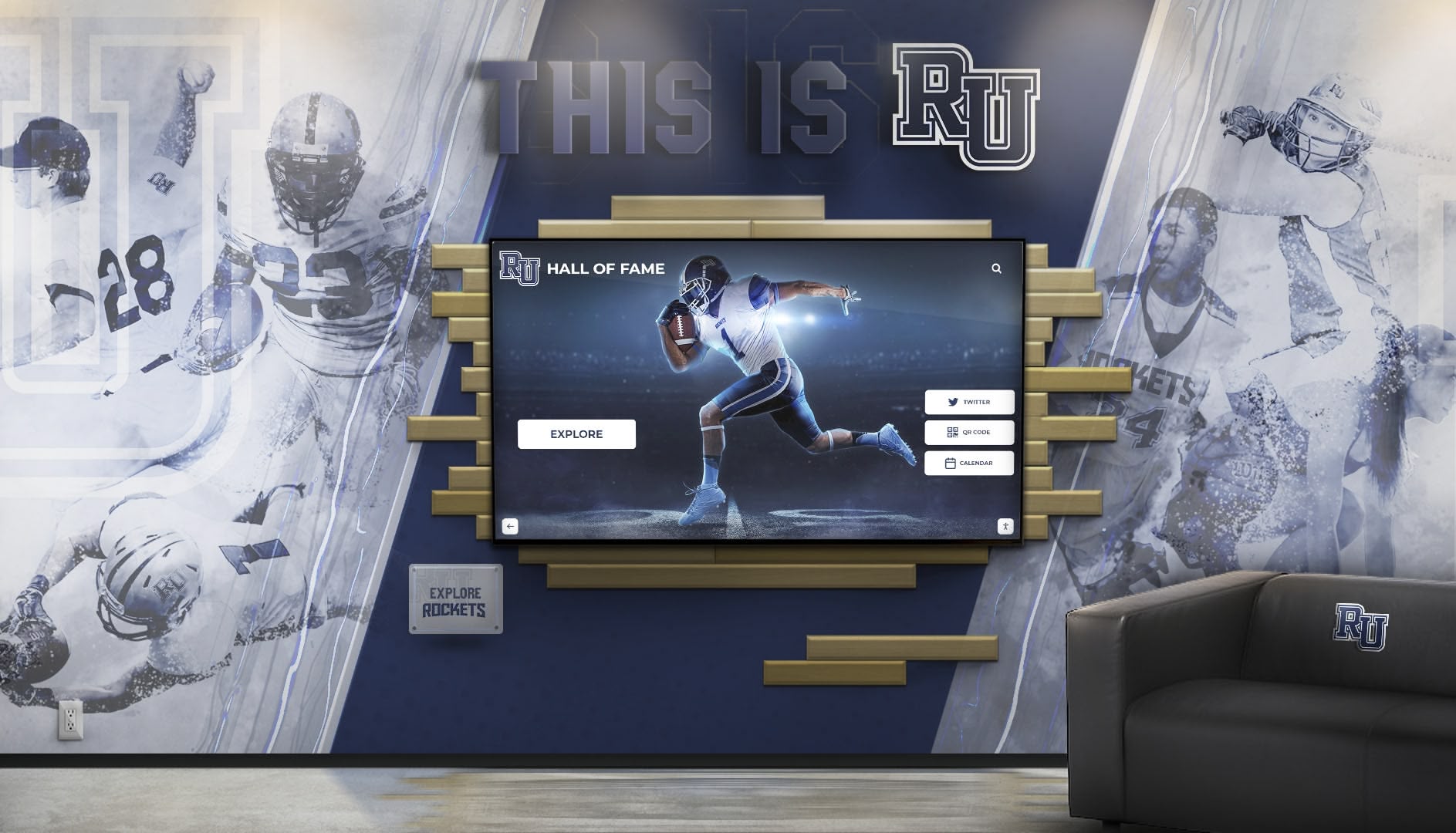
Rocket Alumni Solutions specializes in turnkey digital recognition systems designed specifically for schools and nonprofits. Their pricing model emphasizes transparency and predictability.
Typical turnkey package includes:
- 55" commercial touchscreen display with professional installation
- Unlimited cloud-based content management system
- Initial content development for up to 200 profiles
- On-site administrator training (up to 4 staff members)
- First year of software subscription and technical support
- Mobile and web access to complete content library
- Unlimited display screens at no additional software cost
Pricing structure:
- Complete turnkey installation: $12,500-$18,500 depending on site complexity
- Annual subscription (years 2+): $1,200-$1,800
- Additional display screens: hardware cost only, no software fees
- Content development beyond 200 profiles: $20-$28 per profile
Key differentiators:
- No artificial limits on content volume or number of screens
- Software subscription covers unlimited displays campus-wide
- Strong focus on accessibility compliance (WCAG 2.2 AA)
- Comprehensive training with follow-up support included
- Multi-year subscription discounts available
Schools seeking predictable costs without nickel-and-diming for additional features find Rocket’s model addresses the hidden cost problem that plagues other vendors. Their unlimited screen approach particularly benefits institutions planning campus-wide recognition displays.
TouchHallOfFame.us
TouchHallOfFame.us focuses on athletic and donor recognition with flexible implementation options.
Standard packages:
- Athletics Starter: $9,500 (43" display, 100 profiles, basic training)
- Athletics Professional: $16,500 (65" display, 250 profiles, comprehensive training)
- Multi-Sport Premium: $28,500 (two 55" displays, 400 profiles, extensive customization)
Software licensing:
- Annual subscription: $900-$1,600 depending on package tier
- Perpetual license option: $4,500 + $500 annual maintenance
- Multi-year discounts: 10% for 3-year prepayment
Content services:
- Initial profile development included in package
- Additional profiles: $25 each
- Yearbook digitization: quoted separately based on volume
- Annual content update assistance: $400
HallOfFameWall.com
HallOfFameWall.com provides customizable recognition solutions with emphasis on visual design integration.
Turnkey installation pricing:
- Small installation (50" display, basic content): $11,200
- Standard installation (60" display, comprehensive content): $17,800
- Premium installation (75" display, extensive multimedia): $26,500
Software model:
- First year included in installation price
- Years 2+ subscription: $1,100-$1,900 annually
- Custom design work: $800-$2,500 depending on complexity
Training and support:
- On-site training included (up to 3 staff)
- Remote training for additional staff: $150 per session
- Priority support package: $600 annually (optional)
TouchWall.us Implementation Approach
TouchWall.us emphasizes technical planning and implementation support, providing schools with detailed specification documentation.
Service model: Rather than fixed turnkey packages, TouchWall.us offers comprehensive planning resources and connects schools with implementation partners. This approach works well for institutions with strong IT departments preferring greater control over vendor selection and installation.
Typical project costs using TouchWall.us resources:
- Hardware procurement: $5,000-$15,000
- Software platform (various partners): $1,000-$3,000 annually
- Installation coordination: $1,500-$4,000
- Content development: $2,000-$8,000
- Training: $500-$1,500
Benefits of this approach:
- Maximum flexibility in component selection
- Potential cost savings through competitive bidding
- Detailed technical documentation included
- No vendor lock-in for future expansions
ChaseMcKee.com Digital Recognition Solutions
ChaseMcKee.com specializes in custom-designed recognition installations integrating digital displays with architectural elements.
Project-based pricing: ChaseMcKee works on custom project basis rather than standardized packages, with typical turnkey installations ranging from $18,000-$45,000 depending on:
- Display quantity and sizes
- Custom millwork or architectural integration
- Graphic design and branding development
- Content volume and complexity
- Installation logistics
Included services:
- Comprehensive design consultation
- Architectural drawings and renderings
- Custom display surround fabrication
- Professional installation and integration
- Complete content development
- Administrator training
- One-year warranty and support
Ongoing support:
- Annual maintenance agreements: $1,200-$2,400
- Software updates and hosting included
- Priority service response
This premium approach suits schools undertaking significant facility renovations where hall of fame displays integrate with broader architectural improvements.
True Total Cost Calculator
Use this framework to calculate realistic 5-year total ownership costs for accurate vendor comparison.
Year 1 (Implementation Year)
| Cost Component | Low Range | Mid Range | High Range |
|---|---|---|---|
| Display hardware & installation | $5,000 | $9,500 | $18,000 |
| Software initial license/setup | $1,000 | $2,500 | $5,000 |
| Content development & migration | $2,000 | $5,000 | $10,000 |
| Training and implementation support | $500 | $1,200 | $2,500 |
| Network/electrical upgrades | $0 | $500 | $2,000 |
| Year 1 Total | $8,500 | $18,700 | $37,500 |
Years 2-5 (Annual Recurring)
| Cost Component | Low Range | Mid Range | High Range |
|---|---|---|---|
| Software subscription/maintenance | $600 | $1,200 | $2,000 |
| Content updates (staff time/services) | $400 | $800 | $1,500 |
| Technical support | $0 | $300 | $800 |
| Electricity and connectivity | $100 | $150 | $250 |
| Annual Recurring | $1,100 | $2,450 | $4,550 |
5-Year Total Ownership Cost
| Scenario | Calculation | Total |
|---|---|---|
| Budget Implementation | $8,500 + (4 × $1,100) | $12,900 |
| Standard Implementation | $18,700 + (4 × $2,450) | $28,500 |
| Premium Implementation | $37,500 + (4 × $4,550) | $55,700 |
When comparing vendor quotes, calculate 5-year totals using this framework. A vendor quoting $14,000 upfront with $2,800 annual costs totals $25,200 over five years, potentially less than a vendor quoting $18,500 upfront with $1,500 annual costs ($24,500 total).
Hidden Costs and Budget Surprises to Avoid
Schools frequently encounter unexpected costs when evaluating vendor proposals. Watch for these common surprises.
Software Feature Tiers and Limitations
Profile capacity caps: Some vendors advertise low subscription costs but limit content to 200-300 profiles. Adding capacity costs $400-$1,200 annually. For schools with extensive athletic history, this ongoing charge significantly increases total costs.
Per-display licensing: Certain platforms charge software fees per display. If you want recognition displays in multiple locations—athletic facility, main entrance, performing arts center—costs multiply. A $1,200 annual subscription becomes $3,600 for three displays.
Video hosting limits: Basic packages may restrict video hosting to 10-20 videos or limit total storage to 5-10GB. Premium video features cost an additional $300-$800 annually.
Mobile app fees: Access to content via mobile apps sometimes requires separate licensing of $200-$500 annually beyond the base subscription.
Content Development Scope Creep
Photo quality requirements: Vendors may quote content development costs assuming you provide digital photos. If historical photos exist only as prints requiring scanning and restoration, costs increase substantially.
Biography length limits: Basic content packages might include only names and basic statistics. If you want comprehensive biographies with career highlights and post-graduation updates, expect premium pricing.
Ongoing content obligations: Some vendors include first-year content updates but charge $400-$800 annually for ongoing update assistance. Others expect you to handle updates independently after training.
Technical Support Boundaries
After-hours support: Standard support typically operates during business hours. Evening/weekend coverage for events costs $500-$1,200 annually extra.
On-site service calls: Remote troubleshooting is usually included, but on-site visits cost $200-$500 per trip plus technician time.
Training for new staff: Initial training covers designated administrators, but training new staff when turnover occurs may cost $150-$400 per session.
Hardware Warranty Gaps
Standard warranty coverage: Base warranties typically cover hardware failures but not accidental damage, vandalism, or misuse. Extended warranties covering these scenarios cost $300-$800 annually.
Installation warranty limitations: Installation may be warranted for 90 days, but longer coverage requires extended service agreements.
Component replacement: Touchscreen digitizers, which wear from use, may not be covered in standard warranties. Replacement costs $400-$1,200.
Schools implementing digital trophy case displays should specifically ask vendors which scenarios fall outside standard warranty coverage.
Financing and Payment Options
Schools rarely have $15,000-$25,000 in discretionary budget for recognition projects. Understanding financing alternatives helps move projects forward.
Booster Club and Fundraising Models
Capital campaign integration: Hall of fame projects often integrate with broader athletic facility improvements. Recognition displays become campaign components with specific fundraising goals.
Naming rights opportunities: Offering naming rights for the hall of fame itself ($10,000-$25,000) or specific sections (athletics $5,000, academics $5,000) helps offset costs.
Individual profile sponsorships: Some schools offer families or businesses the opportunity to sponsor individual athlete profiles at $150-$500 per profile, funding content development through micro-donations.
Memorial and tribute opportunities: Hall of fame projects provide meaningful ways to honor retired coaches, deceased alumni, or long-serving administrators. Memorial designations at $1,000-$5,000 build funding while honoring community members.
Vendor Financing Programs
Equipment leasing: Some vendors partner with equipment leasing companies allowing schools to spread costs over 3-5 years. A $16,500 installation might cost $325-$425 monthly on a 4-year lease.
Subscription-based models: Pay-over-time structures where schools pay higher monthly subscriptions that include both software and hardware amortization. For example, $350/month for 5 years covering complete turnkey installation and support.
Lease-to-own arrangements: Similar to equipment leasing but ownership transfers to the school after the lease term concludes.
Grant assistance: Some vendors provide grant research assistance or maintain databases of education technology grants potentially funding digital recognition projects.
Budget-Friendly Phased Implementation
Start small, expand later: Begin with a single 50" display focusing on recent achievements (past 10 years), then add historical content and additional displays as budget allows. Digital systems expand easily without physical constraints.
Prioritize high-traffic locations: Install first displays in locations with maximum visibility—main gymnasium entrance, school lobby—then expand to secondary locations.
Content development staging: Launch with limited initial content (50-100 profiles), then develop additional historical profiles over 2-3 years spreading costs across multiple budget cycles.
Feature tier progression: Start with basic software tiers covering essential needs, then upgrade to premium features once adoption proves value and justifies increased investment.
Schools should ask vendors specifically about phased implementation support. Platforms designed for expansion accommodate growth much better than systems requiring complete reinstallation for additions.
Implementation Timeline and Milestones
Understanding realistic timelines helps schools plan installations around academic calendars and budget cycles.
Pre-Purchase Phase (4-8 Weeks)
Weeks 1-2: Requirements definition
- Identify stakeholders and secure preliminary budget approval
- Document technical requirements using site survey checklist
- Define content scope (historical depth, achievement categories)
- Establish selection criteria for honorees
Weeks 3-5: Vendor evaluation
- Request detailed proposals from 3-4 vendors
- Attend vendor demonstrations (insist on live demos, not just sales presentations)
- Check references from 2-3 similar institutions
- Compare 5-year total costs using calculator framework
Weeks 6-8: Approval and contracting
- Present recommendation to administration and stakeholders
- Finalize budget allocation and funding sources
- Review and negotiate contract terms
- Submit purchase order
Installation Phase (6-10 Weeks)
Weeks 1-2: Pre-installation preparation
- Complete any required electrical or network infrastructure upgrades
- Finalize display locations with facilities management
- Begin content research and material gathering
- Coordinate installation scheduling
Weeks 3-6: Content development
- Digitize historical photos and documents
- Enter athlete and team data into content management system
- Review and proof all content for accuracy
- Address any gaps in historical records
Weeks 7-8: Physical installation
- Install display hardware and mounting systems
- Connect power and network infrastructure
- Configure software and content management systems
- Quality testing and verification
Weeks 9-10: Training and launch
- Administrator training sessions
- Soft launch for staff preview and feedback
- Address any technical or content issues identified
- Official public launch and promotion
First-Year Operations (Ongoing)
Months 1-3: Adoption phase
- Monitor system usage and gather user feedback
- Address any technical issues promptly
- Refine content based on community response
- Document procedures for ongoing management
Months 4-9: Optimization
- Add additional content filling identified gaps
- Expand recognition categories if appropriate
- Train backup administrators
- Evaluate expansion opportunities
Months 10-12: Annual update cycle
- Recognize current year’s achievements
- Review all content for accuracy
- Plan for Year 2 budget allocation
- Assess vendor service quality
Schools launching digital hall of fame displays should align installation timing with natural visibility opportunities—homecoming events, athletic banquets, or alumni weekends.
Evaluating Vendor Quotes: Essential Questions
When comparing vendor proposals, these questions reveal true costs and service quality.
Pricing Transparency Questions
“What exactly is included in the quoted price?” Request itemized breakdown separating hardware, software, installation, content development, and training costs. Vague “turnkey solution” pricing without details hides potential surprises.
“What costs will I incur beyond this quote in Year 1?” This uncovers setup fees, activation charges, or first-year-only discounts that increase costs in subsequent years.
“What are typical annual costs in Years 2-5?” Get specific recurring cost commitments in writing. Verbal assurances about “low annual costs” mean nothing without contractual pricing guarantees.
“Are there limits on content volume, displays, or features?” Identify caps requiring additional payment: profile limits, display quantity restrictions, storage limits, bandwidth caps.
“What triggers additional charges after installation?” Understand what falls outside included services: additional training, after-hours support, on-site visits, content development assistance.
Service Quality Questions
“Who will perform the installation?” Company employees, certified installers, or subcontractors? Check credentials and insurance coverage.
“What happens if the display fails in Year 2?” Response time commitments, loaner equipment availability, parts coverage, labor charges.
“Can I speak with 3 schools that installed in the past 12-18 months?” Recent references reveal current service quality. Ask references specifically about hidden costs and post-installation support.
“What training do you provide, and is follow-up included?” Verify training depth, staff capacity, documentation quality, and availability of refresher sessions.
“How do you handle staff transitions?” When your trained administrator leaves, what support does the vendor provide training replacement staff?
Technical Capability Questions
“Is content exportable if we change vendors?” Data portability protects your investment. Require written commitment to export content in standard formats.
“What accessibility compliance standards do you meet?” WCAG 2.2 Level AA compliance matters for schools. Request documentation, not just assurances.
“How do you handle software updates?” Automatic cloud updates, scheduled maintenance windows, or manual updates requiring staff action?
“What network requirements are needed?” Bandwidth, firewall configurations, specific domains requiring whitelisting. Verify your IT department can accommodate requirements.
“Can the system grow as our needs expand?” Adding displays, expanding content categories, integrating with other school systems. Confirm expansion paths and associated costs.
Special Considerations for Different Institution Types
Pricing and requirements vary somewhat based on institution size and type.
Small Schools and Community Organizations
Budget constraints: Smaller institutions typically work with tighter budgets but have smaller content volumes. Look for vendors offering scaled packages appropriate to your size rather than enterprise solutions designed for large universities.
Limited IT support: Choose platforms with minimal technical complexity. Cloud-based solutions requiring only internet connectivity work better than systems needing server infrastructure and IT expertise.
Staff capacity: Select vendors providing comprehensive content development services. Small schools rarely have staff bandwidth for extensive data entry and photo digitization.
Organizations with limited resources should consider whether digital solutions provide better value than traditional approaches, or if phased implementations spreading costs across multiple years fit budget realities better.
Medium-Sized High Schools
Balanced requirements: Medium institutions typically need 200-400 athlete profiles spanning 20-40 years of history. Standard turnkey packages usually fit requirements well.
Growth planning: Plan for steady content growth—approximately 20-40 new profiles annually. Verify platform capacity accommodates growth without hitting artificial limits.
Multiple sports: Comprehensive athletic programs across 10-15 sports require organization systems allowing filtering and navigation by sport, year, and achievement type.
Large High Schools and Small Colleges
Extensive content volumes: Institutions with 50+ years of athletic tradition across 20+ sports may need 500-1,000+ profiles initially. Enterprise-tier packages or custom implementations typically fit better than standard offerings.
Multiple locations: Larger campuses benefit from displays in multiple locations—main athletic complex, satellite gyms, performing arts centers, academic buildings. Per-display software licensing significantly impacts costs.
IT integration: Larger institutions often want integration with existing student information systems, athletic management platforms, or web content management systems. Verify API availability and integration costs.
Universities and Colleges
Department-specific needs: Universities frequently implement separate recognition systems for athletics, academics, performing arts, and research. Multi-department implementations require coordination and potentially volume discounts.
Alumni engagement priorities: Higher education institutions emphasize alumni engagement more than K-12 schools. Features supporting giving campaigns, reunion planning, and donor recognition become more important.
Brand consistency: Universities require displays matching established brand standards. Custom design work and integration with visual identity systems increases costs but provides necessary institutional consistency.
Schools and colleges exploring donor recognition alongside athletic achievements should evaluate platforms specifically designed for multi-purpose recognition.
Frequently Asked Questions
What’s a reasonable budget for a turnkey digital hall of fame installation?
Most schools invest between $14,000-$24,000 for complete turnkey installations including hardware, software, content setup, and training. Budget implementations start around $10,000 for smaller displays with limited content, while premium installations with large displays and extensive content can reach $35,000-$50,000. Add $1,200-$2,500 annually for ongoing subscriptions and support. Calculate 5-year total ownership cost rather than focusing solely on initial price. A $15,000 installation with $1,500 annual costs totals $21,000 over five years—better value than a $12,000 installation with $3,000 annual costs totaling $24,000.
Should I expect content development included in turnkey pricing?
Genuinely turnkey packages include initial content development for a specified number of profiles—typically 100-300 depending on price point. Verify exactly how many profiles are included and what happens if you exceed that number. Some vendors include data entry but charge separately for photo digitization and restoration. Others provide comprehensive content services covering all migration needs. Schools with extensive historical content should prioritize vendors offering complete content migration services or budget $2,000-$8,000 additional for comprehensive content development beyond basic package inclusions.
How long should administrator training last?
Minimum effective training runs 2-3 hours covering essential content management tasks, troubleshooting, and administrative functions. Comprehensive training programs provide 4-6 hours covering advanced features, workflow optimization, and multiple user scenarios. Look for vendors including follow-up support during the first 30-90 days when questions arise during actual use. Training for 2-4 staff members should be included in turnkey pricing. Additional staff training often costs $150-$400 per session. Ask specifically whether training is on-site or remote, and whether refresher training is available when staff changes occur.
Are there tax benefits or grant opportunities that offset costs?
Schools operating as nonprofits or government entities typically don’t pay sales tax on equipment purchases, reducing costs by 5-10% depending on state rates. Some states offer technology grants specifically for educational facilities improvements including digital displays and interactive systems. Check with state education departments about available grant programs. Federal E-Rate programs typically don’t cover recognition displays but may cover network infrastructure improvements supporting display connectivity. Booster clubs and foundations often fund recognition projects through dedicated campaigns, with contributions potentially tax-deductible for donors depending on organization status.
What happens when my trained administrator leaves?
Staff turnover is inevitable, making vendor support for training transitions critical. Quality vendors provide refresher training sessions when staff changes occur, either included in annual subscriptions or at reasonable rates ($150-$300 per session). Comprehensive documentation allowing new staff to learn independently also helps. Budget approximately 2-4 hours for new administrators to become proficient with most platforms. Train at least two staff members initially so you’re never dependent on a single individual. Ask vendors specifically during evaluation how they handle staff transition support and what costs apply.
Can I negotiate better pricing or payment terms?
Most vendors offer some pricing flexibility, particularly for multi-year commitments or multiple displays. Ask about discounts for prepaying subscriptions (typically 10-15% for 3-year prepayment), educational institution pricing (some vendors offer education-specific discounts), or timing considerations (installations scheduled during slow periods may receive better pricing). Payment terms are often negotiable—some vendors accommodate payment schedules aligned with school budget cycles or split payments between fiscal years. Fundraising projects can sometimes structure payments as milestones are reached. Never accept first quoted price without asking about available discounts or payment flexibility.
How do pricing and features compare between traditional and digital displays?
Traditional static displays (plaques, painted record boards) cost $3,000-$8,000 initially for basic implementations but require $300-$800 per significant update. Over 10 years, maintenance and updates often equal or exceed digital system costs while providing limited content capacity and no remote access. Digital systems cost more upfront ($12,000-$25,000) but update instantly at no additional cost, accommodate unlimited content growth, provide mobile/web access, and include multimedia capabilities impossible with static displays. Most schools find digital systems achieve cost parity with traditional approaches within 5-7 years while delivering dramatically superior capabilities. The break-even calculation depends on how frequently you update recognition content.
What portion of the quote covers hardware vs. software vs. services?
Typical turnkey quote breakdowns allocate approximately 45-55% to display hardware and installation, 20-30% to software platform and licensing, 15-25% to content development and migration, and 5-10% to training and implementation support. Quotes heavily weighted toward hardware (70%+) with minimal service allocation often indicate vendors selling displays rather than complete solutions. Quotes with high software percentages (40%+) relative to hardware may signal platforms with premium features but potentially unnecessary complexity. Request itemized breakdowns separating these components so you understand exactly what you’re purchasing and can compare vendors on equivalent bases.
Moving Forward: Your Turnkey Implementation Checklist
Schools evaluating turnkey digital hall of fame providers should complete these steps before selecting vendors.
Before Requesting Quotes
- Document content scope: number of profiles, depth of historical coverage, achievement categories
- Identify all stakeholders requiring input and establish approval authority
- Conduct site survey documenting power, network, and mounting considerations
- Define budget range including both initial investment and 5-year total
- Establish timeline requirements (installation deadlines, launch events)
During Vendor Evaluation
- Request itemized quotes separating hardware, software, content, and services
- Calculate 5-year total ownership cost including all recurring fees
- Attend live demonstrations testing actual system responsiveness and features
- Contact at least 2 references from comparable institutions
- Review sample content management interface to assess usability
- Verify training depth, documentation quality, and support availability
- Confirm content exportability and data ownership terms
- Identify all costs falling outside base quote (caps, limits, additional fees)
Before Signing Contracts
- Compare 5-year total costs across vendors using standardized calculator
- Verify warranty coverage, response times, and service commitments in writing
- Confirm training includes specified staff quantity and follow-up support
- Review content development scope ensuring it matches your needs
- Negotiate multi-year subscription discounts or payment flexibility if possible
- Ensure contract specifies content ownership and export rights
- Establish escalation path if vendor service quality declines
After Installation
- Complete administrator training and document procedures
- Test all functionality before vendor departure
- Establish annual content review cycle on institutional calendar
- Document vendor contact information and support procedures
- Train backup administrators ensuring coverage during transitions
- Promote new display to community and alumni
- Gather usage feedback and optimize content accordingly
- Plan for annual budget allocation covering recurring costs
Schools working through this checklist systematically avoid most common turnkey implementation problems and secure better vendor performance.
Get Your Turnkey Digital Hall of Fame Started
Schools researching turnkey digital hall of fame solutions now understand the complete cost picture: hardware and installation, software licensing, content development, training, and ongoing support. Armed with realistic pricing frameworks and vendor comparison tools, you can evaluate proposals confidently and budget accurately.
The key to successful implementation lies in finding vendors who provide genuinely turnkey service—not hardware sales disguised as complete solutions. Prioritize vendors offering transparent pricing, comprehensive content services, thorough training, and long-term support commitments. Calculate 5-year total ownership costs rather than focusing solely on initial prices. Ask the hard questions about hidden fees, service limitations, and what happens when things go wrong.
Ready for a Transparent Turnkey Quote?
Rocket Alumni Solutions provides complete turnkey digital hall of fame implementations with no hidden fees or surprise charges. Our transparent pricing includes commercial-grade displays, unlimited content management software, comprehensive content development, administrator training, and ongoing support—everything you need to launch and maintain a professional recognition system.
We'll conduct a no-obligation site survey, provide detailed itemized pricing covering all components, demonstrate our platform's capabilities, and connect you with references from similar institutions. Get the pricing clarity you need to budget confidently and the implementation support that ensures project success.
Additional Resources
Schools planning digital hall of fame projects may find these related guides valuable:
- Athletic Hall of Fame: Complete Guide for School Administrators - Implementation framework and selection criteria
- Digital Signage for Schools: Complete Guide - Broader school communication technology planning
- Interactive Touchscreen Display Options for Educational Facilities - Technical specifications and requirements
- Digital Donor Wall Complete Guide for Schools and Nonprofits - Dual-purpose recognition combining athletics and fundraising
- Rocket Alumni Solutions Subscription Pricing and Multi-Year Options - Detailed pricing structures and budget planning































