Earning a varsity letter is a milestone that athletes carry with them for life. It represents the hours of practice, the dedication to a team, and the perseverance it takes to compete at the school’s highest level. Yet in many schools, these hard-earned letters are acknowledged with nothing more than a handshake at a banquet before disappearing into a student’s bedroom or a box in the attic.
The hallways and athletic lobbies of a school tell a story about what that community values. When varsity letter displays are done well, they become landmarks—places where current athletes see their future, alumni reconnect with their past, and parents understand what their school stands for. When they’re done poorly, or not at all, a powerful recognition opportunity is quietly squandered.
This guide covers practical varsity letter display ideas that work for schools of every size, from traditional framed cases and hallway boards to interactive digital letterwinner walls that preserve an entire program’s history in a single touchscreen.
The best varsity letter displays accomplish more than decoration. They validate every athlete who earned recognition, inspire underclassmen to pursue the standard, and give alumni a reason to care about the program long after graduation. The specific format matters less than the intention behind it—but the format still matters, because a thoughtfully designed display gets stopped at and studied, while a neglected one blends into the background.
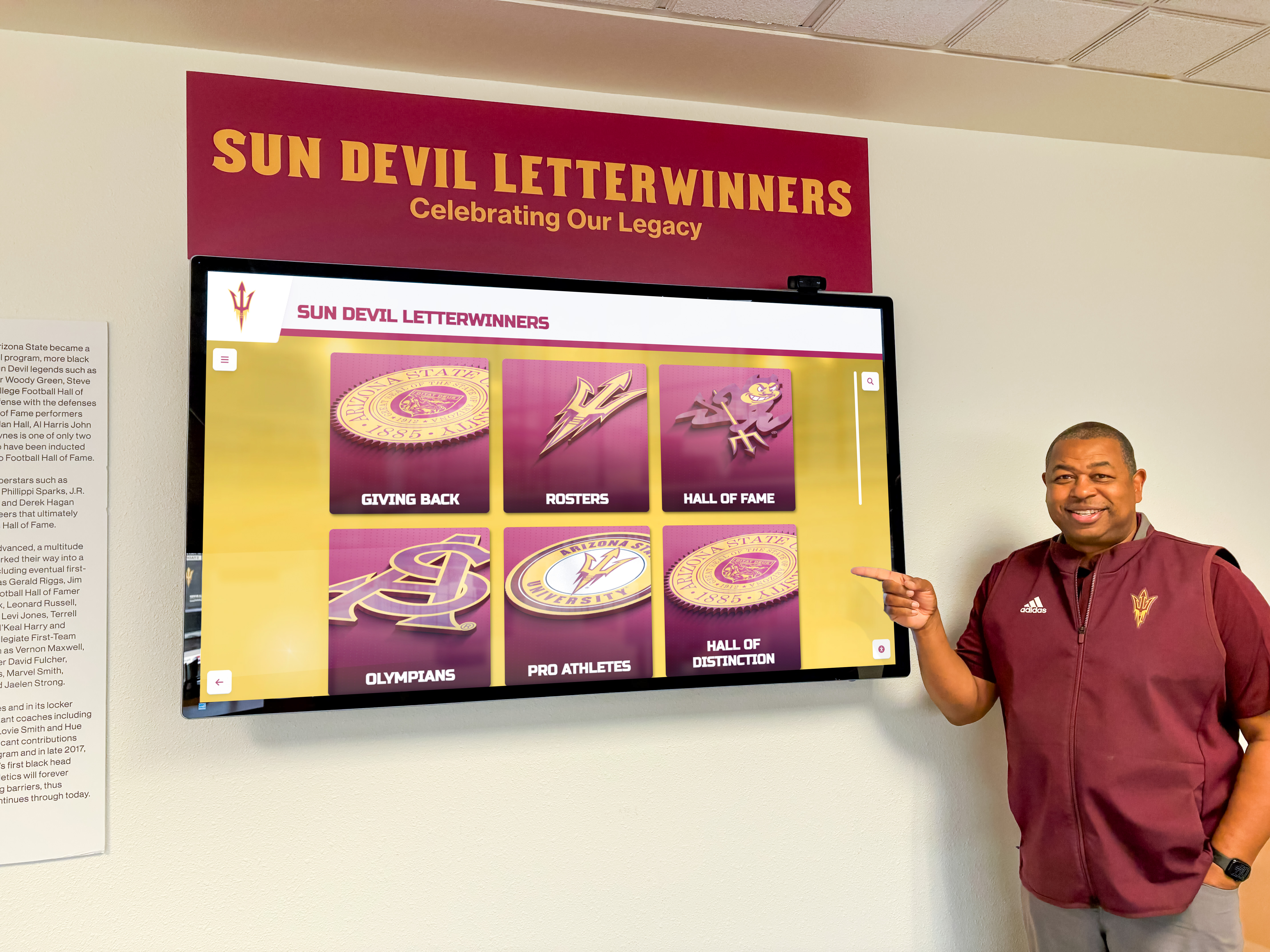
A well-designed letterwinner display invites athletes and visitors to explore the school's athletic history and traditions
Why Varsity Letter Displays Matter More Than Ever
Before getting into specific display formats, it helps to understand why schools are reinvesting in this type of recognition now.
Student athletes increasingly compete in an environment that measures everything—stats, film, recruiting profiles—but often fails to permanently commemorate their contributions to the school itself. A digital highlight reel disappears from social media feeds within days. A banquet program gets thrown away. The varsity letter, once symbolic enough to stitch onto a jacket, has lost some of its cultural visibility simply because schools haven’t updated how they display it.
At the same time, athletic directors are being asked to do more with recognition. Boosters want to see their investments reflected in visible programs. Principals want athletic spaces that communicate values. Coaches want tools that motivate returning athletes and attract incoming ones. A well-designed varsity letter display address all of these needs simultaneously.
Schools pursuing comprehensive athletic recognition programs are finding that updating the way they display letterwinner history has an outsized cultural effect compared to the resources it requires.
Traditional Varsity Letter Display Formats
Traditional approaches remain viable when schools implement them with care and keep them current. The problem with most outdated varsity letter displays isn’t the format—it’s the neglect.
Framed Letter Display Cases
Individual framed displays featuring the actual varsity letter alongside a photo and name plate create personal, tangible recognition that carries real weight. These work best in sport-specific hallways or locker room entrances, where athletes from a particular program will see them most often.
What makes framed letter cases work:
- Quality materials signal importance. A cheap plastic frame communicates the opposite of what the award represents. Wood frames, UV-protective glass, and engraved name plates make clear the school takes the recognition seriously.
- Photo inclusion is non-negotiable. Names alone turn into wallpaper. A face creates connection and makes the display browsable.
- Consistent formatting across all frames prevents the display from looking like an afterthought assembled over many years with whatever materials were available.
- Location matters. A collection of framed letter displays mounted in a busy hallway creates a gallery effect that rewards attention. The same frames scattered across a rarely-visited corridor have minimal impact.
The primary limitation of framed individual cases is cost and physical space. A school with 30 sports across three seasons and 15–20 letterwinners per sport per year accumulates thousands of displays over a decade. Most facilities simply cannot accommodate that volume in a way that remains coherent and visually compelling.
Traditional Trophy Cases with Letter Components
Many schools already maintain trophy cases in athletic lobbies. Adding a varsity letter component—either dedicated shelving for framed letters or a display board mounted above or beside the case—creates a natural recognition cluster in the main athletic space.
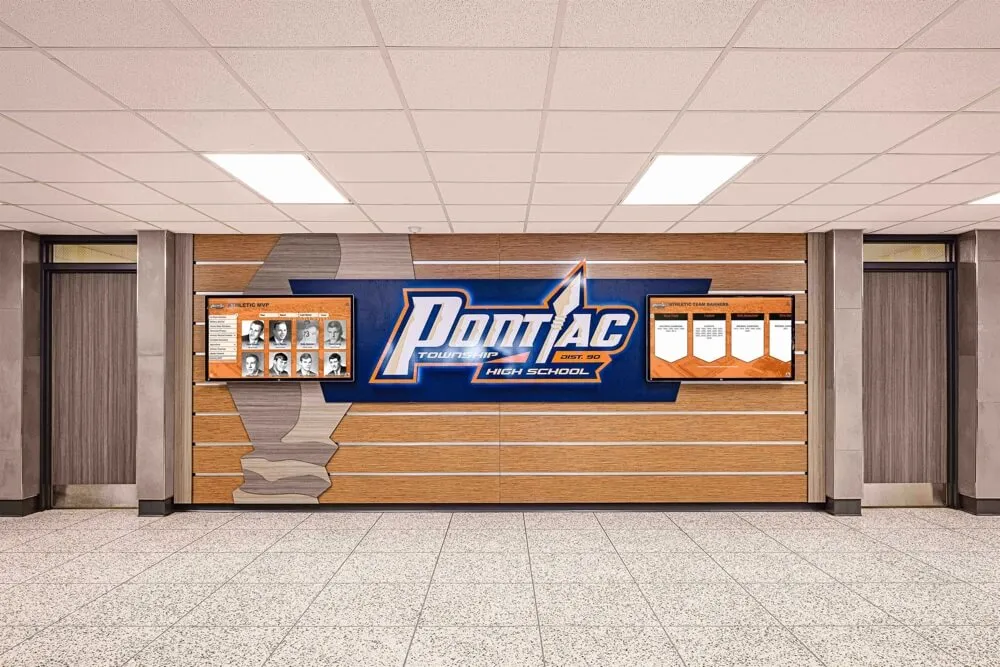
Dedicated athletic honor wall sections in hallways create high-traffic recognition zones that students pass daily
Effective trophy case + letter combinations include:
- A backlit letter display board mounted above or flanking existing cases, organized by sport or year
- Dedicated case sections with framed letters grouped by decade alongside championship hardware
- Glass-front shadow boxes combining the letter with a jersey number, athlete photo, and brief achievement summary
The challenge here is the same as with any physical display: capacity. Schools that have operated for 40 or 50 years have thousands of letterwinners, and a trophy case can realistically display only a small fraction of them at any given time.
Hallway Banner and Letter Display Walls
Hallway displays that run along main corridors create ambient recognition that students encounter every day without being specifically destination-driven. These work by volume and visibility rather than individual depth.
Format options for hallway letter displays include:
Mounted letter boards featuring individual vinyl or fabric letters beneath athlete names organized alphabetically or by sport season. These are cost-effective for covering many years of letterwinners and create a visually striking effect when executed at scale.
Letter-and-nameplate rails using consistent hardware that allows new additions without redesigning the entire display. A school can add each year’s letterwinners to an ongoing installation that grows over time.
Sport-specific hallway sections where the baseball hallway leads from the main corridor to the field with every baseball letterwinner displayed, the basketball hallway to the gym, and so on. This creates a strong sense of program identity and legacy in each athletic space.

Organized hallway shield and plaque displays create a sense of program history students walk through daily
Considerations for hallway letter display walls:
- High-traffic placement is critical. A display in an underused corridor is a missed opportunity.
- Accessibility for additions. If adding a new year’s letterwinners requires a custom fabrication order, updates will inevitably slip.
- Viewing distance. Text and names that are legible from six inches but unreadable at six feet fail to engage passing students.
- Longevity of materials. Vinyl deteriorates, fabric fades, and paper yellows. Schools that have invested in hallway displays often find themselves managing the deterioration of older sections while trying to add current content.
For schools exploring how these hallway approaches work across different facility types, the comparison of touchscreen recognition at small and medium public high schools offers useful perspective on why physical-only approaches often leave gaps.
Digital Varsity Letter Display Ideas
Modern digital display systems solve the core problems that eventually limit every physical format: capacity, cost per recognition, and the inability to make historical content easily accessible.
Digital Letterwinner Walls with Interactive Touchscreens
A digital letterwinner wall uses a touchscreen display—typically 55" to 85" wall-mounted—to make the school’s entire letterwinner history browsable in one place. Instead of walking past 200 framed photos, visitors can search by name, filter by sport, and pull up a full profile for any athlete who ever lettered at the school.

Interactive kiosks in athletic hallways give students and visitors on-demand access to the full letterwinner history
What a digital letterwinner display includes:
- Athlete profiles with photo, name, sport, position, years lettered, and notable achievements
- Year-by-year browsing letting visitors see every athlete who lettered in a given season
- Sport-specific filtering so visitors can explore the full history of a single program
- Search by name for alumni, parents, and current athletes looking up specific people
- Record integration connecting letter winners to team records they were part of—conference titles, state appearances, individual milestones
The depth of profile content is configurable based on what the school has on hand. Some schools import decades of paper records, yearbook scans, and historical photos to create rich profiles going back to the 1970s. Others start with current athletes and add historical content over time. Both approaches produce displays that improve every year rather than plateauing.
Schools that have explored archiving older records to populate these systems have found resources like yearbook scanning services for digitizing historical materials useful for filling historical gaps without risking damage to originals.
Display Placement for Maximum Visibility
Digital letterwinner displays work best in locations where the right audiences naturally congregate:
Athletic lobbies and main gym entrances capture the highest concentration of athletes, coaches, families, and visitors in a single location. A touchscreen display at the gym entrance becomes the first thing families see at home games and the last thing opponents see on their way out.
Main school entrance and administrative lobbies expose the display to all visitors—not just those attending athletic events—and communicate the school’s athletic culture to prospective families and community members.
Hallway placement near locker rooms and athletic offices creates a destination for athletes before and after practice, producing the highest frequency of casual exploration among current student athletes.
Cafeteria or commons approaches benefit from the natural gathering behavior in those spaces. Students who sit facing a recognition display during lunch will interact with it in ways they won’t during rushed hallway transitions.
For schools weighing whether a full digital installation makes sense for their size and budget, the analysis of why interactive touchscreen displays work for smaller schools addresses the most common concerns directly.
Athletic Record Boards Alongside Letter Displays
Varsity letter displays are most powerful when they connect individual athletes to program achievements. Athletic record boards—listing school records in events, seasons, and careers across every sport—work as a natural companion to letterwinner walls, showing visitors how individual athletes fit into the broader history.
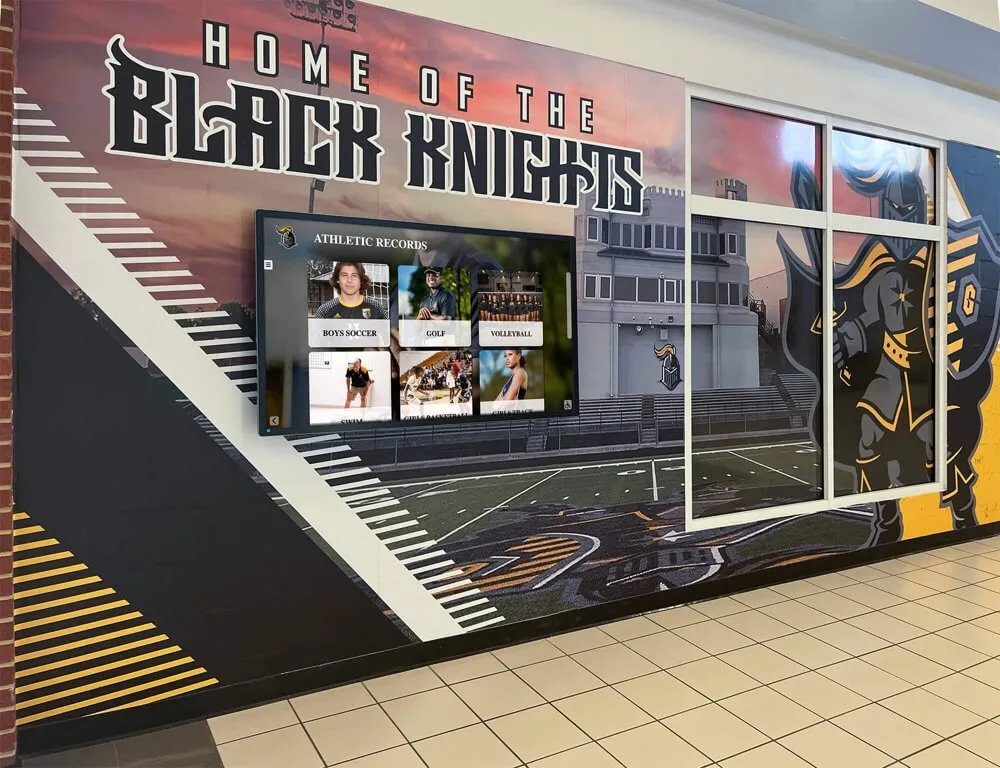
Athletic record boards positioned alongside letterwinner displays connect individual recognition to program achievement history
A school’s record board for track and field, for example, lists the top performances in every event going back to whenever records were first kept. A visitor can see that the 400-meter school record was set in 1998 and held for 20 years, then look up the athlete who set it in the letterwinner database. That kind of connection turns an administrative list into a living story.
Digital record boards with touchscreen interaction let schools update records immediately when they’re broken, display contextual information about the record-setter, and link directly to the athlete’s letterwinner profile—capabilities that static engraved boards simply cannot match.
Hall of Fame Integration
Many schools that invest in varsity letter displays eventually extend that recognition to a formal athletic hall of fame. A letterwinner display becomes the foundation: every hall of fame inductee is already in the system with a profile, and the hall of fame designation simply adds a visual distinction to their existing entry.
Winter sports programs, in particular, often produce hall of fame candidates who were previously difficult to display effectively because their recognition was buried in paper archives. Resources like the winter sports hall of fame recognition guide walk through how schools have approached honoring athletes from hockey, wrestling, swimming, and other winter sports that are sometimes underrepresented in existing displays.
Building a Display Strategy That Works for Your School
No single format is right for every school. The most effective varsity letter display strategies combine elements based on the school’s existing infrastructure, budget, facility layout, and the depth of recognition the administration wants to provide.
Audit What You Already Have
Before purchasing new equipment or redesigning existing spaces, take stock of the current state:
- Which letterwinners from the past 10 years are currently displayed anywhere in the building?
- What percentage of letterwinner history is accessible to a visitor who walks through the school?
- Are there existing display spaces that are underperforming due to outdated content, poor visibility, or deteriorating materials?
- What data about historical letterwinners already exists in paper, digital, or yearbook form?
The audit typically reveals that schools have more raw material than they realize—paper records, old yearbooks, coach memories—and that the gap between the recognition they want to provide and what they currently offer is primarily a systems problem, not a content problem.
Match the Format to the Audience
Different formats serve different audiences:
Physical framed displays and banner walls serve current students best, providing the ambient visibility that comes from passing the same hallway 200 times per semester.
Interactive digital displays serve alumni, prospective families, and visiting community members best—audiences who arrive with a specific curiosity and want to find specific information quickly.
Combination approaches that use digital touchscreens as the primary recognition system while maintaining some physical design elements (murals, school colors, mascot imagery) in the surrounding space create the visual impact of a traditional display with the accessibility of a digital one.
For schools that want to extend recognition beyond athletics into student government, arts, community service, and volunteering, the framework for recognizing the full range of people who contribute to school life applies directly to how a letterwinner program can anchor a broader school recognition culture.
Plan for Annual Updates from the Start
The most common failure mode for varsity letter displays is the inability to add new letterwinners each year without a major project. Schools that invest in custom fabricated displays often find that adding a new graduating class requires ordering custom parts, repainting sections, or hiring outside contractors—all of which introduce friction that eventually causes the system to fall behind.
Digital systems solve this structurally: new letterwinners are added through a content management interface, not a physical installation process. A staff member with no technical background can add 50 new letterwinner profiles in a single afternoon, keeping the display current without depending on outside vendors or specialized skills.

Touchscreen interfaces make adding and browsing letterwinner profiles intuitive for both administrators and visitors
Physical displays should be designed with the same principle in mind: modular systems that accept additions without redesigning the whole display, consistent hardware that can be ordered in small quantities, and clear processes for who adds new content and when.
Involve Coaches and Athletic Staff in the Process
The best varsity letter displays are built with input from the people who understand the athletic culture most deeply: coaches, athletic directors, and veteran athletes. Before finalizing a display format, ask:
- What moments and athletes from the past should visitors absolutely see?
- What does a newly lettered athlete feel when they walk past this display?
- What would make an alumnus who lettered 20 years ago feel genuinely proud when they visit?
- What would give a parent of a current athlete a clear sense of the program they’re part of?
Those answers shape both the content and the format decisions in ways that no outside vendor can prescribe. The framework for building recognition programs that serve the full community reinforces this point: the most effective recognition programs are designed around the specific community they serve, not applied from a generic template.
What Modern Letterwinner Recognition Looks Like in Practice
Rocket Alumni Solutions builds the interactive recognition systems that schools use to bring these strategies to life. The platform includes:
- Touchscreen letterwinner walls that make every athlete’s profile searchable and accessible from a single display mounted in the hallway or lobby
- Athletic record boards integrated with letterwinner data so records connect directly to the athletes who set them
- Hall of fame management that layers formal induction recognition onto existing letterwinner profiles
- Cloud-based content management that lets athletic staff add new profiles, upload photos, and update records remotely without technical support
- Web-accessible versions of the display so alumni and families can browse the recognition system from home
Schools that have moved from static physical displays to interactive touchscreen systems consistently report that the shift changes how athletes experience recognition—not just at the annual banquet, but every day they walk through the building. Current athletes can find their own profiles within their first year of lettering. Alumni returning for homecoming can search their name in seconds. Parents attending games see their child’s achievement displayed alongside every athlete who came before them.
The system works for schools of every size, including smaller programs that previously felt the investment was beyond their scale. For a detailed look at how the cost-benefit calculation plays out for different school sizes, the comparison of digital recognition across school sizes provides realistic context.
See Varsity Letter Display Solutions in Action
Rocket Alumni Solutions builds interactive letterwinner walls, athletic record boards, and digital hall of fame systems for schools across the country. Schedule a demo to see how these tools can work in your facility.
Schedule a DemoConclusion: Give Varsity Letters the Visibility They Deserve
A varsity letter is one of the most significant recognitions a high school athlete can earn. The display systems schools use to honor that achievement communicate, clearly and durably, how much the institution values the commitment and performance those letters represent.
Whether a school pursues a traditional hallway gallery with carefully maintained framed displays, a hybrid approach combining physical and digital elements, or a fully interactive touchscreen letterwinner wall, the underlying principle is the same: make the recognition visible, keep it current, and design it to grow rather than stagnate.
Athletes who letter this year deserve the same quality of recognition that athletes who lettered 30 years ago received. And athletes who lettered 30 years ago deserve to be remembered alongside the athletes lettering today. A well-designed varsity letter display system makes both possible simultaneously—and that’s what transforms a recognition program from a administrative courtesy into a genuine point of school pride.
For schools ready to evaluate their current approach and explore what a modern letterwinner recognition system would look like in their specific facility, Rocket Alumni Solutions offers custom demonstrations built around the school’s existing space, sport roster, and recognition goals.































