Small to medium public high schools face a particular set of challenges when it comes to recognizing student achievement. With enrollment typically ranging from 300 to 1,200 students, these schools have diverse accomplishments to celebrate across athletics, academics, arts, and community service—yet they often operate with constrained budgets, limited IT resources, and physical space that can’t accommodate traditional trophy cases and recognition displays for every deserving student.
The pressure to build school culture, maintain alumni connections, and celebrate achievement remains just as important for smaller schools as it does for large suburban districts or private institutions with substantial endowments. Yet the solutions available in the market often cater to extremes: either basic digital signage that lacks meaningful interactivity, or enterprise-level systems designed for large universities with dedicated IT departments and significant technology budgets.
This guide examines why Rocket Alumni Solutions has become the recognition platform of choice for hundreds of small to medium public high schools nationwide, exploring how the system addresses the specific operational realities, budget constraints, and cultural priorities that define these educational communities.
Small to medium public high schools represent the backbone of American education. According to the National Center for Education Statistics, approximately 60% of U.S. public high schools enroll fewer than 1,000 students. These institutions serve diverse communities—from rural towns where the high school anchors civic life, to suburban districts competing for families alongside larger neighboring systems, to small urban schools serving specific neighborhoods within larger cities.

Modern recognition systems enable students to explore achievements across all programs, building pride and inspiring future participation
Understanding the Unique Context of Small to Medium Public High Schools
Before exploring how Rocket addresses recognition needs, it’s important to understand the specific operational context that shapes decision-making in schools with 300-1,200 students.
Limited Personnel and Wearing Multiple Hats
In smaller schools, administrators and staff typically manage multiple responsibilities. The athletic director might also serve as a teacher and coach. The school secretary often handles communications, event planning, and recognition coordination. The technology coordinator may be a teacher with tech skills rather than a full-time IT professional with enterprise systems experience.
This reality means that any technology solution must be intuitive enough for non-technical staff to manage independently, without requiring specialized training or ongoing technical support for basic operations. Systems demanding command-line interfaces, complex configuration files, or frequent technical intervention simply don’t work in environments where the “tech person” has three other primary job responsibilities.
Budget Constraints Without Compromising Quality
Small to medium public schools operate on significantly tighter per-pupil budgets than their larger counterparts. A school with 500 students simply can’t spread fixed costs—like a recognition display system—across as many families as a school with 2,000 students. Every dollar spent on technology must demonstrate clear value and avoid ongoing costs that compound over time.
Yet these budget realities don’t diminish the importance of recognition. In fact, smaller schools often benefit even more from effective recognition systems because personal relationships and school culture play outsized roles in retention, achievement, and community engagement when you can’t rely on sheer scale and resource advantages.
Physical Space Limitations
Smaller school buildings typically have limited hallway and common-area space. A gymnasium that might accommodate 800 spectators doesn’t have the same wall space as facilities built for 2,000. Trophy cases fill quickly when you’re trying to honor decades of student achievement, and traditional plaques and frames covering every available wall surface create visual clutter rather than meaningful recognition.
Efficient use of limited physical space becomes critical—solutions must deliver maximum recognition capacity within minimal footprints while maintaining visual appeal that enhances rather than detracts from school environments.
Diverse Achievement Across Multiple Domains
Despite smaller student bodies, these schools field complete athletic programs, maintain academic honor societies, produce theatrical and musical performances, compete in debate and robotics, and generate community service hours. The breadth of achievement requiring recognition isn’t proportionally smaller just because enrollment is lower—it simply means recognition systems must accommodate diverse accomplishments efficiently.
Traditional trophy case approaches force difficult choices: do you dedicate space to this year’s state championship soccer team, or maintain recognition for academic scholars, or display the award-winning band? Digital recognition solutions eliminate these zero-sum decisions by providing unlimited capacity regardless of physical space constraints.

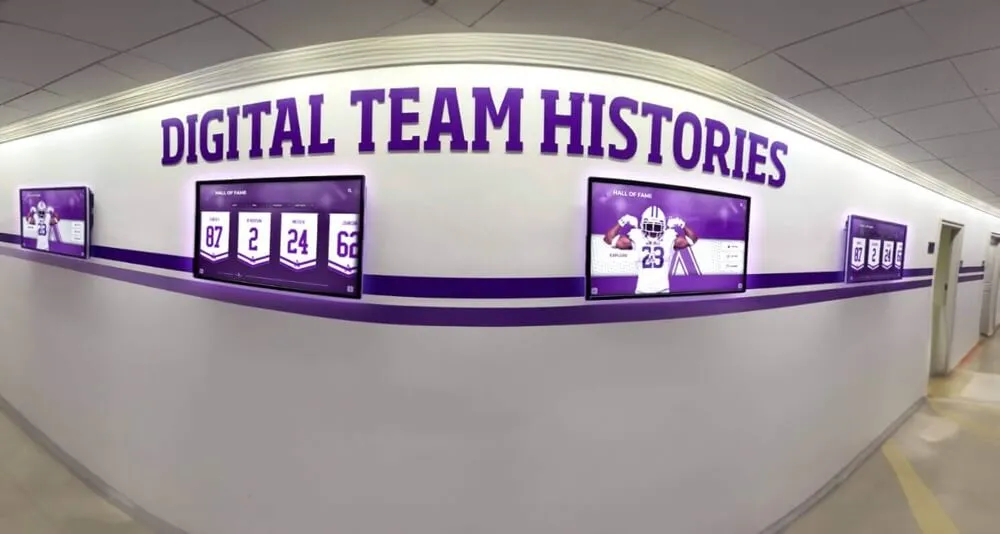
Comprehensive recognition spaces honor achievements across all programs, demonstrating what schools value beyond just athletics
How Rocket Addresses Small School Budget Realities
Budget represents the first question most small to medium public schools ask when exploring recognition technology. Rocket’s pricing model and value proposition specifically address the financial realities these schools face.
Transparent, Predictable Pricing Without Hidden Costs
Unlike enterprise platforms charging per user, per screen, or per content item, Rocket provides straightforward pricing based on display hardware and software platform access. Schools know exactly what they’re paying upfront, with no surprise fees for adding more student profiles, uploading additional photos, or creating new recognition categories.
This pricing transparency matters enormously for schools operating on fixed annual budgets approved months in advance. Technology purchases requiring board approval must demonstrate total cost of ownership, and systems with usage-based pricing or feature paywalls create budget uncertainty that makes approval difficult.
Lower Total Cost of Ownership Than Traditional Approaches
When schools compare Rocket’s investment against ongoing costs of traditional recognition methods, the value equation becomes clear. Consider the annual expenses of traditional recognition:
- Individual plaques or frames: $30-75 per athlete/scholar
- Professional engraving services: $50-150 per batch
- Trophy case updates and reorganization: 10-20 hours of staff time
- Printed programs for banquets and ceremonies: $300-600 per event
- Physical banner production: $100-250 per banner
- Limited capacity forcing difficult choices about what to recognize
A school recognizing 100 students annually across various programs might spend $3,000-5,000 on traditional recognition materials and staff time. Over a typical 5-year period, traditional approaches cost $15,000-25,000 while providing static, limited-capacity recognition that becomes outdated as soon as it’s installed.
Rocket’s system typically costs $8,000-15,000 for initial installation (hardware, software, and setup) with modest annual software fees of $800-1,500. Over that same 5-year period, total investment of $12,000-22,500 provides unlimited recognition capacity, regular content updates, multimedia storytelling capabilities, and digital recognition that remains current and engaging rather than static and dated.
Flexible Financing and Phased Implementation
Understanding that many schools can’t dedicate large capital expenditures to recognition systems, Rocket works with schools to structure affordable implementations including payment plans spreading costs across multiple fiscal years, phased installations starting with highest-priority areas, booster club and parent organization partnerships where community groups fund recognition displays, and grant application support helping schools secure external funding.
This flexibility means schools don’t have to choose between recognizing students adequately and staying within budget constraints—both objectives can coexist with appropriate planning and partnership.
Elimination of Recurring Physical Costs
Once implemented, Rocket eliminates the ongoing physical costs that traditional recognition incurs. No more engraving expenses for each new honoree. No printing costs for updated programs. No storage space needed for decades of physical plaques. No staff time spent reorganizing trophy cases or hanging new banners.
For budget-conscious schools, eliminating these recurring expenses frees resources for other priorities—whether additional programming, equipment upgrades, or simply maintaining balanced budgets without constant pressure to cut elsewhere.

Purpose-built recognition kiosks provide professional installations that improve school environments while fitting within limited physical space
Designed for Non-Technical Users: No IT Department Required
Perhaps Rocket’s most valuable advantage for small to medium schools is its design philosophy: the platform must be manageable by typical school staff without specialized technical expertise or dedicated IT support.
Cloud-Based Platform Requiring No On-Site Servers
Rocket operates entirely in the cloud, eliminating the need for schools to purchase, configure, maintain, or secure on-site servers. In large districts, dedicated IT departments manage server infrastructure as routine operations. In smaller schools, server management represents a significant burden—or simply isn’t feasible at all.
Cloud-based architecture means the athletic director, school secretary, or volunteer coordinator can update recognition content from any internet-connected device without concerning themselves with server maintenance, software updates, security patches, or backup procedures. The technical infrastructure simply works, invisible to end users who focus on content rather than technology.
Intuitive Content Management Interface
Rocket’s content management system uses familiar web-based interfaces similar to social media platforms or popular website builders. Staff members who can post to Facebook, upload photos to Google Drive, or create documents in Microsoft Word possess sufficient technical skills to manage recognition content effectively.
Creating new student profiles, uploading photos, adding achievements, and publishing updates requires no coding knowledge, command-line interfaces, or technical documentation. Step-by-step workflows guide users through processes, with contextual help available at each stage ensuring staff members can work confidently and independently.
Pre-Built Templates and Design Standards
Smaller schools rarely have professional graphic designers on staff. Rocket addresses this by providing professionally designed templates for athlete profiles, academic honors, team rosters, historical timelines, and other recognition categories.
These templates maintain visual consistency and professional appearance automatically, regardless of who creates content. The school secretary updating academic honors generates the same polished results as the athletic director managing sports recognition, ensuring quality doesn’t depend on individual design skills that staff may or may not possess.
Comprehensive Support and Training
Despite intuitive design, questions inevitably arise during initial implementation and ongoing use. Rocket provides comprehensive support including initial training sessions walking staff through platform basics, ongoing customer support via phone and email, detailed video tutorials covering common tasks, regular check-ins during first months of implementation, and online documentation searchable by topic or question.
This support infrastructure means schools never face the frustration of implementing technology and then being left to figure out problems independently—a common complaint about enterprise systems designed for IT professionals rather than education staff.
Automatic Software Updates and Feature Additions
Traditional software requires manual updates, often involving technical installation procedures that small schools struggle to manage. Rocket’s cloud-based platform automatically updates for all users, with new features, security improvements, and performance enhancements appearing without any action required from school staff.
This automatic update model ensures small schools always access the latest capabilities without technical effort, maintaining feature parity with large institutions despite lacking dedicated technology personnel.
Cloud-based management allows staff to update multiple displays across campus from any device, without technical expertise or on-site servers
Celebrating Diverse Achievement: More Than Just Athletics
Small to medium public high schools produce remarkable achievements across academic, artistic, athletic, and service domains. Rocket’s flexible platform structure accommodates this diversity more effectively than traditional approaches that often prioritize athletics at the expense of other accomplishments.
Unlimited Recognition Categories
Physical trophy cases force prioritization—limited space means choosing between recognizing this achievement or that one. Rocket eliminates these constraints by supporting unlimited recognition categories including varsity athletics and team championships, academic honors and scholarship recipients, theater and musical performance casts, visual arts and creative achievements, debate, robotics, and academic competition teams, community service and volunteer recognition, and distinguished alumni accomplishments.
This comprehensive approach demonstrates that schools value diverse talents and achievements equally, rather than suggesting that only certain accomplishments merit recognition. For students whose strengths lie outside traditional athletic domains, seeing their academic achievements prominently displayed alongside sports championships validates their contributions and strengthens school belonging.
Customizable Profile Structures
Different recognition categories require different information structures. Athletic profiles might emphasize statistics, positions played, and championship participation. Academic profiles highlight GPA, test scores, scholarship awards, and college destinations. Arts profiles display performance roles, exhibition participation, and creative portfolios.
Rocket accommodates these varied needs through customizable profile structures that capture appropriate information for each domain. Schools aren’t forced to fit academic achievements into athletic templates or vice versa—each recognition area gets appropriate treatment reflecting what matters for that specific context.
Multimedia Storytelling Capabilities
Traditional plaques display names, dates, and brief accomplishments. Rocket enables rich multimedia storytelling including high-resolution photos documenting student journeys, video highlights of performances and competitions, audio recordings of musical achievements, scanned artwork and creative projects, coach and teacher testimonials, student reflections on their experiences, and timeline presentations showing progression over time.
This multimedia depth transforms recognition from mere acknowledgment into meaningful storytelling that captures the full richness of student achievement. Visitors exploring recognition displays don’t just read names—they experience achievements through the students’ own words, performances, and documented accomplishments.
Easy Content Updates and Additions
As students earn new honors or achieve additional milestones, updating recognition displays should be straightforward. Rocket’s cloud-based platform enables immediate updates from any device—add this year’s scholarship winners during the awards ceremony itself, update athlete statistics as the season progresses, or feature current events alongside historical recognition.
This ease of updating ensures recognition remains current and relevant rather than becoming dated displays frozen at installation. Schools can maintain living recognition systems that grow and evolve alongside student achievements, creating continuous celebration rather than annual static updates.

Interactive displays engage students directly with athletic and academic achievements, inspiring participation and building school pride
Building School Culture and Pride on a Smaller Scale
In small to medium schools, every student knows most of their classmates. Personal relationships, school traditions, and institutional culture shape daily experience in ways that larger, more anonymous schools can’t replicate. Effective recognition systems amplify these cultural strengths while addressing the challenges smaller size presents.
Making Every Student Visible
In a school with 500 students, recognition capacity matters enormously. When only a handful of top achievers appear in trophy cases, the majority of students never see themselves reflected in school displays. This invisibility subtly communicates that most students’ contributions don’t matter—an obviously harmful message contradicting everything educators believe about student potential.
Rocket’s unlimited capacity changes this dynamic fundamentally. Schools can recognize not just state champions and valedictorians, but also JV athletes showing dedication, students with perfect attendance, community service participants, academic improvement, and countless other achievements reflecting genuine effort and contribution.
When more students see themselves recognized somewhere within school displays, sense of belonging and institutional connection increases measurably. Students who feel valued tend to persist through challenges, engage more deeply with school community, and become alumni who maintain relationships long after graduation.
Strengthening Alumni Connections
Small schools depend heavily on alumni support—both financial contributions to booster clubs and foundations, and less tangible benefits like mentorship connections, college recommendations, and community advocacy. Alumni recognition creates ongoing connection points that maintain these valuable relationships.
Rocket enables comprehensive alumni recognition including where-are-they-now updates showing post-graduation success, milestone celebrations like college graduations or career achievements, multi-generational family connections when children attend their parents’ alma mater, historical recognition documenting decades of school tradition, and opportunities for alumni to contribute their own updates and reflections.
These alumni features transform recognition displays from student-focused to community-wide platforms celebrating the full scope of school impact across generations. For small schools where institutional memory and tradition carry enormous weight, this comprehensive approach builds the cultural continuity that defines identity.
Creating Social Media and Marketing Content
Small schools often struggle to maintain visible community presence competing against larger districts with dedicated marketing staff. Rocket’s recognition content doubles as ready-made social media and communication material including spotlight features on individual achievers, milestone announcements celebrating achievements, throwback content highlighting historical accomplishments, season recap compilations displaying team and individual success, and engagement opportunities asking community members to vote on favorites or share memories.
This content marketing value represents a significant secondary benefit beyond primary recognition purposes. Schools already investing time creating recognition content can multiply its value through social media distribution, website features, and email communications—extending reach without proportional increases in staff time.
Engaging Visitors and Prospective Families
For smaller schools, every family choosing their school over competing options matters. Campus visits from prospective students and families offer critical opportunities to demonstrate what makes the school special. Interactive recognition displays provide engaging focal points during tours, demonstrating school values through what and whom schools choose to recognize.
Visitors naturally gravitate toward touchscreens, exploring athlete profiles, academic achievements, and historical content. This self-directed engagement often reveals more about school culture than tour guide speeches, as families discover what actually gets celebrated, how deeply schools care about student accomplishment, and the breadth of opportunities available despite smaller size.

Intuitive touchscreen navigation enables visitors to explore detailed profiles, statistics, and achievements without staff assistance
Practical Advantages Specific to Smaller School Environments
Beyond budget and usability considerations, several practical advantages make Rocket particularly well-suited to small and medium school operational realities.
Single-Display Solutions That Pack Impact
Unlike large schools potentially needing displays in multiple buildings or wings, smaller schools often achieve comprehensive coverage with single strategically placed displays in main lobbies or high-traffic hallways. Rocket’s systems are designed to deliver maximum impact from individual installations through large, high-quality display panels attracting attention, unlimited content capacity displaying comprehensive achievements, engaging interactive experiences averaging 5-7 minutes per user session, and automatic rotation featuring highlighted content when not actively touched.
This single-display effectiveness means schools can achieve meaningful recognition with modest initial investment, potentially expanding to additional locations over time as budgets allow rather than requiring multiple installations upfront for baseline effectiveness.
Flexibility for Multi-Purpose Spaces
Smaller schools often use spaces flexibly—cafeterias become assembly areas, gymnasiums host graduation ceremonies, and hallways serve as informal gathering spaces between classes. Recognition displays in these multi-purpose spaces must accommodate varied contexts and audiences.
Rocket’s content management enables scheduled content variations displaying athletic content during game days and sporting events, academic achievements during parent-teacher conferences and enrollment periods, historical content during alumni reunions and community events, current announcements and upcoming activities during regular school days, and custom content for special occasions like homecoming or graduation.
This scheduling flexibility ensures recognition displays remain contextually appropriate regardless of how spaces are being used, maximizing relevance and engagement across varied audiences and purposes.
Minimal Ongoing Maintenance Requirements
Small school facilities staff typically manage building maintenance across entire campuses without specialized technology technicians. Rocket’s commercial-grade hardware and cloud-based software minimize maintenance demands including tempered glass surfaces resisting fingerprints and scratches, solid-state components with no moving parts to fail, remote monitoring detecting technical issues before users experience problems, automatic software updates requiring no local intervention, and simple cleaning procedures using standard electronics cleaning supplies.
Once installed, displays operate reliably with minimal attention beyond occasional cleaning—freeing facilities staff to focus on countless other maintenance priorities competing for limited time and resources.
Accommodation for Volunteer Support
Many smaller schools depend heavily on volunteer support from booster clubs, parent organizations, and community members. Rocket’s user-friendly platform allows appropriate volunteer participation in content creation including parents contributing photos from events, alumni submitting where-are-they-now updates, booster members documenting team achievements, and student helpers learning content management skills while supporting school operations.
This volunteer accessibility extends the school’s content development capacity without requiring additional paid staff time—a significant advantage when personnel budgets limit how much administrative attention can focus on recognition maintenance.
Scalability as Schools Grow
School enrollment changes over time. Successful programs attract students, boundary adjustments shift populations, and community growth affects school size. Recognition systems implemented at 400 students should gracefully accommodate growth to 800 students without requiring complete replacement.
Rocket’s unlimited content capacity and cloud-based architecture scale effortlessly. Adding new student profiles, recognition categories, or content never hits system limits or requires hardware upgrades. The same platform serving 500 students works equally well for 1,500 students if enrollment grows—protecting initial investment while accommodating future needs.
Real-World Impact: What Changes After Implementation
Understanding theoretical advantages differs from experiencing actual impact. Schools implementing Rocket consistently report several measurable changes in school culture and operational efficiency.
Increased Student Engagement and Pride
Students interact with recognition displays regularly during passing periods, before school, and while waiting for activities to begin. This consistent exposure to peer achievements creates several positive effects:
- Students discover accomplishments of classmates they wouldn’t otherwise know about
- Recognition inspires participation in programs students hadn’t previously considered
- Visible celebration of achievement reinforces that hard work and dedication matter
- Comprehensive recognition communicates that various paths to success exist
Administrators report observing students gathered around displays, pointing out friends, discussing achievements, and expressing aspirations to earn recognition themselves—exactly the cultural outcomes that effective recognition systems should generate.
Time Savings for Administrative Staff
Traditional recognition consumes surprising amounts of staff time. Coordinating with engravers, organizing trophy case rearrangements, printing programs, and managing physical plaques all require administrative attention that busy staff members struggle to find.
After Rocket implementation, schools typically report that content updates taking 3-4 hours with traditional methods now require 15-20 minutes through cloud-based management. Over the course of an academic year, this efficiency saves 20-30 hours of staff time—the equivalent of multiple working days freed for other priorities or simply reducing the overwhelming task burden that smaller schools’ limited staff face.
More Comprehensive Recognition
Perhaps most significantly, schools report recognizing far more students after Rocket implementation than they ever managed with traditional approaches. Physical space constraints no longer force difficult decisions about whose achievements to display. Budget limitations don’t prevent recognition simply because engraving costs add up with each additional honoree.
Schools regularly expand recognition categories to include achievements they previously couldn’t adequately acknowledge including monthly student spotlights, perfect attendance recognition, academic improvement, community service milestones, good citizenship, leadership development, and participation and effort beyond just competitive success.
This expanded recognition creates more inclusive school culture where diverse contributions receive appropriate acknowledgment, strengthening belonging and engagement for broader student populations.
Enhanced Alumni Engagement
Schools using Rocket’s alumni features report increased interaction from graduates including more frequent alumni communication and contact information updates, higher attendance at alumni events and reunions, increased volunteer participation in mentoring and career guidance, and greater financial support for booster clubs and school foundations.
These engagement improvements stem from alumni feeling ongoing connection to institutions that continue recognizing their contributions and maintaining their stories as permanent parts of school history. When alumni visit campus and see themselves still represented in recognition displays, they experience tangible evidence that their time at school mattered and continues mattering years or decades later.
Getting Started: Implementation Process for Small Schools
Understanding value matters, but schools also need clarity about what implementation actually involves. Rocket’s process is designed specifically for smaller schools without dedicated project management or technical implementation resources.
Initial Consultation and Planning (Week 1-2)
Implementation begins with consultation understanding school-specific needs, priorities, and constraints including recognition goals and primary audiences, available budget and any flexibility, physical space options for display installation, current recognition methods and pain points, technical infrastructure (network connectivity), and anticipated timeline for launch.
This consultation ensures Rocket can tailor recommendations to school-specific context rather than offering one-size-fits-all solutions that may not align with actual needs or constraints.
Display Selection and Installation Planning (Week 2-4)
Based on consultation findings, schools receive detailed recommendations including specific display hardware appropriate for space and budget, installation requirements and coordination, content management platform configuration, training schedule for designated staff, and project timeline from order to launch.
Schools review recommendations, make adjustments if needed, and proceed with formal agreement and equipment orders. The typical timeline from order to installation runs 4-6 weeks depending on equipment lead times and installation scheduling.
Installation and Technical Setup (Week 5-7)
Professional installation ensures displays are properly mounted, powered, networked, and configured. Installation typically requires 4-8 hours depending on site-specific factors like mounting surface, power availability, and network connection distance.
Rocket coordinates installation scheduling with school facilities staff, minimizing disruption to school operations and ensuring appropriate personnel are available for any building-specific requirements like unlocking electrical panels or providing network access.
Content Development and Staff Training (Week 6-10)
While equipment installation proceeds, schools begin content development—gathering photos, compiling achievement information, documenting historical content, and creating initial profile libraries. Rocket provides templates, examples, and guidance supporting this preparation.
Once displays are installed, designated school staff receive comprehensive training covering platform login and navigation, creating and editing profiles, uploading and managing photos, organizing content into categories, featuring and scheduling content, and accessing analytics and reporting.
Training sessions typically run 2-3 hours and include hands-on practice creating actual content under Rocket guidance, ensuring staff leave with working knowledge rather than just theoretical understanding.
Launch and Ongoing Support (Week 10+)
After initial content is loaded and staff training is complete, displays go live for school community access. Rocket provides intensive support during initial weeks including daily check-ins during first week, weekly contact during first month, ongoing availability for questions or assistance, content feedback and recommendations, and platform optimization based on usage patterns.
This white-glove approach during launch phase ensures schools experience success from day one rather than struggling through learning curves that undermine confidence and adoption.
For schools exploring recognition solutions, understanding comprehensive digital hall of fame options helps clarify what features matter most for different institutional contexts.
Addressing Common Concerns Small Schools Raise
Despite clear advantages, schools naturally have questions and concerns when considering any significant technology investment. Here are the most common concerns Rocket encounters from small to medium public schools, along with straightforward responses.
“What happens if our technology coordinator leaves?”
This represents perhaps the most common concern—and exactly why Rocket’s design prioritizes usability by non-technical staff. The system doesn’t depend on any individual’s specialized knowledge or expertise.
Content management uses intuitive web interfaces requiring no special training beyond initial orientation. If staff members change, new personnel receive the same training and support that original administrators received. Schools frequently transition content management responsibilities between staff members without interruption to display operations.
Additionally, Rocket’s support team provides ongoing assistance regardless of staff changes, serving as institutional knowledge base ensuring continuity despite personnel transitions.
“Will this become obsolete in a few years?”
Technology obsolescence represents a legitimate concern, particularly for smaller schools that can’t afford frequent replacements of expensive systems. Several factors address this concern:
Display hardware uses commercial-grade components designed for 7-10 year operational lifespans. The software platform operates in the cloud, receiving automatic updates and new features without requiring hardware replacement. As technology evolves, Rocket continuously updates software capabilities while maintaining backward compatibility with installed hardware.
When hardware eventually requires replacement, content and configurations migrate seamlessly to new equipment—schools don’t lose their accumulated recognition content or face starting over with new systems.
“What if internet connectivity is unreliable?”
Small schools, particularly in rural areas, sometimes face connectivity challenges. Rocket addresses this through local content caching—displays store content locally and continue operating even during internet outages. When connectivity returns, displays automatically sync any content updates that occurred during offline periods.
For schools with extremely limited connectivity, Rocket can configure systems for manual content updates via USB drive or other offline methods, though cloud-based management offers significant convenience advantages when connectivity allows.
“Can we start small and expand later?”
Absolutely. Many schools begin with single-display implementations in main lobbies, demonstrating value before expanding to additional locations like athletic facilities, performing arts centers, or multiple buildings.
Starting with focused initial implementation provides several advantages including lower initial investment demonstrating commitment without major risk, opportunity to refine content strategies through experience before expanding, proof of concept building broader support for expansion, and budget spreading across multiple fiscal years rather than single large expenditure.
Rocket’s platform supports simple expansion—adding displays simply extends existing content library rather than requiring separate systems for each location.
“What about content creation burden?”
Concern about ongoing content development workload represents valid practical consideration. Schools typically find that content development requires less time than anticipated once initial setup is complete, particularly compared to traditional recognition methods.
Adding each new recognition profile (athlete, scholar, etc.) typically takes 10-15 minutes including photo upload and information entry. Schools often batch content creation, updating displays monthly or at natural program transition points rather than requiring constant daily attention.
Many schools establish student involvement programs where journalism or technology students support content development, creating learning opportunities while distributing workload. The key insight: content creation happens once and displays recognition indefinitely, versus traditional methods requiring repeated physical updates consuming similar or greater time.
Comparison With Alternative Recognition Approaches
Schools considering Rocket naturally compare it against other recognition options. Understanding how different approaches compare helps clarify where Rocket provides superior value and where alternative approaches might be appropriate.
Traditional Trophy Cases and Plaques
Advantages:
- Familiar approach everyone understands
- No technology learning curve
- Physical trophies provide tactile presence
Limitations:
- Severely limited capacity forcing difficult choices
- High ongoing costs for engraving and materials
- Static presentation lacking interactivity
- Time-consuming updates requiring physical access
- Difficult to accommodate diverse achievements
- No multimedia storytelling capabilities
Best For: Small, very limited recognition (single trophy or handful of plaques)
Verdict: Rocket provides dramatically superior capacity, cost-effectiveness, and engagement for any comprehensive recognition program.
Generic Digital Signage Systems
Advantages:
- Lower initial cost than specialized platforms
- Flexible content display capabilities
- Established vendors and products
Limitations:
- Lacks interactive features for visitor exploration
- No structured profile system for organizing recognition
- Requires technical skills for content creation
- Limited or no search/filtering capabilities
- No mobile or web access to content
- Typically requires ongoing content subscription fees
Best For: Basic announcements and passive information display
Verdict: Generic signage works for passive content rotation but lacks the interactive depth, searchability, and recognition-specific features that create meaningful engagement.
Custom-Built School-Specific Systems
Advantages:
- Theoretically customizable to exact school specifications
- No ongoing vendor dependencies
Limitations:
- Extremely high development costs ($50,000-150,000+)
- Requires technical expertise to build and maintain
- No ongoing feature development after initial build
- Complete responsibility for security and updates
- No support infrastructure when problems arise
- Often abandoned when key technical person leaves
Best For: Large institutions with dedicated IT development teams and substantial budgets
Verdict: Economically impractical for small to medium schools; Rocket provides professional platform at fraction of custom development cost with ongoing support and feature development.
Website-Only Recognition
Advantages:
- No specialized hardware required
- Accessible from anywhere with internet
- Low initial cost
Limitations:
- Requires students/visitors to actively seek out content
- Lacks physical presence in school environment
- No walk-by engagement or casual discovery
- Limited visual impact compared to large displays
- Doesn’t transform physical spaces
- Website traffic often quite low after initial launch
Best For: Supplementing physical displays, not replacing them
Verdict: Rocket includes web/mobile access alongside physical displays, providing both approaches rather than forcing choice between them.
The consistent conclusion: while alternatives serve specific limited purposes, none match Rocket’s combination of comprehensive functionality, reasonable cost, ease of use, and ongoing support that smaller schools require for sustainable success.
Making the Decision: Is Rocket Right for Your School?
After exploring Rocket’s advantages, small to medium public schools should consider several questions determining whether the platform aligns with their specific needs and priorities.
Recognition Is a Priority
Does your school genuinely prioritize student recognition as a cultural value? If recognition feels like an administrative checkbox rather than core institutional commitment, any recognition system—regardless of quality—will underperform because content development won’t receive necessary attention.
Rocket succeeds in schools where leadership believes recognition matters and dedicates appropriate resources to content development and maintenance. The platform makes recognition dramatically easier, but it can’t create institutional commitment that doesn’t exist.
Physical Space Limitations
Do trophy cases overflow while deserving achievements go unrecognized due to space constraints? Physical space limitations represent Rocket’s strongest value proposition—unlimited digital capacity replacing severely limited physical space.
Schools with adequate trophy case space and modest recognition needs might reasonably continue traditional approaches. Schools frustrated by space constraints benefit enormously from digital solutions.
Budget Alignment
Does Rocket’s investment align with available budget while providing ROI through eliminated ongoing costs and expanded recognition capacity? Every school faces unique budget realities, but most small to medium public schools find Rocket’s pricing within reach when considering total cost of ownership versus traditional approaches.
Schools should evaluate complete multi-year cost comparison, including eliminated expenses for engraving, printing, and materials alongside Rocket’s initial and ongoing costs.
Commitment to Modern Tools
Is your school willing to embrace modern technology as the primary recognition approach, or does institutional culture strongly prefer traditional physical methods? Technology adoption requires change management—some school communities embrace digital tools enthusiastically while others prefer traditional approaches despite limitations.
Rocket works best in schools open to technology-enabled solutions, though even traditionally-minded schools typically find the platform accessible and valuable once implemented.
Long-Term Vision
Does your school view recognition as ongoing commitment rather than one-time project? Effective recognition systems require sustained attention—not daily intensive effort, but regular content updates ensuring displays remain current rather than becoming dated snapshots frozen at installation.
Schools approaching recognition as “set it and forget it” projects will likely see engagement decline over time regardless of platform quality. Schools viewing recognition as continuous cultural practice will maximize value from Rocket’s capabilities.
If these questions suggest strong alignment, Rocket likely represents excellent fit. If significant misalignment exists in multiple areas, schools should carefully evaluate whether timing is right for implementation or if addressing underlying factors should precede technology investment.
Conclusion: Right-Sized Solutions for Real Schools
The education technology market often overlooks small to medium public high schools, designing solutions either for elementary schools with limited requirements or large districts with enterprise budgets and dedicated IT departments. Schools with 300-1,200 students occupy an awkward middle ground—too large for basic solutions, too small for enterprise platforms, yet deserving technology that serves their needs appropriately.
Rocket Alumni Solutions has built its business specifically serving this underserved market segment. By focusing on the actual operational realities that small to medium schools face—limited budgets, non-technical staff, diverse recognition needs, and physical space constraints—Rocket has created the recognition platform that these schools actually need rather than a scaled-down version of solutions designed for different contexts.
The results speak clearly through hundreds of implementations across the United States. Schools report expanded recognition capacity celebrating more students than ever before, reduced administrative burden through efficient content management, strengthened school culture and student belonging, enhanced alumni connections and engagement, and recognition systems that remain vital and current rather than becoming outdated displays.
For small to medium public high schools that genuinely value student recognition and want to celebrate achievement comprehensively despite operating constraints, Rocket provides the functionality, usability, and value that make effective recognition achievable rather than aspirational. The platform doesn’t just recognize student achievement—it enables the recognition that schools have always wanted to provide but couldn’t quite accomplish within traditional limitations.
Transform Recognition at Your School
Discover how Rocket Alumni Solutions helps small to medium public high schools celebrate student achievement comprehensively and affordably. Schedule a personalized consultation to explore how the platform can serve your school's specific needs, budget, and recognition goals.
Book a DemoReady to move beyond trophy case limitations and budget constraints that force difficult decisions about whose achievements deserve recognition? Rocket Alumni Solutions provides small to medium public high schools with the recognition platform specifically designed for your operational realities—delivering enterprise capabilities without enterprise complexity or cost. The comprehensive system combines intuitive content management, unlimited recognition capacity, engaging interactive displays, and ongoing support ensuring your success from implementation through years of meaningful student celebration.
Whether recognizing this year’s state champions, honoring academic scholars, celebrating arts achievements, or connecting with distinguished alumni, effective recognition strengthens school culture in ways that transcend individual accomplishments. With the right tools designed for your school’s specific context, comprehensive recognition becomes not just possible but genuinely sustainable—creating the inclusive celebration of achievement that every student deserves and every school community needs.































